
鸿蒙应用开发实战【93】— 实战短信批量导入完整流程
·
鸿蒙应用开发实战【93】— 实战短信批量导入完整流程
本文是「号码助手全栈开发系列」第 93 篇,持续更新中…
开源社区:https://openharmonycrossplatform.csdn.net
前言
短信批量导入是号码助手最具实用价值的功能之一:用户复制一条或多条包含验证码/注册通知的短信,系统自动识别出平台名和手机号,让用户一键创建应用绑定。本篇剖析从文本解析到入库的完整实现。
本篇涵盖:SmsParser 智能解析算法、Platform Keywords 匹配策略、PasteImportPage 候选列表 UI、剪贴板读取
@ohos.pasteboard、候选采纳/忽略流程、跨表数据写入。
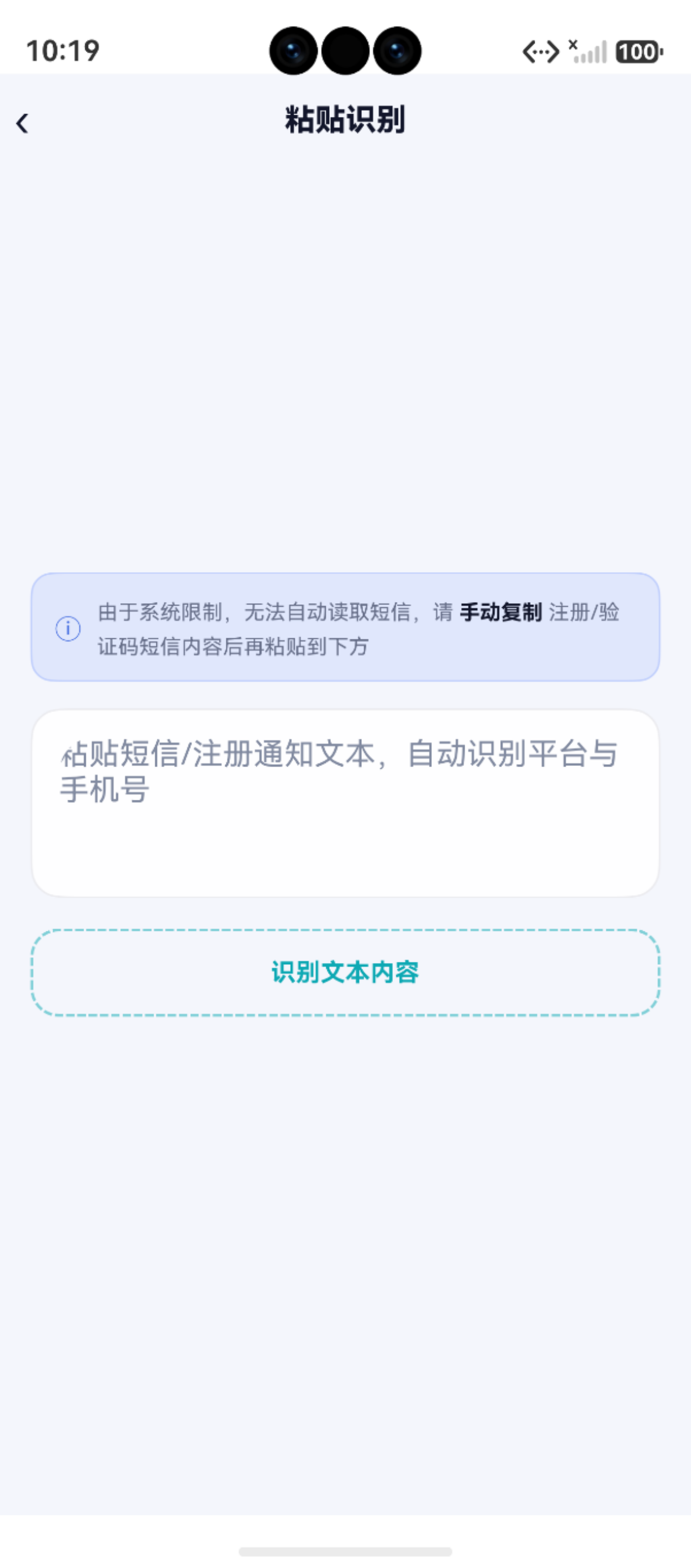
一、整体架构
剪贴板/手动输入
     │
     ▼
SmsParser.parse(text)       ← 智能解析引擎
     │
     ▼
ParseResult[]               ← 识别结果(平台名 + 手机号)
     │
     ▼
PasteImportPage UI          ← 候选列表展示(待确认/已采纳/已忽略)
     │
     ├── 采纳 → AppBindingDao.create() + SmsCandidateDao.create()
     │
     └── 忽略 → SmsCandidateDao.create('已忽略')
二、智能解析引擎 SmsParser
文件:features/sms/SmsParser.ets
2.1 解析输出
/** 单条解析候选结果 */
export interface ParseResult {
  platform: string   // 识别到的平台/应用名称
  phone: string      // 识别到的手机号
  raw: string        // 原始输入文本片段
}
2.2 平台关键词库(部分)
内置 60+ 个已知平台关键词,按行业分组、长词优先:
const PLATFORM_KEYWORDS: string[] = [
  // 银行(长词优先)
  '招商银行', '工商银行', '建设银行', '农业银行', '中国银行', '交通银行',
  '浦发银行', '中信银行', '光大银行', '民生银行', '平安银行', '广发银行',
  // 支付 / 金融
  '支付宝', '微信支付', '云闪付', '数字人民币',
  // 电商
  '拼多多', '天猫', '淘宝', '京东', '唯品会', '小红书', '得物', '闲鱼',
  // 外卖餐饮
  '饿了么', '美团外卖', '美团',
  // 出行
  '滴滴出行', '哈啰出行', '滴滴',
  // 社交
  '微博', '抖音', '快手', 'QQ',
  // 内容娱乐
  '哔哩哔哩', 'B站', '爱奇艺', '优酷视频', '腾讯视频',
  // 办公
  '钉钉', '飞书', '企业微信', '腾讯会议',
  // ...
  '微信'  // 放在最后避免"微信支付"被提前匹配
]
2.3 长词优先策略
for (const kw of PLATFORM_KEYWORDS) {
  if (trimmed.includes(kw)) {
    // 避免已被更长词包含的短词
    let subsumed = false
    for (const already of matched) {
      if (already.includes(kw)) {
        subsumed = true
        break
      }
    }
    if (!subsumed) {
      platformSet.push(kw)
      matched.add(kw)
    }
  }
}
例如文本中包含"携程旅行",匹配到"携程旅行"后就不会再单独匹配"携程"。
2.4 手机号提取
const PHONE_PATTERN = '(1[3-9]\\d{9})'  // 中国大陆手机号
const phoneReg = new RegExp(PHONE_PATTERN, 'g')
2.5 组合策略
if (平台名 && 手机号) {
  // 笛卡尔积:每个平台名 × 每个手机号
  for (const platform of platformSet)
    for (const phone of phoneSet)
      results.push({ platform, phone, raw })
} else if (只有平台名) {
  // 只有平台名
} else if (只有手机号) {
  // 只有手机号
}
三、PasteImportPage 页面实现
文件:pages/PasteImportPage.ets
3.1 剪贴板读取
private async readClipboard(): Promise<void> {
  try {
    const board = pasteboard.getSystemPasteboard()
    const data = await board.getData()
    const text = data.getPrimaryText()
    if (text && text.length > 0) {
      this.smsText = text
      promptAction.showToast({ message: '已读取剪贴板内容' })
    }
  } catch (e) {
    hilog.error(0x0000, 'App', 'readClipboard failed:: %{public}s', JSON.stringify(e))
    promptAction.showToast({ message: '无法读取剪贴板,请手动粘贴' })
  }
}
3.2 解析触发
private doParse(): void {
  this.parsing = true
  const results = SmsParser.parse(this.smsText)
  this.candidates = results.map((r, idx) => ({
    key: `candidate_${Date.now()}_${idx}`,
    platform: r.platform,
    phone: r.phone,
    status: '待确认',
    raw: r.raw
  }))
  this.hasParseAttempted = true
  this.parsing = false
}
3.3 采纳一条候选(核心写入)
private async adoptCandidate(key: string): Promise<void> {
  const item = this.candidates.find(c => c.key === key)
  if (!item || item.status !== '待确认') return

  try {
    const now = Date.now()

    // 写入 app_bindings 表
    await AppBindingDao.create({
      app_name: item.platform,
      icon_key: ICON_COLORS[Math.floor(Math.random() * ICON_COLORS.length)],
      category: 'APP',
      card_id: selectedCardId,
      status: '使用中',
      remark: `来自短信识别,手机号:${item.phone}`,
      source: '短信识别',
      created_at: now,
      updated_at: now
    })

    // 写入 sms_candidates 表(持久化识别记录)
    await SmsCandidateDao.create({
      raw_text: item.raw,
      matched_platform: item.platform,
      matched_phone: item.phone,
      status: '已采纳',
      created_at: now
    })

    // 更新 UI 状态
    item.status = '已采纳'
    promptAction.showToast({ message: `已添加"${item.platform}"` })
  } catch (e) {
    hilog.error(0x0000, 'App', 'adoptCandidate failed:: %{public}s', JSON.stringify(e))
  }
}
3.4 忽略一条候选
private async ignoreCandidate(key: string): Promise<void> {
  await SmsCandidateDao.create({
    raw_text: item.raw,
    matched_platform: item.platform,
    matched_phone: item.phone,
    status: '已忽略',
    created_at: Date.now()
  })
  item.status = '已忽略'
}
四、数据写入路径
采纳候选
  ├── AppBindingDao.create()     → app_bindings 表
  │     app_name: "支付宝"
  │     card_id: 1
  │     status: "使用中"
  │     source: "短信识别"
  └── SmsCandidateDao.create()   → sms_candidates 表
        raw_text: "【支付宝】验证码 1234,..."
        matched_platform: "支付宝"
        status: "已采纳"
五、实际解析演示
输入文本:
【支付宝】验证码 123456,您正在登录,如非本人操作请忽略。
【招商银行】您的验证码是 654321,请勿泄露。
【美团外卖】订单已送达,如有问题请联系 400-888-8888
解析结果:
| 平台名 | 手机号 | 处理 |
|---|---|---|
| 支付宝 | — | ✅ 可采纳 |
| 招商银行 | — | ✅ 可采纳 |
| 美团外卖 | — | ✅ 可采纳 |
注意:上述短信中没有手机号,只有平台名。如果文本包含「手机号 13800138000 正在注册 拼多多」,则会同时识别平台名和手机号。
六、卡号选择循环
// 通过 ActionMenu 让用户选择绑定到哪个卡号
const result = await promptAction.showActionMenu({
  title: '选择绑定卡号',
  buttons: this.cards.map(c => ({
    text: `${c.label} · ${c.phone_number}`,
    color: AppColors.TEXT
  }))
})
this.selectedCardIndex = result.index
小结
| 模块 | 核心类/函数 | 职责 | 文件位置 |
|---|---|---|---|
| 解析引擎 | SmsParser.parse() |
关键词匹配 + 正则提取 | features/sms/SmsParser.ets |
| 页面 | PasteImportPage |
输入 → 解析 → 候选 → 确认 | pages/PasteImportPage.ets |
| 剪贴板 | pasteboard.getSystemPasteboard() |
读取系统剪贴板 | @ohos.pasteboard |
| AppBindingDao | create() |
写入应用绑定 | features/data/AppBindingDao.ets |
| SmsCandidateDao | create() |
持久化识别记录 | features/data/SmsCandidateDao.ets |
| 图标颜色 | ICON_COLORS |
随机分配图标颜色 | AppColors.ets |
如果这篇文章对你有帮助,欢迎点赞👍、收藏⭐、关注🔔,你的支持是我持续创作的动力!
相关资源:
- 开源鸿蒙跨平台社区:https://openharmonycrossplatform.csdn.net
- HarmonyOS pasteboard API:https://developer.huawei.com/consumer/cn/doc/harmonyos-references/pasteboard
- HarmonyOS 官方文档:https://developer.huawei.com/consumer/cn/doc/
- HarmonyOS hilog文档:https://developer.huawei.com/consumer/cn/doc/harmonyos-references/hilog
- HarmonyOS testing:https://developer.huawei.com/consumer/cn/doc/harmonyos-guides/unit-test
- HarmonyOS 安全与权限:https://developer.huawei.com/consumer/cn/doc/harmonyos-guides/permissions-overview

作为“人工智能6S店”的官方数字引擎,为AI开发者与企业提供一个覆盖软硬件全栈、一站式门户。
更多推荐
 0
0 0
0- 0


 已为社区贡献19条内容

所有评论(0)