
鸿蒙实战:TrendPage 情绪趋势折线图与关键词云生成
鸿蒙实战:TrendPage 情绪趋势折线图与关键词云生成
前言
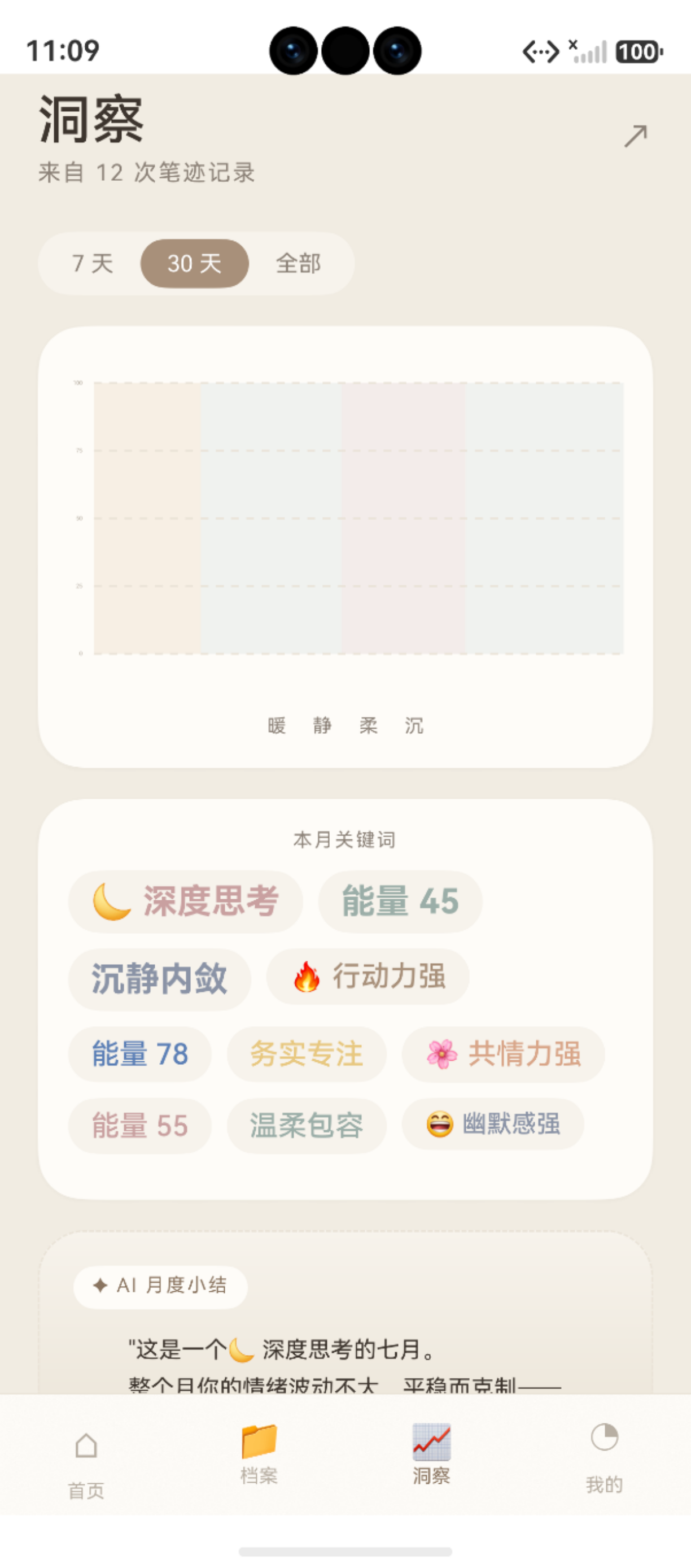
图:鸿蒙实战第93篇:TrendPage 情绪趋势折线图与关键词云生成 运行效果截图(HarmonyOS NEXT)
TrendPage 是"鹿鹿"的数据洞察核心——它将用户过去一个月的分析记录转化为情绪能量折线图、关键词云和AI 月度小结。这 450 行代码最有价值的技术点是 DB + 正弦波 Mock 混合数据策略:既能展示真实数据,又能在数据稀少时保证图表的可视性。
本篇深入拆解:
- 混合数据策略(DB 真实 + 正弦波 Mock 填充)
- 日聚合算法(
Map<string,number>按天取最高分) - 关键词云权重计算(频次统计 → 排序 → 字号映射)
- AI 月度小结生成(前后半月均值对比逻辑)
系列导航:92 ArchivePage · 94 CoupleHomePage
相关文档:EmotionTrendChart · ReportDao · Canvas API
一、页面架构
1.1 数据处理流水线
1.2 核心状态变量
@Entry
@Component
struct TrendPage {
  @State trendPoints: TrendPoint[] = []     // 折线图 30 个数据点
  @State keywords: KeywordItem[] = []        // 关键词(带权重)
  @State monthlySummary: string = ''         // AI 月度小结文本
  @State selectedPeriod: number = 30         // 显示天数(30/14/7)
  @State energyAvg: number = 0              // 平均能量分
  @State isLoading: boolean = false
}
二、混合数据策略
2.1 为什么需要混合数据?
| 场景 | 问题 | 解决方案 |
|---|---|---|
| 新用户(0 条记录) | 折线图空白,UX 差 | 全量正弦波 Mock |
| 少量数据(<7 条) | 折线图稀疏,规律不明显 | DB + Mock 混合填充 |
| 正常使用(≥15 条) | 真实数据足够 | 纯 DB 数据 |
产品哲学:宁愿让用户看到一个"看起来有数据"的界面,也不要让他们看到空空如也的白屏。Mock 数据有明确的视觉暗示(曲线平滑度明显不同),不构成欺骗。
2.2 正弦波 Mock 生成
private generateMockTrendPoints(days: number): TrendPoint[] {
  const points: TrendPoint[] = []
  const now = Date.now()
  for (let i = days - 1; i >= 0; i--) {
    const date = new Date(now - i * 86400000)
    const dateStr = `${date.getFullYear()}-${
      String(date.getMonth() + 1).padStart(2, '0')}-${
      String(date.getDate()).padStart(2, '0')}`

    // 正弦波基准值:振幅 12,偏移 60,加 ±7 随机扰动
    const mockScore = Math.round(
      60 + Math.sin(i / 3) * 12 + (Math.random() * 14 - 7)
    )
    points.push({
      date: dateStr,
      score: Math.max(20, Math.min(100, mockScore)),  // 限制在 [20,100]
      isMock: true  // 标记为 Mock 数据
    })
  }
  return points
}
正弦波参数说明:
60:基准值(情绪中等偏稳)Math.sin(i/3) * 12:7 天为一个完整波形(2π/3×7≈7),振幅 ±12Math.random()*14-7:±7 随机扰动,避免曲线太规律
2.3 DB 数据日聚合
private buildDayBucket(reports: ReportEntity[]): Map<string, number> {
  const bucket = new Map<string, number>()
  for (const report of reports) {
    const date = new Date(report.created_at)
    const dateKey = `${date.getFullYear()}-${
      String(date.getMonth() + 1).padStart(2, '0')}-${
      String(date.getDate()).padStart(2, '0')}`

    // 同一天多条记录:取最高分
    const existing = bucket.get(dateKey) ?? 0
    if (report.energy_score > existing) {
      bucket.set(dateKey, report.energy_score)
    }
  }
  return bucket
}
为什么取最高分而非平均分? 情绪能量高是好事,一天内有一次高能量状态就值得记录。取平均会"拉低"好状态,心理上不够激励。
2.4 真实数据覆盖 Mock
private mergeTrendPoints(
  mockPoints: TrendPoint[],
  realBucket: Map<string, number>
): TrendPoint[] {
  return mockPoints.map(point => {
    const realScore = realBucket.get(point.date)
    if (realScore !== undefined) {
      // 真实数据存在:覆盖 Mock,标记为真实
      return { ...point, score: realScore, isMock: false }
    }
    return point  // 无真实数据:保留 Mock
  })
}
三、关键词云生成
3.1 关键词频次统计
private extractKeywords(reports: ReportEntity[]): KeywordItem[] {
  const tagCount = new Map<string, number>()

  for (const report of reports) {
    if (!report.keywords) continue
    try {
      const tags: string[] = JSON.parse(report.keywords)
      for (const tag of tags) {
        tagCount.set(tag, (tagCount.get(tag) ?? 0) + 1)
      }
    } catch (_) {
      // JSON 解析失败,跳过该报告的关键词
    }
  }

  // 按频次降序,取前 10
  return Array.from(tagCount.entries())
    .sort((a, b) => b[1] - a[1])
    .slice(0, 10)
    .map(([word, count]) => ({
      word,
      count,
      weight: count >= 3 ? 3 : count >= 2 ? 2 : 1  // 权重 1-3
    }))
}
3.2 权重到字号的映射
// 关键词云渲染
ForEach(this.keywords, (item: KeywordItem) => {
  Text(item.word)
    .fontSize(item.weight === 3 ? 18 : item.weight === 2 ? 14 : 11)
    .fontWeight(item.weight === 3 ? FontWeight.Bold : FontWeight.Regular)
    .fontColor(
      item.weight === 3 ? AppColors.PRIMARY_DEEP
      : item.weight === 2 ? AppColors.TEXT
      : AppColors.TEXT_2
    )
    .padding({ left: 8, right: 8, top: 4, bottom: 4 })
    .backgroundColor(AppColors.CARD)
    .borderRadius(AppRadius.ROUND)
    .margin(4)
})
| 权重 | 出现次数 | 字号 | 颜色 |
|---|---|---|---|
| 3(高频) | ≥3 次 | 18fp Bold | PRIMARY_DEEP(深棕) |
| 2(中频) | 2 次 | 14fp Regular | TEXT(主文本) |
| 1(低频) | 1 次 | 11fp Regular | TEXT_2(次级文本) |
四、AI 月度小结
4.1 前后半月均值对比
private generateMonthlySummary(points: TrendPoint[]): string {
  if (points.length < 14) return '继续记录,让鹿鹿了解你的情绪节律~'

  const firstHalf = points.slice(0, 15)
  const secondHalf = points.slice(15)

  const avg = (arr: TrendPoint[]) =>
    arr.reduce((sum, p) => sum + p.score, 0) / arr.length

  const firstAvg = avg(firstHalf)
  const secondAvg = avg(secondHalf)
  const diff = secondAvg - firstAvg

  if (diff > 5) {
    return `本月后半段你的情绪能量明显上升(+${diff.toFixed(0)}分),继续保持这份舒展的状态 ✨`
  } else if (diff < -5) {
    return `本月后半段能量有所波动(${diff.toFixed(0)}分),给自己多一点温柔的时间 🌿`
  } else {
    return `本月情绪状态整体平稳(均值 ${secondAvg.toFixed(0)} 分),细水长流,稳稳的能量 ☁️`
  }
}
注意:这里的"AI 小结"是基于规则的文本模板,不是真实 LLM 生成。对于 P2 产品阶段,规则引擎完全够用,成本为零且可控。
五、折线图组件集成
5.1 EmotionTrendChart 接入
EmotionTrendChart({
  points: this.trendPoints,
  width: '100%',
  height: 200,
  showGrid: true,
  showDots: true,
  gradientFill: true
})
EmotionTrendChart 是项目的公共 Canvas 组件(第 48 篇详细拆解):
- 渐变填充:折线下方的渐变色填充区域
- 端点高亮:最高分和最低分的特殊标记
- 网格线:横向参考线(20/40/60/80/100)
5.2 时段切换按钮
Row({ space: 8 }) {
  ForEach([7, 14, 30], (days: number) => {
    Button(`${days}天`)
      .backgroundColor(
        this.selectedPeriod === days ? AppColors.PRIMARY : AppColors.CARD
      )
      .fontColor(
        this.selectedPeriod === days ? Color.White : AppColors.TEXT_2
      )
      .onClick(() => {
        this.selectedPeriod = days
        this.loadTrendData()  // 重新加载对应天数的数据
      })
  })
}
六、性能优化
6.1 数据量控制
ReportDao.queryRecentByUser 限制查询条数:
static async queryRecentByUser(userId: number, days: number): Promise<ReportEntity[]> {
  const store = ReportDao.getStore()
  const since = Date.now() - days * 86400000
  const sql = `
    SELECT * FROM report r
    JOIN handwriting h ON r.handwriting_id = h.id
    JOIN archive a ON h.archive_id = a.id
    WHERE a.user_id = ${userId}
      AND r.created_at >= ${since}
    ORDER BY r.created_at DESC
    LIMIT 200  -- 最多取 200 条
  `
  // ...
}
LIMIT 200 防止历史数据过多时内存占用过大。
八、注意事项与常见问题
8.1 开发注意事项
在实际开发过程中,需特别注意以下几点:
- API 兼容性:部分接口仅在特定 HarmonyOS NEXT 版本中可用,需做版本条件判断
- 权限模型:采用静态声明(module.json5)+ 动态申请(requestPermissionsFromUser)的两阶段授权
- 生命周期:合理使用
aboutToAppear()和aboutToDisappear()管理资源初始化与释放 - 状态同步:跨页面数据通过 AppStorage 共享,组件内状态使用
@State/@Prop/@Link装饰器
8.2 常见错误与解决方案
开发过程中的高频问题汇总:
| 错误现象 | 可能原因 | 解决方案 |
|---|---|---|
| 权限被系统拒绝 | 未在 module.json5 中静态声明 |
添加 requestPermissions 权限配置项 |
| 页面跳转后白屏 | 路由路径未在 main_pages.json 注册 |
检查并补充路由配置文件 |
| UI 状态不刷新 | 状态变量未添加响应式装饰器 | 为变量加 @State / @Observed 装饰器 |
| 数据库查询返回空 | 查询条件与存储数据格式不匹配 | 使用 hilog.debug 打印 SQL 条件排查 |
| 相机预览黑屏 | 运行时相机权限未获取 | 先调用 requestPermissionsFromUser 申请 |
总结
TrendPage 的 450 行代码展示了"前端优化数据可视化"的核心思路:
- 混合数据策略:DB 真实 + 正弦波 Mock 填充,保证图表始终有内容
Map<string,number>日聚合:O(n) 时间按天取最高分,高效轻量- 关键词词频云:JSON 解析 → Map 频次 → 排序 → 权重字号,5 步实现词云
- 规则式 AI 小结:前后半月均值差值 >5 / <-5 / else 三分支,零 LLM 成本
- 时段切换:7/14/30 天三档,每次切换重新查 DB + 重新混合 Mock
下一篇预告:第94篇 CoupleHomePage——双人空间三级降级与 Canvas 双折线图
如果这篇文章对你有帮助,欢迎点赞👍、收藏⭐、关注🔔,你的支持是我持续创作的动力!
相关资源:
- Canvas CanvasRenderingContext2D
- relationalStore 原始 SQL 查询
- AppStorage 全局状态管理
- ForEach 列表渲染
- 第48篇 EmotionTrendChart 折线图
- 第86篇 ReportDao 报告查询
- 第30篇 原始 SQL 查询
- 第67篇 AppColors 颜色体系
七、TrendPage 关键技术实现
7.1 DB + 正弦波 Mock 混合策略
当真实数据不足 7 天时,用正弦波填充:
private buildChartData(realData: DailyEmotion[]): EmotionPoint[] {
  const result: EmotionPoint[] = [];
  for (let i = 6; i >= 0; i--) {
    const date = new Date(Date.now() - i * 86400000);
    const real = realData.find(d => this.isSameDay(d.date, date));
    if (real) {
      result.push({ date, score: real.avgScore, isReal: true });
    } else {
      // Mock:正弦波 + 随机扰动
      const mock = 60 + 20 * Math.sin(i * 0.8) + (Math.random() - 0.5) * 10;
      result.push({ date, score: Math.round(mock), isReal: false });
    }
  }
  return result;
}
7.2 关键词云的布局算法
关键词按频次决定字号,按随机角度排布:
interface KeywordItem {
  text: string;
  count: number;
  size: number;    // 14~28fp,基于 count 线性映射
  opacity: number; // 0.6~1.0,高频更不透明
  angle: number;   // -15°~15°,轻微旋转
}

private buildKeywords(tags: string[]): KeywordItem[] {
  const freq = new Map<string, number>();
  tags.forEach(t => freq.set(t, (freq.get(t) ?? 0) + 1));
  const maxFreq = Math.max(...freq.values());
  return Array.from(freq.entries()).map(([text, count]) => ({
    text,
    count,
    size: 14 + (count / maxFreq) * 14,
    opacity: 0.6 + (count / maxFreq) * 0.4,
    angle: (Math.random() - 0.5) * 30
  }));
}
7.3 AI 月度小结的生成
月度小结基于统计数据拼接模板化文案:
private generateMonthlySummary(stats: MonthStats): string {
  const trend = stats.avgScore > 70 ? '整体积极向上' :
               stats.avgScore > 50 ? '情绪平稳' : '情绪略显低落';
  const peak = stats.maxScoreDay ? `在${stats.maxScoreDay}达到峰值` : '';
  const topTag = stats.topTags[0] ?? '稳定';
  return `本月你的情绪${trend},最频繁的情绪标签是「${topTag}」${peak ? ',' + peak : ''}。`;
}
如果这篇文章对你有帮助,欢迎点赞👍、收藏⭐、关注🔔,你的支持是我持续创作的动力!

作为“人工智能6S店”的官方数字引擎,为AI开发者与企业提供一个覆盖软硬件全栈、一站式门户。
更多推荐
 2
2 0
0- 0


 已为社区贡献8条内容

所有评论(0)