
Flutter框架跨平台鸿蒙开发——比赛计分器APP开发流程
本文介绍了使用Flutter框架开发跨平台比赛计分器APP的全流程。该APP支持双玩家独立计分,提供+1/-1和+5/-5快速调整功能,并具有美观的渐变背景和响应式布局。开发过程从需求分析、项目初始化到核心功能实现,展示了Flutter在鸿蒙系统上的适配能力。文章详细解析了应用入口设计和计分器主页面的代码实现,包括分数增减逻辑和UI构建方法,体现了Flutter框架"一次编写,到处运行&
·
🚀运行效果展示
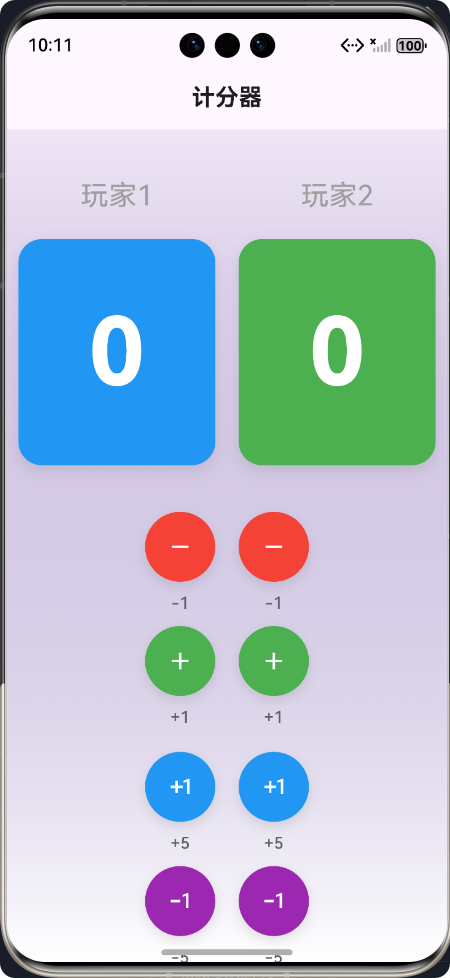
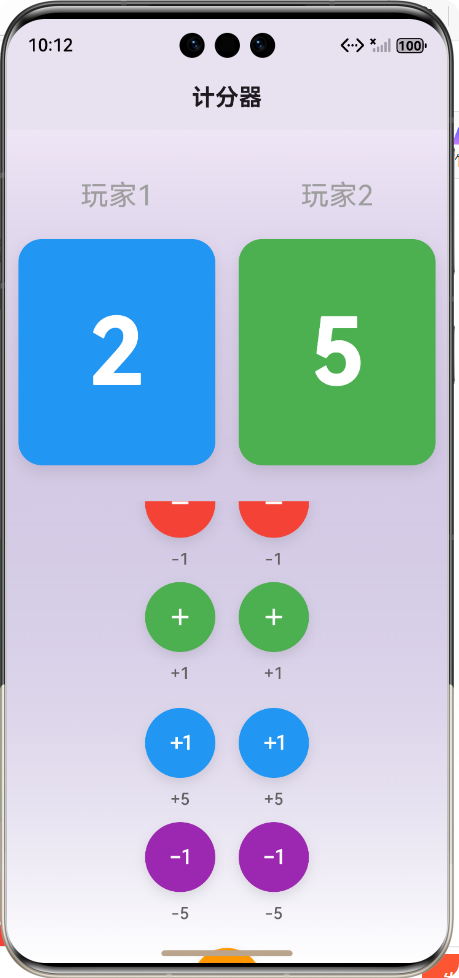
Flutter框架跨平台鸿蒙开发——比赛计分器APP开发流程
🌟 前言
随着移动应用开发技术的飞速发展,跨平台开发框架已成为趋势。Flutter作为Google推出的开源UI框架,以其"一次编写,到处运行"的特性,受到了广大开发者的青睐。本文将详细介绍如何使用Flutter框架开发一款跨平台的比赛计分器APP,并重点讲述其在鸿蒙系统上的适配与实现。
📱 为什么选择Flutter?
- 跨平台兼容性:一套代码支持iOS、Android、Web、Windows、macOS、Linux及鸿蒙系统
- 高性能渲染:采用Skia引擎直接渲染,性能接近原生应用
- 丰富的UI组件:提供大量精美的Material Design和Cupertino风格组件
- 热重载:支持快速迭代开发,提高开发效率
- 强大的社区支持:拥有活跃的开发者社区和丰富的第三方库
🎮 计分器APP介绍
功能概述
本计分器APP是一款专为各类比赛设计的计分工具,支持双玩家同时计分,主要功能包括:
- 支持两个玩家独立计分
- 提供+1/-1快速计分功能
- 支持+5/-5快速调整分数
- 一键重置所有分数
- 美观的渐变背景和现代化UI设计
- 响应式布局,适配各种屏幕尺寸
适用场景
- 桌游比赛计分
- 体育赛事计分
- 课堂游戏计分
- 各类竞技比赛计分
📋 开发流程
1. 需求分析与规划
| 阶段 | 内容 | 输出 |
|---|---|---|
| 需求收集 | 明确功能需求、目标用户、使用场景 | 需求文档 |
| 技术选型 | 确定使用Flutter框架,分析跨平台需求 | 技术方案 |
| UI设计 | 设计界面布局、色彩方案、交互逻辑 | UI设计稿 |
2. 项目初始化
# 创建Flutter项目
flutter create score_counter

# 进入项目目录
cd score_counter

# 运行项目(验证环境)
flutter run
3. 项目结构设计
lib/
├── main.dart                 # 应用入口
└── score_counter_page.dart   # 计分器主页面
4. 核心功能实现
🚀 核心功能实现及代码展示
1. 应用入口设计
main.dart
// 计分器APP
import 'package:flutter/material.dart';
import 'score_counter_page.dart';
/// 主入口函数
void main() {
runApp(const MyApp());
}
/// 应用根组件
class MyApp extends StatelessWidget {
/// 构造函数
const MyApp({super.key});
Widget build(BuildContext context) {
return MaterialApp(
title: '计分器',
/// 禁用Debug模式下的右上角DEBUG横幅
debugShowCheckedModeBanner: false,
theme: ThemeData(
/// 主色调 - 使用蓝色系,代表专业、清晰
primarySwatch: Colors.blue,
/// 应用整体亮度
brightness: Brightness.light,
/// 文本主题
textTheme: const TextTheme(
bodyLarge: TextStyle(fontSize: 16.0),
bodyMedium: TextStyle(fontSize: 14.0),
titleLarge: TextStyle(fontSize: 20.0, fontWeight: FontWeight.bold),
),
),
darkTheme: ThemeData(
primarySwatch: Colors.blue,
brightness: Brightness.dark,
),
themeMode: ThemeMode.system,
/// 首页路由 - 计分器主页面
home: const ScoreCounterPage(),
);
}
}
2. 计分器主页面实现
score_counter_page.dart
// 计分器APP页面
import 'package:flutter/material.dart';
/// 计分器主页面组件
class ScoreCounterPage extends StatefulWidget {
/// 构造函数
const ScoreCounterPage({super.key});
State<ScoreCounterPage> createState() => _ScoreCounterPageState();
}
class _ScoreCounterPageState extends State<ScoreCounterPage> {
/// 第一个分数
int _score1 = 0;
/// 第二个分数
int _score2 = 0;
/// 分数变化步长
final int _step = 1;
/// 增加第一个分数
/// [value] 增加的分数值,默认为步长
void _incrementScore1({int value = 1}) {
setState(() {
_score1 += value;
});
}
/// 减少第一个分数
/// [value] 减少的分数值,默认为步长
void _decrementScore1({int value = 1}) {
setState(() {
_score1 = (_score1 - value).clamp(0, double.infinity).toInt();
});
}
/// 增加第二个分数
/// [value] 增加的分数值,默认为步长
void _incrementScore2({int value = 1}) {
setState(() {
_score2 += value;
});
}
/// 减少第二个分数
/// [value] 减少的分数值,默认为步长
void _decrementScore2({int value = 1}) {
setState(() {
_score2 = (_score2 - value).clamp(0, double.infinity).toInt();
});
}
/// 重置所有分数为0
void _resetScore() {
setState(() {
_score1 = 0;
_score2 = 0;
});
}
Widget build(BuildContext context) {
return Scaffold(
appBar: AppBar(
title: const Text('计分器'),
centerTitle: true,
),
body: Container(
decoration: BoxDecoration(
gradient: LinearGradient(
begin: Alignment.topCenter,
end: Alignment.bottomCenter,
colors: [
Theme.of(context).primaryColor.withValues(alpha: 0.1),
Colors.white,
],
),
),
child: Column(
mainAxisAlignment: MainAxisAlignment.start,
children: [
const SizedBox(height: 40),
// 分数显示区域(固定在顶部)
_buildScoreDisplay(),
const SizedBox(height: 30),
// 操作按钮区域(可滚动)
Expanded(
child: SingleChildScrollView(
padding: const EdgeInsets.symmetric(horizontal: 20, vertical: 10),
child: Column(
children: [
_buildControlButtons(),
const SizedBox(height: 20), // 添加底部间距
],
),
),
),
],
),
),
);
}
/// 构建分数显示组件
Widget _buildScoreDisplay() {
return Row(
mainAxisAlignment: MainAxisAlignment.center,
children: [
// 第一个计分器
_buildSingleScoreDisplay(
score: _score1,
title: '玩家1',
color: Colors.blue,
),
const SizedBox(width: 20), // 减小两个计分器之间的间距
// 第二个计分器
_buildSingleScoreDisplay(
score: _score2,
title: '玩家2',
color: Colors.green,
),
],
);
}
/// 构建单个计分器显示组件
/// [score] 分数值
/// [title] 计分器标题
/// [color] 计分器颜色
Widget _buildSingleScoreDisplay({
required int score,
required String title,
required Color color,
}) {
return Column(
children: [
Text(
title,
style: TextStyle(
fontSize: 24,
color: Colors.grey,
),
),
const SizedBox(height: 20),
Container(
padding: const EdgeInsets.symmetric(horizontal: 60, vertical: 40),
decoration: BoxDecoration(
color: color,
borderRadius: BorderRadius.circular(20),
boxShadow: [
BoxShadow(
color: Colors.black.withValues(alpha: 0.1),
blurRadius: 10,
offset: const Offset(0, 5),
),
],
),
child: Text(
'$score',
style: const TextStyle(
fontSize: 80,
fontWeight: FontWeight.bold,
color: Colors.white,
),
),
),
],
);
}
/// 构建控制按钮组件
Widget _buildControlButtons() {
return Column(
children: [
// 主要操作按钮行(+1/-1)
Row(
mainAxisAlignment: MainAxisAlignment.center,
children: [
// 玩家1操作按钮
Column(
children: [
// 玩家1减分按钮
_buildActionButton(
icon: Icons.remove,
color: Colors.red,
onPressed: () => _decrementScore1(value: _step),
label: '-1',
isSmall: true,
),
const SizedBox(height: 10),
// 玩家1加分按钮
_buildActionButton(
icon: Icons.add,
color: Colors.green,
onPressed: () => _incrementScore1(value: _step),
label: '+1',
isSmall: true,
),
],
),
const SizedBox(width: 20),
// 玩家2操作按钮
Column(
children: [
// 玩家2减分按钮
_buildActionButton(
icon: Icons.remove,
color: Colors.red,
onPressed: () => _decrementScore2(value: _step),
label: '-1',
isSmall: true,
),
const SizedBox(height: 10),
// 玩家2加分按钮
_buildActionButton(
icon: Icons.add,
color: Colors.green,
onPressed: () => _incrementScore2(value: _step),
label: '+1',
isSmall: true,
),
],
),
],
),
const SizedBox(height: 20),
// 快速操作按钮行(+5/-5)
Row(
mainAxisAlignment: MainAxisAlignment.center,
children: [
// 玩家1快速操作按钮
Column(
children: [
// 玩家1加5分按钮
_buildActionButton(
icon: Icons.exposure_plus_1,
color: Colors.blue,
onPressed: () => _incrementScore1(value: 5),
label: '+5',
isSmall: true,
),
const SizedBox(height: 10),
// 玩家1减5分按钮
_buildActionButton(
icon: Icons.exposure_minus_1,
color: Colors.purple,
onPressed: () => _decrementScore1(value: 5),
label: '-5',
isSmall: true,
),
],
),
const SizedBox(width: 20),
// 玩家2快速操作按钮
Column(
children: [
// 玩家2加5分按钮
_buildActionButton(
icon: Icons.exposure_plus_1,
color: Colors.blue,
onPressed: () => _incrementScore2(value: 5),
label: '+5',
isSmall: true,
),
const SizedBox(height: 10),
// 玩家2减5分按钮
_buildActionButton(
icon: Icons.exposure_minus_1,
color: Colors.purple,
onPressed: () => _decrementScore2(value: 5),
label: '-5',
isSmall: true,
),
],
),
],
),
const SizedBox(height: 20),
// 重置按钮单独一行放在最下面
_buildActionButton(
icon: Icons.refresh,
color: Colors.orange,
onPressed: _resetScore,
label: '重置',
isSmall: true,
),
],
);
}
/// 构建操作按钮
/// [icon] 按钮图标
/// [color] 按钮颜色
/// [onPressed] 按钮点击事件
/// [label] 按钮文字
/// [isSmall] 是否为小按钮
Widget _buildActionButton({
required IconData icon,
required Color color,
required VoidCallback onPressed,
required String label,
bool isSmall = false,
}) {
final double buttonSize = isSmall ? 60 : 80;
final double fontSize = isSmall ? 14 : 16;
return Column(
children: [
Container(
width: buttonSize,
height: buttonSize,
decoration: BoxDecoration(
color: color,
borderRadius: BorderRadius.circular(buttonSize / 2),
boxShadow: [
BoxShadow(
color: Colors.black.withValues(alpha: 0.1),
blurRadius: 8,
offset: const Offset(0, 4),
),
],
),
child: IconButton(
icon: Icon(
icon,
color: Colors.white,
size: isSmall ? 24 : 32,
),
onPressed: onPressed,
splashRadius: buttonSize / 2,
),
),
const SizedBox(height: 8),
Text(
label,
style: TextStyle(
fontSize: fontSize,
fontWeight: FontWeight.w500,
color: Colors.grey[700],
),
),
],
);
}
}
📊 开发流程图
🎨 功能流程图
🔧 鸿蒙系统适配
1. 环境配置
# 安装鸿蒙开发工具
# 配置Flutter鸿蒙插件
flutter pub add flutter_ohos
2. 构建鸿蒙应用
# 构建鸿蒙HAP包
flutter build ohos
3. 部署到鸿蒙设备
# 运行到鸿蒙设备
flutter run -d ohos
📈 性能优化
- 状态管理优化:使用setState()进行局部状态更新,避免全局重建
- 布局优化:合理使用Expanded和SingleChildScrollView,避免不必要的嵌套
- 资源优化:使用适当尺寸的图标和图片,减少内存占用
- 代码优化:提取公共组件,减少代码重复
📝 开发经验总结
成功经验
- 模块化设计:将UI组件和业务逻辑分离,提高代码复用性
- 响应式布局:适配不同屏幕尺寸,提升用户体验
- 清晰的代码结构:合理组织代码,便于维护和扩展
- 充分的测试:在不同设备上测试,确保功能正常
遇到的问题与解决方案
| 问题 | 解决方案 |
|---|---|
| 底部文字溢出 | 使用SingleChildScrollView包装按钮区域 |
| 分数显示区域位置调整 | 使用SizedBox调整间距 |
| 鸿蒙系统适配 | 安装Flutter鸿蒙插件,配置相关依赖 |
🔮 未来展望
- 添加更多功能:支持更多玩家、自定义分数步长、历史记录等
- 增强UI设计:添加动画效果、主题切换功能
- 数据持久化:保存计分历史,支持数据导出
- 网络功能:支持多人远程计分、实时同步
- 更多平台适配:优化各平台体验,特别是鸿蒙系统
🎯 总结
通过本文的介绍,我们详细了解了如何使用Flutter框架开发一款跨平台的比赛计分器APP,并重点讲述了其在鸿蒙系统上的适配与实现。Flutter的跨平台特性使得开发者能够高效地开发出同时支持多种平台的应用,大大降低了开发成本和维护成本。
本计分器APP虽然功能简单,但涵盖了Flutter开发的核心概念,包括:
- 状态管理
- 布局设计
- 组件封装
- 事件处理
- 跨平台适配
希望本文能够为正在学习Flutter开发或计划开发跨平台应用的开发者提供一些参考和帮助。
📚 参考资料
欢迎加入开源鸿蒙跨平台社区:https://openharmonycrossplatform.csdn.net

作为“人工智能6S店”的官方数字引擎,为AI开发者与企业提供一个覆盖软硬件全栈、一站式门户。
更多推荐
 5
5 0
0- 0


 已为社区贡献6条内容

所有评论(0)