
Flutter框架开发鸿蒙项目——Container变换效果
Container组件的transform属性提供了强大的变换能力,可以实现旋转、缩放、平移、倾斜等多种视觉效果。本文将深入探讨Container的变换效果,包括基础变换、复合变换、3D变换以及实际应用场景。
·
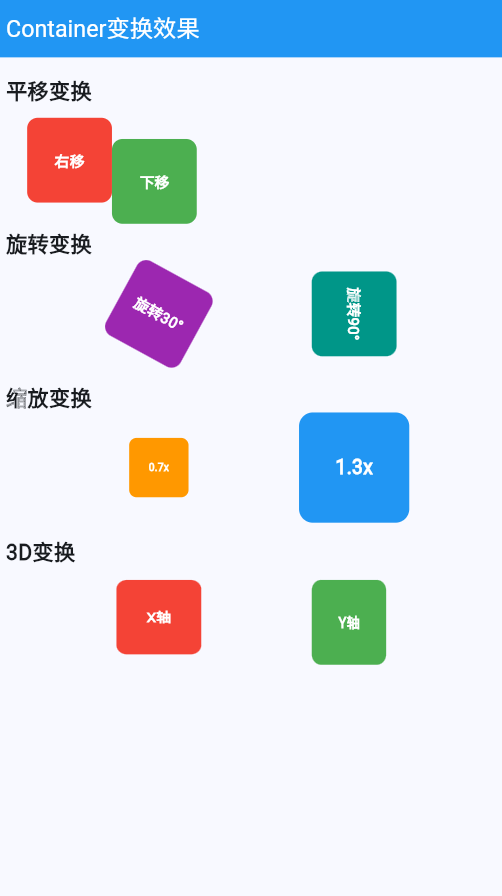
Container组件的transform属性提供了强大的变换能力,可以实现旋转、缩放、平移、倾斜等多种视觉效果。本文将深入探讨Container的变换效果,包括基础变换、复合变换、3D变换以及实际应用场景。
一、变换基础
Container的transform属性使用Matrix4矩阵实现变换,可以创建各种视觉效果。
1.1 变换类型
1.2 变换方法对比
| 变换方法 | 语法 | 效果 | 应用场景 |
|---|---|---|---|
| translation | Matrix4.translationValues(x, y, z) | 平移 | 位置调整 |
| rotationZ | Matrix4.rotationZ(angle) | 2D旋转 | 角度变化 |
| rotationX | Matrix4.rotationX(angle) | 3D X轴旋转 | 3D效果 |
| rotationY | Matrix4.rotationY(angle) | 3D Y轴旋转 | 3D翻转 |
| scaled | Matrix4.diagonal3(sx, sy, sz) | 缩放 | 大小调整 |
| compose | Matrix4.compose() | 复合变换 | 组合效果 |
二、平移变换
2.1 基础平移
class TranslateContainer extends StatelessWidget {
const TranslateContainer({super.key});
Widget build(BuildContext context) {
return Column(
children: [
// 原始Container
Container(
width: 100,
height: 100,
color: Colors.blue,
child: const Center(
child: Text('原始', style: TextStyle(color: Colors.white)),
),
),
const SizedBox(height: 20),
// 向右平移
Transform(
transform: Matrix4.translationValues(50, 0, 0),
child: Container(
width: 100,
height: 100,
color: Colors.green,
child: const Center(
child: Text('向右平移', style: TextStyle(color: Colors.white)),
),
),
),
const SizedBox(height: 20),
// 向下平移
Transform(
transform: Matrix4.translationValues(0, 50, 0),
child: Container(
width: 100,
height: 100,
color: Colors.orange,
child: const Center(
child: Text('向下平移', style: TextStyle(color: Colors.white)),
),
),
),
],
);
}
}
2.2 对角平移
class DiagonalTranslateContainer extends StatelessWidget {
const DiagonalTranslateContainer({super.key});
Widget build(BuildContext context) {
return Container(
width: 200,
height: 200,
color: Colors.grey.shade200,
child: Stack(
children: [
Positioned(
top: 50,
left: 50,
child: Transform(
transform: Matrix4.translationValues(30, 30, 0),
child: Container(
width: 100,
height: 100,
color: Colors.blue,
child: const Center(
child: Text('对角平移', style: TextStyle(color: Colors.white)),
),
),
),
),
],
),
);
}
}
三、旋转变换
3.1 2D旋转
class RotationContainer extends StatelessWidget {
const RotationContainer({super.key});
Widget build(BuildContext context) {
return Row(
mainAxisAlignment: MainAxisAlignment.spaceEvenly,
children: [
// 旋转45度
Transform(
transform: Matrix4.rotationZ(0.78), // 45度 = π/4
child: Container(
width: 80,
height: 80,
color: Colors.red,
child: const Center(
child: Text('45°', style: TextStyle(color: Colors.white)),
),
),
),
// 旋转90度
Transform(
transform: Matrix4.rotationZ(1.57), // 90度 = π/2
child: Container(
width: 80,
height: 80,
color: Colors.green,
child: const Center(
child: Text('90°', style: TextStyle(color: Colors.white)),
),
),
),
// 旋转180度
Transform(
transform: Matrix4.rotationZ(3.14), // 180度 = π
child: Container(
width: 80,
height: 80,
color: Colors.blue,
child: const Center(
child: Text('180°', style: TextStyle(color: Colors.white)),
),
),
),
],
);
}
}
3.2 中心旋转
class CenterRotationContainer extends StatelessWidget {
const CenterRotationContainer({super.key});
Widget build(BuildContext context) {
return SizedBox(
width: 200,
height: 200,
child: Stack(
children: [
// 中心点
Positioned(
left: 100 - 5,
top: 100 - 5,
child: Container(
width: 10,
height: 10,
decoration: BoxDecoration(
color: Colors.black,
shape: BoxShape.circle,
),
),
),
// 围绕中心旋转
Transform(
transform: Matrix4.rotationZ(0.5),
alignment: Alignment.center,
child: const Positioned(
left: 100,
top: 20,
child: Container(
width: 60,
height: 60,
color: Colors.purple,
child: Center(
child: Text('旋转', style: TextStyle(color: Colors.white)),
),
),
),
),
],
),
);
}
}
3.3 动画旋转
class AnimatedRotationContainer extends StatefulWidget {
const AnimatedRotationContainer({super.key});
State<AnimatedRotationContainer> createState() => _AnimatedRotationContainerState();
}
class _AnimatedRotationContainerState extends State<AnimatedRotationContainer>
with SingleTickerProviderStateMixin {
late AnimationController _controller;
late Animation<double> _animation;
void initState() {
super.initState();
_controller = AnimationController(
duration: const Duration(seconds: 3),
vsync: this,
)..repeat();
_animation = Tween<double>(begin: 0, end: 2 * 3.14159).animate(_controller);
}
void dispose() {
_controller.dispose();
super.dispose();
}
Widget build(BuildContext context) {
return AnimatedBuilder(
animation: _animation,
builder: (context, child) {
return Transform(
transform: Matrix4.rotationZ(_animation.value),
child: Container(
width: 100,
height: 100,
color: Colors.orange,
child: const Center(
child: Text('持续旋转', style: TextStyle(color: Colors.white)),
),
),
);
},
);
}
}
四、缩放变换
4.1 等比缩放
class ScaleContainer extends StatelessWidget {
const ScaleContainer({super.key});
Widget build(BuildContext context) {
return Row(
mainAxisAlignment: MainAxisAlignment.spaceEvenly,
children: [
// 缩小到0.5倍
Transform.scale(
scale: 0.5,
child: Container(
width: 100,
height: 100,
color: Colors.red,
child: const Center(
child: Text('0.5x', style: TextStyle(color: Colors.white)),
),
),
),
// 原始大小
Container(
width: 100,
height: 100,
color: Colors.green,
child: const Center(
child: Text('1.0x', style: TextStyle(color: Colors.white)),
),
),
// 放大到1.5倍
Transform.scale(
scale: 1.5,
child: Container(
width: 100,
height: 100,
color: Colors.blue,
child: const Center(
child: Text('1.5x', style: TextStyle(color: Colors.white)),
),
),
),
],
);
}
}
4.2 非等比缩放
class NonUniformScaleContainer extends StatelessWidget {
const NonUniformScaleContainer({super.key});
Widget build(BuildContext context) {
return Column(
children: [
// 水平拉伸
Transform(
transform: Matrix4.diagonal3Values(2.0, 1.0, 1.0),
child: Container(
width: 100,
height: 100,
color: Colors.purple,
child: const Center(
child: Text('水平拉伸', style: TextStyle(color: Colors.white)),
),
),
),
const SizedBox(height: 20),
// 垂直拉伸
Transform(
transform: Matrix4.diagonal3Values(1.0, 2.0, 1.0),
child: Container(
width: 100,
height: 100,
color: Colors.teal,
child: const Center(
child: Text('垂直拉伸', style: TextStyle(color: Colors.white)),
),
),
),
],
);
}
}
4.3 动画缩放
class AnimatedScaleContainer extends StatefulWidget {
const AnimatedScaleContainer({super.key});
State<AnimatedScaleContainer> createState() => _AnimatedScaleContainerState();
}
class _AnimatedScaleContainerState extends State<AnimatedScaleContainer>
with SingleTickerProviderStateMixin {
late AnimationController _controller;
late Animation<double> _animation;
void initState() {
super.initState();
_controller = AnimationController(
duration: const Duration(seconds: 2),
vsync: this,
)..repeat(reverse: true);
_animation = Tween<double>(begin: 0.8, end: 1.2).animate(
CurvedAnimation(
parent: _controller,
curve: Curves.easeInOut,
),
);
}
void dispose() {
_controller.dispose();
super.dispose();
}
Widget build(BuildContext context) {
return AnimatedBuilder(
animation: _animation,
builder: (context, child) {
return Transform.scale(
scale: _animation.value,
child: Container(
width: 100,
height: 100,
decoration: BoxDecoration(
gradient: LinearGradient(
colors: [Colors.blue, Colors.purple],
),
borderRadius: BorderRadius.circular(20),
),
child: const Center(
child: Text(
'呼吸效果',
style: TextStyle(
color: Colors.white,
fontWeight: FontWeight.bold,
),
),
),
),
);
},
);
}
}
五、3D变换
5.1 X轴旋转(上下翻转)
class RotationXContainer extends StatelessWidget {
const RotationXContainer({super.key});
Widget build(BuildContext context) {
return Row(
mainAxisAlignment: MainAxisAlignment.spaceEvenly,
children: [
// X轴旋转30度
Transform(
transform: Matrix4.rotationX(0.52), // 30度
child: Container(
width: 100,
height: 100,
color: Colors.blue,
child: const Center(
child: Text('X轴旋转30°', style: TextStyle(color: Colors.white)),
),
),
),
// X轴旋转60度
Transform(
transform: Matrix4.rotationX(1.05), // 60度
child: Container(
width: 100,
height: 100,
color: Colors.green,
child: const Center(
child: Text('X轴旋转60°', style: TextStyle(color: Colors.white)),
),
),
),
// X轴旋转90度
Transform(
transform: Matrix4.rotationX(1.57), // 90度
child: Container(
width: 100,
height: 100,
color: Colors.orange,
child: const Center(
child: Text('X轴旋转90°', style: TextStyle(color: Colors.white)),
),
),
),
],
);
}
}
5.2 Y轴旋转(左右翻转)
class RotationYContainer extends StatelessWidget {
const RotationYContainer({super.key});
Widget build(BuildContext context) {
return Row(
mainAxisAlignment: MainAxisAlignment.spaceEvenly,
children: [
// Y轴旋转30度
Transform(
transform: Matrix4.rotationY(0.52), // 30度
child: Container(
width: 100,
height: 100,
color: Colors.purple,
child: const Center(
child: Text('Y轴旋转30°', style: TextStyle(color: Colors.white)),
),
),
),
// Y轴旋转60度
Transform(
transform: Matrix4.rotationY(1.05), // 60度
child: Container(
width: 100,
height: 100,
color: Colors.teal,
child: const Center(
child: Text('Y轴旋转60°', style: TextStyle(color: Colors.white)),
),
),
),
// Y轴旋转90度
Transform(
transform: Matrix4.rotationY(1.57), // 90度
child: Container(
width: 100,
height: 100,
color: Colors.red,
child: const Center(
child: Text('Y轴旋转90°', style: TextStyle(color: Colors.white)),
),
),
),
],
);
}
}
5.3 透视效果
class PerspectiveContainer extends StatelessWidget {
const PerspectiveContainer({super.key});
Widget build(BuildContext context) {
return Column(
children: [
// 无透视
Transform(
transform: Matrix4.rotationY(0.5),
child: Container(
width: 150,
height: 100,
color: Colors.blue,
child: const Center(
child: Text('无透视', style: TextStyle(color: Colors.white)),
),
),
),
const SizedBox(height: 20),
// 添加透视
Transform(
transform: Matrix4.identity()
..setEntry(3, 2, 0.002) // 透视系数
..rotateY(0.5),
child: Container(
width: 150,
height: 100,
color: Colors.green,
child: const Center(
child: Text('有透视', style: TextStyle(color: Colors.white)),
),
),
),
],
);
}
}
六、复合变换
6.1 平移+旋转
class CompositeTransformContainer extends StatelessWidget {
const CompositeTransformContainer({super.key});
Widget build(BuildContext context) {
return Container(
width: 300,
height: 300,
color: Colors.grey.shade200,
child: Center(
child: Transform(
// 复合变换:先平移后旋转
transform: Matrix4.identity()
..translate(50, 50, 0)
..rotateZ(0.5),
child: Container(
width: 100,
height: 100,
color: Colors.blue,
child: const Center(
child: Text('复合变换', style: TextStyle(color: Colors.white)),
),
),
),
),
);
}
}
6.2 缩放+旋转
class ScaleRotationContainer extends StatelessWidget {
const ScaleRotationContainer({super.key});
Widget build(BuildContext context) {
return Center(
child: Transform(
// 先缩放后旋转
transform: Matrix4.identity()
..scale(1.5)
..rotateZ(0.3),
child: Container(
width: 100,
height: 100,
decoration: BoxDecoration(
gradient: LinearGradient(
colors: [Colors.orange, Colors.red],
),
borderRadius: BorderRadius.circular(10),
),
child: const Center(
child: Text('缩放旋转', style: TextStyle(color: Colors.white)),
),
),
),
);
}
}
6.3 完整3D变换
class Full3DTransformContainer extends StatelessWidget {
const Full3DTransformContainer({super.key});
Widget build(BuildContext context) {
return Center(
child: Transform(
// 添加透视
transform: Matrix4.identity()
..setEntry(3, 2, 0.003) // 透视系数
..rotateX(0.3) // X轴旋转
..rotateY(0.5) // Y轴旋转
..scale(1.2), // 缩放
alignment: Alignment.center,
child: Container(
width: 150,
height: 150,
decoration: BoxDecoration(
gradient: const LinearGradient(
begin: Alignment.topLeft,
end: Alignment.bottomRight,
colors: [Colors.purple, Colors.blue],
),
borderRadius: BorderRadius.circular(20),
boxShadow: [
BoxShadow(
color: Colors.black.withOpacity(0.3),
blurRadius: 10,
offset: const Offset(5, 5),
),
],
),
child: const Center(
child: Text(
'完整3D',
style: TextStyle(
color: Colors.white,
fontSize: 20,
fontWeight: FontWeight.bold,
),
),
),
),
),
);
}
}
七、动画变换示例
7.1 3D翻转动画
class FlippingContainer extends StatefulWidget {
const FlippingContainer({super.key});
State<FlippingContainer> createState() => _FlippingContainerState();
}
class _FlippingContainerState extends State<FlippingContainer>
with SingleTickerProviderStateMixin {
late AnimationController _controller;
late Animation<double> _animation;
void initState() {
super.initState();
_controller = AnimationController(
duration: const Duration(seconds: 2),
vsync: this,
)..repeat();
_animation = Tween<double>(begin: 0, end: 2 * 3.14159).animate(_controller);
}
void dispose() {
_controller.dispose();
super.dispose();
}
Widget build(BuildContext context) {
return AnimatedBuilder(
animation: _animation,
builder: (context, child) {
return Transform(
transform: Matrix4.identity()
..setEntry(3, 2, 0.003)
..rotateY(_animation.value),
alignment: Alignment.center,
child: Container(
width: 150,
height: 150,
decoration: BoxDecoration(
gradient: LinearGradient(
colors: [
Colors.blue.shade400,
Colors.purple.shade400,
],
),
borderRadius: BorderRadius.circular(20),
),
child: const Center(
child: Text(
'3D翻转',
style: TextStyle(
color: Colors.white,
fontSize: 18,
fontWeight: FontWeight.bold,
),
),
),
),
);
},
);
}
}
7.2 呼吸缩放动画
class BreathingContainer extends StatefulWidget {
const BreathingContainer({super.key});
State<BreathingContainer> createState() => _BreathingContainerState();
}
class _BreathingContainerState extends State<BreathingContainer>
with SingleTickerProviderStateMixin {
late AnimationController _controller;
late Animation<double> _animation;
void initState() {
super.initState();
_controller = AnimationController(
duration: const Duration(seconds: 3),
vsync: this,
)..repeat(reverse: true);
_animation = Tween<double>(begin: 1.0, end: 1.3).animate(
CurvedAnimation(
parent: _controller,
curve: Curves.easeInOut,
),
);
}
void dispose() {
_controller.dispose();
super.dispose();
}
Widget build(BuildContext context) {
return AnimatedBuilder(
animation: _animation,
builder: (context, child) {
return Transform(
transform: Matrix4.diagonal3Values(
_animation.value,
_animation.value,
1.0,
),
child: Container(
width: 120,
height: 120,
decoration: BoxDecoration(
gradient: RadialGradient(
colors: [
Colors.orange.shade200,
Colors.orange.shade600,
],
),
shape: BoxShape.circle,
),
child: const Center(
child: Text(
'呼吸',
style: TextStyle(
color: Colors.white,
fontSize: 20,
fontWeight: FontWeight.bold,
),
),
),
),
);
},
);
}
}
八、完整变换示例
class ContainerTransformExample extends StatelessWidget {
const ContainerTransformExample({super.key});
Widget build(BuildContext context) {
return Scaffold(
appBar: AppBar(
title: const Text('Container变换效果'),
backgroundColor: Colors.blue,
foregroundColor: Colors.white,
),
body: ListView(
padding: const EdgeInsets.all(16),
children: [
const Text(
'平移变换',
style: TextStyle(fontSize: 20, fontWeight: FontWeight.bold),
),
const SizedBox(height: 12),
Row(
children: [
Transform.translate(
offset: const Offset(20, 0),
child: _buildColorBox('右移', Colors.red),
),
const SizedBox(width: 20),
Transform.translate(
offset: const Offset(0, 20),
child: _buildColorBox('下移', Colors.green),
),
],
),
const SizedBox(height: 24),
const Text(
'旋转变换',
style: TextStyle(fontSize: 20, fontWeight: FontWeight.bold),
),
const SizedBox(height: 12),
Row(
mainAxisAlignment: MainAxisAlignment.spaceEvenly,
children: [
Transform.rotate(
angle: 0.5,
child: _buildColorBox('旋转30°', Colors.purple),
),
Transform.rotate(
angle: 1.57,
child: _buildColorBox('旋转90°', Colors.teal),
),
],
),
const SizedBox(height: 24),
const Text(
'缩放变换',
style: TextStyle(fontSize: 20, fontWeight: FontWeight.bold),
),
const SizedBox(height: 12),
Row(
mainAxisAlignment: MainAxisAlignment.spaceEvenly,
children: [
Transform.scale(
scale: 0.7,
child: _buildColorBox('0.7x', Colors.orange),
),
Transform.scale(
scale: 1.3,
child: _buildColorBox('1.3x', Colors.blue),
),
],
),
const SizedBox(height: 24),
const Text(
'3D变换',
style: TextStyle(fontSize: 20, fontWeight: FontWeight.bold),
),
const SizedBox(height: 12),
Row(
mainAxisAlignment: MainAxisAlignment.spaceEvenly,
children: [
Transform(
transform: Matrix4.rotationX(0.5),
child: _buildColorBox('X轴', Colors.red),
),
Transform(
transform: Matrix4.rotationY(0.5),
child: _buildColorBox('Y轴', Colors.green),
),
],
),
const SizedBox(height: 24),
const Text(
'动画效果',
style: TextStyle(fontSize: 20, fontWeight: FontWeight.bold),
),
const SizedBox(height: 12),
const AnimatedRotationContainer(),
const SizedBox(height: 24),
const AnimatedScaleContainer(),
const SizedBox(height: 24),
const FlippingContainer(),
const SizedBox(height: 24),
const BreathingContainer(),
const SizedBox(height: 24),
const Text(
'复合变换',
style: TextStyle(fontSize: 20, fontWeight: FontWeight.bold),
),
const SizedBox(height: 12),
const Full3DTransformContainer(),
],
),
);
}
Widget _buildColorBox(String label, Color color) {
return Container(
width: 80,
height: 80,
decoration: BoxDecoration(
color: color,
borderRadius: BorderRadius.circular(10),
),
child: Center(
child: Text(
label,
style: const TextStyle(color: Colors.white, fontWeight: FontWeight.bold),
),
),
);
}
}
欢迎加入开源鸿蒙跨平台社区:https://openharmonycrossplatform.csdn.net

作为“人工智能6S店”的官方数字引擎,为AI开发者与企业提供一个覆盖软硬件全栈、一站式门户。
更多推荐
 1
1 0
0- 0



 已为社区贡献10条内容

所有评论(0)