
Flutter 框架跨平台鸿蒙开发——Container高级应用
·
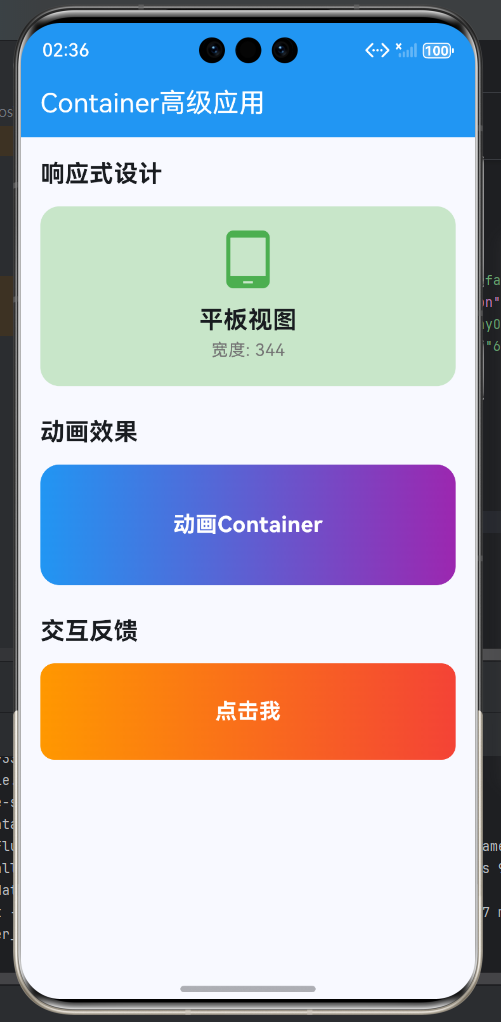
Container组件作为Flutter中最基础也最强大的布局容器,其高级应用涵盖了复杂布局、响应式设计、性能优化、动画效果等多个方面。本文将通过实际案例,深入探讨Container在高级场景中的应用技巧和最佳实践。
一、复杂布局架构
1.1 分层布局
1.2 多层Container叠加
class LayeredContainerExample extends StatelessWidget {
const LayeredContainerExample({super.key});
Widget build(BuildContext context) {
return Container(
width: 300,
height: 200,
decoration: BoxDecoration(
gradient: const LinearGradient(
colors: [Colors.blue.shade100, Colors.purple.shade100],
begin: Alignment.topLeft,
end: Alignment.bottomRight,
),
borderRadius: BorderRadius.circular(20),
),
child: Stack(
children: [
// 背景装饰
Positioned(
top: -50,
right: -50,
child: Container(
width: 150,
height: 150,
decoration: BoxDecoration(
color: Colors.white.withOpacity(0.1),
shape: BoxShape.circle,
),
),
),
// 中间内容
Center(
child: Column(
mainAxisAlignment: MainAxisAlignment.center,
children: [
Container(
width: 80,
height: 80,
decoration: BoxDecoration(
color: Colors.blue,
shape: BoxShape.circle,
boxShadow: [
BoxShadow(
color: Colors.blue.withOpacity(0.3),
blurRadius: 15,
offset: const Offset(0, 5),
),
],
),
child: const Icon(
Icons.layers,
size: 40,
color: Colors.white,
),
),
const SizedBox(height: 16),
const Text(
'分层布局',
style: TextStyle(
fontSize: 20,
fontWeight: FontWeight.bold,
color: Colors.white,
),
),
Text(
'多层Container叠加',
style: TextStyle(
color: Colors.white.withOpacity(0.8),
),
),
],
),
),
// 前景标签
Positioned(
top: 16,
right: 16,
child: Container(
padding: const EdgeInsets.symmetric(horizontal: 12, vertical: 6),
decoration: BoxDecoration(
color: Colors.green,
borderRadius: BorderRadius.circular(20),
),
child: const Text(
'NEW',
style: TextStyle(
color: Colors.white,
fontSize: 12,
fontWeight: FontWeight.bold,
),
),
),
),
],
),
);
}
}
二、响应式设计
2.1 屏幕适配
class ResponsiveContainer extends StatelessWidget {
const ResponsiveContainer({super.key});
Widget build(BuildContext context) {
return LayoutBuilder(
builder: (context, constraints) {
if (constraints.maxWidth < 600) {
return _buildMobileView();
} else if (constraints.maxWidth < 900) {
return _buildTabletView();
} else {
return _buildDesktopView();
}
},
);
}
Widget _buildMobileView() {
return Container(
padding: const EdgeInsets.all(16),
decoration: BoxDecoration(
color: Colors.blue.shade50,
borderRadius: BorderRadius.circular(12),
),
child: Column(
children: [
const Icon(Icons.phone_android, size: 48, color: Colors.blue),
const SizedBox(height: 12),
const Text(
'手机视图',
style: TextStyle(fontSize: 18, fontWeight: FontWeight.bold),
),
Text('宽度 < 600', style: TextStyle(color: Colors.grey.shade600)),
],
),
);
}
Widget _buildTabletView() {
return Container(
padding: const EdgeInsets.all(24),
decoration: BoxDecoration(
color: Colors.green.shade50,
borderRadius: BorderRadius.circular(16),
),
child: Row(
children: [
const Icon(Icons.tablet_android, size: 64, color: Colors.green),
const SizedBox(width: 20),
Expanded(
child: Column(
crossAxisAlignment: CrossAxisAlignment.start,
children: [
const Text(
'平板视图',
style: TextStyle(fontSize: 24, fontWeight: FontWeight.bold),
),
Text('600 ≤ 宽度 < 900', style: TextStyle(color: Colors.grey.shade600)),
],
),
),
],
),
);
}
Widget _buildDesktopView() {
return Container(
padding: const EdgeInsets.all(32),
decoration: BoxDecoration(
color: Colors.orange.shade50,
borderRadius: BorderRadius.circular(20),
),
child: Row(
children: [
const Icon(Icons.desktop_windows, size: 80, color: Colors.orange),
const SizedBox(width: 24),
Expanded(
child: Column(
crossAxisAlignment: CrossAxisAlignment.start,
children: [
const Text(
'桌面视图',
style: TextStyle(fontSize: 28, fontWeight: FontWeight.bold),
),
Text('宽度 ≥ 900', style: TextStyle(color: Colors.grey.shade600)),
const SizedBox(height: 8),
const Text('适配大屏幕显示'),
],
),
),
Container(
padding: const EdgeInsets.symmetric(horizontal: 16, vertical: 8),
decoration: BoxDecoration(
color: Colors.orange,
borderRadius: BorderRadius.circular(8),
),
child: const Text(
'响应式',
style: TextStyle(color: Colors.white, fontWeight: FontWeight.bold),
),
),
],
),
);
}
}
2.2 动态尺寸计算
class DynamicSizeContainer extends StatelessWidget {
const DynamicSizeContainer({super.key});
Widget build(BuildContext context) {
return LayoutBuilder(
builder: (context, constraints) {
final containerWidth = constraints.maxWidth;
final containerHeight = constraints.maxHeight;
// 根据容器大小动态调整
final cardWidth = containerWidth * 0.8;
final cardHeight = containerHeight * 0.6;
final iconSize = cardWidth * 0.15;
final titleFontSize = cardWidth * 0.08;
return Container(
width: cardWidth,
height: cardHeight,
decoration: BoxDecoration(
gradient: LinearGradient(
colors: [Colors.purple.shade300, Colors.blue.shade300],
),
borderRadius: BorderRadius.circular(cardWidth * 0.05),
),
child: Column(
mainAxisAlignment: MainAxisAlignment.center,
children: [
Icon(Icons.aspect_ratio, size: iconSize, color: Colors.white),
SizedBox(height: cardHeight * 0.05),
Text(
'动态尺寸',
style: TextStyle(
fontSize: titleFontSize,
fontWeight: FontWeight.bold,
color: Colors.white,
),
),
SizedBox(height: cardHeight * 0.02),
Text(
'${cardWidth.toInt()}x${cardHeight.toInt()}',
style: TextStyle(
fontSize: titleFontSize * 0.7,
color: Colors.white.withOpacity(0.9),
),
),
],
),
);
},
);
}
}
三、主题适配
3.1 深色模式适配
class ThemedContainer extends StatelessWidget {
final String title;
final String subtitle;
const ThemedContainer({
super.key,
required this.title,
required this.subtitle,
});
Widget build(BuildContext context) {
final theme = Theme.of(context);
final isDark = theme.brightness == Brightness.dark;
return Container(
padding: const EdgeInsets.all(20),
decoration: BoxDecoration(
gradient: LinearGradient(
colors: isDark
? [Colors.blue.shade800, Colors.purple.shade800]
: [Colors.blue.shade100, Colors.purple.shade100],
),
borderRadius: BorderRadius.circular(16),
),
child: Column(
crossAxisAlignment: CrossAxisAlignment.start,
children: [
Icon(
Icons.palette,
color: isDark ? Colors.white70 : Colors.blue.shade700,
size: 32,
),
const SizedBox(height: 12),
Text(
title,
style: TextStyle(
fontSize: 20,
fontWeight: FontWeight.bold,
color: isDark ? Colors.white : Colors.blue.shade900,
),
),
const SizedBox(height: 8),
Text(
subtitle,
style: TextStyle(
fontSize: 14,
color: isDark ? Colors.white70 : Colors.blue.shade700,
),
),
],
),
);
}
}
3.2 颜色主题
enum CardTheme { blue, green, orange, purple }
class ColorThemedContainer extends StatelessWidget {
final CardTheme theme;
final String title;
const ColorThemedContainer({
super.key,
required this.theme,
required this.title,
});
Widget build(BuildContext context) {
final colors = _getThemeColors(theme);
return Container(
padding: const EdgeInsets.all(20),
decoration: BoxDecoration(
gradient: LinearGradient(
colors: colors.gradient,
begin: Alignment.topLeft,
end: Alignment.bottomRight,
),
borderRadius: BorderRadius.circular(16),
boxShadow: [
BoxShadow(
color: colors.shadow.withOpacity(0.3),
blurRadius: 12,
offset: const Offset(0, 6),
),
],
),
child: Row(
children: [
Container(
width: 50,
height: 50,
decoration: BoxDecoration(
color: colors.iconBg,
shape: BoxShape.circle,
),
child: Icon(colors.icon, color: colors.iconColor, size: 28),
),
const SizedBox(width: 16),
Expanded(
child: Column(
crossAxisAlignment: Colors.start,
children: [
Text(
title,
style: TextStyle(
fontSize: 18,
fontWeight: FontWeight.bold,
color: colors.textColor,
),
),
Text(
_getThemeName(theme),
style: TextStyle(
fontSize: 12,
color: colors.textColor.withOpacity(0.7),
),
),
],
),
),
],
),
);
}
_ThemeColors _getThemeColors(CardTheme theme) {
switch (theme) {
case CardTheme.blue:
return _ThemeColors(
gradient: [Colors.blue.shade400, Colors.blue.shade600],
shadow: Colors.blue,
icon: Icons.info,
iconBg: Colors.white,
iconColor: Colors.blue,
textColor: Colors.white,
);
case CardTheme.green:
return _ThemeColors(
gradient: [Colors.green.shade400, Colors.green.shade600],
shadow: Colors.green,
icon: Icons.check_circle,
iconBg: Colors.white,
iconColor: Colors.green,
textColor: Colors.white,
);
case CardTheme.orange:
return _ThemeColors(
gradient: [Colors.orange.shade400, Colors.orange.shade600],
shadow: Colors.orange,
icon: Icons.warning,
iconBg: Colors.white,
iconColor: Colors.orange,
textColor: Colors.white,
);
case CardTheme.purple:
return _ThemeColors(
gradient: [Colors.purple.shade400, Colors.purple.shade600],
shadow: Colors.purple,
icon: Icons.star,
iconBg: Colors.white,
iconColor: Colors.purple,
textColor: Colors.white,
);
}
}
String _getThemeName(CardTheme theme) {
switch (theme) {
case CardTheme.blue:
return '蓝色主题';
case CardTheme.green:
return '绿色主题';
case CardTheme.orange:
return '橙色主题';
case CardTheme.purple:
return '紫色主题';
}
}
}
class _ThemeColors {
final List<Color> gradient;
final Color shadow;
final IconData icon;
final Color iconBg;
final Color iconColor;
final Color textColor;
_ThemeColors({
required this.gradient,
required this.shadow,
required this.icon,
required this.iconBg,
required this.iconColor,
required this.textColor,
});
}
四、动画效果
4.1 状态变化动画
class StateChangeContainer extends StatefulWidget {
const StateChangeContainer({super.key});
State<StateChangeContainer> createState() => _StateChangeContainerState();
}
class _StateChangeContainerState extends State<StateChangeContainer> {
bool _isActive = false;
void _toggleState() {
setState(() {
_isActive = !_isActive;
});
}
Widget build(BuildContext context) {
return GestureDetector(
onTap: _toggleState,
child: AnimatedContainer(
duration: const Duration(milliseconds: 300),
curve: Curves.easeInOut,
width: 200,
height: _isActive ? 150 : 100,
decoration: BoxDecoration(
gradient: LinearGradient(
colors: _isActive
? [Colors.green.shade400, Colors.green.shade600]
: [Colors.blue.shade400, Colors.blue.shade600],
),
borderRadius: BorderRadius.circular(_isActive ? 20 : 12),
),
child: Column(
mainAxisAlignment: MainAxisAlignment.center,
children: [
AnimatedSwitcher(
duration: const Duration(milliseconds: 300),
transitionBuilder: (child, animation) {
return ScaleTransition(
scale: animation,
child: child,
);
},
child: Icon(
_isActive ? Icons.check_circle : Icons.touch_app,
key: ValueKey(_isActive),
size: 48,
color: Colors.white,
),
),
const SizedBox(height: 12),
AnimatedDefaultTextStyle(
duration: const Duration(milliseconds: 300),
style: TextStyle(
fontSize: _isActive ? 22 : 18,
fontWeight: _isActive ? FontWeight.bold : FontWeight.normal,
color: Colors.white,
),
child: Text(_isActive ? '已激活' : '点击激活'),
),
],
),
),
);
}
}
4.2 加载状态
class LoadingContainer extends StatefulWidget {
const LoadingContainer({super.key});
State<LoadingContainer> createState() => _LoadingContainerState();
}
class _LoadingContainerState extends State<LoadingContainer> {
bool _isLoading = true;
void initState() {
super.initState();
// 模拟加载
Future.delayed(const Duration(seconds: 3), () {
if (mounted) {
setState(() {
_isLoading = false;
});
}
});
}
Widget build(BuildContext context) {
return AnimatedContainer(
duration: const Duration(milliseconds: 500),
width: 300,
height: 200,
decoration: BoxDecoration(
gradient: _isLoading
? const LinearGradient(
colors: [Colors.grey.shade200, Colors.grey.shade300],
)
: const LinearGradient(
colors: [Colors.blue.shade400, Colors.purple.shade400],
),
borderRadius: BorderRadius.circular(16),
),
child: _isLoading
? const Column(
mainAxisAlignment: MainAxisAlignment.center,
children: [
CircularProgressIndicator(),
SizedBox(height: 16),
Text('加载中...'),
],
)
: const Column(
mainAxisAlignment: MainAxisAlignment.center,
children: [
Icon(Icons.check_circle, size: 48, color: Colors.white),
SizedBox(height: 12),
Text(
'加载完成',
style: TextStyle(
fontSize: 20,
fontWeight: FontWeight.bold,
color: Colors.white,
),
),
],
),
);
}
}
五、交互反馈
5.1 按下效果
class PressContainer extends StatefulWidget {
const PressContainer({super.key});
State<PressContainer> createState() => _PressContainerState();
}
class _PressContainerState extends State<PressContainer> {
bool _isPressed = false;
Widget build(BuildContext context) {
return GestureDetector(
onTapDown: (_) => setState(() => _isPressed = true),
onTapUp: (_) => setState(() => _isPressed = false),
onTapCancel: () => setState(() => _isPressed = false),
onTap: () {
ScaffoldMessenger.of(context).showSnackBar(
const SnackBar(content: Text('Container被点击')),
);
},
child: AnimatedContainer(
duration: const Duration(milliseconds: 100),
transform: Matrix4.diagonal3Values(
_isPressed ? 0.95 : 1.0,
_isPressed ? 0.95 : 1.0,
1.0,
),
width: 200,
height: 100,
decoration: BoxDecoration(
gradient: LinearGradient(
colors: _isPressed
? [Colors.blue.shade600, Colors.purple.shade600]
: [Colors.blue.shade400, Colors.purple.shade400],
),
borderRadius: BorderRadius.circular(12),
boxShadow: [
BoxShadow(
color: Colors.blue.withOpacity(_isPressed ? 0.1 : 0.3),
blurRadius: _isPressed ? 8 : 12,
offset: Offset(0, _isPressed ? 2 : 6),
),
],
),
child: const Center(
child: Text(
'按下我',
style: TextStyle(
color: Colors.white,
fontSize: 18,
fontWeight: FontWeight.bold,
),
),
),
),
);
}
}
5.2 长按效果
class LongPressContainer extends StatefulWidget {
const LongPressContainer({super.key});
State<LongPressContainer> createState() => _LongPressContainerState();
}
class _LongPressContainerState extends State<LongPressContainer>
with SingleTickerProviderStateMixin {
late AnimationController _controller;
late Animation<double> _animation;
bool _isLongPressed = false;
void initState() {
super.initState();
_controller = AnimationController(
duration: const Duration(milliseconds: 300),
vsync: this,
);
_animation = Tween<double>(begin: 1.0, end: 0.9).animate(_controller);
}
void dispose() {
_controller.dispose();
super.dispose();
}
void _startLongPress() {
setState(() => _isLongPressed = true);
_controller.forward();
}
void _endLongPress() {
setState(() => _isLongPressed = false);
_controller.reverse();
}
Widget build(BuildContext context) {
return GestureDetector(
onLongPressStart: (_) => _startLongPress(),
onLongPressEnd: (_) => _endLongPress(),
onLongPress: () {
ScaffoldMessenger.of(context).showSnackBar(
const SnackBar(content: Text('长按触发')),
);
},
child: AnimatedBuilder(
animation: _animation,
builder: (context, child) {
return Transform.scale(
scale: _animation.value,
child: Container(
width: 200,
height: 100,
decoration: BoxDecoration(
gradient: _isLongPressed
? const LinearGradient(
colors: [Colors.orange.shade600, Colors.red.shade600],
)
: const LinearGradient(
colors: [Colors.orange.shade400, Colors.red.shade400],
),
borderRadius: BorderRadius.circular(12),
),
child: Column(
mainAxisAlignment: MainAxisAlignment.center,
children: [
Icon(
_isLongPressed ? Icons.touch_app : Icons.touch_app_outlined,
color: Colors.white,
size: 32,
),
const SizedBox(height: 8),
Text(
'长按${_isLongPressed ? '松开' : '继续'}',
style: const TextStyle(
color: Colors.white,
fontWeight: FontWeight.bold,
),
),
],
),
),
);
},
),
);
}
}
六、完整高级示例
class ContainerAdvancedExample extends StatelessWidget {
const ContainerAdvancedExample({super.key});
Widget build(BuildContext context) {
return Scaffold(
appBar: AppBar(
title: const Text('Container高级应用'),
backgroundColor: Colors.blue,
foregroundColor: Colors.white,
),
body: ListView(
padding: const EdgeInsets.all(16),
children: [
const Text(
'分层布局',
style: TextStyle(fontSize: 20, fontWeight: FontWeight.bold),
),
const SizedBox(height: 12),
const LayeredContainerExample(),
const SizedBox(height: 24),
const Text(
'响应式设计',
style: TextStyle(fontSize: 20, fontWeight: FontWeight.bold),
),
const SizedBox(height: 12),
const ResponsiveContainer(),
const SizedBox(height: 16),
const DynamicSizeContainer(),
const SizedBox(height: 24),
const Text(
'主题适配',
style: TextStyle(fontSize: 20, fontWeight: FontWeight.bold),
),
const SizedBox(height: 12),
const ThemedContainer(
title: '自动适配',
subtitle: '跟随系统主题变化',
),
const SizedBox(height: 16),
Wrap(
spacing: 12,
runSpacing: 12,
children: const [
ColorThemedContainer(
theme: CardTheme.blue,
title: '蓝色卡片',
),
ColorThemedContainer(
theme: CardTheme.green,
title: '绿色卡片',
),
ColorThemedContainer(
theme: CardTheme.orange,
title: '橙色卡片',
),
ColorThemedContainer(
theme: CardTheme.purple,
title: '紫色卡片',
),
],
),
const SizedBox(height: 24),
const Text(
'动画效果',
style: TextStyle(fontSize: 20, fontWeight: FontWeight.bold),
),
const SizedBox(height: 12),
const StateChangeContainer(),
const SizedBox(height: 16),
const LoadingContainer(),
const SizedBox(height: 24),
const Text(
'交互反馈',
style: TextStyle(fontSize: 20, fontWeight: FontWeight.bold),
),
const SizedBox(height: 12),
const PressContainer(),
const SizedBox(height: 16),
const LongPressContainer(),
],
),
);
}
}
欢迎加入开源鸿蒙跨平台社区:https://openharmonycrossplatform.csdn.net

作为“人工智能6S店”的官方数字引擎,为AI开发者与企业提供一个覆盖软硬件全栈、一站式门户。
更多推荐
 25
25 0
0- 0


 已为社区贡献21条内容

所有评论(0)