
Flutter 框架跨平台鸿蒙开发 - 充电温度检测器应用开发教程
);@override// 绘制警戒线// 绘制温度曲线i++) {} else {// 绘制数据点i++) {@override级别温度范围颜色状态建议正常< 35°C绿色安全正常充电温热35-40°C橙色注意观察温度变化过热40-45°C红色警告建议暂停充电危险> 45°C深红色危险立即停止充电。
·
Flutter充电温度检测器应用开发教程
项目简介
充电温度检测器是一款专业的设备温度监测应用,专门用于监控设备充电时的温度变化,提供实时温度监测、安全警告、历史记录和统计分析功能,帮助用户确保充电安全。
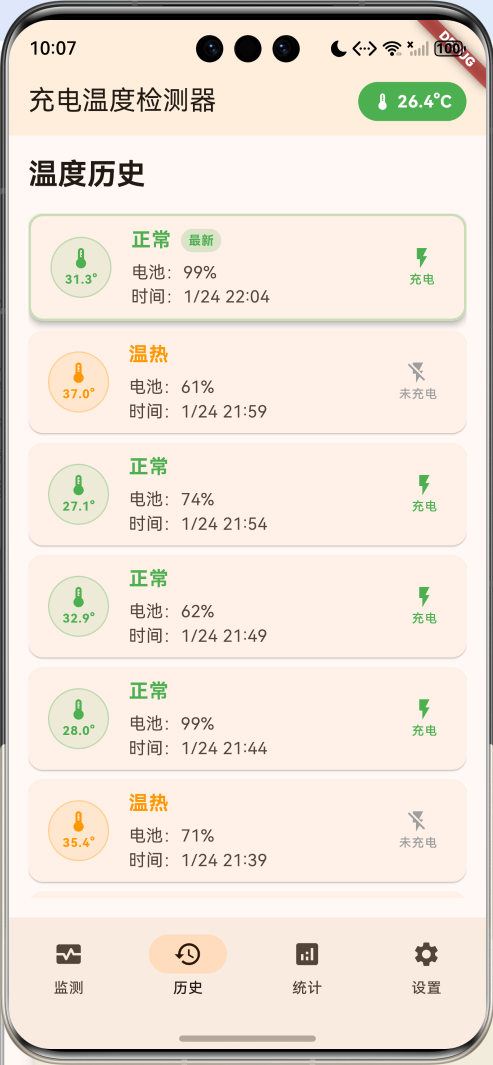
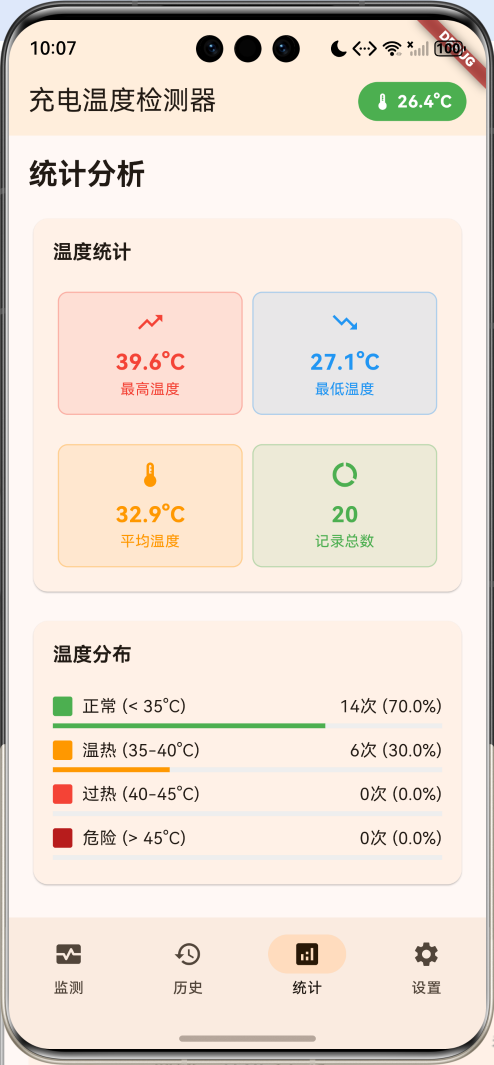
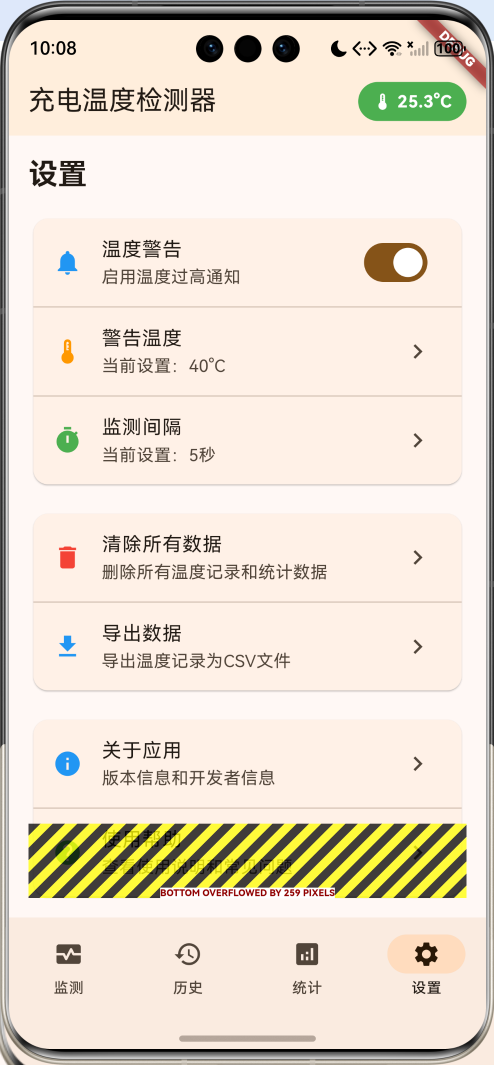
运行效果图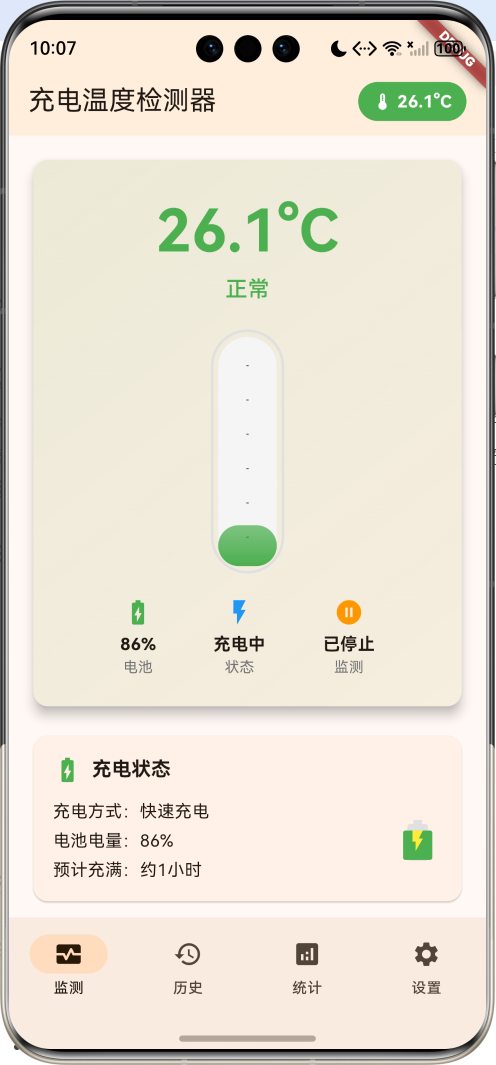
主要功能
- 实时温度监测:持续监控设备温度变化
- 四级温度警告:正常、温热、过热、危险四个级别
- 充电状态跟踪:监测充电状态和电池电量
- 历史记录管理:详细的温度历史记录
- 统计分析:全面的数据统计和趋势分析
- 安全建议:根据温度级别提供安全建议
技术架构
核心技术栈
- Flutter框架:跨平台UI开发
- Dart语言:应用逻辑实现
- Animation系统:温度变化动画效果
- Timer机制:定时温度监测
- CustomPainter:自定义图表绘制
- State管理:应用状态管理
项目结构
lib/
├── main.dart                    # 应用入口和主要逻辑
├── models/                      # 数据模型
│   ├── temperature_record.dart  # 温度记录模型
│   ├── temperature_stats.dart   # 温度统计模型
│   └── enums.dart               # 枚举定义
├── widgets/                     # 自定义组件
│   ├── temperature_card.dart    # 温度显示卡片
│   ├── thermometer.dart         # 温度计组件
│   └── temperature_chart.dart   # 温度图表组件
└── utils/                       # 工具类
    ├── temperature_utils.dart   # 温度工具函数
    └── data_manager.dart        # 数据管理工具
数据模型设计
温度记录模型
class TemperatureRecord {
  final DateTime timestamp;
  final double temperature;
  final double batteryLevel;
  final bool isCharging;
  final String status;

  TemperatureRecord({
    required this.timestamp,
    required this.temperature,
    required this.batteryLevel,
    required this.isCharging,
    required this.status,
  });
}
温度级别枚举
enum TemperatureLevel {
  normal,    // 正常 (< 35°C)
  warm,      // 温热 (35-40°C)
  hot,       // 过热 (40-45°C)
  danger,    // 危险 (> 45°C)
}
充电状态枚举
enum ChargingStatus {
  notCharging,
  charging,
  fastCharging,
  wirelessCharging,
}
温度统计模型
class TemperatureStats {
  double maxTemperature;
  double minTemperature;
  double avgTemperature;
  int totalRecords;
  int warningCount;
  Duration totalChargingTime;
  Map<TemperatureLevel, int> levelCounts;

  TemperatureStats({
    this.maxTemperature = 0,
    this.minTemperature = 100,
    this.avgTemperature = 0,
    this.totalRecords = 0,
    this.warningCount = 0,
    this.totalChargingTime = Duration.zero,
    Map<TemperatureLevel, int>? levelCounts,
  }) : levelCounts = levelCounts ?? {};
}
核心功能实现
1. 应用主框架
class MyApp extends StatelessWidget {
const MyApp({super.key});
Widget build(BuildContext context) {
return MaterialApp(
title: '充电温度检测器',
theme: ThemeData(
colorScheme: ColorScheme.fromSeed(seedColor: Colors.orange),
useMaterial3: true,
),
home: const ChargingTemperatureHomePage(),
);
}
}
2. 主页面状态管理
class _ChargingTemperatureHomePageState extends State<ChargingTemperatureHomePage>
    with TickerProviderStateMixin {
  int _selectedIndex = 0;

  // 当前状态
  double _currentTemperature = 25.0;
  double _batteryLevel = 80.0;
  bool _isCharging = false;
  ChargingStatus _chargingStatus = ChargingStatus.notCharging;
  TemperatureLevel _temperatureLevel = TemperatureLevel.normal;

  // 数据记录
  List<TemperatureRecord> _temperatureRecords = [];
  TemperatureStats _stats = TemperatureStats();

  // 监测控制
  bool _isMonitoring = false;
  Timer? _monitoringTimer;
  Timer? _dataUpdateTimer;

  // 动画控制器
  late AnimationController _pulseAnimationController;
  late AnimationController _temperatureAnimationController;
  late Animation<double> _temperatureAnimation;

  // 设置
  bool _enableNotifications = true;
  double _warningTemperature = 40.0;
  int _monitoringInterval = 5; // 秒
3. 动画系统设置
void _setupAnimations() {
  _pulseAnimationController = AnimationController(
    duration: const Duration(milliseconds: 1500),
    vsync: this,
  );

  _temperatureAnimationController = AnimationController(
    duration: const Duration(milliseconds: 800),
    vsync: this,
  );

  _temperatureAnimation = Tween<double>(
    begin: 0.0,
    end: 1.0,
  ).animate(CurvedAnimation(
    parent: _temperatureAnimationController,
    curve: Curves.elasticOut,
  ));

  _pulseAnimationController.repeat(reverse: true);
}
4. 温度监测逻辑
数据模拟和更新
void _simulateTemperatureReading() {
  setState(() {
    // 模拟温度变化
    double tempChange = (_random.nextDouble() - 0.5) * 2;
    _currentTemperature = (_currentTemperature + tempChange).clamp(20.0, 55.0);

    // 模拟电池电量变化
    if (_isCharging) {
      _batteryLevel = (_batteryLevel + 0.5).clamp(0.0, 100.0);
    } else {
      _batteryLevel = (_batteryLevel - 0.1).clamp(0.0, 100.0);
    }

    // 模拟充电状态
    if (_random.nextDouble() < 0.1) {
      _isCharging = !_isCharging;
      _chargingStatus = _isCharging
          ? ChargingStatus.values[_random.nextInt(3) + 1]
          : ChargingStatus.notCharging;
    }

    // 更新温度级别
    _temperatureLevel = _getTemperatureLevel(_currentTemperature);

    // 记录数据
    if (_isMonitoring) {
      _temperatureRecords.insert(0, TemperatureRecord(
        timestamp: DateTime.now(),
        temperature: _currentTemperature,
        batteryLevel: _batteryLevel,
        isCharging: _isCharging,
        status: _getTemperatureStatus(_currentTemperature),
      ));

      // 保持最近100条记录
      if (_temperatureRecords.length > 100) {
        _temperatureRecords.removeLast();
      }

      _updateStats();

      // 检查温度警告
      if (_currentTemperature >= _warningTemperature && _enableNotifications) {
        _showTemperatureWarning();
      }
    }
  });

  // 触发温度动画
  _temperatureAnimationController.forward().then((_) {
    _temperatureAnimationController.reset();
  });
}
温度级别判断
TemperatureLevel _getTemperatureLevel(double temperature) {
  if (temperature < 35) return TemperatureLevel.normal;
  if (temperature < 40) return TemperatureLevel.warm;
  if (temperature < 45) return TemperatureLevel.hot;
  return TemperatureLevel.danger;
}

String _getTemperatureStatus(double temperature) {
  switch (_getTemperatureLevel(temperature)) {
    case TemperatureLevel.normal:
      return '正常';
    case TemperatureLevel.warm:
      return '温热';
    case TemperatureLevel.hot:
      return '过热';
    case TemperatureLevel.danger:
      return '危险';
  }
}

Color _getTemperatureColor(TemperatureLevel level) {
  switch (level) {
    case TemperatureLevel.normal:
      return Colors.green;
    case TemperatureLevel.warm:
      return Colors.orange;
    case TemperatureLevel.hot:
      return Colors.red;
    case TemperatureLevel.danger:
      return Colors.red.shade900;
  }
}
UI界面设计
1. 温度显示卡片
Widget _buildTemperatureCard() {
  return Card(
    elevation: 8,
    child: Container(
      padding: const EdgeInsets.all(24),
      decoration: BoxDecoration(
        borderRadius: BorderRadius.circular(12),
        gradient: LinearGradient(
          begin: Alignment.topLeft,
          end: Alignment.bottomRight,
          colors: [
            _getTemperatureColor(_temperatureLevel).withValues(alpha: 0.1),
            _getTemperatureColor(_temperatureLevel).withValues(alpha: 0.05),
          ],
        ),
      ),
      child: Column(
        children: [
          // 温度显示
          AnimatedBuilder(
            animation: _temperatureAnimation,
            builder: (context, child) {
              return Transform.scale(
                scale: 1.0 + (_temperatureAnimation.value * 0.1),
                child: Column(
                  children: [
                    Text(
                      '${_currentTemperature.toStringAsFixed(1)}°C',
                      style: TextStyle(
                        fontSize: 48,
                        fontWeight: FontWeight.bold,
                        color: _getTemperatureColor(_temperatureLevel),
                      ),
                    ),
                    Text(
                      _getTemperatureStatus(_currentTemperature),
                      style: TextStyle(
                        fontSize: 18,
                        color: _getTemperatureColor(_temperatureLevel),
                        fontWeight: FontWeight.w500,
                      ),
                    ),
                  ],
                ),
              );
            },
          ),

          const SizedBox(height: 20),

          // 温度计视觉效果
          _buildThermometer(),

          const SizedBox(height: 20),

          // 状态指示器
          Row(
            mainAxisAlignment: MainAxisAlignment.spaceEvenly,
            children: [
              _buildStatusIndicator(
                '电池',
                '${_batteryLevel.toInt()}%',
                Icons.battery_charging_full,
                Colors.green,
              ),
              _buildStatusIndicator(
                '状态',
                _isCharging ? '充电中' : '未充电',
                _isCharging ? Icons.flash_on : Icons.flash_off,
                _isCharging ? Colors.blue : Colors.grey,
              ),
              _buildStatusIndicator(
                '监测',
                _isMonitoring ? '运行中' : '已停止',
                _isMonitoring ? Icons.play_circle : Icons.pause_circle,
                _isMonitoring ? Colors.green : Colors.orange,
              ),
            ],
          ),
        ],
      ),
    ),
  );
}
2. 温度计组件
Widget _buildThermometer() {
  final progress = (_currentTemperature - 20) / 35; // 20-55°C范围

  return Container(
    width: 60,
    height: 200,
    decoration: BoxDecoration(
      borderRadius: BorderRadius.circular(30),
      border: Border.all(color: Colors.grey.shade300, width: 2),
    ),
    child: Stack(
      alignment: Alignment.bottomCenter,
      children: [
        // 背景
        Container(
          margin: const EdgeInsets.all(4),
          decoration: BoxDecoration(
            borderRadius: BorderRadius.circular(26),
            color: Colors.grey.shade100,
          ),
        ),

        // 温度液体
        AnimatedContainer(
          duration: const Duration(milliseconds: 500),
          margin: const EdgeInsets.all(4),
          height: (200 - 8) * progress.clamp(0.0, 1.0),
          decoration: BoxDecoration(
            borderRadius: BorderRadius.circular(26),
            gradient: LinearGradient(
              begin: Alignment.bottomCenter,
              end: Alignment.topCenter,
              colors: [
                _getTemperatureColor(_temperatureLevel),
                _getTemperatureColor(_temperatureLevel).withValues(alpha: 0.7),
              ],
            ),
          ),
        ),

        // 温度刻度
        Positioned.fill(
          child: Column(
            mainAxisAlignment: MainAxisAlignment.spaceEvenly,
            children: List.generate(6, (index) {
              return Container(
                width: 2,
                height: 1,
                color: Colors.grey.shade600,
              );
            }),
          ),
        ),
      ],
    ),
  );
}
3. 充电状态卡片
Widget _buildChargingStatusCard() {
  return Card(
    child: Padding(
      padding: const EdgeInsets.all(16),
      child: Column(
        crossAxisAlignment: CrossAxisAlignment.start,
        children: [
          Row(
            children: [
              Icon(
                _isCharging ? Icons.battery_charging_full : Icons.battery_full,
                color: _isCharging ? Colors.green : Colors.grey,
              ),
              const SizedBox(width: 8),
              Text(
                '充电状态',
                style: Theme.of(context).textTheme.titleMedium?.copyWith(
                  fontWeight: FontWeight.bold,
                ),
              ),
            ],
          ),
          const SizedBox(height: 12),

          Row(
            children: [
              Expanded(
                child: Column(
                  crossAxisAlignment: CrossAxisAlignment.start,
                  children: [
                    Text('充电方式:${_getChargingStatusText()}'),
                    const SizedBox(height: 4),
                    Text('电池电量:${_batteryLevel.toInt()}%'),
                    const SizedBox(height: 4),
                    Text('预计充满:${_getEstimatedTime()}'),
                  ],
                ),
              ),

              // 电池图标
              _buildBatteryIcon(),
            ],
          ),
        ],
      ),
    ),
  );
}
4. 电池图标组件
Widget _buildBatteryIcon() {
  return Stack(
    alignment: Alignment.center,
    children: [
      Icon(
        Icons.battery_full,
        size: 40,
        color: Colors.grey.shade300,
      ),
      Positioned(
        bottom: 4,
        child: Container(
          width: 24,
          height: 28 * (_batteryLevel / 100),
          decoration: BoxDecoration(
            color: _batteryLevel > 20 ? Colors.green : Colors.red,
            borderRadius: BorderRadius.circular(2),
          ),
        ),
      ),
      if (_isCharging)
        const Icon(
          Icons.flash_on,
          size: 20,
          color: Colors.yellow,
        ),
    ],
  );
}
温度图表实现
自定义图表绘制器
class TemperatureChartPainter extends CustomPainter {
final List<TemperatureRecord> records;
final double warningTemperature;
TemperatureChartPainter({
required this.records,
required this.warningTemperature,
});
void paint(Canvas canvas, Size size) {
if (records.isEmpty) return;
final paint = Paint()
..strokeWidth = 2
..style = PaintingStyle.stroke;
final warningPaint = Paint()
..color = Colors.red.withValues(alpha: 0.3)
..strokeWidth = 1
..style = PaintingStyle.stroke;
// 绘制警戒线
final warningY = size.height - ((warningTemperature - 20) / 35 * size.height);
canvas.drawLine(
Offset(0, warningY),
Offset(size.width, warningY),
warningPaint,
);
// 绘制温度曲线
final path = Path();
final reversedRecords = records.reversed.toList();
for (int i = 0; i < reversedRecords.length; i++) {
final record = reversedRecords[i];
final x = (i / (reversedRecords.length - 1)) * size.width;
final y = size.height - ((record.temperature - 20) / 35 * size.height);
if (i == 0) {
path.moveTo(x, y);
} else {
path.lineTo(x, y);
}
}
paint.color = Colors.orange;
canvas.drawPath(path, paint);
// 绘制数据点
final pointPaint = Paint()
..style = PaintingStyle.fill;
for (int i = 0; i < reversedRecords.length; i++) {
final record = reversedRecords[i];
final x = (i / (reversedRecords.length - 1)) * size.width;
final y = size.height - ((record.temperature - 20) / 35 * size.height);
final level = _getTemperatureLevel(record.temperature);
pointPaint.color = _getTemperatureColor(level);
canvas.drawCircle(Offset(x, y), 3, pointPaint);
}
}
bool shouldRepaint(covariant CustomPainter oldDelegate) => true;
}
图表使用
Widget _buildTemperatureChart() {
  if (_temperatureRecords.isEmpty) {
    return Card(
      child: Container(
        height: 200,
        padding: const EdgeInsets.all(16),
        child: const Center(
          child: Text('暂无数据'),
        ),
      ),
    );
  }

  return Card(
    child: Padding(
      padding: const EdgeInsets.all(16),
      child: Column(
        crossAxisAlignment: CrossAxisAlignment.start,
        children: [
          Text(
            '温度趋势',
            style: Theme.of(context).textTheme.titleMedium?.copyWith(
              fontWeight: FontWeight.bold,
            ),
          ),
          const SizedBox(height: 12),

          Container(
            height: 150,
            child: CustomPaint(
              size: Size.infinite,
              painter: TemperatureChartPainter(
                records: _temperatureRecords.take(20).toList(),
                warningTemperature: _warningTemperature,
              ),
            ),
          ),

          const SizedBox(height: 8),

          // 图例
          Row(
            mainAxisAlignment: MainAxisAlignment.spaceEvenly,
            children: [
              _buildLegendItem('温度', Colors.orange),
              _buildLegendItem('警戒线', Colors.red),
              _buildLegendItem('安全区', Colors.green),
            ],
          ),
        ],
      ),
    ),
  );
}
历史记录管理
历史记录页面
Widget _buildHistoryPage() {
  return Padding(
    padding: const EdgeInsets.all(16),
    child: Column(
      crossAxisAlignment: CrossAxisAlignment.start,
      children: [
        Text(
          '温度历史',
          style: Theme.of(context).textTheme.headlineSmall?.copyWith(
            fontWeight: FontWeight.bold,
          ),
        ),
        const SizedBox(height: 16),

        if (_temperatureRecords.isEmpty)
          _buildEmptyHistory()
        else
          Expanded(
            child: ListView.builder(
              itemCount: _temperatureRecords.length,
              itemBuilder: (context, index) {
                final record = _temperatureRecords[index];
                return _buildHistoryItem(record, index == 0);
              },
            ),
          ),
      ],
    ),
  );
}
历史记录项
Widget _buildHistoryItem(TemperatureRecord record, bool isLatest) {
  final level = _getTemperatureLevel(record.temperature);
  final color = _getTemperatureColor(level);

  return Card(
    margin: const EdgeInsets.only(bottom: 8),
    elevation: isLatest ? 4 : 1,
    child: Container(
      decoration: BoxDecoration(
        borderRadius: BorderRadius.circular(12),
        border: isLatest ? Border.all(color: color.withValues(alpha: 0.3), width: 2) : null,
      ),
      child: ListTile(
        leading: Container(
          width: 50,
          height: 50,
          decoration: BoxDecoration(
            color: color.withValues(alpha: 0.1),
            borderRadius: BorderRadius.circular(25),
            border: Border.all(color: color.withValues(alpha: 0.3)),
          ),
          child: Column(
            mainAxisAlignment: MainAxisAlignment.center,
            children: [
              Icon(Icons.thermostat, color: color, size: 20),
              Text(
                '${record.temperature.toStringAsFixed(1)}°',
                style: TextStyle(
                  fontSize: 10,
                  color: color,
                  fontWeight: FontWeight.bold,
                ),
              ),
            ],
          ),
        ),

        title: Row(
          children: [
            Text(
              record.status,
              style: TextStyle(
                fontWeight: FontWeight.bold,
                color: color,
              ),
            ),
            const SizedBox(width: 8),
            if (isLatest)
              Container(
                padding: const EdgeInsets.symmetric(horizontal: 6, vertical: 2),
                decoration: BoxDecoration(
                  color: color.withValues(alpha: 0.2),
                  borderRadius: BorderRadius.circular(10),
                ),
                child: Text(
                  '最新',
                  style: TextStyle(
                    fontSize: 10,
                    color: color,
                    fontWeight: FontWeight.bold,
                  ),
                ),
              ),
          ],
        ),

        subtitle: Column(
          crossAxisAlignment: CrossAxisAlignment.start,
          children: [
            const SizedBox(height: 4),
            Text('电池:${record.batteryLevel.toInt()}%'),
            Text('时间:${_formatTime(record.timestamp)}'),
          ],
        ),

        trailing: Column(
          mainAxisAlignment: MainAxisAlignment.center,
          children: [
            Icon(
              record.isCharging ? Icons.flash_on : Icons.flash_off,
              color: record.isCharging ? Colors.green : Colors.grey,
              size: 20,
            ),
            Text(
              record.isCharging ? '充电' : '未充电',
              style: TextStyle(
                fontSize: 10,
                color: record.isCharging ? Colors.green : Colors.grey,
              ),
            ),
          ],
        ),
      ),
    ),
  );
}
统计分析功能
温度统计更新
void _updateStats() {
  if (_temperatureRecords.isEmpty) return;

  final temps = _temperatureRecords.map((r) => r.temperature).toList();
  _stats.maxTemperature = temps.reduce((a, b) => a > b ? a : b);
  _stats.minTemperature = temps.reduce((a, b) => a < b ? a : b);
  _stats.avgTemperature = temps.reduce((a, b) => a + b) / temps.length;
  _stats.totalRecords = _temperatureRecords.length;
  _stats.warningCount = _temperatureRecords
      .where((r) => r.temperature >= _warningTemperature)
      .length;

  // 统计各温度级别数量
  _stats.levelCounts.clear();
  for (final record in _temperatureRecords) {
    final level = _getTemperatureLevel(record.temperature);
    _stats.levelCounts[level] = (_stats.levelCounts[level] ?? 0) + 1;
  }
}
温度分布图
Widget _buildTemperatureDistribution() {
  return Card(
    child: Padding(
      padding: const EdgeInsets.all(16),
      child: Column(
        crossAxisAlignment: CrossAxisAlignment.start,
        children: [
          Text(
            '温度分布',
            style: Theme.of(context).textTheme.titleMedium?.copyWith(
              fontWeight: FontWeight.bold,
            ),
          ),
          const SizedBox(height: 16),

          ...TemperatureLevel.values.map((level) {
            final count = _stats.levelCounts[level] ?? 0;
            final percentage = _stats.totalRecords > 0
                ? (count / _stats.totalRecords * 100)
                : 0.0;
            final color = _getTemperatureColor(level);

            return Padding(
              padding: const EdgeInsets.symmetric(vertical: 4),
              child: Column(
                children: [
                  Row(
                    children: [
                      Container(
                        width: 16,
                        height: 16,
                        decoration: BoxDecoration(
                          color: color,
                          borderRadius: BorderRadius.circular(2),
                        ),
                      ),
                      const SizedBox(width: 8),
                      Expanded(
                        child: Text(_getLevelName(level)),
                      ),
                      Text('$count次 (${percentage.toStringAsFixed(1)}%)'),
                    ],
                  ),
                  const SizedBox(height: 4),
                  LinearProgressIndicator(
                    value: percentage / 100,
                    backgroundColor: Colors.grey.shade200,
                    valueColor: AlwaysStoppedAnimation<Color>(color),
                  ),
                ],
              ),
            );
          }),
        ],
      ),
    ),
  );
}
安全建议系统
动态安全建议
List<String> _getSafetyTips() {
  switch (_temperatureLevel) {
    case TemperatureLevel.normal:
      return [
        '温度正常,可以安全充电',
        '建议使用原装充电器',
        '避免在高温环境下充电',
      ];
    case TemperatureLevel.warm:
      return [
        '温度略高,注意观察',
        '确保充电环境通风良好',
        '避免边充电边使用设备',
      ];
    case TemperatureLevel.hot:
      return [
        '温度过高,建议暂停充电',
        '将设备移至阴凉处散热',
        '检查充电器是否正常',
      ];
    case TemperatureLevel.danger:
      return [
        '温度危险,立即停止充电!',
        '关闭设备并让其冷却',
        '如持续高温请联系售后',
      ];
  }
}
安全建议卡片
Widget _buildSafetyTips() {
  final tips = _getSafetyTips();

  return Card(
    child: Padding(
      padding: const EdgeInsets.all(16),
      child: Column(
        crossAxisAlignment: CrossAxisAlignment.start,
        children: [
          Row(
            children: [
              Icon(
                Icons.lightbulb_outline,
                color: Colors.amber,
              ),
              const SizedBox(width: 8),
              Text(
                '安全建议',
                style: Theme.of(context).textTheme.titleMedium?.copyWith(
                  fontWeight: FontWeight.bold,
                ),
              ),
            ],
          ),
          const SizedBox(height: 12),

          ...tips.map((tip) => Padding(
            padding: const EdgeInsets.symmetric(vertical: 4),
            child: Row(
              crossAxisAlignment: CrossAxisAlignment.start,
              children: [
                const Text('• ', style: TextStyle(fontWeight: FontWeight.bold)),
                Expanded(child: Text(tip)),
              ],
            ),
          )),
        ],
      ),
    ),
  );
}
设置和配置
设置页面
Widget _buildSettingsPage() {
  return Padding(
    padding: const EdgeInsets.all(16),
    child: Column(
      crossAxisAlignment: CrossAxisAlignment.start,
      children: [
        Text(
          '设置',
          style: Theme.of(context).textTheme.headlineSmall?.copyWith(
            fontWeight: FontWeight.bold,
          ),
        ),
        const SizedBox(height: 16),

        // 监测设置
        Card(
          child: Column(
            children: [
              ListTile(
                leading: const Icon(Icons.notifications, color: Colors.blue),
                title: const Text('温度警告'),
                subtitle: const Text('启用温度过高通知'),
                trailing: Switch(
                  value: _enableNotifications,
                  onChanged: (value) {
                    setState(() {
                      _enableNotifications = value;
                    });
                  },
                ),
              ),
              const Divider(height: 1),
              ListTile(
                leading: const Icon(Icons.thermostat, color: Colors.orange),
                title: const Text('警告温度'),
                subtitle: Text('当前设置:${_warningTemperature.toInt()}°C'),
                trailing: const Icon(Icons.chevron_right),
                onTap: _showWarningTemperatureDialog,
              ),
              const Divider(height: 1),
              ListTile(
                leading: const Icon(Icons.timer, color: Colors.green),
                title: const Text('监测间隔'),
                subtitle: Text('当前设置:${_monitoringInterval}秒'),
                trailing: const Icon(Icons.chevron_right),
                onTap: _showMonitoringIntervalDialog,
              ),
            ],
          ),
        ),
      ],
    ),
  );
}
警告温度设置对话框
void _showWarningTemperatureDialog() {
  showDialog(
    context: context,
    builder: (context) => AlertDialog(
      title: const Text('设置警告温度'),
      content: Column(
        mainAxisSize: MainAxisSize.min,
        children: [
          Text('当前设置:${_warningTemperature.toInt()}°C'),
          const SizedBox(height: 16),
          Slider(
            value: _warningTemperature,
            min: 30,
            max: 50,
            divisions: 20,
            label: '${_warningTemperature.toInt()}°C',
            onChanged: (value) {
              setState(() {
                _warningTemperature = value;
              });
            },
          ),
        ],
      ),
      actions: [
        TextButton(
          onPressed: () => Navigator.of(context).pop(),
          child: const Text('取消'),
        ),
        ElevatedButton(
          onPressed: () {
            Navigator.of(context).pop();
            ScaffoldMessenger.of(context).showSnackBar(
              SnackBar(content: Text('警告温度已设置为${_warningTemperature.toInt()}°C')),
            );
          },
          child: const Text('确定'),
        ),
      ],
    ),
  );
}
温度级别配置
温度级别定义
| 级别 | 温度范围 | 颜色 | 状态 | 建议 |
|---|---|---|---|---|
| 正常 | < 35°C | 绿色 | 安全 | 正常充电 |
| 温热 | 35-40°C | 橙色 | 注意 | 观察温度变化 |
| 过热 | 40-45°C | 红色 | 警告 | 建议暂停充电 |
| 危险 | > 45°C | 深红色 | 危险 | 立即停止充电 |
温度监测参数
// 监测配置
const int DEFAULT_MONITORING_INTERVAL = 5; // 秒
const double DEFAULT_WARNING_TEMPERATURE = 40.0; // °C
const int MAX_RECORDS = 100; // 最大记录数

// 温度范围
const double MIN_TEMPERATURE = 20.0; // °C
const double MAX_TEMPERATURE = 55.0; // °C

// 电池参数
const double CHARGING_RATE = 0.5; // 每次充电增加的百分比
const double DISCHARGING_RATE = 0.1; // 每次放电减少的百分比
数据管理和导出
数据清除功能
void _clearData() {
  showDialog(
    context: context,
    builder: (context) => AlertDialog(
      title: const Text('确认清除'),
      content: const Text('确定要清除所有温度记录吗?此操作不可恢复。'),
      actions: [
        TextButton(
          onPressed: () => Navigator.of(context).pop(),
          child: const Text('取消'),
        ),
        ElevatedButton(
          onPressed: () {
            setState(() {
              _temperatureRecords.clear();
              _stats = TemperatureStats();
            });
            Navigator.of(context).pop();
            ScaffoldMessenger.of(context).showSnackBar(
              const SnackBar(content: Text('数据已清除')),
            );
          },
          style: ElevatedButton.styleFrom(backgroundColor: Colors.red),
          child: const Text('确认', style: TextStyle(color: Colors.white)),
        ),
      ],
    ),
  );
}
数据导出功能
void _exportData() {
  if (_temperatureRecords.isEmpty) {
    ScaffoldMessenger.of(context).showSnackBar(
      const SnackBar(content: Text('暂无数据可导出')),
    );
    return;
  }

  // 生成CSV格式数据
  String csvData = 'Timestamp,Temperature,Battery Level,Is Charging,Status\n';

  for (final record in _temperatureRecords) {
    csvData += '${record.timestamp.toIso8601String()},'
               '${record.temperature},'
               '${record.batteryLevel},'
               '${record.isCharging},'
               '${record.status}\n';
  }

  // 模拟导出功能
  ScaffoldMessenger.of(context).showSnackBar(
    SnackBar(
      content: Text('已导出${_temperatureRecords.length}条记录'),
      action: SnackBarAction(
        label: '查看',
        onPressed: () {
          // 这里可以实现实际的文件导出功能
          print('CSV Data:\n$csvData');
        },
      ),
    ),
  );
}
性能优化策略
1. 数据管理优化
class TemperatureDataManager {
  static const int MAX_RECORDS = 100;
  static const int BATCH_SIZE = 10;

  static void addRecord(List<TemperatureRecord> records, TemperatureRecord newRecord) {
    records.insert(0, newRecord);

    // 批量删除多余记录
    if (records.length > MAX_RECORDS) {
      records.removeRange(MAX_RECORDS, records.length);
    }
  }

  static void optimizeRecords(List<TemperatureRecord> records) {
    // 移除重复或无效记录
    records.removeWhere((record) =>
      record.temperature < 0 || record.temperature > 100);

    // 按时间排序
    records.sort((a, b) => b.timestamp.compareTo(a.timestamp));
  }
}
2. 动画性能优化
class AnimationManager {
  static void optimizeAnimations(TickerProvider vsync) {
    // 使用单个AnimationController管理多个动画
    final controller = AnimationController(
      duration: const Duration(milliseconds: 800),
      vsync: vsync,
    );

    // 复用动画对象
    final scaleAnimation = Tween<double>(
      begin: 1.0,
      end: 1.1,
    ).animate(controller);

    final fadeAnimation = Tween<double>(
      begin: 0.8,
      end: 1.0,
    ).animate(controller);
  }
}
3. 内存管理
class MemoryManager {
  static void cleanupResources() {
    // 清理不必要的数据
    // 释放动画资源
    // 取消定时器
  }

  static void optimizeImageCache() {
    // 优化图片缓存
    PaintingBinding.instance.imageCache.clear();
  }
}
测试和调试
1. 单元测试
import 'package:flutter_test/flutter_test.dart';
import 'package:charging_temperature_detector/main.dart';

void main() {
  group('Temperature Level Tests', () {
    test('Normal temperature level', () {
      expect(getTemperatureLevel(30.0), TemperatureLevel.normal);
      expect(getTemperatureLevel(34.9), TemperatureLevel.normal);
    });

    test('Warm temperature level', () {
      expect(getTemperatureLevel(35.0), TemperatureLevel.warm);
      expect(getTemperatureLevel(39.9), TemperatureLevel.warm);
    });

    test('Hot temperature level', () {
      expect(getTemperatureLevel(40.0), TemperatureLevel.hot);
      expect(getTemperatureLevel(44.9), TemperatureLevel.hot);
    });

    test('Danger temperature level', () {
      expect(getTemperatureLevel(45.0), TemperatureLevel.danger);
      expect(getTemperatureLevel(50.0), TemperatureLevel.danger);
    });
  });

  group('Temperature Record Tests', () {
    test('Temperature record creation', () {
      final record = TemperatureRecord(
        timestamp: DateTime.now(),
        temperature: 35.5,
        batteryLevel: 80.0,
        isCharging: true,
        status: '温热',
      );

      expect(record.temperature, 35.5);
      expect(record.batteryLevel, 80.0);
      expect(record.isCharging, true);
      expect(record.status, '温热');
    });
  });

  group('Temperature Stats Tests', () {
    test('Stats calculation', () {
      final stats = TemperatureStats();
      final records = [
        TemperatureRecord(
          timestamp: DateTime.now(),
          temperature: 30.0,
          batteryLevel: 80.0,
          isCharging: true,
          status: '正常',
        ),
        TemperatureRecord(
          timestamp: DateTime.now(),
          temperature: 40.0,
          batteryLevel: 75.0,
          isCharging: true,
          status: '过热',
        ),
      ];

      // 测试统计计算逻辑
      expect(records.length, 2);
    });
  });
}
2. 集成测试
import 'package:flutter/material.dart';
import 'package:flutter_test/flutter_test.dart';
import 'package:integration_test/integration_test.dart';
import 'package:charging_temperature_detector/main.dart' as app;

void main() {
  IntegrationTestWidgetsFlutterBinding.ensureInitialized();

  group('Charging Temperature Detector Integration Tests', () {
    testWidgets('Complete monitoring flow', (WidgetTester tester) async {
      app.main();
      await tester.pumpAndSettle();

      // 验证初始状态
      expect(find.text('充电温度检测器'), findsOneWidget);
      expect(find.text('开始监测'), findsOneWidget);

      // 开始监测
      await tester.tap(find.text('开始监测'));
      await tester.pumpAndSettle();

      // 验证监测状态
      expect(find.text('停止监测'), findsOneWidget);

      // 等待数据更新
      await tester.pump(const Duration(seconds: 6));

      // 验证温度显示
      expect(find.byIcon(Icons.thermostat), findsWidgets);

      // 测试导航到历史页面
      await tester.tap(find.text('历史'));
      await tester.pumpAndSettle();
      expect(find.text('温度历史'), findsOneWidget);

      // 测试导航到统计页面
      await tester.tap(find.text('统计'));
      await tester.pumpAndSettle();
      expect(find.text('统计分析'), findsOneWidget);

      // 测试导航到设置页面
      await tester.tap(find.text('设置'));
      await tester.pumpAndSettle();
      expect(find.text('设置'), findsOneWidget);
    });

    testWidgets('Temperature warning test', (WidgetTester tester) async {
      app.main();
      await tester.pumpAndSettle();

      // 开始监测
      await tester.tap(find.text('开始监测'));
      await tester.pumpAndSettle();

      // 等待可能的温度警告
      await tester.pump(const Duration(seconds: 10));

      // 检查是否有警告显示
      // 这里可以添加更多验证逻辑
    });
  });
}
部署和发布
1. Android构建配置
// android/app/build.gradle
android {
    compileSdkVersion 34

    defaultConfig {
        applicationId "com.example.charging_temperature_detector"
        minSdkVersion 21
        targetSdkVersion 34
        versionCode 1
        versionName "1.0.0"
    }

    buildTypes {
        release {
            signingConfig signingConfigs.release
            minifyEnabled true
            proguardFiles getDefaultProguardFile('proguard-android.txt'), 'proguard-rules.pro'
        }
    }
}
2. 权限配置
<!-- android/app/src/main/AndroidManifest.xml -->
<uses-permission android:name="android.permission.BATTERY_STATS" />
<uses-permission android:name="android.permission.WAKE_LOCK" />
<uses-permission android:name="android.permission.WRITE_EXTERNAL_STORAGE" />
<uses-permission android:name="android.permission.READ_EXTERNAL_STORAGE" />
3. iOS配置
<!-- ios/Runner/Info.plist -->
<key>NSBatteryUsageDescription</key>
<string>用于监测电池温度和充电状态</string>
<key>NSTemperatureSensorUsageDescription</key>
<string>用于监测设备温度变化</string>
总结
充电温度检测器应用通过Flutter框架实现了一个功能完整的温度监测系统,包含了实时监测、历史记录、统计分析、安全建议等多个方面的功能。
技术亮点
- 实时温度监测:使用Timer机制实现持续的温度监测
- 动态UI更新:通过Animation系统实现流畅的温度变化动画
- 自定义图表:使用CustomPainter绘制专业的温度趋势图
- 智能警告系统:四级温度警告和动态安全建议
- 数据统计分析:全面的温度数据统计和可视化展示
学习收获
- 掌握了Flutter动画系统的高级应用
- 学会了自定义绘制和图表实现
- 理解了定时器和状态管理的最佳实践
- 实践了数据可视化和统计分析
- 体验了完整的监测类应用开发流程
这个项目展示了如何使用Flutter开发一个功能完整、界面精美的设备监测应用,为进一步学习物联网和监测类应用开发奠定了良好的基础。
欢迎加入开源鸿蒙跨平台社区:https://openharmonycrossplatform.csdn.net

作为“人工智能6S店”的官方数字引擎,为AI开发者与企业提供一个覆盖软硬件全栈、一站式门户。
更多推荐
 7
7 0
0- 0


 已为社区贡献20条内容

所有评论(0)