
Flutter 框架跨平台鸿蒙开发 - 打砖块游戏开发教程
物理引擎:球体运动、碰撞检测、反弹算法游戏机制:多种砖块类型、关卡系统、生命系统UI设计:渐变背景、发光效果、流畅动画数据持久化:最高分和统计数据存储性能优化:空间分区、对象池、CustomPainter游戏物理引擎的实现原理AABB碰撞检测算法Flutter手势交互处理游戏循环和状态管理性能优化技巧这个项目可以作为学习Flutter游戏开发的经典案例,通过扩展功能可以打造更加丰富的打砖块游戏体验
Flutter打砖块游戏开发教程
项目简介
打砖块(Breakout)是一款经典的街机游戏,玩家控制挡板反弹小球来击碎屏幕上方的砖块。本项目使用Flutter实现了完整的打砖块游戏机制,包含物理碰撞、多种砖块类型、关卡系统等核心玩法。
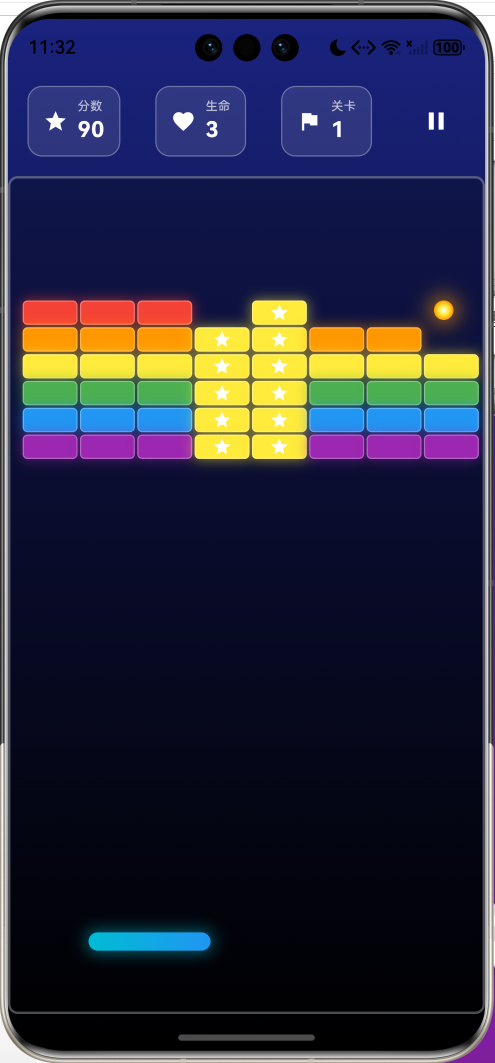
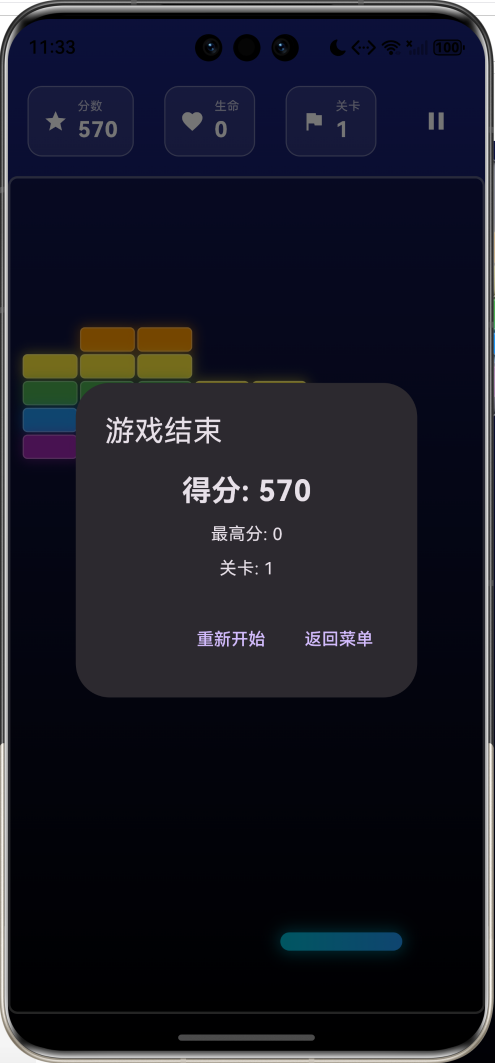
运行效果图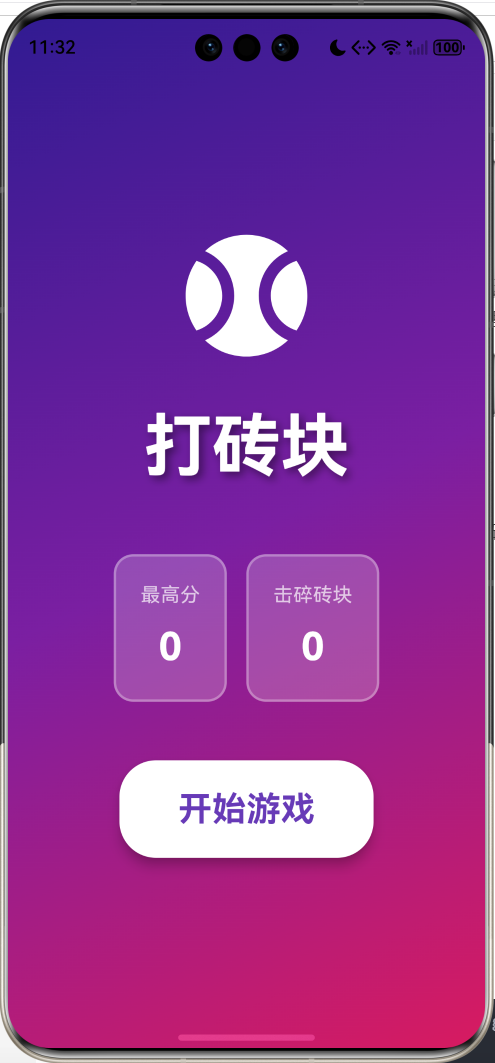
核心特性
- 经典玩法:控制挡板反弹小球击碎砖块
- 多种砖块:普通、坚硬、不可破坏、奖励砖块
- 物理引擎:真实的球体反弹和碰撞检测
- 关卡系统:无限关卡,难度递增
- 生命系统:3条生命,球掉落扣除生命
- 得分系统:不同砖块得分不同
- 暂停功能:随时暂停和继续游戏
- 数据统计:最高分和累计击碎砖块数
- 精美UI:渐变背景、发光效果、流畅动画
技术架构
游戏状态管理
enum GameState { ready, playing, paused, gameOver, levelComplete }

class _GamePageState extends State<GamePage> {
  GameState gameState = GameState.ready;

  // 挡板属性
  double paddleX = 0;              // 挡板X坐标
  final double paddleWidth = 100;  // 挡板宽度
  final double paddleHeight = 15;  // 挡板高度
  final double paddleY = 50;       // 挡板距底部距离

  // 球属性
  List<Ball> balls = [];           // 支持多球

  // 砖块
  List<Brick> bricks = [];

  // 游戏属性
  int score = 0;                   // 当前分数
  int highScore = 0;               // 最高分
  int lives = 3;                   // 生命数
  int level = 1;                   // 当前关卡
  int bricksDestroyed = 0;         // 击碎砖块数

  final double ballSpeed = 5;      // 球速
}
数据模型设计
砖块模型
enum BrickType { normal, hard, unbreakable, bonus }

class Brick {
  double x, y;           // 位置
  double width, height;  // 尺寸
  BrickType type;        // 类型
  int hits;              // 剩余耐久度
  bool destroyed;        // 是否已摧毁
  Color color;           // 颜色

  int get maxHits {
    switch (type) {
      case BrickType.normal: return 1;
      case BrickType.hard: return 2;
      case BrickType.unbreakable: return 999;
      case BrickType.bonus: return 1;
    }
  }

  int get score {
    switch (type) {
      case BrickType.normal: return 10;
      case BrickType.hard: return 20;
      case BrickType.unbreakable: return 0;
      case BrickType.bonus: return 50;
    }
  }
}
砖块类型说明:
- normal(普通):1次击中摧毁,得10分
- hard(坚硬):2次击中摧毁,得20分
- unbreakable(不可破坏):无法摧毁,只反弹
- bonus(奖励):1次击中摧毁,得50分
球模型
class Ball {
  double x, y;      // 位置
  double dx, dy;    // 速度向量
  double radius;    // 半径
  bool active;      // 是否活跃

  Ball({
    required this.x,
    required this.y,
    required this.dx,
    required this.dy,
    this.radius = 8,
    this.active = true,
  });
}
核心算法详解
1. 关卡生成算法
void _initLevel() {
  bricks.clear();
  balls.clear();

  const int rows = 6;
  const int cols = 8;
  const double brickWidth = 45;
  const double brickHeight = 20;
  const double spacing = 2;
  const double startX = 10;
  const double startY = 100;

  for (int row = 0; row < rows; row++) {
    for (int col = 0; col < cols; col++) {
      BrickType type;
      Color color;
      int hits;

      // 根据行数和关卡决定砖块类型
      if (row == 0 && level >= 2) {
        type = BrickType.unbreakable;
        color = Colors.grey.shade800;
        hits = 999;
      } else if (row == 1 && level >= 3) {
        type = BrickType.hard;
        color = Colors.orange;
        hits = 2;
      } else if (col == 3 || col == 4) {
        type = BrickType.bonus;
        color = Colors.yellow;
        hits = 1;
      } else {
        type = BrickType.normal;
        color = _getColorForRow(row);
        hits = 1;
      }

      bricks.add(Brick(
        x: startX + col * (brickWidth + spacing),
        y: startY + row * (brickHeight + spacing),
        width: brickWidth,
        height: brickHeight,
        type: type,
        hits: hits,
        color: color,
      ));
    }
  }

  _resetBall();
}
生成策略:
- 网格布局:6行×8列的砖块阵列
- 难度递增:
- 关卡1:全部普通砖块
- 关卡2+:第一行添加不可破坏砖块
- 关卡3+:第二行添加坚硬砖块
- 奖励砖块:中间两列为奖励砖块(高分)
- 彩虹配色:每行不同颜色,视觉丰富
2. 球体运动算法
void _updateGame() {
  for (var ball in balls) {
    if (!ball.active) continue;

    // 更新位置
    ball.x += ball.dx;
    ball.y += ball.dy;

    // 墙壁碰撞检测
    if (ball.x <= ball.radius || ball.x >= 400 - ball.radius) {
      ball.dx = -ball.dx;
      ball.x = ball.x <= ball.radius
          ? ball.radius
          : 400 - ball.radius;
    }

    if (ball.y <= ball.radius) {
      ball.dy = -ball.dy;
      ball.y = ball.radius;
    }
  }
}
运动原理:
- 每帧更新球的位置:
x += dx,y += dy - 碰到左右墙壁:水平速度反向
dx = -dx - 碰到顶部:垂直速度反向
dy = -dy - 边界修正:防止球穿墙
3. 挡板碰撞检测
bool _checkPaddleCollision(Ball ball) {
  return ball.y + ball.radius >= paddleY &&
      ball.y - ball.radius <= paddleY + paddleHeight &&
      ball.x >= paddleX &&
      ball.x <= paddleX + paddleWidth &&
      ball.dy > 0;  // 只有向下运动时才检测
}

// 碰撞处理
if (_checkPaddleCollision(ball)) {
  ball.dy = -ball.dy.abs();  // 反弹向上
  ball.y = paddleY + paddleHeight + ball.radius;

  // 根据击球位置调整角度
  final hitPos = (ball.x - paddleX) / paddleWidth;
  ball.dx = (hitPos - 0.5) * ballSpeed * 2;
}
碰撞算法:
- AABB检测:检查球和挡板的矩形是否重叠
- 方向判断:只有球向下运动时才触发
- 角度调整:
- 击中挡板中心:垂直反弹
- 击中挡板边缘:斜向反弹
- 公式:
dx = (hitPos - 0.5) * ballSpeed * 2
击球位置与角度关系:
挡板位置:  [0.0 -------- 0.5 -------- 1.0]
反弹角度:  [←←←  ←  ↑  →  →→→]
4. 砖块碰撞检测
void _checkBrickCollision(Ball ball) {
  for (var brick in bricks) {
    if (brick.destroyed) continue;

    // AABB碰撞检测
    if (ball.x + ball.radius >= brick.x &&
        ball.x - ball.radius <= brick.x + brick.width &&
        ball.y + ball.radius >= brick.y &&
        ball.y - ball.radius <= brick.y + brick.height) {

      // 不可破坏砖块只反弹
      if (brick.type == BrickType.unbreakable) {
        _bounceBall(ball, brick);
        continue;
      }

      // 减少耐久度
      brick.hits--;
      if (brick.hits <= 0) {
        brick.destroyed = true;
        score += brick.score;
        bricksDestroyed++;
      }

      _bounceBall(ball, brick);
      break;  // 一帧只碰撞一个砖块
    }
  }
}
碰撞处理流程:
5. 球体反弹算法
void _bounceBall(Ball ball, Brick brick) {
  final brickCenterX = brick.x + brick.width / 2;
  final brickCenterY = brick.y + brick.height / 2;

  final dx = ball.x - brickCenterX;
  final dy = ball.y - brickCenterY;

  // 判断碰撞方向
  if (dx.abs() > dy.abs()) {
    // 水平碰撞(左右边)
    ball.dx = -ball.dx;
  } else {
    // 垂直碰撞(上下边)
    ball.dy = -ball.dy;
  }
}
反弹方向判断:
- 计算球心到砖块中心的距离向量
(dx, dy) - 比较水平和垂直距离的绝对值
|dx| > |dy|:水平碰撞,反转dx|dx| < |dy|:垂直碰撞,反转dy
示意图:
        垂直碰撞
           ↓
    ┌──────────────┐
    │              │
←───│   砖块中心   │───→ 水平碰撞
    │              │
    └──────────────┘
           ↑
        垂直碰撞
6. 游戏循环
void _startGame() {
  setState(() {
    gameState = GameState.playing;
  });

  _gameTimer = Timer.periodic(
    const Duration(milliseconds: 16), // 约60FPS
    (timer) {
      _updateGame();
    },
  );
}

void _updateGame() {
  if (gameState != GameState.playing) return;

  setState(() {
    // 1. 更新所有球的位置
    for (var ball in balls) {
      ball.x += ball.dx;
      ball.y += ball.dy;
    }

    // 2. 检测墙壁碰撞
    // 3. 检测挡板碰撞
    // 4. 检测砖块碰撞
    // 5. 检测球掉落
    // 6. 检查关卡完成
  });
}
游戏循环频率:
- 16ms ≈ 62.5 FPS
- 1000ms / 16ms = 62.5帧/秒
- 流畅的游戏体验
UI组件设计
1. 菜单页面
Widget build(BuildContext context) {
  return Container(
    decoration: BoxDecoration(
      gradient: LinearGradient(
        begin: Alignment.topLeft,
        end: Alignment.bottomRight,
        colors: [
          Colors.deepPurple.shade900,
          Colors.purple.shade700,
          Colors.pink.shade600,
        ],
      ),
    ),
    child: Column(
      children: [
        Icon(Icons.sports_baseball, size: 120),
        Text('打砖块', style: TextStyle(fontSize: 56)),
        Row([
          _buildStatCard('最高分', highScore),
          _buildStatCard('击碎砖块', totalBricksDestroyed),
        ]),
        ElevatedButton('开始游戏'),
      ],
    ),
  );
}
设计特点:
- 三色渐变背景(紫→粉)
- 大图标和标题突出主题
- 统计卡片展示成就
- 圆角按钮提升质感
2. 游戏场景
Widget build(BuildContext context) {
  return GestureDetector(
    onTapDown: (details) => _startGame(),
    onHorizontalDragUpdate: (details) {
      setState(() {
        paddleX += details.delta.dx;
        paddleX = paddleX.clamp(0, 400 - paddleWidth);
      });
    },
    child: Stack([
      ..._buildBricks(),    // 砖块层
      _buildPaddle(),       // 挡板层
      ..._buildBalls(),     // 球层
      _buildUI(),           // UI层
    ]),
  );
}
交互设计:
onTapDown:点击开始游戏onHorizontalDragUpdate:拖动控制挡板clamp:限制挡板在边界内
3. 砖块渲染
Widget _buildBrick(Brick brick) {
  return Container(
    width: brick.width,
    height: brick.height,
    decoration: BoxDecoration(
      color: brick.color,
      borderRadius: BorderRadius.circular(4),
      border: Border.all(
        color: Colors.white.withOpacity(0.3),
      ),
      boxShadow: [
        BoxShadow(
          color: brick.color.withOpacity(0.5),
          blurRadius: 8,
          spreadRadius: 1,
        ),
      ],
    ),
    child: _buildBrickContent(brick),
  );
}
视觉效果:
- 圆角矩形柔和外观
- 半透明边框增加层次
- 发光阴影突出砖块
- 根据类型显示不同内容
砖块内容:
- 坚硬砖块:显示剩余耐久度数字
- 奖励砖块:显示星星图标
- 其他砖块:纯色填充
4. 挡板渲染
Widget _buildPaddle() {
  return Container(
    width: paddleWidth,
    height: paddleHeight,
    decoration: BoxDecoration(
      gradient: const LinearGradient(
        colors: [Colors.cyan, Colors.blue],
      ),
      borderRadius: BorderRadius.circular(8),
      boxShadow: [
        BoxShadow(
          color: Colors.cyan.withOpacity(0.5),
          blurRadius: 10,
          spreadRadius: 2,
        ),
      ],
    ),
  );
}
设计亮点:
- 青蓝渐变科技感
- 圆角矩形流线型
- 青色发光效果
- 视觉焦点明确
5. 球体渲染
Widget _buildBall(Ball ball) {
  return Container(
    width: ball.radius * 2,
    height: ball.radius * 2,
    decoration: BoxDecoration(
      shape: BoxShape.circle,
      gradient: const RadialGradient(
        colors: [Colors.white, Colors.yellow, Colors.orange],
      ),
      boxShadow: [
        BoxShadow(
          color: Colors.orange.withOpacity(0.8),
          blurRadius: 15,
          spreadRadius: 3,
        ),
      ],
    ),
  );
}
视觉特效:
- 径向渐变模拟光照
- 白→黄→橙渐变
- 橙色发光拖尾效果
- 圆形完美球体
6. 状态栏
Widget _buildStatItem(String label, String value, IconData icon) {
  return Container(
    padding: EdgeInsets.symmetric(horizontal: 12, vertical: 8),
    decoration: BoxDecoration(
      color: Colors.white.withOpacity(0.1),
      borderRadius: BorderRadius.circular(12),
      border: Border.all(color: Colors.white.withOpacity(0.3)),
    ),
    child: Row([
      Icon(icon, color: Colors.white, size: 20),
      Column([
        Text(label, style: TextStyle(fontSize: 10)),
        Text(value, style: TextStyle(fontSize: 18, bold)),
      ]),
    ]),
  );
}
信息展示:
- 分数:星星图标
- 生命:爱心图标
- 关卡:旗帜图标
- 半透明背景不遮挡游戏
数据持久化
统计数据存储
Future<void> _saveStats() async {
  final prefs = await SharedPreferences.getInstance();

  // 保存最高分
  if (score > highScore) {
    await prefs.setInt('breakout_high_score', score);
    setState(() {
      highScore = score;
    });
  }

  // 累计击碎砖块数
  final totalBricks = prefs.getInt('breakout_total_bricks') ?? 0;
  await prefs.setInt('breakout_total_bricks',
      totalBricks + bricksDestroyed);
}
存储内容:
breakout_high_score:最高分记录breakout_total_bricks:累计击碎砖块总数
游戏平衡性设计
难度曲线
| 关卡 | 不可破坏砖块 | 坚硬砖块 | 普通砖块 | 奖励砖块 |
|---|---|---|---|---|
| 1 | 0 | 0 | 40 | 12 |
| 2 | 8 | 0 | 32 | 12 |
| 3+ | 8 | 8 | 24 | 12 |
难度递增策略:
- 关卡1:纯普通砖块,熟悉操作
- 关卡2:引入不可破坏砖块,增加难度
- 关卡3+:添加坚硬砖块,需要多次击打
得分系统
总分 = Σ(砖块得分)

砖块得分:
- 普通砖块: 10分
- 坚硬砖块: 20分
- 奖励砖块: 50分
- 不可破坏: 0分
满分计算(关卡1):
- 普通砖块:40 × 10 = 400分
- 奖励砖块:12 × 50 = 600分
- 总计:1000分
物理参数调优
// 球速
final double ballSpeed = 5;

// 挡板尺寸
final double paddleWidth = 100;
final double paddleHeight = 15;

// 球半径
final double ballRadius = 8;

// 砖块尺寸
final double brickWidth = 45;
final double brickHeight = 20;
参数建议:
| 参数 | 推荐值 | 说明 |
|---|---|---|
| ballSpeed | 4-6 | 速度越快难度越高 |
| paddleWidth | 80-120 | 宽度越小难度越高 |
| ballRadius | 6-10 | 半径影响碰撞判定 |
功能扩展建议
1. 道具系统
enum PowerUpType {
  expandPaddle,   // 扩大挡板
  shrinkPaddle,   // 缩小挡板
  slowBall,       // 减速球
  fastBall,       // 加速球
  multiBall,      // 多球
  fireBall,       // 火球(穿透砖块)
  stickyPaddle,   // 粘性挡板(球粘在挡板上)
  laser,          // 激光(挡板发射激光)
}

class PowerUp {
  double x, y;
  PowerUpType type;
  double speed;

  void activate() {
    switch (type) {
      case PowerUpType.expandPaddle:
        paddleWidth *= 1.5;
        Timer(Duration(seconds: 10), () => paddleWidth /= 1.5);
        break;
      case PowerUpType.multiBall:
        for (int i = 0; i < 2; i++) {
          balls.add(Ball(
            x: balls[0].x,
            y: balls[0].y,
            dx: ballSpeed * (i == 0 ? 1 : -1),
            dy: -ballSpeed,
          ));
        }
        break;
      // ...
    }
  }
}
2. 特殊砖块
enum SpecialBrickType {
  explosive,    // 爆炸砖块:摧毁周围砖块
  multiHit,     // 多重砖块:需要多次击打
  moving,       // 移动砖块:左右移动
  invisible,    // 隐形砖块:碰撞后才显示
  regenerating, // 再生砖块:一段时间后恢复
}

class SpecialBrick extends Brick {
  SpecialBrickType specialType;

  void onDestroy() {
    switch (specialType) {
      case SpecialBrickType.explosive:
        _explodeNearbyBricks();
        break;
      case SpecialBrickType.regenerating:
        Timer(Duration(seconds: 5), () {
          destroyed = false;
          hits = maxHits;
        });
        break;
      // ...
    }
  }
}
3. 关卡编辑器
class LevelEditor extends StatefulWidget {
Widget build(BuildContext context) {
return Scaffold(
body: GridView.builder(
gridDelegate: SliverGridDelegateWithFixedCrossAxisCount(
crossAxisCount: 8,
),
itemCount: 48,
itemBuilder: (context, index) {
return GestureDetector(
onTap: () => _toggleBrick(index),
child: Container(
decoration: BoxDecoration(
color: _getBrickColor(index),
border: Border.all(color: Colors.white),
),
),
);
},
),
floatingActionButton: FloatingActionButton(
onPressed: _saveLevel,
child: Icon(Icons.save),
),
);
}
}
4. 成就系统
class Achievement {
  String id;
  String title;
  String description;
  int target;
  int progress;
  bool unlocked;

  static final achievements = [
    Achievement(
      id: 'first_clear',
      title: '初次通关',
      description: '完成第一关',
      target: 1,
    ),
    Achievement(
      id: 'perfect_clear',
      title: '完美通关',
      description: '不失一命通关',
      target: 1,
    ),
    Achievement(
      id: 'brick_destroyer',
      title: '砖块破坏者',
      description: '累计击碎1000个砖块',
      target: 1000,
    ),
    Achievement(
      id: 'combo_master',
      title: '连击大师',
      description: '一球击碎10个砖块',
      target: 10,
    ),
  ];
}
5. 多人模式
class MultiplayerMode {
  List<Player> players;

  void update() {
    for (var player in players) {
      // 更新各自的球和挡板
      player.updateBall();
      player.updatePaddle();

      // 检测碰撞
      player.checkCollisions();
    }

    // 检查胜负
    _checkWinner();
  }
}

class Player {
  String name;
  double paddleX;
  List<Ball> balls;
  int score;
  int lives;
}
6. 粒子效果
class Particle {
  double x, y;
  double dx, dy;
  Color color;
  double life;

  void update() {
    x += dx;
    y += dy;
    dy += 0.5; // 重力
    life -= 0.02;
  }
}

void _createExplosion(double x, double y, Color color) {
  for (int i = 0; i < 20; i++) {
    final angle = Random().nextDouble() * 2 * pi;
    final speed = Random().nextDouble() * 5;

    particles.add(Particle(
      x: x,
      y: y,
      dx: cos(angle) * speed,
      dy: sin(angle) * speed,
      color: color,
      life: 1.0,
    ));
  }
}
7. 音效系统
import 'package:audioplayers/audioplayers.dart';

class SoundManager {
  final AudioPlayer _player = AudioPlayer();

  Future<void> playBrickHit() async {
    await _player.play(AssetSource('sounds/brick_hit.mp3'));
  }

  Future<void> playPaddleHit() async {
    await _player.play(AssetSource('sounds/paddle_hit.mp3'));
  }

  Future<void> playWallHit() async {
    await _player.play(AssetSource('sounds/wall_hit.mp3'));
  }

  Future<void> playLevelComplete() async {
    await _player.play(AssetSource('sounds/level_complete.mp3'));
  }

  Future<void> playGameOver() async {
    await _player.play(AssetSource('sounds/game_over.mp3'));
  }
}
8. 关卡模板
class LevelTemplate {
  String name;
  List<List<BrickType>> layout;

  static final templates = [
    LevelTemplate(
      name: '金字塔',
      layout: [
        [null, null, null, B, B, null, null, null],
        [null, null, B, B, B, B, null, null],
        [null, B, B, B, B, B, B, null],
        [B, B, B, B, B, B, B, B],
      ],
    ),
    LevelTemplate(
      name: '笑脸',
      layout: [
        [null, B, B, null, null, B, B, null],
        [B, null, null, B, B, null, null, B],
        [B, null, null, B, B, null, null, B],
        [null, B, null, null, null, null, B, null],
        [null, null, B, B, B, B, null, null],
      ],
    ),
  ];
}
性能优化
1. 碰撞检测优化
// 空间分区优化
class SpatialGrid {
  Map<int, List<Brick>> grid = {};
  final int cellSize = 50;

  int _getKey(double x, double y) {
    final col = (x / cellSize).floor();
    final row = (y / cellSize).floor();
    return row * 100 + col;
  }

  void insert(Brick brick) {
    final key = _getKey(brick.x, brick.y);
    grid.putIfAbsent(key, () => []).add(brick);
  }

  List<Brick> getNearby(double x, double y) {
    final key = _getKey(x, y);
    return grid[key] ?? [];
  }
}

// 只检测附近的砖块
void _checkBrickCollision(Ball ball) {
  final nearbyBricks = spatialGrid.getNearby(ball.x, ball.y);
  for (var brick in nearbyBricks) {
    // 碰撞检测
  }
}
2. 渲染优化
// 使用CustomPainter减少Widget重建
class GamePainter extends CustomPainter {
final List<Brick> bricks;
final List<Ball> balls;
final double paddleX;
void paint(Canvas canvas, Size size) {
// 绘制砖块
for (var brick in bricks) {
if (!brick.destroyed) {
canvas.drawRect(
Rect.fromLTWH(brick.x, brick.y, brick.width, brick.height),
Paint()..color = brick.color,
);
}
}
// 绘制球
for (var ball in balls) {
canvas.drawCircle(
Offset(ball.x, ball.y),
ball.radius,
Paint()..color = Colors.white,
);
}
// 绘制挡板
canvas.drawRRect(
RRect.fromRectAndRadius(
Rect.fromLTWH(paddleX, paddleY, paddleWidth, paddleHeight),
Radius.circular(8),
),
Paint()..color = Colors.blue,
);
}
bool shouldRepaint(GamePainter oldDelegate) => true;
}
3. 内存管理
// 对象池模式
class BallPool {
  final List<Ball> _pool = [];

  Ball obtain(double x, double y, double dx, double dy) {
    if (_pool.isNotEmpty) {
      final ball = _pool.removeLast();
      ball.x = x;
      ball.y = y;
      ball.dx = dx;
      ball.dy = dy;
      ball.active = true;
      return ball;
    }
    return Ball(x: x, y: y, dx: dx, dy: dy);
  }

  void recycle(Ball ball) {
    ball.active = false;
    _pool.add(ball);
  }
}
测试用例
单元测试
void main() {
  group('Collision Tests', () {
    test('Ball should bounce off walls', () {
      final ball = Ball(x: 5, y: 200, dx: -5, dy: 0);

      // 模拟碰撞左墙
      if (ball.x <= ball.radius) {
        ball.dx = -ball.dx;
      }

      expect(ball.dx, 5);
    });

    test('Ball should bounce off paddle', () {
      final ball = Ball(x: 150, y: 50, dx: 0, dy: 5);
      final paddleX = 100.0;
      final paddleWidth = 100.0;

      final collision = ball.x >= paddleX &&
          ball.x <= paddleX + paddleWidth;

      expect(collision, true);
    });

    test('Brick should be destroyed after hits', () {
      final brick = Brick(
        x: 0, y: 0, width: 45, height: 20,
        type: BrickType.normal,
        hits: 1,
        color: Colors.red,
      );

      brick.hits--;
      expect(brick.hits, 0);
    });
  });

  group('Score Tests', () {
    test('Should calculate correct score', () {
      int score = 0;

      // 击碎普通砖块
      score += 10;
      expect(score, 10);

      // 击碎坚硬砖块
      score += 20;
      expect(score, 30);

      // 击碎奖励砖块
      score += 50;
      expect(score, 80);
    });
  });
}
调试技巧
1. 显示碰撞箱
Widget _buildDebugCollisionBox() {
  return Stack([
    // 球的碰撞箱
    for (var ball in balls)
      Positioned(
        left: ball.x - ball.radius,
        top: ball.y - ball.radius,
        child: Container(
          width: ball.radius * 2,
          height: ball.radius * 2,
          decoration: BoxDecoration(
            shape: BoxShape.circle,
            border: Border.all(color: Colors.red, width: 2),
          ),
        ),
      ),

    // 砖块的碰撞箱
    for (var brick in bricks)
      if (!brick.destroyed)
        Positioned(
          left: brick.x,
          top: brick.y,
          child: Container(
            width: brick.width,
            height: brick.height,
            decoration: BoxDecoration(
              border: Border.all(color: Colors.green, width: 2),
            ),
          ),
        ),
  ]);
}
2. 慢动作模式
bool debugSlowMotion = false;

Timer.periodic(
  Duration(milliseconds: debugSlowMotion ? 50 : 16),
  (timer) => _updateGame(),
);
3. 无敌模式
bool debugInvincible = false;

if (ball.y > 700 && !debugInvincible) {
  ball.active = false;
}
4. 打印游戏状态
void _debugPrintState() {
  print('=== Game State ===');
  print('Score: $score');
  print('Lives: $lives');
  print('Level: $level');
  print('Balls: ${balls.length}');
  print('Bricks: ${bricks.where((b) => !b.destroyed).length}');
  print('==================');
}
常见问题解决
1. 球穿墙
问题:球速过快导致穿过墙壁
原因:一帧移动距离大于墙壁厚度
解决:
// 限制球速
final maxSpeed = 10.0;
ball.dx = ball.dx.clamp(-maxSpeed, maxSpeed);
ball.dy = ball.dy.clamp(-maxSpeed, maxSpeed);

// 或使用连续碰撞检测
void _continuousCollisionDetection(Ball ball) {
  final steps = (ball.dx.abs() / ball.radius).ceil();
  final stepX = ball.dx / steps;
  final stepY = ball.dy / steps;

  for (int i = 0; i < steps; i++) {
    ball.x += stepX;
    ball.y += stepY;
    _checkCollisions(ball);
  }
}
2. 球卡在砖块里
问题:球进入砖块内部无法弹出
原因:碰撞检测后未正确调整位置
解决:
void _bounceBall(Ball ball, Brick brick) {
  // 计算穿透深度
  final overlapX = min(
    ball.x + ball.radius - brick.x,
    brick.x + brick.width - (ball.x - ball.radius),
  );
  final overlapY = min(
    ball.y + ball.radius - brick.y,
    brick.y + brick.height - (ball.y - ball.radius),
  );

  // 沿穿透最小的方向推出
  if (overlapX < overlapY) {
    ball.dx = -ball.dx;
    ball.x += ball.dx > 0 ? overlapX : -overlapX;
  } else {
    ball.dy = -ball.dy;
    ball.y += ball.dy > 0 ? overlapY : -overlapY;
  }
}
3. 挡板控制不灵敏
问题:拖动挡板时响应延迟
原因:setState调用过于频繁
解决:
// 使用ValueNotifier减少重建
final paddleXNotifier = ValueNotifier<double>(0);

ValueListenableBuilder<double>(
  valueListenable: paddleXNotifier,
  builder: (context, paddleX, child) {
    return Positioned(
      left: paddleX,
      child: _buildPaddle(),
    );
  },
);

// 拖动时只更新ValueNotifier
onHorizontalDragUpdate: (details) {
  paddleXNotifier.value += details.delta.dx;
  paddleXNotifier.value = paddleXNotifier.value.clamp(0, 300);
}
4. 内存泄漏
问题:长时间游戏后卡顿
原因:Timer未释放或粒子未清理
解决:
void dispose() {
_gameTimer?.cancel();
balls.clear();
bricks.clear();
particles.clear();
super.dispose();
}
项目结构
lib/
├── main.dart
├── models/
│   ├── brick.dart
│   ├── ball.dart
│   └── power_up.dart
├── screens/
│   ├── menu_page.dart
│   ├── game_page.dart
│   └── level_editor_page.dart
├── widgets/
│   ├── brick_widget.dart
│   ├── paddle_widget.dart
│   └── ball_widget.dart
├── services/
│   ├── collision_detector.dart
│   ├── sound_manager.dart
│   └── storage_service.dart
├── utils/
│   ├── constants.dart
│   └── level_generator.dart
└── painters/
    └── game_painter.dart
依赖包
dependencies:
  flutter:
    sdk: flutter
  shared_preferences: ^2.2.2  # 数据存储

  # 可选扩展
  audioplayers: ^6.0.0        # 音效
  flame: ^1.15.0              # 游戏引擎
  vibration: ^1.8.4           # 震动反馈
总结
本项目实现了一个完整的打砖块游戏,涵盖以下核心技术:
- 物理引擎:球体运动、碰撞检测、反弹算法
- 游戏机制:多种砖块类型、关卡系统、生命系统
- UI设计:渐变背景、发光效果、流畅动画
- 数据持久化:最高分和统计数据存储
- 性能优化:空间分区、对象池、CustomPainter
通过本教程,你可以学习到:
- 游戏物理引擎的实现原理
- AABB碰撞检测算法
- Flutter手势交互处理
- 游戏循环和状态管理
- 性能优化技巧
这个项目可以作为学习Flutter游戏开发的经典案例,通过扩展功能可以打造更加丰富的打砖块游戏体验。
欢迎加入开源鸿蒙跨平台社区:https://openharmonycrossplatform.csdn.net

作为“人工智能6S店”的官方数字引擎,为AI开发者与企业提供一个覆盖软硬件全栈、一站式门户。
更多推荐
 1
1 0
0- 0


 已为社区贡献15条内容

所有评论(0)