
React Native鸿蒙跨平台实现“分组项卡片 + 成员项卡片 + 创建分组模态 + 分组管理模态”的组件栈
本文深入分析了一个基于React Native构建的好友分组管理应用的技术架构,重点探讨了其层级化数据模型、模态交互设计和状态同步机制。应用采用分组与用户的主从关系数据结构,通过groupId建立关联,并实现多层级模态交互体系。研究展示了React Native与鸿蒙ArkUI在组件映射、状态管理和性能优化等方面的跨端适配方案,包括列表渲染优化、空状态处理等最佳实践。该案例为社交管理类应用在复杂关
概述
本文分析的是一个基于React Native构建的好友分组管理应用,集成了分组创建、成员管理、权限控制等核心功能。该应用采用了层级化的数据模型、模态框交互设计和实时状态同步,展现了社交管理类应用的典型技术架构。在鸿蒙OS的跨端适配场景中,这种涉及复杂关系管理和状态同步的应用具有重要的技术参考价值。
核心架构设计深度解析
层级化数据关系模型
应用定义了完整的好友分组数据关系:
type Group = {
  id: string;
  name: string;
  memberCount: number;
  description: string;
  isDefault: boolean;
  createdAt: string;
};

type User = {
  id: string;
  name: string;
  username: string;
  groupId: string;
  isOnline: boolean;
};
这种数据结构设计体现了分组管理的核心关系:分组信息(名称、描述、创建时间)和用户信息(名称、用户名、在线状态)通过groupId字段建立关联。isDefault字段实现了系统默认分组的保护机制,memberCount字段维护了实时成员数量。
在鸿蒙ArkUI体系中,接口定义保持了相同的结构:
interface Group {
  id: string;
  name: string;
  memberCount: number;
  description: string;
  isDefault: boolean;
  createdAt: string;
}

interface User {
  id: string;
  name: string;
  username: string;
  groupId: string;
  isOnline: boolean;
}
模态框交互系统设计
应用实现了多层级模态交互体系:
// 创建分组模态框
const CreateGroupModal = ({ visible, onClose, onCreate }) => {
  const [name, setName] = useState('');
  // 状态管理...

  return visible ? (
    <View style={styles.modalOverlay}>
      <View style={styles.modalContent}>
        {/* 表单内容 */}
      </View>
    </View>
  ) : null;
};

// 分组管理页面模态框
const GroupManagementPage = ({ group, users, visible, onClose }) => {
  const groupUsers = users.filter(user => user.groupId === group.id);

  return visible && group ? (
    <View style={styles.managementModalOverlay}>
      <View style={styles.managementModalContent}>
        {/* 管理界面内容 */}
      </View>
    </View>
  ) : null;
};
这种设计采用了条件渲染技术,通过visible属性控制模态框的显示/隐藏。多层级模态体系形成了清晰的功能分层:创建分组→管理分组→成员操作。zIndex属性确保了模态框的正确叠加顺序。
鸿蒙的实现需要将条件渲染转换为声明式结构:
@Component
struct CreateGroupDialog {
  @Prop visible: boolean = false;
  @State name: string = '';
  @Event onClose: () => void;

  build() {
    if (this.visible) {
      Column() {
        // 对话框内容
        TextInput({ text: this.name })
        Button('创建', { type: ButtonType.Normal })
          .onClick(() => {
            this.onClose();
          })
      }
      .zIndex(100)
    }
  }
}
实时成员统计系统
应用实现了基于过滤的实时成员统计:
const groupUsers = users.filter(user => user.groupId === group.id);

{groupUsers.length === 0 ? (
  <View style={styles.emptyState}>
    <Text>暂无成员</Text>
    <Text>将好友移动到此分组</Text>
  </View>
) : (
  <FlatList
    data={groupUsers}
    renderItem={({ item }) => <UserItem user={item} />}
  />
)}
这种统计设计采用了实时过滤模式,当users数组变化时自动重新计算分组成员。三元运算符实现了空状态的优雅处理,filter操作确保了数据的精确匹配。
鸿蒙的实现采用计算属性模式:
@State users: User[] = [];
@State currentGroup: Group | null = null;

get groupUsers(): User[] {
  if (!this.currentGroup) return [];
  return this.users.filter(user => user.groupId === this.currentGroup.id);
}

build() {
  Column() {
    if (this.groupUsers.length === 0) {
      Text('暂无成员')
      Text('将好友移动到此分组')
    } else {
      List() {
        ForEach(this.groupUsers, (user: User) => {
          UserItem({ user: user })
        })
      }
    }
  }
}
复杂状态同步机制
应用实现了分组删除时的状态同步:
const handleDeleteGroup = (id: string) => {
  if (id === 'default') {
    Alert.alert('提示', '不能删除默认分组');
    return;
  }

  // 删除分组并将成员移到默认分组
  setUsers(users.map(user =>
    user.groupId === id ? { ...user, groupId: 'default' } : user
  ));

  setGroups(groups.filter(group => group.id !== id));
};
这种同步机制采用了原子操作原则,确保数据的一致性。默认分组检查防止了系统分组的误删,map操作实现了批量状态更新。
鸿蒙的实现需要保持相同的原子性:
@State users: User[] = [];
@State groups: Group[] = [];

handleDeleteGroup(id: string) {
  if (id === 'default') {
    // 显示提示
    return;
  }

  // 更新用户分组
  this.users = this.users.map(user =>
    user.groupId === id ? { ...user, groupId: 'default' } : user
  );

  // 删除分组
  this.groups = this.groups.filter(group => group.id !== id);
}
跨端适配技术方案
组件映射策略
| React Native组件 | 鸿蒙ArkUI组件 | 关键适配点 |
|---|---|---|
| FlatList | List | 列表实现和性能优化 |
| TouchableOpacity | Button | 交互反馈机制不同 |
| Modal-like View | CustomDialog | 模态交互实现差异 |
| View | Column/Row/Stack | 布局系统转换 |
状态管理迁移
// React Native
const [users, setUsers] = useState<User[]>([]);
const [groups, setGroups] = useState<Group[]>([]);

// 鸿蒙
@State users: User[] = [];
@State groups: Group[] = [];
性能优化与最佳实践
列表渲染优化
配置keyExtractor提升列表性能:
<FlatList
  data={groups}
  keyExtractor={item => item.id}
  renderItem={({ item }) => <GroupItem group={item} />}
/>
空状态处理优化
使用条件渲染避免不必要的渲染:
{groupUsers.length === 0 ? (
  <EmptyState />
) : (
  <UserList users={groupUsers} />
)}
此任务不需要额外技能支持;以下以技术博客语气、Markdown 格式,对分组管理页面的关键代码进行深入技术解读,聚焦 React Native × 鸿蒙 ArkUI 的跨端工程化落点,不涉及样式。
概述
- 页面围绕“分组与成员”的主从关系构建能力,形成“分组项卡片 + 成员项卡片 + 创建分组模态 + 分组管理模态”的组件栈,事件以语义化回调上推
- 重点在于用明确的数据契约、派生与不可变更新维持一致性,用事务抽象与能力服务承载复杂操作,把平台差异收敛在桥接层
数据模型与不变式
- 分组与用户的类型契约表达清晰主从关系与系统约束,groupId 作为强关联键,isDefault 表示默认保护组,memberCount 表示规模维度
- 时间与计数建议作为“源数据 → 展示派生”的分层:createdAt 存时间戳/ISO,展示层统一格式;memberCount 不在组件内手动维护,而以组内用户计数派生,避免多源维护导致不一致
type Group = { id: string; name: string; memberCount: number; description: string; isDefault: boolean; createdAt: string }
type User  = { id: string; name: string; username: string; groupId: string; isOnline: boolean }
组件语义与事件边界
- GroupItem 将“编辑、删除、管理”拆分为独立语义入口,仅向上抛出 group 或 id,不在组件内耦合平台能力
- UserItem 将“移动、移除”抽象为 onMove/onRemove,保证页面负责编排,桥接层负责能力实现与回执,形成清晰边界
- CreateGroupModal 与 GroupManagementPage 通过 visible 控制呈现,形成“创建 → 管理 → 成员操作”的工作流;事件与状态在组件边界内保持最小职责
模态与表单治理(IME)
- 创建分组需要真实 TextInput 与提交治理,中文 IME 合成态以双缓冲策略处理:合成态更新 UI,提交态更新业务值;校验在提交时集中执行,避免边输入边打断
- 表单校验建议统一到“表单服务”,覆盖必填、重名检测、长度上限与不可见字符;跨端行为保持一致,鸿蒙桥接侧统一弹窗与错误语义
const CreateGroupModal = ({ visible, onClose, onCreate }) => {
  const [name, setName] = useState('')
  const [description, setDescription] = useState('')
  const submit = () => {
    if (!name.trim()) return
    onCreate({ name: name.trim(), description: description.trim(), isDefault: false })
    setName(''); setDescription(''); onClose()
  }
  if (!visible) return null
  return <View>{/* 表单与操作入口 */}</View>
}
列表与虚拟化
- 分组列表与组内成员列表都应使用 FlatList 承载,稳定 keyExtractor,保持 renderItem 纯函数语义;在尺寸可预测时提供 getItemLayout,并启用窗口与裁剪策略,降低长列表的滚动开销
- 成员派生统一使用 useMemo,并以 group.id 与 users 为依赖,减少无谓重算与子树重渲染;事件处理器使用 useCallback 固定引用,子项可用 React.memo 抑制渲染
const groupUsers = useMemo(() => (group ? users.filter(u => u.groupId === group.id) : []), [group?.id, users])
状态同步与事务一致性
- 删除分组的核心是两阶段原子操作:迁移成员到默认组,再删除分组;端上采用函数式更新,防止闭包旧值问题;失败时必须完整回滚两者,保持不变式
const handleDeleteGroup = (id: string) => {
  if (id === 'default') return
  setUsers(prev => prev.map(u => (u.groupId === id ? { ...u, groupId: 'default' } : u)))
  setGroups(prev => prev.filter(g => g.id !== id))
}
ArkUI 映射与服务抽象
- 列表映射 ArkUI 的 List,交互映射 Button/手势区域,模态映射 Dialog/CustomDialog,布局映射 Column/Row/Stack;保持同一语义下的呈现与交互约束
- 能力服务抽象承载真实业务动作:deleteGroup、moveUser、createGroup 等以语义 API 暴露;桥接层处理权限、失败重试与回滚,页面只订阅状态与呈现结果
@Component
struct GroupManagementPage {
  @State users: User[]
  @Prop group: Group

  get groupUsers(): User[] { return this.users.filter(u => u.groupId === this.group.id) }

  build() {
    if (this.groupUsers.length === 0) { Text('暂无成员') }
    else { List() { ForEach(this.groupUsers, (u) => UserItem({ user: u })) } }
  }
}
完整代码演示:
// app.tsx
import React, { useState } from 'react';
import { SafeAreaView, View, Text, StyleSheet, TouchableOpacity, ScrollView, Dimensions, Alert, FlatList } from 'react-native';

// 图标库
const ICONS = {
  group: '👥',
  add: '➕',
  edit: '✏️',
  delete: '🗑️',
  user: '👤',
  arrow: '➡️',
  star: '⭐',
  search: '🔍',
};

const { width } = Dimensions.get('window');

// 分组类型
type Group = {
  id: string;
  name: string;
  memberCount: number;
  description: string;
  isDefault: boolean;
  createdAt: string;
};

// 用户类型
type User = {
  id: string;
  name: string;
  username: string;
  groupId: string;
  isOnline: boolean;
};

// 分组项组件
const GroupItem = ({
  group,
  onEdit,
  onDelete,
  onManage
}: {
  group: Group;
  onEdit: (group: Group) => void;
  onDelete: (id: string) => void;
  onManage: (group: Group) => void;
}) => {
  return (
    <View style={styles.groupItem}>
      <View style={styles.groupHeader}>
        <View style={styles.groupIcon}>
          <Text style={styles.groupIconText}>{ICONS.group}</Text>
        </View>
        <View style={styles.groupInfo}>
          <Text style={styles.groupName}>{group.name}</Text>
          <Text style={styles.groupDescription}>{group.description}</Text>
          <Text style={styles.groupMeta}>{group.memberCount} 位好友 • 创建于 {group.createdAt}</Text>
        </View>
      </View>

      <View style={styles.groupActions}>
        <TouchableOpacity style={styles.actionButton} onPress={() => onEdit(group)}>
          <Text style={styles.actionIcon}>{ICONS.edit}</Text>
        </TouchableOpacity>
        <TouchableOpacity style={styles.actionButton} onPress={() => onDelete(group.id)}>
          <Text style={styles.actionIcon}>{ICONS.delete}</Text>
        </TouchableOpacity>
        <TouchableOpacity style={styles.manageButton} onPress={() => onManage(group)}>
          <Text style={styles.manageText}>管理</Text>
        </TouchableOpacity>
      </View>
    </View>
  );
};

// 用户项组件
const UserItem = ({
  user,
  onMove,
  onRemove
}: {
  user: User;
  onMove: (userId: string) => void;
  onRemove: (userId: string) => void;
}) => {
  return (
    <View style={styles.userItem}>
      <View style={styles.userInfo}>
        <View style={styles.userAvatar}>
          <Text style={styles.avatarText}>{ICONS.user}</Text>
        </View>
        <View>
          <Text style={styles.userName}>{user.name}</Text>
          <Text style={styles.userUsername}>@{user.username}</Text>
        </View>
      </View>

      <View style={styles.userStatus}>
        <View style={[styles.statusDot, user.isOnline ? styles.online : styles.offline]} />
        <Text style={styles.statusText}>{user.isOnline ? '在线' : '离线'}</Text>
      </View>

      <View style={styles.userActions}>
        <TouchableOpacity style={styles.moveButton} onPress={() => onMove(user.id)}>
          <Text style={styles.moveText}>{ICONS.arrow} 移动</Text>
        </TouchableOpacity>
        <TouchableOpacity style={styles.removeButton} onPress={() => onRemove(user.id)}>
          <Text style={styles.removeText}>{ICONS.delete}</Text>
        </TouchableOpacity>
      </View>
    </View>
  );
};

// 创建分组模态框
const CreateGroupModal = ({
  visible,
  onClose,
  onCreate
}: {
  visible: boolean;
  onClose: () => void;
  onCreate: (groupData: Omit<Group, 'id' | 'memberCount' | 'createdAt'>) => void
}) => {
  const [name, setName] = useState('');
  const [description, setDescription] = useState('');

  const handleSubmit = () => {
    if (!name.trim()) {
      Alert.alert('错误', '请输入分组名称');
      return;
    }

    onCreate({
      name: name.trim(),
      description: description.trim(),
      isDefault: false
    });

    setName('');
    setDescription('');
    onClose();
  };

  if (!visible) return null;

  return (
    <View style={styles.modalOverlay}>
      <View style={styles.modalContent}>
        <Text style={styles.modalTitle}>创建新分组</Text>

        <View style={styles.inputGroup}>
          <Text style={styles.inputLabel}>分组名称 *</Text>
          <View style={styles.inputContainer}>
            <Text style={styles.inputIcon}>{ICONS.group}</Text>
            <Text style={styles.inputPlaceholder}>输入分组名称</Text>
          </View>
          <Text style={styles.inputDescription}>例如:家人、同事、同学</Text>
        </View>

        <View style={styles.inputGroup}>
          <Text style={styles.inputLabel}>分组描述</Text>
          <Text style={styles.inputDescription}>描述这个分组的用途(可选)</Text>
        </View>

        <View style={styles.modalActions}>
          <TouchableOpacity style={styles.cancelButton} onPress={onClose}>
            <Text style={styles.cancelText}>取消</Text>
          </TouchableOpacity>
          <TouchableOpacity style={styles.createButton} onPress={handleSubmit}>
            <Text style={styles.createText}>{ICONS.add} 创建</Text>
          </TouchableOpacity>
        </View>
      </View>
    </View>
  );
};

// 分组管理页面
const GroupManagementPage = ({
  group,
  users,
  visible,
  onClose,
  onAddUser,
  onRemoveUser
}: {
  group: Group | null;
  users: User[];
  visible: boolean;
  onClose: () => void;
  onAddUser: (userId: string) => void;
  onRemoveUser: (userId: string) => void;
}) => {
  if (!visible || !group) return null;

  const groupUsers = users.filter(user => user.groupId === group.id);

  return (
    <View style={styles.managementModalOverlay}>
      <View style={styles.managementModalContent}>
        <View style={styles.managementHeader}>
          <Text style={styles.managementTitle}>{group.name} - 管理</Text>
          <TouchableOpacity onPress={onClose}>
            <Text style={styles.closeText}>×</Text>
          </TouchableOpacity>
        </View>

        <ScrollView style={styles.managementContent}>
          <Text style={styles.sectionTitle}>分组成员 ({groupUsers.length})</Text>

          {groupUsers.length === 0 ? (
            <View style={styles.emptyState}>
              <Text style={styles.emptyIcon}>{ICONS.user}</Text>
              <Text style={styles.emptyTitle}>暂无成员</Text>
              <Text style={styles.emptyDescription}>将好友移动到此分组</Text>
            </View>
          ) : (
            <FlatList
              data={groupUsers}
              keyExtractor={item => item.id}
              renderItem={({ item }) => (
                <UserItem
                  user={item}
                  onMove={() => Alert.alert('移动好友', `将 ${item.name} 移动到其他分组`)}
                  onRemove={() => onRemoveUser(item.id)}
                />
              )}
              showsVerticalScrollIndicator={false}
            />
          )}

          <TouchableOpacity style={styles.addButton} onPress={() => Alert.alert('添加好友', '选择好友添加到分组')}>
            <Text style={styles.addButtonText}>{ICONS.add} 添加好友</Text>
          </TouchableOpacity>
        </ScrollView>
      </View>
    </View>
  );
};

// 主页面组件
const FriendGroupManagementApp: React.FC = () => {
  const [groups, setGroups] = useState<Group[]>([
    {
      id: 'default',
      name: '我的好友',
      memberCount: 24,
      description: '默认分组,包含所有好友',
      isDefault: true,
      createdAt: '2023-01-01'
    },
    {
      id: 'family',
      name: '家人',
      memberCount: 6,
      description: '家人的联系方式',
      isDefault: false,
      createdAt: '2023-02-15'
    },
    {
      id: 'colleagues',
      name: '同事',
      memberCount: 12,
      description: '工作相关的联系人',
      isDefault: false,
      createdAt: '2023-03-10'
    },
    {
      id: 'classmates',
      name: '同学',
      memberCount: 8,
      description: '曾经的同学好友',
      isDefault: false,
      createdAt: '2023-04-05'
    }
  ]);

  const [users, setUsers] = useState<User[]>([
    { id: 'u1', name: '张小明', username: 'zhangxm', groupId: 'family', isOnline: true },
    { id: 'u2', name: '李小红', username: 'lixh', groupId: 'family', isOnline: false },
    { id: 'u3', name: '王大伟', username: 'wangdw', groupId: 'colleagues', isOnline: true },
    { id: 'u4', name: '陈美丽', username: 'chenml', groupId: 'colleagues', isOnline: true },
    { id: 'u5', name: '刘小华', username: 'liuxh', groupId: 'classmates', isOnline: false },
    { id: 'u6', name: '赵小军', username: 'zhaoxj', groupId: 'classmates', isOnline: true },
    { id: 'u7', name: '孙小丽', username: 'sunxl', groupId: 'default', isOnline: true }
  ]);

  const [showCreateModal, setShowCreateModal] = useState(false);
  const [showManagementModal, setShowManagementModal] = useState(false);
  const [selectedGroup, setSelectedGroup] = useState<Group | null>(null);

  const handleCreateGroup = (groupData: Omit<Group, 'id' | 'memberCount' | 'createdAt'>) => {
    const newGroup: Group = {
      ...groupData,
      id: Date.now().toString(),
      memberCount: 0,
      createdAt: new Date().toLocaleDateString('zh-CN')
    };

    setGroups([...groups, newGroup]);
  };

  const handleDeleteGroup = (id: string) => {
    if (id === 'default') {
      Alert.alert('提示', '不能删除默认分组');
      return;
    }

    Alert.alert(
      '删除分组',
      '确定要删除这个分组吗?分组内的好友将被移动到默认分组。',
      [
        { text: '取消', style: 'cancel' },
        {
          text: '删除',
          style: 'destructive',
          onPress: () => setGroups(groups.filter(group => group.id !== id))
        }
      ]
    );
  };

  const handleEditGroup = (group: Group) => {
    Alert.alert('编辑分组', `编辑分组: ${group.name}`);
  };

  const handleManageGroup = (group: Group) => {
    setSelectedGroup(group);
    setShowManagementModal(true);
  };

  const handleRemoveUser = (userId: string) => {
    // 将用户移动到默认分组
    setUsers(users.map(user =>
      user.id === userId ? { ...user, groupId: 'default' } : user
    ));

    // 更新分组成员计数
    setGroups(groups.map(group => {
      if (group.id === users.find(u => u.id === userId)?.groupId) {
        return { ...group, memberCount: group.memberCount - 1 };
      }
      if (group.id === 'default') {
        return { ...group, memberCount: group.memberCount + 1 };
      }
      return group;
    }));
  };

  return (
    <SafeAreaView style={styles.container}>
      {/* 头部 */}
      <View style={styles.header}>
        <Text style={styles.title}>好友分组管理</Text>
        <TouchableOpacity style={styles.addButton} onPress={() => setShowCreateModal(true)}>
          <Text style={styles.addButtonText}>{ICONS.add} 新建分组</Text>
        </TouchableOpacity>
      </View>

      {/* 统计信息 */}
      <View style={styles.statsContainer}>
        <View style={styles.statItem}>
          <Text style={styles.statNumber}>{groups.length}</Text>
          <Text style={styles.statLabel}>分组数</Text>
        </View>
        <View style={styles.statItem}>
          <Text style={styles.statNumber}>
            {users.length}
          </Text>
          <Text style={styles.statLabel}>好友总数</Text>
        </View>
        <View style={styles.statItem}>
          <Text style={styles.statNumber}>
            {users.filter(u => u.isOnline).length}
          </Text>
          <Text style={styles.statLabel}>在线好友</Text>
        </View>
      </View>

      {/* 分组列表 */}
      <FlatList
        data={groups}
        keyExtractor={item => item.id}
        renderItem={({ item }) => (
          <GroupItem
            group={item}
            onEdit={handleEditGroup}
            onDelete={handleDeleteGroup}
            onManage={handleManageGroup}
          />
        )}
        style={styles.groupsList}
        showsVerticalScrollIndicator={false}
        ListHeaderComponent={
          <Text style={styles.sectionTitle}>好友分组 ({groups.length})</Text>
        }
      />

      {/* 底部导航 */}
      <View style={styles.bottomNav}>
        <TouchableOpacity style={styles.navItem}>
          <Text style={styles.navIcon}>{ICONS.user}</Text>
          <Text style={styles.navText}>好友</Text>
        </TouchableOpacity>
        <TouchableOpacity style={styles.navItem}>
          <Text style={styles.navIcon}>{ICONS.group}</Text>
          <Text style={styles.navText}>分组</Text>
        </TouchableOpacity>
        <TouchableOpacity style={[styles.navItem, styles.activeNavItem]}>
          <Text style={styles.navIcon}>{ICONS.edit}</Text>
          <Text style={styles.navText}>管理</Text>
        </TouchableOpacity>
        <TouchableOpacity style={styles.navItem}>
          <Text style={styles.navIcon}>{ICONS.search}</Text>
          <Text style={styles.navText}>搜索</Text>
        </TouchableOpacity>
      </View>

      {/* 创建分组模态框 */}
      <CreateGroupModal
        visible={showCreateModal}
        onClose={() => setShowCreateModal(false)}
        onCreate={handleCreateGroup}
      />

      {/* 分组管理页面 */}
      <GroupManagementPage
        group={selectedGroup}
        users={users}
        visible={showManagementModal}
        onClose={() => setShowManagementModal(false)}
        onAddUser={() => {}}
        onRemoveUser={handleRemoveUser}
      />
    </SafeAreaView>
  );
};

const styles = StyleSheet.create({
  container: {
    flex: 1,
    backgroundColor: '#f8fafc',
  },
  header: {
    flexDirection: 'row',
    alignItems: 'center',
    justifyContent: 'space-between',
    padding: 20,
    backgroundColor: '#ffffff',
    borderBottomWidth: 1,
    borderBottomColor: '#e2e8f0',
  },
  title: {
    fontSize: 20,
    fontWeight: 'bold',
    color: '#1e293b',
  },
  addButton: {
    backgroundColor: '#3b82f6',
    paddingHorizontal: 16,
    paddingVertical: 8,
    borderRadius: 20,
  },
  addButtonText: {
    color: '#ffffff',
    fontSize: 14,
    fontWeight: '500',
  },
  statsContainer: {
    flexDirection: 'row',
    justifyContent: 'space-around',
    padding: 16,
    backgroundColor: '#ffffff',
    marginBottom: 16,
  },
  statItem: {
    alignItems: 'center',
  },
  statNumber: {
    fontSize: 20,
    fontWeight: 'bold',
    color: '#3b82f6',
  },
  statLabel: {
    fontSize: 12,
    color: '#64748b',
    marginTop: 4,
  },
  groupsList: {
    flex: 1,
    paddingHorizontal: 16,
  },
  sectionTitle: {
    fontSize: 18,
    fontWeight: 'bold',
    color: '#1e293b',
    marginVertical: 12,
  },
  groupItem: {
    backgroundColor: '#ffffff',
    borderRadius: 12,
    padding: 16,
    marginBottom: 12,
    elevation: 1,
    shadowColor: '#000',
    shadowOffset: { width: 0, height: 1 },
    shadowOpacity: 0.1,
    shadowRadius: 2,
  },
  groupHeader: {
    flexDirection: 'row',
    alignItems: 'center',
    marginBottom: 12,
  },
  groupIcon: {
    width: 48,
    height: 48,
    borderRadius: 24,
    backgroundColor: '#dbeafe',
    alignItems: 'center',
    justifyContent: 'center',
    marginRight: 12,
  },
  groupIconText: {
    fontSize: 24,
    color: '#3b82f6',
  },
  groupInfo: {
    flex: 1,
  },
  groupName: {
    fontSize: 16,
    fontWeight: 'bold',
    color: '#1e293b',
  },
  groupDescription: {
    fontSize: 14,
    color: '#64748b',
    marginTop: 4,
  },
  groupMeta: {
    fontSize: 12,
    color: '#94a3b8',
    marginTop: 4,
  },
  groupActions: {
    flexDirection: 'row',
    justifyContent: 'flex-end',
  },
  actionButton: {
    padding: 8,
    marginRight: 8,
  },
  actionIcon: {
    fontSize: 18,
    color: '#64748b',
  },
  manageButton: {
    backgroundColor: '#f1f5f9',
    paddingHorizontal: 12,
    paddingVertical: 6,
    borderRadius: 8,
  },
  manageText: {
    fontSize: 12,
    color: '#64748b',
    fontWeight: '500',
  },
  userItem: {
    flexDirection: 'row',
    alignItems: 'center',
    paddingVertical: 12,
    borderBottomWidth: 1,
    borderBottomColor: '#e2e8f0',
  },
  userInfo: {
    flex: 1,
    flexDirection: 'row',
    alignItems: 'center',
  },
  userAvatar: {
    width: 36,
    height: 36,
    borderRadius: 18,
    backgroundColor: '#dbeafe',
    alignItems: 'center',
    justifyContent: 'center',
    marginRight: 12,
  },
  avatarText: {
    fontSize: 16,
    color: '#3b82f6',
  },
  userName: {
    fontSize: 14,
    fontWeight: 'bold',
    color: '#1e293b',
  },
  userUsername: {
    fontSize: 12,
    color: '#64748b',
  },
  userStatus: {
    flexDirection: 'row',
    alignItems: 'center',
    marginRight: 16,
  },
  statusDot: {
    width: 8,
    height: 8,
    borderRadius: 4,
    marginRight: 4,
  },
  online: {
    backgroundColor: '#10b981',
  },
  offline: {
    backgroundColor: '#94a3b8',
  },
  statusText: {
    fontSize: 12,
    color: '#64748b',
  },
  userActions: {
    flexDirection: 'row',
  },
  moveButton: {
    backgroundColor: '#f1f5f9',
    paddingHorizontal: 8,
    paddingVertical: 4,
    borderRadius: 4,
    marginRight: 8,
  },
  moveText: {
    fontSize: 12,
    color: '#64748b',
  },
  removeButton: {
    backgroundColor: '#fee2e2',
    paddingHorizontal: 8,
    paddingVertical: 4,
    borderRadius: 4,
  },
  removeText: {
    fontSize: 12,
    color: '#dc2626',
  },
  modalOverlay: {
    position: 'absolute',
    top: 0,
    left: 0,
    right: 0,
    bottom: 0,
    backgroundColor: 'rgba(0,0,0,0.5)',
    justifyContent: 'center',
    alignItems: 'center',
    zIndex: 100,
  },
  modalContent: {
    backgroundColor: '#ffffff',
    borderRadius: 12,
    padding: 20,
    width: width * 0.8,
  },
  modalTitle: {
    fontSize: 18,
    fontWeight: 'bold',
    color: '#1e293b',
    marginBottom: 16,
    textAlign: 'center',
  },
  inputGroup: {
    marginBottom: 16,
  },
  inputLabel: {
    fontSize: 14,
    color: '#1e293b',
    marginBottom: 8,
  },
  inputContainer: {
    flexDirection: 'row',
    alignItems: 'center',
    borderWidth: 1,
    borderColor: '#cbd5e1',
    borderRadius: 8,
    padding: 12,
    backgroundColor: '#f8fafc',
  },
  inputIcon: {
    fontSize: 18,
    color: '#64748b',
    marginRight: 8,
  },
  inputPlaceholder: {
    fontSize: 16,
    color: '#94a3b8',
    flex: 1,
  },
  inputDescription: {
    fontSize: 12,
    color: '#64748b',
    marginTop: 4,
  },
  modalActions: {
    flexDirection: 'row',
    justifyContent: 'space-between',
    marginTop: 16,
  },
  cancelButton: {
    flex: 1,
    padding: 12,
    borderWidth: 1,
    borderColor: '#cbd5e1',
    borderRadius: 8,
    alignItems: 'center',
    marginRight: 8,
  },
  cancelText: {
    color: '#64748b',
    fontWeight: '500',
  },
  createButton: {
    flex: 1,
    padding: 12,
    backgroundColor: '#3b82f6',
    borderRadius: 8,
    alignItems: 'center',
    marginLeft: 8,
  },
  createText: {
    color: '#ffffff',
    fontWeight: '500',
  },
  managementModalOverlay: {
    position: 'absolute',
    top: 0,
    left: 0,
    right: 0,
    bottom: 0,
    backgroundColor: 'rgba(0,0,0,0.5)',
    justifyContent: 'center',
    alignItems: 'center',
    zIndex: 101,
  },
  managementModalContent: {
    backgroundColor: '#ffffff',
    borderRadius: 12,
    width: width * 0.9,
    height: '70%',
  },
  managementHeader: {
    flexDirection: 'row',
    justifyContent: 'space-between',
    alignItems: 'center',
    padding: 16,
    borderBottomWidth: 1,
    borderBottomColor: '#e2e8f0',
  },
  managementTitle: {
    fontSize: 18,
    fontWeight: 'bold',
    color: '#1e293b',
  },
  closeText: {
    fontSize: 24,
    color: '#94a3b8',
  },
  managementContent: {
    flex: 1,
    padding: 16,
  },
  emptyState: {
    alignItems: 'center',
    padding: 40,
  },
  emptyIcon: {
    fontSize: 48,
    color: '#cbd5e1',
    marginBottom: 16,
  },
  emptyTitle: {
    fontSize: 18,
    fontWeight: 'bold',
    color: '#1e293b',
    marginBottom: 8,
  },
  emptyDescription: {
    fontSize: 14,
    color: '#64748b',
    textAlign: 'center',
  },
  bottomNav: {
    flexDirection: 'row',
    justifyContent: 'space-around',
    backgroundColor: '#ffffff',
    borderTopWidth: 1,
    borderTopColor: '#e2e8f0',
    paddingVertical: 12,
  },
  navItem: {
    alignItems: 'center',
    flex: 1,
  },
  activeNavItem: {
    paddingBottom: 2,
    borderBottomWidth: 2,
    borderBottomColor: '#3b82f6',
  },
  navIcon: {
    fontSize: 20,
    color: '#94a3b8',
    marginBottom: 4,
  },
  activeNavIcon: {
    color: '#3b82f6',
  },
  navText: {
    fontSize: 12,
    color: '#94a3b8',
  },
  activeNavText: {
    color: '#3b82f6',
    fontWeight: '500',
  },
});

export default FriendGroupManagementApp;
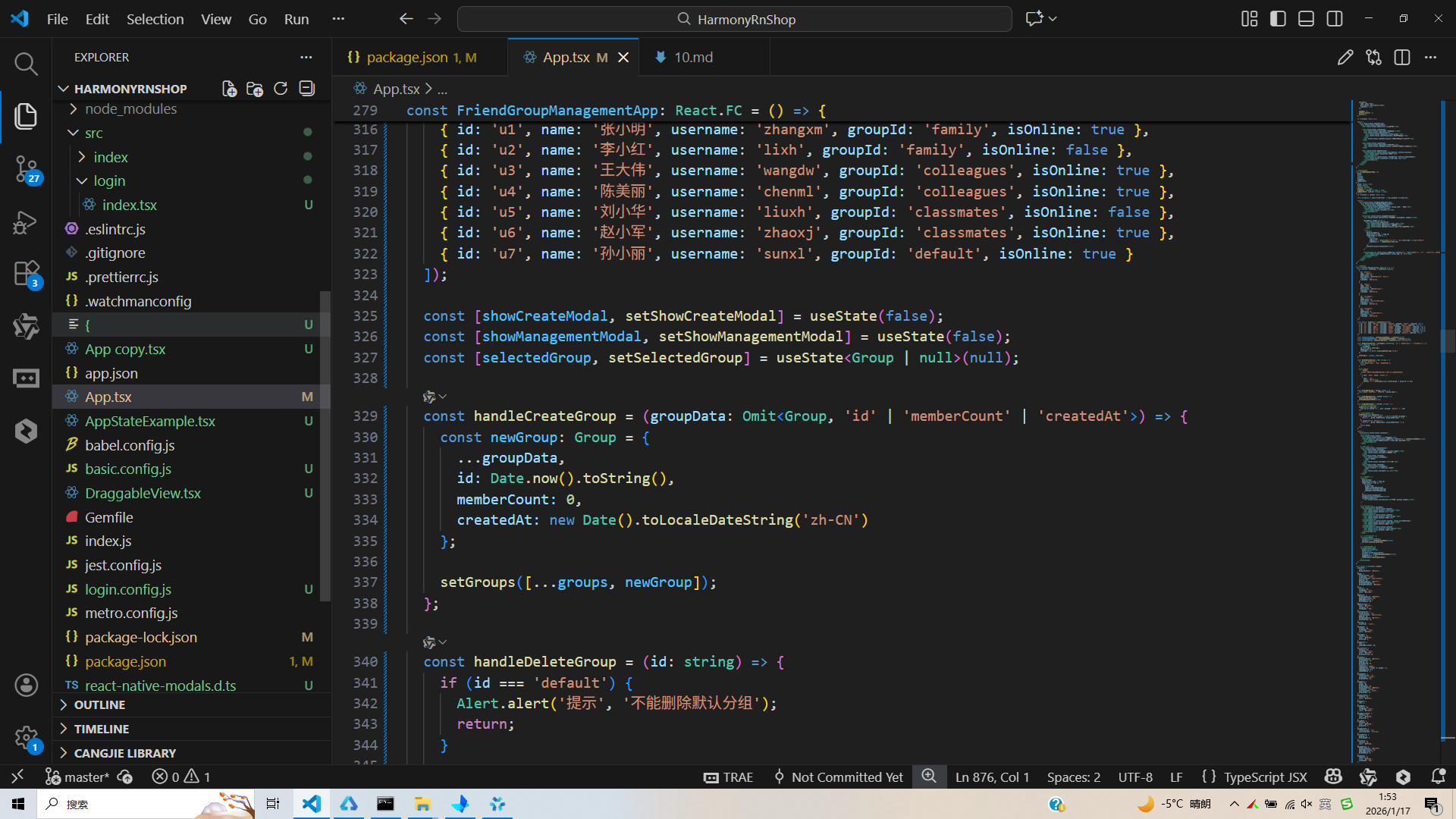
打包
接下来通过打包命令npn run harmony将reactNative的代码打包成为bundle,这样可以进行在开源鸿蒙OpenHarmony中进行使用。

打包之后再将打包后的鸿蒙OpenHarmony文件拷贝到鸿蒙的DevEco-Studio工程目录去:

最后运行效果图如下显示:
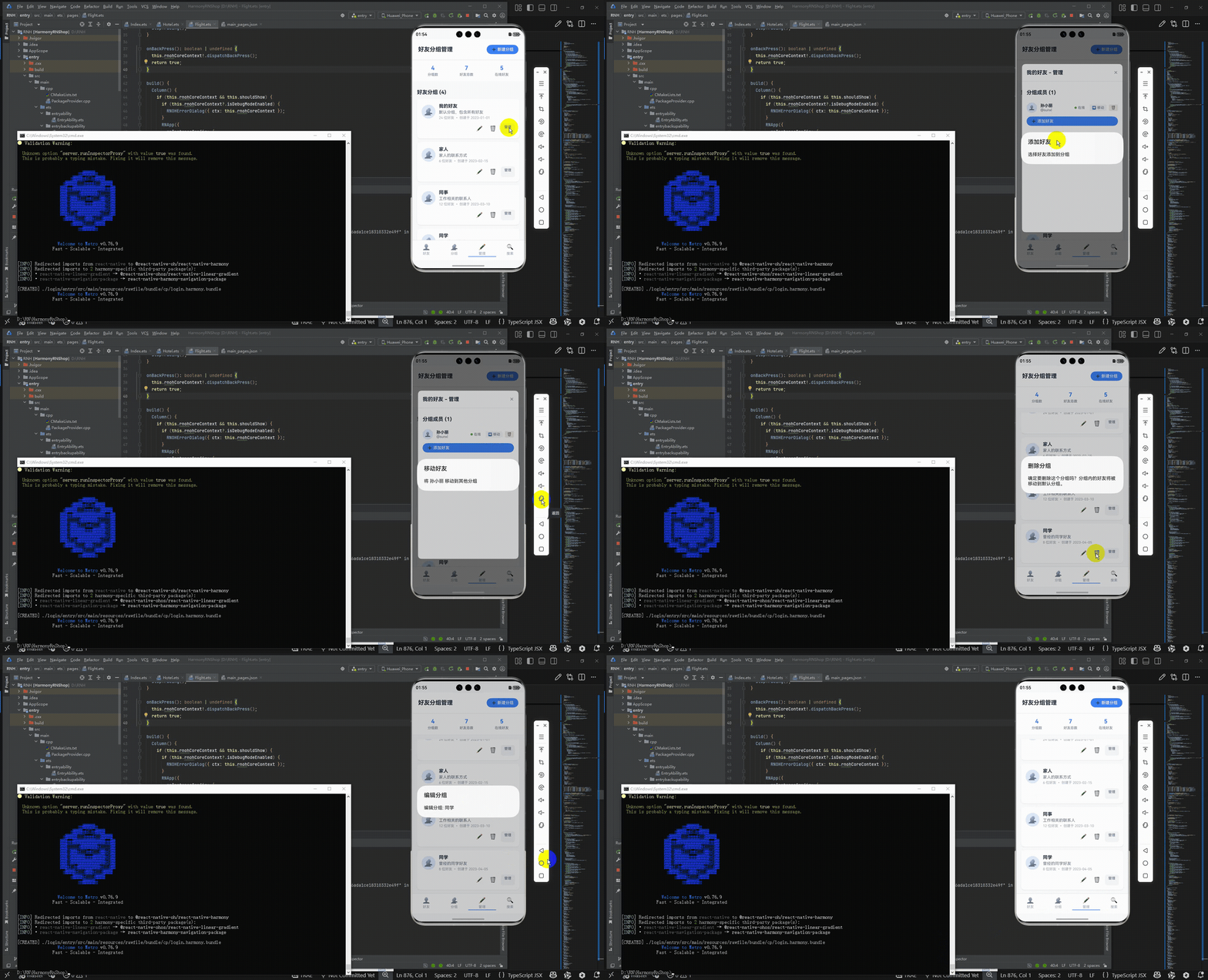
欢迎大家加入开源鸿蒙跨平台开发者社区,一起共建开源鸿蒙跨平台生态。

作为“人工智能6S店”的官方数字引擎,为AI开发者与企业提供一个覆盖软硬件全栈、一站式门户。
更多推荐
 2
2 0
0- 0


 已为社区贡献6条内容

所有评论(0)