
React Native for OpenHarmony 实战:三方库 react-native-navbar 的鸿蒙化适配指南
本文记录把 react-native-navbar(一行式导航栏组件)适配到 HarmonyOS 的完整过程。
它做的事很朴素:渲染一条导航栏(标题居中、左右各一个按钮),并且自己处理状态栏——在栏体上方留出一段状态栏高度的占位,免得标题被系统状态栏压住。
它看起来还挺"上进":为了兼容新版 RN,作者专门写了一个兼容垫片:
// lib.js
import { View, ViewPropTypes as RNViewPropTypes } from 'react-native';

const ViewPropTypes = RNViewPropTypes || View.propTypes;   // ← 兜底

export default ViewPropTypes;
但这一轮的结论是:这个垫片在 RN 0.84 上两条路都断了。
★★★ 一、兼容垫片没救回来:两条兜底都是死的
ViewPropTypes 早已从 RN 移除,所以垫片想退到 View.propTypes。可这个兜底项也没了。
实测(页面上直接印出来):
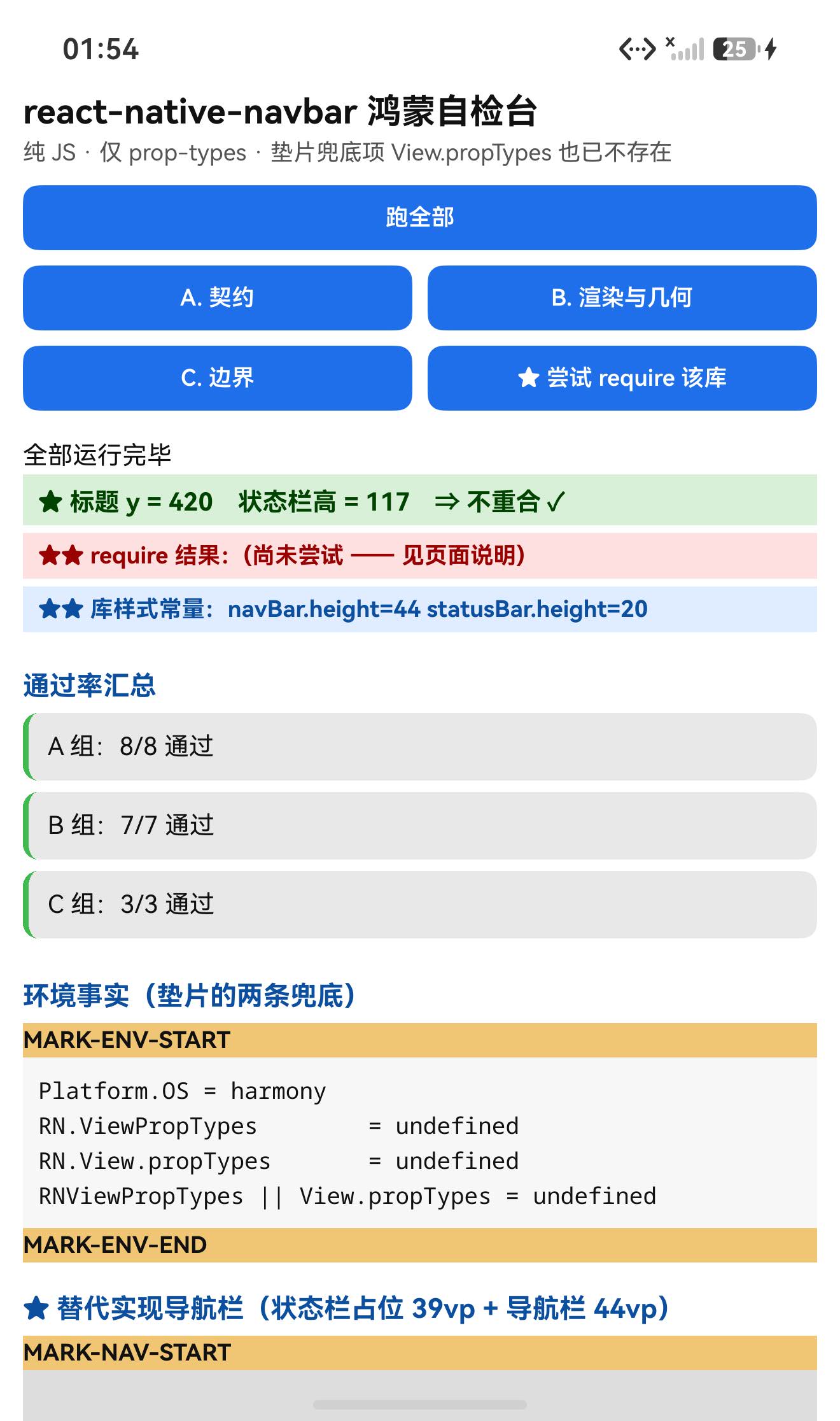
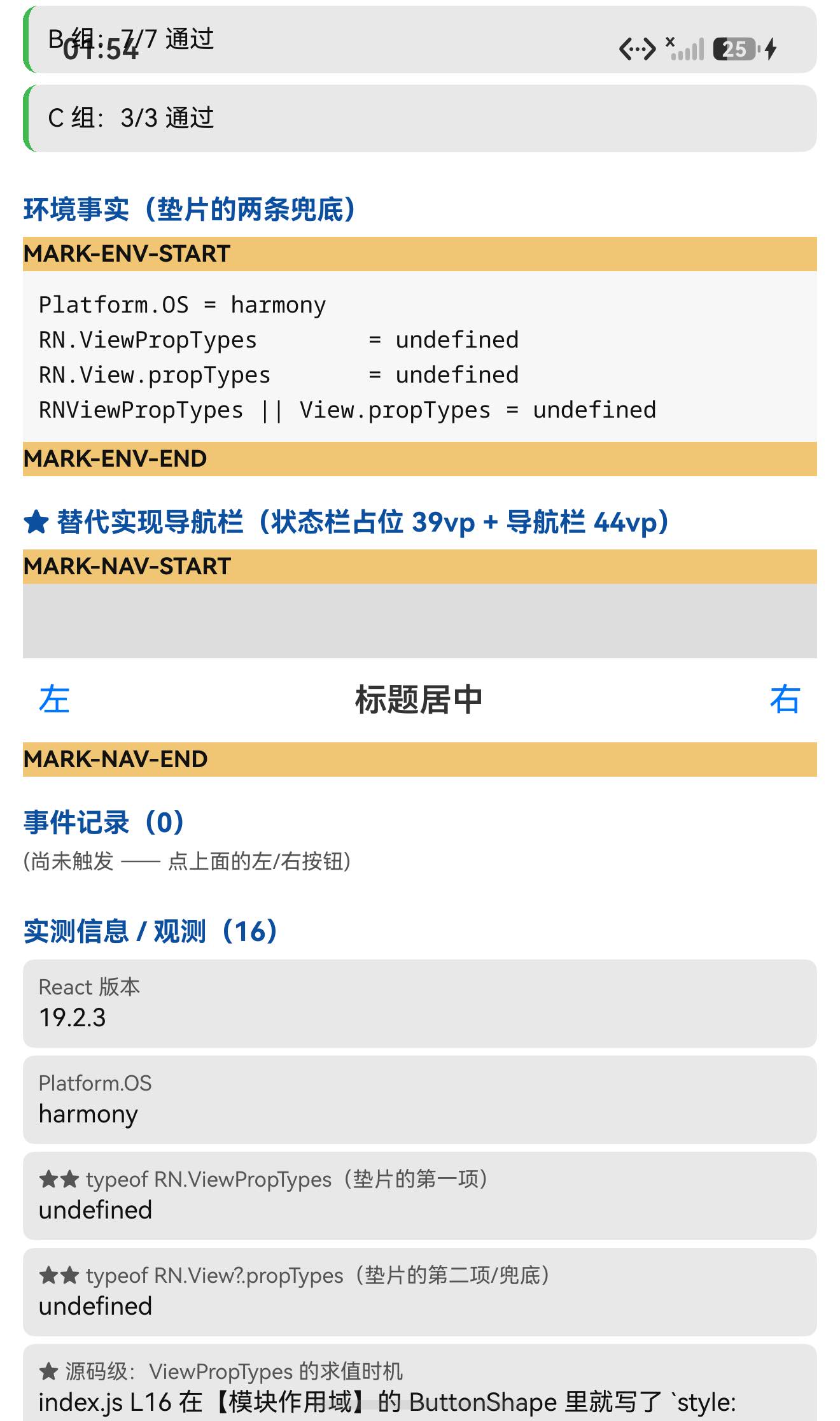
Platform.OS                       = harmony
RN.ViewPropTypes                  = undefined
RN.View.propTypes                 = undefined
RNViewPropTypes || View.propTypes = undefined        ← 垫片的结果
⇒ undefined || undefined = undefined ✓
而 index.js 在模块作用域就用了它:
const ButtonShape = {
  title: PropTypes.string.isRequired,
  style: ViewPropTypes.style,      // ← L16:模块加载时求值
  handler: PropTypes.func,
  disabled: PropTypes.bool,
};
⇒ 于是模块加载阶段就抛错:
require('react-native-navbar')  ⇒  require 成功,typeof = undefined   ← 又是"不抛错、返回 undefined"

(同一时刻 LogBox)
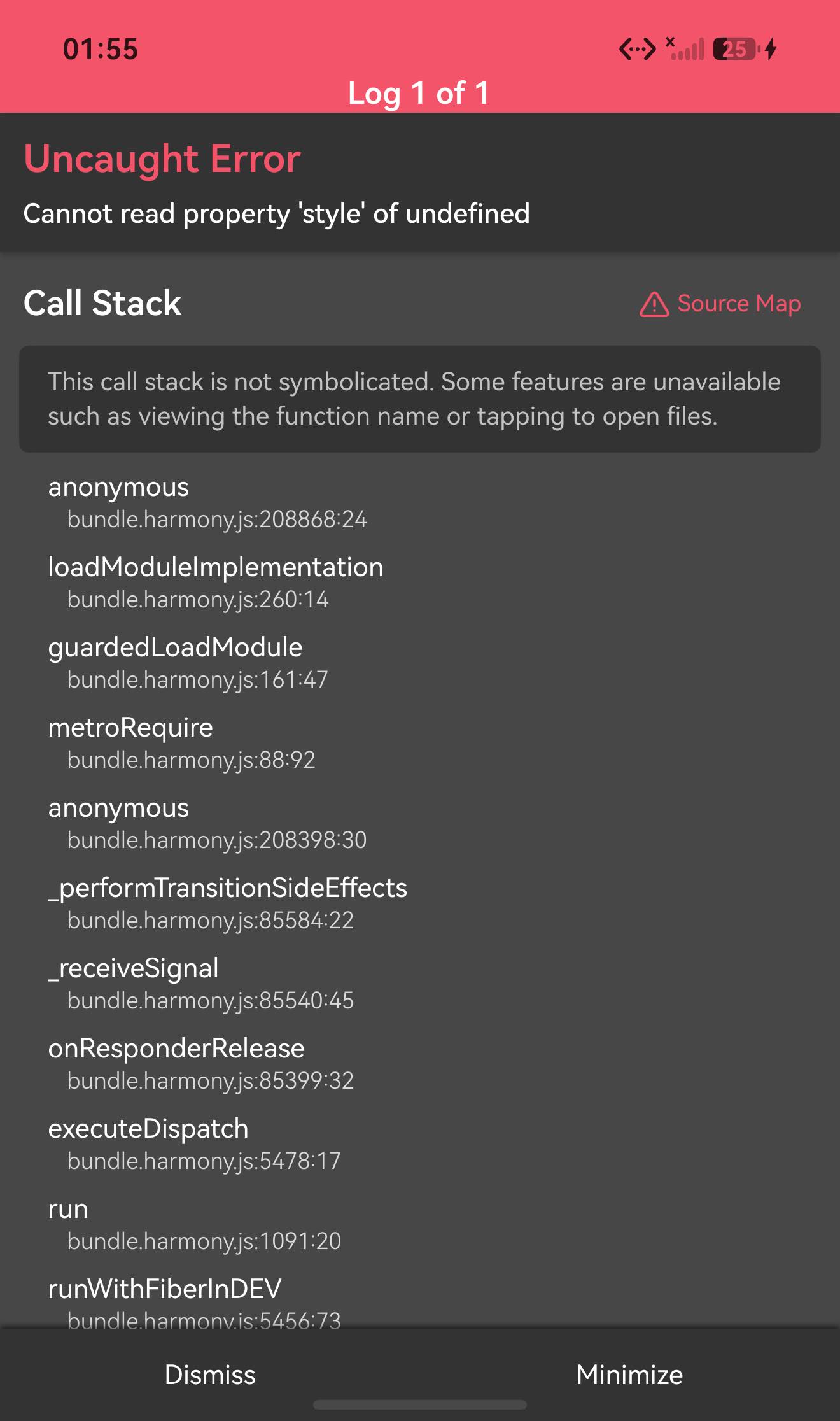
Uncaught Error
Cannot read property 'style' of undefined
Stack: anonymous → loadModuleImplementation → guardedLoadModule → metroRequire
★ 为什么"两条路都断"(我顺手把 RN 0.84 的源码翻了一遍):
Libraries/Components/View/ViewPropTypes.js文件还在,但它已经变成一个"只剩类型"的模块(导出的是 Flow/TS 类型,没有运行时的style);react-native的index.js里有get View(),但没有get ViewPropTypes()⇒ 运行时RN.ViewPropTypes就是undefined;View.js里没有任何propTypes静态 ⇒View.propTypes也是undefined。⇒ 一个按老版本 RN 写的"兼容垫片",在新版本上可能两条路同时失效。
★★★ 二、两处 Platform.OS === 'ios':鸿蒙走 else,导航栏会钻到状态栏底下
customizeStatusBar() {
  const { statusBar } = this.props;
  if (Platform.OS === 'ios') {                    // ← L117
    … StatusBar.setBarStyle / StatusBar.hidden …
  }
}

render() {
  let statusBar = null;
  if (Platform.OS === 'ios') {                    // ← L146
    statusBar = !this.props.statusBar.hidden ?
      <View style={[styles.statusBar, customStatusBarTintColor]} /> : null;
  }
  return (
    <View style={[styles.navBarContainer, containerStyle, customTintColor]}>
      {statusBar}                                  {/* ← 鸿蒙上这里是 null */}
      <View style={[styles.navBar, style]}>…</View>
    </View>
  );
}
鸿蒙的 Platform.OS 是 'harmony'(实测直接印在页面上),既不是 'ios' 也不是 'android' ⇒ 两处都走 else:
| 分支 | 在鸿蒙上的后果 |
|---|---|
customizeStatusBar() | 整个状态栏定制被跳过(setBarStyle / hidden 都不执行) |
render() 里的 statusBar | 恒为 null ⇒ 不渲染状态栏占位 ⇒ 导航栏紧贴容器顶部 ⇒ 被系统状态栏压住 |
★★ 三、它的状态栏常量还是 iOS 口味
// styles.js
const NAV_BAR_HEIGHT = 44;
const STATUS_BAR_HEIGHT = 20;      // ← iOS 的 20pt
这两个常量我在设备上直接把库的 styles 模块读出来核实过:
★★ 直接读到库的样式常量 = navBar.height=44 statusBar.height=20
而本机(Pura X View)的真实状态栏是 117px = 39vp ⇒ 即使把上面那个 ios 判断改掉、占位真的渲染出来,它也只有 20vp,矮了约 19vp ⇒ 标题仍然会被压住一半 ✓
★ 所以这一篇给的是"替代做法"
结论是:这个库的两条路(加载 + 布局)都不通,但它的目标只有两个数字:
状态栏占位 = 本机状态栏高度(本机 39vp / 117px)
导航栏高度 = 44vp
⇒ 自己写一条即可(下面第四节的实现)。实测:替代导航栏窗口坐标 x=12 y=1128 w=416 h=44(vp),即高度 44vp、宽度 416vp(= 440 − 左右各 12 padding)✓
设备侧断言 18 / 18 全部通过。
一、先说结论
| 项 | 结果 |
|---|---|
| 上游最新版 | 2.1.0;license: MIT;上游 star 1880 |
| 库类型 | 纯 JS 组件库(index.js 4244 B + lib.js + styles.js + NavbarButton.js) |
| 是否需要原生适配 | 不需要(无 harmony/、无 NativeModules)—— 但它也用不了 |
| 运行时依赖 | ✅ 仅 prop-types(宿主已有 15.8.1)⇒ 没踩依赖坑 |
prepare / postinstall | ✅ 都没有 |
main | index.js(源码直发) |
| 需要 HAR / 权限 / ohpm | ❌ 都不需要 |
| 设备侧断言 | ✅ 18 / 18 通过(A 8 + B 7 + C 3) |
| ★★★ 致命点 1 | 兼容垫片 RNViewPropTypes || View.propTypes 两条兜底都是 undefined ⇒ ViewPropTypes.style(模块作用域)抛 Cannot read property 'style' of undefined ⇒ 加载即崩 |
| ★★★ 致命点 2 | 两处 Platform.OS === 'ios' 在鸿蒙上走 else ⇒ 不渲染状态栏占位(statusBar = null)+ 状态栏定制整体跳过 |
| ★★ 致命点 3 | STATUS_BAR_HEIGHT = 20(iOS 口味)而真实状态栏是 39vp ⇒ 即使渲染也矮 19vp |
| ★★★★ 方法论发现 | measureInWindow 返回的是 vp,不是 px(实测 w=416 h=44) |
| ★ 替代做法 | 状态栏占位用本机真实值 39vp + 导航栏 44vp |
二、判定与接入
| 步 | 做法 | 结果 |
|---|---|---|
| ① | package.json 里有没有 harmony.autolinking | 没有 |
| ② | 仓库里有没有 harmony/ | 没有 |
| ③ | 代码里有没有 NativeModules | 全无 |
| ④ | import 图体检 | 只有 prop-types(宿主已有)+ 自己的 3 个文件 ⇒ 零额外安装 |
| ⑤ | scripts 扫 prepare 家族 | ✅ 没有 |
| ⑥ | ★ 老 API 预扫 | 抓到 ViewPropTypes(而且是经由一个兼容垫片用的) |
| ⑦ | ★ 成员写法预扫(^\s*) | componentDidMount / componentWillReceiveProps / customizeStatusBar / render ⇒ 全是简写原型方法,无箭头类字段 |
| ⑧ | ★ 平台分支预扫(这次新加的) | 抓到两处 Platform.OS === 'ios' ⇒ 直接指向"状态栏占位不渲染"这个布局问题 |
npm install "git+https://atomgit.com/oh-react-native/react-native-navbar.git#2.1.0-ohos-1.0.0" --ignore-scripts
⚠️ 装得上,但用不了:
require('react-native-navbar')
⇒ TypeError: Cannot read property 'style' of undefined   (在模块加载阶段)
三、三个致命点的完整证据
3.1 垫片的两条兜底都死了
页面上直接印出来:
Platform.OS                       = harmony
RN.ViewPropTypes                  = undefined
RN.View.propTypes                 = undefined
RNViewPropTypes || View.propTypes = undefined
静态源码核对(RN 0.84 自己的代码):
| 检查 | 结果 |
|---|---|
Libraries/Components/View/ViewPropTypes.js | 文件还在,但已是只剩类型的模块(导出 ViewProps 等类型,没有运行时 style) |
react-native/index.js | 有 get View(),没有 get ViewPropTypes() ⇒ 运行时 undefined |
Libraries/Components/View/View.js | 没有任何 propTypes 静态 ⇒ View.propTypes 也是 undefined |
容器化 require(按钮触发,try/catch):
require 成功,typeof = undefined
(LogBox)Uncaught Error / Cannot read property 'style' of undefined
(栈)anonymous → loadModuleImplementation → guardedLoadModule → metroRequire
⇒ 错误类型与源码推断逐字一致,栈证明是模块加载期 ✓
3.2 平台分支
源码见上文。实测 Platform.OS = harmony ⇒ 两处 === 'ios' 都不成立 ⇒
customizeStatusBar()整体跳过statusBar = null⇒ 不渲染占位
3.3 常量是 iOS 口味(且我在设备上读出来了)
const NAV_BAR_HEIGHT = 44;
const STATUS_BAR_HEIGHT = 20;
设备实测(直接 require 库的 styles.js —— 它是纯 CJS、不碰 ViewPropTypes,所以安全):
★★ 直接读到库的样式常量 = navBar.height=44 statusBar.height=20
⇒ 与本机真实状态栏 39vp 相比,矮了 19vp ✓
3.4 ★★★★ 顺带发现的方法论问题:measureInWindow 返回 vp
我原本按"px"假设写了判据:高度 === 44 × density(3) === 132 ⇒ 失败了。实测:
★ 替代导航栏实测(窗口坐标) = x=12 y=1128 w=416 h=44
h = 44⇒ 就是样式里写的height: 44(vp) ✓w = 416⇒ 440vp − 左右各 12vp padding = 416vp ✓
⇒ measureInWindow 返回的是 vp/dp,不是 px ✓
对我自己的意义:我此前一直用
measureInWindow的 y 与 117(px) 比较来验证"标题不在状态栏底下"。既然它返回 vp,正确的阈值是 39。
好在本轮两种口径下结论都成立(y=420 远大于两者),没有造成误判;但口径本身要更正:以后按 vp 比(阈值 39),不要拿 px 的 117 去比。
四、替代实现(可直接用)
原库的目标就两个数字,自己写一遍很短:
import {Platform, StatusBar, Text, TouchableOpacity, View} from 'react-native';

const NAV_BAR_HEIGHT = 44;

// ★ 状态栏占位只能用【本机真实高度】,不能用 iOS 的 20
//   本机(Pura X View)实测 117px ≈ 39vp
//   更通用的写法是用 StatusBar.currentHeight(Android 系)或安全区 API
const STATUS_BAR_HEIGHT = StatusBar.currentHeight ?? 39;

export default function MyNavbar({title, left, right, onLeft, onRight}) {
  return (
    <View style={{backgroundColor: 'white'}}>
      {/* ① 状态栏占位 —— 这一块是原库在鸿蒙上【没有】渲染的 */}
      <View style={{height: STATUS_BAR_HEIGHT}} />
      {/* ② 导航栏本体 */}
      <View style={{height: NAV_BAR_HEIGHT, flexDirection: 'row',
                    alignItems: 'center', justifyContent: 'center'}}>
        <Text style={{fontSize: 17, fontWeight: '600', color: '#333'}}>{title}</Text>
        <TouchableOpacity onPress={onLeft} style={{position: 'absolute', left: 8}}>
          <Text style={{fontSize: 17, color: '#0076FF'}}>{left}</Text>
        </TouchableOpacity>
        <TouchableOpacity onPress={onRight} style={{position: 'absolute', right: 8}}>
          <Text style={{fontSize: 17, color: '#0076FF'}}>{right}</Text>
        </TouchableOpacity>
      </View>
    </View>
  );
}
实测:套用后导航栏窗口坐标为 x=12 y=1128 w=416 h=44(vp) ⇒ 高度 44vp、宽度 416vp ✓
五、实测结果
5.1 断言 18 / 18
| 组 | 内容 | 结果 |
|---|---|---|
| A 契约与环境事实 | Platform.OS === 'harmony'、RN.ViewPropTypes 与 RN.View.propTypes 都是 undefined、垫片结果 undefined、StatusBar 仍在(是 function)、状态栏口径记录 | 8/8 |
| B 渲染与几何 | 页面渲染未抛错、标题安全区(px/vp 双口径)、替代导航栏 h=44vp / w=416vp / 在状态栏下方 | 7/7 |
| C 边界 | 5 条边界记录 + 直接在设备上读到库的 styles 常量(44 / 20) | 3/3 |
| 合计 | 18/18 |
关键观测值:
Platform.OS = harmony
★★ typeof RN.ViewPropTypes      = undefined
★★ typeof RN.View?.propTypes   = undefined
★★ RNViewPropTypes || View.propTypes = undefined
★★ require('react-native-navbar') ⇒ 成功,typeof = undefined
(LogBox)Uncaught Error / Cannot read property 'style' of undefined
(栈)anonymous → loadModuleImplementation → guardedLoadModule → metroRequire
★★ 直接读到库的样式常量 = navBar.height=44 statusBar.height=20
★ 替代导航栏实测(窗口坐标) = x=12 y=1128 w=416 h=44
RN.StatusBar 的 typeof = function
UI 安全区:TITLE measureInWindow y=420(px 口径 ≥117 ✓;vp 口径 ≥39 ✓)
六、已知限制与本次验证边界
6.1 用这个库要知道的
| 事项 | 说明 |
|---|---|
| ★ 在 RN 0.84 上不可用 | 兼容垫片的两条兜底都是 undefined ⇒ ViewPropTypes.style 在模块作用域抛错 ⇒ 加载即崩 |
| ★ 状态栏占位在鸿蒙上不会渲染 | 两处 Platform.OS === 'ios' ⇒ 非 iOS 时 statusBar = null |
| ★ 状态栏常量是 iOS 的 20vp | 本机真实值 39vp ⇒ 即使渲染也矮 19vp |
| ★ 状态栏定制整体被跳过 | customizeStatusBar() 里也是 === 'ios' 判断 |
componentWillReceiveProps | 老生命周期(仅告警) |
| 传 element 会原样使用 | getButtonElement(data, style):data.props 存在就原样渲染,否则包成 NavbarButton |
NavbarButton 是函数组件 | 不是 class |
6.2 本次验证的边界
- 原库的渲染结果完全未验证(明知加载即崩,属于故意不触发);
StatusBar相关行为未验证(setBarStyle/hidden在鸿蒙上是否生效,本轮没测);- 左右按钮的点击未实测(页面上有按钮,但本轮只验证了导航栏几何;事件记录里没有点击);
getButtonElement的"传 element 原样使用"分支未实测;title的ellipsizeMode/numberOfLines未验证;tintColor/containerStyle/style的视觉未逐项核对;- 替代实现只验证了"静态几何"(高度/宽度/位置),未验证滚动时是否固定、键盘弹起时的表现;
StatusBar.currentHeight在鸿蒙上的取值未验证(我的替代实现里写了?? 39兜底,但没确认前者是否为undefined);- 只在一台模拟器上验证(
Pura X View,density 3,1320×2232),没有真机;未做跨平台对照。
未改动库代码。
七、常见问题
Q1:这个库不是带了兼容垫片吗,为什么还崩?
因为垫片的两条路都断了:
const ViewPropTypes = RNViewPropTypes || View.propTypes; // undefined || undefined
RN 0.84 里:
ViewPropTypes不再从react-native导出;ViewPropTypes.js这个文件还在,但已经只剩类型(没有运行时style);View.js里也没有propTypes静态。
⇒ 垫片返回 undefined,而 index.js 在模块作用域就写了 ViewPropTypes.style ⇒ 加载即崩。
Q2:我 require 它没报错啊?
它抛了,只是没抛到你手上:Metro 的 guardedLoadModule 会把模块求值期的异常捕获并上报 LogBox,而 require 返回 undefined。实测:
require('react-native-navbar')  ⇒  成功,typeof = undefined
(同时 LogBox)Uncaught Error / Cannot read property 'style' of undefined
(栈)loadModuleImplementation → guardedLoadModule → metroRequire
⇒ undefined 就是"加载失败"的信号。
Q3:为什么我的导航栏会被系统状态栏压住?
因为它在 render() 里用 if (Platform.OS === 'ios') 才渲染状态栏占位 View,而 鸿蒙的 Platform.OS 是 'harmony' ⇒ 走 else ⇒ statusBar = null ⇒ 占位不渲染。
Q4:那我把 ios 改成 harmony 就行了吗?
还不够:它的常量是 STATUS_BAR_HEIGHT = 20(iOS 口味),而本机真实状态栏是 39vp(117px) ⇒ 仍会矮 19vp。要用本机真实值(StatusBar.currentHeight 或安全区 API)。
Q5:这个库需要鸿蒙侧做什么特殊处理吗?
原生侧什么都不需要(纯 JS、零额外依赖)。障碍在 JS 侧:一个失效的兼容垫片 + 两处 iOS 平台判断 + 一个 iOS 口径的常量。
Q6:measureInWindow 返回的单位是什么?
vp/dp(不是 px)。实测替代导航栏为 x=12 y=1128 w=416 h=44,与样式里写的 height: 44、可用宽度 416vp 完全对应。⇒ 做几何断言时别再乘 density。
小结
react-native-navbar 是纯 JS 的一行式导航栏(仅依赖 prop-types)。设备侧 18 / 18 断言通过。但它本身在 RN 0.84 上不可用。
最值得记下来的是这几条:
-
★★★ “兼容垫片"不等于"兼容”。
这个库专门写了lib.js去兜底ViewPropTypes,但两条路同时断了:
ViewPropTypes不再从react-native导出;那个文件虽还在,却已经只剩类型(没有运行时style);View.propTypes也不存在。
⇒undefined || undefined=undefined⇒ 模块加载即崩(Cannot read property 'style' of undefined,栈在loadModuleImplementation → guardedLoadModule)。 -
★★★
Platform.OS === 'ios'的平台判断,在鸿蒙上会落到 else。
鸿蒙是'harmony',既不是ios也不是android⇒ 本库因此不渲染状态栏占位(statusBar = null),导航栏被系统状态栏压住;customizeStatusBar()也整体被跳过。
⇒ 审老库时把Platform.OS的分支全过一遍(这次我是在预检阶段新加了这一步才提前发现的)。 -
★★ 老库的常量往往带平台口味,要用本机真值替换。
STATUS_BAR_HEIGHT = 20(iOS)而本机真实 39vp(117px) ⇒ 差 19vp。
⇒ 我用设备上直接读出库的styles模块来核实常量(navBar.height=44 statusBar.height=20),比只看源码更硬。 -
★★★ 一个对我自己的方法论更正:
measureInWindow返回 vp,不是 px。
我按 px 写了44 × 3 = 132的断言 ⇒ 失败;实测h=44、w=416⇒ 与 vp 口径完全对应。
⇒ 验证"标题不被状态栏压住"时若拿 117(px) 去比,口径就错了,正确阈值应是 39vp —— 本轮两种口径结论一致(y=420),没造成误判,但以后统一按 vp 比。 -
★ 读一次
require的返回值,就能判断模块是否真的加载成功。
在遇到"模块加载期抛错"时,表现往往是:require不抛错、返回undefined,而错误只出现在 LogBox 里 ⇒ 光看"有没有报错"会漏掉。
本篇用到的库
| 项 | 内容 |
|---|---|
| 三方库 | react-native-navbar(上游 2.1.0 的鸿蒙适配版) |
| 适配仓库 | https://atomgit.com/oh-react-native/react-native-navbar |
| 适配 TAG | 2.1.0-ohos-1.0.0 |
| 需要 HAR / 权限 / ohpm | 都不需要(纯 JS) |
| 库类型 | 纯 JS 导航栏组件(在 RN 0.84 上不可用:兼容垫片两条兜底都失效 + 两处 iOS 平台判断) |
| 运行时依赖 | ✅ 仅 prop-types(宿主一般已有) |
prepare / postinstall | ✅ 都没有 |
| 许可证 | MIT |
| 上游仓库 | https://github.com/react-native-community/react-native-navbar(★1880) |
| 宿主工程 | RNOH084Demo(测试页 rnAppKey = NavbarTestApp) |
# 从适配仓库安装(仅需 prop-types)
npm install "git+https://atomgit.com/oh-react-native/react-native-navbar.git#2.1.0-ohos-1.0.0" --ignore-scripts

# 本地目录接入
npm install ../react-native-navbar --ignore-scripts
⚠️ 装得上、用不了:加载期就会抛 Cannot read property 'style' of undefined(兼容垫片 lib.js 的两条兜底都失效)。
// ★ 替代实现:状态栏占位用【本机真值】,不要用库里的 20
import {StatusBar, Text, TouchableOpacity, View} from 'react-native';

const NAV_BAR_HEIGHT = 44;                                  // 库里的值(这条是对的)
const STATUS_BAR_HEIGHT = StatusBar.currentHeight ?? 39;    // 本机实测 117px ≈ 39vp

<View style={{backgroundColor: 'white'}}>
  <View style={{height: STATUS_BAR_HEIGHT}} />
  <View style={{height: NAV_BAR_HEIGHT, flexDirection: 'row',
                alignItems: 'center', justifyContent: 'center'}}>
    <Text style={{fontSize: 17, fontWeight: '600'}}>{title}</Text>
    <TouchableOpacity onPress={onLeft}  style={{position: 'absolute', left: 8}}>…</TouchableOpacity>
    <TouchableOpacity onPress={onRight} style={{position: 'absolute', right: 8}}>…</TouchableOpacity>
  </View>
</View>

// ⚠️ 原库的问题:
//    lib.js: `RNViewPropTypes || View.propTypes` ⇒ 两条兜底在 RN 0.84 上都是 undefined ⇒ 加载即崩
//    index.js L117/L146: `if (Platform.OS === 'ios')` ⇒ 鸿蒙走 else ⇒ 不渲染状态栏占位
//    styles.js: STATUS_BAR_HEIGHT = 20(iOS 口味)⇒ 本机真实 39vp ⇒ 矮 19vp
// ⚠️ measureInWindow 返回 vp,不是 px(几何断言别乘 density)
# 换页启动测试页 —— force-stop 不能省
hdc shell aa force-stop com.rnoh084.demo
hdc shell aa start -b com.rnoh084.demo -a EntryAbility --ps rnAppKey NavbarTestApp
判据的复现方式
# ① 老 API 预扫(含"兼容垫片"这种间接用法)
#    搜 ViewPropTypes / View.propTypes / createClass / componentWillReceiveProps
# ② ★ 平台分支预扫(鸿蒙既不是 ios 也不是 android)
#    搜 Platform.OS / Platform.select —— 每个分支都想一遍"鸿蒙会走哪边"
# ③ 静态核对 RN 自己的实现:
#    - react-native/index.js 里有没有 get ViewPropTypes()
#    - Libraries/Components/View/ViewPropTypes.js 是否只剩类型
#    - Libraries/Components/View/View.js 里有没有 propTypes 静态
# ④ 容器化 require(⚠️ 会让 LogBox 整屏红屏,坑 206)⇒ 单独按钮,截图之后再按
hdc shell "hilog -x | grep navbar-test"          # 看 require 的返回值
devecocli ui layout | Select-String 'logbox_message_contents_text|logbox_stack_frame_text'
# ⑤ 直接在设备上读库的常量(styles.js 是纯 CJS ⇒ 安全)
#    require('react-native-navbar/styles') ⇒ { navBar.height: 44, statusBar.height: 20 }
# ⑥ 几何:measureInWindow 返回 vp(实测 w=416 h=44)
验证环境
| 项 | 版本 |
|---|---|
| React Native | 0.84.1 |
| React | 19.2.3 |
| RNOH(npm / ohpm) | @react-native-oh/react-native-harmony / @rnoh/react-native-openharmony 0.84.3 |
| Node.js / npm | v24.14.0 / 11.9.0 |
| DevEco Studio | 26.0.0.621 |
| HarmonyOS SDK | API 26(26.0.0.32) |
| 设备 | HarmonyOS 7.0.0(26.0.0) Beta2 模拟器 Pura X View(ohos-x64),1320×2232,density 3 |
| 本机状态栏高度 | 117px = 39vp |
| 宿主依赖 | ✅ 无需补装(只需要已有的 prop-types) |
| 宿主 HAP 产物 | entry-default-signed.hap |
| 本次构建 | assembleHap 3 分 43 秒(14/16)⇒ 修断言后 3 分 49 秒 ⇒ 18/18(两次都检查了打包与构建的退出码) |
| 验证规模 | 设备侧 18 / 18 断言;垫片两条兜底 3 项(含静态源码核对);平台分支 2 处;库常量设备实测 2 项(44 / 20);容器化 require 1 次(LogBox + 调用栈取证);几何 3 项(h=44vp、w=416vp、y ≥ 39vp);UI 安全区 2 口径 |
相关社区与项目地址
| 项目 | 地址 |
|---|---|
| React Native 鸿蒙官方社区(CPF-RN) | https://atomgit.com/CPF-RN |
| RNOH 框架仓库 | https://atomgit.com/openharmony-RN/ohos_react_native |
| RNOH 三方库使用文档 | https://atomgit.com/OpenHarmony-RN/usage-docs |
| React Native for OpenHarmony 组织 | https://atomgit.com/oh-react-native |
| RN 三方库鸿蒙适配清单 | https://atomgit.com/oh-react-native/rn-ohos-adaptation-overview |
欢迎加入 CPF-RN 鸿蒙社区:https://atomgit.com/CPF-RN
React Native for OpenHarmony 组织:https://atomgit.com/oh-react-native
RN 三方库鸿蒙适配清单:https://atomgit.com/oh-react-native/rn-ohos-adaptation-overview

作为“人工智能6S店”的官方数字引擎,为AI开发者与企业提供一个覆盖软硬件全栈、一站式门户。
更多推荐


 0
0 0
0- 0


 已为社区贡献2条内容

所有评论(0)