
ArkTS 与智能融合案例之AI 内容创作应用
1 学习目标
本章以"AI创作工坊"应用为案例,讲解如何在鸿蒙应用中集成AI文本生成与图像生成能力,构建一个完整的多模态内容创作工具。通过本章学习,学生将掌握提示词工程方法、端云协同的AI内容生成架构,以及多模态内容的组合与存储管理。
知识目标
- 理解AI内容生成的基本原理,包括大语言模型的文本生成机制和扩散模型的图像生成机制
- 掌握提示词工程(Prompt Engineering)的核心方法,能够设计高质量的文本与图像生成提示词
- 理解异步API调用模式,掌握通义万相图像生成API的"提交任务+轮询结果"流程
- 了解流式输出(Streaming)的原理与实现方法
能力目标
- 能够使用ArkTS实现文本生成服务,调用qwen-plus模型生成文章、文案等内容
- 能够使用ArkTS实现图像生成服务,调用通义万相API生成图片并下载展示
- 能够构建完整的多模态创作应用,实现文本与图像的组合创作
- 能够实现内容的历史记录管理,支持创建、查看、删除等操作
素养目标 - 关注AI内容创作的伦理与版权问题,树立负责任的使用意识
- 培养创新思维,探索AI辅助创作的更多可能性
- 理解技术能力与社会责任的关系,在创作中遵守相关法律法规
2 项目背景与需求分析
2.1 行业背景
随着大语言模型和AI图像生成技术的快速发展,AI内容创作已成为内容生产领域的重要趋势。从社交媒体文案、营销推广素材到技术博客、创意插图,AI辅助创作正在改变传统的内容生产方式。对于移动端应用而言,将AI内容生成能力集成到鸿蒙应用中,可以为用户提供便捷的智能创作工具。
当前主流的AI内容生成能力主要包括两大类:
文本生成:基于大语言模型(如qwen-plus),根据用户提供的主题或提示词,生成文章、文案、诗歌等文本内容。
图像生成:基于扩散模型(如通义万相),根据用户提供的文本描述,生成相应的图片。图像生成API通常采用异步模式,需要先提交任务再轮询结果。
2.2 应用场景
"AI创作工坊"应用面向以下典型场景:
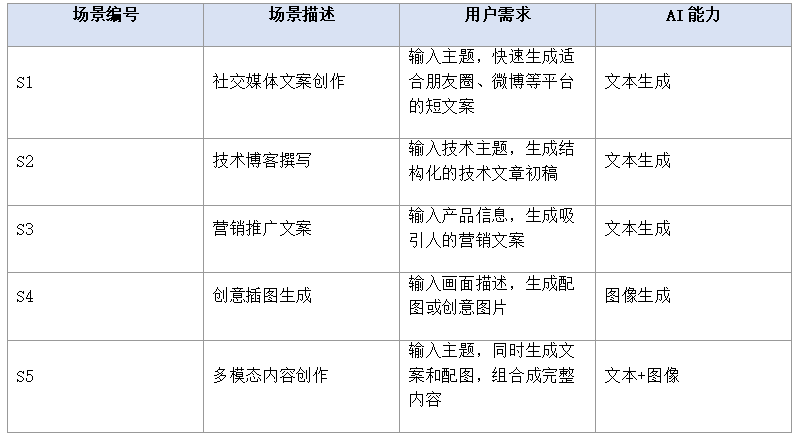
2.3 功能需求
基于上述场景分析,"AI创作工坊"应用需要实现以下核心功能:
1.文本创作:用户输入主题和风格偏好,调用LLM生成文本内容,支持流式输出展示生成过程。
2.图像创作:用户输入画面描述和风格选择,调用图像生成API,异步等待并展示生成结果。
3.内容管理:生成的文本和图片自动保存到本地,支持历史记录查看、详情浏览和删除操作。
4.创作模板:预设多种创作模板(如营销文案、技术博客、诗歌创作),用户选择模板后自动填充提示词。
5.内容分享:支持将生成的文本或图片通过系统分享面板分享到其他应用。
3 技术架构设计
3.1 整体架构
"AI创作工坊"采用端云协同架构,端侧负责UI交互、内容存储和结果展示,云端负责AI模型推理。整体架构分为四层:
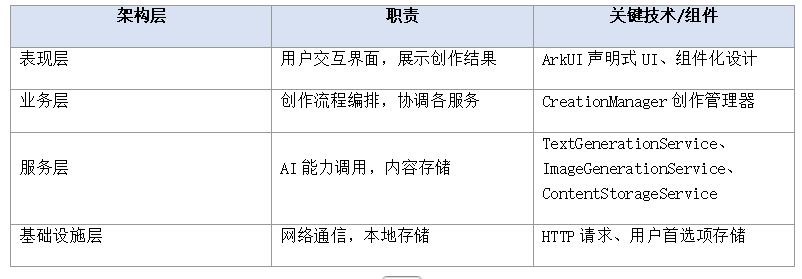
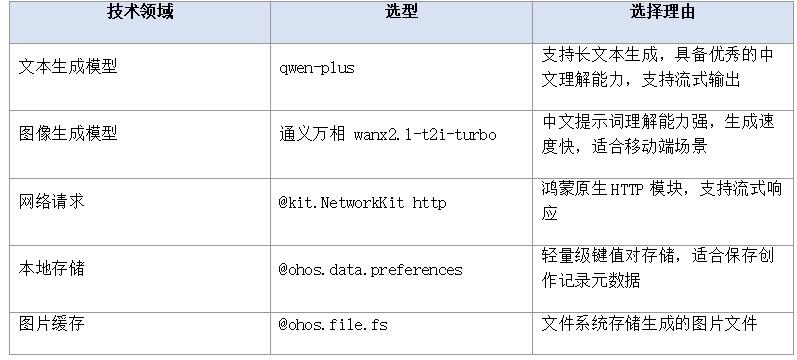
3.2 技术选型
3.3 异步图像生成流程
与文本生成的同步调用不同,通义万相图像生成API采用异步模式,流程如下:
1.提交任务:客户端发送POST请求,包含提示词、模型参数等。服务端返回任务ID(task_id)。
2.轮询状态:客户端定期发送GET请求查询任务状态。状态包括PENDING(排队中)、RUNNING(生成中)、SUCCEEDED(成功)、FAILED(失败)。
3.获取结果:当状态变为SUCCEEDED时,响应中包含生成图片的URL。客户端下载图片并展示。
4 核心知识点
4.1 提示词工程
提示词工程(Prompt Engineering)是指通过精心设计输入提示词,引导AI模型生成高质量内容的方法论。好的提示词能显著提升生成内容的质量和相关性。
提示词设计原则
- 明确角色:为AI设定专业角色,如"你是一位资深营销文案策划师",使生成内容具有专业视角。
- 具体描述:提供详细的需求描述,包括主题、风格、字数、格式等要求,避免模糊指令。
- 提供示例:通过Few-shot方式给出1-3个示例,让模型学习期望的输出格式和风格。
- 设定约束:明确内容边界,如"不使用夸张用语"、"面向技术读者"等约束条件。
- 结构化输出:要求模型按特定结构输出,如"标题+正文+总结"三段式结构。
提示词模板示例
// 营销文案提示词模板
const MARKETING_PROMPT = `你是一位资深营销文案策划师,请根据以下信息创作营销文案:

产品名称:{productName}
产品特点:{features}
目标受众:{audience}
文案风格:{style}

要求:
1. 标题吸引眼球,不超过20字
2. 正文突出产品核心卖点,使用场景化描述
3. 结尾包含行动号召(Call to Action)
4. 全文不超过300字
5. 不使用虚假宣传用语

请按以下格式输出:
【标题】...
【正文】...
【行动号召】...`;
图像生成的提示词设计同样重要,需要包含画面主体、风格、构图、色调等要素:
// 图像生成提示词示例
const IMAGE_PROMPT = `一只橘色的猫坐在窗台上,窗外是雨天的城市街景,
水彩画风格,柔和色调,温暖氛围,侧光照明,
中景构图,焦点在猫咪身上,背景虚化`;
4.2 文本生成API调用
qwen-plus模型通过DashScope API提供服务,调用方式为HTTP POST请求:
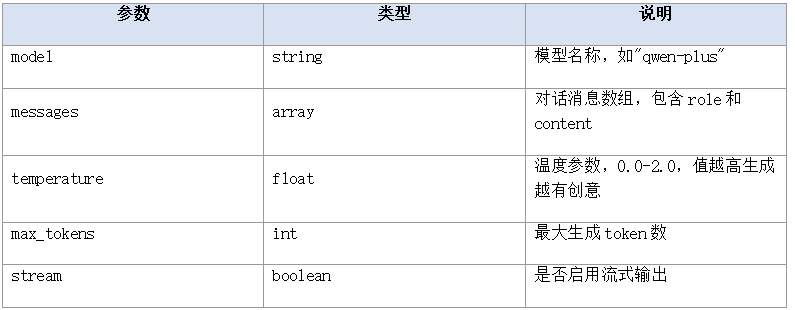
温度参数(temperature)的影响:
- 低温度(0.1-0.3):生成内容稳定、确定性强,适合技术文档、新闻等需要准确性的场景。
- 中温度(0.5-0.8):平衡创意与准确性,适合营销文案、博客文章等场景。
- 高温度(1.0-1.5):生成内容创意性强、多样性高,适合诗歌、创意写作等场景。
4.3 图像生成API调用
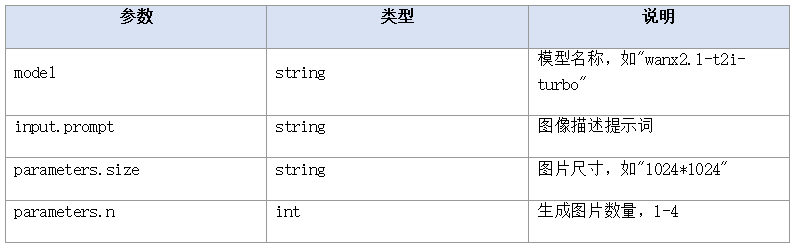
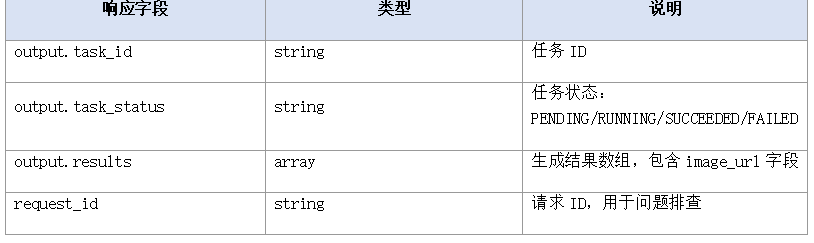
通义万相图像生成API采用异步模式,包含两个接口:
- 提交生成任务(POST):
- 查询任务结果(GET):
4.4 流式输出
流式输出(Streaming)是指模型在生成过程中,将文本逐字或逐段返回给客户端,而非等待全部生成完毕再返回。这种方式可以显著降低用户感知延迟,提升交互体验。
实现流式输出需要:
1.在API请求中设置stream参数为true。
2.使用HTTP响应的on(‘dataReceive’)事件逐块读取数据。
3.解析SSE(Server-Sent Events)格式的数据块,提取文本片段。
4.在UI层逐步追加显示文本,实现打字机效果。
4.5 内容存储管理
生成的文本和图片需要持久化存储,以便用户查看历史创作记录。鸿蒙应用可使用以下存储方案:
- 文本内容:使用@ohos.data.preferences存储为JSON字符串,轻量高效。
- 图片文件:使用@ohos.file.fs将图片保存到应用沙箱目录,路径存储在preferences中。
- 元数据管理:每条创作记录包含ID、类型、标题、内容/路径、创建时间等字段。
5 完整案例实现
本节完整实现"AI创作工坊"应用,包含12个源文件。项目结构如下:
AI-Creation-Studio/
├── entry/
│   └── src/main/ets/
│       ├── model/
│       │   └── Types.ets              // 类型定义
│       ├── common/
│       │   └── Constants.ets          // 常量配置
│       ├── service/
│       │   ├── TextGenerationService.ets  // 文本生成服务
│       │   ├── ImageGenerationService.ets // 图像生成服务
│       │   ├── ContentStorageService.ets  // 内容存储服务
│       │   └── CreationManager.ets         // 创作管理器
│       ├── pages/
│       │   ├── TextCreationPage.ets    // 文本创作页
│       │   ├── ImageCreationPage.ets   // 图像创作页
│       │   ├── ContentListPage.ets     // 内容列表页
│       │   └── IndexPage.ets           // 首页
│       └── entryability/
│           └── EntryAbility.ets        // Ability入口
├── resources/
│   └── profile/
│       └── main_pages.json             // 页面路由
└── module.json5                        // 模块配置
文件1:model/Types.ets
// model/Types.ets
// 创作类型枚举
export enum ContentType {
  TEXT = 'text',
  IMAGE = 'image',
  MULTIMODAL = 'multimodal'
}

// 创作状态枚举
export enum CreationStatus {
  DRAFT = 'draft',
  COMPLETED = 'completed',
  FAILED = 'failed'
}

// 创作风格枚举
export enum CreationStyle {
  PROFESSIONAL = 'professional',   // 专业
  CASUAL = 'casual',               // 轻松
  CREATIVE = 'creative',           // 创意
  HUMOROUS = 'humorous'            // 幽默
}

// 图像风格枚举
export enum ImageStyle {
  REALISTIC = 'realistic',         // 写实
  WATERCOLOR = 'watercolor',       // 水彩
  OIL_PAINTING = 'oil_painting',  // 油画
  ANIME = 'anime',                 // 动漫
  SKETCH = 'sketch'                // 素描
}

// 文本生成参数
export interface TextGenerationParams {
  prompt: string;
  model?: string;
  temperature?: number;
  maxTokens?: number;
  stream?: boolean;
}

// 图像生成参数
export interface ImageGenerationParams {
  prompt: string;
  model?: string;
  size?: string;        // 图片尺寸,如 "1024*1024"
  n?: number;           // 生成数量
  style?: ImageStyle;
}

// 创作记录
export interface CreationRecord {
  id: string;
  type: ContentType;
  title: string;
  content: string;       // 文本内容或图片本地路径
  prompt: string;        // 原始提示词
  style?: string;        // 创作风格
  imageUrl?: string;     // 图片远程URL(图像类型)
  status: CreationStatus;
  createdAt: string;     // 创建时间 ISO格式
}

// 提示词模板
export interface PromptTemplate {
  id: string;
  name: string;
  description: string;
  category: string;      // 分类:marketing/tech/poetry等
  prompt: string;        // 模板内容,使用{placeholder}占位
  type: ContentType;     // 文本或图像
  defaultStyle?: string;
}

// API响应结构
export interface LLMResponse {
  output: {
    text: string;
    finish_reason: string;
  };
  usage: {
    total_tokens: number;
    input_tokens: number;
    output_tokens: number;
  };
  request_id: string;
}

export interface ImageTaskResponse {
  output: {
    task_id: string;
    task_status: string;
  };
  request_id: string;
}

export interface ImageResultResponse {
  output: {
    task_id: string;
    task_status: string;
    results: Array<{ url: string }>;
  };
  request_id: string;
}
文件2:common/Constants.ets
// common/Constants.ets
export class Constants {
  // 文本生成API
  static readonly LLM_API_URL: string = 'https://dashscope.aliyuncs.com/compatible-mode/v1/chat/completions';
  static readonly LLM_MODEL: string = 'qwen-plus';

  // 图像生成API
  static readonly IMAGE_API_URL: string = 'https://dashscope.aliyuncs.com/api/v1/services/aigc/text2image/image-synthesis';
  static readonly IMAGE_QUERY_URL: string = 'https://dashscope.aliyuncs.com/api/v1/tasks/';
  static readonly IMAGE_MODEL: string = 'wanx2.1-t2i-turbo';

  // API密钥(请替换为您的实际密钥,参考第14章安全存储方案)
  static readonly API_KEY: string = 'your_api_key_here';

  // 生成参数默认值
  static readonly DEFAULT_TEMPERATURE: number = 0.7;
  static readonly DEFAULT_MAX_TOKENS: number = 2000;
  static readonly DEFAULT_IMAGE_SIZE: string = '1024*1024';
  static readonly DEFAULT_IMAGE_N: number = 1;

  // 轮询配置
  static readonly POLL_INTERVAL_MS: number = 3000;
  static readonly POLL_MAX_ATTEMPTS: number = 20;

  // 存储键
  static readonly STORAGE_PREFERENCES_NAME: string = 'creation_studio';
  static readonly STORAGE_KEY_RECORDS: string = 'creation_records';

  // 提示词模板
  static readonly PROMPT_TEMPLATES: Array<{ id: string; name: string; description: string; category: string; prompt: string; type: string; defaultStyle: string }> = [
    {
      id: 'tpl_marketing',
      name: '营销文案',
      description: '生成吸引人的产品营销文案',
      category: 'marketing',
      prompt: '你是一位资深营销文案策划师。请根据以下信息创作营销文案:\n\n产品名称:{productName}\n产品特点:{features}\n目标受众:{audience}\n\n要求:\n1. 标题吸引眼球,不超过20字\n2. 正文突出产品核心卖点,使用场景化描述\n3. 结尾包含行动号召\n4. 全文不超过300字',
      type: 'text',
      defaultStyle: 'professional'
    },
    {
      id: 'tpl_tech_blog',
      name: '技术博客',
      description: '生成结构化的技术博客文章',
      category: 'tech',
      prompt: '你是一位技术博客作者。请根据以下主题撰写技术博客:\n\n主题:{topic}\n技术领域:{field}\n\n要求:\n1. 包含引言、正文(至少3个小节)、总结\n2. 面向有一定基础的开发者\n3. 包含代码示例\n4. 全文1500-2000字',
      type: 'text',
      defaultStyle: 'professional'
    },
    {
      id: 'tpl_poetry',
      name: '诗歌创作',
      description: '创作富有意境的诗歌',
      category: 'poetry',
      prompt: '你是一位诗人。请根据以下主题创作一首现代诗:\n\n主题:{theme}\n情感基调:{mood}\n\n要求:\n1. 4-8节\n2. 意境优美,意象丰富\n3. 节奏感强',
      type: 'text',
      defaultStyle: 'creative'
    },
    {
      id: 'tpl_scenery',
      name: '风景插图',
      description: '生成风景类创意图片',
      category: 'image',
      prompt: '一幅{scene}风景画,{style}风格,{lighting}光照,{mood}氛围',
      type: 'image',
      defaultStyle: 'watercolor'
    }
  ];
}
文件3:service/TextGenerationService.ets
// service/TextGenerationService.ets
import { http } from '@kit.NetworkKit';
import { Constants } from '../common/Constants';
import { TextGenerationParams, LLMResponse } from '../model/Types';

export class TextGenerationService {
  // 生成文本(同步模式)
  static async generateText(params: TextGenerationParams): Promise<string> {
    const requestBody = {
      model: params.model || Constants.LLM_MODEL,
      messages: [
        { role: 'system', content: '你是一位专业的内容创作助手,请根据用户的要求生成高质量的内容。' },
        { role: 'user', content: params.prompt }
      ],
      temperature: params.temperature ?? Constants.DEFAULT_TEMPERATURE,
      max_tokens: params.maxTokens ?? Constants.DEFAULT_MAX_TOKENS,
      stream: false
    };

    try {
      const response = await http.request(
        Constants.LLM_API_URL,
        {
          method: http.RequestMethod.POST,
          header: {
            'Content-Type': 'application/json',
            'Authorization': 'Bearer ' + Constants.API_KEY
          },
          extraData: JSON.stringify(requestBody),
          expectDataType: http.HttpDataType.STRING
        }
      );

      const result: LLMResponse = JSON.parse(response.result as string);
      if (result.output && result.output.text) {
        return result.output.text;
      }
      // 兼容OpenAI格式
      const openaiResult = JSON.parse(response.result as string);
      if (openaiResult.choices && openaiResult.choices.length > 0) {
        return openaiResult.choices[0].message.content;
      }
      return '';
    } catch (error) {
      console.error('Text generation failed: ' + JSON.stringify(error));
      throw new Error('文本生成失败: ' + (error as Error).message);
    }
  }

  // 流式生成文本
  static async generateTextStream(
    params: TextGenerationParams,
    onChunk: (text: string) => void,
    onComplete: (fullText: string) => void,
    onError: (error: string) => void
  ): Promise<void> {
    const requestBody = {
      model: params.model || Constants.LLM_MODEL,
      messages: [
        { role: 'system', content: '你是一位专业的内容创作助手,请根据用户的要求生成高质量的内容。' },
        { role: 'user', content: params.prompt }
      ],
      temperature: params.temperature ?? Constants.DEFAULT_TEMPERATURE,
      max_tokens: params.maxTokens ?? Constants.DEFAULT_MAX_TOKENS,
      stream: true
    };

    try {
      const httpRequest = http.createHttp();
      let fullText = '';

      httpRequest.on('dataReceive', (data: ArrayBuffer) => {
        const chunk = new TextDecoder('utf-8').decode(data);
        // 解析SSE格式数据
        const lines = chunk.split('\n');
        for (const line of lines) {
          if (line.startsWith('data:')) {
            const jsonStr = line.substring(5).trim();
            if (jsonStr === '[DONE]') {
              continue;
            }
            try {
              const parsed = JSON.parse(jsonStr);
              const delta = parsed.choices?.[0]?.delta?.content || '';
              if (delta) {
                fullText += delta;
                onChunk(delta);
              }
            } catch (e) {
              // 忽略解析错误
            }
          }
        }
      });

      httpRequest.on('dataEnd', () => {
        onComplete(fullText);
        httpRequest.destroy();
      });

      httpRequest.on('dataReceiveProgress', (progress) => {
        // 进度回调,可用于显示加载状态
      });

      await httpRequest.request(
        Constants.LLM_API_URL,
        {
          method: http.RequestMethod.POST,
          header: {
            'Content-Type': 'application/json',
            'Authorization': 'Bearer ' + Constants.API_KEY,
            'Accept': 'text/event-stream'
          },
          extraData: JSON.stringify(requestBody),
          expectDataType: http.HttpDataType.STRING
        }
      );
    } catch (error) {
      onError('流式生成失败: ' + (error as Error).message);
    }
  }

  // 使用模板生成
  static async generateWithTemplate(
    templatePrompt: string,
    placeholders: Record<string, string>,
    temperature?: number
  ): Promise<string> {
    // 替换占位符
    let prompt = templatePrompt;
    for (const key of Object.keys(placeholders)) {
      const regex = new RegExp('\{' + key + '\}', 'g');
      prompt = prompt.replace(regex, placeholders[key]);
    }

    return await this.generateText({
      prompt: prompt,
      temperature: temperature || Constants.DEFAULT_TEMPERATURE
    });
  }
}
文件4:service/ImageGenerationService.ets
// service/ImageGenerationService.ets
import { http } from '@kit.NetworkKit';
import { Constants } from '../common/Constants';
import { ImageGenerationParams, ImageTaskResponse, ImageResultResponse, ImageStyle } from '../model/Types';

export class ImageGenerationService {
  // 提交图像生成任务
  static async submitTask(params: ImageGenerationParams): Promise<string> {
    // 构建提示词,拼接风格关键词
    let fullPrompt = params.prompt;
    if (params.style) {
      fullPrompt += ', ' + this.getStyleKeyword(params.style);
    }

    const requestBody = {
      model: params.model || Constants.IMAGE_MODEL,
      input: {
        prompt: fullPrompt
      },
      parameters: {
        size: params.size || Constants.DEFAULT_IMAGE_SIZE,
        n: params.n || Constants.DEFAULT_IMAGE_N
      }
    };

    try {
      const response = await http.request(
        Constants.IMAGE_API_URL,
        {
          method: http.RequestMethod.POST,
          header: {
            'Content-Type': 'application/json',
            'Authorization': 'Bearer ' + Constants.API_KEY,
            'X-DashScope-Async': 'enable'
          },
          extraData: JSON.stringify(requestBody),
          expectDataType: http.HttpDataType.STRING
        }
      );

      const result: ImageTaskResponse = JSON.parse(response.result as string);
      if (result.output && result.output.task_id) {
        return result.output.task_id;
      }
      throw new Error('未获取到任务ID');
    } catch (error) {
      console.error('Submit image task failed: ' + JSON.stringify(error));
      throw new Error('提交图像生成任务失败: ' + (error as Error).message);
    }
  }

  // 轮询任务状态
  static async pollTaskResult(
    taskId: string,
    onProgress?: (status: string) => void
  ): Promise<string> {
    const queryUrl = Constants.IMAGE_QUERY_URL + taskId;

    for (let i = 0; i < Constants.POLL_MAX_ATTEMPTS; i++) {
      try {
        const response = await http.request(
          queryUrl,
          {
            method: http.RequestMethod.GET,
            header: {
              'Authorization': 'Bearer ' + Constants.API_KEY
            },
            expectDataType: http.HttpDataType.STRING
          }
        );

        const result: ImageResultResponse = JSON.parse(response.result as string);
        const status = result.output.task_status;

        if (onProgress) {
          onProgress(status);
        }

        if (status === 'SUCCEEDED') {
          if (result.output.results && result.output.results.length > 0) {
            return result.output.results[0].url;
          }
          throw new Error('任务成功但未返回图片URL');
        }

        if (status === 'FAILED') {
          throw new Error('图像生成失败');
        }

        // 等待后继续轮询
        await this.sleep(Constants.POLL_INTERVAL_MS);
      } catch (error) {
        throw error;
      }
    }

    throw new Error('轮询超时,任务未完成');
  }

  // 下载图片到本地
  static async downloadImage(imageUrl: string, localPath: string): Promise<void> {
    try {
      const response = await http.request(imageUrl, {
        method: http.RequestMethod.GET,
        expectDataType: http.HttpDataType.ARRAY_BUFFER
      });

      const imageBuffer = response.result as ArrayBuffer;
      const file = fs.openSync(localPath, fs.OpenMode.CREATE | fs.OpenMode.WRITE_ONLY);
      fs.writeSync(file.fd, imageBuffer);
      fs.closeSync(file);
    } catch (error) {
      console.error('Download image failed: ' + JSON.stringify(error));
      throw new Error('图片下载失败: ' + (error as Error).message);
    }
  }

  // 获取风格关键词
  private static getStyleKeyword(style: ImageStyle): string {
    const keywords: Record<ImageStyle, string> = {
      [ImageStyle.REALISTIC]: 'photorealistic, high detail, 8K',
      [ImageStyle.WATERCOLOR]: 'watercolor painting, soft colors, artistic',
      [ImageStyle.OIL_PAINTING]: 'oil painting, rich texture, classical art',
      [ImageStyle.ANIME]: 'anime style, cel shading, vibrant colors',
      [ImageStyle.SKETCH]: 'pencil sketch, monochrome, detailed lines'
    };
    return keywords[style] || '';
  }

  private static sleep(ms: number): Promise<void> {
    return new Promise(resolve => setTimeout(resolve, ms));
  }
}

// 导入文件系统模块
import { fs } from '@kit.CoreFileKit';
文件5:service/ContentStorageService.ets
// service/ContentStorageService.ets
import { preferences } from '@kit.ArkData';
import { Constants } from '../common/Constants';
import { CreationRecord, ContentType, CreationStatus } from '../model/Types';

export class ContentStorageService {
  private static store: preferences.Preferences | null = null;

  // 初始化存储
  static async init(context: Context): Promise<void> {
    this.store = await preferences.getPreferences(context, Constants.STORAGE_PREFERENCES_NAME);
  }

  // 保存创作记录
  static async saveRecord(record: CreationRecord): Promise<void> {
    if (!this.store) {
      throw new Error('存储未初始化');
    }
    const records = await this.getAllRecords();
    records.unshift(record); // 新记录插入头部
    await this.store.put(Constants.STORAGE_KEY_RECORDS, JSON.stringify(records));
    await this.store.flush();
  }

  // 更新创作记录
  static async updateRecord(id: string, updates: Partial<CreationRecord>): Promise<void> {
    if (!this.store) {
      throw new Error('存储未初始化');
    }
    const records = await this.getAllRecords();
    const index = records.findIndex(r => r.id === id);
    if (index >= 0) {
      records[index] = { ...records[index], ...updates };
      await this.store.put(Constants.STORAGE_KEY_RECORDS, JSON.stringify(records));
      await this.store.flush();
    }
  }

  // 获取所有记录
  static async getAllRecords(): Promise<CreationRecord[]> {
    if (!this.store) {
      return [];
    }
    const json = await this.store.get(Constants.STORAGE_KEY_RECORDS, '') as string;
    if (!json) {
      return [];
    }
    try {
      return JSON.parse(json) as CreationRecord[];
    } catch {
      return [];
    }
  }

  // 按类型获取记录
  static async getRecordsByType(type: ContentType): Promise<CreationRecord[]> {
    const records = await this.getAllRecords();
    return records.filter(r => r.type === type);
  }

  // 删除记录
  static async deleteRecord(id: string): Promise<void> {
    if (!this.store) {
      return;
    }
    const records = await this.getAllRecords();
    const filtered = records.filter(r => r.id !== id);
    await this.store.put(Constants.STORAGE_KEY_RECORDS, JSON.stringify(filtered));
    await this.store.flush();
  }

  // 生成唯一ID
  static generateId(): string {
    return Date.now().toString(36) + Math.random().toString(36).substring(2, 8);
  }

  // 创建新记录
  static createRecord(
    type: ContentType,
    title: string,
    content: string,
    prompt: string,
    style?: string,
    imageUrl?: string
  ): CreationRecord {
    return {
      id: this.generateId(),
      type: type,
      title: title,
      content: content,
      prompt: prompt,
      style: style,
      imageUrl: imageUrl,
      status: CreationStatus.COMPLETED,
      createdAt: new Date().toISOString()
    };
  }
}
文件6:service/CreationManager.ets
// service/CreationManager.ets
import { TextGenerationService } from './TextGenerationService';
import { ImageGenerationService } from './ImageGenerationService';
import { ContentStorageService } from './ContentStorageService';
import { Constants } from '../common/Constants';
import {
  CreationRecord, ContentType, CreationStyle, ImageStyle,
  TextGenerationParams, ImageGenerationParams, PromptTemplate
} from '../model/Types';

export class CreationManager {
  // 创建文本内容
  static async createText(
    topic: string,
    style: CreationStyle,
    onStream?: (text: string) => void
  ): Promise<CreationRecord> {
    const styleHint = this.getStyleHint(style);
    const prompt = '请围绕以下主题创作内容:\n\n主题:' + topic + '\n风格要求:' + styleHint +
      '\n\n要求:\n1. 内容结构清晰,包含标题和正文\n2. 语言流畅,逻辑连贯\n3. 适合移动端阅读\n4. 800-1200字';

    let fullText = '';

    if (onStream) {
      // 流式生成
      await TextGenerationService.generateTextStream(
        { prompt: prompt, temperature: this.getTemperatureByStyle(style) },
        (chunk) => {
          fullText += chunk;
          onStream(fullText);
        },
        (complete) => {
          fullText = complete;
        },
        (error) => {
          throw new Error(error);
        }
      );
    } else {
      // 同步生成
      fullText = await TextGenerationService.generateText({
        prompt: prompt,
        temperature: this.getTemperatureByStyle(style)
      });
    }

    // 提取标题(取第一行或前20字)
    const title = this.extractTitle(fullText, topic);

    // 保存记录
    const record = ContentStorageService.createRecord(
      ContentType.TEXT, title, fullText, prompt, style
    );
    await ContentStorageService.saveRecord(record);
    return record;
  }

  // 创建图像内容
  static async createImage(
    prompt: string,
    style: ImageStyle,
    onProgress?: (status: string) => void
  ): Promise<CreationRecord> {
    // 提交生成任务
    if (onProgress) {
      onProgress('提交中');
    }
    const taskId = await ImageGenerationService.submitTask({
      prompt: prompt,
      style: style
    });

    // 轮询结果
    if (onProgress) {
      onProgress('生成中');
    }
    const imageUrl = await ImageGenerationService.pollTaskResult(taskId, onProgress);

    // 下载图片到本地
    if (onProgress) {
      onProgress('下载中');
    }
    const localPath = this.getLocalImagePath(ContentStorageService.generateId());
    await ImageGenerationService.downloadImage(imageUrl, localPath);

    // 保存记录
    const record = ContentStorageService.createRecord(
      ContentType.IMAGE,
      prompt.substring(0, 30),
      localPath,
      prompt,
      style,
      imageUrl
    );
    await ContentStorageService.saveRecord(record);
    return record;
  }

  // 使用模板创建
  static async createWithTemplate(
    template: PromptTemplate,
    placeholders: Record<string, string>
  ): Promise<CreationRecord> {
    if (template.type === ContentType.TEXT) {
      const text = await TextGenerationService.generateWithTemplate(
        template.prompt, placeholders
      );
      const title = this.extractTitle(text, placeholders.topic || template.name);
      const record = ContentStorageService.createRecord(
        ContentType.TEXT, title, text, template.prompt, template.defaultStyle
      );
      await ContentStorageService.saveRecord(record);
      return record;
    } else {
      // 图像模板
      let prompt = template.prompt;
      for (const key of Object.keys(placeholders)) {
        const regex = new RegExp('\{' + key + '\}', 'g');
        prompt = prompt.replace(regex, placeholders[key]);
      }
      return await this.createImage(prompt, ImageStyle.WATERCOLOR);
    }
  }

  // 获取所有创作记录
  static async getAllCreations(): Promise<CreationRecord[]> {
    return await ContentStorageService.getAllRecords();
  }

  // 删除创作记录
  static async deleteCreation(id: string): Promise<void> {
    await ContentStorageService.deleteRecord(id);
  }

  // 获取提示词模板列表
  static getTemplates(): PromptTemplate[] {
    return Constants.PROMPT_TEMPLATES.map(t => ({
      id: t.id,
      name: t.name,
      description: t.description,
      category: t.category,
      prompt: t.prompt,
      type: t.type === 'text' ? ContentType.TEXT : ContentType.IMAGE,
      defaultStyle: t.defaultStyle
    }));
  }

  // 私有辅助方法
  private static getStyleHint(style: CreationStyle): string {
    const hints: Record<CreationStyle, string> = {
      [CreationStyle.PROFESSIONAL]: '专业严谨,用词准确',
      [CreationStyle.CASUAL]: '轻松活泼,通俗易懂',
      [CreationStyle.CREATIVE]: '富有创意,想象丰富',
      [CreationStyle.HUMOROUS]: '幽默风趣,引人入胜'
    };
    return hints[style] || '专业严谨';
  }

  private static getTemperatureByStyle(style: CreationStyle): number {
    const temps: Record<CreationStyle, number> = {
      [CreationStyle.PROFESSIONAL]: 0.3,
      [CreationStyle.CASUAL]: 0.6,
      [CreationStyle.CREATIVE]: 1.0,
      [CreationStyle.HUMOROUS]: 1.2
    };
    return temps[style] || 0.7;
  }

  private static extractTitle(text: string, fallback: string): string {
    const lines = text.split('\n');
    for (const line of lines) {
      const trimmed = line.trim();
      if (trimmed.length > 0 && trimmed.length <= 50) {
        // 去掉标题标记符号
        return trimmed.replace(/^[#\*\u3010\u3011\[\]]+/g, '').trim();
      }
    }
    return fallback.substring(0, 30);
  }

  private static getLocalImagePath(id: string): string {
    const context = getContext();
    const dir = context.filesDir + '/images/';
    // 确保目录存在
    try {
      fs.mkdirSync(dir, true);
    } catch (e) {
      // 目录已存在
    }
    return dir + id + '.png';
  }
}

import { fs } from '@kit.CoreFileKit';
文件7:pages/TextCreationPage.ets
// pages/TextCreationPage.ets
import { CreationManager } from '../service/CreationManager';
import { ContentStorageService } from '../service/ContentStorageService';
import { CreationStyle, ContentType } from '../model/Types';

@Entry
@Component
struct TextCreationPage {
  @State topic: string = '';
  @State selectedStyle: CreationStyle = CreationStyle.PROFESSIONAL;
  @State generatedText: string = '';
  @State isGenerating: boolean = false;
  @State showResult: boolean = false;

  private styles: Array<{ label: string; value: CreationStyle }> = [
    { label: '专业', value: CreationStyle.PROFESSIONAL },
    { label: '轻松', value: CreationStyle.CASUAL },
    { label: '创意', value: CreationStyle.CREATIVE },
    { label: '幽默', value: CreationStyle.HUMOROUS }
  ];

  build() {
    Column() {
      // 标题栏
      Row() {
        Text('文本创作')
          .fontSize(20)
          .fontWeight(FontWeight.Bold)
          .fontColor('#333333')
      }
      .width('100%')
      .height(56)
      .padding({ left: 16, right: 16 })
      .justifyContent(FlexAlign.Start)

      // 输入区域
      Column() {
        Text('创作主题')
          .fontSize(14)
          .fontColor('#666666')
          .margin({ bottom: 8 })

        TextArea({ placeholder: '请输入创作主题,如"人工智能在教育领域的应用"' })
          .width('100%')
          .height(80)
          .fontSize(14)
          .borderRadius(8)
          .backgroundColor('#F5F5F5')
          .onChange((value) => {
            this.topic = value;
          })

        // 风格选择
        Text('创作风格')
          .fontSize(14)
          .fontColor('#666666')
          .margin({ top: 16, bottom: 8 })

        Row() {
          ForEach(this.styles, (item: { label: string; value: CreationStyle }) => {
            Text(item.label)
              .fontSize(14)
              .fontColor(this.selectedStyle === item.value ? '#FFFFFF' : '#333333')
              .backgroundColor(this.selectedStyle === item.value ? '#0070C0' : '#F0F0F0')
              .borderRadius(16)
              .padding({ left: 16, right: 16, top: 8, bottom: 8 })
              .margin({ right: 8 })
              .onClick(() => {
                this.selectedStyle = item.value;
              })
          })
        }
      }
      .width('100%')
      .padding(16)

      // 生成按钮
      Button(this.isGenerating ? '生成中...' : '开始创作')
        .width('90%')
        .height(44)
        .fontSize(16)
        .backgroundColor(this.isGenerating ? '#CCCCCC' : '#0070C0')
        .fontColor('#FFFFFF')
        .borderRadius(22)
        .enabled(!this.isGenerating && this.topic.length > 0)
        .margin({ top: 16, bottom: 16 })
        .onClick(() => {
          this.startGeneration();
        })

      // 结果展示
      if (this.showResult) {
        Scroll() {
          Column() {
            Text(this.generatedText)
              .fontSize(14)
              .fontColor('#333333')
              .lineHeight(24)
              .width('100%')
              .padding(16)
              .backgroundColor('#FAFAFA')
              .borderRadius(8)
          }
          .width('100%')
        }
        .layoutWeight(1)
        .padding({ left: 16, right: 16 })

        // 操作按钮
        Row() {
          Button('复制')
            .layoutWeight(1)
            .height(40)
            .fontSize(14)
            .backgroundColor('#F0F0F0')
            .fontColor('#333333')
            .borderRadius(20)
            .margin({ right: 8 })
            .onClick(() => {
              pasteboard.getSystemPasteboard().setData(pasteboard.createData(pasteboard.MIMETYPE_TEXT_PLAIN, this.generatedText));
              promptAction.showToast({ message: '已复制到剪贴板' });
            })

          Button('保存')
            .layoutWeight(1)
            .height(40)
            .fontSize(14)
            .backgroundColor('#0070C0')
            .fontColor('#FFFFFF')
            .borderRadius(20)
            .margin({ left: 8 })
            .onClick(() => {
              promptAction.showToast({ message: '内容已保存' });
            })
        }
        .width('90%')
        .margin({ bottom: 16 })
      }
    }
    .width('100%')
    .height('100%')
    .backgroundColor('#FFFFFF')
  }

  private async startGeneration(): Promise<void> {
    this.isGenerating = true;
    this.showResult = true;
    this.generatedText = '';

    try {
      await CreationManager.createText(
        this.topic,
        this.selectedStyle,
        (text: string) => {
          this.generatedText = text;
        }
      );
    } catch (error) {
      this.generatedText = '生成失败:' + (error as Error).message;
    } finally {
      this.isGenerating = false;
    }
  }
}

import { pasteboard } from '@kit.BasicServicesKit';
import { promptAction } from '@kit.ArkUI';
文件8:pages/ImageCreationPage.ets
// pages/ImageCreationPage.ets
import { CreationManager } from '../service/CreationManager';
import { ImageStyle } from '../model/Types';

@Entry
@Component
struct ImageCreationPage {
  @State prompt: string = '';
  @State selectedStyle: ImageStyle = ImageStyle.WATERCOLOR;
  @State imageUrl: string = '';
  @State localPath: string = '';
  @State isGenerating: boolean = false;
  @State progressText: string = '';

  private styles: Array<{ label: string; value: ImageStyle }> = [
    { label: '写实', value: ImageStyle.REALISTIC },
    { label: '水彩', value: ImageStyle.WATERCOLOR },
    { label: '油画', value: ImageStyle.OIL_PAINTING },
    { label: '动漫', value: ImageStyle.ANIME },
    { label: '素描', value: ImageStyle.SKETCH }
  ];

  build() {
    Column() {
      // 标题栏
      Row() {
        Text('图像创作')
          .fontSize(20)
          .fontWeight(FontWeight.Bold)
          .fontColor('#333333')
      }
      .width('100%')
      .height(56)
      .padding({ left: 16, right: 16 })

      // 输入区域
      Column() {
        Text('画面描述')
          .fontSize(14)
          .fontColor('#666666')
          .margin({ bottom: 8 })

        TextArea({ placeholder: '描述你想要生成的画面,如"一只橘色的猫坐在窗台上,窗外是雨天城市"' })
          .width('100%')
          .height(80)
          .fontSize(14)
          .borderRadius(8)
          .backgroundColor('#F5F5F5')
          .onChange((value) => {
            this.prompt = value;
          })

        // 风格选择
        Text('艺术风格')
          .fontSize(14)
          .fontColor('#666666')
          .margin({ top: 16, bottom: 8 })

        Flex({ wrap: FlexWrap.Wrap }) {
          ForEach(this.styles, (item: { label: string; value: ImageStyle }) => {
            Text(item.label)
              .fontSize(14)
              .fontColor(this.selectedStyle === item.value ? '#FFFFFF' : '#333333')
              .backgroundColor(this.selectedStyle === item.value ? '#0070C0' : '#F0F0F0')
              .borderRadius(16)
              .padding({ left: 14, right: 14, top: 6, bottom: 6 })
              .margin({ right: 8, bottom: 8 })
              .onClick(() => {
                this.selectedStyle = item.value;
              })
          })
        }
      }
      .width('100%')
      .padding(16)

      // 生成按钮
      Button(this.isGenerating ? this.progressText : '生成图片')
        .width('90%')
        .height(44)
        .fontSize(16)
        .backgroundColor(this.isGenerating ? '#CCCCCC' : '#0070C0')
        .fontColor('#FFFFFF')
        .borderRadius(22)
        .enabled(!this.isGenerating && this.prompt.length > 0)
        .margin({ top: 8, bottom: 16 })
        .onClick(() => {
          this.startGeneration();
        })

      // 图片展示
      if (this.localPath.length > 0) {
        Column() {
          Image(this.localPath)
            .width('90%')
            .height(300)
            .objectFit(ImageFit.Contain)
            .borderRadius(8)
            .backgroundColor('#F5F5F5')

          Row() {
            Button('保存到相册')
              .layoutWeight(1)
              .height(40)
              .fontSize(14)
              .backgroundColor('#F0F0F0')
              .fontColor('#333333')
              .borderRadius(20)
              .margin({ right: 8 })
              .onClick(() => {
                this.saveToAlbum();
              })

            Button('重新生成')
              .layoutWeight(1)
              .height(40)
              .fontSize(14)
              .backgroundColor('#0070C0')
              .fontColor('#FFFFFF')
              .borderRadius(20)
              .margin({ left: 8 })
              .onClick(() => {
                this.startGeneration();
              })
          }
          .width('90%')
          .margin({ top: 12, bottom: 16 })
        }
      }
    }
    .width('100%')
    .height('100%')
    .backgroundColor('#FFFFFF')
  }

  private async startGeneration(): Promise<void> {
    this.isGenerating = true;
    this.localPath = '';
    this.progressText = '提交中...';

    try {
      const record = await CreationManager.createImage(
        this.prompt,
        this.selectedStyle,
        (status: string) => {
          this.progressText = this.getStatusText(status);
        }
      );
      this.localPath = record.content;
    } catch (error) {
      promptAction.showToast({ message: '生成失败:' + (error as Error).message });
    } finally {
      this.isGenerating = false;
    }
  }

  private getStatusText(status: string): string {
    const map: Record<string, string> = {
      'PENDING': '排队中...',
      'RUNNING': '生成中...',
      'SUCCEEDED': '下载中...',
      '提交中': '提交中...'
    };
    return map[status] || '处理中...';
  }

  private async saveToAlbum(): Promise<void> {
    try {
      const helper = photoAccessHelper.getPhotoAccessHelper(getContext());
      await helper.createAsset(photoAccessHelper.PhotoType.IMAGE, 'png', {
        title: 'AI_' + Date.now()
      });
      promptAction.showToast({ message: '已保存到相册' });
    } catch (error) {
      promptAction.showToast({ message: '保存失败' });
    }
  }
}

import { promptAction } from '@kit.ArkUI';
import { photoAccessHelper } from '@kit.MediaLibraryKit';
文件9:pages/ContentListPage.ets
// pages/ContentListPage.ets
import { CreationManager } from '../service/CreationManager';
import { ContentStorageService } from '../service/ContentStorageService';
import { CreationRecord, ContentType } from '../model/Types';

@Entry
@Component
struct ContentListPage {
  @State records: CreationRecord[] = [];
  @State filterType: ContentType | 'all' = 'all';

  private filters: Array<{ label: string; value: ContentType | 'all' }> = [
    { label: '全部', value: 'all' },
    { label: '文本', value: ContentType.TEXT },
    { label: '图片', value: ContentType.IMAGE }
  ];

  async aboutToAppear() {
    await this.loadRecords();
  }

  async loadRecords() {
    this.records = await ContentStorageService.getAllRecords();
  }

  build() {
    Column() {
      // 标题栏
      Row() {
        Text('我的创作')
          .fontSize(20)
          .fontWeight(FontWeight.Bold)
          .fontColor('#333333')
        Blank()
        Text('共' + this.records.length + '条')
          .fontSize(13)
          .fontColor('#999999')
      }
      .width('100%')
      .height(56)
      .padding({ left: 16, right: 16 })

      // 筛选栏
      Row() {
        ForEach(this.filters, (item: { label: string; value: ContentType | 'all' }) => {
          Text(item.label)
            .fontSize(13)
            .fontColor(this.filterType === item.value ? '#FFFFFF' : '#666666')
            .backgroundColor(this.filterType === item.value ? '#0070C0' : '#F0F0F0')
            .borderRadius(14)
            .padding({ left: 14, right: 14, top: 6, bottom: 6 })
            .margin({ right: 8 })
            .onClick(() => {
              this.filterType = item.value;
            })
        })
      }
      .width('100%')
      .padding({ left: 16, right: 16, bottom: 8 })

      // 记录列表
      if (this.getFilteredRecords().length === 0) {
        Column() {
          Text('暂无创作记录')
            .fontSize(15)
            .fontColor('#999999')
          Text('去创作一些内容吧')
            .fontSize(13)
            .fontColor('#CCCCCC')
            .margin({ top: 8 })
        }
        .width('100%')
        .layoutWeight(1)
        .justifyContent(FlexAlign.Center)
      } else {
        List({ space: 8 }) {
          ForEach(this.getFilteredRecords(), (record: CreationRecord) => {
            ListItem() {
              this.RecordCard(record)
            }
            .swipeAction({
              end: {
                builder: () => {
                  this.DeleteButton(record)
                }
              }
            })
          }
        }
        .layoutWeight(1)
        .padding({ left: 16, right: 16 })
        .divider({ strokeWidth: 1, color: '#F0F0F0' })
      }
    }
    .width('100%')
    .height('100%')
    .backgroundColor('#FFFFFF')
  }

  @Builder
  RecordCard(record: CreationRecord) {
    Row() {
      // 类型图标
      Column() {
        if (record.type === ContentType.TEXT) {
          Text('文')
            .fontSize(16)
            .fontColor('#FFFFFF')
            .backgroundColor('#0070C0')
            .width(40)
            .height(40)
            .borderRadius(20)
            .textAlign(TextAlign.Center)
        } else {
          Text('图')
            .fontSize(16)
            .fontColor('#FFFFFF')
            .backgroundColor('#FF6600')
            .width(40)
            .height(40)
            .borderRadius(20)
            .textAlign(TextAlign.Center)
        }
      }

      // 内容信息
      Column() {
        Text(record.title)
          .fontSize(15)
          .fontColor('#333333')
          .maxLines(1)
          .textOverflow({ overflow: TextOverflow.Ellipsis })

        Text(record.prompt.substring(0, 40))
          .fontSize(12)
          .fontColor('#999999')
          .maxLines(1)
          .textOverflow({ overflow: TextOverflow.Ellipsis })
          .margin({ top: 4 })

        Text(this.formatDate(record.createdAt))
          .fontSize(11)
          .fontColor('#CCCCCC')
          .margin({ top: 4 })
      }
      .layoutWeight(1)
      .margin({ left: 12 })
      .alignItems(HorizontalAlign.Start)
    }
    .width('100%')
    .padding({ top: 12, bottom: 12 })
  }

  @Builder
  DeleteButton(record: CreationRecord) {
    Button('删除')
      .height(100)
      .backgroundColor('#FF4444')
      .fontColor('#FFFFFF')
      .fontSize(14)
      .onClick(async () => {
        await CreationManager.deleteCreation(record.id);
        await this.loadRecords();
        promptAction.showToast({ message: '已删除' });
      })
  }

  private getFilteredRecords(): CreationRecord[] {
    if (this.filterType === 'all') {
      return this.records;
    }
    return this.records.filter(r => r.type === this.filterType);
  }

  private formatDate(iso: string): string {
    const date = new Date(iso);
    const month = String(date.getMonth() + 1).padStart(2, '0');
    const day = String(date.getDate()).padStart(2, '0');
    const hours = String(date.getHours()).padStart(2, '0');
    const minutes = String(date.getMinutes()).padStart(2, '0');
    return month + '-' + day + ' ' + hours + ':' + minutes;
  }
}

import { promptAction } from '@kit.ArkUI';
文件10:pages/IndexPage.ets
// pages/IndexPage.ets
import { ContentStorageService } from '../service/ContentStorageService';

@Entry
@Component
struct IndexPage {
  @State currentIndex: number = 0;

  @Builder
  TabBuilder(title: string, icon: Resource, index: number) {
    Column() {
      Image(icon)
        .width(24)
        .height(24)
        .fillColor(this.currentIndex === index ? '#0070C0' : '#999999')
      Text(title)
        .fontSize(11)
        .fontColor(this.currentIndex === index ? '#0070C0' : '#999999')
        .margin({ top: 4 })
    }
    .layoutWeight(1)
    .height('100%')
    .justifyContent(FlexAlign.Center)
    .onClick(() => {
      this.currentIndex = index;
    })
  }

  build() {
    Column() {
      // 内容区域
      TabContent() {
        if (this.currentIndex === 0) {
          TextCreationContent()
        } else if (this.currentIndex === 1) {
          ImageCreationContent()
        } else {
          ContentListContent()
        }
      }
      .layoutWeight(1)

      // 底部导航栏
      Row() {
        this.TabBuilder('文本', $r('app.media.icon_text'), 0)
        this.TabBuilder('图像', $r('app.media.icon_image'), 1)
        this.TabBuilder('我的', $r('app.media.icon_list'), 2)
      }
      .width('100%')
      .height(56)
      .backgroundColor('#FFFFFF')
      .border({ width: { top: 1 }, color: '#E0E0E0' })
    }
    .width('100%')
    .height('100%')
  }
}

// 使用Builder模式引用各页面
@Component
struct TextCreationContent {
  build() {
    Column() {
      TextCreationPage()
    }
    .width('100%')
    .height('100%')
  }
}

@Component
struct ImageCreationContent {
  build() {
    Column() {
      ImageCreationPage()
    }
    .width('100%')
    .height('100%')
  }
}

@Component
struct ContentListContent {
  build() {
    Column() {
      ContentListPage()
    }
    .width('100%')
    .height('100%')
  }
}

// 引用页面组件
import { TextCreationPage } from './TextCreationPage';
import { ImageCreationPage } from './ImageCreationPage';
import { ContentListPage } from './ContentListPage';
文件11:entryability/EntryAbility.ets
// entryability/EntryAbility.ets
import { AbilityConstant, UIAbility, Want } from '@kit.AbilityKit';
import { window } from '@kit.ArkUI';
import { ContentStorageService } from '../service/ContentStorageService';

export default class EntryAbility extends UIAbility {
  async onCreate(want: Want, launchParam: AbilityConstant.LaunchParam): Promise<void> {
    console.info('EntryAbility onCreate');
    // 初始化存储服务
    await ContentStorageService.init(this.context);
  }

  onDestroy(): void {
    console.info('EntryAbility onDestroy');
  }

  onWindowStageCreate(windowStage: window.WindowStage): void {
    windowStage.loadContent('pages/IndexPage', (err) => {
      if (err.code) {
        console.error('Failed to load content: ' + JSON.stringify(err));
        return;
      }
      console.info('Content loaded successfully');
    });
  }

  onForeground(): void {
    console.info('EntryAbility onForeground');
  }

  onBackground(): void {
    console.info('EntryAbility onBackground');
  }
}
文件12:module.json5
{
  "module": {
    "name": "entry",
    "type": "entry",
    "description": "$string:module_desc",
    "mainElement": "EntryAbility",
    "deviceTypes": [
      "phone",
      "tablet"
    ],
    "deliveryWithInstall": true,
    "installationFree": false,
    "pages": "$profile:main_pages",
    "abilities": [
      {
        "name": "EntryAbility",
        "srcEntry": "./ets/entryability/EntryAbility.ets",
        "description": "$string:EntryAbility_desc",
        "label": "$string:EntryAbility_label",
        "startWindowIcon": "$media:startIcon",
        "startWindowBackground": "$color:start_window_background",
        "exported": true,
        "skills": [
          {
            "entities": [
              "entity.system.home"
            ],
            "actions": [
              "action.system.home"
            ]
          }
        ]
      }
    ],
    "requestPermissions": [
      {
        "name": "ohos.permission.INTERNET",
        "reason": "$string:permission_internet_reason",
        "usedScene": {
          "abilities": [
            "EntryAbility"
          ],
          "when": "inuse"
        }
      }
    ]
  }
}
6 测试与优化
6.1 功能测试
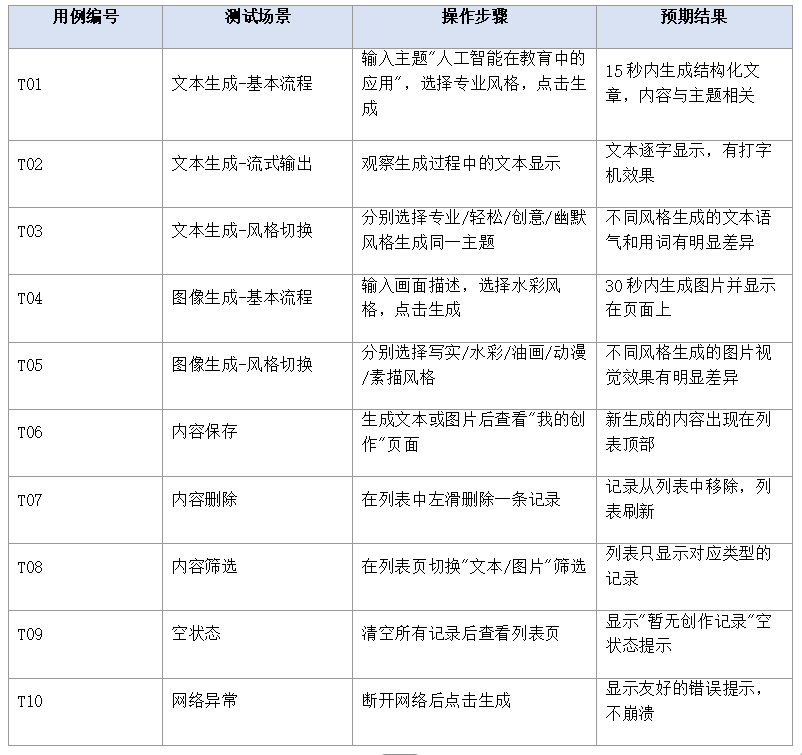
完成代码编写后,需要对应用进行全面的功能测试。测试用例设计如下:
6.2 性能优化
- 流式输出优化
流式输出过程中,频繁更新State可能导致UI卡顿。优化方案:
- 使用节流(throttle)机制,每100毫秒更新一次UI,而非每次收到数据块都更新。
- 使用requestAnimationFrame或setTimeout将UI更新推迟到下一帧,避免阻塞主线程。
- 对长文本使用分段渲染,只渲染可视区域内的文本。
- 图片加载优化
生成的图片可能较大,直接加载会导致内存压力:
- 使用Image组件的objectFit属性控制图片缩放方式,避免全尺寸加载。
- 在列表页使用缩略图,详情页才加载原图。
- 对已下载的图片进行本地缓存,避免重复下载。
- API调用优化
- 添加请求重试机制,对网络波动导致的失败自动重试1-2次。
- 对图像生成API添加节流逻辑,限制每分钟最多2次请求。
- 使用请求超时设置,避免长时间等待无响应。

作为“人工智能6S店”的官方数字引擎,为AI开发者与企业提供一个覆盖软硬件全栈、一站式门户。
更多推荐
 0
0 0
0- 0


 已为社区贡献6条内容

所有评论(0)