
HarmonyOS ArkTS API 24每个模型类都通过constructor接收对应的Meta接口数据并完成属性赋值
引言
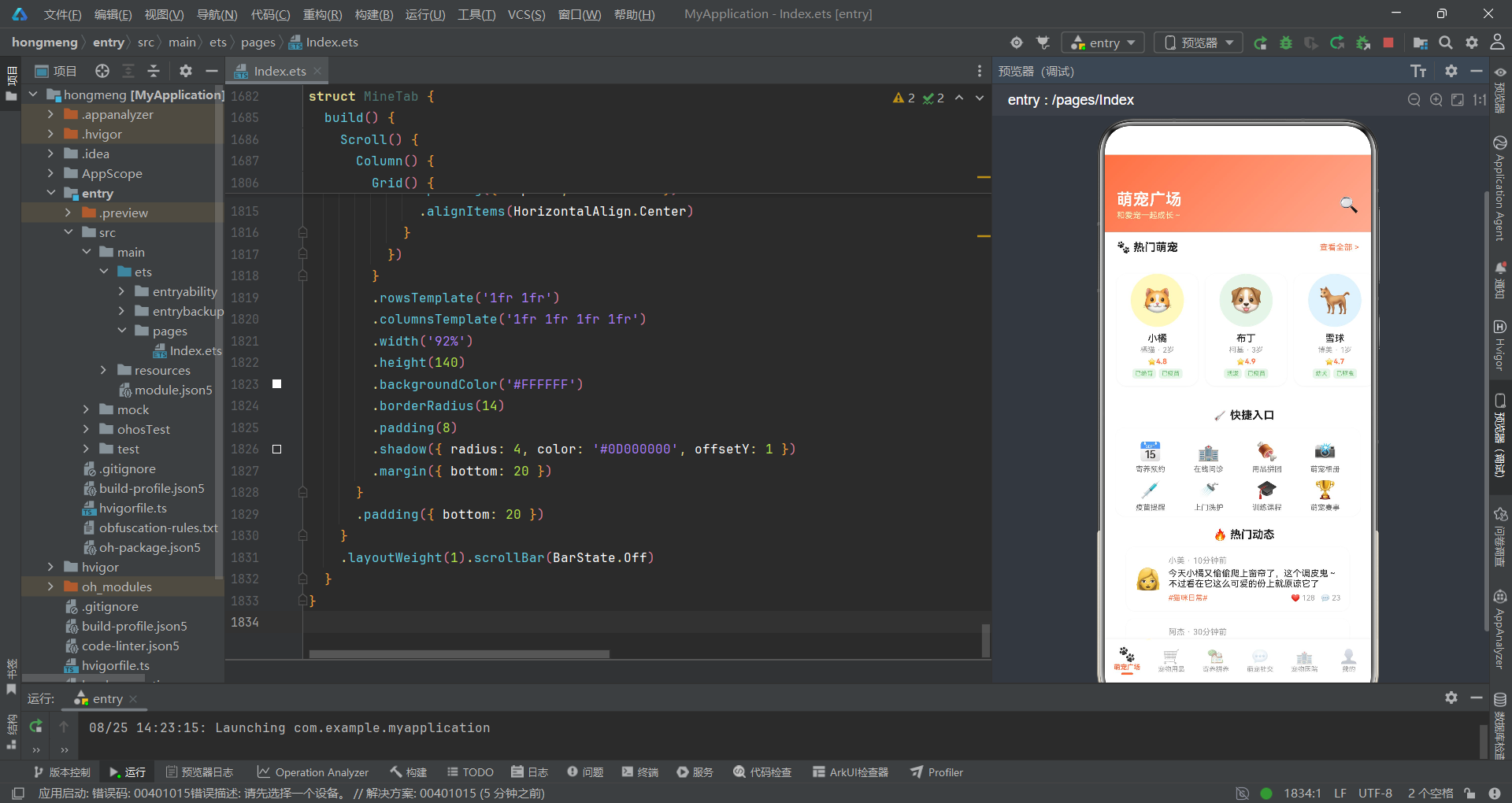
在移动互联网高速发展的今天,宠物经济已经成为消费升级浪潮中不可忽视的重要赛道。从宠物寄养、社交分享到用品拼团,萌宠社区正从单一的信息发布平台演化为涵盖交易、社交、医疗、寄养等多元场景的综合服务生态。本文将深入剖析一个基于HarmonyOS ArkTS声明式UI框架构建的萌宠拼养社区应用,该应用融合了拼多多风格的电商拼团模式与宠物垂直社区的内容运营模式,实现了宠物名片展示、用品瀑布流购物、寄养预约、萌宠社交动态、宠物医院导诊等六大核心业务场景的完整端侧实现。
从技术架构层面来看,该应用采用了HarmonyOS API 24所提供的声明式开发范式,以@Entry、@Component、@Builder、@State、@Observed等核心装饰器构建了高度组件化的UI体系。整个应用基于单页面多Tab切换架构,通过MainTab枚举实现六个主功能模块的路由切换,每个Tab对应一个独立的@Component结构体组件,各组件之间通过回调函数(如onBookFoster、onPetDetail、onPost、onDelete、onEditPet)实现跨组件通信。应用同时管理五个弹窗状态,覆盖寄养预约、动态发布、删除确认、宠物档案编辑和宠物详情展示等交互场景。
在数据架构设计上,应用采用了"接口定义—观察者模型—全局静态数据"三层架构模式。首先通过TypeScript interface明确定义了PetCardMeta、ProductMeta、FosterFamilyMeta、SocialPostMeta、HospitalMeta等十一个元数据接口,为整个应用的数据结构提供类型安全保障。随后使用@Observed装饰器将关键数据模型(PetCard、Product、FosterFamily、SocialPost、Hospital)包装为可观察对象,使UI层能够自动响应数据变化并触发重渲染。最后通过模块级常量数组存放全局写死数据,包括10条宠物名片、12件商品、6家寄养家庭、8条社交动态、8家宠物医院等丰富数据集,为UI组件提供充足的数据驱动素材。
一、接口定义与数据模型层
1.1 元数据接口定义
应用首先通过interface定义了所有业务实体的元数据结构,这是整个TypeScript类型系统的基石。以下代码展示了核心的接口定义部分。
interface PetCardMeta {
  name: string
  breed: string
  age: string
  owner: string
  avatar: string
  bgColor: string
  rating: number
  tags: string[]
}

interface ProductMeta {
  name: string
  price: number
  originalPrice: number
  emoji: string
  sold: number
  bgColor: string
  tag: string
}

interface FosterFamilyMeta {
  name: string
  rating: number
  distance: string
  price: number
  emoji: string
  tags: string[]
  capacity: string
}

interface SocialPostMeta {
  userName: string
  userAvatar: string
  petName: string
  content: string
  images: string[]
  likes: number
  comments: number
  time: string
  topic: string
}

interface HospitalMeta {
  name: string
  rating: number
  distance: string
  departments: string[]
  emoji: string
  reviewCount: number
  priceLevel: string
}

interface GroupBuyProgressMeta {
  petName: string
  targetCount: number
  currentCount: number
  avatars: string[]
  price: number
  endTime: string
}

interface VaccineRecordMeta {
  name: string
  date: string
  nextDate: string
  status: string
}

interface HealthRecordMeta {
  date: string
  weight: string
  note: string
}
上述接口定义覆盖了宠物名片、商品、寄养家庭、社交动态、医院、拼养进度、疫苗记录、健康记录等核心业务实体。每个接口都精确定义了各字段的类型,如rating为number类型、tags为string数组类型,确保了类型安全性。这种基于interface的设计模式使得数据结构清晰可读,同时也为后续的@Observed模型和全局数据提供了统一的类型约束。值得注意的是,接口采用了Meta后缀命名规范,表示这些是"元数据"结构,用于描述原始数据的形式。
1.2 @Observed可观察数据模型
在接口定义的基础上,应用使用@Observed装饰器创建了可观察的数据模型类,这是HarmonyOS状态管理框架的核心机制。
@Observed
export class PetCard {
  name: string = ''
  breed: string = ''
  age: string = ''
  owner: string = ''
  avatar: string = ''
  bgColor: string = ''
  rating: number = 0
  tags: string[] = []

  constructor(data: PetCardMeta) {
    this.name = data.name
    this.breed = data.breed
    this.age = data.age
    this.owner = data.owner
    this.avatar = data.avatar
    this.bgColor = data.bgColor
    this.rating = data.rating
    this.tags = data.tags
  }
}

@Observed
export class Product {
  name: string = ''
  price: number = 0
  originalPrice: number = 0
  emoji: string = ''
  sold: number = 0
  bgColor: string = ''
  tag: string = ''

  constructor(data: ProductMeta) {
    this.name = data.name
    this.price = data.price
    this.originalPrice = data.originalPrice
    this.emoji = data.emoji
    this.sold = data.sold
    this.bgColor = data.bgColor
    this.tag = data.tag
  }
}

@Observed
export class FosterFamily {
  name: string = ''
  rating: number = 0
  distance: string = ''
  price: number = 0
  emoji: string = ''
  tags: string[] = []
  capacity: string = ''

  constructor(data: FosterFamilyMeta) {
    this.name = data.name
    this.rating = data.rating
    this.distance = data.distance
    this.price = data.price
    this.emoji = data.emoji
    this.tags = data.tags
    this.capacity = data.capacity
  }
}

@Observed
export class SocialPost {
  userName: string = ''
  userAvatar: string = ''
  petName: string = ''
  content: string = ''
  images: string[] = []
  likes: number = 0
  comments: number = 0
  time: string = ''
  topic: string = ''

  constructor(data: SocialPostMeta) {
    this.userName = data.userName
    this.userAvatar = data.userAvatar
    this.petName = data.petName
    this.content = data.content
    this.images = data.images
    this.likes = data.likes
    this.comments = data.comments
    this.time = data.time
    this.topic = data.topic
  }
}

@Observed
export class Hospital {
  name: string = ''
  rating: number = 0
  distance: string = ''
  departments: string[] = []
  emoji: string = ''
  reviewCount: number = 0
  priceLevel: string = ''

  constructor(data: HospitalMeta) {
    this.name = data.name
    this.rating = data.rating
    this.distance = data.distance
    this.departments = data.departments
    this.emoji = data.emoji
    this.reviewCount = data.reviewCount
    this.priceLevel = data.priceLevel
  }
}
@Observed装饰器使得这些类实例的属性变更能够被ArkUI框架自动追踪,当属性值发生变化时,所有引用该实例的UI组件都会自动触发重渲染。每个模型类都通过constructor接收对应的Meta接口数据并完成属性赋值。这种"接口→可观察模型"的转换设计不仅保持了数据类型的严谨性,还实现了状态管理框架与原始数据的解耦。属性初始化时全部赋予默认空值(如name = ''、rating = 0),这是一种防御性编程策略,确保即使构造函数未完全赋值也不会产生undefined错误。
二、设计令牌与全局数据
2.1 设计令牌系统
应用通过模块级常量定义了统一的设计令牌(Design Tokens),包括颜色映射表和渐变配置,实现了视觉风格的集中管控。
const PET_COLORS: Record<string, string> = {
  'primary': '#FF7043',
  'green': '#66BB6A',
  'cream': '#FFF9C4',
  'sky': '#4FC3F7',
  'lightGreenBg': '#E8F5E9',
  'white': '#FFFFFF',
  'red': '#E53935',
  'successGreen': '#4CAF50',
  'darkText': '#212121',
  'grayText': '#999999',
  'lightGray': '#F5F5F5',
}

const PET_GRADIENT: LinearGradientOptions = {
  angle: 135,
  colors: [['#FF7043', 0.0], ['#FFAB91', 1.0]]
}

const PET_GREEN_GRADIENT: LinearGradientOptions = {
  angle: 135,
  colors: [['#66BB6A', 0.0], ['#A5D6A7', 1.0]]
}

const PET_BLUE_GRADIENT: LinearGradientOptions = {
  angle: 135,
  colors: [['#4FC3F7', 0.0], ['#81D4FA', 1.0]]
}
PET_COLORS使用Record<string, string>类型定义了一个语义化颜色字典,通过键名而非硬编码十六进制值来引用颜色,大大提高了代码可维护性。三组渐变配置分别对应橙色系(主品牌色,用于萌宠广场和社交Tab)、绿色系(用于宠物用品Tab)和蓝色系(用于寄养和医院Tab),形成了一套视觉语义体系:暖橙代表活力与社交,绿色代表健康与消费,蓝色代表信赖与服务。所有渐变均采用135度对角方向,保持了一致的视觉基调。
2.2 全局业务数据
应用通过模块级常量数组预置了大量业务数据,为UI渲染提供数据源。以下展示了核心数据集的结构和内容。
// 宠物名片数据 10条
const PET_CARDS: PetCardMeta[] = [
{ name: '小橘', breed: '橘猫', age: '2岁', owner: '小美', avatar: '🐱', bgColor: '#FFF9C4', rating: 4.8, tags: ['已绝育', '已疫苗', '亲人'] },
{ name: '布丁', breed: '柯基', age: '3岁', owner: '阿杰', avatar: '🐶', bgColor: '#E8F5E9', rating: 4.9, tags: ['活泼', '已疫苗', '爱玩'] },
{ name: '雪球', breed: '博美', age: '1岁', owner: 'Lily', avatar: '🐕', bgColor: '#E3F2FD', rating: 4.7, tags: ['幼犬', '已驱虫', '粘人'] },
{ name: '芒果', breed: '金毛', age: '5岁', owner: '婷婷', avatar: '🦮', bgColor: '#FFF9C4', rating: 5.0, tags: ['大型犬', '已疫苗', '乖巧'] },
{ name: '芝麻', breed: '哈士奇', age: '2岁', owner: '老张', avatar: '🐺', bgColor: '#E8F5E9', rating: 4.5, tags: ['拆家王', '已疫苗', '精力旺'] },
{ name: '奶昔', breed: '布偶', age: '3岁', owner: '小雨', avatar: '🐈', bgColor: '#E3F2FD', rating: 4.9, tags: ['名贵', '已绝育', '仙气'] },
{ name: '悟空', breed: '边牧', age: '3岁', owner: 'Leo', avatar: '🐶', bgColor: '#E8F5E9', rating: 5.0, tags: ['高智商', '已疫苗', '飞盘王'] },
]
// 用品商品 12条
const PRODUCTS: ProductMeta[] = [
{ name: '天然猫粮10kg', price: 89, originalPrice: 159, emoji: '🍖', sold: 3267, bgColor: '#FFF9C4', tag: '限时秒杀' },
{ name: '狗狗洁齿骨5支', price: 19.9, originalPrice: 39, emoji: '🦴', sold: 8923, bgColor: '#E8F5E9', tag: '爆款' },
{ name: '猫咪自动饮水器', price: 59, originalPrice: 99, emoji: '💧', sold: 5621, bgColor: '#E3F2FD', tag: '新品' },
{ name: '猫爬架多层', price: 199, originalPrice: 399, emoji: '🐱', sold: 876, bgColor: '#FFF9C4', tag: '大件' },
{ name: '冻干鸡肉小零食', price: 12.9, originalPrice: 25, emoji: '🍗', sold: 23456, bgColor: '#FFF3E0', tag: '拼团' },
{ name: '宠物便携航空箱', price: 79, originalPrice: 150, emoji: '🧳', sold: 1234, bgColor: '#FFF3E0', tag: '出行' },
]
// 瀑布流左右列
const PRODUCTS_LEFT: ProductMeta[] = [
PRODUCTS[0], PRODUCTS[2], PRODUCTS[4], PRODUCTS[6], PRODUCTS[8], PRODUCTS[10]
]
const PRODUCTS_RIGHT: ProductMeta[] = [
PRODUCTS[1], PRODUCTS[3], PRODUCTS[5], PRODUCTS[7], PRODUCTS[9], PRODUCTS[11]
]
// 寄养家庭 6条
const FOSTER_FAMILIES: FosterFamilyMeta[] = [
{ name: '阳光宠物之家', rating: 4.9, distance: '1.2km', price: 60, emoji: '🏡', tags: ['有院子', '有摄像头', '经验丰富'], capacity: '可接3只' },
{ name: '萌宠乐园寄养', rating: 4.8, distance: '2.5km', price: 80, emoji: '🏰', tags: ['专业团队', '24小时看护'], capacity: '可接5只' },
{ name: '温馨家庭寄养', rating: 5.0, distance: '0.8km', price: 50, emoji: '🏠', tags: ['家庭式', '爱心饲养'], capacity: '可接2只' },
]
// 社交动态 8条
const SOCIAL_POSTS: SocialPostMeta[] = [
{ userName: '小美', userAvatar: '👩', petName: '小橘', content: '今天小橘又偷偷爬上窗帘了,这个调皮鬼~不过看在它这么可爱的份上就原谅它了', images: ['📷', '📷', '📷'], likes: 128, comments: 23, time: '10分钟前', topic: '#猫咪日常#' },
{ userName: '阿杰', userAvatar: '👨', petName: '布丁', content: '布丁今天第一次去海边玩,开心得不得了!狗狗就应该多出去跑跑', images: ['🏖️', '🌊'], likes: 256, comments: 45, time: '30分钟前', topic: '#遛狗日记#' },
{ userName: '老张', userAvatar: '👨🦱', petName: '芝麻', content: '芝麻今天又拆家了,沙发惨不忍睹...有人知道怎么治哈士奇拆家吗', images: ['😱', '🛋️', '💥'], likes: 543, comments: 128, time: '5小时前', topic: '#哈士奇拆家#' },
]
// 快捷入口
const QUICK_ENTRIES: QuickEntryMeta[] = [
{ icon: '📅', label: '寄养预约', color: '#FF7043' },
{ icon: '🏥', label: '在线问诊', color: '#4FC3F7' },
{ icon: '🍖', label: '用品拼团', color: '#66BB6A' },
{ icon: '📸', label: '萌宠相册', color: '#FFAB91' },
{ icon: '💉', label: '疫苗提醒', color: '#FF7043' },
{ icon: '🚿', label: '上门洗护', color: '#4FC3F7' },
{ icon: '🎓', label: '训练课程', color: '#66BB6A' },
{ icon: '🏆', label: '萌宠赛事', color: '#FFAB91' },
]
全局数据采用了强类型数组定义,每条数据都严格按照前文定义的interface结构填充。特别值得注意的是商品瀑布流的左右列分割设计:PRODUCTS_LEFT和PRODUCTS_RIGHT通过索引奇偶拆分将12件商品分为两列,实现了类电商应用中常见的交错瀑布流布局效果。快捷入口数据中每项都关联了独立的品牌色,使得宫格中的图标能够以差异化色彩呈现。社交动态数据中包含了images数组字段,支持一条动态展示多张图片的场景。
三、工具函数与Tab枚举
3.1 工具函数
应用定义了三个工具函数用于数据格式化处理,在UI渲染中被频繁调用。
function formatPrice(price: number): string {
  if (price === Math.floor(price)) {
    return price.toString()
  }
  return price.toFixed(1)
}

function formatSold(sold: number): string {
  if (sold >= 10000) {
    return (sold / 10000).toFixed(1) + '万'
  }
  return sold.toString()
}

function ratingColor(rating: number): string {
  if (rating >= 4.8) {
    return '#FF7043'
  }
  if (rating >= 4.5) {
    return '#66BB6A'
  }
  return '#4FC3F7'
}
formatPrice函数智能处理价格显示格式:当价格为整数时直接返回字符串(如89显示为"89"),非整数时保留一位小数(如19.9显示为"19.9"),避免了价格显示中不必要的".0"后缀。formatSold函数实现了销量数据的万级缩写,超过一万时自动转换为"X.X万"格式,这是电商场景中非常常见的数据展示优化。ratingColor函数根据评分区间返回不同语义颜色:4.8以上用品牌橙(高优)、4.5以上用绿色(良好)、其他用蓝色(普通),为评分数据赋予了直观的视觉层次。
3.2 Tab枚举定义
enum MainTab {
  SQUARE = 0,
  SHOP = 1,
  FOSTER = 2,
  SOCIAL = 3,
  HOSPITAL = 4,
  MINE = 5
}
MainTab枚举定义了六个底部Tab的索引值,从0到5分别对应萌宠广场、宠物用品、寄养拼养、萌宠社交、宠物医院和个人中心。枚举的使用使得Tab切换逻辑更加清晰可读,避免了魔法数字的滥用。后续所有Tab切换的if-else判断都基于这个枚举值进行路由分发。
四、@Entry入口组件与状态管理
4.1 入口组件状态定义
@Entry组件是整个应用的根节点,负责管理全局状态和Tab路由切换。
@Entry
@Component
struct PetCommunityApp {
  @State activeTab: MainTab = MainTab.SQUARE
  @State showFosterModal: boolean = false
  @State showPostModal: boolean = false
  @State showDeleteModal: boolean = false
  @State showEditPetModal: boolean = false
  @State showPetDetailModal: boolean = false
  @State selectedPetIndex: number = 0
  @State deletePostIndex: number = 0

  build() {
    Column() {
      Stack() {
        Column() {
          if (this.activeTab === MainTab.SQUARE) {
            SquareTab({
              onBookFoster: () => { this.showFosterModal = true },
              onPetDetail: (index: number) => {
                this.selectedPetIndex = index
                this.showPetDetailModal = true
              }
            })
          }
          if (this.activeTab === MainTab.SHOP) {
            ShopTab()
          }
          if (this.activeTab === MainTab.FOSTER) {
            FosterTab({
              onBookFoster: () => { this.showFosterModal = true }
            })
          }
          if (this.activeTab === MainTab.SOCIAL) {
            SocialTab({
              onPost: () => { this.showPostModal = true },
              onDelete: (index: number) => {
                this.deletePostIndex = index
                this.showDeleteModal = true
              }
            })
          }
          if (this.activeTab === MainTab.HOSPITAL) {
            HospitalTab()
          }
          if (this.activeTab === MainTab.MINE) {
            MineTab({
              onEditPet: () => { this.showEditPetModal = true }
            })
          }
        }
        .width('100%').height('100%')

        if (this.showFosterModal) {
          this.fosterModal()
        }
        if (this.showPostModal) {
          this.postModal()
        }
        if (this.showDeleteModal) {
          this.deleteModal()
        }
        if (this.showEditPetModal) {
          this.editPetModal()
        }
        if (this.showPetDetailModal) {
          this.petDetailModal()
        }
      }
      .width('100%').layoutWeight(1)

      // 底部Tab栏
      Row() {
        this.bottomTabItem('🐾', '萌宠广场', MainTab.SQUARE)
        this.bottomTabItem('🛒', '宠物用品', MainTab.SHOP)
        this.bottomTabItem('🏡', '寄养拼养', MainTab.FOSTER)
        this.bottomTabItem('💬', '萌宠社交', MainTab.SOCIAL)
        this.bottomTabItem('🏥', '宠物医院', MainTab.HOSPITAL)
        this.bottomTabItem('👤', '我的', MainTab.MINE)
      }
      .width('100%').height(56)
      .backgroundColor('#FFFFFF')
      .shadow({ radius: 8, color: '#10000000', offsetY: -2 })
    }
    .width('100%').height('100%')
  }
入口组件通过@State装饰器管理了八个核心状态变量:activeTab控制当前激活的Tab页;五个布尔型Modal开关分别控制五种弹窗的显示状态;selectedPetIndex和deletePostIndex用于记录用户当前选中的宠物索引和待删除动态索引。build()方法使用Stack容器叠加内容区和弹窗层,内容区通过if-else条件判断根据activeTab值渲染对应Tab组件,弹窗层则通过五个独立的if条件判断叠加渲染。子组件通过回调函数与父组件通信,例如SquareTab接收onBookFoster和onPetDetail两个回调,当用户触发对应操作时调用回调修改父组件状态,从而触发弹窗显示。
4.2 底部Tab栏构建
@Builder modalOverlay(onClose: () => void) {
  Column()
    .width('100%').height('100%')
    .backgroundColor('rgba(0,0,0,0.5)')
    .onClick(onClose)
}

@Builder bottomTabItem(icon: string, label: string, tab: MainTab) {
  Column() {
    Text(icon).fontSize(19).opacity(this.activeTab === tab ? 1.0 : 0.45)
    Text(label).fontSize(9)
      .fontColor(this.activeTab === tab ? '#FF7043' : '#999999')
      .fontWeight(this.activeTab === tab ? FontWeight.Bold : FontWeight.Normal)
      .margin({ top: 1 })
    if (this.activeTab === tab) {
      Column().width(16).height(3).backgroundColor('#FF7043').borderRadius(2).margin({ top: 2 })
    }
  }
  .layoutWeight(1)
  .alignItems(HorizontalAlign.Center)
  .padding({ top: 5, bottom: 4 })
  .onClick(() => { this.activeTab = tab })
}
bottomTabItem是一个@Builder方法,用于构建底部Tab栏的单个Tab项。它接收图标emoji、标签文本和枚举值三个参数,通过比较this.activeTab === tab判断当前Tab是否激活,激活时图标全透明度、文字品牌橙色加粗、底部显示一条橙色指示条。modalOverlay是一个通用遮罩Builder,接收一个onClose回调函数,点击半透明遮罩区域时触发关闭弹窗的逻辑。这种Builder复用模式减少了大量重复代码。
五、弹窗交互实现
5.1 寄养预约弹窗
寄养预约弹窗是应用中最复杂的交互组件之一,集成了日期选择、宠物选择、寄养家庭展示和费用明细计算。
@Builder fosterModal() {
  Column() {
    this.modalOverlay(() => { this.showFosterModal = false })
    Column() {
      Text('寄养预约').fontSize(18).fontWeight(FontWeight.Bold).fontColor('#212121')
        .margin({ top: 20, bottom: 16 })

      // 日期选择
      Text('选择日期').fontSize(13).fontColor('#999999').alignSelf(ItemAlign.Start)
        .margin({ left: 20, bottom: 8 })
      Row({ space: 6 }) {
        ForEach(FOSTER_CALENDAR, (cal: FosterCalendarMeta) => {
          Column() {
            Text('8月').fontSize(8).fontColor(cal.marked ? '#FFFFFF' : '#999999')
            Text(cal.day).fontSize(14).fontColor(cal.marked ? '#FFFFFF' : '#212121')
              .fontWeight(FontWeight.Bold)
          }
          .width(38).height(48)
          .backgroundColor(cal.marked ? '#FF7043' : '#F5F5F5')
          .borderRadius(10)
          .alignItems(HorizontalAlign.Center)
          .justifyContent(FlexAlign.Center)
        })
      }
      .width('100%')
      .padding({ left: 16, right: 16 })
      .justifyContent(FlexAlign.Center)

      // 宠物选择
      Text('选择宠物').fontSize(13).fontColor('#999999').alignSelf(ItemAlign.Start)
        .margin({ left: 20, top: 16, bottom: 8 })
      Row({ space: 8 }) {
        ForEach(PET_CARDS.slice(0, 4), (pet: PetCardMeta, index: number) => {
          Column() {
            Text(pet.avatar).fontSize(22)
            Text(pet.name).fontSize(9).fontColor(index === 0 ? '#FF7043' : '#999999')
          }
          .width(56).height(56)
          .backgroundColor(index === 0 ? '#FFF3E0' : '#F5F5F5')
          .borderRadius(12)
          .alignItems(HorizontalAlign.Center)
          .justifyContent(FlexAlign.Center)
        })
      }
      .width('100%')
      .padding({ left: 16, right: 16 })

      // 寄养家庭
      Text('寄养家庭').fontSize(13).fontColor('#999999').alignSelf(ItemAlign.Start)
        .margin({ left: 20, top: 16, bottom: 8 })
      Row() {
        Text(FOSTER_FAMILIES[0].emoji).fontSize(28)
        Column() {
          Text(FOSTER_FAMILIES[0].name).fontSize(13).fontColor('#212121').fontWeight(FontWeight.Medium)
          Text('⭐ ' + FOSTER_FAMILIES[0].rating + ' · ' + FOSTER_FAMILIES[0].distance).fontSize(10).fontColor('#999999')
        }
        .alignItems(HorizontalAlign.Start).margin({ left: 10 })
        Column().layoutWeight(1)
        Text('更换').fontSize(11).fontColor('#FF7043')
      }
      .width('100%')
      .padding({ left: 16, right: 16 })

      // 费用明细
      Column() {
        Row() {
          Text('寄养费用').fontSize(12).fontColor('#666666')
          Column().layoutWeight(1)
          Text('¥' + FOSTER_FAMILIES[0].price + '/天 × 3天').fontSize(12).fontColor('#212121')
        }
        .width('100%').margin({ bottom: 6 })
        Row() {
          Text('拼养优惠').fontSize(12).fontColor('#66BB6A')
          Column().layoutWeight(1)
          Text('-¥30').fontSize(12).fontColor('#66BB6A')
        }
        .width('100%').margin({ bottom: 6 })
        Row() {
          Text('合计').fontSize(13).fontColor('#212121').fontWeight(FontWeight.Bold)
          Column().layoutWeight(1)
          Text('¥' + (FOSTER_FAMILIES[0].price * 3 - 30)).fontSize(16).fontColor('#FF7043').fontWeight(FontWeight.Bold)
        }
        .width('100%')
      }
      .width('100%')
      .padding(16)
      .backgroundColor('#FFF9C4')
      .borderRadius(12)
      .margin({ left: 16, right: 16, top: 16 })

      // 确认按钮
      Row() {
        Text('确认预约').fontSize(15).fontColor('#FFFFFF').fontWeight(FontWeight.Bold)
      }
      .width('80%').height(44)
      .linearGradient(PET_GRADIENT)
      .borderRadius(22)
      .justifyContent(FlexAlign.Center)
      .margin({ top: 20, bottom: 20 })
      .onClick(() => { this.showFosterModal = false })
    }
    .width('88%').backgroundColor('#FFFFFF').borderRadius(16)
    .alignItems(HorizontalAlign.Center)
    .position({ x: '6%', y: '12%' })
  }
  .width('100%').height('100%').position({ x: 0, y: 0 }).zIndex(999)
}
寄养预约弹窗展示了完整的预约表单流程:日期选择通过ForEach遍历FOSTER_CALENDAR数组渲染日历卡片,已选中日期以橙色背景标识;宠物选择取前4条宠物名片数据渲染为可点击的圆角卡片,第一只默认选中以橙色背景突出;费用明细区域动态计算总费用(FOSTER_FAMILIES[0].price * 3 - 30),即单价乘天数减去拼养优惠,所有计算在UI层直接完成。确认按钮使用linearGradient(PET_GRADIENT)应用品牌渐变背景,整个弹窗通过zIndex(999)悬浮于内容层之上。
5.2 发布动态与删除确认弹窗
@Builder postModal() {
  Column() {
    this.modalOverlay(() => { this.showPostModal = false })
    Column() {
      Row() {
        Text('取消').fontSize(14).fontColor('#999999')
          .onClick(() => { this.showPostModal = false })
        Column().layoutWeight(1)
        Text('发布动态').fontSize(16).fontColor('#212121').fontWeight(FontWeight.Bold)
        Column().layoutWeight(1)
        Text('发布').fontSize(14).fontColor('#FF7043').fontWeight(FontWeight.Bold)
          .onClick(() => { this.showPostModal = false })
      }
      .width('100%')
      .padding({ left: 16, right: 16, top: 16, bottom: 12 })

      // 图片选择
      Row({ space: 8 }) {
        ForEach(['📷', '📷', '📷'], (img: string) => {
          Column() {
            Text(img).fontSize(28)
            Text('添加图片').fontSize(8).fontColor('#999999')
          }
          .width(72).height(72)
          .backgroundColor('#F5F5F5').borderRadius(10)
          .alignItems(HorizontalAlign.Center)
          .justifyContent(FlexAlign.Center)
        })
        Column() {
          Text('+').fontSize(24).fontColor('#CCCCCC')
        }
        .width(72).height(72)
        .backgroundColor('#F5F5F5').borderRadius(10)
        .alignItems(HorizontalAlign.Center)
        .justifyContent(FlexAlign.Center)
      }
      .width('100%')
      .padding({ left: 16, right: 16, bottom: 12 })

      // 文字输入区
      Text('分享你和萌宠的故事...').fontSize(14).fontColor('#CCCCCC')
        .width('100%')
        .padding(12)
        .backgroundColor('#F5F5F5')
        .borderRadius(10)
        .margin({ left: 16, right: 16 })

      // 话题标签
      Text('热门话题').fontSize(13).fontColor('#999999').alignSelf(ItemAlign.Start)
        .margin({ left: 20, top: 16, bottom: 8 })
      Row({ space: 8 }) {
        ForEach(HOT_TOPICS, (topic: string) => {
          Text(topic).fontSize(11).fontColor('#FF7043')
            .padding({ left: 10, right: 10, top: 6, bottom: 6 })
            .backgroundColor('#FFF3E0').borderRadius(12)
        })
      }
      .width('100%').padding({ left: 16, right: 16 })
    }
    .width('88%').backgroundColor('#FFFFFF').borderRadius(16)
    .alignItems(HorizontalAlign.Center)
    .position({ x: '6%', y: '15%' })
  }
  .width('100%').height('100%').position({ x: 0, y: 0 }).zIndex(999)
}

@Builder deleteModal() {
  Column() {
    this.modalOverlay(() => { this.showDeleteModal = false })
    Column() {
      Text('删除动态').fontSize(18).fontWeight(FontWeight.Bold).fontColor('#E53935')
        .margin({ top: 24, bottom: 8 })

      Text('⚠️ 确认删除这条动态吗?').fontSize(13).fontColor('#666666')
        .margin({ bottom: 8 })
      Text('删除后无法恢复').fontSize(11).fontColor('#999999')
        .margin({ bottom: 16 })

      // 动态内容预览
      Column() {
        Text(SOCIAL_POSTS[this.deletePostIndex].content).fontSize(12).fontColor('#999999')
          .maxLines(3)
          .textOverflow({ overflow: TextOverflow.Ellipsis })
      }
      .width('100%')
      .padding(12)
      .backgroundColor('#FFF3E0')
      .borderRadius(10)
      .margin({ left: 16, right: 16, bottom: 20 })

      Row({ space: 12 }) {
        Text('取消').fontSize(14).fontColor('#666666')
          .width('40%').height(40)
          .backgroundColor('#F5F5F5').borderRadius(20)
          .textAlign(TextAlign.Center)
          .onClick(() => { this.showDeleteModal = false })

        Text('确认删除').fontSize(14).fontColor('#FFFFFF').fontWeight(FontWeight.Bold)
          .width('40%').height(40)
          .backgroundColor('#E53935').borderRadius(20)
          .textAlign(TextAlign.Center)
          .onClick(() => { this.showDeleteModal = false })
      }
      .width('100%')
      .justifyContent(FlexAlign.Center)
      .margin({ bottom: 24 })
    }
    .width('80%').backgroundColor('#FFFFFF').borderRadius(16)
    .alignItems(HorizontalAlign.Center)
    .position({ x: '10%', y: '30%' })
  }
  .width('100%').height('100%').position({ x: 0, y: 0 }).zIndex(999)
}
发布动态弹窗采用了顶栏取消/发布按钮+图片选择区+文字输入区+热门话题标签的布局结构。图片选择区通过ForEach渲染三个预设图片占位符和一个"+"添加按钮,使用统一72vp尺寸的圆角方块。热门话题标签从全局HOT_TOPICS数组读取,以橙色文字配合浅橙背景的胶囊形态呈现。删除确认弹窗则采用了警示风格,标题用红色#E53935、内容预览区使用浅橙背景,底部取消和确认删除按钮以双列布局并排展示,确认删除按钮使用红色背景形成视觉警示。
5.3 宠物详情与编辑弹窗
@Builder petDetailModal() {
  Column() {
    this.modalOverlay(() => { this.showPetDetailModal = false })
    Column() {
      // 大头像
      Column() {
        Text(PET_CARDS[this.selectedPetIndex].avatar).fontSize(48)
      }
      .width(96).height(96)
      .backgroundColor(PET_CARDS[this.selectedPetIndex].bgColor)
      .borderRadius(48)
      .justifyContent(FlexAlign.Center)
      .alignItems(HorizontalAlign.Center)
      .margin({ top: 20, bottom: 12 })

      Text(PET_CARDS[this.selectedPetIndex].name).fontSize(20).fontWeight(FontWeight.Bold).fontColor('#212121')
      Text(PET_CARDS[this.selectedPetIndex].breed + ' · ' + PET_CARDS[this.selectedPetIndex].age).fontSize(12).fontColor('#999999')
        .margin({ bottom: 12 })

      // 基本信息
      Row({ space: 24 }) {
        Column() {
          Text('⭐ 评分').fontSize(9).fontColor('#999999')
          Text(PET_CARDS[this.selectedPetIndex].rating.toString()).fontSize(16).fontColor('#FF7043').fontWeight(FontWeight.Bold)
        }.alignItems(HorizontalAlign.Center)
        Column() {
          Text('👤 主人').fontSize(9).fontColor('#999999')
          Text(PET_CARDS[this.selectedPetIndex].owner).fontSize(13).fontColor('#212121').fontWeight(FontWeight.Medium)
        }.alignItems(HorizontalAlign.Center)
        Column() {
          Text('🏷️ 标签').fontSize(9).fontColor('#999999')
          Text(PET_CARDS[this.selectedPetIndex].tags.length.toString() + '个').fontSize(13).fontColor('#66BB6A').fontWeight(FontWeight.Medium)
        }.alignItems(HorizontalAlign.Center)
      }
      .margin({ bottom: 16 })

      // 健康记录
      Text('健康记录').fontSize(13).fontColor('#999999').alignSelf(ItemAlign.Start)
        .margin({ left: 24, bottom: 8 })
      Column() {
        ForEach(HEALTH_RECORDS, (record: HealthRecordMeta) => {
          Row() {
            Text(record.date).fontSize(11).fontColor('#999999')
            Column().layoutWeight(1)
            Text(record.weight).fontSize(11).fontColor('#212121')
            Text(record.note).fontSize(10).fontColor('#666666').margin({ left: 8 })
          }
          .width('100%')
          .padding({ left: 12, right: 12, top: 6, bottom: 6 })
        })
      }
      .width('100%')
      .padding(8)
      .backgroundColor('#F5F5F5')
      .borderRadius(10)
      .margin({ left: 16, right: 16, bottom: 12 })

      // 疫苗记录
      Text('疫苗记录').fontSize(13).fontColor('#999999').alignSelf(ItemAlign.Start)
        .margin({ left: 24, bottom: 8 })
      Column() {
        ForEach(VACCINE_RECORDS, (record: VaccineRecordMeta) => {
          Row() {
            Text(record.name).fontSize(11).fontColor('#212121')
            Column().layoutWeight(1)
            Text(record.date).fontSize(10).fontColor('#999999')
            Text(record.status).fontSize(10)
              .fontColor(record.status === '已完成' ? '#4CAF50' : '#FF7043')
              .margin({ left: 8 })
          }
          .width('100%')
          .padding({ left: 12, right: 12, top: 6, bottom: 6 })
        })
      }
      .width('100%')
      .padding(8)
      .backgroundColor('#E8F5E9')
      .borderRadius(10)
      .margin({ left: 16, right: 16, bottom: 16 })

      // 编辑按钮
      Row() {
        Text('编辑档案').fontSize(14).fontColor('#FFFFFF').fontWeight(FontWeight.Bold)
      }
      .width('60%').height(40)
      .linearGradient(PET_GRADIENT)
      .borderRadius(20)
      .justifyContent(FlexAlign.Center)
      .margin({ bottom: 20 })
      .onClick(() => {
        this.showPetDetailModal = false
        this.showEditPetModal = true
      })
    }
    .width('86%').backgroundColor('#FFFFFF').borderRadius(16)
    .alignItems(HorizontalAlign.Center)
    .position({ x: '7%', y: '5%' })
  }
  .width('100%').height('100%').position({ x: 0, y: 0 }).zIndex(999)
}

@Builder editField(label: string, value: string) {
  Row() {
    Text(label).fontSize(13).fontColor('#666666')
    Column().layoutWeight(1)
    Text(value).fontSize(13).fontColor('#212121')
    Text('✏️').fontSize(14).margin({ left: 8 })
  }
  .width('100%')
  .padding(12)
  .backgroundColor('#F5F5F5')
  .borderRadius(10)
  .margin({ left: 16, right: 16, bottom: 8 })
}
宠物详情弹窗通过this.selectedPetIndex索引从PET_CARDS数组动态获取对应宠物数据,展示大头像、基本信息三列统计(评分、主人、标签数)、健康记录列表和疫苗记录列表。疫苗记录的状态字段使用条件颜色:已完成用绿色#4CAF50、待接种用橙色#FF7043,使得用户能快速识别疫苗状态。详情弹窗底部的"编辑档案"按钮通过先关闭详情弹窗再打开编辑弹窗的方式实现了弹窗间的链式跳转。editField是一个可复用的Builder方法,用于渲染表单字段行,包含标签、值和编辑图标,以灰色背景圆角行的形态呈现。
六、Tab组件实现
6.1 萌宠广场Tab
萌宠广场作为首页Tab,集成了头部横幅、宠物名片横滑、快捷入口宫格和热门动态预览四大模块。
@Component
struct SquareTab {
  onBookFoster: () => void = () => {}
  onPetDetail: (index: number) => void = (_index: number) => {}

  build() {
    Scroll() {
      Column() {
        // 头部
        Row() {
          Column() {
            Text('萌宠广场').fontSize(22).fontWeight(FontWeight.Bold).fontColor('#FFFFFF')
            Text('和爱宠一起成长~').fontSize(11).fontColor('#FFFFFFCC')
              .margin({ top: 2 })
          }
          .alignItems(HorizontalAlign.Start)
          Column().layoutWeight(1)
          Text('🔍').fontSize(22).fontColor('#FFFFFF')
        }
        .width('100%')
        .padding({ left: 16, right: 16, top: 48, bottom: 16 })
        .linearGradient(PET_GRADIENT)

        // 宠物名片横滑
        Row() {
          Text('🐾 热门萌宠').fontSize(15).fontColor('#212121').fontWeight(FontWeight.Bold)
          Column().layoutWeight(1)
          Text('查看全部 >').fontSize(11).fontColor('#FF7043')
        }
        .width('100%')
        .padding({ left: 16, right: 16, top: 12, bottom: 8 })

        Scroll() {
          Row({ space: 10 }) {
            ForEach(PET_CARDS, (pet: PetCardMeta, index: number) => {
              Column() {
                Column() {
                  Text(pet.avatar).fontSize(36)
                }
                .width(72).height(72)
                .backgroundColor(pet.bgColor)
                .borderRadius(36)
                .justifyContent(FlexAlign.Center)

                Text(pet.name).fontSize(13).fontColor('#212121').fontWeight(FontWeight.Medium)
                  .margin({ top: 8 })
                Text(pet.breed + ' · ' + pet.age).fontSize(10).fontColor('#999999')
                  .margin({ top: 2 })

                Row() {
                  Text('⭐').fontSize(9)
                  Text(pet.rating.toString()).fontSize(10).fontColor('#FF7043').fontWeight(FontWeight.Bold)
                }
                .margin({ top: 4 })

                Row({ space: 4 }) {
                  ForEach(pet.tags.slice(0, 2), (tag: string) => {
                    Text(tag).fontSize(8).fontColor('#66BB6A')
                      .padding({ left: 4, right: 4, top: 2, bottom: 2 })
                      .backgroundColor('#E8F5E9').borderRadius(4)
                  })
                }
                .margin({ top: 4, bottom: 10 })
              }
              .width(110)
              .backgroundColor('#FFFFFF')
              .borderRadius(14)
              .alignItems(HorizontalAlign.Center)
              .shadow({ radius: 6, color: '#0D000000', offsetY: 2 })
              .onClick(() => { this.onPetDetail(index) })
            })
          }
          .padding({ left: 16, right: 16 })
        }
        .scrollable(ScrollDirection.Horizontal)
        .scrollBar(BarState.Off)
        .height(190)

        // 快捷入口
        Text('🚀 快捷入口').fontSize(15).fontColor('#212121').fontWeight(FontWeight.Bold)
          .margin({ left: 16, top: 12, bottom: 8 })

        Grid() {
          ForEach(QUICK_ENTRIES, (entry: QuickEntryMeta) => {
            GridItem() {
              Column() {
                Text(entry.icon).fontSize(24)
                Text(entry.label).fontSize(10).fontColor('#666666').margin({ top: 4 })
              }
              .width('100%')
              .padding({ top: 10, bottom: 10 })
              .alignItems(HorizontalAlign.Center)
              .onClick(() => {
                if (entry.label === '寄养预约') {
                  this.onBookFoster()
                }
              })
            }
          })
        }
        .rowsTemplate('1fr 1fr')
        .columnsTemplate('1fr 1fr 1fr 1fr')
        .width('92%')
        .height(120)
        .backgroundColor('#FFFFFF')
        .borderRadius(14)
        .padding(8)
        .shadow({ radius: 4, color: '#0D000000', offsetY: 1 })
      }
      .padding({ bottom: 20 })
    }
    .layoutWeight(1).scrollBar(BarState.Off)
  }
}
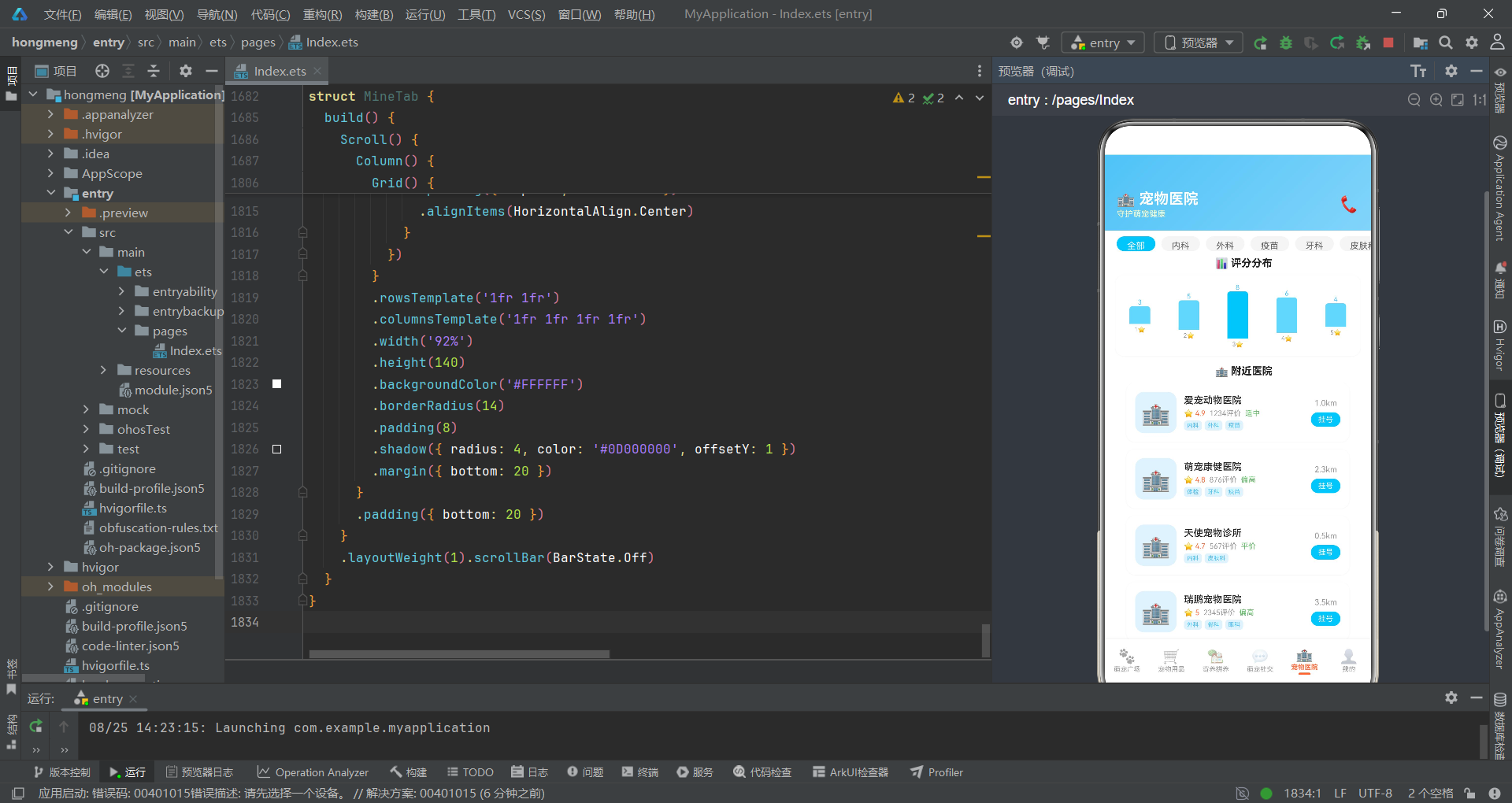
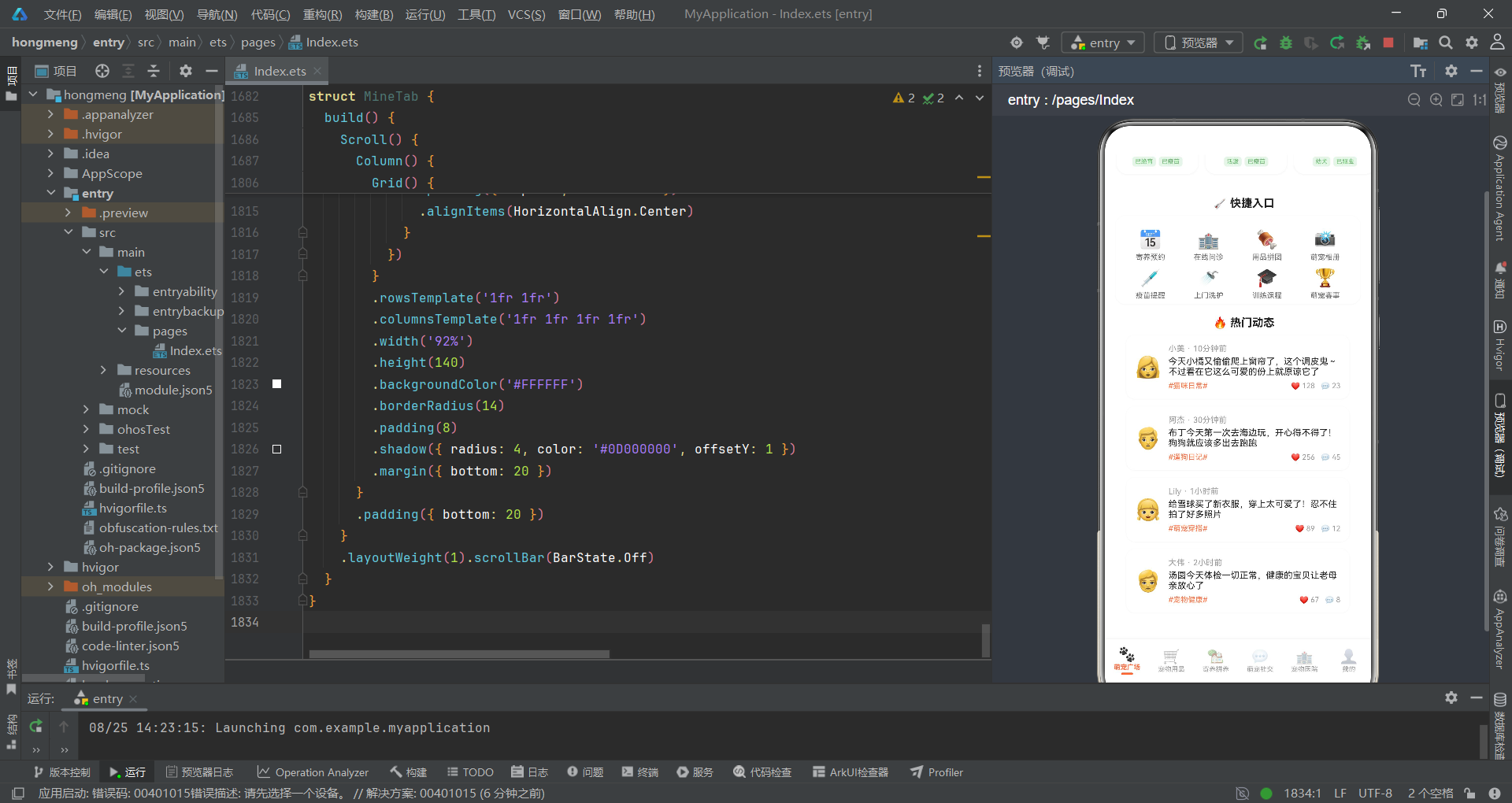
萌宠广场Tab的头部使用linearGradient(PET_GRADIENT)渲染橙色渐变背景,白字标题配合半透明副标题营造品牌氛围。宠物名片横滑区域通过Scroll().scrollable(ScrollDirection.Horizontal)实现横向滚动,ForEach遍历10条宠物名片数据渲染圆形头像卡片,每张卡片包含emoji头像、宠物名、品种年龄、星级评分和标签胶囊。快捷入口使用Grid组件以4列2行的模板布局8个功能入口,其中"寄养预约"入口通过onClick条件判断触发onBookFoster回调,实现了从广场Tab到寄养弹窗的跨组件通信。
6.2 宠物用品Tab与瀑布流
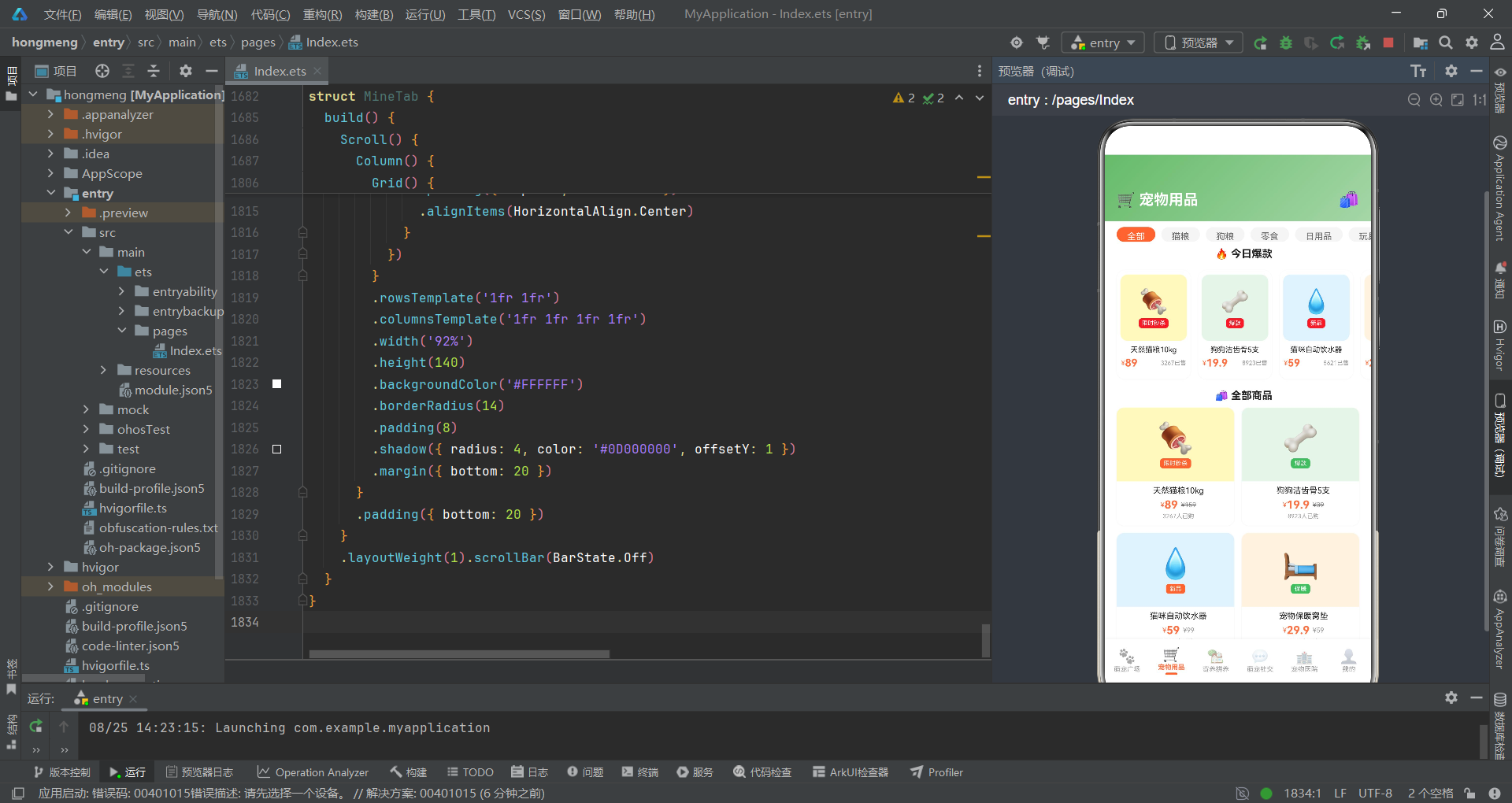
宠物用品Tab实现了分类筛选、横向爆款推荐和双列瀑布流商品展示,是电商场景的核心组件。
@Component
struct ShopTab {
  @State activeCategory: number = 0

  build() {
    Column() {
      // 头部
      Row() {
        Text('🛒 宠物用品').fontSize(20).fontWeight(FontWeight.Bold).fontColor('#FFFFFF')
        Column().layoutWeight(1)
        Text('🛍️').fontSize(22).fontColor('#FFFFFF')
      }
      .width('100%')
      .padding({ left: 16, right: 16, top: 48, bottom: 16 })
      .linearGradient(PET_GREEN_GRADIENT)

      // 分类标签
      Scroll() {
        Row({ space: 8 }) {
          ForEach(SHOP_CATEGORIES, (cat: string, index: number) => {
            Text(cat).fontSize(12)
              .fontColor(this.activeCategory === index ? '#FFFFFF' : '#666666')
              .padding({ left: 14, right: 14, top: 6, bottom: 6 })
              .backgroundColor(this.activeCategory === index ? '#FF7043' : '#F5F5F5')
              .borderRadius(16)
              .onClick(() => { this.activeCategory = index })
          })
        }
        .padding({ left: 16, right: 16 })
      }
      .scrollable(ScrollDirection.Horizontal)
      .scrollBar(BarState.Off)
      .height(36)
      .padding({ top: 8, bottom: 8 })

      // 横向爆款
      Text('🔥 今日爆款').fontSize(14).fontColor('#212121').fontWeight(FontWeight.Bold)
        .margin({ left: 16, bottom: 8 })

      Scroll() {
        Row({ space: 10 }) {
          ForEach(PRODUCTS.slice(0, 4), (product: ProductMeta) => {
            Column() {
              Column() {
                Text(product.emoji).fontSize(32)
                Text(product.tag).fontSize(8).fontColor('#FFFFFF')
                  .padding({ left: 4, right: 4, top: 2, bottom: 2 })
                  .backgroundColor('#E53935').borderRadius(4)
                  .margin({ top: 4 })
              }
              .width(90).height(90)
              .backgroundColor(product.bgColor)
              .borderRadius(10)
              .alignItems(HorizontalAlign.Center)
              .justifyContent(FlexAlign.Center)

              Text(product.name).fontSize(10).fontColor('#212121').margin({ top: 6 })
                .maxLines(1)
                .textOverflow({ overflow: TextOverflow.Ellipsis })
              Row() {
                Text('¥').fontSize(9).fontColor('#FF7043')
                Text(formatPrice(product.price)).fontSize(14).fontColor('#FF7043').fontWeight(FontWeight.Bold)
                Column().layoutWeight(1)
                Text(formatSold(product.sold) + '已售').fontSize(8).fontColor('#999999')
              }
              .margin({ top: 4, bottom: 8 })
            }
            .width(100)
            .backgroundColor('#FFFFFF')
            .borderRadius(12)
            .padding(6)
            .shadow({ radius: 4, color: '#0D000000', offsetY: 1 })
          })
        }
        .padding({ left: 16, right: 16 })
      }
      .scrollable(ScrollDirection.Horizontal)
      .scrollBar(BarState.Off)
      .height(160)
      .margin({ bottom: 8 })

      // 瀑布双列
      Text('🛍️ 全部商品').fontSize(14).fontColor('#212121').fontWeight(FontWeight.Bold)
        .margin({ left: 16, bottom: 8 })

      Scroll() {
        Column() {
          Row({ space: 10 }) {
            // 左列
            Column({ space: 10 }) {
              ForEach(PRODUCTS_LEFT, (product: ProductMeta) => {
                Column() {
                  Column() {
                    Text(product.emoji).fontSize(40)
                    Text(product.tag).fontSize(8).fontColor('#FFFFFF')
                      .padding({ left: 5, right: 5, top: 2, bottom: 2 })
                      .backgroundColor('#FF7043').borderRadius(4)
                      .margin({ top: 4 })
                  }
                  .width('100%').height(100)
                  .backgroundColor(product.bgColor)
                  .borderRadius({ topLeft: 10, topRight: 10 })
                  .alignItems(HorizontalAlign.Center)
                  .justifyContent(FlexAlign.Center)

                  Text(product.name).fontSize(11).fontColor('#212121').margin({ top: 6, left: 8 })
                    .maxLines(1)
                    .textOverflow({ overflow: TextOverflow.Ellipsis })
                  Row() {
                    Text('¥').fontSize(9).fontColor('#FF7043')
                    Text(formatPrice(product.price)).fontSize(15).fontColor('#FF7043').fontWeight(FontWeight.Bold)
                    Text('¥' + formatPrice(product.originalPrice)).fontSize(9)
                      .fontColor('#999999')
                      .decoration({ type: TextDecorationType.LineThrough })
                      .margin({ left: 4 })
                  }
                  .margin({ left: 8, top: 4 })
                  Text(formatSold(product.sold) + '人已购').fontSize(8).fontColor('#999999')
                    .margin({ left: 8, top: 2, bottom: 8 })
                }
                .width('100%')
                .backgroundColor('#FFFFFF')
                .borderRadius(10)
                .shadow({ radius: 4, color: '#0D000000', offsetY: 1 })
              })
            }
            .layoutWeight(1)

            // 右列
            Column({ space: 10 }) {
              ForEach(PRODUCTS_RIGHT, (product: ProductMeta) => {
                Column() {
                  Column() {
                    Text(product.emoji).fontSize(40)
                    Text(product.tag).fontSize(8).fontColor('#FFFFFF')
                      .padding({ left: 5, right: 5, top: 2, bottom: 2 })
                      .backgroundColor('#66BB6A').borderRadius(4)
                      .margin({ top: 4 })
                  }
                  .width('100%').height(100)
                  .backgroundColor(product.bgColor)
                  .borderRadius({ topLeft: 10, topRight: 10 })
                  .alignItems(HorizontalAlign.Center)
                  .justifyContent(FlexAlign.Center)

                  Text(product.name).fontSize(11).fontColor('#212121').margin({ top: 6, left: 8 })
                    .maxLines(1)
                    .textOverflow({ overflow: TextOverflow.Ellipsis })
                  Row() {
                    Text('¥').fontSize(9).fontColor('#FF7043')
                    Text(formatPrice(product.price)).fontSize(15).fontColor('#FF7043').fontWeight(FontWeight.Bold)
                    Text('¥' + formatPrice(product.originalPrice)).fontSize(9)
                      .fontColor('#999999')
                      .decoration({ type: TextDecorationType.LineThrough })
                      .margin({ left: 4 })
                  }
                  .margin({ left: 8, top: 4 })
                  Text(formatSold(product.sold) + '人已购').fontSize(8).fontColor('#999999')
                    .margin({ left: 8, top: 2, bottom: 8 })
                }
                .width('100%')
                .backgroundColor('#FFFFFF')
                .borderRadius(10)
                .shadow({ radius: 4, color: '#0D000000', offsetY: 1 })
              })
            }
            .layoutWeight(1)
          }
          .padding({ left: 16, right: 16, bottom: 20 })
        }
      }
      .layoutWeight(1).scrollBar(BarState.Off)
    }
    .width('100%').height('100%')
  }
}
瀑布流实现是该Tab的核心亮点。左右两列分别通过ForEach遍历PRODUCTS_LEFT和PRODUCTS_RIGHT数组渲染商品卡片,两列使用layoutWeight(1)均分宽度。商品卡片包含emoji图标区(背景色取自数据)、商品名(单行省略)、价格行(现价+原价删除线)和销量信息。原价使用TextDecorationType.LineThrough添加删除线效果,这是电商场景中"划掉原价"的经典视觉表达。左右列标签颜色做了差异化处理:左列用橙色#FF7043、右列用绿色#66BB6A,形成视觉层次区分。分类标签的选中状态通过@State activeCategory驱动,点击切换时文字变白、背景变橙。
6.3 寄养拼养Tab
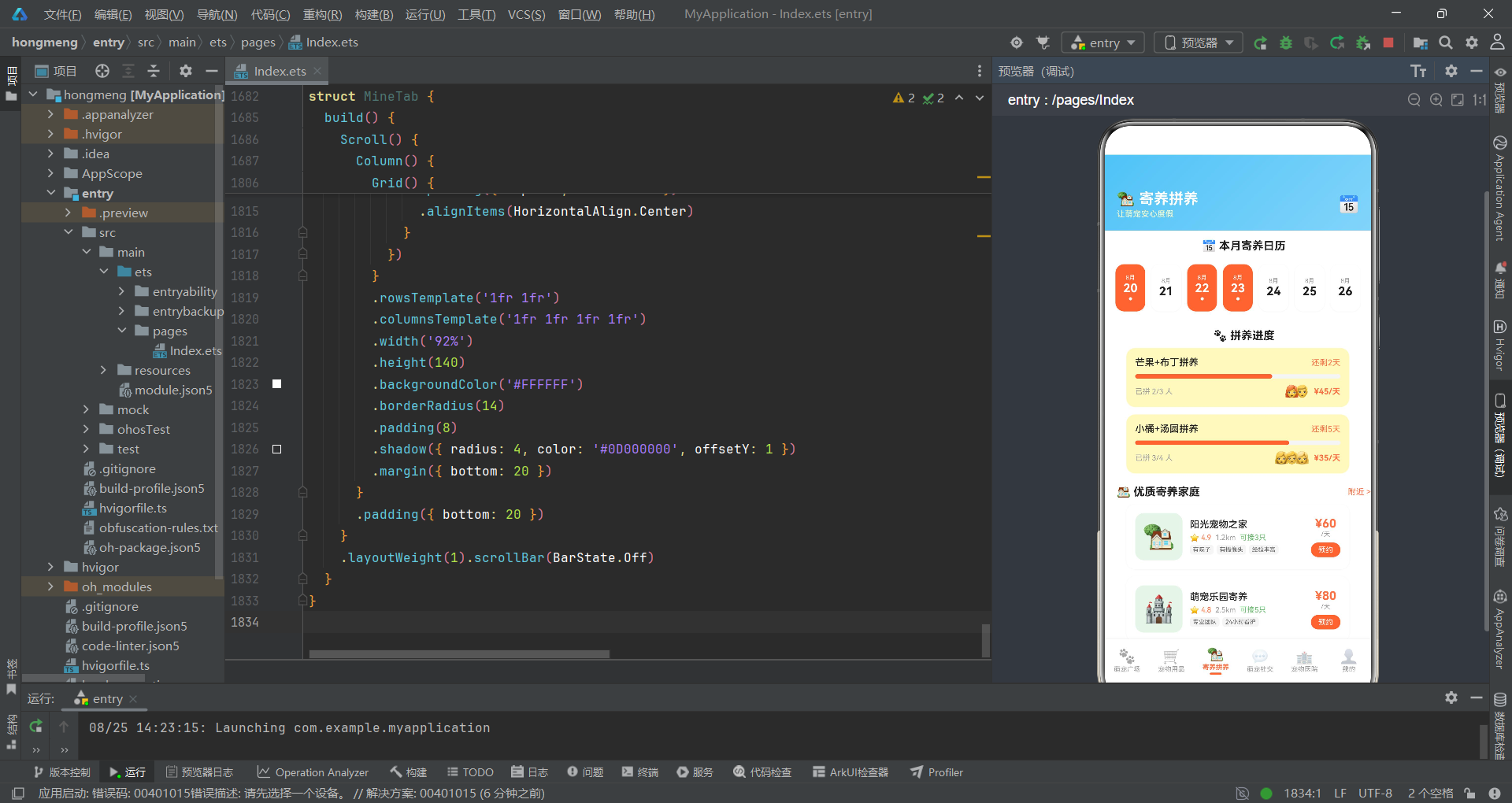
寄养拼养Tab集成了寄养日历、拼养进度条和寄养家庭列表三大模块。
@Component
struct FosterTab {
  onBookFoster: () => void = () => {}

  build() {
    Scroll() {
      Column() {
        // 头部
        Row() {
          Column() {
            Text('🏡 寄养拼养').fontSize(20).fontWeight(FontWeight.Bold).fontColor('#FFFFFF')
            Text('让萌宠安心度假').fontSize(11).fontColor('#FFFFFFCC').margin({ top: 2 })
          }
          .alignItems(HorizontalAlign.Start)
          Column().layoutWeight(1)
          Text('📅').fontSize(22).fontColor('#FFFFFF')
        }
        .width('100%')
        .padding({ left: 16, right: 16, top: 48, bottom: 16 })
        .linearGradient(PET_BLUE_GRADIENT)

        // 寄养日历
        Text('📅 本月寄养日历').fontSize(15).fontColor('#212121').fontWeight(FontWeight.Bold)
          .margin({ left: 16, top: 12, bottom: 8 })

        Row({ space: 8 }) {
          ForEach(FOSTER_CALENDAR, (cal: FosterCalendarMeta) => {
            Column() {
              Text('8月').fontSize(8).fontColor(cal.marked ? '#FFFFFF' : '#999999')
              Text(cal.day).fontSize(16).fontColor(cal.marked ? '#FFFFFF' : '#212121')
                .fontWeight(FontWeight.Bold)
              if (cal.marked) {
                Text('●').fontSize(6).fontColor('#FFFFFF').margin({ top: 2 })
              }
            }
            .layoutWeight(1)
            .height(64)
            .backgroundColor(cal.marked ? '#FF7043' : '#FFFFFF')
            .borderRadius(12)
            .alignItems(HorizontalAlign.Center)
            .justifyContent(FlexAlign.Center)
            .shadow({ radius: 4, color: '#0D000000', offsetY: 1 })
          })
        }
        .width('92%')
        .padding({ top: 8, bottom: 8 })

        // 拼养进度卡
        Text('🐾 拼养进度').fontSize(15).fontColor('#212121').fontWeight(FontWeight.Bold)
          .margin({ left: 16, top: 16, bottom: 8 })

        Column({ space: 10 }) {
          ForEach(GROUP_BUY_DATA, (group: GroupBuyProgressMeta) => {
            Column() {
              Row() {
                Text(group.petName).fontSize(13).fontColor('#212121').fontWeight(FontWeight.Medium)
                Column().layoutWeight(1)
                Text(group.endTime).fontSize(11).fontColor('#FF7043')
              }
              .width('100%')

              // 进度条
              Row() {
                Column()
                  .width((group.currentCount / group.targetCount * 100) + '%')
                  .height(6).backgroundColor('#FF7043').borderRadius(3)
                Column().layoutWeight(1)
              }
              .width('100%').height(6).backgroundColor('#F5F5F5').borderRadius(3)
              .margin({ top: 8 })

              Row() {
                Text('已拼 ' + group.currentCount + '/' + group.targetCount + ' 人').fontSize(10).fontColor('#999999')
                Column().layoutWeight(1)
                Row() {
                  ForEach(group.avatars, (avatar: string) => {
                    Text(avatar).fontSize(16)
                      .margin({ left: -6 })
                  })
                }
                Text('  ¥' + group.price + '/天').fontSize(11).fontColor('#FF7043').fontWeight(FontWeight.Bold)
              }
              .width('100%')
              .margin({ top: 8 })
            }
            .width('92%')
            .padding(12)
            .backgroundColor('#FFF9C4')
            .borderRadius(12)
          })
        }
        .padding({ left: 16, right: 16 })

        // 寄养家庭列表
        Row() {
          Text('🏠 优质寄养家庭').fontSize(15).fontColor('#212121').fontWeight(FontWeight.Bold)
          Column().layoutWeight(1)
          Text('附近 >').fontSize(11).fontColor('#FF7043')
        }
        .width('100%')
        .padding({ left: 16, top: 16, bottom: 8 })

        Column({ space: 10 }) {
          ForEach(FOSTER_FAMILIES, (family: FosterFamilyMeta) => {
            Row() {
              Column() {
                Text(family.emoji).fontSize(36)
              }
              .width(64).height(64)
              .backgroundColor('#E8F5E9')
              .borderRadius(12)
              .justifyContent(FlexAlign.Center)

              Column() {
                Text(family.name).fontSize(13).fontColor('#212121').fontWeight(FontWeight.Medium)
                Row() {
                  Text('⭐ ' + family.rating).fontSize(10).fontColor('#FF7043')
                  Text('  ' + family.distance).fontSize(10).fontColor('#999999')
                  Text('  ' + family.capacity).fontSize(10).fontColor('#66BB6A')
                }
                .margin({ top: 4 })
                Row({ space: 4 }) {
                  ForEach(family.tags.slice(0, 3), (tag: string) => {
                    Text(tag).fontSize(8).fontColor('#666666')
                      .padding({ left: 4, right: 4, top: 2, bottom: 2 })
                      .backgroundColor('#F5F5F5').borderRadius(4)
                  })
                }
                .margin({ top: 4 })
              }
              .alignItems(HorizontalAlign.Start)
              .margin({ left: 10 })
              .layoutWeight(1)

              Column() {
                Text('¥' + family.price).fontSize(16).fontColor('#FF7043').fontWeight(FontWeight.Bold)
                Text('/天').fontSize(9).fontColor('#999999')
                Text('预约').fontSize(10).fontColor('#FFFFFF')
                  .padding({ left: 10, right: 10, top: 4, bottom: 4 })
                  .backgroundColor('#FF7043').borderRadius(10)
                  .margin({ top: 6 })
                  .onClick(() => { this.onBookFoster() })
              }
              .alignItems(HorizontalAlign.Center)
            }
            .width('92%')
            .padding(12)
            .backgroundColor('#FFFFFF')
            .borderRadius(12)
            .shadow({ radius: 4, color: '#0D000000', offsetY: 1 })
          })
        }
        .padding({ left: 16, right: 16, bottom: 20 })
      }
    }
    .layoutWeight(1).scrollBar(BarState.Off)
  }
}
寄养日历通过ForEach遍历FOSTER_CALENDAR数组渲染7天日历卡片,已标记日期以橙色背景白字标识,底部还有一个小圆点提示标记状态。拼养进度卡通过计算group.currentCount / group.targetCount * 100得到进度百分比,以动态宽度的橙色进度条在灰色轨道中展示成团进度。参与拼养的头像使用负margin叠加效果(margin({ left: -6 }))实现类似社交应用中常见的头像重叠展示。寄养家庭列表每张卡片右侧的"预约"按钮通过onClick触发onBookFoster回调,与父组件的状态联动打开寄养预约弹窗。
七、应用核心流程
以下流程图展示了应用的主要交互流程和组件间通信路径:
从流程图可以清晰看到,PetCommunityApp入口组件作为中枢节点,通过activeTab状态变量分发到六个子Tab组件。各Tab组件通过回调函数与弹窗系统通信,弹窗之间也存在链式跳转关系(如宠物详情弹窗可跳转到编辑弹窗)。这种设计确保了组件间的松耦合——子Tab组件不直接操作弹窗状态,而是通过回调将控制权交还给父组件,由父组件统一管理弹窗的显示与隐藏。
八、社交动态与医院Tab
8.1 萌宠社交Tab
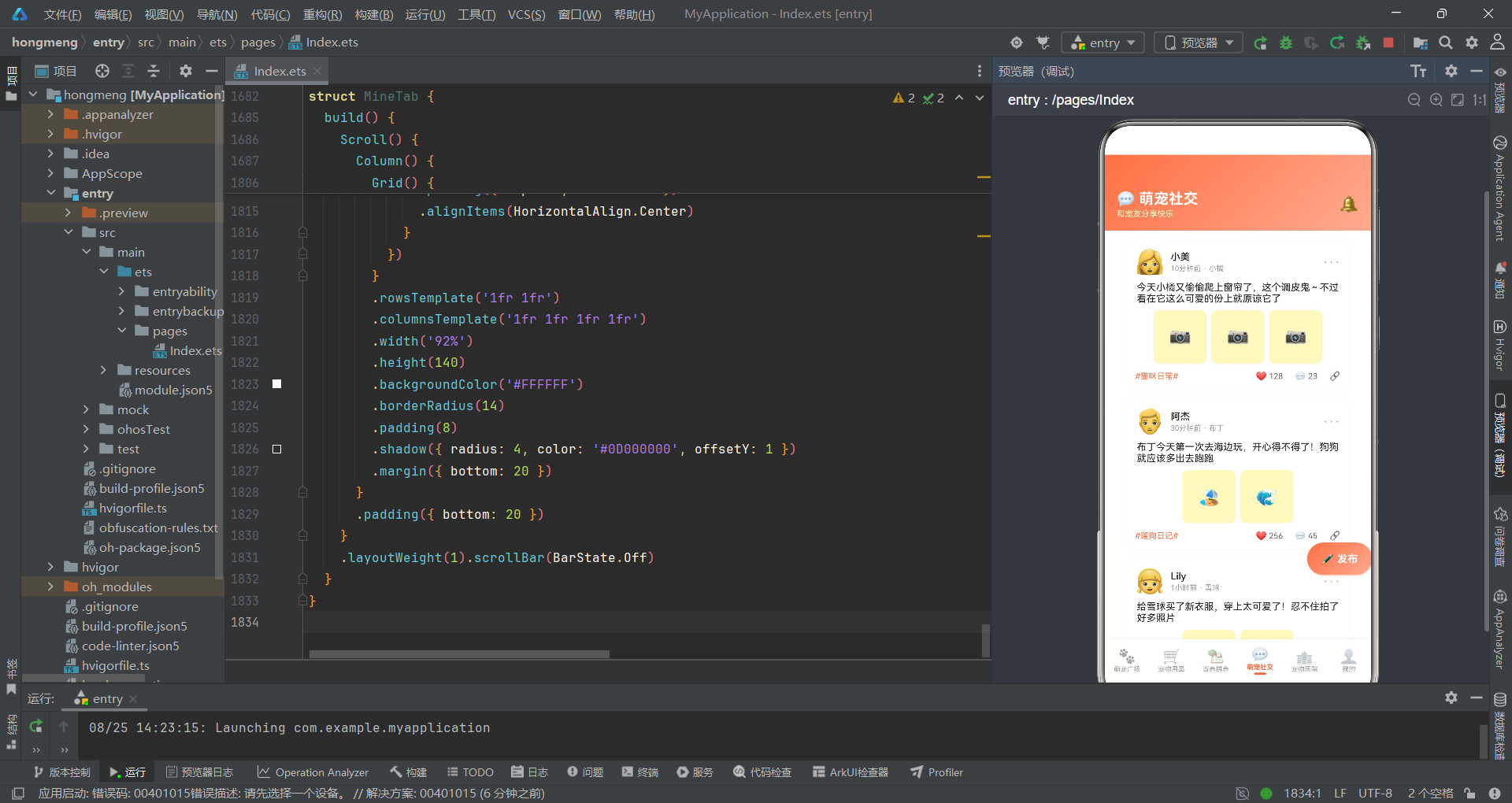
社交Tab实现了动态信息流展示和浮动发布按钮,是社区内容运营的核心载体。
@Component
struct SocialTab {
  onPost: () => void = () => {}
  onDelete: (index: number) => void = (_index: number) => {}

  build() {
    Stack() {
      Column() {
        // 头部
        Row() {
          Column() {
            Text('💬 萌宠社交').fontSize(20).fontWeight(FontWeight.Bold).fontColor('#FFFFFF')
            Text('和宠友分享快乐').fontSize(11).fontColor('#FFFFFFCC').margin({ top: 2 })
          }
          .alignItems(HorizontalAlign.Start)
          Column().layoutWeight(1)
          Text('🔔').fontSize(22).fontColor('#FFFFFF')
        }
        .width('100%')
        .padding({ left: 16, right: 16, top: 48, bottom: 16 })
        .linearGradient(PET_GRADIENT)

        // 动态信息流
        Scroll() {
          Column({ space: 12 }) {
            ForEach(SOCIAL_POSTS, (post: SocialPostMeta, index: number) => {
              Column() {
                Row() {
                  Text(post.userAvatar).fontSize(32)
                  Column() {
                    Text(post.userName).fontSize(13).fontColor('#212121').fontWeight(FontWeight.Medium)
                    Text(post.time + ' · ' + post.petName).fontSize(10).fontColor('#999999').margin({ top: 2 })
                  }
                  .alignItems(HorizontalAlign.Start)
                  .margin({ left: 8 })
                  .layoutWeight(1)
                  Text('···').fontSize(16).fontColor('#999999')
                    .onClick(() => { this.onDelete(index) })
                }

                Text(post.content).fontSize(13).fontColor('#212121').margin({ top: 8 })

                Row({ space: 6 }) {
                  ForEach(post.images, (img: string) => {
                    Column() {
                      Text(img).fontSize(24)
                    }
                    .width(72).height(72)
                    .backgroundColor('#FFF9C4')
                    .borderRadius(8)
                    .justifyContent(FlexAlign.Center)
                  })
                }
                .margin({ top: 8 })

                Row() {
                  Text(post.topic).fontSize(11).fontColor('#FF7043')
                  Column().layoutWeight(1)
                  Row() {
                    Text('❤️').fontSize(12)
                    Text(post.likes.toString()).fontSize(11).fontColor('#666666').margin({ left: 3 })
                  }
                  Row() {
                    Text('💬').fontSize(12)
                    Text(post.comments.toString()).fontSize(11).fontColor('#666666').margin({ left: 3 })
                  }
                  .margin({ left: 16 })
                  Text('🔗').fontSize(12).margin({ left: 16 })
                }
                .margin({ top: 10 })
              }
              .width('92%')
              .padding(12)
              .backgroundColor('#FFFFFF')
              .borderRadius(14)
              .shadow({ radius: 4, color: '#0D000000', offsetY: 1 })
            })
          }
          .padding({ top: 12, left: 16, right: 16, bottom: 80 })
        }
        .layoutWeight(1).scrollBar(BarState.Off)
      }
      .width('100%').height('100%')

      // 浮动发布按钮
      Row() {
        Text('✏️ 发布').fontSize(14).fontColor('#FFFFFF').fontWeight(FontWeight.Bold)
      }
      .width(88).height(44)
      .linearGradient(PET_GRADIENT)
      .borderRadius(22)
      .justifyContent(FlexAlign.Center)
      .shadow({ radius: 8, color: '#33FF7043', offsetY: 4 })
      .position({ x: '76%', y: '80%' })
      .onClick(() => { this.onPost() })
    }
    .width('100%').height('100%')
  }
}
社交Tab的动态信息流通过ForEach遍历SOCIAL_POSTS数组渲染动态卡片,每张卡片包含用户头像、用户名、时间、宠物名、正文内容、图片九宫格、话题标签和互动统计(点赞、评论、分享)。每条动态右上角的"···"按钮通过onClick触发onDelete(index)回调,将当前动态索引传递给父组件打开删除确认弹窗。浮动发布按钮使用Stack容器的position定位悬浮于右下角,通过linearGradient(PET_GRADIENT)渲染品牌渐变,并使用带透明度的shadow营造悬浮投影效果。图片展示区使用Row({ space: 6 })配合ForEach渲染动态图片数组,每张72vp尺寸的圆角方块以浅黄背景呈现。
8.2 宠物医院Tab
医院Tab展示了科室筛选、评分分布柱状图和医院列表,是垂直医疗服务场景的体现。
@Component
struct HospitalTab {
  @State activeDept: number = 0

  build() {
    Column() {
      // 头部
      Row() {
        Column() {
          Text('🏥 宠物医院').fontSize(20).fontWeight(FontWeight.Bold).fontColor('#FFFFFF')
          Text('守护萌宠健康').fontSize(11).fontColor('#FFFFFFCC').margin({ top: 2 })
        }
        .alignItems(HorizontalAlign.Start)
        Column().layoutWeight(1)
        Text('📞').fontSize(22).fontColor('#FFFFFF')
      }
      .width('100%')
      .padding({ left: 16, right: 16, top: 48, bottom: 16 })
      .linearGradient(PET_BLUE_GRADIENT)

      // 科室筛选
      Scroll() {
        Row({ space: 8 }) {
          ForEach(HOSPITAL_DEPTS, (dept: string, index: number) => {
            Text(dept).fontSize(12)
              .fontColor(this.activeDept === index ? '#FFFFFF' : '#666666')
              .padding({ left: 14, right: 14, top: 6, bottom: 6 })
              .backgroundColor(this.activeDept === index ? '#4FC3F7' : '#F5F5F5')
              .borderRadius(16)
              .onClick(() => { this.activeDept = index })
          })
        }
        .padding({ left: 16, right: 16 })
      }
      .scrollable(ScrollDirection.Horizontal)
      .scrollBar(BarState.Off)
      .height(36)
      .padding({ top: 8, bottom: 8 })

      // 评分柱状图
      Text('📊 评分分布').fontSize(14).fontColor('#212121').fontWeight(FontWeight.Bold)
        .margin({ left: 16, bottom: 8 })

      Row() {
        ForEach(RATING_DATA, (val: number, index: number) => {
          Column() {
            Text(val.toString()).fontSize(9).fontColor('#4FC3F7')
            Column()
              .width(28)
              .height((val / 10 * 80).toFixed(0) + 'vp')
              .backgroundColor(index === 2 ? '#4FC3F7' : '#81D4FA')
              .borderRadius({ topLeft: 4, topRight: 4 })
            Text((index + 1) + '⭐').fontSize(8).fontColor('#999999').margin({ top: 3 })
          }
          .layoutWeight(1).alignItems(HorizontalAlign.Center)
        })
      }
      .width('92%')
      .height(110)
      .backgroundColor('#FFFFFF')
      .borderRadius(12)
      .padding({ top: 8, bottom: 8 })
      .shadow({ radius: 4, color: '#0D000000', offsetY: 1 })

      // 医院列表
      Text('🏥 附近医院').fontSize(14).fontColor('#212121').fontWeight(FontWeight.Bold)
        .margin({ left: 16, top: 12, bottom: 8 })

      Scroll() {
        Column({ space: 10 }) {
          ForEach(HOSPITALS, (hospital: HospitalMeta) => {
            Row() {
              Column() {
                Text(hospital.emoji).fontSize(32)
              }
              .width(56).height(56)
              .backgroundColor('#E3F2FD')
              .borderRadius(12)
              .justifyContent(FlexAlign.Center)

              Column() {
                Text(hospital.name).fontSize(13).fontColor('#212121').fontWeight(FontWeight.Medium)
                Row() {
                  Text('⭐ ' + hospital.rating).fontSize(10).fontColor('#FF7043')
                  Text('  ' + hospital.reviewCount + '评价').fontSize(10).fontColor('#999999')
                  Text('  ' + hospital.priceLevel).fontSize(10).fontColor('#66BB6A')
                }
                .margin({ top: 4 })
                Row({ space: 4 }) {
                  ForEach(hospital.departments.slice(0, 3), (dept: string) => {
                    Text(dept).fontSize(8).fontColor('#4FC3F7')
                      .padding({ left: 4, right: 4, top: 2, bottom: 2 })
                      .backgroundColor('#E3F2FD').borderRadius(4)
                  })
                }
                .margin({ top: 4 })
              }
              .alignItems(HorizontalAlign.Start)
              .margin({ left: 10 })
              .layoutWeight(1)

              Column() {
                Text(hospital.distance).fontSize(11).fontColor('#999999')
                Text('挂号').fontSize(10).fontColor('#FFFFFF')
                  .padding({ left: 10, right: 10, top: 4, bottom: 4 })
                  .backgroundColor('#4FC3F7').borderRadius(10)
                  .margin({ top: 6 })
              }
              .alignItems(HorizontalAlign.Center)
            }
            .width('92%')
            .padding(12)
            .backgroundColor('#FFFFFF')
            .borderRadius(12)
            .shadow({ radius: 4, color: '#0D000000', offsetY: 1 })
          })
        }
        .padding({ left: 16, right: 16, bottom: 20 })
      }
      .layoutWeight(1).scrollBar(BarState.Off)
    }
    .width('100%').height('100%')
  }
}
评分柱状图是该Tab的数据可视化亮点,通过ForEach遍历RATING_DATA数组,以Column组件的高度动态映射评分值(val / 10 * 80计算vp高度),第三根柱子(3星评分)用深色#4FC3F7突出显示,其余用浅色#81D4FA,形成视觉对比。科室筛选标签和医院卡片中的科室标签都使用了蓝色系配色,与医院Tab的整体蓝色调一致。医院列表每张卡片右侧的"挂号"按钮使用蓝色背景,与Tab的主题色统一。科室标签使用slice(0, 3)限制最多展示3个科室,避免标签过多导致布局溢出。
8.3 个人中心Tab
个人中心Tab集成了用户头部、宠物档案横滑、健康打卡柱状图、订单列表和功能宫格。
@Component
struct MineTab {
  onEditPet: () => void = () => {}

  build() {
    Scroll() {
      Column() {
        // 渐变头部
        Column() {
          Text('🐕').fontSize(48).margin({ top: 56 })
          Text('小美的萌宠家园').fontSize(20).fontWeight(FontWeight.Bold).fontColor('#FFFFFF')
            .margin({ top: 8 })
          Text('养宠3年 · 2只萌宠 · 积分1280').fontSize(11).fontColor('#FFFFFFCC')
            .margin({ top: 4 })
        }
        .width('100%')
        .padding({ bottom: 20 })
        .linearGradient(PET_GRADIENT)
        .alignItems(HorizontalAlign.Center)

        // 宠物档案
        Row() {
          Text('🐾 我的宠物').fontSize(15).fontColor('#212121').fontWeight(FontWeight.Bold)
          Column().layoutWeight(1)
          Text('+ 添加').fontSize(11).fontColor('#FF7043')
        }
        .width('92%')
        .margin({ top: 16, bottom: 8 })

        Scroll() {
          Row({ space: 10 }) {
            ForEach(PET_CARDS.slice(0, 4), (pet: PetCardMeta) => {
              Column() {
                Column() {
                  Text(pet.avatar).fontSize(32)
                }
                .width(60).height(60)
                .backgroundColor(pet.bgColor)
                .borderRadius(30)
                .justifyContent(FlexAlign.Center)

                Text(pet.name).fontSize(12).fontColor('#212121').fontWeight(FontWeight.Medium)
                  .margin({ top: 6 })
                Text(pet.breed).fontSize(9).fontColor('#999999')
                Text('编辑').fontSize(9).fontColor('#FF7043').margin({ top: 4 })
                  .onClick(() => { this.onEditPet() })
              }
              .width(80)
              .backgroundColor('#FFFFFF')
              .borderRadius(12)
              .padding({ top: 10, bottom: 10 })
              .alignItems(HorizontalAlign.Center)
              .shadow({ radius: 4, color: '#0D000000', offsetY: 1 })
            })
          }
          .padding({ left: 16, right: 16 })
        }
        .scrollable(ScrollDirection.Horizontal)
        .scrollBar(BarState.Off)
        .height(130)

        // 健康打卡柱状图
        Text('📊 本周健康打卡').fontSize(15).fontColor('#212121').fontWeight(FontWeight.Bold)
          .margin({ left: 16, top: 16, bottom: 8 })

        Row() {
          ForEach(CHECK_DATA, (d: number, index: number) => {
            Column() {
              Text(d.toString()).fontSize(9).fontColor('#66BB6A')
              Column()
                .width(22)
                .height((d / 10 * 60).toFixed(0) + 'vp')
                .backgroundColor(index === 4 ? '#66BB6A' : '#A5D6A7')
                .borderRadius({ topLeft: 4, topRight: 4 })
              Text(WEEK_DAYS[index]).fontSize(8).fontColor('#999999').margin({ top: 3 })
            }
            .layoutWeight(1).alignItems(HorizontalAlign.Center)
          })
        }
        .width('92%')
        .padding(12)
        .backgroundColor('#FFFFFF')
        .borderRadius(12)
        .shadow({ radius: 4, color: '#0D000000', offsetY: 1 })

        // 我的订单
        Row() {
          Text('📦 我的订单').fontSize(15).fontColor('#212121').fontWeight(FontWeight.Bold)
          Column().layoutWeight(1)
          Text('全部 >').fontSize(11).fontColor('#FF7043')
        }
        .width('92%')
        .margin({ top: 16, bottom: 8 })

        Column({ space: 8 }) {
          ForEach(ORDER_DATA, (order: OrderMeta) => {
            Row() {
              Text(order.emoji).fontSize(24)
              Column() {
                Text(order.title).fontSize(12).fontColor('#212121')
                Text(order.type + ' · ' + order.time).fontSize(9).fontColor('#999999').margin({ top: 2 })
              }
              .alignItems(HorizontalAlign.Start)
              .margin({ left: 10 })
              .layoutWeight(1)
              Column() {
                Text('¥' + order.price).fontSize(13).fontColor('#FF7043').fontWeight(FontWeight.Bold)
                Text(order.status).fontSize(9).fontColor('#4CAF50').margin({ top: 2 })
              }
              .alignItems(HorizontalAlign.End)
            }
            .width('100%')
            .padding(10)
            .backgroundColor('#FFFFFF')
            .borderRadius(10)
            .shadow({ radius: 2, color: '#0D000000', offsetY: 1 })
          })
        }
        .width('92%')
        .padding({ left: 16, right: 16 })

        // 功能宫格
        Text('⚙️ 更多功能').fontSize(15).fontColor('#212121').fontWeight(FontWeight.Bold)
          .margin({ left: 16, top: 16, bottom: 8 })

        Grid() {
          ForEach(FEATURE_ITEMS, (item: FeatureItemMeta) => {
            GridItem() {
              Column() {
                Text(item.icon).fontSize(24)
                Text(item.label).fontSize(10).fontColor('#666666').margin({ top: 4 })
              }
              .width('100%')
              .padding({ top: 12, bottom: 12 })
              .alignItems(HorizontalAlign.Center)
            }
          })
        }
        .rowsTemplate('1fr 1fr')
        .columnsTemplate('1fr 1fr 1fr 1fr')
        .width('92%')
        .height(140)
        .backgroundColor('#FFFFFF')
        .borderRadius(14)
        .padding(8)
        .shadow({ radius: 4, color: '#0D000000', offsetY: 1 })
        .margin({ bottom: 20 })
      }
    }
    .layoutWeight(1).scrollBar(BarState.Off)
  }
}
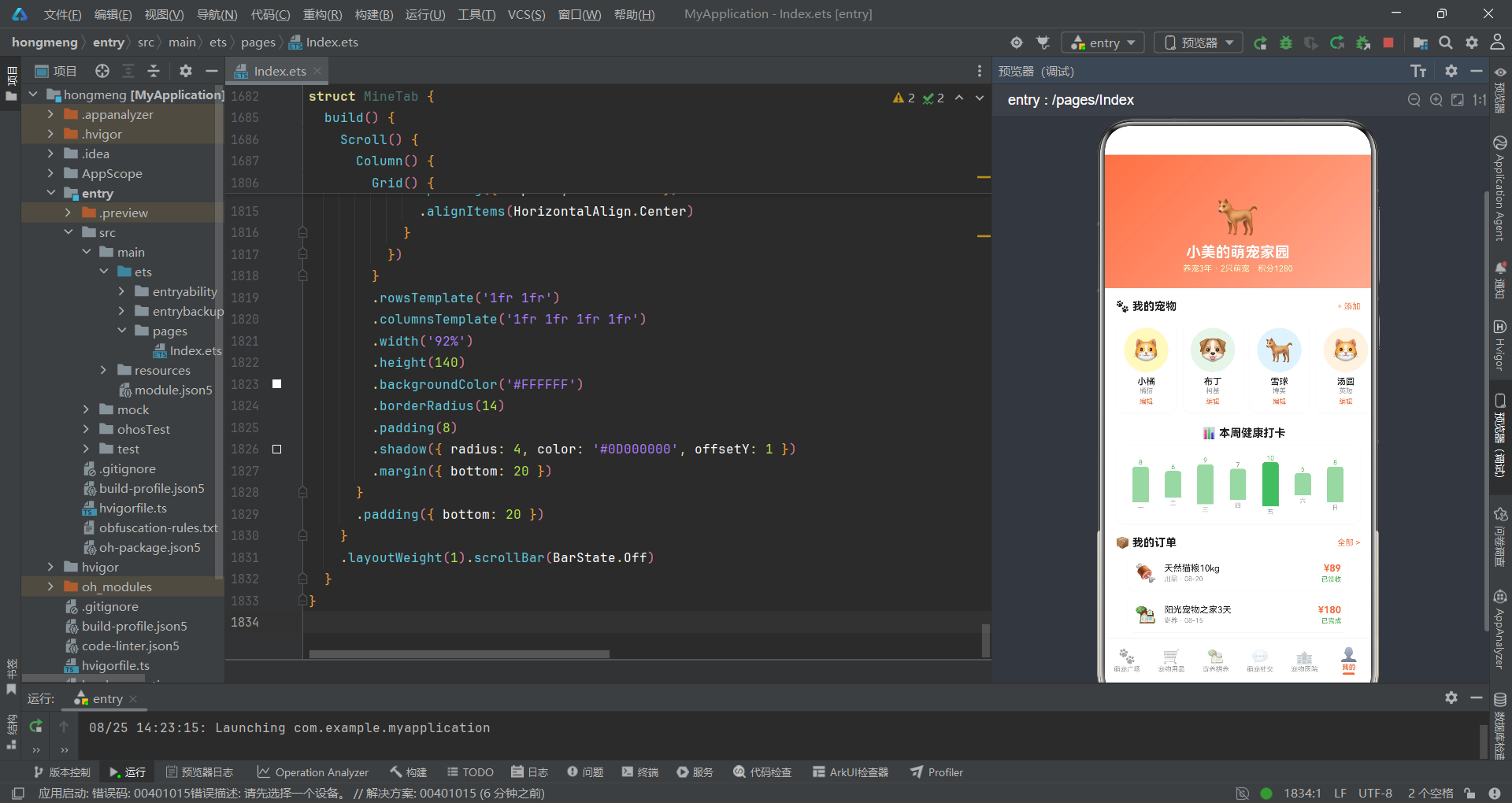
个人中心Tab的健康打卡柱状图使用绿色系(#66BB6A深色和#A5D6A7浅色),与医院Tab的蓝色柱状图形成场景区分——绿色代表日常健康打卡(生活化场景),蓝色代表医院评分(专业场景)。第五天(周五)的柱子用深色突出,暗示当日打卡值最高。宠物档案横滑区域的"编辑"按钮通过onClick触发onEditPet回调打开编辑弹窗。功能宫格使用4列2行模板展示8个功能入口(订单管理、优惠券、收货地址、我的钱包、积分商城、帮助中心、设置、联系客服),与首页快捷入口宫格形成呼应。订单列表的每条订单通过emoji图标、标题、类型时间、价格和状态构建信息层次,状态文字用绿色表示已完成。
九、技术点对比
| 技术维度 | 实现方案 | 特点分析 | 适用场景 |
|---|---|---|---|
| 状态管理 | @State + @Observed | 组件内状态自动追踪,@Observed模型属性变更触发重渲染 | 中等复杂度单页面应用 |
| 组件通信 | 回调函数参数传递 | 子组件通过回调通知父组件状态变更,实现松耦合 | 父子组件单向数据流 |
| 弹窗管理 | Stack叠加 + zIndex | 多弹窗独立控制,通过布尔状态变量管理显隐 | 多弹窗交互场景 |
| 数据模型 | Interface + @Observed双层 | 接口定义类型结构,@Observed包装为可观察对象 | 类型安全的状态管理 |
| 列表渲染 | ForEach + 静态数据 | 遍历全局数据数组渲染列表,keyGenerator去重 | 中等规模数据展示 |
| 横向滚动 | Scroll + Horizontal | scrollable(ScrollDirection.Horizontal)实现横滑列表 | 卡片轮播、标签栏 |
| 瀑布流布局 | 双Column + layoutWeight | 左右列独立ForEach渲染,layoutWeight均分宽度 | 电商商品双列展示 |
| 数据可视化 | Column动态高度 | 根据数据值计算vp高度渲染柱状图 | 简单统计图表 |
| 样式复用 | @Builder方法 | modalOverlay等通用Builder减少重复代码 | 通用UI组件复用 |
| 渐变背景 | LinearGradientOptions | 三组渐变令牌对应三个Tab色彩主题 | 品牌色视觉统一 |
安装DevEco Studio程序

选择目标安装目录:

设置环境变量,但是需要重启一下:

新建一个空白模板:

设置API为24的模板项目:
初始化项目,自动下载相关依赖:

完整代码:
// ============================================================================
// 拼多多风格·萌宠拼养社区
// 宠物寄养 + 社交 + 用品拼团平台
// 包含:宠物名片、寄养预约、萌宠社交、宠物医院等场景
// ============================================================================
// ============================ Interface 定义 ================================
interface PetCardMeta {
name: string
breed: string
age: string
owner: string
avatar: string
bgColor: string
rating: number
tags: string[]
}
interface ProductMeta {
name: string
price: number
originalPrice: number
emoji: string
sold: number
bgColor: string
tag: string
}
interface FosterFamilyMeta {
name: string
rating: number
distance: string
price: number
emoji: string
tags: string[]
capacity: string
}
interface SocialPostMeta {
userName: string
userAvatar: string
petName: string
content: string
images: string[]
likes: number
comments: number
time: string
topic: string
}
interface HospitalMeta {
name: string
rating: number
distance: string
departments: string[]
emoji: string
reviewCount: number
priceLevel: string
}
interface OrderMeta {
type: string
title: string
price: number
status: string
time: string
emoji: string
}
interface QuickEntryMeta {
icon: string
label: string
color: string
}
interface GroupBuyProgressMeta {
petName: string
targetCount: number
currentCount: number
avatars: string[]
price: number
endTime: string
}
interface VaccineRecordMeta {
name: string
date: string
nextDate: string
status: string
}
interface HealthRecordMeta {
date: string
weight: string
note: string
}
interface FeatureItemMeta {
icon: string
label: string
}
interface FosterCalendarMeta {
day: string
marked: boolean
}
// ============================ @Observed 数据模型 ===========================
@Observed
export class PetCard {
name: string = ''
breed: string = ''
age: string = ''
owner: string = ''
avatar: string = ''
bgColor: string = ''
rating: number = 0
tags: string[] = []
constructor(data: PetCardMeta) {
this.name = data.name
this.breed = data.breed
this.age = data.age
this.owner = data.owner
this.avatar = data.avatar
this.bgColor = data.bgColor
this.rating = data.rating
this.tags = data.tags
}
}
@Observed
export class Product {
name: string = ''
price: number = 0
originalPrice: number = 0
emoji: string = ''
sold: number = 0
bgColor: string = ''
tag: string = ''
constructor(data: ProductMeta) {
this.name = data.name
this.price = data.price
this.originalPrice = data.originalPrice
this.emoji = data.emoji
this.sold = data.sold
this.bgColor = data.bgColor
this.tag = data.tag
}
}
@Observed
export class FosterFamily {
name: string = ''
rating: number = 0
distance: string = ''
price: number = 0
emoji: string = ''
tags: string[] = []
capacity: string = ''
constructor(data: FosterFamilyMeta) {
this.name = data.name
this.rating = data.rating
this.distance = data.distance
this.price = data.price
this.emoji = data.emoji
this.tags = data.tags
this.capacity = data.capacity
}
}
@Observed
export class SocialPost {
userName: string = ''
userAvatar: string = ''
petName: string = ''
content: string = ''
images: string[] = []
likes: number = 0
comments: number = 0
time: string = ''
topic: string = ''
constructor(data: SocialPostMeta) {
this.userName = data.userName
this.userAvatar = data.userAvatar
this.petName = data.petName
this.content = data.content
this.images = data.images
this.likes = data.likes
this.comments = data.comments
this.time = data.time
this.topic = data.topic
}
}
@Observed
export class Hospital {
name: string = ''
rating: number = 0
distance: string = ''
departments: string[] = []
emoji: string = ''
reviewCount: number = 0
priceLevel: string = ''
constructor(data: HospitalMeta) {
this.name = data.name
this.rating = data.rating
this.distance = data.distance
this.departments = data.departments
this.emoji = data.emoji
this.reviewCount = data.reviewCount
this.priceLevel = data.priceLevel
}
}
// ============================ 设计令牌 =====================================
const PET_COLORS: Record<string, string> = {
'primary': '#FF7043',
'green': '#66BB6A',
'cream': '#FFF9C4',
'sky': '#4FC3F7',
'lightGreenBg': '#E8F5E9',
'white': '#FFFFFF',
'red': '#E53935',
'successGreen': '#4CAF50',
'darkText': '#212121',
'grayText': '#999999',
'lightGray': '#F5F5F5',
}
const PET_GRADIENT: LinearGradientOptions = {
angle: 135,
colors: [['#FF7043', 0.0], ['#FFAB91', 1.0]]
}
const PET_GREEN_GRADIENT: LinearGradientOptions = {
angle: 135,
colors: [['#66BB6A', 0.0], ['#A5D6A7', 1.0]]
}
const PET_BLUE_GRADIENT: LinearGradientOptions = {
angle: 135,
colors: [['#4FC3F7', 0.0], ['#81D4FA', 1.0]]
}
// ============================ 全局写死数据 =================================
// 宠物名片数据 10条
const PET_CARDS: PetCardMeta[] = [
{ name: '小橘', breed: '橘猫', age: '2岁', owner: '小美', avatar: '🐱', bgColor: '#FFF9C4', rating: 4.8, tags: ['已绝育', '已疫苗', '亲人'] },
{ name: '布丁', breed: '柯基', age: '3岁', owner: '阿杰', avatar: '🐶', bgColor: '#E8F5E9', rating: 4.9, tags: ['活泼', '已疫苗', '爱玩'] },
{ name: '雪球', breed: '博美', age: '1岁', owner: 'Lily', avatar: '🐕', bgColor: '#E3F2FD', rating: 4.7, tags: ['幼犬', '已驱虫', '粘人'] },
{ name: '汤圆', breed: '英短', age: '4岁', owner: '大伟', avatar: '🐱', bgColor: '#FFF3E0', rating: 4.6, tags: ['已绝育', '慵懒', '温顺'] },
{ name: '芒果', breed: '金毛', age: '5岁', owner: '婷婷', avatar: '🦮', bgColor: '#FFF9C4', rating: 5.0, tags: ['大型犬', '已疫苗', '乖巧'] },
{ name: '芝麻', breed: '哈士奇', age: '2岁', owner: '老张', avatar: '🐺', bgColor: '#E8F5E9', rating: 4.5, tags: ['拆家王', '已疫苗', '精力旺'] },
{ name: '奶昔', breed: '布偶', age: '3岁', owner: '小雨', avatar: '🐈', bgColor: '#E3F2FD', rating: 4.9, tags: ['名贵', '已绝育', '仙气'] },
{ name: '可乐', breed: '柴犬', age: '2岁', owner: 'Kevin', avatar: '🐕', bgColor: '#FFF3E0', rating: 4.7, tags: ['微笑柴', '已疫苗', '独立'] },
{ name: '芋圆', breed: '加菲', age: '1岁', owner: '甜甜', avatar: '🐱', bgColor: '#FFF9C4', rating: 4.6, tags: ['扁脸萌', '已驱虫', '贪吃'] },
{ name: '悟空', breed: '边牧', age: '3岁', owner: 'Leo', avatar: '🐶', bgColor: '#E8F5E9', rating: 5.0, tags: ['高智商', '已疫苗', '飞盘王'] },
]
// 用品商品 12条
const PRODUCTS: ProductMeta[] = [
{ name: '天然猫粮10kg', price: 89, originalPrice: 159, emoji: '🍖', sold: 3267, bgColor: '#FFF9C4', tag: '限时秒杀' },
{ name: '狗狗洁齿骨5支', price: 19.9, originalPrice: 39, emoji: '🦴', sold: 8923, bgColor: '#E8F5E9', tag: '爆款' },
{ name: '猫咪自动饮水器', price: 59, originalPrice: 99, emoji: '💧', sold: 5621, bgColor: '#E3F2FD', tag: '新品' },
{ name: '宠物保暖窝垫', price: 29.9, originalPrice: 59, emoji: '🛏️', sold: 4532, bgColor: '#FFF3E0', tag: '保暖' },
{ name: '狗牵引绳可伸缩', price: 25, originalPrice: 50, emoji: '🔗', sold: 2341, bgColor: '#E8F5E9', tag: '热销' },
{ name: '猫爬架多层', price: 199, originalPrice: 399, emoji: '🐱', sold: 876, bgColor: '#FFF9C4', tag: '大件' },
{ name: '宠物沐浴露500ml', price: 15.9, originalPrice: 35, emoji: '🧴', sold: 12890, bgColor: '#E3F2FD', tag: '日用' },
{ name: '冻干鸡肉小零食', price: 12.9, originalPrice: 25, emoji: '🍗', sold: 23456, bgColor: '#FFF3E0', tag: '拼团' },
{ name: '猫砂豆腐砂6L', price: 35, originalPrice: 69, emoji: '📦', sold: 7890, bgColor: '#E8F5E9', tag: '囤货' },
{ name: '宠物梳子去浮毛', price: 9.9, originalPrice: 20, emoji: '✂️', sold: 5678, bgColor: '#FFF9C4', tag: '实用' },
{ name: '狗零食大礼包', price: 39.9, originalPrice: 89, emoji: '🎁', sold: 3456, bgColor: '#E3F2FD', tag: '礼包' },
{ name: '宠物便携航空箱', price: 79, originalPrice: 150, emoji: '🧳', sold: 1234, bgColor: '#FFF3E0', tag: '出行' },
]
// 瀑布流左右列
const PRODUCTS_LEFT: ProductMeta[] = [
PRODUCTS[0], PRODUCTS[2], PRODUCTS[4], PRODUCTS[6], PRODUCTS[8], PRODUCTS[10]
]
const PRODUCTS_RIGHT: ProductMeta[] = [
PRODUCTS[1], PRODUCTS[3], PRODUCTS[5], PRODUCTS[7], PRODUCTS[9], PRODUCTS[11]
]
// 寄养家庭 6条
const FOSTER_FAMILIES: FosterFamilyMeta[] = [
{ name: '阳光宠物之家', rating: 4.9, distance: '1.2km', price: 60, emoji: '🏡', tags: ['有院子', '有摄像头', '经验丰富'], capacity: '可接3只' },
{ name: '萌宠乐园寄养', rating: 4.8, distance: '2.5km', price: 80, emoji: '🏰', tags: ['专业团队', '24小时看护'], capacity: '可接5只' },
{ name: '温馨家庭寄养', rating: 5.0, distance: '0.8km', price: 50, emoji: '🏠', tags: ['家庭式', '爱心饲养'], capacity: '可接2只' },
{ name: '快乐汪汪寄养', rating: 4.7, distance: '3.1km', price: 70, emoji: '🏕️', tags: ['大型犬专接', '有草坪'], capacity: '可接4只' },
{ name: '猫咪天堂寄养', rating: 4.9, distance: '1.8km', price: 65, emoji: '🌺', tags: ['猫专用', '恒温环境'], capacity: '可接6只' },
{ name: '全能宠物驿站', rating: 4.6, distance: '4.2km', price: 90, emoji: '🏩', tags: ['医养结合', '接送服务'], capacity: '可接8只' },
]
// 动态数据 8条
const SOCIAL_POSTS: SocialPostMeta[] = [
{ userName: '小美', userAvatar: '👩', petName: '小橘', content: '今天小橘又偷偷爬上窗帘了,这个调皮鬼~不过看在它这么可爱的份上就原谅它了', images: ['📷', '📷', '📷'], likes: 128, comments: 23, time: '10分钟前', topic: '#猫咪日常#' },
{ userName: '阿杰', userAvatar: '👨', petName: '布丁', content: '布丁今天第一次去海边玩,开心得不得了!狗狗就应该多出去跑跑', images: ['🏖️', '🌊'], likes: 256, comments: 45, time: '30分钟前', topic: '#遛狗日记#' },
{ userName: 'Lily', userAvatar: '👧', petName: '雪球', content: '给雪球买了新衣服,穿上太可爱了!忍不住拍了好多照片', images: ['👗', '📸'], likes: 89, comments: 12, time: '1小时前', topic: '#萌宠穿搭#' },
{ userName: '大伟', userAvatar: '🧔', petName: '汤圆', content: '汤圆今天体检一切正常,健康的宝贝让老母亲放心了', images: ['🏥'], likes: 67, comments: 8, time: '2小时前', topic: '#宠物健康#' },
{ userName: '婷婷', userAvatar: '👩🦰', petName: '芒果', content: '芒果今天帮它洗了澡,洗完香喷喷的,金毛洗澡后真的像变了一只狗', images: ['🛁', '✨'], likes: 312, comments: 56, time: '3小时前', topic: '#洗澡日常#' },
{ userName: '老张', userAvatar: '👨🦱', petName: '芝麻', content: '芝麻今天又拆家了,沙发惨不忍睹...有人知道怎么治哈士奇拆家吗', images: ['😱', '🛋️', '💥'], likes: 543, comments: 128, time: '5小时前', topic: '#哈士奇拆家#' },
{ userName: '小雨', userAvatar: '👱♀️', petName: '奶昔', content: '奶昔今天终于学会了握手!布偶猫也可以很聪明的好吗', images: ['🤝', '🐾'], likes: 198, comments: 34, time: '8小时前', topic: '#训练打卡#' },
{ userName: 'Leo', userAvatar: '🧑', petName: '悟空', content: '带悟空去飞盘比赛拿了第一名!边牧的运动天赋真的不是盖的', images: ['🥇', '🐕🦺', '🏆'], likes: 467, comments: 89, time: '昨天', topic: '#运动健将#' },
]
// 医院数据 8条
const HOSPITALS: HospitalMeta[] = [
{ name: '爱宠动物医院', rating: 4.9, distance: '1.0km', departments: ['内科', '外科', '疫苗'], emoji: '🏥', reviewCount: 1234, priceLevel: '适中' },
{ name: '萌宠康健医院', rating: 4.8, distance: '2.3km', departments: ['体检', '牙科', '疫苗'], emoji: '🏥', reviewCount: 876, priceLevel: '偏高' },
{ name: '天使宠物诊所', rating: 4.7, distance: '0.5km', departments: ['内科', '皮肤科'], emoji: '🏥', reviewCount: 567, priceLevel: '平价' },
{ name: '瑞鹏宠物医院', rating: 5.0, distance: '3.5km', departments: ['外科', '骨科', '眼科'], emoji: '🏥', reviewCount: 2345, priceLevel: '偏高' },
{ name: '好邻居宠物诊所', rating: 4.6, distance: '1.8km', departments: ['疫苗', '驱虫'], emoji: '🏥', reviewCount: 345, priceLevel: '平价' },
{ name: '康贝宠物医院', rating: 4.8, distance: '2.7km', departments: ['内科', '外科', '产科'], emoji: '🏥', reviewCount: 789, priceLevel: '适中' },
{ name: '爱诺动物医院', rating: 4.5, distance: '4.0km', departments: ['体检', '疫苗', '牙科'], emoji: '🏥', reviewCount: 456, priceLevel: '平价' },
{ name: '优品宠物医疗中心', rating: 4.9, distance: '3.2km', departments: ['外科', '骨科', '眼科', '皮肤科'], emoji: '🏥', reviewCount: 1567, priceLevel: '偏高' },
]
// 健康打卡数据 7天
const CHECK_DATA: number[] = [8, 6, 9, 7, 10, 5, 8]
const WEEK_DAYS: string[] = ['一', '二', '三', '四', '五', '六', '日']
// 评分分布数据
const RATING_DATA: number[] = [3, 5, 8, 6, 4]
// 拼养进度数据
const GROUP_BUY_DATA: GroupBuyProgressMeta[] = [
{ petName: '芒果+布丁拼养', targetCount: 3, currentCount: 2, avatars: ['👩🦰', '👨'], price: 45, endTime: '还剩2天' },
{ petName: '小橘+汤圆拼养', targetCount: 4, currentCount: 3, avatars: ['👩', '🧔', '👱♀️'], price: 35, endTime: '还剩5天' },
]
// 快捷入口
const QUICK_ENTRIES: QuickEntryMeta[] = [
{ icon: '📅', label: '寄养预约', color: '#FF7043' },
{ icon: '🏥', label: '在线问诊', color: '#4FC3F7' },
{ icon: '🍖', label: '用品拼团', color: '#66BB6A' },
{ icon: '📸', label: '萌宠相册', color: '#FFAB91' },
{ icon: '💉', label: '疫苗提醒', color: '#FF7043' },
{ icon: '🚿', label: '上门洗护', color: '#4FC3F7' },
{ icon: '🎓', label: '训练课程', color: '#66BB6A' },
{ icon: '🏆', label: '萌宠赛事', color: '#FFAB91' },
]
// 订单数据
const ORDER_DATA: OrderMeta[] = [
{ type: '用品', title: '天然猫粮10kg', price: 89, status: '已签收', time: '08-20', emoji: '🍖' },
{ type: '寄养', title: '阳光宠物之家3天', price: 180, status: '已完成', time: '08-15', emoji: '🏡' },
{ type: '医疗', title: '疫苗接种', price: 120, status: '已完成', time: '08-10', emoji: '💉' },
]
// 疫苗记录
const VACCINE_RECORDS: VaccineRecordMeta[] = [
{ name: '狂犬疫苗', date: '2026-01-15', nextDate: '2027-01-15', status: '已完成' },
{ name: '猫三联', date: '2026-03-20', nextDate: '2027-03-20', status: '已完成' },
{ name: '驱虫', date: '2026-08-01', nextDate: '2026-11-01', status: '待接种' },
]
// 健康记录
const HEALTH_RECORDS: HealthRecordMeta[] = [
{ date: '2026-08-20', weight: '4.2kg', note: '体重正常,食欲良好' },
{ date: '2026-07-20', weight: '4.0kg', note: '驱虫完成' },
{ date: '2026-06-20', weight: '3.8kg', note: '体检正常' },
]
// 寄养日历数据
const FOSTER_CALENDAR: FosterCalendarMeta[] = [
{ day: '20', marked: true },
{ day: '21', marked: false },
{ day: '22', marked: true },
{ day: '23', marked: true },
{ day: '24', marked: false },
{ day: '25', marked: false },
{ day: '26', marked: false },
]
// 功能宫格
const FEATURE_ITEMS: FeatureItemMeta[] = [
{ icon: '📋', label: '订单管理' },
{ icon: '🎫', label: '优惠券' },
{ icon: '📍', label: '收货地址' },
{ icon: '💰', label: '我的钱包' },
{ icon: '🎁', label: '积分商城' },
{ icon: '❓', label: '帮助中心' },
{ icon: '⚙️', label: '设置' },
{ icon: '📞', label: '联系客服' },
]
// 热门话题
const HOT_TOPICS: string[] = ['#猫咪日常#', '#遛狗日记#', '#萌宠穿搭#', '#宠物健康#']
// 热门分类
const SHOP_CATEGORIES: string[] = ['全部', '猫粮', '狗粮', '零食', '日用品', '玩具']
// 医院科室
const HOSPITAL_DEPTS: string[] = ['全部', '内科', '外科', '疫苗', '牙科', '皮肤科']
// ============================ 工具函数 =====================================
function formatPrice(price: number): string {
if (price === Math.floor(price)) {
return price.toString()
}
return price.toFixed(1)
}
function formatSold(sold: number): string {
if (sold >= 10000) {
return (sold / 10000).toFixed(1) + '万'
}
return sold.toString()
}
function ratingColor(rating: number): string {
if (rating >= 4.8) {
return '#FF7043'
}
if (rating >= 4.5) {
return '#66BB6A'
}
return '#4FC3F7'
}
// ============================ 底部Tab枚举 ==================================
enum MainTab {
SQUARE = 0,
SHOP = 1,
FOSTER = 2,
SOCIAL = 3,
HOSPITAL = 4,
MINE = 5
}
// ============================ @Entry 入口 ==================================
@Entry
@Component
struct PetCommunityApp {
@State activeTab: MainTab = MainTab.SQUARE
@State showFosterModal: boolean = false
@State showPostModal: boolean = false
@State showDeleteModal: boolean = false
@State showEditPetModal: boolean = false
@State showPetDetailModal: boolean = false
@State selectedPetIndex: number = 0
@State deletePostIndex: number = 0
build() {
Column() {
Stack() {
Column() {
if (this.activeTab === MainTab.SQUARE) {
SquareTab({
onBookFoster: () => { this.showFosterModal = true },
onPetDetail: (index: number) => {
this.selectedPetIndex = index
this.showPetDetailModal = true
}
})
}
if (this.activeTab === MainTab.SHOP) {
ShopTab()
}
if (this.activeTab === MainTab.FOSTER) {
FosterTab({
onBookFoster: () => { this.showFosterModal = true }
})
}
if (this.activeTab === MainTab.SOCIAL) {
SocialTab({
onPost: () => { this.showPostModal = true },
onDelete: (index: number) => {
this.deletePostIndex = index
this.showDeleteModal = true
}
})
}
if (this.activeTab === MainTab.HOSPITAL) {
HospitalTab()
}
if (this.activeTab === MainTab.MINE) {
MineTab({
onEditPet: () => { this.showEditPetModal = true }
})
}
}
.width('100%').height('100%')
if (this.showFosterModal) {
this.fosterModal()
}
if (this.showPostModal) {
this.postModal()
}
if (this.showDeleteModal) {
this.deleteModal()
}
if (this.showEditPetModal) {
this.editPetModal()
}
if (this.showPetDetailModal) {
this.petDetailModal()
}
}
.width('100%').layoutWeight(1)
// 底部Tab栏
Row() {
this.bottomTabItem('🐾', '萌宠广场', MainTab.SQUARE)
this.bottomTabItem('🛒', '宠物用品', MainTab.SHOP)
this.bottomTabItem('🏡', '寄养拼养', MainTab.FOSTER)
this.bottomTabItem('💬', '萌宠社交', MainTab.SOCIAL)
this.bottomTabItem('🏥', '宠物医院', MainTab.HOSPITAL)
this.bottomTabItem('👤', '我的', MainTab.MINE)
}
.width('100%').height(56)
.backgroundColor('#FFFFFF')
.shadow({ radius: 8, color: '#10000000', offsetY: -2 })
}
.width('100%').height('100%')
}
@Builder modalOverlay(onClose: () => void) {
Column()
.width('100%').height('100%')
.backgroundColor('rgba(0,0,0,0.5)')
.onClick(onClose)
}
@Builder bottomTabItem(icon: string, label: string, tab: MainTab) {
Column() {
Text(icon).fontSize(19).opacity(this.activeTab === tab ? 1.0 : 0.45)
Text(label).fontSize(9)
.fontColor(this.activeTab === tab ? '#FF7043' : '#999999')
.fontWeight(this.activeTab === tab ? FontWeight.Bold : FontWeight.Normal)
.margin({ top: 1 })
if (this.activeTab === tab) {
Column().width(16).height(3).backgroundColor('#FF7043').borderRadius(2).margin({ top: 2 })
}
}
.layoutWeight(1)
.alignItems(HorizontalAlign.Center)
.padding({ top: 5, bottom: 4 })
.onClick(() => { this.activeTab = tab })
}
// ===================== 弹框1: 寄养预约 =====================
@Builder fosterModal() {
Column() {
this.modalOverlay(() => { this.showFosterModal = false })
Column() {
Text('寄养预约').fontSize(18).fontWeight(FontWeight.Bold).fontColor('#212121')
.margin({ top: 20, bottom: 16 })
// 日期选择
Text('选择日期').fontSize(13).fontColor('#999999').alignSelf(ItemAlign.Start)
.margin({ left: 20, bottom: 8 })
Row({ space: 6 }) {
ForEach(FOSTER_CALENDAR, (cal: FosterCalendarMeta) => {
Column() {
Text('8月').fontSize(8).fontColor(cal.marked ? '#FFFFFF' : '#999999')
Text(cal.day).fontSize(14).fontColor(cal.marked ? '#FFFFFF' : '#212121')
.fontWeight(FontWeight.Bold)
}
.width(38).height(48)
.backgroundColor(cal.marked ? '#FF7043' : '#F5F5F5')
.borderRadius(10)
.alignItems(HorizontalAlign.Center)
.justifyContent(FlexAlign.Center)
})
}
.width('100%')
.padding({ left: 16, right: 16 })
.justifyContent(FlexAlign.Center)
// 宠物选择
Text('选择宠物').fontSize(13).fontColor('#999999').alignSelf(ItemAlign.Start)
.margin({ left: 20, top: 16, bottom: 8 })
Row({ space: 8 }) {
ForEach(PET_CARDS.slice(0, 4), (pet: PetCardMeta, index: number) => {
Column() {
Text(pet.avatar).fontSize(22)
Text(pet.name).fontSize(9).fontColor(index === 0 ? '#FF7043' : '#999999')
}
.width(56).height(56)
.backgroundColor(index === 0 ? '#FFF3E0' : '#F5F5F5')
.borderRadius(12)
.alignItems(HorizontalAlign.Center)
.justifyContent(FlexAlign.Center)
})
}
.width('100%')
.padding({ left: 16, right: 16 })
// 寄养家庭
Text('寄养家庭').fontSize(13).fontColor('#999999').alignSelf(ItemAlign.Start)
.margin({ left: 20, top: 16, bottom: 8 })
Row() {
Text(FOSTER_FAMILIES[0].emoji).fontSize(28)
Column() {
Text(FOSTER_FAMILIES[0].name).fontSize(13).fontColor('#212121').fontWeight(FontWeight.Medium)
Text('⭐ ' + FOSTER_FAMILIES[0].rating + ' · ' + FOSTER_FAMILIES[0].distance).fontSize(10).fontColor('#999999')
}
.alignItems(HorizontalAlign.Start).margin({ left: 10 })
Column().layoutWeight(1)
Text('更换').fontSize(11).fontColor('#FF7043')
}
.width('100%')
.padding({ left: 16, right: 16 })
// 费用明细
Column() {
Row() {
Text('寄养费用').fontSize(12).fontColor('#666666')
Column().layoutWeight(1)
Text('¥' + FOSTER_FAMILIES[0].price + '/天 × 3天').fontSize(12).fontColor('#212121')
}
.width('100%').margin({ bottom: 6 })
Row() {
Text('拼养优惠').fontSize(12).fontColor('#66BB6A')
Column().layoutWeight(1)
Text('-¥30').fontSize(12).fontColor('#66BB6A')
}
.width('100%').margin({ bottom: 6 })
Row() {
Text('合计').fontSize(13).fontColor('#212121').fontWeight(FontWeight.Bold)
Column().layoutWeight(1)
Text('¥' + (FOSTER_FAMILIES[0].price * 3 - 30)).fontSize(16).fontColor('#FF7043').fontWeight(FontWeight.Bold)
}
.width('100%')
}
.width('100%')
.padding(16)
.backgroundColor('#FFF9C4')
.borderRadius(12)
.margin({ left: 16, right: 16, top: 16 })
// 确认按钮
Row() {
Text('确认预约').fontSize(15).fontColor('#FFFFFF').fontWeight(FontWeight.Bold)
}
.width('80%').height(44)
.linearGradient(PET_GRADIENT)
.borderRadius(22)
.justifyContent(FlexAlign.Center)
.margin({ top: 20, bottom: 20 })
.onClick(() => { this.showFosterModal = false })
}
.width('88%').backgroundColor('#FFFFFF').borderRadius(16)
.alignItems(HorizontalAlign.Center)
.position({ x: '6%', y: '12%' })
}
.width('100%').height('100%').position({ x: 0, y: 0 }).zIndex(999)
}
// ===================== 弹框2: 发布动态 =====================
@Builder postModal() {
Column() {
this.modalOverlay(() => { this.showPostModal = false })
Column() {
Row() {
Text('取消').fontSize(14).fontColor('#999999')
.onClick(() => { this.showPostModal = false })
Column().layoutWeight(1)
Text('发布动态').fontSize(16).fontColor('#212121').fontWeight(FontWeight.Bold)
Column().layoutWeight(1)
Text('发布').fontSize(14).fontColor('#FF7043').fontWeight(FontWeight.Bold)
.onClick(() => { this.showPostModal = false })
}
.width('100%')
.padding({ left: 16, right: 16, top: 16, bottom: 12 })
// 图片选择
Row({ space: 8 }) {
ForEach(['📷', '📷', '📷'], (img: string) => {
Column() {
Text(img).fontSize(28)
Text('添加图片').fontSize(8).fontColor('#999999')
}
.width(72).height(72)
.backgroundColor('#F5F5F5').borderRadius(10)
.alignItems(HorizontalAlign.Center)
.justifyContent(FlexAlign.Center)
})
Column() {
Text('+').fontSize(24).fontColor('#CCCCCC')
}
.width(72).height(72)
.backgroundColor('#F5F5F5').borderRadius(10)
.alignItems(HorizontalAlign.Center)
.justifyContent(FlexAlign.Center)
}
.width('100%')
.padding({ left: 16, right: 16, bottom: 12 })
// 文字输入区
Text('分享你和萌宠的故事...').fontSize(14).fontColor('#CCCCCC')
.width('100%')
.padding(12)
.backgroundColor('#F5F5F5')
.borderRadius(10)
.margin({ left: 16, right: 16 })
// 话题标签
Text('热门话题').fontSize(13).fontColor('#999999').alignSelf(ItemAlign.Start)
.margin({ left: 20, top: 16, bottom: 8 })
Row({ space: 8 }) {
ForEach(HOT_TOPICS, (topic: string) => {
Text(topic).fontSize(11).fontColor('#FF7043')
.padding({ left: 10, right: 10, top: 6, bottom: 6 })
.backgroundColor('#FFF3E0').borderRadius(12)
})
}
.width('100%').padding({ left: 16, right: 16 })
Column().height(20)
}
.width('88%').backgroundColor('#FFFFFF').borderRadius(16)
.alignItems(HorizontalAlign.Center)
.position({ x: '6%', y: '15%' })
}
.width('100%').height('100%').position({ x: 0, y: 0 }).zIndex(999)
}
// ===================== 弹框3: 删除动态 =====================
@Builder deleteModal() {
Column() {
this.modalOverlay(() => { this.showDeleteModal = false })
Column() {
Text('删除动态').fontSize(18).fontWeight(FontWeight.Bold).fontColor('#E53935')
.margin({ top: 24, bottom: 8 })
Text('⚠️ 确认删除这条动态吗?').fontSize(13).fontColor('#666666')
.margin({ bottom: 8 })
Text('删除后无法恢复').fontSize(11).fontColor('#999999')
.margin({ bottom: 16 })
// 动态内容预览
Column() {
Text(SOCIAL_POSTS[this.deletePostIndex].content).fontSize(12).fontColor('#999999')
.maxLines(3)
.textOverflow({ overflow: TextOverflow.Ellipsis })
}
.width('100%')
.padding(12)
.backgroundColor('#FFF3E0')
.borderRadius(10)
.margin({ left: 16, right: 16, bottom: 20 })
Row({ space: 12 }) {
Text('取消').fontSize(14).fontColor('#666666')
.width('40%').height(40)
.backgroundColor('#F5F5F5').borderRadius(20)
.textAlign(TextAlign.Center)
.onClick(() => { this.showDeleteModal = false })
总结
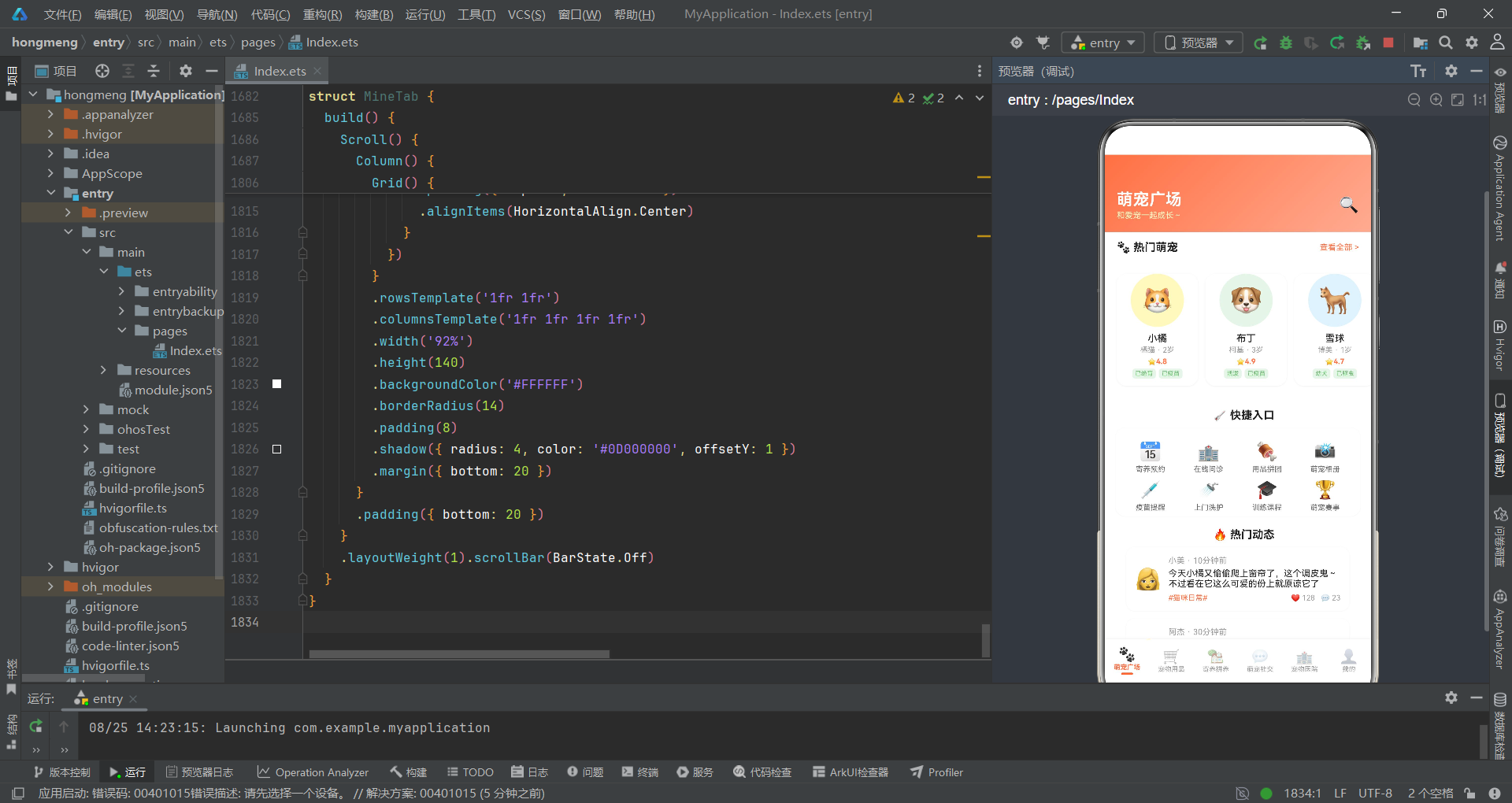
本文深入剖析了一个基于HarmonyOS ArkTS声明式UI框架的萌宠拼养社区应用的完整实现。从接口定义到@Observed数据模型,从设计令牌到全局数据,从入口组件状态管理到六Tab子组件实现,从五个弹窗交互到瀑布流、柱状图等数据可视化,整个应用展现了HarmonyOS声明式开发范式在复杂业务场景下的设计能力。应用通过@State/@Observed的状态追踪机制实现了数据驱动的自动重渲染,通过回调函数参数实现了父子组件间的松耦合通信,通过@Builder方法实现了通用UI组件的代码复用,通过Stack叠加和zIndex实现了弹窗层级管理。
从业务设计角度看,该应用巧妙地将拼多多风格的电商拼团模式(商品瀑布流、拼养进度条、费用明细)与宠物垂直社区的内容运营模式(宠物名片、社交动态、健康记录)融合为一体,六大Tab覆盖了宠物日常生活的完整服务链条:广场发现(宠物名片+快捷入口+动态预览)、用品购物(分类筛选+爆款推荐+瀑布流商品)、寄养拼养(日历+进度+家庭列表)、社交分享(动态信息流+发布弹窗)、医疗健康(科室筛选+评分柱状图+医院列表)和个人中心(档案+打卡+订单+功能宫格)。每个Tab都集成了多种UI组件类型,从横向滚动列表到Grid宫格,从柱状图到进度条,从条件渲染的标签胶囊到浮动操作按钮,展现了丰富的UI表现力。
从工程实践角度看,该应用采用了"接口→模型→令牌→数据→函数→枚举→入口→子组件"的分层代码组织结构,每一层都有明确的职责边界:接口层定义数据类型、模型层实现状态追踪、令牌层统一视觉风格、数据层提供业务素材、函数层封装格式化逻辑、枚举层管理路由状态、入口层协调全局状态、子组件层实现独立业务功能。这种分层组织使得近两千行代码的单文件依然保持了良好的可读性和可维护性。对于希望深入学习HarmonyOS ArkTS声明式UI开发的开发者而言,该应用的Tab切换架构、弹窗管理系统、瀑布流实现和数据可视化方案都具有直接的参考价值。

作为“人工智能6S店”的官方数字引擎,为AI开发者与企业提供一个覆盖软硬件全栈、一站式门户。
更多推荐
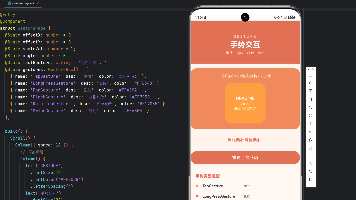


 6
6 0
0- 0


 已为社区贡献66条内容

所有评论(0)