
基于HarmonyOS ArkTS API 24通过Math.floor(score / 20)计算填充星星数量,selStars()方法将评分百分比值转换为五星字符串
引言
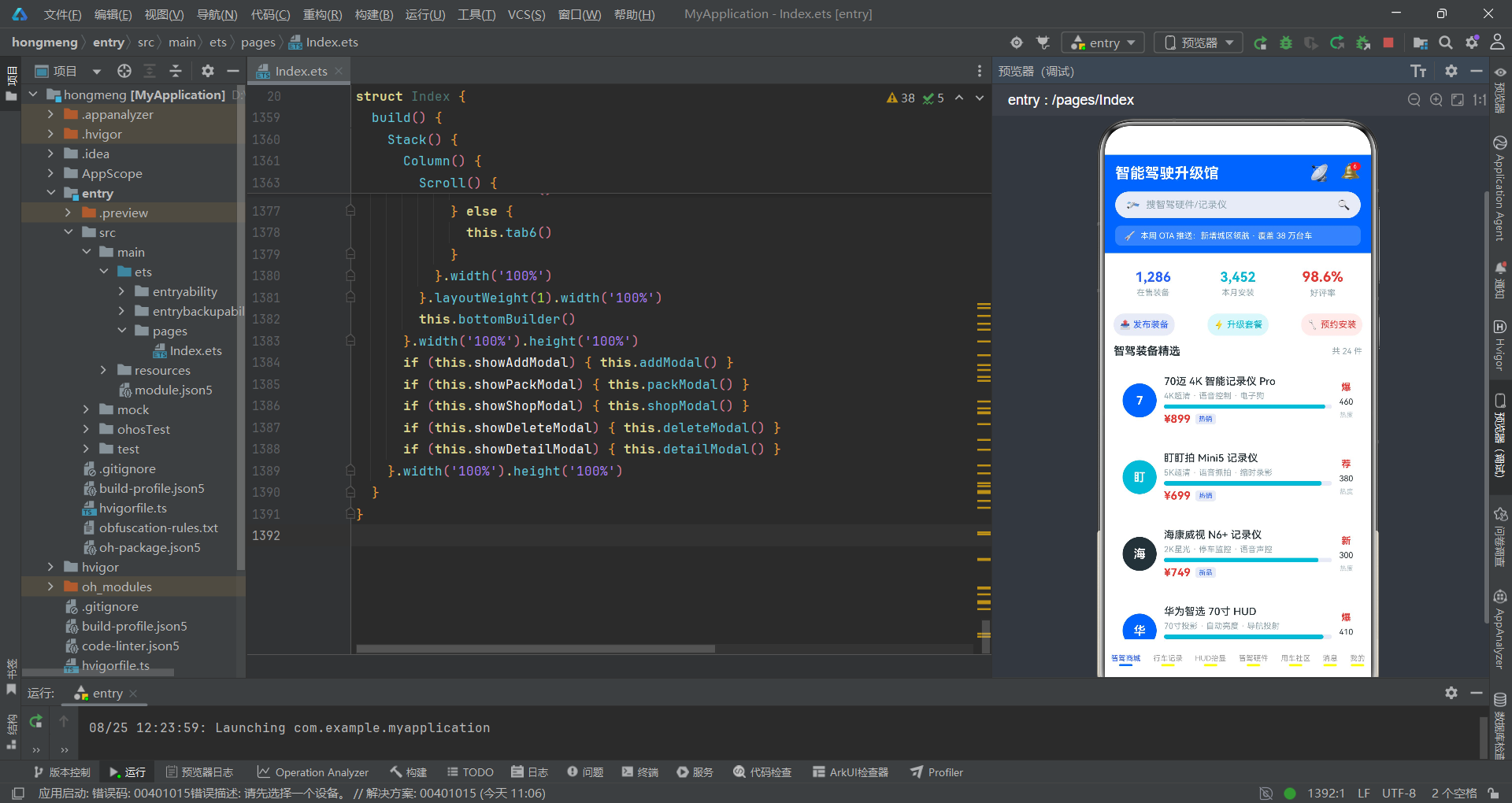
随着智能汽车产业的蓬勃发展,智驾硬件升级已成为车主购车后的核心刚需。从行车记录仪到激光雷达,从HUD抬显到域控制器,消费者需要一个集中化的平台来浏览、对比和选购各类智驾装备。本应用正是基于HarmonyOS ArkTS声明式UI框架构建的"智能驾驶升级馆",采用单文件页面架构,集成了智驾商城、行车记录、HUD抬显、智驾硬件、用车社区、消息中心和个人中心共七个核心Tab模块,同时配套五个功能弹框,覆盖了从商品浏览到预约安装的完整业务闭环。
在技术架构层面,本应用充分利用了ArkTS的状态驱动渲染机制。通过@Entry和@Component装饰器定义入口组件,使用@State进行细粒度的响应式状态管理,当currentTab、showAddModal等状态变量发生变化时,框架会自动触发对应UI区域的差异化更新。此外,@Builder装饰器被大量用于构建可复用的UI片段,包括静态头部、底部Tab栏、七个Tab内容区以及五个功能弹框,使得近一千四百行代码在逻辑上保持了清晰的模块化分层。整个应用不依赖任何外部UI库,纯靠ArkTS原生组件(Column、Row、Scroll、Flex、Stack、ForEach等)完成了所有视觉呈现。
在业务设计层面,应用模拟了一个完整的汽车智驾硬件电商生态。智驾商城Tab展示了24件精选装备,涵盖记录仪、HUD、激光雷达、域控制器等多品类;行车记录Tab以万像素柱状图和双列网格呈现12款记录仪;HUD抬显Tab通过横向滚动卡片和亮度对比图展示10款HUD设备;智驾硬件Tab以TOPS算力柱状图为视觉锚点展示10款高性能域控平台;用车社区Tab展示10条真实车主的智驾体验帖;消息中心Tab聚合了OTA推送、安装顾问、社区互动等12条结构化消息;个人中心Tab则提供了用户等级、行驶里程和功能菜单入口。五个弹框分别处理发布装备、升级套餐选择、预约安装、删除确认和商品详情等关键交互流程,构成了完整的用户操作链路。
数据模型与状态管理
商品数据接口定义
应用首先定义了GoodsItem接口作为所有商品、帖子和消息的统一数据模型。这个接口包含了名称、价格、描述、评分、热度数值、标签和热门标记七个字段,通过单一数据结构适配了商城装备、社区帖子和系统消息等多种业务场景。
interface GoodsItem {
  name: string
  price: number
  desc: string
  score: number
  num: number
  tag: string
  hot: string
}

@Entry
@Component
struct Index {
  @State currentTab: number = 0
  @State showAddModal: boolean = false
  @State showPackModal: boolean = false
  @State showShopModal: boolean = false
  @State showDeleteModal: boolean = false
  @State showDetailModal: boolean = false
  @State selectedItem: GoodsItem | null = null
  @State chipA: number = 0
  @State chipB: number = 0
  @State stepNum: number = 1
  @State stepNumB: number = 1
  @State addDesc: string = ''
}
在上述代码中,@State装饰器声明的变量构成了应用的核心状态树。currentTab控制当前激活的Tab页面索引,五个show*Modal布尔值分别控制五个弹框的显隐,selectedItem保存当前被点击的商品对象,chipA和chipB追踪弹框内Chip选择器的选中索引,stepNum和stepNumB管理数量步进器的当前值,addDesc则绑定文本输入框的内容。这些状态变量的任何变更都会触发ArkUI框架的精确差分更新,确保UI与数据始终保持同步。
Tab与Chip配置数据
应用通过私有数组预先配置了所有Tab标签、Chip选项和统计数据,这些静态数据在组件初始化时即被加载,避免了运行时网络请求的复杂性。
  // ---------- 顶部 Tab ----------
  private tabs: string[] = ['智驾商城', '行车记录', 'HUD抬显', '智驾硬件', '用车社区', '消息', '我的']

  // ---------- 各类 chips ----------
  private kindChips: string[] = ['行车记录仪', 'HUD', '激光雷达', '域控制器', '传感器']
  private carChips: string[] = ['特斯拉', '蔚来', '小鹏', '理想', '比亚迪', '极氪']
  private packChips: string[] = ['基础辅助', '高阶智驾', '全栈智享', '旗舰领航']
  private packPrices: number[] = [3999, 12999, 25999, 39999]
  private shopChips: string[] = ['中关村店', '望京店', '亦庄店', '顺义店']
  private timeChips: string[] = ['上午', '下午', '晚间']
  private topicChips: string[] = ['城区领航实测', 'HUD改装日记', '记录仪夜视', '激光雷达解析', 'OTA体验', '续航分享', '高速NOA']

  // ---------- 统计卡数据 ----------
  private statLabels: string[] = ['在售装备', '本月安装', '好评率']
  private statNums: string[] = ['1,286', '3,452', '98.6%']
  private statColors: string[] = ['#2962FF', '#00B8D4', '#E53935']
  private myStatLabels: string[] = ['我的装备', 'OTA记录', '预约安装']
  private myStatNums: string[] = ['8', '23', '2']
这里的设计思路是将所有配置项集中管理,tabs数组定义了底部导航栏的七个入口标签,kindChips和carChips分别为发布装备弹框提供品类和车型选项,packChips和packPrices为升级套餐弹框提供方案名称与对应价格,shopChips和timeChips为预约安装弹框提供门店和时段选择。统计卡数据则通过statLabels、statNums和statColors三个平行数组的方式组织,配合ForEach的index参数实现数据与样式的动态绑定。
商品列表数据源
应用的核心数据源是mainList数组,包含24条精心编排的智驾装备数据,每条数据都包含了完整的商品信息。此外还有dashList、hudList、hwList、postList和msgList五个分类数组,分别服务于不同的Tab页面。
  private mainList: GoodsItem[] = [
    { name: '70迈 4K 智能记录仪 Pro', price: 899, desc: '4K超清 · 语音控制 · 电子狗', score: 96, num: 460, tag: '热销', hot: '爆' },
    { name: '盯盯拍 Mini5 记录仪', price: 699, desc: '5K超清 · 语音抓拍 · 缩时录影', score: 94, num: 380, tag: '热销', hot: '荐' },
    { name: '海康威视 N6+ 记录仪', price: 749, desc: '2K星光 · 停车监控 · 语音声控', score: 92, num: 300, tag: '新品', hot: '新' },
    { name: '华为智选 70寸 HUD', price: 1699, desc: '70寸投影 · 自动亮度 · 导航投射', score: 95, num: 410, tag: '热销', hot: '爆' },
    { name: '路畅 6G 毫米波雷达', price: 2599, desc: '前向感知 · 盲区补全 · 全天候', score: 90, num: 260, tag: '新品', hot: '荐' },
    { name: '禾赛 XT32 激光雷达', price: 4999, desc: '32线 · 200米量程 · 车规级', score: 97, num: 480, tag: '旗舰', hot: '爆' },
    { name: '速腾 M1 激光雷达', price: 4599, desc: 'MEMS · 点云成像 · 150米', score: 95, num: 440, tag: '旗舰', hot: '爆' },
    { name: '地平线 征程5 域控制器', price: 8999, desc: '128TOPS · 深度学习加速', score: 93, num: 330, tag: '高算力', hot: '荐' },
    { name: '黑芝麻 A1000 域控制器', price: 9999, desc: '116TOPS · 车规级双芯', score: 92, num: 290, tag: '高算力', hot: '荐' },
    { name: 'Mobileye 6L 辅助驾驶盒', price: 12999, desc: '单目视觉 · 预警算法大师', score: 96, num: 350, tag: '旗舰', hot: '爆' },
    { name: '经纬恒润 L2 辅助套件', price: 6999, desc: 'ACC · LKA · 一键升级', score: 94, num: 320, tag: '高算力', hot: '爆' }
  ]
每条商品数据的设计都非常贴近真实电商场景。score字段既用于好评进度条的宽度计算(直接作为百分比),又通过selStars()方法转换为五星评分展示。num字段在不同Tab中承载不同语义——在商城中代表热度值,在行车记录中代表万像素,在HUD中代表流明,在智驾硬件中代表TOPS算力,在社区中代表点赞数,在消息中代表未读条数。这种一字段多语义的设计减少了接口定义的冗余,但要求开发者在渲染时根据Tab上下文正确解读数据含义。
辅助方法与选中项读取
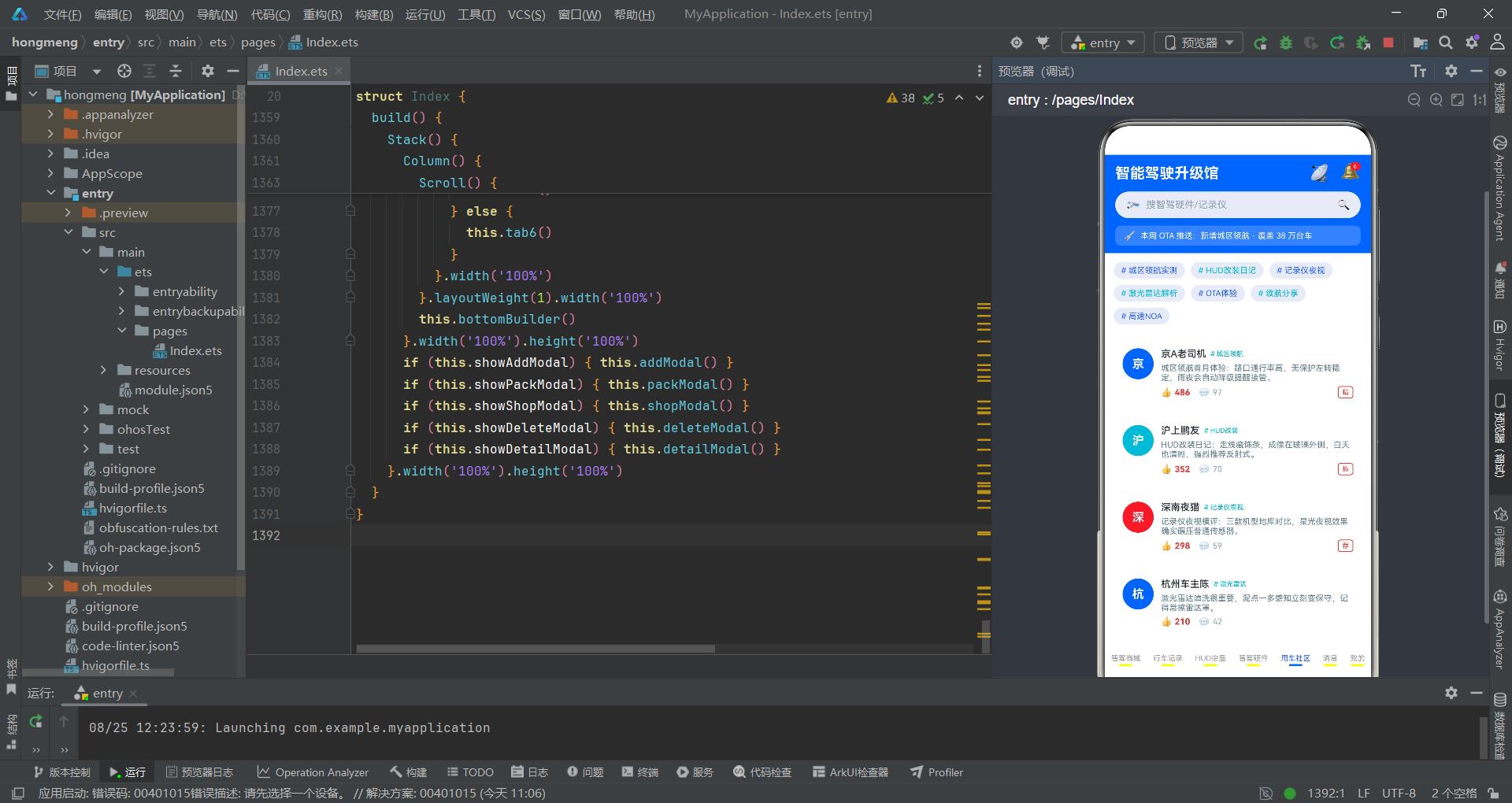
应用定义了一组sel*辅助方法用于安全地读取当前选中商品的各个字段,这些方法在selectedItem为null时返回默认值,避免了空指针异常。
  selName(): string {
    if (this.selectedItem !== null) { return this.selectedItem.name }
    return ''
  }
  selPrice(): number {
    if (this.selectedItem !== null) { return this.selectedItem.price }
    return 0
  }
  selScore(): number {
    if (this.selectedItem !== null) { return this.selectedItem.score }
    return 0
  }
  selStars(): string {
    if (this.selectedItem === null) { return '' }
    let filled: number = Math.floor(this.selectedItem.score / 20)
    let res: string = ''
    for (let i = 0; i < 5; i++) {
      if (i < filled) { res += '★' } else { res += '☆' }
    }
    return res
  }
  maxNumOf(list: GoodsItem[]): number {
    let m: number = 1
    for (let i = 0; i < list.length; i++) {
      if (list[i].num > m) { m = list[i].num }
    }
    return m
  }
  packTotal(): number {
    return Math.floor(this.packPrices[this.chipA] * this.stepNum)
  }
selStars()方法将评分百分比值转换为五星字符串,通过Math.floor(score / 20)计算填充星星数量(满分100分对应5颗星)。maxNumOf()方法遍历列表找到最大num值,用于柱状图的高度归一化计算——每个柱子的高度等于item.num / maxNum * 基准高度,确保所有柱子按比例填充图表区域。packTotal()方法根据当前选中的套餐索引和数量步进值计算总价,体现了状态联动计算的典型模式。
静态头部与底部Tab栏构建
头部Builder的设计
头部区域使用@Builder装饰器定义为headerBuilder,包含了应用标题、OTA图标、消息角标、搜索胶囊和信息条四个功能区块,整体采用极客蓝#2962FF背景配合白色文字的配色方案。
  @Builder
  headerBuilder() {
    Column({ space: 10 }) {
      Row() {
        Column() {
          Text('智能驾驶升级馆').fontSize(20).fontColor('#FFFFFF').fontWeight(FontWeight.Bold)
        }.alignItems(HorizontalAlign.Start)
        Column().layoutWeight(1)

        Row({ space: 12 }) {
          Text('📡').fontSize(22)
          Stack({ alignContent: Alignment.TopEnd }) {
            Text('🔔').fontSize(22)
            Text('6').fontSize(8).fontColor('#FFFFFF').backgroundColor('#E53935')
              .borderRadius(7).padding({ left: 4, right: 4, top: 1, bottom: 1 })
              .constraintSize({ minWidth: 14 })
          }.width(30).height(30)
        }.alignItems(VerticalAlign.Center)
      }.width('100%').alignItems(VerticalAlign.Center)

      Row({ space: 8 }) {
        Text('🛰').fontSize(16)
        Text('搜智驾硬件/记录仪').fontSize(13).fontColor('#90A4AE')
        Column().layoutWeight(1)
        Text('🔍').fontSize(14)
      }.width('100%').height(36).padding({ left: 14, right: 14 })
      .backgroundColor('#E8EAF6').borderRadius(18)
      .alignItems(VerticalAlign.Center)

      Row({ space: 6 }) {
        Text('🚀').fontSize(13)
        Text('本周 OTA 推送:新增城区领航 · 覆盖 38 万台车')
          .fontSize(11).fontColor('#FFFFFF')
      }.width('100%').padding({ left: 12, right: 12, top: 6, bottom: 6 })
      .backgroundColor('rgba(255,255,255,0.2)').borderRadius(8)
      .alignItems(VerticalAlign.Center)
    }.width('100%').padding({ left: 14, right: 14, top: 10, bottom: 10 })
    .backgroundColor('#2962FF').alignItems(HorizontalAlign.Start)
  }
头部Builder的核心设计在于消息角标的实现。使用Stack容器配合alignContent: Alignment.TopEnd将红色未读数字角标定位到铃铛图标的右上角,通过constraintSize({ minWidth: 14 })确保角标在单数字和双数字情况下都能保持最小宽度。搜索胶囊采用浅蓝底#E8EAF6配合圆角18的胶囊造型,内部使用layoutWeight(1)的空Column实现搜索图标与放大镜图标的左右分离布局。信息条使用半透明白色背景rgba(255,255,255,0.2)叠加在蓝色底色上,营造出层次感的通告效果。
底部Tab栏的实现
底部Tab栏通过ForEach遍历tabs数组动态生成七个Tab项,每个Tab项包含文字标签和底部指示条,指示条的颜色和宽度根据当前选中状态动态变化。
  @Builder
  bottomBuilder() {
    Row() {
      ForEach(this.tabs, (tab: string, index: number) => {
        Column({ space: 2 }) {
          Text(tab).fontSize(10).fontColor(this.currentTab === index ? '#2962FF' : '#999999')
          Column().width(18).height(3).borderRadius(2)
            .backgroundColor(this.currentTab === index ? '#2962FF' : '#FFFFFF00')
        }.onClick(() => { this.currentTab = index })
      }, (tab: string) => tab)
    }.width('100%').height(56).backgroundColor('#FFFFFF')
    .justifyContent(FlexAlign.SpaceAround).alignItems(VerticalAlign.Center)
  }
底部Tab栏的交互逻辑非常简洁:点击任意Tab项时,将currentTab状态变量设置为对应索引值,框架随即触发页面内容区的条件渲染切换。未选中的Tab文字使用#999999灰色,选中时变为#2962FF极客蓝,同时底部出现一条18像素宽的蓝色指示条。未选中状态的指示条使用透明色#FFFFFF00占位,保持了布局高度的一致性,避免选中切换时的跳动。整个Tab栏通过justifyContent(FlexAlign.SpaceAround)实现七个Tab项的均匀分布。
Tab1智驾商城:统计卡与装备列表
三格统计卡与快捷入口
智驾商城Tab以三格统计卡开场,展示在售装备数、本月安装量和好评率三项关键运营指标,并通过快捷操作入口提供发布装备、升级套餐和预约安装三个功能入口。
  @Builder
  tab0() {
    Column({ space: 12 }) {
      Row({ space: 8 }) {
        ForEach(this.statLabels, (label: string, index: number) => {
          Column({ space: 4 }) {
            Text(this.statNums[index]).fontSize(18)
              .fontColor(this.statColors[index]).fontWeight(FontWeight.Bold)
            Text(label).fontSize(11).fontColor('#90A4AE')
          }.layoutWeight(1).padding({ top: 10, bottom: 10 })
          .backgroundColor('#FFFFFF').borderRadius(10).alignItems(HorizontalAlign.Center)
          .scale(index === 2 ? { x: 1.05, y: 1.05 } : { x: 1, y: 1 })
          .animation({ duration: 700, iterations: -1, curve: Curve.EaseInOut })
        }, (label: string) => label)
      }.width('100%').alignItems(VerticalAlign.Center)

      Row({ space: 8 }) {
        Text('📤 发布装备').fontSize(12).fontColor('#2962FF').padding(8)
          .backgroundColor('#E8EAF6').borderRadius(14)
          .onClick(() => { this.showAddModal = true })
        Text('⚡ 升级套餐').fontSize(12).fontColor('#00B8D4').padding(8)
          .backgroundColor('#E0F7FA').borderRadius(14)
          .onClick(() => { this.showPackModal = true })
        Text('🔧 预约安装').fontSize(12).fontColor('#E53935').padding(8)
          .backgroundColor('#FDECEA').borderRadius(14)
          .onClick(() => { this.showShopModal = true })
      }.width('100%').justifyContent(FlexAlign.SpaceBetween)
统计卡的核心技术点在于第三个卡片(好评率)的脉冲动画效果。通过scale属性设置{ x: 1.05, y: 1.05 }的放大比例,并链式调用.animation({ duration: 700, iterations: -1, curve: Curve.EaseInOut })实现无限循环的呼吸式缩放动画,iterations: -1表示无限重复,Curve.EaseInOut使动画在放大和缩小时都呈现平滑的缓入缓出效果。快捷入口按钮采用justifyContent(FlexAlign.SpaceBetween)实现三等分均匀分布,每个按钮的点击事件直接设置对应的弹框显示状态为true。
24条装备行式列表渲染
装备列表采用ForEach遍历mainList数组,每行包含左侧圆形首字图标、中部商品信息和右侧热度数值三个区域,通过Row的space和Column的layoutWeight实现弹性布局。
      ForEach(this.mainList, (item: GoodsItem, index: number) => {
        Row({ space: 10 }) {
          Column() {
            Text(item.name.substring(0, 1)).fontSize(16).fontColor('#FFFFFF')
              .fontWeight(FontWeight.Bold)
          }.width(46).height(46).borderRadius(23)
          .backgroundColor(index % 3 === 0 ? '#2962FF' : (index % 3 === 1 ? '#00B8D4' : '#263238'))
          .justifyContent(FlexAlign.Center).alignItems(HorizontalAlign.Center)

          Column({ space: 5 }) {
            Text(item.name).fontSize(14).fontColor('#263238')
              .fontWeight(FontWeight.Medium).maxLines(1)
            Text(item.desc).fontSize(11).fontColor('#90A4AE').maxLines(1)
            Row() {
              Column().width(item.score + '%').height(6)
                .backgroundColor('#00B8D4').borderRadius(3)
            }.width('100%').height(6).backgroundColor('#E8EAF6').borderRadius(3)

            Row({ space: 6 }) {
              Text('¥' + Math.floor(item.price)).fontSize(15).fontColor('#E53935')
                .fontWeight(FontWeight.Bold)
              Text(item.tag).fontSize(9).fontColor('#2962FF')
                .padding({ left: 5, right: 5, top: 2, bottom: 2 })
                .backgroundColor('#E8EAF6').borderRadius(4)
            }.alignItems(VerticalAlign.Center)
          }.layoutWeight(1).alignItems(HorizontalAlign.Start)

          Column({ space: 6 }) {
            Text(item.hot).fontSize(12).fontColor('#E53935').fontWeight(FontWeight.Bold)
              .scale({ x: 1.05, y: 1.05 })
              .animation({ duration: 700, iterations: -1, curve: Curve.EaseInOut })
            Text(item.num + '').fontSize(11).fontColor('#263238')
            Text('热度').fontSize(9).fontColor('#B0BEC5')
          }.alignItems(HorizontalAlign.Center)
        }.width('100%').padding(12).backgroundColor('#FFFFFF').borderRadius(10)
        .alignItems(VerticalAlign.Center)
        .onClick(() => {
          this.selectedItem = item
          this.showDetailModal = true
        })
      }, (item: GoodsItem) => item.name)
列表项的左侧图标采用item.name.substring(0, 1)提取商品名首字作为图标内容,背景色通过index % 3取模运算在极客蓝、荧光青和深空灰三种颜色间循环切换,营造视觉节奏感。好评进度条通过Column().width(item.score + '%')动态设置填充宽度,外层Row设置固定的浅蓝底色作为轨道,内层Column叠加荧光青填充条。右侧热度区域的热门标记文字同样应用了脉冲缩放动画,与统计卡形成统一的动效语言。整行的点击事件将商品对象赋值给selectedItem并触发详情弹框显示。
Tab2行车记录:柱状图与双列网格
像素柱状图实现
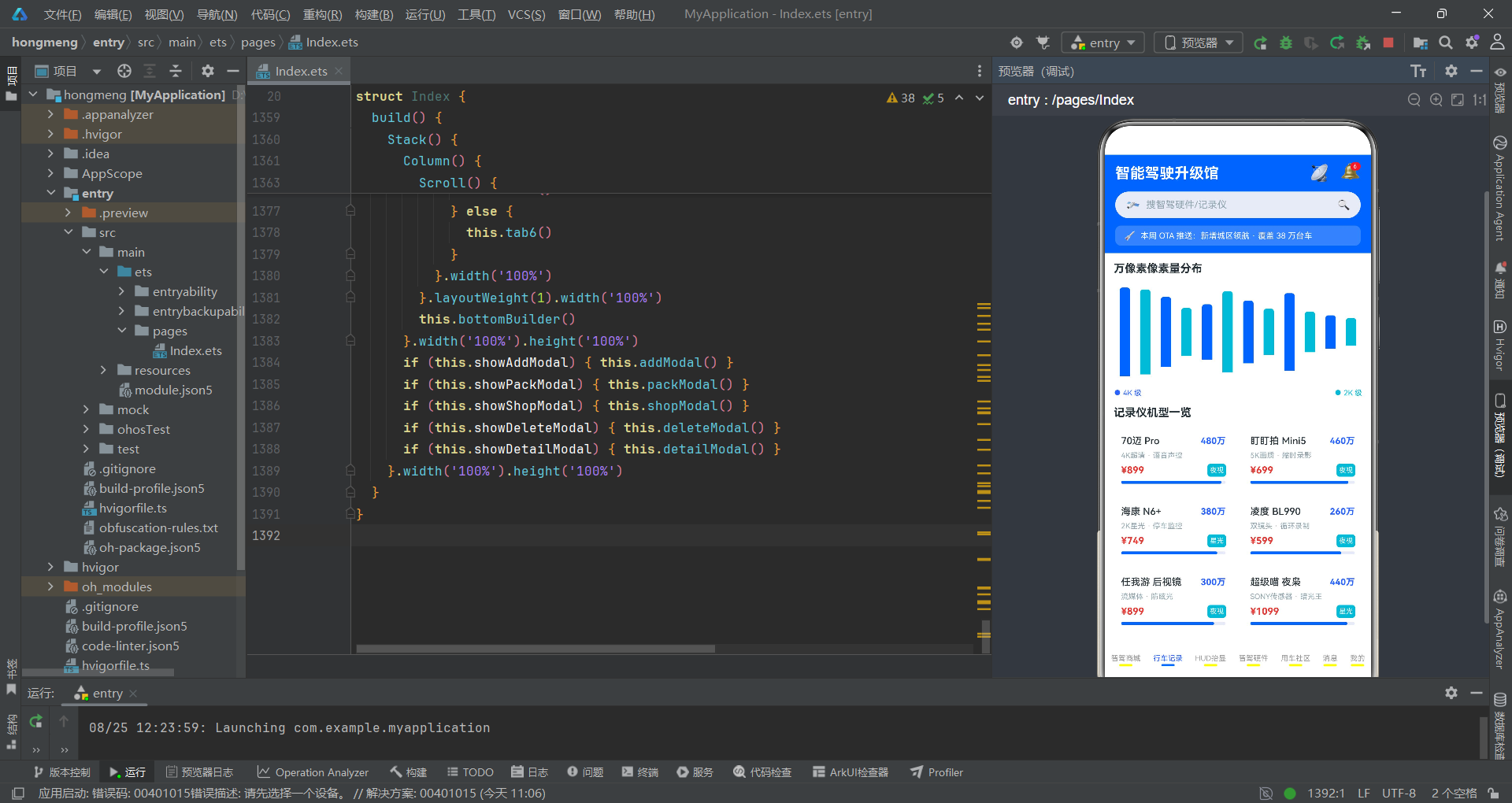
行车记录Tab的特色在于以万像素为单位的柱状图可视化,通过ForEach遍历dashList数组,每个柱子的高度根据item.num / maxNumOf(list) * 120的归一化公式动态计算。
  @Builder
  tab1() {
    Column({ space: 12 }) {
      Text('万像素像素量分布').fontSize(15).fontColor('#263238').fontWeight(FontWeight.Bold)
      Row({ space: 6 }) {
        ForEach(this.dashList, (item: GoodsItem, index: number) => {
          Column() {
            Column()
              .width(14)
              .height(item.num / this.maxNumOf(this.dashList) * 120)
              .backgroundColor(index % 2 === 0 ? '#2962FF' : '#00B8D4')
              .borderRadius({ topLeft: 4, topRight: 4 })
          }.alignItems(HorizontalAlign.Center)
        }, (item: GoodsItem) => item.name)
      }.width('100%').height(130).backgroundColor('#FFFFFF').borderRadius(10)
      .padding({ left: 8, right: 8 })
      .justifyContent(FlexAlign.SpaceBetween).alignItems(VerticalAlign.End)
柱状图的实现原理是利用Column组件作为柱子容器,内层Column设置固定宽度14像素和动态计算的高度值。maxNumOf()方法先遍历整个列表找到最大像素值作为归一化基准,然后每个柱子的高度等于当前值 / 最大值 * 120,确保最高的柱子达到120像素的上限。外层Row通过justifyContent(FlexAlign.SpaceBetween)和alignItems(VerticalAlign.End)实现柱子的均匀分布和底部对齐,模拟出标准柱状图的视觉效果。柱子颜色通过index % 2在极客蓝和荧光青间交替,顶部的圆角borderRadius({ topLeft: 4, topRight: 4 })使柱子更加精致。
记录仪双列网格布局
在柱状图下方,12款记录仪以双列网格的形式展示,使用Flex的wrap属性实现自动换行,每个卡片包含名称、万像素数值、描述、价格和夜视标签等信息。
      Text('记录仪机型一览').fontSize(15).fontColor('#263238').fontWeight(FontWeight.Bold)
      Flex({ wrap: FlexWrap.Wrap, justifyContent: FlexAlign.SpaceBetween }) {
        ForEach(this.dashList, (item: GoodsItem, index: number) => {
          Column({ space: 6 }) {
            Row() {
              Text(item.name).fontSize(13).fontColor('#263238')
                .fontWeight(FontWeight.Medium).maxLines(1)
              Column().layoutWeight(1)
              Text(item.num + '万').fontSize(12).fontColor('#2962FF')
                .fontWeight(FontWeight.Bold)
            }.width('100%').alignItems(VerticalAlign.Center)

            Text(item.desc).fontSize(10).fontColor('#90A4AE').maxLines(1)

            Row() {
              Text('¥' + Math.floor(item.price)).fontSize(13).fontColor('#E53935')
                .fontWeight(FontWeight.Bold)
              Column().layoutWeight(1)
              Text(item.tag).fontSize(9).fontColor('#FFFFFF').padding(3)
                .backgroundColor('#00B8D4').borderRadius(4)
                .scale({ x: 1.05, y: 1.05 })
                .animation({ duration: 700, iterations: -1, curve: Curve.EaseInOut })
            }.width('100%').alignItems(VerticalAlign.Center)

            Row() {
              Column().width(item.score + '%').height(4)
                .backgroundColor('#2962FF').borderRadius(2)
            }.width('100%').height(4).backgroundColor('#E8EAF6').borderRadius(2)
          }.width('48%').padding(10).backgroundColor('#FFFFFF').borderRadius(10)
          .alignItems(HorizontalAlign.Start)
          .margin({ bottom: 10 })
          .onClick(() => {
            this.selectedItem = item
            this.showDetailModal = true
          })
        }, (item: GoodsItem) => item.name)
      }.width('100%')
双列网格通过Flex({ wrap: FlexWrap.Wrap, justifyContent: FlexAlign.SpaceBetween })实现,每个卡片宽度设为48%,两个卡片之间通过SpaceBetween自动分配间距。夜视标签item.tag同样应用了脉冲动画效果,与全局动效风格保持一致。好评进度条在此处采用4像素高度和2像素圆角的更紧凑样式,适配双列卡片的较小尺寸。点击卡片同样触发详情弹框的显示,保持了与商城列表一致的交互模式。
Tab3 HUD抬显:横向滚动与亮度对比
深色统计卡与亮度柱状图
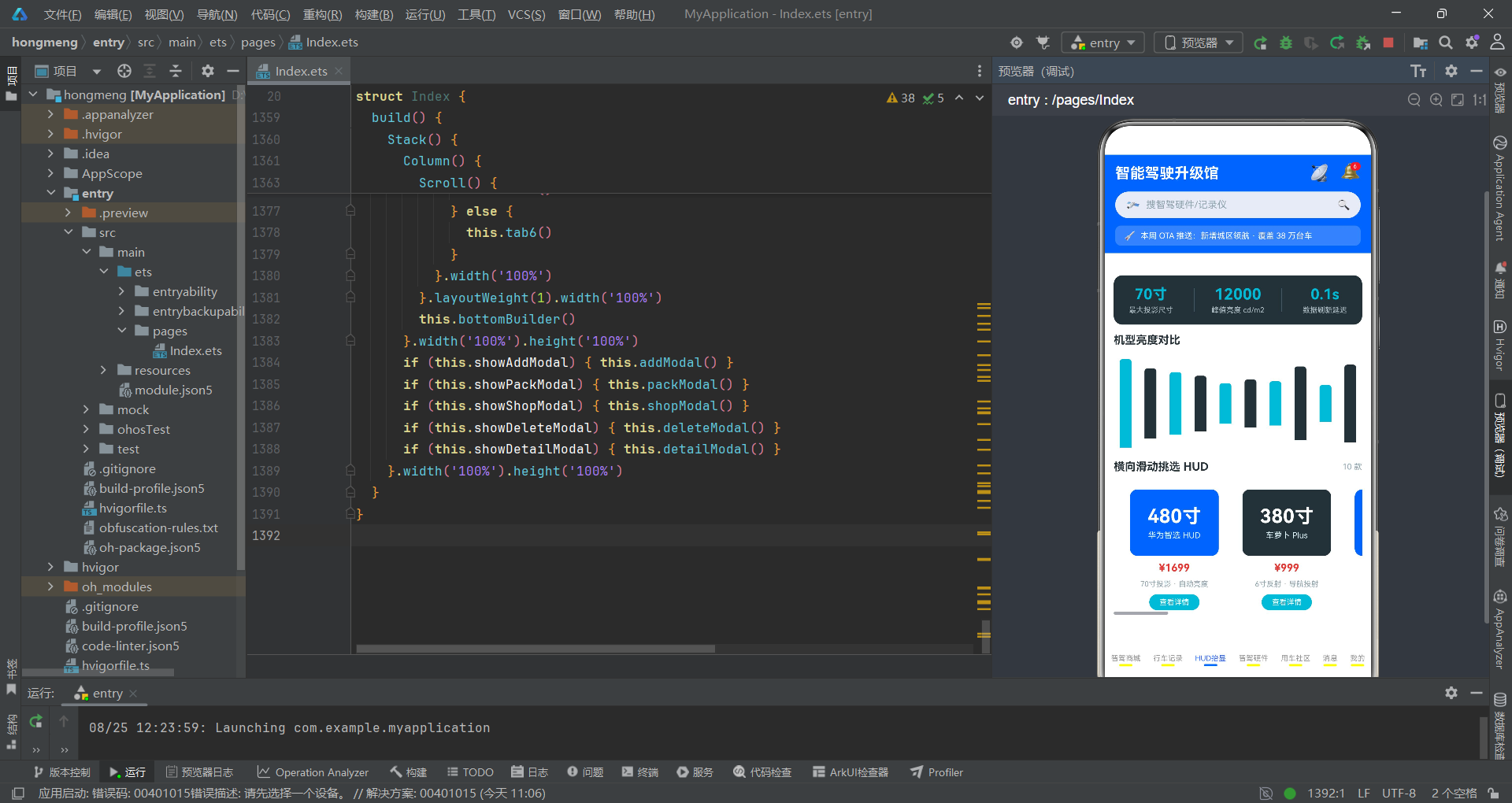
HUD Tab采用深色主题统计卡作为开场,展示最大投影尺寸、峰值亮度和数据刷新延迟三项关键参数,随后以亮度柱状图直观对比各机型的流明数值。
  @Builder
  tab2() {
    Column({ space: 12 }) {
      Row({ space: 8 }) {
        Column({ space: 4 }) {
          Text('70寸').fontSize(20).fontColor('#00B8D4').fontWeight(FontWeight.Bold)
          Text('最大投影尺寸').fontSize(10).fontColor('#B0BEC5')
        }.layoutWeight(1).alignItems(HorizontalAlign.Center)

        Column().width(1).height(32).backgroundColor('#455A64')

        Column({ space: 4 }) {
          Text('12000').fontSize(20).fontColor('#00B8D4').fontWeight(FontWeight.Bold)
            .scale({ x: 1.05, y: 1.05 })
            .animation({ duration: 700, iterations: -1, curve: Curve.EaseInOut })
          Text('峰值亮度 cd/m2').fontSize(10).fontColor('#B0BEC5')
        }.layoutWeight(1).alignItems(HorizontalAlign.Center)

        Column().width(1).height(32).backgroundColor('#455A64')

        Column({ space: 4 }) {
          Text('0.1s').fontSize(20).fontColor('#00B8D4').fontWeight(FontWeight.Bold)
          Text('数据刷新延迟').fontSize(10).fontColor('#B0BEC5')
        }.layoutWeight(1).alignItems(HorizontalAlign.Center)
      }.width('100%').padding({ top: 14, bottom: 14 })
      .backgroundColor('#263238').borderRadius(12)
      .alignItems(VerticalAlign.Center)
深色统计卡采用#263238深空灰背景配合#00B8D4荧光青数值文字,形成科技感强烈的暗色视觉风格。三格之间通过1像素宽、32像素高的#455A64色Column作为分隔线,实现了简洁的分隔效果。峰值亮度数值"12000"应用了脉冲缩放动画,引导用户关注这一核心卖点参数。亮度柱状图与像素柱状图实现原理一致,但柱子颜色在荧光青和深空灰间交替,与深色统计卡的主题色呼应。
横向滚动HUD卡片
HUD设备展示采用横向滚动布局,通过Scroll组件的scrollable(ScrollDirection.Horizontal)属性实现水平滑动,每张卡片以大号投影尺寸数字为视觉焦点。
      Scroll() {
        Row({ space: 12 }) {
          ForEach(this.hudList, (item: GoodsItem, index: number) => {
            Column({ space: 8 }) {
              Column({ space: 4 }) {
                Text(item.num + '寸').fontSize(26).fontColor('#FFFFFF')
                  .fontWeight(FontWeight.Bold)
                Text(item.name).fontSize(11).fontColor('#E0F7FA')
              }.width('100%').height(90).justifyContent(FlexAlign.Center)
              .backgroundColor(index % 2 === 0 ? '#2962FF' : '#263238')
              .borderRadius(10).alignItems(HorizontalAlign.Center)

              Text('¥' + Math.floor(item.price)).fontSize(14).fontColor('#E53935')
                .fontWeight(FontWeight.Bold)
              Text(item.desc).fontSize(10).fontColor('#90A4AE').maxLines(1)
              Text('查看详情').fontSize(10).fontColor('#FFFFFF').padding({
                left: 14, right: 14, top: 5, bottom: 5
              }).backgroundColor('#00B8D4').borderRadius(12)
            }.width(140).padding(10).backgroundColor('#FFFFFF').borderRadius(12)
            .alignItems(HorizontalAlign.Center)
            .onClick(() => {
              this.selectedItem = item
              this.showDetailModal = true
            })
          }, (item: GoodsItem) => item.name)
        }.padding({ left: 12, right: 12 })
      }.scrollable(ScrollDirection.Horizontal).width('100%')
横向滚动卡片的核心设计在于每张卡片顶部的大号投影尺寸展示区。item.num + '寸'以26号字体白色粗体显示在蓝灰交替的背景色块上,高度90像素并居中对齐,成为视觉焦点。卡片宽度固定为140像素,通过Row({ space: 12 })控制卡片间距。Scroll组件的scrollable(ScrollDirection.Horizontal)属性使内容可以水平滑动浏览,用户可以通过手势快速浏览所有10款HUD设备,这种交互模式在展示同品类多商品时比垂直列表更加高效。
Tab4智驾硬件:算力对比与列表
TOPS算力柱状图
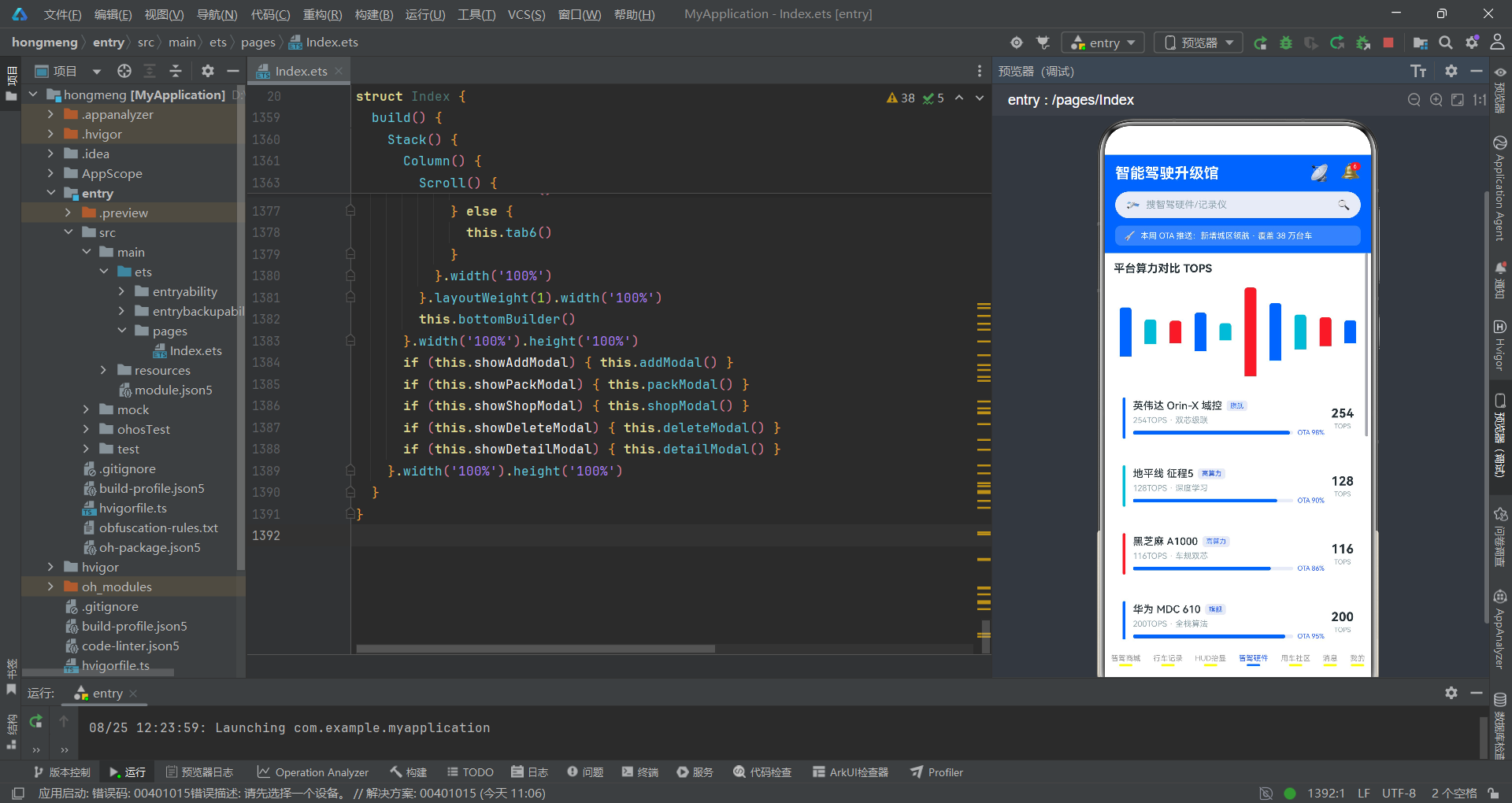
智驾硬件Tab以TOPS算力柱状图为视觉核心,直观展示各域控平台的算力差异,柱子颜色采用三色循环(极客蓝、荧光青、警示红)以区分不同算力等级。
  @Builder
  tab3() {
    Column({ space: 12 }) {
      Text('平台算力对比 TOPS').fontSize(15).fontColor('#263238').fontWeight(FontWeight.Bold)
      Row({ space: 8 }) {
        ForEach(this.hwList, (item: GoodsItem, index: number) => {
          Column() {
            Column()
              .width(16)
              .height(item.num / this.maxNumOf(this.hwList) * 120)
              .backgroundColor(index % 3 === 0 ? '#2962FF' : (index % 3 === 1 ? '#00B8D4' : '#E53935'))
              .borderRadius({ topLeft: 4, topRight: 4 })
          }.alignItems(HorizontalAlign.Center)
        }, (item: GoodsItem) => item.name)
      }.width('100%').height(130).backgroundColor('#FFFFFF').borderRadius(10)
      .padding({ left: 8, right: 8 })
      .justifyContent(FlexAlign.SpaceBetween).alignItems(VerticalAlign.End)
算力柱状图的实现与前述像素和亮度柱状图采用相同的归一化算法,但柱子颜色扩展为三色循环:index % 3 === 0为极客蓝代表旗舰级算力,index % 3 === 1为荧光青代表高算力,index % 3 === 2为警示红代表传感器类。这种颜色编码使用户能够一眼区分不同类型的硬件产品。柱子宽度为16像素,比前两个柱状图的14像素略宽,因为TOPS数值通常更大,需要更宽的柱子来承载视觉重量。
硬件列表与OTA进度条
硬件列表采用行式布局,每行左侧以彩条标识硬件类型,中部展示名称、标签、描述和OTA进度条,右侧以脉冲动画展示算力数值。
      ForEach(this.hwList, (item: GoodsItem, index: number) => {
        Row({ space: 10 }) {
          Column().width(4).height(56).borderRadius(2)
            .backgroundColor(index % 3 === 0 ? '#2962FF' : (index % 3 === 1 ? '#00B8D4' : '#E53935'))

          Column({ space: 5 }) {
            Row({ space: 6 }) {
              Text(item.name).fontSize(14).fontColor('#263238')
                .fontWeight(FontWeight.Medium).maxLines(1)
              Text(item.tag).fontSize(9).fontColor('#2962FF')
                .padding({ left: 5, right: 5, top: 2, bottom: 2 })
                .backgroundColor('#E8EAF6').borderRadius(4)
            }.alignItems(VerticalAlign.Center)

            Text(item.desc).fontSize(11).fontColor('#90A4AE').maxLines(1)

            Row({ space: 6 }) {
              Row() {
                Column().width(item.score + '%').height(5)
                  .backgroundColor('#2962FF').borderRadius(3)
              }.layoutWeight(1).height(5).backgroundColor('#E8EAF6').borderRadius(3)

              Text('OTA ' + item.score + '%').fontSize(9).fontColor('#2962FF')
            }.width('100%').alignItems(VerticalAlign.Center)
          }.layoutWeight(1).alignItems(HorizontalAlign.Start)

          Column({ space: 3 }) {
            Text(item.num + '').fontSize(16).fontColor('#263238').fontWeight(FontWeight.Bold)
              .scale({ x: 1.05, y: 1.05 })
              .animation({ duration: 700, iterations: -1, curve: Curve.EaseInOut })
            Text('TOPS').fontSize(9).fontColor('#90A4AE')
          }.alignItems(HorizontalAlign.Center)
        }.width('100%').padding(12).backgroundColor('#FFFFFF').borderRadius(10)
        .alignItems(VerticalAlign.Center)
      }, (item: GoodsItem) => item.name)
硬件列表的特色在于左侧4像素宽的彩条标识,通过index % 3取模在三种颜色间循环,与柱状图的颜色编码保持一致。OTA进度条使用layoutWeight(1)使进度条自适应剩余空间,右侧紧跟"OTA xx%"的文字标注,进度条颜色采用极客蓝,与标签颜色呼应。右侧算力数值以16号粗体字显示,配合脉冲缩放动画强调算力这一核心参数。整个布局通过Row的space: 10和Column的layoutWeight实现了左彩条、中信息、右数值的三栏弹性结构。
Tab5用车社区与Tab6消息中心
社区话题与帖子展示
用车社区Tab以话题Chip标签开场,展示10条车主真实智驾体验帖子,每条帖子包含圆形头像、用户名、话题标签、正文内容和点赞评论数据。
  @Builder
  tab4() {
    Column({ space: 12 }) {
      Flex({ wrap: FlexWrap.Wrap }) {
        ForEach(this.topicChips, (topic: string, index: number) => {
          Text('# ' + topic).fontSize(11)
            .fontColor(index % 2 === 0 ? '#2962FF' : '#00B8D4')
            .padding({ left: 10, right: 10, top: 5, bottom: 5 })
            .backgroundColor('#E8EAF6').borderRadius(12)
            .margin({ right: 8, bottom: 8 })
        }, (topic: string) => topic)
      }.width('100%')

      ForEach(this.postList, (item: GoodsItem, index: number) => {
        Row({ space: 10 }) {
          Column() {
            Text(item.name.substring(0, 1)).fontSize(16).fontColor('#FFFFFF')
              .fontWeight(FontWeight.Bold)
          }.width(42).height(42).borderRadius(21)
          .backgroundColor(index % 3 === 0 ? '#2962FF' : (index % 3 === 1 ? '#00B8D4' : '#E53935'))
          .justifyContent(FlexAlign.Center).alignItems(HorizontalAlign.Center)

          Column({ space: 5 }) {
            Row({ space: 6 }) {
              Text(item.name).fontSize(13).fontColor('#263238')
                .fontWeight(FontWeight.Medium)
              Text('# ' + item.tag).fontSize(9).fontColor('#00B8D4')
            }.alignItems(VerticalAlign.Center)

            Text(item.desc).fontSize(11).fontColor('#607D8B').maxLines(2)

            Row({ space: 12 }) {
              Row({ space: 4 }) {
                Text('👍').fontSize(12)
                Text(item.num + '').fontSize(11).fontColor('#E53935')
                  .fontWeight(FontWeight.Bold)
                  .scale({ x: 1.05, y: 1.05 })
                  .animation({ duration: 700, iterations: -1, curve: Curve.EaseInOut })
              }.alignItems(VerticalAlign.Center)

              Row({ space: 4 }) {
                Text('💬').fontSize(12)
                Text(Math.floor(item.num / 5) + '').fontSize(11).fontColor('#90A4AE')
              }.alignItems(VerticalAlign.Center)

              Column().layoutWeight(1)

              if (item.hot !== '') {
                Text(item.hot).fontSize(9).fontColor('#E53935')
                  .padding({ left: 5, right: 5, top: 2, bottom: 2 })
                  .border({ width: 1, color: '#E53935' }).borderRadius(4)
              }
            }.width('100%').alignItems(VerticalAlign.Center)
          }.layoutWeight(1).alignItems(HorizontalAlign.Start)
        }.width('100%').padding(12).backgroundColor('#FFFFFF').borderRadius(10)
        .alignItems(VerticalAlign.Top)
      }, (item: GoodsItem) => item.name)
社区帖子的技术亮点在于点赞数的脉冲动画。点赞数字item.num以红色粗体显示并应用缩放动画,吸引用户关注热门帖子。评论数通过Math.floor(item.num / 5)从点赞数推算,模拟了点赞与评论的比例关系。帖子正文使用maxLines(2)限制为两行显示,避免长文本撑开布局。右下角的item.hot热门标记仅在非空时显示,使用border属性创建空心边框标签效果,与实心背景标签形成视觉差异。
消息中心结构化列表
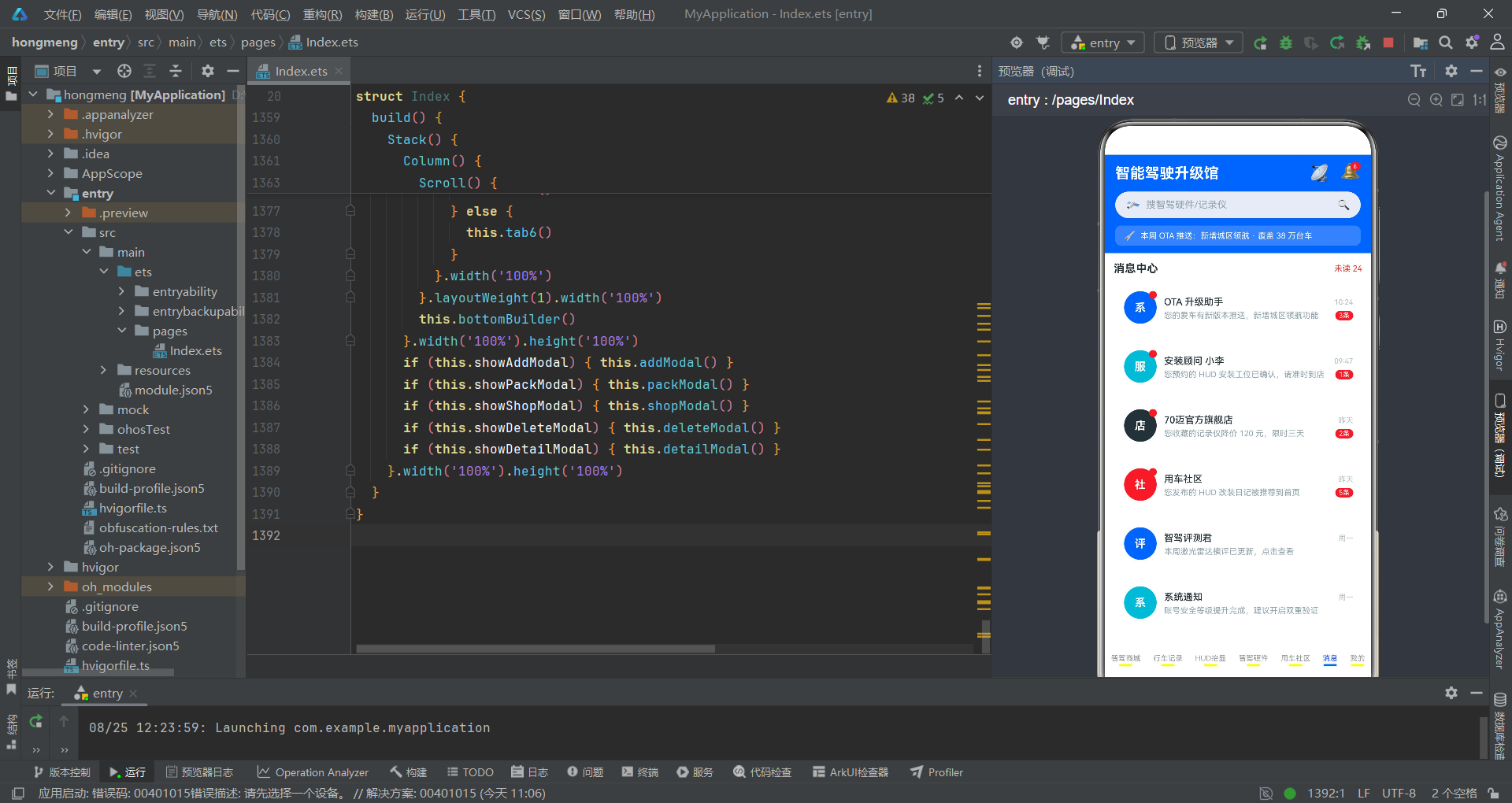
消息中心Tab展示12条结构化消息,每条消息包含发送方头像、名称、内容摘要、时间戳和未读条数角标,未读红点以脉冲动画提示用户注意。
  @Builder
  tab5() {
    Column({ space: 10 }) {
      Row() {
        Text('消息中心').fontSize(15).fontColor('#263238').fontWeight(FontWeight.Bold)
        Column().layoutWeight(1)
        Text('未读 24').fontSize(11).fontColor('#E53935')
      }.width('100%').alignItems(VerticalAlign.Center)

      ForEach(this.msgList, (item: GoodsItem, index: number) => {
        Row({ space: 10 }) {
          Stack({ alignContent: Alignment.TopEnd }) {
            Column() {
              Text(item.hot).fontSize(15).fontColor('#FFFFFF').fontWeight(FontWeight.Bold)
            }.width(44).height(44).borderRadius(22)
            .backgroundColor(index % 4 === 0 ? '#2962FF' : (index % 4 === 1 ? '#00B8D4' : (index % 4 === 2 ? '#263238' : '#E53935')))
            .justifyContent(FlexAlign.Center).alignItems(HorizontalAlign.Center)

            if (item.num > 0) {
              Column().width(10).height(10).borderRadius(5).backgroundColor('#E53935')
                .scale({ x: 1.05, y: 1.05 })
                .animation({ duration: 700, iterations: -1, curve: Curve.EaseInOut })
            }
          }.width(46).height(46)

          Column({ space: 4 }) {
            Row() {
              Text(item.name).fontSize(13).fontColor('#263238')
                .fontWeight(FontWeight.Medium).maxLines(1)
              Column().layoutWeight(1)
              Text(item.tag).fontSize(10).fontColor('#B0BEC5')
            }.width('100%').alignItems(VerticalAlign.Center)

            Row() {
              Text(item.desc).fontSize(11).fontColor('#90A4AE').maxLines(1)
              Column().layoutWeight(1)
              if (item.num > 0) {
                Text(item.num + '条').fontSize(9).fontColor('#FFFFFF')
                  .padding({ left: 5, right: 5, top: 1, bottom: 1 })
                  .backgroundColor('#E53935').borderRadius(8)
              }
            }.width('100%').alignItems(VerticalAlign.Center)
          }.layoutWeight(1).alignItems(HorizontalAlign.Start)
        }.width('100%').padding(12).backgroundColor('#FFFFFF').borderRadius(10)
        .alignItems(VerticalAlign.Center)
      }, (item: GoodsItem) => item.name)
消息列表的技术核心在于未读红点的实现。使用Stack({ alignContent: Alignment.TopEnd })将10x10像素的红色圆点定位到头像右上角,仅在item.num > 0时渲染,配合脉冲缩放动画形成持续的视觉提醒。消息头像背景色采用四色循环index % 4,比其他Tab的三色循环更加丰富,因为消息来源类型更加多样(系统、服务、店铺、社区等)。未读条数角标使用红色背景白色文字的胶囊样式,圆角8像素,与红点形成双层未读提示体系。
Tab7个人中心与菜单系统
深空灰个人卡片
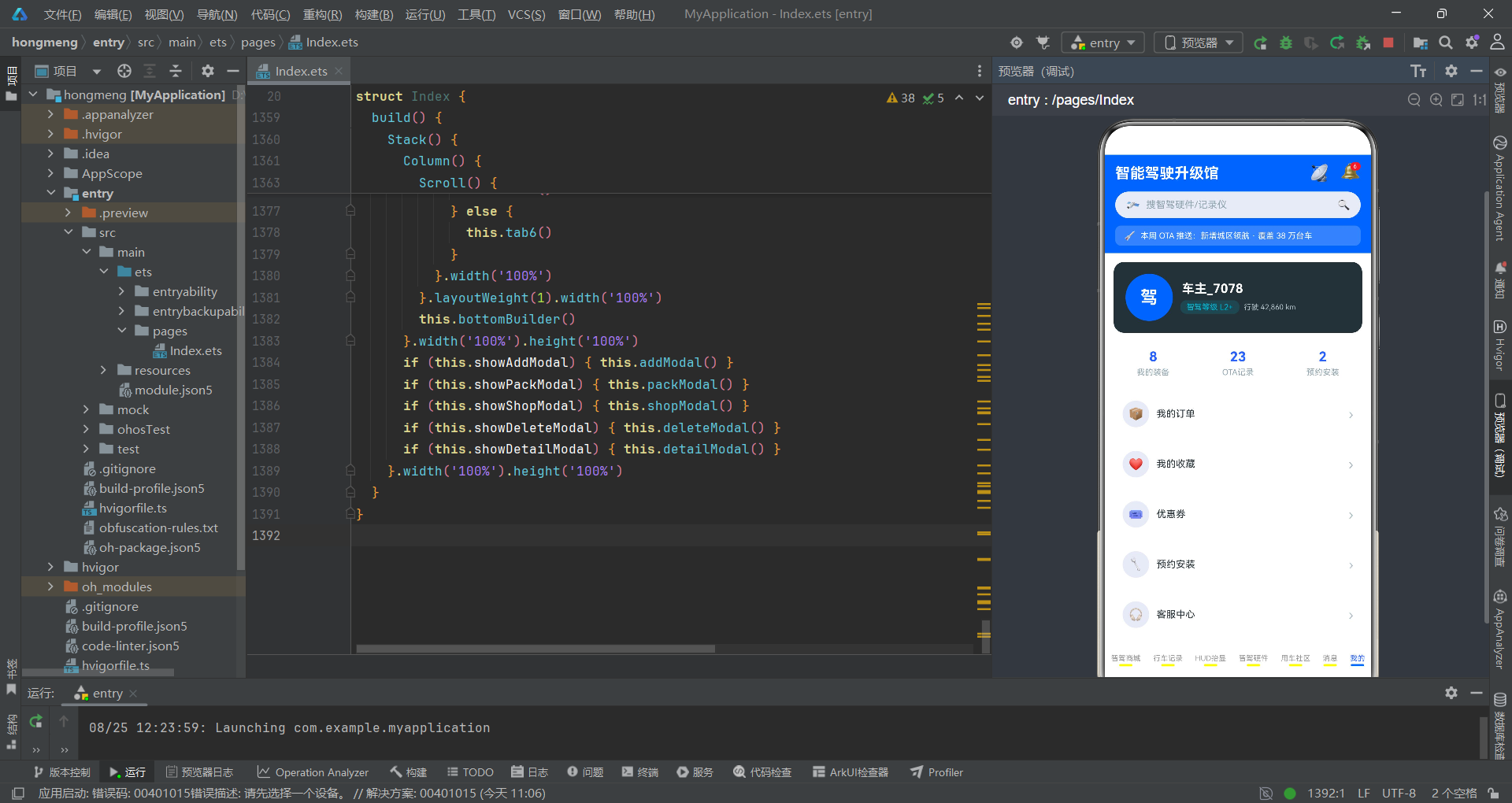
个人中心Tab以深空灰背景的个人信息卡开场,展示用户头像、昵称、智驾等级和行驶里程,随后是三格统计卡和六行功能菜单。
  @Builder
  tab6() {
    Column({ space: 12 }) {
      Row({ space: 12 }) {
        Column() {
          Text('驾').fontSize(24).fontColor('#FFFFFF').fontWeight(FontWeight.Bold)
        }.width(64).height(64).borderRadius(32).backgroundColor('#2962FF')
        .justifyContent(FlexAlign.Center).alignItems(HorizontalAlign.Center)

        Column({ space: 6 }) {
          Text('车主_7078').fontSize(17).fontColor('#FFFFFF').fontWeight(FontWeight.Bold)
          Row({ space: 8 }) {
            Text('智驾等级 L2+').fontSize(10).fontColor('#00B8D4')
              .padding({ left: 8, right: 8, top: 3, bottom: 3 })
              .backgroundColor('rgba(0,184,212,0.15)').borderRadius(8)
              .scale({ x: 1.05, y: 1.05 })
              .animation({ duration: 700, iterations: -1, curve: Curve.EaseInOut })
            Text('行驶 42,860 km').fontSize(10).fontColor('#B0BEC5')
          }.alignItems(VerticalAlign.Center)
        }.layoutWeight(1).alignItems(HorizontalAlign.Start)
      }.width('100%').padding(16).backgroundColor('#263238').borderRadius(14)
      .alignItems(VerticalAlign.Center)

      Row({ space: 8 }) {
        ForEach(this.myStatLabels, (label: string, index: number) => {
          Column({ space: 4 }) {
            Text(this.myStatNums[index]).fontSize(18).fontColor('#2962FF')
              .fontWeight(FontWeight.Bold)
            Text(label).fontSize(11).fontColor('#90A4AE')
          }.layoutWeight(1).padding({ top: 10, bottom: 10 })
          .backgroundColor('#FFFFFF').borderRadius(10)
          .alignItems(HorizontalAlign.Center)
        }, (label: string) => label)
      }.width('100%').alignItems(VerticalAlign.Center)
个人卡片的视觉风格与HUD深色统计卡呼应,采用#263238深空灰背景。用户头像使用64x64的圆形蓝色背景块,内嵌"驾"字白色粗体文字。"智驾等级 L2+"标签使用半透明荧光青背景rgba(0,184,212,0.15)配合脉冲动画,成为个人信息区唯一的动态元素。三格统计卡使用极客蓝数值文字,与个人卡的荧光青形成色彩区分。整个个人中心的配色策略是从暗到明的渐变——深空灰个人卡到白色统计卡再到白色菜单项,形成了视觉层次的自然过渡。
六行功能菜单
功能菜单以ForEach遍历menuNames数组生成六行列表项,每行包含圆形图标、菜单名称和右箭头,点击不同菜单项触发不同的弹框或Tab切换。
      ForEach(this.menuNames, (menu: string, index: number) => {
        Row({ space: 10 }) {
          Column() {
            Text(index === 0 ? '📦' : (index === 1 ? '❤️' : (index === 2 ? '🎟️' : (index === 3 ? '🔧' : (index === 4 ? '🎧' : '⚙️')))))
              .fontSize(16)
          }.width(36).height(36).borderRadius(18).backgroundColor('#E8EAF6')
          .justifyContent(FlexAlign.Center).alignItems(HorizontalAlign.Center)

          Text(menu).fontSize(13).fontColor('#263238')
          Column().layoutWeight(1)
          Text('›').fontSize(18).fontColor('#B0BEC5')
        }.width('100%').padding({ left: 12, right: 12, top: 10, bottom: 10 })
        .backgroundColor('#FFFFFF').borderRadius(10)
        .alignItems(VerticalAlign.Center)
        .onClick(() => {
          if (index === 1) {
            this.showDeleteModal = true
          } else if (index === 3) {
            this.showShopModal = true
          } else if (index === 0) {
            this.showPackModal = true
          } else {
            this.currentTab = 6
          }
        })
      }, (menu: string) => menu)

      Text('智能驾驶升级馆 · 让每一次升级都安心').fontSize(10).fontColor('#B0BEC5')
菜单图标的实现采用了嵌套三元运算符根据index选择不同的emoji图标,虽然写法紧凑但可读性有所牺牲。菜单点击逻辑通过index判断触发不同操作:index为0(我的订单)触发升级套餐弹框,index为1(我的收藏)触发删除确认弹框,index为3(预约安装)触发预约安装弹框,其他菜单项则保持在个人中心Tab。底部的slogan文字"智能驾驶升级馆 · 让每一次升级都安心"以灰色小字居中显示,为整个Tab页面画上句号。
应用交互流程概览
上述流程图完整描绘了应用的核心交互路径。从应用启动到各个弹框的触发和关闭,每一步都由@State状态变量的变更驱动。五个弹框的显隐完全由对应的布尔状态变量控制,通过Stack的图层叠加实现模态覆盖效果。升级套餐弹框中的总价计算packTotal()是一个典型的状态联动案例——当用户切换方案Chip或调整数量步进器时,chipA和stepNum的变化会自动触发packTotal()的重新计算和UI更新。
弹框系统:发布装备与升级套餐
发布装备底部弹框
发布装备弹框从底部弹出,包含品类选择Chip、车型适配Chip、装备描述输入框和立即上架按钮,整体采用底部弹出配合顶部圆角的Sheet样式。
  @Builder
  addModal() {
    Column() {
      Column().layoutWeight(1)
      Column({ space: 12 }) {
        Row() {
          Text('发布智驾装备').fontSize(16).fontColor('#263238').fontWeight(FontWeight.Bold)
          Column().layoutWeight(1)
          Text('✕').fontSize(14).fontColor('#90A4AE')
            .onClick(() => { this.showAddModal = false })
        }.width('100%').alignItems(VerticalAlign.Center)

        Text('选择品类').fontSize(12).fontColor('#90A4AE')
        Flex({ wrap: FlexWrap.Wrap }) {
          ForEach(this.kindChips, (kind: string, index: number) => {
            Text(kind).fontSize(12)
              .fontColor(this.chipA === index ? '#FFFFFF' : '#2962FF')
              .padding({ left: 12, right: 12, top: 6, bottom: 6 })
              .backgroundColor(this.chipA === index ? '#2962FF' : '#E8EAF6')
              .borderRadius(14)
              .margin({ right: 8, bottom: 8 })
              .onClick(() => { this.chipA = index })
          }, (kind: string) => kind)
        }.width('100%')

        Text('适配车型').fontSize(12).fontColor('#90A4AE')
        Flex({ wrap: FlexWrap.Wrap }) {
          ForEach(this.carChips, (car: string, index: number) => {
            Text(car).fontSize(12)
              .fontColor(this.chipB === index ? '#FFFFFF' : '#00B8D4')
              .padding({ left: 12, right: 12, top: 6, bottom: 6 })
              .backgroundColor(this.chipB === index ? '#00B8D4' : '#E0F7FA')
              .borderRadius(14)
              .margin({ right: 8, bottom: 8 })
              .onClick(() => { this.chipB = index })
          }, (car: string) => car)
        }.width('100%')

        Text('装备描述').fontSize(12).fontColor('#90A4AE')
        TextInput({ placeholder: '一句话介绍你的智驾装备', text: this.addDesc })
          .height(44).fontSize(12).backgroundColor('#F5F5F5').borderRadius(8)
          .onChange((value: string) => { this.addDesc = value })

        Text('立即上架').fontSize(14).fontColor('#FFFFFF')
          .width('100%').textAlign(TextAlign.Center).padding(12)
          .backgroundColor('#2962FF').borderRadius(22)
          .onClick(() => { this.showAddModal = false })
      }.width('100%').padding(16).backgroundColor('#FFFFFF')
      .borderRadius({ topLeft: 16, topRight: 16 })
      .constraintSize({ maxHeight: '80%' })
      .alignItems(HorizontalAlign.Start)
      .onClick((event: ClickEvent) => { event.stopPropagation() })
    }.width('100%').height('100%').backgroundColor('rgba(0,0,0,0.5)')
    .onClick(() => { this.showAddModal = false })
  }
弹框的实现采用了经典的Overlay模式:外层Column铺满全屏并设置半透明黑色背景rgba(0,0,0,0.5)作为遮罩,内层通过Column().layoutWeight(1)将内容推到底部。Chip选择器的选中态通过条件表达式动态切换文字颜色和背景色——选中时为白字蓝底,未选中时为蓝字浅蓝底。TextInput组件的onChange回调将输入值同步到addDesc状态变量,实现双向数据绑定。内层Column的onClick使用event.stopPropagation()阻止事件冒泡,确保点击弹框内容区域不会触发外层遮罩的关闭逻辑,而点击遮罩区域则直接关闭弹框。
升级套餐弹框与数量步进器
升级套餐弹框展示了方案选择、数量步进和实时总价计算三个核心功能,步进器通过条件样式反映操作边界(最小1件、最大6件)。
  @Builder
  packModal() {
    Column() {
      Column().layoutWeight(1)
      Column({ space: 12 }) {
        Row() {
          Text('升级套餐').fontSize(16).fontColor('#263238').fontWeight(FontWeight.Bold)
          Column().layoutWeight(1)
          Text('✕').fontSize(14).fontColor('#90A4AE')
            .onClick(() => { this.showPackModal = false })
        }.width('100%').alignItems(VerticalAlign.Center)

        Text('当前方案:' + this.packChips[this.chipA]).fontSize(13).fontColor('#2962FF')
          .fontWeight(FontWeight.Medium)

        Text('选择方案').fontSize(12).fontColor('#90A4AE')
        Flex({ wrap: FlexWrap.Wrap }) {
          ForEach(this.packChips, (pack: string, index: number) => {
            Text(pack).fontSize(12)
              .fontColor(this.chipA === index ? '#FFFFFF' : '#263238')
              .padding({ left: 14, right: 14, top: 7, bottom: 7 })
              .backgroundColor(this.chipA === index ? '#2962FF' : '#E8EAF6')
              .borderRadius(15)
              .margin({ right: 8, bottom: 8 })
              .onClick(() => { this.chipA = index })
          }, (pack: string) => pack)
        }.width('100%')

        Row() {
          Text('硬件数量(限 1-6 件)').fontSize(12).fontColor('#90A4AE')
          Column().layoutWeight(1)
          Text('¥' + this.packTotal()).fontSize(18).fontColor('#E53935').fontWeight(FontWeight.Bold)
            .scale({ x: 1.05, y: 1.05 })
            .animation({ duration: 700, iterations: -1, curve: Curve.EaseInOut })
        }.width('100%').alignItems(VerticalAlign.Center)

        Row({ space: 16 }) {
          Text('-').fontSize(16).fontColor(this.stepNum <= 1 ? '#B0BEC5' : '#2962FF')
            .width(30).height(30).borderRadius(15).textAlign(TextAlign.Center)
            .border({ width: 1, color: this.stepNum <= 1 ? '#B0BEC5' : '#2962FF' })
            .onClick(() => {
              if (this.stepNum > 1) { this.stepNum = this.stepNum - 1 }
            })
          Text(this.stepNum + ' 件').fontSize(14).fontColor('#263238').fontWeight(FontWeight.Medium)
          Text('+').fontSize(16).fontColor(this.stepNum >= 6 ? '#B0BEC5' : '#2962FF')
            .width(30).height(30).borderRadius(15).textAlign(TextAlign.Center)
            .border({ width: 1, color: this.stepNum >= 6 ? '#B0BEC5' : '#2962FF' })
            .onClick(() => {
              if (this.stepNum < 6) { this.stepNum = this.stepNum + 1 }
            })
        }.justifyContent(FlexAlign.Center).width('100%')

        Text('确认升级').fontSize(14).fontColor('#FFFFFF')
          .width('100%').textAlign(TextAlign.Center).padding(12)
          .backgroundColor('#00B8D4').borderRadius(22)
          .onClick(() => { this.showPackModal = false })
      }.width('100%').padding(16).backgroundColor('#FFFFFF')
      .borderRadius({ topLeft: 16, topRight: 16 })
      .constraintSize({ maxHeight: '80%' })
      .alignItems(HorizontalAlign.Start)
      .onClick((event: ClickEvent) => { event.stopPropagation() })
    }.width('100%').height('100%').backgroundColor('rgba(0,0,0,0.5)')
    .onClick(() => { this.showPackModal = false })
  }
步进器的核心技术在于条件样式绑定。当stepNum <= 1时,减号按钮的文字和边框变为灰色#B0BEC5,表示已到达下限不可再减;当stepNum >= 6时,加号按钮同样变为灰色不可再加。这种视觉反馈通过条件表达式直接绑定到fontColor和border属性,框架会在stepNum变化时自动更新样式。总价packTotal()的计算公式为packPrices[chipA] * stepNum,当方案或数量任一变化时都会触发重新计算,总价数字还应用了脉冲动画强调金额。确认升级按钮使用荧光青#00B8D4背景,与方案Chip的极客蓝形成色彩区分。
弹框系统:预约安装与删除确认
预约安装弹框的双Chip与双步进器
预约安装弹框包含门店选择Chip、时段选择Chip和工位数量步进器,复用了chipA和chipB两个状态变量分别管理门店和时段的选中状态。
  @Builder
  shopModal() {
    Column() {
      Column().layoutWeight(1)
      Column({ space: 12 }) {
        Row() {
          Text('预约安装').fontSize(16).fontColor('#263238').fontWeight(FontWeight.Bold)
          Column().layoutWeight(1)
          Text('✕').fontSize(14).fontColor('#90A4AE')
            .onClick(() => { this.showShopModal = false })
        }.width('100%').alignItems(VerticalAlign.Center)

        Text('选择门店').fontSize(12).fontColor('#90A4AE')
        Flex({ wrap: FlexWrap.Wrap }) {
          ForEach(this.shopChips, (shop: string, index: number) => {
            Text(shop).fontSize(12)
              .fontColor(this.chipA === index ? '#FFFFFF' : '#2962FF')
              .padding({ left: 12, right: 12, top: 6, bottom: 6 })
              .backgroundColor(this.chipA === index ? '#2962FF' : '#E8EAF6')
              .borderRadius(14)
              .margin({ right: 8, bottom: 8 })
              .onClick(() => { this.chipA = index })
          }, (shop: string) => shop)
        }.width('100%')

        Text('选择时段').fontSize(12).fontColor('#90A4AE')
        Row({ space: 8 }) {
          ForEach(this.timeChips, (time: string, index: number) => {
            Text(time).fontSize(12)
              .fontColor(this.chipB === index ? '#FFFFFF' : '#00B8D4')
              .padding({ left: 16, right: 16, top: 7, bottom: 7 })
              .backgroundColor(this.chipB === index ? '#00B8D4' : '#E0F7FA')
              .borderRadius(15)
              .onClick(() => { this.chipB = index })
          }, (time: string) => time)
        }.width('100%')

        Row() {
          Text('施工工位(限 1-2 位)').fontSize(12).fontColor('#90A4AE')
          Column().layoutWeight(1)
          Text(this.shopChips[this.chipA] + ' · ' + this.timeChips[this.chipB])
            .fontSize(11).fontColor('#263238')
        }.width('100%').alignItems(VerticalAlign.Center)

        Row({ space: 16 }) {
          Text('-').fontSize(16).fontColor(this.stepNumB <= 1 ? '#B0BEC5' : '#E53935')
            .width(30).height(30).borderRadius(15).textAlign(TextAlign.Center)
            .border({ width: 1, color: this.stepNumB <= 1 ? '#B0BEC5' : '#E53935' })
            .onClick(() => {
              if (this.stepNumB > 1) { this.stepNumB = this.stepNumB - 1 }
            })
          Text(this.stepNumB + ' 位').fontSize(14).fontColor('#263238').fontWeight(FontWeight.Medium)
          Text('+').fontSize(16).fontColor(this.stepNumB >= 2 ? '#B0BEC5' : '#E53935')
            .width(30).height(30).borderRadius(15).textAlign(TextAlign.Center)
            .border({ width: 1, color: this.stepNumB >= 2 ? '#B0BEC5' : '#E53935' })
            .onClick(() => {
              if (this.stepNumB < 2) { this.stepNumB = this.stepNumB + 1 }
            })
        }.justifyContent(FlexAlign.Center).width('100%')

        Text('提交预约').fontSize(14).fontColor('#FFFFFF')
          .width('100%').textAlign(TextAlign.Center).padding(12)
          .backgroundColor('#2962FF').borderRadius(22)
          .onClick(() => { this.showShopModal = false })
      }.width('100%').padding(16).backgroundColor('#FFFFFF')
      .borderRadius({ topLeft: 16, topRight: 16 })
      .constraintSize({ maxHeight: '80%' })
      .alignItems(HorizontalAlign.Start)
      .onClick((event: ClickEvent) => { event.stopPropagation() })
    }.width('100%').height('100%').backgroundColor('rgba(0,0,0,0.5)')
    .onClick(() => { this.showShopModal = false })
  }
预约安装弹框的状态复用策略值得关注。chipA和chipB两个状态变量在多个弹框间共享——在发布装备弹框中分别管理品类和车型,在升级套餐弹框中管理方案选择,在预约安装弹框中管理门店和时段。这种共享设计减少了状态变量的数量,但也意味着同时只能打开一个弹框(应用的设计约束保证了这一点)。工位步进器的范围为1-2位,比升级套餐的1-6件更窄,使用独立的stepNumB变量管理。步进器的边框和文字颜色采用警示红#E53935而非极客蓝,与提交预约按钮的极客蓝形成功能区分。
删除确认居中弹框
删除确认弹框采用居中小卡片样式,顶部红色警示区配合底部取消/删除双按钮,与底部弹出的其他弹框形成视觉对比。
  @Builder
  deleteModal() {
    Column() {
      Column() {
        Column({ space: 4 }) {
          Text('⚠').fontSize(26).fontColor('#FFFFFF')
          Text('删除后不可恢复').fontSize(10).fontColor('#FFEBEE')
        }.width('100%').padding({ top: 16, bottom: 16 })
        .backgroundColor('#E53935')
        .justifyContent(FlexAlign.Center).alignItems(HorizontalAlign.Center)

        Column({ space: 14 }) {
          Text('确认删除该装备收藏?').fontSize(15).fontColor('#263238')
            .fontWeight(FontWeight.Medium)

          Row({ space: 10 }) {
            Text('取消').fontSize(13).fontColor('#607D8B')
              .layoutWeight(1).textAlign(TextAlign.Center).padding(10)
              .backgroundColor('#ECEFF1').borderRadius(20)
              .onClick(() => { this.showDeleteModal = false })

            Text('删除').fontSize(13).fontColor('#FFFFFF')
              .layoutWeight(1).textAlign(TextAlign.Center).padding(10)
              .backgroundColor('#E53935').borderRadius(20)
              .onClick(() => { this.showDeleteModal = false })
          }.width('100%').alignItems(VerticalAlign.Center)
        }.width('100%').padding(16)
      }.width('72%').borderRadius(12).backgroundColor('#FFFFFF')
      .alignItems(HorizontalAlign.Center)
      .onClick((event: ClickEvent) => { event.stopPropagation() })
    }.width('100%').height('100%').backgroundColor('rgba(0,0,0,0.5)')
    .justifyContent(FlexAlign.Center).alignItems(HorizontalAlign.Center)
    .onClick(() => { this.showDeleteModal = false })
  }
删除确认弹框的定位方式与其他弹框截然不同。外层Column使用justifyContent(FlexAlign.Center).alignItems(HorizontalAlign.Center)将内容居中显示,而非底部弹出。弹框宽度为72%,顶部红色区域以警示图标"⚠"和"删除后不可恢复"提示文字构成警示头部,底部白色区域包含确认文字和取消/删除双按钮。两个按钮各占layoutWeight(1)的等宽空间,取消按钮使用灰色背景#ECEFF1,删除按钮使用红色背景#E53935,通过颜色对比引导用户谨慎操作。整个弹框宽度仅72%,比底部弹框的全宽更紧凑,符合居中确认对话框的视觉惯例。
弹框系统:商品详情右侧滑出面板
详情面板的完整结构
商品详情弹框采用右侧滑出的全高面板设计,从右侧80%宽度滑入,包含大色块头图区、可滚动内容区和底部购买按钮三个核心区块。
  @Builder
  detailModal() {
    Column() {
      Column({ space: 12 }) {
        Column({ space: 6 }) {
          Text(this.selName().substring(0, 1)).fontSize(44).fontColor('#FFFFFF')
            .fontWeight(FontWeight.Bold)
          Text(this.selTag()).fontSize(11).fontColor('#E8EAF6')
            .padding({ left: 10, right: 10, top: 3, bottom: 3 })
            .backgroundColor('rgba(255,255,255,0.25)').borderRadius(10)
        }.width('100%').height(170)
        .backgroundColor('#2962FF')
        .justifyContent(FlexAlign.Center).alignItems(HorizontalAlign.Center)

        Scroll() {
          Column({ space: 12 }) {
            Text(this.selName()).fontSize(17).fontColor('#263238')
              .fontWeight(FontWeight.Bold).maxLines(2)
            Text(this.selDesc()).fontSize(12).fontColor('#90A4AE')

            Row({ space: 8 }) {
              Text(this.selStars()).fontSize(16).fontColor('#FFB300')
              Text(this.selScore() + ' 分').fontSize(12).fontColor('#FFB300')
              Column().layoutWeight(1)
              Text(this.selNum() + ' 人加购').fontSize(10).fontColor('#B0BEC5')
            }.width('100%').alignItems(VerticalAlign.Center)

            Row({ space: 6 }) {
              Text('¥').fontSize(14).fontColor('#E53935')
              Text(Math.floor(this.selPrice()) + '').fontSize(28).fontColor('#E53935')
                .fontWeight(FontWeight.Bold)
              Text('分期免息').fontSize(9).fontColor('#E53935')
                .padding({ left: 5, right: 5, top: 2, bottom: 2 })
                .border({ width: 1, color: '#E53935' }).borderRadius(4)
            }.alignItems(VerticalAlign.Bottom)

            Column({ space: 6 }) {
              Text('好评率 ' + this.selScore() + '%').fontSize(11).fontColor('#00B8D4')
              Row() {
                Column().width(this.selScore() + '%').height(7)
                  .backgroundColor('#00B8D4').borderRadius(4)
              }.width('100%').height(7).backgroundColor('#E8EAF6').borderRadius(4)
            }.width('100%').alignItems(HorizontalAlign.Start)

            Text('适配车型').fontSize(12).fontColor('#90A4AE')
            Flex({ wrap: FlexWrap.Wrap }) {
              ForEach(this.carChips, (car: string) => {
                Text(car).fontSize(11).fontColor('#2962FF')
                  .padding({ left: 10, right: 10, top: 5, bottom: 5 })
                  .backgroundColor('#E8EAF6').borderRadius(12)
                  .margin({ right: 8, bottom: 8 })
              }, (car: string) => car)
            }.width('100%')

            Text('取消收藏').fontSize(11).fontColor('#B0BEC5')
              .padding(8)
              .onClick(() => {
                this.showDetailModal = false
                this.showDeleteModal = true
              })
          }.width('100%').padding(16)
          .alignItems(HorizontalAlign.Start)
        }.layoutWeight(1).width('100%')

        Text('立即购买').fontSize(15).fontColor('#FFFFFF')
          .width('100%').textAlign(TextAlign.Center).padding(14)
          .backgroundColor('#2962FF').borderRadius(24)
          .margin({ bottom: 16 })
          .scale({ x: 1.05, y: 1.05 })
          .animation({ duration: 700, iterations: -1, curve: Curve.EaseInOut })
          .onClick(() => { this.showDetailModal = false })
      }.width('80%').height('100%').backgroundColor('#FFFFFF')
      .alignItems(HorizontalAlign.Start)
      .onClick((event: ClickEvent) => { event.stopPropagation() })
    }.width('100%').height('100%').backgroundColor('rgba(0,0,0,0.5)')
    .justifyContent(FlexAlign.End).alignItems(HorizontalAlign.End)
    .onClick(() => { this.showDetailModal = false })
  }
详情面板的布局策略是通过外层Column的justifyContent(FlexAlign.End).alignItems(HorizontalAlign.End)将80%宽度的内层面板推到右侧,模拟从右侧滑入的效果。头图区使用170像素高度的极客蓝色块,内嵌商品首字大号白色文字和标签,形成强烈的品牌色视觉锚点。内容区使用Scroll包裹,支持长内容滚动,包含了商品名称、描述、五星评分(通过selStars()生成)、价格大字(28号红色粗体)、好评率进度条和适配车型Chip列表。"取消收藏"按钮的点击事件链式触发了两个状态变更:先关闭详情弹框,再打开删除确认弹框,实现了跨弹框的流程跳转。底部"立即购买"按钮应用了脉冲缩放动画,是整个面板中唯一的动态元素,引导用户完成购买转化。
页面装配与构建函数
Stack层叠与条件渲染
应用的build()函数使用Stack作为根容器,将主内容区和五个弹框层叠在一起,通过条件渲染控制弹框的显隐,实现了完整的页面装配。
  build() {
    Stack() {
      Column() {
        this.headerBuilder()
        Scroll() {
          Column() {
            if (this.currentTab === 0) {
              this.tab0()
            } else if (this.currentTab === 1) {
              this.tab1()
            } else if (this.currentTab === 2) {
              this.tab2()
            } else if (this.currentTab === 3) {
              this.tab3()
            } else if (this.currentTab === 4) {
              this.tab4()
            } else if (this.currentTab === 5) {
              this.tab5()
            } else {
              this.tab6()
            }
          }.width('100%')
        }.layoutWeight(1).width('100%')
        this.bottomBuilder()
      }.width('100%').height('100%')
      if (this.showAddModal) { this.addModal() }
      if (this.showPackModal) { this.packModal() }
      if (this.showShopModal) { this.shopModal() }
      if (this.showDeleteModal) { this.deleteModal() }
      if (this.showDetailModal) { this.detailModal() }
    }.width('100%').height('100%')
  }
页面装配的核心设计是Stack的层叠机制。底层是主内容区Column,包含headerBuilder、可滚动的内容区和bottomBuilder三个垂直排列的区域。内容区通过if-else if条件判断根据currentTab的值渲染对应的Tab Builder,layoutWeight(1)使内容区占据头部和底部之间的所有剩余空间。五个弹框作为Stack的上层,各自通过独立的布尔状态变量控制渲染——当状态为true时对应弹框Builder被调用并渲染在Stack上层,遮罩层覆盖底层内容区,实现模态效果。这种架构使得所有弹框共享同一个Stack容器,无需额外的弹框管理器,代码结构清晰且易于维护。
技术对比分析
| 技术维度 | 智驾商城Tab(tab0) | 行车记录Tab(tab1) | HUD抬显Tab(tab2) | 智驾硬件Tab(tab3) |
|---|---|---|---|---|
| 列表布局 | 行式列表(单列) | Flex双列网格 | 横向Scroll滚动 | 行式列表(单列) |
| 数据可视化 | 好评进度条 | 万像素柱状图 | 亮度柱状图 | TOPS算力柱状图 |
| 统计卡样式 | 三格白色卡(脉冲) | 无 | 三格深色卡(脉冲) | 无 |
| 柱状图颜色 | 不适用 | 蓝/青双色交替 | 青/灰双色交替 | 蓝/青/红三色循环 |
| 动画元素 | 热度数字脉冲 | 夜视标签脉冲 | 峰值亮度脉冲 | 算力数值脉冲 |
| 卡片宽度 | 100% | 48% | 140px固定 | 100% |
| 点击行为 | 打开详情弹框 | 打开详情弹框 | 打开详情弹框 | 无点击事件 |
| 数据条数 | 24条 | 12条 | 10条 | 10条 |
| 标签样式 | 浅蓝底蓝字 | 荧光青底白字 | 不适用 | 浅蓝底蓝字 |
| 进度条高度 | 6px | 4px | 不适用 | 5px |
| 弹框维度 | 发布装备(addModal) | 升级套餐(packModal) | 预约安装(shopModal) | 删除确认(deleteModal) | 商品详情(detailModal) |
|---|---|---|---|---|---|
| 弹出位置 | 底部弹出 | 底部弹出 | 底部弹出 | 居中显示 | 右侧滑出 |
| 宽度 | 100% | 100% | 100% | 72% | 80% |
| Chip选择器 | 品类+车型(双组) | 方案(单组) | 门店+时段(双组) | 无 | 车型(只读展示) |
| 步进器 | 无 | 数量(1-6件) | 工位(1-2位) | 无 | 无 |
| 状态变量 | chipA/chipB/addDesc | chipA/stepNum | chipA/chipB/stepNumB | 无 | selectedItem |
| 确认按钮颜色 | 极客蓝 | 荧光青 | 极客蓝 | 警示红 | 极客蓝(脉冲) |
| 关闭方式 | 遮罩点击/叉号 | 遮罩点击/叉号 | 遮罩点击/叉号 | 遮罩点击/取消按钮 | 遮罩点击 |
| 最大高度 | 80% | 80% | 80% | 自适应 | 100% |
| 事件冒泡阻止 | 是 | 是 | 是 | 是 | 是 |
安装DevEco Studio程序

选择目标安装目录:

设置环境变量,但是需要重启一下:

新建一个空白模板:

设置API为24的模板项目:
初始化项目,自动下载相关依赖:

完整代码:
// ============================================================
// 智能驾驶升级馆 —— 汽车之家 App 风格的智驾硬件升级场景
// 单文件 ArkTS 页面:7 Tab + 5 弹框
// 配色:极客蓝 #2962FF / 深空灰 #263238 / 荧光青 #00B8D4
// 浅蓝底 #E8EAF6 / 警示红 #E53935
// ============================================================
interface GoodsItem {
name: string
price: number
desc: string
score: number
num: number
tag: string
hot: string
}
@Entry
@Component
struct Index {
@State currentTab: number = 0
@State showAddModal: boolean = false
@State showPackModal: boolean = false
@State showShopModal: boolean = false
@State showDeleteModal: boolean = false
@State showDetailModal: boolean = false
@State selectedItem: GoodsItem | null = null
@State chipA: number = 0
@State chipB: number = 0
@State stepNum: number = 1
@State stepNumB: number = 1
@State addDesc: string = ''
// ---------- 顶部 Tab ----------
private tabs: string[] = ['智驾商城', '行车记录', 'HUD抬显', '智驾硬件', '用车社区', '消息', '我的']
// ---------- 各类 chips ----------
private kindChips: string[] = ['行车记录仪', 'HUD', '激光雷达', '域控制器', '传感器']
private carChips: string[] = ['特斯拉', '蔚来', '小鹏', '理想', '比亚迪', '极氪']
private packChips: string[] = ['基础辅助', '高阶智驾', '全栈智享', '旗舰领航']
private packPrices: number[] = [3999, 12999, 25999, 39999]
private shopChips: string[] = ['中关村店', '望京店', '亦庄店', '顺义店']
private timeChips: string[] = ['上午', '下午', '晚间']
private topicChips: string[] = ['城区领航实测', 'HUD改装日记', '记录仪夜视', '激光雷达解析', 'OTA体验', '续航分享', '高速NOA']
// ---------- 统计卡数据 ----------
private statLabels: string[] = ['在售装备', '本月安装', '好评率']
private statNums: string[] = ['1,286', '3,452', '98.6%']
private statColors: string[] = ['#2962FF', '#00B8D4', '#E53935']
private myStatLabels: string[] = ['我的装备', 'OTA记录', '预约安装']
private myStatNums: string[] = ['8', '23', '2']
// ---------- 菜单 ----------
private menuNames: string[] = ['我的订单', '我的收藏', '优惠券', '预约安装', '客服中心', '设置']
// ---------- 智驾商城 24 条装备 ----------
private mainList: GoodsItem[] = [
{
name: '70迈 4K 智能记录仪 Pro',
price: 899,
desc: '4K超清 · 语音控制 · 电子狗',
score: 96,
num: 460,
tag: '热销',
hot: '爆'
},
{
name: '盯盯拍 Mini5 记录仪',
price: 699,
desc: '5K超清 · 语音抓拍 · 缩时录影',
score: 94,
num: 380,
tag: '热销',
hot: '荐'
},
{
name: '海康威视 N6+ 记录仪',
price: 749,
desc: '2K星光 · 停车监控 · 语音声控',
score: 92,
num: 300,
tag: '新品',
hot: '新'
},
{
name: '华为智选 70寸 HUD',
price: 1699,
desc: '70寸投影 · 自动亮度 · 导航投射',
score: 95,
num: 410,
tag: '热销',
hot: '爆'
},
{
name: '路畅 6G 毫米波雷达',
price: 2599,
desc: '前向感知 · 盲区补全 · 全天候',
score: 90,
num: 260,
tag: '新品',
hot: '荐'
},
{
name: '禾赛 XT32 激光雷达',
price: 4999,
desc: '32线 · 200米量程 · 车规级',
score: 97,
num: 480,
tag: '旗舰',
hot: '爆'
},
{
name: '速腾 M1 激光雷达',
price: 4599,
desc: 'MEMS · 点云成像 · 150米',
score: 95,
num: 440,
tag: '旗舰',
hot: '爆'
},
{
name: '地平线 征程5 域控制器',
price: 8999,
desc: '128TOPS · 深度学习加速',
score: 93,
num: 330,
tag: '高算力',
hot: '荐'
},
{
name: '黑芝麻 A1000 域控制器',
price: 9999,
desc: '116TOPS · 车规级双芯',
score: 92,
num: 290,
tag: '高算力',
hot: '荐'
},
{
name: 'P卡 4G GPS定位器',
price: 199,
desc: '4G全网通 · 远程监听 · 电子围栏',
score: 88,
num: 120,
tag: '特价',
hot: '惠'
},
{
name: '70迈 智能后视镜 X200',
price: 1299,
desc: '10寸流媒体 · 后路影像',
score: 91,
num: 240,
tag: '热销',
hot: '荐'
},
{
name: '凌度 BL990 后视镜记录仪',
price: 599,
desc: '双镜头 · 倒车影像 · 循环录',
score: 87,
num: 140,
tag: '特价',
hot: '惠'
},
{
name: '任我游 流媒体后视镜',
price: 899,
desc: '9.6寸 · 防眩光 · 广角后摄',
score: 89,
num: 160,
tag: '热销',
hot: '荐'
},
{
name: '铁将军 太阳能胎压监测',
price: 349,
desc: '太阳能 · 六感应 · 实时显示',
score: 90,
num: 180,
tag: '特价',
hot: '惠'
},
{
name: '伟力通 胎压监测 T6',
price: 299,
desc: '内置传感 · 高温报警',
score: 91,
num: 200,
tag: '热销',
hot: '荐'
},
{
name: '小米 车载智慧屏 Pro',
price: 1099,
desc: '16寸 · 米家互联 · 语音助手',
score: 92,
num: 220,
tag: '新品',
hot: '新'
},
{
name: 'bee电 智能胎压充电帽',
price: 129,
desc: '实时胎压 · USB供电 · 四只装',
score: 85,
num: 90,
tag: '特价',
hot: '惠'
},
{
name: '科盛 ADAS 预警仪',
price: 1599,
desc: '防碰撞 · 车道偏离预警',
score: 88,
num: 170,
tag: '新品',
hot: '荐'
},
{
name: '中恒 D5 OBD 行车电脑',
price: 459,
desc: 'OBD即插 · 故障检测 · 仪表数据',
score: 86,
num: 110,
tag: '特价',
hot: '惠'
},
{
name: '纽曼 车载空气净化器',
price: 399,
desc: 'HEPA滤网 · 负离子 · 静音',
score: 84,
num: 80,
tag: '特价',
hot: '惠'
},
{
name: '飞利浦 激光大灯总成',
price: 2899,
desc: '激光大灯 · 自适应远光',
score: 93,
num: 210,
tag: '旗舰',
hot: '荐'
},
{
name: '海拉 智能大灯控制器',
price: 1899,
desc: 'ADB防眩 · 分区照明',
score: 91,
num: 190,
tag: '高配',
hot: '新'
},
{
name: 'Mobileye 6L 辅助驾驶盒',
price: 12999,
desc: '单目视觉 · 预警算法大师',
score: 96,
num: 350,
tag: '旗舰',
hot: '爆'
},
{
name: '经纬恒润 L2 辅助套件',
price: 6999,
desc: 'ACC · LKA · 一键升级',
score: 94,
num: 320,
tag: '高算力',
hot: '爆'
}
]
// ---------- 行车记录 12 条(num = 万像素) ----------
private dashList: GoodsItem[] = [
{ name: '70迈 Pro', price: 899, desc: '4K超清 · 语音声控', score: 96, num: 480, tag: '夜视', hot: '爆' },
{ name: '盯盯拍 Mini5', price: 699, desc: '5K画质 · 缩时录影', score: 94, num: 460, tag: '夜视', hot: '荐' },
{ name: '海康 N6+', price: 749, desc: '2K星光 · 停车监控', score: 92, num: 380, tag: '星光', hot: '荐' },
{ name: '凌度 BL990', price: 599, desc: '双镜头 · 循环录制', score: 87, num: 260, tag: '夜视', hot: '惠' },
{ name: '任我游 后视镜', price: 899, desc: '流媒体 · 防眩光', score: 89, num: 300, tag: '夜视', hot: '荐' },
{ name: '超级喵 夜枭', price: 1099, desc: 'SONY传感器 · 暗光王', score: 93, num: 440, tag: '星光', hot: '爆' },
{ name: 'PAPAGO N291', price: 659, desc: '149度广角 · GPS', score: 90, num: 340, tag: '夜视', hot: '荐' },
{ name: '70迈 M300', price: 399, desc: '隐藏式 · 2K小机身', score: 88, num: 250, tag: '特价', hot: '惠' },
{ name: '黑剑 H9', price: 1299, desc: '4K · 后摄双录', score: 91, num: 420, tag: '夜视', hot: '荐' },
{ name: '神眸 X5', price: 549, desc: '语音抓拍 · 紧急锁定', score: 86, num: 220, tag: '星光', hot: '惠' },
{ name: '丁威特 D680', price: 469, desc: '迷你机身 · 电容供电', score: 85, num: 180, tag: '特价', hot: '惠' },
{ name: '捷渡 D160', price: 559, desc: '倒车影像 · 三镜头', score: 84, num: 150, tag: '夜视', hot: '惠' }
]
// ---------- HUD 抬显 10 条(num = 流明) ----------
private hudList: GoodsItem[] = [
{ name: '华为智选 HUD', price: 1699, desc: '70寸投影 · 自动亮度', score: 95, num: 480, tag: '热销', hot: '爆' },
{ name: '车萝卜 Plus', price: 999, desc: '6寸反射 · 导航投射', score: 92, num: 380, tag: '热销', hot: '荐' },
{ name: '百路达 M3', price: 899, desc: '曲面成像 · 语音控制', score: 90, num: 340, tag: '新品', hot: '新' },
{ name: '任我游 H7', price: 799, desc: '5.5寸 · 胎压同屏', score: 89, num: 300, tag: '特价', hot: '惠' },
{ name: '纽曼 H5', price: 599, desc: 'OBD数据 · 速显抬头', score: 86, num: 220, tag: '特价', hot: '惠' },
{ name: '中恒 H8', price: 699, desc: '高清反射 · 故障码', score: 88, num: 260, tag: '新品', hot: '新' },
{ name: '途乐 H6', price: 649, desc: '星空屏 · 亮度自适应', score: 87, num: 240, tag: '热销', hot: '荐' },
{ name: '车视杰 H9', price: 1199, desc: '9寸大屏 · 双模投射', score: 91, num: 400, tag: '旗舰', hot: '爆' },
{ name: '联想 H3', price: 749, desc: '轻巧机身 · GPS速显', score: 85, num: 200, tag: '特价', hot: '惠' },
{ name: '极目 P1', price: 1399, desc: 'AR实景 · 4K投影', score: 93, num: 420, tag: '旗舰', hot: '爆' }
]
// ---------- 智驾硬件 10 条(num = 算力 TOPS) ----------
private hwList: GoodsItem[] = [
{ name: '英伟达 Orin-X 域控', price: 15999, desc: '254TOPS · 双芯级联', score: 98, num: 254, tag: '旗舰', hot: '爆' },
{ name: '地平线 征程5', price: 8999, desc: '128TOPS · 深度学习', score: 90, num: 128, tag: '高算力', hot: '荐' },
{ name: '黑芝麻 A1000', price: 9999, desc: '116TOPS · 车规双芯', score: 86, num: 116, tag: '高算力', hot: '荐' },
{ name: '华为 MDC 610', price: 29999, desc: '200TOPS · 全栈算法', score: 95, num: 200, tag: '旗舰', hot: '爆' },
{ name: 'Mobileye EyeQ6', price: 12999, desc: '等效算力 · 视觉方案', score: 82, num: 90, tag: '新品', hot: '新' },
{ name: '地平线 J6P', price: 19999, desc: '560TOPS · 城区领航', score: 96, num: 460, tag: '旗舰', hot: '爆' },
{ name: '黑芝麻 A2000', price: 21999, desc: '300TOPS · 舱驾一体', score: 93, num: 300, tag: '新品', hot: '新' },
{ name: '德赛西威 IVA9', price: 16999, desc: '180TOPS · 中算力平台', score: 88, num: 180, tag: '高算力', hot: '荐' },
{ name: '经纬恒润 ADC', price: 13999, desc: '150TOPS · L2进阶', score: 84, num: 150, tag: '热销', hot: '荐' },
{ name: '禾赛 XT32 雷达', price: 4999, desc: '32线 · 点云成像', score: 92, num: 120, tag: '传感器', hot: '爆' }
]
// ---------- 用车社区 10 条帖子(num = 点赞数) ----------
private postList: GoodsItem[] = [
{ name: '京A老司机', price: 0, desc: '城区领航首月体验:路口通行率高,无保护左转稳定,雨夜会自动降级提醒接管。', score: 98, num: 486, tag: '城区领航', hot: '精' },
{ name: '沪上鹏友', price: 0, desc: 'HUD改装日记:走线藏饰条,成像在玻璃外侧,白天也清晰,强烈推荐反射式。', score: 92, num: 352, tag: 'HUD改装', hot: '热' },
{ name: '深南夜猫', price: 0, desc: '记录仪夜视横评:三款机型地库对比,星光夜视效果确实碾压普通传感器。', score: 90, num: 298, tag: '记录仪夜视', hot: '荐' },
{ name: '杭州车主陈', price: 0, desc: '激光雷达清洗很重要,泥点一多感知立刻变保守,记得常擦雷达罩。', score: 86, num: 210, tag: '激光雷达', hot: '' },
{ name: '蓉城特斯拉', price: 0, desc: 'OTA 后自动变道更果断了,匝道汇入依旧偏保守,整体像老司机带实习生。', score: 94, num: 410, tag: 'OTA体验', hot: '精' },
{ name: '广州奶爸', price: 0, desc: '长途高速全程领航,中途只接管一次,到家腰不酸,智驾真是带娃神器。', score: 96, num: 465, tag: '高速NOA', hot: '热' },
{ name: '西安油电双持', price: 0, desc: '续航分享:开智驾比脚踩省半个电,高速能耗曲线明显更平顺。', score: 88, num: 175, tag: '续航分享', hot: '' },
{ name: '青岛湾流', price: 0, desc: '域控升级作业:换大算力盒子后车道保持丝滑不少,值得为算力买单。', score: 91, num: 260, tag: 'HUD改装', hot: '荐' },
{ name: '长沙米粉队长', price: 0, desc: '暴雨天智驾会提前提示降级,逻辑透明不吓人,这点好评。', score: 87, num: 190, tag: 'OTA体验', hot: '' },
{ name: '哈尔滨冰哥', price: 0, desc: '零下二十度记录仪电池报警,换电容版机器后冬季再没断录。', score: 85, num: 130, tag: '记录仪夜视', hot: '' }
]
// ---------- 消息 12 条(num = 未读条数) ----------
private msgList: GoodsItem[] = [
{
name: 'OTA 升级助手',
price: 0,
desc: '您的爱车有新版本推送,新增城区领航功能',
score: 0,
num: 3,
tag: '10:24',
hot: '系'
},
{
name: '安装顾问 小李',
price: 0,
desc: '您预约的 HUD 安装工位已确认,请准时到店',
score: 0,
num: 1,
tag: '09:47',
hot: '服'
},
{
name: '70迈官方旗舰店',
price: 0,
desc: '您收藏的记录仪降价 120 元,限时三天',
score: 0,
num: 2,
tag: '昨天',
hot: '店'
},
{
name: '用车社区',
price: 0,
desc: '您发布的 HUD 改装日记被推荐到首页',
score: 0,
num: 5,
tag: '昨天',
hot: '社'
},
{
name: '智驾评测君',
price: 0,
desc: '本周激光雷达横评已更新,点击查看',
score: 0,
num: 0,
tag: '周一',
hot: '评'
},
{
name: '系统通知',
price: 0,
desc: '账号安全等级提升完成,建议开启双重验证',
score: 0,
num: 0,
tag: '周一',
hot: '系'
},
{
name: '同城车友会',
price: 0,
desc: '周六亦庄店车友聚会开始报名,前 20 名送洗车',
score: 0,
num: 4,
tag: '周二',
hot: '社'
},
{
name: '保险管家',
price: 0,
desc: '您的车险还有 30 天到期,可在线比价续保',
score: 0,
num: 0,
tag: '周三',
hot: '保'
},
{
name: '预约中心',
price: 0,
desc: '施工完成回访:请为本次安装服务打分',
score: 0,
num: 1,
tag: '周四',
hot: '服'
},
{
name: '配件到货提醒',
price: 0,
desc: '缺货的胎压传感器已补货,库存紧张',
score: 0,
num: 2,
tag: '周四',
hot: '店'
},
{
name: '夜间行车小助手',
price: 0,
desc: '本周夜间事故率下降 12%,感谢规范用灯',
score: 0,
num: 0,
tag: '周五',
hot: '评'
},
{
name: '会员权益中心',
price: 0,
desc: '您的智驾会员积分即将过期,可兑换保养券',
score: 0,
num: 6,
tag: '周五',
hot: '保'
}
]
// ---------- 选中项读取辅助 ----------
selName(): string {
if (this.selectedItem !== null) { return this.selectedItem.name }
return ''
}
selPrice(): number {
if (this.selectedItem !== null) { return this.selectedItem.price }
return 0
}
selDesc(): string {
if (this.selectedItem !== null) { return this.selectedItem.desc }
return ''
}
selScore(): number {
if (this.selectedItem !== null) { return this.selectedItem.score }
return 0
}
selNum(): number {
if (this.selectedItem !== null) { return this.selectedItem.num }
return 0
}
selTag(): string {
if (this.selectedItem !== null) { return this.selectedItem.tag }
return ''
}
selStars(): string {
if (this.selectedItem === null) { return '' }
let filled: number = Math.floor(this.selectedItem.score / 20)
let res: string = ''
for (let i = 0; i < 5; i++) {
if (i < filled) { res += '★' } else { res += '☆' }
}
return res
}
maxNumOf(list: GoodsItem[]): number {
let m: number = 1
for (let i = 0; i < list.length; i++) {
if (list[i].num > m) { m = list[i].num }
}
return m
}
packTotal(): number {
return Math.floor(this.packPrices[this.chipA] * this.stepNum)
}
// ================= 静态头部(无任何动画) =================
@Builder
headerBuilder() {
Column({ space: 10 }) {
// 顶部行:标题 + OTA 图标 + 消息图标数字角标
Row() {
Column() {
Text('智能驾驶升级馆').fontSize(20).fontColor('#FFFFFF').fontWeight(FontWeight.Bold)
}.alignItems(HorizontalAlign.Start)
Column().layoutWeight(1)
Row({ space: 12 }) {
Text('📡').fontSize(22)
Stack({ alignContent: Alignment.TopEnd }) {
Text('🔔').fontSize(22)
Text('6').fontSize(8).fontColor('#FFFFFF').backgroundColor('#E53935')
.borderRadius(7).padding({ left: 4, right: 4, top: 1, bottom: 1 })
.constraintSize({ minWidth: 14 })
}.width(30).height(30)
}.alignItems(VerticalAlign.Center)
}.width('100%').alignItems(VerticalAlign.Center)
// 搜索胶囊
Row({ space: 8 }) {
Text('🛰').fontSize(16)
Text('搜智驾硬件/记录仪').fontSize(13).fontColor('#90A4AE')
Column().layoutWeight(1)
Text('🔍').fontSize(14)
}.width('100%').height(36).padding({ left: 14, right: 14 })
.backgroundColor('#E8EAF6').borderRadius(18)
.alignItems(VerticalAlign.Center)
// 信息条
Row({ space: 6 }) {
Text('🚀').fontSize(13)
Text('本周 OTA 推送:新增城区领航 · 覆盖 38 万台车')
.fontSize(11).fontColor('#FFFFFF')
}.width('100%').padding({ left: 12, right: 12, top: 6, bottom: 6 })
.backgroundColor('rgba(255,255,255,0.2)').borderRadius(8)
.alignItems(VerticalAlign.Center)
}.width('100%').padding({ left: 14, right: 14, top: 10, bottom: 10 })
.backgroundColor('#2962FF').alignItems(HorizontalAlign.Start)
}
// ================= 底部 Tab 栏 =================
@Builder
bottomBuilder() {
Row() {
ForEach(this.tabs, (tab: string, index: number) => {
Column({ space: 2 }) {
Text(tab).fontSize(10).fontColor(this.currentTab === index ? '#2962FF' : '#999999')
Column().width(18).height(3).borderRadius(2)
.backgroundColor(this.currentTab === index ? '#2962FF' : '#FFFFFF00')
}.onClick(() => { this.currentTab = index })
}, (tab: string) => tab)
}.width('100%').height(56).backgroundColor('#FFFFFF')
.justifyContent(FlexAlign.SpaceAround).alignItems(VerticalAlign.Center)
}
// ================= Tab1 智驾商城 =================
@Builder
tab0() {
Column({ space: 12 }) {
// 三格统计卡
Row({ space: 8 }) {
ForEach(this.statLabels, (label: string, index: number) => {
Column({ space: 4 }) {
Text(this.statNums[index]).fontSize(18)
.fontColor(this.statColors[index]).fontWeight(FontWeight.Bold)
Text(label).fontSize(11).fontColor('#90A4AE')
}.layoutWeight(1).padding({ top: 10, bottom: 10 })
.backgroundColor('#FFFFFF').borderRadius(10).alignItems(HorizontalAlign.Center)
.scale(index === 2 ? { x: 1.05, y: 1.05 } : { x: 1, y: 1 })
.animation({ duration: 700, iterations: -1, curve: Curve.EaseInOut })
}, (label: string) => label)
}.width('100%').alignItems(VerticalAlign.Center)
// 快捷操作入口
Row({ space: 8 }) {
Text('📤 发布装备').fontSize(12).fontColor('#2962FF').padding(8)
.backgroundColor('#E8EAF6').borderRadius(14)
.onClick(() => { this.showAddModal = true })
Text('⚡ 升级套餐').fontSize(12).fontColor('#00B8D4').padding(8)
.backgroundColor('#E0F7FA').borderRadius(14)
.onClick(() => { this.showPackModal = true })
Text('🔧 预约安装').fontSize(12).fontColor('#E53935').padding(8)
.backgroundColor('#FDECEA').borderRadius(14)
.onClick(() => { this.showShopModal = true })
}.width('100%').justifyContent(FlexAlign.SpaceBetween)
// 装备列表标题
Row() {
Text('智驾装备精选').fontSize(15).fontColor('#263238').fontWeight(FontWeight.Bold)
Column().layoutWeight(1)
Text('共 24 件').fontSize(11).fontColor('#90A4AE')
}.width('100%').alignItems(VerticalAlign.Center)
// 24 条装备行式列表
ForEach(this.mainList, (item: GoodsItem, index: number) => {
Row({ space: 10 }) {
// 左侧首字圆形图标
Column() {
Text(item.name.substring(0, 1)).fontSize(16).fontColor('#FFFFFF')
.fontWeight(FontWeight.Bold)
}.width(46).height(46).borderRadius(23)
.backgroundColor(index % 3 === 0 ? '#2962FF' : (index % 3 === 1 ? '#00B8D4' : '#263238'))
.justifyContent(FlexAlign.Center).alignItems(HorizontalAlign.Center)
// 中部信息
Column({ space: 5 }) {
Text(item.name).fontSize(14).fontColor('#263238')
.fontWeight(FontWeight.Medium).maxLines(1)
Text(item.desc).fontSize(11).fontColor('#90A4AE').maxLines(1)
// 好评进度条
Row() {
Column().width(item.score + '%').height(6)
.backgroundColor('#00B8D4').borderRadius(3)
}.width('100%').height(6).backgroundColor('#E8EAF6').borderRadius(3)
Row({ space: 6 }) {
Text('¥' + Math.floor(item.price)).fontSize(15).fontColor('#E53935')
.fontWeight(FontWeight.Bold)
Text(item.tag).fontSize(9).fontColor('#2962FF')
.padding({ left: 5, right: 5, top: 2, bottom: 2 })
.backgroundColor('#E8EAF6').borderRadius(4)
}.alignItems(VerticalAlign.Center)
}.layoutWeight(1).alignItems(HorizontalAlign.Start)
// 右侧热度
Column({ space: 6 }) {
Text(item.hot).fontSize(12).fontColor('#E53935').fontWeight(FontWeight.Bold)
.scale({ x: 1.05, y: 1.05 })
.animation({ duration: 700, iterations: -1, curve: Curve.EaseInOut })
Text(item.num + '').fontSize(11).fontColor('#263238')
Text('热度').fontSize(9).fontColor('#B0BEC5')
}.alignItems(HorizontalAlign.Center)
}.width('100%').padding(12).backgroundColor('#FFFFFF').borderRadius(10)
.alignItems(VerticalAlign.Center)
.onClick(() => {
this.selectedItem = item
this.showDetailModal = true
})
}, (item: GoodsItem) => item.name)
}.width('100%').padding(12).alignItems(HorizontalAlign.Start)
}
// ================= Tab2 行车记录 =================
@Builder
tab1() {
Column({ space: 12 }) {
// 像素柱状图
Text('万像素像素量分布').fontSize(15).fontColor('#263238').fontWeight(FontWeight.Bold)
Row({ space: 6 }) {
ForEach(this.dashList, (item: GoodsItem, index: number) => {
Column() {
Column()
.width(14)
.height(item.num / this.maxNumOf(this.dashList) * 120)
.backgroundColor(index % 2 === 0 ? '#2962FF' : '#00B8D4')
.borderRadius({ topLeft: 4, topRight: 4 })
}.alignItems(HorizontalAlign.Center)
}, (item: GoodsItem) => item.name)
}.width('100%').height(130).backgroundColor('#FFFFFF').borderRadius(10)
.padding({ left: 8, right: 8 })
.justifyContent(FlexAlign.SpaceBetween)
Row() {
Text('● 4K 级').fontSize(10).fontColor('#2962FF')
Column().layoutWeight(1)
Text('● 2K 级').fontSize(10).fontColor('#00B8D4')
}.width('100%')
// 12 条记录仪双列网格
Text('记录仪机型一览').fontSize(15).fontColor('#263238').fontWeight(FontWeight.Bold)
Flex({ wrap: FlexWrap.Wrap, justifyContent: FlexAlign.SpaceBetween }) {
ForEach(this.dashList, (item: GoodsItem, index: number) => {
Column({ space: 6 }) {
Row() {
Text(item.name).fontSize(13).fontColor('#263238')
.fontWeight(FontWeight.Medium).maxLines(1)
Column().layoutWeight(1)
Text(item.num + '万').fontSize(12).fontColor('#2962FF')
.fontWeight(FontWeight.Bold)
}.width('100%').alignItems(VerticalAlign.Center)
Text(item.desc).fontSize(10).fontColor('#90A4AE').maxLines(1)
Row() {
Text('¥' + Math.floor(item.price)).fontSize(13).fontColor('#E53935')
.fontWeight(FontWeight.Bold)
Column().layoutWeight(1)
// 夜视标签(脉冲)
Text(item.tag).fontSize(9).fontColor('#FFFFFF').padding(3)
.backgroundColor('#00B8D4').borderRadius(4)
.scale({ x: 1.05, y: 1.05 })
.animation({ duration: 700, iterations: -1, curve: Curve.EaseInOut })
}.width('100%').alignItems(VerticalAlign.Center)
Row() {
Column().width(item.score + '%').height(4)
.backgroundColor('#2962FF').borderRadius(2)
}.width('100%').height(4).backgroundColor('#E8EAF6').borderRadius(2)
}.width('48%').padding(10).backgroundColor('#FFFFFF').borderRadius(10)
.alignItems(HorizontalAlign.Start)
.margin({ bottom: 10 })
.onClick(() => {
this.selectedItem = item
this.showDetailModal = true
})
}, (item: GoodsItem) => item.name)
}.width('100%')
}.width('100%').padding(12).alignItems(HorizontalAlign.Start)
}
// ================= Tab3 HUD 抬显 =================
@Builder
tab2() {
Column({ space: 12 }) {
// 深色统计卡
Row({ space: 8 }) {
Column({ space: 4 }) {
Text('70寸').fontSize(20).fontColor('#00B8D4').fontWeight(FontWeight.Bold)
Text('最大投影尺寸').fontSize(10).fontColor('#B0BEC5')
}.layoutWeight(1).alignItems(HorizontalAlign.Center)
Column().width(1).height(32).backgroundColor('#455A64')
Column({ space: 4 }) {
Text('12000').fontSize(20).fontColor('#00B8D4').fontWeight(FontWeight.Bold)
.scale({ x: 1.05, y: 1.05 })
.animation({ duration: 700, iterations: -1, curve: Curve.EaseInOut })
Text('峰值亮度 cd/m2').fontSize(10).fontColor('#B0BEC5')
}.layoutWeight(1).alignItems(HorizontalAlign.Center)
Column().width(1).height(32).backgroundColor('#455A64')
Column({ space: 4 }) {
Text('0.1s').fontSize(20).fontColor('#00B8D4').fontWeight(FontWeight.Bold)
Text('数据刷新延迟').fontSize(10).fontColor('#B0BEC5')
}.layoutWeight(1).alignItems(HorizontalAlign.Center)
}.width('100%').padding({ top: 14, bottom: 14 })
.backgroundColor('#263238').borderRadius(12)
.alignItems(VerticalAlign.Center)
// 亮度柱状图(num = 流明)
Text('机型亮度对比').fontSize(15).fontColor('#263238').fontWeight(FontWeight.Bold)
Row({ space: 8 }) {
ForEach(this.hudList, (item: GoodsItem, index: number) => {
Column() {
Column()
.width(16)
.height(item.num / this.maxNumOf(this.hudList) * 120)
.backgroundColor(index % 2 === 0 ? '#00B8D4' : '#263238')
.borderRadius({ topLeft: 4, topRight: 4 })
}.alignItems(HorizontalAlign.Center)
}, (item: GoodsItem) => item.name)
}.width('100%').height(130).backgroundColor('#FFFFFF').borderRadius(10)
.padding({ left: 8, right: 8 })
.justifyContent(FlexAlign.SpaceBetween)
// 横向滚动 HUD 卡
Row() {
Text('横向滑动挑选 HUD').fontSize(15).fontColor('#263238').fontWeight(FontWeight.Bold)
Column().layoutWeight(1)
Text('10 款').fontSize(11).fontColor('#90A4AE')
}.width('100%').alignItems(VerticalAlign.Center)
Scroll() {
Row({ space: 12 }) {
ForEach(this.hudList, (item: GoodsItem, index: number) => {
Column({ space: 8 }) {
// 投影尺寸大字
Column({ space: 4 }) {
Text(item.num + '寸').fontSize(26).fontColor('#FFFFFF')
.fontWeight(FontWeight.Bold)
Text(item.name).fontSize(11).fontColor('#E0F7FA')
}.width('100%').height(90).justifyContent(FlexAlign.Center)
.backgroundColor(index % 2 === 0 ? '#2962FF' : '#263238')
.borderRadius(10).alignItems(HorizontalAlign.Center)
Text('¥' + Math.floor(item.price)).fontSize(14).fontColor('#E53935')
.fontWeight(FontWeight.Bold)
Text(item.desc).fontSize(10).fontColor('#90A4AE').maxLines(1)
Text('查看详情').fontSize(10).fontColor('#FFFFFF').padding({
left: 14, right: 14, top: 5, bottom: 5
}).backgroundColor('#00B8D4').borderRadius(12)
}.width(140).padding(10).backgroundColor('#FFFFFF').borderRadius(12)
.alignItems(HorizontalAlign.Center)
.onClick(() => {
this.selectedItem = item
this.showDetailModal = true
})
}, (item: GoodsItem) => item.name)
}.padding({ left: 12, right: 12 })
}.scrollable(ScrollDirection.Horizontal).width('100%')
}.width('100%').padding(12).alignItems(HorizontalAlign.Start)
}
// ================= Tab4 智驾硬件 =================
@Builder
tab3() {
Column({ space: 12 }) {
// 算力柱状图(num = TOPS)
Text('平台算力对比 TOPS').fontSize(15).fontColor('#263238').fontWeight(FontWeight.Bold)
Row({ space: 8 }) {
ForEach(this.hwList, (item: GoodsItem, index: number) => {
Column() {
Column()
.width(16)
.height(item.num / this.maxNumOf(this.hwList) * 120)
.backgroundColor(index % 3 === 0 ? '#2962FF' : (index % 3 === 1 ? '#00B8D4' : '#E53935'))
.borderRadius({ topLeft: 4, topRight: 4 })
}.alignItems(HorizontalAlign.Center)
}, (item: GoodsItem) => item.name)
}.width('100%').height(130).backgroundColor('#FFFFFF').borderRadius(10)
.padding({ left: 8, right: 8 })
.justifyContent(FlexAlign.SpaceBetween)
// 10 条硬件列表
ForEach(this.hwList, (item: GoodsItem, index: number) => {
Row({ space: 10 }) {
// 左侧彩条
Column().width(4).height(56).borderRadius(2)
.backgroundColor(index % 3 === 0 ? '#2962FF' : (index % 3 === 1 ? '#00B8D4' : '#E53935'))
Column({ space: 5 }) {
Row({ space: 6 }) {
Text(item.name).fontSize(14).fontColor('#263238')
.fontWeight(FontWeight.Medium).maxLines(1)
Text(item.tag).fontSize(9).fontColor('#2962FF')
.padding({ left: 5, right: 5, top: 2, bottom: 2 })
.backgroundColor('#E8EAF6').borderRadius(4)
}.alignItems(VerticalAlign.Center)
Text(item.desc).fontSize(11).fontColor('#90A4AE').maxLines(1)
// OTA 进度条
Row({ space: 6 }) {
Row() {
Column().width(item.score + '%').height(5)
.backgroundColor('#2962FF').borderRadius(3)
}.layoutWeight(1).height(5).backgroundColor('#E8EAF6').borderRadius(3)
Text('OTA ' + item.score + '%').fontSize(9).fontColor('#2962FF')
}.width('100%').alignItems(VerticalAlign.Center)
}.layoutWeight(1).alignItems(HorizontalAlign.Start)
// 算力数值(脉冲)
Column({ space: 3 }) {
Text(item.num + '').fontSize(16).fontColor('#263238').fontWeight(FontWeight.Bold)
.scale({ x: 1.05, y: 1.05 })
.animation({ duration: 700, iterations: -1, curve: Curve.EaseInOut })
Text('TOPS').fontSize(9).fontColor('#90A4AE')
}.alignItems(HorizontalAlign.Center)
}.width('100%').padding(12).backgroundColor('#FFFFFF').borderRadius(10)
.alignItems(VerticalAlign.Center)
}, (item: GoodsItem) => item.name)
}.width('100%').padding(12).alignItems(HorizontalAlign.Start)
}
// ================= Tab5 用车社区 =================
@Builder
tab4() {
Column({ space: 12 }) {
// 话题 chips
Flex({ wrap: FlexWrap.Wrap }) {
ForEach(this.topicChips, (topic: string, index: number) => {
Text('# ' + topic).fontSize(11)
.fontColor(index % 2 === 0 ? '#2962FF' : '#00B8D4')
.padding({ left: 10, right: 10, top: 5, bottom: 5 })
.backgroundColor('#E8EAF6').borderRadius(12)
.margin({ right: 8, bottom: 8 })
}, (topic: string) => topic)
}.width('100%')
// 10 条帖子
ForEach(this.postList, (item: GoodsItem, index: number) => {
Row({ space: 10 }) {
// 圆形头像
Column() {
Text(item.name.substring(0, 1)).fontSize(16).fontColor('#FFFFFF')
.fontWeight(FontWeight.Bold)
}.width(42).height(42).borderRadius(21)
.backgroundColor(index % 3 === 0 ? '#2962FF' : (index % 3 === 1 ? '#00B8D4' : '#E53935'))
.justifyContent(FlexAlign.Center).alignItems(HorizontalAlign.Center)
Column({ space: 5 }) {
Row({ space: 6 }) {
Text(item.name).fontSize(13).fontColor('#263238')
.fontWeight(FontWeight.Medium)
Text('# ' + item.tag).fontSize(9).fontColor('#00B8D4')
}.alignItems(VerticalAlign.Center)
Text(item.desc).fontSize(11).fontColor('#607D8B').maxLines(2)
Row({ space: 12 }) {
// 点赞数字(脉冲)
Row({ space: 4 }) {
Text('👍').fontSize(12)
Text(item.num + '').fontSize(11).fontColor('#E53935')
.fontWeight(FontWeight.Bold)
.scale({ x: 1.05, y: 1.05 })
.animation({ duration: 700, iterations: -1, curve: Curve.EaseInOut })
}.alignItems(VerticalAlign.Center)
Row({ space: 4 }) {
Text('💬').fontSize(12)
Text(Math.floor(item.num / 5) + '').fontSize(11).fontColor('#90A4AE')
}.alignItems(VerticalAlign.Center)
Column().layoutWeight(1)
if (item.hot !== '') {
Text(item.hot).fontSize(9).fontColor('#E53935')
.padding({ left: 5, right: 5, top: 2, bottom: 2 })
.border({ width: 1, color: '#E53935' }).borderRadius(4)
}
}.width('100%').alignItems(VerticalAlign.Center)
}.layoutWeight(1).alignItems(HorizontalAlign.Start)
}.width('100%').padding(12).backgroundColor('#FFFFFF').borderRadius(10)
.alignItems(VerticalAlign.Top)
}, (item: GoodsItem) => item.name)
}.width('100%').padding(12).alignItems(HorizontalAlign.Start)
}
// ================= Tab6 消息 =================
@Builder
tab5() {
Column({ space: 10 }) {
Row() {
Text('消息中心').fontSize(15).fontColor('#263238').fontWeight(FontWeight.Bold)
Column().layoutWeight(1)
Text('未读 24').fontSize(11).fontColor('#E53935')
}.width('100%').alignItems(VerticalAlign.Center)
// 12 条消息
ForEach(this.msgList, (item: GoodsItem, index: number) => {
Row({ space: 10 }) {
// 圆形头像
Stack({ alignContent: Alignment.TopEnd }) {
Column() {
Text(item.hot).fontSize(15).fontColor('#FFFFFF').fontWeight(FontWeight.Bold)
}.width(44).height(44).borderRadius(22)
.backgroundColor(index % 4 === 0 ? '#2962FF' : (index % 4 === 1 ? '#00B8D4' : (index % 4 === 2 ? '#263238' : '#E53935')))
.justifyContent(FlexAlign.Center).alignItems(HorizontalAlign.Center)
if (item.num > 0) {
// 未读红点(脉冲)
Column().width(10).height(10).borderRadius(5).backgroundColor('#E53935')
.scale({ x: 1.05, y: 1.05 })
.animation({ duration: 700, iterations: -1, curve: Curve.EaseInOut })
}
}.width(46).height(46)
Column({ space: 4 }) {
Row() {
Text(item.name).fontSize(13).fontColor('#263238')
.fontWeight(FontWeight.Medium).maxLines(1)
Column().layoutWeight(1)
Text(item.tag).fontSize(10).fontColor('#B0BEC5')
}.width('100%').alignItems(VerticalAlign.Center)
Row() {
Text(item.desc).fontSize(11).fontColor('#90A4AE').maxLines(1)
Column().layoutWeight(1)
if (item.num > 0) {
Text(item.num + '条').fontSize(9).fontColor('#FFFFFF')
.padding({ left: 5, right: 5, top: 1, bottom: 1 })
.backgroundColor('#E53935').borderRadius(8)
}
}.width('100%').alignItems(VerticalAlign.Center)
}.layoutWeight(1).alignItems(HorizontalAlign.Start)
}.width('100%').padding(12).backgroundColor('#FFFFFF').borderRadius(10)
.alignItems(VerticalAlign.Center)
}, (item: GoodsItem) => item.name)
}.width('100%').padding(12).alignItems(HorizontalAlign.Start)
}
// ================= Tab7 我的 =================
@Builder
tab6() {
Column({ space: 12 }) {
// 深空灰个人卡
Row({ space: 12 }) {
Column() {
Text('驾').fontSize(24).fontColor('#FFFFFF').fontWeight(FontWeight.Bold)
}.width(64).height(64).borderRadius(32).backgroundColor('#2962FF')
.justifyContent(FlexAlign.Center).alignItems(HorizontalAlign.Center)
Column({ space: 6 }) {
Text('车主_7078').fontSize(17).fontColor('#FFFFFF').fontWeight(FontWeight.Bold)
Row({ space: 8 }) {
Text('智驾等级 L2+').fontSize(10).fontColor('#00B8D4')
.padding({ left: 8, right: 8, top: 3, bottom: 3 })
.backgroundColor('rgba(0,184,212,0.15)').borderRadius(8)
.scale({ x: 1.05, y: 1.05 })
.animation({ duration: 700, iterations: -1, curve: Curve.EaseInOut })
Text('行驶 42,860 km').fontSize(10).fontColor('#B0BEC5')
}.alignItems(VerticalAlign.Center)
}.layoutWeight(1).alignItems(HorizontalAlign.Start)
}.width('100%').padding(16).backgroundColor('#263238').borderRadius(14)
.alignItems(VerticalAlign.Center)
// 三格统计
Row({ space: 8 }) {
ForEach(this.myStatLabels, (label: string, index: number) => {
Column({ space: 4 }) {
Text(this.myStatNums[index]).fontSize(18).fontColor('#2962FF')
.fontWeight(FontWeight.Bold)
Text(label).fontSize(11).fontColor('#90A4AE')
}.layoutWeight(1).padding({ top: 10, bottom: 10 })
.backgroundColor('#FFFFFF').borderRadius(10)
.alignItems(HorizontalAlign.Center)
}, (label: string) => label)
}.width('100%').alignItems(VerticalAlign.Center)
// 6 行菜单
ForEach(this.menuNames, (menu: string, index: number) => {
Row({ space: 10 }) {
Column() {
Text(index === 0 ? '📦' : (index === 1 ? '❤️' : (index === 2 ? '🎟️' : (index === 3 ? '🔧' : (index === 4 ? '🎧' : '⚙️')))))
.fontSize(16)
}.width(36).height(36).borderRadius(18).backgroundColor('#E8EAF6')
.justifyContent(FlexAlign.Center).alignItems(HorizontalAlign.Center)
Text(menu).fontSize(13).fontColor('#263238')
Column().layoutWeight(1)
Text('›').fontSize(18).fontColor('#B0BEC5')
}.width('100%').padding({ left: 12, right: 12, top: 10, bottom: 10 })
.backgroundColor('#FFFFFF').borderRadius(10)
.alignItems(VerticalAlign.Center)
.onClick(() => {
if (index === 1) {
this.showDeleteModal = true
} else if (index === 3) {
this.showShopModal = true
} else if (index === 0) {
this.showPackModal = true
} else {
this.currentTab = 6
}
})
}, (menu: string) => menu)
Text('智能驾驶升级馆 · 让每一次升级都安心').fontSize(10).fontColor('#B0BEC5')
}.width('100%').padding(12).alignItems(HorizontalAlign.Start)
}
// ================= 弹框1:发布装备(底部弹出) =================
@Builder
addModal() {
Column() {
Column().layoutWeight(1)
Column({ space: 12 }) {
Row() {
Text('发布智驾装备').fontSize(16).fontColor('#263238').fontWeight(FontWeight.Bold)
Column().layoutWeight(1)
Text('✕').fontSize(14).fontColor('#90A4AE')
.onClick(() => { this.showAddModal = false })
}.width('100%').alignItems(VerticalAlign.Center)
Text('选择品类').fontSize(12).fontColor('#90A4AE')
Flex({ wrap: FlexWrap.Wrap }) {
ForEach(this.kindChips, (kind: string, index: number) => {
Text(kind).fontSize(12)
.fontColor(this.chipA === index ? '#FFFFFF' : '#2962FF')
.padding({ left: 12, right: 12, top: 6, bottom: 6 })
.backgroundColor(this.chipA === index ? '#2962FF' : '#E8EAF6')
.borderRadius(14)
.margin({ right: 8, bottom: 8 })
.onClick(() => { this.chipA = index })
}, (kind: string) => kind)
}.width('100%')
Text('适配车型').fontSize(12).fontColor('#90A4AE')
Flex({ wrap: FlexWrap.Wrap }) {
ForEach(this.carChips, (car: string, index: number) => {
Text(car).fontSize(12)
.fontColor(this.chipB === index ? '#FFFFFF' : '#00B8D4')
.padding({ left: 12, right: 12, top: 6, bottom: 6 })
.backgroundColor(this.chipB === index ? '#00B8D4' : '#E0F7FA')
.borderRadius(14)
.margin({ right: 8, bottom: 8 })
.onClick(() => { this.chipB = index })
}, (car: string) => car)
}.width('100%')
Text('装备描述').fontSize(12).fontColor('#90A4AE')
TextInput({ placeholder: '一句话介绍你的智驾装备', text: this.addDesc })
.height(44).fontSize(12).backgroundColor('#F5F5F5').borderRadius(8)
.onChange((value: string) => { this.addDesc = value })
Text('立即上架').fontSize(14).fontColor('#FFFFFF')
.width('100%').textAlign(TextAlign.Center).padding(12)
.backgroundColor('#2962FF').borderRadius(22)
.onClick(() => { this.showAddModal = false })
}.width('100%').padding(16).backgroundColor('#FFFFFF')
.borderRadius({ topLeft: 16, topRight: 16 })
.constraintSize({ maxHeight: '80%' })
.alignItems(HorizontalAlign.Start)
}.width('100%').height('100%').backgroundColor('rgba(0,0,0,0.5)')
.onClick(() => { this.showAddModal = false })
}
// ================= 弹框2:升级套餐(底部弹出) =================
@Builder
packModal() {
Column() {
Column().layoutWeight(1)
Column({ space: 12 }) {
Row() {
Text('升级套餐').fontSize(16).fontColor('#263238').fontWeight(FontWeight.Bold)
Column().layoutWeight(1)
Text('✕').fontSize(14).fontColor('#90A4AE')
.onClick(() => { this.showPackModal = false })
}.width('100%').alignItems(VerticalAlign.Center)
Text('当前方案:' + this.packChips[this.chipA]).fontSize(13).fontColor('#2962FF')
.fontWeight(FontWeight.Medium)
Text('选择方案').fontSize(12).fontColor('#90A4AE')
Flex({ wrap: FlexWrap.Wrap }) {
ForEach(this.packChips, (pack: string, index: number) => {
Text(pack).fontSize(12)
.fontColor(this.chipA === index ? '#FFFFFF' : '#263238')
.padding({ left: 14, right: 14, top: 7, bottom: 7 })
.backgroundColor(this.chipA === index ? '#2962FF' : '#E8EAF6')
.borderRadius(15)
.margin({ right: 8, bottom: 8 })
.onClick(() => { this.chipA = index })
}, (pack: string) => pack)
}.width('100%')
Row() {
Text('硬件数量(限 1-6 件)').fontSize(12).fontColor('#90A4AE')
Column().layoutWeight(1)
// 总价(脉冲)
Text('¥' + this.packTotal()).fontSize(18).fontColor('#E53935').fontWeight(FontWeight.Bold)
.scale({ x: 1.05, y: 1.05 })
.animation({ duration: 700, iterations: -1, curve: Curve.EaseInOut })
}.width('100%').alignItems(VerticalAlign.Center)
// 数量 stepper
Row({ space: 16 }) {
Text('-').fontSize(16).fontColor(this.stepNum <= 1 ? '#B0BEC5' : '#2962FF')
.width(30).height(30).borderRadius(15).textAlign(TextAlign.Center)
.border({ width: 1, color: this.stepNum <= 1 ? '#B0BEC5' : '#2962FF' })
.onClick(() => {
if (this.stepNum > 1) { this.stepNum = this.stepNum - 1 }
})
Text(this.stepNum + ' 件').fontSize(14).fontColor('#263238').fontWeight(FontWeight.Medium)
Text('+').fontSize(16).fontColor(this.stepNum >= 6 ? '#B0BEC5' : '#2962FF')
.width(30).height(30).borderRadius(15).textAlign(TextAlign.Center)
.border({ width: 1, color: this.stepNum >= 6 ? '#B0BEC5' : '#2962FF' })
.onClick(() => {
if (this.stepNum < 6) { this.stepNum = this.stepNum + 1 }
})
}.justifyContent(FlexAlign.Center).width('100%')
Text('确认升级').fontSize(14).fontColor('#FFFFFF')
.width('100%').textAlign(TextAlign.Center).padding(12)
.backgroundColor('#00B8D4').borderRadius(22)
.onClick(() => { this.showPackModal = false })
}.width('100%').padding(16).backgroundColor('#FFFFFF')
.borderRadius({ topLeft: 16, topRight: 16 })
.constraintSize({ maxHeight: '80%' })
.alignItems(HorizontalAlign.Start)
}.width('100%').height('100%').backgroundColor('rgba(0,0,0,0.5)')
.onClick(() => { this.showPackModal = false })
}
// ================= 弹框3:预约安装(底部弹出) =================
@Builder
shopModal() {
Column() {
Column().layoutWeight(1)
Column({ space: 12 }) {
Row() {
Text('预约安装').fontSize(16).fontColor('#263238').fontWeight(FontWeight.Bold)
Column().layoutWeight(1)
Text('✕').fontSize(14).fontColor('#90A4AE')
.onClick(() => { this.showShopModal = false })
}.width('100%').alignItems(VerticalAlign.Center)
Text('选择门店').fontSize(12).fontColor('#90A4AE')
Flex({ wrap: FlexWrap.Wrap }) {
ForEach(this.shopChips, (shop: string, index: number) => {
Text(shop).fontSize(12)
.fontColor(this.chipA === index ? '#FFFFFF' : '#2962FF')
.padding({ left: 12, right: 12, top: 6, bottom: 6 })
.backgroundColor(this.chipA === index ? '#2962FF' : '#E8EAF6')
.borderRadius(14)
.margin({ right: 8, bottom: 8 })
.onClick(() => { this.chipA = index })
}, (shop: string) => shop)
}.width('100%')
Text('选择时段').fontSize(12).fontColor('#90A4AE')
Row({ space: 8 }) {
ForEach(this.timeChips, (time: string, index: number) => {
Text(time).fontSize(12)
.fontColor(this.chipB === index ? '#FFFFFF' : '#00B8D4')
.padding({ left: 16, right: 16, top: 7, bottom: 7 })
.backgroundColor(this.chipB === index ? '#00B8D4' : '#E0F7FA')
.borderRadius(15)
.onClick(() => { this.chipB = index })
}, (time: string) => time)
}.width('100%')
Row() {
Text('施工工位(限 1-2 位)').fontSize(12).fontColor('#90A4AE')
Column().layoutWeight(1)
Text(this.shopChips[this.chipA] + ' · ' + this.timeChips[this.chipB])
.fontSize(11).fontColor('#263238')
}.width('100%').alignItems(VerticalAlign.Center)
// 工位 stepper
Row({ space: 16 }) {
Text('-').fontSize(16).fontColor(this.stepNumB <= 1 ? '#B0BEC5' : '#E53935')
.width(30).height(30).borderRadius(15).textAlign(TextAlign.Center)
.border({ width: 1, color: this.stepNumB <= 1 ? '#B0BEC5' : '#E53935' })
.onClick(() => {
if (this.stepNumB > 1) { this.stepNumB = this.stepNumB - 1 }
})
Text(this.stepNumB + ' 位').fontSize(14).fontColor('#263238').fontWeight(FontWeight.Medium)
Text('+').fontSize(16).fontColor(this.stepNumB >= 2 ? '#B0BEC5' : '#E53935')
.width(30).height(30).borderRadius(15).textAlign(TextAlign.Center)
.border({ width: 1, color: this.stepNumB >= 2 ? '#B0BEC5' : '#E53935' })
.onClick(() => {
if (this.stepNumB < 2) { this.stepNumB = this.stepNumB + 1 }
})
}.justifyContent(FlexAlign.Center).width('100%')
Text('提交预约').fontSize(14).fontColor('#FFFFFF')
.width('100%').textAlign(TextAlign.Center).padding(12)
.backgroundColor('#2962FF').borderRadius(22)
.onClick(() => { this.showShopModal = false })
}.width('100%').padding(16).backgroundColor('#FFFFFF')
.borderRadius({ topLeft: 16, topRight: 16 })
.constraintSize({ maxHeight: '80%' })
.alignItems(HorizontalAlign.Start)
}.width('100%').height('100%').backgroundColor('rgba(0,0,0,0.5)')
.onClick(() => { this.showShopModal = false })
}
// ================= 弹框4:删除确认(居中小卡警示) =================
@Builder
deleteModal() {
Column() {
Column() {
// 红色警示区
Column({ space: 4 }) {
Text('⚠').fontSize(26).fontColor('#FFFFFF')
Text('删除后不可恢复').fontSize(10).fontColor('#FFEBEE')
}.width('100%').padding({ top: 16, bottom: 16 })
.backgroundColor('#E53935')
.justifyContent(FlexAlign.Center).alignItems(HorizontalAlign.Center)
Column({ space: 14 }) {
Text('确认删除该装备收藏?').fontSize(15).fontColor('#263238')
.fontWeight(FontWeight.Medium)
Row({ space: 10 }) {
Text('取消').fontSize(13).fontColor('#607D8B')
.layoutWeight(1).textAlign(TextAlign.Center).padding(10)
.backgroundColor('#ECEFF1').borderRadius(20)
.onClick(() => { this.showDeleteModal = false })
Text('删除').fontSize(13).fontColor('#FFFFFF')
.layoutWeight(1).textAlign(TextAlign.Center).padding(10)
.backgroundColor('#E53935').borderRadius(20)
.onClick(() => { this.showDeleteModal = false })
}.width('100%').alignItems(VerticalAlign.Center)
}.width('100%').padding(16)
}.width('72%').borderRadius(12).backgroundColor('#FFFFFF')
.alignItems(HorizontalAlign.Center)
}.width('100%').height('100%').backgroundColor('rgba(0,0,0,0.5)')
.justifyContent(FlexAlign.Center).alignItems(HorizontalAlign.Center)
.onClick(() => { this.showDeleteModal = false })
}
// ================= 弹框5:详情(右侧滑出全高面板) =================
@Builder
detailModal() {
Column() {
Column({ space: 12 }) {
// 大色块头图区
Column({ space: 6 }) {
Text(this.selName().substring(0, 1)).fontSize(44).fontColor('#FFFFFF')
.fontWeight(FontWeight.Bold)
Text(this.selTag()).fontSize(11).fontColor('#E8EAF6')
.padding({ left: 10, right: 10, top: 3, bottom: 3 })
.backgroundColor('rgba(255,255,255,0.25)').borderRadius(10)
}.width('100%').height(170)
.backgroundColor('#2962FF')
.justifyContent(FlexAlign.Center).alignItems(HorizontalAlign.Center)
Scroll() {
Column({ space: 12 }) {
Text(this.selName()).fontSize(17).fontColor('#263238')
.fontWeight(FontWeight.Bold).maxLines(2)
Text(this.selDesc()).fontSize(12).fontColor('#90A4AE')
// 评分星级
Row({ space: 8 }) {
Text(this.selStars()).fontSize(16).fontColor('#FFB300')
Text(this.selScore() + ' 分').fontSize(12).fontColor('#FFB300')
Column().layoutWeight(1)
Text(this.selNum() + ' 人加购').fontSize(10).fontColor('#B0BEC5')
}.width('100%').alignItems(VerticalAlign.Center)
// 价格大字
Row({ space: 6 }) {
Text('¥').fontSize(14).fontColor('#E53935')
Text(Math.floor(this.selPrice()) + '').fontSize(28).fontColor('#E53935')
.fontWeight(FontWeight.Bold)
Text('分期免息').fontSize(9).fontColor('#E53935')
.padding({ left: 5, right: 5, top: 2, bottom: 2 })
.border({ width: 1, color: '#E53935' }).borderRadius(4)
}.alignItems(VerticalAlign.Bottom)
// 好评进度
Column({ space: 6 }) {
Text('好评率 ' + this.selScore() + '%').fontSize(11).fontColor('#00B8D4')
Row() {
Column().width(this.selScore() + '%').height(7)
.backgroundColor('#00B8D4').borderRadius(4)
}.width('100%').height(7).backgroundColor('#E8EAF6').borderRadius(4)
}.width('100%').alignItems(HorizontalAlign.Start)
// 适配车型 chips
Text('适配车型').fontSize(12).fontColor('#90A4AE')
Flex({ wrap: FlexWrap.Wrap }) {
ForEach(this.carChips, (car: string) => {
Text(car).fontSize(11).fontColor('#2962FF')
.padding({ left: 10, right: 10, top: 5, bottom: 5 })
.backgroundColor('#E8EAF6').borderRadius(12)
.margin({ right: 8, bottom: 8 })
}, (car: string) => car)
}.width('100%')
Text('取消收藏').fontSize(11).fontColor('#B0BEC5')
.padding(8)
.onClick(() => {
this.showDetailModal = false
this.showDeleteModal = true
})
}.width('100%').padding(16)
.alignItems(HorizontalAlign.Start)
}.layoutWeight(1).width('100%')
// 底部立即购买
Text('立即购买').fontSize(15).fontColor('#FFFFFF')
.width('100%').textAlign(TextAlign.Center).padding(14)
.backgroundColor('#2962FF').borderRadius(24)
.margin({ bottom: 16 })
.scale({ x: 1.05, y: 1.05 })
.animation({ duration: 700, iterations: -1, curve: Curve.EaseInOut })
.onClick(() => { this.showDetailModal = false })
}.width('80%').height('100%').backgroundColor('#FFFFFF')
.alignItems(HorizontalAlign.Start)
}.width('100%').height('100%').backgroundColor('rgba(0,0,0,0.5)')
.justifyContent(FlexAlign.End).alignItems(HorizontalAlign.End)
.onClick(() => { this.showDetailModal = false })
}
// ================= 页面装配 =================
build() {
Stack() {
Column() {
this.headerBuilder()
Scroll() {
Column() {
if (this.currentTab === 0) {
this.tab0()
} else if (this.currentTab === 1) {
this.tab1()
} else if (this.currentTab === 2) {
this.tab2()
} else if (this.currentTab === 3) {
this.tab3()
} else if (this.currentTab === 4) {
this.tab4()
} else if (this.currentTab === 5) {
this.tab5()
} else {
this.tab6()
}
}.width('100%')
}.layoutWeight(1).width('100%')
this.bottomBuilder()
}.width('100%').height('100%')
if (this.showAddModal) { this.addModal() }
if (this.showPackModal) { this.packModal() }
if (this.showShopModal) { this.shopModal() }
if (this.showDeleteModal) { this.deleteModal() }
if (this.showDetailModal) { this.detailModal() }
}.width('100%').height('100%')
}
}
总结
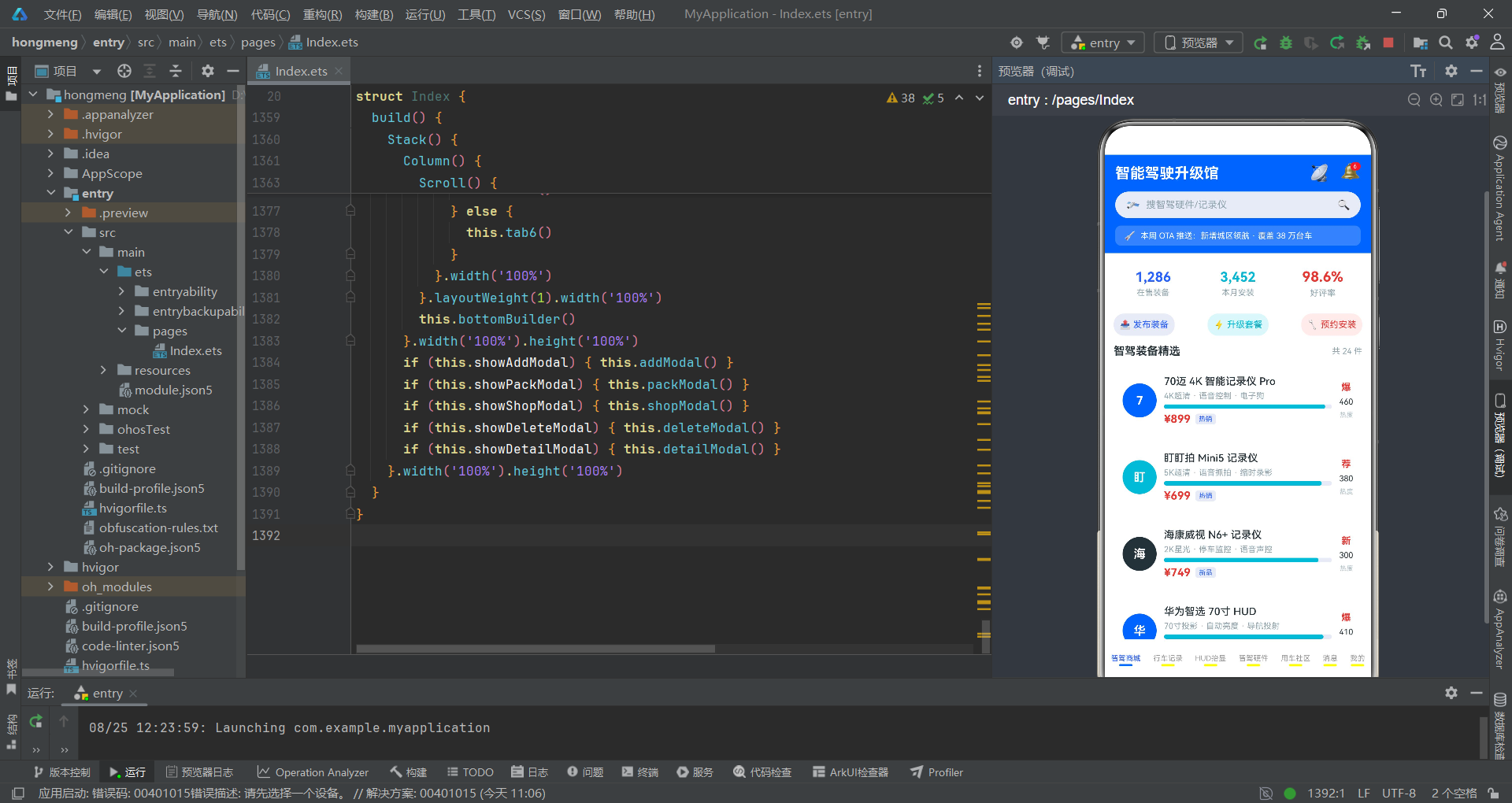
本文深入解析了一款基于HarmonyOS ArkTS声明式UI框架构建的智能驾驶升级馆应用。该应用以单文件页面架构集成了七个功能Tab和五个交互弹框,覆盖了智驾装备商城、行车记录、HUD抬显、智驾硬件、用车社区、消息中心和个人中心的完整业务场景。在数据层面,应用通过统一的GoodsItem接口适配了装备、帖子、消息等多种数据类型,通过六组私有数组预置了78条结构化数据,并通过sel*系列辅助方法实现了对选中商品的安全访问。在UI层面,应用大量运用了ForEach列表渲染、Flex弹性布局、Scroll滚动容器和Stack层叠管理等ArkTS原生组件,配合柱状图、进度条和脉冲动画等可视化手段,构建了信息密度高且交互友好的用户界面。
从技术实现角度来看,应用的核心设计模式体现在三个方面。首先是状态驱动的弹框管理系统——五个布尔状态变量各自控制一个弹框的显隐,通过Stack的条件渲染实现了模态层叠效果,内层event.stopPropagation()确保了点击弹框内容不会误触关闭。其次是状态联动的实时计算——升级套餐弹框中的packTotal()方法根据方案索引和数量步进值动态计算总价,当任一输入变化时框架自动触发UI更新,体现了ArkTS响应式编程的核心优势。最后是视觉一致性的系统化保障——应用定义了极客蓝、荧光青、深空灰、浅蓝底和警示红五色配色体系,通过index % 3取模运算在列表项间循环分配颜色,脉冲缩放动画(duration: 700ms, iterations: -1, curve: EaseInOut)作为统一的动效语言贯穿统计卡、热度数字、标签和按钮等所有交互元素。
从工程实践角度来看,该应用的代码组织展现了ArkTS声明式UI的最佳实践。@Builder装饰器被系统性地用于构建可复用的UI片段——从headerBuilder和bottomBuilder到七个Tab内容和五个弹框,每个Builder各司其职、边界清晰。@State状态变量的粒度控制恰到好处——既不过度细分导致状态管理复杂,也不过度聚合影响渲染性能。辅助方法如maxNumOf()和selStars()封装了通用计算逻辑,减少了模板代码的重复。柱状图、进度条等数据可视化的实现完全基于Column组件的动态宽高属性,无需引入第三方图表库,体现了ArkTS原生组件的强大表达能力。整体而言,该应用为HarmonyOS平台的电商类应用开发提供了一个结构完整、设计精良的参考实现。

作为“人工智能6S店”的官方数字引擎,为AI开发者与企业提供一个覆盖软硬件全栈、一站式门户。
更多推荐

 5
5 0
0- 0


 已为社区贡献66条内容

所有评论(0)