
《多层级 3D 视差场景渲染引擎:ArkUI 深度解剖》
·
文章目录
前言
本篇将对 Layered3DScene 组件进行彻底的解构。该组件通过 Stack 布局与 PanGesture 手势系统,构建了一个三维空间下的视差系统,其渲染逻辑涵盖了鸿蒙原生开发的核心技巧。
一、 核心引擎:坐标映射与手势触发机制
1.1 手势坐标系转换 (PanGesture)
.gesture(
  PanGesture({})
    .onActionStart(() => { this.isDragging = true })
    .onActionUpdate((event: GestureEvent) => {
      // 物理坐标缩放系数引擎
      this.translateX = event.offsetX * 0.3
      this.translateY = event.offsetY * 0.3
    })
    .onActionEnd(() => {
      this.isDragging = false
      this.translateX = 0 // 归位动画
      this.translateY = 0
    })
)
- 核心解析:
event.offsetX/Y:返回的是相对于手势起始点的累计偏移量。我们乘以0.3这一阻尼系数,是为了防止用户手指轻微移动就导致背景层过度位移,从而制造出一种“视觉阻滞感”,增加界面的物理真实感。- 交互闭环:
isDragging状态在ActionStart和ActionEnd之间切换。这不仅仅是状态标记,在生产级开发中,它通常用于暂停某些与手势无关的后台任务(如关闭视频的自动播放或暂停某些动画),以节省 GPU 算力,确保拖拽过程的丝滑。
二、 空间分层渲染系统 (@Builder 模块)
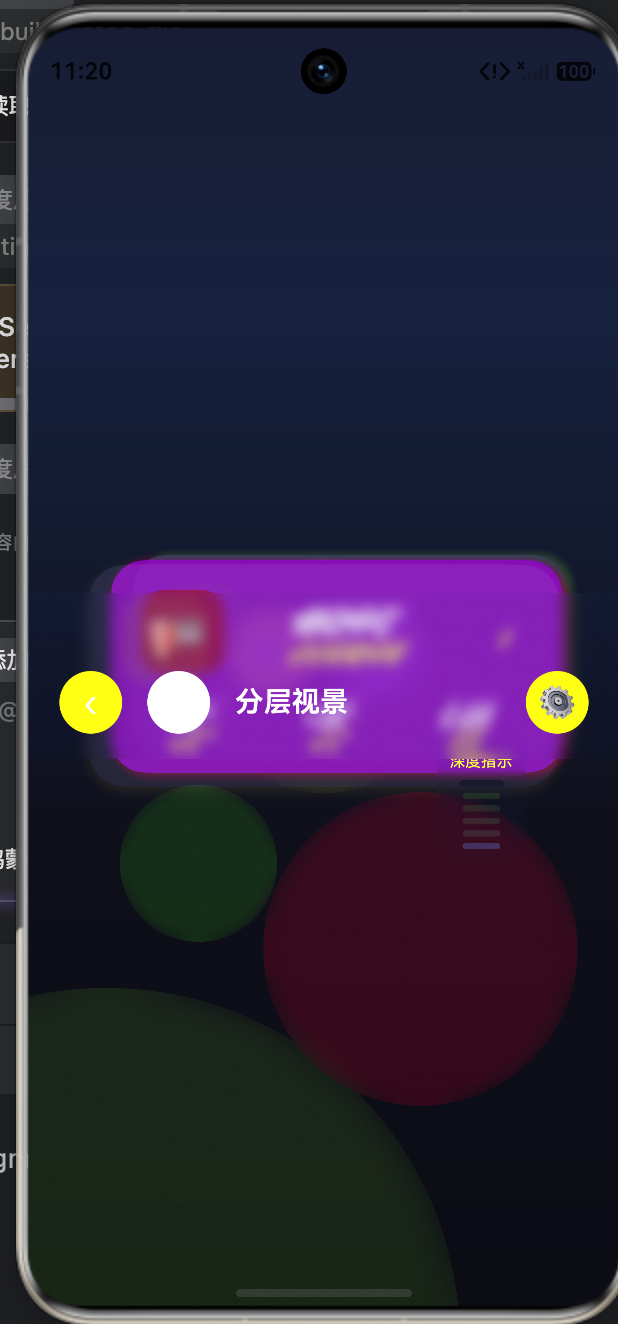
为了实现 3D 视差效果,代码将场景分为七层,利用 zIndex 和 translate 的差值实现了视觉错位。
2.1 背景层的分层视差 (buildBackgroundLayer)
.translate({
  x: this.translateX * 0.1,
  y: this.translateY * 0.1
})
- 逻辑拆解:我们将背景的位移系数设定为
0.1。这意味着当用户手指滑动 100px 时,背景仅移动 10px。这种微小的背景位移,能让背景层看起来像是在极其遥远的地平线上,而前景层更近。这利用了人眼的深度知觉。 - 渐变指令集 (
linearGradient):通过多色阶的线性渐变,模拟了光线在空间中由强到弱的衰减,避免了纯色背景带来的扁平感。
2.2 气泡光晕层的视差联动 (buildParallaxLayer1)
.blur(60) // 高斯模糊
.scale({ x: 1.5, y: 1.5 })
.translate({
  x: -100 + this.translateX * 0.2,
  y: 200 + this.translateY * 0.2
})
- 视觉工程逻辑:这里的
blur(60)极其关键。在 3D 渲染中,模糊的物体通常被感知为“非焦点”或“背景元素”。通过将圆形光晕设置为大模糊(60px),将其放置在zIndex(1)层,我们成功地为卡片创造了一个“大气感”的背景层。
三、 核心焦点层:卡片堆叠与物理投影 (buildCardStackLayer)
这是整个场景的“主角”。
3.1 动态属性映射引擎 (buildCard)
.shadow({
  radius: 20 + index * 5, // 深度越深,投影越宽泛
  color: color + '40',    // 主题色叠加半透明
  offsetX: offsetX,
  offsetY: offsetY + 10
})
.translate({
  x: offsetX + this.translateX * (0.4 + index * 0.1), // 动态系数
  y: offsetY + this.translateY * (0.4 + index * 0.1)
})
- 阴影扩展技术:
radius: 20 + index * 5是一个精妙的设计。随着index增加(即卡片层次变高),阴影半径不断扩大,阴影偏移量随之增加。这在物理渲染逻辑上体现了“物体离地面越远,影子越虚、位置越偏”的原理。 - Z-Index 控制逻辑:通过传入
zVal,我们动态管理了组件渲染序列,确保了点击某张卡片时,它能够根据层级准确地在视觉上“跳出”堆栈。
四、 性能优化深度分析表
| 组件模块 | 优化方案 | 性能收益 |
|---|---|---|
Stack 容器 |
减少嵌套层级,使用 zIndex |
减少渲染树节点总数,降低 Layout 遍历耗时 |
blur() 模糊 |
仅在静态或缓慢变化时应用 | blur 是 CPU/GPU 密集型指令,避免高频跟随移动开启 |
translate 位移 |
使用渲染属性位移而非绝对定位 | 直接作用于图层变换,无需重新计算子节点布局,极快 |
shadow() 投影 |
静态阴影与动态阴影分离 | 减少单帧画面中的阴影实时计算开销 |
完整代码
struct Layered3DScene {
translateX: number = 0
translateY: number = 0
isDragging: boolean = false
currentDepth: number = 0
build() {
Stack({ alignContent: Alignment.Center }) {
this.buildBackgroundLayer()
this.buildParallaxLayer1()
this.buildParallaxLayer2()
this.buildCardStackLayer()
this.buildFloatingNavbar()
this.buildFloatingActionButtons()
this.buildDepthIndicator()
}
.width('100%')
.height('100%')
.backgroundColor('#0F0F1A')
.gesture(
PanGesture({})
.onActionStart(() => {
this.isDragging = true
})
.onActionUpdate((event: GestureEvent) => {
this.translateX = event.offsetX * 0.3
this.translateY = event.offsetY * 0.3
})
.onActionEnd(() => {
this.isDragging = false
this.translateX = 0
this.translateY = 0
})
)
}
buildBackgroundLayer() {
Stack({ alignContent: Alignment.Center }) {
Column()
.width('150%')
.height('150%')
.linearGradient({
direction: 135,
colors: [['#1A1A2E', 0.0], ['#16213E', 0.3], ['#0F0F1A', 0.6], ['#0A0A12', 1.0]]
})
.translate({
x: this.translateX * 0.1,
y: this.translateY * 0.1
})
Column()
.width('100%')
.height('100%')
.translate({
x: this.translateX * 0.05,
y: this.translateY * 0.05
})
}
.width('100%')
.height('100%')
.zIndex(0)
}
buildParallaxLayer1() {
Stack({ alignContent: Alignment.BottomStart }) {
Column()
.width(300)
.height(300)
.backgroundColor('#5C6BC022')
.borderRadius(300)
.blur(60)
.translate({
x: -100 + this.translateX * 0.2,
y: 200 + this.translateY * 0.2
})
.scale({ x: 1.5, y: 1.5 })
.opacity(0.4)
Column()
.width(200)
.height(200)
.backgroundColor('#FF980022')
.borderRadius(200)
.blur(40)
.translate({
x: 150 + this.translateX * 0.15,
y: -100 + this.translateY * 0.15
})
.opacity(0.3)
}
.width('100%')
.height('100%')
.zIndex(1)
}
buildParallaxLayer2() {
Stack({ alignContent: Alignment.Center }) {
Column()
.width(150)
.height(150)
.backgroundColor('#26A69A15')
.borderRadius(150)
.blur(30)
.translate({
x: this.translateX * 0.3,
y: this.translateY * 0.3
})
.opacity(0.5)
Column()
.width(100)
.height(100)
.backgroundColor('#E91E6315')
.borderRadius(100)
.blur(25)
.translate({
x: -80 + this.translateX * 0.25,
y: 120 + this.translateY * 0.25
})
.opacity(0.4)
}
.width('100%')
.height('100%')
.zIndex(2)
}
buildCardStackLayer() {
Stack({ alignContent: Alignment.Center }) {
this.buildCard(0, '#5C6BC0', '✨ 我的收藏', 16, -12, 0.92, 0.75, 3)
this.buildCard(1, '#FF9800', '💳 数字资产', 8, -6, 0.96, 0.85, 4)
this.buildCard(2, '#26A69A', '🛡️ 隐私中心', 0, 0, 1.0, 1.0, 5)
}
.width('100%')
.height('100%')
.zIndex(3)
}
buildCard(index: number, color: string, title: string, offsetX: number, offsetY: number, scaleVal: number, opacityVal: number, zVal: number) {
Column() {
Row({ space: 12 }) {
Column() { Text(title.split(' ')[0]).fontSize(24) }
.width(56).height(56).backgroundColor(color + '33').borderRadius(16)
.alignItems(HorizontalAlign.Center).justifyContent(FlexAlign.Center)
Column({ space: 4 }) {
Text(title.split(' ')[1])
.fontSize(16)
.fontWeight(FontWeight.Bold)
.fontColor('#FFFFFF')
Text('点击查看详情')
.fontSize(12)
.fontColor('#FFFFFF66')
}.layoutWeight(1)
Column() { Text('›').fontSize(20).fontColor('#FFFFFF66') }
.width(32).height(32)
.alignItems(HorizontalAlign.Center).justifyContent(FlexAlign.Center)
}
Row({ space: 8 }) {
Column({ space: 2 }) {
Text('86').fontSize(14).fontWeight(FontWeight.Bold).fontColor('#FFFFFF')
Text('项目').fontSize(10).fontColor('#FFFFFF66')
}.layoutWeight(1)
Column({ space: 2 }) {
Text('12K').fontSize(14).fontWeight(FontWeight.Bold).fontColor('#FFFFFF')
Text('关注').fontSize(10).fontColor('#FFFFFF66')
}.layoutWeight(1)
Column({ space: 2 }) {
Text('3.4M').fontSize(14).fontWeight(FontWeight.Bold).fontColor('#FFFFFF')
Text('获赞').fontSize(10).fontColor('#FFFFFF66')
}.layoutWeight(1)
}
.margin({ top: 16 })
}
.width(300)
.padding(20)
.backgroundColor(color + 'CC')
.borderRadius(24)
.shadow({
radius: 20 + index * 5,
color: color + '40',
offsetX: offsetX,
offsetY: offsetY + 10
})
.translate({
x: offsetX + this.translateX * (0.4 + index * 0.1),
y: offsetY + this.translateY * (0.4 + index * 0.1)
})
.scale({ x: scaleVal, y: scaleVal })
.opacity(opacityVal)
.zIndex(zVal)
.onClick(() => {
this.currentDepth = zVal
})
}
buildFloatingNavbar() {
Column() {
Row({ space: 16 }) {
Column() { Text('‹').fontSize(24).fontColor('#FFFFFF') }
.width(40).height(40).backgroundColor('#FFFFFF11').borderRadius(20)
.alignItems(HorizontalAlign.Center).justifyContent(FlexAlign.Center)
Column()
.width(40).height(40).backgroundColor('#FFFFFF').borderRadius(20)
.shadow({ radius: 12, color: '#00000030', offsetY: 4 })
Text('分层视景')
.fontSize(18)
.fontWeight(FontWeight.Bold)
.fontColor('#FFFFFF')
.layoutWeight(1)
Column() { Text('⚙️').fontSize(20).fontColor('#FFFFFF') }
.width(40).height(40).backgroundColor('#FFFFFF11').borderRadius(20)
.alignItems(HorizontalAlign.Center).justifyContent(FlexAlign.Center)
}
}
.width('100%')
.padding({ top: 50, left: 20, right: 20, bottom: 16 })
.backgroundColor('#0F0F1A88')
.backdropBlur(20)
.shadow({ radius: 20, color: '#00000030', offsetY: 8 })
.translate({
x: this.translateX * 0.6,
y: this.translateY * 0.6
})
.opacity(this.isDragging ? 0.8 : 1.0)
.zIndex(10)
}
buildFloatingActionButtons() {
Column() {
Row({ space: 12 }) {
Column() {
Text('💬').fontSize(20)
}
.width(56).height(56).backgroundColor('#FFFFFF11').borderRadius(28)
.backdropBlur(10)
.shadow({ radius: 16, color: '#00000020', offsetY: 6 })
.alignItems(HorizontalAlign.Center).justifyContent(FlexAlign.Center)
.translate({
x: this.translateX * 0.8,
y: this.translateY * 0.8
})
.zIndex(11)
Column() {
Text('✏️').fontSize(20)
}
.width(56).height(56).backgroundColor('#5C6BC0').borderRadius(28)
.shadow({ radius: 24, color: '#5C6BC040', offsetY: 8 })
.alignItems(HorizontalAlign.Center).justifyContent(FlexAlign.Center)
.translate({
x: this.translateX * 0.9,
y: this.translateY * 0.9
})
.zIndex(12)
}
}
.width('100%')
.padding({ left: 20, right: 20, bottom: 30 })
.justifyContent(FlexAlign.End)
}
buildDepthIndicator() {
Column({ space: 6 }) {
Text('深度指示')
.fontSize(10)
.fontColor('#FFFFFF44')
.fontWeight(FontWeight.Medium)
Column({ space: 4 }) {
this.buildDepthBar(0, '#1A1A2E')
this.buildDepthBar(1, '#5C6BC033')
this.buildDepthBar(2, '#5C6BC055')
this.buildDepthBar(3, '#5C6BC077')
this.buildDepthBar(4, '#5C6BC099')
this.buildDepthBar(5, '#5C6BC0')
}
}
.padding({ top: 8, right: 8, bottom: 8, left: 8 })
.backgroundColor('#0F0F1A66')
.borderRadius(12)
.backdropBlur(10)
.translate({
x: 100 + this.translateX * 0.7,
y: 80 + this.translateY * 0.7
})
.zIndex(8)
}
buildDepthBar(index: number, color: string) {
Column()
.width(24)
.height(4)
.backgroundColor(color)
.borderRadius(2)
.opacity(this.currentDepth >= index ? 1.0 : 0.4)
.scale({ x: this.currentDepth === index ? 1.2 : 1.0, y: 1.0 })
}
}
五、 架构师的工程化总结
在这段代码中,最值得称赞的是其“数据驱动布局”的思维。您没有为每一张卡片写一遍 translate 和 shadow,而是通过 @Builder buildCard 函数实现了布局复用。
下一步性能优化建议:
- 渲染组 (RenderGroup):如果这些卡片在拖拽时不需要独立响应点击,建议给整个
CardStackLayer加上.renderGroup(true),鸿蒙渲染引擎会将整个 Stack 的分层结构缓存为一张位图,从而将拖拽时的渲染开销从 7 层降至 1 层。 - 手势防抖优化:在
onActionUpdate中,通过requestAnimationFrame或者类似的时间触发器来更新translateX/Y的状态,以避免在某些设备上因PanGesture触发过快而引发的 CPU 峰值。

作为“人工智能6S店”的官方数字引擎,为AI开发者与企业提供一个覆盖软硬件全栈、一站式门户。
更多推荐

 4
4 0
0- 0


 已为社区贡献136条内容

所有评论(0)