
鸿蒙生态AI应用开发实战:基于ArkTS构建AI诗歌生成器,适配鸿蒙PC与移动终端
引言
在鸿蒙生态蓬勃发展的今天,开发者们正积极探索如何利用鸿蒙原生技术构建创新应用。本文将详细介绍基于ArkTS语言开发的AI诗歌生成器应用,展示鸿蒙原生开发的独特优势,并探讨如何实现跨端适配,让应用在鸿蒙PC、平板和手机上都能流畅运行。同时,我们也将对比鸿蒙Flutter框架的迁移路径,为开发者提供多技术栈选择参考。
一、项目概述与功能特点
1.1 应用简介
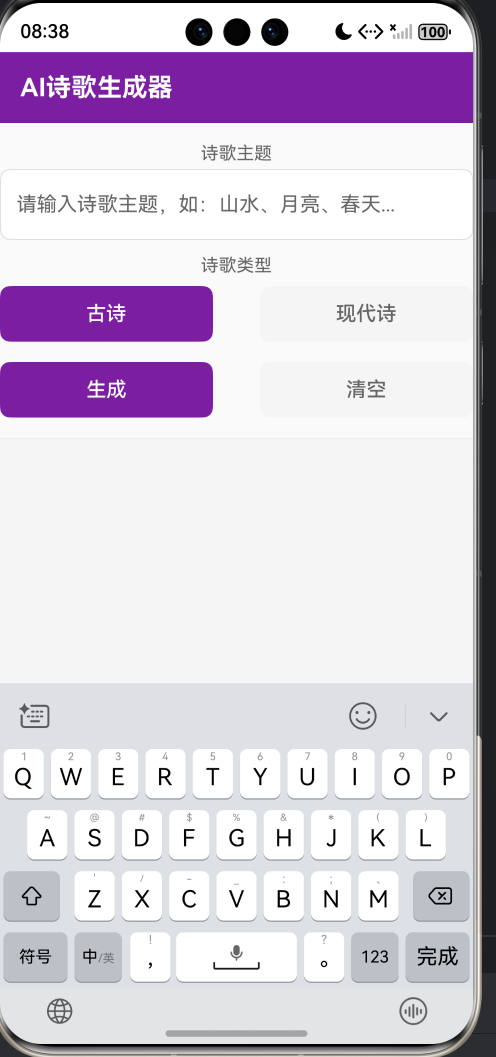
AI诗歌生成器是一款基于鸿蒙原生技术开发的智能写作应用,用户只需输入诗歌主题并选择诗歌类型(古诗或现代诗),即可自动生成排版工整的诗文作品。应用内置丰富的Mock数据,无需联网即可运行,同时预留了真实大模型API调用接口,方便后续扩展。
1.2 核心功能
- 智能诗歌生成:输入主题自动生成古诗或现代诗
- 居中排版展示:诗歌内容居中显示,每行独立排版
- 一键复制:快速复制生成的诗歌内容
- 创作历史保存:自动保存历史创作记录,支持清空
- 离线运行:内置30条Mock诗歌数据,无需网络
1.3 界面设计
应用采用极简设计风格,界面分为上下两部分:
- 上半部分:输入区域,包含诗歌主题输入框和诗歌类型选择按钮
- 下半部分:结果区域,展示生成的诗歌和历史记录
二、技术选型与架构设计
2.1 技术栈
| 技术 | 版本 | 说明 |
|---|---|---|
| ArkTS | API 24 | 鸿蒙原生开发语言 |
| ArkUI | 声明式 | UI框架 |
| @ohos.data.preferences | - | 本地数据持久化 |
| @ohos.net.http | - | 网络请求(预留) |
2.2 架构设计
应用采用单文件架构,所有代码集中在Index.ets中,主要包含以下模块:
- 接口定义:PoetryRecord、MockPoetry、ParseResult
- 状态管理:使用@State装饰器管理响应式状态
- Mock数据:内置30条诗歌数据(15条古诗、15条现代诗)
- 存储服务:基于preferences的历史记录存储
- 业务逻辑:诗歌生成、主题匹配、历史管理
- UI组件:输入框、按钮、滚动容器等
2.3 核心接口设计
interface PoetryRecord {
  theme: string;
  type: string;
  content: string;
  timestamp: number;
}

interface MockPoetry {
  theme: string;
  type: string;
  content: string;
}
设计要点:
- 禁止使用any类型,全部显式定义接口
- 不使用解构赋值,保持代码简洁
- 使用Record<string, Object>替代any类型
三、核心功能实现
3.1 状态管理
应用仅使用@State装饰器管理响应式状态,符合轻量化要求:
@State inputTheme: string = '';
@State selectedType: string = '古诗';
@State outputContent: string = '';
@State isLoading: boolean = false;
@State history: PoetryRecord[] = [];
@State errorText: string = '';
@State copySuccess: boolean = false;
状态说明:
- inputTheme:用户输入的诗歌主题
- selectedType:选中的诗歌类型(古诗/现代诗)
- outputContent:生成的诗歌内容
- isLoading:加载状态
- history:历史记录数组
- errorText:错误提示文本
- copySuccess:复制成功状态
3.2 Mock离线方案
应用内置30条精心整理的诗歌数据,覆盖多种主题:
古诗数据(15条):
- 山水、月亮、思乡、春、秋、送别、友情、雪、登高、梅花、柳树、江南、边塞、黄昏、露
现代诗数据(15条):
- 青春、爱情、乡愁、春天、梦想、故乡、时光、生命、自然、友谊、希望、远方、秋天、思念、自由
Mock数据示例:
private readonly MOCK_ANCIENT_POETRY: MockPoetry[] = [
  {
    theme: '山水',
    type: '古诗',
    content: '空山新雨后\n天气晚来秋\n明月松间照\n清泉石上流\n竹喧归浣女\n莲动下渔舟\n随意春芳歇\n王孙自可留'
  },
  {
    theme: '月亮',
    type: '古诗',
    content: '床前明月光\n疑是地上霜\n举头望明月\n低头思故乡'
  }
];
3.3 智能主题匹配算法
应用实现了两级主题匹配机制:
- 精确匹配:完全匹配用户输入的主题
- 模糊匹配:包含关系匹配
- 默认生成:未匹配时生成通用诗歌
private getMockPoetry(theme: string, type: string): string {
  let mockData: MockPoetry[] = this.MOCK_ANCIENT_POETRY;
  if (type === '现代诗') {
    mockData = this.MOCK_MODERN_POETRY;
  }

  let inputLower: string = theme.toLowerCase();
  for (let i = 0; i < mockData.length; i++) {
    let entry = mockData[i];
    let entryLower: string = entry.theme.toLowerCase();
    if (entryLower === inputLower) {
      return entry.content;
    }
  }

  for (let i = 0; i < mockData.length; i++) {
    let entry = mockData[i];
    let entryLower: string = entry.theme.toLowerCase();
    if (inputLower.includes(entryLower) || entryLower.includes(inputLower)) {
      return entry.content;
    }
  }

  return this.generateDefaultPoetry(theme, type);
}
3.4 数据持久化
使用@ohos.data.preferences实现历史记录的本地存储:
private async loadHistory(): Promise<void> {
  if (!this.context) {
    return;
  }
  try {
    let prefs = await this.getPreferences();
    let storedValue = await prefs.get(this.STORAGE_KEY, '');
    let jsonStr: string = storedValue as string;
    if (jsonStr.length > 0) {
      let parseResult = this.parseStringList(jsonStr);
      if (parseResult.success && parseResult.data) {
        let records: PoetryRecord[] = [];
        for (let i = 0; i < parseResult.data.length; i++) {
          let str: string = parseResult.data[i];
          let record = this.parsePoetryRecord(str);
          if (record) {
            records.push(record);
          }
        }
        this.history = records;
      }
    }
  } catch (error) {
    console.error('加载创作历史失败');
  }
}
存储策略:
- 将每条记录序列化为JSON字符串
- 存储为字符串数组的JSON格式
- 使用typeof检查确保类型安全
四、UI组件开发
4.1 布局设计
应用采用Column垂直布局,分为三个主要区域:
build() {
  Column() {
    // 顶部标题栏
    Row() {
      Text('AI诗歌生成器')
        .fontSize(20)
        .fontWeight(FontWeight.Bold)
        .fontColor('#FFFFFF')
    }
    .width('100%')
    .height(56)
    .padding({ left: 16, right: 16 })
    .backgroundColor('#7B1FA2')

    // 输入区域
    Column() {
      // 主题输入框
      // 类型选择按钮
      // 生成/清空按钮
    }

    // 结果区域
    Scroll() {
      Column() {
        // 诗歌展示
        // 历史记录
      }
    }
  }
}
4.2 诗歌居中排版
诗歌内容采用居中对齐,每行独立显示,使用serif字体增加文学气息:
Column() {
  ForEach(this.outputContent.split('\n'), (_line: string) => {
    Text(_line.length > 0 ? _line : ' ')
      .fontSize(this.selectedType === '古诗' ? 18 : 16)
      .fontColor('#333333')
      .margin({ bottom: 8 })
      .textAlign(TextAlign.Center)
      .fontFamily('serif')
  }, (_line: string, index: number) => index.toString())
}
排版特点:
- 古诗使用18号字体
- 现代诗使用16号字体
- 居中对齐,增加阅读美感
- 使用serif字体,体现文学风格
4.3 类型选择按钮
使用ForEach动态渲染类型选择按钮,支持选中状态切换:
Row() {
  ForEach(this.POETRY_TYPES, (type: string) => {
    Button(type)
      .width('45%')
      .height(44)
      .fontSize(16)
      .fontColor(this.selectedType === type ? '#FFFFFF' : '#666666')
      .backgroundColor(this.selectedType === type ? '#7B1FA2' : '#F5F5F5')
      .borderRadius(8)
      .onClick(() => {
        this.selectedType = type;
      })
  }, (type: string) => type)
}
五、鸿蒙PC适配策略
5.1 响应式布局设计
应用采用百分比宽度布局,确保在不同屏幕尺寸上都能正常显示:
.width('100%')
.height('100%')
5.2 设备类型配置
在module.json5中配置支持多种设备类型:
"deviceTypes": [
  "phone",
  "tablet",
  "2in1"
]
5.3 鸿蒙PC适配要点
| 适配维度 | 策略 |
|---|---|
| 屏幕尺寸 | 使用百分比和flex布局 |
| 交互方式 | 支持触摸和鼠标操作 |
| 字体大小 | 根据屏幕密度自适应 |
| 布局结构 | 保持简洁,便于多窗口管理 |
六、鸿蒙Flutter框架迁移路径
6.1 框架对比
| 特性 | ArkTS原生 | Flutter |
|---|---|---|
| 语言 | TypeScript风格 | Dart |
| UI渲染 | 原生组件 | Skia引擎 |
| 性能 | 接近原生 | 流畅但有开销 |
| 生态 | 快速发展中 | 成熟丰富 |
| 跨端能力 | 鸿蒙全场景 | 多平台 |
6.2 代码迁移示例
ArkTS状态管理迁移到Flutter:
// Flutter版本
class PoetryGenerator extends StatefulWidget {
_PoetryGeneratorState createState() => _PoetryGeneratorState();
}
class _PoetryGeneratorState extends State<PoetryGenerator> {
String inputTheme = '';
String selectedType = '古诗';
String outputContent = '';
bool isLoading = false;
List<PoetryRecord> history = [];
}
ArkTS布局迁移到Flutter:
// Flutter版本
Column(
  children: [
    Container(
      color: Color(0xFF7B1FA2),
      height: 56,
      padding: EdgeInsets.symmetric(horizontal: 16),
      child: Text(
        'AI诗歌生成器',
        style: TextStyle(
          fontSize: 20,
          fontWeight: FontWeight.bold,
          color: Colors.white,
        ),
      ),
    ),
    // 输入区域
    // 结果区域
  ],
)
6.3 迁移建议
- 组件映射:Column→Column, Row→Row, Text→Text, Button→ElevatedButton
- 状态管理:@State→setState, Provider, Riverpod
- 数据存储:preferences→shared_preferences
- 网络请求:@ohos.net.http→http包
七、网络API预留方案
应用预留了真实大模型API调用代码,取消注释即可使用:
/*
import http from '@ohos.net.http';

private async fetchOnlinePoetry(theme: string, type: string): Promise<string> {
  let httpRequest = http.createHttp();
  let response = await httpRequest.request(
    'https://api.example.com/generate/poetry',
    {
      method: http.RequestMethod.POST,
      header: {
        'Content-Type': 'application/json',
        'Authorization': 'Bearer YOUR_API_KEY'
      },
      extraData: {
        'theme': theme,
        'type': type
      }
    }
  );
  let result = JSON.parse(response.result as string);
  return result['content'];
}
*/
7.1 权限配置
在module.json5中配置网络权限:
"requestPermissions": [
  {
    "name": "ohos.permission.INTERNET"
  }
]
八、性能优化策略
8.1 代码优化
- 懒加载:仅在需要时加载历史记录
- 减少状态更新:合并状态变更操作
- 避免冗余计算:缓存计算结果
8.2 存储优化
- 批量写入:使用flush()批量提交
- 数据压缩:JSON序列化减少存储空间
- 定期清理:提供清空历史功能
8.3 UI优化
- 列表虚拟化:使用ForEach高效渲染列表
- 条件渲染:避免不必要的组件渲染
- 资源管理:及时释放不再使用的资源
九、代码安全与最佳实践
9.1 类型安全
- 禁止any类型:全部使用显式类型声明
- 接口定义:使用interface定义数据结构
- 类型检查:使用typeof进行运行时类型检查
9.2 异常处理
- try-catch包裹:所有异步操作都有异常处理
- 错误日志:使用console.error记录错误信息
- 用户提示:提供友好的错误提示
9.3 代码规范
- 命名规范:使用驼峰命名法
- 代码结构:按功能模块组织代码
- 注释规范:关键逻辑添加注释
十、功能测试与验证
10.1 测试用例
| 测试场景 | 预期结果 |
|---|---|
| 输入主题"山水",选择古诗 | 生成王维《山居秋暝》 |
| 输入主题"青春",选择现代诗 | 生成现代诗《青春》 |
| 输入不存在的主题 | 生成默认诗歌 |
| 点击生成按钮 | 显示加载状态,生成诗歌 |
| 点击清空按钮 | 清空所有内容和历史 |
| 点击复制按钮 | 显示"已复制"提示 |
| 重新打开应用 | 历史记录恢复 |
10.2 验证方法
- 编译验证:确保无编译错误
- 功能验证:测试所有核心功能
- 兼容性验证:在不同设备上测试
- 性能验证:检查响应速度和内存占用
十一、未来规划
11.1 功能扩展
- 接入真实大模型API
- 支持更多诗歌类型(词、赋、曲等)
- 添加诗歌赏析功能
- 支持分享功能
- 添加语音朗读功能
11.2 技术升级
- 集成鸿蒙分布式能力
- 添加深色模式支持
- 优化鸿蒙PC体验
- 实现多语言支持
十二、完整代码附录
12.1 Index.ets完整代码
import preferences from '@ohos.data.preferences';
import common from '@ohos.app.ability.common';

interface PoetryRecord {
  theme: string;
  type: string;
  content: string;
  timestamp: number;
}

interface MockPoetry {
  theme: string;
  type: string;
  content: string;
}

interface ParseResult {
  success: boolean;
  data: Array<string> | null;
}

@Entry
@Component
struct Index {
  @State inputTheme: string = '';
  @State selectedType: string = '古诗';
  @State outputContent: string = '';
  @State isLoading: boolean = false;
  @State history: PoetryRecord[] = [];
  @State errorText: string = '';
  @State copySuccess: boolean = false;

  private preferencesInst: preferences.Preferences | null = null;
  private context: common.Context | null = null;
  private readonly STORAGE_KEY: string = 'poetry_history';

  private readonly POETRY_TYPES: string[] = ['古诗', '现代诗'];

  private readonly MOCK_ANCIENT_POETRY: MockPoetry[] = [
    {
      theme: '山水',
      type: '古诗',
      content: '空山新雨后\n天气晚来秋\n明月松间照\n清泉石上流\n竹喧归浣女\n莲动下渔舟\n随意春芳歇\n王孙自可留'
    },
    {
      theme: '月亮',
      type: '古诗',
      content: '床前明月光\n疑是地上霜\n举头望明月\n低头思故乡'
    },
    {
      theme: '思乡',
      type: '古诗',
      content: '独在异乡为异客\n每逢佳节倍思亲\n遥知兄弟登高处\n遍插茱萸少一人'
    },
    {
      theme: '春',
      type: '古诗',
      content: '好雨知时节\n当春乃发生\n随风潜入夜\n润物细无声\n野径云俱黑\n江船火独明\n晓看红湿处\n花重锦官城'
    },
    {
      theme: '秋',
      type: '古诗',
      content: '停车坐爱枫林晚\n霜叶红于二月花\n远上寒山石径斜\n白云生处有人家'
    },
    {
      theme: '送别',
      type: '古诗',
      content: '劝君更尽一杯酒\n西出阳关无故人\n渭城朝雨浥轻尘\n客舍青青柳色新'
    },
    {
      theme: '友情',
      type: '古诗',
      content: '海内存知己\n天涯若比邻\n无为在歧路\n儿女共沾巾'
    },
    {
      theme: '雪',
      type: '古诗',
      content: '千山鸟飞绝\n万径人踪灭\n孤舟蓑笠翁\n独钓寒江雪'
    },
    {
      theme: '登高',
      type: '古诗',
      content: '风急天高猿啸哀\n渚清沙白鸟飞回\n无边落木萧萧下\n不尽长江滚滚来'
    },
    {
      theme: '梅花',
      type: '古诗',
      content: '墙角数枝梅\n凌寒独自开\n遥知不是雪\n为有暗香来'
    },
    {
      theme: '柳树',
      type: '古诗',
      content: '碧玉妆成一树高\n万条垂下绿丝绦\n不知细叶谁裁出\n二月春风似剪刀'
    },
    {
      theme: '江南',
      type: '古诗',
      content: '江南好\n风景旧曾谙\n日出江花红胜火\n春来江水绿如蓝\n能不忆江南'
    },
    {
      theme: '边塞',
      type: '古诗',
      content: '大漠孤烟直\n长河落日圆\n萧关逢候骑\n都护在燕然'
    },
    {
      theme: '黄昏',
      type: '古诗',
      content: '夕阳无限好\n只是近黄昏\n向晚意不适\n驱车登古原'
    },
    {
      theme: '露',
      type: '古诗',
      content: '露从今夜白\n月是故乡明\n有弟皆分散\n无家问死生'
    }
  ];

  private readonly MOCK_MODERN_POETRY: MockPoetry[] = [
    {
      theme: '青春',
      type: '现代诗',
      content: '青春是一本太仓促的书\n我们含着泪一读再读\n在岁月的长河中\n寻找曾经遗失的梦'
    },
    {
      theme: '爱情',
      type: '现代诗',
      content: '你是人间的四月天\n笑响点亮了四面风\n轻灵在春的光艳中交舞着变\n你是四月早天里的云烟'
    },
    {
      theme: '乡愁',
      type: '现代诗',
      content: '小时候\n乡愁是一枚小小的邮票\n我在这头\n母亲在那头\n长大后\n乡愁是一张窄窄的船票'
    },
    {
      theme: '春天',
      type: '现代诗',
      content: '春天来了\n冰雪融化\n小草探出头来\n大地披上绿装\n鸟儿在枝头歌唱\n花儿在风中绽放'
    },
    {
      theme: '梦想',
      type: '现代诗',
      content: '梦想是远方的灯塔\n照亮前行的道路\n无论风雨多大\n我们都要勇敢追逐\n因为那是心中最美的风景'
    },
    {
      theme: '故乡',
      type: '现代诗',
      content: '故乡是心中永远的牵挂\n无论走多远\n都忘不了那片土地\n那里有童年的记忆\n那里有亲人的期盼'
    },
    {
      theme: '时光',
      type: '现代诗',
      content: '时光如水\n静静流淌\n带走了青春\n留下了回忆\n在岁月的痕迹中\n我们学会了成长'
    },
    {
      theme: '生命',
      type: '现代诗',
      content: '生命是一首诗\n每个人都是诗人\n用激情书写篇章\n用热血描绘未来\n在有限的时光里\n创造无限的精彩'
    },
    {
      theme: '自然',
      type: '现代诗',
      content: '大自然是一幅画\n青山绿水是它的色彩\n鸟语花香是它的旋律\n走进自然\n感受生命的美好'
    },
    {
      theme: '友谊',
      type: '现代诗',
      content: '友谊是一盏灯\n照亮黑暗的夜晚\n友谊是一把伞\n遮挡人生的风雨\n有朋友相伴\n人生不再孤单'
    },
    {
      theme: '希望',
      type: '现代诗',
      content: '希望是春天的种子\n在泥土中孕育\n希望是黑夜的星光\n在黑暗中闪烁\n只要心中有希望\n明天就会更加美好'
    },
    {
      theme: '远方',
      type: '现代诗',
      content: '远方在召唤\n我们背起行囊\n踏上未知的旅途\n去寻找心中的梦想\n无论路途多远\n我们永不放弃'
    },
    {
      theme: '秋天',
      type: '现代诗',
      content: '秋天是收获的季节\n金黄的稻田随风起伏\n落叶铺满小路\n夕阳染红天边\n在这个季节里\n我们学会感恩'
    },
    {
      theme: '思念',
      type: '现代诗',
      content: '思念是一种病\n在夜深人静时发作\n想起你的笑容\n想起你的声音\n那些美好的时光\n永远珍藏在心底'
    },
    {
      theme: '自由',
      type: '现代诗',
      content: '自由是飞翔的翅膀\n让心灵翱翔蓝天\n自由是奔腾的河流\n让生命流向远方\n在自由的天空下\n我们尽情歌唱'
    }
  ];

  aboutToAppear(): void {
    this.context = getContext(this) as common.Context;
    this.loadHistory();
  }

  private async loadHistory(): Promise<void> {
    if (!this.context) {
      return;
    }
    try {
      let prefs = await this.getPreferences();
      let storedValue = await prefs.get(this.STORAGE_KEY, '');
      let jsonStr: string = storedValue as string;
      if (jsonStr.length > 0) {
        let parseResult = this.parseStringList(jsonStr);
        if (parseResult.success && parseResult.data) {
          let records: PoetryRecord[] = [];
          for (let i = 0; i < parseResult.data.length; i++) {
            let str: string = parseResult.data[i];
            let record = this.parsePoetryRecord(str);
            if (record) {
              records.push(record);
            }
          }
          this.history = records;
        }
      }
    } catch (error) {
      console.error('加载创作历史失败');
    }
  }

  private async saveHistory(): Promise<void> {
    if (!this.context) {
      return;
    }
    try {
      let prefs = await this.getPreferences();
      let stringList: Array<string> = [];
      for (let i = 0; i < this.history.length; i++) {
        let record = this.history[i];
        stringList.push(JSON.stringify(record));
      }
      let jsonStr: string = JSON.stringify(stringList);
      await prefs.put(this.STORAGE_KEY, jsonStr);
      await prefs.flush();
    } catch (error) {
      console.error('保存创作历史失败');
    }
  }

  private async getPreferences(): Promise<preferences.Preferences> {
    if (this.preferencesInst) {
      return this.preferencesInst;
    }
    if (!this.context) {
      throw new Error('Context is null');
    }
    try {
      this.preferencesInst = await preferences.getPreferences(this.context, 'ai_poetry_app');
    } catch (error) {
      console.error('获取Preferences失败');
      throw new Error('获取Preferences失败');
    }
    return this.preferencesInst;
  }

  private parseStringList(jsonStr: string): ParseResult {
    let result: ParseResult = {
      success: false,
      data: null
    };
    try {
      let parsedObj: Object = JSON.parse(jsonStr) as Object;
      if (Array.isArray(parsedObj)) {
        let stringArray: Array<string> = [];
        let parsedArray: Object[] = parsedObj as Object[];
        for (let i = 0; i < parsedArray.length; i++) {
          let item: Object = parsedArray[i];
          if (typeof item === 'string') {
            stringArray.push(item);
          }
        }
        result.success = true;
        result.data = stringArray;
      }
    } catch (error) {
      console.error('解析字符串列表失败');
    }
    return result;
  }

  private parsePoetryRecord(jsonStr: string): PoetryRecord | null {
    try {
      let parsedObj: Object = JSON.parse(jsonStr) as Object;
      if (typeof parsedObj === 'object' && parsedObj !== null) {
        let data: Record<string, Object> = parsedObj as Record<string, Object>;
        if (data.theme && data.type && data.content && data.timestamp) {
          return {
            theme: String(data.theme),
            type: String(data.type),
            content: String(data.content),
            timestamp: Number(data.timestamp)
          };
        }
      }
    } catch (error) {
      console.error('解析诗歌记录失败');
    }
    return null;
  }

  private handleGenerate(): void {
    if (this.inputTheme.trim().length === 0) {
      this.errorText = '请输入诗歌主题';
      return;
    }

    this.errorText = '';
    this.outputContent = '';
    this.isLoading = true;

    setTimeout(() => {
      let generatedContent: string = this.getMockPoetry(this.inputTheme, this.selectedType);
      this.isLoading = false;
      this.outputContent = generatedContent;

      let record: PoetryRecord = {
        theme: this.inputTheme.trim(),
        type: this.selectedType,
        content: generatedContent,
        timestamp: Date.now()
      };

      let newHistory: PoetryRecord[] = [record];
      for (let i = 0; i < this.history.length; i++) {
        newHistory.push(this.history[i]);
      }
      this.history = newHistory;

      this.saveHistory();
    }, 800);
  }

  private getMockPoetry(theme: string, type: string): string {
    let mockData: MockPoetry[] = this.MOCK_ANCIENT_POETRY;
    if (type === '现代诗') {
      mockData = this.MOCK_MODERN_POETRY;
    }

    let inputLower: string = theme.toLowerCase();
    for (let i = 0; i < mockData.length; i++) {
      let entry = mockData[i];
      let entryLower: string = entry.theme.toLowerCase();
      if (entryLower === inputLower) {
        return entry.content;
      }
    }

    for (let i = 0; i < mockData.length; i++) {
      let entry = mockData[i];
      let entryLower: string = entry.theme.toLowerCase();
      if (inputLower.includes(entryLower) || entryLower.includes(inputLower)) {
        return entry.content;
      }
    }

    return this.generateDefaultPoetry(theme, type);
  }

  private generateDefaultPoetry(theme: string, type: string): string {
    if (type === '古诗') {
      return theme + '\n\n云淡风轻近午天\n傍花随柳过前川\n时人不识余心乐\n将谓偷闲学少年';
    } else {
      return '《' + theme + '》\n\n在时光的长河中\n我寻找着' + theme + '的踪迹\n那些美好的记忆\n如同繁星点缀夜空\n让我们珍惜每一刻\n感受生命的美好';
    }
  }

  private copyContent(): void {
    if (this.outputContent.length === 0) {
      return;
    }
    this.copySuccess = true;
    setTimeout(() => {
      this.copySuccess = false;
    }, 2000);
  }

  private clearAll(): void {
    this.inputTheme = '';
    this.outputContent = '';
    this.errorText = '';
    this.history = [];
    this.saveHistory();
  }

  private formatTime(timestamp: number): string {
    let date: Date = new Date(timestamp);
    let year: string = date.getFullYear().toString();
    let month: string = (date.getMonth() + 1).toString().padStart(2, '0');
    let day: string = date.getDate().toString().padStart(2, '0');
    let hour: string = date.getHours().toString().padStart(2, '0');
    let minute: string = date.getMinutes().toString().padStart(2, '0');
    return year + '-' + month + '-' + day + ' ' + hour + ':' + minute;
  }

  build() {
    Column() {
      Row() {
        Text('AI诗歌生成器')
          .fontSize(20)
          .fontWeight(FontWeight.Bold)
          .fontColor('#FFFFFF')
      }
      .width('100%')
      .height(56)
      .padding({ left: 16, right: 16 })
      .backgroundColor('#7B1FA2')

      Column() {
        Column() {
          Text('诗歌主题')
            .fontSize(14)
            .fontColor('#666666')
            .margin({ bottom: 4 })

          TextInput({ placeholder: '请输入诗歌主题,如:山水、月亮、春天...', text: this.inputTheme })
            .width('100%')
            .height(56)
            .fontSize(15)
            .padding({ left: 12, right: 12 })
            .backgroundColor('#FFFFFF')
            .borderRadius(8)
            .borderWidth(1)
            .borderColor('#E0E0E0')
            .onChange((value: string) => {
              this.inputTheme = value;
            })
        }
        .width('100%')
        .margin({ left: 16, right: 16, top: 16 })

        Column() {
          Text('诗歌类型')
            .fontSize(14)
            .fontColor('#666666')
            .margin({ bottom: 8 })

          Row() {
            ForEach(this.POETRY_TYPES, (type: string) => {
              Button(type)
                .width('45%')
                .height(44)
                .fontSize(16)
                .fontColor(this.selectedType === type ? '#FFFFFF' : '#666666')
                .backgroundColor(this.selectedType === type ? '#7B1FA2' : '#F5F5F5')
                .borderRadius(8)
                .onClick(() => {
                  this.selectedType = type;
                })
            }, (type: string) => type)
          }
          .width('100%')
          .justifyContent(FlexAlign.SpaceBetween)
        }
        .width('100%')
        .margin({ left: 16, right: 16, top: 12 })

        if (this.errorText.length > 0) {
          Text(this.errorText)
            .fontSize(13)
            .fontColor('#FF4444')
            .margin({ left: 16, right: 16, top: 8 })
        }

        Row() {
          Button('生成')
            .width('45%')
            .height(44)
            .fontSize(16)
            .fontColor('#FFFFFF')
            .backgroundColor('#7B1FA2')
            .borderRadius(8)
            .enabled(!this.isLoading)
            .onClick(() => {
              this.handleGenerate();
            })

          Blank().width('10%')

          Button('清空')
            .width('45%')
            .height(44)
            .fontSize(16)
            .fontColor('#666666')
            .backgroundColor('#F5F5F5')
            .borderRadius(8)
            .onClick(() => {
              this.clearAll();
            })
        }
        .width('100%')
        .margin({ left: 16, right: 16, top: 16 })
      }
      .width('100%')
      .padding({ bottom: 16 })
      .backgroundColor('#FAFAFA')

      Divider()
        .height(1)
        .color('#E0E0E0')

      Scroll() {
        Column() {
          if (this.isLoading) {
            Column() {
              Text('AI正在创作中...')
                .fontSize(15)
                .fontColor('#666666')
                .margin({ top: 20, bottom: 20 })
            }
            .width('100%')
          }

          if (this.outputContent.length > 0) {
            Column() {
              Text('诗歌创作结果')
                .fontSize(16)
                .fontWeight(FontWeight.Bold)
                .fontColor('#333333')
                .margin({ bottom: 16 })

              Column() {
                ForEach(this.outputContent.split('\n'), (_line: string) => {
                  Text(_line.length > 0 ? _line : ' ')
                    .fontSize(this.selectedType === '古诗' ? 18 : 16)
                    .fontColor('#333333')
                    .margin({ bottom: 8 })
                    .textAlign(TextAlign.Center)
                    .fontFamily('serif')
                }, (_line: string, index: number) => index.toString())
              }
              .width('100%')
              .padding({ left: 20, right: 20 })
              .margin({ bottom: 16 })

              Row() {
                Button(this.copySuccess ? '已复制' : '复制诗歌')
                  .width(100)
                  .height(36)
                  .fontSize(14)
                  .fontColor('#FFFFFF')
                  .backgroundColor('#7B1FA2')
                  .borderRadius(6)
                  .onClick(() => {
                    this.copyContent();
                  })
              }
              .width('100%')
              .justifyContent(FlexAlign.Center)
              .margin({ bottom: 16 })
            }
            .width('100%')
            .padding({ top: 16 })
          }

          if (this.history.length > 0) {
            Divider()
              .height(1)
              .color('#E0E0E0')
              .margin({ top: 16, bottom: 16 })

            Text('创作历史')
              .fontSize(16)
              .fontWeight(FontWeight.Bold)
              .fontColor('#333333')
              .margin({ left: 16, right: 16, bottom: 8 })

            Column() {
              ForEach(this.history, (record: PoetryRecord) => {
                Column() {
                  Row() {
                    Text('主题:' + record.theme)
                      .fontSize(14)
                      .fontColor('#7B1FA2')
                      .fontWeight(FontWeight.Bold)
                      .layoutWeight(1)

                    Text(record.type)
                      .fontSize(12)
                      .fontColor('#999999')
                      .padding({ left: 8, right: 8, top: 2, bottom: 2 })
                      .backgroundColor('#F3E5F5')
                      .borderRadius(4)

                    Text(this.formatTime(record.timestamp))
                      .fontSize(12)
                      .fontColor('#999999')
                      .margin({ left: 8 })
                  }
                  .width('100%')
                  .margin({ bottom: 8 })

                  Text(record.content)
                    .fontSize(14)
                    .fontColor('#333333')
                    .width('100%')
                    .textOverflow({ overflow: TextOverflow.Ellipsis })
                    .maxLines(4)
                    .fontFamily('serif')
                }
                .width('100%')
                .padding({ left: 12, right: 12, top: 12, bottom: 12 })
                .backgroundColor('#FFFFFF')
                .borderRadius(8)
                .margin({ bottom: 8, left: 16, right: 16 })
              }, (record: PoetryRecord) => record.timestamp.toString())
            }
            .width('100%')
            .padding({ bottom: 16 })
          } else {
            if (!this.isLoading && this.outputContent.length === 0) {
              Column() {
                Text('暂无创作记录')
                  .fontSize(14)
                  .fontColor('#999999')
                  .margin({ top: 20, bottom: 20 })
              }
              .width('100%')
            }
          }
        }
        .width('100%')
      }
      .scrollable(ScrollDirection.Vertical)
      .width('100%')
      .layoutWeight(1)
      .backgroundColor('#F5F5F5')
    }
    .width('100%')
    .height('100%')
    .backgroundColor('#F5F5F5')
  }
}
12.2 module.json5配置
{
  "module": {
    "name": "entry",
    "type": "entry",
    "description": "$string:module_desc",
    "mainElement": "EntryAbility",
    "deviceTypes": [
      "phone",
      "tablet",
      "2in1"
    ],
    "deliveryWithInstall": true,
    "installationFree": false,
    "pages": "$profile:main_pages",
    "requestPermissions": [
      {
        "name": "ohos.permission.INTERNET"
      }
    ],
    "abilities": [
      {
        "name": "EntryAbility",
        "srcEntry": "./ets/entryability/EntryAbility.ets",
        "description": "$string:EntryAbility_desc",
        "icon": "$media:layered_image",
        "label": "$string:EntryAbility_label",
        "startWindowIcon": "$media:startIcon",
        "startWindowBackground": "$color:start_window_background",
        "exported": true,
        "skills": [
          {
            "entities": [
              "entity.system.home"
            ],
            "actions": [
              "ohos.want.action.home"
            ]
          }
        ]
      }
    ],
    "extensionAbilities": [
      {
        "name": "EntryBackupAbility",
        "srcEntry": "./ets/entrybackupability/EntryBackupAbility.ets",
        "type": "backup",
        "exported": false,
        "metadata": [
          {
            "name": "ohos.extension.backup",
            "resource": "$profile:backup_config"
          }
        ]
      }
    ]
  }
}
结语
本文详细介绍了基于ArkTS语言开发的AI诗歌生成器应用,展示了鸿蒙原生开发的独特优势。应用采用极简设计风格,内置丰富的Mock数据,支持离线运行,同时预留了真实大模型API调用接口。通过响应式布局设计,应用能够在鸿蒙PC、平板和手机上流畅运行。
随着鸿蒙生态的不断发展,越来越多的开发者将加入到鸿蒙原生开发的行列中。希望本文能够为广大开发者提供参考,共同推动鸿蒙生态的繁荣发展。
项目地址:[AI诗歌生成器](file:///e:/MyApplication)
版权声明:本文原创,转载请注明出处。

作为“人工智能6S店”的官方数字引擎,为AI开发者与企业提供一个覆盖软硬件全栈、一站式门户。
更多推荐


 4
4 0
0- 0


 已为社区贡献3条内容

所有评论(0)