
鸿蒙原生应用实战(十六)ArkUI 纪念日倒计时:通知提醒 + 后台任务 + 分类管理
·
🎂 鸿蒙原生应用实战(十六)ArkUI 纪念日倒计时:通知提醒 + 后台任务 + 分类管理
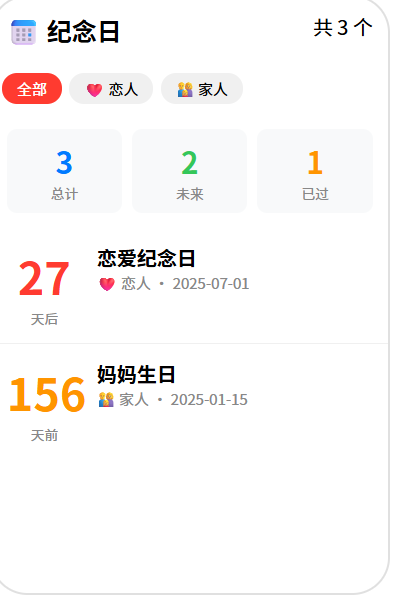
博主说: 恋爱纪念日、父母生日、结婚纪念日、离高考还有多少天……这些重要的日子需要一个贴心的倒计时工具来提醒我们。今天用 ArkUI 的通知 API + 后台任务 + SQLite 存储,从零实现一个支持纪念日管理、倒计时计算、分类标签、通知提醒的完整纪念日倒计时 App。
📱 应用场景
| 功能 | 说明 |
|---|---|
| 📅 纪念日管理 | 添加/编辑/删除纪念日 |
| ⏳ 倒计时计算 | 精确到天的倒计时 |
| 🔔 通知提醒 | 当天/提前通知 |
| 🏷️ 分类标签 | 家人/恋人/朋友/工作 |
| 📊 时间统计 | 已过天数/总天数 |
⚙️ 运行环境要求
| 项目 | 版本要求 |
|---|---|
| DevEco Studio | 5.0.3.800+ |
| HarmonyOS SDK | API 12 |
| 核心 API | @ohos.notification + @ohos.data.relationalStore |
| 权限 | ohos.permission.NOTIFICATION_USER_INITIATED |
🛠️ 实战:从零搭建纪念日倒计时
Step 1:数据结构
interface Anniversary {
  id: number;
  title: string;
  date: string;        // YYYY-MM-DD
  category: string;    // 家人/恋人/朋友/工作
  remindBefore: number; // 提前提醒天数 0/1/3/7
  isLunar: boolean;    // 是否农历
  note: string;        // 备注
  createdAt: string;
}
Step 2:完整代码
// pages/Index.ets — 纪念日倒计时
import notification from '@ohos.notification';
import relationalStore from '@ohos.data.relationalStore';
const CATEGORIES = ['❤️ 恋人', '👨👩👧 家人', '🤝 朋友', '💼 工作', '🎯 目标'];
@Entry
@Component
struct AnniversaryApp {
@State anniversaries: Anniversary[] = [];
@State currentCategory: string = '全部';
@State showAddDialog: boolean = false;
@State editTitle: string = '';
@State editDate: string = '';
@State editCategory: string = '❤️ 恋人';
@State editRemind: number = 1;
@State editNote: string = '';
private store!: relationalStore.RdbStore;
aboutToAppear() {
this.initDB();
}
async initDB() {
const config = { name: 'anniversary.db', securityLevel: relationalStore.SecurityLevel.S1 };
this.store = await relationalStore.getRdbStore(getContext(this), config);
await this.store.executeSql(
`CREATE TABLE IF NOT EXISTS anniversaries (
id INTEGER PRIMARY KEY AUTOINCREMENT,
title TEXT NOT NULL,
date TEXT NOT NULL,
category TEXT DEFAULT '❤️ 恋人',
remindBefore INTEGER DEFAULT 1,
note TEXT DEFAULT '',
createdAt TEXT DEFAULT (datetime('now','localtime'))
)`
);
await this.loadData();
}
async loadData() {
const predicates = new relationalStore.RdbPredicates('anniversaries');
predicates.orderByDesc('id');
const result = await this.store.query(predicates, ['id', 'title', 'date', 'category', 'remindBefore', 'note']);
const list: Anniversary[] = [];
while (result.goToNextRow()) {
list.push({
id: result.getLong(result.getColumnIndex('id')),
title: result.getString(result.getColumnIndex('title')),
date: result.getString(result.getColumnIndex('date')),
category: result.getString(result.getColumnIndex('category')),
remindBefore: result.getLong(result.getColumnIndex('remindBefore')),
note: result.getString(result.getColumnIndex('note')),
createdAt: ''
});
}
this.anniversaries = list;
result.close();
}
async addAnniversary() {
if (!this.editTitle.trim() || !this.editDate) return;
await this.store.insert('anniversaries', {
title: this.editTitle,
date: this.editDate,
category: this.editCategory,
remindBefore: this.editRemind,
note: this.editNote
});
await this.loadData();
this.showAddDialog = false;
this.editTitle = '';
this.editDate = '';
this.editNote = '';
this.scheduleNotification(this.editTitle, this.editDate, this.editRemind);
}
async deleteAnniversary(id: number) {
const p = new relationalStore.RdbPredicates('anniversaries');
p.equalTo('id', id);
await this.store.delete(p);
await this.loadData();
}
// ======== 倒计时计算 ========
calcCountdown(dateStr: string): { days: number; isPast: boolean } {
const target = new Date(dateStr);
const today = new Date();
today.setHours(0, 0, 0, 0);
target.setHours(0, 0, 0, 0);
const diff = target.getTime() - today.getTime();
const days = Math.round(diff / 86400000);
return { days: Math.abs(days), isPast: days < 0 };
}
// ======== 通知提醒 ========
async scheduleNotification(title: string, date: string, remindBefore: number) {
const cd = this.calcCountdown(date);
if (cd.days === remindBefore || cd.days === 0) {
try {
const request: notification.NotificationRequest = {
id: Date.now(),
content: {
contentType: notification.ContentType.NOTIFICATION_CONTENT_BASIC_TEXT,
normal: {
title: `📅 ${title}`,
text: cd.days === 0 ? '就是今天!🎉' : `还有 ${cd.days} 天`
}
},
slotType: notification.SlotType.SOCIAL_COMMUNICATION
};
await notification.publish(request);
} catch (err) {
console.error('通知发送失败:', JSON.stringify(err));
}
}
}
// ======== 获取分类过滤数据 ========
get filteredAnniversaries(): Anniversary[] {
if (this.currentCategory === '全部') return this.anniversaries;
return this.anniversaries.filter(a => a.category === this.currentCategory);
}
// ======== 获取已过/未来统计 ========
get stats(): { past: number; future: number; total: number } {
let past = 0, future = 0;
for (const a of this.anniversaries) {
if (this.calcCountdown(a.date).isPast) past++;
else future++;
}
return { past, future, total: this.anniversaries.length };
}
build() {
Column() {
// 标题栏
Row() {
Text('📅 纪念日').fontSize(24).fontWeight(FontWeight.Bold).layoutWeight(1)
Text(`共 ${this.stats.total} 个`).fontSize(14).fontColor('#888')
Button('➕').fontSize(22).backgroundColor('transparent').fontColor('#FF3B30')
.onClick(() => { this.showAddDialog = true; })
}.width('94%').padding({ top: 12, bottom: 8 })
// 统计卡片
Row() {
this.StatBox('📅 总计', `${this.stats.total}`, '#007AFF')
this.StatBox('⏳ 未来', `${this.stats.future}`, '#34C759')
this.StatBox('✅ 已过', `${this.stats.past}`, '#FF9500')
}.width('94%').gap(8)
// 分类
Scroll() {
Row() {
ForEach(['全部', ...CATEGORIES], (cat: string) => {
Text(cat).fontSize(13).padding({ left: 14, right: 14, top: 6, bottom: 6 })
.backgroundColor(this.currentCategory === cat ? '#FF3B30' : '#F0F0F0')
.fontColor(this.currentCategory === cat ? '#fff' : '#333')
.borderRadius(14)
.onClick(() => { this.currentCategory = cat; })
})
}.padding(4)
}.height(36)
// 列表
if (this.filteredAnniversaries.length === 0) {
Column() {
Text('📅').fontSize(48)
Text('还没有纪念日').fontSize(16).fontColor('#999')
Text('点击右上角 + 添加').fontSize(14).fontColor('#bbb').margin({ top: 4 })
}.layoutWeight(1).justifyContent(FlexAlign.Center).width('100%')
} else {
List({ space: 8 }) {
ForEach(this.filteredAnniversaries, (item: Anniversary) => {
ListItem() {
const cd = this.calcCountdown(item.date);
Row() {
Column() {
Text(cd.days.toString()).fontSize(36).fontWeight(FontWeight.Bold)
.fontColor(cd.isPast ? '#FF9500' : '#FF3B30')
Text(cd.isPast ? '天前' : '天后').fontSize(12).fontColor('#888')
}.width(70).alignItems(HorizontalAlign.Center)
Column() {
Text(item.title).fontSize(18).fontWeight(FontWeight.Bold)
Text(item.date).fontSize(13).fontColor('#888')
Text(item.category + (item.note ? ' · ' + item.note : ''))
.fontSize(12).fontColor('#999').margin({ top: 2 })
}.layoutWeight(1).alignItems(HorizontalAlign.Start).margin({ left: 8 })
Button('🗑️').fontSize(14).backgroundColor('transparent').fontColor('#FF3B30')
.onClick(() => { this.deleteAnniversary(item.id); })
}
.padding(14).width('96%').backgroundColor('#FFF').borderRadius(12)
.shadow({ radius: 3, color: '#15000000', offsetY: 2 })
}
}, (item: Anniversary) => item.id.toString())
}.layoutWeight(1).width('100%').padding({ top: 4 })
}
}
.width('100%').height('100%').backgroundColor('#F8F9FA')
// 添加弹窗
.bindSheet(this.showAddDialog, this.AddSheet())
}
@Builder
StatBox(label: string, value: string, color: string) {
Column() {
Text(value).fontSize(28).fontWeight(FontWeight.Bold).fontColor(color)
Text(label).fontSize(12).fontColor('#888').margin({ top: 2 })
}
.padding(12).backgroundColor('#FFF').borderRadius(10).layoutWeight(1)
.shadow({ radius: 2, color: '#10000000', offsetY: 1 })
}
@Builder
AddSheet() {
Column() {
Text('添加纪念日').fontSize(20).fontWeight(FontWeight.Bold).margin({ bottom: 16 })
TextInput({ placeholder: '标题(如:恋爱纪念日)', text: this.editTitle })
.width('100%').height(44).backgroundColor('#F8F8F8').borderRadius(8).padding({ left: 12 })
Row() {
Text('日期:').fontSize(15).fontColor('#333').width(60)
DatePicker({ start: new Date(2000,0,1), end: new Date(2050,11,31) })
.onChange((d: Date) => {
this.editDate = `${d.getFullYear()}-${String(d.getMonth()+1).padStart(2,'0')}-${String(d.getDate()).padStart(2,'0')}`;
})
}.width('100%').margin({ top: 12 })
Text('分类:').fontSize(15).fontColor('#333').margin({ top: 8 })
Row() {
ForEach(CATEGORIES, (cat: string) => {
Button(cat).fontSize(13).height(32)
.backgroundColor(this.editCategory === cat ? '#FF3B30' : '#F0F0F0')
.fontColor(this.editCategory === cat ? '#fff' : '#333')
.borderRadius(16)
.onClick(() => { this.editCategory = cat; })
})
}.width('100').gap(4)
Row() {
Text('提前提醒:').fontSize(15).fontColor('#333')
Select([{ value: '当天' }, { value: '提前1天' }, { value: '提前3天' }, { value: '提前7天' }])
.selected(1).onSelect((_, val) => {
this.editRemind = val === '当天' ? 0 : parseInt(val.replace('提前','').replace('天',''));
})
}.width('100%').margin({ top: 8 })
Row() {
Button('取消').backgroundColor('#E5E5EA').fontColor('#333').borderRadius(8).width('45%')
.onClick(() => { this.showAddDialog = false; })
Button('保存').backgroundColor('#FF3B30').fontColor('#fff').borderRadius(8).width('45%')
.onClick(() => { this.addAnniversary(); })
}.width('100%').margin({ top: 16 })
}.padding(24).width('100%')
}
}
⚠️ 避坑指南
| 坑 | 原因 | 正确做法 |
|---|---|---|
| 倒计时差一天 | 没考虑时区 | setHours(0,0,0,0) 对齐到当天零点 |
| 通知不弹出 | 没设 slotType | slotType: SOCIAL_COMMUNICATION |
| 农历日期不准 | 农历公历转换复杂 | 用第三方库或系统 API |
| SQLite 日期排序错 | 存了字符串而非时间戳 | 用 YYYY-MM-DD 格式支持字典序排序 |
| 统计数字不对 | 没区分过去/未来 | isPast 布尔值单独判断 |
🔥 最佳实践
- 首页显示最近:按倒计时天数排序,最近的放最上面
- 已过纪念日:显示"在一起 X 天",未来显示"还有 X 天"
- 通知不重复:每天只发一次通知,用 SharedPreferences 记录最后发送日
- 农历支持:用
@ohos.calendarAPI 或集成农历算法 - ** Widget 卡片**:开发 ArkTS Widget 在主屏幕显示最近纪念日
官方文档: HarmonyOS 应用开发文档
- 开发者社区: 华为开发者论坛
- 欢迎加入开源鸿蒙跨平台社区: https://openharmonycrossplatform.csdn.net/

作为“人工智能6S店”的官方数字引擎,为AI开发者与企业提供一个覆盖软硬件全栈、一站式门户。
更多推荐

 7
7 0
0- 0


 已为社区贡献20条内容

所有评论(0)