
浪漫满屋 - 鸿蒙PC Electron框架完成温馨家居装饰模拟器
摘要: "浪漫满屋"是一款基于HTML5/CSS3/JavaScript的家居装饰模拟应用,支持用户在虚拟房间中自由搭配家具,并通过购物车系统完成购买。核心功能包括: 多房间系统(客厅/卧室/厨房/阳台),适配不同家具类型 智能购物车(增减数量、实时计算总价) 温馨指数算法,根据家具组合动态评分 氛围切换(日间/夜晚/烛光模式) 数据持久化(LocalStorage保存装修方案) 项目采用模块化设
·
欢迎加入开源鸿蒙PC社区:
https://harmonypc.csdn.net/
atomgit仓库地址: https://atomgit.com/Math_teacher_fan/langmanmanwu
一、项目概述
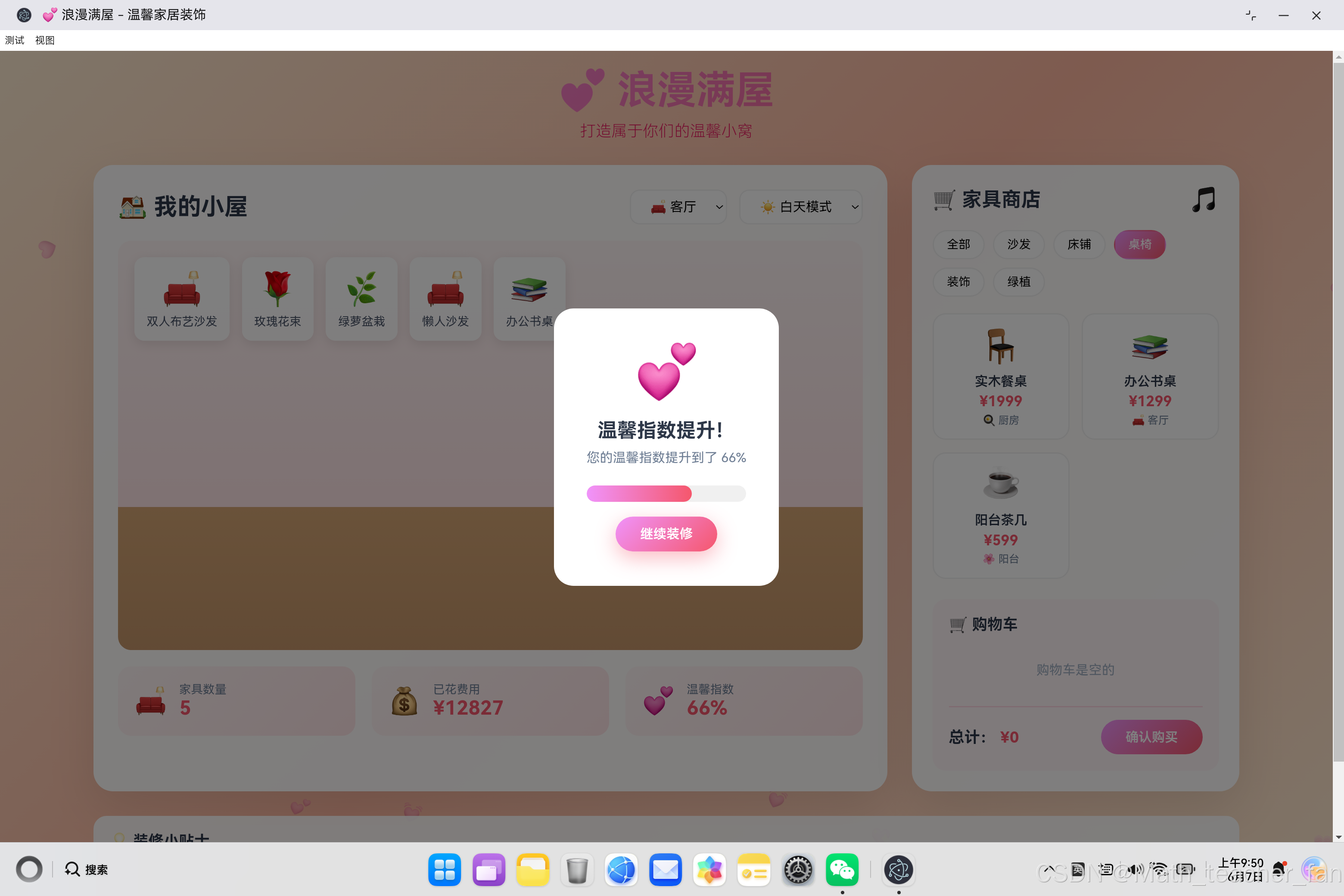
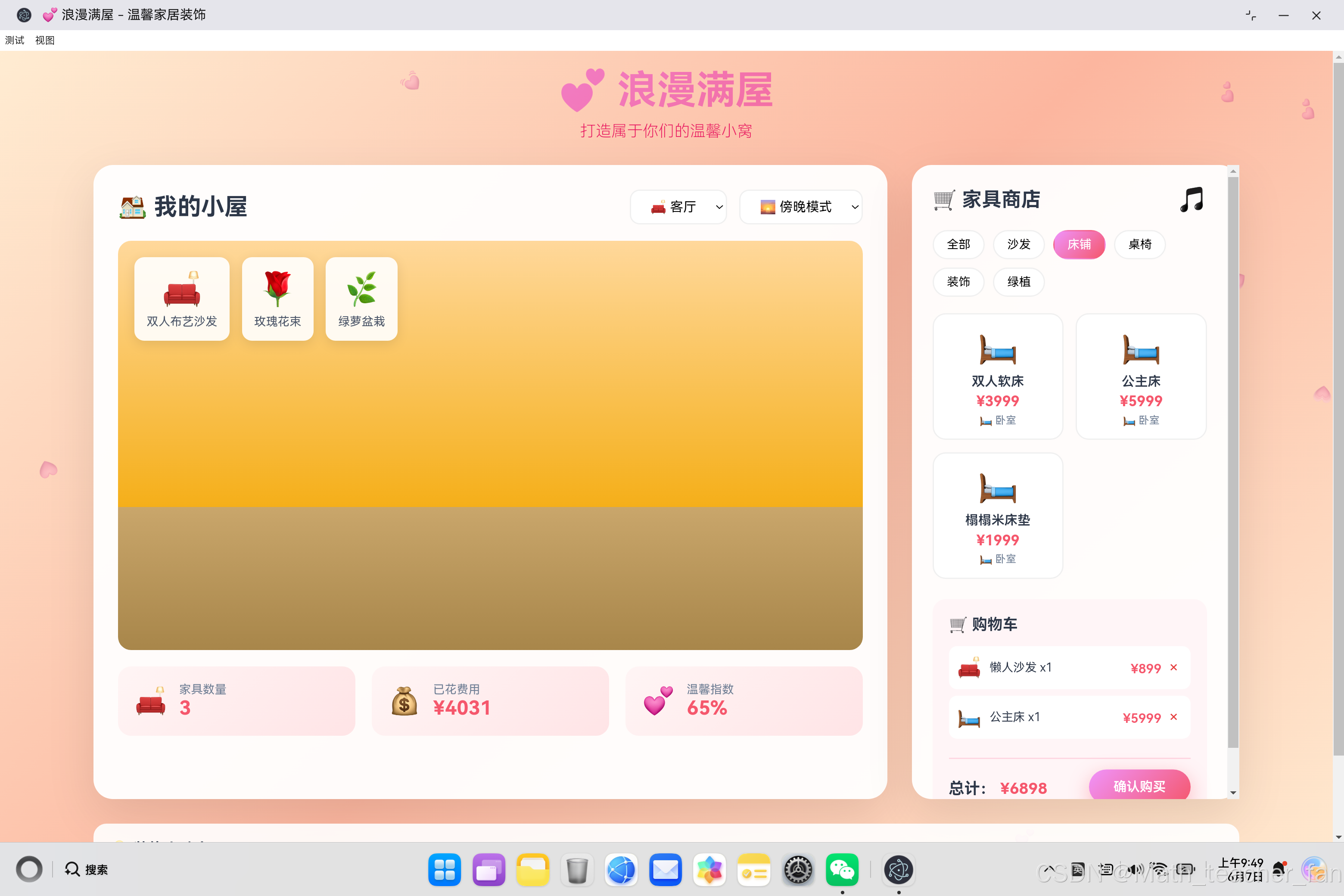
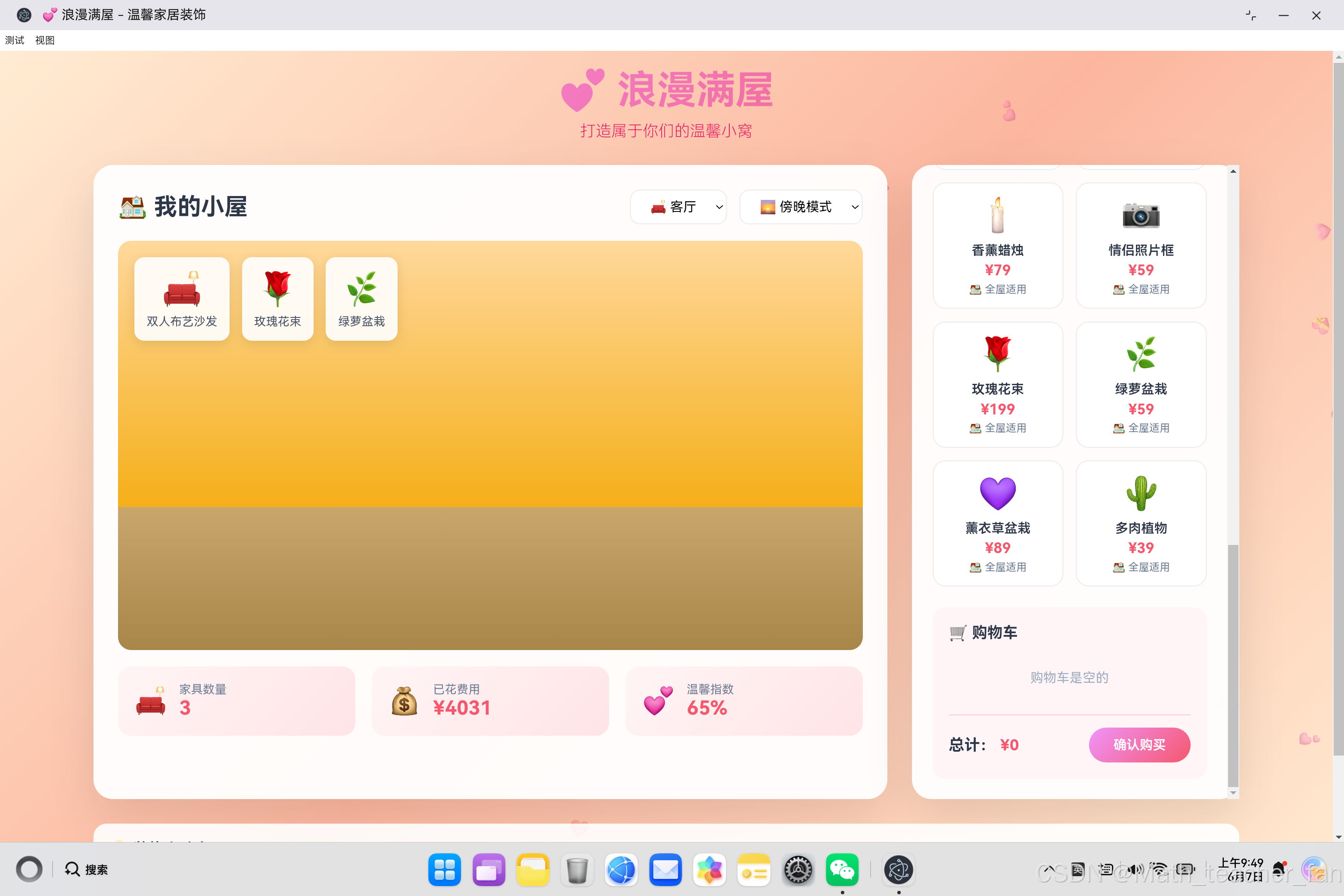
"浪漫满屋"是一款温馨风格的家居装饰模拟应用,用户可以在虚拟房间中购买和布置家具,体验不同的装修风格和氛围。本文将详细介绍从需求分析到代码实现的完整过程,涵盖房间系统、购物车模块、温馨指数算法、氛围切换等核心功能。
1.1 项目目标
- 提供沉浸式的家居装饰体验
- 实现完整的购物车功能
- 建立智能的温馨指数系统
- 创造浪漫温馨的视觉效果
1.2 技术选型
| 技术 | 用途 | 优势 |
|---|---|---|
| HTML5 | 页面结构 | 语义化标签 |
| CSS3 | 样式设计 | 渐变、动画 |
| JavaScript ES6+ | 核心逻辑 | 面向对象 |
| LocalStorage | 数据持久化 | 本地存储 |
二、系统架构设计
2.1 整体架构
┌─────────────────────────────────────────────────────────────┐
│                     用户界面层                                  │
│  ┌──────────┐  ┌──────────┐  ┌──────────┐  ┌──────────┐     │
│  │ 房间展示  │  │ 家具商店  │  │ 购物车   │  │ 统计面板  │     │
│  └──────────┘  └──────────┘  └──────────┘  └──────────┘     │
└─────────────────────────────────────────────────────────────┘
                              ↓
┌─────────────────────────────────────────────────────────────┐
│                     业务逻辑层                                  │
│  ┌──────────────────────────────────────────────────────┐  │
│  │              RomanticHouseApp 类                      │  │
│  │  - 房间管理 (currentRoom, roomFurniture)             │  │
│  │  - 购物车 (cart)                                    │  │
│  │  - 氛围控制 (currentAmbiance)                       │  │
│  │  - 温馨指数计算 (calculateAmbiance)                  │  │
│  └──────────────────────────────────────────────────────┘  │
└─────────────────────────────────────────────────────────────┘
                              ↓
┌─────────────────────────────────────────────────────────────┐
│                     数据持久化层                               │
│  LocalStorage: roomFurniture (房间家具数据)                   │
└─────────────────────────────────────────────────────────────┘
2.2 核心类设计
class RomanticHouseApp {
    // 状态管理
    currentRoom = 'living'      // 当前房间
    currentAmbiance = 'day'     // 当前氛围
    cart = []                   // 购物车
    roomFurniture = {           // 各房间家具
        living: [],
        bedroom: [],
        kitchen: [],
        balcony: []
    }
    isMusicPlaying = false      // 音乐状态

    // 数据
    furnitureCatalog = []        // 家具目录
    tips = []                   // 小贴士

    // 核心方法
    addToCart()                 // 添加购物车
    removeFromCart()           // 移除购物车
    checkout()                  // 确认购买
    calculateAmbiance()         // 计算温馨指数
    renderRoomFurniture()       // 渲染房间家具
    // ...
}
三、数据模型设计
3.1 家具数据模型
// 家具目录项
{
    id: 'sofa-01',           // 唯一标识
    name: '双人布艺沙发',      // 显示名称
    icon: '🛋️',              // emoji图标
    category: 'sofa',        // 分类
    price: 2999,             // 价格(元)
    room: 'living',          // 适用房间
    ambiance: 85             // 温馨指数贡献
}
3.2 家具分类体系
| 分类 | 说明 | 示例 |
|---|---|---|
| sofa | 沙发类 | 双人沙发、三人沙发、懒人沙发 |
| bed | 床铺类 | 双人床、公主床、榻榻米 |
| table | 桌椅类 | 餐桌、书桌、茶几 |
| decor | 装饰类 | 抱枕、壁画、星星灯、蜡烛 |
| plant | 绿植类 | 玫瑰、绿萝、薰衣草 |
3.3 房间体系
| 房间 | 适用家具 | 氛围特点 |
|---|---|---|
| 客厅 | 沙发、书桌 | 温馨家庭氛围 |
| 卧室 | 床铺、衣柜 | 浪漫私密空间 |
| 厨房 | 餐桌、餐椅 | 烟火气息 |
| 阳台 | 茶几、花卉 | 自然惬意 |
| 全屋 | 装饰、绿植 | 通用点缀 |
四、核心功能实现
4.1 购物车模块
添加到购物车
addToCart(item) {
    // 检查是否已在购物车
    const existingItem = this.cart.find(
        cartItem => cartItem.id === item.id
    );

    if (existingItem) {
        // 数量+1
        existingItem.quantity++;
    } else {
        // 添加新项
        this.cart.push({
            ...item,
            quantity: 1
        });
    }

    this.renderCart();
    this.updateStats();
}
购物车渲染
renderCart() {
    const container = document.getElementById('cartItems');

    if (this.cart.length === 0) {
        container.innerHTML = '<p class="cart-empty">购物车是空的</p>';
    } else {
        container.innerHTML = this.cart.map(item => `
            <div class="cart-item">
                <div class="cart-item-info">
                    <span class="cart-item-icon">${item.icon}</span>
                    <span class="cart-item-name">
                        ${item.name} x${item.quantity}
                    </span>
                </div>
                <div>
                    <span class="cart-item-price">
                        ¥${item.price * item.quantity}
                    </span>
                    <button class="remove-btn"
                        onclick="app.removeFromCart('${item.id}')">×</button>
                </div>
            </div>
        `).join('');
    }

    // 计算总价
    const total = this.cart.reduce(
        (sum, item) => sum + item.price * item.quantity,
        0
    );
    document.getElementById('cartTotal').textContent = `¥${total}`;
}
4.2 温馨指数算法
温馨指数是衡量房间"温馨程度"的核心指标,基于家具的温馨贡献值和组合加成计算。
calculateAmbiance() {
    const furniture = this.roomFurniture[this.currentRoom];

    // 无家具时温馨指数为0
    if (furniture.length === 0) return 0;

    // 计算基础温馨指数
    let totalAmbiance = furniture.reduce(
        (sum, item) => sum + item.ambiance,
        0
    );
    let baseAmbiance = Math.min(
        totalAmbiance / furniture.length,
        100
    );

    // 统计各类别家具数量
    const categoryCount = {};
    furniture.forEach(item => {
        categoryCount[item.category] =
            (categoryCount[item.category] || 0) + 1;
    });

    // 计算类别加成
    let categoryBonus = 0;
    Object.keys(categoryCount).forEach(cat => {
        if (categoryCount[cat] >= 3) {
            categoryBonus += 10;  // 同类家具>=3件时+10
        }
    });

    // 最终温馨指数(上限100%)
    const finalAmbiance = Math.min(
        baseAmbiance + categoryBonus,
        100
    );

    return Math.round(finalAmbiance);
}
温馨指数计算公式
温馨指数 = min(基础指数 + 类别加成, 100)

其中:
- 基础指数 = Σ(家具温馨值) / 家具数量
- 类别加成 = Σ(同类家具≥3 ? 10 : 0)
4.3 购买结算流程
checkout() {
    if (this.cart.length === 0) {
        alert('购物车是空的,请先添加家具!');
        return;
    }

    // 记录购买前的温馨指数
    const previousAmbiance = this.calculateAmbiance();

    // 将购物车物品添加到房间
    this.cart.forEach(item => {
        const furnitureItem = {
            ...item,
            instanceId: Date.now() + Math.random()  // 生成唯一实例ID
        };

        // 全屋适用物品添加到所有房间
        if (item.room === 'all') {
            Object.keys(this.roomFurniture).forEach(room => {
                this.roomFurniture[room].push({...furnitureItem});
            });
        } else {
            // 添加到指定房间
            this.roomFurniture[item.room].push({...furnitureItem});
        }
    });

    // 计算新的温馨指数
    const newAmbiance = this.calculateAmbiance();

    // 清空购物车并更新界面
    this.cart = [];
    this.renderCart();
    this.renderRoomFurniture();
    this.updateStats();
    this.saveToStorage();

    // 显示成功提示
    document.getElementById('successModal').classList.add('active');

    // 如果温馨指数提升,显示加成提示
    if (newAmbiance > previousAmbiance) {
        setTimeout(() => {
            document.getElementById('ambianceMessage').textContent =
                `您的温馨指数提升到了 ${newAmbiance}%`;
            document.getElementById('ambianceFill').style.width =
                newAmbiance + '%';
            document.getElementById('ambianceModal').classList.add('active');
        }, 1500);
    }

    // 显示随机小贴士
    this.showRandomTip();
}
4.4 房间切换系统
changeRoom(room) {
    this.currentRoom = room;
    this.renderRoomFurniture();  // 重新渲染该房间的家具
    this.updateStats();         // 更新统计数据
}

renderRoomFurniture() {
    const container = document.getElementById('furnitureArea');
    container.innerHTML = '';

    const furniture = this.roomFurniture[this.currentRoom] || [];

    furniture.forEach(item => {
        const itemEl = document.createElement('div');
        itemEl.className = 'furniture-item';
        itemEl.innerHTML = `
            <div class="icon">${item.icon}</div>
            <div class="name">${item.name}</div>
        `;

        // 点击移除家具
        itemEl.addEventListener('click', () => {
            this.removeFurniture(item.instanceId);
        });

        container.appendChild(itemEl);
    });
}
五、氛围系统实现
5.1 氛围模式
changeAmbiance(ambiance) {
    this.currentAmbiance = ambiance;
    const roomContainer = document.getElementById('roomContainer');

    // 更新CSS类名以触发不同的视觉效果
    roomContainer.className = 'room-container ' + ambiance;
}
5.2 氛围样式实现
/* 白天模式 - 默认 */
.room-wall {
    background: linear-gradient(180deg, #fff5f5 0%, #ffe4e6 100%);
}

/* 傍晚模式 - 暖黄色调 */
.room-container.evening .room-wall {
    background: linear-gradient(180deg, #ffd89b 0%, #f5af19 100%);
}

/* 夜晚模式 - 深色背景 */
.room-container.night .room-wall {
    background: linear-gradient(180deg, #2c3e50 0%, #1a252f 100%);
}

/* 夜晚模式的月亮标记 */
.room-container.night::after {
    content: '🌙';
    position: absolute;
    top: 10px;
    right: 20px;
    font-size: 2rem;
}
六、视觉效果实现
6.1 浮动爱心动画
createFloatingHearts() {
    const container = document.getElementById('floatingHearts');
    const hearts = ['💕', '💖', '💗', '💓', '💝', '❤️', '🩷'];

    // 创建15个浮动爱心
    for (let i = 0; i < 15; i++) {
        const heart = document.createElement('div');
        heart.className = 'heart';
        heart.textContent = hearts[
            Math.floor(Math.random() * hearts.length)
        ];
        heart.style.left = Math.random() * 100 + '%';
        heart.style.animationDelay = Math.random() * 6 + 's';
        heart.style.animationDuration = (5 + Math.random() * 4) + 's';
        container.appendChild(heart);
    }
}
6.2 CSS动画实现
.heart {
    position: absolute;
    font-size: 20px;
    animation: floatHeart 6s ease-in-out infinite;
    opacity: 0.3;
}

@keyframes floatHeart {
    0%, 100% {
        transform: translateY(100vh) rotate(0deg);
        opacity: 0;
    }
    10% {
        opacity: 0.3;
    }
    90% {
        opacity: 0.3;
    }
    100% {
        transform: translateY(-100px) rotate(360deg);
        opacity: 0;
    }
}
七、数据持久化
7.1 保存数据
saveToStorage() {
    try {
        localStorage.setItem(
            'romanticHouseData',
            JSON.stringify({
                roomFurniture: this.roomFurniture
            })
        );
    } catch (e) {
        console.warn('保存数据失败');
    }
}
7.2 加载数据
loadFromStorage() {
    try {
        const saved = localStorage.getItem('romanticHouseData');
        if (saved) {
            const data = JSON.parse(saved);
            this.roomFurniture = data.roomFurniture || this.roomFurniture;
        }
    } catch (e) {
        console.warn('加载数据失败');
    }
}
八、事件处理系统
8.1 事件监听设置
setupEventListeners() {
    // 房间切换
    document.getElementById('roomSelect').addEventListener(
        'change',
        (e) => this.changeRoom(e.target.value)
    );

    // 氛围切换
    document.getElementById('ambianceSelect').addEventListener(
        'change',
        (e) => this.changeAmbiance(e.target.value)
    );

    // 分类标签切换
    document.querySelectorAll('.tab-btn').forEach(btn => {
        btn.addEventListener('click', (e) => {
            document.querySelectorAll('.tab-btn')
                .forEach(b => b.classList.remove('active'));
            e.target.classList.add('active');
            this.renderShopItems(e.target.dataset.category);
        });
    });

    // 购买按钮
    document.getElementById('checkoutBtn').addEventListener(
        'click',
        () => this.checkout()
    );

    // 音乐切换
    document.getElementById('musicToggle').addEventListener(
        'click',
        () => this.toggleMusic()
    );
}
九、用户交互优化
9.1 小贴士系统
initializeTips() {
    return [
        '将沙发和茶几搭配在一起,可以提升客厅的整体温馨感 💕',
        '卧室放置公主床和心形抱枕,会让温馨指数大幅提升哦!',
        'LED星星灯是营造浪漫氛围的必备神器 ✨',
        // ... 更多贴士
    ];
}

showRandomTip() {
    const tip = this.tips[
        Math.floor(Math.random() * this.tips.length)
    ];
    document.getElementById('tipsContent').innerHTML =
        `<p>${tip}</p>`;
}
9.2 动画反馈
.furniture-item:hover {
    transform: translateY(-5px);
    box-shadow: 0 8px 25px rgba(245, 87, 108, 0.3);
}

.shop-item:hover {
    border-color: #f5576c;
    transform: translateY(-3px);
    box-shadow: 0 8px 25px rgba(245, 87, 108, 0.2);
}
十、响应式设计
10.1 媒体查询
/* 平板设备 */
@media (max-width: 1024px) {
    .main-content {
        grid-template-columns: 1fr;
    }

    .shop-items {
        grid-template-columns: repeat(3, 1fr);
    }
}

/* 移动设备 */
@media (max-width: 768px) {
    .header h1 {
        font-size: 2rem;
    }

    .room-stats {
        grid-template-columns: 1fr;
    }
}

/* 小屏手机 */
@media (max-width: 480px) {
    .room-container {
        height: 400px;
    }

    .shop-items {
        grid-template-columns: 1fr;
    }
}
十一、完整家具目录
| ID | 名称 | 分类 | 价格 | 房间 | 温馨值 |
|---|---|---|---|---|---|
| sofa-01 | 双人布艺沙发 | sofa | ¥2999 | living | 85 |
| sofa-02 | 三人皮质沙发 | sofa | ¥4999 | living | 95 |
| sofa-03 | 懒人沙发 | sofa | ¥899 | living | 70 |
| bed-01 | 双人软床 | bed | ¥3999 | bedroom | 90 |
| bed-02 | 公主床 | bed | ¥5999 | bedroom | 100 |
| decor-03 | LED星星灯 | decor | ¥149 | all | 80 |
| decor-01 | 心形抱枕 | decor | ¥99 | all | 50 |
| plant-01 | 玫瑰花束 | plant | ¥199 | all | 70 |
十二、总结
12.1 核心技术要点
本文详细介绍了"浪漫满屋"应用的完整实现:
- 购物车系统:完整的增删改查功能
- 温馨指数算法:基于家具组合的智能评分
- 房间管理系统:多房间数据隔离
- 氛围切换系统:CSS类名切换实现不同视觉效果
- 浮动爱心动画:CSS keyframes实现
- 数据持久化:LocalStorage存储房间数据
12.2 核心代码模块
| 文件 | 行数 | 说明 |
|---|---|---|
| [app.js](file:///d:/save/systemIso/electron-openharmony-vue3/ohos_hap/web_engine/src/main/resources/resfile/resources/app/app.js) | 523 | 完整的应用逻辑实现 |
| [index.html](file:///d:/save/systemIso/electron-openharmony-vue3/ohos_hap/web_engine/src/main/resources/resfile/resources/app/index.html) | 139 | 页面结构 |
| [style.css](file:///d:/save/systemIso/electron-openharmony-vue3/ohos_hap/web_engine/src/main/resources/resfile/resources/app/style.css) | 630 | 样式和动画 |
12.3 学习收获
通过这个项目,深入学习了:
- 面向对象设计:大泥球类的合理组织
- 状态管理:多状态的数据模型设计
- 算法设计:温馨指数的评分算法
- 动画效果:CSS关键帧动画
- 数据持久化:LocalStorage使用
- 响应式设计:媒体查询适配多端
作者:Web Developer
更新时间:2026年6月
标签:#家居装饰 #模拟游戏 #温馨指数 #购物车 #JavaScript #前端开发 #HarmonyOS #Electron

作为“人工智能6S店”的官方数字引擎,为AI开发者与企业提供一个覆盖软硬件全栈、一站式门户。
更多推荐
 1
1 0
0- 0


 已为社区贡献32条内容

所有评论(0)