
生活风暴 - 点击防御大作战鸿蒙PC Electron框架完整开发指南
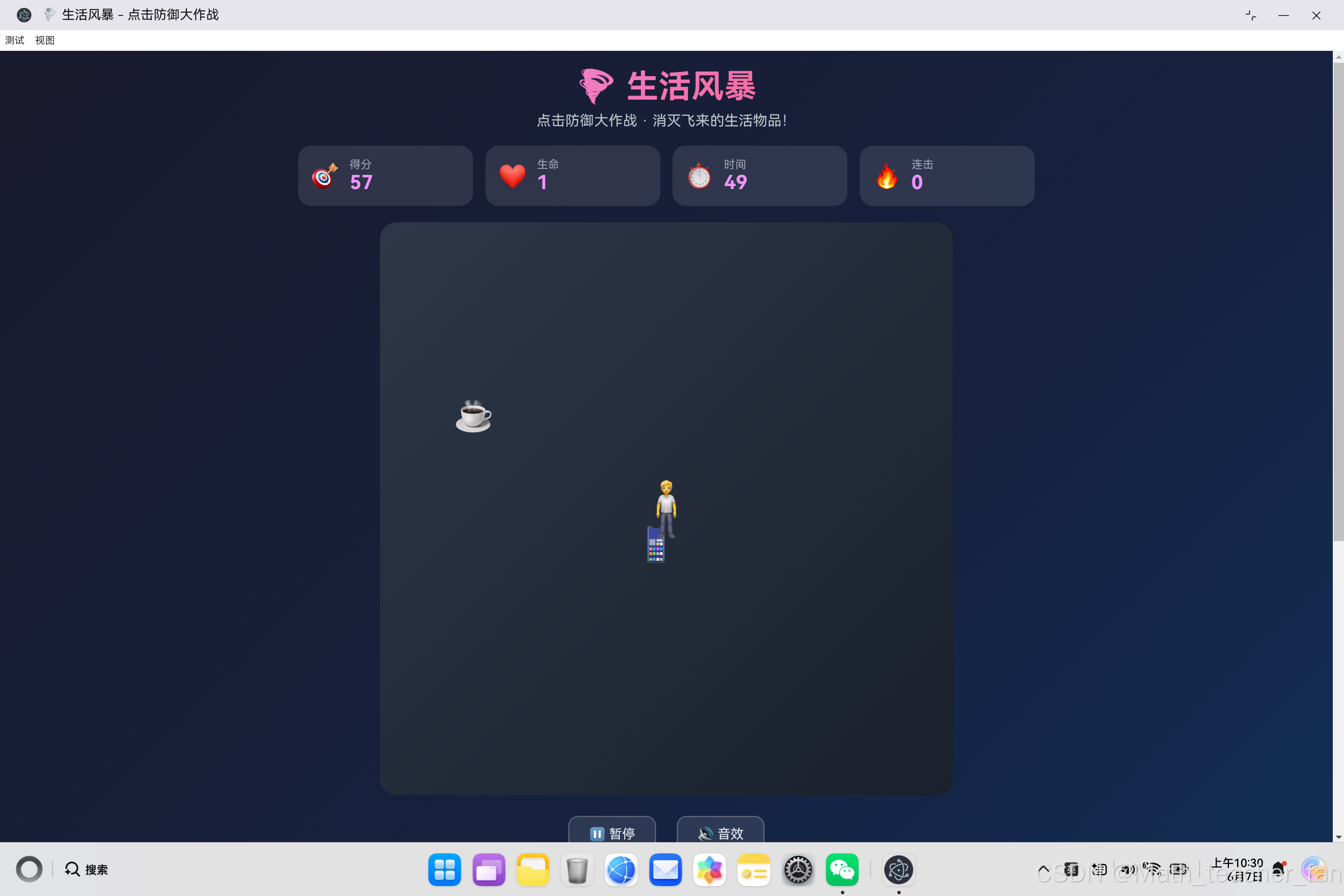
《生活风暴》是一款HTML5点击防御游戏,玩家需保护中央角色免受四面八方飞来的生活物品攻击。游戏采用JavaScript ES6+实现核心逻辑,包含物品生成系统(8方向随机生成30种物品)、物理移动系统(基于向量计算)、碰撞检测和连击评分机制。设计上采用面向对象架构,包含游戏状态管理、难度调节(影响物品速度和生成频率)和音效系统。玩家点击消灭物品得分,未拦截则扣生命值,支持连击奖励,游戏在时间结束
·
欢迎加入开源鸿蒙PC社区:
https://harmonypc.csdn.net/
atomgit仓库地址: https://atomgit.com/Math_teacher_fan/shenghuofengbao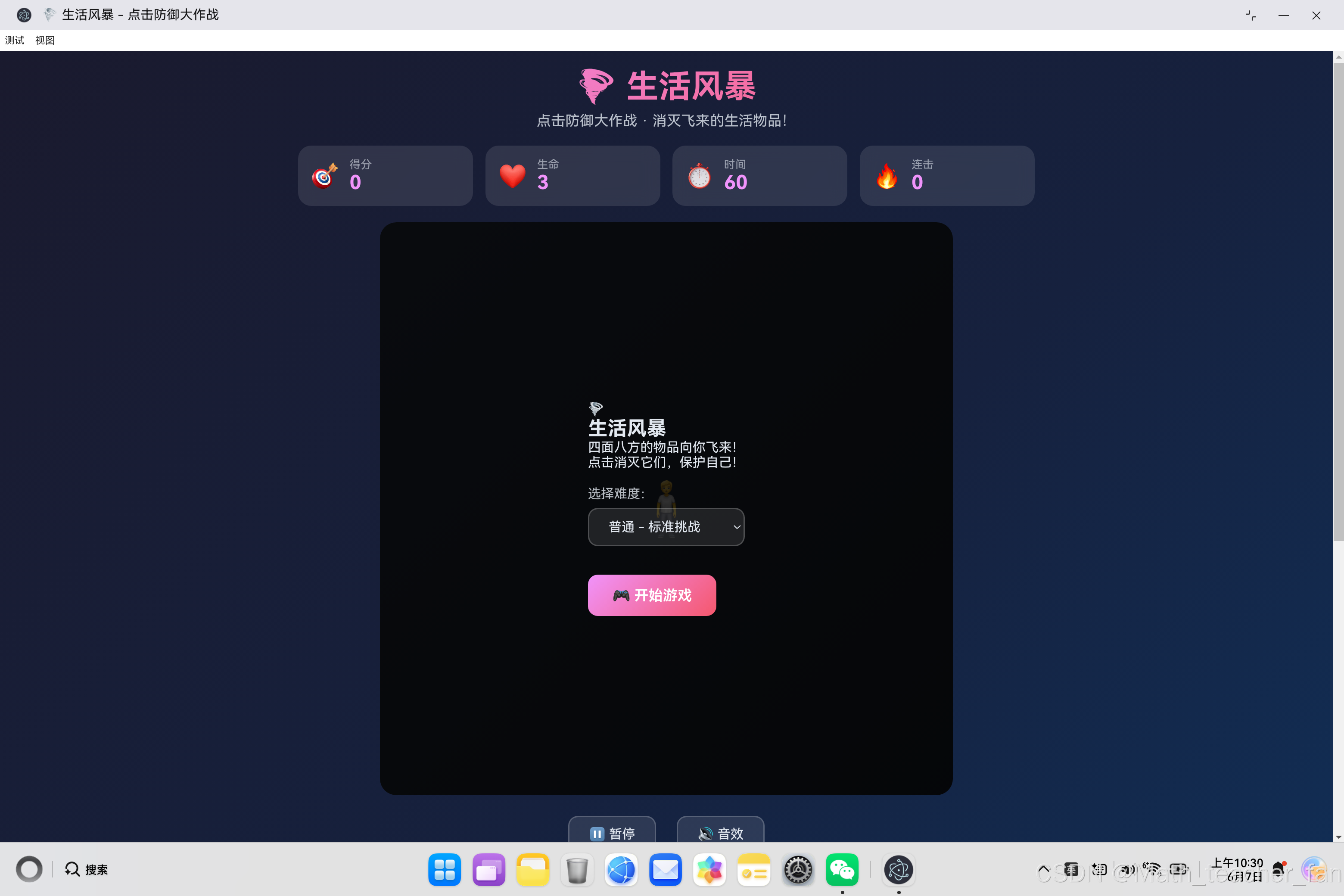
一、项目概述
"生活风暴"是一款有趣的点击防御游戏,玩家需要保护中心的角色,消灭从四面八方飞来的各种生活物品。本文将详细介绍从游戏设计到代码实现的完整过程,涵盖物品生成系统、移动系统、碰撞检测、连击系统等核心技术。
1.1 项目目标
- 创建一个有趣的点击防御游戏
- 实现四面八方的物品生成系统
- 设计流畅的物品移动和碰撞检测
- 建立连击加分系统
- 提供多种难度选择
1.2 技术选型
| 技术 | 用途 | 优势 |
|---|---|---|
| HTML5 | 页面结构 | 语义化标签 |
| CSS3 | 样式设计 | 动画效果 |
| JavaScript ES6+ | 核心逻辑 | 面向对象 |
| Web Audio API | 音效系统 | 无需外部音频文件 |
二、游戏设计
2.1 游戏规则
- 角色位于屏幕中央
- 生活物品从四面八方飞向角色
- 点击物品消灭它们,获得分数
- 物品碰到角色会损失生命值
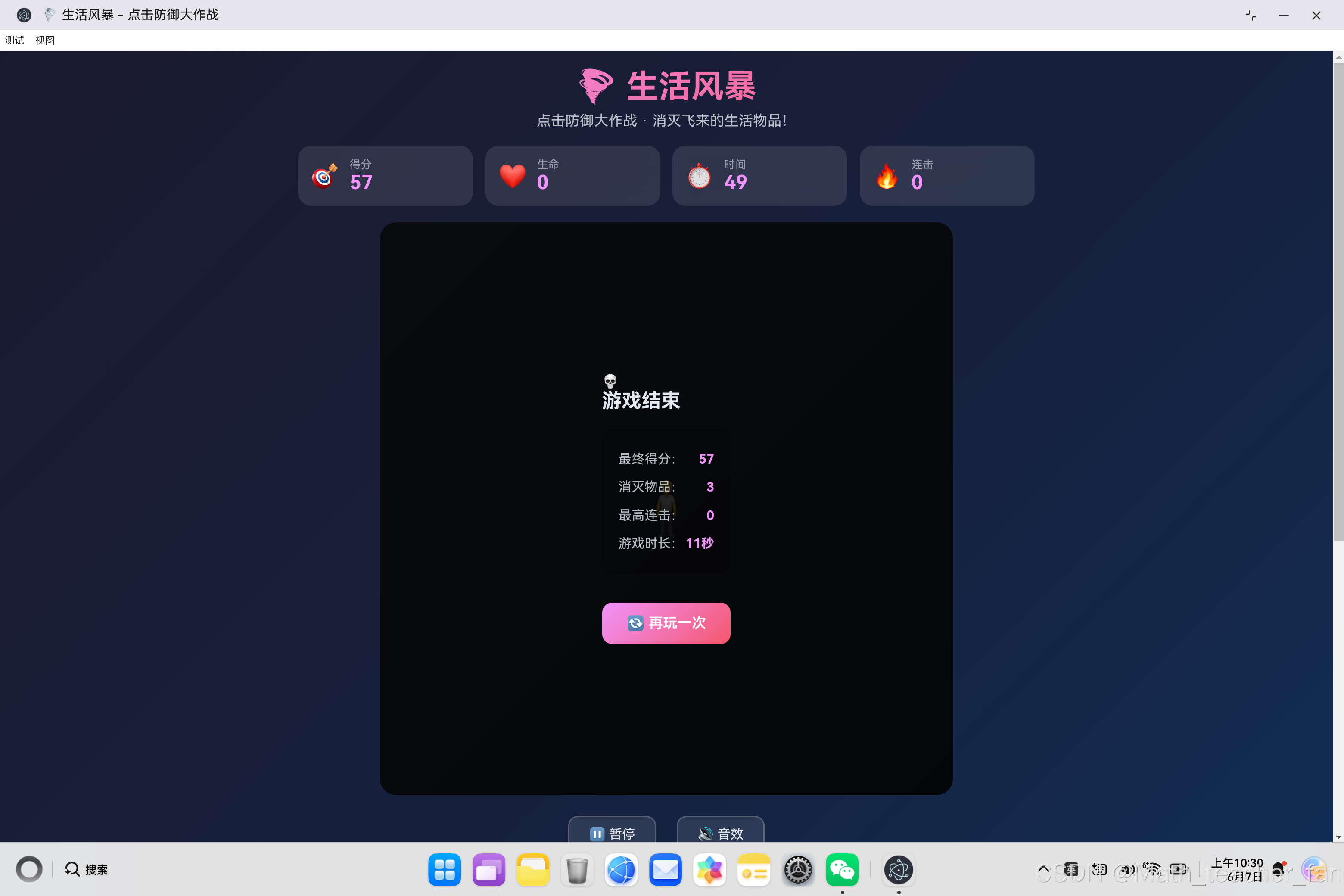
- 生命值归零或时间结束游戏结束
- 连续点击可以获得连击加分
2.2 游戏流程图
开始游戏
    ↓
选择难度
    ↓
┌─────────────────────────────┐
│       游戏进行中              │
│  ┌──────┐  ┌──────┐        │
│  │生成  │→ │移动  │        │
│  │物品  │  │物品  │        │
│  └──────┘  └──────┘        │
│      ↓         ↓           │
│  ┌──────┐  ┌──────┐        │
│  │点击  │  │碰撞  │        │
│  │消灭  │  │检测  │        │
│  └──────┘  └──────┘        │
│      ↓         ↓           │
│  得分加分  生命减少         │
└─────────────────────────────┘
    ↓
时间结束/生命归零
    ↓
显示结果
三、核心类设计
3.1 游戏类结构
class LifeStormGame {
    // 游戏状态
    score = 0           // 得分
    lives = 3           // 生命值
    time = 60           // 游戏时间
    combo = 0           // 当前连击
    maxCombo = 0        // 最高连击
    totalKills = 0      // 消灭物品总数
    isPlaying = false   // 游戏是否进行中
    isPaused = false    // 是否暂停
    soundEnabled = true // 音效开关
    difficulty = 'normal' // 当前难度
    items = []          // 当前物品列表

    // 游戏循环
    gameLoop = null     // 物品移动循环
    timerLoop = null    // 时间计数循环
    spawnLoop = null    // 物品生成循环
    lastKillTime = 0    // 上次消灭时间

    // 数据
    itemsData = []      // 物品数据
    difficultySettings = {} // 难度配置

    // 核心方法
    startGame()         // 开始游戏
    spawnItem()         // 生成物品
    updateItems()       // 更新物品位置
    destroyItem()       // 消灭物品
    hitCharacter()      // 角色被击中
    endGame()           // 结束游戏
}
四、物品生成系统
4.1 物品数据模型
initializeItems() {
    return [
        { icon: '🍎', name: '苹果', score: 10, speed: 2 },
        { icon: '📱', name: '手机', score: 15, speed: 2.5 },
        { icon: '📚', name: '书本', score: 12, speed: 1.8 },
        { icon: '⚡', name: '闪电', score: 35, speed: 5 },
        { icon: '🚗', name: '汽车', score: 40, speed: 3.5 },
        // ... 30种物品
    ];
}
4.2 物品生成逻辑
spawnItem() {
    const gameArea = document.getElementById('gameArea');
    const rect = gameArea.getBoundingClientRect();
    const centerX = rect.width / 2;
    const centerY = rect.height / 2;

    // 1. 随机选择物品类型
    const itemData = this.itemsData[
        Math.floor(Math.random() * this.itemsData.length)
    ];

    // 2. 根据难度调整速度
    const settings = this.difficultySettings[this.difficulty];
    const speed = itemData.speed * settings.speedMultiplier;

    // 3. 随机选择生成方向(8个方向)
    const directions = [
        'top', 'bottom', 'left', 'right',
        'topLeft', 'topRight', 'bottomLeft', 'bottomRight'
    ];
    const direction = directions[
        Math.floor(Math.random() * directions.length)
    ];

    // 4. 计算起始位置
    let startX, startY;
    switch(direction) {
        case 'top':
            startX = Math.random() * rect.width;
            startY = -30;
            break;
        case 'bottom':
            startX = Math.random() * rect.width;
            startY = rect.height + 30;
            break;
        // ... 其他方向
    }

    // 5. 计算移动速度向量(向中心移动)
    const dx = centerX - startX;
    const dy = centerY - startY;
    const distance = Math.sqrt(dx * dx + dy * dy);
    const vx = (dx / distance) * speed;  // X方向速度
    const vy = (dy / distance) * speed;  // Y方向速度

    // 6. 创建物品DOM元素
    const itemEl = document.createElement('div');
    itemEl.className = 'item';
    itemEl.textContent = itemData.icon;
    itemEl.style.left = startX + 'px';
    itemEl.style.top = startY + 'px';

    // 7. 添加点击事件
    itemEl.addEventListener('click', (e) => {
        e.stopPropagation();
        this.destroyItem(item);
    });

    // 8. 创建物品对象
    const item = {
        id: Date.now() + Math.random(),
        el: itemEl,
        x: startX,
        y: startY,
        vx: vx,
        vy: vy,
        data: itemData,
        direction: direction
    };

    // 9. 添加到游戏区域和物品列表
    gameArea.appendChild(itemEl);
    this.items.push(item);
}
4.3 方向生成示意图
        ↑ 上方
        |
左上 ←──┼──→ 右上
        |
← 左 ───角色───→ 右
        |
左下 ←──┼──→ 右下
        |
        ↓ 下方

物品从8个方向随机生成,向中心角色移动
五、物品移动系统
5.1 移动更新逻辑
updateItems() {
    const gameArea = document.getElementById('gameArea');
    const rect = gameArea.getBoundingClientRect();
    const centerX = rect.width / 2;
    const centerY = rect.height / 2;
    const hitRadius = 40;  // 碰撞半径

    this.items.forEach((item, index) => {
        // 1. 更新位置
        item.x += item.vx;
        item.y += item.vy;

        // 2. 更新DOM位置
        item.el.style.left = item.x + 'px';
        item.el.style.top = item.y + 'px';

        // 3. 检测与角色的碰撞
        const dx = centerX - item.x;
        const dy = centerY - item.y;
        const distance = Math.sqrt(dx * dx + dy * dy);

        // 4. 如果距离小于碰撞半径,角色被击中
        if (distance < hitRadius) {
            this.hitCharacter(item);
            this.removeItem(item, index);
        }
    });
}
5.2 游戏循环
// 每16ms更新一次(约60FPS)
this.gameLoop = setInterval(() => {
    if (!this.isPaused) {
        this.updateItems();
    }
}, 16);
六、碰撞检测系统
6.1 圆形碰撞检测
// 计算物品与角色的距离
const dx = centerX - item.x;
const dy = centerY - item.y;
const distance = Math.sqrt(dx * dx + dy * dy);

// 如果距离小于碰撞半径,判定为碰撞
if (distance < hitRadius) {
    this.hitCharacter(item);
    this.removeItem(item, index);
}
6.2 碰撞处理
hitCharacter(item) {
    // 1. 减少生命值
    this.lives--;

    // 2. 重置连击
    this.combo = 0;

    // 3. 角色动画效果
    const character = document.getElementById('character');
    character.classList.add('hit');
    setTimeout(() => character.classList.remove('hit'), 300);

    // 4. 更新显示
    this.updateDisplay();

    // 5. 播放音效
    if (this.soundEnabled) {
        this.playSound('hit');
    }

    // 6. 检查游戏结束
    if (this.lives <= 0) {
        this.endGame(false);
    }
}
七、点击消灭系统
7.1 消灭逻辑
destroyItem(item) {
    if (!this.isPlaying || this.isPaused) return;

    const now = Date.now();
    const timeDiff = now - this.lastKillTime;

    // 1. 连击判定(500ms内连续点击)
    if (timeDiff < 500) {
        this.combo++;
        if (this.combo > this.maxCombo) {
            this.maxCombo = this.combo;
        }

        // 显示连击文字
        if (this.combo >= 3) {
            this.showComboText(this.combo);
        }
    } else {
        this.combo = 1;
    }

    this.lastKillTime = now;

    // 2. 计算分数(连击加成)
    const comboMultiplier = 1 + (this.combo - 1) * 0.2;
    const finalScore = Math.round(item.data.score * comboMultiplier);

    // 3. 更新分数
    this.score += finalScore;
    this.totalKills++;

    // 4. 显示分数弹出
    this.showScorePopup(item.x, item.y, finalScore);

    // 5. 消灭动画
    item.el.classList.add('destroyed');

    // 6. 移除物品
    setTimeout(() => {
        if (item.el.parentNode) {
            item.el.parentNode.removeChild(item.el);
        }
    }, 300);

    // 7. 从列表中移除
    const index = this.items.findIndex(i => i.id === item.id);
    if (index > -1) {
        this.items.splice(index, 1);
    }

    // 8. 更新显示
    this.updateDisplay();

    // 9. 播放音效
    if (this.soundEnabled) {
        this.playSound('destroy');
    }
}
7.2 连击加成公式
最终分数 = 物品基础分数 × 连击加成系数

连击加成系数 = 1 + (连击数 - 1) × 0.2

示例:
- 1连击:加成系数 = 1.0,分数 = 基础分数
- 2连击:加成系数 = 1.2,分数 = 基础分数 × 1.2
- 3连击:加成系数 = 1.4,分数 = 基础分数 × 1.4
- 5连击:加成系数 = 1.8,分数 = 基础分数 × 1.8
八、难度系统
8.1 难度配置
initializeDifficulty() {
    return {
        easy: {
            spawnRate: 2000,      // 生成间隔(毫秒)
            maxItems: 5,          // 最大物品数
            speedMultiplier: 0.8  // 速度倍率
        },
        normal: {
            spawnRate: 1500,
            maxItems: 8,
            speedMultiplier: 1
        },
        hard: {
            spawnRate: 1000,
            maxItems: 12,
            speedMultiplier: 1.3
        },
        extreme: {
            spawnRate: 600,
            maxItems: 20,
            speedMultiplier: 1.8
        }
    };
}
8.2 难度对比表
| 难度 | 生成间隔 | 最大物品 | 速度倍率 | 挑战程度 |
|---|---|---|---|---|
| 简单 | 2秒 | 5个 | 0.8x | 适合新手 |
| 普通 | 1.5秒 | 8个 | 1.0x | 标准挑战 |
| 困难 | 1秒 | 12个 | 1.3x | 需要技巧 |
| 极限 | 0.6秒 | 20个 | 1.8x | 疯狂模式 |
九、音效系统
9.1 Web Audio API实现
playSound(type) {
    try {
        // 1. 创建音频上下文
        const audioContext = new (
            window.AudioContext || window.webkitAudioContext
        )();

        // 2. 创建振荡器(发声器)
        const oscillator = audioContext.createOscillator();

        // 3. 创建增益节点(音量控制)
        const gainNode = audioContext.createGain();

        // 4. 连接节点
        oscillator.connect(gainNode);
        gainNode.connect(audioContext.destination);

        // 5. 根据音效类型设置参数
        switch(type) {
            case 'destroy':
                oscillator.frequency.value = 800;  // 高频
                gainNode.gain.value = 0.1;         // 低音量
                oscillator.type = 'sine';          // 正弦波
                break;
            case 'hit':
                oscillator.frequency.value = 200;  // 低频
                gainNode.gain.value = 0.2;         // 较高音量
                oscillator.type = 'square';        // 方波(刺耳)
                break;
            case 'spawn':
                oscillator.frequency.value = 400;  // 中频
                gainNode.gain.value = 0.05;        // 很低音量
                oscillator.type = 'triangle';      // 三角波
                break;
        }

        // 6. 播放音效(0.1秒)
        oscillator.start();
        oscillator.stop(audioContext.currentTime + 0.1);
    } catch (e) {
        // 音效播放失败,忽略
    }
}
十、视觉效果
10.1 物品消灭动画
.item.destroyed {
    animation: itemDestroy 0.3s ease forwards;
}

@keyframes itemDestroy {
    0% {
        transform: scale(1);
        opacity: 1;
    }
    50% {
        transform: scale(1.5);
        opacity: 0.5;
    }
    100% {
        transform: scale(0);
        opacity: 0;
    }
}
10.2 分数弹出动画
.score-popup {
    position: absolute;
    font-size: 1.2rem;
    font-weight: 700;
    color: #ffd89b;
    animation: scorePopup 0.5s ease forwards;
}

@keyframes scorePopup {
    0% {
        transform: translateY(0);
        opacity: 1;
    }
    100% {
        transform: translateY(-30px);
        opacity: 0;
    }
}
10.3 角色被击中动画
.character.hit {
    animation: characterHit 0.3s ease;
}

@keyframes characterHit {
    0%, 100% {
        transform: translate(-50%, -50%) scale(1);
    }
    50% {
        transform: translate(-50%, -50%) scale(0.8);
        opacity: 0.5;
    }
}
十一、游戏状态管理
11.1 游戏开始
startGame() {
    // 1. 初始化状态
    this.score = 0;
    this.lives = 3;
    this.time = 60;
    this.combo = 0;
    this.maxCombo = 0;
    this.totalKills = 0;
    this.isPlaying = true;
    this.isPaused = false;
    this.items = [];

    // 2. 更新显示
    this.updateDisplay();
    this.hideAllOverlays();

    // 3. 获取难度配置
    const settings = this.difficultySettings[this.difficulty];

    // 4. 启动物品生成循环
    this.spawnLoop = setInterval(() => {
        if (!this.isPaused && this.items.length < settings.maxItems) {
            this.spawnItem();
        }
    }, settings.spawnRate);

    // 5. 启动时间计数循环
    this.timerLoop = setInterval(() => {
        if (!this.isPaused) {
            this.time--;
            document.getElementById('time').textContent = this.time;

            if (this.time <= 0) {
                this.endGame(true);  // 时间结束,胜利
            }
        }
    }, 1000);

    // 6. 启动游戏主循环
    this.gameLoop = setInterval(() => {
        if (!this.isPaused) {
            this.updateItems();
        }
    }, 16);
}
11.2 游戏结束
endGame(isVictory) {
    // 1. 停止游戏
    this.stopGame();

    // 2. 显示结果
    if (isVictory && this.lives > 0) {
        // 胜利界面
        document.getElementById('victoryScore').textContent = this.score;
        document.getElementById('victoryKills').textContent = this.totalKills;
        document.getElementById('victoryCombo').textContent = this.maxCombo;
        document.getElementById('victoryOverlay').style.display = 'flex';
    } else {
        // 失败界面
        document.getElementById('finalScore').textContent = this.score;
        document.getElementById('totalKills').textContent = this.totalKills;
        document.getElementById('maxCombo').textContent = this.maxCombo;
        document.getElementById('gameTime').textContent = (60 - this.time) + '秒';
        document.getElementById('gameOverOverlay').style.display = 'flex';
    }
}
十二、物品一览表
| 物品 | 图标 | 分数 | 速度 | 特点 |
|---|---|---|---|---|
| 苹果 | 🍎 | 10 | 2 | 常见物品 |
| 手机 | 📱 | 15 | 2.5 | 中等难度 |
| 闪电 | ⚡ | 35 | 5 | 高分快速 |
| 汽车 | 🚗 | 40 | 3.5 | 最高分 |
| 冰块 | 🧊 | 8 | 3.5 | 快速低分 |
| 火焰 | 🔥 | 25 | 4 | 快速高分 |
| 床 | 🛏️ | 30 | 0.8 | 慢速高分 |
十三、总结
13.1 核心技术要点
本文详细介绍了"生活风暴"游戏的完整实现:
- 物品生成系统:8方向随机生成,向中心移动
- 移动系统:速度向量计算,60FPS更新
- 碰撞检测:圆形碰撞检测算法
- 连击系统:时间窗口判定,分数加成
- 难度系统:生成间隔、数量、速度配置
- 音效系统:Web Audio API合成音效
- 视觉效果:CSS动画消灭、分数弹出
13.2 核心代码模块
| 文件 | 说明 |
|---|---|
| [app.js](file:///d:/save/systemIso/electron-openharmony-vue3/ohos_hap/web_engine/src/main/resources/resfile/resources/app/app.js) | 完整的游戏逻辑实现 |
| [index.html](file:///d:/save/systemIso/electron-openharmony-vue3/ohos_hap/web_engine/src/main/resources/resfile/resources/app/index.html) | 页面结构 |
| [style.css](file:///d:/save/systemIso/electron-openharmony-vue3/ohos_hap/web_engine/src/main/resources/resfile/resources/app/style.css) | 样式和动画 |
13.3 学习收获
通过这个项目,深入学习了:
- 游戏循环设计:多循环协同工作
- 物理模拟:速度向量、碰撞检测
- 事件处理:点击消灭、状态管理
- 动画效果:CSS关键帧动画
- 音效合成:Web Audio API使用
- 难度平衡:游戏参数配置
作者:数学老师
更新时间:2026年6月
标签:#点击游戏 #防御游戏 #碰撞检测 #连击系统 #JavaScript #游戏开发 #HarmonyOS #Electron

作为“人工智能6S店”的官方数字引擎,为AI开发者与企业提供一个覆盖软硬件全栈、一站式门户。
更多推荐

 1
1 0
0- 0


 已为社区贡献32条内容

所有评论(0)