
快乐记单词 - 趣味背单词鸿蒙PC Electron框架完整开发指南
快乐记单词应用开发摘要 本项目开发了一款基于Web的英语单词学习应用"快乐记单词",主要功能包括: 三种学习模式:学习模式展示单词详细信息与记忆技巧,测试模式生成选择题检验记忆效果,复习模式根据遗忘曲线强化记忆 科学记忆方法:集成谐音联想、词根词缀等记忆技巧,采用艾宾浩斯遗忘曲线安排复习 五大分类词库:包含日常用语、美食餐饮等5个场景共50个单词 学习进度追踪:记录已学单词、学习天数统计和每日目标
·
欢迎加入开源鸿蒙PC社区:
https://harmonypc.csdn.net/
atomgit仓库地址: hhttps://atomgit.com/Math_teacher_fan/kuailejidanci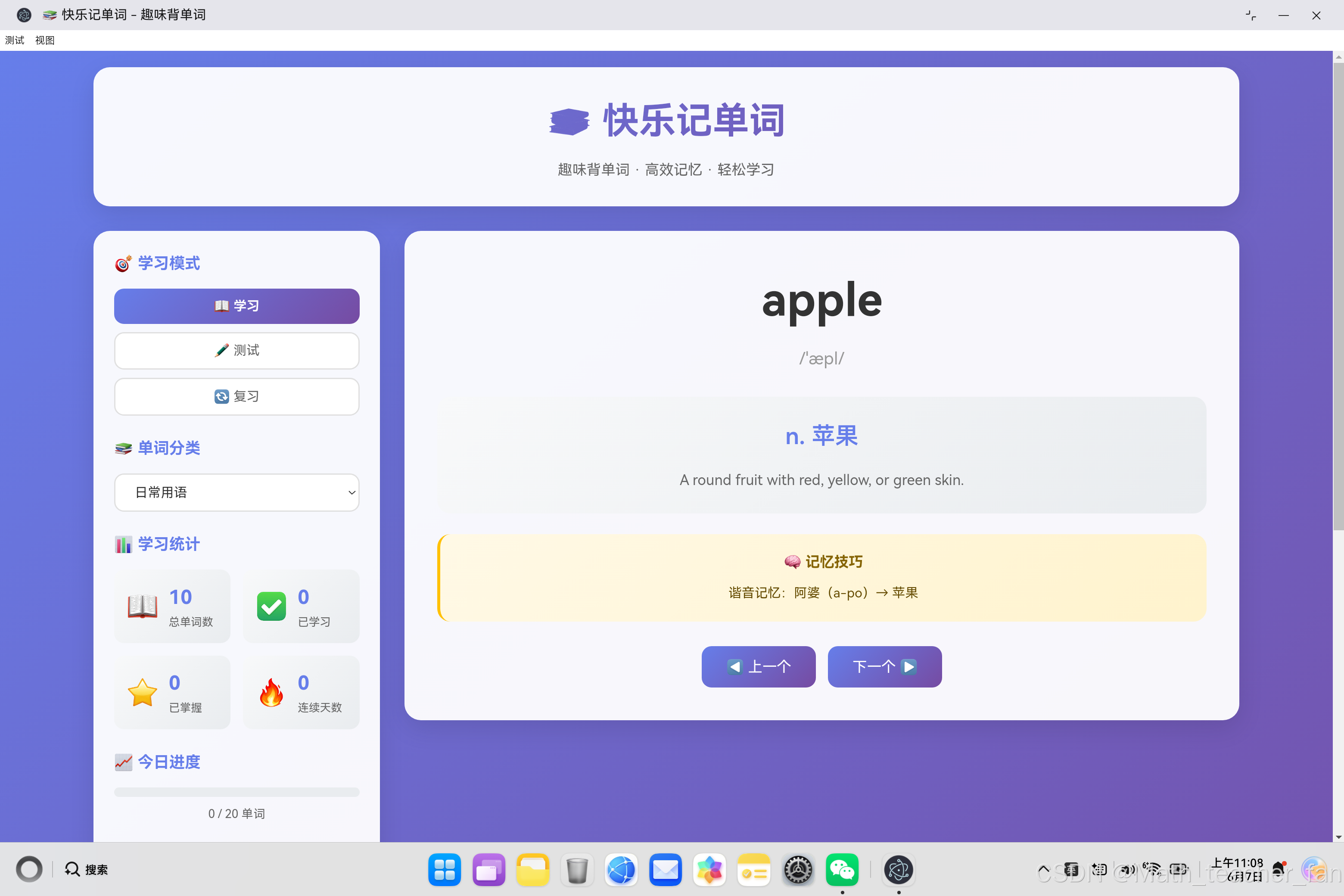
一、项目概述
"快乐记单词"是一款基于Web技术的英语单词学习应用,旨在通过科学的学习方法和有趣的记忆技巧,帮助用户高效记忆英语单词。本文将详细介绍从需求分析到代码实现的完整过程。
1.1 项目目标
- 提供多种学习模式(学习、测试、复习)
- 包含丰富的单词库和分类
- 实现科学的记忆技巧和艾宾浩斯遗忘曲线
- 提供完整的学习进度统计和追踪
- 支持跨平台运行(鸿蒙PC和传统桌面端)
1.2 技术选型
| 技术 | 用途 | 优势 |
|---|---|---|
| HTML5 | 页面结构 | 语义化标签 |
| CSS3 | 样式设计 | 渐变、动画、响应式 |
| JavaScript ES6+ | 核心逻辑 | 面向对象、数据管理 |
| LocalStorage | 数据持久化 | 本地存储、无需后端 |
二、系统架构设计
2.1 整体架构
┌─────────────────────────────────────────────────────────────┐
│                     用户界面层                                  │
│  ┌──────────┐  ┌──────────┐  ┌──────────┐  ┌──────────┐  │
│  │ 学习模式  │  │ 测试模式  │  │ 复习模式  │  │ 统计面板  │  │
│  └──────────┘  └──────────┘  └──────────┘  └──────────┘  │
└─────────────────────────────────────────────────────────────┘
                              ↓
┌─────────────────────────────────────────────────────────────┐
│                     业务逻辑层                                  │
│  ┌──────────────────────────────────────────────────────┐  │
│  │            VocabularyApp 类                              │  │
│  │  - 单词库管理 (wordDatabase)                          │  │
│  │  - 学习进度 (wordStates)                              │  │
│  │  - 记忆技巧 (tips)                                   │  │
│  │  - 测试生成 (generateQuestions)                       │  │
│  │  - 数据持久化 (loadData/saveData)                    │  │
│  └──────────────────────────────────────────────────────┘  │
└─────────────────────────────────────────────────────────────┘
                              ↓
┌─────────────────────────────────────────────────────────────┐
│                     数据存储层                                  │
│  LocalStorage - wordStates, todayLearned, streakDays        │
└─────────────────────────────────────────────────────────────┘
2.2 核心类设计
class VocabularyApp {
    // 当前状态
    currentMode = 'learn'           // 当前模式
    currentCategory = 'daily'       // 当前分类
    currentIndex = 0              // 当前单词索引
    words = []                     // 当前单词列表

    // 学习进度
    wordStates = {}                // 单词状态
    todayLearned = 0              // 今日学习数
    dailyGoal = 20                // 每日目标

    // 数据
    wordDatabase = {}              // 单词数据库
    tips = []                     // 记忆技巧

    // 核心方法
    loadCategory()                 // 加载分类
    displayWord()                 // 显示单词
    switchMode()                  // 切换模式
    generateQuestions()            // 生成测试题
    handleAnswer()                // 处理答案
    updateStats()                 // 更新统计
    renderWordList()              // 渲染单词列表
}
三、单词库设计
3.1 单词数据结构
{
    word: 'apple',                 // 单词
    phonetic: '/ˈæpl/',            // 发音音标
    meaning: 'n. 苹果',            // 中文释义
    enMeaning: 'A round fruit...', // 英文释义
    tip: '谐音记忆:阿婆...'      // 记忆技巧
}
3.2 五大分类
| 分类 | 单词数 | 适用场景 |
|---|---|---|
| 日常用语 | 10词 | 日常生活交流 |
| 美食餐饮 | 10词 | 餐饮场景应用 |
| 旅行交通 | 10词 | 旅行出行必备 |
| 科技数码 | 10词 | 技术领域词汇 |
| 商务办公 | 10词 | 职场商务交流 |
3.3 记忆技巧分类
const tips = [
    '重复是记忆之母,多次复习能加深印象',
    '联想记忆法:将单词与熟悉的事物联系起来',
    '词根词缀法:很多单词由词根和词缀组成',
    '语境记忆:在句子中使用单词,记得更牢',
    '发音记忆:大声朗读有助于记忆',
    '艾宾浩斯遗忘曲线:及时复习是关键',
    '制作闪卡:随时随地进行复习',
    '分组记忆:将相关单词放在一起学习'
];
四、核心功能实现
4.1 学习模式
学习模式提供单词的完整信息展示:
displayWord() {
    const word = this.words[this.currentIndex];

    // 显示单词基本信息
    document.getElementById('wordText').textContent = word.word;
    document.getElementById('wordPhonetic').textContent = word.phonetic;
    document.getElementById('meaningZh').textContent = word.meaning;
    document.getElementById('meaningEn').textContent = word.enMeaning;

    // 显示记忆技巧
    document.getElementById('memoryTipText').textContent = word.tip;

    // 随机显示学习技巧
    document.getElementById('tipText').textContent =
        this.tips[this.currentIndex % this.tips.length];
}
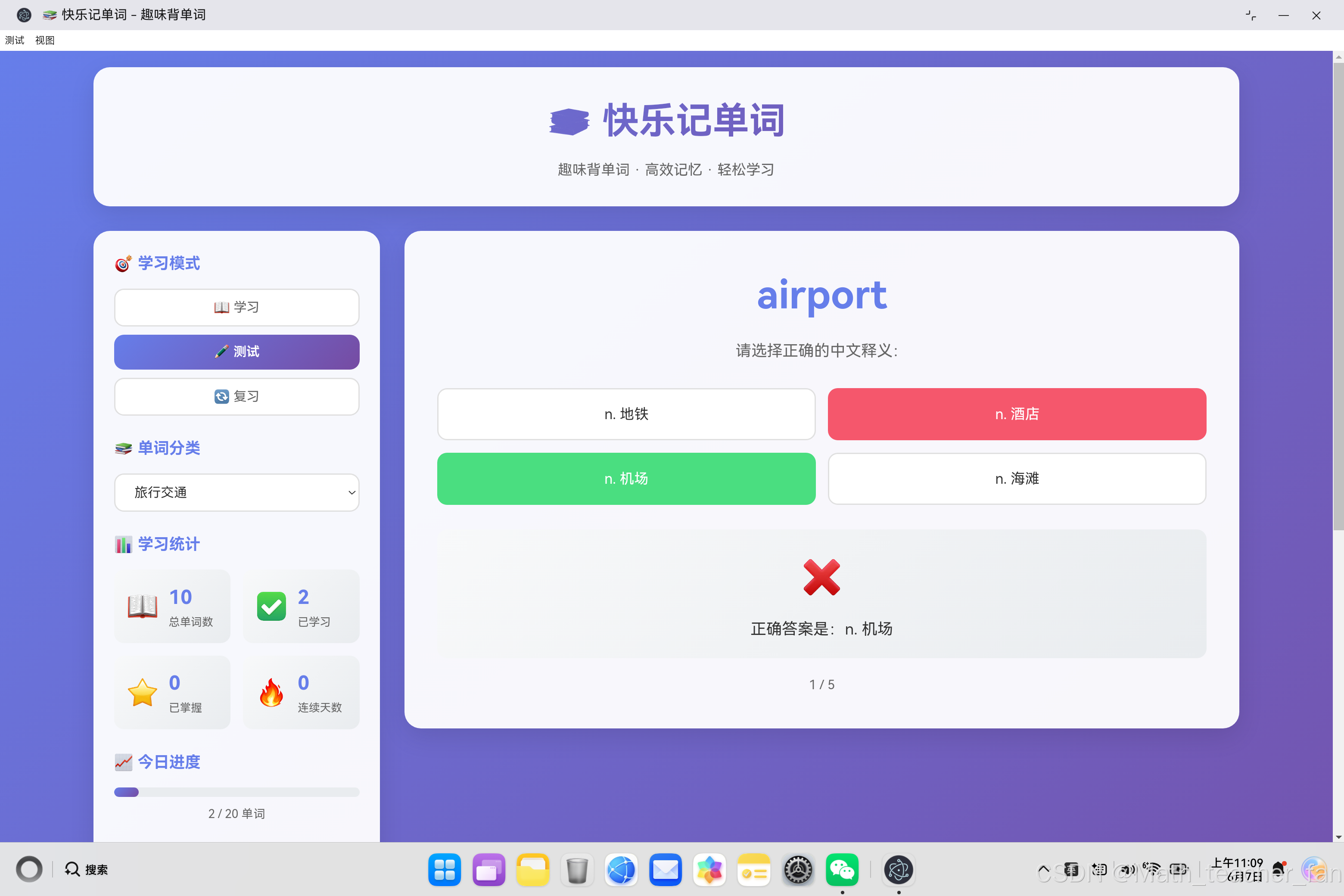
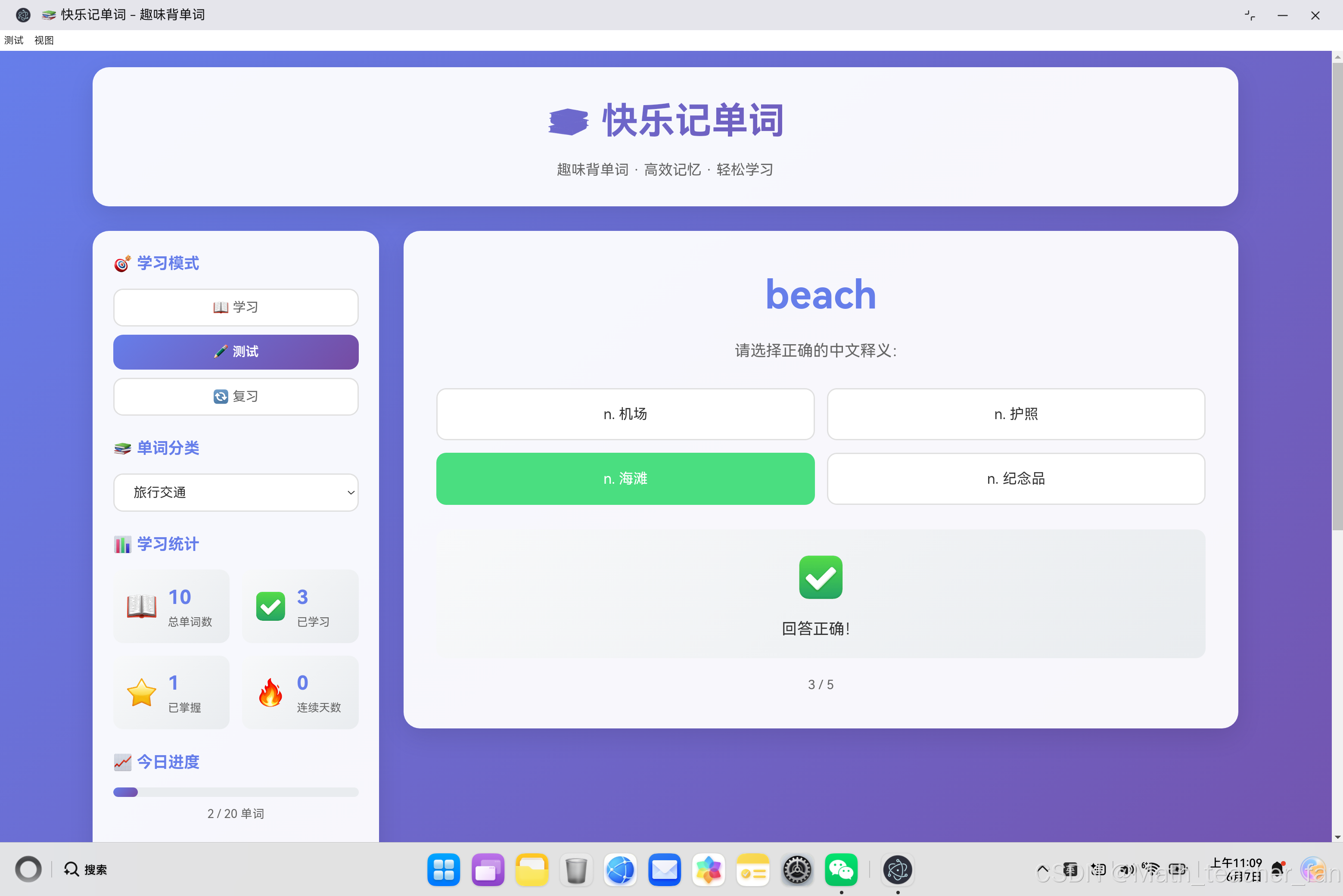
4.2 测试模式
测试模式通过选择题检验学习效果:
generateQuestions() {
    const questions = [];
    const shuffledWords = this.shuffleArray([...this.words]).slice(0, 5);

    shuffledWords.forEach(word => {
        // 获取其他单词的释义作为干扰选项
        const otherMeanings = this.words
            .filter(w => w.word !== word.word)
            .map(w => w.meaning);

        // 随机选择3个错误选项
        const wrongAnswers = this.shuffleArray(otherMeanings).slice(0, 3);

        // 混合正确和错误选项
        const options = this.shuffleArray([word.meaning, ...wrongAnswers]);

        questions.push({
            word: word.word,
            correctAnswer: word.meaning,
            options: options
        });
    });

    return questions;
}

handleAnswer(e) {
    const selectedAnswer = e.target.textContent;
    const question = this.testQuestions[this.currentQuestion];
    const isCorrect = selectedAnswer === question.correctAnswer;

    // 显示答案结果
    const options = document.querySelectorAll('.option-btn');
    options.forEach(btn => {
        if (btn.textContent === question.correctAnswer) {
            btn.classList.add('correct');   // 正确答案
        } else if (btn === e.target && !isCorrect) {
            btn.classList.add('wrong');     // 错误答案
        }
    });

    if (isCorrect) {
        this.markAsMastered(question.word);
    }
}
4.3 复习模式
复习模式打乱单词顺序,检验记忆效果:
shuffleWords() {
    // Fisher-Yates 洗牌算法
    this.words = this.shuffleArray([...this.words]);
    this.currentIndex = 0;
    this.displayWord();
}

shuffleArray(array) {
    for (let i = array.length - 1; i > 0; i--) {
        const j = Math.floor(Math.random() * (i + 1));
        [array[i], array[j]] = [array[j], array[i]];
    }
    return array;
}
五、数据持久化系统
5.1 数据结构设计
const data = {
    wordStates: {
        'apple': { learned: true, mastered: true },
        'beautiful': { learned: true },
        // ...
    },
    todayLearned: 15,
    lastDate: 'Sat Jun 07 2025',
    streakDays: 5
};
5.2 保存与加载
saveData() {
    const data = {
        wordStates: this.wordStates,
        todayLearned: this.todayLearned,
        lastDate: new Date().toDateString(),
        streakDays: this.streakDays
    };
    localStorage.setItem('vocabularyData', JSON.stringify(data));
}

loadData() {
    const savedData = localStorage.getItem('vocabularyData');
    if (savedData) {
        const data = JSON.parse(savedData);
        this.wordStates = data.wordStates || {};
        this.todayLearned = data.todayLearned || 0;
        this.checkStreak();
    }
}
5.3 连续学习天数计算
checkStreak() {
    const lastDate = localStorage.getItem('vocabularyData') ?
        JSON.parse(localStorage.getItem('vocabularyData')).lastDate : null;

    const today = new Date().toDateString();
    const yesterday = new Date(Date.now() - 86400000).toDateString();

    if (lastDate !== today) {
        if (lastDate === yesterday) {
            // 昨天学习过,连续天数+1
            this.streakDays = (JSON.parse(
                localStorage.getItem('vocabularyData')
            ).streakDays || 0) + 1;
        } else {
            // 昨天没学习,重新开始计数
            this.streakDays = 1;
        }
    } else {
        // 今天已经学习过,保持当前连续天数
        this.streakDays = JSON.parse(
            localStorage.getItem('vocabularyData')
        ).streakDays || 0;
    }
}
六、用户界面设计
6.1 界面布局
┌─────────────────────────────────────────────────────────────┐
│                    📚 快乐记单词                              │
│                    趣味背单词 · 高效记忆                        │
└─────────────────────────────────────────────────────────────┘

┌────────────────┐  ┌─────────────────────────────────────┐
│ 🎯 学习模式    │  │                                     │
│ [学习][测试]   │  │            apple                     │
│ [复习]        │  │          /ˈæpl/                      │
│                │  │                                     │
│ 📚 单词分类    │  │        n. 苹果                       │
│ [下拉选择]    │  │                                     │
│                │  │    A round fruit with red...        │
│ 📊 学习统计    │  │                                     │
│ 总:10 已学:5   │  │  🧠 谐音记忆:阿婆 → 苹果            │
│ 已掌握:3 连续:7 │  │                                     │
│                │  │     [◀ 上一个]  [下一个 ▶]           │
│ 📈 今日进度    │  │                                     │
│ [████████░░]  │  └─────────────────────────────────────┘
│        8/20    │
│                │
│ 💡 记忆技巧    │
│ 重复是记忆之母  │
└────────────────┘
6.2 单词卡片设计
.word-card {
    background: rgba(255, 255, 255, 0.95);
    border-radius: 20px;
    padding: 40px;
    box-shadow: 0 10px 30px rgba(0, 0, 0, 0.1);
    text-align: center;
}

.word-text {
    font-size: 3.5rem;
    font-weight: 700;
    color: #333;
    margin-bottom: 10px;
}

.word-phonetic {
    font-size: 1.3rem;
    color: #999;
}

.memory-tip {
    background: linear-gradient(135deg, #fff9e6 0%, #fff3cd 100%);
    border-radius: 16px;
    padding: 20px;
    border-left: 4px solid #ffc107;
}
七、艾宾浩斯遗忘曲线应用
7.1 遗忘曲线原理
德国心理学家艾宾浩斯研究发现,人类大脑对新事物的遗忘遵循特定规律:
- 20分钟后:遗忘42%
- 1小时后:遗忘56%
- 1天后:遗忘66%
- 2天后:遗忘72%
- 6天后:遗忘75%
- 1个月后:遗忘79%
7.2 应用策略
// 复习时机提示
const reviewSchedule = {
    '20分钟': '刚刚学过的单词,可以回顾一下',
    '1小时': '每小时复习一次,加深印象',
    '1天': '今天学过的单词,明天要复习',
    '3天': '三天前的单词,需要再次巩固',
    '7天': '一周前的单词,形成长期记忆',
    '30天': '一个月的单词,已经形成永久记忆'
};
7.3 实践建议
- 及时复习:学完单词后20分钟内复习一次
- 多次循环:按照20分钟、1小时、1天、3天、7天的间隔复习
- 检测反馈:通过测试模式检验记忆效果
- 保持连续:连续学习天数激励坚持
八、性能优化
8.1 数据结构优化
// 使用对象存储单词状态,O(1)查询
wordStates = {
    'apple': { learned: true, mastered: true },
    'beautiful': { learned: true },
    // ...
}

// 快速检查单词是否已学习
if (!this.wordStates[word.word]) {
    this.wordStates[word.word] = { learned: true };
    this.todayLearned++;
}
8.2 DOM操作优化
// 批量更新而非多次操作
renderWordList() {
    const wordList = document.getElementById('wordList');
    wordList.innerHTML = '';  // 一次性清空

    this.words.forEach(word => {
        const item = document.createElement('div');
        // ... 设置内容
        wordList.appendChild(item);  // 批量添加
    });
}
8.3 事件委托
// 使用事件委托处理多个按钮
document.querySelectorAll('.mode-btn').forEach(btn => {
    btn.addEventListener('click', (e) => {
        // 处理点击事件
    });
});
九、用户体验设计
9.1 即时反馈
handleAnswer(e) {
    const isCorrect = selectedAnswer === question.correctAnswer;

    if (isCorrect) {
        document.getElementById('resultIcon').textContent = '✅';
        document.getElementById('resultText').textContent = '回答正确!';
        this.markAsMastered(question.word);
    } else {
        document.getElementById('resultIcon').textContent = '❌';
        document.getElementById('resultText').textContent =
            `正确答案是:${question.correctAnswer}`;
    }
}
9.2 进度可视化
updateStats() {
    const progress = Math.min((this.todayLearned / this.dailyGoal) * 100, 100);
    document.getElementById('progressFill').style.width = `${progress}%`;
    document.getElementById('progressText').textContent =
        `${this.todayLearned} / ${this.dailyGoal} 单词`;
}
9.3 状态标识
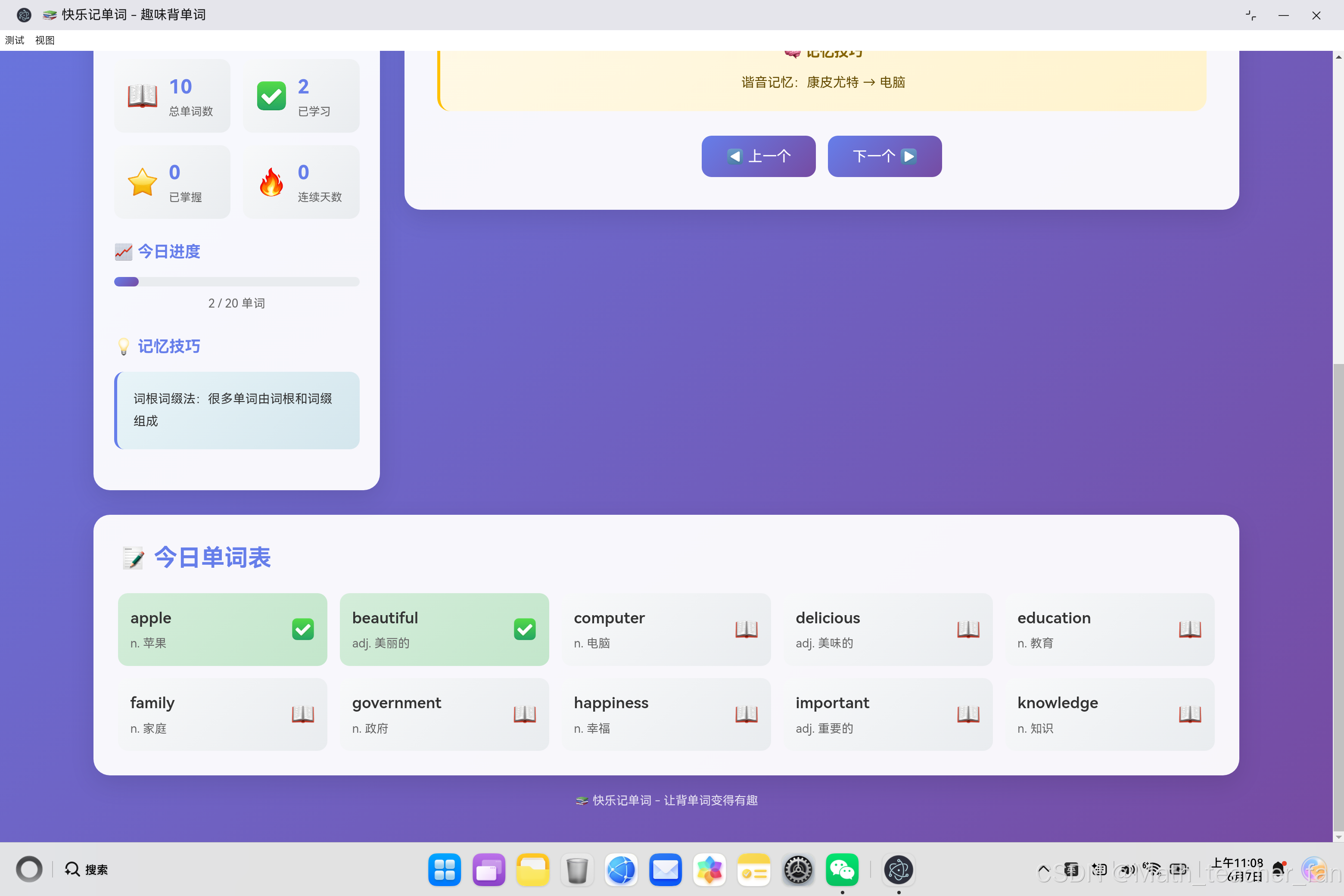
// 单词列表中的状态显示
if (state && state.mastered) {
    item.classList.add('mastered');      // ⭐ 已掌握
} else if (state && state.learned) {
    item.classList.add('learned');      // ✅ 已学习
}

// 图标显示
${state && state.mastered ? '⭐' :
  (state && state.learned ? '✅' : '📖')}
十、扩展功能建议
10.1 发音功能
- 集成 Web Speech API 实现单词发音
- 支持英式/美式发音选择
- 自动朗读功能
10.2 艾宾浩斯复习提醒
- 记录每个单词的学习时间
- 自动计算最佳复习时机
- 推送复习提醒
10.3 自定义单词本
- 支持添加个人生词
- 自定义记忆技巧
- 导入/导出功能
10.4 社交功能
- 学习成就系统
- 排行榜
- 学习数据统计图表
十一、核心代码模块
| 文件 | 说明 | 行数 |
|---|---|---|
| app.js | 完整的应用逻辑实现 | 387行 |
| index.html | 页面结构 | 150行 |
| style.css | 样式设计 | 508行 |
十二、总结
12.1 技术要点回顾
通过这个项目,我们学习了:
- 面向对象编程:使用类管理复杂状态
- 数据结构设计:合理的数据模型提高效率
- LocalStorage:浏览器本地存储技术
- DOM操作:动态渲染和事件处理
- 艾宾浩斯遗忘曲线:科学记忆理论的应用
12.2 学习收获
开发一个单词学习应用不仅是技术的实现,更是对教育学的探索:
- 认知心理学:理解记忆的规律
- 交互设计:提供最佳用户体验
- 数据分析:追踪学习效果
- 游戏化设计:提高学习动力
12.3 改进方向
- 添加语音发音功能
- 实现艾宾浩斯复习提醒
- 支持自定义单词本
- 添加学习成就系统
- 集成更多记忆技巧
标签:#记单词 #英语学习 #记忆技巧 #艾宾浩斯 #JavaScript #HarmonyOS #Electron

作为“人工智能6S店”的官方数字引擎,为AI开发者与企业提供一个覆盖软硬件全栈、一站式门户。
更多推荐

 0
0 0
0- 0


 已为社区贡献32条内容

所有评论(0)