
家庭药品管理系统智能过期预警鸿蒙PC Electron框架技术深度解析
开源鸿蒙PC社区推出家庭药品管理系统,其核心智能过期预警技术采用三层架构设计(数据层、计算引擎层、展示层)。关键技术包括:1)基于时间戳的精确日期计算算法,处理各类边界情况;2)三级状态分类(正常/即将过期/已过期)及转换逻辑;3)动态UI渲染系统,通过颜色编码(绿/橙/红)直观显示药品状态。该系统能准确计算剩余天数,提供30天提前预警,确保用药安全。项目代码已开源,欢迎开发者参与贡献。
·
欢迎加入开源鸿蒙PC社区:
https://harmonypc.csdn.net/
atomgit仓库地址: https://atomgit.com/m0_66062719/jiatingyaopinguanli
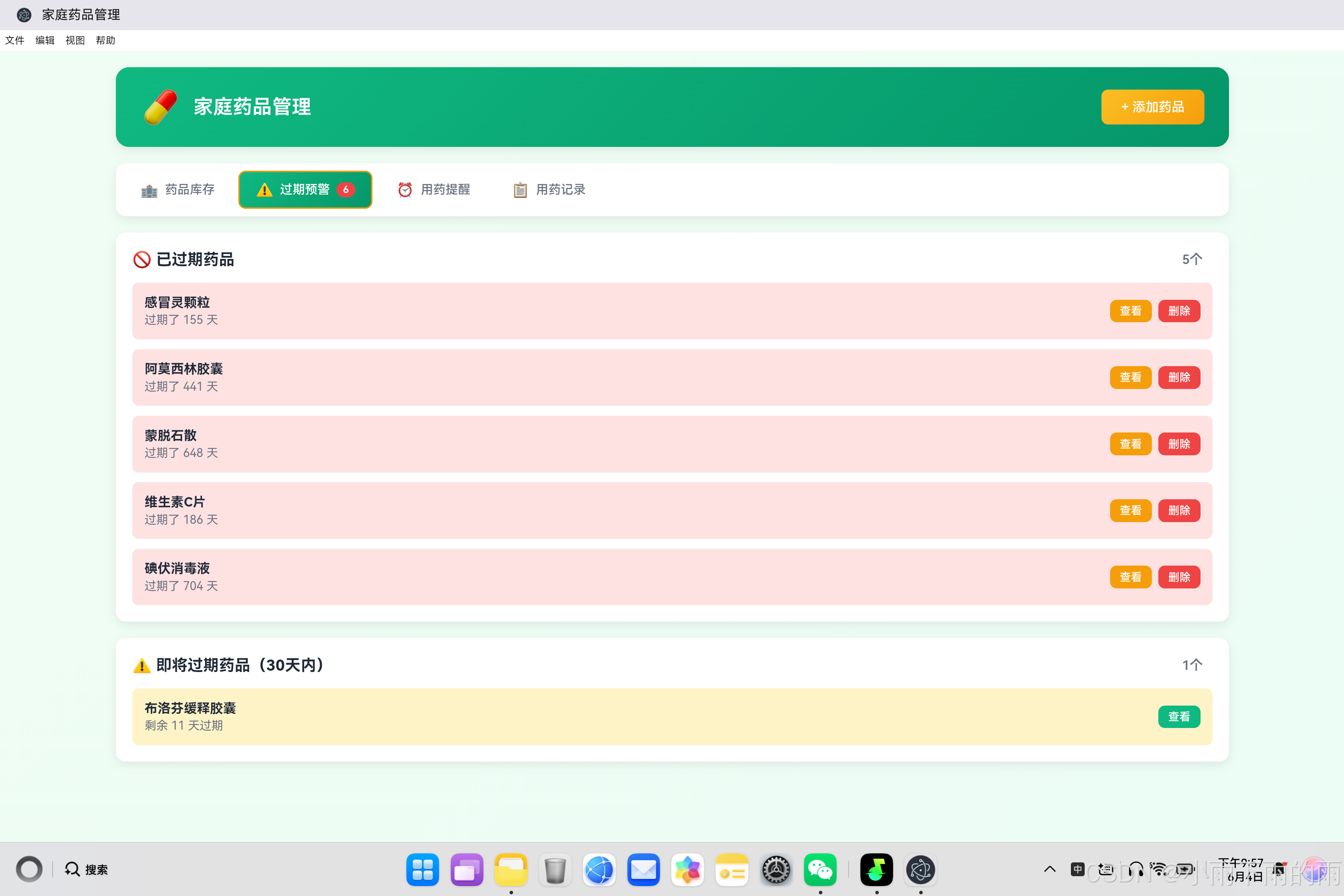
一、引言
在家庭药品管理系统中,智能过期预警技术是整个应用的核心功能之一。它不仅是用户体验的关键,更是保障用药安全的重要手段。本文将深入剖析这一核心技术的实现原理、算法设计和工程实践。
二、过期预警系统架构设计
2.1 系统架构图
┌─────────────────────────────────────────────────────────────┐
│                    智能过期预警系统架构                      │
├─────────────────────────────────────────────────────────────┤
│                                                             │
│   ┌──────────────┐    ┌──────────────┐    ┌──────────────┐ │
│   │  药品数据层  │───▶│  计算引擎层  │───▶│  展示层      │ │
│   │  (Medicines)│    │  (Calculator)│    │  (UI Display)│ │
│   └──────────────┘    └──────────────┘    └──────────────┘ │
│         │                    │                    │         │
│         ▼                    ▼                    ▼         │
│   ┌──────────────┐    ┌──────────────┐    ┌──────────────┐ │
│   │ expiryDate   │    │ 剩余天数计算 │    │ 状态徽章     │ │
│   │ quantity     │    │ 状态判断     │    │ 颜色编码     │ │
│   │ category     │    │ 预警级别     │    │ 列表渲染     │ │
│   └──────────────┘    └──────────────┘    └──────────────┘ │
│                                                             │
└─────────────────────────────────────────────────────────────┘
2.2 核心组件职责
| 组件 | 职责 | 输入 | 输出 |
|---|---|---|---|
| 数据层 | 存储药品信息 | - | 药品对象数组 |
| 计算引擎 | 过期状态计算 | 药品对象 | 状态标识 |
| 展示层 | 状态可视化 | 状态标识 | 颜色、徽章、提示 |
三、日期计算核心算法
3.1 算法原理
过期预警的核心是计算药品距离过期的剩余天数。这涉及到日期时间的精确计算:
function getDaysRemaining(med) {
    // 边界检查:无有效期则返回null
    if (!med.expiryDate) return null;

    // 创建日期对象
    const expiry = new Date(med.expiryDate);
    const today = new Date();

    // 将时间设置为午夜,确保日期比较的准确性
    today.setHours(0, 0, 0, 0);
    expiry.setHours(0, 0, 0, 0);

    // 计算时间差(毫秒)
    const diffTime = expiry - today;

    // 转换为天数,向上取整
    const diffDays = Math.ceil(diffTime / (1000 * 60 * 60 * 24));

    return diffDays;
}
3.2 关键技术点
时间戳计算原理:
1秒 = 1000毫秒
1分钟 = 60秒 = 60000毫秒
1小时 = 60分钟 = 3600000毫秒
1天 = 24小时 = 86400000毫秒

天数计算公式:
diffDays = Math.ceil((expiryTime - todayTime) / 86400000)
时间归一化处理:
today.setHours(0, 0, 0, 0);
expiry.setHours(0, 0, 0, 0);
这一步至关重要,确保比较的是完整的日期,不受当天时间影响。
3.3 边界情况处理
| 场景 | 输入 | 预期输出 |
|---|---|---|
| 无有效期 | expiryDate = null | null |
| 今天过期 | expiryDate = 今天 | 0 |
| 已过期1天 | expiryDate = 昨天 | -1 |
| 明天过期 | expiryDate = 明天 | 1 |
| 正好30天 | expiryDate = 30天后 | 30 |
四、状态判断机制
4.1 状态分类体系
function getMedicineStatus(med) {
    const days = getDaysRemaining(med);

    // 无有效期视为正常
    if (days === null) return 'normal';

    // 已过期
    if (days <= 0) return 'expired';

    // 即将过期(30天内)
    if (days <= 30) return 'near-expiry';

    // 正常状态
    return 'normal';
}
4.2 状态转换逻辑
                    ┌─────────────────────────────────────┐
                    │          状态转换图                   │
                    └─────────────────────────────────────┘
                                    │
         ┌───────────────────────────┼───────────────────────────┐
         ▼                           ▼                           ▼
    ┌──────────┐              ┌──────────────┐              ┌──────────┐
    │  normal  │────────────▶│near-expiry  │────────────▶│ expired  │
    │  (正常)  │   ≤30天      │  (即将过期)  │    ≤0天      │  (已过期)│
    └──────────┘              └──────────────┘              └──────────┘
         │                           │                           │
         │ 更换药品                   │ 更换药品                   │ 删除/更换
         ▼                           ▼                           ▼
    ┌─────────────────────────────────────────────────────────────┐
    │                      处理建议                               │
    └─────────────────────────────────────────────────────────────┘
4.3 预警级别定义
| 状态 | 剩余天数 | 预警级别 | 视觉标识 |
|---|---|---|---|
| normal | >30天 | 无 | 绿色 |
| near-expiry | 1-30天 | 警告 | 橙色 |
| expired | ≤0天 | 危险 | 红色 |
五、动态UI渲染技术
5.1 状态驱动的样式变化
function renderMedicineCard(med) {
    const status = getMedicineStatus(med);
    const daysRemaining = getDaysRemaining(med);

    // 状态样式映射
    const statusConfig = {
        'normal': {
            badgeClass: 'status-badge normal',
            text: '正常',
            color: '#10b981'
        },
        'near-expiry': {
            badgeClass: 'status-badge warning',
            text: '即将过期',
            color: '#f59e0b'
        },
        'expired': {
            badgeClass: 'status-badge danger',
            text: '已过期',
            color: '#ef4444'
        }
    };

    const config = statusConfig[status];

    // 生成过期时间文本
    let expiryText = `有效期至 ${formatDate(med.expiryDate)}`;
    if (daysRemaining !== null) {
        if (daysRemaining <= 0) {
            expiryText = `已过期 ${Math.abs(daysRemaining)} 天`;
        } else if (daysRemaining <= 30) {
            expiryText = `剩余 ${daysRemaining} 天过期`;
        }
    }

    return `
        <div class="medicine-card ${status}">
            <div class="medicine-name">${med.name}</div>
            <div class="medicine-info" style="color: ${config.color};">${expiryText}</div>
            <span class="${config.badgeClass}">${config.text}</span>
        </div>
    `;
}
5.2 颜色编码系统
.status-badge {
    padding: 4px 12px;
    border-radius: 20px;
    font-size: 0.8rem;
    font-weight: 500;
}

.status-badge.normal {
    background: #d1fae5;
    color: #10b981;
}

.status-badge.warning {
    background: #fef3c7;
    color: #f59e0b;
}

.status-badge.danger {
    background: #fee2e2;
    color: #ef4444;
}
5.3 实时更新策略
// 定期检查状态变化
setInterval(() => {
    renderMedicineGrid();
    renderWarnings();
    updateWarningBadge();
}, 60000); // 每分钟更新一次

// 数据变化时立即更新
function onDataChange() {
    saveData();
    renderMedicineGrid();
    renderWarnings();
    updateWarningBadge();
}
六、预警徽章系统
6.1 实时计数机制
function updateWarningBadge() {
    let count = 0;

    medicines.forEach(med => {
        const status = getMedicineStatus(med);
        if (status === 'near-expiry' || status === 'expired') {
            count++;
        }
    });

    const badge = document.getElementById('warningBadge');
    badge.textContent = count;
    badge.style.display = count > 0 ? 'inline-block' : 'none';
}
6.2 徽章显示逻辑
┌─────────────────────────────────────────────────────┐
│                  徽章显示逻辑                        │
├─────────────────────────────────────────────────────┤
│                                                     │
│  count = 0  ─────▶  display: none                   │
│  count > 0  ─────▶  display: inline-block          │
│                      textContent = count            │
│                                                     │
└─────────────────────────────────────────────────────┘
七、性能优化策略
7.1 计算结果缓存
// 使用WeakMap缓存计算结果
const statusCache = new WeakMap();

function getMedicineStatusCached(med) {
    // 检查缓存
    if (statusCache.has(med)) {
        return statusCache.get(med);
    }

    // 计算并缓存
    const status = getMedicineStatus(med);
    statusCache.set(med, status);

    return status;
}

// 数据更新时清除缓存
function clearStatusCache() {
    statusCache.clear();
}
7.2 批量DOM更新
function renderMedicineGrid() {
    const grid = document.getElementById('medicineGrid');
    const filtered = filterMedicines();

    // 使用DocumentFragment减少重排
    const fragment = document.createDocumentFragment();

    filtered.forEach(med => {
        const card = createMedicineCard(med);
        fragment.appendChild(card);
    });

    // 一次性更新DOM
    grid.innerHTML = '';
    grid.appendChild(fragment);
}
7.3 虚拟滚动优化(大数据量场景)
function initVirtualScroll() {
    const container = document.getElementById('medicineGrid');
    const itemHeight = 200; // 预估每个卡片高度

    container.addEventListener('scroll', () => {
        const scrollTop = container.scrollTop;
        const visibleStart = Math.floor(scrollTop / itemHeight);
        const visibleEnd = visibleStart + Math.ceil(container.clientHeight / itemHeight) + 1;

        // 只渲染可见区域的卡片
        renderVisibleItems(visibleStart, visibleEnd);
    });
}
八、完整实现示例
8.1 可运行的预警组件
<!DOCTYPE html>
<html lang="zh-CN">
<head>
    <meta charset="UTF-8">
    <meta name="viewport" content="width=device-width, initial-scale=1.0">
    <title>药品过期预警组件</title>
    <style>
        .medicine-card {
            padding: 15px;
            border-radius: 8px;
            margin-bottom: 10px;
            border-left: 4px solid;
        }
        .card-normal { border-color: #10b981; background: #f0fdf4; }
        .card-warning { border-color: #f59e0b; background: #fffbeb; }
        .card-danger { border-color: #ef4444; background: #fef2f2; }
        .status-badge {
            display: inline-block;
            padding: 4px 10px;
            border-radius: 15px;
            font-size: 0.8rem;
            margin-top: 10px;
        }
        .badge-normal { background: #d1fae5; color: #10b981; }
        .badge-warning { background: #fef3c7; color: #f59e0b; }
        .badge-danger { background: #fee2e2; color: #ef4444; }
    </style>
</head>
<body>
    <div id="medicineList"></div>

    <script>
        // 示例数据
        const medicines = [
            { id: 1, name: '感冒灵颗粒', expiryDate: '2025-12-31' },
            { id: 2, name: '布洛芬胶囊', expiryDate: '2024-08-15' },
            { id: 3, name: '阿莫西林', expiryDate: '2024-06-01' },
            { id: 4, name: '维生素C', expiryDate: '2026-01-15' }
        ];

        // 计算剩余天数
        function getDaysRemaining(expiryDate) {
            if (!expiryDate) return null;
            const expiry = new Date(expiryDate);
            const today = new Date();
            today.setHours(0, 0, 0, 0);
            expiry.setHours(0, 0, 0, 0);
            const diffTime = expiry - today;
            return Math.ceil(diffTime / (1000 * 60 * 60 * 24));
        }

        // 获取状态
        function getStatus(med) {
            const days = getDaysRemaining(med.expiryDate);
            if (days === null) return 'normal';
            if (days <= 0) return 'danger';
            if (days <= 30) return 'warning';
            return 'normal';
        }

        // 渲染列表
        function renderList() {
            const container = document.getElementById('medicineList');
            container.innerHTML = medicines.map(med => {
                const status = getStatus(med);
                const days = getDaysRemaining(med.expiryDate);
                return `
                    <div class="medicine-card card-${status}">
                        <strong>${med.name}</strong>
                        <div>有效期: ${med.expiryDate}</div>
                        <div>剩余天数: ${days !== null ? days + '天' : '未知'}</div>
                        <span class="status-badge badge-${status}">
                            ${status === 'normal' ? '正常' : status === 'warning' ? '即将过期' : '已过期'}
                        </span>
                    </div>
                `;
            }).join('');
        }

        // 初始化
        renderList();
    </script>
</body>
</html>
九、技术价值与业务意义
9.1 技术价值
| 维度 | 价值说明 |
|---|---|
| 用户体验 | 提前预警,避免使用过期药品 |
| 用药安全 | 防止因药品过期导致的健康风险 |
| 成本节约 | 及时处理过期药品,避免浪费 |
| 管理效率 | 自动提醒,减少人工检查工作量 |
9.2 业务意义
智能过期预警的业务价值:
┌─────────────────────────────────────────────────────┐
│                                                     │
│  用户视角:                                          │
│  ├─ 收到过期提醒 → 及时处理 → 保障用药安全         │
│  ├─ 收到即将过期提醒 → 优先使用 → 避免浪费         │
│  │                                                   │
│  家庭视角:                                          │
│  ├─ 系统化管理 → 减少药品浪费                       │
│  ├─ 安全用药 → 保护家庭成员健康                     │
│  │                                                   │
│  技术视角:                                          │
│  ├─ 自动化检测 → 提高管理效率                       │
│  └─ 智能化提醒 → 提升用户体验                       │
│                                                     │
└─────────────────────────────────────────────────────┘
十、扩展与未来改进
10.1 功能扩展方向
- 自定义预警阈值:允许用户设置提醒天数
- 多维度预警:结合库存数量、使用频率等因素
- 智能推荐:根据过期时间推荐优先使用的药品
- 批量处理:支持批量删除、批量更新有效期
10.2 技术改进方向
- 算法优化:使用更高效的日期计算方法
- 实时同步:与系统时间同步更新
- 通知推送:系统级通知提醒
- 数据可视化:过期趋势图表展示
十一、总结
智能过期预警技术是家庭药品管理系统的核心竞争力之一。通过精确的日期计算、智能的状态判断和动态的UI渲染,为用户提供了安全、高效的药品管理体验。
本文详细阐述了:
- 核心算法:日期计算和状态判断的实现原理
- UI渲染:状态驱动的样式变化和实时更新
- 性能优化:缓存机制和批量更新策略
- 完整示例:可运行的预警组件代码
这些技术不仅适用于药品管理领域,还可以推广到食品管理、证件管理、设备维护等需要有效期管理的场景,具有广泛的应用价值。
通过掌握这些技术,开发者可以构建更加智能、高效的管理类应用,为用户提供更好的使用体验。

作为“人工智能6S店”的官方数字引擎,为AI开发者与企业提供一个覆盖软硬件全栈、一站式门户。
更多推荐
 0
0 0
0- 0


 已为社区贡献10条内容

所有评论(0)