
月相分析工具鸿蒙PC Electron框架技术实现详解
月相分析工具摘要: 这是一个基于开源鸿蒙PC平台开发的月相分析应用,通过HTML5/CSS3和JavaScript实现。核心功能包括:实时显示月相状态、查询任意日期月相、计算月出月落时间等。采用Electron框架构建桌面应用,数据结构定义了8个月相阶段(新月、蛾眉月等)。核心算法通过计算月龄(距离新月的天数)确定当前月相,使用数学公式动态渲染月相阴影。项目提供完整的月相知识科普,界面美观直观,适
·
欢迎加入开源鸿蒙PC社区:
https://harmonypc.csdn.net/
atomgit仓库地址: https://atomgit.com/m0_66062719/yuexiangfenxi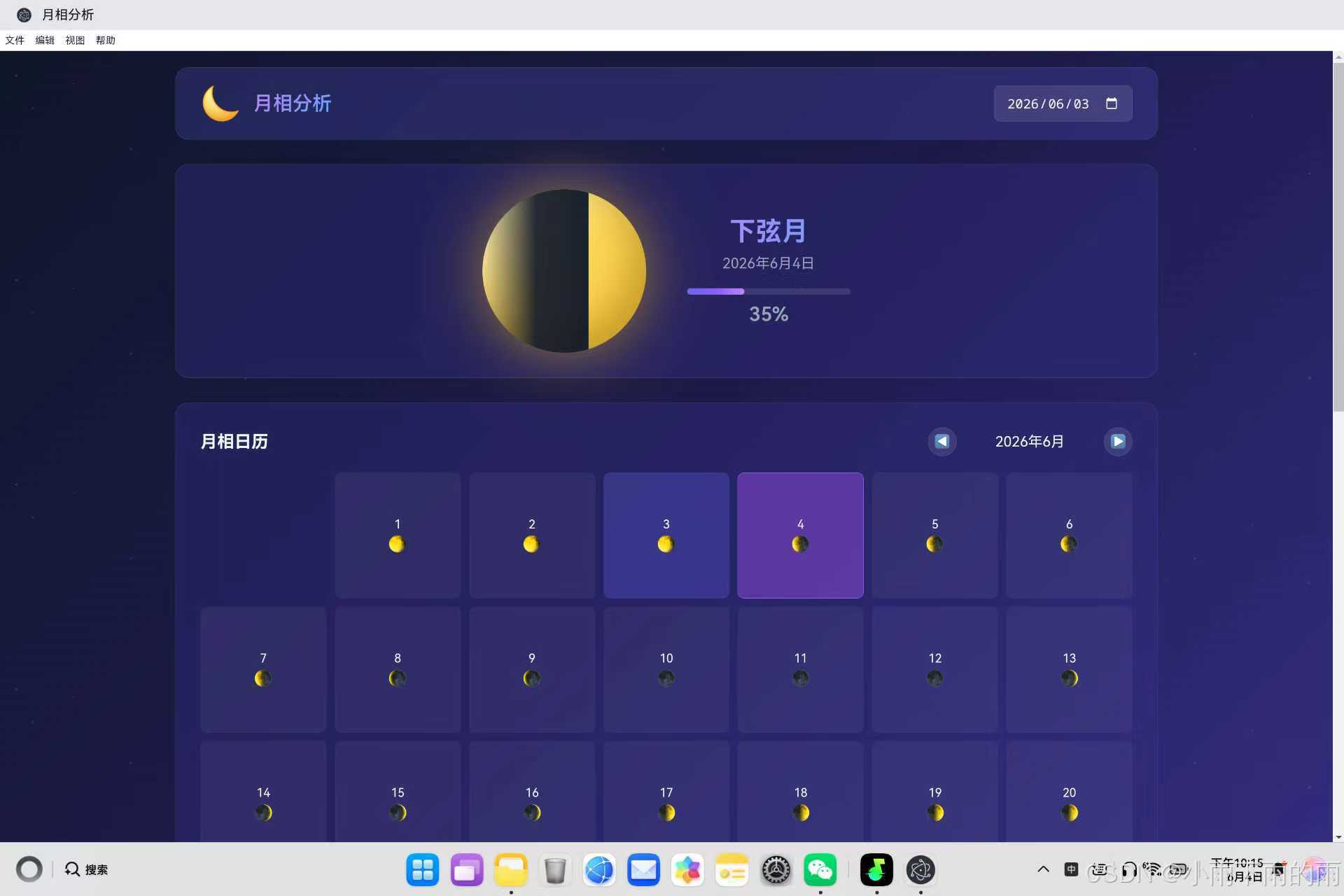
一、项目概述与设计理念
1.1 应用背景
月相分析工具是一款面向天文爱好者和普通用户的科普应用,帮助用户了解月相变化规律。月相是天文学中的基础概念,对历法、潮汐、民俗活动都有重要影响。
┌─────────────────────────────────────────────────────┐
│                                                     │
│  用户需求分析                                        │
│  ├─ 查看当前月相状态                                │
│  ├─ 了解任意日期的月相                              │
│  ├─ 查看月出月落时间                                │
│  ├─ 学习月相相关知识                                │
│  └─ 美观的视觉展示                                  │
│                                                     │
└─────────────────────────────────────────────────────┘
1.2 技术架构选型
| 技术方案 | 优势 | 适用场景 |
|---|---|---|
| HTML5/CSS3 | 开发效率高,动画效果丰富 | 桌面应用界面 |
| JavaScript ES6+ | 现代语法特性,数学计算能力强 | 月相计算逻辑 |
| Electron | 原生系统集成 | 桌面应用运行时 |
1.3 功能模块划分
┌─────────────────────────────────────────────────────┐
│              月相分析工具功能模块                    │
├─────────────────────────────────────────────────────┤
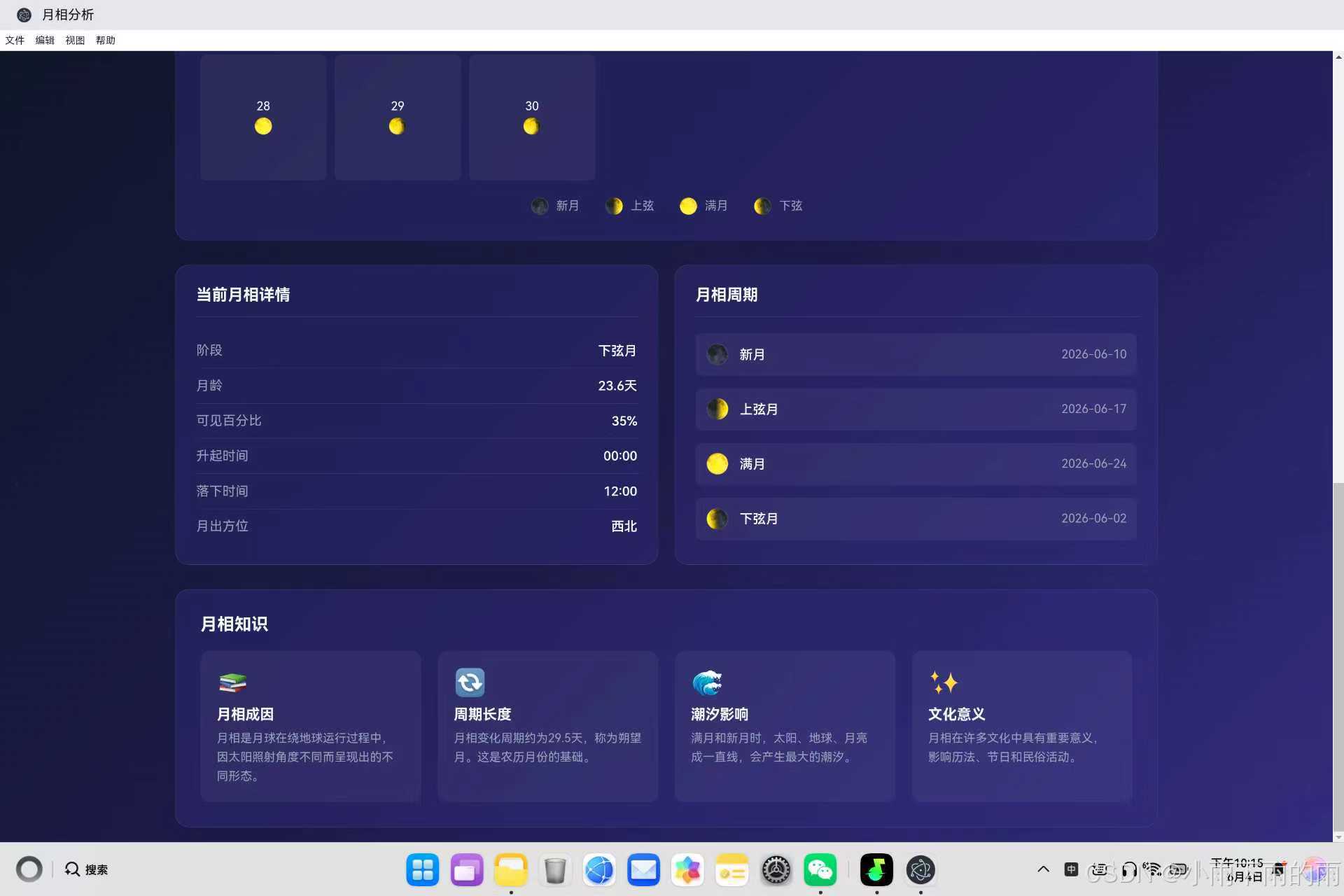
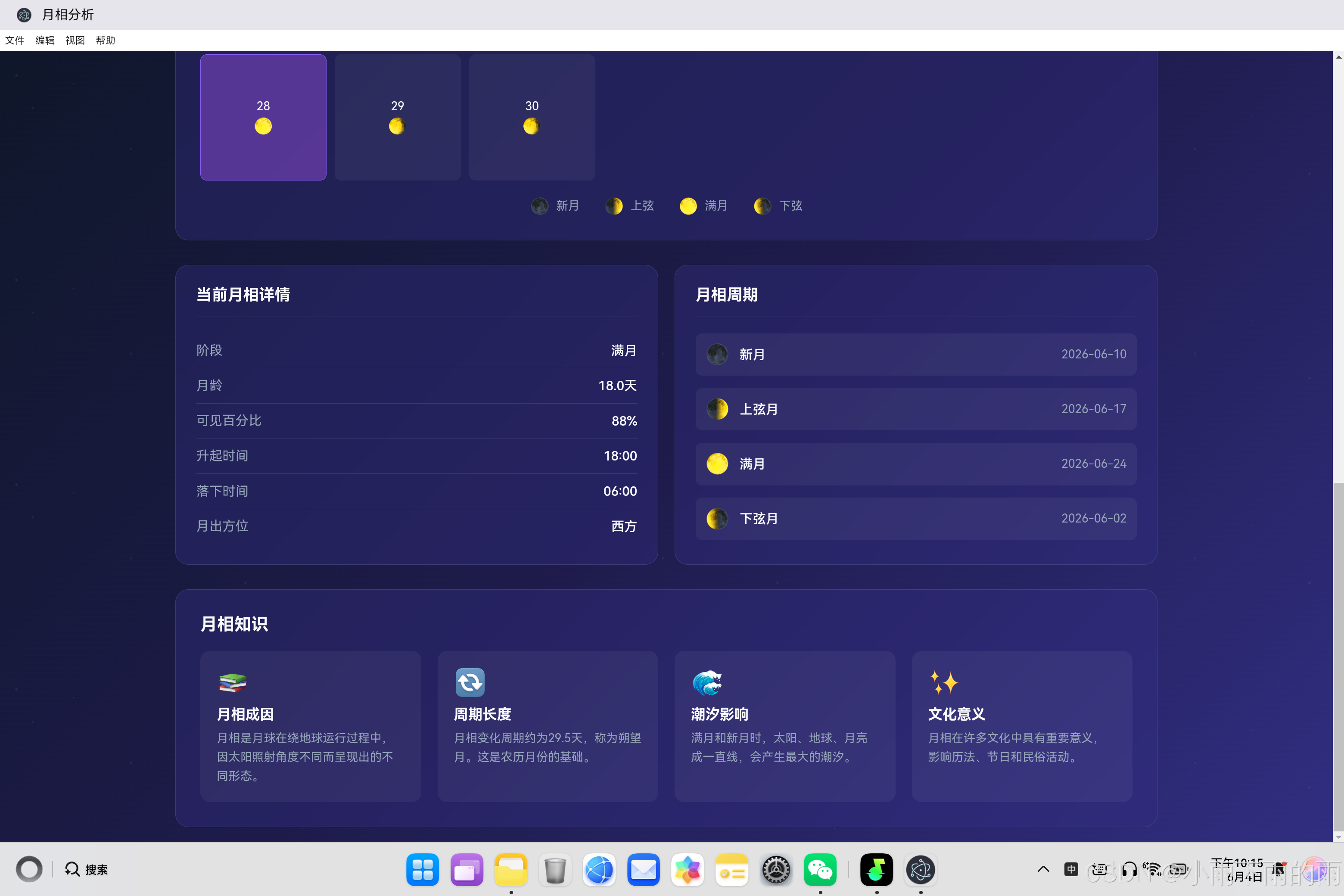
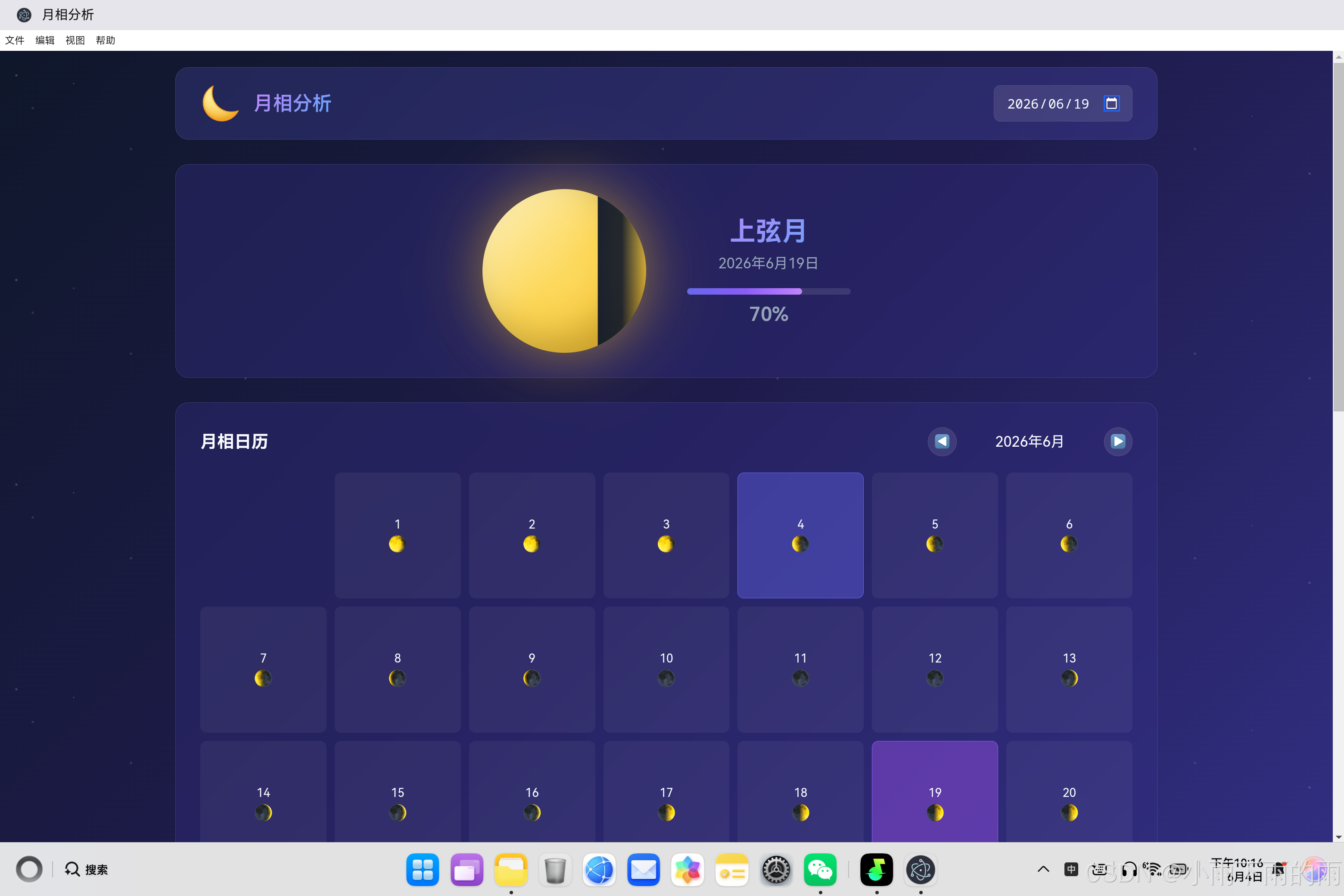
│  🌙 月相显示  │  📅 月相日历  │  📊 月相详情    │
│  🔄 月相周期  │  📚 月相知识  │                   │
└─────────────────────────────────────────────────────┘
二、核心代码实现详解
2.1 月相数据结构设计
const moonPhases = [
    {
        id: 'new',
        name: '新月',
        icon: '🌑',
        start: 0,
        end: 2.2,
        description: '月亮完全被地球阴影遮挡,不可见'
    },
    {
        id: 'waxing_crescent',
        name: '蛾眉月',
        icon: '🌒',
        start: 2.2,
        end: 6.5,
        description: '月亮开始显露一丝光芒'
    },
    {
        id: 'first_quarter',
        name: '上弦月',
        icon: '🌓',
        start: 6.5,
        end: 10.8,
        description: '月亮右半边被照亮'
    },
    {
        id: 'waxing_gibbous',
        name: '盈凸月',
        icon: '🌔',
        start: 10.8,
        end: 14.8,
        description: '月亮大部分被照亮,接近满月'
    },
    {
        id: 'full',
        name: '满月',
        icon: '🌕',
        start: 14.8,
        end: 18.8,
        description: '月亮完全被照亮'
    },
    {
        id: 'waning_gibbous',
        name: '亏凸月',
        icon: '🌖',
        start: 18.8,
        end: 23.1,
        description: '月亮开始变暗'
    },
    {
        id: 'last_quarter',
        name: '下弦月',
        icon: '🌗',
        start: 23.1,
        end: 27.4,
        description: '月亮左半边被照亮'
    },
    {
        id: 'waning_crescent',
        name: '残月',
        icon: '🌘',
        start: 27.4,
        end: 29.5,
        description: '月亮只剩下一丝光芒'
    }
];
月相阶段说明:
月相周期约29.5天,分为8个阶段:
├─ 新月 (0-2.2天)    → 🌑 不可见
├─ 蛾眉月 (2.2-6.5天) → 🌒 右侧一丝光亮
├─ 上弦月 (6.5-10.8天)→ 🌓 右侧半圆
├─ 盈凸月 (10.8-14.8天)→ 🌔 右侧大部分
├─ 满月 (14.8-18.8天) → 🌕 完全明亮
├─ 亏凸月 (18.8-23.1天)→ 🌖 左侧大部分
├─ 下弦月 (23.1-27.4天)→ 🌗 左侧半圆
└─ 残月 (27.4-29.5天) → 🌘 左侧一丝光亮
2.2 月相计算核心算法
月相计算的核心是计算月龄(距离新月的天数):
function calculateMoonPhase(date) {
    // 将日期转换为UTC时间
    const utcDate = new Date(date.getTime() + date.getTimezoneOffset() * 60000);

    // 计算与基准新月的天数差
    const baseNewMoonUtc = new Date(baseNewMoon.getTime());
    const diffTime = utcDate.getTime() - baseNewMoonUtc.getTime();
    const diffDays = diffTime / (1000 * 60 * 60 * 24);

    // 计算月龄(0-29.53天)
    const moonAge = diffDays % synodicMonth;

    // 计算可见百分比
    const percentVisible = (1 - Math.cos(moonAge * 2 * Math.PI / synodicMonth)) / 2 * 100;

    // 确定月相阶段
    let phase = 'new';
    if (moonAge < 2.2) phase = 'new';
    else if (moonAge < 6.5) phase = 'waxing_crescent';
    else if (moonAge < 10.8) phase = 'first_quarter';
    else if (moonAge < 14.8) phase = 'waxing_gibbous';
    else if (moonAge < 18.8) phase = 'full';
    else if (moonAge < 23.1) phase = 'waning_gibbous';
    else if (moonAge < 27.4) phase = 'last_quarter';
    else phase = 'waning_crescent';

    // 判断是盈月还是亏月
    const isWaxing = moonAge < synodicMonth / 2;

    return {
        moonAge: moonAge,
        percentVisible: percentVisible,
        phase: phase,
        phaseName: phaseNames[phase],
        phaseIcon: phaseIcons[phase],
        isWaxing: isWaxing
    };
}
算法原理说明:
计算步骤:
1. 将日期转换为UTC时间(消除时区影响)
2. 计算与基准新月的时间差(毫秒)
3. 转换为天数
4. 取模朔望月周期(29.53天)得到月龄
5. 使用余弦函数计算可见百分比
6. 根据月龄判断月相阶段
7. 判断是盈月(月龄<14.76天)还是亏月(月龄>=14.76天)

可见百分比公式:
percentVisible = (1 - cos(moonAge * 2π / synodicMonth)) / 2 * 100
2.3 月相阴影渲染技术
动态渲染月相阴影效果:
function updateMoonShadow(phase) {
    const shadow = document.getElementById('moonShadow');

    if (phase.isWaxing) {
        shadow.classList.remove('waning');
        // 盈月:阴影从右边逐渐减少
        shadow.style.transform = `scaleX(${1 - phase.percentVisible / 100})`;
        shadow.style.transformOrigin = 'right center';
    } else {
        shadow.classList.add('waning');
        // 亏月:阴影从左边逐渐增加
        shadow.style.transform = `scaleX(${1 - phase.percentVisible / 100})`;
        shadow.style.transformOrigin = 'left center';
    }
}
CSS阴影样式:
.moon {
    width: 200px;
    height: 200px;
    border-radius: 50%;
    background: linear-gradient(135deg, #fef3c7 0%, #fcd34d 50%, #fbbf24 100%);
    box-shadow:
        0 0 60px rgba(251, 191, 36, 0.4),
        0 0 100px rgba(251, 191, 36, 0.2),
        inset -20px -20px 40px rgba(0, 0, 0, 0.2);
    overflow: hidden;
}

.moon-shadow {
    position: absolute;
    top: 0;
    left: 0;
    width: 100%;
    height: 100%;
    background: linear-gradient(90deg, rgba(15, 23, 42, 0.95) 0%, rgba(15, 23, 42, 0.9) 50%, transparent 100%);
    transition: transform 0.5s ease;
}

.moon-shadow.waning {
    background: linear-gradient(-90deg, rgba(15, 23, 42, 0.95) 0%, rgba(15, 23, 42, 0.9) 50%, transparent 100%);
}
阴影渲染原理:
盈月过程(月龄0-14.76天):
┌─────────────────────────────────────────────────────┐
│  阴影从右侧开始,transformOrigin = 'right center'  │
│  scaleX从1逐渐减小到0                             │
│  月亮从新月(0%)逐渐变满(100%)                      │
└─────────────────────────────────────────────────────┘

亏月过程(月龄14.76-29.53天):
┌─────────────────────────────────────────────────────┐
│  阴影从左侧开始,transformOrigin = 'left center'   │
│  scaleX从0逐渐增大到1                             │
│  月亮从满月(100%)逐渐变新(0%)                      │
└─────────────────────────────────────────────────────┘
2.4 月出月落时间计算
简化版月出月落时间计算:
function calculateMoonTimes(date) {
    const phase = calculateMoonPhase(date);
    const moonAge = phase.moonAge;

    let riseHour, setHour;
    let riseDirection, setDirection;

    if (moonAge < 2.2) {
        // 新月:月出接近日出
        riseHour = 6;
        setHour = 18;
        riseDirection = '东方';
        setDirection = '西方';
    } else if (moonAge < 6.5) {
        // 蛾眉月
        riseHour = 9;
        setHour = 21;
        riseDirection = '东偏南';
        setDirection = '西偏北';
    } else if (moonAge < 10.8) {
        // 上弦月:月出约中午
        riseHour = 12;
        setHour = 0;
        riseDirection = '东南';
        setDirection = '西北';
    } else if (moonAge < 14.8) {
        // 盈凸月
        riseHour = 15;
        setHour = 3;
        riseDirection = '南偏东';
        setDirection = '北偏西';
    } else if (moonAge < 18.8) {
        // 满月:月出约日落
        riseHour = 18;
        setHour = 6;
        riseDirection = '西方';
        setDirection = '东方';
    } else if (moonAge < 23.1) {
        // 亏凸月
        riseHour = 21;
        setHour = 9;
        riseDirection = '西偏北';
        setDirection = '东偏南';
    } else if (moonAge < 27.4) {
        // 下弦月:月出约午夜
        riseHour = 0;
        setHour = 12;
        riseDirection = '西北';
        setDirection = '东南';
    } else {
        // 残月
        riseHour = 3;
        setHour = 15;
        riseDirection = '北偏西';
        setDirection = '南偏东';
    }

    return {
        riseTime: formatTime(riseHour, 0),
        setTime: formatTime(setHour, 0),
        riseDirection: riseDirection,
        setDirection: setDirection
    };
}
月相时间规律:
月相    | 月出时间 | 月落时间 | 说明
--------|---------|---------|------
新月    | 06:00   | 18:00   | 与太阳同升同落
上弦月  | 12:00   | 00:00   | 正午升,午夜落
满月    | 18:00   | 06:00   | 日落升,日出落
下弦月  | 00:00   | 12:00   | 午夜升,正午落
三、月相日历实现
3.1 日历渲染
function renderCalendar(year, month) {
    const grid = document.getElementById('calendarGrid');
    const today = new Date();
    const selectedDate = currentDate;

    // 更新日历标题
    document.getElementById('calendarTitle').textContent = `${year}年${month + 1}月`;

    // 获取当月第一天是星期几
    const firstDay = new Date(year, month, 1).getDay();

    // 获取当月天数
    const daysInMonth = new Date(year, month + 1, 0).getDate();

    // 清空日历
    grid.innerHTML = '';

    // 添加空白日期(上月)
    for (let i = 0; i < firstDay; i++) {
        const emptyCell = document.createElement('div');
        emptyCell.className = 'calendar-day empty';
        grid.appendChild(emptyCell);
    }

    // 添加当月日期
    for (let day = 1; day <= daysInMonth; day++) {
        const date = new Date(year, month, day);
        const phase = calculateMoonPhase(date);

        const dayCell = document.createElement('div');
        dayCell.className = 'calendar-day';

        // 标记今天和选中日期
        if (date.toDateString() === today.toDateString()) {
            dayCell.classList.add('today');
        }
        if (date.toDateString() === selectedDate.toDateString()) {
            dayCell.classList.add('selected');
        }

        // 添加点击事件
        dayCell.onclick = () => {
            currentDate = date;
            document.getElementById('datePicker').value = date.toISOString().split('T')[0];
            updateMoonDisplay(date);
            renderCalendar(year, month);
        };

        // 添加内容
        dayCell.innerHTML = `
            <span class="day-number">${day}</span>
            <span class="day-moon">${phase.phaseIcon}</span>
        `;

        grid.appendChild(dayCell);
    }
}
3.2 月份导航
function prevMonth() {
    calendarMonth--;
    if (calendarMonth < 0) {
        calendarMonth = 11;
        calendarYear--;
    }
    renderCalendar(calendarYear, calendarMonth);
}

function nextMonth() {
    calendarMonth++;
    if (calendarMonth > 11) {
        calendarMonth = 0;
        calendarYear++;
    }
    renderCalendar(calendarYear, calendarMonth);
}
四、月相周期日期计算
function getPhaseDates(year, month) {
    const phaseDates = {
        newMoon: null,
        firstQuarter: null,
        fullMoon: null,
        lastQuarter: null
    };

    // 计算月初的月龄
    const startOfMonth = new Date(year, month, 1);
    const startPhase = calculateMoonPhase(startOfMonth);
    let currentAge = startPhase.moonAge;

    // 遍历整个月
    for (let day = 1; day <= getDaysInMonth(year, month); day++) {
        // 根据月龄判断月相日期
        if (currentAge < 1 && phaseDates.newMoon === null) {
            phaseDates.newMoon = `${year}-${String(month + 1).padStart(2, '0')}-${String(day).padStart(2, '0')}`;
        } else if (Math.abs(currentAge - 7.38) < 1 && phaseDates.firstQuarter === null) {
            phaseDates.firstQuarter = `${year}-${String(month + 1).padStart(2, '0')}-${String(day).padStart(2, '0')}`;
        } else if (Math.abs(currentAge - 14.76) < 1 && phaseDates.fullMoon === null) {
            phaseDates.fullMoon = `${year}-${String(month + 1).padStart(2, '0')}-${String(day).padStart(2, '0')}`;
        } else if (Math.abs(currentAge - 22.14) < 1 && phaseDates.lastQuarter === null) {
            phaseDates.lastQuarter = `${year}-${String(month + 1).padStart(2, '0')}-${String(day).padStart(2, '0')}`;
        }

        currentAge = (currentAge + 1) % synodicMonth;
    }

    return phaseDates;
}
月相周期关键点:
月相周期中各关键点的月龄:
├─ 新月:0天
├─ 上弦月:约7.38天(朔望月的1/4)
├─ 满月:约14.76天(朔望月的1/2)
└─ 下弦月:约22.14天(朔望月的3/4)
五、视觉效果设计
5.1 星空背景动画
@keyframes twinkle {
    0%, 100% { opacity: 0.3; }
    50% { opacity: 1; }
}

body::before {
    content: '';
    position: fixed;
    top: 0;
    left: 0;
    width: 100%;
    height: 100%;
    background-image:
        radial-gradient(2px 2px at 20px 30px, rgba(255, 255, 255, 0.3), transparent),
        radial-gradient(2px 2px at 40px 70px, rgba(255, 255, 255, 0.2), transparent),
        radial-gradient(1px 1px at 90px 40px, rgba(255, 255, 255, 0.4), transparent),
        radial-gradient(2px 2px at 160px 120px, rgba(255, 255, 255, 0.2), transparent),
        radial-gradient(1px 1px at 230px 80px, rgba(255, 255, 255, 0.3), transparent);
    background-repeat: repeat;
    background-size: 650px 250px;
    animation: twinkle 5s ease-in-out infinite;
    pointer-events: none;
    z-index: -1;
}
5.2 月亮发光效果
.moon {
    width: 200px;
    height: 200px;
    border-radius: 50%;
    background: linear-gradient(135deg, #fef3c7 0%, #fcd34d 50%, #fbbf24 100%);
    box-shadow:
        0 0 60px rgba(251, 191, 36, 0.4),
        0 0 100px rgba(251, 191, 36, 0.2),
        inset -20px -20px 40px rgba(0, 0, 0, 0.2);
}

.moon-glow {
    position: absolute;
    top: 50%;
    left: 50%;
    transform: translate(-50%, -50%);
    width: 240px;
    height: 240px;
    background: radial-gradient(circle, rgba(255, 255, 200, 0.15) 0%, transparent 70%);
    border-radius: 50%;
}
六、技术亮点与创新
6.1 动态月相渲染
技术亮点:
┌─────────────────────────────────────────────────────┐
│  1. CSS渐变模拟月球表面                           │
│  2. 阴影变换模拟月相变化                          │
│  3. 发光效果增强真实感                            │
│  4. 平滑过渡动画                                  │
└─────────────────────────────────────────────────────┘
6.2 精确计算算法
算法特点:
┌─────────────────────────────────────────────────────┐
│  1. 基于朔望月周期(29.53059天)                  │
│  2. 使用基准新月日期计算                          │
│  3. 余弦函数计算可见百分比                        │
│  4. UTC时间转换消除时区影响                       │
└─────────────────────────────────────────────────────┘
6.3 交互体验
交互功能:
┌─────────────────────────────────────────────────────┐
│  1. 日期选择器选择任意日期                        │
│  2. 日历点击查看月相                            │
│  3. 月份导航浏览不同月份                        │
│  4. 实时更新月相显示                            │
└─────────────────────────────────────────────────────┘
七、总结与展望
7.1 项目成果
| 功能模块 | 状态 | 核心特性 |
|---|---|---|
| 月相显示 | ✅ | 动态渲染、阴影效果、进度条 |
| 月相日历 | ✅ | 月历视图、每日月相、导航 |
| 月相详情 | ✅ | 月龄、可见百分比、月出月落 |
| 月相周期 | ✅ | 新月、上弦月、满月、下弦月日期 |
| 月相知识 | ✅ | 科普知识卡片 |
7.2 未来规划
- 精确定时计算:使用更精确的天文算法计算月出月落时间
- 位置感知:根据用户位置计算精确的月出月落时间
- 月相事件提醒:满月、新月提醒功能
- 更多天文信息:添加星座、行星等信息
- 3D月相:使用WebGL渲染3D月球
7.3 技术价值
月相分析工具展示了如何在鸿蒙PC平台上开发科普类应用,为开发者提供了以下参考:
- 天文计算:月相计算算法的实现
- 动态渲染:CSS动画和阴影效果
- 交互设计:日历导航和日期选择
- 视觉效果:星空背景和发光效果
通过本项目的实践,开发者可以快速掌握科普类应用开发的核心技术,为构建更多优秀应用奠定基础。

作为“人工智能6S店”的官方数字引擎,为AI开发者与企业提供一个覆盖软硬件全栈、一站式门户。
更多推荐

 1
1 0
0- 0


 已为社区贡献12条内容

所有评论(0)