
家庭药品管理系统鸿蒙PC用Electron框架技术实现详解
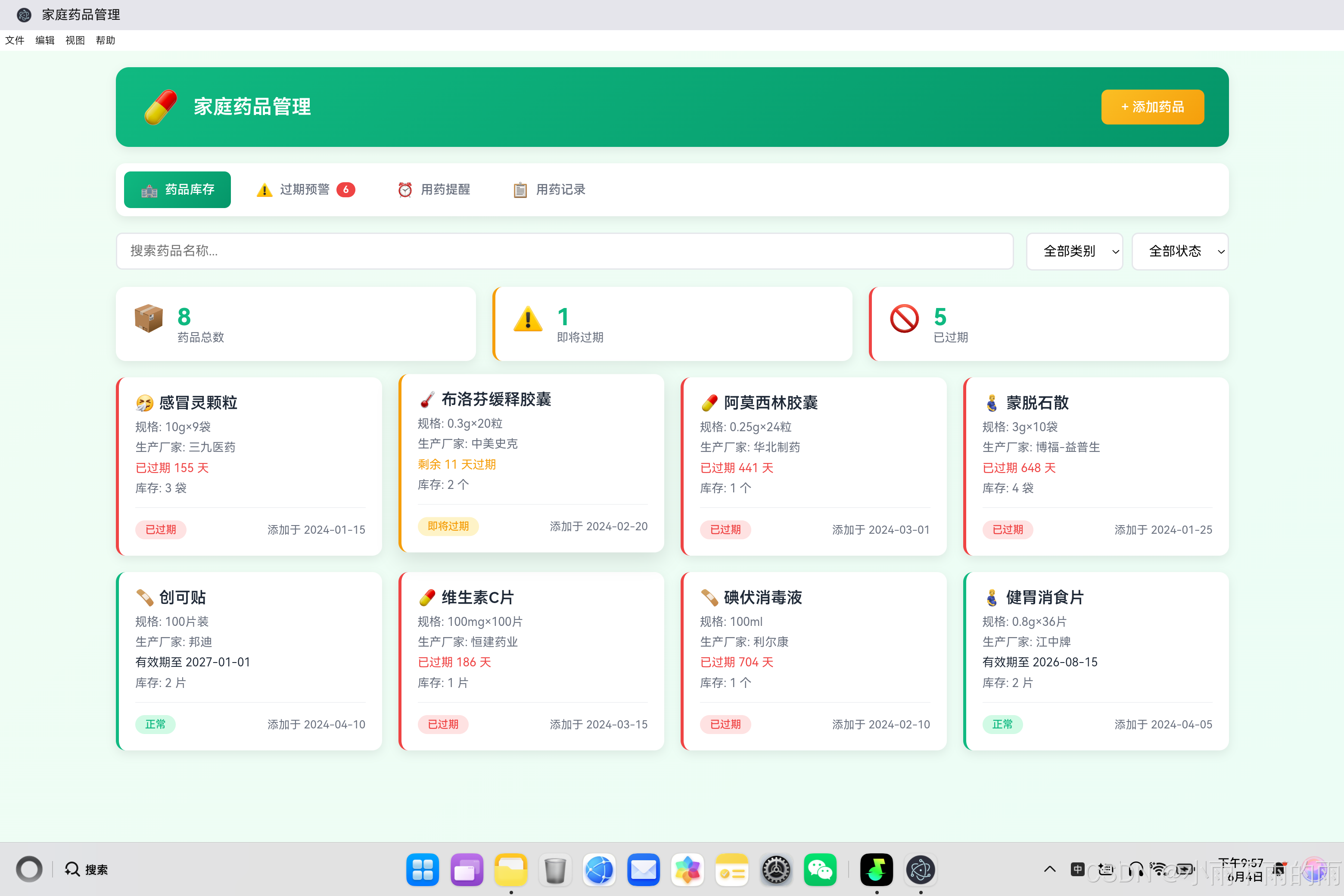
家庭药品管理系统摘要 本项目基于HTML5/CSS3、JavaScript和Electron技术开发,旨在解决家庭药品管理难题。系统核心功能包括:药品库存管理、过期预警、用药提醒及记录等。采用localStorage实现数据持久化,设计了完善的药品数据结构(包含名称、类别、有效期等字段),并通过智能算法自动计算药品状态(正常/即将过期/已过期)。用户界面采用卡片式布局,支持分类筛选和搜索,不同状态
·
欢迎加入开源鸿蒙PC社区:
https://harmonypc.csdn.net/
atomgit仓库地址: https://atomgit.com/m0_66062719/jiatingyaopinguanli
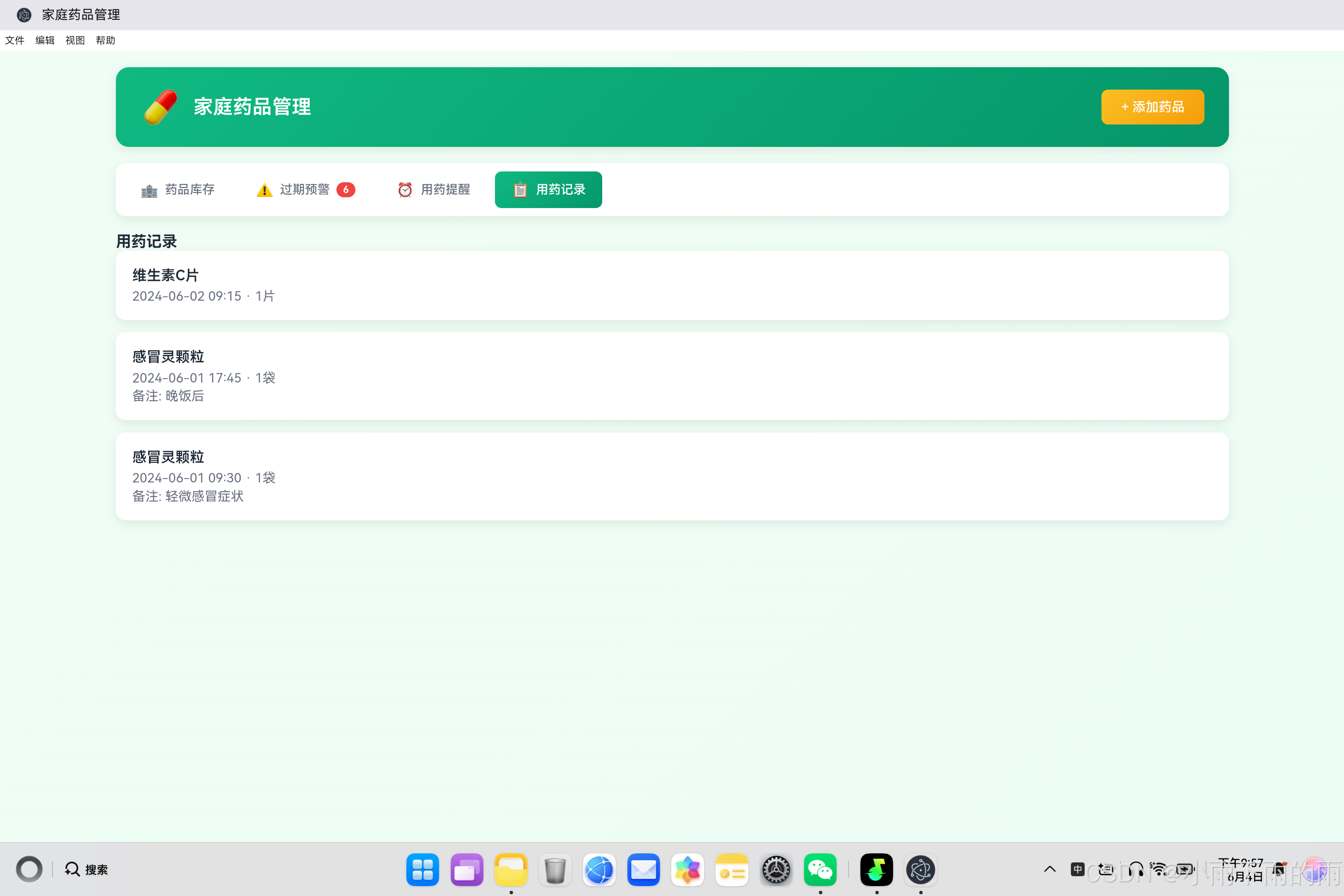
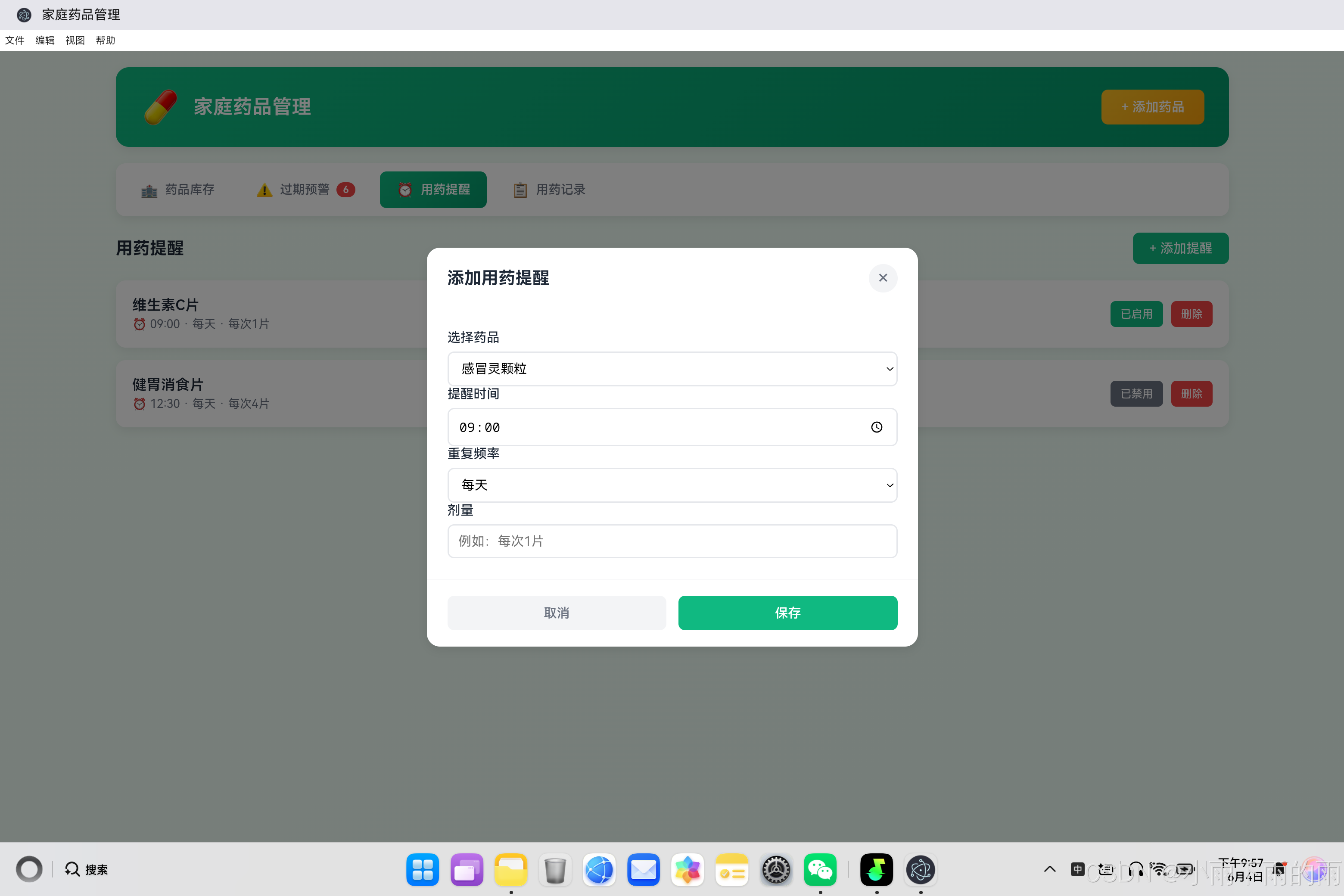
一、项目概述与设计理念
1.1 应用背景
家庭药品管理是每个家庭都需要面对的实际问题。药品过期、用药混乱、重复购买等问题时有发生。一个专业的药品管理应用可以帮助用户:
┌─────────────────────────────────────────────────────┐
│                                                     │
│  需求分析                                          │
│  ├─ 有效管理家庭药品库存                            │
│  ├─ 及时预警即将过期或已过期药品                    │
│  ├─ 设置用药提醒避免忘记                            │
│  ├─ 记录用药历史追踪健康                            │
│  └─ 分类整理便于查找和管理                          │
│                                                     │
└─────────────────────────────────────────────────────┘
1.2 技术架构选型
| 技术方案 | 优势 | 适用场景 |
|---|---|---|
| HTML5/CSS3 | 开发效率高,跨平台能力强 | 桌面应用界面 |
| JavaScript ES6+ | 现代语法特性,异步处理能力强 | 业务逻辑实现 |
| Electron | 原生系统集成,支持系统API | 桌面应用运行时 |
| localStorage | 简单易用,本地存储 | 数据持久化 |
1.3 功能模块划分
┌─────────────────────────────────────────────────────┐
│              家庭药品管理系统功能模块                │
├─────────────────────────────────────────────────────┤
│  🏥 药品库存  │  ⚠️ 过期预警  │  ⏰ 用药提醒  │
│  📋 用药记录  │  💾 数据管理  │               │
└─────────────────────────────────────────────────────┘
二、核心代码实现详解
2.1 药品数据结构设计
药品是应用的核心数据,我们设计了完整的药品数据结构:
const defaultMedicines = [
    {
        id: 1,
        name: "感冒灵颗粒",
        category: "感冒药",
        spec: "10g×9袋",
        manufacturer: "三九医药",
        expiryDate: "2025-12-31",
        quantity: 3,
        use: "用于感冒引起的头痛、发热、鼻塞、流涕、咽痛",
        notes: "饭后服用,一次1袋,一日3次",
        addedDate: "2024-01-15"
    }
];
数据结构说明:
药品对象包含以下字段:
├─ id: 唯一标识符,用于管理和查找
├─ name: 药品名称,用于显示和搜索
├─ category: 药品类别(感冒药、退烧药、消炎药等)
├─ spec: 规格说明
├─ manufacturer: 生产厂家
├─ expiryDate: 有效期(日期格式)
├─ quantity: 库存数量
├─ use: 用途说明
├─ notes: 注意事项
└─ addedDate: 添加日期
2.2 过期状态计算逻辑
智能过期状态计算是应用的核心功能之一:
function getMedicineStatus(med) {
    const days = getDaysRemaining(med);
    if (days === null) return 'normal';

    if (days <= 0) return 'expired';
    if (days <= 30) return 'near-expiry';
    return 'normal';
}

function getDaysRemaining(med) {
    if (!med.expiryDate) return null;

    const expiry = new Date(med.expiryDate);
    const today = new Date();
    const diffTime = expiry - today;
    const diffDays = Math.ceil(diffTime / (1000 * 60 * 60 * 24));

    return diffDays;
}
状态分类逻辑:
剩余天数 → 状态分类:
├─ ≤ 0 天  → expired(已过期)
├─ 1-30天 → near-expiry(即将过期)
└─ > 30天 → normal(正常)
2.3 药品状态展示与渲染
根据不同状态动态渲染药品卡片:
function renderMedicineGrid() {
    const grid = document.getElementById('medicineGrid');
    const searchTerm = document.getElementById('searchInput').value.toLowerCase();
    const categoryFilter = document.getElementById('categoryFilter').value;
    const statusFilter = document.getElementById('statusFilter').value;

    const filtered = medicines.filter(med => {
        const matchesSearch = med.name.toLowerCase().includes(searchTerm);
        const matchesCategory = !categoryFilter || med.category === categoryFilter;

        let matchesStatus = true;
        if (statusFilter) {
            const status = getMedicineStatus(med);
            matchesStatus = status === statusFilter;
        }

        return matchesSearch && matchesCategory && matchesStatus;
    });

    if (filtered.length === 0) {
        grid.innerHTML = `
            <div style="grid-column: 1/-1; text-align: center; padding: 60px 20px; color: var(--text-secondary);">
                <div style="font-size: 3rem; margin-bottom: 20px;">📦</div>
                <p>暂无药品数据</p>
            </div>
        `;
        return;
    }

    grid.innerHTML = filtered.map(med => {
        const status = getMedicineStatus(med);
        const statusText = {
            'normal': '正常',
            'near-expiry': '即将过期',
            'expired': '已过期'
        }[status];

        const statusBadgeClass = {
            'normal': 'normal',
            'near-expiry': 'warning',
            'expired': 'danger'
        }[status];

        const daysRemaining = getDaysRemaining(med);
        let expiryText = `有效期至 ${formatDate(med.expiryDate)}`;
        if (daysRemaining !== null) {
            if (daysRemaining <= 0) {
                expiryText = `已过期 ${Math.abs(daysRemaining)} 天`;
            } else if (daysRemaining <= 30) {
                expiryText = `剩余 ${daysRemaining} 天过期`;
            }
        }

        return `
            <div class="medicine-card ${status}" onclick="showMedicineDetail(${med.id})">
                <div class="medicine-name">
                    ${categoryIcons[med.category] || '💊'} ${med.name}
                </div>
                <div class="medicine-info">
                    ${med.spec ? `规格: ${med.spec}` : ''}
                </div>
                <div class="medicine-info">
                    生产厂家: ${med.manufacturer || '未知'}
                </div>
                <div class="medicine-info" style="color: ${status === 'expired' ? 'var(--danger)' : status === 'near-expiry' ? 'var(--warning)' : 'inherit'};">
                    ${expiryText}
                </div>
                <div class="medicine-info">
                    库存: ${med.quantity} ${med.spec && med.spec.includes('片') ? '片' : med.spec && med.spec.includes('袋') ? '袋' : '个'}
                </div>
                <div class="medicine-status">
                    <span class="status-badge ${statusBadgeClass}">${statusText}</span>
                    <span style="color: var(--text-secondary); font-size: 0.85rem;">
                        添加于 ${formatDate(med.addedDate)}
                    </span>
                </div>
            </div>
        `;
    }).join('');
}
筛选与渲染流程:
渲染流程:
├─ 获取搜索和筛选条件
├─ 过滤药品数据
├─ 为空时显示空状态
├─ 为每个药品计算状态
├─ 动态生成HTML卡片
└─ 更新DOM
2.4 数据持久化管理
使用localStorage实现数据的持久化存储:
function loadData() {
    const savedMedicines = localStorage.getItem('medicines');
    const savedReminders = localStorage.getItem('reminders');
    const savedHistory = localStorage.getItem('medicineHistory');

    if (savedMedicines) {
        medicines = JSON.parse(savedMedicines);
    } else {
        medicines = [...defaultMedicines];
        localStorage.setItem('medicines', JSON.stringify(medicines));
    }

    if (savedReminders) {
        reminders = JSON.parse(savedReminders);
    } else {
        reminders = [...defaultReminders];
        localStorage.setItem('reminders', JSON.stringify(reminders));
    }

    if (savedHistory) {
        history = JSON.parse(savedHistory);
    } else {
        history = [...defaultHistory];
        localStorage.setItem('medicineHistory', JSON.stringify(history));
    }
}

function saveData() {
    localStorage.setItem('medicines', JSON.stringify(medicines));
    localStorage.setItem('reminders', JSON.stringify(reminders));
    localStorage.setItem('medicineHistory', JSON.stringify(history));
}
三、药品管理功能实现
3.1 药品添加与编辑
function showAddMedicine() {
    currentEditId = null;
    document.getElementById('addMedicineTitle').textContent = '添加药品';
    clearMedicineForm();
    document.getElementById('addMedicineModal').classList.add('active');
}

function saveMedicine() {
    const name = document.getElementById('medicineName').value.trim();
    if (!name) {
        showToast('请输入药品名称');
        return;
    }

    const medData = {
        name: name,
        category: document.getElementById('medicineCategory').value,
        spec: document.getElementById('medicineSpec').value.trim(),
        manufacturer: document.getElementById('medicineManufacturer').value.trim(),
        expiryDate: document.getElementById('medicineExpiry').value,
        quantity: parseInt(document.getElementById('medicineQuantity').value) || 1,
        use: document.getElementById('medicineUse').value.trim(),
        notes: document.getElementById('medicineNotes').value.trim(),
        addedDate: new Date().toISOString().split('T')[0]
    };

    if (currentEditId) {
        const index = medicines.findIndex(m => m.id === currentEditId);
        if (index !== -1) {
            medData.id = currentEditId;
            medData.addedDate = medicines[index].addedDate;
            medicines[index] = medData;
            showToast('药品已更新');
        }
    } else {
        const maxId = medicines.length > 0 ? Math.max(...medicines.map(m => m.id)) : 0;
        medData.id = maxId + 1;
        medicines.push(medData);
        showToast('药品已添加');
    }

    saveData();
    renderMedicineGrid();
    renderStats();
    renderWarnings();
    updateWarningBadge();
    closeModal('addMedicineModal');
}
添加与编辑流程:
流程:
├─ 检查是否为编辑模式
├─ 获取表单数据
├─ 验证必填字段
├─ 更新或添加到数组
├─ 保存到localStorage
├─ 刷新界面
└─ 关闭模态框
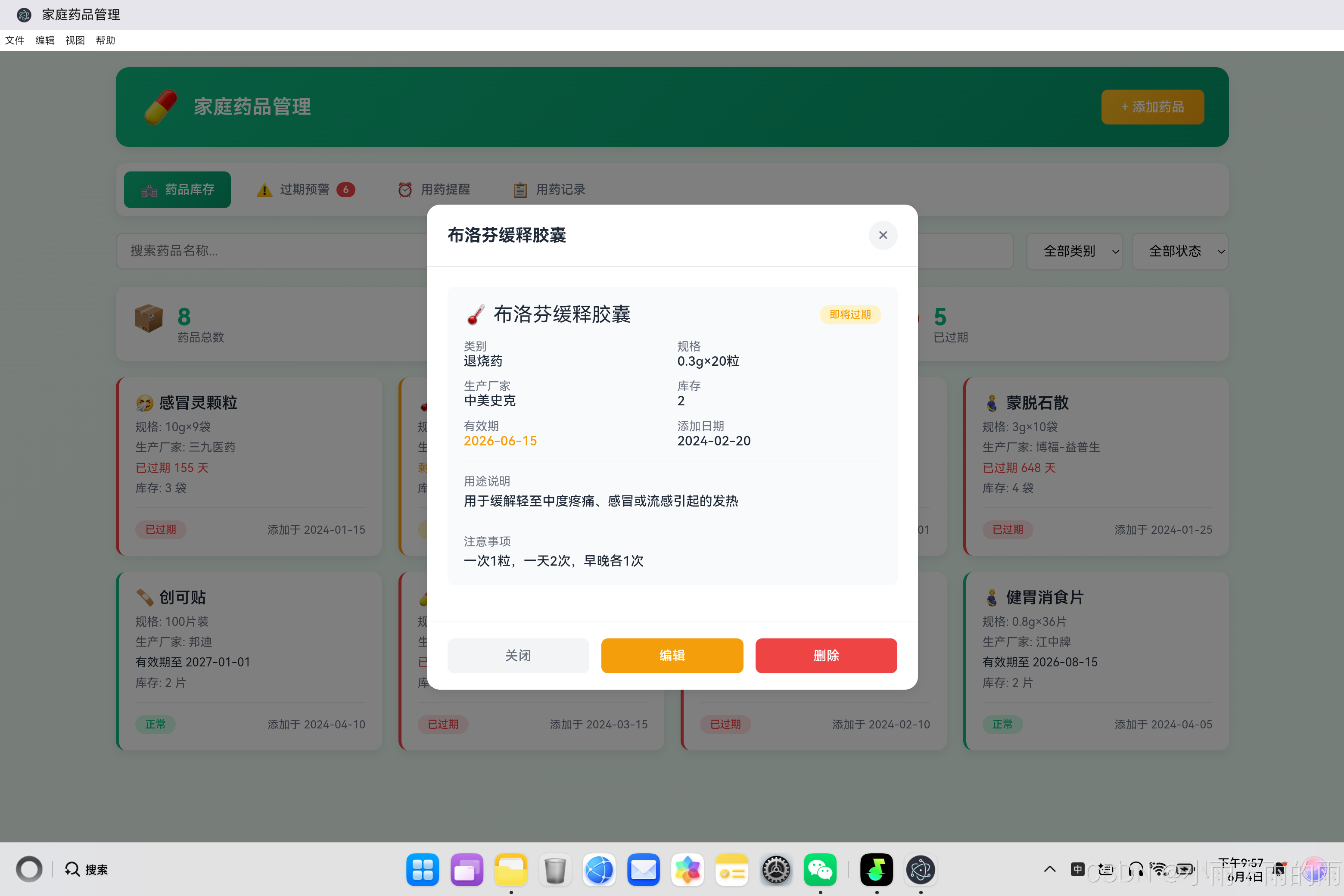
3.2 药品详情与删除
function showMedicineDetail(id) {
    const med = medicines.find(m => m.id === id);
    if (!med) return;

    currentEditId = id;
    document.getElementById('medicineDetailTitle').textContent = med.name;

    const status = getMedicineStatus(med);
    const statusText = {
        'normal': '正常',
        'near-expiry': '即将过期',
        'expired': '已过期'
    }[status];

    const statusColor = {
        'normal': 'var(--success)',
        'near-expiry': 'var(--warning)',
        'expired': 'var(--danger)'
    }[status];

    document.getElementById('medicineDetailContent').innerHTML = `
        <div style="padding: 20px; background: #f9fafb; border-radius: 8px; margin-bottom: 20px;">
            <div style="display: flex; justify-content: space-between; align-items: center; margin-bottom: 15px;">
                <span style="font-size: 1.5rem;">${categoryIcons[med.category] || '💊'} ${med.name}</span>
                <span class="status-badge ${status === 'normal' ? 'normal' : status === 'near-expiry' ? 'warning' : 'danger'}">${statusText}</span>
            </div>

            <div style="display: grid; grid-template-columns: 1fr 1fr; gap: 12px;">
                <div>
                    <span style="color: var(--text-secondary); font-size: 0.9rem;">类别</span>
                    <div style="font-weight: 500;">${med.category}</div>
                </div>
                <div>
                    <span style="color: var(--text-secondary); font-size: 0.9rem;">规格</span>
                    <div style="font-weight: 500;">${med.spec || '未填写'}</div>
                </div>
                <div>
                    <span style="color: var(--text-secondary); font-size: 0.9rem;">生产厂家</span>
                    <div style="font-weight: 500;">${med.manufacturer || '未填写'}</div>
                </div>
                <div>
                    <span style="color: var(--text-secondary); font-size: 0.9rem;">库存</span>
                    <div style="font-weight: 500;">${med.quantity}</div>
                </div>
                <div>
                    <span style="color: var(--text-secondary); font-size: 0.9rem;">有效期</span>
                    <div style="font-weight: 500; color: ${statusColor};">${formatDate(med.expiryDate)}</div>
                </div>
                <div>
                    <span style="color: var(--text-secondary); font-size: 0.9rem;">添加日期</span>
                    <div style="font-weight: 500;">${formatDate(med.addedDate)}</div>
                </div>
            </div>

            ${med.use ? `
                <div style="margin-top: 15px; padding-top: 15px; border-top: 1px solid var(--border-color);">
                    <span style="color: var(--text-secondary); font-size: 0.9rem;">用途说明</span>
                    <div style="font-weight: 500; margin-top: 6px;">${med.use}</div>
                </div>
            ` : ''}

            ${med.notes ? `
                <div style="margin-top: 15px; padding-top: 15px; border-top: 1px solid var(--border-color);">
                    <span style="color: var(--text-secondary); font-size: 0.9rem;">注意事项</span>
                    <div style="font-weight: 500; margin-top: 6px;">${med.notes}</div>
                </div>
            ` : ''}
        </div>
    `;

    document.getElementById('medicineDetailModal').classList.add('active');
}

function deleteMedicine(id) {
    if (!confirm('确定要删除这个药品吗?')) return;

    medicines = medicines.filter(m => m.id !== id);
    saveData();
    renderMedicineGrid();
    renderStats();
    renderWarnings();
    updateWarningBadge();
    closeModal('medicineDetailModal');
    showToast('药品已删除');
}
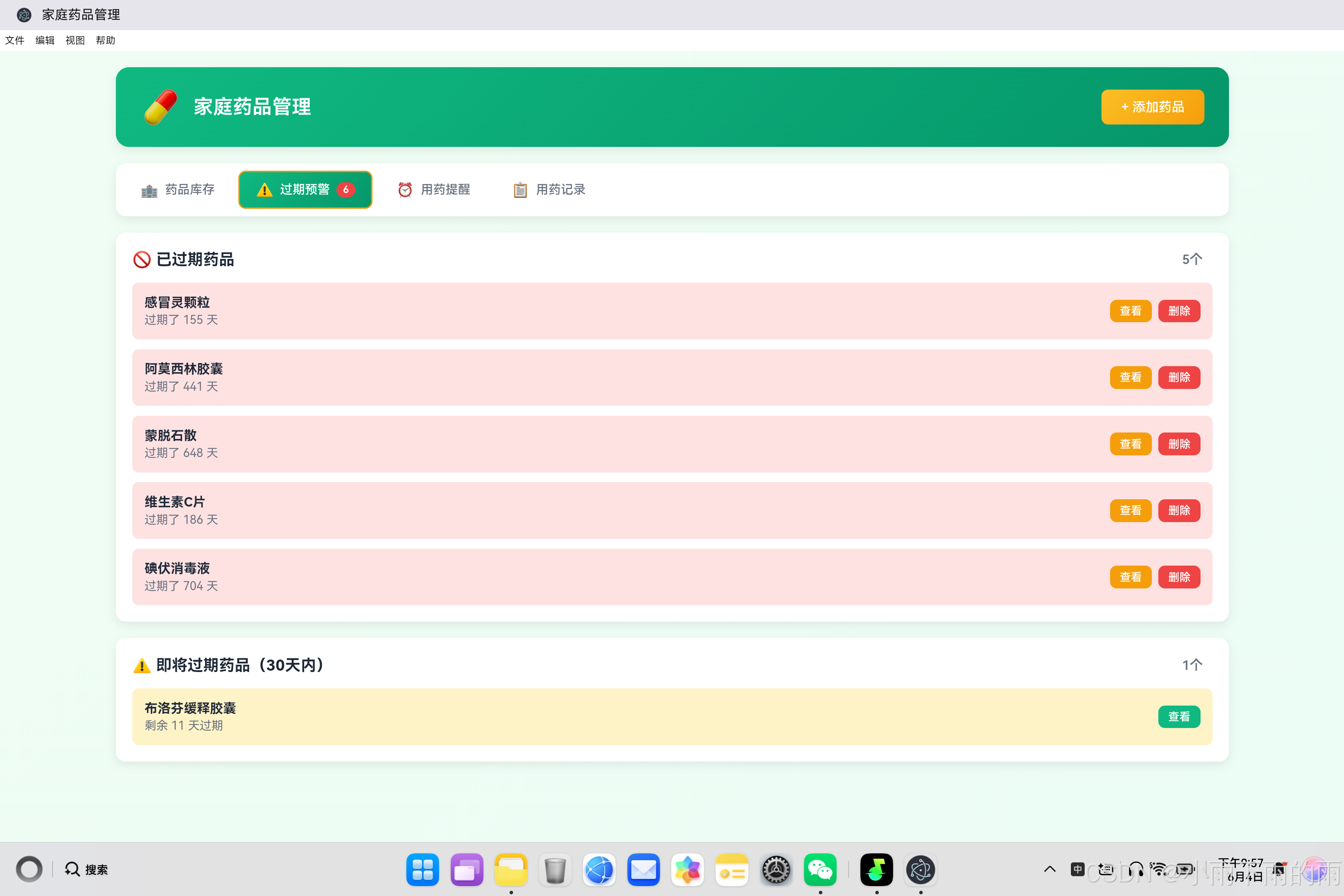
四、预警系统实现
4.1 预警列表渲染
function renderWarnings() {
    const expiredMedicines = medicines.filter(med => getMedicineStatus(med) === 'expired');
    const nearExpiryMedicines = medicines.filter(med => getMedicineStatus(med) === 'near-expiry');

    document.getElementById('expiredSectionCount').textContent = `${expiredMedicines.length}个`;
    document.getElementById('nearExpirySectionCount').textContent = `${nearExpiryMedicines.length}个`;

    const expiredList = document.getElementById('expiredList');
    const nearExpiryList = document.getElementById('nearExpiryList');

    if (expiredMedicines.length === 0) {
        expiredList.innerHTML = '<div style="text-align: center; padding: 40px; color: var(--text-secondary);">暂无已过期药品</div>';
    } else {
        expiredList.innerHTML = expiredMedicines.map(med => `
            <div class="warning-item expired">
                <div>
                    <strong>${med.name}</strong>
                    <div style="font-size: 0.9rem; color: var(--text-secondary); margin-top: 4px;">
                        过期了 ${Math.abs(getDaysRemaining(med))} 天
                    </div>
                </div>
                <div style="display: flex; gap: 8px;">
                    <button class="btn btn-warning" style="padding: 6px 12px; font-size: 0.85rem;" onclick="showMedicineDetail(${med.id}); event.stopPropagation();">查看</button>
                    <button class="btn btn-danger" style="padding: 6px 12px; font-size: 0.85rem;" onclick="deleteMedicine(${med.id}); event.stopPropagation();">删除</button>
                </div>
            </div>
        `).join('');
    }

    if (nearExpiryMedicines.length === 0) {
        nearExpiryList.innerHTML = '<div style="text-align: center; padding: 40px; color: var(--text-secondary);">暂无即将过期药品</div>';
    } else {
        nearExpiryList.innerHTML = nearExpiryMedicines.map(med => `
            <div class="warning-item">
                <div>
                    <strong>${med.name}</strong>
                    <div style="font-size: 0.9rem; color: var(--text-secondary); margin-top: 4px;">
                        剩余 ${getDaysRemaining(med)} 天过期
                    </div>
                </div>
                <div style="display: flex; gap: 8px;">
                    <button class="btn btn-secondary" style="padding: 6px 12px; font-size: 0.85rem;" onclick="showMedicineDetail(${med.id}); event.stopPropagation();">查看</button>
                </div>
            </div>
        `).join('');
    }
}
4.2 徽章更新
function updateWarningBadge() {
    let count = 0;
    medicines.forEach(med => {
        const status = getMedicineStatus(med);
        if (status === 'near-expiry' || status === 'expired') {
            count++;
        }
    });
    const badge = document.getElementById('warningBadge');
    badge.textContent = count;
    badge.style.display = count > 0 ? 'inline-block' : 'none';
}
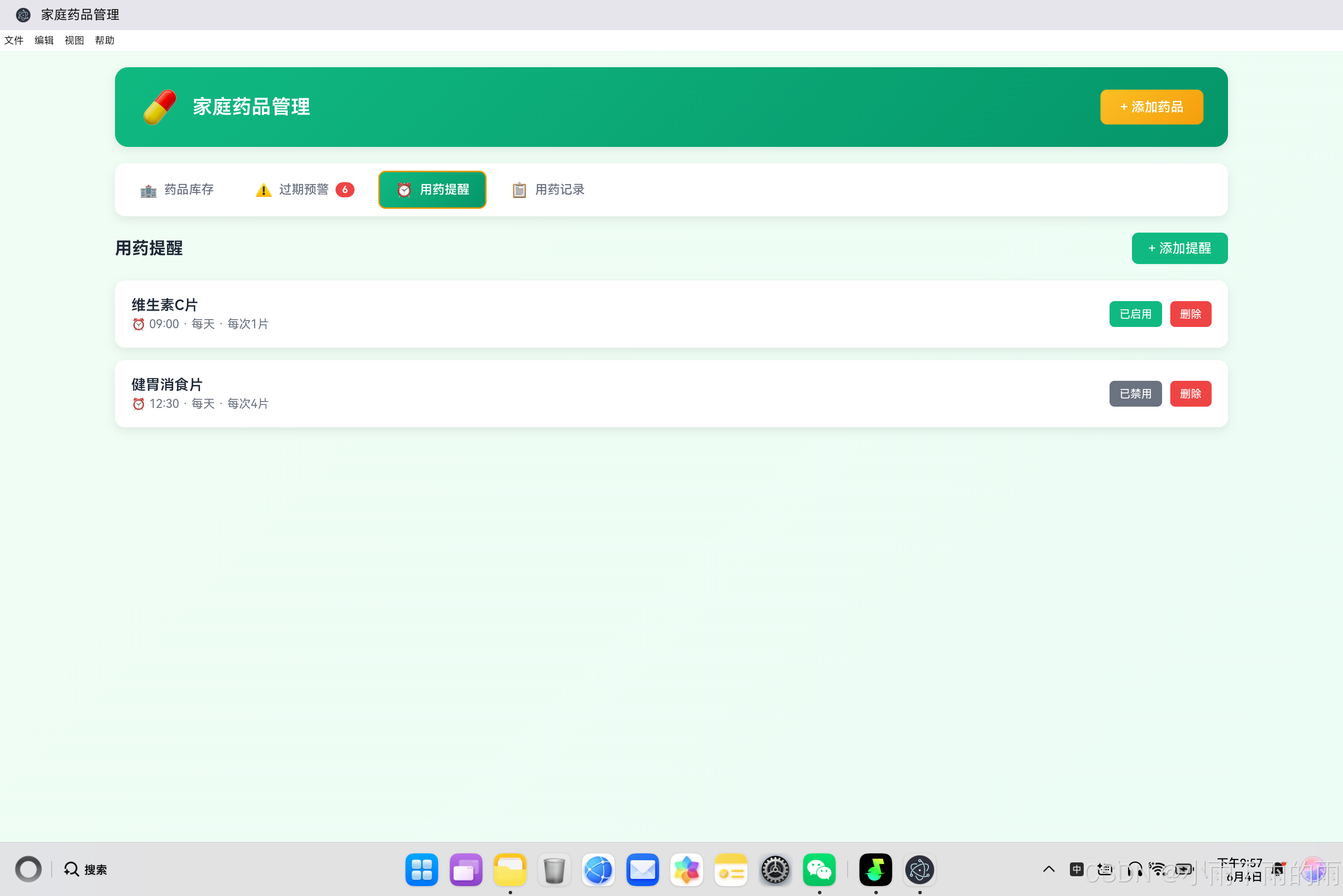
五、用药提醒系统
5.1 提醒数据结构
const defaultReminders = [
    {
        id: 1,
        medicineId: 6,
        medicineName: "维生素C片",
        time: "09:00",
        frequency: "daily",
        dosage: "每次1片",
        active: true
    }
];
5.2 提醒管理功能
function showAddReminder() {
    const select = document.getElementById('reminderMedicine');
    select.innerHTML = medicines.map(med =>
        `<option value="${med.id}">${med.name}</option>`
    ).join('');

    document.getElementById('reminderTime').value = '09:00';
    document.getElementById('reminderFrequency').value = 'daily';
    document.getElementById('reminderDosage').value = '';

    document.getElementById('addReminderModal').classList.add('active');
}

function saveReminder() {
    const medicineId = parseInt(document.getElementById('reminderMedicine').value);
    const time = document.getElementById('reminderTime').value;
    const frequency = document.getElementById('reminderFrequency').value;
    const dosage = document.getElementById('reminderDosage').value.trim();

    if (!time) {
        showToast('请设置提醒时间');
        return;
    }

    const med = medicines.find(m => m.id === medicineId);
    if (!med) return;

    const maxId = reminders.length > 0 ? Math.max(...reminders.map(r => r.id)) : 0;

    reminders.push({
        id: maxId + 1,
        medicineId: medicineId,
        medicineName: med.name,
        time: time,
        frequency: frequency,
        dosage: dosage,
        active: true
    });

    saveData();
    renderReminders();
    closeModal('addReminderModal');
    showToast('提醒已添加');
}

function toggleReminder(id) {
    const rem = reminders.find(r => r.id === id);
    if (rem) {
        rem.active = !rem.active;
        saveData();
        renderReminders();
        showToast(rem.active ? '提醒已启用' : '提醒已禁用');
    }
}

function deleteReminder(id) {
    if (!confirm('确定要删除这个提醒吗?')) return;

    reminders = reminders.filter(r => r.id !== id);
    saveData();
    renderReminders();
    showToast('提醒已删除');
}

function getFrequencyText(frequency) {
    const map = {
        'daily': '每天',
        'weekday': '工作日',
        'weekend': '周末',
        'custom': '自定义'
    };
    return map[frequency] || '未知';
}
六、统计与展示
6.1 统计数据渲染
function renderStats() {
    let totalCount = medicines.length;
    let nearExpiryCount = 0;
    let expiredCount = 0;

    medicines.forEach(med => {
        const status = getMedicineStatus(med);
        if (status === 'near-expiry') nearExpiryCount++;
        if (status === 'expired') expiredCount++;
    });

    document.getElementById('totalCount').textContent = totalCount;
    document.getElementById('nearExpiryCount').textContent = nearExpiryCount;
    document.getElementById('expiredCount').textContent = expiredCount;
}
6.2 历史记录展示
function renderHistory() {
    const list = document.getElementById('historyList');

    if (history.length === 0) {
        list.innerHTML = '<div style="text-align: center; padding: 60px 20px; color: var(--text-secondary);">暂无用药记录</div>';
        return;
    }

    const sortedHistory = [...history].sort((a, b) => {
        const dateA = new Date(a.date + ' ' + a.time);
        const dateB = new Date(b.date + ' ' + b.time);
        return dateB - dateA;
    });

    list.innerHTML = sortedHistory.slice(0, 20).map(record => `
        <div class="history-item">
            <div class="history-info">
                <div style="font-weight: 600; font-size: 1.1rem;">${record.medicineName}</div>
                <div style="color: var(--text-secondary); margin-top: 6px;">
                    ${record.date} ${record.time} · ${record.dosage}
                    ${record.notes ? `<div style="margin-top: 4px;">备注: ${record.notes}</div>` : ''}
                </div>
            </div>
        </div>
    `).join('');
}
七、UI设计与交互体验
7.1 标签页切换
function switchTab(tabName) {
    document.querySelectorAll('.nav-tab').forEach(tab => {
        tab.classList.remove('active');
    });
    document.querySelector(`[data-tab="${tabName}"]`).classList.add('active');

    document.querySelectorAll('.tab-content').forEach(content => {
        content.classList.remove('active');
    });
    document.getElementById(`${tabName}-tab`).classList.add('active');
}
7.2 模态框管理
function closeModal(modalId) {
    document.getElementById(modalId).classList.remove('active');
}

document.addEventListener('click', function(e) {
    if (e.target.classList.contains('modal')) {
        e.target.classList.remove('active');
    }
});
7.3 Toast提示
function showToast(message) {
    const toast = document.getElementById('toast');
    document.querySelector('.toast-message').textContent = message;
    toast.classList.add('show');

    setTimeout(() => {
        toast.classList.remove('show');
    }, 3000);
}
7.4 日期格式化
function formatDate(dateStr) {
    if (!dateStr) return '未知';

    const date = new Date(dateStr);
    const year = date.getFullYear();
    const month = String(date.getMonth() + 1).padStart(2, '0');
    const day = String(date.getDate()).padStart(2, '0');

    return `${year}-${month}-${day}`;
}
八、技术亮点与创新
8.1 智能过期计算
计算逻辑:
├─ 获取当前日期
├─ 解析有效期
├─ 计算时间差
├─ 转换为天数
├─ 判断状态
└─ 显示相应提示
8.2 多条件筛选系统
筛选条件:
├─ 搜索关键词(药品名称)
├─ 药品类别
├─ 状态(正常/即将过期/已过期)
└─ 组合筛选
8.3 数据持久化设计
存储方案:
├─ medicines:药品数据
├─ reminders:提醒数据
└─ medicineHistory:用药记录

加载流程:
├─ 检查localStorage
├─ 有数据则加载
├─ 无数据则使用默认值
└─ 初始化应用
8.4 响应式布局设计
@media (max-width: 1024px) {
    .search-filter-bar {
        flex-direction: column;
    }

    .filter-box {
        flex-direction: column;
    }
}

@media (max-width: 768px) {
    .app-header {
        flex-direction: column;
        gap: 15px;
        text-align: center;
    }

    .nav-tabs {
        flex-wrap: wrap;
    }

    .form-grid {
        grid-template-columns: 1fr;
    }

    .form-group.full {
        grid-column: span 1;
    }
}
九、项目总结与未来规划
9.1 项目成果
| 功能模块 | 状态 | 核心特性 |
|---|---|---|
| 药品库存 | ✅ | 添加、编辑、删除、搜索、筛选 |
| 过期预警 | ✅ | 自动检测、高亮显示、快速处理 |
| 用药提醒 | ✅ | 时间设置、频率控制、启用/禁用 |
| 用药记录 | ✅ | 历史记录查看、时间排序 |
| 数据管理 | ✅ | 持久化存储、数据保存 |
9.2 未来规划
- 用药记录增强:添加手动记录功能,支持剂量调整
- 导入导出功能:支持CSV格式导入导出药品数据
- 药品条码扫描:使用摄像头扫描药品条码快速添加
- 云端同步:支持多设备数据同步
- 家庭成员管理:为不同成员设置独立的用药提醒
- 药品互动检查:提醒药物相互作用风险
9.3 技术价值
家庭药品管理系统展示了如何在鸿蒙PC平台上开发健康管理类应用,为开发者提供了以下参考:
- 数据结构设计:合理的药品数据模型和关系
- 智能预警机制:基于日期的状态判断和预警系统
- 数据持久化:localStorage的最佳实践应用
- 用户体验优化:直观的界面设计和流畅的交互
- 响应式开发:适配不同屏幕尺寸的布局方案
通过本项目的实践,开发者可以快速掌握健康管理类应用开发的核心技术,为构建更多优秀应用奠定基础。

作为“人工智能6S店”的官方数字引擎,为AI开发者与企业提供一个覆盖软硬件全栈、一站式门户。
更多推荐
 0
0 0
0- 0


 已为社区贡献12条内容

所有评论(0)