
鸿蒙PC Electron框架实战:内存/CPU/IO性能优化与调试技巧
开源鸿蒙PC社区性能优化指南 本文介绍了Electron应用性能优化的关键策略,包括: 性能分析工具:使用Chrome DevTools和Node.js调试器监控内存、CPU等指标 启动优化:通过延迟加载模块和禁用非必要功能减少启动时间 代码优化:提供性能监控API实现方案,包括内存和CPU使用率统计 调试技巧:详细说明主进程和渲染进程的调试方法 文章包含实用代码示例,如LazyLoader类实现
·
欢迎加入开源鸿蒙PC社区:https://harmonypc.csdn.net/
atomgit仓库地址:https://atomgit.com/feng8403000/cms
testPerformance() // 运行性能测试
perfReport() // 输出完整性能报告
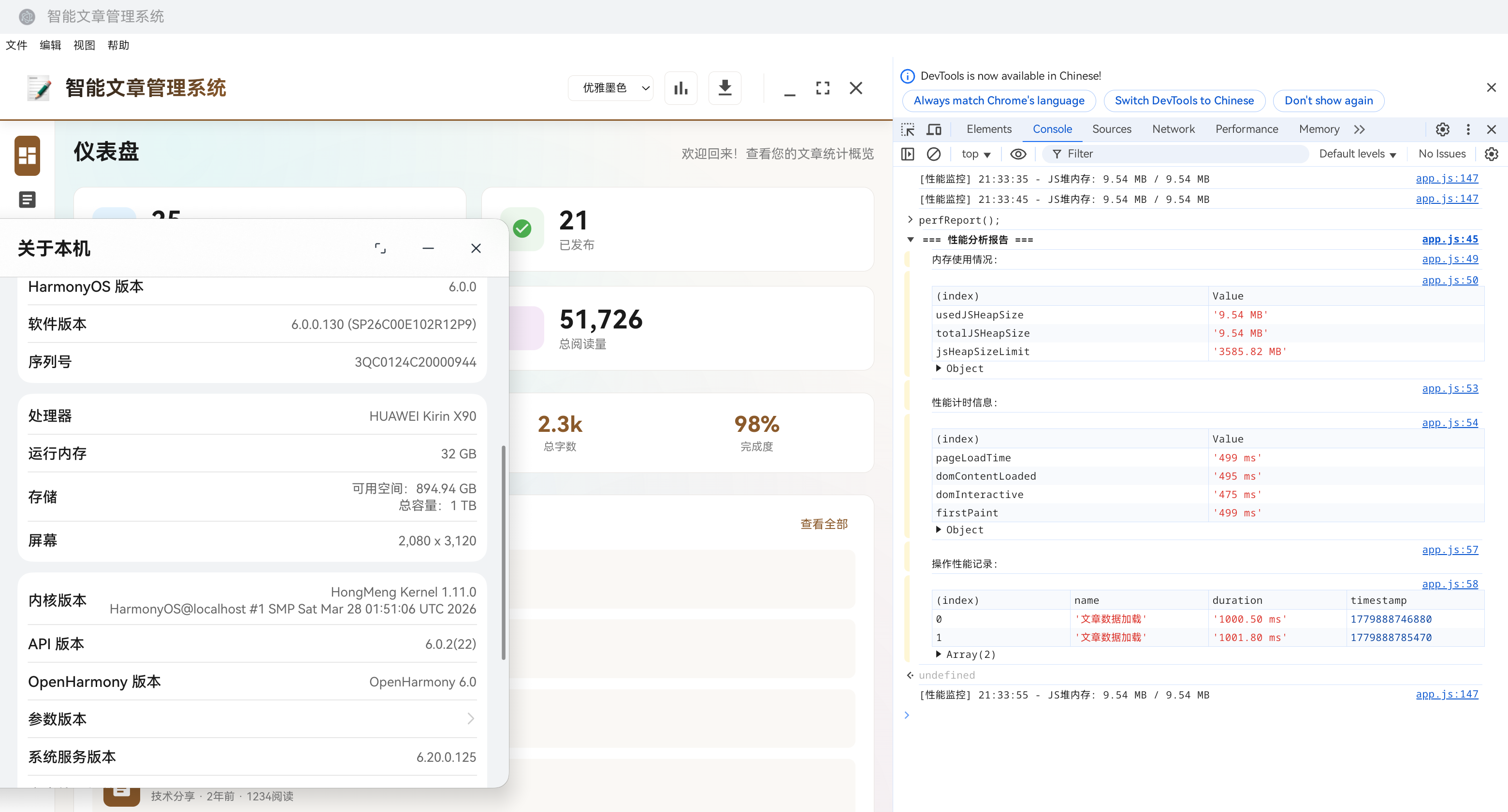
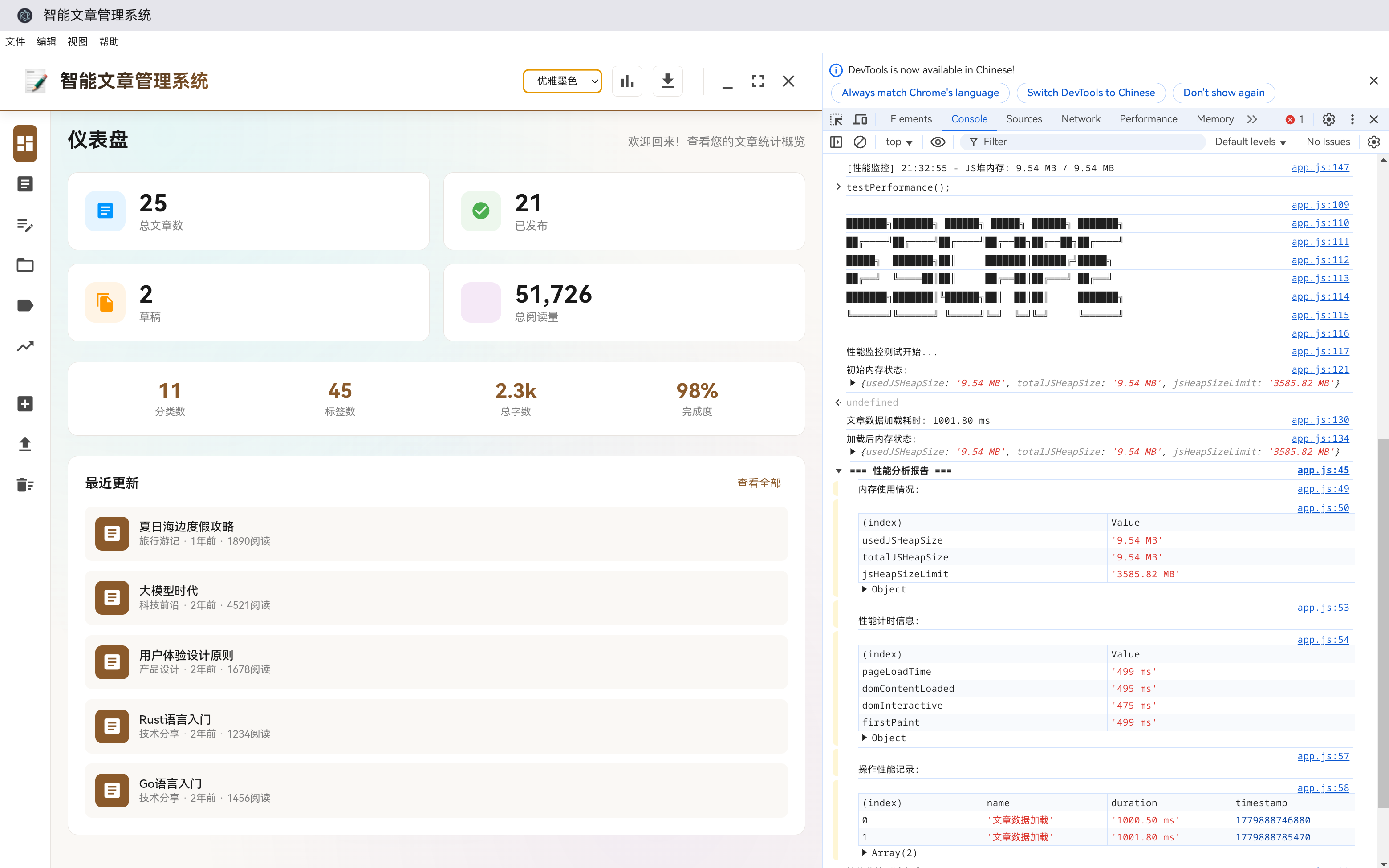
一、引言
1.1 性能优化的重要性
在桌面应用开发中,性能是影响用户体验的关键因素。一个响应迅速、流畅运行的应用能够提升用户满意度和使用率。
性能优化涉及多个方面:
- 启动速度:应用启动时间
- 渲染性能:界面渲染流畅度
- 内存管理:内存占用和泄漏
- CPU占用:计算密集型操作优化
- I/O操作:文件读写和网络请求优化
1.2 Electron应用的性能挑战
Electron应用面临一些独特的性能挑战:
- 双重运行时:Node.js + Chromium,内存占用较高
- 渲染进程隔离:每个窗口独立进程,资源消耗大
- 跨平台差异:不同操作系统性能表现不同
- 原生模块兼容性:原生依赖可能影响性能
1.3 本章概述
本章将详细介绍Electron应用的性能优化策略和调试技巧,包括:
- 性能分析工具
- 启动优化
- 渲染优化
- 内存管理
- CPU优化
- 调试技巧
二、性能分析工具
2.1 Chrome DevTools
Electron应用可以使用Chrome DevTools进行调试和性能分析:
// 主进程中开启DevTools
const { BrowserWindow } = require('electron');

const mainWindow = new BrowserWindow({
    width: 1200,
    height: 800,
    webPreferences: {
        nodeIntegration: true,
        contextIsolation: false
    }
});

// 打开DevTools
mainWindow.webContents.openDevTools();
性能分析面板:
- Performance:记录和分析运行时性能
- Memory:内存分析和泄漏检测
- CPU Profiler:CPU使用分析
- Network:网络请求分析
2.2 主进程调试
主进程调试需要使用Node.js调试器:
# 启动应用并开启调试端口
electron --inspect=9222 .

# 或者使用远程调试
electron --remote-debugging-port=9222 .
在Chrome中访问 chrome://inspect 来连接到主进程。
2.3 性能监控API
class PerformanceMonitor {
    constructor() {
        this.metrics = {
            memory: {
                heapUsed: 0,
                heapTotal: 0,
                external: 0
            },
            cpu: {
                usage: 0,
                idle: 0
            },
            timing: {
                startup: 0,
                render: 0
            }
        };

        this.interval = null;
    }

    start(interval = 1000) {
        this.interval = setInterval(() => {
            this.updateMetrics();
        }, interval);
    }

    stop() {
        if (this.interval) {
            clearInterval(this.interval);
        }
    }

    updateMetrics() {
        // 更新内存指标
        const memUsage = process.memoryUsage();
        this.metrics.memory = {
            heapUsed: this.formatBytes(memUsage.heapUsed),
            heapTotal: this.formatBytes(memUsage.heapTotal),
            external: this.formatBytes(memUsage.external)
        };

        // 更新CPU指标(简化版)
        this.metrics.cpu.usage = this.getCPUUsage();

        console.log('性能指标:', this.metrics);
    }

    formatBytes(bytes) {
        if (bytes === 0) return '0 Bytes';

        const k = 1024;
        const sizes = ['Bytes', 'KB', 'MB', 'GB'];
        const i = Math.floor(Math.log(bytes) / Math.log(k));

        return parseFloat((bytes / Math.pow(k, i)).toFixed(2)) + ' ' + sizes[i];
    }

    getCPUUsage() {
        // 获取CPU使用情况(简化实现)
        const cpus = require('os').cpus();
        let totalIdle = 0;
        let totalTick = 0;

        cpus.forEach(cpu => {
            for (const type in cpu.times) {
                totalTick += cpu.times[type];
            }
            totalIdle += cpu.times.idle;
        });

        return ((1 - totalIdle / totalTick) * 100).toFixed(1) + '%';
    }

    getMetrics() {
        return this.metrics;
    }
}
三、启动优化
3.1 减少启动时间
应用启动时间是用户体验的重要指标。以下是优化启动时间的策略:
3.1.1 延迟加载
// 延迟加载非关键模块
class LazyLoader {
    constructor() {
        this.loadedModules = new Map();
    }

    async loadModule(modulePath) {
        if (this.loadedModules.has(modulePath)) {
            return this.loadedModules.get(modulePath);
        }

        // 使用动态import延迟加载
        const module = await import(modulePath);
        this.loadedModules.set(modulePath, module);

        return module;
    }

    // 预加载常用模块
    async preloadModules(modulePaths) {
        const promises = modulePaths.map(path => this.loadModule(path));
        await Promise.all(promises);
    }
}

// 使用示例
const lazyLoader = new LazyLoader();

// 应用启动时只加载核心模块
async function initApp() {
    // 核心模块立即加载
    const coreModule = require('./core');
    coreModule.init();

    // 非核心模块延迟加载
    setTimeout(async () => {
        const analyticsModule = await lazyLoader.loadModule('./analytics');
        analyticsModule.init();
    }, 1000);
}
3.1.2 禁用不必要的功能
const { app, BrowserWindow } = require('electron');

function createWindow() {
    const mainWindow = new BrowserWindow({
        width: 1200,
        height: 800,
        // 禁用默认菜单(可以自定义菜单)
        autoHideMenuBar: true,

        webPreferences: {
            // 禁用远程模块(如果不需要)
            enableRemoteModule: false,

            // 禁用Node.js集成(如果不需要)
            nodeIntegration: false,

            // 启用上下文隔离
            contextIsolation: true,

            // 预加载脚本(如果需要Node.js访问)
            preload: path.join(__dirname, 'preload.js'),

            // 禁用WebGL(如果不需要)
            webgl: false
        }
    });

    mainWindow.loadFile('index.html');
}
3.1.3 优化HTML加载
<!-- index.html - 优化加载顺序 -->
<!DOCTYPE html>
<html lang="zh-CN">
<head>
    <meta charset="UTF-8">
    <meta name="viewport" content="width=device-width, initial-scale=1.0">

    <!-- 关键CSS内联 -->
    <style>
        /* 关键样式内联,避免FOUC */
        body {
            margin: 0;
            padding: 0;
            background-color: var(--bg-paper);
            font-family: var(--font-family);
        }

        .loading-spinner {
            display: flex;
            justify-content: center;
            align-items: center;
            height: 100vh;
        }
    </style>

    <title>智能文章管理系统</title>
</head>
<body>
    <!-- 加载状态显示 -->
    <div id="loading" class="loading-spinner">
        <div class="spinner"></div>
    </div>

    <!-- 主内容(初始隐藏) -->
    <div id="app" style="display: none;">
        <!-- 应用内容 -->
    </div>

    <!-- JavaScript延迟加载 -->
    <script defer src="js/config.js"></script>
    <script defer src="js/app.js"></script>
</body>
</html>
3.2 启动时间测量
// 启动时间测量
class StartupTimer {
    constructor() {
        this.timestamps = {};
        this.startTime = Date.now();
    }

    mark(eventName) {
        this.timestamps[eventName] = Date.now();
    }

    getDuration(eventName) {
        if (!this.timestamps[eventName]) {
            return null;
        }

        return this.timestamps[eventName] - this.startTime;
    }

    getReport() {
        const report = {};

        for (const [event, timestamp] of Object.entries(this.timestamps)) {
            report[event] = `${timestamp - this.startTime}ms`;
        }

        report.total = `${Date.now() - this.startTime}ms`;

        return report;
    }

    logReport() {
        console.log('启动时间报告:', this.getReport());
    }
}

// 使用示例
const startupTimer = new StartupTimer();

// 应用启动时标记
startupTimer.mark('app-start');

// 主窗口创建完成
app.on('ready', () => {
    startupTimer.mark('app-ready');

    createWindow();
});

// 窗口加载完成
mainWindow.webContents.on('did-finish-load', () => {
    startupTimer.mark('window-loaded');
    startupTimer.logReport();
});
四、渲染性能优化
4.1 虚拟滚动
对于长列表,使用虚拟滚动只渲染可见区域:
class VirtualScroller {
    constructor(options) {
        this.container = options.container;
        this.itemHeight = options.itemHeight || 50;
        this.totalItems = options.totalItems || 0;
        this.renderedCount = options.renderedCount || 20;

        this.scrollTop = 0;
        this.startIndex = 0;

        this.setupEventListeners();
        this.render();
    }

    setupEventListeners() {
        this.container.addEventListener('scroll', (e) => {
            this.onScroll(e);
        });
    }

    onScroll(e) {
        this.scrollTop = e.target.scrollTop;
        this.updateVisibleItems();
    }

    updateVisibleItems() {
        const newStartIndex = Math.floor(this.scrollTop / this.itemHeight);

        // 只在起始索引变化时重新渲染
        if (newStartIndex !== this.startIndex) {
            this.startIndex = newStartIndex;
            this.render();
        }
    }

    render() {
        const endIndex = Math.min(
            this.startIndex + this.renderedCount,
            this.totalItems
        );

        // 创建占位元素
        const placeholderTop = document.createElement('div');
        placeholderTop.style.height = `${this.startIndex * this.itemHeight}px`;

        // 创建可见项
        const itemsContainer = document.createElement('div');

        for (let i = this.startIndex; i < endIndex; i++) {
            const item = this.createItem(i);
            itemsContainer.appendChild(item);
        }

        // 创建底部占位元素
        const placeholderBottom = document.createElement('div');
        placeholderBottom.style.height = `${Math.max(0, (this.totalItems - endIndex) * this.itemHeight)}px`;

        // 更新容器内容
        this.container.innerHTML = '';
        this.container.appendChild(placeholderTop);
        this.container.appendChild(itemsContainer);
        this.container.appendChild(placeholderBottom);
    }

    createItem(index) {
        const item = document.createElement('div');
        item.className = 'list-item';
        item.style.height = `${this.itemHeight}px`;
        item.innerHTML = `<span>项目 ${index + 1}</span>`;

        return item;
    }

    setTotalItems(count) {
        this.totalItems = count;
        this.render();
    }

    updateItemHeight(height) {
        this.itemHeight = height;
        this.render();
    }
}
4.2 节流与防抖
// 节流函数
function throttle(func, limit) {
    let inThrottle = false;

    return function(...args) {
        if (!inThrottle) {
            func.apply(this, args);
            inThrottle = true;
            setTimeout(() => (inThrottle = false), limit);
        }
    };
}

// 防抖函数
function debounce(func, delay) {
    let timeoutId = null;

    return function(...args) {
        if (timeoutId) {
            clearTimeout(timeoutId);
        }

        timeoutId = setTimeout(() => {
            func.apply(this, args);
        }, delay);
    };
}

// 使用示例
const throttledScroll = throttle(function() {
    console.log('滚动事件');
}, 100);

const debouncedSearch = debounce(function(query) {
    console.log('搜索:', query);
}, 300);

// 添加事件监听
window.addEventListener('scroll', throttledScroll);

const searchInput = document.getElementById('search-input');
searchInput.addEventListener('input', (e) => {
    debouncedSearch(e.target.value);
});
4.3 GPU加速
使用CSS GPU加速提升渲染性能:
/* 使用GPU加速的属性 */
.gpu-accelerated {
    transform: translateZ(0);
    will-change: transform, opacity;
    backface-visibility: hidden;
    perspective: 1000px;
}

/* 动画使用GPU加速 */
.smooth-animation {
    transition: transform 0.3s ease-out;
    transform: translate3d(0, 0, 0);
}

/* 复杂动画启用compositing */
.layered-element {
    compositing: 'destination-over';
}
五、内存管理
5.1 内存泄漏检测
class MemoryLeakDetector {
    constructor() {
        this.snapshots = [];
        this.maxSnapshots = 5;
    }

    takeSnapshot() {
        const snapshot = {
            timestamp: Date.now(),
            memoryUsage: process.memoryUsage(),
            heapSnapshot: null // 实际项目中可以使用heapdump库
        };

        this.snapshots.push(snapshot);

        // 保持最大快照数量
        if (this.snapshots.length > this.maxSnapshots) {
            this.snapshots.shift();
        }

        return snapshot;
    }

    analyzeLeaks() {
        if (this.snapshots.length < 2) {
            return { status: 'insufficient-data' };
        }

        const first = this.snapshots[0];
        const last = this.snapshots[this.snapshots.length - 1];

        const heapGrowth = last.memoryUsage.heapUsed - first.memoryUsage.heapUsed;
        const timeDiff = last.timestamp - first.timestamp;

        // 判断是否存在内存泄漏
        const isLeaking = heapGrowth > 50 * 1024 * 1024; // 超过50MB增长

        return {
            status: isLeaking ? 'leaking' : 'normal',
            heapGrowth: this.formatBytes(heapGrowth),
            timeDiff: `${timeDiff / 1000}秒`,
            snapshots: this.snapshots.length
        };
    }

    formatBytes(bytes) {
        if (bytes === 0) return '0 Bytes';

        const k = 1024;
        const sizes = ['Bytes', 'KB', 'MB', 'GB'];
        const i = Math.floor(Math.log(Math.abs(bytes)) / Math.log(k));

        return parseFloat((bytes / Math.pow(k, i)).toFixed(2)) + ' ' + sizes[i];
    }

    startMonitoring(interval = 5000) {
        setInterval(() => {
            this.takeSnapshot();
            const result = this.analyzeLeaks();

            if (result.status === 'leaking') {
                console.warn('检测到内存泄漏:', result);
            }
        }, interval);
    }
}
5.2 避免内存泄漏的最佳实践
// 正确清理事件监听器
class EventManager {
    constructor() {
        this.listeners = [];
    }

    addListener(target, event, callback) {
        target.addEventListener(event, callback);

        this.listeners.push({
            target,
            event,
            callback
        });
    }

    removeAllListeners() {
        this.listeners.forEach(({ target, event, callback }) => {
            target.removeEventListener(event, callback);
        });

        this.listeners = [];
    }

    removeListener(target, event, callback) {
        const index = this.listeners.findIndex(
            l => l.target === target && l.event === event && l.callback === callback
        );

        if (index !== -1) {
            const listener = this.listeners[index];
            listener.target.removeEventListener(listener.event, listener.callback);
            this.listeners.splice(index, 1);
        }
    }
}

// 正确处理DOM节点引用
class Component {
    constructor() {
        this.element = null;
        this.subComponents = [];
    }

    render() {
        this.element = document.createElement('div');
        // ...
    }

    destroy() {
        // 清理子组件
        this.subComponents.forEach(component => {
            component.destroy();
        });

        // 移除DOM节点
        if (this.element && this.element.parentNode) {
            this.element.parentNode.removeChild(this.element);
        }

        // 清空引用
        this.element = null;
        this.subComponents = null;
    }
}
六、CPU优化
6.1 Web Worker
将耗时操作移到Web Worker中:
// 创建Web Worker
const worker = new Worker('worker.js');

// 发送消息到Worker
worker.postMessage({
    type: 'process-data',
    payload: largeDataset
});

// 接收Worker的响应
worker.onmessage = function(e) {
    const result = e.data;
    console.log('处理完成:', result);
};

// 错误处理
worker.onerror = function(error) {
    console.error('Worker错误:', error);
};
// worker.js
self.onmessage = function(e) {
    const { type, payload } = e.data;

    switch (type) {
        case 'process-data':
            const result = processLargeDataset(payload);
            self.postMessage(result);
            break;
    }
};

function processLargeDataset(data) {
    // 耗时的计算操作
    let result = [];

    for (let i = 0; i < data.length; i++) {
        // 复杂计算
        result.push(complexCalculation(data[i]));
    }

    return result;
}
6.2 避免同步阻塞
// 使用Promise避免阻塞
async function processData(data) {
    // 分批处理,避免长时间阻塞
    const batchSize = 100;
    const results = [];

    for (let i = 0; i < data.length; i += batchSize) {
        const batch = data.slice(i, i + batchSize);

        // 处理批次数据
        const batchResult = await processBatch(batch);
        results.push(...batchResult);

        // 让出主线程
        await new Promise(resolve => setImmediate(resolve));
    }

    return results;
}

async function processBatch(batch) {
    // 处理单个批次
    return batch.map(item => processItem(item));
}

function processItem(item) {
    // 处理单个项目
    return item * 2;
}
七、调试技巧
7.1 日志系统
class Logger {
    constructor() {
        this.logLevel = 'info';
        this.loggers = [];
    }

    setLevel(level) {
        this.logLevel = level;
    }

    debug(...args) {
        if (this.shouldLog('debug')) {
            this.log('DEBUG', args);
        }
    }

    info(...args) {
        if (this.shouldLog('info')) {
            this.log('INFO', args);
        }
    }

    warn(...args) {
        if (this.shouldLog('warn')) {
            this.log('WARN', args);
        }
    }

    error(...args) {
        if (this.shouldLog('error')) {
            this.log('ERROR', args);
        }
    }

    shouldLog(level) {
        const levels = ['debug', 'info', 'warn', 'error'];
        const currentIndex = levels.indexOf(this.logLevel);
        const targetIndex = levels.indexOf(level);

        return targetIndex >= currentIndex;
    }

    log(level, args) {
        const timestamp = new Date().toISOString();
        const message = args.map(arg =>
            typeof arg === 'object' ? JSON.stringify(arg, null, 2) : arg
        ).join(' ');

        console[level === 'DEBUG' ? 'log' : level.toLowerCase()](
            `[${timestamp}] [${level}] ${message}`
        );

        // 发送到自定义日志收集器
        this.loggers.forEach(logger => {
            logger(level, args);
        });
    }

    addLogger(logger) {
        this.loggers.push(logger);
    }

    removeLogger(logger) {
        const index = this.loggers.indexOf(logger);
        if (index !== -1) {
            this.loggers.splice(index, 1);
        }
    }
}

// 创建全局日志实例
const logger = new Logger();

// 设置日志级别
logger.setLevel(process.env.NODE_ENV === 'development' ? 'debug' : 'warn');
7.2 性能分析工具使用
// 使用Performance API进行性能分析
class PerformanceAnalyzer {
    constructor() {
        this.markers = [];
    }

    mark(name) {
        performance.mark(name);
        this.markers.push({ name, timestamp: Date.now() });
    }

    measure(name, startMark, endMark) {
        performance.measure(name, startMark, endMark);

        const measures = performance.getEntriesByName(name);
        const lastMeasure = measures[measures.length - 1];

        if (lastMeasure) {
            console.log(`${name}: ${lastMeasure.duration.toFixed(2)}ms`);
        }
    }

    clear() {
        performance.clearMarks();
        performance.clearMeasures();
        this.markers = [];
    }

    getReport() {
        const report = [];

        for (let i = 1; i < this.markers.length; i++) {
            const prev = this.markers[i - 1];
            const curr = this.markers[i];

            report.push({
                phase: `${prev.name} -> ${curr.name}`,
                duration: `${curr.timestamp - prev.timestamp}ms`
            });
        }

        return report;
    }
}

// 使用示例
const analyzer = new PerformanceAnalyzer();

analyzer.mark('start');

// 执行操作
analyzer.mark('operation-start');
// ... 执行某个操作
analyzer.mark('operation-end');

// 测量时间
analyzer.measure('operation-duration', 'operation-start', 'operation-end');

console.log('性能报告:', analyzer.getReport());
7.3 错误追踪
class ErrorTracker {
    constructor() {
        this.errors = [];
        this.maxErrors = 100;

        this.setupGlobalHandlers();
    }

    setupGlobalHandlers() {
        // 捕获未处理的Promise拒绝
        process.on('unhandledRejection', (reason, promise) => {
            this.trackError({
                type: 'unhandled-rejection',
                message: reason?.message || 'Unknown rejection',
                stack: reason?.stack,
                promise
            });
        });

        // 捕获未捕获的异常
        process.on('uncaughtException', (error) => {
            this.trackError({
                type: 'uncaught-exception',
                message: error.message,
                stack: error.stack
            });

            // 防止应用崩溃
            process.exit(1);
        });

        // 渲染进程错误(在渲染进程中)
        if (typeof window !== 'undefined') {
            window.addEventListener('error', (event) => {
                this.trackError({
                    type: 'window-error',
                    message: event.message,
                    filename: event.filename,
                    line: event.lineno,
                    column: event.colno,
                    error: event.error
                });
            });
        }
    }

    trackError(errorInfo) {
        const error = {
            ...errorInfo,
            timestamp: Date.now(),
            id: `error-${Date.now()}-${Math.random().toString(36).substr(2, 9)}`
        };

        this.errors.push(error);

        // 保持最大错误数量
        if (this.errors.length > this.maxErrors) {
            this.errors.shift();
        }

        // 发送错误报告
        this.sendErrorReport(error);

        console.error('追踪到错误:', error);
    }

    sendErrorReport(error) {
        // 在实际项目中,这里会发送到错误追踪服务
        // 例如:Sentry、Bugsnag等
        console.log('发送错误报告:', error);
    }

    getErrors() {
        return [...this.errors];
    }

    getErrorById(id) {
        return this.errors.find(error => error.id === id);
    }

    clearErrors() {
        this.errors = [];
    }
}

// 创建全局错误追踪实例
const errorTracker = new ErrorTracker();
八、总结与展望
8.1 功能回顾
本章详细介绍了性能优化与调试技巧,包括:
- 性能分析工具:Chrome DevTools、主进程调试、性能监控API
- 启动优化:延迟加载、禁用不必要功能、优化HTML加载
- 渲染优化:虚拟滚动、节流防抖、GPU加速
- 内存管理:内存泄漏检测、避免内存泄漏的最佳实践
- CPU优化:Web Worker、避免同步阻塞
- 调试技巧:日志系统、性能分析、错误追踪
8.2 技术亮点
- 全面的性能优化策略:覆盖启动、渲染、内存、CPU等多个方面
- 实用的调试工具:提供完整的日志和错误追踪系统
- 可复用的代码模块:虚拟滚动、节流防抖等可直接使用
- 最佳实践指导:提供避免内存泄漏的具体建议
8.3 未来扩展
未来可以考虑添加以下功能:
- 自动化性能测试:集成性能测试框架
- 性能预算监控:设置性能阈值并报警
- 智能优化建议:根据性能数据自动提供优化建议
- 热更新支持:支持应用热更新,减少重启时间

作为“人工智能6S店”的官方数字引擎,为AI开发者与企业提供一个覆盖软硬件全栈、一站式门户。
更多推荐
 0
0 0
0- 0


 已为社区贡献68条内容

所有评论(0)