
鸿蒙自定义安全键盘开发实战:Canvas 精密布局与安全交互
本文介绍了一个基于HarmonyOS 5.0+的自定义安全键盘实现方案。该键盘支持数字、字母和符号三种模式切换,具备数字随机排列、大小写切换、防截屏等安全特性。采用Canvas绘制实现不规则布局,通过MVVM架构分离业务逻辑与UI绘制,使用纯算法计算布局适配不同屏幕。核心功能包括:防截屏保护、动态高度调整、横竖屏适配和字体缩放。项目结构清晰,包含键盘组件、视图模型、数据模型和工具类等模块,通过常量
基于 HarmonyOS 5.0+,实现数字/字母/符号三种键盘,支持数字随机排列、大小写切换、防截屏、动态控制。
核心特性:Canvas 绘制、排列算法、间距细粒度区分、始终绑定回落、防录屏控制
一、为什么需要自定义安全键盘
在支付密码、银行转账等敏感输入场景,系统键盘可能不能满足设计需求。自定义键盘可以:
- 完全控制界面,避免系统键盘样式干扰。
- 实现防截屏(
setWindowPrivacyMode)和数字随机排列,提升安全性。 - 灵活添加功能键(如“完成”、“退格”、“键盘切换”),并适配复杂布局要求与样式。
最初设计键盘时使用了 Grid 组件完成数字键盘,但当加入字母以及字符键盘时,发现 Grid 无法满足需求。GridLayoutOptions 虽然可以控制不规则布局,却无法实现占据半格或居中这类要求。如果使用其他组件需要创建大量按钮组件,同时在切换键盘时也需要销毁当前并重新创建。于是想到了 Canvas 画布。本文将带你从零实现一款高安全、高精度的自定义键盘组件,支持数字、字母、符号三种模式切换,并且对外提供了颜色、样式、字体大小等配置。
运行效果
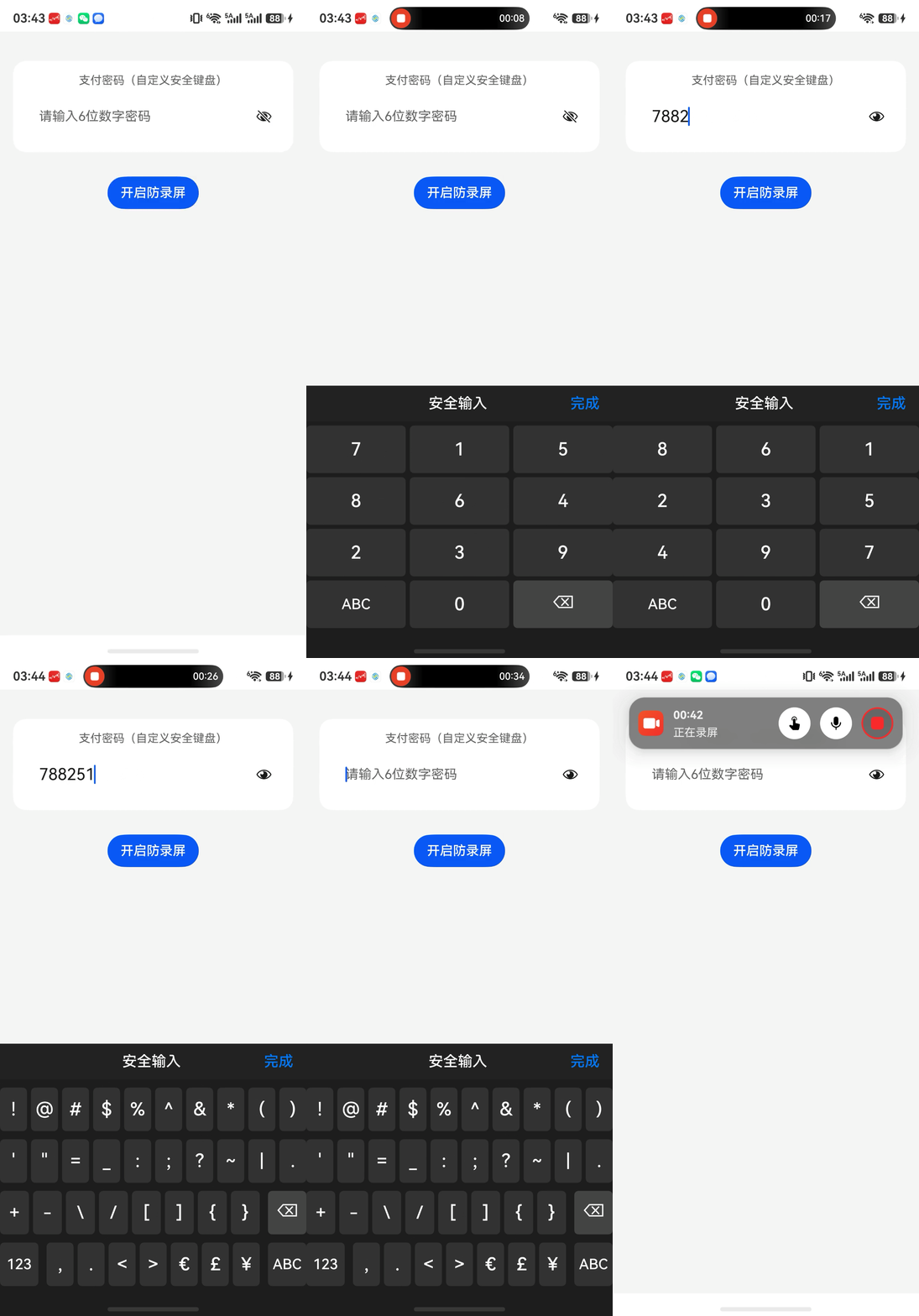
二、技术架构
| 模块 | 技术方案 | 作用 |
|---|---|---|
| UI 绘制 | Canvas + 路径绘制 | 实现不规则布局、圆角按钮、精确坐标控制 |
| 状态管理 | MVVM + @State/@Prop | 业务逻辑与绘制分离 |
| 布局计算 | 纯算法(无 Grid) | 适应任意屏幕宽度,支持独立居中和对齐 |
| 安全防护 | setWindowPrivacyMode |
防截屏/录屏,支持动态开关 |
| 键盘回落 | 始终绑定 customKeyboard |
通过 clearFocus() 收起,无系统键盘干扰 |
| 横竖屏适配 | 监听 display.on('change') |
重新生成布局,调整总高度 |
| 字体缩放 | vp2px + 系数配置 |
适配不同屏幕密度,支持外部动态缩放 |
三、项目结构
entry/src/main/ets/
├── entryability/
│   └── EntryAbility.ets
├── pages/
│   └── Index.ets                    // 演示页面
├── component/
│   └── AdvancedKeyboard.ets         // 键盘 UI 组件(Canvas 绘制)
├── viewmodel/
│   └── KeyboardViewModel.ets        // 布局生成与业务逻辑
├── model/
│   └── ButtonInfo.ets               // 按钮数据接口
├── constants/
│   └── KeyboardConstants.ets        // 所有常量配置
└── utils/
│   └── WindowUtil.ets               // 窗口工具(防截屏、安全区、动态高度)
四、核心常量配置
常量类集中管理布局、间距、样式,便于全局调整。
/**
 * 键盘布局和样式常量
 */
export class KeyboardConstants {
  /** 固定按钮高度(px) */
  static readonly BUTTON_HEIGHT: number = 56;

  /** 总行数 */
  static readonly ROWS: number = 4;

  /** 数字键盘列数 */
  static readonly NUMBER_COLS: number = 3;

  /** 字母/符号键盘列数 */
  static readonly LETTER_SYMBOL_COLS: number = 10;

  /** 左右边距(px) */
  static readonly SIDE_MARGIN: number = 0;

  /** 基础间隙(px),也是列间距 */
  static readonly BASE_GAP: number = 5;

  /** 数字键盘行间距(与 BASE_GAP 相同) */
  static readonly NUMBER_ROW_GAP: number = this.BASE_GAP;

  /** 数字键盘顶部内边距(vp) */
  static readonly TOP_PADDING_NUMBER: number = this.BASE_GAP;

  /** 字母/符号键盘顶部内边距(vp) */
  static readonly TOP_PADDING_LETTER_SYMBOL: number = this.BASE_GAP * 2;

  /** 字母/符号键盘行间距(2倍 BASE_GAP) */
  static readonly LETTER_SYMBOL_ROW_GAP: number = this.BASE_GAP * 2;

  /** 键盘内容区域总高度(不含顶部内边距),按字母键盘计算 */
  static readonly TOTAL_HEIGHT: number =
    this.BUTTON_HEIGHT * this.ROWS + this.LETTER_SYMBOL_ROW_GAP * (this.ROWS - 1);

  /** 按钮圆角半径(px) */
  static readonly BUTTON_RADIUS: number = 6;

  /** 基准字体大小(vp) */
  static readonly BASE_FONT_SIZE_VP: number = 22;

  /** 普通按钮字体系数(字母、数字等) */
  static readonly NORMAL_FONT_SCALE: number = 1.0;

  /** 功能按钮字体系数(123、#+=、ABC) */
  static readonly ACTION_FONT_SCALE: number = 0.8;

  /** 空格按钮字体系数 */
  static readonly SPACE_FONT_SCALE: number = 0.7;
}
五、窗口工具类 WindowUtil.ets
窗口工具封装了隐私模式、窗口尺寸监听、安全区域获取以及动态键盘高度计算,是自定义键盘的基础依赖。
import window from '@ohos.window';
import { common } from '@kit.AbilityKit';
import { display } from '@kit.ArkUI';

export class WindowUtil {
  private static currentWindow: window.Window | null = null;
  private static orientationCallback?: () => void;

  /** 获取当前窗口实例(单例模式) */
  static async getWindow(context: common.UIAbilityContext): Promise<window.Window> {
    if (WindowUtil.currentWindow) return WindowUtil.currentWindow;
    try {
      WindowUtil.currentWindow = await window.getLastWindow(context);
      return WindowUtil.currentWindow;
    } catch (err) {
      console.error('getWindow failed', JSON.stringify(err));
      throw new Error(err);
    }
  }

  /** 设置窗口隐私模式(防截屏/录屏) */
  static async setPrivacyMode(context: common.UIAbilityContext, enable: boolean): Promise<void> {
    const win = await WindowUtil.getWindow(context);
    try {
      await win.setWindowPrivacyMode(enable);
      console.info(`Privacy mode set to ${enable}`);
    } catch (err) {
      console.error('setPrivacyMode error', JSON.stringify(err));
    }
  }

  /** 监听窗口尺寸变化(用于动态调整键盘高度) */
  static onWindowSizeChange(context: common.UIAbilityContext, callback: (width: number, height: number) => void): void {
    WindowUtil.getWindow(context).then(win => {
      win.on('windowSizeChange', (data: window.Size) => callback(data.width, data.height));
    }).catch((err: Error) => console.error('onWindowSizeChange error', JSON.stringify(err)));
  }

  /** 移除窗口尺寸变化监听 */
  static offWindowSizeChange(context: common.UIAbilityContext): void {
    WindowUtil.getWindow(context).then(win => win.off('windowSizeChange'));
  }

  /** 获取底部安全区域高度(手势条/导航栏高度) */
  static async getSystemBottomHeight(context: common.UIAbilityContext): Promise<number> {
    try {
      const win = await window.getLastWindow(context);
      const avoidArea = win.getWindowAvoidArea(window.AvoidAreaType.TYPE_NAVIGATION_INDICATOR);
      return avoidArea.bottomRect.height;
    } catch (e) {
      return 0;
    }
  }

  /** 动态计算键盘高度(vp),根据屏幕宽高比、设备类型返回合适比例 */
  static getDynamicKeyboardHeight(uiContext: UIContext): number {
    try {
      const defaultDisplay = display.getDefaultDisplaySync();
      const screenHeightVp = uiContext.px2vp(defaultDisplay.height);
      const shortSideVp = Math.min(uiContext.px2vp(defaultDisplay.width), screenHeightVp);
      const isLargeScreen = shortSideVp >= 600;
      const isLandscape = defaultDisplay.width > defaultDisplay.height;
      let ratio = 0.36;   // 手机竖屏默认 36%
      if (isLargeScreen) {
        ratio = isLandscape ? 0.33 : 0.22;   // 平板:横屏33% 竖屏22%
      } else {
        ratio = isLandscape ? 0.42 : 0.36;
      }
      return Math.floor(screenHeightVp * ratio);
    } catch (e) {
      return 260;   // 后备固定高度
    }
  }

  /** 注册屏幕方向变化监听 */
  static onOrientationChange(callback: () => void): void {
    if (this.orientationCallback) this.offOrientationChange();
    this.orientationCallback = callback;
    try {
      display.on('change', this.orientationCallback);
    } catch (e) {
      console.error('display.on error', e);
    }
  }

  /** 取消屏幕方向变化监听 */
  static offOrientationChange(): void {
    if (this.orientationCallback) {
      try {
        display.off('change', this.orientationCallback);
      } catch (e) {
        console.error('display.off error', e);
      }
      this.orientationCallback = undefined;
    }
  }
}
六、ViewModel:精确布局算法
6.1 数字键盘(随机排列)
private generateNumberKeyboard(
  btnWidth: number,
  btnHeight: number,
  rowGap: number,
  colGap: number,
  sideMargin: number,
  topPadding: number
): void {
  let digits = ['1', '2', '3', '4', '5', '6', '7', '8', '9', '0'];
  if (this.enableRandom) {
    const num1to9 = digits.slice(0, 9);
    for (let i = num1to9.length - 1; i > 0; i--) {
      const j = Math.floor(Math.random() * (i + 1));
      const temp = num1to9[i];
      num1to9[i] = num1to9[j];
      num1to9[j] = temp;
    }
    digits = [...num1to9, '0'];
  }

  const newButtons: ButtonInfo[] = [];
  let idx = 0;

  for (let r = 0; r < KeyboardConstants.ROWS; r++) {
    const y = topPadding + r * (btnHeight + rowGap);
    for (let c = 0; c < KeyboardConstants.NUMBER_COLS; c++) {
      const x = sideMargin + c * (btnWidth + colGap);
      if (r < 3) {
        const label = digits[idx++];
        newButtons.push({ label, value: label, x, y, w: btnWidth, h: btnHeight });
      } else {
        if (c === 0) {
          newButtons.push({ label: 'ABC', value: 'switch_to_letter', x, y, w: btnWidth, h: btnHeight });
        } else if (c === 1) {
          newButtons.push({ label: digits[9], value: digits[9], x, y, w: btnWidth, h: btnHeight });
        } else {
          newButtons.push({ label: '⌫', value: 'backspace', x, y, w: btnWidth, h: btnHeight });
        }
      }
    }
  }
  this.buttons = newButtons;
}
6.2 字母键盘
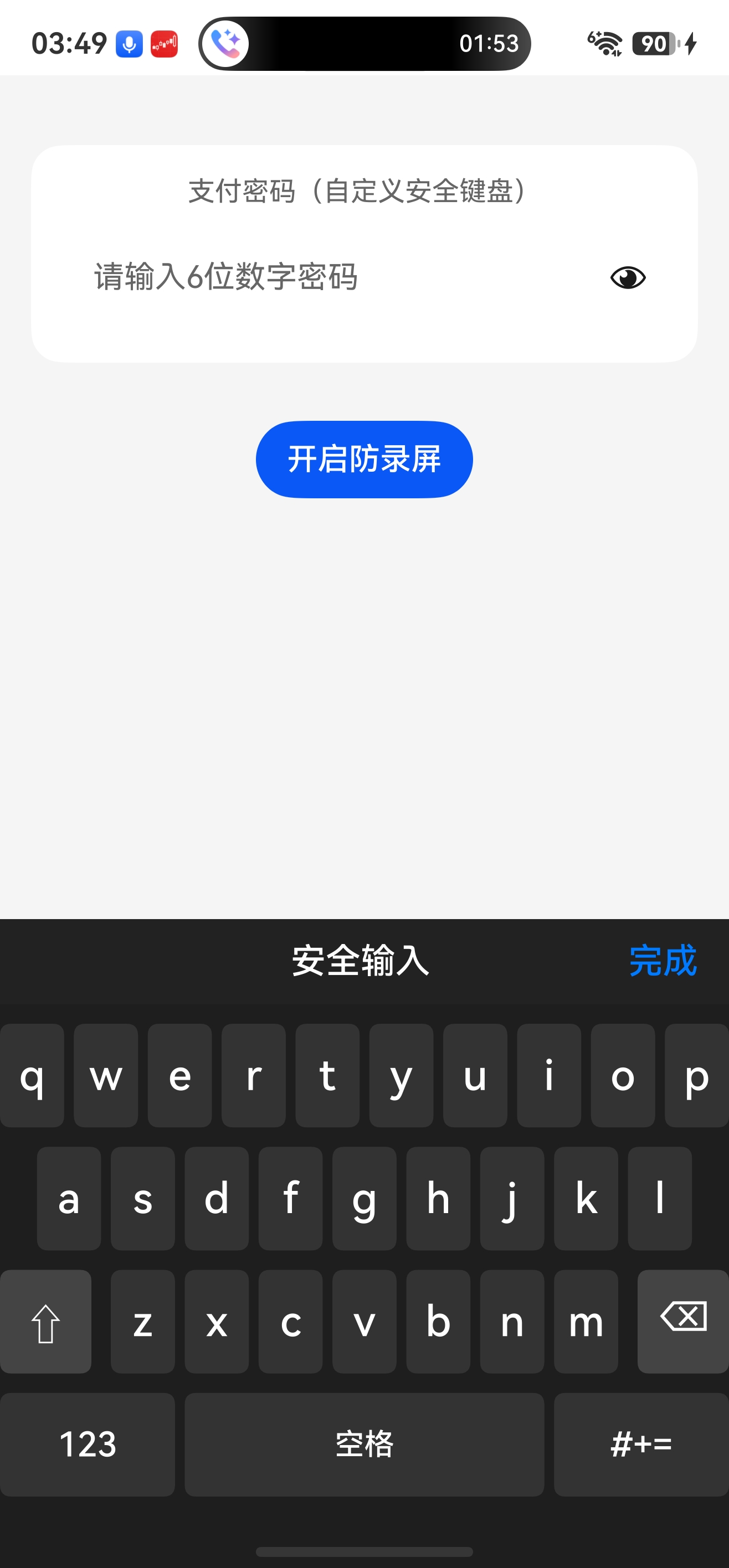
字母键盘布局要求:所有字母等宽;每行独立居中;第三行左对齐第一行;功能键间距使用 rowGap;第四行空格覆盖 x 到 n,左右按钮与空格间距使用 colGap。
private generateLetterKeyboard(
  btnHeight: number,
  rowGap: number,
  colGap: number,
  availableWidth: number,
  sideMargin: number,
  topPadding: number
): void {
  const totalWidth = this.parentWidth;
  const lowerRows: string[][] = [
    ['q', 'w', 'e', 'r', 't', 'y', 'u', 'i', 'o', 'p'],
    ['a', 's', 'd', 'f', 'g', 'h', 'j', 'k', 'l'],
    ['z', 'x', 'c', 'v', 'b', 'n', 'm'],
  ];
  const rows = this.isUpperCase
    ? lowerRows.map((row) => row.map((ch) => ch.toUpperCase()))
    : lowerRows;
  const newButtons: ButtonInfo[] = [];

  const firstRowCount = rows[0].length;
  const letterW = (availableWidth - (firstRowCount - 1) * colGap) / firstRowCount;

  const rowCounts = rows.map((r) => r.length);
  const rowTotals = rowCounts.map((count) => count * letterW + (count - 1) * colGap);
  const rowStartXList = rowTotals.map((total) => sideMargin + (availableWidth - total) / 2);

  for (let r = 0; r < 3; r++) {
    const y = topPadding + r * (btnHeight + rowGap);
    const startX = rowStartXList[r];
    for (let c = 0; c < rowCounts[r]; c++) {
      const x = startX + c * (letterW + colGap);
      newButtons.push({ label: rows[r][c], value: rows[r][c], x, y, w: letterW, h: btnHeight });
    }
  }

  const thirdRowTotal = rowTotals[2];
  const thirdRowStartX = rowStartXList[2];
  const thirdRemaining = availableWidth - thirdRowTotal - 2 * rowGap;
  const funcBtnWidth = thirdRemaining / 2;
  const shiftX = sideMargin;
  const backspaceX = sideMargin + availableWidth - funcBtnWidth;
  const thirdRowY = topPadding + 2 * (btnHeight + rowGap);
  newButtons.push({ label: '⇧', value: 'shift', x: shiftX, y: thirdRowY, w: funcBtnWidth, h: btnHeight });
  newButtons.push({ label: '⌫', value: 'backspace', x: backspaceX, y: thirdRowY, w: funcBtnWidth, h: btnHeight });

  const startIdx = 1; // x
  const endIdx = 5;   // n
  const spaceLeft = thirdRowStartX + startIdx * (letterW + colGap);
  const spaceRight = thirdRowStartX + (endIdx + 1) * (letterW + colGap) - colGap;
  const spaceWidth = spaceRight - spaceLeft;
  const remainingForSide = availableWidth - spaceWidth - 2 * colGap;
  const sideBtnWidth = remainingForSide / 2;
  const leftBtnX = sideMargin;
  const rightBtnX = sideMargin + availableWidth - sideBtnWidth;
  const fourthRowY = topPadding + 3 * (btnHeight + rowGap);
  newButtons.push({ label: '123', value: 'switch_to_number', x: leftBtnX, y: fourthRowY, w: sideBtnWidth, h: btnHeight });
  newButtons.push({ label: '空格', value: 'space', x: spaceLeft, y: fourthRowY, w: spaceWidth, h: btnHeight });
  newButtons.push({ label: '#+=', value: 'switch_to_symbol', x: rightBtnX, y: fourthRowY, w: sideBtnWidth, h: btnHeight });

  this.buttons = newButtons;
}
6.3 符号键盘
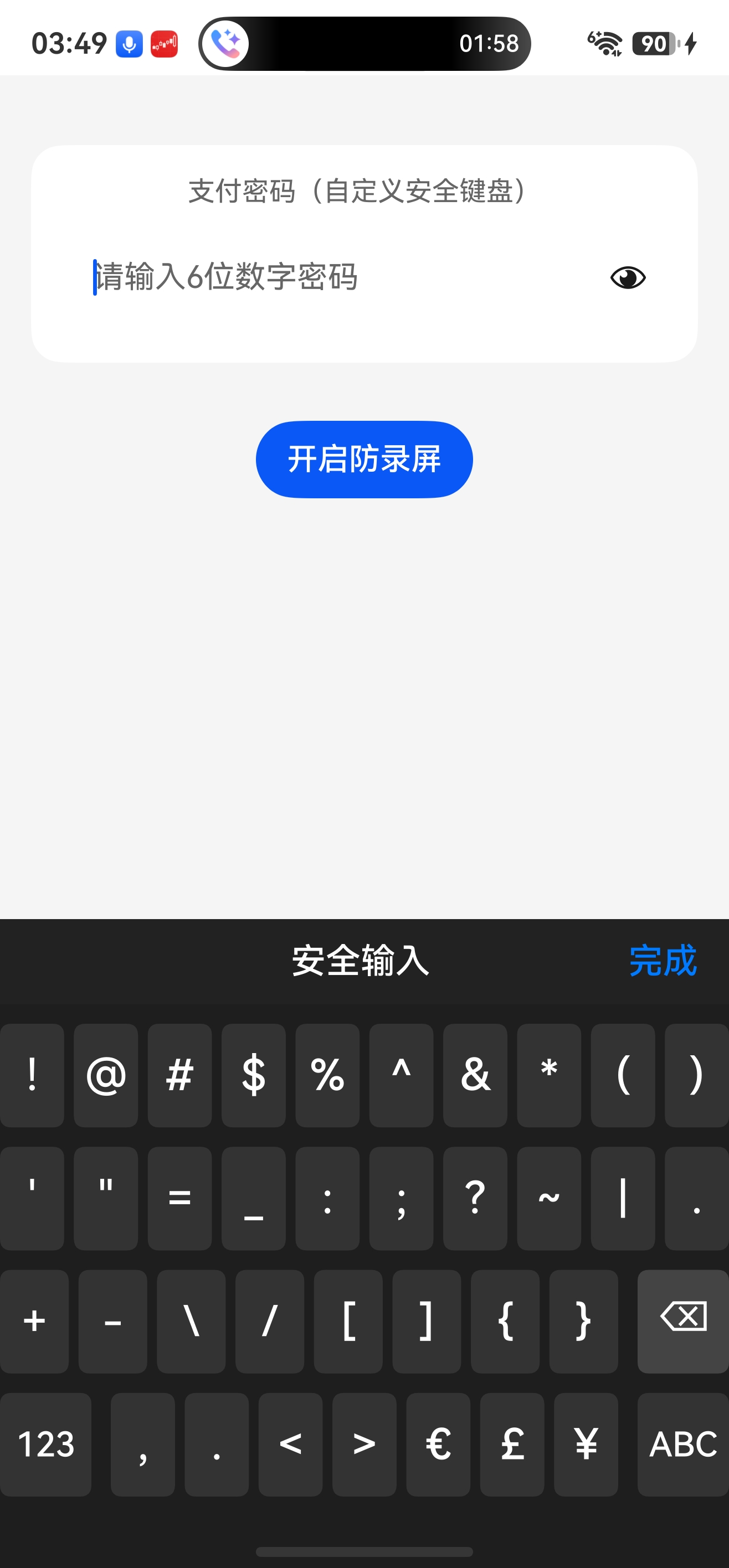
符号键盘第一、二行等宽居中;第四行中间7个符号居中,左右功能键均分剩余宽度(间距 rowGap);第三行8个符号居中,退格键与第四行右功能键对齐,符号区与退格键间距 rowGap。
private generateSymbolKeyboard(
  btnHeight: number,
  rowGap: number,
  colGap: number,
  availableWidth: number,
  sideMargin: number,
  topPadding: number
): void {
  const totalWidth = this.parentWidth;
  const symbolMatrix: string[][] = [
    ['!', '@', '#', '$', '%', '^', '&', '*', '(', ')'],
    ["'", '"', '=', '_', ':', ';', '?', '~', '|', '.'],
    ['+', '-', '\\', '/', '[', ']', '{', '}'], // 8个符号
    ['123', ',', '.', '<', '>', '€', '£', '¥', 'ABC'],
  ];
  const newButtons: ButtonInfo[] = [];

  const commonWidth = (availableWidth - 9 * colGap) / 10;
  const rowStartX = sideMargin + (availableWidth - (10 * commonWidth + 9 * colGap)) / 2;
  const firstRowY = topPadding;
  const secondRowY = topPadding + btnHeight + rowGap;
  for (let c = 0; c < 10; c++) {
    const x = rowStartX + c * (commonWidth + colGap);
    newButtons.push({ label: symbolMatrix[0][c], value: symbolMatrix[0][c], x, y: firstRowY, w: commonWidth, h: btnHeight });
    newButtons.push({ label: symbolMatrix[1][c], value: symbolMatrix[1][c], x, y: secondRowY, w: commonWidth, h: btnHeight });
  }

  const middleSymbols = symbolMatrix[3].slice(1, -1); // 7个符号
  const middleCount = middleSymbols.length;
  const middleTotal = middleCount * commonWidth + (middleCount - 1) * colGap;
  const middleStartX = sideMargin + (availableWidth - middleTotal) / 2;
  const remaining = availableWidth - middleTotal - 2 * rowGap;
  const sideBtnWidth = remaining / 2;
  const leftFuncX = sideMargin;
  const rightFuncX = sideMargin + availableWidth - sideBtnWidth;
  const fourthRowY = topPadding + 3 * (btnHeight + rowGap);

  newButtons.push({ label: '123', value: 'switch_to_number', x: leftFuncX, y: fourthRowY, w: sideBtnWidth, h: btnHeight });
  for (let i = 0; i < middleCount; i++) {
    const x = middleStartX + i * (commonWidth + colGap);
    newButtons.push({ label: middleSymbols[i], value: middleSymbols[i], x, y: fourthRowY, w: commonWidth, h: btnHeight });
  }
  newButtons.push({ label: 'ABC', value: 'switch_to_letter', x: rightFuncX, y: fourthRowY, w: sideBtnWidth, h: btnHeight });

  const thirdSymbols = symbolMatrix[2];
  const thirdCount = thirdSymbols.length;
  const backspaceX = rightFuncX;
  const backspaceWidth = sideBtnWidth;
  const availableForSymbols = backspaceX - rowGap - sideMargin;
  const thirdLetterW = (availableForSymbols - (thirdCount - 1) * colGap) / thirdCount;
  const thirdRowY = topPadding + 2 * (btnHeight + rowGap);
  for (let i = 0; i < thirdCount; i++) {
    const x = sideMargin + i * (thirdLetterW + colGap);
    newButtons.push({ label: thirdSymbols[i], value: thirdSymbols[i], x, y: thirdRowY, w: thirdLetterW, h: btnHeight });
  }
  newButtons.push({ label: '⌫', value: 'backspace', x: backspaceX, y: thirdRowY, w: backspaceWidth, h: btnHeight });

  this.buttons = newButtons;
}
6.4 键盘切换
generateKeyboard(): void {
  if (this.parentWidth === 0) return;

  const rowGap = this.getCurrentRowGap();
  const btnHeight = this.getCurrentButtonHeight();
  const colGap = KeyboardConstants.BASE_GAP;
  const sideMargin = KeyboardConstants.SIDE_MARGIN;
  const availableWidth = this.parentWidth - 2 * sideMargin;
  const topPadding = this.getCurrentTopPadding();

  if (this.keyboardType === 'number') {
    const cols = KeyboardConstants.NUMBER_COLS;
    const btnWidth = (availableWidth - colGap * (cols - 1)) / cols;
    this.generateNumberKeyboard(btnWidth, btnHeight, rowGap, colGap, sideMargin, topPadding);
  } else if (this.keyboardType === 'letter') {
    this.generateLetterKeyboard(btnHeight, rowGap, colGap, availableWidth, sideMargin, topPadding);
  } else {
    this.generateSymbolKeyboard(btnHeight, rowGap, colGap, availableWidth, sideMargin, topPadding);
  }
}

handleButtonPress(value: string): void {
  switch (value) {
    case 'backspace':
      this.inputValueChange(this._inputValue.slice(0, -1));
      break;
    case 'space':
      if (this._inputValue.length < this.maxLength) {
        this.inputValueChange(this._inputValue + ' ');
      }
      break;
    case 'shift':
      this.isUpperCase = !this.isUpperCase;
      this.generateKeyboard();
      break;
    case 'switch_to_number':
      this.keyboardType = 'number';
      this.generateKeyboard();
      break;
    case 'switch_to_letter':
      this.keyboardType = 'letter';
      this.generateKeyboard();
      break;
    case 'switch_to_symbol':
      this.keyboardType = 'symbol';
      this.generateKeyboard();
      break;
    default:
      if (this._inputValue.length < this.maxLength) {
        this.inputValueChange(this._inputValue + value);
      }
      break;
  }
}
七、自定义键盘UI组件
AdvancedKeyboard.ets 集成了所有绘制、触摸、防截屏、动态高度等功能。
import { WindowUtil } from '../utils/WindowUtil';
import { common } from '@kit.AbilityKit';
import { KeyboardViewModel } from '../viewmodel/KeyboardViewModel';

@Component
export struct AdvancedKeyboard {
  @Link inputValue: string;
  @Prop maxLength: number = 20;
  @Prop enableRandom: boolean = true;
  @Prop title: string = '安全输入';
  @Prop fontSizeScale: number = 1.0;     // 外部字体缩放系数(建议 0.8~1.2)
  @Prop @Watch('onPrivacyModeChange') privacyModeEnabled: boolean = true;
  onConfirm?: () => void;

  // ========== 颜色配置 ==========
  @Prop keyboardBgColor: string = '#1E1E1E';
  @Prop normalButtonColor: string = '#333333';
  @Prop specialButtonColor: string = '#444444';
  @Prop pressedButtonColor: string = '#666666';
  @Prop toolbarBgColor: string = '#222222';
  @Prop outerBgColor: string = '#222222';
  @State private keyboardHeight: number = 260;
  private viewModel: KeyboardViewModel = new KeyboardViewModel();
  private settings: RenderingContextSettings = new RenderingContextSettings(true);
  private ctx: CanvasRenderingContext2D = new CanvasRenderingContext2D(this.settings);
  private context = this.getUIContext().getHostContext() as common.UIAbilityContext;
  private canvasWidth: number = 0;

  aboutToAppear(): void {
    if (this.privacyModeEnabled) {
      WindowUtil.setPrivacyMode(this.context, true);
    }
    this.viewModel.setMaxLength(this.maxLength);
    this.viewModel.setEnableRandom(this.enableRandom);
    this.viewModel.onInputValueChange = (newVal: string) => {
      this.inputValue = newVal;
    };
    this.viewModel.onConfirm = () => {
      if (this.onConfirm) this.onConfirm();
    };
    this.viewModel.inputValue = this.inputValue;
    // 监听窗口尺寸变化(横竖屏)
    WindowUtil.onWindowSizeChange(this.context, () => {
      if (this.canvasWidth > 0) {
        this.viewModel.setParentWidth(this.canvasWidth);
        this.updateKeyboardHeight();
        this.drawKeyboard();
      }
    });
    this.updateKeyboardHeight();
    // 监听屏幕方向变化
    WindowUtil.onOrientationChange(() => {
      this.updateKeyboardHeight();
    });
  }

  private updateKeyboardHeight(): void {
    const newHeight = WindowUtil.getDynamicKeyboardHeight(this.getUIContext());
    if (newHeight !== this.keyboardHeight) {
      this.keyboardHeight = newHeight;
    }
  }

  aboutToDisappear(): void {
    WindowUtil.setPrivacyMode(this.context, false);
    WindowUtil.offWindowSizeChange(this.context);
    WindowUtil.offOrientationChange();   // 取消方向监听
  }

  private onPrivacyModeChange(): void {
    WindowUtil.setPrivacyMode(this.context, this.privacyModeEnabled);
  }
 // 绘制键盘
  private drawKeyboard(): void {
    if (!this.ctx || this.canvasWidth === 0) return;
    this.ctx.clearRect(0, 0, this.canvasWidth, this.keyboardHeight);
    this.ctx.fillStyle = this.keyboardBgColor;
    this.ctx.fillRect(0, 0, this.canvasWidth, this.keyboardHeight);

    const radius = 6;
    // 应用外部字体缩放系数,并限制范围 0.8 ~ 1.2
    const safeScale = Math.min(1.2, Math.max(0.8, this.fontSizeScale));
    const baseFontSizeVp = 22 * safeScale;
    const normalScale = 1.0;
    const actionScale = 0.8;
    const spaceScale = 0.7;

    for (let i = 0; i < this.viewModel.buttons.length; i++) {
      const btn = this.viewModel.buttons[i];
      if (btn.label === '') continue;
      const isPressed = (i === this.viewModel.pressedIndex);
      let bgColor = (btn.value === 'backspace' || btn.value === 'shift') ? this.specialButtonColor : this.normalButtonColor;
      if (isPressed) bgColor = this.pressedButtonColor;
      this.ctx.fillStyle = bgColor;
      this.fillRoundRect(btn.x, btn.y, btn.w, btn.h, radius);
      this.ctx.fillStyle = '#FFFFFF';

      let scale = normalScale;
      if (btn.label === '空格') {
        scale = spaceScale;
      } else if (btn.label === '123' || btn.label === '#+=' || btn.label === 'ABC') {
        scale = actionScale;
      }
      const fontSizeVp = baseFontSizeVp * scale;
      const fontSizePx = this.getUIContext().vp2px(fontSizeVp);
      this.ctx.font = `500 ${fontSizePx}px HarmonyOS Sans`;
      this.ctx.textAlign = 'center';
      this.ctx.textBaseline = 'middle';
      this.ctx.fillText(btn.label, btn.x + btn.w / 2, btn.y + btn.h / 2);
    }
  }
  // 形状
  private fillRoundRect(x: number, y: number, w: number, h: number, r: number): void {
    this.ctx.beginPath();
    this.ctx.moveTo(x + r, y);
    this.ctx.lineTo(x + w - r, y);
    this.ctx.quadraticCurveTo(x + w, y, x + w, y + r);
    this.ctx.lineTo(x + w, y + h - r);
    this.ctx.quadraticCurveTo(x + w, y + h, x + w - r, y + h);
    this.ctx.lineTo(x + r, y + h);
    this.ctx.quadraticCurveTo(x, y + h, x, y + h - r);
    this.ctx.lineTo(x, y + r);
    this.ctx.quadraticCurveTo(x, y, x + r, y);
    this.ctx.closePath();
    this.ctx.fill();
  }
  // 点击事件
  private onCanvasTouch = (event: TouchEvent): void => {
    if (event.type === TouchType.Down && event.touches.length > 0) {
      const touch = event.touches[0];
      const x = touch.x;
      const y = touch.y;
      let hitIndex = -1;
      for (let i = 0; i < this.viewModel.buttons.length; i++) {
        const btn = this.viewModel.buttons[i];
        if (btn.label !== '' && x >= btn.x && x <= btn.x + btn.w && y >= btn.y && y <= btn.y + btn.h) {
          hitIndex = i;
          break;
        }
      }
      if (hitIndex !== -1) {
        this.viewModel.pressedIndex = hitIndex;
        this.drawKeyboard();
      }
    } else if (event.type === TouchType.Up) {
      if (this.viewModel.pressedIndex !== -1) {
        const btn = this.viewModel.buttons[this.viewModel.pressedIndex];
        this.viewModel.handleButtonPress(btn.value);
        this.viewModel.pressedIndex = -1;
        this.drawKeyboard();
      }
    } else if (event.type === TouchType.Cancel) {
      if (this.viewModel.pressedIndex !== -1) {
        this.viewModel.pressedIndex = -1;
        this.drawKeyboard();
      }
    }
  };

  public reshuffle(): void {
    this.viewModel.reshuffle();
    this.drawKeyboard();
  }

  build() {
    Column() {
      // 工具栏
      Row() {
        Button('取消').visibility(Visibility.Hidden)
        Text(this.title)
          .fontSize(18)
          .padding(10)
          .fontWeight(FontWeight.Medium)
          .fontColor(Color.White)
          .textAlign(TextAlign.Center);
        Button('完成', { buttonStyle: ButtonStyleMode.NORMAL })
          .fontSize(18)
          .fontColor('#007AFF')
          .backgroundColor(Color.Transparent)
          .onClick(() => {
            if (this.viewModel.onConfirm) this.viewModel.onConfirm();
            if (this.onConfirm) this.onConfirm();
            // 清除焦点,键盘回落
            this.getUIContext().getFocusController().clearFocus();
          });
      }
      .justifyContent(FlexAlign.SpaceBetween)
      .width('100%')
      .height(44)
      .backgroundColor(this.toolbarBgColor)

      Canvas(this.ctx)
        .width('100%')
        .height(this.keyboardHeight)
        .backgroundColor('#1E1E1E')
        .onAreaChange((_, newArea) => {
          const w = newArea.width as number;
          if (w > 0 && w !== this.canvasWidth) {
            this.canvasWidth = w;
            this.viewModel.setParentWidth(w);
            this.drawKeyboard();
          }
        })
        .onTouch(this.onCanvasTouch);
    }
    .width('100%')
    .backgroundColor(this.outerBgColor)
    .borderRadius(20)
  }
}
八、主页面
import { AdvancedKeyboard } from '../component/AdvancedKeyboard';

@Entry
@Component
struct Index {
  @State password: string = '';
  @State enableRandom: boolean = true;
  @State privacyModeEnabled: boolean = true;

  build() {
    Column() {
      Column() {
        Text('支付密码(自定义安全键盘)').fontSize(14).fontColor('#666').margin({ bottom: 8 });
        TextInput({ text: this.password, placeholder: '请输入6位数字密码' })
          .width('100%').height(56).fontSize(20).type(InputType.Password)
          .backgroundColor(Color.White).borderRadius(12)
          .customKeyboard(this.CustomKeyboardBuilder);
      }
      .width('100%').padding(16).backgroundColor('#FFFFFF').borderRadius(16).margin({ top: 20 });

      Button(this.privacyModeEnabled ? '关闭防录屏' : '开启防录屏')
        .onClick(() => { this.privacyModeEnabled = !this.privacyModeEnabled; })
        .margin({ top: 30 })
    }
    .width('100%').height('100%').backgroundColor('#F5F5F5').padding(16);
  }

  @Builder
  CustomKeyboardBuilder(): void {
    AdvancedKeyboard({
      inputValue: $password,
      maxLength: 6,
      enableRandom: true,
      privacyModeEnabled: this.privacyModeEnabled,
      onConfirm: () => { console.info('确认密码:', this.password); }
    });
  }
}
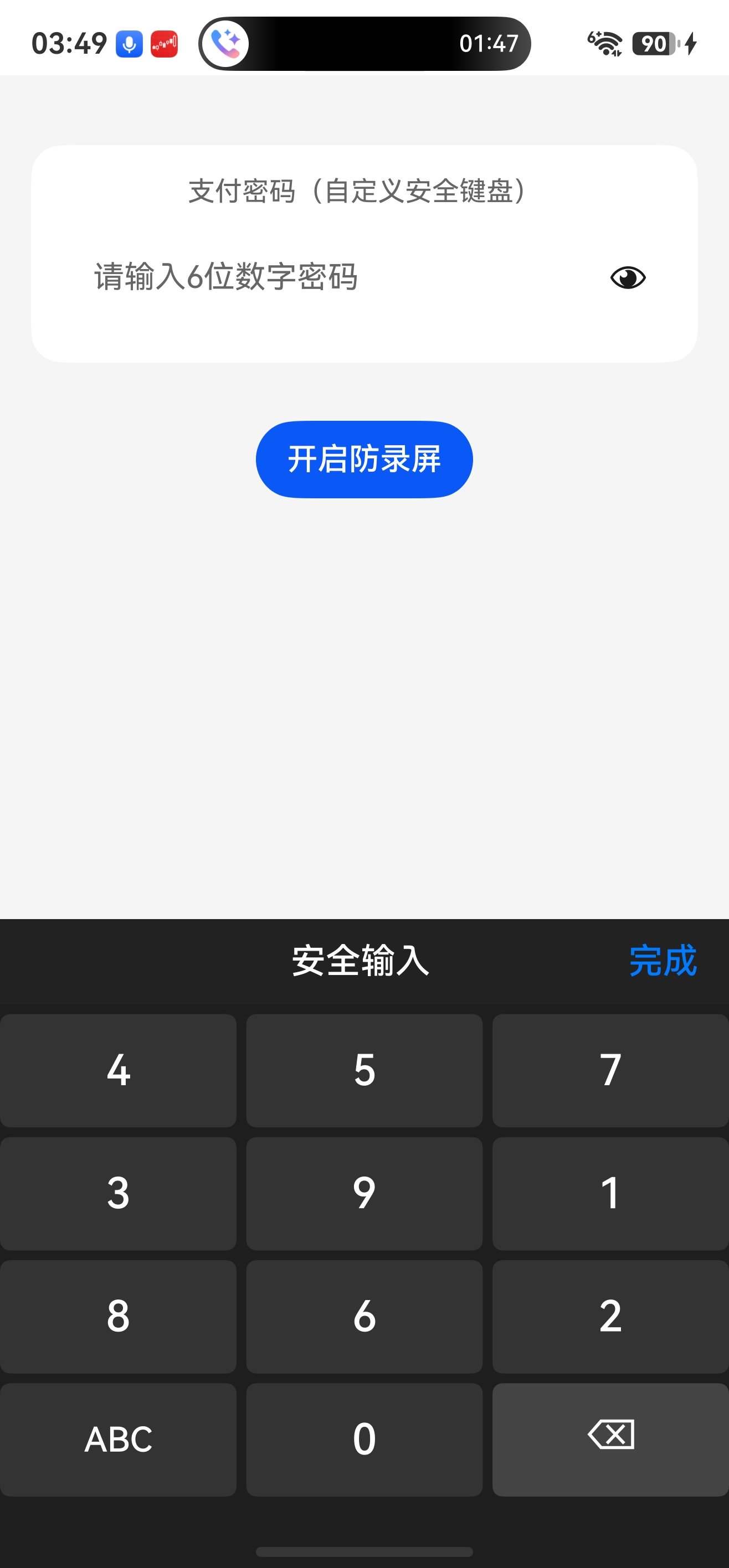
九、三种键盘样式截屏
| 数字键盘 | 字母键盘 | 字符键盘 |
|---|---|---|
 |
 |
 |
十、横竖屏与安全区域适配
- 横竖屏监听:通过
WindowUtil.onOrientationChange重新计算键盘高度并刷新布局。 - 动态高度:
WindowUtil.getDynamicKeyboardHeight根据屏幕比例和设备类型返回合适高度。 - 底部安全区:可通过
WindowUtil.getSystemBottomHeight获取手势条高度,为键盘外层Column添加padding({ bottom: safeHeight })。
十一、性能优化与字体缩放
- 按钮重绘:
drawKeyboard每帧全量绘制,但按钮数量少(最多40个),性能足够。 - 字体缩放:支持外部
fontSizeScale参数,范围 0.8~1.2,动态调整所有按钮字体,且限制范围避免太突兀。 - 按压高亮:仅记录按下索引,重绘时改变对应按钮颜色,成本低。
十二、总结
工程代码可直接集成到鸿蒙应用中,为支付、登录等场景提供安全可靠的输入体验。自行参考实现拓展专属自定义键盘,也可拓展加入震动传感器、适配深浅样式。如果觉得本文对你有帮助,请点赞、收藏、转发支持!

作为“人工智能6S店”的官方数字引擎,为AI开发者与企业提供一个覆盖软硬件全栈、一站式门户。
更多推荐
 1
1 0
0- 0


 已为社区贡献83条内容

所有评论(0)