
Day10_开源鸿蒙_Flutter_for_OpenHarmony_离线笔记_全量备份导出导入
本文介绍了开源鸿蒙Flutter应用中离线笔记功能的全量备份实现方案。通过JSON格式导出/导入所有笔记数据,解决了单条导出效率低的问题。文章详细说明了备份数据结构设计(包含加密字段)、数据库查询优化、核心代码实现(导出为JSON字符串和解析导入),以及前端交互界面开发。关键点包括:1)支持私密笔记加密字段备份;2)一键操作简化迁移流程;3)完整的自测验证方案,确保数据完整性。该方案无需新增插件,
开源鸿蒙 Flutter for OpenHarmony:离线笔记收官(全量备份导出/导入)
欢迎加入开源鸿蒙跨平台社区:https://openharmonycrossplatform.csdn.net
离线笔记做到 Day9,单条笔记已经能导出/导入(二维码+复制文本)。
但到了真正“换机/重装/迁移”的场景,大家更需要的是:全量备份。
Day10 收官把这件事补齐:
一键把当前数据库里所有笔记导出成一段 JSON 文本(复制到剪贴板),另一台设备/重装后直接粘贴导入恢复。
这篇的重点依然是“怎么把三方库用到位”,但全量备份本身不需要新增插件:
- 数据来自
sqflite - 私密笔记的密文字段照样备份(不会导出明文)
- 复制/粘贴用 Flutter 自带剪贴板即可
1. 全量备份为什么要单独做(单条导出不够用)
单条导出的缺点很明显:
- 50 条笔记要导出 50 次
- 迁移成本高,容易漏
全量备份的目标只有一个:
一次复制,一次导入,全部恢复。
2. 备份格式(v=1):包含 salt + notes 数组
为了兼容 Day4 的私密笔记,我们把 salt_b64 一起带上。
全量备份结构如下:
{
  "v": 1,
  "salt_b64": "xxxx",
  "notes": [
    {
      "title": "xxx",
      "content": "xxx",
      "pinned": 0,
      "is_private": 0,
      "content_cipher": null,
      "content_nonce": null,
      "content_mac": null,
      "created_at": 0,
      "updated_at": 0
    }
  ]
}
关键点:
- 普通笔记:
content有明文 - 私密笔记:
content固定为空,密文在content_cipher/nonce/mac
所以全量导出不会“把私密内容明文泄露”。
3. DAO 增加 listAllNotes:一次性取出所有未删除笔记
📌 文件:lib/features/note/data/note_dao.dart
Future<List<Note>> listAllNotes() async {
  final db = await _db.database;
  final rows = await db.query(
    'notes',
    where: 'is_deleted = ?',
    whereArgs: const [0],
    orderBy: 'pinned DESC, updated_at DESC',
  );
  return rows.map(_fromRow).toList(growable: false);
}
这里不设 limit:因为我们就是为了“全量”。
4. Repository 实现全量导出/导入
📌 文件:lib/features/note/data/note_repository.dart
4.1 导出:exportAllNotesAsJson()
Future<String> exportAllNotesAsJson() async {
  const saltKey = 'private_pin_salt_b64';
  final saltB64 = await _dao.appDb.getKv(saltKey);
  final all = await _dao.listAllNotes();
  final payload = <String, Object?>{
    'v': 1,
    'salt_b64': saltB64,
    'notes': all.map((note) => <String, Object?>{
      'title': note.title,
      'content': note.content,
      'pinned': note.pinned ? 1 : 0,
      'is_private': note.isPrivate ? 1 : 0,
      'content_cipher': note.contentCipher,
      'content_nonce': note.contentNonce,
      'content_mac': note.contentMac,
      'created_at': note.createdAt.millisecondsSinceEpoch,
      'updated_at': note.updatedAt.millisecondsSinceEpoch,
    }).toList(growable: false),
  };
  return jsonEncode(payload);
}
4.2 导入:importAllNotesFromJson(text)
导入逻辑也很直接:
- 解析 JSON,校验
v - 如果带了
salt_b64,先写回app_kv - 循环
notes,逐条 insert
Future<int> importAllNotesFromJson(String text) async {
  const saltKey = 'private_pin_salt_b64';

  final obj = jsonDecode(text);
  if (obj is! Map) throw StateError('Invalid json');
  final v = obj['v'];
  if (v != 1) throw StateError('Unsupported version');

  final saltB64 = obj['salt_b64'];
  if (saltB64 is String && saltB64.isNotEmpty) {
    await _dao.appDb.setKv(saltKey, saltB64);
  }

  final list = obj['notes'];
  if (list is! List) throw StateError('Missing notes');

  var count = 0;
  for (final item in list) {
    if (item is! Map) continue;
    ...
    await _dao.insert(note);
    count++;
  }
  return count;
}
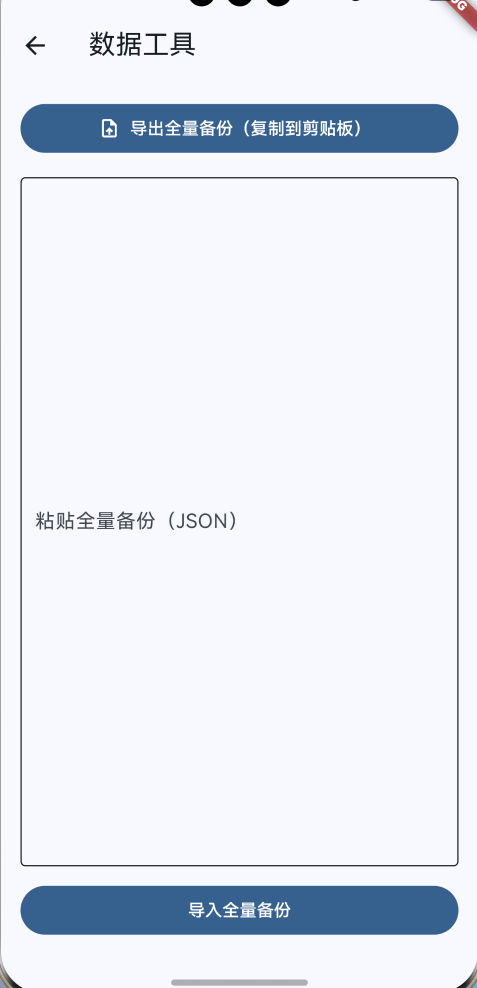
5. 新增一个“数据工具”页面:导出复制 + 粘贴导入
📌 文件:lib/features/debug/ui/data_tools_page.dart
5.1 一键导出:复制到剪贴板
final text = await widget.repo.exportAllNotesAsJson();
await Clipboard.setData(ClipboardData(text: text));
await showToast('已复制全量备份');
5.2 粘贴导入:导入成功提示“导入了多少条”
final n = await widget.repo.importAllNotesFromJson(text);
await showToast('已导入 $n 条');
Navigator.pop(context, true);
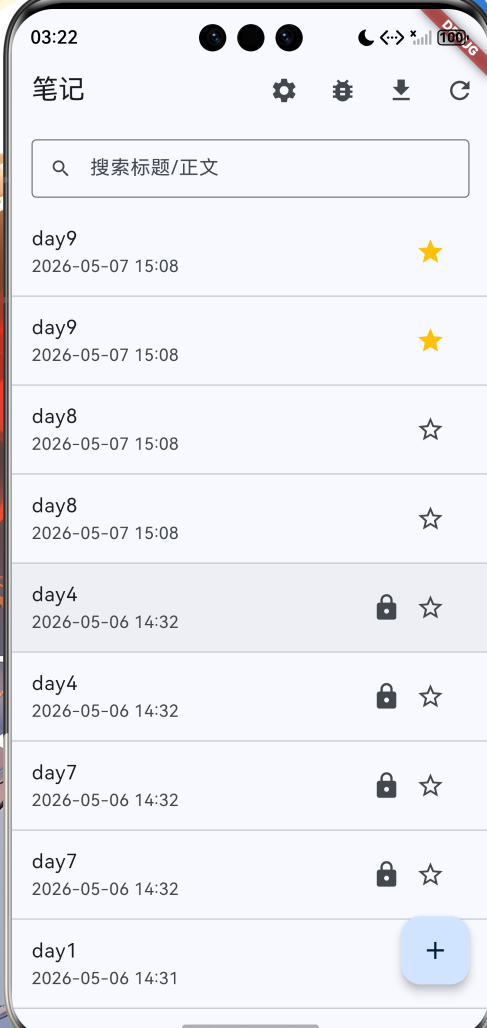
6. 入口:列表页右上角加一个“数据工具”按钮
📌 文件:lib/features/note/ui/notes_list_page.dart
IconButton(
  onPressed: () async {
    final changed = await Navigator.of(context).push<bool>(
      MaterialPageRoute(
        builder: (_) => DataToolsPage(repo: _repo),
      ),
    );
    if (changed == true && mounted) {
      await _controller.load();
    }
  },
  icon: const Icon(Icons.settings),
  tooltip: '数据工具',
),
导入成功后返回列表自动刷新。
📷
7. 自测清单(Day10)
- 创建几条普通笔记 + 私密笔记 + 置顶笔记
- 打开“数据工具” → 点导出 → 粘贴到备忘录确认是一段 JSON
- 清空应用数据/重装(或换设备)后 → 打开“数据工具” → 粘贴 JSON → 导入
- 返回列表:
- 笔记数量一致
- 置顶排序仍然有效
- 私密笔记仍然需要 PIN 才能看到正文(导入不会变明文)

作为“人工智能6S店”的官方数字引擎,为AI开发者与企业提供一个覆盖软硬件全栈、一站式门户。
更多推荐


 0
0 0
0- 0


 已为社区贡献9条内容

所有评论(0)