
Day2_开源鸿蒙_Flutter_for_OpenHarmony_离线笔记_自动保存与搜索
文章摘要 本文介绍了如何在开源鸿蒙平台上使用Flutter和sqflite实现笔记应用的搜索和自动保存功能。主要内容包括: 搜索功能实现:通过sqflite的query方法结合LIKE操作符实现标题/正文关键字搜索,支持未删除数据筛选和按更新时间排序。 搜索优化:使用防抖技术(300ms延迟)减少频繁查询数据库的问题,提升用户体验。 自动保存机制: 采用800ms防抖策略,在用户停止输入后进行保存
开源鸿蒙 Flutter for OpenHarmony:sqflite搜索+自动保存
欢迎加入开源鸿蒙跨平台社区:https://openharmonycrossplatform.csdn.net
Day2 的重点放在一件事:把 sqflite 用得更像“真实笔记应用”。
- 笔记多了要能搜:用
sqflite做标题/正文关键字查询(LIKE) - 写笔记要安全:输入过程中自动落盘,返回前再兜底保存一次(底层还是
sqflite的 insert/update)
本篇不新增第三方库,沿用 Day1 的三方库组合:sqflite + fluttertoast + path。
1. 今天用到的第三方库(各自负责什么)
🧩 sqflite
- 负责:SQLite 查询/插入/更新(搜索、自动保存最终都是它在写库/查库)
🧩 fluttertoast
- 负责:把“保存成功/保存失败”这种状态给用户一个轻提示(不挡操作)
🧩 path
- 负责:拼接数据库文件路径(Day1 已完成,本篇继续沿用)
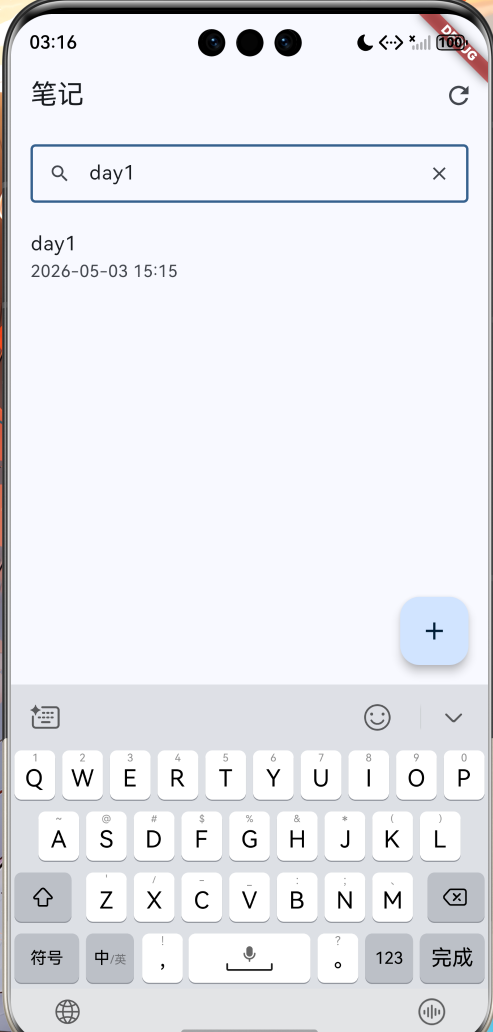
2. 搜索怎么写:sqflite 的 query + LIKE + whereArgs
搜索的目标很简单:
- 只搜未删除数据:
is_deleted = 0 - 标题或正文命中即可:
title LIKE ? OR content LIKE ? - 最近更新的排前面:
orderBy: 'updated_at DESC'
📌 文件:lib/features/note/data/note_dao.dart
Future<List<Note>> searchNotes(String keyword, {int limit = 100}) async {
  final db = await _db.database;
  final k = '%${keyword.trim()}%';
  final rows = await db.query(
    'notes',
    where: 'is_deleted = ? AND (title LIKE ? OR content LIKE ?)',
    whereArgs: [0, k, k],
    orderBy: 'updated_at DESC',
    limit: limit,
  );
  return rows.map(_fromRow).toList(growable: false);
}
这段代码专门讲清楚 4 个点(学会就能举一反三):
✅ 1)为什么用 db.query(...)
query是 sqflite 的高频接口:表名、where、排序、limit 都是参数,不需要自己拼 SQL 字符串
✅ 2)为什么 whereArgs 必须用
- 不要把关键字直接拼到
where里(容易出错,也不利于排查) whereArgs就是参数绑定:title LIKE ?的?对应k
✅ 3)为什么 k 要写成 %关键字%
LIKE的包含匹配写法:%表示任意字符串- 如果只想前缀匹配,可以用
关键字%
✅ 4)为什么要 orderBy updated_at DESC
- 笔记类列表通常“最近编辑的在前面”,搜索结果也一样
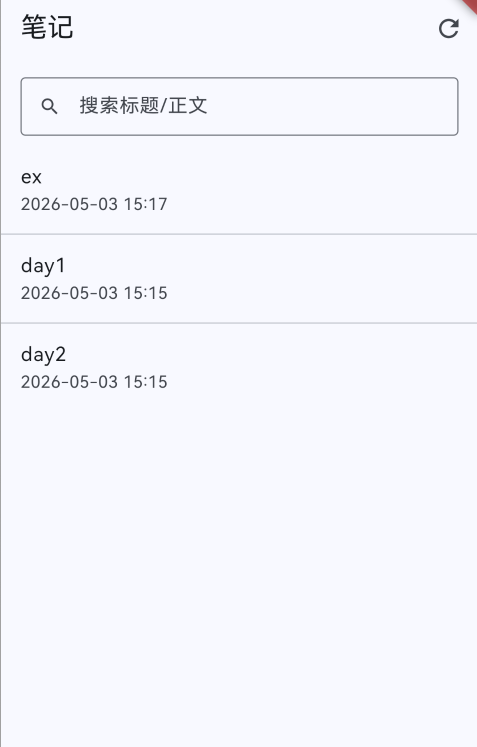
📷 截图位(建议准备 3 张)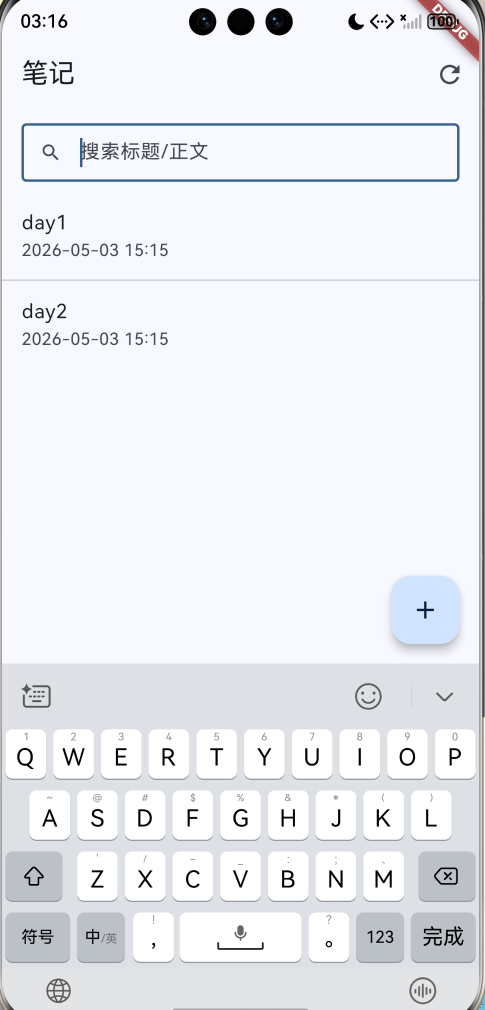
3. 搜索框怎么写:避免每个字都触发一次 sqflite 查询
如果输入一个字就查一次库,sqflite 的查询会变得很频繁,体验会抖。处理方式很朴素:防抖,停 300ms 再查。
📌 文件:lib/features/note/ui/notes_list_page.dart
Timer? _searchDebounce;
late final TextEditingController _searchController;

Future<List<Note>> _loadNotes() {
  final keyword = _searchController.text.trim();
  if (keyword.isEmpty) {
    return _repo.listNotes();
  }
  return _repo.searchNotes(keyword);
}

void _onSearchChanged(String _) {
  _searchDebounce?.cancel();
  _searchDebounce = Timer(const Duration(milliseconds: 300), () {
    if (!mounted) return;
    _reload();
  });
}
这里和 sqflite 的关系是:
_repo.searchNotes(keyword)最终会走到NoteDao.searchNotes(...)- 防抖的意义就是“减少 sqflite 的 query 调用次数”
4. 自动保存怎么写:核心是把 sqflite 的 insert/update 调用节奏做对
自动保存不是“疯狂写库”,目标是两条:
- 输入停下来一小段时间,落盘一次(防抖)
- 返回页面前,再兜底落盘一次
这背后对应的就是 sqflite 的两类写操作:
- 第一次:
insert(新建一条 note) - 后续:
update(持续更新同一条 note)
4.1 防抖保存:800ms 不输入就写一次库
📌 文件:lib/features/note/ui/note_editor_page.dart
Timer? _autoSaveDebounce;
bool _dirty = false;

void _scheduleAutoSave() {
  _dirty = true;
  _autoSaveDebounce?.cancel();
  _autoSaveDebounce = Timer(const Duration(milliseconds: 800), () async {
    if (!mounted) return;
    await _persist(showToastOnEmpty: false, showToastOnSuccess: false);
  });
}
这段写法的好处:
- 不是每次输入都写库,而是“停下来再写”
sqflite写库次数减少,体验更稳
4.2 持久化函数:把 create/update 封装成一个入口
📌 文件:lib/features/note/ui/note_editor_page.dart
bool _saving = false;
bool _queuedSave = false;
Note? _note;

Future<void> _persist({
  required bool showToastOnEmpty,
  required bool showToastOnSuccess,
}) async {
  if (!_dirty && _note != null) return;
  if (_saving) {
    _queuedSave = true;
    return;
  }

  final title = _titleController.text;
  final content = _contentController.text;
  if (title.trim().isEmpty && content.trim().isEmpty) {
    if (showToastOnEmpty) await showToast('内容为空,未保存');
    return;
  }

  setState(() => _saving = true);
  try {
    final existing = _note;
    if (existing == null) {
      final created = await widget.repo.create(title: title, content: content);
      _note = created;
    } else {
      await widget.repo.update(
        id: existing.id!,
        title: title,
        content: content,
        createdAt: existing.createdAt,
      );
    }
    _dirty = false;
    if (showToastOnSuccess) await showToast('已保存');
  } catch (e) {
    await showToast('保存失败:$e');
  } finally {
    if (mounted) setState(() => _saving = false);
    if (mounted && _queuedSave) {
      _queuedSave = false;
      await _persist(showToastOnEmpty: false, showToastOnSuccess: false);
    } else {
      _queuedSave = false;
    }
  }
}
这里最关键的是:它把 sqflite 的写库“节奏”控制住了。
✅ 1)第一次自动保存为什么能成功
existing == null时走repo.create(...)create最终会走到 DAO 的insert(...)(sqflite insert)- 插入成功后把
_note赋值,后面就不会重复 insert
✅ 2)为什么不会并发写库
_saving期间如果又来了保存请求,就把_queuedSave标记为 true- 本轮保存结束后再跑下一轮 persist(串行写库)
✅ 3)fluttertoast 在这里怎么用
- 自动保存默认不弹“已保存”,避免打扰
- 只有点击保存按钮时才
showToast('已保存') - 失败一定 toast(否则用户以为保存了,其实没写进去)
5. 返回兜底保存:确保最后一段输入不会丢
📌 文件:lib/features/note/ui/note_editor_page.dart
return PopScope(
  canPop: false,
  onPopInvokedWithResult: (didPop, result) {
    if (didPop) return;
    _onBackPressed();
  },
  child: Scaffold(
    appBar: AppBar(
      leading: IconButton(
        onPressed: _onBackPressed,
        icon: const Icon(Icons.arrow_back),
      ),
    ),
  ),
);
_onBackPressed() 做的事很直接:取消防抖计时器 → 如果脏数据未落盘则 persist 一次 → 再退出页面。
📷 截图位(建议准备 2 张)


6. 自测清单(Day2)
🧪 搜索:
- 输入关键字能命中标题/正文
- 清空关键字后恢复完整列表
- 连续输入时不卡顿(防抖生效)
🧪 自动保存:
- 新建页输入一段内容,不点保存直接返回 → 再进列表仍能看到内容
- 编辑已有笔记,停 1 秒左右返回 → 列表更新时间变更
- 快速连续输入时不会卡死/不会报错(串行写库生效)
7. 下一步(Day3 方向)
Day3 适合写一篇更“排错向”的内容:sqflite 锁库、并发写入、迁移失败如何复现与定位。

作为“人工智能6S店”的官方数字引擎,为AI开发者与企业提供一个覆盖软硬件全栈、一站式门户。
更多推荐

 1
1 0
0- 0


 已为社区贡献2条内容

所有评论(0)