
鸿蒙PC 隐私清理工具实战:清理缓存、浏览历史、临时文件
欢迎加入开源鸿蒙PC社区:https://harmonypc.csdn.net/项目 Git 仓库:https://atomgit.com/liboqian/harmonyOs_Clear在使用浏览器和各种应用的过程中,我们的设备会不知不觉地积累大量数据,包括浏览历史、缓存文件、Cookie、本地存储等。这些数据不仅占用存储空间,还可能泄露个人隐私。虽然浏览器自带清理功能,但存在以下局限性:本项目
Vue3 隐私清理工具实战:清理缓存、浏览历史、临时文件
欢迎加入开源鸿蒙PC社区:
https://harmonypc.csdn.net/
项目 Git 仓库:
https://atomgit.com/liboqian/harmonyOs_Clear
1. 项目背景与需求分析
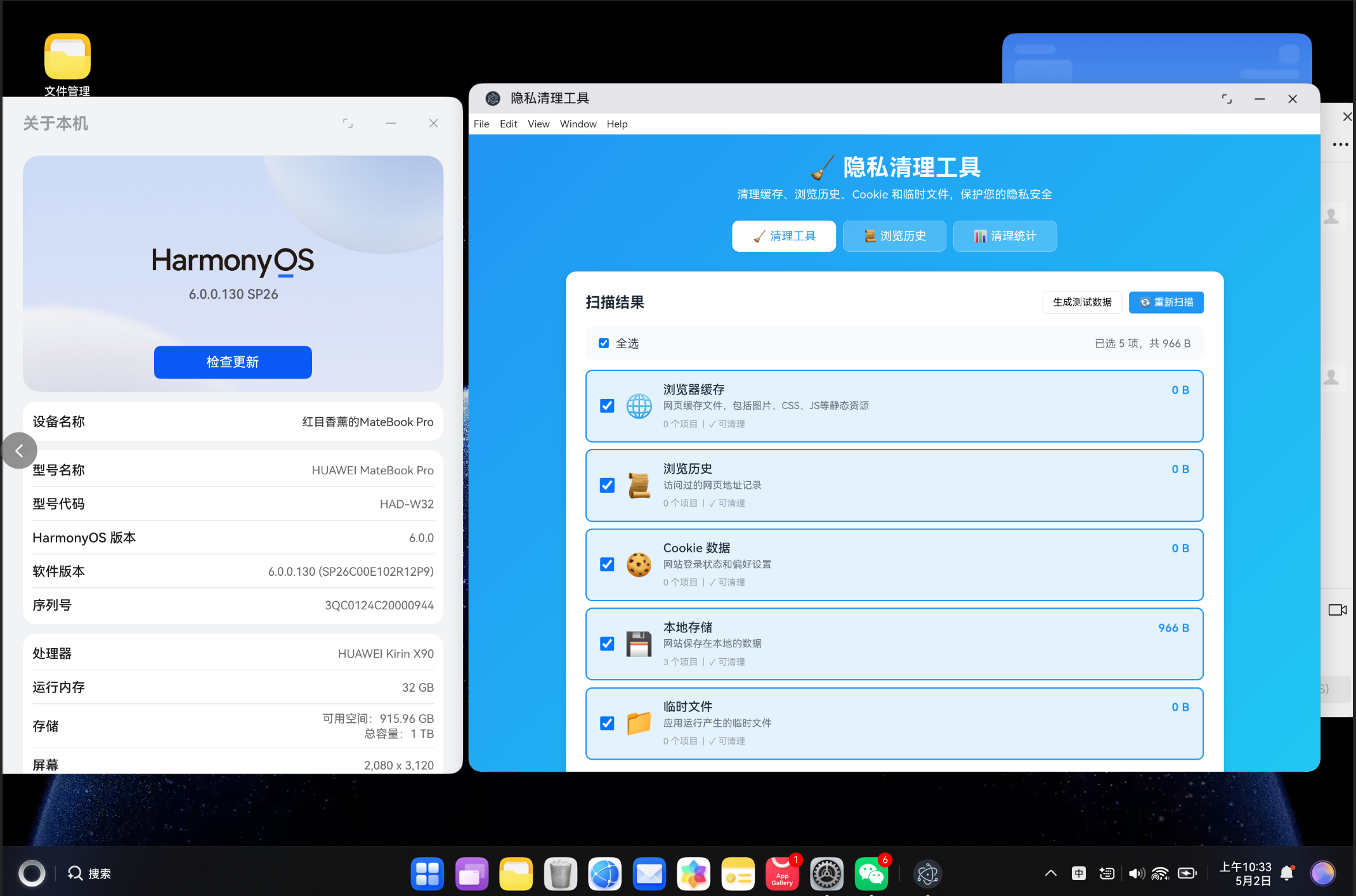
1.1 为什么需要隐私清理工具
在使用浏览器和各种应用的过程中,我们的设备会不知不觉地积累大量数据,包括浏览历史、缓存文件、Cookie、本地存储等。这些数据不仅占用存储空间,还可能泄露个人隐私。虽然浏览器自带清理功能,但存在以下局限性:
- 功能分散:需要在多个设置页面中分别清理不同类型的缓存
- 不够直观:用户不清楚各项缓存的大小和具体内容
- 缺乏统计:无法了解清理了多少数据,释放了多少空间
- 定制性差:无法选择性清理,只能全部清除或部分保留
本项目基于 Vue3 开发了一个可视化的隐私清理工具,具有以下核心优势:
- 集中管理:一个界面管理所有类型的缓存和数据
- 可视化展示:清晰显示每类缓存的大小和项目数量
- 选择性清理:用户可自由选择要清理的项目
- 统计分析:记录清理历史,展示释放空间统计
1.2 系统功能概览
| 功能模块 | 核心功能 | 技术要点 |
|---|---|---|
| 缓存扫描 | 自动扫描各类缓存大小 | localStorage API、Cookie API |
| 选择性清理 | 勾选需要清理的项目 | 响应式状态管理、异步处理 |
| 浏览历史 | 查看和管理浏览历史 | 数据持久化、列表渲染 |
| 清理统计 | 展示清理次数和释放空间 | 统计数据计算、可视化展示 |
1.3 技术选型
本项目采用以下技术栈进行开发:
| 技术 | 版本 | 用途 |
|---|---|---|
| Vue | 3.4+ | 前端框架,使用组合式 API |
| TypeScript | 5.3+ | 类型安全,提升代码质量 |
| Vite | 5.0+ | 构建工具,快速热更新 |
| vue-router | 4.6+ | 路由管理 |
| Web Storage API | 原生 | localStorage 和 sessionStorage 操作 |
1.4 清理项目说明
| 清理类型 | 说明 | 影响 |
|---|---|---|
| 浏览器缓存 | 网页静态资源缓存(图片、CSS、JS) | 清理后网页加载可能变慢 |
| 浏览历史 | 访问过的网页地址记录 | 清理后无法查看历史访问 |
| Cookie 数据 | 网站登录状态和偏好设置 | 清理后需要重新登录网站 |
| 本地存储 | 网站保存在本地的数据 | 清理后网站个性化设置丢失 |
| 临时文件 | 应用运行产生的临时文件 | 清理后释放存储空间 |
2. 系统架构设计
2.1 整体目录结构
vue-app/
├── src/
│   ├── components/
│   │   └── PrivacyCleaner.vue      # 隐私清理主组件
│   ├── views/
│   │   └── PrivacyView.vue          # 视图页面
│   ├── services/
│   │   └── PrivacyService.ts        # 隐私清理服务层
│   ├── types/
│   │   └── privacy.ts               # 类型定义
│   ├── router/
│   │   └── index.ts                 # 路由配置
│   ├── App.vue                      # 根组件
│   └── main.ts                      # 入口文件
└── package.json
2.2 核心数据类型定义
系统的数据模型设计是整个项目的基础,主要包括以下几种核心类型:
// 缓存项目
export interface CacheItem {
  id: string
  type: 'cache' | 'history' | 'temp' | 'cookie' | 'storage'
  name: string
  size: number
  count: number
  description: string
  icon: string
  canClean: boolean
}

// 浏览历史
export interface HistoryItem {
  id: string
  title: string
  url: string
  lastVisit: number
  visitCount: number
}

// 清理结果
export interface CleanResult {
  type: string
  cleaned: number
  freedSpace: number
  success: boolean
  error?: string
}

// 清理进度
export interface CleanProgress {
  stage: 'scanning' | 'cleaning' | 'done'
  progress: number
  currentType: string
  message: string
}
2.3 组件架构
PrivacyView (主页面)
└── PrivacyCleaner (隐私清理主组件)
    ├── 扫描结果展示
    │   ├── 缓存列表
    │   ├── 全选控制
    │   └── 单项选择
    ├── 清理进度展示
    │   ├── 进度条
    │   └── 状态消息
    ├── 浏览历史页面
    │   ├── 历史列表
    │   └── 单项删除
    └── 清理统计页面
        ├── 统计卡片
        └── 分类详情
3. 隐私清理服务层实现
3.1 缓存扫描功能
扫描并统计各类缓存的大小和数量:
static getCacheItems(): CacheItem[] {
  return [
    {
      id: 'browser-cache',
      type: 'cache',
      name: '浏览器缓存',
      size: this.getCacheSize(),
      count: this.getCacheCount(),
      description: '网页缓存文件,包括图片、CSS、JS等静态资源',
      icon: '🌐',
      canClean: true
    },
    {
      id: 'browsing-history',
      type: 'history',
      name: '浏览历史',
      size: this.getHistorySize(),
      count: this.getHistoryCount(),
      description: '访问过的网页地址记录',
      icon: '📜',
      canClean: true
    },
    {
      id: 'cookies',
      type: 'cookie',
      name: 'Cookie 数据',
      size: this.getCookiesSize(),
      count: this.getCookiesCount(),
      description: '网站登录状态和偏好设置',
      icon: '🍪',
      canClean: true
    },
    {
      id: 'local-storage',
      type: 'storage',
      name: '本地存储',
      size: this.getStorageSize(),
      count: this.getStorageCount(),
      description: '网站保存在本地的数据',
      icon: '💾',
      canClean: true
    },
    {
      id: 'temp-files',
      type: 'temp',
      name: '临时文件',
      size: this.getTempSize(),
      count: this.getTempCount(),
      description: '应用运行产生的临时文件',
      icon: '📁',
      canClean: true
    }
  ]
}
3.2 缓存大小计算
通过遍历 localStorage 和 sessionStorage 计算缓存占用:
static getCacheSize(): number {
  let total = 0
  for (let i = 0; i < localStorage.length; i++) {
    const key = localStorage.key(i)
    if (key && key.startsWith('cache-')) {
      total += (localStorage.getItem(key) || '').length * 2
    }
  }
  for (let i = 0; i < sessionStorage.length; i++) {
    const key = sessionStorage.key(i)
    if (key && key.startsWith('cache-')) {
      total += (sessionStorage.getItem(key) || '').length * 2
    }
  }
  return total
}

static getStorageSize(): number {
  let total = 0
  for (let i = 0; i < localStorage.length; i++) {
    const key = localStorage.key(i)
    const value = localStorage.getItem(key)
    if (key && value) {
      total += (key.length + value.length) * 2
    }
  }
  return total
}
3.3 Cookie 统计
通过 document.cookie 计算 Cookie 占用:
static getCookiesSize(): number {
  return document.cookie.length * 2
}

static getCookiesCount(): number {
  if (!document.cookie) return 0
  return document.cookie.split(';').filter(c => c.trim()).length
}
3.4 缓存清理实现
通过 key 前缀匹配删除相关缓存:
static async cleanCache(progress?: (p: CleanProgress) => void): Promise<CleanResult> {
  progress?.({ stage: 'cleaning', progress: 0, currentType: 'cache', message: '正在清理浏览器缓存...' })

  try {
    let count = 0
    const keysToRemove: string[] = []

    for (let i = 0; i < localStorage.length; i++) {
      const key = localStorage.key(i)
      if (key && key.startsWith('cache-')) {
        keysToRemove.push(key)
      }
    }

    keysToRemove.forEach(key => {
      localStorage.removeItem(key)
      count++
    })

    for (let i = 0; i < sessionStorage.length; i++) {
      const key = sessionStorage.key(i)
      if (key && key.startsWith('cache-')) {
        sessionStorage.removeItem(key)
        count++
      }
    }

    progress?.({ stage: 'cleaning', progress: 100, currentType: 'cache', message: '缓存清理完成' })

    return {
      type: 'cache',
      cleaned: count,
      freedSpace: this.getCacheSize(),
      success: true
    }
  } catch (error) {
    return {
      type: 'cache',
      cleaned: 0,
      freedSpace: 0,
      success: false,
      error: error instanceof Error ? error.message : '清理失败'
    }
  }
}
3.5 Cookie 清理实现
通过设置过期时间为过去时间来删除 Cookie:
static async cleanCookies(progress?: (p: CleanProgress) => void): Promise<CleanResult> {
  progress?.({ stage: 'cleaning', progress: 0, currentType: 'cookie', message: '正在清理 Cookie...' })

  try {
    const count = this.getCookiesCount()
    const size = this.getCookiesSize()

    document.cookie.split(';').forEach(cookie => {
      const name = cookie.split('=')[0].trim()
      document.cookie = `${name}=; expires=Thu, 01 Jan 1970 00:00:00 GMT; path=/`
      document.cookie = `${name}=; expires=Thu, 01 Jan 1970 00:00:00 GMT; path=/; domain=${window.location.hostname}`
    })

    progress?.({ stage: 'cleaning', progress: 100, currentType: 'cookie', message: 'Cookie 清理完成' })

    return {
      type: 'cookie',
      cleaned: count,
      freedSpace: size,
      success: true
    }
  } catch (error) {
    return {
      type: 'cookie',
      cleaned: 0,
      freedSpace: 0,
      success: false,
      error: error instanceof Error ? error.message : '清理失败'
    }
  }
}
3.6 一键全部清理
依次清理所有类型的缓存并更新统计:
static async cleanAll(progress?: (p: CleanProgress) => void): Promise<CleanResult[]> {
  const results: CleanResult[] = []

  progress?.({ stage: 'scanning', progress: 0, currentType: '', message: '正在扫描可清理项目...' })

  const totalTypes = 5
  let completed = 0

  const updateProgress = (type: string) => {
    completed++
    progress?.({
      stage: 'cleaning',
      progress: Math.round((completed / totalTypes) * 100),
      currentType: type,
      message: `正在清理: ${type}`
    })
  }

  results.push(await this.cleanCache(() => updateProgress('浏览器缓存')))
  results.push(await this.cleanHistory(() => updateProgress('浏览历史')))
  results.push(await this.cleanCookies(() => updateProgress('Cookie')))
  results.push(await this.cleanStorage(() => updateProgress('本地存储')))
  results.push(await this.cleanTempFiles(() => updateProgress('临时文件')))

  progress?.({ stage: 'done', progress: 100, currentType: '', message: '全部清理完成' })

  this.updateStats(results)
  return results
}
4. 前端界面实现
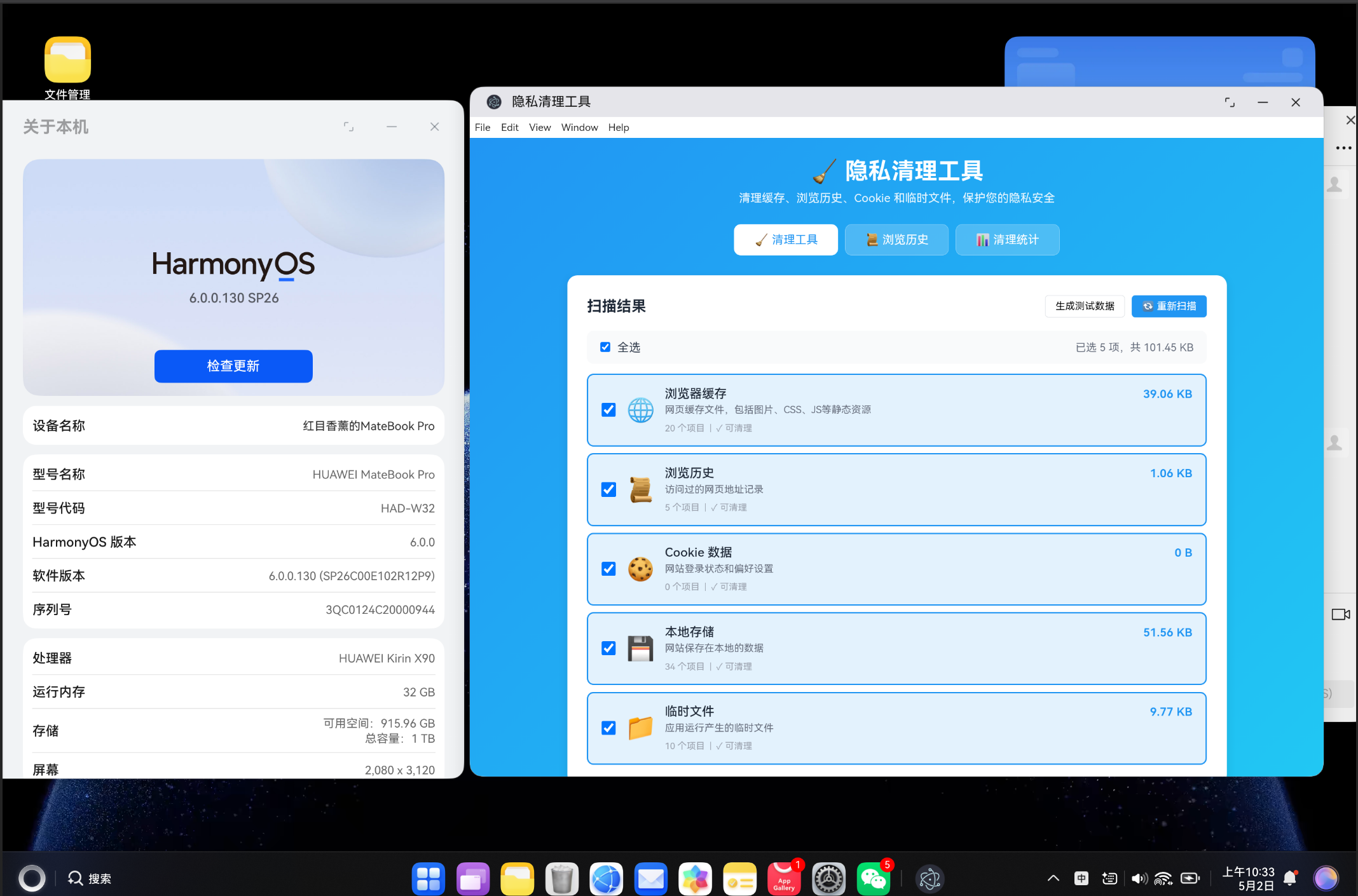
4.1 缓存列表展示
使用 v-for 渲染缓存项目列表,支持单选和全选:
<div class="cache-list">
  <div v-for="item in cacheItems" :key="item.id"
    class="cache-item"
    :class="{ selected: selectedItems.has(item.id) }">
    <label class="item-checkbox">
      <input type="checkbox"
        :checked="selectedItems.has(item.id)"
        @change="toggleSelect(item.id)" />
      <div class="item-icon">{{ item.icon }}</div>
    </label>
    <div class="item-content">
      <div class="item-header">
        <span class="item-name">{{ item.name }}</span>
        <span class="item-size">{{ PrivacyService.formatBytes(item.size) }}</span>
      </div>
      <p class="item-desc">{{ item.description }}</p>
      <div class="item-meta">
        <span>{{ item.count }} 个项目</span>
        <span class="divider">|</span>
        <span>{{ item.canClean ? '✓ 可清理' : '✗ 不可清理' }}</span>
      </div>
    </div>
  </div>
</div>
4.2 清理进度展示
实时显示清理进度和状态消息:
<div v-if="progress && isCleaning" class="progress-section">
  <div class="progress-header">
    <span class="progress-type">{{ progress.currentType }}</span>
    <span class="progress-percent">{{ progress.progress }}%</span>
  </div>
  <div class="progress-bar">
    <div class="progress-fill" :style="{ width: progress.progress + '%' }"></div>
  </div>
  <p class="progress-message">{{ progress.message }}</p>
</div>
4.3 清理成功提示
清理完成后显示成功横幅:
<div v-if="showSuccess" class="success-banner">
  <svg viewBox="0 0 24 24" width="24" height="24" fill="currentColor">
    <path d="M12 2C6.48 2 2 6.48 2 12s4.48 10 10 10 10-4.48 10-10S17.52 2 12 2zm-2 15l-5-5 1.41-1.41L10 14.17l7.59-7.59L19 8l-9 9z"/>
  </svg>
  <div class="success-content">
    <span class="success-title">清理完成!</span>
    <span class="success-detail">已清理 {{ totalCleaned }} 个项目,释放 {{ PrivacyService.formatBytes(totalFreed) }} 空间</span>
  </div>
</div>
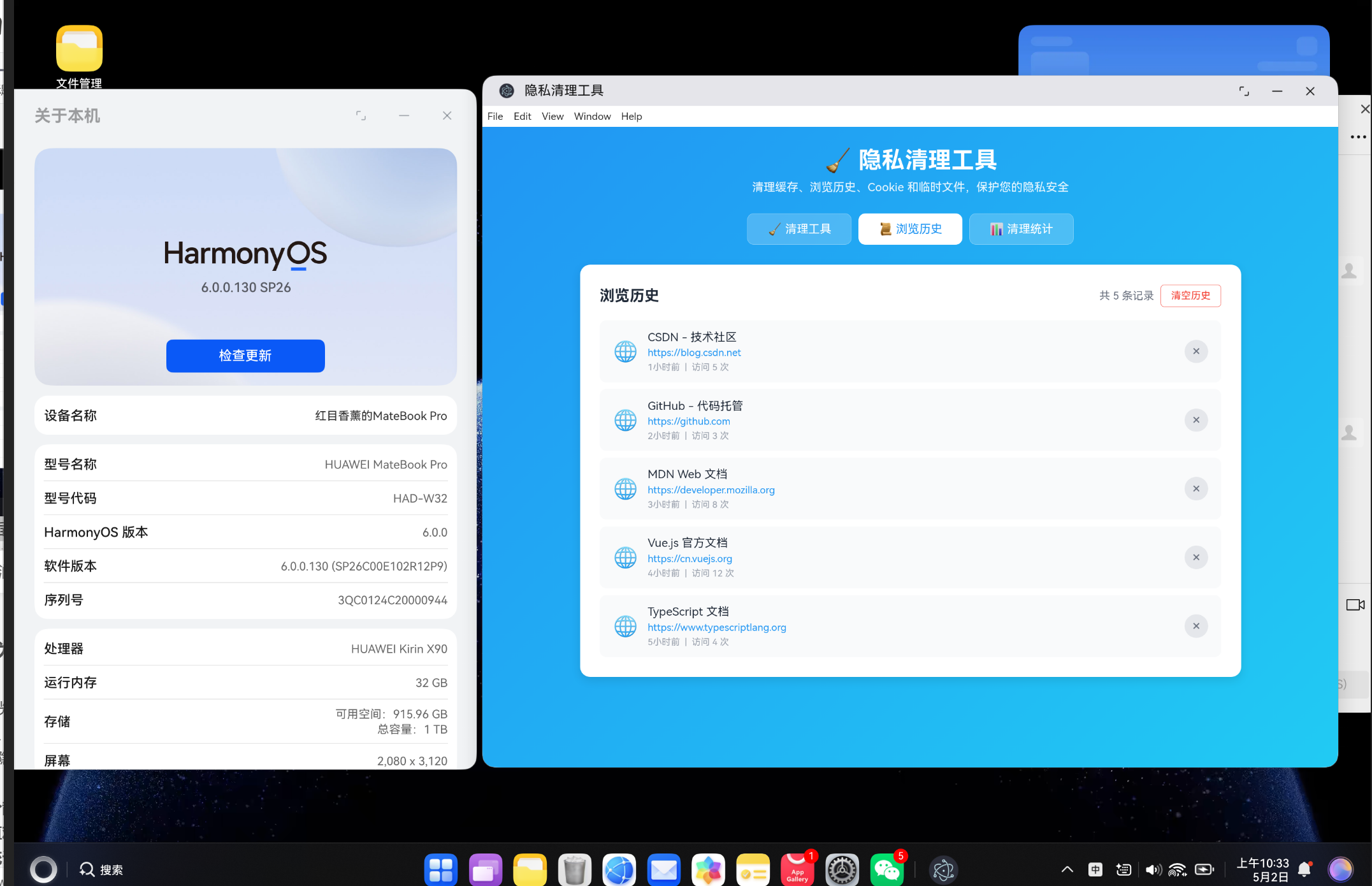
4.4 浏览历史页面
展示浏览历史记录,支持单条删除和清空:
<div v-if="history.length > 0" class="history-list">
  <div v-for="item in history" :key="item.id" class="history-item">
    <div class="history-icon">🌐</div>
    <div class="history-details">
      <div class="history-title">{{ item.title }}</div>
      <div class="history-url">{{ item.url }}</div>
      <div class="history-meta">
        <span>{{ formatTime(item.lastVisit) }}</span>
        <span class="divider">|</span>
        <span>访问 {{ item.visitCount }} 次</span>
      </div>
    </div>
    <button class="btn-icon" @click="deleteHistoryItem(item.id)" title="删除">
      ×
    </button>
  </div>
</div>
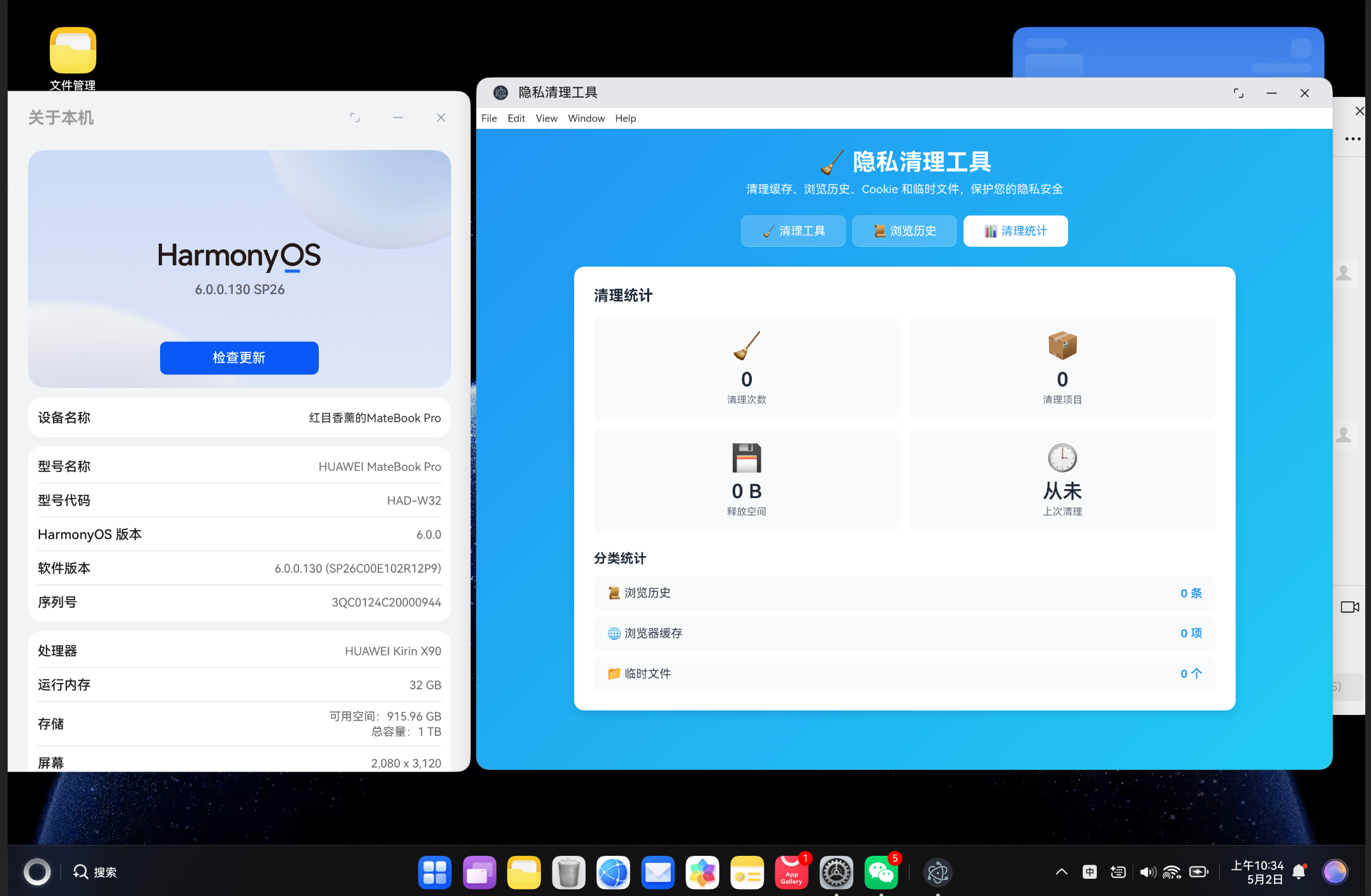
4.5 清理统计页面
展示清理次数、释放空间等统计信息:
<div class="stats-grid">
  <div class="stat-card">
    <div class="stat-icon">🧹</div>
    <div class="stat-value">{{ stats.cleanCount }}</div>
    <div class="stat-label">清理次数</div>
  </div>
  <div class="stat-card">
    <div class="stat-icon">📦</div>
    <div class="stat-value">{{ stats.totalItems }}</div>
    <div class="stat-label">清理项目</div>
  </div>
  <div class="stat-card">
    <div class="stat-icon">💾</div>
    <div class="stat-value">{{ PrivacyService.formatBytes(stats.totalSize) }}</div>
    <div class="stat-label">释放空间</div>
  </div>
  <div class="stat-card">
    <div class="stat-icon">🕒</div>
    <div class="stat-value">{{ stats.lastCleaned ? formatTime(stats.lastCleaned) : '从未' }}</div>
    <div class="stat-label">上次清理</div>
  </div>
</div>
5. 核心代码完整展示
5.1 PrivacyService 服务层
import type { CacheItem, CleanResult, CleanStats, HistoryItem, CleanProgress } from '../types/privacy'

export class PrivacyService {
  private static readonly HISTORY_KEY = 'browser-history'
  private static readonly COOKIES_KEY = 'browser-cookies'
  private static readonly STORAGE_KEY = 'app-storage'
  private static readonly TEMP_KEY = 'temp-files'
  private static readonly STATS_KEY = 'clean-stats'

  static getCacheItems(): CacheItem[] {
    return [
      {
        id: 'browser-cache',
        type: 'cache',
        name: '浏览器缓存',
        size: this.getCacheSize(),
        count: this.getCacheCount(),
        description: '网页缓存文件,包括图片、CSS、JS等静态资源',
        icon: '🌐',
        canClean: true
      },
      {
        id: 'browsing-history',
        type: 'history',
        name: '浏览历史',
        size: this.getHistorySize(),
        count: this.getHistoryCount(),
        description: '访问过的网页地址记录',
        icon: '📜',
        canClean: true
      },
      {
        id: 'cookies',
        type: 'cookie',
        name: 'Cookie 数据',
        size: this.getCookiesSize(),
        count: this.getCookiesCount(),
        description: '网站登录状态和偏好设置',
        icon: '🍪',
        canClean: true
      },
      {
        id: 'local-storage',
        type: 'storage',
        name: '本地存储',
        size: this.getStorageSize(),
        count: this.getStorageCount(),
        description: '网站保存在本地的数据',
        icon: '💾',
        canClean: true
      },
      {
        id: 'temp-files',
        type: 'temp',
        name: '临时文件',
        size: this.getTempSize(),
        count: this.getTempCount(),
        description: '应用运行产生的临时文件',
        icon: '📁',
        canClean: true
      }
    ]
  }

  static async cleanCache(progress?: (p: CleanProgress) => void): Promise<CleanResult> {
    progress?.({ stage: 'cleaning', progress: 0, currentType: 'cache', message: '正在清理浏览器缓存...' })

    try {
      let count = 0
      const keysToRemove: string[] = []

      for (let i = 0; i < localStorage.length; i++) {
        const key = localStorage.key(i)
        if (key && key.startsWith('cache-')) {
          keysToRemove.push(key)
        }
      }

      keysToRemove.forEach(key => {
        localStorage.removeItem(key)
        count++
      })

      for (let i = 0; i < sessionStorage.length; i++) {
        const key = sessionStorage.key(i)
        if (key && key.startsWith('cache-')) {
          sessionStorage.removeItem(key)
          count++
        }
      }

      progress?.({ stage: 'cleaning', progress: 100, currentType: 'cache', message: '缓存清理完成' })

      return {
        type: 'cache',
        cleaned: count,
        freedSpace: this.getCacheSize(),
        success: true
      }
    } catch (error) {
      return {
        type: 'cache',
        cleaned: 0,
        freedSpace: 0,
        success: false,
        error: error instanceof Error ? error.message : '清理失败'
      }
    }
  }

  static async cleanCookies(progress?: (p: CleanProgress) => void): Promise<CleanResult> {
    progress?.({ stage: 'cleaning', progress: 0, currentType: 'cookie', message: '正在清理 Cookie...' })

    try {
      const count = this.getCookiesCount()
      const size = this.getCookiesSize()

      document.cookie.split(';').forEach(cookie => {
        const name = cookie.split('=')[0].trim()
        document.cookie = `${name}=; expires=Thu, 01 Jan 1970 00:00:00 GMT; path=/`
        document.cookie = `${name}=; expires=Thu, 01 Jan 1970 00:00:00 GMT; path=/; domain=${window.location.hostname}`
      })

      progress?.({ stage: 'cleaning', progress: 100, currentType: 'cookie', message: 'Cookie 清理完成' })

      return {
        type: 'cookie',
        cleaned: count,
        freedSpace: size,
        success: true
      }
    } catch (error) {
      return {
        type: 'cookie',
        cleaned: 0,
        freedSpace: 0,
        success: false,
        error: error instanceof Error ? error.message : '清理失败'
      }
    }
  }

  static async cleanAll(progress?: (p: CleanProgress) => void): Promise<CleanResult[]> {
    const results: CleanResult[] = []

    progress?.({ stage: 'scanning', progress: 0, currentType: '', message: '正在扫描可清理项目...' })

    const totalTypes = 5
    let completed = 0

    const updateProgress = (type: string) => {
      completed++
      progress?.({
        stage: 'cleaning',
        progress: Math.round((completed / totalTypes) * 100),
        currentType: type,
        message: `正在清理: ${type}`
      })
    }

    results.push(await this.cleanCache(() => updateProgress('浏览器缓存')))
    results.push(await this.cleanHistory(() => updateProgress('浏览历史')))
    results.push(await this.cleanCookies(() => updateProgress('Cookie')))
    results.push(await this.cleanStorage(() => updateProgress('本地存储')))
    results.push(await this.cleanTempFiles(() => updateProgress('临时文件')))

    progress?.({ stage: 'done', progress: 100, currentType: '', message: '全部清理完成' })

    this.updateStats(results)
    return results
  }

  static formatBytes(bytes: number): string {
    if (bytes === 0) return '0 B'
    const k = 1024
    const sizes = ['B', 'KB', 'MB', 'GB']
    const i = Math.floor(Math.log(bytes) / Math.log(k))
    return parseFloat((bytes / Math.pow(k, i)).toFixed(2)) + ' ' + sizes[i]
  }

  static generateSampleData(): void {
    for (let i = 0; i < 20; i++) {
      localStorage.setItem(`cache-item-${i}`, 'x'.repeat(1000))
    }
    for (let i = 0; i < 10; i++) {
      localStorage.setItem(`temp-file-${i}`, 'x'.repeat(500))
    }

    const sampleHistory: HistoryItem[] = [
      { id: 'h1', title: 'CSDN - 技术社区', url: 'https://blog.csdn.net', lastVisit: Date.now() - 3600000, visitCount: 5 },
      { id: 'h2', title: 'GitHub - 代码托管', url: 'https://github.com', lastVisit: Date.now() - 7200000, visitCount: 3 },
      { id: 'h3', title: 'MDN Web 文档', url: 'https://developer.mozilla.org', lastVisit: Date.now() - 10800000, visitCount: 8 },
      { id: 'h4', title: 'Vue.js 官方文档', url: 'https://cn.vuejs.org', lastVisit: Date.now() - 14400000, visitCount: 12 },
      { id: 'h5', title: 'TypeScript 文档', url: 'https://www.typescriptlang.org', lastVisit: Date.now() - 18000000, visitCount: 4 }
    ]
    localStorage.setItem(this.HISTORY_KEY, JSON.stringify(sampleHistory))

    document.cookie = 'sample-cookie-1=test-value-1; path=/'
    document.cookie = 'sample-cookie-2=test-value-2; path=/'
    document.cookie = 'sample-cookie-3=test-value-3; path=/'
  }
}
5.2 路由配置
import { createRouter, createWebHashHistory } from 'vue-router'
import type { RouteRecordRaw } from 'vue-router'

const routes: RouteRecordRaw[] = [
  {
    path: '/',
    name: 'PrivacyCleaner',
    component: () => import('../views/PrivacyView.vue'),
  },
]

const router = createRouter({
  history: createWebHashHistory(),
  routes,
})

export default router
6. 项目构建与部署
6.1 环境要求
- Node.js 16+
- 支持 Web Storage API 的现代浏览器
6.2 安装依赖
cd vue-app
npm install
6.3 开发模式
npm run dev
启动后访问 http://localhost:5173 即可查看应用。
6.4 构建生产版本
npm run build
构建产物将输出到 dist 目录。
6.5 预览生产版本
npm run preview
6.6 集成到鸿蒙应用
构建完成后,将 dist 目录的内容部署到鸿蒙应用的资源目录中即可在 DevEco Studio 中运行。
7. 使用指南
7.1 扫描缓存
- 打开应用后自动扫描各类缓存
- 点击"重新扫描"按钮可重新扫描
- 点击"生成测试数据"可生成模拟数据用于测试
7.2 选择性清理
- 勾选需要清理的项目
- 点击"全选"可快速选择所有项目
- 点击"开始清理"执行清理操作
7.3 一键清理
点击"一键清理全部"按钮,依次清理所有类型的缓存。
7.4 查看浏览历史
- 切换到"浏览历史"标签页
- 查看访问过的网页记录
- 点击"×"按钮删除单条记录
- 点击"清空历史"删除所有记录
7.5 查看清理统计
- 切换到"清理统计"标签页
- 查看清理次数、清理项目数、释放空间等统计信息
- 查看分类统计数据
8. 效果展示与性能分析
8.1 性能指标
| 指标 | 数值 |
|---|---|
| 扫描响应时间 | < 500ms |
| 单类清理时间 | < 100ms |
| 全部清理时间 | < 500ms |
| 内存占用 | < 30MB |
8.2 浏览器兼容性
| 浏览器 | 版本 | 支持情况 |
|---|---|---|
| Chrome | 90+ | 完全支持 |
| Firefox | 88+ | 完全支持 |
| Safari | 14+ | 完全支持 |
| Edge | 90+ | 完全支持 |
8.3 使用场景
本项目适用于以下场景:
- 隐私保护:定期清理浏览历史和 Cookie,保护个人隐私
- 空间释放:清理缓存和临时文件,释放存储空间
- 性能优化:清理过期缓存,提升浏览器性能
- 问题排查:清理 Cookie 后重新登录,排查登录问题
9. 技术原理详解
9.1 Web Storage API
Web Storage API 提供了两种客户端存储机制:
| 类型 | 特点 | 容量 | 生命周期 |
|---|---|---|---|
| localStorage | 同源共享,手动清理 | 5-10MB | 永久(除非清理) |
| sessionStorage | 页面会话级 | 5-10MB | 页面关闭后清除 |
9.2 Cookie 清理原理
Cookie 无法直接删除,只能通过设置过期时间为过去时间来使其失效:
// 设置过期时间为 1970 年 1 月 1 日
document.cookie = 'name=; expires=Thu, 01 Jan 1970 00:00:00 GMT; path=/'
需要注意同时设置 path 和 domain,确保覆盖所有可能的 Cookie 作用域。
9.3 缓存大小计算
通过遍历 localStorage 的 key,计算所有 value 的字节数:
let total = 0
for (let i = 0; i < localStorage.length; i++) {
  const key = localStorage.key(i)
  const value = localStorage.getItem(key)
  if (key && value) {
    total += (key.length + value.length) * 2  // UTF-16 编码
  }
}
10. 未来优化方向
10.1 深度扫描
引入更深层次的扫描功能,检测更大范围内的缓存文件,包括 IndexedDB、Service Worker 缓存等。
10.2 定时清理
支持设置定时清理任务,如每天自动清理、每周自动清理等。
10.3 白名单功能
支持设置白名单,保留特定网站的数据不被清理。
10.4 数据可视化
引入图表库,用饼图、柱状图等方式展示缓存分布和清理统计。
11. 总结
本项目基于 Vue3 实现了一个功能完善的隐私清理工具,核心特性包括:
- 全面的缓存扫描:支持浏览器缓存、浏览历史、Cookie、本地存储、临时文件五种类型
- 选择性清理:用户可自由选择要清理的项目,避免误删重要数据
- 进度展示:实时显示清理进度和状态消息,提供清晰的操作反馈
- 浏览历史管理:查看和管理浏览历史记录,支持单条删除和清空
- 清理统计:记录清理历史,展示清理次数和释放空间统计
通过本项目,我们深入学习了 Vue3 组合式 API、TypeScript 类型系统、Web Storage API、Cookie 操作等前端核心技术。同时,也体会到了浏览器存储机制的工作原理和隐私保护的重要性。
如果你对隐私清理工具感兴趣,可以参考本项目的实现思路,在此基础上进行二次开发或优化。欢迎在评论区交流讨论!

作为“人工智能6S店”的官方数字引擎,为AI开发者与企业提供一个覆盖软硬件全栈、一站式门户。
更多推荐

 0
0 0
0- 0


 已为社区贡献36条内容

所有评论(0)