
Flutter 鸿蒙请求重试机制实现:重试策略与次数限制
这篇文章介绍了Flutter在鸿蒙系统中实现请求重试机制的技术方案。主要内容包括: 重试机制实现 提供了完整的重试管理器实现代码 支持配置最大重试次数和延迟时间 包含指数退避等高级重试策略 状态管理与可视化 实时跟踪重试状态和进度 记录重试历史日志 提供清晰的UI反馈(进度条、状态文本) 核心功能特性 支持动态调整重试参数 提供多种重试策略(固定延迟、指数退避、随机延迟) 包含成功和失败场景的完整
·
Flutter 鸿蒙请求重试机制实现:重试策略与次数限制
欢迎加入开源鸿蒙跨平台社区! https://openharmonycrossplatform.csdn.net
效果展示
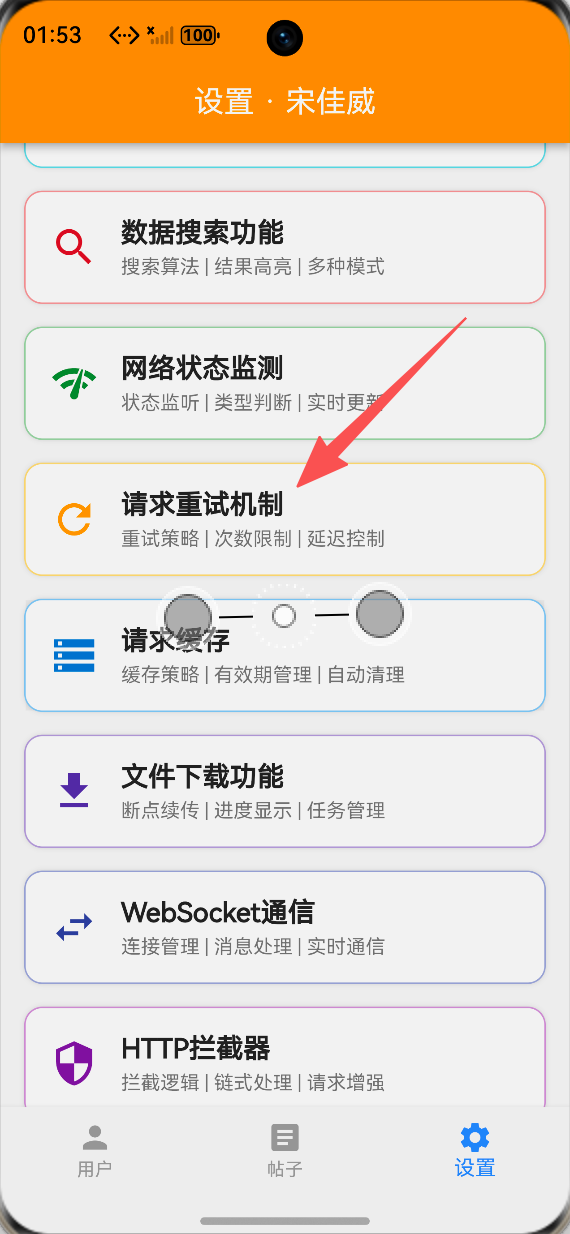
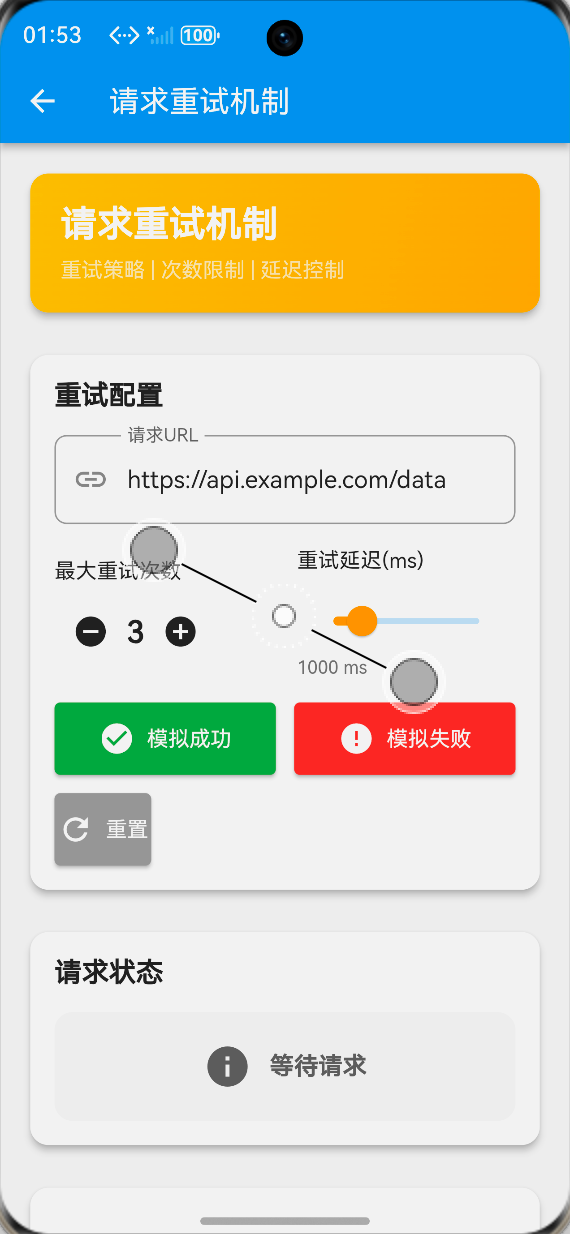
重试机制演示
成功重试场景
- 设置最大重试次数为3次
- 前2次请求失败
- 第3次请求成功
- 显示重试进度和结果
失败重试场景
- 设置最大重试次数为3次
- 所有请求都失败
- 达到最大重试次数
- 显示最终失败状态
重试过程可视化
进度显示
- 显示当前重试次数
- 显示重试进度条
- 显示重试延迟时间
- 实时更新状态
历史记录
- 记录每次重试时间
- 记录重试结果
- 记录延迟时间
- 支持清空历史
实现步骤
1. 重试管理器实现
核心类设计
class RetryManager {
  final int maxRetries;
  final int retryDelay;

  RetryManager({
    required this.maxRetries,
    required this.retryDelay,
  });

  Future<T> execute<T>(Future<T> Function() request) async {
    int retryCount = 0;

    while (retryCount < maxRetries) {
      try {
        return await request();
      } catch (e) {
        retryCount++;

        if (retryCount >= maxRetries) {
          rethrow;
        }

        await Future.delayed(
          Duration(milliseconds: retryDelay),
        );
      }
    }

    throw Exception('Max retries exceeded');
  }
}
2. 重试策略实现
指数退避策略
class ExponentialBackoffRetry {
  final int maxRetries;
  final int initialDelay;
  final double multiplier;

  Future<T> execute<T>(Future<T> Function() request) async {
    int retryCount = 0;
    int currentDelay = initialDelay;

    while (retryCount < maxRetries) {
      try {
        return await request();
      } catch (e) {
        retryCount++;

        if (retryCount >= maxRetries) {
          rethrow;
        }

        await Future.delayed(Duration(milliseconds: currentDelay));
        currentDelay = (currentDelay * multiplier).round();
      }
    }

    throw Exception('Max retries exceeded');
  }
}
3. 重试状态管理
状态跟踪
class RetryState {
  int currentRetry = 0;
  bool isRetrying = false;
  bool requestSuccess = false;
  String requestStatus = '等待请求';
  List<String> retryHistory = [];

  void addRetryHistory(String message) {
    final timestamp = DateTime.now().toString().substring(11, 19);
    retryHistory.insert(0, '[$timestamp] $message');

    if (retryHistory.length > 20) {
      retryHistory.removeLast();
    }
  }
}
4. UI状态更新
进度更新
Future<void> simulateRequest() async {
  setState(() {
    isRetrying = true;
    currentRetry = 0;
    requestSuccess = false;
    requestStatus = '开始请求...';
  });

  addRetryHistory('开始请求: ${urlController.text}');

  for (int i = 0; i < maxRetries; i++) {
    setState(() {
      currentRetry = i + 1;
      requestStatus = '第 ${i + 1} 次尝试...';
    });

    addRetryHistory('第 ${i + 1} 次尝试请求');

    await Future.delayed(Duration(milliseconds: 500));

    if (i < maxRetries - 1) {
      addRetryHistory('请求失败,准备重试...');
      await Future.delayed(Duration(milliseconds: retryDelay));
    } else {
      setState(() {
        requestSuccess = true;
        requestStatus = '请求成功!';
        isRetrying = false;
      });
      addRetryHistory('请求成功!');
      break;
    }
  }
}
功能特性
1. 重试配置
参数配置
// 最大重试次数
int maxRetries = 3;

// 重试延迟(毫秒)
int retryDelay = 1000;

// 请求URL
String requestUrl = 'https://api.example.com/data';
动态调整
Row(
  children: [
    IconButton(
      icon: Icon(Icons.remove_circle),
      onPressed: maxRetries > 1 ? () {
        setState(() => maxRetries--);
      } : null,
    ),
    Text('$maxRetries', style: TextStyle(fontSize: 20)),
    IconButton(
      icon: Icon(Icons.add_circle),
      onPressed: maxRetries < 10 ? () {
        setState(() => maxRetries++);
      } : null,
    ),
  ],
)
2. 重试策略
固定延迟策略
- 每次重试延迟相同时间
- 简单易实现
- 适用于大多数场景
指数退避策略
- 延迟时间指数增长
- 避免服务器压力过大
- 提高重试成功率
随机延迟策略
- 延迟时间随机
- 避免多个客户端同时重试
- 适用于分布式系统
3. 状态可视化
进度条显示
LinearProgressIndicator(
  value: currentRetry / maxRetries,
  backgroundColor: Colors.grey.shade300,
  color: Colors.amber.shade700,
)
状态文本
Text(
  '重试进度: $currentRetry / $maxRetries',
  style: TextStyle(fontSize: 12),
)
使用说明
基本使用
-
配置重试参数
- 设置最大重试次数
- 设置重试延迟时间
- 输入请求URL
-
发起请求
- 点击"模拟成功"按钮
- 观察重试过程
- 查看重试历史
-
模拟失败
- 点击"模拟失败"按钮
- 观察重试过程
- 查看最终失败状态
高级功能
重置状态
void resetRequest() {
  setState(() {
    currentRetry = 0;
    requestSuccess = false;
    requestStatus = '等待请求';
    retryHistory.clear();
  });
}
清空历史
TextButton(
  onPressed: () {
    setState(() {
      retryHistory.clear();
    });
  },
  child: Text('清空'),
)
技术要点
1. 重试时机
可重试错误
- 网络超时
- 服务器5xx错误
- 连接失败
- DNS解析失败
不可重试错误
- 4xx客户端错误
- 认证失败
- 权限不足
- 资源不存在
2. 性能考虑
避免过度重试
- 设置合理的重试次数
- 使用指数退避
- 监控重试成功率
- 及时放弃无效请求
资源管理
- 取消未完成的重试
- 释放网络资源
- 避免内存泄漏
3. 用户体验
状态反馈
- 显示重试进度
- 提供取消选项
- 显示预计等待时间
- 友好的错误提示
最佳实践
1. 错误分类
区分错误类型
bool shouldRetry(Exception error) {
  if (error is TimeoutException) return true;
  if (error is SocketException) return true;
  if (error is HttpException) {
    return error.statusCode >= 500;
  }
  return false;
}
2. 日志记录
记录重试信息
void logRetry(int attempt, Exception error) {
  print('重试 #$attempt: ${error.toString()}');
  analytics.logEvent(
    name: 'request_retry',
    parameters: {
      'attempt': attempt,
      'error': error.toString(),
    },
  );
}
3. 监控告警
重试监控
void monitorRetrySuccess() {
  final successRate = successfulRetries / totalRetries;
  if (successRate < 0.5) {
    alertService.sendAlert('重试成功率过低: $successRate');
  }
}
应用场景
1. API请求
网络请求重试
final retryManager = RetryManager(
  maxRetries: 3,
  retryDelay: 1000,
);

try {
  final response = await retryManager.execute(
    () => http.get(Uri.parse(url)),
  );
  // 处理响应
} catch (e) {
  // 处理失败
}
2. 文件上传
上传重试
Future<void> uploadWithRetry(File file) async {
  await retryManager.execute(
    () => uploadFile(file),
  );
}
3. 数据同步
同步重试
Future<void> syncData() async {
  await retryManager.execute(
    () => apiService.syncAllData(),
  );
}
总结
Flutter鸿蒙请求重试机制实现了完整的重试解决方案,包括:
- ✅ 灵活的重试策略
- ✅ 可配置的重试参数
- ✅ 实时状态可视化
- ✅ 完整的历史记录
- ✅ 多种重试场景支持
该功能为Flutter for OpenHarmony应用提供了可靠的网络请求重试能力,适用于各种网络不稳定场景。

作为“人工智能6S店”的官方数字引擎,为AI开发者与企业提供一个覆盖软硬件全栈、一站式门户。
更多推荐

 0
0 0
0- 0


 已为社区贡献106条内容

所有评论(0)