
【maaath】Flutter for OpenHarmony 外卖订单应用实战开发
随着鸿蒙生态的蓬勃发展,Flutter 作为跨平台开发框架也开始支持 OpenHarmony 操作系统。本文将通过一个完整的外卖订单应用案例,详细讲解如何使用 Flutter 开发可运行在鸿蒙设备上的跨平台应用。整个开发过程将演示从项目搭建到功能实现的全流程,帮助开发者快速掌握 Flutter for OpenHarmony 的开发技巧。外卖订餐是移动端最常见的应用场景之一,具有界面交互复杂、状态
Flutter for OpenHarmony 外卖订单应用实战开发
社区引导
欢迎加入开源鸿蒙跨平台社区: https://openharmonycrossplatform.csdn.net
作者:maaath
前言
随着鸿蒙生态的蓬勃发展,Flutter 作为跨平台开发框架也开始支持 OpenHarmony 操作系统。本文将通过一个完整的外卖订单应用案例,详细讲解如何使用 Flutter 开发可运行在鸿蒙设备上的跨平台应用。整个开发过程将演示从项目搭建到功能实现的全流程,帮助开发者快速掌握 Flutter for OpenHarmony 的开发技巧。
一、项目概述
1.1 项目背景
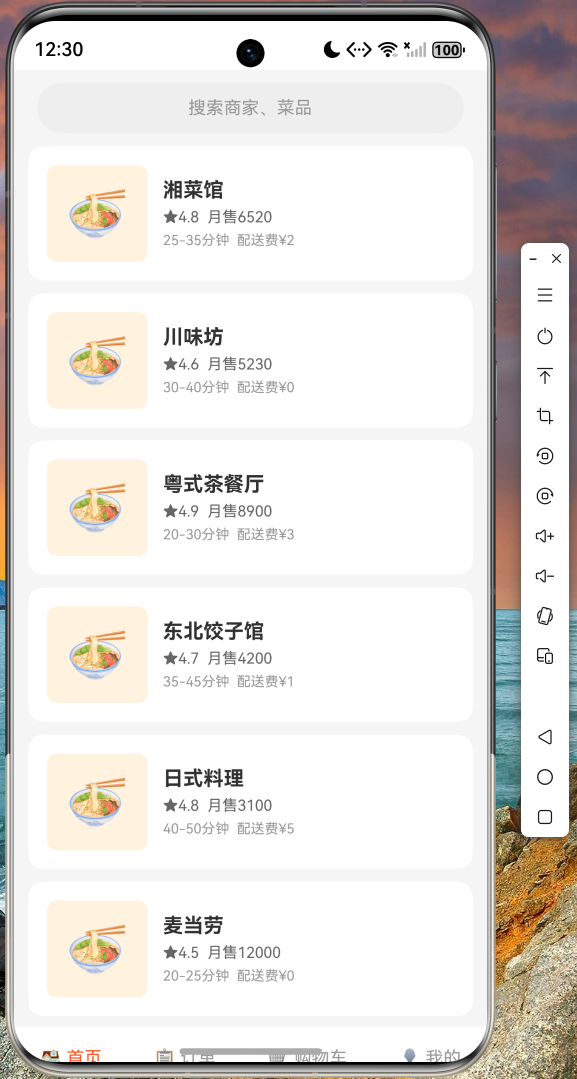
外卖订餐是移动端最常见的应用场景之一,具有界面交互复杂、状态管理多样、列表渲染频繁等特点,是检验跨平台框架能力的绝佳案例。本文将使用 Flutter 构建一个功能完整的外卖订单应用,涵盖首页商家展示、订单管理、购物车、个人中心等核心模块。
1.2 技术选型
本项目采用以下技术方案:
- 框架:Flutter SDK(支持 OpenHarmony)
- 状态管理:内置 StatefulWidget + setState
- 路由管理:Flutter Navigator 2.0
- UI 组件:Material Design 3 组件库
1.3 功能模块
应用包含以下主要功能:
- 首页:商家列表展示、搜索功能、商家卡片
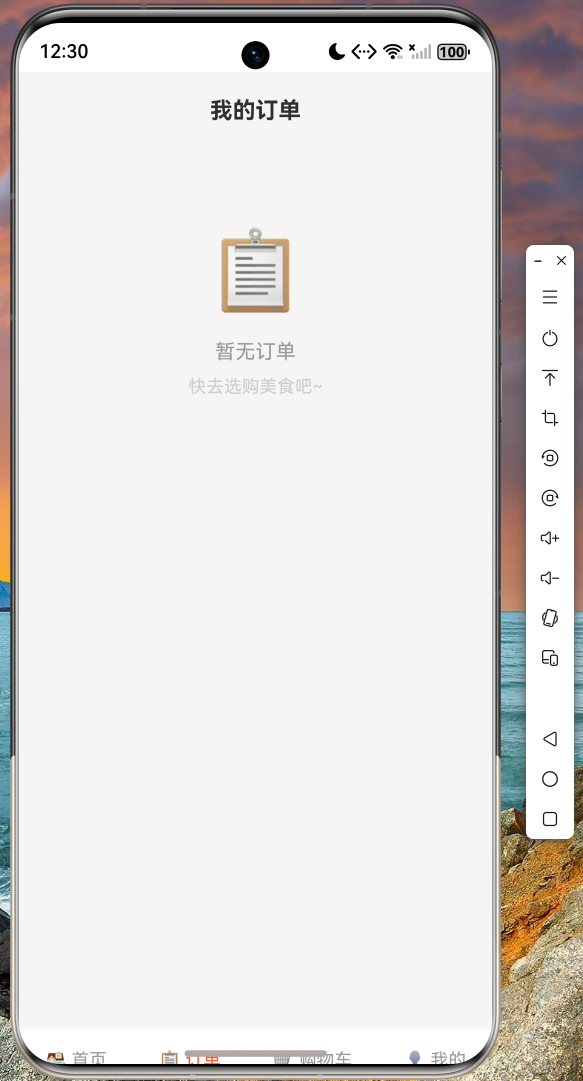
- 订单:订单列表、空状态引导
- 购物车:购物车管理、空状态引导
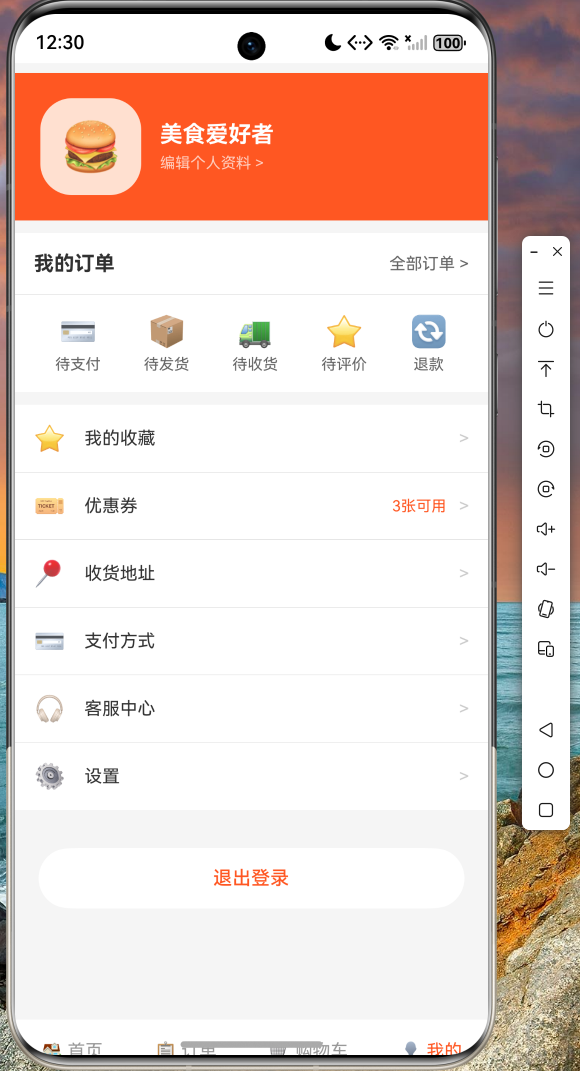
- 我的:用户信息、订单入口、功能菜单
二、环境准备
2.1 开发环境要求
开发 Flutter for OpenHarmony 应用需要以下环境:
- 操作系统:Windows 10/11 或 macOS
- Dart SDK:3.0 及以上版本
- Flutter SDK:支持 OpenHarmony 的最新版本
- DevEco Studio:鸿蒙应用开发IDE
- OpenHarmony SDK:API Version 9 及以上
2.2 项目创建
使用 Flutter CLI 创建支持 OpenHarmony 的项目:
flutter create --platforms=openharmony food_delivery_app
cd food_delivery_app
项目结构采用标准 Flutter 结构:
food_delivery_app/
├── lib/
│   ├── main.dart          # 应用入口
│   └── pages/            # 页面目录
├── ohos/                 # OpenHarmony 平台代码
└── pubspec.yaml          # 依赖配置
三、核心代码实现
3.1 应用入口文件
首先创建主入口文件,负责应用初始化和页面导航:
import 'package:flutter/material.dart';
import 'pages/food_delivery_index.dart';
void main() {
runApp(const FoodDeliveryApp());
}
class FoodDeliveryApp extends StatelessWidget {
const FoodDeliveryApp({super.key});
Widget build(BuildContext context) {
return MaterialApp(
title: '美食外卖',
debugShowCheckedModeBanner: false,
theme: ThemeData(
colorScheme: ColorScheme.fromSeed(
seedColor: const Color(0xFFFF5722),
brightness: Brightness.light,
),
useMaterial3: true,
),
home: const FoodDeliveryIndex(),
);
}
}
3.2 启动页实现
启动页承担品牌展示和页面跳转的职责。设计中采用简洁风格,使用橙色渐变背景营造温暖的餐饮氛围:
import 'package:flutter/material.dart';
import 'food_delivery_main_page.dart';
class FoodDeliveryIndex extends StatefulWidget {
const FoodDeliveryIndex({super.key});
State<FoodDeliveryIndex> createState() => _FoodDeliveryIndexState();
}
class _FoodDeliveryIndexState extends State<FoodDeliveryIndex> {
void initState() {
super.initState();
// 延迟跳转到主页
Future.delayed(const Duration(milliseconds: 500), () {
if (mounted) {
Navigator.pushReplacement(
context,
MaterialPageRoute(
builder: (context) => const FoodDeliveryMainPage(),
),
);
}
});
}
Widget build(BuildContext context) {
return Scaffold(
backgroundColor: const Color(0xFFFF7043),
body: Center(
child: Column(
mainAxisAlignment: MainAxisAlignment.center,
children: [
const Text('🍔', style: TextStyle(fontSize: 80)),
const SizedBox(height: 20),
const Text(
'美食外卖',
style: TextStyle(
fontSize: 32,
fontWeight: FontWeight.bold,
color: Colors.white,
),
),
const SizedBox(height: 40),
const Text(
'正在加载...',
style: TextStyle(
fontSize: 14,
color: Colors.white70,
),
),
const SizedBox(height: 20),
const CircularProgressIndicator(
valueColor: AlwaysStoppedAnimation<Color>(Colors.white),
),
],
),
),
);
}
}
3.3 主页面框架
主页面采用底部导航栏加内容区域的经典布局。通过 IndexedStack 确保各 tab 切换时状态不丢失:
class FoodDeliveryMainPage extends StatefulWidget {
const FoodDeliveryMainPage({super.key});
State<FoodDeliveryMainPage> createState() => _FoodDeliveryMainPageState();
}
class _FoodDeliveryMainPageState extends State<FoodDeliveryMainPage> {
int _currentIndex = 0;
final List<Widget> _pages = const [
HomePage(),
OrderPage(),
CartPage(),
MinePage(),
];
Widget build(BuildContext context) {
return Scaffold(
body: IndexedStack(
index: _currentIndex,
children: _pages,
),
bottomNavigationBar: BottomNavigationBar(
currentIndex: _currentIndex,
type: BottomNavigationBarType.fixed,
selectedItemColor: const Color(0xFFFF5722),
unselectedItemColor: Colors.grey,
onTap: (index) {
setState(() {
_currentIndex = index;
});
},
items: const [
BottomNavigationBarItem(icon: Text('🏠'), label: '首页'),
BottomNavigationBarItem(icon: Text('📋'), label: '订单'),
BottomNavigationBarItem(icon: Text('🛒'), label: '购物车'),
BottomNavigationBarItem(icon: Text('👤'), label: '我的'),
],
),
);
}
}
3.4 首页商家列表
首页是应用的核心页面,展示商家列表供用户选择。采用 ListView.builder 实现高效的列表渲染:
class HomePage extends StatelessWidget {
const HomePage({super.key});
Widget build(BuildContext context) {
final merchants = [
Merchant('湘菜馆', 4.8, 6520, '25-35分钟', 2),
Merchant('川味坊', 4.6, 5230, '30-40分钟', 0),
Merchant('粤式茶餐厅', 4.9, 8900, '20-30分钟', 3),
Merchant('东北饺子馆', 4.7, 4200, '35-45分钟', 1),
Merchant('日式料理', 4.8, 3100, '40-50分钟', 5),
Merchant('麦当劳', 4.5, 12000, '20-25分钟', 0),
];
return Scaffold(
backgroundColor: const Color(0xFFF5F5F5),
body: SafeArea(
child: Column(
children: [
// 搜索栏
Padding(
padding: const EdgeInsets.all(16),
child: Container(
height: 40,
decoration: BoxDecoration(
color: Colors.grey[200],
borderRadius: BorderRadius.circular(20),
),
child: const Center(
child: Text(
'搜索商家、菜品',
style: TextStyle(color: Colors.grey),
),
),
),
),
// 商家列表
Expanded(
child: ListView.builder(
padding: const EdgeInsets.symmetric(horizontal: 16),
itemCount: merchants.length,
itemBuilder: (context, index) {
final merchant = merchants[index];
return _MerchantCard(merchant: merchant);
},
),
),
],
),
),
);
}
}
class Merchant {
final String name;
final double rating;
final int sales;
final String deliveryTime;
final int deliveryFee;
Merchant(this.name, this.rating, this.sales, this.deliveryTime, this.deliveryFee);
}
class _MerchantCard extends StatelessWidget {
final Merchant merchant;
const _MerchantCard({required this.merchant});
Widget build(BuildContext context) {
return Card(
margin: const EdgeInsets.only(bottom: 12),
elevation: 2,
shape: RoundedRectangleBorder(borderRadius: BorderRadius.circular(12)),
child: Padding(
padding: const EdgeInsets.all(15),
child: Row(
children: [
Container(
width: 70,
height: 70,
decoration: BoxDecoration(
color: const Color(0xFFFFF3E0),
borderRadius: BorderRadius.circular(8),
),
child: const Center(child: Text('🍜', style: TextStyle(fontSize: 40))),
),
const SizedBox(width: 12),
Expanded(
child: Column(
crossAxisAlignment: CrossAxisAlignment.start,
children: [
Text(
merchant.name,
style: const TextStyle(
fontSize: 16,
fontWeight: FontWeight.bold,
),
),
const SizedBox(height: 5),
Text(
'★ ${merchant.rating} 月售${merchant.sales}',
style: TextStyle(fontSize: 12, color: Colors.orange[700]),
),
const SizedBox(height: 5),
Text(
'${merchant.deliveryTime} 配送费¥${merchant.deliveryFee}',
style: const TextStyle(fontSize: 11, color: Colors.grey),
),
],
),
),
],
),
),
);
}
}
3.5 订单页面
订单页面展示用户的订单历史,采用空状态设计引导用户下单:
class OrderPage extends StatelessWidget {
const OrderPage({super.key});
Widget build(BuildContext context) {
return Scaffold(
backgroundColor: const Color(0xFFF5F5F5),
appBar: AppBar(
title: const Text('我的订单', style: TextStyle(fontWeight: FontWeight.bold)),
backgroundColor: Colors.white,
foregroundColor: Colors.black,
elevation: 0,
),
body: Center(
child: Column(
mainAxisAlignment: MainAxisAlignment.center,
children: [
const Text('📋', style: TextStyle(fontSize: 60)),
const SizedBox(height: 20),
const Text('暂无订单', style: TextStyle(fontSize: 16, color: Colors.grey)),
const SizedBox(height: 10),
const Text('快去选购美食吧~', style: TextStyle(fontSize: 14, color: Colors.grey)),
],
),
),
);
}
}
3.6 购物车页面
购物车页面管理用户选择的商品:
class CartPage extends StatelessWidget {
const CartPage({super.key});
Widget build(BuildContext context) {
return Scaffold(
backgroundColor: const Color(0xFFF5F5F5),
appBar: AppBar(
title: const Text('购物车', style: TextStyle(fontWeight: FontWeight.bold)),
backgroundColor: Colors.white,
foregroundColor: Colors.black,
elevation: 0,
),
body: Center(
child: Column(
mainAxisAlignment: MainAxisAlignment.center,
children: [
const Text('🛒', style: TextStyle(fontSize: 60)),
const SizedBox(height: 20),
const Text('购物车是空的', style: TextStyle(fontSize: 16, color: Colors.grey)),
const SizedBox(height: 10),
const Text('快去添加喜欢的美食吧~', style: TextStyle(fontSize: 14, color: Colors.grey)),
],
),
),
);
}
}
3.7 个人中心页面
个人中心展示用户信息和提供各种功能入口:
class MinePage extends StatelessWidget {
const MinePage({super.key});
Widget build(BuildContext context) {
return Scaffold(
backgroundColor: const Color(0xFFF5F5F5),
body: SafeArea(
child: SingleChildScrollView(
child: Column(
children: [
// 用户信息头部
Container(
color: const Color(0xFFFF5722),
padding: const EdgeInsets.all(20),
child: Row(
children: [
Container(
width: 70,
height: 70,
decoration: BoxDecoration(
color: const Color(0xFFFFE0D0),
borderRadius: BorderRadius.circular(35),
),
child: const Center(child: Text('🍔', style: TextStyle(fontSize: 40))),
),
const SizedBox(width: 15),
const Column(
crossAxisAlignment: CrossAxisAlignment.start,
children: [
Text(
'美食爱好者',
style: TextStyle(
fontSize: 18,
fontWeight: FontWeight.bold,
color: Colors.white,
),
),
SizedBox(height: 5),
Text(
'编辑个人资料 >',
style: TextStyle(fontSize: 12, color: Colors.white70),
),
],
),
],
),
),
// 订单入口
Container(
margin: const EdgeInsets.all(16),
padding: const EdgeInsets.all(16),
decoration: BoxDecoration(
color: Colors.white,
borderRadius: BorderRadius.circular(12),
),
child: Column(
children: [
Row(
mainAxisAlignment: MainAxisAlignment.spaceBetween,
children: [
const Text('我的订单', style: TextStyle(fontWeight: FontWeight.bold)),
const Text('全部订单 >', style: TextStyle(color: Colors.grey, fontSize: 13)),
],
),
const Divider(height: 20),
Row(
mainAxisAlignment: MainAxisAlignment.spaceAround,
children: [
_buildOrderIcon('💳', '待支付'),
_buildOrderIcon('📦', '待发货'),
_buildOrderIcon('🚚', '待收货'),
_buildOrderIcon('⭐', '待评价'),
_buildOrderIcon('🔄', '退款'),
],
),
],
),
),
// 功能菜单
Container(
margin: const EdgeInsets.symmetric(horizontal: 16),
decoration: BoxDecoration(
color: Colors.white,
borderRadius: BorderRadius.circular(12),
),
child: Column(
children: [
_buildMenuItem('⭐', '我的收藏'),
const Divider(height: 1),
_buildMenuItem('🎫', '优惠券', badge: '3张可用'),
const Divider(height: 1),
_buildMenuItem('📍', '收货地址'),
const Divider(height: 1),
_buildMenuItem('💳', '支付方式'),
const Divider(height: 1),
_buildMenuItem('🎧', '客服中心'),
const Divider(height: 1),
_buildMenuItem('⚙️', '设置'),
],
),
),
const SizedBox(height: 30),
SizedBox(
width: MediaQuery.of(context).size.width * 0.9,
child: ElevatedButton(
onPressed: () {},
style: ElevatedButton.styleFrom(
backgroundColor: Colors.white,
foregroundColor: const Color(0xFFFF5722),
padding: const EdgeInsets.symmetric(vertical: 12),
shape: RoundedRectangleBorder(
borderRadius: BorderRadius.circular(24),
),
),
child: const Text('退出登录'),
),
),
const SizedBox(height: 80),
],
),
),
),
);
}
Widget _buildOrderIcon(String emoji, String title) {
return Column(
children: [
Text(emoji, style: const TextStyle(fontSize: 24)),
const SizedBox(height: 5),
Text(title, style: const TextStyle(fontSize: 12, color: Colors.grey)),
],
);
}
Widget _buildMenuItem(String icon, String title, {String? badge}) {
return Padding(
padding: const EdgeInsets.symmetric(horizontal: 16, vertical: 15),
child: Row(
children: [
Text(icon, style: const TextStyle(fontSize: 20)),
const SizedBox(width: 15),
Text(title, style: const TextStyle(fontSize: 14)),
const Spacer(),
if (badge != null)
Text(badge, style: const TextStyle(fontSize: 12, color: Color(0xFFFF5722))),
const SizedBox(width: 8),
const Text('>', style: TextStyle(color: Colors.grey)),
],
),
);
}
}
四、运行效果
4.1 启动页效果
应用启动后首先显示启动页,橙色渐变背景搭配品牌 Logo,营造温暖的餐饮氛围。启动页会在 500 毫秒后自动跳转到主页面。
4.2 首页效果
首页包含顶部搜索栏和商家列表。商家卡片展示商家名称、评分、月销量、配送时间和配送费用等关键信息。界面采用卡片式布局,层次分明,便于用户快速浏览和选择。
4.3 底部导航
底部导航栏提供四个入口:首页、订单、购物车、我的。选中的 tab 以橙色高亮显示,未选中项为灰色。切换页面时使用 IndexedStack 保持页面状态。
4.4 个人中心
个人中心展示用户头像和昵称,下方是订单入口和功能菜单列表。整体采用卡片分组设计,视觉效果清晰。
五、运行验证截图
六、代码托管
本文涉及的完整代码已托管至 AtomGit 平台:
仓库地址:https://atomgit.com/maaath/food-delivery-flutter-oh
开发者可通过以下命令克隆项目:
git clone https://atomgit.com/maaath/food-delivery-flutter-oh
七、总结与展望
7.1 技术总结
本文通过一个完整的外卖订单应用案例,展示了 Flutter for OpenHarmony 的开发流程。应用涵盖了页面导航、状态管理、列表渲染、组件封装等核心知识点,代码结构清晰,便于学习和二次开发。
7.2 可扩展方向
基于当前基础,可以进一步扩展以下功能:
- 商家详情页:点击商家进入详情,展示菜品列表
- 购物车功能:添加商品到购物车,支持数量增减
- 下单流程:填写地址、选择支付方式、完成订单
- 用户登录:集成登录注册功能
7.3 技术展望
Flutter for OpenHarmony 作为新兴的跨平台解决方案,正在快速迭代和完善。随着鸿蒙生态的持续发展,相信会有更多应用选择 Flutter 作为跨平台开发的首选框架,为开发者带来更高效的开发和更一致的用户体验。
参考资料
- Flutter 官方文档:https://flutter.cn/docs
- OpenHarmony 开发者官网:https://www.openharmony.cn/
- AtomGit 代码托管平台:https://atomgit.com

作为“人工智能6S店”的官方数字引擎,为AI开发者与企业提供一个覆盖软硬件全栈、一站式门户。
更多推荐
 0
0 0
0- 0


 已为社区贡献24条内容

所有评论(0)