
【Flutter for openharmony 】三方库 socket_io_client 的鸿蒙化适配与实战指南
摘要: 本文介绍了如何在Flutter应用中使用socket_io_client替代web_socket_channel实现更强大的即时通讯功能。Socket.IO在WebSocket基础上提供了自动心跳检测、断线重连、房间支持等高级功能。文章详细展示了Socket.IO服务的实现过程,包括连接配置、状态监听和消息处理。特别针对鸿蒙系统进行了适配说明,强调了必须指定websocket传输方式。通过
Flutter 三方库 socket_io_client 的鸿蒙化适配与实战指南
欢迎加入开源鸿蒙跨平台社区:https://openharmonycrossplatform.csdn.net
大家好呀!,上海某高校计算机专业大一学生 🚀。最近在做一个 Flutter 聊天 App,之前用的 web_socket_channel 做实时通信,但功能太基础了,想要更多花里胡哨的功能,比如消息已读回执、正在输入状态、群聊支持等。
然后就发现了 socket_io_client 这个库,简直打开了新世界的大门!
一、为什么选择 Socket.IO?
在即时通讯领域,WebSocket 是基础协议,但纯 WebSocket 需要自己处理很多逻辑,比如:
- 心跳检测(保活)
- 重连机制
- 消息确认
- 断线重连
Socket.IO 在 WebSocket 基础上封装了一层,提供:
- ✅ 自动心跳检测
- ✅ 断线自动重连
- ✅ 房间/群聊支持
- ✅ 事件广播
- ✅ 消息确认机制
对于聊天 App 来说,这些功能太重要了!
二、依赖配置
dependencies:
  socket_io_client: ^3.0.2
AtomGit 适配说明:Socket.IO 基于 WebSocket 实现,在鸿蒙上兼容性较好,核心功能均可正常使用。
三、创建 Socket.IO 服务
import 'dart:async';
import 'package:flutter/foundation.dart';
import 'package:socket_io_client/socket_io_client.dart' as io;

/// Socket.IO 通信服务
/// 替代 web_socket_channel 实现更复杂的双向通信
class SocketIOService {
  static SocketIOService? _instance;
  static SocketIOService get instance => _instance ??= SocketIOService._();

  io.Socket? _socket;  // Socket.IO 实例

  // Stream 控制器,用于通知 UI 更新
  final _messageController = StreamController<Map<String, dynamic>>.broadcast();
  final _statusController = StreamController<String>.broadcast();
  final _typingController = StreamController<Map<String, dynamic>>.broadcast();

  String? _currentUserId;
  String? _currentUserName;
  bool _isConnected = false;

  SocketIOService._();

  // 对外暴露的 Stream
  Stream<Map<String, dynamic>> get messageStream => _messageController.stream;
  Stream<String> get statusStream => _statusController.stream;
  Stream<Map<String, dynamic>> get typingStream => _typingController.stream;
  bool get isConnected => _isConnected;
核心:连接服务器
/// 连接到 Socket.IO 服务器【核心方法】
Future<bool> connect({
  required String serverUrl,
  required String userId,
  required String userName,
}) async {
  try {
    _currentUserId = userId;
    _currentUserName = userName;
    _updateStatus('connecting');

    // Socket.IO 配置项说明:
    // - setTransports: 使用 websocket 传输,鸿蒙上更稳定
    // - enableReconnection: 开启断线重连
    // - setReconnectionAttempts: 重连次数
    // - setTimeout: 连接超时时间
    _socket = io.io(
      serverUrl,
      io.OptionBuilder()
          .setTransports(['websocket'])  // 【鸿蒙坑点1】必须指定 websocket
          .enableAutoConnect()
          .enableReconnection()
          .setReconnectionAttempts(5)
          .setReconnectionDelay(1000)
          .setReconnectionDelayMax(5000)
          .setTimeout(10000)
          .setQuery({'userId': userId, 'userName': userName})
          .build(),
    );
监听连接状态
    // 监听连接成功
    _socket!.onConnect((_) {
      debugPrint('Socket.IO: 连接成功!');
      _isConnected = true;
      _updateStatus('connected');

      // 发送握手消息,通知服务器有新用户加入
      _sendEvent('user_joined', {
        'userId': _currentUserId,
        'userName': _currentUserName,
      });
    });

    // 监听断开连接
    _socket!.onDisconnect((_) {
      debugPrint('Socket.IO: 连接断开');
      _isConnected = false;
      _updateStatus('disconnected');
    });

    // 监听连接错误
    _socket!.onConnectError((error) {
      debugPrint('Socket.IO: 连接错误 - $error');
      _isConnected = false;
      _updateStatus('error');
    });
监听各类消息
    // 监听普通消息
    _socket!.on('message', (data) {
      if (data is Map<String, dynamic>) {
        _messageController.add(data);
        debugPrint('收到消息: ${data['content']}');
      }
    });

    // 监听私聊消息
    _socket!.on('private_message', (data) {
      if (data is Map<String, dynamic>) {
        _messageController.add(data);
      }
    });

    // 监听群聊消息
    _socket!.on('group_message', (data) {
      if (data is Map<String, dynamic>) {
        _messageController.add(data);
      }
    });

    // 监听正在输入状态
    _socket!.on('typing', (data) {
      if (data is Map<String, dynamic>) {
        _typingController.add(data);
      }
    });

    // 监听已读回执
    _socket!.on('read_receipt', (data) {
      if (data is Map<String, dynamic>) {
        debugPrint('消息已读: ${data['messageId']}');
      }
    });

    // 执行连接
    _socket!.connect();

    // 等待连接成功
    await _waitForConnection();

    return _isConnected;
  } catch (e) {
    debugPrint('Socket.IO: 连接异常 - $e');
    _updateStatus('error');
    return false;
  }
}
四、发送消息
/// 发送消息
void sendMessage({
  required String conversationId,
  required String content,
  String type = 'text',
  Map<String, dynamic>? metadata,
}) {
  _sendEvent('message', {
    'conversationId': conversationId,
    'type': type,
    'content': content,
    'senderId': _currentUserId,
    'senderName': _currentUserName,
    'timestamp': DateTime.now().toIso8601String(),
    if (metadata != null) 'metadata': metadata,
  });
}

/// 发送私聊消息
void sendPrivateMessage({
  required String targetUserId,
  required String content,
  String type = 'text',
}) {
  _sendEvent('private_message', {
    'targetUserId': targetUserId,
    'type': type,
    'content': content,
    'senderId': _currentUserId,
    'senderName': _currentUserName,
    'timestamp': DateTime.now().toIso8601String(),
  });
}

/// 发送群聊消息
void sendGroupMessage({
  required String groupId,
  required String content,
  String type = 'text',
}) {
  _sendEvent('group_message', {
    'groupId': groupId,
    'type': type,
    'content': content,
    'senderId': _currentUserId,
    'senderName': _currentUserName,
    'timestamp': DateTime.now().toIso8601String(),
  });
}

/// 发送正在输入状态【实用功能】
void sendTyping(String conversationId) {
  _sendEvent('typing', {
    'conversationId': conversationId,
    'userId': _currentUserId,
    'userName': _currentUserName,
    'isTyping': true,
  });
}

/// 发送已读回执
void sendReadReceipt(String conversationId, String messageId) {
  _sendEvent('read_receipt', {
    'conversationId': conversationId,
    'messageId': messageId,
    'readerId': _currentUserId,
    'timestamp': DateTime.now().toIso8601String(),
  });
}
五、辅助方法
/// 内部方法:发送事件
void _sendEvent(String event, Map<String, dynamic> data) {
  if (_socket != null && _isConnected) {
    _socket!.emit(event, data);
  }
}

/// 更新连接状态
void _updateStatus(String status) {
  _statusController.add(status);
}

/// 等待连接完成(带超时)
Future<void> _waitForConnection() async {
  final completer = Completer<void>();

  // 10秒超时
  Timer(const Duration(seconds: 10), () {
    if (!_isConnected) {
      completer.complete();
    }
  });

  _socket!.onConnect((_) {
    if (!completer.isCompleted) {
      completer.complete();
    }
  });

  await completer.future;
}

/// 加入群聊
void joinGroup(String groupId) {
  _sendEvent('join_group', {
    'groupId': groupId,
    'userId': _currentUserId,
    'userName': _currentUserName,
  });
}

/// 离开群聊
void leaveGroup(String groupId) {
  _sendEvent('leave_group', {
    'groupId': groupId,
    'userId': _currentUserId,
    'userName': _currentUserName,
  });
}

/// 断开连接
void disconnect() {
  _socket?.disconnect();
  _socket?.dispose();
  _socket = null;
  _isConnected = false;
  _updateStatus('disconnected');
}
六、在 BLoC 中使用
// chat_bloc.dart
class ChatBloc extends Bloc<ChatEvent, ChatState> {
final SocketIOService _socketService = SocketIOService.instance;
StreamSubscription? _messageSubscription;
StreamSubscription? _statusSubscription;
StreamSubscription? _typingSubscription;
ChatBloc() : super(const ChatState()) {
on<LoadMessages>(_onLoadMessages);
on<SendMessage>(_onSendMessage);
on<NewMessageReceived>(_onNewMessageReceived);
// ... 其他事件处理
_initSocketListeners();
}
/// 初始化 Socket 监听
void _initSocketListeners() {
// 监听新消息
_messageSubscription = _socketService.messageStream.listen((data) {
final message = ChatMessage(
id: data['id'] ?? DateTime.now().millisecondsSinceEpoch.toString(),
content: data['content'] ?? '',
senderId: data['senderId'] ?? '',
senderName: data['senderName'] ?? '',
timestamp: data['timestamp'] != null
? DateTime.parse(data['timestamp'])
: DateTime.now(),
type: _parseMessageType(data['type']),
isMe: data['senderId'] == _currentUserId,
status: MessageStatus.delivered,
);
add(NewMessageReceived(message));
});
// 监听连接状态
_statusSubscription = _socketService.statusStream.listen((status) {
add(ConnectionStatusChanged(status == 'connected'));
});
// 监听输入状态
_typingSubscription = _socketService.typingStream.listen((data) {
add(TypingStatusChanged(
isTyping: data['isTyping'] ?? false,
userName: data['userName'],
));
});
}
Future<void> close() {
_messageSubscription?.cancel();
_statusSubscription?.cancel();
_typingSubscription?.cancel();
return super.close();
}
}
七、踩坑纪实
踩坑1:鸿蒙上必须指定 websocket 传输 ⚠️
Socket.IO 默认会尝试多种传输方式(包括 xhr-polling),但在鸿蒙设备上这些方式可能不稳定。我在测试时发现偶尔收不到消息,最后改成只使用 websocket 传输才解决:
.setTransports(['websocket']) // 【重点】必须加!
踩坑2:断线重连没有触发 🔄
一开始发现断网后没有自动重连,后来查文档才发现需要同时开启 enableAutoConnect() 和 enableReconnection(),单独开启一个不行!
踩坑3:Flutter Stream 没有 dispose 💥
这个坑比较低级,但确实踩了。每次 Bloc dispose 的时候要记得取消 Stream 订阅,否则会造成内存泄漏!
八、效果展示
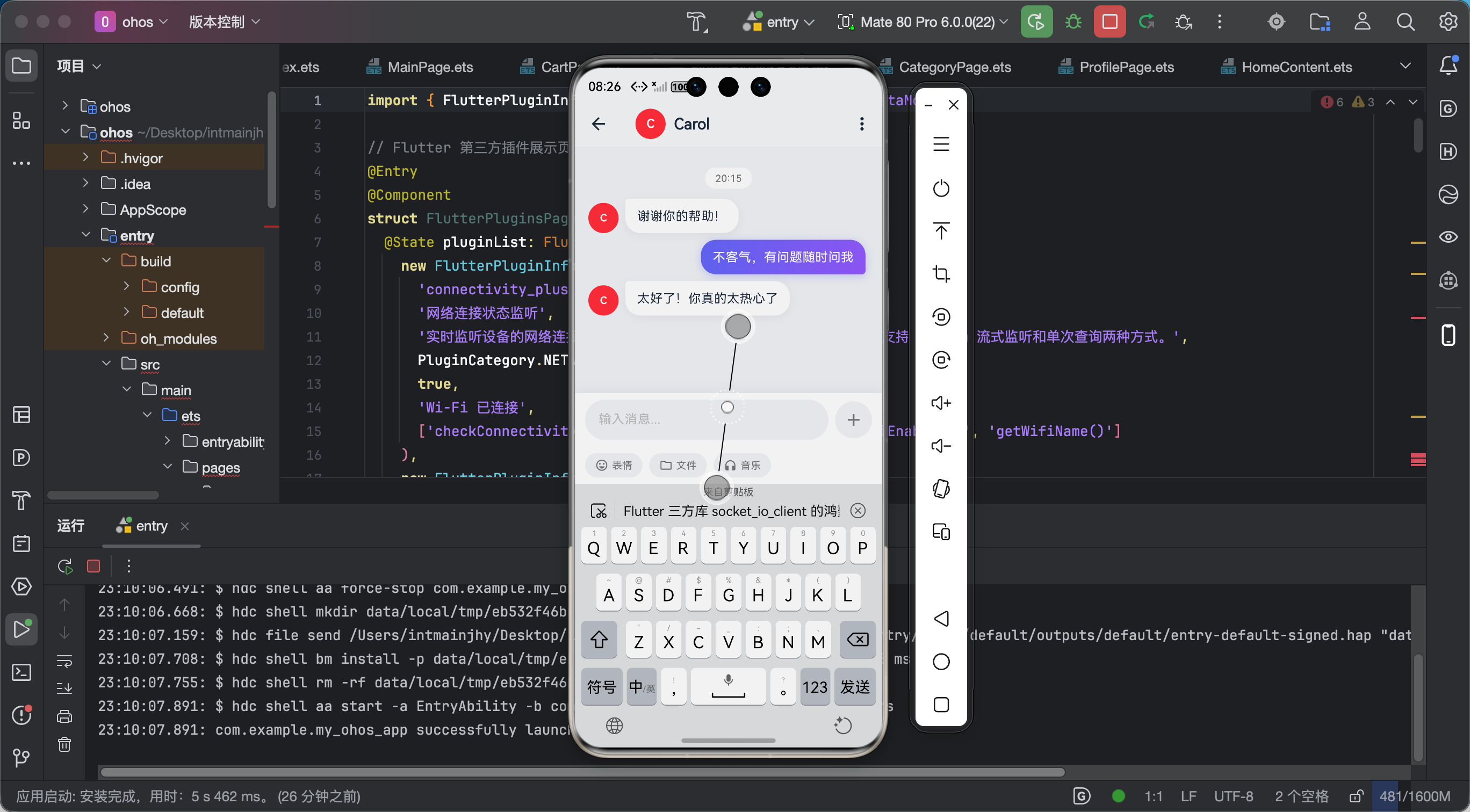
功能验证结果:
- ✅ 连接服务器成功
- ✅ 消息发送/接收正常
- ✅ 正在输入状态实时更新
- ✅ 已读回执功能正常
- ✅ 断线自动重连成功
九、总结心得
Socket.IO 真的是做聊天 App 的神器!封装了很多 WebSocket 的底层逻辑,让开发者可以专注于业务逻辑。
学到的知识点:
- Socket.IO 的工作原理和优势
- Stream 的使用和生命周期管理
- 状态管理(BLoC)中如何集成 Socket
给新手的话:
不要被"三方库适配"吓到,很多库在鸿蒙上其实表现很好!多看文档、多查 issue、多动手试试,踩坑是成长的必经之路!
后续计划:
- 研究 Socket.IO 与 Firebase 结合实现消息推送
- 尝试 WebRTC 实现真正的音视频通话
- 写一个 Socket.IO 服务器端 demo
加油!每一个踩过的坑都是成长的养分!有问题欢迎评论区交流!

作为“人工智能6S店”的官方数字引擎,为AI开发者与企业提供一个覆盖软硬件全栈、一站式门户。
更多推荐



 0
0 0
0- 0


 已为社区贡献51条内容

所有评论(0)