
鸿蒙Flutter实战:29.优先使用联合插件开发鸿蒙化插件
本文介绍了Flutter插件鸿蒙化的两种思路,重点阐述了联合插件(Federated plugins)的实现方案。联合插件通过将插件API拆分为平台接口、平台实现和应用接口,实现非侵入式的跨平台扩展。文章以app_set_id插件为例,详细说明了开发鸿蒙化联合插件的步骤:创建插件项目、配置pubspec、编写ArkTS核心代码、添加权限配置等。该方案优势在于不影响原插件代码,便于维护和升级,用户只
背景
现有插件鸿蒙化,目前主要有两种思路,一种是需要复刻源代码,然后在自我仓库二次开发,使用时使用 git 方式引入 pubspeck.
第二种思路则是开发一个联合插件,在使用时,同时引入原插件和鸿蒙化插件,组合方式使用。
什么是联合插件
联合插件(Federated plugins) 是一种将插件 API 拆分为多个部分的方式,包括:平台接口(platform interface)、各个平台的独立实现(platform implementations),以及面向应用的接口(app-facing interface)。面向应用的接口会使用当前运行平台所注册的实现。
按包拆分的联合插件(package-separated federated plugins) 指的是:平台接口、平台实现以及面向应用的接口分别放在不同的 Dart 包中。
因此,一个按包拆分的联合插件可以为不同平台使用不同的包,例如:一个用于 iOS,一个用于 Android,一个用于 Web,甚至可以有一个用于车载设备(作为物联网设备的示例)。这种方式的一个重要优势是:某个领域的专家可以基于自己熟悉的平台,对现有插件进行扩展。
以 url_launcher 插件为例,查看项目源码目录结构:
├── url_launcher
├── url_launcher_platform_interface
├── url_launcher_android
├── url_launcher_ios
├── url_launcher_linux
├── url_launcher_macos
├── url_launcher_web
├── url_launcher_windows
其中,url_launcher_platform_interface 也就是平台接口(platform interface),这里定义了插件的 API 接口。url_launcher_android 、url_launcher_ios 、url_launcher_linux 、url_launcher_macos 、url_launcher_web 、url_launcher_windows 均是平台实现(platform implementations),它们分别对应不同的平台。
url_launcher 为面向应用的接口(app-facing interface),也就是开发者在使用时引入的插件包,使用时会根据当前运行平台所注册的实现来调用对应的平台实现。同时这个包里面增加了一些通用的业务逻辑。
联合插件的优势
- 非侵入式:插件开发过程中,不会对原插件产生任何影响。
- 方便维护:由于鸿蒙化插件使用单独的包和仓库,不需要合并至原插件仓库,易于维护、升级、发布
- 使用便捷:鸿蒙化插件可以发布至 pub.dev 平台,包名以 xxx_ohos 形式命名,用户在使用时只需引入原插件和鸿蒙化插件即可。
联合插件使用形式
以联合插件 app_set_id 为例,使用方式如下:
dependencies:
  app_set_id: ^1.4.0
  app_set_id_ohos: ^1.4.0
哪些插件可以以联合插件开发
- 原插件架构为联合插件架构,像前面提到的
url_launcher插件就是一个例子。 - 原插件为普通插件,但使用了
method_channel来调用原生 API, 本文要介绍的app_set_id插件就是这样的例子。
适配原理
由于插件使用 method_channel 来调用原生 API,所有我们开发一个新的鸿蒙化插件,并在原生鸿蒙代码中,接收这个消息调用,并返回结果给 Flutter 端。
在使用时,原插件和鸿蒙化插件同时引入,在 Flutter 代码侧调用原插件提供的 API,method_channel 则会调用到我们开发好的鸿蒙端的回调。也就达到了适配目的。
开发步骤
创建鸿蒙 Flutter 插件
flutter create app_set_id_ohos --template=plugin --platforms=ohos --org nl.u2312.app_set_id
这样会自动创建好插件的目录结构,同时只有一个鸿蒙侧目录,同时我们需要清空 lib 中的文件,只保留一个名为 app_set_id_ohos.dart 的空文件即可。
配置 pubspec.yaml
在 pubspec.yaml 中增加 ohos 字段,配置插件包名和插件类名。
ohos:
  package: nl.u2312.app_set_id_ohos
  pluginClass: AppSetIdPlugin
ArkTS 核心代码示例
修改 ohos/src/main/arkts/app_set_id_plugin.ts 文件,增加核心代码如下:
import { abilityAccessCtrl, common, PermissionRequestResult } from '@kit.AbilityKit';
import hilog from '@ohos.hilog';
import { advertising, identifier } from '@kit.AdsKit';

  async onMethodCall(call: MethodCall, result: MethodResult): Promise<void> {
    if (call.method == "getIdentifier") {
      const oaid = await this.requestOAID(getContext());
      result.success(oaid)
    } else {
      result.notImplemented()
    }
  }

  // 申请权限并获取 OAID
  async requestOAID(context: Context): Promise<string | undefined> {
    let isPermissionGranted: boolean = false;
    try {
      const atManager: abilityAccessCtrl.AtManager = abilityAccessCtrl.createAtManager();
      const result: PermissionRequestResult =
        await atManager.requestPermissionsFromUser(context, ['ohos.permission.APP_TRACKING_CONSENT']);
      isPermissionGranted = result.authResults[0] === abilityAccessCtrl.GrantStatus.PERMISSION_GRANTED;
    } catch (err) {
      hilog.error(0x0000, TAG, `Failed to request permission`);
    }

    if (isPermissionGranted) {
      const oaid = await identifier.getOAID();
      return oaid;
    }
    return undefined;
  }
使用
1. 添加依赖
在 pubspec.yaml 中添加 app_set_id 和 app_set_id_ohos:
dependencies:
  app_set_id: ^1.4.0      # 主包,提供统一的 API 接口
  app_set_id_ohos: ^1.4.0 # 鸿蒙平台实现
2. 权限配置
在鸿蒙项目的 ohos/entry/src/main/module.json5 中添加以下权限:
{
  "module": {
    "requestPermissions": [
      {"name" :  "ohos.permission.APP_TRACKING_CONSENT"}
    ]
  }
}
插件已自动配置所需权限。如需自定义权限说明,可在鸿蒙项目的 ohos/src/main/resources/base/element/string.json 中添加:
{
  "string": [
    {
      "name": "app_tracking_permission_reason",
      "value": "获取 OAID 设备标识符"
    }
  ]
}
示例项目
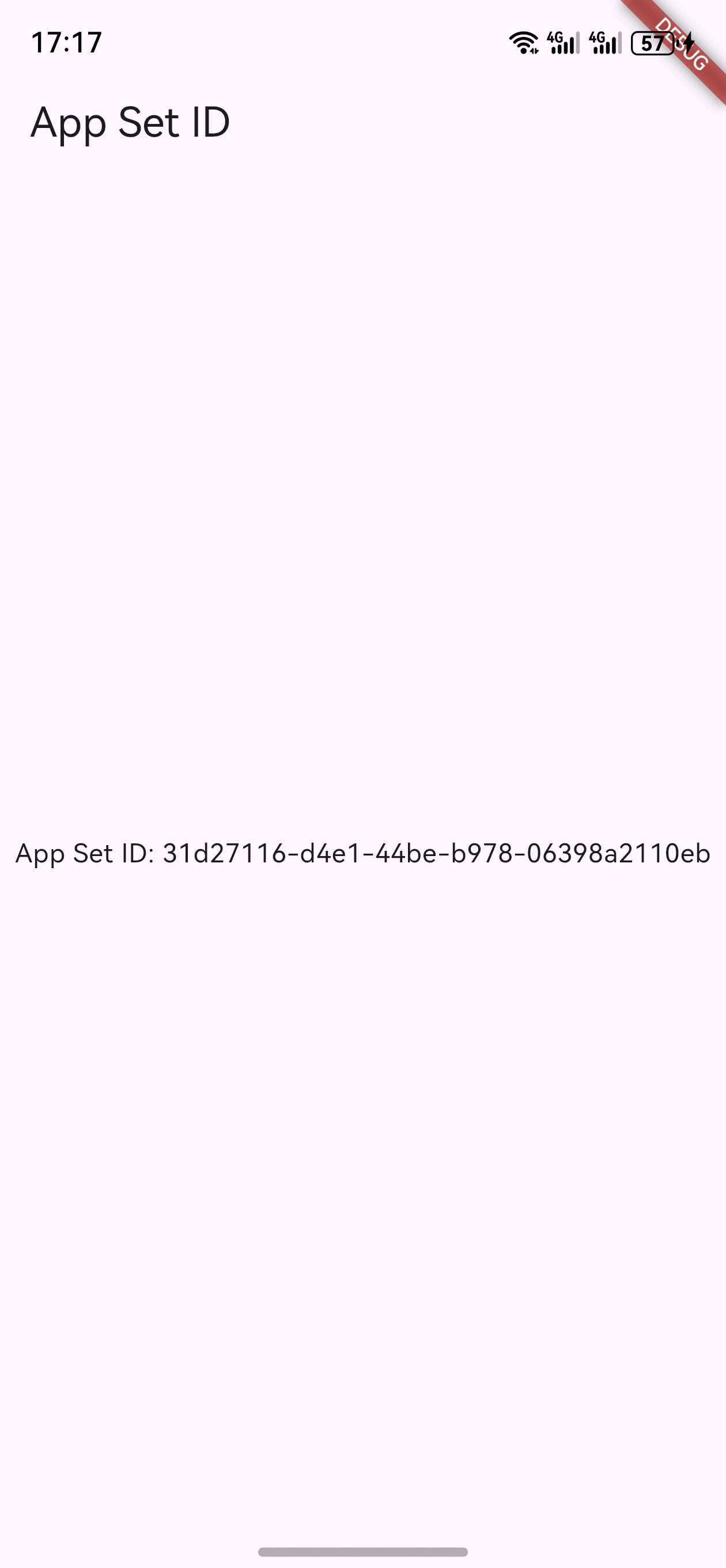
运行示例项目:
cd example
flutter pub get
flutter run
截图
插件地址
插件源码
参考文档

作为“人工智能6S店”的官方数字引擎,为AI开发者与企业提供一个覆盖软硬件全栈、一站式门户。
更多推荐

 12
12 0
0- 0



 已为社区贡献2条内容

所有评论(0)