
Flutter 框架跨平台鸿蒙开发 - AR城市历史穿越
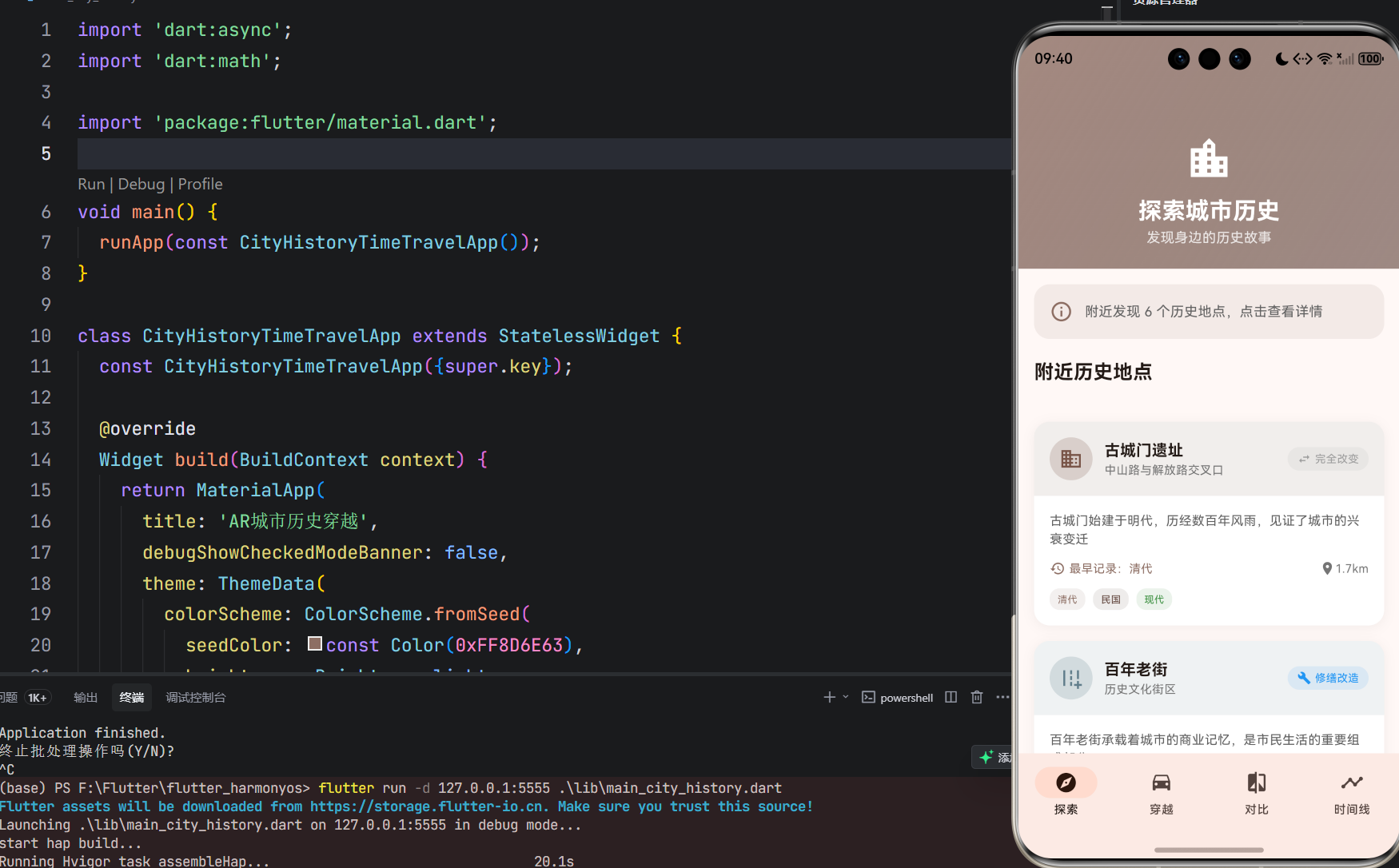
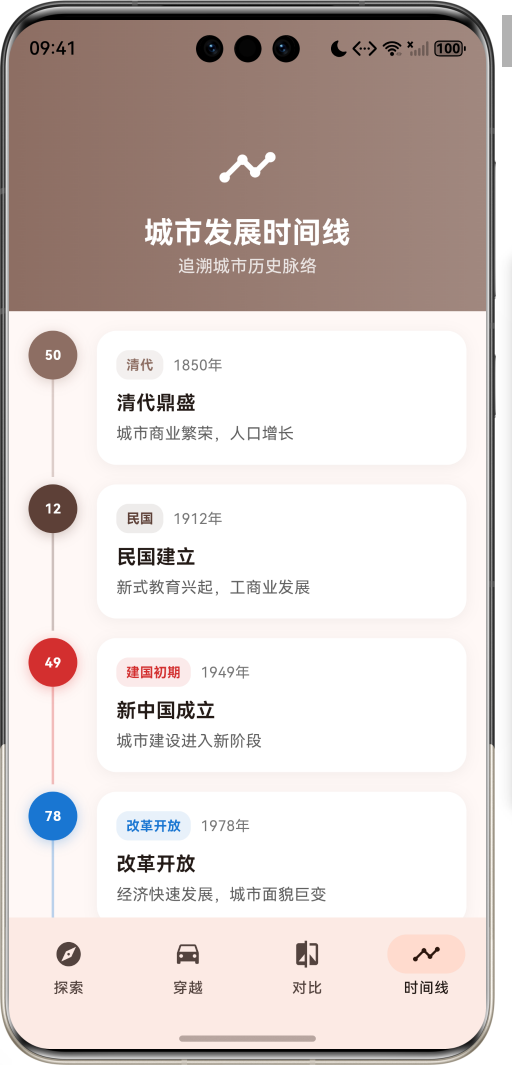
运行效果图AR城市历史穿越是一款科技探索类应用,为用户提供沉浸式的历史体验服务。应用以棕色为主色调,象征历史与传承。界面设计采用复古现代结合的风格,让用户能够穿越时空,见证城市变迁。应用通过AR技术模拟展示城市某个地点几十年前的样子,支持今昔对比,让用户了解城市历史发展脉络。站在城市某个地点,就能看到这个地方百年前的模样,感受时光流转的魅力。序号年代名称时间跨度颜色描述1清代1644-1912棕色
AR城市历史穿越应用
欢迎加入开源鸿蒙跨平台社区:
https://openharmonycrossplatform.csdn.net
一、项目概述
运行效果图
1.1 应用简介
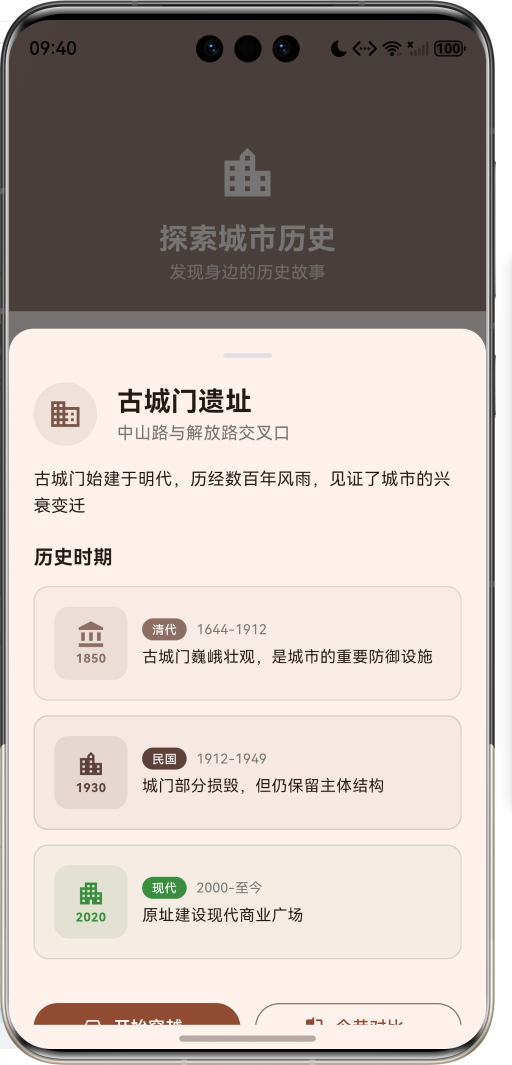
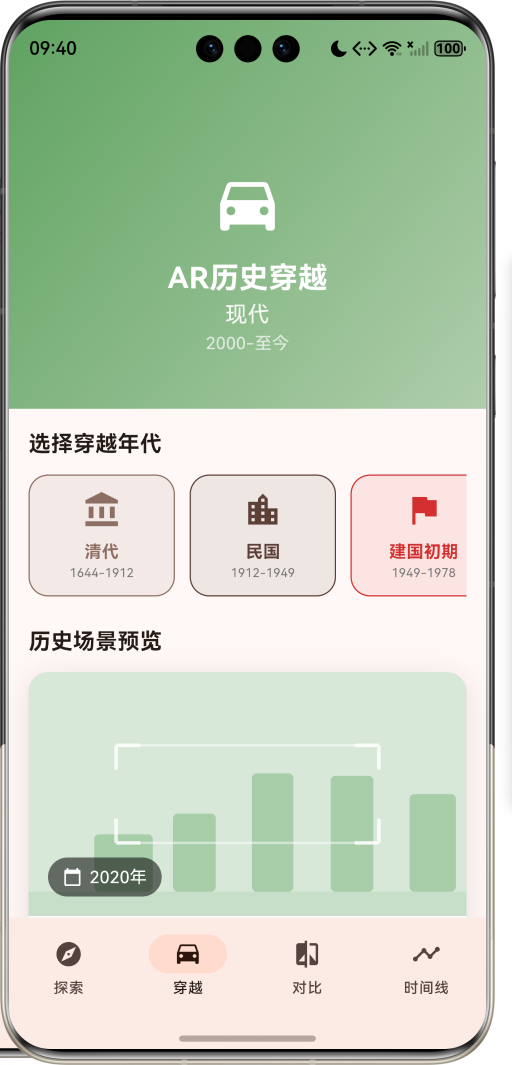
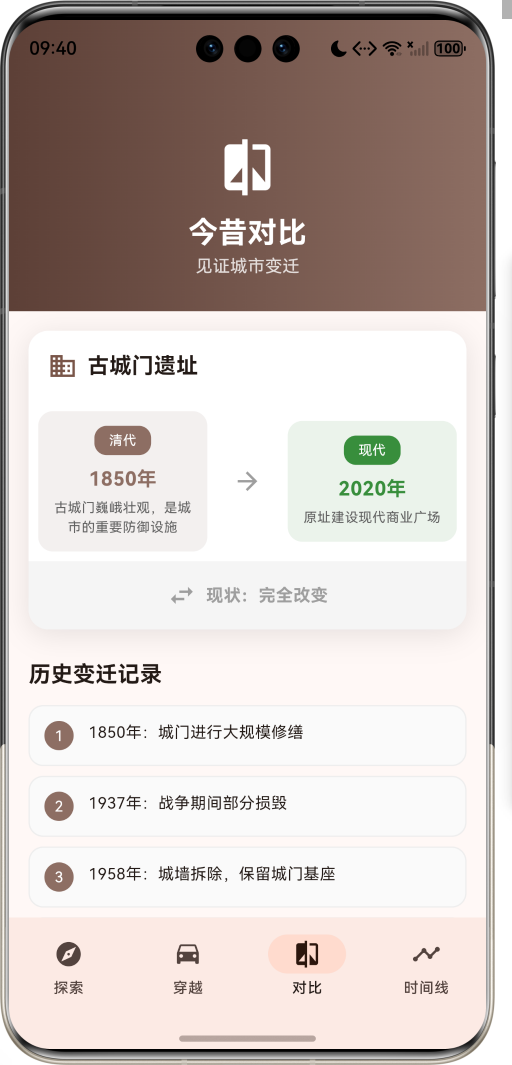
AR城市历史穿越是一款科技探索类应用,为用户提供沉浸式的历史体验服务。应用以棕色为主色调,象征历史与传承。界面设计采用复古现代结合的风格,让用户能够穿越时空,见证城市变迁。
应用通过AR技术模拟展示城市某个地点几十年前的样子,支持今昔对比,让用户了解城市历史发展脉络。站在城市某个地点,就能看到这个地方百年前的模样,感受时光流转的魅力。
1.2 核心功能
| 功能模块 | 功能描述 | 实现方式 |
|---|---|---|
| 历史探索 | 发现附近历史地点 | 位置服务 |
| AR穿越 | 模拟历史场景展示 | CustomPaint绘制 |
| 今昔对比 | 历史与现代对比 | 双视图展示 |
| 时间线 | 城市发展脉络 | 时间轴组件 |
| 历史事件 | 重要历史事件记录 | 数据模型存储 |
| 场景特征 | 历史场景特征展示 | 标签列表 |
1.3 历史年代定义
| 序号 | 年代名称 | 时间跨度 | 颜色 | 描述 |
|---|---|---|---|---|
| 1 | 清代 | 1644-1912 | 棕色 | 封建王朝末期 |
| 2 | 民国 | 1912-1949 | 深棕 | 风云变幻年代 |
| 3 | 建国初期 | 1949-1978 | 红色 | 新中国建设 |
| 4 | 改革开放 | 1978-2000 | 蓝色 | 经济腾飞时期 |
| 5 | 现代 | 2000-至今 | 绿色 | 现代化都市 |
1.4 地点类型定义
| 序号 | 类型名称 | Emoji | 颜色 |
|---|---|---|---|
| 1 | 建筑 | 🏛️ | 棕色 |
| 2 | 街道 | 🛣️ | 蓝灰 |
| 3 | 公园 | 🌳 | 绿色 |
| 4 | 桥梁 | 🌉 | 蓝色 |
| 5 | 车站 | 🚂 | 橙色 |
| 6 | 市场 | 🏪 | 粉红 |
| 7 | 寺庙 | 🛕 | 紫色 |
| 8 | 学校 | 🏫 | 靛蓝 |
1.5 变化类型定义
| 序号 | 类型名称 | Emoji | 颜色 | 说明 |
|---|---|---|---|---|
| 1 | 保存完好 | ✅ | 绿色 | 历史风貌保留 |
| 2 | 修缮改造 | 🔧 | 蓝色 | 部分改造更新 |
| 3 | 原址重建 | 🏗️ | 橙色 | 原址新建建筑 |
| 4 | 完全改变 | ↔️ | 灰色 | 面貌完全不同 |
| 5 | 已拆除 | ❌ | 红色 | 原建筑已不存在 |
1.6 技术栈
| 技术领域 | 技术选型 | 版本要求 |
|---|---|---|
| 开发框架 | Flutter | >= 3.0.0 |
| 编程语言 | Dart | >= 2.17.0 |
| 设计规范 | Material Design 3 | - |
| 自定义绘制 | CustomPainter | - |
| 动画系统 | AnimationController | - |
| 目标平台 | 鸿蒙OS / Web | API 21+ |
1.7 项目结构
lib/
└── main_city_history.dart
    ├── CityHistoryTimeTravelApp       # 应用入口
    ├── HistoricalEra                  # 历史年代枚举
    ├── LocationType                   # 地点类型枚举
    ├── ChangeType                     # 变化类型枚举
    ├── HistoricalLocation             # 历史地点模型
    ├── HistoricalPeriod               # 历史时期模型
    ├── HistoricalEvent                # 历史事件模型
    ├── TimeLineItem                   # 时间线项目模型
    ├── CityHistoryHomePage            # 主页面(底部导航)
    ├── _buildExplorePage              # 探索页面
    ├── _buildTimeTravelPage           # 穿越页面
    ├── _buildComparePage              # 对比页面
    ├── _buildTimelinePage             # 时间线页面
    └── ARScenePainter                 # AR场景绘制器
二、系统架构
2.1 整体架构图
2.2 类图设计
2.3 页面导航流程
2.4 AR穿越流程
三、核心模块设计
3.1 数据模型设计
3.1.1 历史年代枚举 (HistoricalEra)
enum HistoricalEra {
  qing('清代', '1644-1912', Color(0xFF8D6E63), Icons.account_balance, '封建王朝末期'),
  republic('民国', '1912-1949', Color(0xFF5D4037), Icons.location_city, '风云变幻年代'),
  earlyPrc('建国初期', '1949-1978', Color(0xFFD32F2F), Icons.flag, '新中国建设'),
  reform('改革开放', '1978-2000', Color(0xFF1976D2), Icons.trending_up, '经济腾飞时期'),
  modern('现代', '2000-至今', Color(0xFF388E3C), Icons.apartment, '现代化都市');

  final String label;
  final String period;
  final Color color;
  final IconData icon;
  final String description;
}
3.1.2 地点类型枚举 (LocationType)
enum LocationType {
  architecture('建筑', Icons.domain, Color(0xFF795548)),
  street('街道', Icons.add_road, Color(0xFF607D8B)),
  park('公园', Icons.park, Color(0xFF4CAF50)),
  bridge('桥梁', Icons.water, Color(0xFF2196F3)),
  station('车站', Icons.train, Color(0xFFFF9800)),
  market('市场', Icons.store, Color(0xFFE91E63)),
  temple('寺庙', Icons.temple_buddhist, Color(0xFF9C27B0)),
  school('学校', Icons.school, Color(0xFF3F51B5));

  final String label;
  final IconData icon;
  final Color color;
}
3.1.3 历史地点模型 (HistoricalLocation)
class HistoricalLocation {
  final String id;                        // 地点ID
  final String name;                      // 地点名称
  final String currentAddress;            // 当前地址
  final LocationType type;                // 地点类型
  final double latitude;                  // 纬度
  final double longitude;                 // 经度
  final List<HistoricalPeriod> periods;   // 历史时期列表
  final String description;               // 描述
  final List<String> historicalFacts;     // 历史事实
  final ChangeType changeType;            // 变化类型
  final double distance;                  // 距离

  HistoricalEra get earliestEra;          // 最早年代
}
3.1.4 历史时期模型 (HistoricalPeriod)
class HistoricalPeriod {
  final HistoricalEra era;        // 所属年代
  final String description;       // 描述
  final String imagePath;         // 图片路径
  final int year;                 // 年份
  final List<String> features;    // 场景特征
}
3.1.5 历史年代分布
3.2 页面结构设计
3.2.1 主页面布局
3.2.2 探索页结构
3.2.3 穿越页结构
3.2.4 时间线页结构
3.3 年代选择逻辑
3.4 今昔对比逻辑
3.5 AR场景绘制逻辑
四、UI设计规范
4.1 配色方案
应用以棕色为主色调,象征历史与传承:
| 颜色类型 | 色值 | 用途 |
|---|---|---|
| 主色 | #8D6E63 | 导航、主题元素 |
| 辅助色 | #5D4037 | 渐变、背景 |
| 清代色 | #8D6E63 | 清代相关 |
| 民国色 | #5D4037 | 民国相关 |
| 建国色 | #D32F2F | 建国初期相关 |
| 改革色 | #1976D2 | 改革开放相关 |
| 现代色 | #388E3C | 现代相关 |
4.2 年代颜色
| 历史年代 | 色值 | 视觉效果 |
|---|---|---|
| 清代 | #8D6E63 | 古朴棕色 |
| 民国 | #5D4037 | 深沉棕褐 |
| 建国初期 | #D32F2F | 革命红色 |
| 改革开放 | #1976D2 | 发展蓝色 |
| 现代 | #388E3C | 现代绿色 |
4.3 字体规范
| 元素 | 字号 | 字重 | 颜色 |
|---|---|---|---|
| 页面标题 | 24px | Bold | 白色 |
| 地点名称 | 16px | SemiBold | #000000 |
| 年代标签 | 11px | Regular | 年代颜色 |
| 描述文字 | 13px | Regular | #666666 |
| 年份显示 | 16px | Bold | 年代颜色 |
4.4 组件规范
4.4.1 探索页界面
┌─────────────────────────────────────┐
│ [🏛️] 探索城市历史                    │
│      发现身边的历史故事               │
├─────────────────────────────────────┤
│  ℹ️ 附近发现 6 个历史地点             │
├─────────────────────────────────────┤
│  [🏛️] 古城门遗址        [完全改变]   │
│       中山路与解放路交叉口            │
│       📅 最早记录:清代  📍 0.8km     │
│       [清代] [民国] [现代]            │
└─────────────────────────────────────┘
4.4.2 年代选择卡片
┌─────────────────────────────────────┐
│ [🏛️]                                │
│  清代                               │
│  1644-1912                          │
└─────────────────────────────────────┘
4.4.3 AR场景预览
┌─────────────────────────────────────┐
│ ┌───┐           ┌───┐               │
│ │   │           │   │               │
│ └───┘           └───┘               │
│                                     │
│     [建筑轮廓]  [建筑轮廓]           │
│                                     │
│ ┌───┐           ┌───┐               │
│ │   │           │   │               │
│ └───┘           └───┘               │
│                                     │
│ [📅 1850年]                         │
└─────────────────────────────────────┘
4.4.4 时间线节点
┌─────────────────────────────────────┐
│  (●)────────                        │
│  │  [清代] 1850年                    │
│  │  清代鼎盛                         │
│  │  城市商业繁荣,人口增长            │
│  ↓                                  │
│  (●)────────                        │
│     [民国] 1912年                    │
└─────────────────────────────────────┘
五、核心功能实现
5.1 年代选择实现
void _startTimeTravel(HistoricalEra era) {
  setState(() {
    _selectedEra = era;
    _isTimeTraveling = true;
  });

  Future.delayed(const Duration(seconds: 2), () {
    if (mounted) {
      setState(() {
        _isTimeTraveling = false;
      });
    }
  });
}
5.2 最早年代获取
HistoricalEra get earliestEra {
  if (periods.isEmpty) return HistoricalEra.modern;
  return periods.map((p) => p.era).reduce((a, b) => a.index < b.index ? a : b);
}
5.3 地点选择实现
void _selectLocation(HistoricalLocation location) {
  setState(() {
    _selectedLocation = location;
  });
}

void _showLocationDetail(HistoricalLocation location) {
  setState(() {
    _selectedLocation = location;
  });
  showModalBottomSheet(
    context: context,
    isScrollControlled: true,
    builder: (context) => DraggableScrollableSheet(
      initialChildSize: 0.7,
      builder: (context, scrollController) => SingleChildScrollView(
        controller: scrollController,
        child: Column(
          children: [
            // 地点详情内容
          ],
        ),
      ),
    ),
  );
}
5.4 历史时期匹配
final period = _selectedLocation!.periods.firstWhere(
  (p) => p.era == _selectedEra,
  orElse: () => _selectedLocation!.periods.first,
);
5.5 AR场景绘制实现
class ARScenePainter extends CustomPainter {
final Color eraColor;
final bool isAnimating;
ARScenePainter(this.eraColor, this.isAnimating);
void paint(Canvas canvas, Size size) {
// 绘制建筑轮廓
for (int i = 0; i < 5; i++) {
final x = size.width * 0.15 + i * size.width * 0.18;
final height = 40 + random.nextInt(60);
final rect = RRect.fromRectAndRadius(
Rect.fromLTWH(x, size.height - height - 20, width, height),
const Radius.circular(4),
);
canvas.drawRRect(rect, buildingPaint);
}
// 绘制扫描框角标
final cornerPaint = Paint()
..color = Colors.white.withOpacity(0.8)
..style = PaintingStyle.stroke
..strokeWidth = 3;
// ... 角标绘制代码
}
}
5.6 时间线绘制
Widget _buildTimelineItem(TimeLineItem item) {
  final isLast = item == _timeline.last;

  return Row(
    crossAxisAlignment: CrossAxisAlignment.start,
    children: [
      Column(
        children: [
          Container(
            width: 40,
            height: 40,
            decoration: BoxDecoration(
              color: item.era.color,
              shape: BoxShape.circle,
            ),
            child: Center(
              child: Text(
                item.year.toString().substring(2),
                style: const TextStyle(color: Colors.white),
              ),
            ),
          ),
          if (!isLast)
            Container(
              width: 2,
              height: 80,
              color: item.era.color.withOpacity(0.3),
            ),
        ],
      ),
      // 信息卡片
    ],
  );
}
六、交互设计
6.1 探索流程
6.2 穿越流程
6.3 对比流程
七、扩展功能规划
7.1 后续版本规划
7.2 功能扩展建议
7.2.1 真实AR功能
AR功能:
- 摄像头实时画面
- 历史图片叠加
- 3D建筑模型
- 位置定位对齐
7.2.2 语音讲解系统
讲解功能:
- 专业历史讲解
- 多语言支持
- 离线语音包
- 智能推荐路线
7.2.3 社区贡献
社区功能:
- 用户上传历史照片
- 历史故事分享
- 地点纠错
- 互动评论
八、注意事项
8.1 开发注意事项
-
年代排序:历史时期按年代顺序排列
-
场景匹配:选择年代时匹配对应历史时期
-
动画管理:穿越动画需要正确管理AnimationController
-
状态同步:选择地点后需同步更新各页面
-
数据完整性:确保历史数据的准确性
8.2 常见问题
| 问题 | 原因 | 解决方案 |
|---|---|---|
| AR场景为空 | 未选择地点 | 先选择历史地点 |
| 年代不匹配 | 无对应时期 | 显示默认时期 |
| 时间线错乱 | 数据未排序 | 检查数据顺序 |
| 动画卡顿 | 控制器未释放 | 检查dispose |
8.3 使用技巧
🏛️ 历史探索技巧 🏛️
探索建议
- 关注身边的历史地点
- 了解城市变迁脉络
- 对比今昔变化
- 记录个人感受
穿越体验
- 选择感兴趣的年代
- 注意场景特征变化
- 结合历史事件理解
- 分享给朋友
时间线学习
- 按时间顺序浏览
- 关注重要节点
- 理解历史因果
- 建立时间观念
九、运行说明
9.1 环境要求
| 环境 | 版本要求 |
|---|---|
| Flutter SDK | >= 3.0.0 |
| Dart SDK | >= 2.17.0 |
| 鸿蒙OS | API 21+ |
| Web浏览器 | Chrome 90+ |
9.2 运行命令
# 查看可用设备
flutter devices

# 运行到Web服务器
flutter run -d web-server -t lib/main_city_history.dart --web-port 8143

# 运行到鸿蒙设备
flutter run -d 127.0.0.1:5555 lib/main_city_history.dart

# 代码分析
flutter analyze lib/main_city_history.dart
十、总结
AR城市历史穿越应用通过历史探索、AR穿越、今昔对比、时间线四大模块,为用户提供了一个沉浸式的历史体验平台。应用支持5个历史年代、8种地点类型、5种变化状态,让用户能够穿越时空,见证城市变迁。
核心功能涵盖历史地点探索、AR场景模拟、今昔对比展示、城市发展时间线四大模块。历史年代包括清代、民国、建国初期、改革开放、现代五个时期,覆盖中国近现代主要历史阶段;地点类型涵盖建筑、街道、公园、桥梁、车站、市场、寺庙、学校等,全面展示城市面貌;变化状态分为保存完好、修缮改造、原址重建、完全改变、已拆除五种,直观呈现历史变迁。
应用采用 Material Design 3 设计规范,以棕色为主色调,象征历史与传承。通过本应用,希望能够帮助用户了解城市历史,感受时光流转的魅力,增强对城市文化的认同感。
AR城市历史穿越——穿越时空,见证城市变迁

作为“人工智能6S店”的官方数字引擎,为AI开发者与企业提供一个覆盖软硬件全栈、一站式门户。
更多推荐
 0
0 0
0- 0


 已为社区贡献10条内容

所有评论(0)