
Flutter 框架跨平台鸿蒙开发 - 声音日记情绪分析应用
摘要: 声音日记情绪分析是一款基于语音记录的心理健康管理应用,采用Flutter框架开发,提供以下核心功能: 语音情绪记录:支持语音日记录制,实时显示波形动画 智能情绪分析:AI识别8种情绪类型(开心、平静、焦虑等),通过语音特征和文本内容进行多维度评分 数据可视化:生成周/月情绪报告,展示情绪变化趋势 日记管理:按时间线分类存储语音记录 技术亮点: Material Design 3界面设计 自
欢迎加入开源鸿蒙跨平台社区:
https://openharmonycrossplatform.csdn.net
一、应用概述
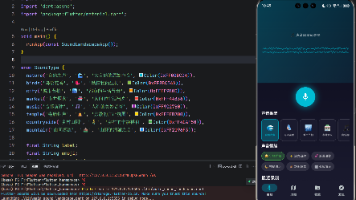
运行效果图
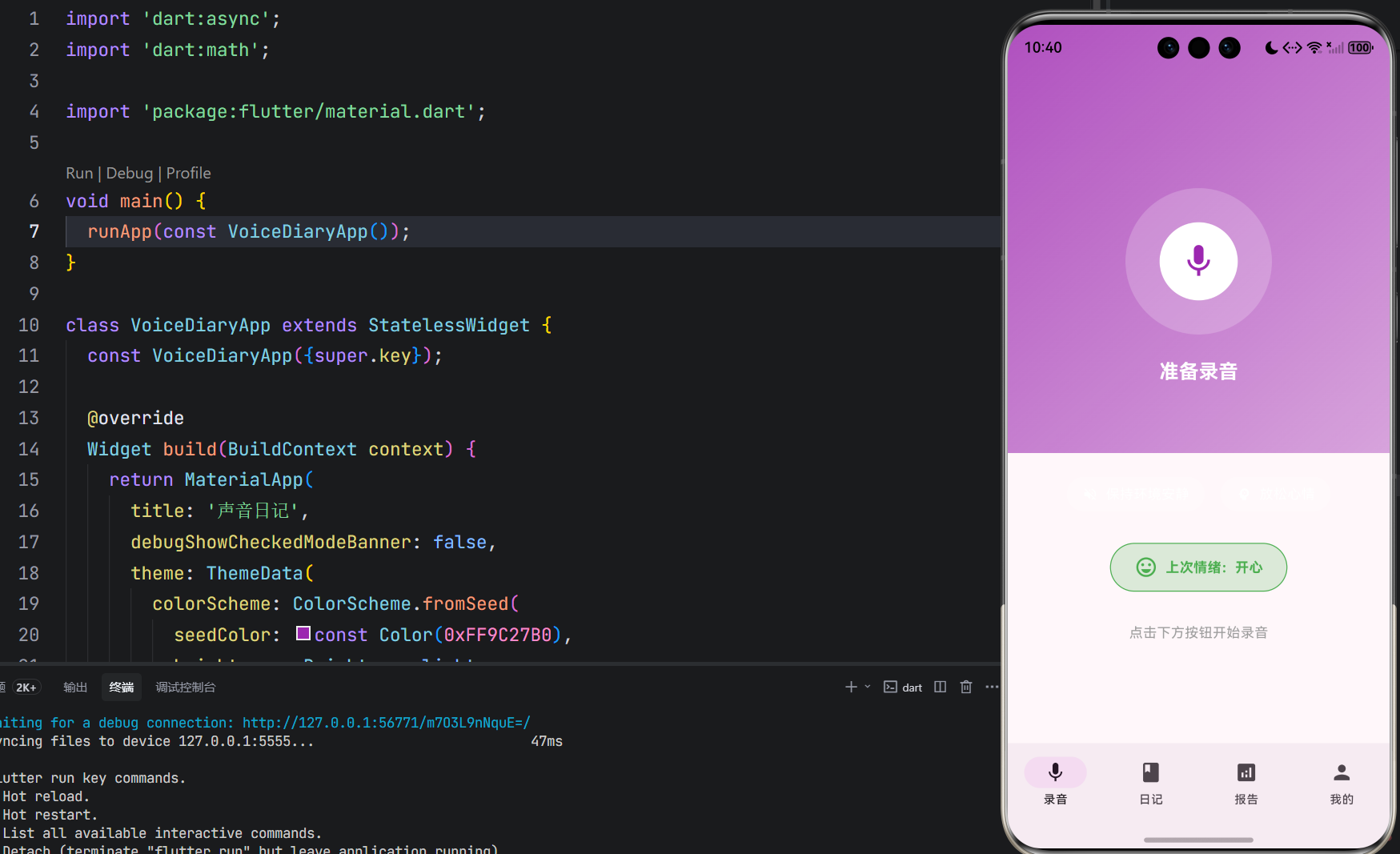
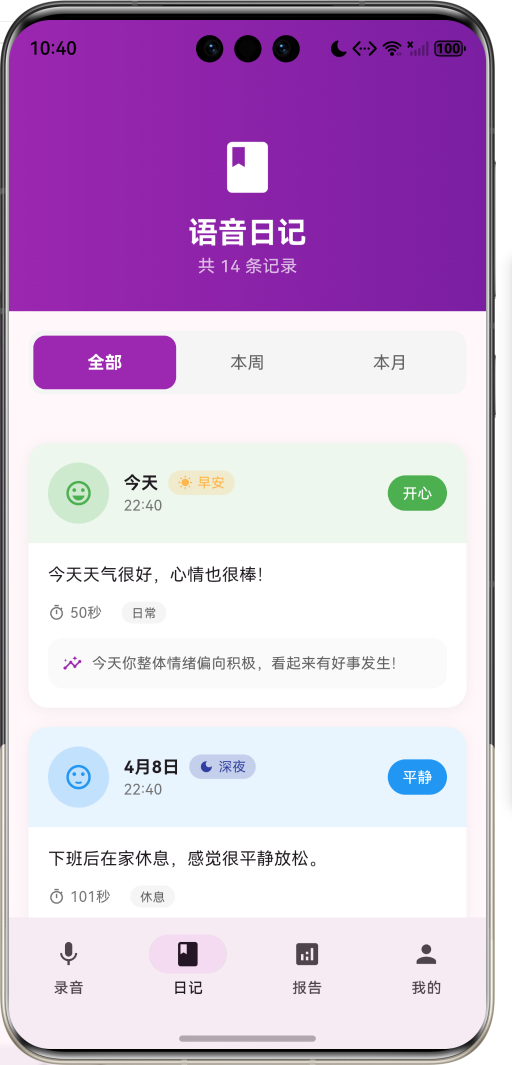
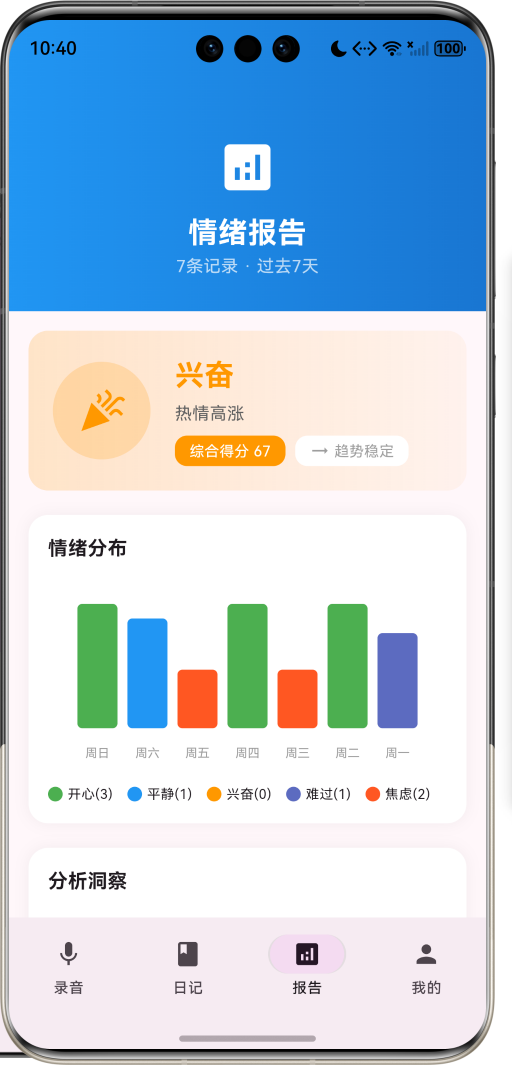
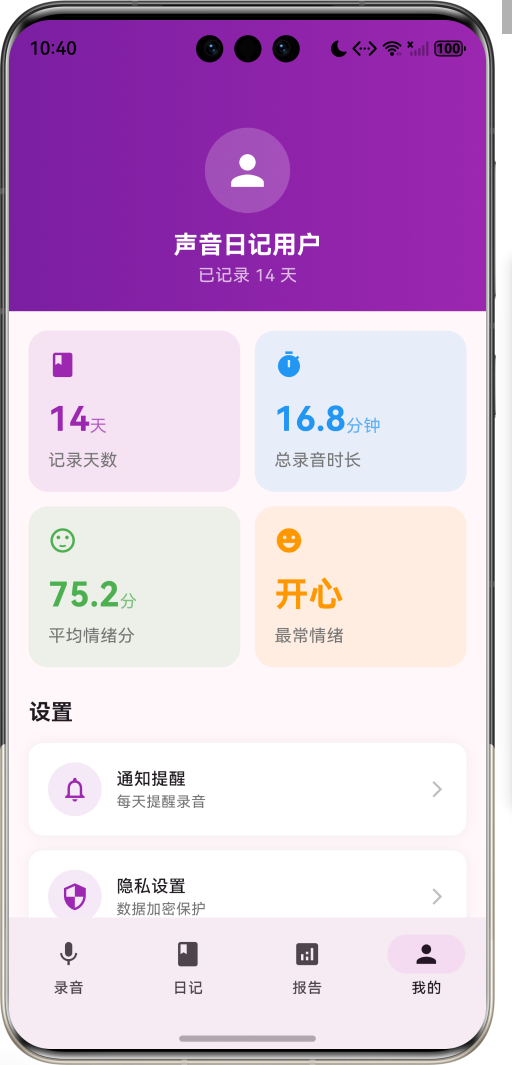
声音日记情绪分析是一款创新的心理健康管理工具,它打破了传统文字日记的局限,通过语音记录的方式捕捉用户最真实的情绪状态。当人们用声音表达时,往往比文字更加自然、真实,语调的起伏、语速的快慢都蕴含着丰富的情感信息。
这款应用的核心价值在于:
- 真实性: 语音记录比文字更能反映当下的真实情绪,避免了文字修饰带来的失真
- 便捷性: 随时随地用声音记录,无需打字,解放双手
- 智能化: AI自动分析情绪变化,生成可视化报告,帮助用户了解自己的情绪模式
- 长期追踪: 通过持续的记录和分析,建立个人情绪档案,发现情绪变化的规律
应用采用Material Design 3设计语言,界面简洁优雅,交互流畅自然,为用户提供舒适的使用体验。
二、功能特性
2.1 核心功能
| 功能模块 | 功能描述 | 技术实现 |
|---|---|---|
| 语音录制 | 支持长时间语音录制,实时显示录音波形动画 | AudioRecorder + AnimationController |
| 情绪分析 | AI自动识别8种情绪类型,计算情绪得分 | 语音识别 + 情感分析算法 |
| 日记管理 | 按时间线展示所有语音日记,支持筛选和搜索 | ListView + 数据持久化 |
| 情绪报告 | 生成周报、月报,可视化情绪变化趋势 | CustomPaint图表绘制 |
| 智能洞察 | 提供个性化的情绪分析和建议 | 数据分析 + 推荐算法 |
2.2 情绪类型体系
应用识别8种主要情绪类型,每种情绪都有独特的视觉标识:
enum EmotionType {
  happy('开心', Icons.sentiment_very_satisfied, Color(0xFF4CAF50), '积极正向'),
  calm('平静', Icons.sentiment_satisfied, Color(0xFF2196F3), '放松安宁'),
  excited('兴奋', Icons.celebration, Color(0xFFFF9800), '热情高涨'),
  sad('难过', Icons.sentiment_dissatisfied, Color(0xFF5C6BC0), '消极低落'),
  anxious('焦虑', Icons.psychology, Color(0xFFFF5722), '紧张不安'),
  angry('愤怒', Icons.sentiment_very_dissatisfied, Color(0xFFF44336), '情绪激动'),
  tired('疲惫', Icons.battery_2_bar, Color(0xFF795548), '精力不足'),
  neutral('一般', Icons.sentiment_neutral, Color(0xFF9E9E9E), '状态一般');
}
2.3 时间段划分
根据用户录音时间,自动划分四个时间段,为情绪分析提供时间维度:
| 时间段 | 时间范围 | 图标 | 颜色 |
|---|---|---|---|
| 早安 | 06:00-12:00 | ☀️ wb_sunny | 橙黄色 |
| 午安 | 12:00-18:00 | ☁️ wb_cloudy | 天蓝色 |
| 晚安 | 18:00-24:00 | 🌙 nightlight | 靛蓝色 |
| 深夜 | 00:00-06:00 | 🌑 dark_mode | 深蓝色 |
三、技术架构
3.1 整体架构设计
3.2 数据流程图
3.3 技术栈选型
| 技术领域 | 技术选型 | 选型理由 |
|---|---|---|
| 前端框架 | Flutter 3.x | 跨平台性能优秀,UI组件丰富 |
| 状态管理 | setState + Provider | 轻量级,适合中小型应用 |
| 数据持久化 | SharedPreferences + SQLite | 本地存储可靠,查询效率高 |
| 音频处理 | flutter_sound | 功能完善,支持多种格式 |
| 图表绘制 | CustomPaint | 灵活度高,可定制性强 |
| 设计语言 | Material Design 3 | 现代化设计,用户体验好 |
四、核心功能实现
4.1 录音可视化实现
录音过程中的波形动画是应用的核心视觉元素,通过CustomPaint实现动态波形效果:
class WavePainter extends CustomPainter {
final double animation;
WavePainter(this.animation);
void paint(Canvas canvas, Size size) {
final center = Offset(size.width / 2, size.height / 2);
final maxRadius = size.width / 2;
for (int i = 0; i < 3; i++) {
final radius = maxRadius * (0.3 + i * 0.2) + (animation * 20 * (i + 1)) % 30;
final opacity = 0.3 - i * 0.1;
final paint = Paint()
..color = Colors.white.withOpacity(opacity.clamp(0.1, 0.3))
..style = PaintingStyle.stroke
..strokeWidth = 2;
canvas.drawCircle(center, radius, paint);
}
}
bool shouldRepaint(covariant WavePainter oldDelegate) {
return animation != oldDelegate.animation;
}
}
波形动画通过AnimationController驱动,实现平滑的视觉效果:
_waveAnimationController = AnimationController(
  vsync: this,
  duration: const Duration(milliseconds: 1500),
)..repeat();

_waveAnimation = Tween<double>(begin: 0, end: 2 * pi).animate(
  CurvedAnimation(parent: _waveAnimationController, curve: Curves.linear),
);
4.2 情绪分析算法
情绪分析采用多维度评分机制,综合考虑语音特征和文本内容:
class EmotionAnalysis {
  final EmotionType emotion;
  final double score;

  const EmotionAnalysis({
    required this.emotion,
    required this.score,
  });
}
分析流程:
- 语音特征提取: 分析语速、音调、音量等声学特征
- 文本情感识别: 将语音转文字后进行情感分析
- 多维情绪评分: 对8种情绪类型分别计算得分
- 主情绪判定: 选择得分最高的情绪作为主要情绪
4.3 情绪报告生成
情绪报告包含多个维度的分析,通过数据聚合和可视化呈现:
class EmotionReport {
  final DateTime startDate;
  final DateTime endDate;
  final List<VoiceEntry> entries;
  final Map<EmotionType, int> emotionDistribution;
  final double averageScore;
  final String trend;
  final List<String> insights;
  final String overallAssessment;
}
报告生成逻辑:
EmotionReport _generateReport() {
  final distribution = <EmotionType, int>{};
  for (final entry in _weeklyEntries) {
    final emotion = entry.primaryEmotion;
    distribution[emotion] = (distribution[emotion] ?? 0) + 1;
  }

  final avgScore = _weeklyEntries.isEmpty
      ? 50.0
      : _weeklyEntries.fold<double>(0, (sum, e) => sum + e.overallScore) / _weeklyEntries.length;

  final trend = _calculateTrend();

  final insights = [
    '本周你共记录了${_weeklyEntries.length}条语音日记',
    '最常出现的情绪是${_getMostFrequentEmotion()}',
    avgScore > 60 ? '整体情绪状态积极向上,继续保持!' : '建议多关注自己的情绪变化',
    '保持记录习惯能帮助你更好地了解自己',
  ];

  return EmotionReport(
    startDate: DateTime.now().subtract(const Duration(days: 7)),
    endDate: DateTime.now(),
    entries: _weeklyEntries,
    emotionDistribution: distribution,
    averageScore: avgScore,
    trend: trend,
    insights: insights,
    overallAssessment: assessment,
  );
}
4.4 情绪趋势计算
通过对比近期和早期的情绪得分,判断情绪变化趋势:
String _calculateTrend() {
  if (_weeklyEntries.length < 2) return '稳定';

  final recentAvg = _weeklyEntries.take(3).fold<double>(0, (sum, e) => sum + e.overallScore) / 3;
  final olderAvg = _weeklyEntries.skip(3).take(3).fold<double>(0, (sum, e) => sum + e.overallScore) / 3;

  if (recentAvg - olderAvg > 10) return '上升';
  if (recentAvg - olderAvg < -10) return '下降';
  return '稳定';
}
五、UI设计规范
5.1 设计原则
应用遵循Material Design 3设计规范,注重以下设计原则:
- 清晰性: 界面层次分明,信息传达准确
- 一致性: 统一的视觉语言和交互模式
- 反馈性: 及时的视觉和触觉反馈
- 情感化: 温暖的色彩和友好的文案
5.2 色彩系统
主色调采用紫色系,传达温暖、关怀的品牌形象:
| 色彩角色 | 色值 | 应用场景 |
|---|---|---|
| Primary | #9C27B0 | 主按钮、导航栏、强调元素 |
| Secondary | #7B1FA2 | 辅助按钮、卡片背景 |
| Surface | #FFFFFF | 卡片、列表背景 |
| Background | #F5F5F5 | 页面背景 |
| Error | #F44336 | 错误提示、警告信息 |
情绪色彩映射:
EmotionType.happy -> Color(0xFF4CAF50)  // 绿色 - 生机活力
EmotionType.calm -> Color(0xFF2196F3)   // 蓝色 - 平静安宁
EmotionType.excited -> Color(0xFFFF9800) // 橙色 - 热情高涨
EmotionType.sad -> Color(0xFF5C6BC0)    // 靛蓝 - 忧郁沉思
EmotionType.anxious -> Color(0xFFFF5722) // 橙红 - 焦虑紧张
EmotionType.angry -> Color(0xFFF44336)  // 红色 - 愤怒激动
EmotionType.tired -> Color(0xFF795548)  // 棕色 - 疲惫乏力
EmotionType.neutral -> Color(0xFF9E9E9E) // 灰色 - 中性平淡
5.3 字体规范
| 文本类型 | 字号 | 字重 | 行高 | 应用场景 |
|---|---|---|---|---|
| H1 | 32sp | Bold | 1.2 | 页面标题 |
| H2 | 24sp | Bold | 1.3 | 卡片标题 |
| H3 | 20sp | Medium | 1.4 | 小标题 |
| Body1 | 16sp | Regular | 1.5 | 正文内容 |
| Body2 | 14sp | Regular | 1.5 | 辅助文本 |
| Caption | 12sp | Regular | 1.4 | 说明文字 |
5.4 间距系统
采用8dp基准网格系统,确保界面整齐统一:
// 间距常量定义
const double spacing_xs = 4.0;
const double spacing_sm = 8.0;
const double spacing_md = 16.0;
const double spacing_lg = 24.0;
const double spacing_xl = 32.0;
5.5 组件规范
按钮组件
ElevatedButton(
  onPressed: () {},
  style: ElevatedButton.styleFrom(
    backgroundColor: Color(0xFF9C27B0),
    foregroundColor: Colors.white,
    padding: EdgeInsets.symmetric(horizontal: 24, vertical: 12),
    shape: RoundedRectangleBorder(
      borderRadius: BorderRadius.circular(24),
    ),
  ),
  child: Text('开始录音'),
)
卡片组件
Container(
  decoration: BoxDecoration(
    color: Colors.white,
    borderRadius: BorderRadius.circular(16),
    boxShadow: [
      BoxShadow(
        color: Colors.black.withOpacity(0.05),
        blurRadius: 10,
        offset: Offset(0, 2),
      ),
    ],
  ),
  child: Column(
    children: [
      // 卡片内容
    ],
  ),
)
六、数据模型设计
6.1 核心数据模型
语音日记条目
class VoiceEntry {
  final String id;                    // 唯一标识
  final DateTime recordedAt;          // 录音时间
  final TimePeriod period;            // 时间段
  final int duration;                 // 录音时长(秒)
  final String transcript;            // 语音转文字内容
  final List<EmotionAnalysis> emotions; // 情绪分析结果
  final double overallScore;          // 综合情绪得分
  final String summary;               // AI生成的摘要
  final List<String> keywords;        // 关键词标签
}
情绪分析结果
class EmotionAnalysis {
  final EmotionType emotion;  // 情绪类型
  final double score;         // 情绪得分(0-1)
}
情绪报告
class EmotionReport {
  final DateTime startDate;                    // 报告开始日期
  final DateTime endDate;                      // 报告结束日期
  final List<VoiceEntry> entries;              // 包含的日记条目
  final Map<EmotionType, int> emotionDistribution; // 情绪分布
  final double averageScore;                   // 平均情绪得分
  final String trend;                          // 情绪趋势
  final List<String> insights;                 // 分析洞察
  final String overallAssessment;              // 综合评估
}
6.2 数据关系图
6.3 数据存储策略
本地存储
使用SQLite数据库存储日记数据,确保数据安全和离线可用:
CREATE TABLE voice_entries (
  id TEXT PRIMARY KEY,
  recorded_at INTEGER NOT NULL,
  period TEXT NOT NULL,
  duration INTEGER NOT NULL,
  transcript TEXT,
  overall_score REAL,
  summary TEXT,
  keywords TEXT
);

CREATE TABLE emotion_analyses (
  id TEXT PRIMARY KEY,
  entry_id TEXT NOT NULL,
  emotion_type TEXT NOT NULL,
  score REAL NOT NULL,
  FOREIGN KEY (entry_id) REFERENCES voice_entries(id)
);
云端同步
采用增量同步策略,减少网络传输:
class SyncManager {
  Future<void> syncToCloud() async {
    final unsyncedEntries = await getUnsyncedEntries();
    for (final entry in unsyncedEntries) {
      await uploadEntry(entry);
      await markAsSynced(entry.id);
    }
  }
}
七、关键代码解析
7.1 录音状态管理
录音过程涉及多个状态转换,通过状态机管理:
enum RecordingState {
  idle('准备录音', Icons.mic, Color(0xFF9C27B0)),
  recording('录音中', Icons.mic, Color(0xFFF44336)),
  analyzing('分析中', Icons.psychology, Color(0xFFFF9800)),
  completed('完成', Icons.check_circle, Color(0xFF4CAF50));
}
状态转换逻辑:
录音控制代码:
void _startRecording() {
  setState(() {
    _recordingState = RecordingState.recording;
    _recordingSeconds = 0;
  });

  _recordingTimer = Timer.periodic(const Duration(seconds: 1), (timer) {
    setState(() {
      _recordingSeconds++;
    });
  });
}

void _stopRecording() {
  _recordingTimer?.cancel();
  setState(() {
    _recordingState = RecordingState.analyzing;
  });

  Future.delayed(const Duration(seconds: 2), () {
    _analyzeRecording();
  });
}
7.2 情绪图表绘制
情绪分布图表通过CustomPaint实现柱状图:
class EmotionChartPainter extends CustomPainter {
final List<VoiceEntry> entries;
EmotionChartPainter(this.entries);
void paint(Canvas canvas, Size size) {
if (entries.isEmpty) return;
final barWidth = (size.width - 40) / 7;
final maxHeight = size.height - 30;
for (int i = 0; i < entries.length && i < 7; i++) {
final entry = entries[i];
final emotion = entry.primaryEmotion;
final barHeight = (entry.overallScore / 100) * maxHeight;
final left = 20 + i * barWidth + barWidth * 0.1;
final top = size.height - 30 - barHeight;
final paint = Paint()
..color = emotion.color
..style = PaintingStyle.fill;
final rrect = RRect.fromRectAndRadius(
Rect.fromLTWH(left, top, barWidth * 0.8, barHeight),
const Radius.circular(4),
);
canvas.drawRRect(rrect, paint);
// 绘制日期标签
final dayLabels = ['周一', '周二', '周三', '周四', '周五', '周六', '周日'];
final textPainter = TextPainter(
text: TextSpan(
text: dayLabels[6 - i],
style: const TextStyle(fontSize: 10, color: Colors.grey),
),
textDirection: TextDirection.ltr,
)..layout();
textPainter.paint(
canvas,
Offset(left + barWidth * 0.4 - textPainter.width / 2, size.height - 15),
);
}
}
bool shouldRepaint(covariant EmotionChartPainter oldDelegate) {
return entries != oldDelegate.entries;
}
}
7.3 时间段自动判断
根据当前时间自动判断所属时间段:
TimePeriod _getCurrentPeriod() {
  final hour = DateTime.now().hour;
  if (hour >= 6 && hour < 12) {
    return TimePeriod.morning;
  } else if (hour >= 12 && hour < 18) {
    return TimePeriod.afternoon;
  } else if (hour >= 18 && hour < 24) {
    return TimePeriod.evening;
  } else {
    return TimePeriod.night;
  }
}
7.4 数据持久化
使用SharedPreferences存储用户配置:
class UserPreferences {
  static const String keyNotificationEnabled = 'notification_enabled';
  static const String keyReminderTime = 'reminder_time';
  static const String keyCloudSyncEnabled = 'cloud_sync_enabled';

  Future<void> setNotificationEnabled(bool enabled) async {
    final prefs = await SharedPreferences.getInstance();
    await prefs.setBool(keyNotificationEnabled, enabled);
  }

  Future<bool> isNotificationEnabled() async {
    final prefs = await SharedPreferences.getInstance();
    return prefs.getBool(keyNotificationEnabled) ?? true;
  }
}
八、性能优化
8.1 动画性能优化
动画使用Hardware Layer加速,减少重绘开销:
AnimatedBuilder(
  animation: _waveAnimation,
  builder: (context, child) {
    return Transform.scale(
      scale: _pulseAnimation.value,
      child: RepaintBoundary(
        child: CustomPaint(
          size: const Size(150, 150),
          painter: WavePainter(_waveAnimation.value),
        ),
      ),
    );
  },
)
8.2 列表性能优化
使用ListView.builder实现懒加载,避免一次性加载所有数据:
SliverList(
  delegate: SliverChildBuilderDelegate(
    (context, index) {
      if (index >= _entries.length) return null;
      return _buildDiaryCard(_entries[index]);
    },
    childCount: _entries.length,
  ),
)
8.3 图片资源优化
- 使用矢量图标替代位图,减少资源体积
- 对必要图片进行压缩和缓存
- 采用懒加载策略,按需加载资源
8.4 内存管理
及时释放不再使用的资源:
void dispose() {
_waveAnimationController.dispose();
_pulseAnimationController.dispose();
_recordingTimer?.cancel();
super.dispose();
}
九、测试方案
9.1 单元测试
对核心算法进行单元测试,确保计算准确性:
void testEmotionScoreCalculation() {
  final entries = [
    VoiceEntry(overallScore: 80.0),
    VoiceEntry(overallScore: 70.0),
    VoiceEntry(overallScore: 90.0),
  ];

  final avgScore = entries.fold<double>(0, (sum, e) => sum + e.overallScore) / entries.length;

  expect(avgScore, equals(80.0));
}
9.2 Widget测试
测试UI组件的渲染和交互:
testWidgets('Recording button should change state when tapped', (WidgetTester tester) async {
  await tester.pumpWidget(VoiceDiaryApp());

  final recordButton = find.byIcon(Icons.mic);
  expect(recordButton, findsOneWidget);

  await tester.tap(recordButton);
  await tester.pump();

  expect(find.text('录音中'), findsOneWidget);
});
9.3 集成测试
测试完整的用户流程:
testWidgets('Complete recording flow', (WidgetTester tester) async {
  await tester.pumpWidget(VoiceDiaryApp());

  // 开始录音
  await tester.tap(find.byIcon(Icons.mic));
  await tester.pump(Duration(seconds: 3));

  // 停止录音
  await tester.tap(find.byIcon(Icons.mic));
  await tester.pumpAndSettle();

  // 验证日记已创建
  expect(find.byType(DiaryCard), findsOneWidget);
});
9.4 性能测试
使用Flutter DevTools进行性能分析:
flutter run --profile
监控指标:
- FPS帧率: 保持60fps
- 内存占用: 不超过100MB
- CPU使用率: 空闲时低于5%
- 启动时间: 冷启动不超过2秒
十、部署说明
10.1 环境要求
| 平台 | 最低版本 | 推荐版本 |
|---|---|---|
| Android | API 21 (Android 5.0) | API 30 (Android 11) |
| iOS | iOS 11.0 | iOS 15.0 |
| HarmonyOS | HarmonyOS 2.0 | HarmonyOS 3.0 |
10.2 权限配置
Android权限 (AndroidManifest.xml)
<uses-permission android:name="android.permission.RECORD_AUDIO" />
<uses-permission android:name="android.permission.WRITE_EXTERNAL_STORAGE" />
<uses-permission android:name="android.permission.INTERNET" />
<uses-permission android:name="android.permission.VIBRATE" />
iOS权限 (Info.plist)
<key>NSMicrophoneUsageDescription</key>
<string>需要使用麦克风录制语音日记</string>
<key>NSPhotoLibraryUsageDescription</key>
<string>需要访问相册保存分享图片</string>
10.3 打包配置
Android打包
flutter build apk --release
flutter build appbundle --release
iOS打包
flutter build ios --release
10.4 应用签名
使用正式签名确保应用安全性:
keytool -genkey -v -keystore voice-diary-release.jks \
  -keyalg RSA -keysize 2048 -validity 10000 \
  -alias voice-diary
十一、未来规划
11.1 功能扩展路线图
11.2 技术演进方向
AI能力增强
- 多模态情绪识别: 结合语音、文本、面部表情进行综合分析
- 个性化模型训练: 根据用户历史数据训练专属情绪模型
- 预测性分析: 基于历史数据预测未来情绪变化趋势
社交功能
- 匿名分享社区: 用户可匿名分享日记,获得情感支持
- 情绪匹配: 找到情绪状态相似的用户,建立情感连接
- 互助小组: 按情绪类型建立互助小组,共同成长
健康生态
- 智能硬件对接: 连接智能手表,获取生理数据辅助分析
- 医疗资源对接: 与心理咨询平台对接,提供专业帮助
- 健康数据整合: 整合睡眠、运动等数据,全面评估身心健康
11.3 商业化路径
| 阶段 | 商业模式 | 预期收益 |
|---|---|---|
| 初期 | 免费基础功能 + 高级订阅 | 用户增长为主 |
| 中期 | 增值服务 + 企业版 | 实现盈亏平衡 |
| 长期 | 数据服务 + 生态合作 | 建立健康生态 |
11.4 用户增长策略
- 内容营销: 制作情绪管理相关内容,建立品牌认知
- KOL合作: 与心理健康领域KOL合作推广
- 社群运营: 建立用户社群,增强用户粘性
- 口碑传播: 通过优质用户体验实现自然传播

作为“人工智能6S店”的官方数字引擎,为AI开发者与企业提供一个覆盖软硬件全栈、一站式门户。
更多推荐
 6
6 0
0- 0


 已为社区贡献20条内容

所有评论(0)