
HarmonyOS 6.0 游戏开发实战:用 ArkUI 从零打造消消乐小游戏
一直想在鸿蒙上做个小游戏试试,消消乐是个很经典的选题——规则简单,但实现起来涉及的技术点还挺多:网格布局、状态驱动刷新、动画效果、消除判断逻辑。正好把这些在 HarmonyOS 6.0 的 ArkUI 框架里系统走一遍。这篇文章会完整实现一个可以玩的消消乐:点击两个相邻的格子交换位置,交换后如果有三个或三个以上相同颜色连成一排或一列,就消除并得分,上方的方块自动下落补位,空缺处随机生成新方块。技术
一、前言
一直想在鸿蒙上做个小游戏试试,消消乐是个很经典的选题——规则简单,但实现起来涉及的技术点还挺多:网格布局、状态驱动刷新、动画效果、消除判断逻辑。正好把这些在 HarmonyOS 6.0 的 ArkUI 框架里系统走一遍。
这篇文章会完整实现一个可以玩的消消乐:点击两个相邻的格子交换位置,交换后如果有三个或三个以上相同颜色连成一排或一列,就消除并得分,上方的方块自动下落补位,空缺处随机生成新方块。
技术上重点讲几件事:网格布局怎么用 Grid 组件搭、方块的选中/交换/消除动画怎么做、游戏状态怎么管理。代码全部可以直接运行,不依赖任何第三方库。
二、项目结构
entry/src/main/ets/
├── entryability/
│   └── EntryAbility.ets
├── model/
│   └── GameModel.ets        // 游戏数据模型与核心逻辑
├── pages/
│   └── GamePage.ets         // 游戏主页面
└── components/
    ├── GameGrid.ets          // 游戏棋盘组件
    ├── BlockCell.ets         // 单个方块组件
    └── ScoreBoard.ets        // 得分面板组件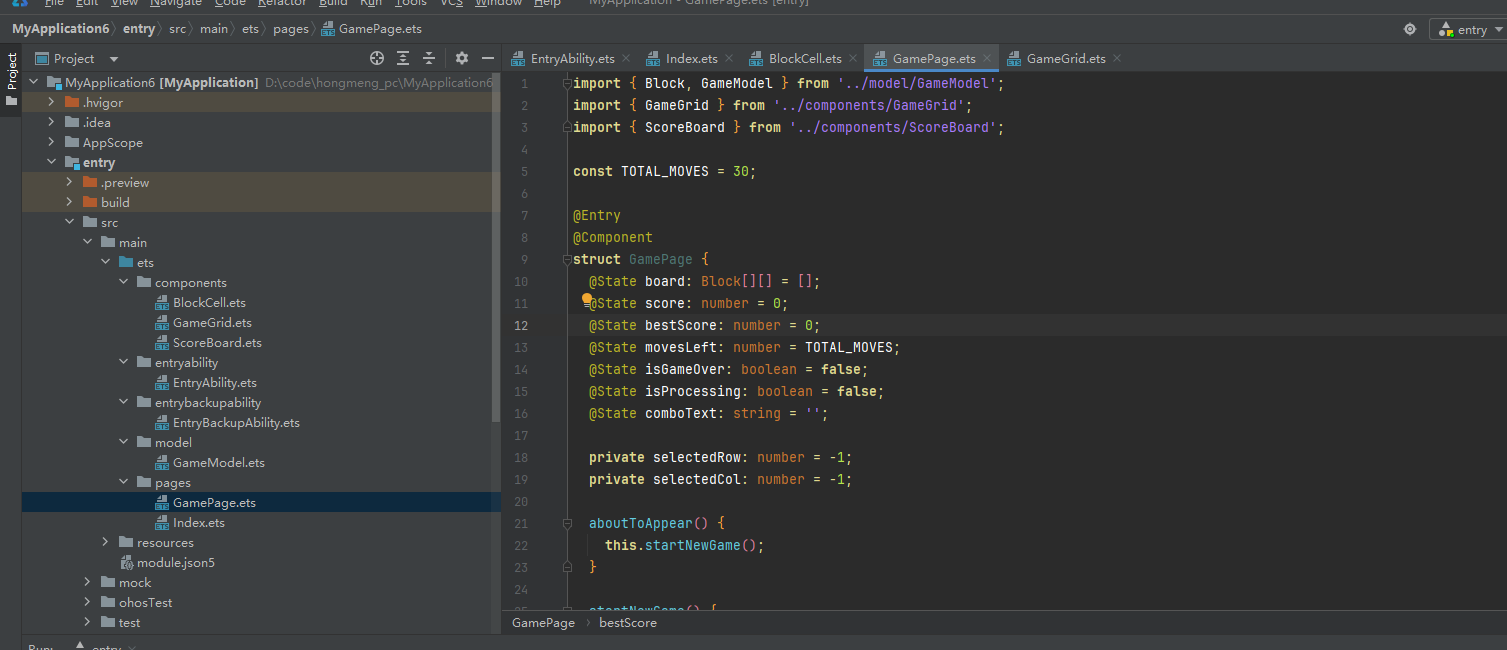
三、数据模型与游戏逻辑
3.1 方块数据结构
// model/GameModel.ets

// 方块颜色类型,用数字枚举方便后续比较
export enum BlockColor {
  RED    = 0,
  BLUE   = 1,
  GREEN  = 2,
  YELLOW = 3,
  PURPLE = 4,
  ORANGE = 5
}

// 单个方块
export interface Block {
  id: number;           // 唯一标识,用于动画 key
  color: BlockColor;
  row: number;
  col: number;
  isSelected: boolean;  // 是否被选中
  isMatched: boolean;   // 是否在消除中
}

// 棋盘尺寸
export const BOARD_SIZE = 7;   // 7x7 的棋盘
export const BLOCK_COLORS = 6; // 6种颜色
3.2 核心游戏逻辑
游戏逻辑全部封装在 GameModel 里,主要包含:初始化棋盘、判断消除、执行消除和下落、随机补位。
// model/GameModel.ets (续)

export class GameModel {
  private static idCounter = 0;

  // 生成一个新方块
  static createBlock(row: number, col: number): Block {
    return {
      id: ++GameModel.idCounter,
      color: Math.floor(Math.random() * BLOCK_COLORS) as BlockColor,
      row,
      col,
      isSelected: false,
      isMatched: false
    };
  }

  // 初始化棋盘,确保初始状态没有可消除的组合
  static initBoard(): Block[][] {
    const board: Block[][] = [];
    for (let r = 0; r < BOARD_SIZE; r++) {
      board[r] = [];
      for (let c = 0; c < BOARD_SIZE; c++) {
        let block: Block;
        do {
          block = GameModel.createBlock(r, c);
        } while (GameModel.wouldMatch(board, r, c, block.color));
        board[r][c] = block;
      }
    }
    return board;
  }

  // 判断在 (r, c) 放置某颜色是否会立即形成三连
  static wouldMatch(board: Block[][], r: number, c: number, color: BlockColor): boolean {
    // 检查横向
    if (c >= 2 &&
        board[r][c - 1]?.color === color &&
        board[r][c - 2]?.color === color) return true;
    // 检查纵向
    if (r >= 2 &&
        board[r - 1]?.[c]?.color === color &&
        board[r - 2]?.[c]?.color === color) return true;
    return false;
  }

  // 检查两个方块是否相邻
  static isAdjacent(r1: number, c1: number, r2: number, c2: number): boolean {
    return (Math.abs(r1 - r2) === 1 && c1 === c2) ||
           (Math.abs(c1 - c2) === 1 && r1 === r2);
  }

  // 交换两个方块
  static swap(board: Block[][], r1: number, c1: number, r2: number, c2: number): void {
    const tmp = board[r1][c1].color;
    board[r1][c1] = { ...board[r1][c1], color: board[r2][c2].color };
    board[r2][c2] = { ...board[r2][c2], color: tmp };
  }

  // 找出所有可消除的方块,返回 Set<"row,col"> 格式
  static findMatches(board: Block[][]): Set<string> {
    const matched = new Set<string>();

    for (let r = 0; r < BOARD_SIZE; r++) {
      for (let c = 0; c < BOARD_SIZE - 2; c++) {
        // 横向三连检查
        if (board[r][c].color === board[r][c + 1].color &&
            board[r][c].color === board[r][c + 2].color) {
          matched.add(`${r},${c}`);
          matched.add(`${r},${c + 1}`);
          matched.add(`${r},${c + 2}`);
        }
      }
    }

    for (let c = 0; c < BOARD_SIZE; c++) {
      for (let r = 0; r < BOARD_SIZE - 2; r++) {
        // 纵向三连检查
        if (board[r][c].color === board[r + 1][c].color &&
            board[r][c].color === board[r + 2][c].color) {
          matched.add(`${r},${c}`);
          matched.add(`${r + 1},${c}`);
          matched.add(`${r + 2},${c}`);
        }
      }
    }

    return matched;
  }

  // 执行消除:把匹配的方块标记,然后下落补位
  // 返回本次消除的方块数量
  static applyMatches(board: Block[][], matched: Set<string>): number {
    if (matched.size === 0) return 0;

    // 逐列处理下落
    for (let c = 0; c < BOARD_SIZE; c++) {
      // 找出这一列没有被消除的方块,从下到上保留
      const surviving: Block[] = [];
      for (let r = BOARD_SIZE - 1; r >= 0; r--) {
        if (!matched.has(`${r},${c}`)) {
          surviving.push(board[r][c]);
        }
      }

      // 从底部开始重新填充这一列
      let fillRow = BOARD_SIZE - 1;
      for (const block of surviving) {
        board[fillRow][c] = { ...block, row: fillRow, col: c };
        fillRow--;
      }

      // 顶部空缺随机生成新方块
      while (fillRow >= 0) {
        board[fillRow][c] = GameModel.createBlock(fillRow, c);
        fillRow--;
      }
    }

    return matched.size;
  }

  // 计算得分:消除越多一次性加成越高
  static calcScore(matchCount: number): number {
    if (matchCount <= 3) return matchCount * 10;
    if (matchCount <= 6) return matchCount * 20;
    return matchCount * 50;  // 大消除奖励
  }
}
findMatches 只做横向和纵向的三连判断,没有做更长连击的特殊处理,这样代码简洁,后期要扩展加成逻辑也容易改。
applyMatches 用逐列处理的方式实现下落,思路是:把这一列没被消除的方块从底部开始摆,顶部空缺填新的随机方块。
四、方块组件
4.1 颜色配置
// components/BlockCell.ets

import { Block, BlockColor } from '../model/GameModel';

// 颜色映射表
const COLOR_MAP: Record<number, string> = {
  0: '#f87171',  // 红
  1: '#60a5fa',  // 蓝
  2: '#4ade80',  // 绿
  3: '#facc15',  // 黄
  4: '#c084fc',  // 紫
  5: '#fb923c',  // 橙
};

// 颜色对应的深色版本(选中时用)
const COLOR_DARK_MAP: Record<number, string> = {
  0: '#dc2626',
  1: '#2563eb',
  2: '#16a34a',
  3: '#d97706',
  4: '#9333ea',
  5: '#ea580c',
};

// 颜色对应的 Emoji 图标,增加辨识度
const COLOR_ICON: Record<number, string> = {
  0: '🍎',
  1: '💎',
  2: '🍀',
  3: '⭐',
  4: '🔮',
  5: '🍊',
};
4.2 方块组件实现
// components/BlockCell.ets (续)

@Component
export struct BlockCell {
  @Prop block: Block = {} as Block;
  cellSize: number = 44;
  onClick: () => void = () => {};

  // 选中时的缩放动画
  @State scale: number = 1.0;

  build() {
    Column() {
      Text(COLOR_ICON[this.block.color])
        .fontSize(this.cellSize * 0.45)
        .textAlign(TextAlign.Center)
    }
    .width(this.cellSize)
    .height(this.cellSize)
    .borderRadius(this.cellSize * 0.2)
    .backgroundColor(
      this.block.isSelected
        ? COLOR_DARK_MAP[this.block.color]
        : COLOR_MAP[this.block.color]
    )
    .border({
      width: this.block.isSelected ? 3 : 1,
      color: this.block.isSelected ? Color.White : 'rgba(255,255,255,0.3)'
    })
    .shadow(this.block.isSelected ? {
      radius: 12,
      color: COLOR_MAP[this.block.color],
      offsetX: 0,
      offsetY: 4
    } : {
      radius: 4,
      color: 'rgba(0,0,0,0.15)',
      offsetX: 0,
      offsetY: 2
    })
    .scale({ x: this.scale, y: this.scale })
    .animation({
      duration: 150,
      curve: Curve.EaseOut
    })
    .onClick(() => {
      // 点击时有个弹跳反馈
      this.scale = 0.88;
      setTimeout(() => { this.scale = 1.0; }, 150);
      this.onClick();
    })
  }
}
选中状态通过背景色变深、加白色边框、添加发光阴影来体现,视觉反馈很直观。点击时用 scale 做了一个轻微的按压弹跳动画,增加操作手感。
五、得分面板组件
// components/ScoreBoard.ets

@Component
export struct ScoreBoard {
  @Prop score: number = 0;
  @Prop bestScore: number = 0;
  @Prop moves: number = 0;

  build() {
    Row() {
      // 当前分数
      Column() {
        Text('得分').fontSize(12).fontColor('#94a3b8')
        Text(`${this.score}`)
          .fontSize(28)
          .fontWeight(FontWeight.Bold)
          .fontColor('#1e293b')
      }
      .alignItems(HorizontalAlign.Center)
      .layoutWeight(1)

      // 分隔线
      Divider().vertical(true).height(40).color('#e2e8f0')

      // 最高分
      Column() {
        Text('最高').fontSize(12).fontColor('#94a3b8')
        Text(`${this.bestScore}`)
          .fontSize(28)
          .fontWeight(FontWeight.Bold)
          .fontColor('#7c3aed')
      }
      .alignItems(HorizontalAlign.Center)
      .layoutWeight(1)

      Divider().vertical(true).height(40).color('#e2e8f0')

      // 剩余步数
      Column() {
        Text('步数').fontSize(12).fontColor('#94a3b8')
        Text(`${this.moves}`)
          .fontSize(28)
          .fontWeight(FontWeight.Bold)
          .fontColor(this.moves <= 5 ? '#ef4444' : '#1e293b')
      }
      .alignItems(HorizontalAlign.Center)
      .layoutWeight(1)
    }
    .width('100%')
    .padding({ top: 16, bottom: 16 })
    .backgroundColor(Color.White)
    .borderRadius(16)
    .shadow({ radius: 8, color: 'rgba(0,0,0,0.08)', offsetX: 0, offsetY: 2 })
  }
}
步数剩余 5 步以下时数字变红色,给玩家紧张感。
六、棋盘组件
// components/GameGrid.ets

import { Block, BOARD_SIZE } from '../model/GameModel';
import { BlockCell } from './BlockCell';

@Component
export struct GameGrid {
  @Prop board: Block[][] = [];
  cellSize: number = 44;
  gap: number = 4;
  onCellClick: (row: number, col: number) => void = () => {};

  build() {
    Column({ space: this.gap }) {
      ForEach(
        Array.from({ length: BOARD_SIZE }, (_, i) => i),
        (rowIdx: number) => {
          Row({ space: this.gap }) {
            ForEach(
              Array.from({ length: BOARD_SIZE }, (_, i) => i),
              (colIdx: number) => {
                if (this.board[rowIdx] && this.board[rowIdx][colIdx]) {
                  BlockCell({
                    block: this.board[rowIdx][colIdx],
                    cellSize: this.cellSize,
                    onClick: () => {
                      this.onCellClick(rowIdx, colIdx);
                    }
                  })
                }
              },
              (colIdx: number) => `col-${colIdx}`
            )
          }
        },
        (rowIdx: number) => `row-${rowIdx}`
      )
    }
    .padding(8)
    .backgroundColor('#0f172a')
    .borderRadius(16)
    .shadow({ radius: 16, color: 'rgba(0,0,0,0.3)', offsetX: 0, offsetY: 6 })
  }
}棋盘背景用深色(#0f172a),方块的颜色在深色背景上对比度更高,视觉效果更好。
七、游戏主页面
主页面负责整合所有组件,处理点击交互、消除逻辑、步数和分数管理:
// pages/GamePage.ets

import { Block, BlockColor, BOARD_SIZE, GameModel } from '../model/GameModel';
import { GameGrid } from '../components/GameGrid';
import { ScoreBoard } from '../components/ScoreBoard';
import { BlockCell } from '../components/BlockCell';

const TOTAL_MOVES = 30;  // 每局总步数

@Entry
@Component
struct GamePage {
  @State board: Block[][] = [];
  @State score: number = 0;
  @State bestScore: number = 0;
  @State movesLeft: number = TOTAL_MOVES;
  @State isGameOver: boolean = false;
  @State isProcessing: boolean = false;  // 防止动画期间重复点击
  @State comboText: string = '';         // 连击提示文字

  // 当前选中的方块位置
  private selectedRow: number = -1;
  private selectedCol: number = -1;

  aboutToAppear() {
    this.startNewGame();
  }

  startNewGame() {
    this.board = GameModel.initBoard();
    this.score = 0;
    this.movesLeft = TOTAL_MOVES;
    this.isGameOver = false;
    this.isProcessing = false;
    this.selectedRow = -1;
    this.selectedCol = -1;
    this.comboText = '';
  }

  // 处理格子点击
  async handleCellClick(row: number, col: number) {
    if (this.isProcessing || this.isGameOver) return;

    // 没有选中过,选中当前格子
    if (this.selectedRow === -1) {
      this.selectCell(row, col);
      return;
    }

    // 点击同一个格子,取消选中
    if (this.selectedRow === row && this.selectedCol === col) {
      this.clearSelection();
      return;
    }

    // 点击相邻格子,尝试交换
    if (GameModel.isAdjacent(this.selectedRow, this.selectedCol, row, col)) {
      await this.trySwap(this.selectedRow, this.selectedCol, row, col);
    } else {
      // 不相邻,改为选中新格子
      this.clearSelection();
      this.selectCell(row, col);
    }
  }

  selectCell(row: number, col: number) {
    // 取消上一个选中
    if (this.selectedRow !== -1) {
      this.board[this.selectedRow][this.selectedCol].isSelected = false;
    }
    this.board[row][col].isSelected = true;
    this.board = [...this.board];
    this.selectedRow = row;
    this.selectedCol = col;
  }

  clearSelection() {
    if (this.selectedRow !== -1) {
      this.board[this.selectedRow][this.selectedCol].isSelected = false;
      this.board = [...this.board];
    }
    this.selectedRow = -1;
    this.selectedCol = -1;
  }

  async trySwap(r1: number, c1: number, r2: number, c2: number) {
    this.isProcessing = true;
    this.clearSelection();

    // 执行交换
    GameModel.swap(this.board, r1, c1, r2, c2);
    this.board = [...this.board];

    // 等待交换动画
    await this.delay(200);

    // 检查是否有消除
    const matched = GameModel.findMatches(this.board);

    if (matched.size === 0) {
      // 没有消除,换回来
      GameModel.swap(this.board, r1, c1, r2, c2);
      this.board = [...this.board];
      await this.delay(200);
    } else {
      // 有消除,扣步数,开始连锁消除
      this.movesLeft--;
      await this.processMatches(matched);
    }

    this.isProcessing = false;

    // 检查游戏是否结束
    if (this.movesLeft <= 0) {
      this.isGameOver = true;
      if (this.score > this.bestScore) {
        this.bestScore = this.score;
      }
    }
  }

  // 处理消除,支持连锁消除
  async processMatches(matched: Set<string>) {
    let combo = 0;

    while (matched.size > 0) {
      combo++;

      // 标记消除中的方块
      matched.forEach(key => {
        const [r, c] = key.split(',').map(Number);
        this.board[r][c].isMatched = true;
      });
      this.board = [...this.board];
      await this.delay(300);

      // 计算得分
      const points = GameModel.calcScore(matched.size) * combo;
      this.score += points;

      // 显示连击文字
      if (combo > 1) {
        this.comboText = `${combo}连击!+${points}`;
        setTimeout(() => { this.comboText = ''; }, 1000);
      }

      // 执行消除和下落
      GameModel.applyMatches(this.board, matched);
      this.board = [...this.board];
      await this.delay(300);

      // 检查下落后是否触发新的消除
      matched = GameModel.findMatches(this.board);
    }
  }

  // 工具:延迟等待
  delay(ms: number): Promise<void> {
    return new Promise(resolve => setTimeout(resolve, ms));
  }

  build() {
    Column() {
      // 顶部标题
      Row() {
        Text('消消乐')
          .fontSize(22)
          .fontWeight(FontWeight.Bold)
          .fontColor('#1e293b')
        Blank()
        Button('重新开始')
          .fontSize(13)
          .fontColor('#7c3aed')
          .backgroundColor('#ede9fe')
          .borderRadius(20)
          .height(34)
          .padding({ left: 14, right: 14 })
          .onClick(() => this.startNewGame())
      }
      .width('100%')
      .padding({ left: 20, right: 20, top: 16, bottom: 12 })

      // 得分面板
      ScoreBoard({
        score: this.score,
        bestScore: this.bestScore,
        moves: this.movesLeft
      })
      .margin({ left: 16, right: 16 })

      // 连击提示
      if (this.comboText !== '') {
        Text(this.comboText)
          .fontSize(20)
          .fontWeight(FontWeight.Bold)
          .fontColor('#f59e0b')
          .margin({ top: 8 })
          .transition({ type: TransitionType.Insert, opacity: 1 })
      } else {
        Text(' ').fontSize(20).margin({ top: 8 })
      }

      // 游戏棋盘
      GameGrid({
        board: this.board,
        cellSize: 44,
        gap: 4,
        onCellClick: (row: number, col: number) => {
          this.handleCellClick(row, col);
        }
      })
      .margin({ top: 12, left: 8, right: 8 })

      // 游戏结束遮罩
      if (this.isGameOver) {
        Column() {
          Text('游戏结束').fontSize(28).fontWeight(FontWeight.Bold).fontColor(Color.White)
          Text(`最终得分:${this.score}`)
            .fontSize(20).fontColor('#facc15').margin({ top: 8 })

          if (this.score >= this.bestScore && this.score > 0) {
            Text('🎉 新纪录!').fontSize(16).fontColor('#4ade80').margin({ top: 4 })
          }

          Button('再来一局')
            .width(160).height(48)
            .backgroundColor('#7c3aed')
            .fontColor(Color.White)
            .borderRadius(24)
            .fontSize(16)
            .margin({ top: 24 })
            .onClick(() => this.startNewGame())
        }
        .width('100%')
        .height('100%')
        .justifyContent(FlexAlign.Center)
        .backgroundColor('rgba(0,0,0,0.75)')
        .position({ x: 0, y: 0 })
      }
    }
    .height('100%')
    .backgroundColor('#f1f5f9')
  }
}
八、EntryAbility 修改
// entryability/EntryAbility.ets
// onWindowStageCreate 里把页面改为 GamePage

onWindowStageCreate(windowStage: window.WindowStage) {
  windowStage.loadContent('pages/GamePage', (err) => {
    if (err.code) {
      console.error('loadContent failed:', err.message);
    }
  });
}
九、main_pages.json
{
  "src": [
    "pages/GamePage"
  ]
}
十、几个开发细节
10.1 为什么棋盘用 ForEach 嵌套而不是 Grid 组件
HarmonyOS 的 Grid 组件更适合等宽等高的纯展示场景,但游戏棋盘需要精确控制每个格子的点击事件和状态,用 Row + Column 嵌套 ForEach 更灵活,每个格子都是独立的组件实例,状态隔离也更干净。
10.2 @Prop 和数组刷新
ArkTS 里直接修改 this.board[r][c].isSelected = true 不会触发 UI 刷新,必须在修改完之后执行 this.board = [...this.board] 重新赋值,让框架检测到数组引用变化才会重新渲染。这是 ArkTS 状态管理里最需要注意的一点。
10.3 isProcessing 防抖
交换和消除动画期间,如果用户继续点击会导致状态混乱。用 isProcessing 标志位在动画期间屏蔽所有点击,动画结束后再恢复,是游戏开发中很常用的处理方式。
10.4 连锁消除的实现
processMatches 用 while 循环处理连锁消除:每次消除后重新调用 findMatches 检查有没有新的三连,有的话继续消除并叠加连击倍率。循环直到没有新的消除才结束,这样就实现了连锁消除效果。
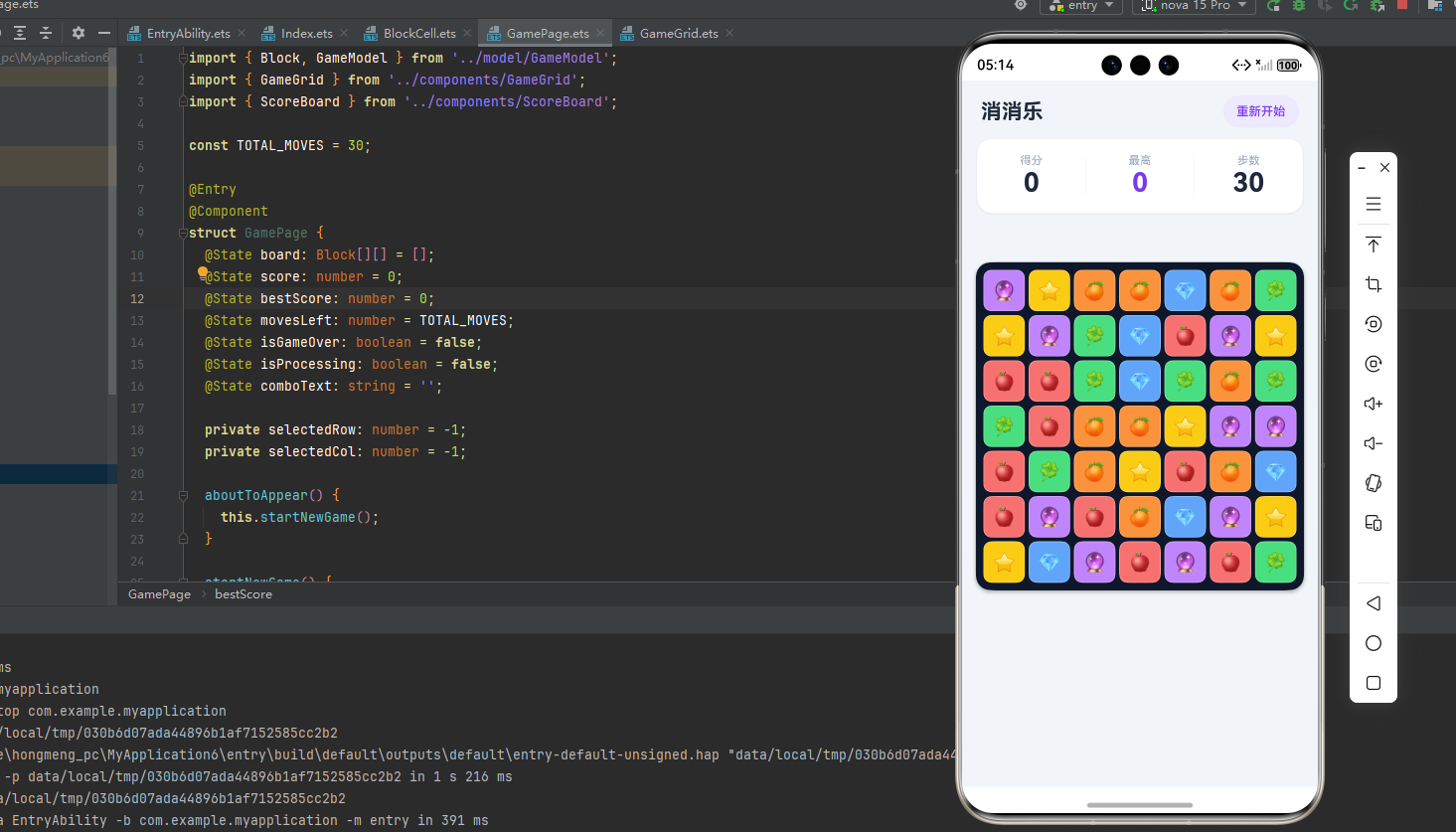
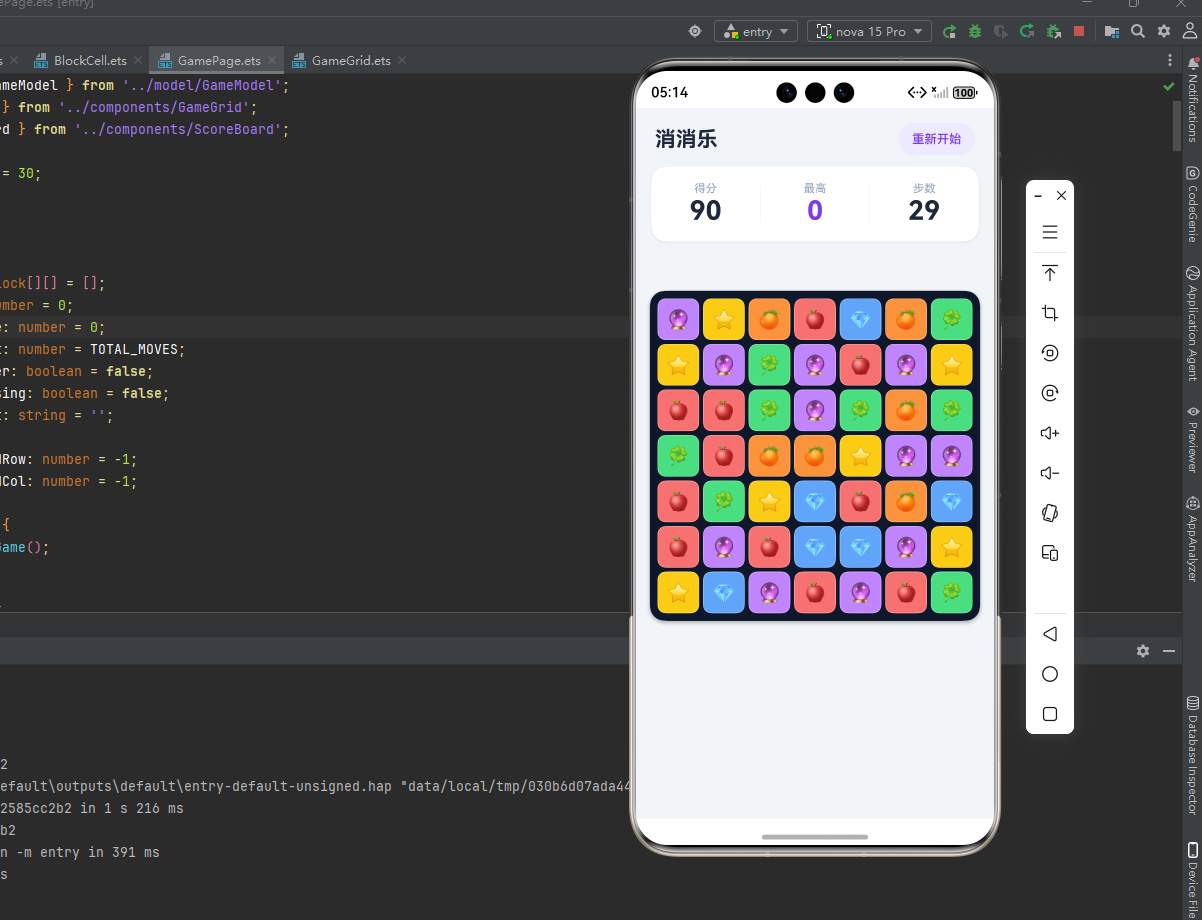
十一、总结
这个消消乐实现下来,用到的 HarmonyOS 6.0 ArkUI 技术点包括:
- ForEach 嵌套渲染二维网格,用字符串 key 保证组件复用
- @Prop + 数组重新赋值触发状态刷新
- @State scale + animation实现按压弹跳动画
- shadow / border / backgroundColor 随状态动态变化做视觉反馈
- async/await + setTimeout控制动画时序,实现交换→消除→下落的顺序动画
- isProcessing 标志位防止动画期间的重复操作
整个项目代码量不到 500 行,逻辑清晰,可以在这个基础上继续扩展:加音效、加道具方块、加关卡系统都不难。
如果跑起来碰到问题,欢迎评论区留言。

作为“人工智能6S店”的官方数字引擎,为AI开发者与企业提供一个覆盖软硬件全栈、一站式门户。
更多推荐
 0
0 0
0- 0


 已为社区贡献33条内容

所有评论(0)