
让笔记触手可及:为 Flutter + OpenHarmony 鸿蒙记事本添加实时搜索(二)
本文成功为鸿蒙记事本注入了 **实时搜索能力**,通过 **防抖优化、状态分离、UI 聚焦** 等手段,在保证性能的同时极大提升了海量笔记下的查找效率。所有改动均严格遵循 OpenHarmony 的简洁、高效设计原则。
个人主页:ujainu
欢迎加入开源鸿蒙跨平台社区:https://openharmonycrossplatform.csdn.net
文章目录
在上一篇《零依赖!用 Flutter + OpenHarmony 构建鸿蒙风格临时记事本(一):内存 CRUD》中,我们成功搭建了一个功能完整的 内存版记事本,实现了增、删、改、查四大基础操作。然而,当笔记数量逐渐增多——从几条到几十条甚至上百条时,用户将面临一个现实问题:如何快速找到某条特定笔记?
此时,全局搜索功能便成为提升用户体验的关键一环。本文将在此基础上,为记事本主界面集成 实时模糊搜索能力,支持对笔记的 标题与内容 进行关键词匹配,并通过 防抖(debounce)优化性能、动态隐藏 FAB 聚焦搜索体验,全面贴合 OpenHarmony 所倡导的“高效、自然”交互原则。
✅ 为什么搜索如此重要?
- 用户平均只记得笔记的“片段信息”(如“会议纪要”、“购物清单”)
- 线性滚动查找效率极低(O(n) 时间复杂度)
- 实时反馈能显著降低认知负荷,提升操作流畅度
一、鸿蒙设计语言下的搜索交互规范
OpenHarmony 的设计哲学强调 “以用户为中心”,其对搜索功能有明确指引:
- 入口显性但不突兀:搜索栏置于 AppBar 内,保持界面整洁
- 即时反馈:输入即搜,无需点击“搜索”按钮
- 聚焦优先级:搜索激活时,弱化其他操作(如隐藏 FAB)
- 结果清晰:高亮匹配项(本文暂不实现高亮,后续可扩展)
在 Flutter 中,我们有两种主流方案:
- Material 3 的
SearchBar/SearchAnchor(推荐,符合鸿蒙现代感) - 自定义
TextField+AppBar.actions
考虑到兼容性与控制力,本文采用 自定义 TextField 方案,既保留 Material 3 视觉风格,又便于实现防抖与状态管理。
二、核心架构调整:分离 allNotes 与 filteredNotes
为了支持搜索,我们必须将 原始数据源 与 展示数据 分离:
List<Note> _allNotes = [];        // 原始完整列表(来自内存 CRUD)
List<Note> _filteredNotes = [];   // 当前展示列表(根据关键词过滤)
String _searchQuery = '';         // 当前搜索关键词
🔍 关键逻辑:
_allNotes由 CRUD 操作维护(新增、编辑、删除)_filteredNotes仅用于 UI 展示,随_searchQuery动态变化- 初始状态下
_filteredNotes = _allNotes(无搜索)
三、搜索栏实现:AppBar 内嵌 TextField
我们将搜索框集成到 AppBar 的 title 区域,并支持 聚焦展开 与 失焦收起:
class _HomePageState extends State<HomePage> {
final List<Note> _allNotes = [];
List<Note> _filteredNotes = [];
String _searchQuery = '';
late FocusNode _searchFocusNode;
bool _isSearching = false;
void initState() {
super.initState();
_searchFocusNode = FocusNode();
_filteredNotes = _allNotes; // 初始显示全部
}
void dispose() {
_searchFocusNode.dispose();
super.dispose();
}
Widget build(BuildContext context) {
return Scaffold(
appBar: AppBar(
backgroundColor: Colors.white,
foregroundColor: Colors.black,
elevation: 0,
title: _buildSearchField(),
leading: _isSearching
? IconButton(
icon: const Icon(Icons.arrow_back),
onPressed: _exitSearch,
)
: null,
actions: !_isSearching
? [
IconButton(
icon: const Icon(Icons.search),
onPressed: _enterSearchMode,
),
]
: null,
),
body: _buildNoteList(),
floatingActionButton: !_isSearching
? FloatingActionButton(
onPressed: _onAddNote,
child: const Icon(Icons.add),
)
: null, // 搜索时隐藏 FAB
);
}
}
搜索模式切换逻辑
void _enterSearchMode() {
  setState(() {
    _isSearching = true;
    _searchQuery = ''; // 清空上次搜索
    _filteredNotes = _allNotes; // 先显示全部
  });
  _searchFocusNode.requestFocus(); // 自动聚焦
}

void _exitSearchMode() {
  setState(() {
    _isSearching = false;
    _searchQuery = '';
    _filteredNotes = _allNotes;
  });
  _searchFocusNode.unfocus();
}
✅ 优化点:
- 搜索激活时,左侧显示返回箭头(替代默认汉堡菜单)
- 右侧搜索图标仅在非搜索状态显示
- FAB 在搜索时自动隐藏,避免干扰
四、实时搜索与防抖(Debounce)优化
直接监听 TextField 的 onChanged 会导致 每次按键都触发过滤,在大量数据下可能造成卡顿。因此,我们引入 防抖机制:
import 'dart:async';
class _HomePageState extends State<HomePage> {
// ... 其他字段
Timer? _debounceTimer;
void _onSearchQueryChanged(String query) {
// 取消之前的定时器
_debounceTimer?.cancel();
// 设置新的延迟任务(300ms)
_debounceTimer = Timer(const Duration(milliseconds: 300), () {
_performSearch(query);
});
}
void _performSearch(String query) {
setState(() {
_searchQuery = query.trim();
if (query.isEmpty) {
_filteredNotes = _allNotes;
} else {
_filteredNotes = _allNotes.where((note) {
final titleMatch = note.title.toLowerCase().contains(query.toLowerCase());
final contentMatch = note.content.toLowerCase().contains(query.toLowerCase());
return titleMatch || contentMatch;
}).toList();
}
});
}
void dispose() {
_debounceTimer?.cancel();
_searchFocusNode.dispose();
super.dispose();
}
}
⚠️ 为什么需要防抖?
- 用户输入“Flutter”需按 7 次键,若每次都过滤,会执行 7 次 O(n) 操作
- 防抖后,仅在用户停顿 300ms 后执行一次,大幅降低 CPU 负载
- 300ms 是经验值,平衡响应速度与性能
五、搜索栏 UI 构建
使用 TextField 模拟 Material 3 搜索样式:
Widget _buildSearchField() {
  if (!_isSearching) {
    return const Text('我的笔记', style: TextStyle(fontWeight: FontWeight.w500));
  }

  return TextField(
    focusNode: _searchFocusNode,
    onChanged: _onSearchQueryChanged,
    decoration: InputDecoration(
      hintText: '搜索标题或内容...',
      hintStyle: const TextStyle(color: Colors.grey),
      border: InputBorder.none,
      focusedBorder: InputBorder.none,
      prefixIcon: const Icon(Icons.search, color: Colors.grey),
      suffixIcon: _searchQuery.isNotEmpty
          ? IconButton(
              icon: const Icon(Icons.clear, size: 18),
              onPressed: () {
                _onSearchQueryChanged('');
                // 清空输入框
                WidgetsBinding.instance.addPostFrameCallback((_) {
                  if (_searchFocusNode.hasFocus) {
                    _searchFocusNode.requestFocus();
                  }
                });
              },
            )
          : null,
    ),
    style: const TextStyle(fontSize: 16),
  );
}
✅ 细节打磨:
- 使用
prefixIcon显示搜索图标- 有输入时显示清除按钮(
suffixIcon)- 清除后自动重新聚焦,保持搜索状态
- 无边框设计,符合鸿蒙“去装饰化”理念
六、列表展示与空状态处理
搜索结果可能为空,需友好提示:
Widget _buildNoteList() {
  if (_filteredNotes.isEmpty) {
    if (_searchQuery.isNotEmpty) {
      return Center(
        child: Column(
          mainAxisAlignment: MainAxisAlignment.center,
          children: [
            const Icon(Icons.search_off, size: 64, color: Colors.grey),
            const SizedBox(height: 16),
            Text('未找到包含“$_searchQuery”的笔记', style: const TextStyle(color: Colors.grey)),
          ],
        ),
      );
    } else {
      return const Center(child: Text('暂无笔记', style: TextStyle(color: Colors.grey)));
    }
  }

  return ListView.builder(
    padding: const EdgeInsets.all(16),
    itemCount: _filteredNotes.length,
    itemBuilder: (context, index) {
      final note = _filteredNotes[index];
      return _buildNoteItem(note, index);
    },
  );
}
📌 用户体验增强:
- 区分“无笔记”与“无搜索结果”两种空状态
- 使用
Icons.search_off图标强化语义
七、完整可运行代码(Flutter + OpenHarmony)
以下代码整合了 内存 CRUD + 实时搜索,可直接复制到 main.dart 中运行:
// main.dart - 支持实时搜索的鸿蒙记事本
import 'package:flutter/material.dart';
import 'dart:async';
// ==================== 数据模型 ====================
class Note {
final String id;
String title;
String content;
final DateTime createdAt;
Note({required this.title, this.content = ''})
: id = DateTime.now().microsecondsSinceEpoch.toString(),
createdAt = DateTime.now();
Note.withId({
required this.id,
required this.title,
required this.content,
required this.createdAt,
});
}
// ==================== 编辑页面 ====================
class NoteEditorPage extends StatefulWidget {
final Note? existingNote;
const NoteEditorPage({this.existingNote, super.key});
State<NoteEditorPage> createState() => _NoteEditorPageState();
}
class _NoteEditorPageState extends State<NoteEditorPage> {
late final TextEditingController _titleController;
late final TextEditingController _contentController;
void initState() {
super.initState();
if (widget.existingNote != null) {
_titleController = TextEditingController(text: widget.existingNote!.title);
_contentController = TextEditingController(text: widget.existingNote!.content);
} else {
_titleController = TextEditingController();
_contentController = TextEditingController();
}
}
void dispose() {
_titleController.dispose();
_contentController.dispose();
super.dispose();
}
void _saveNote() {
final title = _titleController.text.trim();
if (title.isEmpty) return;
final note = widget.existingNote != null
? Note.withId(
id: widget.existingNote!.id,
title: title,
content: _contentController.text.trim(),
createdAt: widget.existingNote!.createdAt,
)
: Note(title: title, content: _contentController.text.trim());
Navigator.pop(context, note);
}
Widget build(BuildContext context) {
return Scaffold(
appBar: AppBar(
title: Text(widget.existingNote == null ? '新建笔记' : '编辑笔记'),
backgroundColor: Colors.white,
foregroundColor: Colors.black,
elevation: 0,
actions: [IconButton(icon: const Icon(Icons.save), onPressed: _saveNote)],
),
body: Padding(
padding: const EdgeInsets.all(16),
child: Column(
children: [
TextField(
controller: _titleController,
decoration: const InputDecoration(
hintText: '标题',
border: InputBorder.none,
focusedBorder: InputBorder.none,
),
style: const TextStyle(fontSize: 20, fontWeight: FontWeight.bold),
maxLines: 1,
),
const Divider(height: 24),
Expanded(
child: TextField(
controller: _contentController,
decoration: const InputDecoration(
hintText: '写下你的想法...',
border: InputBorder.none,
focusedBorder: InputBorder.none,
),
maxLines: null,
keyboardType: TextInputType.multiline,
),
),
],
),
),
);
}
}
// ==================== 主界面(含搜索)====================
class HomePage extends StatefulWidget {
const HomePage({super.key});
State<HomePage> createState() => _HomePageState();
}
class _HomePageState extends State<HomePage> {
final List<Note> _allNotes = [];
List<Note> _filteredNotes = [];
String _searchQuery = '';
late FocusNode _searchFocusNode;
bool _isSearching = false;
Timer? _debounceTimer;
void initState() {
super.initState();
_searchFocusNode = FocusNode();
_filteredNotes = _allNotes;
}
void dispose() {
_debounceTimer?.cancel();
_searchFocusNode.dispose();
super.dispose();
}
void _enterSearchMode() {
setState(() {
_isSearching = true;
_searchQuery = '';
_filteredNotes = _allNotes;
});
_searchFocusNode.requestFocus();
}
void _exitSearchMode() {
setState(() {
_isSearching = false;
_searchQuery = '';
_filteredNotes = _allNotes;
});
_searchFocusNode.unfocus();
}
void _onSearchQueryChanged(String query) {
_debounceTimer?.cancel();
_debounceTimer = Timer(const Duration(milliseconds: 300), () {
_performSearch(query);
});
}
void _performSearch(String query) {
setState(() {
_searchQuery = query.trim();
if (query.isEmpty) {
_filteredNotes = _allNotes;
} else {
final lowerQuery = query.toLowerCase();
_filteredNotes = _allNotes.where((note) {
return note.title.toLowerCase().contains(lowerQuery) ||
note.content.toLowerCase().contains(lowerQuery);
}).toList();
}
});
}
void _onAddNote() {
Navigator.push(context, MaterialPageRoute(builder: (_) => const NoteEditorPage()))
.then((result) {
if (result != null && result is Note) {
setState(() {
_allNotes.insert(0, result);
if (!_isSearching) _filteredNotes = _allNotes;
});
}
});
}
void _onEditNote(Note note) {
Navigator.push(
context,
MaterialPageRoute(builder: (_) => NoteEditorPage(existingNote: note)),
).then((result) {
if (result != null && result is Note) {
setState(() {
final index = _allNotes.indexWhere((n) => n.id == result.id);
if (index != -1) {
_allNotes[index] = result;
if (!_isSearching) {
_filteredNotes = _allNotes;
} else {
_performSearch(_searchQuery); // 重新搜索
}
}
});
}
});
}
String _formatTime(DateTime time) {
return '${time.year}-${time.month.toString().padLeft(2, '0')}-${time.day.toString().padLeft(2, '0')} '
'${time.hour.toString().padLeft(2, '0')}:${time.minute.toString().padLeft(2, '0')}';
}
Widget _buildNoteCard(Note note) {
return Card(
margin: const EdgeInsets.only(bottom: 12),
shape: RoundedRectangleBorder(borderRadius: BorderRadius.circular(12)),
child: Padding(
padding: const EdgeInsets.all(16),
child: Column(
crossAxisAlignment: CrossAxisAlignment.start,
children: [
Text(note.title, style: const TextStyle(fontSize: 18, fontWeight: FontWeight.bold, color: Colors.grey),
maxLines: 1, overflow: TextOverflow.ellipsis),
const SizedBox(height: 8),
if (note.content.isNotEmpty)
Text(note.content, maxLines: 2, overflow: TextOverflow.ellipsis, style: const TextStyle(color: Colors.grey)),
const SizedBox(height: 12),
Text(_formatTime(note.createdAt), style: const TextStyle(color: Colors.grey, fontSize: 12)),
],
),
),
);
}
Widget _buildNoteItem(Note note, int index) {
return Dismissible(
key: Key(note.id),
direction: DismissDirection.endToStart,
background: Container(
color: Colors.red,
alignment: Alignment.centerRight,
padding: const EdgeInsets.only(right: 20),
child: const Icon(Icons.delete, color: Colors.white),
),
onDismissed: (direction) {
setState(() {
_allNotes.removeWhere((n) => n.id == note.id);
if (!_isSearching) {
_filteredNotes = _allNotes;
} else {
_performSearch(_searchQuery);
}
});
ScaffoldMessenger.of(context).showSnackBar(SnackBar(content: Text('已删除 "${note.title}"')));
},
child: GestureDetector(
onTap: () => _onEditNote(note),
child: _buildNoteCard(note),
),
);
}
Widget _buildSearchField() {
if (!_isSearching) {
return const Text('我的笔记', style: TextStyle(fontWeight: FontWeight.w500));
}
return TextField(
focusNode: _searchFocusNode,
onChanged: _onSearchQueryChanged,
decoration: InputDecoration(
hintText: '搜索标题或内容...',
hintStyle: const TextStyle(color: Colors.grey),
border: InputBorder.none,
focusedBorder: InputBorder.none,
prefixIcon: const Icon(Icons.search, color: Colors.grey),
suffixIcon: _searchQuery.isNotEmpty
? IconButton(
icon: const Icon(Icons.clear, size: 18),
onPressed: () {
_onSearchQueryChanged('');
WidgetsBinding.instance.addPostFrameCallback((_) {
if (_searchFocusNode.hasFocus) {
_searchFocusNode.requestFocus();
}
});
},
)
: null,
),
style: const TextStyle(fontSize: 16),
);
}
Widget _buildNoteList() {
if (_filteredNotes.isEmpty) {
if (_searchQuery.isNotEmpty) {
return Center(
child: Column(
mainAxisAlignment: MainAxisAlignment.center,
children: [
const Icon(Icons.search_off, size: 64, color: Colors.grey),
const SizedBox(height: 16),
Text('未找到包含“$_searchQuery”的笔记', style: const TextStyle(color: Colors.grey)),
],
),
);
} else {
return const Center(child: Text('暂无笔记', style: TextStyle(color: Colors.grey)));
}
}
return ListView.builder(
padding: const EdgeInsets.all(16),
itemCount: _filteredNotes.length,
itemBuilder: (context, index) => _buildNoteItem(_filteredNotes[index], index),
);
}
Widget build(BuildContext context) {
return Scaffold(
appBar: AppBar(
backgroundColor: Colors.white,
foregroundColor: Colors.black,
elevation: 0,
title: _buildSearchField(),
leading: _isSearching
? IconButton(icon: const Icon(Icons.arrow_back), onPressed: _exitSearchMode)
: null,
actions: !_isSearching
? [IconButton(icon: const Icon(Icons.search), onPressed: _enterSearchMode)]
: null,
),
body: _buildNoteList(),
floatingActionButton: !_isSearching
? FloatingActionButton(onPressed: _onAddNote, child: const Icon(Icons.add))
: null,
);
}
}
// ==================== 主程序入口 ====================
void main() {
runApp(MaterialApp(
debugShowCheckedModeBanner: false,
theme: ThemeData(useMaterial3: true),
home: HomePage(),
));
}
运行界面
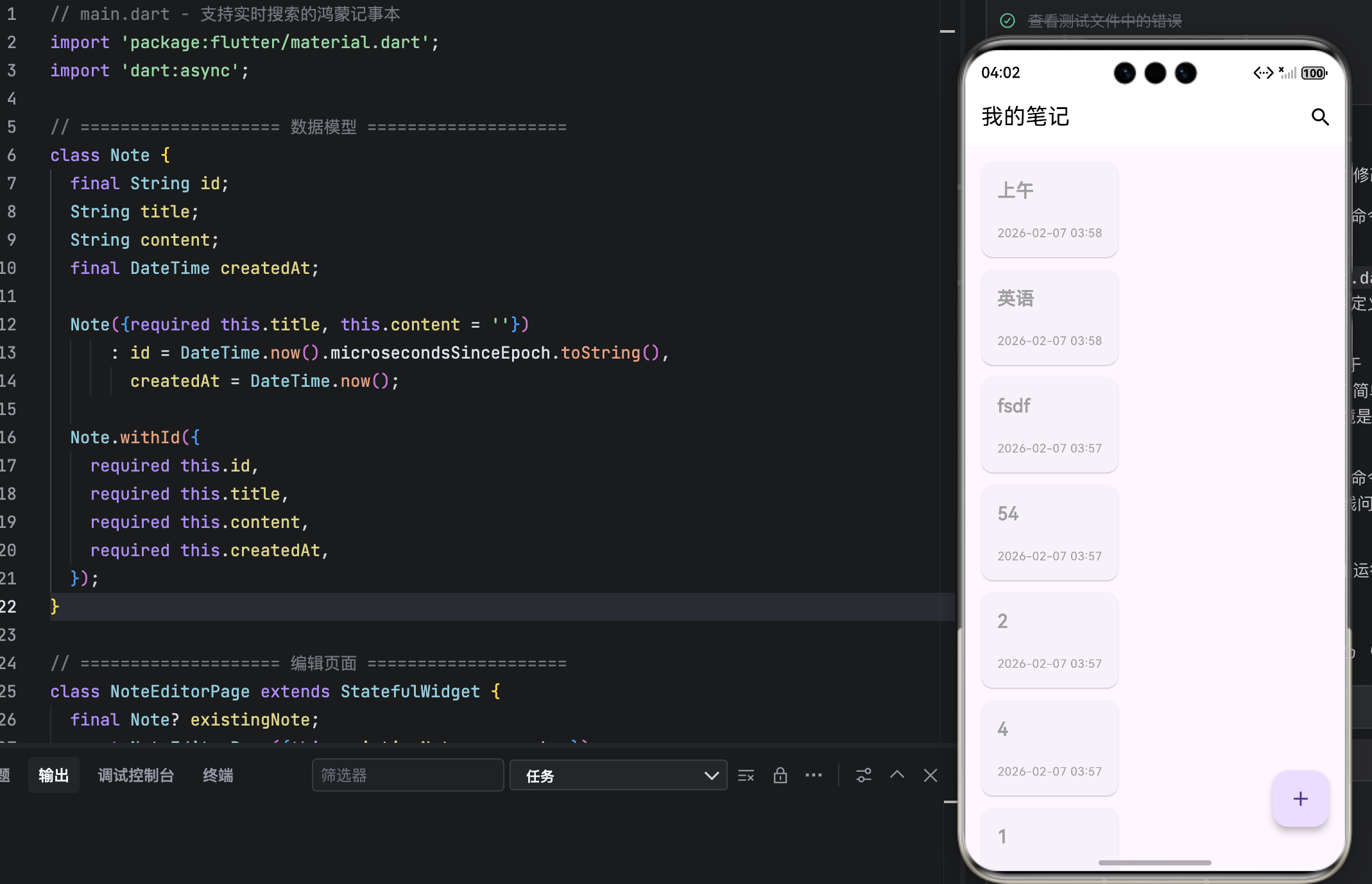
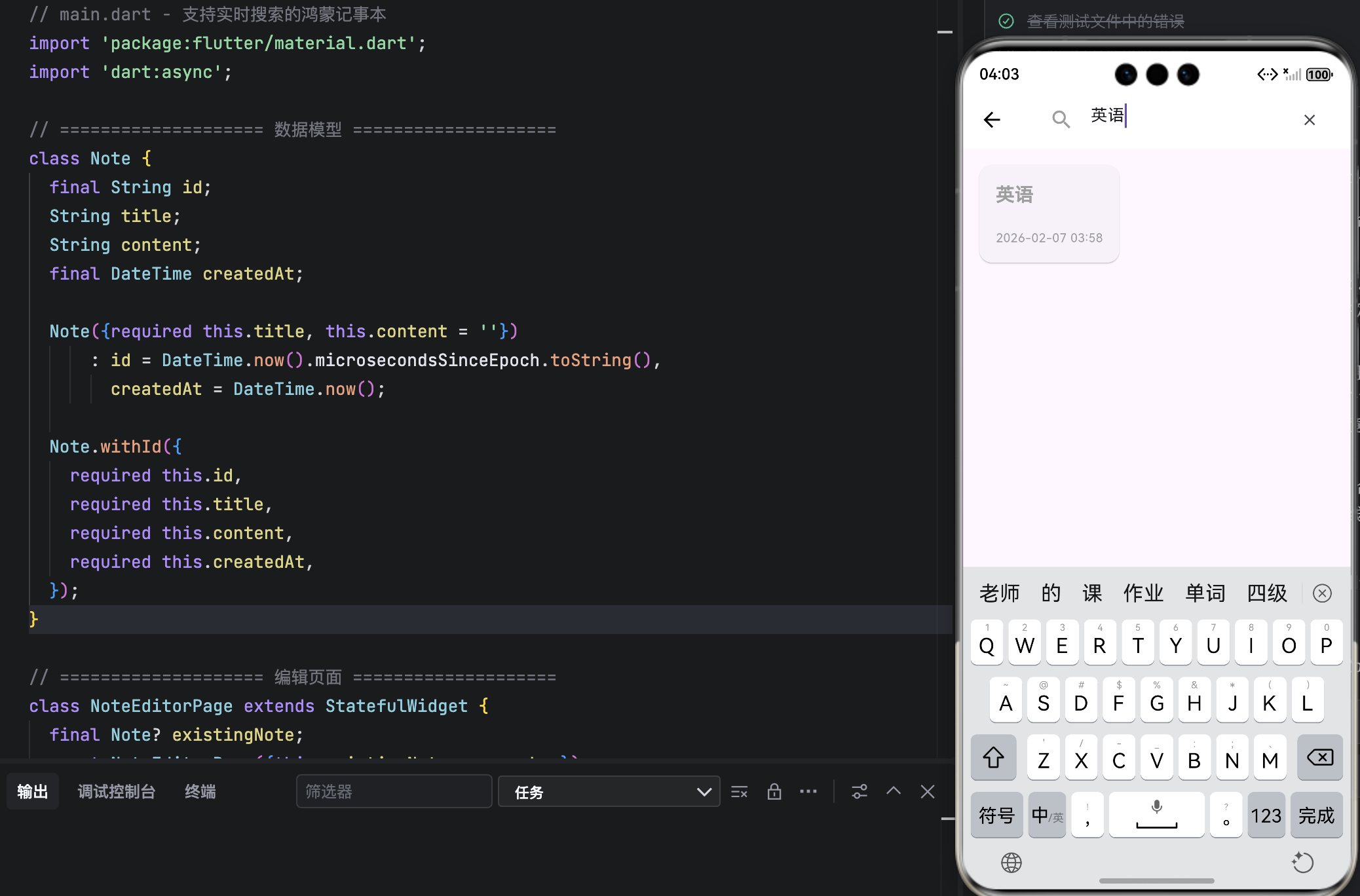
结语
本文成功为鸿蒙记事本注入了 实时搜索能力,通过 防抖优化、状态分离、UI 聚焦 等手段,在保证性能的同时极大提升了海量笔记下的查找效率。所有改动均严格遵循 OpenHarmony 的简洁、高效设计原则。
此功能虽小,却是专业应用的标配。下一步,我们将把内存数据迁移到 本地数据库(Drift),实现真正的持久化存储,让笔记“永不丢失”。

作为“人工智能6S店”的官方数字引擎,为AI开发者与企业提供一个覆盖软硬件全栈、一站式门户。
更多推荐

 6
6 0
0- 0


 已为社区贡献39条内容

所有评论(0)