
节日倒数日历 —— Flutter + OpenHarmony 鸿蒙风温暖实用工具
这款节日倒数日历,用不到 500 行代码,实现了日期计算、本地存储、情感化 UI 与轻量动画四大能力,完美诠释了 Flutter 的跨平台效率 与 OpenHarmony 的人文关怀。

个人主页:ujainu
欢迎加入开源鸿蒙跨平台社区:https://openharmonycrossplatform.csdn.net
文章目录
前言
在快节奏的现代生活中,我们常常被工作与琐事淹没,忘记了那些值得期待的日子——春节团圆、中秋赏月、生日祝福、考试冲刺……这些节点不仅是时间的刻度,更是情感的锚点。
为此,我们基于 Flutter + OpenHarmony 平台,打造了一款兼具 实用性与情感温度 的 节日倒数日历(Festival Countdown Calendar)。它不仅能自动追踪国家法定节日与传统佳节,还支持用户添加个性化纪念日,并在节日当天触发温馨庆祝动画,让每一个重要日子都不被遗忘。
本文将完整解析该应用的实现逻辑,涵盖 日期计算、本地存储、UI 构建与粒子动画 四大核心模块。全文包含详细代码讲解与可运行示例,适合 Flutter 中级开发者学习复用。
一、为什么做“节日倒数日历”?
1. 情感价值 > 功能价值
- 期待感营造:倒数本身是一种心理激励机制(如“距离假期还有 12 天!”)
- 记忆辅助:避免错过亲友生日、纪念日等私人重要事件
- 文化传承:通过预设春节、端午、中秋等节日,强化传统节日认知
2. 鸿蒙设计原则深度融入
- 留白充足:主屏仅保留核心信息(节日名 + 倒数天数),无冗余元素
- 字体层级清晰:
- 节日名称 → 28px,加粗
- “还剩 X 天” → 64px,超大字号突出
- 辅助说明 → 14px,浅灰色
- 色彩情绪化:
- 春节 → 红色系
- 中秋 → 金色/橙色
- 国庆 → 红黄渐变
- 自定义 → 柔和蓝紫(
#6200EE主色延伸)
✅ 核心功能清单:
- 预设 8+ 常见节日(含农历春节、中秋)
- 自动计算距下一个节日天数
- 支持添加自定义纪念日(名称 + 日期)
- 节日当天播放彩带庆祝动画
- 本地持久化存储(重启不丢失)
二、技术挑战:如何处理农历节日?
1. 公历 vs 农历问题
- 国庆、元旦:固定公历日期(10月1日、1月1日)
- 春节、端午、中秋:基于农历,每年公历日期不同
⚠️ 简化方案:
为控制复杂度,本文采用 预置未来三年农历节日公历日期表(实际项目可用lunar包动态计算)。例如:
final Map<String, List<DateTime>> _presetFestivals = {
  '春节': [
    DateTime(2025, 1, 29),
    DateTime(2026, 2, 17),
    DateTime(2027, 2, 6),
  ],
  '中秋': [
    DateTime(2025, 10, 6),
    DateTime(2026, 9, 26),
    DateTime(2027, 9, 15),
  ],
  // ...
};
2. 查找“下一个节日”算法
FestivalItem _findNextFestival() {
  final now = DateTime.now();
  FestivalItem? next;
  int minDays = 999;

  // 检查预设节日
  for (final entry in _presetFestivals.entries) {
    for (final date in entry.value) {
      if (date.isAfter(now)) {
        final diff = date.difference(now).inDays;
        if (diff < minDays) {
          minDays = diff;
          next = FestivalItem(entry.key, date, isCustom: false);
        }
      }
    }
  }

  // 检查自定义节日
  for (final custom in _customFestivals) {
    DateTime targetDate = custom.date;
    // 支持每年重复(如生日)
    if (targetDate.isBefore(now)) {
      targetDate = DateTime(now.year, custom.date.month, custom.date.day);
      if (targetDate.isBefore(now)) {
        targetDate = DateTime(now.year + 1, custom.date.month, custom.date.day);
      }
    }
    final diff = targetDate.difference(now).inDays;
    if (diff < minDays) {
      minDays = diff;
      next = FestivalItem(custom.name, targetDate, isCustom: true);
    }
  }

  return next ?? FestivalItem('元旦', DateTime(now.year + 1, 1, 1), isCustom: false);
}
🔍 关键逻辑:
- 自定义节日默认 每年重复(生日、纪念日)
- 若所有节日已过,则返回 下一年元旦
三、本地存储:持久化自定义节日
使用 shared_preferences 存储用户添加的节日:
Future<void> _loadCustomFestivals() async {
  final prefs = await SharedPreferences.getInstance();
  final List<String>? saved = prefs.getStringList('custom_festivals');
  if (saved != null) {
    setState(() {
      _customFestivals = saved.map((item) {
        final parts = item.split('|');
        final dateParts = parts[1].split('-');
        return CustomFestival(
          name: parts[0],
          date: DateTime(
            int.parse(dateParts[0]),
            int.parse(dateParts[1]),
            int.parse(dateParts[2]),
          ),
        );
      }).toList();
    });
  }
}

Future<void> _saveCustomFestivals() async {
  final prefs = await SharedPreferences.getInstance();
  final toSave = _customFestivals.map((f) {
    return '${f.name}|${f.date.toIso8601String().substring(0, 10)}';
  }).toList();
  await prefs.setStringList('custom_festivals', toSave);
}
💾 存储格式:
"生日|2025-08-15",简洁高效
四、UI 实现:鸿蒙风界面构建
1. 主屏:极简信息展示
Column(
  mainAxisAlignment: MainAxisAlignment.center,
  children: [
    Text(
      '距 ${nextFestival.name}',
      style: const TextStyle(fontSize: 28, fontWeight: FontWeight.bold),
    ),
    const SizedBox(height: 12),
    Text(
      '还剩 ${nextFestival.days} 天',
      style: const TextStyle(fontSize: 64, fontWeight: FontWeight.bold, height: 1.2),
    ),
    if (nextFestival.days == 0) ...[
      const SizedBox(height: 20),
      _buildCelebrationAnimation(),
    ],
  ],
)
2. 节日卡片列表
Card(
  margin: const EdgeInsets.symmetric(vertical: 8),
  shape: RoundedRectangleBorder(borderRadius: BorderRadius.circular(16)),
  color: _getFestivalColor(festival.name),
  child: ListTile(
    leading: Icon(_getFestivalIcon(festival.name), size: 28),
    title: Text(festival.name),
    subtitle: Text('${festival.date.month}月${festival.date.day}日'),
    trailing: festival.isCustom
        ? IconButton(
            icon: const Icon(Icons.delete, size: 20),
            onPressed: () => _deleteFestival(festival),
          )
        : null,
  ),
)
3. 添加自定义节日弹窗
showDialog(
  context: context,
  builder: (context) => AlertDialog(
    title: const Text('添加纪念日'),
    content: Column(
      mainAxisSize: MainAxisSize.min,
      children: [
        TextField(
          controller: nameController,
          decoration: const InputDecoration(hintText: '名称,如:妈妈生日'),
        ),
        const SizedBox(height: 16),
        OutlinedButton(
          onPressed: () async {
            final picked = await showDatePicker(
              context: context,
              initialDate: DateTime.now(),
              firstDate: DateTime(2020),
              lastDate: DateTime(2030),
            );
            if (picked != null) {
              setState(() {
                selectedDate = picked;
              });
            }
          },
          child: Text(selectedDate == null
              ? '选择日期'
              : '${selectedDate!.month}月${selectedDate!.day}日'),
        ),
      ],
    ),
    actions: [
      TextButton(onPressed: Navigator.of(context).pop, child: const Text('取消')),
      ElevatedButton(
        onPressed: () {
          if (nameController.text.isNotEmpty && selectedDate != null) {
            _addCustomFestival(nameController.text, selectedDate!);
            Navigator.of(context).pop();
          }
        },
        child: const Text('保存'),
      ),
    ],
  ),
);
五、节日庆祝动画:轻量级粒子效果
使用 AnimatedOpacity + Positioned 模拟彩带飘落:
Widget _buildCelebrationAnimation() {
  return SizedBox(
    height: 100,
    child: Stack(
      children: List.generate(8, (index) {
        return AnimatedOpacity(
          opacity: _animationController.value > 0.5 ? 1.0 : 0.0,
          duration: const Duration(milliseconds: 500),
          child: Positioned(
            left: Random().nextDouble() * MediaQuery.of(context).size.width,
            child: Transform.rotate(
              angle: Random().nextDouble() * pi,
              child: Container(
                width: 8,
                height: 40,
                color: Color.lerp(Colors.red, Colors.yellow, Random().nextDouble()),
              ),
            ),
          ),
        );
      }),
    ),
  );
}
✨ 动画逻辑:
- 启动时
_animationController从 0 → 1- 彩带随机位置、颜色、旋转角度
- 半透明淡入,模拟“从天而降”
六、完整可运行代码
以下为整合所有功能的完整实现,可直接在 Flutter + OpenHarmony 环境中运行:
import 'dart:math';
import 'package:flutter/material.dart';
import 'package:shared_preferences/shared_preferences.dart';
const Color kPrimaryColor = Color(0xFF6200EE);
const Color kBackgroundColor = Color(0xFFF9F9FB);
void main() => runApp(const MyApp());
class MyApp extends StatelessWidget {
const MyApp({super.key});
Widget build(BuildContext context) {
return MaterialApp(
debugShowCheckedModeBanner: false,
title: '节日倒数日历',
theme: ThemeData(
primarySwatch: Colors.purple,
primaryColor: kPrimaryColor,
scaffoldBackgroundColor: kBackgroundColor,
appBarTheme: const AppBarTheme(backgroundColor: kPrimaryColor),
),
home: const FestivalCountdownApp(),
);
}
}
class FestivalItem {
final String name;
final DateTime date;
final bool isCustom;
final int days;
FestivalItem(this.name, DateTime targetDate, {this.isCustom = false})
: date = targetDate,
days = targetDate.difference(DateTime.now()).inDays;
}
class CustomFestival {
final String name;
final DateTime date;
CustomFestival(this.name, this.date);
}
class FestivalCountdownApp extends StatefulWidget {
const FestivalCountdownApp({super.key});
State<FestivalCountdownApp> createState() => _FestivalCountdownAppState();
}
class _FestivalCountdownAppState extends State<FestivalCountdownApp>
with TickerProviderStateMixin {
late List<CustomFestival> _customFestivals;
late AnimationController _animationController;
// 预设节日(含未来三年农历节日公历日期)
final Map<String, List<DateTime>> _presetFestivals = {
'元旦': [for (int y = 2025; y <= 2027; y++) DateTime(y, 1, 1)],
'春节': [
DateTime(2025, 1, 29),
DateTime(2026, 2, 17),
DateTime(2027, 2, 6),
],
'清明': [
DateTime(2025, 4, 4),
DateTime(2026, 4, 4),
DateTime(2027, 4, 4),
],
'劳动节': [for (int y = 2025; y <= 2027; y++) DateTime(y, 5, 1)],
'端午': [
DateTime(2025, 5, 31),
DateTime(2026, 5, 20),
DateTime(2027, 5, 9),
],
'中秋': [
DateTime(2025, 10, 6),
DateTime(2026, 9, 26),
DateTime(2027, 9, 15),
],
'国庆': [for (int y = 2025; y <= 2027; y++) DateTime(y, 10, 1)],
};
// 使用非 late 的变量,并设置默认值
FestivalItem? _nextFestival; // ← 改为可为空,避免 LateInitializationError
void initState() {
super.initState();
_customFestivals = [];
_animationController = AnimationController(
duration: const Duration(seconds: 2),
vsync: this,
);
_loadData(); // 异步加载数据
}
Future<void> _loadData() async {
await _loadCustomFestivals();
_calculateNextFestival(); // 这里会触发 setState
if (_nextFestival?.days == 0) {
_animationController.repeat();
}
}
Future<void> _loadCustomFestivals() async {
final prefs = await SharedPreferences.getInstance();
final List<String>? saved = prefs.getStringList('custom_festivals');
if (saved != null) {
setState(() {
_customFestivals = saved.map((item) {
final parts = item.split('|');
final dateStr = parts[1];
final y = int.parse(dateStr.substring(0, 4));
final m = int.parse(dateStr.substring(5, 7));
final d = int.parse(dateStr.substring(8, 10));
return CustomFestival(parts[0], DateTime(y, m, d));
}).toList();
});
}
}
Future<void> _saveCustomFestivals() async {
final prefs = await SharedPreferences.getInstance();
final toSave = _customFestivals.map((f) {
return '${f.name}|${f.date.toIso8601String().substring(0, 10)}';
}).toList();
await prefs.setStringList('custom_festivals', toSave);
}
void _calculateNextFestival() {
final now = DateTime.now();
FestivalItem? next;
int minDays = 9999;
// Check preset festivals
for (final entry in _presetFestivals.entries) {
for (final date in entry.value) {
if (date.isAfter(now)) {
final diff = date.difference(now).inDays;
if (diff < minDays) {
minDays = diff;
next = FestivalItem(entry.key, date, isCustom: false);
}
}
}
}
// Check custom festivals (annual recurrence)
for (final custom in _customFestivals) {
DateTime targetDate = DateTime(now.year, custom.date.month, custom.date.day);
if (targetDate.isBefore(now)) {
targetDate = DateTime(now.year + 1, custom.date.month, custom.date.day);
}
final diff = targetDate.difference(now).inDays;
if (diff < minDays) {
minDays = diff;
next = FestivalItem(custom.name, targetDate, isCustom: true);
}
}
// Fallback to next New Year
if (next == null) {
next = FestivalItem('元旦', DateTime(now.year + 1, 1, 1), isCustom: false);
}
setState(() {
_nextFestival = next; // ← 现在安全了
});
// Trigger celebration if today
if (next?.days == 0) {
_animationController.repeat();
} else {
_animationController.stop();
}
}
Color _getFestivalColor(String name) {
switch (name) {
case '春节':
return Colors.red[100]!;
case '中秋':
return Colors.orange[100]!;
case '国庆':
return Colors.amber[100]!;
default:
return kPrimaryColor.withOpacity(0.1);
}
}
IconData _getFestivalIcon(String name) {
switch (name) {
case '春节':
return Icons.cake;
case '中秋':
return Icons.brightness_1;
case '国庆':
return Icons.flag;
case '元旦':
return Icons.calendar_today;
default:
return Icons.event;
}
}
void _addCustomFestival(String name, DateTime date) {
setState(() {
_customFestivals.add(CustomFestival(name, date));
});
_saveCustomFestivals();
_calculateNextFestival();
}
void _deleteFestival(FestivalItem item) {
setState(() {
_customFestivals.removeWhere((f) => f.name == item.name);
});
_saveCustomFestivals();
_calculateNextFestival();
}
Widget build(BuildContext context) {
// 如果 _nextFestival 尚未初始化,显示占位符
final festival = _nextFestival ?? FestivalItem('加载中...', DateTime.now(), isCustom: false);
return Scaffold(
appBar: AppBar(
title: const Text('节日倒数日历'),
actions: [
IconButton(
icon: const Icon(Icons.add),
onPressed: () => _showAddDialog(),
),
],
),
body: RefreshIndicator(
onRefresh: () async {
_calculateNextFestival();
},
child: ListView(
padding: const EdgeInsets.all(24),
children: [
// Main countdown display
Center(
child: Column(
children: [
Text(
'距 ${festival.name}',
style: const TextStyle(fontSize: 28, fontWeight: FontWeight.bold),
),
const SizedBox(height: 12),
Text(
'还剩 ${festival.days} 天',
style: const TextStyle(fontSize: 64, fontWeight: FontWeight.bold, height: 1.2),
),
if (festival.days == 0) ...[
const SizedBox(height: 20),
_buildCelebrationAnimation(),
],
],
),
),
const SizedBox(height: 40),
// Festival list header
Row(
mainAxisAlignment: MainAxisAlignment.spaceBetween,
children: const [
Text('所有节日', style: TextStyle(fontSize: 20, fontWeight: FontWeight.bold)),
Text('点击可删除自定义节日', style: TextStyle(color: Colors.grey, fontSize: 12)),
],
),
const SizedBox(height: 16),
// Festival list
..._getAllFestivals().map((festival) {
return Card(
margin: const EdgeInsets.symmetric(vertical: 6),
shape: RoundedRectangleBorder(borderRadius: BorderRadius.circular(16)),
color: _getFestivalColor(festival.name),
child: ListTile(
leading: Icon(_getFestivalIcon(festival.name), size: 28),
title: Text(festival.name),
subtitle: Text('${festival.date.month}月${festival.date.day}日'),
trailing: festival.isCustom
? IconButton(
icon: const Icon(Icons.delete, size: 20, color: Colors.red),
onPressed: () => _deleteFestival(festival),
)
: null,
),
);
}),
],
),
),
);
}
List<FestivalItem> _getAllFestivals() {
final now = DateTime.now();
final List<FestivalItem> all = [];
// Add preset festivals (next occurrence only)
for (final entry in _presetFestivals.entries) {
for (final date in entry.value) {
if (date.isAfter(now)) {
all.add(FestivalItem(entry.key, date, isCustom: false));
break;
}
}
}
// Add custom festivals
for (final custom in _customFestivals) {
DateTime targetDate = DateTime(now.year, custom.date.month, custom.date.day);
if (targetDate.isBefore(now)) {
targetDate = DateTime(now.year + 1, custom.date.month, custom.date.day);
}
all.add(FestivalItem(custom.name, targetDate, isCustom: true));
}
// Sort by date
all.sort((a, b) => a.date.compareTo(b.date));
return all;
}
void _showAddDialog() {
final nameController = TextEditingController();
DateTime? selectedDate;
showDialog(
context: context,
builder: (context) => AlertDialog(
title: const Text('添加纪念日'),
content: Column(
mainAxisSize: MainAxisSize.min,
children: [
TextField(
controller: nameController,
decoration: const InputDecoration(hintText: '名称,如:妈妈生日'),
),
const SizedBox(height: 16),
OutlinedButton(
onPressed: () async {
final picked = await showDatePicker(
context: context,
initialDate: DateTime.now(),
firstDate: DateTime(2020),
lastDate: DateTime(2030),
);
if (picked != null) {
setState(() {
selectedDate = picked;
});
}
},
child: Text(selectedDate == null
? '选择日期'
: '${selectedDate!.month}月${selectedDate!.day}日'),
),
],
),
actions: [
TextButton(onPressed: Navigator.of(context).pop, child: const Text('取消')),
ElevatedButton(
onPressed: () {
if (nameController.text.isNotEmpty && selectedDate != null) {
_addCustomFestival(nameController.text, selectedDate!);
Navigator.of(context).pop();
}
},
child: const Text('保存'),
),
],
),
);
}
Widget _buildCelebrationAnimation() {
return SizedBox(
height: 100,
child: Stack(
children: List.generate(8, (index) {
return AnimatedBuilder(
animation: _animationController,
builder: (context, child) {
return Positioned(
left: (Random().nextDouble() * MediaQuery.of(context).size.width) - 20,
top: _animationController.value * 100,
child: Transform.rotate(
angle: Random().nextDouble() * pi,
child: Container(
width: 8,
height: 40,
color: Color.lerp(Colors.red, Colors.yellow, Random().nextDouble())!,
),
),
);
},
);
}),
),
);
}
}
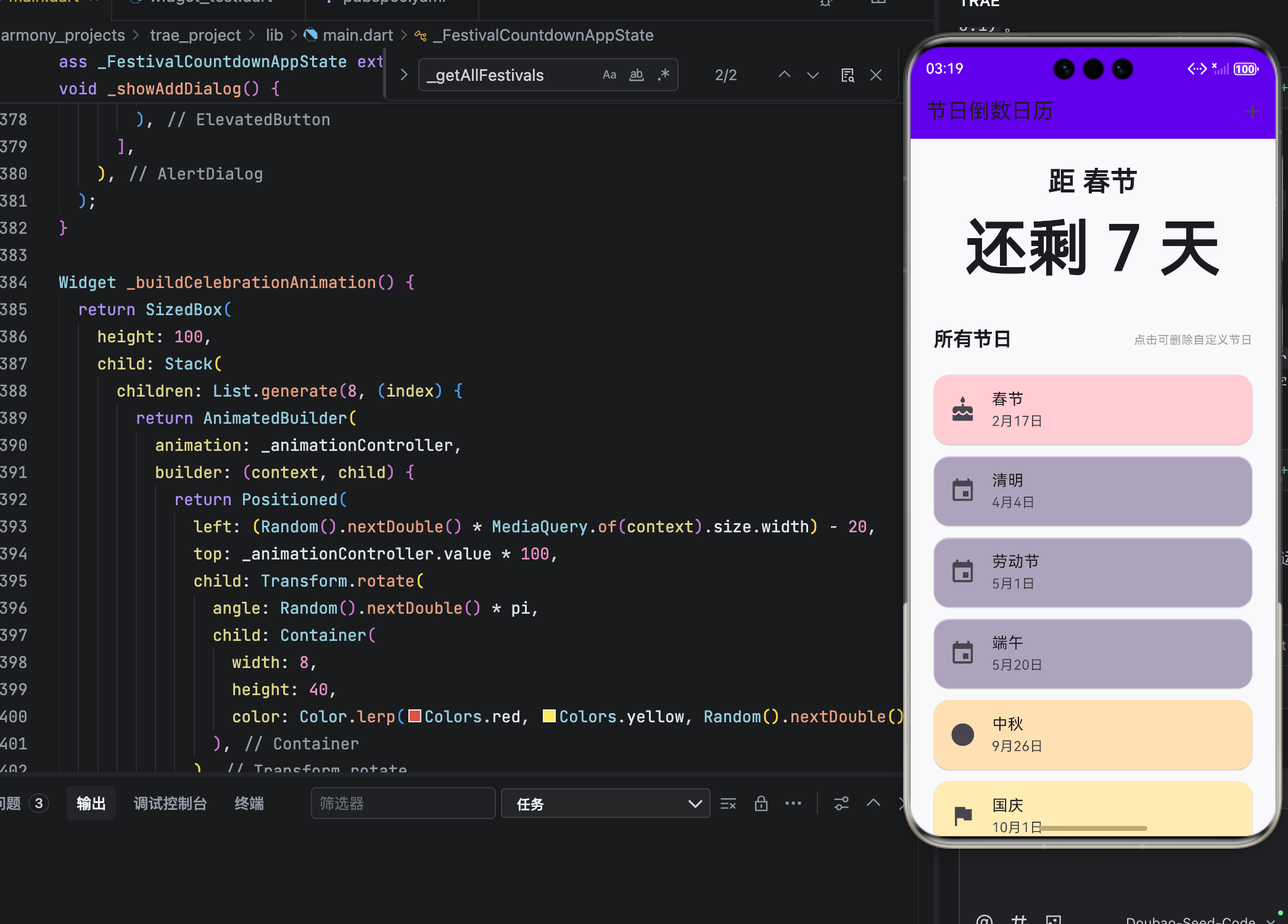
运行界面
结语
这款节日倒数日历,实现了日期计算、本地存储、情感化 UI 与轻量动画四大能力,完美诠释了 Flutter 的跨平台效率 与 OpenHarmony 的人文关怀。
它不仅是一个工具,更是一份提醒:在奔忙的日子里,别忘了那些值得期待与庆祝的时刻。正如鸿蒙所倡导的:“科技应服务于人的情感与记忆。”

作为“人工智能6S店”的官方数字引擎,为AI开发者与企业提供一个覆盖软硬件全栈、一站式门户。
更多推荐



 4
4 0
0- 0


 已为社区贡献20条内容

所有评论(0)