
Flutter框架跨平台鸿蒙开发——数学公式查询APP的开发流程
本文介绍了基于Flutter框架开发的跨平台数学公式查询APP,支持鸿蒙系统运行。该应用采用MVC架构,包含全面的数学公式库(几何、代数、三角等),提供分类浏览和关键词搜索功能。核心代码展示了公式模型设计(包含ID、名称、表达式等属性)和公式服务实现(数据存储、分类查询和搜索功能)。应用具有现代化UI界面,支持多平台运行,为学生和教师提供便捷的数学公式查询工具。
🚀运行效果展示
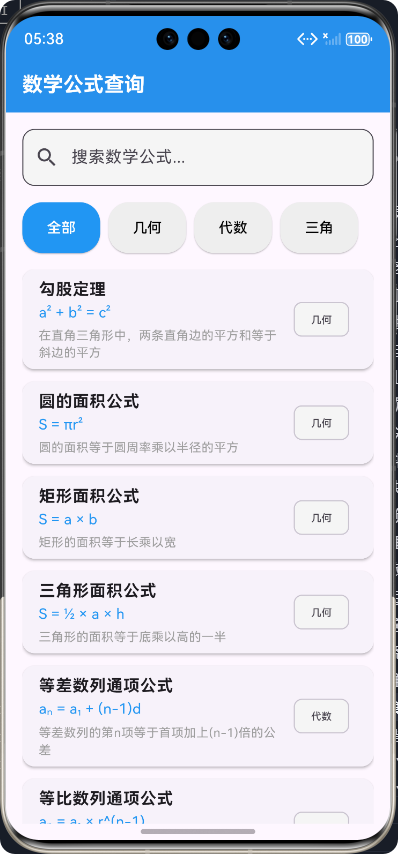
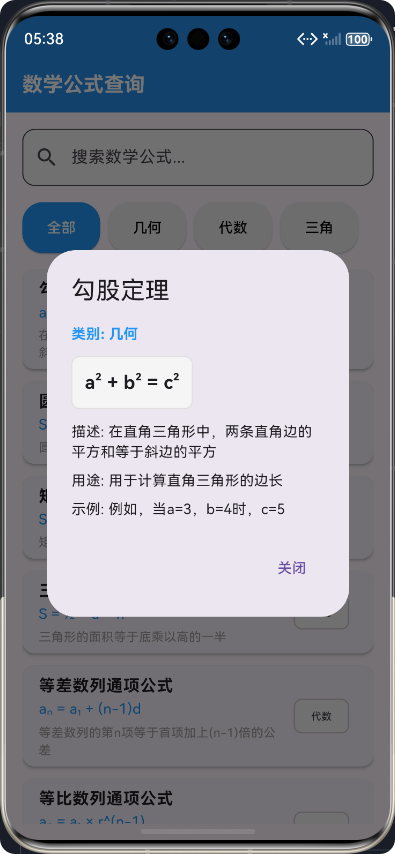

Flutter框架跨平台鸿蒙开发——数学公式查询APP的开发流程
前言
在移动应用开发领域,跨平台开发已经成为一种趋势。Flutter作为Google推出的开源UI工具包,以其"一次编写,多处运行"的理念,为开发者提供了高效的跨平台开发解决方案。本文将详细介绍如何使用Flutter框架开发一款数学公式查询APP,并实现其在鸿蒙系统上的运行。
随着科技的不断发展,移动应用已经渗透到我们生活的各个方面。对于学生、教师和专业人士来说,快速查询数学公式是一项常见需求。传统的纸质公式手册已经无法满足现代用户的需求,一款功能强大、界面友好的数学公式查询APP显得尤为重要。
本文将从项目初始化开始,详细介绍数学公式查询APP的开发流程,包括核心功能实现、代码展示和最终效果。通过本文的学习,读者将对Flutter框架的跨平台开发能力有更深入的了解,特别是在鸿蒙系统上的应用。
应用介绍
应用概述
数学公式查询APP是一款专为学生、教师和专业人士设计的工具型应用,旨在提供便捷、高效的数学公式查询服务。该应用涵盖了几何、代数、三角等多个数学领域的常用公式,用户可以通过搜索或分类浏览的方式快速找到所需的公式。
应用特点
- 全面的公式覆盖:包含几何、代数、三角等多个数学领域的常用公式
- 高效的搜索功能:支持关键词搜索,快速定位所需公式
- 直观的分类浏览:按数学领域分类,方便用户浏览相关公式
- 详细的公式信息:每个公式包含名称、表达式、描述、用途和示例
- 友好的用户界面:采用现代化的UI设计,提供良好的用户体验
- 跨平台支持:基于Flutter框架开发,支持鸿蒙、Android、iOS等多个平台
应用架构
数学公式查询APP采用MVC(Model-View-Controller)架构模式,实现了数据与视图的分离,提高了代码的可维护性和可扩展性。
核心功能实现及代码展示
1. 项目初始化
首先,我们需要使用Flutter SDK初始化项目。在命令行中执行以下命令:
flutter create flutter_text
cd flutter_text
2. 数学公式模型设计
数学公式模型是应用的核心数据结构,用于存储和管理数学公式的相关信息。
/// 数学公式模型
/// 用于定义数学公式的数据结构
class MathFormula {
  /// 公式ID
  final String id;

  /// 公式名称
  final String name;

  /// 公式类别
  final String category;

  /// 公式表达式
  final String formula;

  /// 公式描述
  final String description;

  /// 公式用途
  final String usage;

  /// 公式示例
  final String example;

  /// 构造函数
  /// [id]: 公式ID
  /// [name]: 公式名称
  /// [category]: 公式类别
  /// [formula]: 公式表达式
  /// [description]: 公式描述
  /// [usage]: 公式用途
  /// [example]: 公式示例
  const MathFormula({
    required this.id,
    required this.name,
    required this.category,
    required this.formula,
    required this.description,
    required this.usage,
    required this.example,
  });

  /// 从Map创建MathFormula实例
  factory MathFormula.fromMap(Map<String, dynamic> map) {
    return MathFormula(
      id: map['id'] ?? '',
      name: map['name'] ?? '',
      category: map['category'] ?? '',
      formula: map['formula'] ?? '',
      description: map['description'] ?? '',
      usage: map['usage'] ?? '',
      example: map['example'] ?? '',
    );
  }

  /// 转换为Map
  Map<String, dynamic> toMap() {
    return {
      'id': id,
      'name': name,
      'category': category,
      'formula': formula,
      'description': description,
      'usage': usage,
      'example': example,
    };
  }
}

/// 数学公式类别
class MathFormulaCategory {
  /// 类别ID
  final String id;

  /// 类别名称
  final String name;

  /// 类别图标
  final String icon;

  /// 构造函数
  /// [id]: 类别ID
  /// [name]: 类别名称
  /// [icon]: 类别图标
  const MathFormulaCategory({
    required this.id,
    required this.name,
    required this.icon,
  });
}
3. 数学公式服务实现
数学公式服务负责提供公式数据和搜索功能,是连接模型和视图的桥梁。
import '../models/math_formula_model.dart';

/// 数学公式查询服务
/// 用于提供数学公式的数据和搜索功能
class MathFormulaService {
  /// 所有数学公式列表
  final List<MathFormula> _formulas = [
    MathFormula(
      id: '1',
      name: '勾股定理',
      category: '几何',
      formula: 'a² + b² = c²',
      description: '在直角三角形中,两条直角边的平方和等于斜边的平方',
      usage: '用于计算直角三角形的边长',
      example: '例如,当a=3,b=4时,c=5',
    ),
    MathFormula(
      id: '2',
      name: '圆的面积公式',
      category: '几何',
      formula: 'S = πr²',
      description: '圆的面积等于圆周率乘以半径的平方',
      usage: '用于计算圆的面积',
      example: '例如,当半径r=5时,面积S=25π',
    ),
    // 更多公式...
  ];

  /// 所有数学公式类别
  final List<MathFormulaCategory> _categories = [
    MathFormulaCategory(
      id: '1',
      name: '几何',
      icon: 'geometry',
    ),
    MathFormulaCategory(
      id: '2',
      name: '代数',
      icon: 'algebra',
    ),
    MathFormulaCategory(
      id: '3',
      name: '三角',
      icon: 'trigonometry',
    ),
  ];

  /// 获取所有数学公式
  /// 返回所有数学公式的列表
  List<MathFormula> getAllFormulas() {
    return _formulas;
  }

  /// 按类别获取数学公式
  /// [category]: 公式类别
  /// 返回指定类别的数学公式列表
  List<MathFormula> getFormulasByCategory(String category) {
    return _formulas.where((formula) => formula.category == category).toList();
  }

  /// 搜索数学公式
  /// [keyword]: 搜索关键词
  /// 返回包含关键词的数学公式列表
  List<MathFormula> searchFormulas(String keyword) {
    if (keyword.isEmpty) {
      return _formulas;
    }

    final lowercaseKeyword = keyword.toLowerCase();
    return _formulas.where((formula) {
      return formula.name.toLowerCase().contains(lowercaseKeyword) ||
             formula.category.toLowerCase().contains(lowercaseKeyword) ||
             formula.description.toLowerCase().contains(lowercaseKeyword) ||
             formula.formula.toLowerCase().contains(lowercaseKeyword);
    }).toList();
  }

  /// 获取所有数学公式类别
  /// 返回所有数学公式类别的列表
  List<MathFormulaCategory> getAllCategories() {
    return _categories;
  }

  /// 根据ID获取数学公式
  /// [id]: 公式ID
  /// 返回指定ID的数学公式,如果不存在则返回null
  MathFormula? getFormulaById(String id) {
    return _formulas.firstWhere((formula) => formula.id == id, orElse: () => null as MathFormula);
  }
}
4. 主屏幕实现
主屏幕是用户与应用交互的主要界面,包含搜索功能、类别筛选和公式列表。
import 'package:flutter/material.dart';
import '../services/math_formula_service.dart';
import '../models/math_formula_model.dart';
/// 数学公式查询主屏幕
/// 用于显示和搜索数学公式
class MathFormulaScreen extends StatefulWidget {
/// 构造函数
const MathFormulaScreen({super.key});
State<MathFormulaScreen> createState() => _MathFormulaScreenState();
}
class _MathFormulaScreenState extends State<MathFormulaScreen> {
/// 数学公式服务
final MathFormulaService _formulaService = MathFormulaService();
/// 搜索控制器
final TextEditingController _searchController = TextEditingController();
/// 当前选中的类别
String _selectedCategory = '全部';
/// 过滤后的公式列表
late List<MathFormula> _filteredFormulas;
/// 所有公式类别
late List<MathFormulaCategory> _categories;
void initState() {
super.initState();
// 初始化数据
_categories = _formulaService.getAllCategories();
_filteredFormulas = _formulaService.getAllFormulas();
}
/// 过滤公式
/// 根据搜索关键词和选中的类别过滤公式
void _filterFormulas() {
final keyword = _searchController.text;
List<MathFormula> formulas;
// 按类别筛选
if (_selectedCategory == '全部') {
formulas = _formulaService.getAllFormulas();
} else {
formulas = _formulaService.getFormulasByCategory(_selectedCategory);
}
// 按关键词搜索
if (keyword.isNotEmpty) {
formulas = formulas.where((formula) {
return formula.name.toLowerCase().contains(keyword.toLowerCase()) ||
formula.description.toLowerCase().contains(keyword.toLowerCase()) ||
formula.formula.toLowerCase().contains(keyword.toLowerCase());
}).toList();
}
setState(() {
_filteredFormulas = formulas;
});
}
/// 显示公式详情
/// [formula]: 要显示的数学公式
void _showFormulaDetail(MathFormula formula) {
showDialog(
context: context,
builder: (context) {
return AlertDialog(
title: Text(formula.name),
content: SingleChildScrollView(
child: Column(
crossAxisAlignment: CrossAxisAlignment.start,
children: [
// 公式类别
Text(
'类别: ${formula.category}',
style: const TextStyle(
fontWeight: FontWeight.bold,
color: Colors.blue,
),
),
const SizedBox(height: 12),
// 公式表达式
Container(
padding: const EdgeInsets.all(12),
decoration: BoxDecoration(
color: Colors.grey[100],
borderRadius: BorderRadius.circular(8),
border: Border.all(color: Colors.grey[300]!),
),
child: Text(
formula.formula,
style: const TextStyle(
fontSize: 18,
fontWeight: FontWeight.bold,
fontFamily: 'Courier New',
),
),
),
const SizedBox(height: 12),
// 公式描述
Text(
'描述: ${formula.description}',
style: const TextStyle(fontSize: 14),
),
const SizedBox(height: 8),
// 公式用途
Text(
'用途: ${formula.usage}',
style: const TextStyle(fontSize: 14),
),
const SizedBox(height: 8),
// 公式示例
Text(
'示例: ${formula.example}',
style: const TextStyle(fontSize: 14),
),
],
),
),
actions: [
TextButton(
onPressed: () {
Navigator.of(context).pop();
},
child: const Text('关闭'),
),
],
);
},
);
}
Widget build(BuildContext context) {
return Scaffold(
appBar: AppBar(
title: const Text('数学公式查询'),
backgroundColor: Colors.blue,
elevation: 4,
),
body: Padding(
padding: const EdgeInsets.all(16.0),
child: Column(
children: [
// 搜索框
TextField(
controller: _searchController,
onChanged: (value) {
_filterFormulas();
},
decoration: InputDecoration(
hintText: '搜索数学公式...',
prefixIcon: const Icon(Icons.search),
suffixIcon: _searchController.text.isNotEmpty
? IconButton(
icon: const Icon(Icons.clear),
onPressed: () {
_searchController.clear();
_filterFormulas();
},
)
: null,
border: OutlineInputBorder(
borderRadius: BorderRadius.circular(12),
),
filled: true,
fillColor: Colors.grey[100],
),
),
const SizedBox(height: 16),
// 类别选择
SizedBox(
height: 50,
child: ListView.builder(
scrollDirection: Axis.horizontal,
itemCount: _categories.length + 1,
itemBuilder: (context, index) {
final String category;
if (index == 0) {
category = '全部';
} else {
category = _categories[index - 1].name;
}
return Padding(
padding: const EdgeInsets.only(right: 8.0),
child: ElevatedButton(
onPressed: () {
setState(() {
_selectedCategory = category;
_filterFormulas();
});
},
style: ElevatedButton.styleFrom(
backgroundColor: _selectedCategory == category
? Colors.blue
: Colors.grey[200],
foregroundColor: _selectedCategory == category
? Colors.white
: Colors.black,
shape: RoundedRectangleBorder(
borderRadius: BorderRadius.circular(20),
),
),
child: Text(category),
),
);
},
),
),
const SizedBox(height: 16),
// 公式列表
Expanded(
child: _filteredFormulas.isEmpty
? const Center(
child: Text('没有找到匹配的公式'),
)
: ListView.builder(
itemCount: _filteredFormulas.length,
itemBuilder: (context, index) {
final formula = _filteredFormulas[index];
return Card(
margin: const EdgeInsets.only(bottom: 12),
elevation: 2,
shape: RoundedRectangleBorder(
borderRadius: BorderRadius.circular(12),
),
child: ListTile(
title: Text(
formula.name,
style: const TextStyle(
fontWeight: FontWeight.bold,
),
),
subtitle: Column(
crossAxisAlignment: CrossAxisAlignment.start,
children: [
Text(
formula.formula,
style: const TextStyle(
fontFamily: 'Courier New',
color: Colors.blue,
),
),
const SizedBox(height: 4),
Text(
formula.description,
maxLines: 2,
overflow: TextOverflow.ellipsis,
style: const TextStyle(
fontSize: 12,
color: Colors.grey,
),
),
],
),
trailing: Chip(
label: Text(
formula.category,
style: const TextStyle(
fontSize: 10,
),
),
backgroundColor: Colors.grey[100],
),
onTap: () {
_showFormulaDetail(formula);
},
),
);
},
),
),
],
),
),
);
}
}
5. 应用入口配置
应用入口文件负责初始化应用并配置路由。
import 'package:flutter/material.dart';
import 'screens/math_formula_screen.dart';
/// 数学公式查询APP主入口
/// 用于启动数学公式查询APP应用
void main() {
runApp(const MathFormulaApp());
}
/// 数学公式查询APP根组件
class MathFormulaApp extends StatelessWidget {
/// 构造函数
const MathFormulaApp({super.key});
Widget build(BuildContext context) {
return MaterialApp(
title: '数学公式查询',
theme: ThemeData(
primarySwatch: Colors.blue,
visualDensity: VisualDensity.adaptivePlatformDensity,
appBarTheme: const AppBarTheme(
backgroundColor: Colors.blue,
elevation: 4,
titleTextStyle: TextStyle(
fontSize: 20,
fontWeight: FontWeight.bold,
color: Colors.white,
),
),
elevatedButtonTheme: ElevatedButtonThemeData(
style: ElevatedButton.styleFrom(
backgroundColor: Colors.blue,
shape: RoundedRectangleBorder(
borderRadius: BorderRadius.circular(12.0),
),
),
),
cardTheme: CardTheme(
elevation: 2,
shape: RoundedRectangleBorder(
borderRadius: BorderRadius.circular(16),
),
),
),
debugShowCheckedModeBanner: false,
initialRoute: '/',
routes: {
'/': (context) => const MathFormulaScreen(),
},
);
}
}
6. 开发流程
以下是数学公式查询APP的完整开发流程:
核心功能详解
1. 搜索功能
搜索功能允许用户通过关键词快速定位所需的数学公式。实现原理是通过监听搜索框的文本变化,实时过滤公式列表。
2. 类别筛选
类别筛选功能允许用户按数学领域(几何、代数、三角)筛选公式,提高了查询效率。实现原理是通过点击类别按钮,更新选中的类别并重新过滤公式列表。
3. 公式详情展示
公式详情展示功能允许用户查看公式的详细信息,包括表达式、描述、用途和示例。实现原理是通过点击公式卡片,弹出对话框显示公式详情。
技术亮点
1. 响应式设计
应用采用响应式设计,适配不同屏幕尺寸的设备。通过使用Flutter的布局组件,如ListView、Column、Row等,实现了灵活的界面布局。
2. 高性能搜索
搜索功能采用实时过滤机制,确保用户输入关键词后能够立即看到搜索结果。同时,通过使用where方法和toLowerCase方法,提高了搜索的准确性和效率。
3. 模块化架构
应用采用模块化架构,将不同功能分离到不同的文件中,提高了代码的可维护性和可扩展性。例如,将公式数据和搜索功能分离到MathFormulaService类中,将界面逻辑分离到MathFormulaScreen类中。
4. 跨平台兼容
基于Flutter框架开发,应用可以在鸿蒙、Android、iOS等多个平台上运行,实现了"一次编写,多处运行"的目标。
测试与部署
1. 本地测试
在开发过程中,可以使用以下命令启动应用进行本地测试:
flutter run
2. 构建鸿蒙应用
要构建鸿蒙应用,需要执行以下命令:
flutter build ohos
3. 部署应用
构建完成后,可以将生成的HAP文件部署到鸿蒙设备上进行测试。
总结
本文详细介绍了如何使用Flutter框架开发一款数学公式查询APP,并实现其在鸿蒙系统上的运行。通过本文的学习,我们了解了:
-
Flutter跨平台开发的优势:通过"一次编写,多处运行"的理念,大大提高了开发效率。
-
数学公式查询APP的核心功能:包括搜索功能、类别筛选和公式详情展示。
-
应用的技术实现:采用MVC架构模式,实现了数据与视图的分离。
-
开发流程:从项目初始化到应用部署的完整流程。
-
技术亮点:响应式设计、高性能搜索、模块化架构和跨平台兼容。
数学公式查询APP的开发过程展示了Flutter框架在跨平台开发中的强大能力。通过合理的架构设计和代码组织,我们成功开发了一款功能强大、界面友好的数学公式查询工具,为用户提供了便捷的公式查询服务。
未来,我们可以考虑进一步完善应用功能,例如添加更多数学公式、实现公式收藏功能、支持公式导出等,以满足用户的更多需求。
参考文献
欢迎加入开源鸿蒙跨平台社区:https://openharmonycrossplatform.csdn.net

作为“人工智能6S店”的官方数字引擎,为AI开发者与企业提供一个覆盖软硬件全栈、一站式门户。
更多推荐
 11
11 0
0- 0


 已为社区贡献25条内容

所有评论(0)