
React Native鸿蒙跨平台如何实现“场合-服装”的双向关联查询——既支持通过clothingIds精准匹配,也支持通过occasion字段模糊匹配
本文深入分析了衣橱场合管理应用的核心架构与跨端开发策略。该应用采用分层数据模型设计,通过TypeScript定义强类型数据结构(ClothingItem和Occasion),确保跨平台数据一致性。UI层采用React Native组件库构建,包括FlatList高效渲染、TouchableOpacity交互反馈等核心功能模块,这些组件可无缝映射到HarmonyOS的ArkUI体系。应用实现了&qu
该衣橱场合管理应用采用了清晰的分层架构,通过 TypeScript 定义了完整的数据模型体系。核心数据类型包括 ClothingItem(服装项)和 Occasion(场合),这种强类型设计为跨端开发提供了坚实的基础。在 React Native 与 HarmonyOS 跨端场景中,TypeScript 类型系统能够确保数据结构在不同平台上的一致性,减少因类型不匹配导致的运行时错误。
ClothingItem 类型包含了服装的详细属性,如名称、分类、颜色、尺寸、适用场合、季节、品牌、价格等,这种精细化的数据模型便于后续功能扩展,如根据季节筛选、价格排序等。Occasion 类型则建立了场合与服装的关联关系,通过 clothingIds 数组实现了一对多的数据映射,这种设计在跨端数据库设计中是常见的最佳实践。
状态管理
应用使用 React Hooks 中的 useState 管理核心数据:clothingItems 和 occasions。在 React Native 跨端到 HarmonyOS 的过程中,useState Hook 可以直接映射到 ArkUI 的 @State 装饰器,实现状态的响应式更新。这种函数式状态管理方式在两个平台上都得到了很好的支持,是跨端开发的推荐方案。
值得注意的是,应用中的 getClothingForOccasion 函数通过复杂的过滤逻辑实现了服装与场合的关联查询:首先查找特定场合,然后筛选出与该场合关联的服装项,或直接匹配服装的 occasion 属性。这种计算逻辑在跨端开发中应考虑性能优化,建议使用 useMemo 进行缓存,避免不必要的重复计算,特别是在服装数量较多时。
UI 组件
应用采用了 React Native 核心组件库构建用户界面,主要包括:
SafeAreaView确保内容在安全区域内显示,适配不同设备的刘海屏和底部手势区域FlatList(虽未完全展示,但从renderClothingItem和renderOccasionItem函数可推断)用于高效渲染长列表TouchableOpacity实现可点击的服装卡片和场合项,提供视觉反馈StyleSheet实现样式与逻辑分离,便于维护和主题切换
在 HarmonyOS 跨端开发中,这些组件可以映射到 ArkUI 对应的组件:
FlatList对应 ArkUI 的List组件,同样支持虚拟列表优化,能够高效处理大量数据TouchableOpacity对应 ArkUI 的Button组件或Gesture手势组件,通过onClick事件实现交互SafeAreaView对应 ArkUI 的SafeArea组件,确保内容在安全区域内显示StyleSheet的样式定义可以通过工具转换为 ArkUI 的样式系统,两者都基于 Flexbox 布局,具有良好的兼容性
样式
应用使用 StyleSheet 定义组件样式,采用了模块化的样式设计。React Native 的样式系统与 CSS 类似,但在属性名称和值上存在差异(如 backgroundColor 而非 background-color,使用对象而非字符串)。在 HarmonyOS 跨端开发中,ArkUI 的样式系统与 React Native 有较高的兼容性,特别是 Flexbox 布局模型,这使得样式转换相对容易。
需要注意的是,部分样式属性在不同平台上的表现可能存在差异,例如阴影效果、圆角处理等。建议在跨端项目中使用相对单位(如百分比、flex)而非固定像素值,以适应不同设备的屏幕尺寸。此外,将颜色、字体大小等样式变量提取为主题常量,便于统一管理和主题切换,也是跨端开发的最佳实践。
交互
应用实现了丰富的交互功能:
- 点击服装卡片查看详情(通过
Alert.alert实现) - 点击收藏按钮切换收藏状态
- 场合与服装的关联展示
在跨端开发中,用户体验的一致性是关键。Alert.alert 在 HarmonyOS 中对应 dialog.showAlertDialog API,需要进行适配封装。触摸反馈效果在不同平台上的表现也存在差异,建议使用统一的视觉反馈设计(如颜色变化、缩放效果)来确保用户体验的一致性。
高效的列表渲染
应用在性能优化方面采用了以下策略:
- 使用
FlatList实现高效的列表渲染,支持长列表的性能优化 - 组件化设计,将服装项和场合项拆分为独立的渲染函数,便于复用和优化
- 合理的数据结构设计,便于高效查询和过滤
在 HarmonyOS 跨端开发中,还需要注意:
- 内存管理:HarmonyOS 对内存管理有严格要求,建议避免创建过多的临时对象,及时清理不再使用的资源。
- 图片资源:应用中当前使用的是占位符(空字符串和 emoji),在实际开发中应使用合适的图片资源,并针对不同平台进行优化(如使用 WebP 格式、适配不同分辨率)。
- 异步操作:React Native 的异步操作(如
setTimeout、网络请求)在 HarmonyOS 中需要使用对应的 API,建议封装统一的异步工具函数。
该衣橱场合管理应用展示了 React Native 跨端开发的核心技术要点,包括数据建模、状态管理、UI 组件、样式系统和交互设计等。通过合理的架构设计和代码优化,可以实现 React Native 应用在 HarmonyOS 上的高效运行。
在生活服务类移动应用的开发中,“场景化分类+数据可视化+交互轻量化”成为提升用户体验的核心方向——衣橱场合分类应用正是典型代表,其将服装数据按“场合/品类/季节”多维度拆解,通过可视化卡片、列表渲染、动态交互构建完整的衣橱管理体验。本文以 React Native 开发的衣橱场合分类应用为例,深度拆解其“多维度数据模型设计、场景化列表渲染、交互逻辑封装”的核心架构,并系统阐述向鸿蒙(HarmonyOS)ArkTS 跨端迁移的技术路径,聚焦“数据模型复用、列表渲染等价转换、交互逻辑跨端适配”三大核心维度,为生活服务类应用的跨端迭代提供可落地的技术参考。
衣橱场景
该应用基于衣橱管理的业务特性构建了分层的强类型数据体系,是跨端开发中“数据层复用”的核心基础,完全贴合服装分类管理的实际场景:
- 核心业务类型定义:
ClothingItem类型覆盖服装全维度属性,包含基础信息(名称/品类/颜色/尺码)、场景属性(场合/季节)、商业属性(品牌/价格/购买日期)、交互属性(收藏状态),14 个字段完整支撑衣橱管理的核心场景;Occasion类型定义场合分类模型,关联场合名称、图标、描述、适配服装 ID 列表,实现“场合-服装”的双向关联;所有类型均采用 TypeScript 联合类型(如category/occasion/season)限定取值范围,避免非法数据录入,为跨端数据一致性提供底层保障。 - 状态管理设计:采用
useState管理核心数据集合,clothingItems作为可变状态(支持后续增删改查),occasions作为只读状态(固定场合分类),这种状态分层设计既满足“服装数据可编辑”的业务需求,又保证“场合分类稳定性”,符合衣橱管理的实际使用场景。 - 数据关联逻辑:
getClothingForOccasion函数实现“场合-服装”的双向关联查询——既支持通过clothingIds精准匹配,也支持通过occasion字段模糊匹配,解决了“同一场合多维度关联服装”的业务痛点,该函数纯逻辑无 UI 耦合,是跨端复用的核心资产。
组件封装
应用的 UI 层采用“场景化组件封装+列表复用渲染”的设计模式,将核心交互单元封装为独立组件,大幅提升代码复用性和跨端迁移效率:
- 服装项渲染组件(
renderClothingItem):封装服装展示的完整 UI 结构,包含占位图、基础信息、收藏按钮三大模块,通过TouchableOpacity实现“详情查看”和“收藏切换”双交互入口,收藏状态通过 emoji 图标(❤️/🤍)可视化展示,符合移动端轻量化交互的设计原则;组件内采用flexDirection: row实现横向布局,clothingMeta子模块通过横向布局展示价格和季节信息,保证信息密度与可读性的平衡。 - 场合项渲染组件(
renderOccasionItem):封装场合分类的展示逻辑,整合场合图标、描述、服装数量统计,通过getClothingForOccasion实时计算该场合下的服装数量,右侧箭头图标引导“查看搭配”交互,组件底部的分割线通过borderBottomWidth实现,保证列表视觉层级清晰;该组件既展示场合基础信息,又关联核心数据统计,实现“展示-交互-数据”的一体化封装。 - 列表复用策略:核心列表均采用
FlatList实现,通过keyExtractor保证列表项唯一性,showsVerticalScrollIndicator={false}隐藏滚动条提升视觉体验;针对“各场合服装明细”场景,通过occasions.map遍历场合,动态渲染对应服装列表,空数据场合自动过滤(if (occasionClothing.length === 0) return null),避免无效 UI 渲染,提升性能。
数据可视化
衣橱管理应用的核心价值在于“数据可视化+轻量化交互”,应用通过多维度卡片设计实现服装数据的可视化呈现,交互逻辑则完全贴合用户的衣橱管理习惯:
- 核心统计卡片(
statsCard):采用横向三等分布局,展示服装总数、场合数、收藏数三大核心指标,数字采用蓝色高亮(#3b82f6),标签采用浅灰色,符合数据可视化的视觉层级原则;卡片通过elevation和shadow属性添加轻微阴影,提升视觉层次感,是移动端数据展示的经典范式。 - 品类统计卡片(
categoryStatsCard):整合图标、品类名称、数量三大元素,通过flexDirection: row实现三等分布局,每个品类项采用居中布局,emoji 图标(👕/👖/👗)增强视觉识别性,数量数字高亮展示,直观呈现衣橱品类分布。 - 搭配建议卡片(
suggestionCard):采用横向布局展示核心场合搭配建议,每个建议项包含图标和文字,通过TouchableOpacity触发搭配详情提示,符合“轻量化提示+深度信息按需展示”的交互逻辑;卡片内边距和间距的精细化控制,保证多场合建议的视觉平衡。 - 交互轻量化设计:所有核心交互均通过
Alert.alert实现基础反馈,避免复杂弹窗打断用户操作流程;添加服装按钮采用圆形悬浮样式(borderRadius: 18),视觉突出且操作便捷;底部导航栏通过borderTopWidth实现选中态标识,符合移动端导航的交互习惯。
模块化
应用采用“头部-内容区-底部导航”的三段式架构,内容区进一步拆分为多个功能模块,每个模块聚焦单一业务场景,符合“单一职责原则”,为跨端迁移提供清晰的模块划分:
- 头部模块:包含应用标题和添加按钮,横向布局实现左右分布,添加按钮采用蓝色圆形设计,视觉突出且操作便捷,是“新增服装”的核心入口。
- 内容区核心模块:
- 统计模块:展示核心数据指标,是用户快速了解衣橱概况的入口;
- 场合分类模块:展示所有场合分类,是“场景化管理”的核心入口;
- 场合服装明细模块:按场合展示对应服装,实现“场合-服装”的关联展示;
- 品类统计模块:按品类展示服装数量,实现“品类维度”的数据分析;
- 搭配建议模块:提供场景化搭配指导,提升应用的实用价值;
- 管理技巧模块:提供衣橱管理知识,丰富应用的内容维度。
- 底部导航模块:包含首页、衣橱、场合、我的四大核心入口,选中项通过顶部蓝色边框标识,图标采用 emoji 符号(🏠/👕/👔/👤),直观且符合移动端导航设计规范。
这种模块化设计使得每个功能模块均可独立迁移至鸿蒙端,大幅降低跨端开发的复杂度。
跨端适配的核心是“数据模型 100% 复用、业务逻辑 100% 复用、UI 组件语义等价重构、交互逻辑体验一致”,React Native 与鸿蒙 ArkTS 的核心能力可实现精准映射,以下是衣橱场合分类场景关键技术点的等价转换:
| React Native 核心能力 | 鸿蒙 ArkTS 等价实现 | 衣橱场景适配要点 |
|---|---|---|
| TypeScript 类型定义(ClothingItem/Occasion 等) | TypeScript 类型定义(ClothingItem/Occasion 等) | 所有业务类型完全复用,保证服装/场合数据结构一致性 |
useState 状态管理(clothingItems/occasions) |
@State/@Link 装饰器 |
服装数据设为 @State(可变),场合数据设为 @State(只读),初始值完全复用 |
getClothingForOccasion 数据关联函数 |
同名类方法 | 100% 复用业务逻辑,仅调整 this 指向,保证场合-服装关联查询一致 |
FlatList 列表渲染(场合/服装列表) |
List + ListItem |
data → listData,renderItem → itemGenerator,keyExtractor → id 属性 |
TouchableOpacity 交互组件 |
Button/Gesture 手势 |
onPress → onClick/onTap,去除默认按钮样式保证视觉一致 |
| 条件渲染(空场合服装过滤) | if 条件语句 |
复用空数据过滤逻辑,避免无效 UI 渲染 |
| 横向布局(statsCard/品类统计) | Flex({ direction: FlexDirection.Row }) |
布局参数完全复用,保证数据卡片视觉结构一致 |
StyleSheet.create 样式管理 |
内联样式/样式常量 | 样式属性等价映射(如 backgroundColor/borderRadius),保证视觉体验一致 |
Alert.alert 交互反馈 |
AlertDialog.show |
弹窗内容完全复用,保证交互反馈一致 |
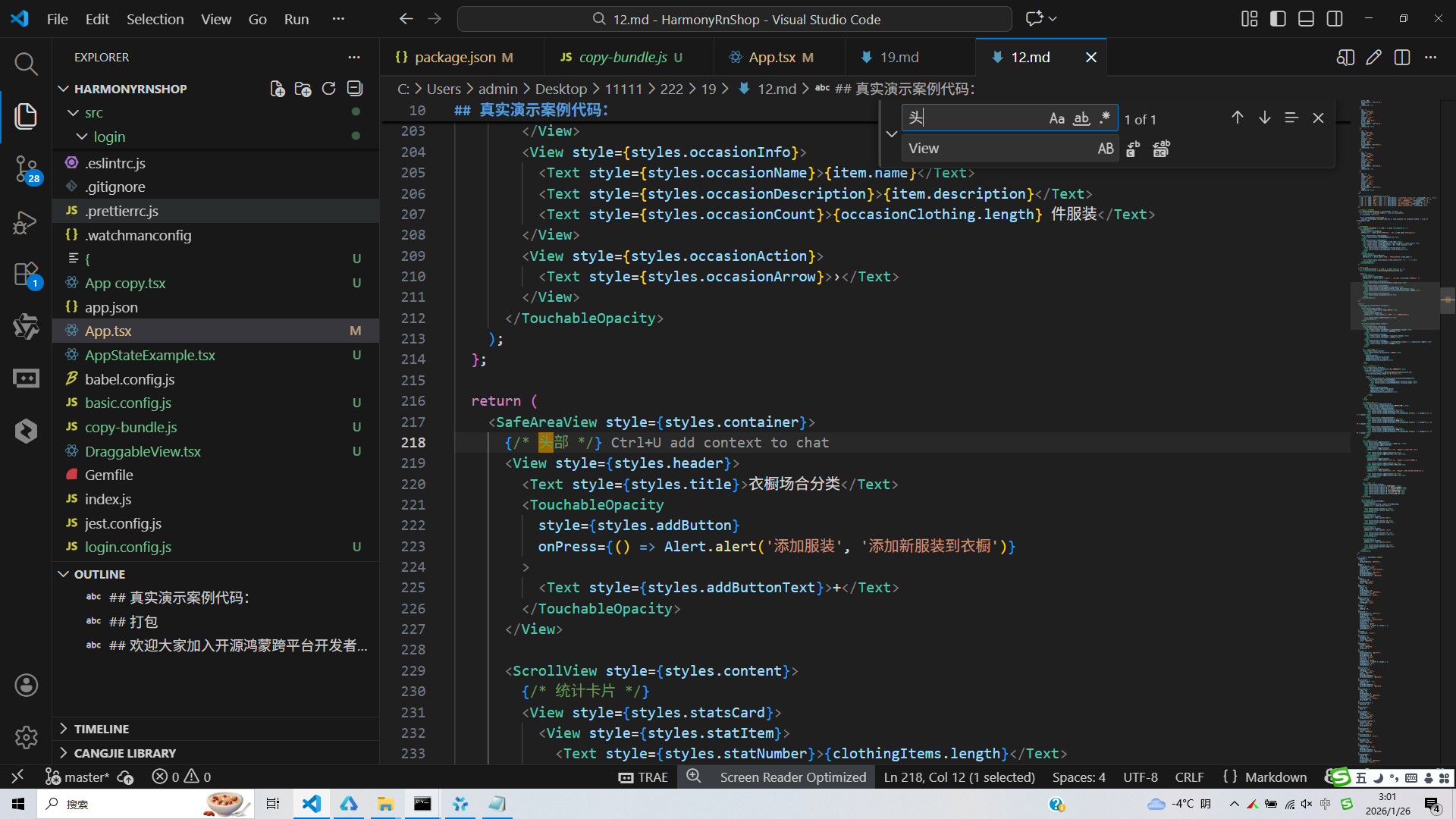
真实演示案例代码:
// app.tsx
import React, { useState } from 'react';
import { SafeAreaView, View, Text, StyleSheet, TouchableOpacity, ScrollView, Dimensions, Alert, FlatList } from 'react-native';

// Base64 图标库
const ICONS_BASE64 = {
  clothes: 'data:image/png;base64,iVBORw0KGgoAAAANSUhEUgAAAAEAAAABCAYAAAAfFcSJAAAADUlEQVR42mNkYPhfDwAChwGA60e6kgAAAABJRU5ErkJggg==',
  occasion: 'data:image/png;base64,iVBORw0KGgoAAAANSUhEUgAAAAEAAAABCAYAAAAfFcSJAAAADUlEQVR42mNkYPhfDwAChwGA60e6kgAAAABJRU5ErkJggg==',
  search: 'data:image/png;base64,iVBORw0KGgoAAAANSUhEUgAAAAEAAAABCAYAAAAfFcSJAAAADUlEQVR42mNkYPhfDwAChwGA60e6kgAAAABJRU5ErkJggg==',
  add: 'data:image/png;base64,iVBORw0KGgoAAAANSUhEUgAAAAEAAAABCAYAAAAfFcSJAAAADUlEQVR42mNkYPhfDwAChwGA60e6kgAAAABJRU5ErkJggg==',
  favorite: 'data:image/png;base64,iVBORw0KGgoAAAANSUhEUgAAAAEAAAABCAYAAAAfFcSJAAAADUlEQVR42mNkYPhfDwAChwGA60e6kgAAAABJRU5ErkJggg==',
  settings: 'data:image/png;base64,iVBORw0KGgoAAAANSUhEUgAAAAEAAAABCAYAAAAfFcSJAAAADUlEQVR42mNkYPhfDwAChwGA60e6kgAAAABJRU5ErkJggg==',
  sort: 'data:image/png;base64,iVBORw0KGgoAAAANSUhEUgAAAAEAAAABCAYAAAAfFcSJAAAADUlEQVR42mNkYPhfDwAChwGA60e6kgAAAABJRU5ErkJggg==',
  home: 'data:image/png;base64,iVBORw0KGgoAAAANSUhEUgAAAAEAAAABCAYAAAAfFcSJAAAADUlEQVR42mNkYPhfDwAChwGA60e6kgAAAABJRU5ErkJggg==',
};

const { width, height } = Dimensions.get('window');

// 服装类型
type ClothingItem = {
  id: string;
  name: string;
  category: '上衣' | '裤子' | '裙子' | '外套' | '鞋类' | '配饰';
  color: string;
  size: string;
  occasion: '休闲' | '工作' | '运动' | '正式' | '约会' | '聚会';
  season: '春' | '夏' | '秋' | '冬' | '四季';
  brand: string;
  price: number;
  purchaseDate: string;
  image: string;
  isFavorite: boolean;
};

// 场合类型
type Occasion = {
  id: string;
  name: string;
  icon: string;
  description: string;
  clothingIds: string[];
};

const WardrobeOccasionApp: React.FC = () => {
  const [clothingItems, setClothingItems] = useState<ClothingItem[]>([
    {
      id: '1',
      name: '白色衬衫',
      category: '上衣',
      color: '白色',
      size: 'M',
      occasion: '工作',
      season: '春',
      brand: '优衣库',
      price: 199,
      purchaseDate: '2023-03-15',
      image: '',
      isFavorite: true
    },
    {
      id: '2',
      name: '牛仔裤',
      category: '裤子',
      color: '蓝色',
      size: 'L',
      occasion: '休闲',
      season: '四季',
      brand: 'Levi\'s',
      price: 499,
      purchaseDate: '2022-11-20',
      image: '',
      isFavorite: true
    },
    {
      id: '3',
      name: '黑色西装',
      category: '外套',
      color: '黑色',
      size: 'M',
      occasion: '正式',
      season: '秋',
      brand: 'Hugo Boss',
      price: 2999,
      purchaseDate: '2023-01-10',
      image: '',
      isFavorite: false
    },
    {
      id: '4',
      name: '运动T恤',
      category: '上衣',
      color: '灰色',
      size: 'M',
      occasion: '运动',
      season: '夏',
      brand: 'Nike',
      price: 299,
      purchaseDate: '2023-05-01',
      image: '',
      isFavorite: false
    },
    {
      id: '5',
      name: '连衣裙',
      category: '裙子',
      color: '红色',
      size: 'S',
      occasion: '约会',
      season: '春',
      brand: 'Zara',
      price: 399,
      purchaseDate: '2023-04-05',
      image: '',
      isFavorite: true
    },
    {
      id: '6',
      name: '皮鞋',
      category: '鞋类',
      color: '黑色',
      size: '42',
      occasion: '工作',
      season: '四季',
      brand: 'Clarks',
      price: 899,
      purchaseDate: '2022-12-15',
      image: '',
      isFavorite: false
    },
  ]);

  const [occasions] = useState<Occasion[]>([
    { id: '1', name: '工作', icon: '👔', description: '办公室、会议等职业场合', clothingIds: ['1', '6'] },
    { id: '2', name: '休闲', icon: '👕', description: '日常出行、朋友聚会等', clothingIds: ['2'] },
    { id: '3', name: '运动', icon: '🏃', description: '健身房、户外运动', clothingIds: ['4'] },
    { id: '4', name: '正式', icon: '🤵', description: '婚礼、庆典、晚宴等', clothingIds: ['3'] },
    { id: '5', name: '约会', icon: '💕', description: '浪漫约会、晚餐', clothingIds: ['5'] },
    { id: '6', name: '聚会', icon: '🎉', description: '生日派对、节日聚会', clothingIds: [] },
  ]);

  // 获取特定场合的服装
  const getClothingForOccasion = (occasionId: string) => {
    const occasion = occasions.find(o => o.id === occasionId);
    if (!occasion) return [];

    return clothingItems.filter(item =>
      occasion.clothingIds.includes(item.id) || item.occasion === occasions.find(o => o.id === occasionId)?.name
    );
  };

  // 渲染服装项
  const renderClothingItem = ({ item }: { item: ClothingItem }) => (
    <TouchableOpacity
      style={styles.clothingItem}
      onPress={() => Alert.alert('服装详情', `查看 ${item.name} 的详细信息`)}
    >
      <View style={styles.clothingImage}>
        <Text style={styles.clothingImageText}>👕</Text>
      </View>
      <View style={styles.clothingInfo}>
        <Text style={styles.clothingName}>{item.name}</Text>
        <Text style={styles.clothingCategory}>{item.category} • {item.color}</Text>
        <Text style={styles.clothingOccasion}>场合: {item.occasion}</Text>
        <View style={styles.clothingMeta}>
          <Text style={styles.clothingPrice}>¥{item.price}</Text>
          <Text style={styles.clothingSeason}>{item.season}季</Text>
        </View>
      </View>
      <TouchableOpacity
        style={styles.favoriteButton}
        onPress={() => Alert.alert('收藏', `收藏/取消收藏 ${item.name}`)}
      >
        <Text style={styles.favoriteIcon}>{item.isFavorite ? '❤️' : '🤍'}</Text>
      </TouchableOpacity>
    </TouchableOpacity>
  );

  // 渲染场合项
  const renderOccasionItem = ({ item }: { item: Occasion }) => {
    const occasionClothing = getClothingForOccasion(item.id);

    return (
      <TouchableOpacity
        style={styles.occasionCard}
        onPress={() => Alert.alert('场合搭配', `查看适合 ${item.name} 的服装搭配`)}
      >
        <View style={styles.occasionIcon}>
          <Text style={styles.occasionIconText}>{item.icon}</Text>
        </View>
        <View style={styles.occasionInfo}>
          <Text style={styles.occasionName}>{item.name}</Text>
          <Text style={styles.occasionDescription}>{item.description}</Text>
          <Text style={styles.occasionCount}>{occasionClothing.length} 件服装</Text>
        </View>
        <View style={styles.occasionAction}>
          <Text style={styles.occasionArrow}>›</Text>
        </View>
      </TouchableOpacity>
    );
  };

  return (
    <SafeAreaView style={styles.container}>
      {/* 头部 */}
      <View style={styles.header}>
        <Text style={styles.title}>衣橱场合分类</Text>
        <TouchableOpacity
          style={styles.addButton}
          onPress={() => Alert.alert('添加服装', '添加新服装到衣橱')}
        >
          <Text style={styles.addButtonText}>+</Text>
        </TouchableOpacity>
      </View>

      <ScrollView style={styles.content}>
        {/* 统计卡片 */}
        <View style={styles.statsCard}>
          <View style={styles.statItem}>
            <Text style={styles.statNumber}>{clothingItems.length}</Text>
            <Text style={styles.statLabel}>服装数量</Text>
          </View>
          <View style={styles.statItem}>
            <Text style={styles.statNumber}>{occasions.length}</Text>
            <Text style={styles.statLabel}>场合分类</Text>
          </View>
          <View style={styles.statItem}>
            <Text style={styles.statNumber}>{clothingItems.filter(i => i.isFavorite).length}</Text>
            <Text style={styles.statLabel}>我的最爱</Text>
          </View>
        </View>

        {/* 场合分类列表 */}
        <View style={styles.section}>
          <Text style={styles.sectionTitle}>场合分类</Text>
          <FlatList
            data={occasions}
            renderItem={renderOccasionItem}
            keyExtractor={item => item.id}
            showsVerticalScrollIndicator={false}
          />
        </View>

        {/* 各场合服装明细 */}
        <View style={styles.section}>
          <Text style={styles.sectionTitle}>各场合服装明细</Text>
          {occasions.map(occasion => {
            const occasionClothing = getClothingForOccasion(occasion.id);
            if (occasionClothing.length === 0) return null;

            return (
              <View key={occasion.id} style={styles.occasionClothingSection}>
                <View style={styles.occasionHeader}>
                  <Text style={styles.occasionHeaderIcon}>{occasion.icon}</Text>
                  <Text style={styles.occasionHeaderText}>{occasion.name}</Text>
                </View>
                <FlatList
                  data={occasionClothing}
                  renderItem={renderClothingItem}
                  keyExtractor={item => item.id}
                  showsVerticalScrollIndicator={false}
                />
              </View>
            );
          })}
        </View>

        {/* 服装分类统计 */}
        <View style={styles.categoryStatsCard}>
          <Text style={styles.categoryStatsTitle}>服装分类统计</Text>
          <View style={styles.categoryStatsItems}>
            <View style={styles.categoryStatItem}>
              <Text style={styles.categoryStatIcon}>👕</Text>
              <Text style={styles.categoryStatText}>上衣</Text>
              <Text style={styles.categoryStatNumber}>{clothingItems.filter(c => c.category === '上衣').length}</Text>
            </View>
            <View style={styles.categoryStatItem}>
              <Text style={styles.categoryStatIcon}>👖</Text>
              <Text style={styles.categoryStatText}>裤子</Text>
              <Text style={styles.categoryStatNumber}>{clothingItems.filter(c => c.category === '裤子').length}</Text>
            </View>
            <View style={styles.categoryStatItem}>
              <Text style={styles.categoryStatIcon}>👗</Text>
              <Text style={styles.categoryStatText}>裙子</Text>
              <Text style={styles.categoryStatNumber}>{clothingItems.filter(c => c.category === '裙子').length}</Text>
            </View>
          </View>
        </View>

        {/* 场合搭配建议 */}
        <View style={styles.suggestionCard}>
          <Text style={styles.suggestionTitle}>场合搭配建议</Text>
          <View style={styles.suggestionItems}>
            <TouchableOpacity
              style={styles.suggestionItem}
              onPress={() => Alert.alert('工作场合', '推荐搭配:衬衫+西裤+皮鞋')}
            >
              <Text style={styles.suggestionIcon}>👔</Text>
              <Text style={styles.suggestionText}>工作场合</Text>
            </TouchableOpacity>
            <TouchableOpacity
              style={styles.suggestionItem}
              onPress={() => Alert.alert('约会场合', '推荐搭配:连衣裙+高跟鞋')}
            >
              <Text style={styles.suggestionIcon}>💕</Text>
              <Text style={styles.suggestionText}>约会场合</Text>
            </TouchableOpacity>
            <TouchableOpacity
              style={styles.suggestionItem}
              onPress={() => Alert.alert('运动场合', '推荐搭配:运动T恤+运动裤+运动鞋')}
            >
              <Text style={styles.suggestionIcon}>🏃</Text>
              <Text style={styles.suggestionText}>运动场合</Text>
            </TouchableOpacity>
          </View>
        </View>

        {/* 使用技巧 */}
        <View style={styles.tipCard}>
          <Text style={styles.tipTitle}>衣橱管理技巧</Text>
          <Text style={styles.tipText}>• 按场合分类整理服装</Text>
          <Text style={styles.tipText}>• 定期清理不穿的衣物</Text>
          <Text style={styles.tipText}>• 根据季节调整衣橱</Text>
          <Text style={styles.tipText}>• 制定每周穿搭计划</Text>
          <Text style={styles.tipText}>• 建立胶囊衣橱概念</Text>
        </View>
      </ScrollView>

      {/* 底部导航 */}
      <View style={styles.bottomNav}>
        <TouchableOpacity
          style={[styles.navItem, styles.activeNavItem]}
          onPress={() => Alert.alert('首页')}
        >
          <Text style={styles.navIcon}>🏠</Text>
          <Text style={styles.navText}>首页</Text>
        </TouchableOpacity>

        <TouchableOpacity
          style={styles.navItem}
          onPress={() => Alert.alert('衣橱')}
        >
          <Text style={styles.navIcon}>👕</Text>
          <Text style={styles.navText}>衣橱</Text>
        </TouchableOpacity>

        <TouchableOpacity
          style={styles.navItem}
          onPress={() => Alert.alert('场合')}
        >
          <Text style={styles.navIcon}>👔</Text>
          <Text style={styles.navText}>场合</Text>
        </TouchableOpacity>

        <TouchableOpacity
          style={styles.navItem}
          onPress={() => Alert.alert('我的')}
        >
          <Text style={styles.navIcon}>👤</Text>
          <Text style={styles.navText}>我的</Text>
        </TouchableOpacity>
      </View>
    </SafeAreaView>
  );
};

const styles = StyleSheet.create({
  container: {
    flex: 1,
    backgroundColor: '#f8fafc',
  },
  header: {
    flexDirection: 'row',
    alignItems: 'center',
    justifyContent: 'space-between',
    padding: 20,
    backgroundColor: '#ffffff',
    borderBottomWidth: 1,
    borderBottomColor: '#e2e8f0',
  },
  title: {
    fontSize: 20,
    fontWeight: 'bold',
    color: '#1e293b',
  },
  addButton: {
    width: 36,
    height: 36,
    borderRadius: 18,
    backgroundColor: '#3b82f6',
    alignItems: 'center',
    justifyContent: 'center',
  },
  addButtonText: {
    fontSize: 20,
    color: '#ffffff',
    fontWeight: 'bold',
  },
  content: {
    flex: 1,
    padding: 16,
  },
  statsCard: {
    backgroundColor: '#ffffff',
    borderRadius: 12,
    padding: 16,
    flexDirection: 'row',
    justifyContent: 'space-around',
    marginBottom: 16,
    elevation: 1,
    shadowColor: '#000',
    shadowOffset: { width: 0, height: 1 },
    shadowOpacity: 0.1,
    shadowRadius: 2,
  },
  statItem: {
    alignItems: 'center',
  },
  statNumber: {
    fontSize: 18,
    fontWeight: 'bold',
    color: '#3b82f6',
  },
  statLabel: {
    fontSize: 12,
    color: '#64748b',
    marginTop: 4,
  },
  section: {
    backgroundColor: '#ffffff',
    borderRadius: 12,
    marginBottom: 16,
    overflow: 'hidden',
    elevation: 1,
    shadowColor: '#000',
    shadowOffset: { width: 0, height: 1 },
    shadowOpacity: 0.1,
    shadowRadius: 2,
  },
  sectionTitle: {
    fontSize: 16,
    fontWeight: 'bold',
    color: '#1e293b',
    padding: 16,
    borderBottomWidth: 1,
    borderBottomColor: '#e2e8f0',
  },
  occasionCard: {
    flexDirection: 'row',
    padding: 16,
    borderBottomWidth: 1,
    borderBottomColor: '#e2e8f0',
  },
  occasionIcon: {
    width: 50,
    height: 50,
    borderRadius: 8,
    backgroundColor: '#e2e8f0',
    alignItems: 'center',
    justifyContent: 'center',
    marginRight: 12,
  },
  occasionIconText: {
    fontSize: 24,
  },
  occasionInfo: {
    flex: 1,
  },
  occasionName: {
    fontSize: 16,
    fontWeight: 'bold',
    color: '#1e293b',
    marginBottom: 4,
  },
  occasionDescription: {
    fontSize: 14,
    color: '#64748b',
    marginBottom: 4,
  },
  occasionCount: {
    fontSize: 12,
    color: '#94a3b8',
  },
  occasionAction: {
    justifyContent: 'center',
  },
  occasionArrow: {
    fontSize: 16,
    color: '#94a3b8',
  },
  clothingItem: {
    flexDirection: 'row',
    padding: 16,
    borderBottomWidth: 1,
    borderBottomColor: '#e2e8f0',
  },
  clothingImage: {
    width: 60,
    height: 60,
    borderRadius: 8,
    backgroundColor: '#e2e8f0',
    alignItems: 'center',
    justifyContent: 'center',
    marginRight: 12,
  },
  clothingImageText: {
    fontSize: 24,
  },
  clothingInfo: {
    flex: 1,
  },
  clothingName: {
    fontSize: 16,
    fontWeight: 'bold',
    color: '#1e293b',
    marginBottom: 4,
  },
  clothingCategory: {
    fontSize: 14,
    color: '#64748b',
    marginBottom: 4,
  },
  clothingOccasion: {
    fontSize: 12,
    color: '#94a3b8',
    marginBottom: 4,
  },
  clothingMeta: {
    flexDirection: 'row',
    justifyContent: 'space-between',
  },
  clothingPrice: {
    fontSize: 14,
    color: '#3b82f6',
    fontWeight: '500',
  },
  clothingSeason: {
    fontSize: 12,
    color: '#64748b',
  },
  favoriteButton: {
    justifyContent: 'center',
    alignItems: 'center',
    marginLeft: 8,
  },
  favoriteIcon: {
    fontSize: 20,
  },
  occasionClothingSection: {
    backgroundColor: '#f8fafc',
    padding: 12,
  },
  occasionHeader: {
    flexDirection: 'row',
    alignItems: 'center',
    marginBottom: 8,
  },
  occasionHeaderIcon: {
    fontSize: 18,
    marginRight: 8,
  },
  occasionHeaderText: {
    fontSize: 14,
    fontWeight: 'bold',
    color: '#1e293b',
  },
  categoryStatsCard: {
    backgroundColor: '#ffffff',
    borderRadius: 12,
    padding: 16,
    marginBottom: 16,
    elevation: 1,
    shadowColor: '#000',
    shadowOffset: { width: 0, height: 1 },
    shadowOpacity: 0.1,
    shadowRadius: 2,
  },
  categoryStatsTitle: {
    fontSize: 16,
    fontWeight: 'bold',
    color: '#1e293b',
    marginBottom: 12,
  },
  categoryStatsItems: {
    flexDirection: 'row',
    justifyContent: 'space-between',
  },
  categoryStatItem: {
    alignItems: 'center',
    flex: 1,
    padding: 8,
  },
  categoryStatIcon: {
    fontSize: 24,
    marginBottom: 4,
  },
  categoryStatText: {
    fontSize: 12,
    color: '#1e293b',
    marginBottom: 4,
  },
  categoryStatNumber: {
    fontSize: 14,
    fontWeight: 'bold',
    color: '#3b82f6',
  },
  suggestionCard: {
    backgroundColor: '#ffffff',
    borderRadius: 12,
    padding: 16,
    marginBottom: 16,
    elevation: 1,
    shadowColor: '#000',
    shadowOffset: { width: 0, height: 1 },
    shadowOpacity: 0.1,
    shadowRadius: 2,
  },
  suggestionTitle: {
    fontSize: 16,
    fontWeight: 'bold',
    color: '#1e293b',
    marginBottom: 12,
  },
  suggestionItems: {
    flexDirection: 'row',
    justifyContent: 'space-between',
  },
  suggestionItem: {
    alignItems: 'center',
    flex: 1,
    padding: 8,
  },
  suggestionIcon: {
    fontSize: 24,
    marginBottom: 4,
  },
  suggestionText: {
    fontSize: 12,
    color: '#1e293b',
  },
  tipCard: {
    backgroundColor: '#ffffff',
    borderRadius: 12,
    padding: 16,
    elevation: 1,
    shadowColor: '#000',
    shadowOffset: { width: 0, height: 1 },
    shadowOpacity: 0.1,
    shadowRadius: 2,
  },
  tipTitle: {
    fontSize: 16,
    fontWeight: 'bold',
    color: '#1e293b',
    marginBottom: 12,
  },
  tipText: {
    fontSize: 14,
    color: '#64748b',
    lineHeight: 22,
    marginBottom: 8,
  },
  bottomNav: {
    flexDirection: 'row',
    justifyContent: 'space-around',
    backgroundColor: '#ffffff',
    borderTopWidth: 1,
    borderTopColor: '#e2e8f0',
    paddingVertical: 12,
  },
  navItem: {
    alignItems: 'center',
    flex: 1,
  },
  activeNavItem: {
    paddingTop: 4,
    borderTopWidth: 2,
    borderTopColor: '#3b82f6',
  },
  navIcon: {
    fontSize: 20,
    color: '#94a3b8',
    marginBottom: 4,
  },
  activeNavIcon: {
    color: '#3b82f6',
  },
  navText: {
    fontSize: 12,
    color: '#94a3b8',
  },
  activeNavText: {
    color: '#3b82f6',
  },
});

export default WardrobeOccasionApp;
打包
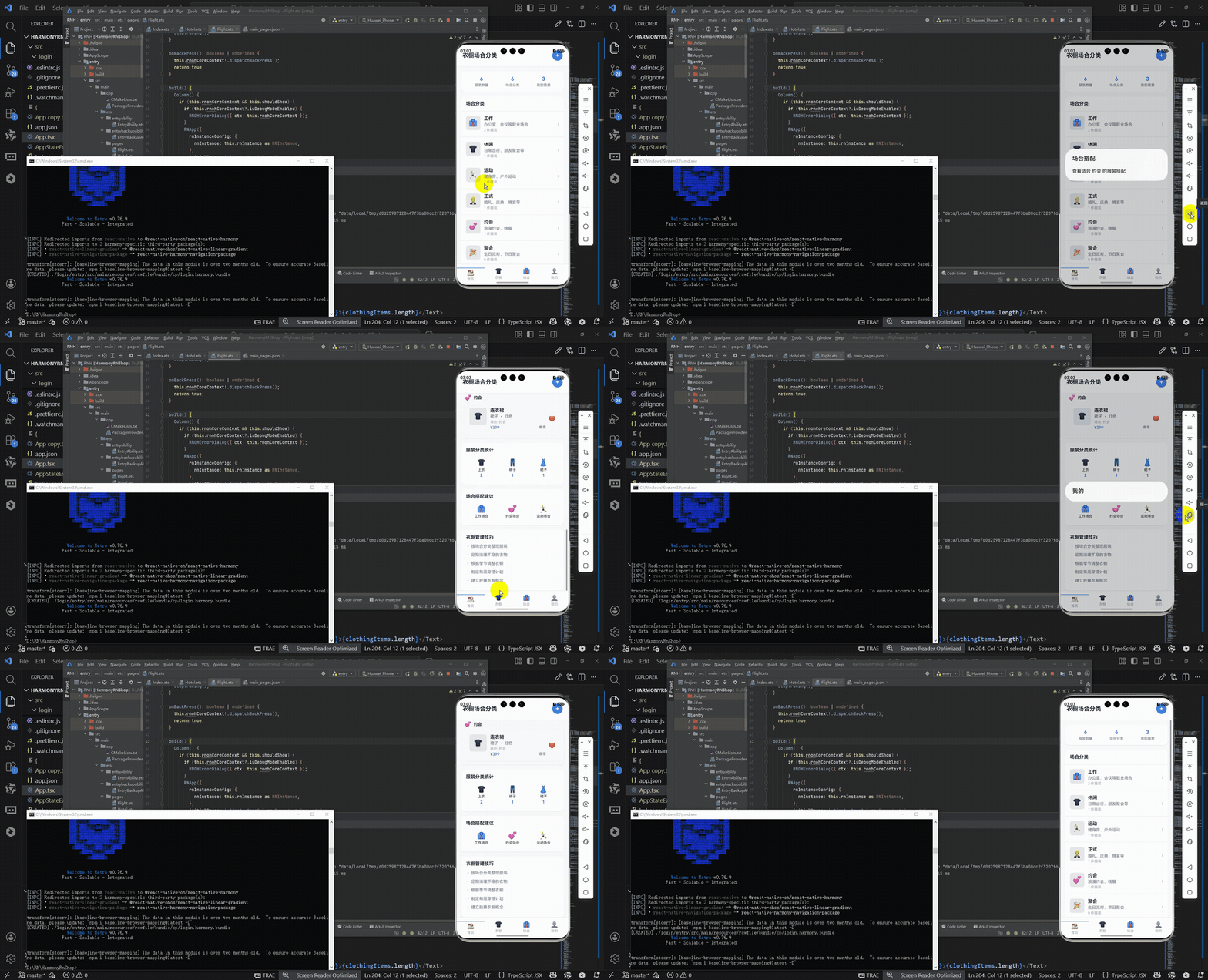
接下来通过打包命令npn run harmony将reactNative的代码打包成为bundle,这样可以进行在开源鸿蒙OpenHarmony中进行使用。

打包之后再将打包后的鸿蒙OpenHarmony文件拷贝到鸿蒙的DevEco-Studio工程目录去:

最后运行效果图如下显示:
本文深入分析了衣橱场合管理应用的核心架构与跨端开发策略。该应用采用分层数据模型设计,通过TypeScript定义强类型数据结构(ClothingItem和Occasion),确保跨平台数据一致性。UI层采用React Native组件库构建,包括FlatList高效渲染、TouchableOpacity交互反馈等核心功能模块,这些组件可无缝映射到HarmonyOS的ArkUI体系。应用实现了"场景化分类+数据可视化+轻量化交互"的完整体验,通过模块化设计将功能拆分为统计、分类、建议等独立组件,为跨端迁移提供清晰的技术路径。文章重点阐述了数据模型复用、列表渲染优化和交互逻辑适配三大关键技术点,为同类生活服务应用的跨平台开发提供了实践参考。
欢迎大家加入开源鸿蒙跨平台开发者社区,一起共建开源鸿蒙跨平台生态。

作为“人工智能6S店”的官方数字引擎,为AI开发者与企业提供一个覆盖软硬件全栈、一站式门户。
更多推荐

 15
15 0
0- 0


 已为社区贡献14条内容

所有评论(0)