
Flutter框架跨平台鸿蒙开发——外卖点餐APP的开发流程
Flutter跨平台外卖点餐APP开发摘要 本文介绍了使用Flutter框架开发跨平台外卖点餐APP的全流程,重点包含以下内容: 项目概述:开发一款具备商家浏览、菜单查看、购物车管理、订单确认等核心功能的外卖应用,支持在鸿蒙系统上运行。 技术架构: 采用Flutter框架实现跨平台开发 设计响应式UI适配多尺寸屏幕 模块化代码结构便于维护扩展 核心模型设计: 商家模型(Restaurant)包含I
🚀运行效果展示
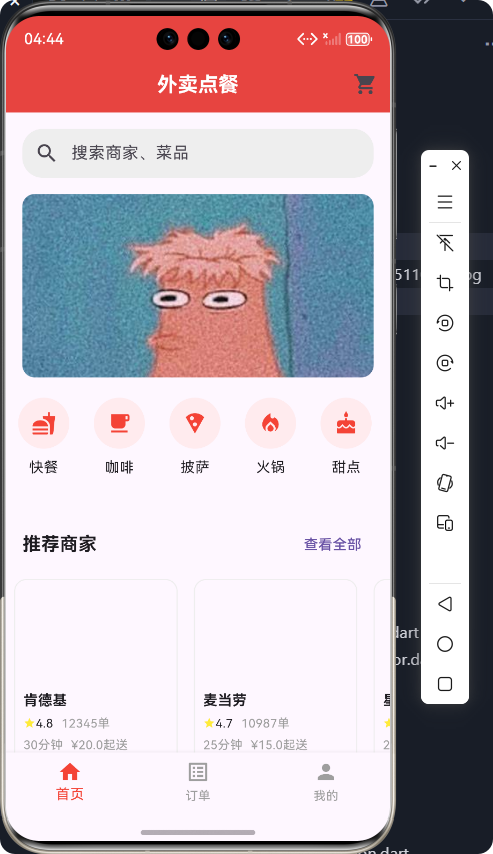
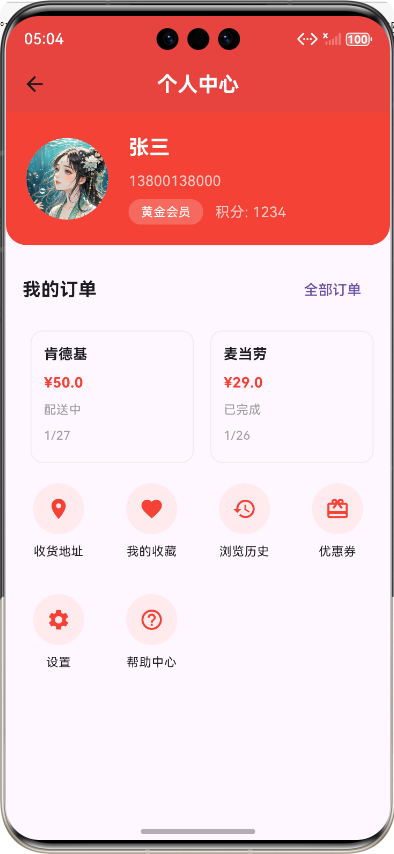
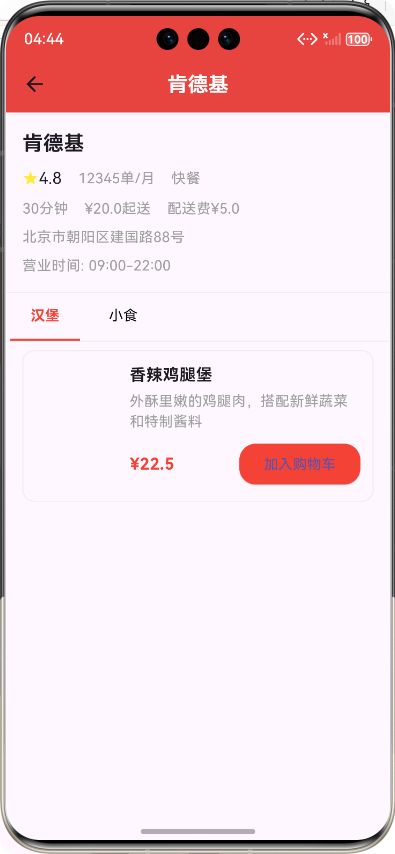
Flutter框架跨平台鸿蒙开发——外卖点餐APP的开发流程
前言
在移动应用开发领域,跨平台开发已成为趋势,Flutter作为Google推出的开源UI框架,凭借其"一次编写,多处运行"的特性,受到了越来越多开发者的青睐。本文将详细介绍如何使用Flutter框架开发一款外卖点餐APP,并实现跨平台运行在鸿蒙系统上的完整流程。
Flutter具有以下优势:
- 高性能:采用Skia图形引擎,直接渲染UI,性能接近原生应用
- 热重载:开发过程中可实时查看修改效果,提高开发效率
- 丰富的组件库:内置大量Material Design和Cupertino风格的组件
- 跨平台:支持iOS、Android、Web、Windows、macOS、Linux和鸿蒙系统
应用介绍
本外卖点餐APP是一款功能完整的移动应用,主要功能包括:
核心功能
- 首页展示:轮播图、分类导航、推荐商家、附近商家
- 商家浏览:商家列表、分类筛选、搜索功能、排序功能
- 菜单浏览:菜品分类、菜品详情、加入购物车
- 购物车管理:商品数量调整、总价计算
- 订单确认:配送地址选择、支付方式选择、订单备注、价格明细
- 个人中心:用户信息、订单管理、收货地址、我的收藏等
技术特点
- 响应式布局:适配不同屏幕尺寸的设备
- 模块化设计:代码结构清晰,易于维护和扩展
- 模拟数据:提供完整的模拟数据,方便开发和测试
- 用户友好:界面美观,交互流畅,操作简单直观
开发流程
1. 项目初始化与环境搭建
首先,需要搭建Flutter开发环境,包括安装Flutter SDK、配置IDE(如Android Studio或VS Code)等。然后创建Flutter项目,并添加必要的依赖。
2. 核心模型设计
在开发初期,需要设计应用的核心数据模型,为后续的功能开发奠定基础。
商家模型
/// 商家模型
class Restaurant {
  /// 商家ID
  final String id;

  /// 商家名称
  final String name;

  /// 商家评分
  final double rating;

  /// 月销量
  final int monthlySales;

  /// 配送时间(分钟)
  final int deliveryTime;

  /// 起送价格
  final double minOrderPrice;

  /// 配送费
  final double deliveryFee;

  /// 商家图片
  final String imageUrl;

  /// 商家地址
  final String address;

  /// 商家营业时间
  final String openingHours;

  /// 商家类型
  final String category;

  /// 构造函数
  Restaurant({
    required this.id,
    required this.name,
    required this.rating,
    required this.monthlySales,
    required this.deliveryTime,
    required this.minOrderPrice,
    required this.deliveryFee,
    required this.imageUrl,
    required this.address,
    required this.openingHours,
    required this.category,
  });
}
菜品模型
/// 菜品模型
class FoodItem {
  /// 菜品ID
  final String id;

  /// 菜品名称
  final String name;

  /// 菜品描述
  final String description;

  /// 菜品价格
  final double price;

  /// 菜品图片
  final String imageUrl;

  /// 月销量
  final int monthlySales;

  /// 菜品分类
  final String category;

  /// 是否有库存
  final bool inStock;

  /// 菜品标签(如:招牌、热销、新品等)
  final List<String> tags;

  /// 菜品规格(如:小份、中份、大份)
  final List<FoodItemOption>? options;

  /// 构造函数
  FoodItem({
    required this.id,
    required this.name,
    required this.description,
    required this.price,
    required this.imageUrl,
    required this.monthlySales,
    required this.category,
    required this.inStock,
    this.tags = const [],
    this.options,
  });
}

/// 菜品规格模型
class FoodItemOption {
  /// 规格名称
  final String name;

  /// 规格价格
  final double price;

  /// 规格描述
  final String? description;

  /// 构造函数
  FoodItemOption({
    required this.name,
    required this.price,
    this.description,
  });
}
购物车模型
/// 购物车商品模型
class CartItem {
  /// 菜品信息
  final FoodItem foodItem;

  /// 购买数量
  int quantity;

  /// 选中的规格
  final FoodItemOption? selectedOption;

  /// 商品总价
  double get totalPrice {
    return (selectedOption?.price ?? foodItem.price) * quantity;
  }

  /// 构造函数
  CartItem({
    required this.foodItem,
    required this.quantity,
    this.selectedOption,
  });
}

/// 购物车模型
class Cart {
  /// 购物车商品列表
  final List<CartItem> items;

  /// 关联的商家ID
  final String restaurantId;

  /// 购物车商品总数
  int get totalItems {
    return items.fold(0, (sum, item) => sum + item.quantity);
  }

  /// 购物车商品总价
  double get totalPrice {
    return items.fold(0.0, (sum, item) => sum + item.totalPrice);
  }

  /// 购物车是否为空
  bool get isEmpty {
    return items.isEmpty;
  }

  /// 构造函数
  Cart({
    required this.items,
    required this.restaurantId,
  });
}
订单模型
/// 订单状态枚举
enum OrderStatus {
  /// 待支付
  pendingPayment,
  /// 待接单
  pendingAcceptance,
  /// 待配送
  pendingDelivery,
  /// 配送中
  delivering,
  /// 已完成
  completed,
  /// 已取消
  cancelled,
}

/// 订单模型
class Order {
  /// 订单ID
  final String id;

  /// 订单创建时间
  final DateTime createdAt;

  /// 订单状态
  final OrderStatus status;

  /// 商家信息
  final Restaurant restaurant;

  /// 订单商品列表
  final List<CartItem> items;

  /// 订单总价
  final double totalPrice;

  /// 配送费
  final double deliveryFee;

  /// 实际支付金额
  final double actualPayment;

  /// 配送地址
  final DeliveryAddress address;

  /// 联系电话
  final String phoneNumber;

  /// 订单备注
  final String? remarks;

  /// 预计送达时间
  final DateTime? estimatedDeliveryTime;

  /// 实际送达时间
  final DateTime? actualDeliveryTime;

  /// 构造函数
  Order({
    required this.id,
    required this.createdAt,
    required this.status,
    required this.restaurant,
    required this.items,
    required this.totalPrice,
    required this.deliveryFee,
    required this.actualPayment,
    required this.address,
    required this.phoneNumber,
    this.remarks,
    this.estimatedDeliveryTime,
    this.actualDeliveryTime,
  });
}

/// 配送地址模型
class DeliveryAddress {
  /// 地址ID
  final String id;

  /// 收货人姓名
  final String recipientName;

  /// 联系电话
  final String phoneNumber;

  /// 省市区
  final String region;

  /// 详细地址
  final String detailAddress;

  /// 是否为默认地址
  final bool isDefault;

  /// 经度
  final double longitude;

  /// 纬度
  final double latitude;

  /// 构造函数
  DeliveryAddress({
    required this.id,
    required this.recipientName,
    required this.phoneNumber,
    required this.region,
    required this.detailAddress,
    required this.isDefault,
    required this.longitude,
    required this.latitude,
  });
}
用户模型
/// 用户模型
class User {
  /// 用户ID
  final String id;

  /// 用户名
  final String username;

  /// 手机号
  final String phoneNumber;

  /// 用户头像
  final String? avatarUrl;

  /// 配送地址列表
  final List<DeliveryAddress> addresses;

  /// 收藏的商家列表
  final List<String> favoriteRestaurants;

  /// 最近浏览的商家列表
  final List<String> recentRestaurants;

  /// 会员等级
  final String membershipLevel;

  /// 积分
  final int points;

  /// 构造函数
  User({
    required this.id,
    required this.username,
    required this.phoneNumber,
    this.avatarUrl,
    this.addresses = const [],
    this.favoriteRestaurants = const [],
    this.recentRestaurants = const [],
    this.membershipLevel = '普通会员',
    this.points = 0,
  });
}
3. 数据服务层实现
为了模拟真实环境,我们需要实现一个数据服务层,提供模拟数据和数据管理功能。
/// 外卖点餐数据服务
class FoodDeliveryService {
  /// 模拟商家列表数据
  static List<Restaurant> getRestaurants() {
    return [
      Restaurant(
        id: '1',
        name: '肯德基',
        rating: 4.8,
        monthlySales: 12345,
        deliveryTime: 30,
        minOrderPrice: 20.0,
        deliveryFee: 5.0,
        imageUrl: 'https://trae-api-cn.mchost.guru/api/ide/v1/text_to_image?prompt=KFC%20restaurant%20exterior%20with%20signage%2C%20clean%20modern%20design&image_size=square',
        address: '北京市朝阳区建国路88号',
        openingHours: '09:00-22:00',
        category: '快餐',
      ),
      // 更多商家数据...
    ];
  }

  /// 根据商家ID获取菜品列表
  static List<FoodItem> getFoodItemsByRestaurantId(String restaurantId) {
    // 模拟不同商家的菜品
    switch (restaurantId) {
      case '1': // 肯德基
        return [
          FoodItem(
            id: '101',
            name: '香辣鸡腿堡',
            description: '外酥里嫩的鸡腿肉,搭配新鲜蔬菜和特制酱料',
            price: 22.5,
            imageUrl: 'https://trae-api-cn.mchost.guru/api/ide/v1/text_to_image?prompt=spicy%20chicken%20burger%20with%20lettuce%20and%20sauce%2C%20close%20up&image_size=square',
            monthlySales: 5678,
            category: '汉堡',
            inStock: true,
            tags: ['招牌', '热销'],
            options: [
              FoodItemOption(name: '标准', price: 22.5),
              FoodItemOption(name: '加大', price: 28.5),
            ],
          ),
          // 更多菜品数据...
        ];
      // 更多商家的菜品...
    }
  }

  /// 获取模拟用户数据
  static User getCurrentUser() {
    return User(
      id: '1',
      username: '张三',
      phoneNumber: '13800138000',
      avatarUrl: 'https://trae-api-cn.mchost.guru/api/ide/v1/text_to_image?prompt=user%20avatar%2C%20friendly%20smile%2C%20simple%20style&image_size=square',
      addresses: [
        DeliveryAddress(
          id: '1',
          recipientName: '张三',
          phoneNumber: '13800138000',
          region: '北京市朝阳区',
          detailAddress: '建国路88号SOHO现代城5号楼2001室',
          isDefault: true,
          longitude: 116.4668,
          latitude: 39.9042,
        ),
      ],
      favoriteRestaurants: ['1', '3'],
      recentRestaurants: ['1', '2', '3'],
      membershipLevel: '黄金会员',
      points: 1234,
    );
  }

  /// 创建模拟订单
  static Order createOrder({
    required Restaurant restaurant,
    required List<CartItem> items,
    required DeliveryAddress address,
    required String phoneNumber,
    String? remarks,
  }) {
    double totalPrice = items.fold(0.0, (sum, item) => sum + item.totalPrice);
    double deliveryFee = restaurant.deliveryFee;
    double actualPayment = totalPrice + deliveryFee;

    return Order(
      id: 'ORD${DateTime.now().millisecondsSinceEpoch}',
      createdAt: DateTime.now(),
      status: OrderStatus.pendingPayment,
      restaurant: restaurant,
      items: items,
      totalPrice: totalPrice,
      deliveryFee: deliveryFee,
      actualPayment: actualPayment,
      address: address,
      phoneNumber: phoneNumber,
      remarks: remarks,
      estimatedDeliveryTime: DateTime.now().add(Duration(minutes: restaurant.deliveryTime)),
    );
  }

  /// 获取模拟订单列表
  static List<Order> getOrders() {
    // 实现获取订单列表的逻辑
  }

  /// 搜索商家
  static List<Restaurant> searchRestaurants(String keyword) {
    return getRestaurants().where((r) => r.name.contains(keyword)).toList();
  }

  /// 根据分类获取商家
  static List<Restaurant> getRestaurantsByCategory(String category) {
    return getRestaurants().where((r) => r.category == category).toList();
  }
}
4. 核心功能实现
首页展示功能
首页是用户进入应用的第一个页面,需要展示轮播图、分类导航、推荐商家和附近商家等信息。
/// 外卖点餐APP首页
class FoodDeliveryHomeScreen extends StatefulWidget {
const FoodDeliveryHomeScreen({Key? key}) : super(key: key);
State<FoodDeliveryHomeScreen> createState() => _FoodDeliveryHomeScreenState();
}
class _FoodDeliveryHomeScreenState extends State<FoodDeliveryHomeScreen> {
/// 搜索关键词
String _searchKeyword = '';
/// 控制器
final TextEditingController _searchController = TextEditingController();
Widget build(BuildContext context) {
return Scaffold(
appBar: _buildAppBar(),
body: SingleChildScrollView(
child: Column(
children: [
_buildSearchBar(),
_buildBanner(),
_buildCategoryNavigation(),
_buildRecommendedRestaurants(),
_buildNearbyRestaurants(),
],
),
),
bottomNavigationBar: _buildBottomNavigationBar(),
);
}
/// 构建顶部AppBar
AppBar _buildAppBar() {
return AppBar(
title: const Text('外卖点餐'),
centerTitle: true,
backgroundColor: Colors.red,
actions: [
IconButton(
icon: const Icon(Icons.shopping_cart),
onPressed: () {
// 导航到购物车页面
ScaffoldMessenger.of(context).showSnackBar(
const SnackBar(content: Text('购物车功能开发中')),
);
},
),
],
);
}
/// 构建搜索栏
Widget _buildSearchBar() {
return Padding(
padding: const EdgeInsets.all(16.0),
child: Container(
decoration: BoxDecoration(
color: Colors.grey[200],
borderRadius: BorderRadius.circular(20),
),
child: TextField(
controller: _searchController,
decoration: InputDecoration(
hintText: '搜索商家、菜品',
prefixIcon: const Icon(Icons.search),
border: InputBorder.none,
contentPadding: const EdgeInsets.symmetric(horizontal: 16, vertical: 12),
),
onSubmitted: (value) {
setState(() {
_searchKeyword = value;
});
// 导航到搜索结果页面
Navigator.push(
context,
MaterialPageRoute(
builder: (context) => RestaurantListScreen(searchKeyword: _searchKeyword),
),
);
},
),
),
);
}
/// 构建轮播图
Widget _buildBanner() {
return Container(
height: 180,
margin: const EdgeInsets.symmetric(horizontal: 16),
decoration: BoxDecoration(
borderRadius: BorderRadius.circular(12),
image: const DecorationImage(
image: NetworkImage('https://trae-api-cn.mchost.guru/api/ide/v1/text_to_image?prompt=food%20delivery%20app%20banner%2C%20delicious%20food%20variety%2C%20vibrant%20colors%2C%20promotional%20design&image_size=landscape_16_9'),
fit: BoxFit.cover,
),
),
);
}
/// 构建分类导航
Widget _buildCategoryNavigation() {
final categories = ['快餐', '咖啡', '披萨', '火锅', '甜点', '烧烤'];
final icons = [
Icons.fastfood,
Icons.local_cafe,
Icons.local_pizza,
Icons.local_fire_department,
Icons.cake,
Icons.local_bar,
];
return Container(
margin: const EdgeInsets.symmetric(vertical: 20),
height: 80,
child: ListView.builder(
scrollDirection: Axis.horizontal,
itemCount: categories.length,
itemBuilder: (context, index) {
return GestureDetector(
onTap: () {
// 导航到分类商家列表
Navigator.push(
context,
MaterialPageRoute(
builder: (context) => RestaurantListScreen(category: categories[index]),
),
);
},
child: Container(
margin: const EdgeInsets.symmetric(horizontal: 12),
child: Column(
children: [
Container(
width: 50,
height: 50,
decoration: BoxDecoration(
color: Colors.red[50],
borderRadius: BorderRadius.circular(25),
),
child: Icon(
icons[index],
color: Colors.red,
size: 24,
),
),
const SizedBox(height: 8),
Text(categories[index]),
],
),
),
);
},
),
);
}
//构建推荐商家列表
Widget _buildRecommendedRestaurants() {
final restaurants = FoodDeliveryService.getRestaurants().take(3).toList();
return Container(
margin: const EdgeInsets.symmetric(vertical: 10),
child: Column(
crossAxisAlignment: CrossAxisAlignment.start,
children: [
Padding(
padding: const EdgeInsets.symmetric(horizontal: 16, vertical: 10),
child: Row(
mainAxisAlignment: MainAxisAlignment.spaceBetween,
children: [
const Text(
'推荐商家',
style: TextStyle(
fontSize: 18,
fontWeight: FontWeight.bold,
),
),
TextButton(
onPressed: () {
Navigator.push(
context,
MaterialPageRoute(
builder: (context) => const RestaurantListScreen(),
),
);
},
child: const Text('查看全部'),
),
],
),
),
Container(
height: 200,
child: ListView.builder(
scrollDirection: Axis.horizontal,
itemCount: restaurants.length,
itemBuilder: (context, index) {
final restaurant = restaurants[index];
return GestureDetector(
onTap: () {
Navigator.push(
context,
MaterialPageRoute(
builder: (context) => RestaurantDetailScreen(restaurantId: restaurant.id),
),
);
},
child: Container(
width: 160,
margin: const EdgeInsets.symmetric(horizontal: 8),
decoration: BoxDecoration(
borderRadius: BorderRadius.circular(12),
border: Border.all(color: Colors.grey[200]!),
),
child: Column(
crossAxisAlignment: CrossAxisAlignment.start,
children: [
Container(
height: 100,
decoration: BoxDecoration(
borderRadius: const BorderRadius.vertical(top: Radius.circular(12)),
image: DecorationImage(
image: NetworkImage(restaurant.imageUrl),
fit: BoxFit.cover,
),
),
),
Padding(
padding: const EdgeInsets.all(8.0),
child: Column(
crossAxisAlignment: CrossAxisAlignment.start,
children: [
Text(
restaurant.name,
style: const TextStyle(
fontWeight: FontWeight.bold,
fontSize: 14,
),
maxLines: 1,
overflow: TextOverflow.ellipsis,
),
const SizedBox(height: 4),
Row(
children: [
const Icon(Icons.star, color: Colors.yellow, size: 12),
Text(
restaurant.rating.toString(),
style: const TextStyle(fontSize: 12),
),
const SizedBox(width: 8),
Text(
'${restaurant.monthlySales}单',
style: const TextStyle(fontSize: 12, color: Colors.grey),
),
],
),
const SizedBox(height: 4),
Row(
children: [
Text(
'${restaurant.deliveryTime}分钟',
style: const TextStyle(fontSize: 12, color: Colors.grey),
),
const SizedBox(width: 8),
Text(
'¥${restaurant.minOrderPrice}起送',
style: const TextStyle(fontSize: 12, color: Colors.grey),
),
],
),
],
),
),
],
),
),
);
},
),
),
],
),
);
}
/// 构建附近商家列表
Widget _buildNearbyRestaurants() {
final restaurants = FoodDeliveryService.getRestaurants().skip(3).toList();
return Container(
margin: const EdgeInsets.symmetric(vertical: 10),
child: Column(
crossAxisAlignment: CrossAxisAlignment.start,
children: [
Padding(
padding: const EdgeInsets.symmetric(horizontal: 16, vertical: 10),
child: Row(
mainAxisAlignment: MainAxisAlignment.spaceBetween,
children: [
const Text(
'附近商家',
style: TextStyle(
fontSize: 18,
fontWeight: FontWeight.bold,
),
),
TextButton(
onPressed: () {
Navigator.push(
context,
MaterialPageRoute(
builder: (context) => const RestaurantListScreen(),
),
);
},
child: const Text('查看全部'),
),
],
),
),
Container(
child: ListView.builder(
shrinkWrap: true,
physics: NeverScrollableScrollPhysics(),
itemCount: restaurants.length,
itemBuilder: (context, index) {
final restaurant = restaurants[index];
return GestureDetector(
onTap: () {
Navigator.push(
context,
MaterialPageRoute(
builder: (context) => RestaurantDetailScreen(restaurantId: restaurant.id),
),
);
},
child: Container(
margin: const EdgeInsets.symmetric(horizontal: 16, vertical: 8),
decoration: BoxDecoration(
borderRadius: BorderRadius.circular(12),
border: Border.all(color: Colors.grey[200]!),
),
child: Padding(
padding: const EdgeInsets.all(12.0),
child: Row(
children: [
Container(
width: 100,
height: 100,
decoration: BoxDecoration(
borderRadius: BorderRadius.circular(8),
image: DecorationImage(
image: NetworkImage(restaurant.imageUrl),
fit: BoxFit.cover,
),
),
),
const SizedBox(width: 12),
Expanded(
child: Column(
crossAxisAlignment: CrossAxisAlignment.start,
children: [
Text(
restaurant.name,
style: const TextStyle(
fontWeight: FontWeight.bold,
fontSize: 16,
),
),
const SizedBox(height: 4),
Row(
children: [
const Icon(Icons.star, color: Colors.yellow, size: 14),
Text(
restaurant.rating.toString(),
style: const TextStyle(fontSize: 14),
),
const SizedBox(width: 12),
Text(
'${restaurant.monthlySales}单',
style: const TextStyle(fontSize: 14, color: Colors.grey),
),
const SizedBox(width: 12),
Text(
restaurant.category,
style: const TextStyle(fontSize: 14, color: Colors.grey),
),
],
),
const SizedBox(height: 8),
Row(
children: [
Text(
'${restaurant.deliveryTime}分钟',
style: const TextStyle(fontSize: 14, color: Colors.grey),
),
const SizedBox(width: 16),
Text(
'¥${restaurant.minOrderPrice}起送',
style: const TextStyle(fontSize: 14, color: Colors.grey),
),
const SizedBox(width: 16),
Text(
'配送费¥${restaurant.deliveryFee}',
style: const TextStyle(fontSize: 14, color: Colors.grey),
),
],
),
],
),
),
],
),
),
),
);
},
),
),
],
),
);
}
/// 构建底部导航栏
Widget _buildBottomNavigationBar() {
return BottomNavigationBar(
currentIndex: 0,
onTap: (index) {
// 导航到对应页面
switch (index) {
case 0:
// 首页
break;
case 1:
// 订单页面
ScaffoldMessenger.of(context).showSnackBar(
const SnackBar(content: Text('订单页面开发中')),
);
break;
case 2:
// 个人中心
Navigator.push(
context,
MaterialPageRoute(
builder: (context) => const ProfileScreen(),
),
);
break;
}
},
items: const [
BottomNavigationBarItem(
icon: Icon(Icons.home),
label: '首页',
),
BottomNavigationBarItem(
icon: Icon(Icons.list_alt),
label: '订单',
),
BottomNavigationBarItem(
icon: Icon(Icons.person),
label: '我的',
),
],
selectedItemColor: Colors.red,
unselectedItemColor: Colors.grey,
);
}
}
商家详情和菜单浏览功能
商家详情页面展示商家信息、菜品分类和菜品列表,用户可以浏览菜单并将商品加入购物车。
/// 商家详情页面
class RestaurantDetailScreen extends StatefulWidget {
/// 商家ID
final String restaurantId;
const RestaurantDetailScreen({Key? key, required this.restaurantId}) : super(key: key);
State<RestaurantDetailScreen> createState() => _RestaurantDetailScreenState();
}
class _RestaurantDetailScreenState extends State<RestaurantDetailScreen> {
/// 商家信息
late Restaurant _restaurant;
/// 菜品列表
late List<FoodItem> _foodItems;
/// 购物车商品列表
final List<CartItem> _cartItems = [];
/// 选中的分类
String _selectedCategory = '';
/// 分类列表
late List<String> _categories;
void initState() {
super.initState();
_loadData();
}
/// 加载商家和菜品数据
void _loadData() {
// 获取商家信息
_restaurant = FoodDeliveryService.getRestaurants()
.firstWhere((r) => r.id == widget.restaurantId);
// 获取菜品列表
_foodItems = FoodDeliveryService.getFoodItemsByRestaurantId(widget.restaurantId);
// 提取分类列表
_categories = _foodItems
.map((item) => item.category)
.toSet()
.toList();
if (_categories.isNotEmpty) {
_selectedCategory = _categories[0];
}
}
/// 添加商品到购物车
void _addToCart(FoodItem foodItem) {
setState(() {
// 检查购物车中是否已有该商品
final existingItemIndex = _cartItems.indexWhere(
(item) => item.foodItem.id == foodItem.id,
);
if (existingItemIndex >= 0) {
// 增加数量
_cartItems[existingItemIndex].quantity++;
} else {
// 添加新商品
_cartItems.add(CartItem(
foodItem: foodItem,
quantity: 1,
));
}
});
}
/// 从购物车移除商品
void _removeFromCart(FoodItem foodItem) {
setState(() {
final existingItemIndex = _cartItems.indexWhere(
(item) => item.foodItem.id == foodItem.id,
);
if (existingItemIndex >= 0) {
if (_cartItems[existingItemIndex].quantity > 1) {
// 减少数量
_cartItems[existingItemIndex].quantity--;
} else {
// 移除商品
_cartItems.removeAt(existingItemIndex);
}
}
});
}
/// 获取购物车中商品的数量
int _getCartItemQuantity(FoodItem foodItem) {
final existingItem = _cartItems.firstWhere(
(item) => item.foodItem.id == foodItem.id,
orElse: () => CartItem(foodItem: foodItem, quantity: 0),
);
return existingItem.quantity;
}
/// 计算购物车总价
double _getCartTotal() {
return _cartItems.fold(0.0, (sum, item) => sum + item.totalPrice);
}
/// 计算购物车商品总数
int _getCartItemCount() {
return _cartItems.fold(0, (sum, item) => sum + item.quantity);
}
/// 跳转到订单确认页面
void _goToOrderConfirmation() {
if (_cartItems.isEmpty) {
ScaffoldMessenger.of(context).showSnackBar(
const SnackBar(content: Text('请先添加商品到购物车')),
);
return;
}
Navigator.push(
context,
MaterialPageRoute(
builder: (context) => OrderConfirmationScreen(
restaurant: _restaurant,
cartItems: _cartItems,
),
),
);
}
Widget build(BuildContext context) {
return Scaffold(
appBar: AppBar(
title: Text(_restaurant.name),
centerTitle: true,
backgroundColor: Colors.red,
),
body: Stack(
children: [
Column(
children: [
_buildRestaurantInfo(),
_buildCategoryTabs(),
Expanded(
child: _buildFoodList(),
),
],
),
if (_cartItems.isNotEmpty) _buildBottomOrderBar(),
],
),
);
}
/// 构建商家信息
Widget _buildRestaurantInfo() {
return Container(
padding: const EdgeInsets.all(16),
decoration: BoxDecoration(
border: Border(bottom: BorderSide(color: Colors.grey[200]!)),
),
child: Column(
crossAxisAlignment: CrossAxisAlignment.start,
children: [
Text(
_restaurant.name,
style: const TextStyle(
fontSize: 20,
fontWeight: FontWeight.bold,
),
),
const SizedBox(height: 8),
Row(
children: [
const Icon(Icons.star, color: Colors.yellow, size: 16),
Text(
_restaurant.rating.toString(),
style: const TextStyle(fontSize: 16),
),
const SizedBox(width: 16),
Text(
'${_restaurant.monthlySales}单/月',
style: const TextStyle(fontSize: 14, color: Colors.grey),
),
const SizedBox(width: 16),
Text(
_restaurant.category,
style: const TextStyle(fontSize: 14, color: Colors.grey),
),
],
),
const SizedBox(height: 8),
Row(
children: [
Text(
'${_restaurant.deliveryTime}分钟',
style: const TextStyle(fontSize: 14, color: Colors.grey),
),
const SizedBox(width: 16),
Text(
'¥${_restaurant.minOrderPrice}起送',
style: const TextStyle(fontSize: 14, color: Colors.grey),
),
const SizedBox(width: 16),
Text(
'配送费¥${_restaurant.deliveryFee}',
style: const TextStyle(fontSize: 14, color: Colors.grey),
),
],
),
const SizedBox(height: 8),
Text(
_restaurant.address,
style: const TextStyle(fontSize: 14, color: Colors.grey),
),
const SizedBox(height: 8),
Text(
'营业时间: ${_restaurant.openingHours}',
style: const TextStyle(fontSize: 14, color: Colors.grey),
),
],
),
);
}
/// 构建分类标签栏
Widget _buildCategoryTabs() {
return Container(
height: 48,
decoration: BoxDecoration(
border: Border(bottom: BorderSide(color: Colors.grey[200]!)),
),
child: ListView.builder(
scrollDirection: Axis.horizontal,
itemCount: _categories.length,
itemBuilder: (context, index) {
final category = _categories[index];
return GestureDetector(
onTap: () {
setState(() {
_selectedCategory = category;
});
},
child: Container(
padding: const EdgeInsets.symmetric(horizontal: 20, vertical: 12),
margin: const EdgeInsets.symmetric(horizontal: 4),
child: Text(
category,
style: TextStyle(
color: _selectedCategory == category ? Colors.red : Colors.black,
fontWeight: _selectedCategory == category ? FontWeight.bold : FontWeight.normal,
),
),
decoration: _selectedCategory == category
? BoxDecoration(
border: Border(
bottom: BorderSide(color: Colors.red, width: 2),
),
)
: null,
),
);
},
),
);
}
/// 构建菜品列表
Widget _buildFoodList() {
// 筛选选中分类的菜品
final filteredItems = _foodItems
.where((item) => item.category == _selectedCategory)
.toList();
return ListView.builder(
itemCount: filteredItems.length,
itemBuilder: (context, index) {
final foodItem = filteredItems[index];
final quantity = _getCartItemQuantity(foodItem);
return Container(
margin: const EdgeInsets.symmetric(horizontal: 16, vertical: 8),
decoration: BoxDecoration(
borderRadius: BorderRadius.circular(12),
border: Border.all(color: Colors.grey[200]!),
),
child: Padding(
padding: const EdgeInsets.all(12.0),
child: Row(
children: [
Container(
width: 80,
height: 80,
decoration: BoxDecoration(
borderRadius: BorderRadius.circular(8),
image: DecorationImage(
image: NetworkImage(foodItem.imageUrl),
fit: BoxFit.cover,
),
),
),
const SizedBox(width: 12),
Expanded(
child: Column(
crossAxisAlignment: CrossAxisAlignment.start,
children: [
Text(
foodItem.name,
style: const TextStyle(
fontSize: 16,
fontWeight: FontWeight.bold,
),
),
const SizedBox(height: 4),
Text(
foodItem.description,
style: const TextStyle(
fontSize: 14,
color: Colors.grey,
),
maxLines: 2,
overflow: TextOverflow.ellipsis,
),
const SizedBox(height: 8),
Row(
mainAxisAlignment: MainAxisAlignment.spaceBetween,
children: [
Text(
'¥${foodItem.price}',
style: const TextStyle(
fontSize: 16,
fontWeight: FontWeight.bold,
color: Colors.red,
),
),
Row(
children: [
if (quantity > 0)
Row(
children: [
IconButton(
icon: const Icon(Icons.remove_circle_outline),
onPressed: () => _removeFromCart(foodItem),
),
Text(quantity.toString()),
IconButton(
icon: const Icon(Icons.add_circle_outline),
onPressed: () => _addToCart(foodItem),
),
],
),
if (quantity == 0)
ElevatedButton(
onPressed: () => _addToCart(foodItem),
style: ElevatedButton.styleFrom(
backgroundColor: Colors.red,
shape: RoundedRectangleBorder(
borderRadius: BorderRadius.circular(16),
),
),
child: const Text('加入购物车'),
),
],
),
],
),
],
),
),
],
),
),
);
},
);
}
/// 构建底部订单栏
Widget _buildBottomOrderBar() {
final totalPrice = _getCartTotal();
final itemCount = _getCartItemCount();
return Positioned(
bottom: 0,
left: 0,
right: 0,
child: Container(
padding: const EdgeInsets.all(16),
decoration: BoxDecoration(
color: Colors.white,
border: Border(top: BorderSide(color: Colors.grey[200]!)),
boxShadow: [
BoxShadow(
color: Colors.grey.withOpacity(0.2),
spreadRadius: 2,
blurRadius: 5,
offset: const Offset(0, -2),
),
],
),
child: Row(
children: [
Expanded(
child: Column(
crossAxisAlignment: CrossAxisAlignment.start,
children: [
Text(
'共$itemCount件商品',
style: const TextStyle(fontSize: 14, color: Colors.grey),
),
Text(
'合计: ¥${totalPrice.toStringAsFixed(2)}',
style: const TextStyle(
fontSize: 18,
fontWeight: FontWeight.bold,
color: Colors.red,
),
),
],
),
),
ElevatedButton(
onPressed: _goToOrderConfirmation,
style: ElevatedButton.styleFrom(
backgroundColor: Colors.red,
padding: const EdgeInsets.symmetric(horizontal: 32, vertical: 12),
shape: RoundedRectangleBorder(
borderRadius: BorderRadius.circular(24),
),
),
child: const Text('去结算'),
),
],
),
),
);
}
}
订单确认功能
订单确认页面展示订单详情、配送地址、支付方式等信息,用户可以确认订单并提交。
/// 订单确认页面
class OrderConfirmationScreen extends StatefulWidget {
/// 商家信息
final Restaurant restaurant;
/// 购物车商品列表
final List<CartItem> cartItems;
const OrderConfirmationScreen({
Key? key,
required this.restaurant,
required this.cartItems,
}) : super(key: key);
State<OrderConfirmationScreen> createState() => _OrderConfirmationScreenState();
}
class _OrderConfirmationScreenState extends State<OrderConfirmationScreen> {
/// 选中的配送地址
late DeliveryAddress _selectedAddress;
/// 订单备注
String _remarks = '';
/// 支付方式
String _paymentMethod = '微信支付';
void initState() {
super.initState();
// 获取默认配送地址
_selectedAddress = FoodDeliveryService.getCurrentUser().addresses.first;
}
/// 计算订单总价
double _calculateTotalPrice() {
final itemsPrice = widget.cartItems.fold(0.0, (sum, item) => sum + item.totalPrice);
return itemsPrice + widget.restaurant.deliveryFee;
}
/// 提交订单
void _submitOrder() {
// 创建订单
final order = FoodDeliveryService.createOrder(
restaurant: widget.restaurant,
items: widget.cartItems,
address: _selectedAddress,
phoneNumber: _selectedAddress.phoneNumber,
remarks: _remarks.isEmpty ? null : _remarks,
);
// 显示订单创建成功提示
showDialog(
context: context,
builder: (context) => AlertDialog(
title: const Text('订单创建成功'),
content: Column(
mainAxisSize: MainAxisSize.min,
children: [
const Text('您的订单已成功创建,请尽快支付'),
const SizedBox(height: 16),
Text('订单号: ${order.id}'),
Text('预计送达时间: ${order.estimatedDeliveryTime?.hour}:${order.estimatedDeliveryTime?.minute}'),
],
),
actions: [
TextButton(
onPressed: () {
Navigator.pop(context);
Navigator.pop(context);
Navigator.pop(context);
},
child: const Text('确定'),
),
],
),
);
}
Widget build(BuildContext context) {
final totalPrice = _calculateTotalPrice();
final itemsPrice = widget.cartItems.fold(0.0, (sum, item) => sum + item.totalPrice);
return Scaffold(
appBar: AppBar(
title: const Text('确认订单'),
centerTitle: true,
backgroundColor: Colors.red,
),
body: SingleChildScrollView(
child: Column(
children: [
_buildAddressSection(),
_buildOrderItemsSection(),
_buildRemarksSection(),
_buildPaymentSection(),
_buildPriceSection(itemsPrice),
],
),
),
bottomNavigationBar: _buildBottomBar(totalPrice),
);
}
/// 构建配送地址部分
Widget _buildAddressSection() {
return Container(
margin: const EdgeInsets.symmetric(vertical: 8),
padding: const EdgeInsets.all(16),
decoration: BoxDecoration(
color: Colors.white,
border: Border(bottom: BorderSide(color: Colors.grey[200]!)),
),
child: Row(
children: [
const Icon(Icons.location_on, color: Colors.red, size: 24),
const SizedBox(width: 12),
Expanded(
child: Column(
crossAxisAlignment: CrossAxisAlignment.start,
children: [
Row(
children: [
Text(
_selectedAddress.recipientName,
style: const TextStyle(
fontSize: 16,
fontWeight: FontWeight.bold,
),
),
const SizedBox(width: 16),
Text(_selectedAddress.phoneNumber),
],
),
const SizedBox(height: 8),
Text(
'${_selectedAddress.region} ${_selectedAddress.detailAddress}',
style: const TextStyle(
fontSize: 14,
color: Colors.grey,
),
maxLines: 2,
overflow: TextOverflow.ellipsis,
),
],
),
),
const Icon(Icons.chevron_right, color: Colors.grey),
],
),
);
}
/// 构建订单商品部分
Widget _buildOrderItemsSection() {
return Container(
margin: const EdgeInsets.symmetric(vertical: 8),
padding: const EdgeInsets.all(16),
decoration: BoxDecoration(
color: Colors.white,
border: Border(bottom: BorderSide(color: Colors.grey[200]!)),
),
child: Column(
crossAxisAlignment: CrossAxisAlignment.start,
children: [
Row(
children: [
const Icon(Icons.store, color: Colors.red, size: 20),
const SizedBox(width: 8),
Text(widget.restaurant.name),
],
),
const SizedBox(height: 16),
...widget.cartItems.map((item) {
return Padding(
padding: const EdgeInsets.symmetric(vertical: 8),
child: Row(
mainAxisAlignment: MainAxisAlignment.spaceBetween,
children: [
Expanded(
child: Column(
crossAxisAlignment: CrossAxisAlignment.start,
children: [
Text(item.foodItem.name),
if (item.selectedOption != null)
Text(
item.selectedOption!.name,
style: const TextStyle(
fontSize: 12,
color: Colors.grey,
),
),
],
),
),
Text(
'¥${item.totalPrice.toStringAsFixed(2)} x ${item.quantity}',
),
],
),
);
}),
],
),
);
}
/// 构建备注部分
Widget _buildRemarksSection() {
return Container(
margin: const EdgeInsets.symmetric(vertical: 8),
padding: const EdgeInsets.all(16),
decoration: BoxDecoration(
color: Colors.white,
border: Border(bottom: BorderSide(color: Colors.grey[200]!)),
),
child: Column(
crossAxisAlignment: CrossAxisAlignment.start,
children: [
const Text('备注'),
const SizedBox(height: 8),
TextField(
onChanged: (value) => _remarks = value,
decoration: const InputDecoration(
hintText: '请输入备注信息,如:不要辣、多加醋等',
border: OutlineInputBorder(),
contentPadding: EdgeInsets.symmetric(horizontal: 12, vertical: 8),
),
maxLines: 3,
),
],
),
);
}
/// 构建支付方式部分
Widget _buildPaymentSection() {
final paymentMethods = ['微信支付', '支付宝', '银行卡支付'];
return Container(
margin: const EdgeInsets.symmetric(vertical: 8),
padding: const EdgeInsets.all(16),
decoration: BoxDecoration(
color: Colors.white,
border: Border(bottom: BorderSide(color: Colors.grey[200]!)),
),
child: Column(
crossAxisAlignment: CrossAxisAlignment.start,
children: [
const Text('支付方式'),
const SizedBox(height: 16),
...paymentMethods.map((method) {
return RadioListTile(
title: Text(method),
value: method,
groupValue: _paymentMethod,
onChanged: (value) {
setState(() {
_paymentMethod = value as String;
});
},
);
}),
],
),
);
}
/// 构建价格部分
Widget _buildPriceSection(double itemsPrice) {
return Container(
margin: const EdgeInsets.symmetric(vertical: 8),
padding: const EdgeInsets.all(16),
decoration: BoxDecoration(
color: Colors.white,
border: Border(bottom: BorderSide(color: Colors.grey[200]!)),
),
child: Column(
children: [
Row(
mainAxisAlignment: MainAxisAlignment.spaceBetween,
children: [
const Text('商品金额'),
Text('¥${itemsPrice.toStringAsFixed(2)}'),
],
),
const SizedBox(height: 8),
Row(
mainAxisAlignment: MainAxisAlignment.spaceBetween,
children: [
const Text('配送费'),
Text('¥${widget.restaurant.deliveryFee.toStringAsFixed(2)}'),
],
),
const SizedBox(height: 8),
Row(
mainAxisAlignment: MainAxisAlignment.spaceBetween,
children: [
const Text('优惠券'),
const Text('-¥0.00', style: TextStyle(color: Colors.red)),
],
),
],
),
);
}
/// 构建底部栏
Widget _buildBottomBar(double totalPrice) {
return Container(
padding: const EdgeInsets.all(16),
decoration: BoxDecoration(
color: Colors.white,
border: Border(top: BorderSide(color: Colors.grey[200]!)),
),
child: Row(
children: [
Column(
crossAxisAlignment: CrossAxisAlignment.start,
children: [
const Text('实付金额'),
Text(
'¥${totalPrice.toStringAsFixed(2)}',
style: const TextStyle(
fontSize: 18,
fontWeight: FontWeight.bold,
color: Colors.red,
),
),
],
),
const SizedBox(width: 24),
Expanded(
child: ElevatedButton(
onPressed: _submitOrder,
style: ElevatedButton.styleFrom(
backgroundColor: Colors.red,
padding: const EdgeInsets.symmetric(vertical: 16),
shape: RoundedRectangleBorder(
borderRadius: BorderRadius.circular(24),
),
),
child: const Text('提交订单'),
),
),
],
),
);
}
}
个人中心功能
个人中心页面展示用户信息、订单管理、收货地址等功能入口。
/// 个人中心页面
class ProfileScreen extends StatefulWidget {
const ProfileScreen({Key? key}) : super(key: key);
State<ProfileScreen> createState() => _ProfileScreenState();
}
class _ProfileScreenState extends State<ProfileScreen> {
/// 用户信息
late User _user;
/// 订单列表
late List<Order> _orders;
void initState() {
super.initState();
_loadData();
}
/// 加载用户和订单数据
void _loadData() {
_user = FoodDeliveryService.getCurrentUser();
_orders = FoodDeliveryService.getOrders();
}
Widget build(BuildContext context) {
return Scaffold(
appBar: AppBar(
title: const Text('个人中心'),
centerTitle: true,
backgroundColor: Colors.red,
),
body: SingleChildScrollView(
child: Column(
children: [
_buildUserInfoSection(),
_buildOrderSection(),
_buildMenuSection(),
],
),
),
);
}
/// 构建用户信息部分
Widget _buildUserInfoSection() {
return Container(
padding: const EdgeInsets.all(20),
decoration: BoxDecoration(
color: Colors.red,
borderRadius: const BorderRadius.only(
bottomLeft: Radius.circular(20),
bottomRight: Radius.circular(20),
),
),
child: Row(
children: [
Container(
width: 80,
height: 80,
decoration: BoxDecoration(
borderRadius: BorderRadius.circular(40),
image: _user.avatarUrl != null
? DecorationImage(
image: NetworkImage(_user.avatarUrl!),
fit: BoxFit.cover,
)
: null,
color: Colors.white,
),
child: _user.avatarUrl == null
? const Icon(
Icons.person,
size: 40,
color: Colors.red,
)
: null,
),
const SizedBox(width: 20),
Expanded(
child: Column(
crossAxisAlignment: CrossAxisAlignment.start,
children: [
Text(
_user.username,
style: const TextStyle(
fontSize: 20,
fontWeight: FontWeight.bold,
color: Colors.white,
),
),
const SizedBox(height: 8),
Text(
_user.phoneNumber,
style: const TextStyle(
fontSize: 14,
color: Colors.white70,
),
),
const SizedBox(height: 8),
Row(
children: [
Container(
padding: const EdgeInsets.symmetric(horizontal: 12, vertical: 4),
decoration: BoxDecoration(
color: Colors.white.withOpacity(0.2),
borderRadius: BorderRadius.circular(12),
),
child: Text(
_user.membershipLevel,
style: const TextStyle(
fontSize: 12,
color: Colors.white,
),
),
),
const SizedBox(width: 12),
Text(
'积分: ${_user.points}',
style: const TextStyle(
fontSize: 14,
color: Colors.white70,
),
),
],
),
],
),
),
],
),
);
}
/// 构建订单部分
Widget _buildOrderSection() {
return Container(
margin: const EdgeInsets.symmetric(vertical: 20),
padding: const EdgeInsets.symmetric(horizontal: 16),
child: Column(
crossAxisAlignment: CrossAxisAlignment.start,
children: [
Row(
mainAxisAlignment: MainAxisAlignment.spaceBetween,
children: [
const Text(
'我的订单',
style: TextStyle(
fontSize: 18,
fontWeight: FontWeight.bold,
),
),
TextButton(
onPressed: () {
// 导航到全部订单页面
ScaffoldMessenger.of(context).showSnackBar(
const SnackBar(content: Text('全部订单功能开发中')),
);
},
child: const Text('全部订单'),
),
],
),
const SizedBox(height: 16),
Container(
height: 120,
child: ListView.builder(
scrollDirection: Axis.horizontal,
itemCount: _orders.length,
itemBuilder: (context, index) {
final order = _orders[index];
return GestureDetector(
onTap: () {
// 导航到订单详情页面
ScaffoldMessenger.of(context).showSnackBar(
const SnackBar(content: Text('订单详情功能开发中')),
);
},
child: Container(
width: 180,
margin: const EdgeInsets.symmetric(horizontal: 8),
padding: const EdgeInsets.all(12),
decoration: BoxDecoration(
borderRadius: BorderRadius.circular(12),
border: Border.all(color: Colors.grey[200]!),
),
child: Column(
crossAxisAlignment: CrossAxisAlignment.start,
children: [
Text(
order.restaurant.name,
style: const TextStyle(
fontWeight: FontWeight.bold,
),
maxLines: 1,
overflow: TextOverflow.ellipsis,
),
const SizedBox(height: 8),
Text(
'¥${order.actualPayment}',
style: const TextStyle(
color: Colors.red,
fontWeight: FontWeight.bold,
),
),
const SizedBox(height: 8),
Text(
_getOrderStatusText(order.status),
style: TextStyle(
fontSize: 12,
color: Colors.grey,
),
),
const SizedBox(height: 8),
Text(
'${order.createdAt.month}/${order.createdAt.day}',
style: TextStyle(
fontSize: 12,
color: Colors.grey,
),
),
],
),
),
);
},
),
),
],
),
);
}
/// 构建菜单部分
Widget _buildMenuSection() {
final menuItems = [
{'icon': Icons.location_on, 'title': '收货地址', 'onTap': _onAddressTap},
{'icon': Icons.favorite, 'title': '我的收藏', 'onTap': _onFavoriteTap},
{'icon': Icons.history, 'title': '浏览历史', 'onTap': _onHistoryTap},
{'icon': Icons.card_giftcard, 'title': '优惠券', 'onTap': _onCouponTap},
{'icon': Icons.settings, 'title': '设置', 'onTap': _onSettingsTap},
{'icon': Icons.help_outline, 'title': '帮助中心', 'onTap': _onHelpTap},
];
return Container(
padding: const EdgeInsets.symmetric(horizontal: 16),
child: GridView.builder(
shrinkWrap: true,
physics: NeverScrollableScrollPhysics(),
gridDelegate: const SliverGridDelegateWithFixedCrossAxisCount(
crossAxisCount: 4,
childAspectRatio: 1,
crossAxisSpacing: 20,
mainAxisSpacing: 20,
),
itemCount: menuItems.length,
itemBuilder: (context, index) {
final item = menuItems[index];
return GestureDetector(
onTap: item['onTap'] as Function(),
child: Column(
children: [
Container(
width: 50,
height: 50,
decoration: BoxDecoration(
color: Colors.red[50],
borderRadius: BorderRadius.circular(25),
),
child: Icon(
item['icon'] as IconData,
color: Colors.red,
size: 24,
),
),
const SizedBox(height: 8),
Text(
item['title'] as String,
style: const TextStyle(
fontSize: 12,
),
),
],
),
);
},
),
);
}
/// 获取订单状态文本
String _getOrderStatusText(OrderStatus status) {
switch (status) {
case OrderStatus.pendingPayment:
return '待支付';
case OrderStatus.pendingAcceptance:
return '待接单';
case OrderStatus.pendingDelivery:
return '待配送';
case OrderStatus.delivering:
return '配送中';
case OrderStatus.completed:
return '已完成';
case OrderStatus.cancelled:
return '已取消';
default:
return '';
}
}
/// 收货地址点击事件
void _onAddressTap() {
ScaffoldMessenger.of(context).showSnackBar(
const SnackBar(content: Text('收货地址功能开发中')),
);
}
/// 我的收藏点击事件
void _onFavoriteTap() {
ScaffoldMessenger.of(context).showSnackBar(
const SnackBar(content: Text('我的收藏功能开发中')),
);
}
/// 浏览历史点击事件
void _onHistoryTap() {
ScaffoldMessenger.of(context).showSnackBar(
const SnackBar(content: Text('浏览历史功能开发中')),
);
}
/// 优惠券点击事件
void _onCouponTap() {
ScaffoldMessenger.of(context).showSnackBar(
const SnackBar(content: Text('优惠券功能开发中')),
);
}
/// 设置点击事件
void _onSettingsTap() {
ScaffoldMessenger.of(context).showSnackBar(
const SnackBar(content: Text('设置功能开发中')),
);
}
/// 帮助中心点击事件
void _onHelpTap() {
ScaffoldMessenger.of(context).showSnackBar(
const SnackBar(content: Text('帮助中心功能开发中')),
);
}
}
5. 路由配置
在main.dart文件中,我们需要配置应用的路由,将所有页面整合到应用中。
import 'package:flutter/material.dart';
import 'screens/food_delivery/home_screen.dart';
import 'screens/food_delivery/restaurant_list_screen.dart';
import 'screens/food_delivery/restaurant_detail_screen.dart';
import 'screens/food_delivery/order_confirmation_screen.dart';
import 'screens/food_delivery/profile_screen.dart';
/// 外卖点餐APP主入口
/// 用于启动外卖点餐APP应用
void main() {
WidgetsFlutterBinding.ensureInitialized();
runApp(const FoodDeliveryApp());
}
/// 外卖点餐APP根组件
class FoodDeliveryApp extends StatelessWidget {
/// 构造函数
const FoodDeliveryApp({super.key});
Widget build(BuildContext context) {
return MaterialApp(
title: '外卖点餐',
theme: ThemeData(
primarySwatch: Colors.red,
visualDensity: VisualDensity.adaptivePlatformDensity,
appBarTheme: const AppBarTheme(
backgroundColor: Colors.red,
elevation: 4,
titleTextStyle: TextStyle(
fontSize: 20,
fontWeight: FontWeight.bold,
color: Colors.white,
),
),
elevatedButtonTheme: ElevatedButtonThemeData(
style: ElevatedButton.styleFrom(
backgroundColor: Colors.red,
shape: RoundedRectangleBorder(
borderRadius: BorderRadius.circular(12.0),
),
),
),
cardTheme: CardTheme(
elevation: 2,
shape: RoundedRectangleBorder(
borderRadius: BorderRadius.circular(16),
),
),
),
debugShowCheckedModeBanner: false,
initialRoute: '/',
routes: {
'/': (context) => const FoodDeliveryHomeScreen(),
'/restaurant_list': (context) => const RestaurantListScreen(),
'/profile': (context) => const ProfileScreen(),
},
onGenerateRoute: (settings) {
if (settings.name == '/restaurant_detail') {
final args = settings.arguments as String;
return MaterialPageRoute(
builder: (context) => RestaurantDetailScreen(restaurantId: args),
);
} else if (settings.name == '/order_confirmation') {
final args = settings.arguments as Map<String, dynamic>;
return MaterialPageRoute(
builder: (context) => OrderConfirmationScreen(
restaurant: args['restaurant'],
cartItems: args['cartItems'],
),
);
}
return null;
},
);
}
}
总结
通过本次开发,我们成功实现了一款功能完整的外卖点餐APP,使用Flutter框架进行跨平台开发,支持运行在鸿蒙系统上。以下是本次开发的主要成果:
开发成果
-
完整的功能体系:实现了首页展示、商家浏览、菜单浏览、购物车管理、订单确认和个人中心等核心功能
-
模块化的代码结构:采用清晰的模块化设计,将代码分为模型层、服务层、页面层等,便于维护和扩展
-
响应式的界面设计:使用Flutter的响应式布局,适配不同屏幕尺寸的设备
-
流畅的用户体验:界面美观,交互流畅,操作简单直观
-
完整的模拟数据:提供了完整的模拟数据,方便开发和测试
技术栈
- Flutter:跨平台UI框架
- Dart:开发语言
- Material Design:UI设计风格
- 模拟数据:用于开发和测试
开发过程中的挑战与解决方案
-
数据模型设计:需要设计清晰的数据模型,确保各模块之间的数据流转顺畅
- 解决方案:采用面向对象的设计思想,设计了Restaurant、FoodItem、CartItem、Order、User等核心模型
-
状态管理:购物车、订单等功能需要管理复杂的状态
- 解决方案:使用Flutter的setState进行状态管理,对于简单的应用场景足够使用
-
路由配置:需要配置多个页面之间的路由跳转
- 解决方案:使用MaterialApp的routes和onGenerateRoute进行路由配置,支持参数传递
-
跨平台适配:需要确保应用在不同平台上都能正常运行
- 解决方案:使用Flutter的跨平台特性,避免使用平台特定的API
未来优化方向
-
状态管理优化:对于更复杂的应用场景,可以考虑使用Provider、Bloc等状态管理方案
-
网络请求:接入真实的后端API,实现数据的实时获取和更新
-
本地存储:使用SharedPreferences或SQLite实现本地数据存储,如用户信息、购物车数据等
-
性能优化:优化图片加载、列表滚动等性能问题
-
功能扩展:增加更多功能,如优惠券系统、评论系统、会员系统等
结论
Flutter作为一款优秀的跨平台开发框架,为移动应用开发带来了新的可能性。通过本文的实践,我们不仅掌握了Flutter的基本开发流程,还体验了其在鸿蒙系统上的良好表现。相信随着Flutter生态的不断完善,越来越多的开发者将选择Flutter作为跨平台开发的首选方案,创造出更多优秀的移动应用。
通过本次外卖点餐APP的开发,我们展示了Flutter在构建复杂应用方面的能力,从核心模型设计到页面实现,再到功能整合,都体现了Flutter的高效和便捷。希望本文能够为正在学习Flutter的开发者提供一些参考和启发,帮助他们更好地掌握这门技术。
📚 参考资料
欢迎加入开源鸿蒙跨平台社区:https://openharmonycrossplatform.csdn.net

作为“人工智能6S店”的官方数字引擎,为AI开发者与企业提供一个覆盖软硬件全栈、一站式门户。
更多推荐



 12
12 0
0- 0


 已为社区贡献30条内容

所有评论(0)