
Flutter for OpenHarmony:password_strength 快速评估用户密码强度,拒绝弱口令(安全增强库) 深度解析与鸿蒙适配指南
本文介绍了基于熵计算的密码强度检测库 password_strength 的使用方法。该库通过分析密码长度、字符种类和常见字典匹配,给出0.0-1.0的强度评分。文章详细解析了其原理、核心API和应用场景,包括注册表单反馈、强制策略实施和弱口令扫描等,并提供了OpenHarmony平台适配说明和完整的Flutter示例代码。最后强调最佳实践应平衡安全性与用户体验,建议采用可视化反馈和针对性引导,而
欢迎加入开源鸿蒙跨平台社区:https://openharmonycrossplatform.csdn.net
前言
在注册或修改密码时,我们经常需要提示用户“您的密码太弱了”。虽然简单的正则表达式(如 .{8,})能限制长度,但很难识别出 123456, password, qwerty 这种高频弱口令。
password_strength 是一个基于熵(Entropy)计算和常见字典匹配的密码强度估算库。它能给出 0.0 到 1.0 的分数,帮助开发者构建更安全的认证系统。
一、概念介绍/原理解析
1.1 基础概念
- Entropy (熵): 信息论中的概念,密码的随机性越大,熵值越高,破解难度越大。
- Dictionary Attack (字典攻击): 黑客利用常用密码表尝试登录。
- Score: 综合长度、字符种类(大写/小写/数字/符号)及字典匹配结果给出的强度评分。
1.2 进阶概念
虽然该库不如 zxcvbn(Dropbox 开源的更强大的估算器)那样复杂,但对于移动端应用来说,它的体积极其轻量,且完全无需联网。
二、核心 API/组件详解
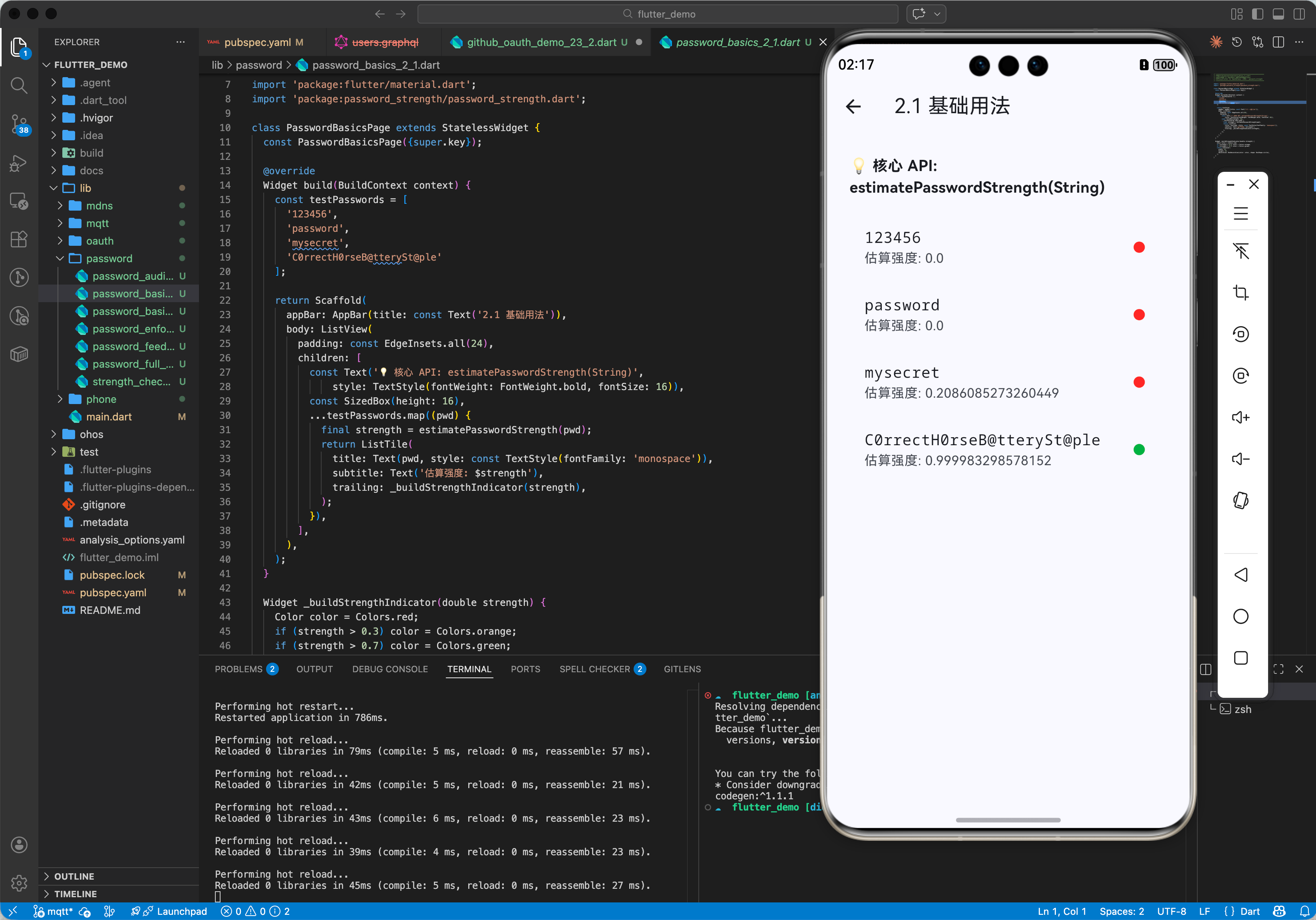
2.1 基础用法
计算密码强度值。
import 'package:password_strength/password_strength.dart';

void main() {
  // 极弱
  print(estimatePasswordStrength('123456')); // ~0.02

  // 中等
  print(estimatePasswordStrength('mysecret')); // ~0.3

  // 强
  print(estimatePasswordStrength('C0rrectH0rseB@tterySt@ple')); // >0.9
}
2.2 自定义字典
如果你在做企业应用,可能需要禁止包含公司名的密码。虽然库本身没有直接暴露 customDictionary 参数,但你可以结合简单的 string contains 预检查。
三、常见应用场景
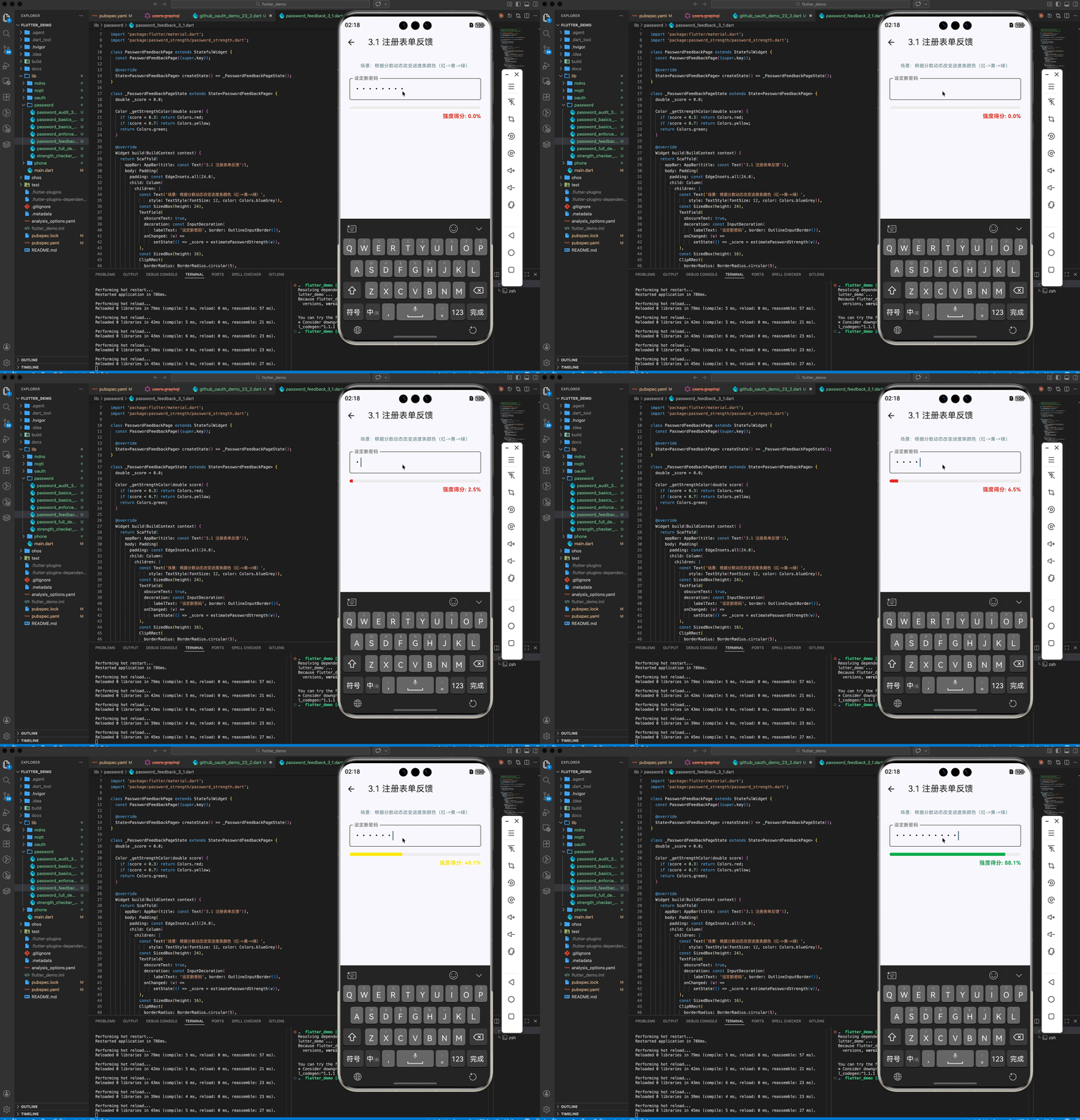
3.1 场景 1:注册表单反馈
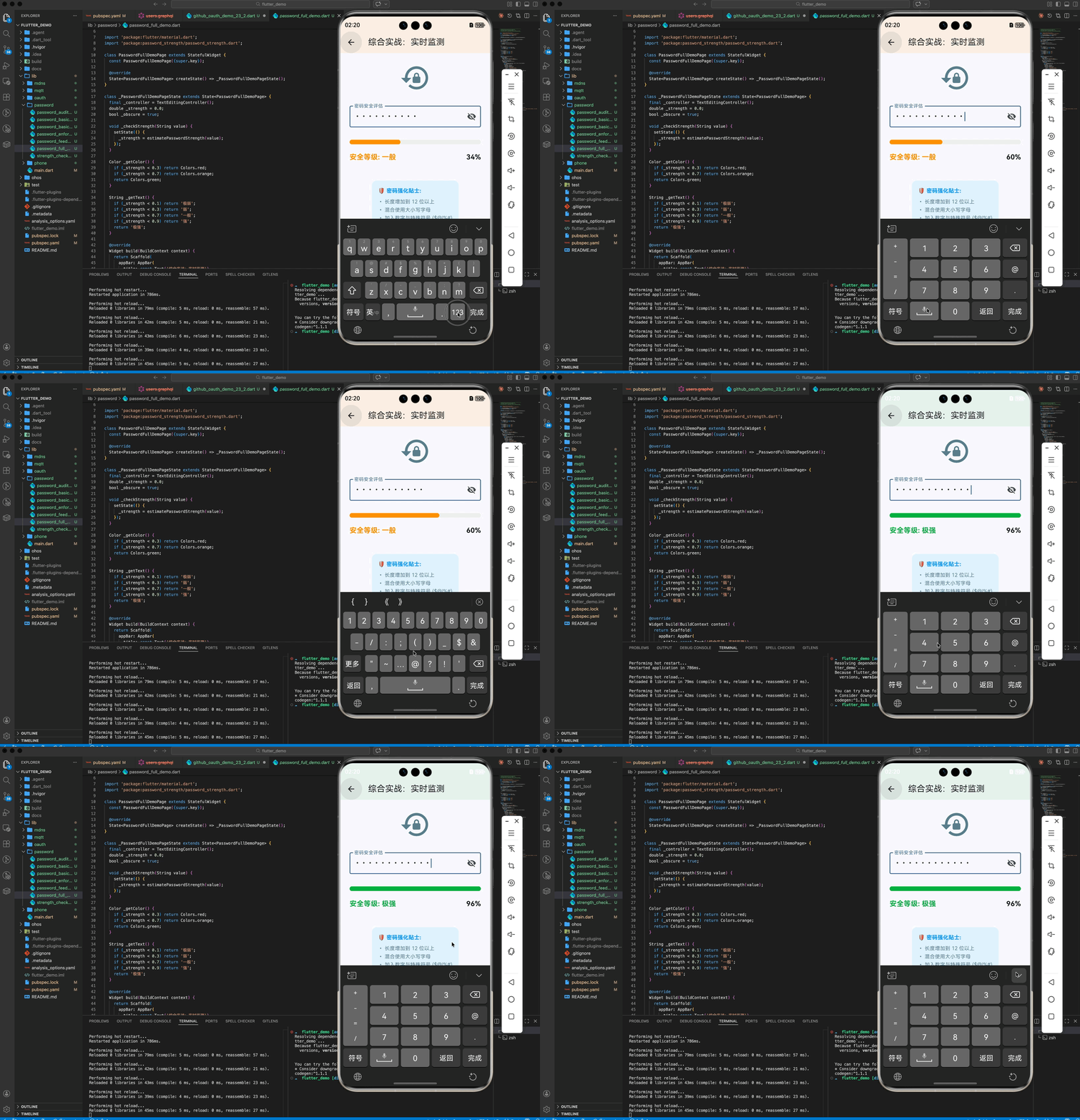
根据分数动态改变进度条颜色(红->黄->绿)。
Color getStrengthColor(double score) {
  if (score < 0.3) return Colors.red;
  if (score < 0.7) return Colors.yellow;
  return Colors.green;
}
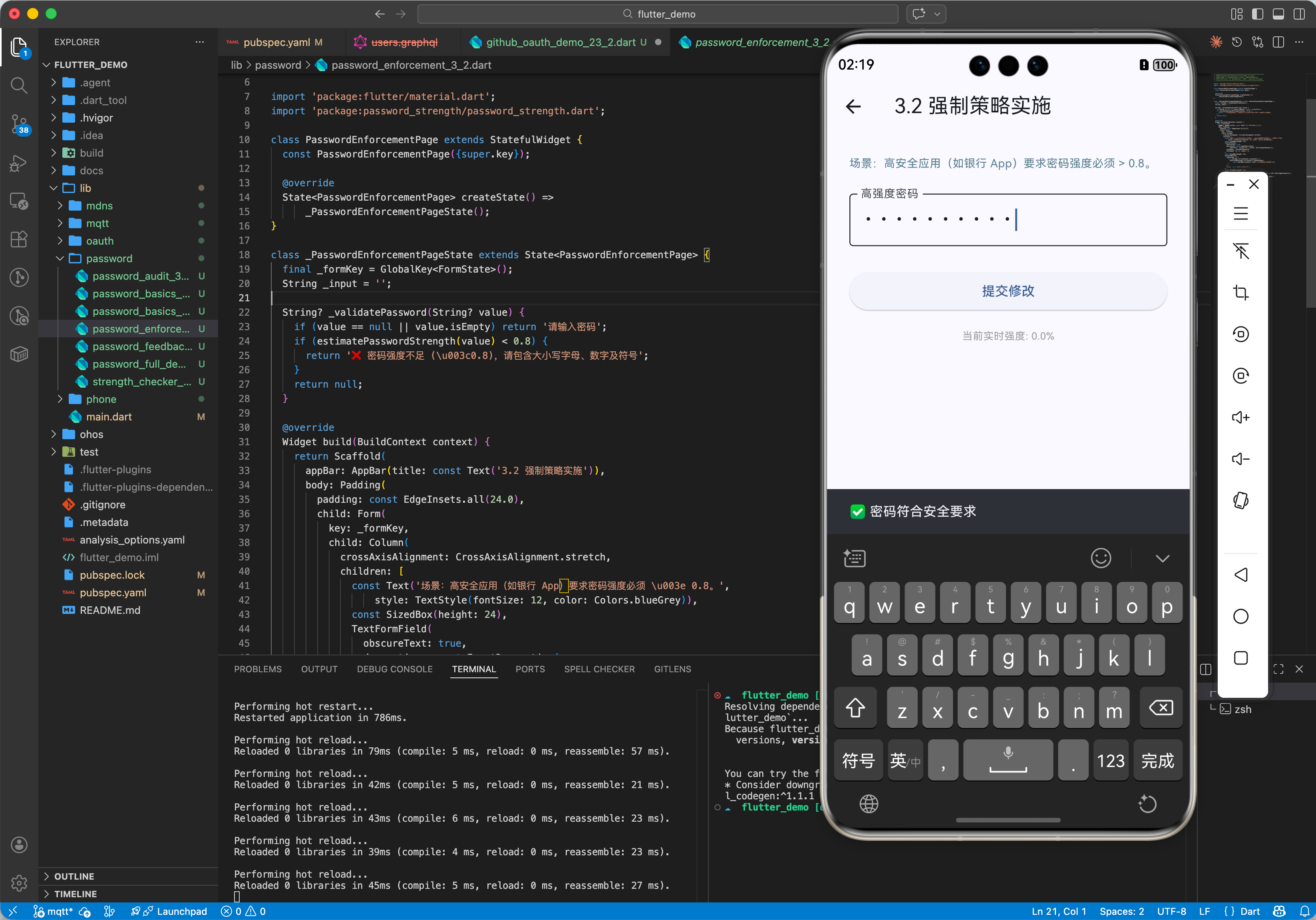
3.2 场景 2:强制策略实施
某些高安全应用(如银行 App)要求密码强度必须 > 0.8。
String? validatePassword(String? value) {
  if (value == null || estimatePasswordStrength(value) < 0.8) {
    return '密码强度不足,请包含大小写字母、数字及符号';
  }
  return null;
}
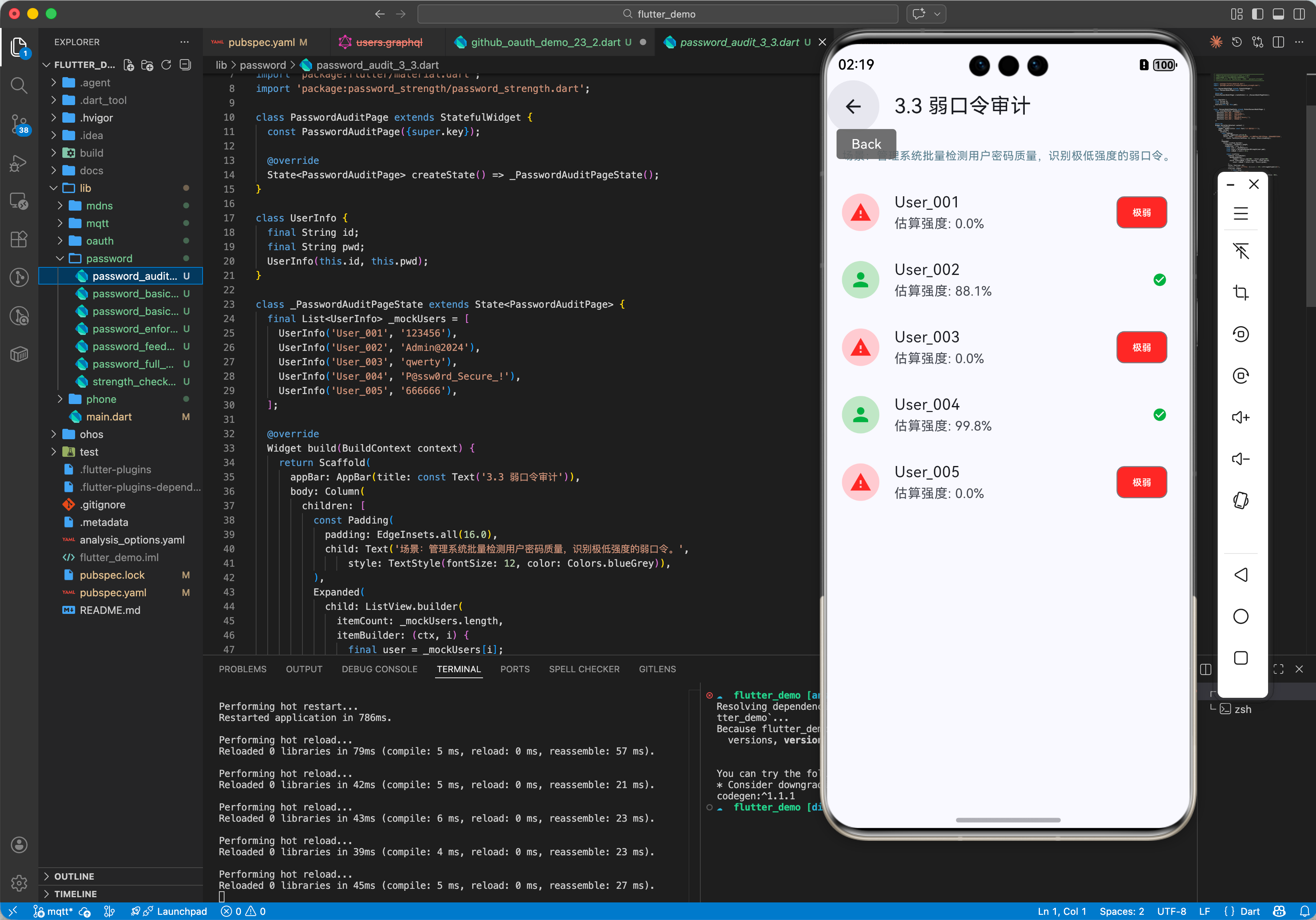
3.3 场景 3:弱口令扫码
后台管理系统批量检测存量用户(假设存的是明文或可逆加密,虽然不推荐)的密码质量。
void auditUsers(List<User> users) {
  for (var u in users) {
    if (estimatePasswordStrength(u.pwd) < 0.1) {
      print('User ${u.id} has very weak password!');
    }
  }
}
四、OpenHarmony 平台适配
4.1 纯算法库
无任何平台依赖,OpenHarmony 完美支持。
4.2 性能
计算过程非常快,不会阻塞 UI 线程,即便在低端鸿蒙机上也能流畅运行。
五、完整示例代码
本示例构建一个实时密码强度检测器。
import 'package:flutter/material.dart';
import 'package:password_strength/password_strength.dart';
void main() {
runApp(const MaterialApp(home: PasswordPage()));
}
class PasswordPage extends StatefulWidget {
const PasswordPage({super.key});
State<PasswordPage> createState() => _PasswordPageState();
}
class _PasswordPageState extends State<PasswordPage> {
final _controller = TextEditingController();
double _strength = 0.0;
void _checkStrength(String value) {
setState(() {
_strength = estimatePasswordStrength(value);
});
}
Color _getColor() {
if (_strength < 0.3) return Colors.red;
if (_strength < 0.7) return Colors.orange;
return Colors.green;
}
String _getText() {
if (_strength < 0.1) return '极弱';
if (_strength < 0.3) return '弱';
if (_strength < 0.7) return '一般';
if (_strength < 0.9) return '强';
return '极强';
}
Widget build(BuildContext context) {
return Scaffold(
appBar: AppBar(title: const Text('密码强度检测')),
body: Padding(
padding: const EdgeInsets.all(20.0),
child: Column(
children: [
TextField(
controller: _controller,
obscureText: true,
decoration: const InputDecoration(
labelText: '请输入密码',
border: OutlineInputBorder(),
),
onChanged: _checkStrength,
),
const SizedBox(height: 20),
LinearProgressIndicator(
value: _strength,
backgroundColor: Colors.grey[300],
color: _getColor(),
minHeight: 10,
),
const SizedBox(height: 10),
Text(
'强度: ${_getText()} (${(_strength * 100).toStringAsFixed(0)}%)',
style: TextStyle(
fontSize: 20,
fontWeight: FontWeight.bold,
color: _getColor(),
),
),
],
),
),
);
}
}
六、总结
password_strength 虽然简单,却极大提升了应用的安全合规性。
最佳实践:
- 用户引导:不要只告诉用户“密码弱”,要告诉他“缺什么”(如:加个符号)。
- 视觉反馈:进度条比单纯的文字警告更直观。
- 不要过度:对于非金融类 App,过高的密码要求(>0.9)可能会降低转化率。

作为“人工智能6S店”的官方数字引擎,为AI开发者与企业提供一个覆盖软硬件全栈、一站式门户。
更多推荐


 11
11 0
0- 0


 已为社区贡献46条内容

所有评论(0)