
Flutter 框架跨平台鸿蒙开发 - 校园热水卡记录应用开发教程
本教程详细介绍了如何使用Flutter开发一个功能完整的校园热水卡记录应用。应用包含了卡片管理、使用记录、充值记录、统计分析等核心功能,采用了Material Design 3设计规范,提供了良好的用户体验。Flutter应用架构设计复杂数据模型的设计和管理多页面导航和状态管理动画效果的实现和优化搜索和筛选功能的实现数据统计和可视化展示性能优化技巧测试策略和部署流程这个应用不仅适合校园学生使用,也
Flutter校园热水卡记录应用开发教程
项目概述
本教程将带你开发一个功能完整的Flutter校园热水卡记录应用。这款应用专为校园学生设计,提供热水卡余额查询、使用记录追踪、充值记录管理、统计分析等功能,帮助学生更好地管理热水卡的使用情况。
运行效果图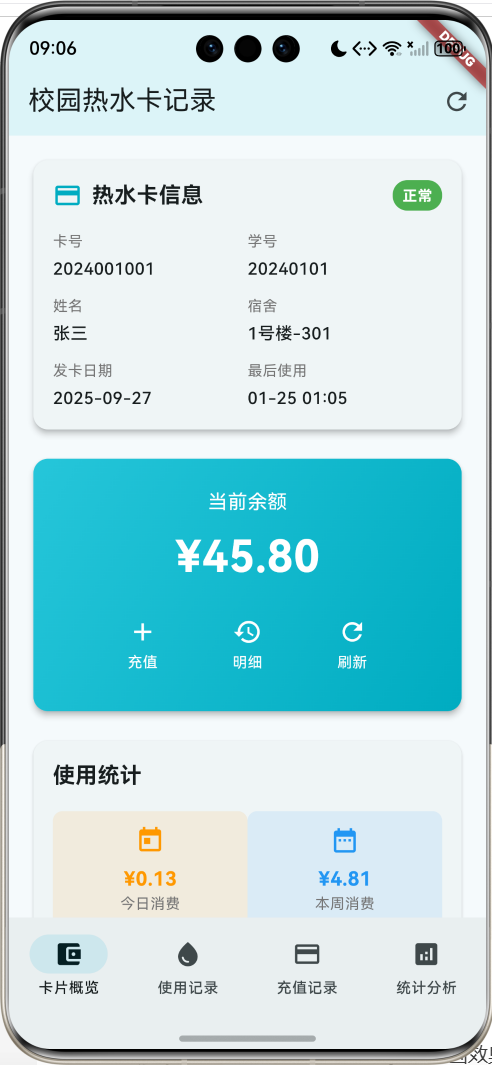
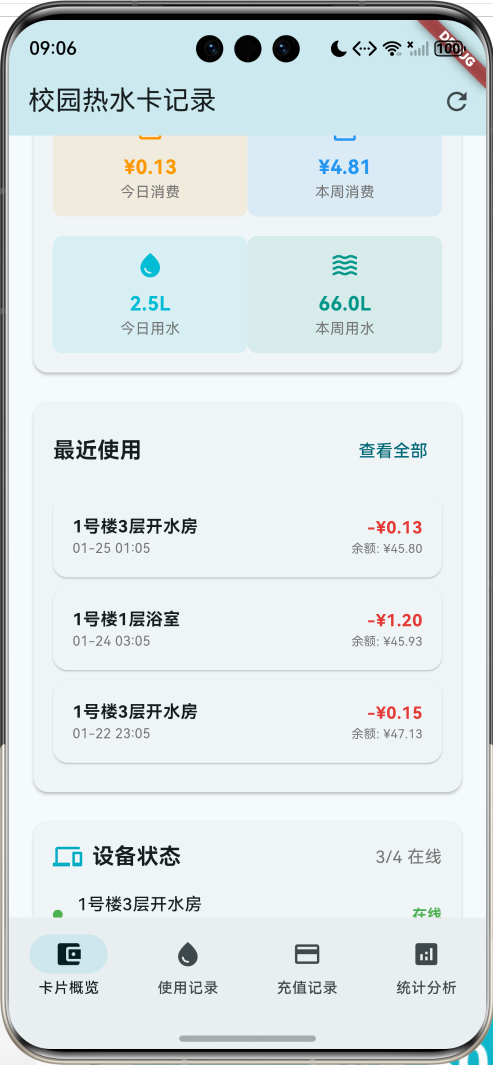
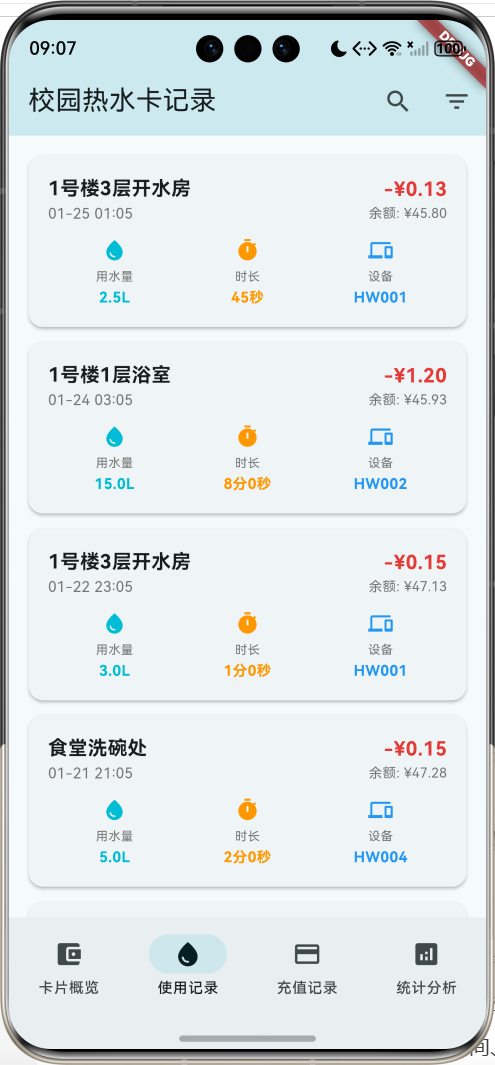
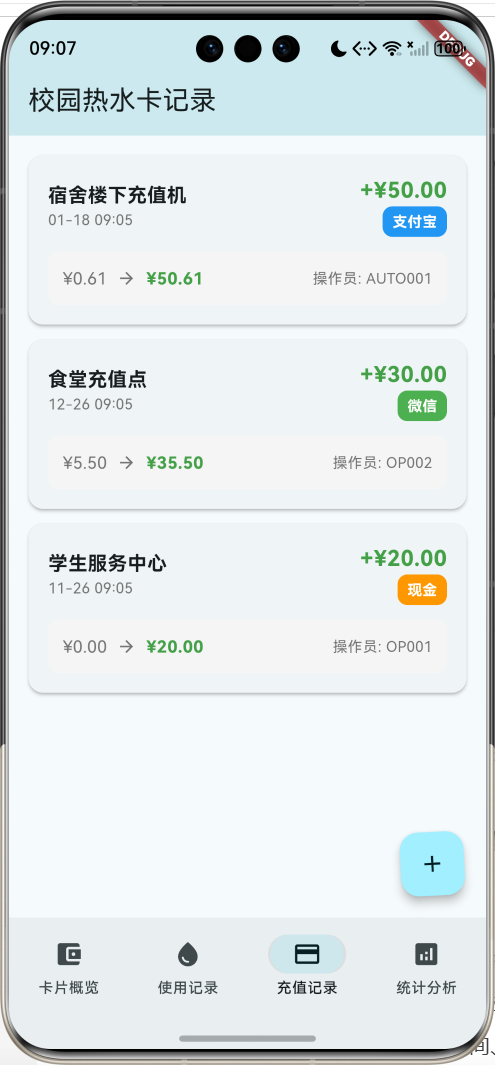
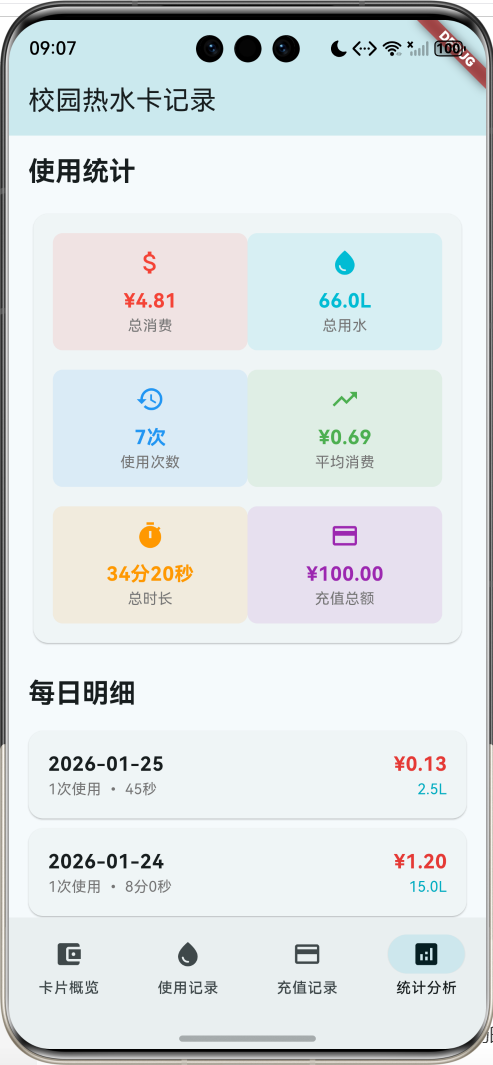
应用特色
- 卡片信息管理:显示热水卡基本信息,包括卡号、学号、姓名、宿舍等
- 余额实时显示:动画效果展示当前余额,支持刷新功能
- 使用记录追踪:详细记录每次用水的时间、地点、用量、费用等信息
- 充值记录管理:记录充值历史,支持多种支付方式
- 智能统计分析:提供日统计、周统计、地点分布等多维度分析
- 设备状态监控:显示校园内热水设备的在线状态和价格信息
- 多维度筛选:支持按时间、地点、设备等条件筛选记录
- 动画效果:余额显示和页面切换都有流畅的动画效果
技术栈
- 框架:Flutter 3.x
- 语言:Dart
- UI组件:Material Design 3
- 状态管理:StatefulWidget
- 动画:AnimationController + 多种动画效果
- 数据存储:内存存储(可扩展为本地数据库)
- 导航:NavigationBar
项目结构设计
核心数据模型
1. 热水卡信息模型(HotWaterCard)
class HotWaterCard {
  final String id;              // 唯一标识
  final String cardNumber;      // 卡号
  final String studentId;       // 学号
  final String studentName;     // 学生姓名
  final String dormitory;       // 宿舍信息
  final DateTime issueDate;     // 发卡日期
  double balance;              // 当前余额
  bool isActive;               // 卡片状态
  DateTime lastUsedDate;       // 最后使用时间
}
2. 使用记录模型(UsageRecord)
class UsageRecord {
  final String id;              // 唯一标识
  final String cardId;          // 关联的卡片ID
  final DateTime usageDate;     // 使用日期
  final String location;        // 使用地点:宿舍楼、浴室等
  final double waterAmount;     // 用水量(升)
  final double cost;            // 消费金额
  final double balanceBefore;   // 使用前余额
  final double balanceAfter;    // 使用后余额
  final String deviceId;        // 设备编号
  final int duration;           // 使用时长(秒)
}
3. 充值记录模型(RechargeRecord)
class RechargeRecord {
  final String id;              // 唯一标识
  final String cardId;          // 关联的卡片ID
  final DateTime rechargeDate;  // 充值日期
  final double amount;          // 充值金额
  final String paymentMethod;   // 支付方式:现金、支付宝、微信等
  final String location;        // 充值地点
  final String operatorId;      // 操作员ID
  final double balanceBefore;   // 充值前余额
  final double balanceAfter;    // 充值后余额
}
4. 统计数据模型(UsageStatistics)
class UsageStatistics {
  final DateTime date;          // 日期
  final double totalCost;       // 总消费
  final double totalWaterAmount; // 总用水量
  final int usageCount;         // 使用次数
  final int totalDuration;      // 总时长
}
5. 设备信息模型(WaterDevice)
class WaterDevice {
  final String id;              // 唯一标识
  final String deviceNumber;    // 设备编号
  final String location;        // 设备位置
  final String building;        // 所在楼栋
  final String floor;           // 所在楼层
  final bool isOnline;          // 是否在线
  final double pricePerLiter;   // 每升价格
  final DateTime lastMaintenanceDate; // 最后维护日期
}
页面架构
应用采用底部导航栏设计,包含四个主要页面:
- 卡片概览页面:显示卡片信息、余额、快速统计和设备状态
- 使用记录页面:展示详细的用水记录,支持搜索和筛选
- 充值记录页面:显示充值历史记录
- 统计分析页面:提供多维度的数据统计和分析
详细实现步骤
第一步:项目初始化
创建新的Flutter项目:
flutter create hot_water_card_app
cd hot_water_card_app
第二步:主应用结构
class MyApp extends StatelessWidget {
const MyApp({super.key});
Widget build(BuildContext context) {
return MaterialApp(
title: '校园热水卡记录',
theme: ThemeData(
colorScheme: ColorScheme.fromSeed(seedColor: Colors.cyan),
useMaterial3: true,
),
home: const HotWaterCardHomePage(),
);
}
}
第三步:数据初始化
创建示例热水卡和使用记录数据:
void _initializeData() {
  // 初始化热水卡信息
  _currentCard = HotWaterCard(
    id: '1',
    cardNumber: '2024001001',
    studentId: '20240101',
    studentName: '张三',
    dormitory: '1号楼-301',
    issueDate: DateTime.now().subtract(const Duration(days: 120)),
    balance: 45.80,
    isActive: true,
    lastUsedDate: DateTime.now().subtract(const Duration(hours: 8)),
  );

  // 初始化设备信息
  _devices = [
    WaterDevice(
      id: '1',
      deviceNumber: 'HW001',
      location: '1号楼3层开水房',
      building: '1号楼',
      floor: '3层',
      isOnline: true,
      pricePerLiter: 0.05,
      lastMaintenanceDate: DateTime.now().subtract(const Duration(days: 7)),
    ),
    // 更多设备数据...
  ];
}
第四步:卡片概览页面
卡片信息展示
Widget _buildCardInfoCard() {
  return Card(
    elevation: 4,
    child: Padding(
      padding: const EdgeInsets.all(16),
      child: Column(
        crossAxisAlignment: CrossAxisAlignment.start,
        children: [
          // 标题行
          Row(
            children: [
              Icon(
                Icons.credit_card,
                color: Colors.cyan.shade600,
                size: 24,
              ),
              const SizedBox(width: 8),
              const Text(
                '热水卡信息',
                style: TextStyle(
                  fontSize: 18,
                  fontWeight: FontWeight.bold,
                ),
              ),
              const Spacer(),
              // 卡片状态标签
              Container(
                padding: const EdgeInsets.symmetric(horizontal: 8, vertical: 4),
                decoration: BoxDecoration(
                  color: _currentCard!.isActive ? Colors.green : Colors.red,
                  borderRadius: BorderRadius.circular(12),
                ),
                child: Text(
                  _currentCard!.isActive ? '正常' : '停用',
                  style: const TextStyle(
                    color: Colors.white,
                    fontSize: 12,
                    fontWeight: FontWeight.bold,
                  ),
                ),
              ),
            ],
          ),

          // 详细信息展示
          Row(
            children: [
              Expanded(
                child: _buildInfoRow('卡号', _currentCard!.cardNumber),
              ),
              Expanded(
                child: _buildInfoRow('学号', _currentCard!.studentId),
              ),
            ],
          ),
          // 更多信息行...
        ],
      ),
    ),
  );
}
余额卡片(带动画效果)
Widget _buildBalanceCard() {
  return Card(
    elevation: 4,
    child: Container(
      width: double.infinity,
      padding: const EdgeInsets.all(24),
      decoration: BoxDecoration(
        borderRadius: BorderRadius.circular(12),
        gradient: LinearGradient(
          colors: [Colors.cyan.shade400, Colors.cyan.shade600],
          begin: Alignment.topLeft,
          end: Alignment.bottomRight,
        ),
      ),
      child: Column(
        children: [
          const Text(
            '当前余额',
            style: TextStyle(
              color: Colors.white,
              fontSize: 16,
            ),
          ),
          const SizedBox(height: 8),
          // 动画余额显示
          AnimatedBuilder(
            animation: _balanceAnimation,
            builder: (context, child) {
              return Text(
                '¥${(_currentCard!.balance * _balanceAnimation.value).toStringAsFixed(2)}',
                style: const TextStyle(
                  color: Colors.white,
                  fontSize: 36,
                  fontWeight: FontWeight.bold,
                ),
              );
            },
          ),
          const SizedBox(height: 16),
          // 操作按钮
          Row(
            mainAxisAlignment: MainAxisAlignment.spaceEvenly,
            children: [
              _buildBalanceAction(Icons.add, '充值', () => _showRechargeDialog()),
              _buildBalanceAction(Icons.history, '明细', () => setState(() => _selectedIndex = 1)),
              _buildBalanceAction(Icons.refresh, '刷新', () => _refreshBalance()),
            ],
          ),
        ],
      ),
    ),
  );
}
快速统计卡片
Widget _buildQuickStatsCard() {
  final todayUsage = _usageRecords.where((record) {
    final today = DateTime.now();
    return record.usageDate.year == today.year &&
        record.usageDate.month == today.month &&
        record.usageDate.day == today.day;
  }).toList();

  final weekUsage = _usageRecords.where((record) {
    final weekAgo = DateTime.now().subtract(const Duration(days: 7));
    return record.usageDate.isAfter(weekAgo);
  }).toList();

  final todayCost = todayUsage.fold(0.0, (sum, record) => sum + record.cost);
  final weekCost = weekUsage.fold(0.0, (sum, record) => sum + record.cost);

  return Card(
    elevation: 2,
    child: Padding(
      padding: const EdgeInsets.all(16),
      child: Column(
        crossAxisAlignment: CrossAxisAlignment.start,
        children: [
          const Text(
            '使用统计',
            style: TextStyle(
              fontSize: 18,
              fontWeight: FontWeight.bold,
            ),
          ),
          const SizedBox(height: 16),
          Row(
            children: [
              Expanded(
                child: _buildStatItem(
                  '今日消费',
                  '¥${todayCost.toStringAsFixed(2)}',
                  Icons.today,
                  Colors.orange,
                ),
              ),
              Expanded(
                child: _buildStatItem(
                  '本周消费',
                  '¥${weekCost.toStringAsFixed(2)}',
                  Icons.date_range,
                  Colors.blue,
                ),
              ),
            ],
          ),
        ],
      ),
    ),
  );
}
第五步:使用记录页面
使用记录卡片
Widget _buildUsageRecordItem(UsageRecord record, {bool isCompact = false}) {
  return Card(
    elevation: isCompact ? 1 : 2,
    margin: EdgeInsets.only(bottom: isCompact ? 8 : 12),
    child: Padding(
      padding: const EdgeInsets.all(16),
      child: Column(
        crossAxisAlignment: CrossAxisAlignment.start,
        children: [
          // 标题行
          Row(
            children: [
              Expanded(
                child: Column(
                  crossAxisAlignment: CrossAxisAlignment.start,
                  children: [
                    Text(
                      record.location,
                      style: TextStyle(
                        fontSize: isCompact ? 14 : 16,
                        fontWeight: FontWeight.bold,
                      ),
                    ),
                    Text(
                      _formatDateTime(record.usageDate),
                      style: TextStyle(
                        color: Colors.grey.shade600,
                        fontSize: isCompact ? 11 : 12,
                      ),
                    ),
                  ],
                ),
              ),
              // 消费金额和余额
              Column(
                crossAxisAlignment: CrossAxisAlignment.end,
                children: [
                  Text(
                    '-¥${record.cost.toStringAsFixed(2)}',
                    style: TextStyle(
                      fontSize: isCompact ? 14 : 16,
                      fontWeight: FontWeight.bold,
                      color: Colors.red.shade600,
                    ),
                  ),
                  Text(
                    '余额: ¥${record.balanceAfter.toStringAsFixed(2)}',
                    style: TextStyle(
                      fontSize: isCompact ? 10 : 11,
                      color: Colors.grey.shade600,
                    ),
                  ),
                ],
              ),
            ],
          ),

          if (!isCompact) ...[
            const SizedBox(height: 12),
            // 详细信息
            Row(
              children: [
                Expanded(
                  child: _buildUsageInfoItem(
                    Icons.water_drop,
                    '用水量',
                    '${record.waterAmount.toStringAsFixed(1)}L',
                    Colors.cyan,
                  ),
                ),
                Expanded(
                  child: _buildUsageInfoItem(
                    Icons.timer,
                    '时长',
                    _formatDuration(record.duration),
                    Colors.orange,
                  ),
                ),
                Expanded(
                  child: _buildUsageInfoItem(
                    Icons.devices,
                    '设备',
                    record.deviceId,
                    Colors.blue,
                  ),
                ),
              ],
            ),
          ],
        ],
      ),
    ),
  );
}
筛选功能
List<UsageRecord> _getFilteredUsageRecords() {
  return _usageRecords.where((record) {
    // 搜索过滤
    if (_searchQuery.isNotEmpty) {
      final query = _searchQuery.toLowerCase();
      if (!record.location.toLowerCase().contains(query) &&
          !record.deviceId.toLowerCase().contains(query)) {
        return false;
      }
    }

    // 日期范围过滤
    if (_startDate != null && record.usageDate.isBefore(_startDate!)) {
      return false;
    }
    if (_endDate != null && record.usageDate.isAfter(_endDate!.add(const Duration(days: 1)))) {
      return false;
    }

    // 地点过滤
    if (_selectedLocation != null && record.location != _selectedLocation) {
      return false;
    }

    // 本周过滤
    if (_showThisWeekOnly) {
      final weekAgo = DateTime.now().subtract(const Duration(days: 7));
      if (record.usageDate.isBefore(weekAgo)) {
        return false;
      }
    }

    return true;
  }).toList();
}
第六步:充值记录页面
充值记录卡片
Widget _buildRechargeRecordItem(RechargeRecord record) {
  return Card(
    elevation: 2,
    margin: const EdgeInsets.only(bottom: 12),
    child: Padding(
      padding: const EdgeInsets.all(16),
      child: Column(
        crossAxisAlignment: CrossAxisAlignment.start,
        children: [
          // 标题行
          Row(
            children: [
              Expanded(
                child: Column(
                  crossAxisAlignment: CrossAxisAlignment.start,
                  children: [
                    Text(
                      record.location,
                      style: const TextStyle(
                        fontSize: 16,
                        fontWeight: FontWeight.bold,
                      ),
                    ),
                    Text(
                      _formatDateTime(record.rechargeDate),
                      style: TextStyle(
                        color: Colors.grey.shade600,
                        fontSize: 12,
                      ),
                    ),
                  ],
                ),
              ),
              // 充值金额和支付方式
              Column(
                crossAxisAlignment: CrossAxisAlignment.end,
                children: [
                  Text(
                    '+¥${record.amount.toStringAsFixed(2)}',
                    style: TextStyle(
                      fontSize: 18,
                      fontWeight: FontWeight.bold,
                      color: Colors.green.shade600,
                    ),
                  ),
                  Container(
                    padding: const EdgeInsets.symmetric(horizontal: 8, vertical: 4),
                    decoration: BoxDecoration(
                      color: _getPaymentMethodColor(record.paymentMethod),
                      borderRadius: BorderRadius.circular(8),
                    ),
                    child: Text(
                      record.paymentMethod,
                      style: const TextStyle(
                        color: Colors.white,
                        fontSize: 12,
                        fontWeight: FontWeight.bold,
                      ),
                    ),
                  ),
                ],
              ),
            ],
          ),

          const SizedBox(height: 12),

          // 余额变化显示
          Container(
            padding: const EdgeInsets.all(12),
            decoration: BoxDecoration(
              color: Colors.grey.shade100,
              borderRadius: BorderRadius.circular(8),
            ),
            child: Row(
              children: [
                Text(
                  '¥${record.balanceBefore.toStringAsFixed(2)}',
                  style: TextStyle(
                    fontSize: 14,
                    color: Colors.grey.shade600,
                  ),
                ),
                const SizedBox(width: 8),
                Icon(
                  Icons.arrow_forward,
                  size: 16,
                  color: Colors.grey.shade600,
                ),
                const SizedBox(width: 8),
                Text(
                  '¥${record.balanceAfter.toStringAsFixed(2)}',
                  style: TextStyle(
                    fontSize: 14,
                    fontWeight: FontWeight.bold,
                    color: Colors.green.shade600,
                  ),
                ),
                const Spacer(),
                Text(
                  '操作员: ${record.operatorId}',
                  style: TextStyle(
                    fontSize: 12,
                    color: Colors.grey.shade600,
                  ),
                ),
              ],
            ),
          ),
        ],
      ),
    ),
  );
}
支付方式颜色映射
Color _getPaymentMethodColor(String method) {
  switch (method) {
    case '支付宝':
      return Colors.blue;
    case '微信':
      return Colors.green;
    case '现金':
      return Colors.orange;
    case '银行卡':
      return Colors.purple;
    case '校园卡':
      return Colors.cyan;
    default:
      return Colors.grey;
  }
}
第七步:统计分析页面
总体统计卡片
Widget _buildOverallStatsCard() {
  final totalCost = _usageRecords.fold(0.0, (sum, record) => sum + record.cost);
  final totalWater = _usageRecords.fold(0.0, (sum, record) => sum + record.waterAmount);
  final totalDuration = _usageRecords.fold(0, (sum, record) => sum + record.duration);
  final avgCostPerUse = _usageRecords.isNotEmpty ? totalCost / _usageRecords.length : 0.0;

  return Card(
    child: Padding(
      padding: const EdgeInsets.all(16),
      child: Column(
        children: [
          Row(
            children: [
              Expanded(
                child: _buildStatItem(
                  '总消费',
                  '¥${totalCost.toStringAsFixed(2)}',
                  Icons.attach_money,
                  Colors.red,
                ),
              ),
              Expanded(
                child: _buildStatItem(
                  '总用水',
                  '${totalWater.toStringAsFixed(1)}L',
                  Icons.water_drop,
                  Colors.cyan,
                ),
              ),
            ],
          ),
          const SizedBox(height: 16),
          Row(
            children: [
              Expanded(
                child: _buildStatItem(
                  '使用次数',
                  '${_usageRecords.length}次',
                  Icons.history,
                  Colors.blue,
                ),
              ),
              Expanded(
                child: _buildStatItem(
                  '平均消费',
                  '¥${avgCostPerUse.toStringAsFixed(2)}',
                  Icons.trending_up,
                  Colors.green,
                ),
              ),
            ],
          ),
        ],
      ),
    ),
  );
}
地点使用分布
Widget _buildLocationStatsCard() {
  final locationStats = <String, Map<String, double>>{};

  for (final record in _usageRecords) {
    if (!locationStats.containsKey(record.location)) {
      locationStats[record.location] = {
        'cost': 0.0,
        'water': 0.0,
        'count': 0.0,
      };
    }
    locationStats[record.location]!['cost'] =
        locationStats[record.location]!['cost']! + record.cost;
    locationStats[record.location]!['water'] =
        locationStats[record.location]!['water']! + record.waterAmount;
    locationStats[record.location]!['count'] =
        locationStats[record.location]!['count']! + 1;
  }

  return Card(
    child: Padding(
      padding: const EdgeInsets.all(16),
      child: Column(
        children: locationStats.entries.map((entry) {
          final location = entry.key;
          final stats = entry.value;
          final percentage = stats['cost']! / _usageRecords.fold(0.0, (sum, r) => sum + r.cost);

          return Padding(
            padding: const EdgeInsets.only(bottom: 12),
            child: Column(
              crossAxisAlignment: CrossAxisAlignment.start,
              children: [
                Row(
                  mainAxisAlignment: MainAxisAlignment.spaceBetween,
                  children: [
                    Text(
                      location,
                      style: const TextStyle(fontWeight: FontWeight.w500),
                    ),
                    Text(
                      '¥${stats['cost']!.toStringAsFixed(2)} (${(percentage * 100).toStringAsFixed(1)}%)',
                      style: TextStyle(
                        color: Colors.red.shade600,
                        fontWeight: FontWeight.bold,
                      ),
                    ),
                  ],
                ),
                const SizedBox(height: 4),
                LinearProgressIndicator(
                  value: percentage,
                  backgroundColor: Colors.grey.shade300,
                  valueColor: AlwaysStoppedAnimation<Color>(Colors.cyan.shade600),
                ),
                const SizedBox(height: 4),
                Text(
                  '${stats['count']!.toInt()}次使用 • ${stats['water']!.toStringAsFixed(1)}L',
                  style: TextStyle(
                    fontSize: 12,
                    color: Colors.grey.shade600,
                  ),
                ),
              ],
            ),
          );
        }).toList(),
      ),
    ),
  );
}
第八步:动画效果实现
多种动画控制器
void _setupAnimations() {
  // 页面淡入动画
  _fadeAnimationController = AnimationController(
    duration: const Duration(milliseconds: 800),
    vsync: this,
  );

  _fadeAnimation = Tween<double>(
    begin: 0.0,
    end: 1.0,
  ).animate(CurvedAnimation(
    parent: _fadeAnimationController,
    curve: Curves.easeInOut,
  ));

  // 余额弹性动画
  _balanceAnimationController = AnimationController(
    duration: const Duration(milliseconds: 1200),
    vsync: this,
  );

  _balanceAnimation = Tween<double>(
    begin: 0.0,
    end: 1.0,
  ).animate(CurvedAnimation(
    parent: _balanceAnimationController,
    curve: Curves.elasticOut,
  ));

  _fadeAnimationController.forward();
  _balanceAnimationController.forward();
}
余额刷新动画
void _refreshBalance() {
  _balanceAnimationController.reset();
  _balanceAnimationController.forward();

  ScaffoldMessenger.of(context).showSnackBar(
    const SnackBar(content: Text('余额已刷新')),
  );
}
核心功能详解
1. 数据统计算法
// 生成每日统计数据
void _generateStatistics() {
  final Map<String, UsageStatistics> dailyStats = {};

  for (final record in _usageRecords) {
    final dateKey = _formatDate(record.usageDate);

    if (dailyStats.containsKey(dateKey)) {
      final existing = dailyStats[dateKey]!;
      dailyStats[dateKey] = UsageStatistics(
        date: existing.date,
        totalCost: existing.totalCost + record.cost,
        totalWaterAmount: existing.totalWaterAmount + record.waterAmount,
        usageCount: existing.usageCount + 1,
        totalDuration: existing.totalDuration + record.duration,
      );
    } else {
      dailyStats[dateKey] = UsageStatistics(
        date: record.usageDate,
        totalCost: record.cost,
        totalWaterAmount: record.waterAmount,
        usageCount: 1,
        totalDuration: record.duration,
      );
    }
  }

  _statistics = dailyStats.values.toList()
    ..sort((a, b) => b.date.compareTo(a.date));
}
2. 时间格式化工具
// 格式化日期时间
String _formatDateTime(DateTime dateTime) {
  return '${dateTime.month.toString().padLeft(2, '0')}-${dateTime.day.toString().padLeft(2, '0')} ${dateTime.hour.toString().padLeft(2, '0')}:${dateTime.minute.toString().padLeft(2, '0')}';
}

// 格式化日期
String _formatDate(DateTime dateTime) {
  return '${dateTime.year}-${dateTime.month.toString().padLeft(2, '0')}-${dateTime.day.toString().padLeft(2, '0')}';
}

// 格式化时长
String _formatDuration(int seconds) {
  final minutes = seconds ~/ 60;
  final remainingSeconds = seconds % 60;
  if (minutes > 0) {
    return '${minutes}分${remainingSeconds}秒';
  } else {
    return '${remainingSeconds}秒';
  }
}
3. 设备状态监控
// 设备状态显示
Widget _buildDeviceItem(WaterDevice device) {
  return Padding(
    padding: const EdgeInsets.only(bottom: 8),
    child: Row(
      children: [
        // 在线状态指示器
        Container(
          width: 8,
          height: 8,
          decoration: BoxDecoration(
            color: device.isOnline ? Colors.green : Colors.red,
            shape: BoxShape.circle,
          ),
        ),
        const SizedBox(width: 12),
        Expanded(
          child: Column(
            crossAxisAlignment: CrossAxisAlignment.start,
            children: [
              Text(
                device.location,
                style: const TextStyle(
                  fontSize: 14,
                  fontWeight: FontWeight.w500,
                ),
              ),
              Text(
                '${device.deviceNumber} • ¥${device.pricePerLiter}/L',
                style: TextStyle(
                  fontSize: 12,
                  color: Colors.grey.shade600,
                ),
              ),
            ],
          ),
        ),
        Text(
          device.isOnline ? '在线' : '离线',
          style: TextStyle(
            fontSize: 12,
            color: device.isOnline ? Colors.green : Colors.red,
            fontWeight: FontWeight.bold,
          ),
        ),
      ],
    ),
  );
}
性能优化
1. 列表优化
使用ListView.builder实现虚拟滚动:
ListView.builder(
  padding: const EdgeInsets.all(16),
  itemCount: filteredRecords.length,
  itemBuilder: (context, index) {
    final record = filteredRecords[index];
    return _buildUsageRecordItem(record);
  },
)
2. 状态管理优化
合理使用setState,避免不必要的重建:
void _updateBalance(double newBalance) {
  setState(() {
    _currentCard!.balance = newBalance;
  });
  _refreshBalance();
}
3. 内存管理
及时释放动画控制器:
void dispose() {
_fadeAnimationController.dispose();
_balanceAnimationController.dispose();
super.dispose();
}
4. 数据缓存
// 缓存筛选结果
List<UsageRecord>? _cachedFilteredRecords;
String? _lastSearchQuery;

List<UsageRecord> _getFilteredUsageRecords() {
  // 检查缓存是否有效
  if (_cachedFilteredRecords != null && _lastSearchQuery == _searchQuery) {
    return _cachedFilteredRecords!;
  }

  // 重新计算筛选结果
  _cachedFilteredRecords = _usageRecords.where((record) {
    // 筛选逻辑...
  }).toList();

  _lastSearchQuery = _searchQuery;
  return _cachedFilteredRecords!;
}
扩展功能
1. 数据持久化
使用sqflite数据库保存数据:
dependencies:
  sqflite: ^2.3.0

class DatabaseHelper {
  static final DatabaseHelper _instance = DatabaseHelper._internal();
  factory DatabaseHelper() => _instance;
  DatabaseHelper._internal();

  static Database? _database;

  Future<Database> get database async {
    if (_database != null) return _database!;
    _database = await _initDatabase();
    return _database!;
  }

  Future<Database> _initDatabase() async {
    String path = join(await getDatabasesPath(), 'hot_water_card.db');
    return await openDatabase(
      path,
      version: 1,
      onCreate: _onCreate,
    );
  }

  Future<void> _onCreate(Database db, int version) async {
    // 创建热水卡表
    await db.execute('''
      CREATE TABLE hot_water_cards(
        id TEXT PRIMARY KEY,
        card_number TEXT NOT NULL,
        student_id TEXT NOT NULL,
        student_name TEXT NOT NULL,
        dormitory TEXT NOT NULL,
        issue_date TEXT NOT NULL,
        balance REAL NOT NULL,
        is_active INTEGER NOT NULL,
        last_used_date TEXT NOT NULL
      )
    ''');

    // 创建使用记录表
    await db.execute('''
      CREATE TABLE usage_records(
        id TEXT PRIMARY KEY,
        card_id TEXT NOT NULL,
        usage_date TEXT NOT NULL,
        location TEXT NOT NULL,
        water_amount REAL NOT NULL,
        cost REAL NOT NULL,
        balance_before REAL NOT NULL,
        balance_after REAL NOT NULL,
        device_id TEXT NOT NULL,
        duration INTEGER NOT NULL,
        FOREIGN KEY (card_id) REFERENCES hot_water_cards (id)
      )
    ''');

    // 创建充值记录表
    await db.execute('''
      CREATE TABLE recharge_records(
        id TEXT PRIMARY KEY,
        card_id TEXT NOT NULL,
        recharge_date TEXT NOT NULL,
        amount REAL NOT NULL,
        payment_method TEXT NOT NULL,
        location TEXT NOT NULL,
        operator_id TEXT NOT NULL,
        balance_before REAL NOT NULL,
        balance_after REAL NOT NULL,
        FOREIGN KEY (card_id) REFERENCES hot_water_cards (id)
      )
    ''');
  }

  // 插入使用记录
  Future<int> insertUsageRecord(UsageRecord record) async {
    final db = await database;
    return await db.insert('usage_records', {
      'id': record.id,
      'card_id': record.cardId,
      'usage_date': record.usageDate.toIso8601String(),
      'location': record.location,
      'water_amount': record.waterAmount,
      'cost': record.cost,
      'balance_before': record.balanceBefore,
      'balance_after': record.balanceAfter,
      'device_id': record.deviceId,
      'duration': record.duration,
    });
  }

  // 获取所有使用记录
  Future<List<UsageRecord>> getAllUsageRecords() async {
    final db = await database;
    final List<Map<String, dynamic>> maps = await db.query('usage_records');
    return List.generate(maps.length, (i) => UsageRecord.fromMap(maps[i]));
  }
}
2. 推送通知功能
使用flutter_local_notifications设置余额提醒:
dependencies:
  flutter_local_notifications: ^16.1.0

class NotificationService {
  final FlutterLocalNotificationsPlugin _notifications = FlutterLocalNotificationsPlugin();

  Future<void> initialize() async {
    const androidSettings = AndroidInitializationSettings('@mipmap/ic_launcher');
    const iosSettings = DarwinInitializationSettings();
    const settings = InitializationSettings(
      android: androidSettings,
      iOS: iosSettings,
    );

    await _notifications.initialize(settings);
  }

  Future<void> scheduleLowBalanceReminder(double balance) async {
    if (balance < 10.0) {
      await _notifications.show(
        0,
        '余额不足提醒',
        '您的热水卡余额仅剩¥${balance.toStringAsFixed(2)},请及时充值',
        const NotificationDetails(
          android: AndroidNotificationDetails(
            'balance_channel',
            '余额提醒',
            channelDescription: '热水卡余额不足提醒',
            importance: Importance.high,
          ),
        ),
      );
    }
  }

  Future<void> scheduleUsageReminder() async {
    await _notifications.zonedSchedule(
      1,
      '用水提醒',
      '记得关注用水量,节约用水从我做起',
      _nextInstanceOfTime(20, 0), // 每天晚上8点
      const NotificationDetails(
        android: AndroidNotificationDetails(
          'usage_channel',
          '用水提醒',
          channelDescription: '节约用水提醒',
          importance: Importance.default,
        ),
      ),
      uiLocalNotificationDateInterpretation: UILocalNotificationDateInterpretation.absoluteTime,
      matchDateTimeComponents: DateTimeComponents.time,
    );
  }
}
3. 数据导出功能
导出使用记录为CSV或PDF:
dependencies:
  csv: ^5.0.2
  pdf: ^3.10.4

class DataExporter {
  Future<void> exportUsageRecordsToCSV(List<UsageRecord> records) async {
    List<List<dynamic>> rows = [];

    // 添加表头
    rows.add([
      '使用日期',
      '使用地点',
      '用水量(L)',
      '消费金额',
      '使用前余额',
      '使用后余额',
      '设备编号',
      '使用时长(秒)'
    ]);

    // 添加数据行
    for (final record in records) {
      rows.add([
        record.usageDate.toString(),
        record.location,
        record.waterAmount,
        record.cost,
        record.balanceBefore,
        record.balanceAfter,
        record.deviceId,
        record.duration,
      ]);
    }

    String csv = const ListToCsvConverter().convert(rows);

    final Directory directory = await getApplicationDocumentsDirectory();
    final String path = '${directory.path}/usage_records_export.csv';
    final File file = File(path);
    await file.writeAsString(csv);

    await Share.shareFiles([path], text: '热水卡使用记录导出');
  }

  Future<void> exportMonthlyReportToPDF(List<UsageRecord> records, DateTime month) async {
    final pdf = pw.Document();

    pdf.addPage(
      pw.Page(
        pageFormat: PdfPageFormat.a4,
        build: (pw.Context context) {
          return pw.Column(
            crossAxisAlignment: pw.CrossAxisAlignment.start,
            children: [
              pw.Text(
                '热水卡月度使用报告',
                style: pw.TextStyle(
                  fontSize: 24,
                  fontWeight: pw.FontWeight.bold,
                ),
              ),
              pw.SizedBox(height: 20),
              pw.Text('报告月份: ${month.year}年${month.month}月'),
              pw.Text('总使用次数: ${records.length}次'),
              pw.Text('总消费金额: ¥${records.fold(0.0, (sum, r) => sum + r.cost).toStringAsFixed(2)}'),
              pw.Text('总用水量: ${records.fold(0.0, (sum, r) => sum + r.waterAmount).toStringAsFixed(1)}L'),
              pw.SizedBox(height: 20),
              pw.Text('详细记录:'),
              pw.Table.fromTextArray(
                headers: ['日期', '地点', '用水量', '消费'],
                data: records.map((r) => [
                  r.usageDate.toString().substring(0, 10),
                  r.location,
                  '${r.waterAmount.toStringAsFixed(1)}L',
                  '¥${r.cost.toStringAsFixed(2)}',
                ]).toList(),
              ),
            ],
          );
        },
      ),
    );

    final output = await getTemporaryDirectory();
    final file = File('${output.path}/monthly_report.pdf');
    await file.writeAsBytes(await pdf.save());

    await Share.shareFiles([file.path], text: '热水卡月度报告');
  }
}
4. 云同步功能
集成Firebase进行数据同步:
dependencies:
  firebase_core: ^2.24.2
  cloud_firestore: ^4.13.6

class FirebaseService {
  final FirebaseFirestore _firestore = FirebaseFirestore.instance;

  Future<void> syncUsageRecords(List<UsageRecord> records) async {
    final batch = _firestore.batch();

    for (final record in records) {
      final docRef = _firestore
          .collection('users')
          .doc(_getCurrentUserId())
          .collection('usage_records')
          .doc(record.id);
      batch.set(docRef, record.toMap());
    }

    await batch.commit();
  }

  Stream<List<UsageRecord>> getUsageRecordsStream() {
    return _firestore
        .collection('users')
        .doc(_getCurrentUserId())
        .collection('usage_records')
        .orderBy('usage_date', descending: true)
        .snapshots()
        .map((snapshot) => snapshot.docs
            .map((doc) => UsageRecord.fromMap(doc.data()))
            .toList());
  }

  Future<void> syncCardInfo(HotWaterCard card) async {
    await _firestore
        .collection('users')
        .doc(_getCurrentUserId())
        .collection('cards')
        .doc(card.id)
        .set(card.toMap());
  }

  String _getCurrentUserId() {
    return 'user_id'; // 实际应用中获取当前用户ID
  }
}
5. 智能分析功能
class UsageAnalyzer {
  // 分析用水习惯
  static Map<String, dynamic> analyzeUsagePattern(List<UsageRecord> records) {
    final hourlyUsage = <int, int>{};
    final dailyUsage = <int, double>{};
    final locationPreference = <String, int>{};

    for (final record in records) {
      // 按小时统计
      final hour = record.usageDate.hour;
      hourlyUsage[hour] = (hourlyUsage[hour] ?? 0) + 1;

      // 按星期统计
      final weekday = record.usageDate.weekday;
      dailyUsage[weekday] = (dailyUsage[weekday] ?? 0.0) + record.cost;

      // 地点偏好
      locationPreference[record.location] = (locationPreference[record.location] ?? 0) + 1;
    }

    // 找出使用高峰时段
    final peakHour = hourlyUsage.entries
        .reduce((a, b) => a.value > b.value ? a : b)
        .key;

    // 找出最常用地点
    final favoriteLocation = locationPreference.entries
        .reduce((a, b) => a.value > b.value ? a : b)
        .key;

    return {
      'peakHour': peakHour,
      'favoriteLocation': favoriteLocation,
      'hourlyUsage': hourlyUsage,
      'dailyUsage': dailyUsage,
      'locationPreference': locationPreference,
    };
  }

  // 预测余额耗尽时间
  static DateTime? predictBalanceDepletion(double currentBalance, List<UsageRecord> recentRecords) {
    if (recentRecords.isEmpty) return null;

    // 计算最近7天的平均日消费
    final recentWeek = recentRecords.where((r) =>
        DateTime.now().difference(r.usageDate).inDays <= 7).toList();

    if (recentWeek.isEmpty) return null;

    final totalCost = recentWeek.fold(0.0, (sum, r) => sum + r.cost);
    final avgDailyCost = totalCost / 7;

    if (avgDailyCost <= 0) return null;

    final daysRemaining = currentBalance / avgDailyCost;
    return DateTime.now().add(Duration(days: daysRemaining.ceil()));
  }

  // 生成节水建议
  static List<String> generateWaterSavingTips(List<UsageRecord> records) {
    final tips = <String>[];

    final avgWaterPerUse = records.fold(0.0, (sum, r) => sum + r.waterAmount) / records.length;
    final avgDurationPerUse = records.fold(0, (sum, r) => sum + r.duration) / records.length;

    if (avgWaterPerUse > 20) {
      tips.add('您的平均用水量较高,建议控制用水时间');
    }

    if (avgDurationPerUse > 600) {
      tips.add('建议缩短用水时间,每次使用不超过10分钟');
    }

    final bathUsage = records.where((r) => r.location.contains('浴室')).length;
    final totalUsage = records.length;

    if (bathUsage / totalUsage > 0.8) {
      tips.add('可以考虑错峰洗澡,避免用水高峰期');
    }

    return tips;
  }
}
测试策略
1. 单元测试
测试核心业务逻辑:
// test/usage_analyzer_test.dart
import 'package:flutter_test/flutter_test.dart';
import 'package:hot_water_card_app/models/usage_record.dart';
import 'package:hot_water_card_app/services/usage_analyzer.dart';

void main() {
  group('UsageAnalyzer Tests', () {
    test('should analyze usage pattern correctly', () {
      final records = [
        UsageRecord(
          id: '1',
          cardId: '1',
          usageDate: DateTime(2024, 1, 1, 8, 0),
          location: '1号楼浴室',
          waterAmount: 15.0,
          cost: 1.2,
          balanceBefore: 50.0,
          balanceAfter: 48.8,
          deviceId: 'HW001',
          duration: 480,
        ),
        UsageRecord(
          id: '2',
          cardId: '1',
          usageDate: DateTime(2024, 1, 1, 8, 30),
          location: '1号楼浴室',
          waterAmount: 18.0,
          cost: 1.44,
          balanceBefore: 48.8,
          balanceAfter: 47.36,
          deviceId: 'HW001',
          duration: 540,
        ),
      ];

      final analysis = UsageAnalyzer.analyzeUsagePattern(records);

      expect(analysis['peakHour'], equals(8));
      expect(analysis['favoriteLocation'], equals('1号楼浴室'));
    });

    test('should predict balance depletion correctly', () {
      final records = [
        UsageRecord(
          id: '1',
          cardId: '1',
          usageDate: DateTime.now().subtract(const Duration(days: 1)),
          location: '1号楼浴室',
          waterAmount: 15.0,
          cost: 2.0,
          balanceBefore: 50.0,
          balanceAfter: 48.0,
          deviceId: 'HW001',
          duration: 480,
        ),
      ];

      final prediction = UsageAnalyzer.predictBalanceDepletion(20.0, records);

      expect(prediction, isNotNull);
      expect(prediction!.isAfter(DateTime.now()), isTrue);
    });
  });
}
2. Widget测试
测试UI组件:
// test/widget_test.dart
import 'package:flutter/material.dart';
import 'package:flutter_test/flutter_test.dart';
import 'package:hot_water_card_app/main.dart';

void main() {
  testWidgets('App should display navigation bar', (WidgetTester tester) async {
    await tester.pumpWidget(const MyApp());

    expect(find.byType(NavigationBar), findsOneWidget);
    expect(find.text('卡片概览'), findsOneWidget);
    expect(find.text('使用记录'), findsOneWidget);
    expect(find.text('充值记录'), findsOneWidget);
    expect(find.text('统计分析'), findsOneWidget);
  });

  testWidgets('Should show card information', (WidgetTester tester) async {
    await tester.pumpWidget(const MyApp());

    await tester.pumpAndSettle();

    expect(find.text('热水卡信息'), findsOneWidget);
    expect(find.text('当前余额'), findsOneWidget);
    expect(find.byType(Card), findsWidgets);
  });

  testWidgets('Should navigate between pages', (WidgetTester tester) async {
    await tester.pumpWidget(const MyApp());

    await tester.pumpAndSettle();

    // 点击使用记录页面
    await tester.tap(find.text('使用记录'));
    await tester.pumpAndSettle();

    expect(find.byType(ListView), findsOneWidget);

    // 点击统计分析页面
    await tester.tap(find.text('统计分析'));
    await tester.pumpAndSettle();

    expect(find.text('使用统计'), findsOneWidget);
  });
}
3. 集成测试
测试完整用户流程:
// integration_test/app_test.dart
import 'package:flutter/material.dart';
import 'package:flutter_test/flutter_test.dart';
import 'package:integration_test/integration_test.dart';
import 'package:hot_water_card_app/main.dart' as app;

void main() {
  IntegrationTestWidgetsFlutterBinding.ensureInitialized();

  group('App Integration Tests', () {
    testWidgets('Complete user flow test', (WidgetTester tester) async {
      app.main();
      await tester.pumpAndSettle();

      // 测试余额刷新
      await tester.tap(find.byIcon(Icons.refresh));
      await tester.pumpAndSettle();

      expect(find.text('余额已刷新'), findsOneWidget);

      // 测试搜索功能
      await tester.tap(find.text('使用记录'));
      await tester.pumpAndSettle();

      await tester.tap(find.byIcon(Icons.search));
      await tester.pumpAndSettle();

      await tester.enterText(find.byType(TextField), '浴室');
      await tester.tap(find.text('搜索'));
      await tester.pumpAndSettle();

      expect(find.text('浴室'), findsWidgets);

      // 测试筛选功能
      await tester.tap(find.byIcon(Icons.filter_list));
      await tester.pumpAndSettle();

      await tester.tap(find.text('仅显示本周'));
      await tester.tap(find.text('应用'));
      await tester.pumpAndSettle();

      expect(find.text('本周'), findsOneWidget);

      // 测试统计页面
      await tester.tap(find.text('统计分析'));
      await tester.pumpAndSettle();

      expect(find.text('总消费'), findsOneWidget);
      expect(find.text('总用水'), findsOneWidget);
    });
  });
}
部署和发布
1. Android发布
# 生成签名密钥
keytool -genkey -v -keystore ~/key.jks -keyalg RSA -keysize 2048 -validity 10000 -alias key

# 配置android/app/build.gradle
android {
    signingConfigs {
        release {
            keyAlias keystoreProperties['keyAlias']
            keyPassword keystoreProperties['keyPassword']
            storeFile keystoreProperties['storeFile'] ? file(keystoreProperties['storeFile']) : null
            storePassword keystoreProperties['storePassword']
        }
    }
    buildTypes {
        release {
            signingConfig signingConfigs.release
        }
    }
}

# 构建APK
flutter build apk --release
2. iOS发布
# 构建iOS应用
flutter build ios --release

# 使用Xcode进行代码签名和发布
open ios/Runner.xcworkspace
3. Web发布
# 构建Web应用
flutter build web --release

# 部署到服务器
# 将build/web目录内容上传到Web服务器
总结
本教程详细介绍了如何使用Flutter开发一个功能完整的校园热水卡记录应用。应用包含了卡片管理、使用记录、充值记录、统计分析等核心功能,采用了Material Design 3设计规范,提供了良好的用户体验。
通过本项目的学习,你将掌握:
- Flutter应用架构设计
- 复杂数据模型的设计和管理
- 多页面导航和状态管理
- 动画效果的实现和优化
- 搜索和筛选功能的实现
- 数据统计和可视化展示
- 性能优化技巧
- 测试策略和部署流程
这个应用不仅适合校园学生使用,也为其他校园服务类应用的开发提供了很好的参考模板。你可以根据自己的需求进行功能扩展和定制,比如添加NFC读卡、二维码支付、社交分享等高级功能。
欢迎加入开源鸿蒙跨平台社区:https://openharmonycrossplatform.csdn.net

作为“人工智能6S店”的官方数字引擎,为AI开发者与企业提供一个覆盖软硬件全栈、一站式门户。
更多推荐
 6
6 0
0- 0


 已为社区贡献25条内容

所有评论(0)