
Flutter 框架跨平台鸿蒙开发 - 手账贴纸收藏应用开发教程
手账贴纸收藏应用是一款专为手账爱好者设计的收藏管理工具,帮助用户系统化管理各种手账贴纸,记录使用情况,分析收藏偏好。应用集成了贴纸收藏管理、分类整理、使用记录追踪、统计分析等功能,为用户提供全方位的贴纸收藏管理体验。运行效果图数据模型设计贴纸模型(Sticker)贴纸模型是应用的核心数据结构,记录每个贴纸的详细信息:贴纸分类模型(StickerCategory)分类模型用于组织和管理不同类型的贴纸
Flutter手账贴纸收藏应用开发教程
项目简介
手账贴纸收藏应用是一款专为手账爱好者设计的收藏管理工具,帮助用户系统化管理各种手账贴纸,记录使用情况,分析收藏偏好。应用集成了贴纸收藏管理、分类整理、使用记录追踪、统计分析等功能,为用户提供全方位的贴纸收藏管理体验。
运行效果图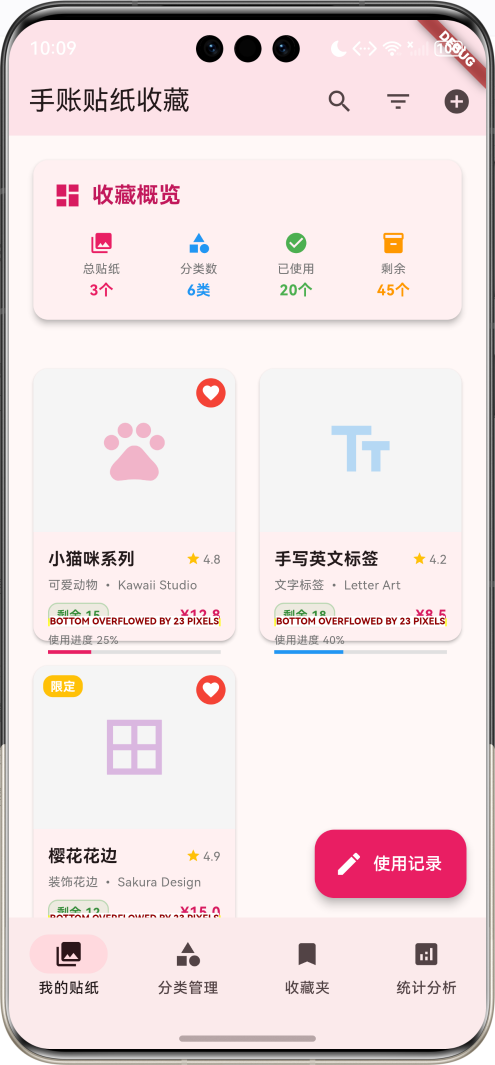
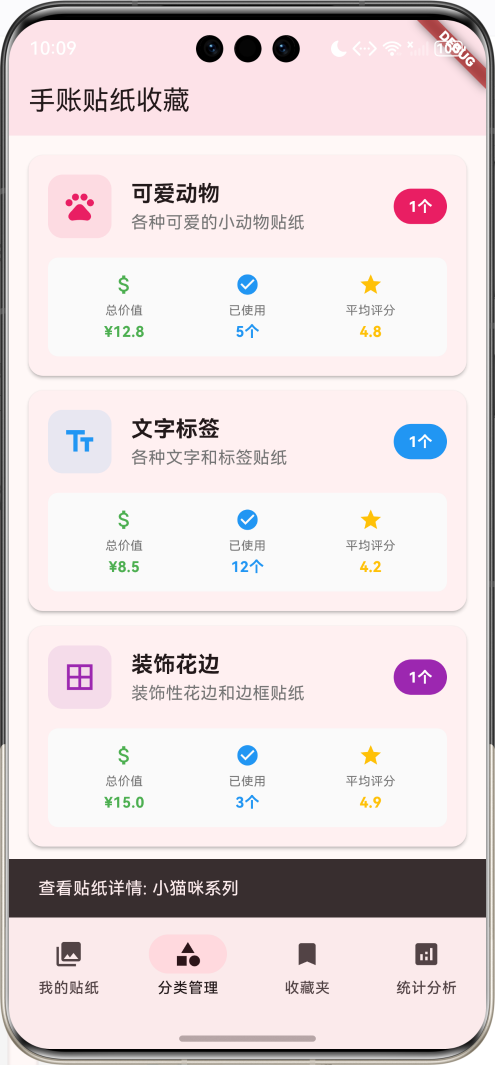
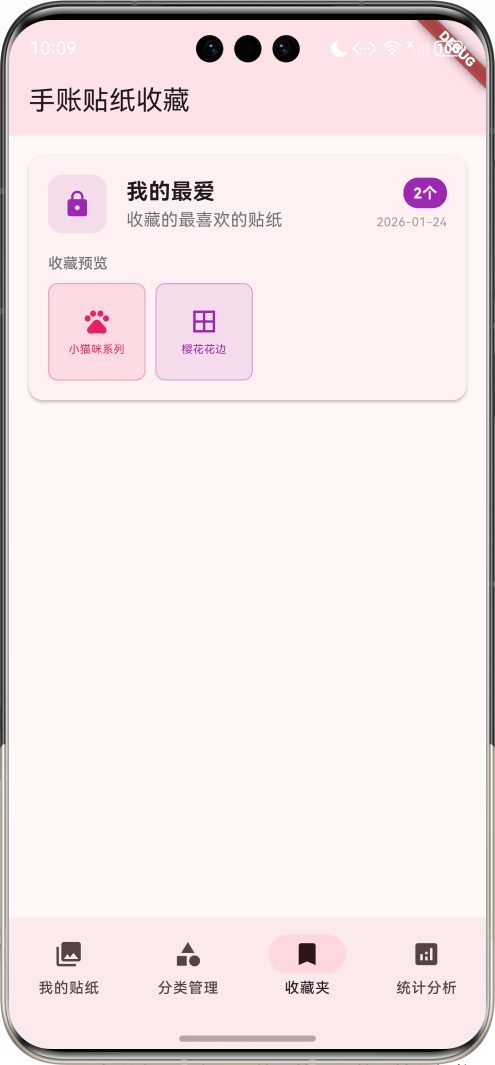
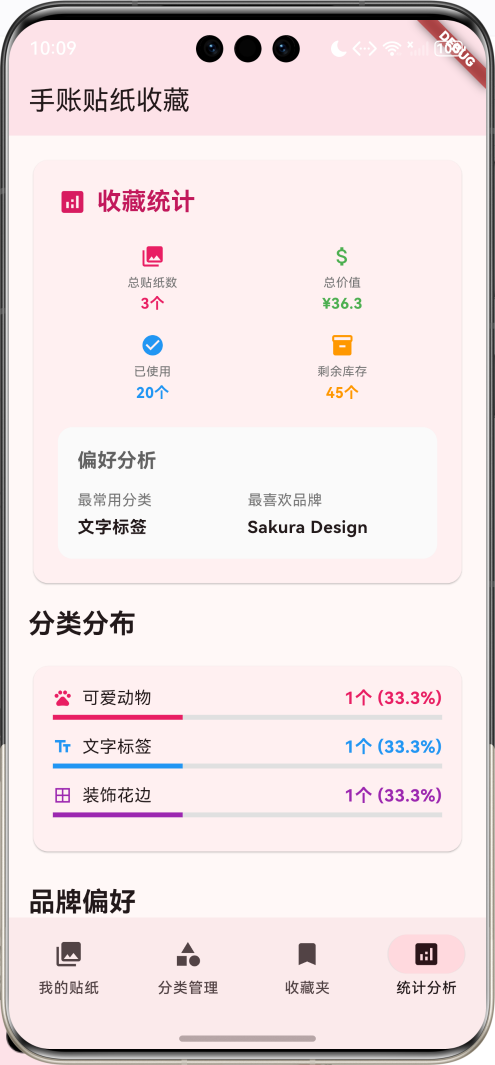
核心功能特性
- 智能收藏管理:支持贴纸信息录入,包含名称、分类、品牌、价格、数量等详细信息
- 多维度分类:按分类、品牌、系列、标签等多种方式组织和查找贴纸
- 使用记录追踪:记录每次贴纸使用情况,包含项目名称、使用数量、满意度评分
- 收藏夹管理:创建个性化收藏夹,按主题或用途整理贴纸
- 统计分析功能:全面的数据统计,包含分类分布、品牌偏好、使用趋势分析
- 智能筛选搜索:支持按多种条件筛选和搜索贴纸
技术架构
开发环境
- 框架:Flutter 3.x
- 开发语言:Dart
- UI组件:Material Design 3
- 状态管理:StatefulWidget + setState
- 动画效果:AnimationController + Tween
项目结构
lib/
├── main.dart                 # 应用入口和主要逻辑
├── models/                   # 数据模型
│   ├── sticker.dart          # 贴纸模型
│   ├── category.dart         # 分类模型
│   ├── usage_record.dart     # 使用记录模型
│   ├── collection.dart       # 收藏夹模型
│   └── stats.dart            # 统计数据模型
├── pages/                    # 页面组件
│   ├── stickers_page.dart    # 贴纸管理页面
│   ├── categories_page.dart  # 分类管理页面
│   ├── collections_page.dart # 收藏夹页面
│   └── stats_page.dart       # 统计分析页面
└── widgets/                  # 自定义组件
    ├── sticker_card.dart     # 贴纸卡片组件
    ├── category_card.dart    # 分类卡片组件
    └── stats_chart.dart      # 统计图表组件
数据模型设计
贴纸模型(Sticker)
贴纸模型是应用的核心数据结构,记录每个贴纸的详细信息:
class Sticker {
  final String id;              // 贴纸唯一标识
  final String name;            // 贴纸名称
  final String category;        // 分类:可爱、文字、装饰、节日等
  final String series;          // 系列名称
  final String brand;           // 品牌
  final String imageUrl;        // 图片路径
  final List<String> tags;      // 标签列表
  final String description;     // 描述信息
  final DateTime purchaseDate;  // 购买日期
  final double price;           // 价格
  final int quantity;           // 总数量
  final int usedCount;          // 已使用数量
  final String size;            // 尺寸规格
  final String material;        // 材质信息
  final bool isFavorite;        // 是否收藏
  final double rating;          // 用户评分
  final String notes;           // 备注信息
  final String purchaseLocation; // 购买地点
  final bool isLimitedEdition; // 是否限定版
}
贴纸分类模型(StickerCategory)
分类模型用于组织和管理不同类型的贴纸:
class StickerCategory {
  final String id;              // 分类唯一标识
  final String name;            // 分类名称
  final String description;     // 分类描述
  final IconData icon;          // 分类图标
  final Color color;            // 分类主题色
  final int stickerCount;       // 该分类下的贴纸数量
}
使用记录模型(UsageRecord)
使用记录模型追踪每次贴纸的使用情况:
class UsageRecord {
  final String id;              // 记录唯一标识
  final String stickerId;       // 关联的贴纸ID
  final String stickerName;     // 贴纸名称
  final DateTime usageDate;     // 使用日期
  final String projectName;     // 使用的项目名称
  final String projectType;     // 项目类型:日记、计划、装饰等
  final int usedQuantity;       // 使用数量
  final String notes;           // 使用备注
  final List<String> photos;    // 使用照片
  final double satisfaction;    // 满意度评分
}
收藏夹模型(StickerCollection)
收藏夹模型用于创建主题化的贴纸集合:
class StickerCollection {
  final String id;              // 收藏夹唯一标识
  final String name;            // 收藏夹名称
  final String description;     // 描述信息
  final List<String> stickerIds; // 包含的贴纸ID列表
  final DateTime createdDate;   // 创建日期
  final DateTime lastModified;  // 最后修改时间
  final String coverImageUrl;   // 封面图片
  final bool isPublic;          // 是否公开
}
统计数据模型(StickerStats)
统计模型提供全面的数据分析功能:
class StickerStats {
  final int totalStickers;                    // 总贴纸数量
  final int totalCategories;                  // 总分类数量
  final int totalUsed;                        // 总使用数量
  final int totalRemaining;                   // 剩余数量
  final double totalValue;                    // 总价值
  final String mostUsedCategory;              // 最常用分类
  final String favoriteBrand;                 // 最喜欢品牌
  final Map<String, int> categoryDistribution; // 分类分布
  final Map<String, int> brandDistribution;   // 品牌分布
  final Map<String, double> monthlySpending;  // 月度支出
}
应用主界面设计
主页面结构
应用采用底部导航栏设计,包含四个主要功能模块:
class StickerCollectionHomePage extends StatefulWidget {
const StickerCollectionHomePage({super.key});
State<StickerCollectionHomePage> createState() => _StickerCollectionHomePageState();
}
class _StickerCollectionHomePageState extends State<StickerCollectionHomePage>
with TickerProviderStateMixin {
int _selectedIndex = 0;
// 数据存储
List<Sticker> _stickers = [];
List<StickerCategory> _categories = [];
List<UsageRecord> _usageRecords = [];
List<StickerCollection> _collections = [];
StickerStats? _stats;
// 筛选和搜索
String _searchQuery = '';
String? _selectedCategory;
String? _selectedBrand;
bool _showFavoritesOnly = false;
String _sortBy = 'name';
// 动画控制器
late AnimationController _fadeAnimationController;
late Animation<double> _fadeAnimation;
late AnimationController _scaleAnimationController;
late Animation<double> _scaleAnimation;
}
底部导航栏设计
底部导航栏提供四个主要功能入口:
bottomNavigationBar: NavigationBar(
  selectedIndex: _selectedIndex,
  onDestinationSelected: (index) {
    setState(() => _selectedIndex = index);
  },
  destinations: const [
    NavigationDestination(
      icon: Icon(Icons.collections),
      label: '我的贴纸',
    ),
    NavigationDestination(
      icon: Icon(Icons.category),
      label: '分类管理',
    ),
    NavigationDestination(
      icon: Icon(Icons.bookmark),
      label: '收藏夹',
    ),
    NavigationDestination(
      icon: Icon(Icons.analytics),
      label: '统计分析',
    ),
  ],
)
动画效果实现
应用使用多种动画效果提升用户体验:
void _setupAnimations() {
  _fadeAnimationController = AnimationController(
    duration: const Duration(milliseconds: 600),
    vsync: this,
  );

  _fadeAnimation = Tween<double>(
    begin: 0.0,
    end: 1.0,
  ).animate(CurvedAnimation(
    parent: _fadeAnimationController,
    curve: Curves.easeInOut,
  ));

  _scaleAnimationController = AnimationController(
    duration: const Duration(milliseconds: 800),
    vsync: this,
  );

  _scaleAnimation = Tween<double>(
    begin: 0.8,
    end: 1.0,
  ).animate(CurvedAnimation(
    parent: _scaleAnimationController,
    curve: Curves.elasticOut,
  ));

  _fadeAnimationController.forward();
  _scaleAnimationController.forward();
}
贴纸收藏功能实现
贴纸列表页面
贴纸页面是应用的核心功能,展示用户的所有贴纸收藏:
Widget _buildStickersPage() {
  final filteredStickers = _getFilteredStickers();

  return Column(
    children: [
      // 快速统计卡片
      if (_stats != null) _buildQuickStatsCard(),

      // 筛选标签显示
      if (_searchQuery.isNotEmpty ||
          _selectedCategory != null ||
          _selectedBrand != null ||
          _showFavoritesOnly)
        Container(
          padding: const EdgeInsets.all(16),
          child: Wrap(
            spacing: 8,
            runSpacing: 8,
            children: [
              if (_searchQuery.isNotEmpty)
                Chip(
                  label: Text('搜索: $_searchQuery'),
                  onDeleted: () {
                    setState(() => _searchQuery = '');
                  },
                ),
              // 其他筛选标签...
            ],
          ),
        ),

      // 贴纸网格
      Expanded(
        child: filteredStickers.isEmpty
            ? _buildEmptyState()
            : GridView.builder(
                padding: const EdgeInsets.all(16),
                gridDelegate: const SliverGridDelegateWithFixedCrossAxisCount(
                  crossAxisCount: 2,
                  childAspectRatio: 0.75,
                  crossAxisSpacing: 12,
                  mainAxisSpacing: 12,
                ),
                itemCount: filteredStickers.length,
                itemBuilder: (context, index) {
                  final sticker = filteredStickers[index];
                  return _buildStickerCard(sticker);
                },
              ),
      ),
    ],
  );
}
快速统计卡片
快速统计卡片显示用户收藏的关键指标:
Widget _buildQuickStatsCard() {
  final stats = _stats!;

  return Container(
    margin: const EdgeInsets.all(16),
    child: Card(
      elevation: 4,
      child: Padding(
        padding: const EdgeInsets.all(16),
        child: Column(
          crossAxisAlignment: CrossAxisAlignment.start,
          children: [
            Row(
              children: [
                Icon(
                  Icons.dashboard,
                  color: Colors.pink.shade600,
                  size: 24,
                ),
                const SizedBox(width: 8),
                Text(
                  '收藏概览',
                  style: TextStyle(
                    fontSize: 18,
                    fontWeight: FontWeight.bold,
                    color: Colors.pink.shade700,
                  ),
                ),
              ],
            ),
            const SizedBox(height: 16),
            Row(
              children: [
                Expanded(
                  child: _buildStatItem(
                    Icons.collections, '总贴纸', '${stats.totalStickers}个', Colors.pink,
                  ),
                ),
                Expanded(
                  child: _buildStatItem(
                    Icons.category, '分类数', '${stats.totalCategories}类', Colors.blue,
                  ),
                ),
                Expanded(
                  child: _buildStatItem(
                    Icons.check_circle, '已使用', '${stats.totalUsed}个', Colors.green,
                  ),
                ),
                Expanded(
                  child: _buildStatItem(
                    Icons.inventory, '剩余', '${stats.totalRemaining}个', Colors.orange,
                  ),
                ),
              ],
            ),
          ],
        ),
      ),
    ),
  );
}
贴纸卡片设计
每个贴纸以卡片形式展示,包含详细的收藏信息:
Widget _buildStickerCard(Sticker sticker) {
  final remainingCount = sticker.quantity - sticker.usedCount;
  final usagePercentage = sticker.quantity > 0 ? sticker.usedCount / sticker.quantity : 0.0;

  return Card(
    elevation: 2,
    child: InkWell(
      onTap: () => _showStickerDetail(sticker),
      child: Column(
        crossAxisAlignment: CrossAxisAlignment.start,
        children: [
          // 贴纸图片区域
          Expanded(
            flex: 3,
            child: Container(
              width: double.infinity,
              decoration: BoxDecoration(
                color: Colors.grey.shade100,
                borderRadius: const BorderRadius.vertical(top: Radius.circular(12)),
              ),
              child: Stack(
                children: [
                  Center(
                    child: Icon(
                      _getCategoryIcon(sticker.category),
                      size: 60,
                      color: _getCategoryColor(sticker.category).withValues(alpha: 0.3),
                    ),
                  ),
                  // 收藏标记
                  if (sticker.isFavorite)
                    Positioned(
                      top: 8,
                      right: 8,
                      child: Container(
                        padding: const EdgeInsets.all(4),
                        decoration: BoxDecoration(
                          color: Colors.red,
                          borderRadius: BorderRadius.circular(12),
                        ),
                        child: const Icon(
                          Icons.favorite,
                          color: Colors.white,
                          size: 16,
                        ),
                      ),
                    ),
                  // 限定版标记
                  if (sticker.isLimitedEdition)
                    Positioned(
                      top: 8,
                      left: 8,
                      child: Container(
                        padding: const EdgeInsets.symmetric(horizontal: 6, vertical: 2),
                        decoration: BoxDecoration(
                          color: Colors.amber,
                          borderRadius: BorderRadius.circular(8),
                        ),
                        child: const Text(
                          '限定',
                          style: TextStyle(
                            color: Colors.white,
                            fontSize: 10,
                            fontWeight: FontWeight.bold,
                          ),
                        ),
                      ),
                    ),
                ],
              ),
            ),
          ),

          // 贴纸信息区域
          Expanded(
            flex: 2,
            child: Padding(
              padding: const EdgeInsets.all(12),
              child: Column(
                crossAxisAlignment: CrossAxisAlignment.start,
                children: [
                  // 名称和评分
                  Row(
                    children: [
                      Expanded(
                        child: Text(
                          sticker.name,
                          style: const TextStyle(
                            fontSize: 14,
                            fontWeight: FontWeight.bold,
                          ),
                          maxLines: 1,
                          overflow: TextOverflow.ellipsis,
                        ),
                      ),
                      Row(
                        mainAxisSize: MainAxisSize.min,
                        children: [
                          Icon(Icons.star, color: Colors.amber, size: 12),
                          const SizedBox(width: 2),
                          Text(
                            sticker.rating.toStringAsFixed(1),
                            style: TextStyle(
                              fontSize: 10,
                              color: Colors.grey.shade600,
                            ),
                          ),
                        ],
                      ),
                    ],
                  ),

                  const SizedBox(height: 4),

                  // 分类和品牌
                  Text(
                    '${sticker.category} • ${sticker.brand}',
                    style: TextStyle(
                      fontSize: 10,
                      color: Colors.grey.shade600,
                    ),
                    maxLines: 1,
                    overflow: TextOverflow.ellipsis,
                  ),

                  const SizedBox(height: 8),

                  // 数量和价格
                  Row(
                    mainAxisAlignment: MainAxisAlignment.spaceBetween,
                    children: [
                      Container(
                        padding: const EdgeInsets.symmetric(horizontal: 6, vertical: 2),
                        decoration: BoxDecoration(
                          color: remainingCount > 0
                              ? Colors.green.withValues(alpha: 0.1)
                              : Colors.red.withValues(alpha: 0.1),
                          borderRadius: BorderRadius.circular(8),
                          border: Border.all(
                            color: remainingCount > 0
                                ? Colors.green.withValues(alpha: 0.3)
                                : Colors.red.withValues(alpha: 0.3),
                          ),
                        ),
                        child: Text(
                          '剩余 $remainingCount',
                          style: TextStyle(
                            fontSize: 10,
                            color: remainingCount > 0
                                ? Colors.green.shade700
                                : Colors.red.shade700,
                            fontWeight: FontWeight.bold,
                          ),
                        ),
                      ),
                      Text(
                        '¥${sticker.price.toStringAsFixed(1)}',
                        style: TextStyle(
                          fontSize: 12,
                          fontWeight: FontWeight.bold,
                          color: Colors.pink.shade600,
                        ),
                      ),
                    ],
                  ),

                  const SizedBox(height: 4),

                  // 使用进度条
                  Column(
                    crossAxisAlignment: CrossAxisAlignment.start,
                    children: [
                      Text(
                        '使用进度 ${(usagePercentage * 100).toStringAsFixed(0)}%',
                        style: TextStyle(
                          fontSize: 9,
                          color: Colors.grey.shade600,
                        ),
                      ),
                      const SizedBox(height: 2),
                      LinearProgressIndicator(
                        value: usagePercentage,
                        backgroundColor: Colors.grey.shade300,
                        valueColor: AlwaysStoppedAnimation<Color>(
                          _getCategoryColor(sticker.category),
                        ),
                        minHeight: 3,
                      ),
                    ],
                  ),
                ],
              ),
            ),
          ),
        ],
      ),
    ),
  );
}
筛选和搜索功能
应用提供多维度的筛选和搜索功能:
List<Sticker> _getFilteredStickers() {
  return _stickers.where((sticker) {
    // 搜索过滤
    if (_searchQuery.isNotEmpty) {
      final query = _searchQuery.toLowerCase();
      if (!sticker.name.toLowerCase().contains(query) &&
          !sticker.category.toLowerCase().contains(query) &&
          !sticker.brand.toLowerCase().contains(query) &&
          !sticker.series.toLowerCase().contains(query) &&
          !sticker.tags.any((tag) => tag.toLowerCase().contains(query))) {
        return false;
      }
    }

    // 分类过滤
    if (_selectedCategory != null && sticker.category != _selectedCategory) {
      return false;
    }

    // 品牌过滤
    if (_selectedBrand != null && sticker.brand != _selectedBrand) {
      return false;
    }

    // 收藏过滤
    if (_showFavoritesOnly && !sticker.isFavorite) {
      return false;
    }

    return true;
  }).toList()
    ..sort((a, b) {
      switch (_sortBy) {
        case 'name':
          return a.name.compareTo(b.name);
        case 'date':
          return b.purchaseDate.compareTo(a.purchaseDate);
        case 'price':
          return b.price.compareTo(a.price);
        case 'rating':
          return b.rating.compareTo(a.rating);
        default:
          return 0;
      }
    });
}
搜索对话框
搜索功能通过对话框实现,支持实时搜索:
void _showSearchDialog() {
  showDialog(
    context: context,
    builder: (context) => AlertDialog(
      title: const Text('搜索贴纸'),
      content: TextField(
        autofocus: true,
        decoration: const InputDecoration(
          hintText: '输入贴纸名称、分类、品牌或标签',
          prefixIcon: Icon(Icons.search),
        ),
        onChanged: (value) {
          _searchQuery = value;
        },
        onSubmitted: (value) {
          Navigator.of(context).pop();
          setState(() {});
        },
      ),
      actions: [
        TextButton(
          onPressed: () => Navigator.of(context).pop(),
          child: const Text('取消'),
        ),
        ElevatedButton(
          onPressed: () {
            Navigator.of(context).pop();
            setState(() {});
          },
          child: const Text('搜索'),
        ),
      ],
    ),
  );
}
筛选对话框
筛选对话框提供分类、品牌和收藏状态的多选筛选:
void _showFilterDialog() {
  showDialog(
    context: context,
    builder: (context) => AlertDialog(
      title: const Text('筛选贴纸'),
      content: SingleChildScrollView(
        child: Column(
          mainAxisSize: MainAxisSize.min,
          crossAxisAlignment: CrossAxisAlignment.start,
          children: [
            const Text('分类:'),
            const SizedBox(height: 8),
            Wrap(
              spacing: 8,
              children: [
                FilterChip(
                  label: const Text('全部'),
                  selected: _selectedCategory == null,
                  onSelected: (selected) {
                    setState(() {
                      _selectedCategory = selected ? null : _selectedCategory;
                    });
                  },
                ),
                ..._categories.map((category) => FilterChip(
                      label: Text(category.name),
                      selected: _selectedCategory == category.name,
                      onSelected: (selected) {
                        setState(() {
                          _selectedCategory = selected ? category.name : null;
                        });
                      },
                    )),
              ],
            ),
            const SizedBox(height: 16),
            const Text('品牌:'),
            const SizedBox(height: 8),
            Wrap(
              spacing: 8,
              children: [
                FilterChip(
                  label: const Text('全部'),
                  selected: _selectedBrand == null,
                  onSelected: (selected) {
                    setState(() {
                      _selectedBrand = selected ? null : _selectedBrand;
                    });
                  },
                ),
                ...['Kawaii Studio', 'Letter Art', 'Sakura Design']
                    .map((brand) => FilterChip(
                          label: Text(brand),
                          selected: _selectedBrand == brand,
                          onSelected: (selected) {
                            setState(() {
                              _selectedBrand = selected ? brand : null;
                            });
                          },
                        )),
              ],
            ),
            const SizedBox(height: 16),
            Row(
              children: [
                Checkbox(
                  value: _showFavoritesOnly,
                  onChanged: (value) {
                    setState(() {
                      _showFavoritesOnly = value ?? false;
                    });
                  },
                ),
                const Text('仅显示收藏'),
              ],
            ),
          ],
        ),
      ),
      actions: [
        TextButton(
          onPressed: () => Navigator.of(context).pop(),
          child: const Text('取消'),
        ),
        ElevatedButton(
          onPressed: () {
            Navigator.of(context).pop();
            setState(() {});
          },
          child: const Text('应用'),
        ),
      ],
    ),
  );
}
分类管理功能
分类列表页面
分类页面展示所有贴纸分类及其统计信息:
Widget _buildCategoriesPage() {
  return ListView.builder(
    padding: const EdgeInsets.all(16),
    itemCount: _categories.length,
    itemBuilder: (context, index) {
      final category = _categories[index];
      return _buildCategoryCard(category);
    },
  );
}
分类卡片设计
每个分类以卡片形式展示详细信息和统计数据:
Widget _buildCategoryCard(StickerCategory category) {
  final categoryStickers = _stickers.where((s) => s.category == category.name).toList();
  final totalValue = categoryStickers.fold(0.0, (sum, s) => sum + s.price);
  final totalUsed = categoryStickers.fold(0, (sum, s) => sum + s.usedCount);

  return Card(
    elevation: 2,
    margin: const EdgeInsets.only(bottom: 12),
    child: InkWell(
      onTap: () => _showCategoryDetail(category),
      child: Padding(
        padding: const EdgeInsets.all(16),
        child: Column(
          crossAxisAlignment: CrossAxisAlignment.start,
          children: [
            // 标题行
            Row(
              children: [
                Container(
                  padding: const EdgeInsets.all(12),
                  decoration: BoxDecoration(
                    color: category.color.withValues(alpha: 0.1),
                    borderRadius: BorderRadius.circular(12),
                  ),
                  child: Icon(
                    category.icon,
                    color: category.color,
                    size: 28,
                  ),
                ),
                const SizedBox(width: 16),
                Expanded(
                  child: Column(
                    crossAxisAlignment: CrossAxisAlignment.start,
                    children: [
                      Text(
                        category.name,
                        style: const TextStyle(
                          fontSize: 18,
                          fontWeight: FontWeight.bold,
                        ),
                      ),
                      Text(
                        category.description,
                        style: TextStyle(
                          color: Colors.grey.shade600,
                          fontSize: 14,
                        ),
                      ),
                    ],
                  ),
                ),
                Container(
                  padding: const EdgeInsets.symmetric(horizontal: 12, vertical: 6),
                  decoration: BoxDecoration(
                    color: category.color,
                    borderRadius: BorderRadius.circular(16),
                  ),
                  child: Text(
                    '${categoryStickers.length}个',
                    style: const TextStyle(
                      color: Colors.white,
                      fontSize: 12,
                      fontWeight: FontWeight.bold,
                    ),
                  ),
                ),
              ],
            ),

            const SizedBox(height: 16),

            // 统计信息
            Container(
              padding: const EdgeInsets.all(12),
              decoration: BoxDecoration(
                color: Colors.grey.shade50,
                borderRadius: BorderRadius.circular(8),
              ),
              child: Row(
                children: [
                  Expanded(
                    child: _buildStatItem(
                      Icons.attach_money, '总价值', '¥${totalValue.toStringAsFixed(1)}', Colors.green,
                    ),
                  ),
                  Expanded(
                    child: _buildStatItem(
                      Icons.check_circle, '已使用', '${totalUsed}个', Colors.blue,
                    ),
                  ),
                  Expanded(
                    child: _buildStatItem(
                      Icons.star, '平均评分',
                      categoryStickers.isNotEmpty
                          ? (categoryStickers.fold(0.0, (sum, s) => sum + s.rating) / categoryStickers.length).toStringAsFixed(1)
                          : '0.0',
                      Colors.amber,
                    ),
                  ),
                ],
              ),
            ),
          ],
        ),
      ),
    ),
  );
}
收藏夹管理功能
收藏夹列表页面
收藏夹页面展示用户创建的所有主题收藏夹:
Widget _buildCollectionsPage() {
  return ListView.builder(
    padding: const EdgeInsets.all(16),
    itemCount: _collections.length,
    itemBuilder: (context, index) {
      final collection = _collections[index];
      return _buildCollectionCard(collection);
    },
  );
}
收藏夹卡片设计
每个收藏夹以卡片形式展示,包含贴纸预览:
Widget _buildCollectionCard(StickerCollection collection) {
  final collectionStickers = _stickers.where((s) => collection.stickerIds.contains(s.id)).toList();

  return Card(
    elevation: 2,
    margin: const EdgeInsets.only(bottom: 12),
    child: InkWell(
      onTap: () => _showCollectionDetail(collection),
      child: Padding(
        padding: const EdgeInsets.all(16),
        child: Column(
          crossAxisAlignment: CrossAxisAlignment.start,
          children: [
            // 标题行
            Row(
              children: [
                Container(
                  padding: const EdgeInsets.all(12),
                  decoration: BoxDecoration(
                    color: Colors.purple.withValues(alpha: 0.1),
                    borderRadius: BorderRadius.circular(12),
                  ),
                  child: Icon(
                    collection.isPublic ? Icons.public : Icons.lock,
                    color: Colors.purple,
                    size: 24,
                  ),
                ),
                const SizedBox(width: 16),
                Expanded(
                  child: Column(
                    crossAxisAlignment: CrossAxisAlignment.start,
                    children: [
                      Text(
                        collection.name,
                        style: const TextStyle(
                          fontSize: 18,
                          fontWeight: FontWeight.bold,
                        ),
                      ),
                      Text(
                        collection.description,
                        style: TextStyle(
                          color: Colors.grey.shade600,
                          fontSize: 14,
                        ),
                      ),
                    ],
                  ),
                ),
                Column(
                  crossAxisAlignment: CrossAxisAlignment.end,
                  children: [
                    Container(
                      padding: const EdgeInsets.symmetric(horizontal: 8, vertical: 4),
                      decoration: BoxDecoration(
                        color: Colors.purple,
                        borderRadius: BorderRadius.circular(12),
                      ),
                      child: Text(
                        '${collection.stickerIds.length}个',
                        style: const TextStyle(
                          color: Colors.white,
                          fontSize: 12,
                          fontWeight: FontWeight.bold,
                        ),
                      ),
                    ),
                    const SizedBox(height: 4),
                    Text(
                      _formatDate(collection.lastModified),
                      style: TextStyle(
                        color: Colors.grey.shade500,
                        fontSize: 10,
                      ),
                    ),
                  ],
                ),
              ],
            ),

            const SizedBox(height: 16),

            // 贴纸预览
            if (collectionStickers.isNotEmpty) ...[
              Text(
                '收藏预览',
                style: TextStyle(
                  fontSize: 12,
                  color: Colors.grey.shade600,
                  fontWeight: FontWeight.w500,
                ),
              ),
              const SizedBox(height: 8),
              SizedBox(
                height: 80,
                child: ListView.builder(
                  scrollDirection: Axis.horizontal,
                  itemCount: collectionStickers.take(6).length,
                  itemBuilder: (context, index) {
                    final sticker = collectionStickers[index];
                    return Container(
                      width: 80,
                      margin: const EdgeInsets.only(right: 8),
                      decoration: BoxDecoration(
                        color: _getCategoryColor(sticker.category).withValues(alpha: 0.1),
                        borderRadius: BorderRadius.circular(8),
                        border: Border.all(color: _getCategoryColor(sticker.category).withValues(alpha: 0.3)),
                      ),
                      child: Column(
                        mainAxisAlignment: MainAxisAlignment.center,
                        children: [
                          Icon(
                            _getCategoryIcon(sticker.category),
                            color: _getCategoryColor(sticker.category),
                            size: 24,
                          ),
                          const SizedBox(height: 4),
                          Text(
                            sticker.name,
                            style: TextStyle(
                              fontSize: 9,
                              color: _getCategoryColor(sticker.category),
                            ),
                            maxLines: 2,
                            overflow: TextOverflow.ellipsis,
                            textAlign: TextAlign.center,
                          ),
                        ],
                      ),
                    );
                  },
                ),
              ),
            ] else ...[
              Container(
                height: 60,
                decoration: BoxDecoration(
                  color: Colors.grey.shade100,
                  borderRadius: BorderRadius.circular(8),
                  border: Border.all(color: Colors.grey.shade300),
                ),
                child: Center(
                  child: Text(
                    '暂无收藏贴纸',
                    style: TextStyle(
                      color: Colors.grey.shade500,
                      fontSize: 12,
                    ),
                  ),
                ),
              ),
            ],
          ],
        ),
      ),
    ),
  );
}
统计分析功能
统计页面结构
统计页面提供全面的数据分析功能:
Widget _buildStatsPage() {
  if (_stats == null) {
    return const Center(child: CircularProgressIndicator());
  }

  return SingleChildScrollView(
    padding: const EdgeInsets.all(16),
    child: Column(
      crossAxisAlignment: CrossAxisAlignment.start,
      children: [
        // 总体统计卡片
        _buildOverallStatsCard(),

        const SizedBox(height: 16),

        // 分类分布
        Text(
          '分类分布',
          style: Theme.of(context).textTheme.titleLarge?.copyWith(
                fontWeight: FontWeight.bold,
              ),
        ),
        const SizedBox(height: 16),
        _buildCategoryDistributionCard(),

        const SizedBox(height: 24),

        // 品牌分布
        Text(
          '品牌偏好',
          style: Theme.of(context).textTheme.titleLarge?.copyWith(
                fontWeight: FontWeight.bold,
              ),
        ),
        const SizedBox(height: 16),
        _buildBrandDistributionCard(),

        const SizedBox(height: 24),

        // 使用记录
        Text(
          '最近使用记录',
          style: Theme.of(context).textTheme.titleLarge?.copyWith(
                fontWeight: FontWeight.bold,
              ),
        ),
        const SizedBox(height: 16),
        _buildRecentUsageCard(),
      ],
    ),
  );
}
总体统计卡片
总体统计展示用户收藏的关键指标:
Widget _buildOverallStatsCard() {
  final stats = _stats!;

  return Card(
    child: Padding(
      padding: const EdgeInsets.all(20),
      child: Column(
        crossAxisAlignment: CrossAxisAlignment.start,
        children: [
          Row(
            children: [
              Icon(
                Icons.analytics,
                color: Colors.pink.shade600,
                size: 24,
              ),
              const SizedBox(width: 8),
              Text(
                '收藏统计',
                style: TextStyle(
                  fontSize: 20,
                  fontWeight: FontWeight.bold,
                  color: Colors.pink.shade700,
                ),
              ),
            ],
          ),
          const SizedBox(height: 20),
          Row(
            children: [
              Expanded(
                child: _buildStatItem(
                  Icons.collections, '总贴纸数', '${stats.totalStickers}个', Colors.pink,
                ),
              ),
              Expanded(
                child: _buildStatItem(
                  Icons.attach_money, '总价值', '¥${stats.totalValue.toStringAsFixed(1)}', Colors.green,
                ),
              ),
            ],
          ),
          const SizedBox(height: 16),
          Row(
            children: [
              Expanded(
                child: _buildStatItem(
                  Icons.check_circle, '已使用', '${stats.totalUsed}个', Colors.blue,
                ),
              ),
              Expanded(
                child: _buildStatItem(
                  Icons.inventory, '剩余库存', '${stats.totalRemaining}个', Colors.orange,
                ),
              ),
            ],
          ),
          const SizedBox(height: 20),
          Container(
            padding: const EdgeInsets.all(16),
            decoration: BoxDecoration(
              color: Colors.grey.shade50,
              borderRadius: BorderRadius.circular(12),
            ),
            child: Column(
              crossAxisAlignment: CrossAxisAlignment.start,
              children: [
                Text(
                  '偏好分析',
                  style: TextStyle(
                    fontSize: 16,
                    fontWeight: FontWeight.bold,
                    color: Colors.grey.shade700,
                  ),
                ),
                const SizedBox(height: 12),
                Row(
                  children: [
                    Expanded(
                      child: Column(
                        crossAxisAlignment: CrossAxisAlignment.start,
                        children: [
                          Text(
                            '最常用分类',
                            style: TextStyle(
                              fontSize: 12,
                              color: Colors.grey.shade600,
                            ),
                          ),
                          const SizedBox(height: 4),
                          Text(
                            stats.mostUsedCategory,
                            style: const TextStyle(
                              fontSize: 14,
                              fontWeight: FontWeight.bold,
                            ),
                          ),
                        ],
                      ),
                    ),
                    Expanded(
                      child: Column(
                        crossAxisAlignment: CrossAxisAlignment.start,
                        children: [
                          Text(
                            '最喜欢品牌',
                            style: TextStyle(
                              fontSize: 12,
                              color: Colors.grey.shade600,
                            ),
                          ),
                          const SizedBox(height: 4),
                          Text(
                            stats.favoriteBrand,
                            style: const TextStyle(
                              fontSize: 14,
                              fontWeight: FontWeight.bold,
                            ),
                          ),
                        ],
                      ),
                    ),
                  ],
                ),
              ],
            ),
          ),
        ],
      ),
    ),
  );
}
分类分布统计
分类分布卡片以进度条形式展示各分类的贴纸数量:
Widget _buildCategoryDistributionCard() {
  final stats = _stats!;

  return Card(
    child: Padding(
      padding: const EdgeInsets.all(16),
      child: Column(
        children: stats.categoryDistribution.entries.map((entry) {
          final total = stats.categoryDistribution.values.fold(0, (sum, value) => sum + value);
          final percentage = total > 0 ? entry.value / total : 0.0;
          return Padding(
            padding: const EdgeInsets.only(bottom: 12),
            child: Column(
              crossAxisAlignment: CrossAxisAlignment.start,
              children: [
                Row(
                  mainAxisAlignment: MainAxisAlignment.spaceBetween,
                  children: [
                    Row(
                      children: [
                        Icon(
                          _getCategoryIcon(entry.key),
                          color: _getCategoryColor(entry.key),
                          size: 16,
                        ),
                        const SizedBox(width: 8),
                        Text(entry.key),
                      ],
                    ),
                    Text(
                      '${entry.value}个 (${(percentage * 100).toStringAsFixed(1)}%)',
                      style: TextStyle(
                        color: _getCategoryColor(entry.key),
                        fontWeight: FontWeight.bold,
                      ),
                    ),
                  ],
                ),
                const SizedBox(height: 4),
                LinearProgressIndicator(
                  value: percentage,
                  backgroundColor: Colors.grey.shade300,
                  valueColor: AlwaysStoppedAnimation<Color>(
                    _getCategoryColor(entry.key),
                  ),
                ),
              ],
            ),
          );
        }).toList(),
      ),
    ),
  );
}
品牌分布统计
品牌分布展示用户最喜欢的贴纸品牌:
Widget _buildBrandDistributionCard() {
  final stats = _stats!;

  return Card(
    child: Padding(
      padding: const EdgeInsets.all(16),
      child: Column(
        children: stats.brandDistribution.entries.take(5).map((entry) {
          final total = stats.brandDistribution.values.fold(0, (sum, value) => sum + value);
          final percentage = total > 0 ? entry.value / total : 0.0;
          return Padding(
            padding: const EdgeInsets.only(bottom: 12),
            child: Column(
              crossAxisAlignment: CrossAxisAlignment.start,
              children: [
                Row(
                  mainAxisAlignment: MainAxisAlignment.spaceBetween,
                  children: [
                    Expanded(
                      child: Text(
                        entry.key,
                        style: const TextStyle(fontWeight: FontWeight.w500),
                      ),
                    ),
                    Text(
                      '${entry.value}个 (${(percentage * 100).toStringAsFixed(1)}%)',
                      style: TextStyle(
                        color: Colors.purple.shade600,
                        fontWeight: FontWeight.bold,
                      ),
                    ),
                  ],
                ),
                const SizedBox(height: 4),
                LinearProgressIndicator(
                  value: percentage,
                  backgroundColor: Colors.grey.shade300,
                  valueColor: AlwaysStoppedAnimation<Color>(
                    Colors.purple.shade600,
                  ),
                ),
              ],
            ),
          );
        }).toList(),
      ),
    ),
  );
}
使用记录统计
最近使用记录展示用户的贴纸使用情况:
Widget _buildRecentUsageCard() {
  final recentUsage = _usageRecords.take(3).toList();

  return Card(
    child: Padding(
      padding: const EdgeInsets.all(16),
      child: Column(
        crossAxisAlignment: CrossAxisAlignment.start,
        children: [
          if (recentUsage.isEmpty)
            Container(
              height: 60,
              decoration: BoxDecoration(
                color: Colors.grey.shade100,
                borderRadius: BorderRadius.circular(8),
              ),
              child: Center(
                child: Text(
                  '暂无使用记录',
                  style: TextStyle(
                    color: Colors.grey.shade500,
                    fontSize: 14,
                  ),
                ),
              ),
            )
          else
            ...recentUsage.map((record) => Padding(
                  padding: const EdgeInsets.only(bottom: 12),
                  child: Container(
                    padding: const EdgeInsets.all(12),
                    decoration: BoxDecoration(
                      color: Colors.grey.shade50,
                      borderRadius: BorderRadius.circular(8),
                      border: Border.all(color: Colors.grey.shade200),
                    ),
                    child: Column(
                      crossAxisAlignment: CrossAxisAlignment.start,
                      children: [
                        Row(
                          children: [
                            Expanded(
                              child: Text(
                                record.stickerName,
                                style: const TextStyle(
                                  fontWeight: FontWeight.bold,
                                ),
                              ),
                            ),
                            Text(
                              _formatDate(record.usageDate),
                              style: TextStyle(
                                color: Colors.grey.shade600,
                                fontSize: 12,
                              ),
                            ),
                          ],
                        ),
                        const SizedBox(height: 4),
                        Text(
                          '${record.projectName} • 使用${record.usedQuantity}个',
                          style: TextStyle(
                            color: Colors.grey.shade600,
                            fontSize: 12,
                          ),
                        ),
                        if (record.notes.isNotEmpty) ...[
                          const SizedBox(height: 4),
                          Text(
                            record.notes,
                            style: TextStyle(
                              color: Colors.grey.shade500,
                              fontSize: 11,
                            ),
                          ),
                        ],
                      ],
                    ),
                  ),
                )),
        ],
      ),
    ),
  );
}
工具函数和辅助方法
颜色和图标映射
应用使用多种颜色和图标来区分不同的贴纸分类:
Color _getCategoryColor(String category) {
  switch (category) {
    case '可爱动物':
      return Colors.pink;
    case '文字标签':
      return Colors.blue;
    case '装饰花边':
      return Colors.purple;
    case '节日主题':
      return Colors.orange;
    case '食物美食':
      return Colors.green;
    case '自然风景':
      return Colors.teal;
    default:
      return Colors.grey;
  }
}

IconData _getCategoryIcon(String category) {
  switch (category) {
    case '可爱动物':
      return Icons.pets;
    case '文字标签':
      return Icons.text_fields;
    case '装饰花边':
      return Icons.border_all;
    case '节日主题':
      return Icons.celebration;
    case '食物美食':
      return Icons.restaurant;
    case '自然风景':
      return Icons.nature;
    default:
      return Icons.collections;
  }
}
时间格式化
时间显示格式化函数:
String _formatDate(DateTime dateTime) {
  return '${dateTime.year}-${dateTime.month.toString().padLeft(2, '0')}-${dateTime.day.toString().padLeft(2, '0')}';
}
统计项组件
统计项组件用于显示各种数值指标:
Widget _buildStatItem(IconData icon, String label, String value, Color color) {
  return Column(
    children: [
      Icon(icon, color: color, size: 20),
      const SizedBox(height: 4),
      Text(
        label,
        style: TextStyle(
          fontSize: 10,
          color: Colors.grey.shade600,
        ),
        textAlign: TextAlign.center,
      ),
      const SizedBox(height: 2),
      Text(
        value,
        style: TextStyle(
          fontSize: 12,
          fontWeight: FontWeight.bold,
          color: color,
        ),
        textAlign: TextAlign.center,
      ),
    ],
  );
}
数据初始化和统计计算
数据初始化
应用启动时初始化示例数据:
void _initializeData() {
  // 初始化贴纸分类
  _categories = [
    StickerCategory(
      id: 'cat001',
      name: '可爱动物',
      description: '各种可爱的小动物贴纸',
      icon: Icons.pets,
      color: Colors.pink,
      stickerCount: 25,
    ),
    StickerCategory(
      id: 'cat002',
      name: '文字标签',
      description: '各种文字和标签贴纸',
      icon: Icons.text_fields,
      color: Colors.blue,
      stickerCount: 18,
    ),
    // 更多分类...
  ];

  // 初始化贴纸数据
  _stickers = [
    Sticker(
      id: 'st001',
      name: '小猫咪系列',
      category: '可爱动物',
      series: '萌宠日常',
      brand: 'Kawaii Studio',
      imageUrl: 'assets/stickers/cat_series.png',
      tags: ['可爱', '猫咪', '萌宠', '日常'],
      description: '超可爱的小猫咪贴纸,有各种表情和动作',
      purchaseDate: DateTime.now().subtract(const Duration(days: 15)),
      price: 12.8,
      quantity: 20,
      usedCount: 5,
      size: '2cm x 2cm',
      material: '防水PVC',
      isFavorite: true,
      rating: 4.8,
      notes: '质量很好,颜色鲜艳',
      purchaseLocation: '淘宝',
      isLimitedEdition: false,
    ),
    // 更多贴纸数据...
  ];

  // 初始化使用记录
  _usageRecords = [
    UsageRecord(
      id: 'ur001',
      stickerId: 'st001',
      stickerName: '小猫咪系列',
      usageDate: DateTime.now().subtract(const Duration(days: 3)),
      projectName: '日常生活记录',
      projectType: '生活日记',
      usedQuantity: 2,
      notes: '用来装饰今天和朋友聚会的页面',
      photos: ['usage_photo_1.jpg'],
      satisfaction: 4.5,
    ),
    // 更多使用记录...
  ];

  // 初始化收藏夹
  _collections = [
    StickerCollection(
      id: 'col001',
      name: '我的最爱',
      description: '收藏的最喜欢的贴纸',
      stickerIds: ['st001', 'st003'],
      createdDate: DateTime.now().subtract(const Duration(days: 30)),
      lastModified: DateTime.now().subtract(const Duration(days: 1)),
      coverImageUrl: 'assets/collections/favorites.png',
      isPublic: false,
    ),
    // 更多收藏夹...
  ];
}
统计数据计算
实时计算各种统计指标:
void _calculateStats() {
  final totalStickers = _stickers.length;
  final totalCategories = _categories.length;
  final totalUsed = _stickers.fold(0, (sum, sticker) => sum + sticker.usedCount);
  final totalRemaining = _stickers.fold(0, (sum, sticker) => sum + (sticker.quantity - sticker.usedCount));
  final totalValue = _stickers.fold(0.0, (sum, sticker) => sum + sticker.price);

  // 计算最常用分类
  final categoryUsage = <String, int>{};
  for (final sticker in _stickers) {
    categoryUsage[sticker.category] = (categoryUsage[sticker.category] ?? 0) + sticker.usedCount;
  }
  final mostUsedCategory = categoryUsage.entries.isNotEmpty
      ? categoryUsage.entries.reduce((a, b) => a.value > b.value ? a : b).key
      : '暂无';

  // 计算最喜欢品牌
  final brandCount = <String, int>{};
  for (final sticker in _stickers) {
    brandCount[sticker.brand] = (brandCount[sticker.brand] ?? 0) + 1;
  }
  final favoriteBrand = brandCount.entries.isNotEmpty
      ? brandCount.entries.reduce((a, b) => a.value > b.value ? a : b).key
      : '暂无';

  // 计算分类分布
  final categoryDistribution = <String, int>{};
  for (final sticker in _stickers) {
    categoryDistribution[sticker.category] = (categoryDistribution[sticker.category] ?? 0) + 1;
  }

  // 计算品牌分布
  final brandDistribution = <String, int>{};
  for (final sticker in _stickers) {
    brandDistribution[sticker.brand] = (brandDistribution[sticker.brand] ?? 0) + 1;
  }

  // 简化的月度支出(示例数据)
  final monthlySpending = <String, double>{
    '1月': 45.6,
    '2月': 32.8,
    '3月': 58.2,
    '4月': 41.5,
    '5月': 67.3,
    '6月': 39.7,
  };

  _stats = StickerStats(
    totalStickers: totalStickers,
    totalCategories: totalCategories,
    totalUsed: totalUsed,
    totalRemaining: totalRemaining,
    totalValue: totalValue,
    mostUsedCategory: mostUsedCategory,
    favoriteBrand: favoriteBrand,
    categoryDistribution: categoryDistribution,
    brandDistribution: brandDistribution,
    monthlySpending: monthlySpending,
  );
}
应用特色功能
智能分类管理
应用具备多种智能分类功能:
- 自动分类识别:根据贴纸名称和标签自动推荐分类
- 分类统计分析:实时计算每个分类的贴纸数量、价值和使用情况
- 分类颜色主题:每个分类配有独特的颜色主题,便于视觉识别
- 分类图标系统:使用直观的图标表示不同分类
多维度数据分析
应用提供全面的数据分析功能:
- 收藏分析:总数量、总价值、使用率等关键指标
- 分类偏好分析:分析用户最喜欢的贴纸分类
- 品牌偏好分析:统计用户最常购买的品牌
- 使用习惯分析:分析贴纸使用频率和项目类型
个性化收藏体验
应用注重个性化用户体验:
- 自定义收藏夹:按主题或用途创建个性化收藏夹
- 智能推荐系统:基于使用历史推荐相似贴纸
- 收藏状态管理:支持收藏、评分、备注等个性化标记
- 使用记录追踪:详细记录每次使用情况和满意度
高效搜索筛选
应用提供强大的搜索筛选功能:
- 多关键词搜索:支持按名称、分类、品牌、标签搜索
- 多维度筛选:按分类、品牌、收藏状态、价格等筛选
- 智能排序:支持按名称、日期、价格、评分排序
- 筛选状态显示:直观显示当前筛选条件
技术优化建议
性能优化
- 数据缓存机制:实现本地数据缓存,减少重复计算
- 懒加载实现:大数据列表采用懒加载方式提升性能
- 图片优化:贴纸图片采用缩略图和原图分离策略
- 内存管理:及时释放不必要的资源和监听器
用户体验优化
- 离线功能:支持离线浏览和编辑,网络恢复后同步
- 快捷操作:提供更多快捷添加和编辑方式
- 数据导出:支持收藏数据导出和备份功能
- 多语言支持:国际化支持,适配不同语言环境
功能扩展建议
- 社交功能:添加好友系统,支持收藏分享
- 云端同步:支持多设备数据同步
- AI识别:通过拍照自动识别贴纸信息
- 购买建议:基于使用习惯推荐新贴纸
总结
Flutter手账贴纸收藏应用是一个功能完整、设计精美的收藏管理工具。应用通过Material Design 3设计语言,提供了直观友好的用户界面;通过完善的数据模型设计,实现了全面的贴纸收藏管理;通过智能统计分析,帮助用户了解自己的收藏偏好和使用习惯。
应用的核心价值在于:
- 系统化管理:科学组织和管理各种手账贴纸,提高收藏效率
- 数据可视化:直观的统计图表,让收藏数据一目了然
- 个性化体验:自定义收藏夹和标签系统,满足个性化需求
- 使用追踪:详细的使用记录,帮助优化贴纸使用策略
通过本教程的学习,开发者可以掌握Flutter应用开发的核心技术,包括状态管理、UI设计、数据处理、动画效果等。同时,也能了解如何设计和实现一个完整的收藏管理应用,为后续的项目开发奠定坚实基础。
欢迎加入开源鸿蒙跨平台社区:https://openharmonycrossplatform.csdn.net

作为“人工智能6S店”的官方数字引擎,为AI开发者与企业提供一个覆盖软硬件全栈、一站式门户。
更多推荐
 7
7 0
0- 0


 已为社区贡献18条内容

所有评论(0)