
Flutter 框架跨平台鸿蒙开发 - 校园饮水机打卡应用开发教程
Flutter校园饮水机打卡应用是一个功能完整、设计精美的健康管理工具。应用通过Material Design 3设计语言,提供了直观友好的用户界面;通过完善的数据模型设计,实现了全面的饮水记录管理;通过智能统计分析,帮助用户养成良好的饮水习惯。健康管理:科学记录和分析饮水数据,促进健康生活方式便民服务:提供校园饮水机信息查询,方便日常使用智能提醒:个性化提醒系统,帮助用户保持良好饮水习惯数据可视
Flutter校园饮水机打卡应用开发教程
项目简介
校园饮水机打卡应用是一款专为校园环境设计的健康管理工具,帮助学生和教职工记录日常饮水情况,养成良好的饮水习惯。应用集成了饮水记录管理、饮水机信息查询、健康统计分析和智能提醒等功能,为用户提供全方位的饮水健康管理服务。
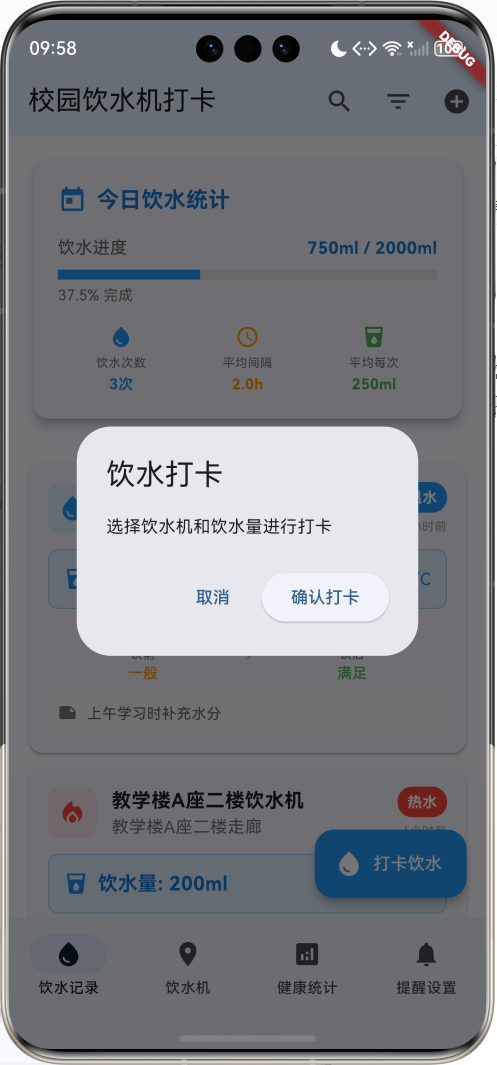
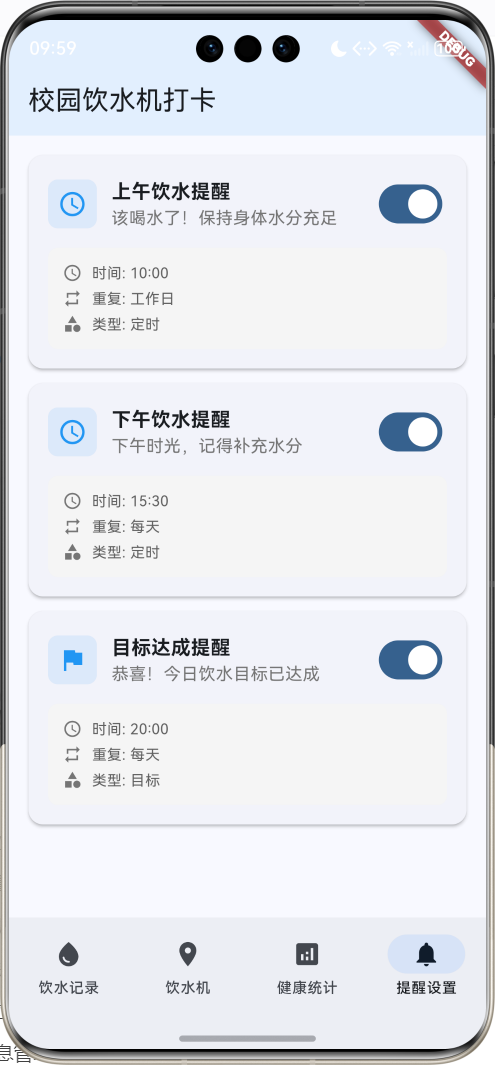
运行效果图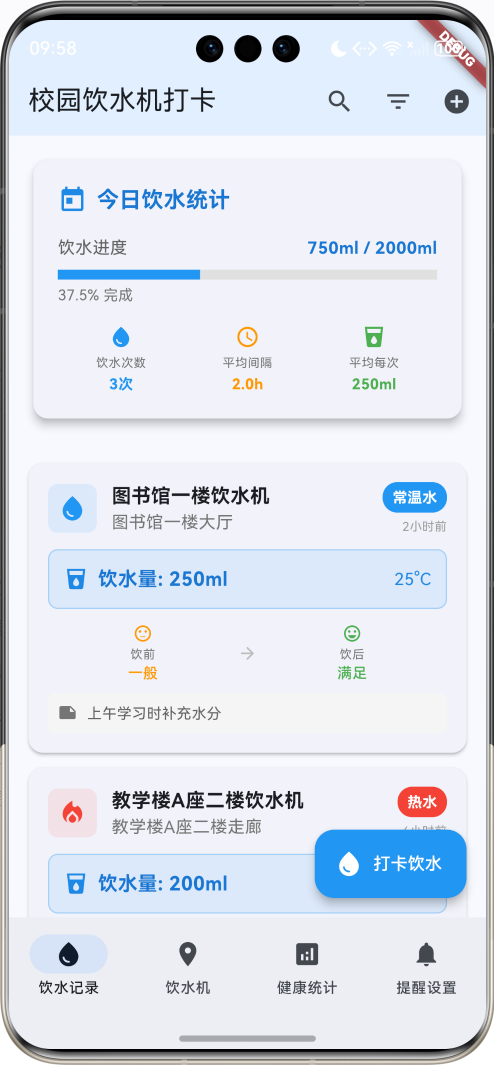
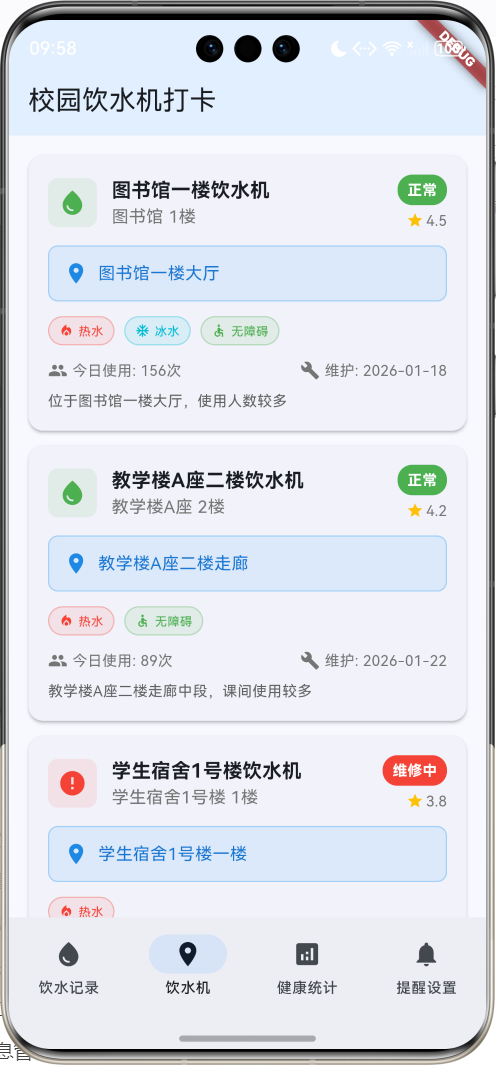
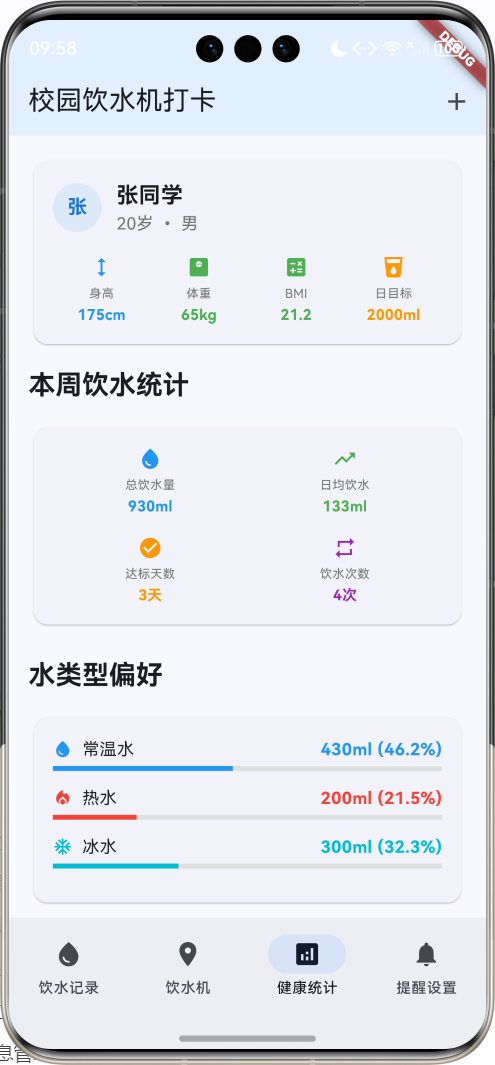
核心功能特性
- 智能打卡记录:支持快速饮水打卡,记录饮水量、水温、心情状态等详细信息
- 饮水机地图:校园饮水机位置查询,包含设备状态、功能特性和用户评价
- 健康统计分析:个人饮水数据统计,包含日、周、月度分析和趋势图表
- 智能提醒系统:个性化饮水提醒,支持定时、智能和目标导向的提醒方式
- 多维度筛选:支持按时间、位置、水类型等条件筛选饮水记录
- 用户健康档案:个人健康信息管理,BMI计算和饮水目标设定
技术架构
开发环境
- 框架:Flutter 3.x
- 开发语言:Dart
- UI组件:Material Design 3
- 状态管理:StatefulWidget + setState
- 动画效果:AnimationController + Tween
项目结构
lib/
├── main.dart                 # 应用入口和主要逻辑
├── models/                   # 数据模型
│   ├── drinking_record.dart  # 饮水记录模型
│   ├── water_station.dart    # 饮水机信息模型
│   ├── health_profile.dart   # 用户健康档案模型
│   ├── daily_stats.dart      # 每日统计模型
│   └── reminder.dart         # 提醒设置模型
├── pages/                    # 页面组件
│   ├── records_page.dart     # 饮水记录页面
│   ├── stations_page.dart    # 饮水机页面
│   ├── stats_page.dart       # 健康统计页面
│   └── reminders_page.dart   # 提醒设置页面
└── widgets/                  # 自定义组件
    ├── record_card.dart      # 记录卡片组件
    ├── station_card.dart     # 饮水机卡片组件
    └── stats_chart.dart      # 统计图表组件
数据模型设计
饮水记录模型(DrinkingRecord)
饮水记录是应用的核心数据结构,记录用户每次饮水的详细信息:
class DrinkingRecord {
  final String id;              // 记录唯一标识
  final DateTime timestamp;     // 打卡时间
  final String stationId;       // 饮水机ID
  final String stationName;     // 饮水机名称
  final String location;        // 位置信息
  final int volume;             // 饮水量(毫升)
  final String waterType;       // 水类型:常温、热水、冰水
  final double temperature;     // 水温度
  final String notes;           // 用户备注
  final String userId;          // 用户ID
  final bool isHealthy;         // 是否健康饮水
  final String moodBefore;      // 饮水前状态
  final String moodAfter;       // 饮水后状态
}
饮水机信息模型(WaterStation)
饮水机信息模型存储校园内各个饮水机的详细信息:
class WaterStation {
  final String id;                    // 饮水机唯一标识
  final String name;                  // 饮水机名称
  final String location;              // 具体位置
  final String building;              // 所在建筑
  final String floor;                 // 楼层信息
  final List<String> waterTypes;      // 支持的水类型
  final bool isWorking;               // 工作状态
  final DateTime lastMaintenance;     // 上次维护时间
  final int dailyUsageCount;          // 今日使用次数
  final double rating;                // 用户评分
  final String description;           // 设备描述
  final List<String> photos;          // 设备照片
  final bool hasHotWater;             // 是否支持热水
  final bool hasColdWater;            // 是否支持冰水
  final bool isAccessible;            // 是否无障碍设计
}
用户健康档案模型(HealthProfile)
用户健康档案记录个人基本信息和健康数据:
class HealthProfile {
  final String userId;                // 用户ID
  final String name;                  // 用户姓名
  final int age;                      // 年龄
  final String gender;                // 性别
  final double weight;                // 体重(kg)
  final double height;                // 身高(cm)
  final int dailyWaterGoal;           // 每日饮水目标(毫升)
  final List<String> healthConditions; // 健康状况
  final List<String> preferences;     // 饮水偏好
  final DateTime createdDate;         // 创建日期
  final DateTime lastUpdated;         // 最后更新时间
}
每日饮水统计模型(DailyWaterStats)
每日统计模型用于分析用户的饮水习惯和健康状况:
class DailyWaterStats {
  final String userId;                    // 用户ID
  final DateTime date;                    // 统计日期
  final int totalVolume;                  // 总饮水量
  final int goalVolume;                   // 目标饮水量
  final int drinkingCount;                // 饮水次数
  final Map<String, int> waterTypeStats;  // 各类型水的饮用量
  final Map<String, int> locationStats;   // 各位置的饮水次数
  final List<DateTime> drinkingTimes;     // 饮水时间点
  final double averageInterval;           // 平均饮水间隔(小时)
  final bool goalAchieved;                // 是否达成目标
}
饮水提醒模型(DrinkingReminder)
提醒系统模型支持多种提醒方式和个性化设置:
class DrinkingReminder {
  final String id;                // 提醒唯一标识
  final String userId;            // 用户ID
  final String title;             // 提醒标题
  final String message;           // 提醒内容
  final DateTime scheduledTime;   // 预定时间
  final bool isRepeating;         // 是否重复
  final List<int> repeatDays;     // 重复的星期几(1-7)
  final bool isEnabled;           // 是否启用
  final String reminderType;      // 提醒类型:定时、智能、目标
  final DateTime createdDate;     // 创建日期
}
应用主界面设计
主页面结构
应用采用底部导航栏设计,包含四个主要功能模块:
class WaterStationHomePage extends StatefulWidget {
const WaterStationHomePage({super.key});
State<WaterStationHomePage> createState() => _WaterStationHomePageState();
}
class _WaterStationHomePageState extends State<WaterStationHomePage>
with TickerProviderStateMixin {
int _selectedIndex = 0;
// 数据存储
List<DrinkingRecord> _drinkingRecords = [];
List<WaterStation> _waterStations = [];
List<DrinkingReminder> _reminders = [];
HealthProfile? _userProfile;
DailyWaterStats? _todayStats;
// 筛选和搜索
String _searchQuery = '';
DateTime _selectedDate = DateTime.now();
String? _selectedLocation;
String? _selectedWaterType;
// 动画控制器
late AnimationController _fadeAnimationController;
late Animation<double> _fadeAnimation;
late AnimationController _bounceAnimationController;
late Animation<double> _bounceAnimation;
}
底部导航栏设计
底部导航栏提供四个主要功能入口:
bottomNavigationBar: NavigationBar(
  selectedIndex: _selectedIndex,
  onDestinationSelected: (index) {
    setState(() => _selectedIndex = index);
  },
  destinations: const [
    NavigationDestination(
      icon: Icon(Icons.water_drop),
      label: '饮水记录',
    ),
    NavigationDestination(
      icon: Icon(Icons.location_on),
      label: '饮水机',
    ),
    NavigationDestination(
      icon: Icon(Icons.analytics),
      label: '健康统计',
    ),
    NavigationDestination(
      icon: Icon(Icons.notifications),
      label: '提醒设置',
    ),
  ],
)
动画效果实现
应用使用多种动画效果提升用户体验:
void _setupAnimations() {
  _fadeAnimationController = AnimationController(
    duration: const Duration(milliseconds: 800),
    vsync: this,
  );

  _fadeAnimation = Tween<double>(
    begin: 0.0,
    end: 1.0,
  ).animate(CurvedAnimation(
    parent: _fadeAnimationController,
    curve: Curves.easeInOut,
  ));

  _bounceAnimationController = AnimationController(
    duration: const Duration(milliseconds: 1200),
    vsync: this,
  );

  _bounceAnimation = Tween<double>(
    begin: 0.0,
    end: 1.0,
  ).animate(CurvedAnimation(
    parent: _bounceAnimationController,
    curve: Curves.elasticOut,
  ));

  _fadeAnimationController.forward();
  _bounceAnimationController.forward();
}
饮水记录功能实现
记录列表页面
饮水记录页面是应用的核心功能,展示用户的所有饮水记录:
Widget _buildDrinkingRecordsPage() {
  final filteredRecords = _getFilteredDrinkingRecords();

  return Column(
    children: [
      // 今日统计卡片
      if (_todayStats != null) _buildTodayStatsCard(),

      // 筛选标签显示
      if (_searchQuery.isNotEmpty ||
          _selectedLocation != null ||
          _selectedWaterType != null)
        Container(
          padding: const EdgeInsets.all(16),
          child: Wrap(
            spacing: 8,
            runSpacing: 8,
            children: [
              if (_searchQuery.isNotEmpty)
                Chip(
                  label: Text('搜索: $_searchQuery'),
                  onDeleted: () {
                    setState(() => _searchQuery = '');
                  },
                ),
              // 其他筛选标签...
            ],
          ),
        ),

      // 饮水记录列表
      Expanded(
        child: filteredRecords.isEmpty
            ? _buildEmptyState()
            : ListView.builder(
                padding: const EdgeInsets.all(16),
                itemCount: filteredRecords.length,
                itemBuilder: (context, index) {
                  final record = filteredRecords[index];
                  return _buildDrinkingRecordCard(record);
                },
              ),
      ),
    ],
  );
}
今日统计卡片
今日统计卡片显示用户当天的饮水进度和关键指标:
Widget _buildTodayStatsCard() {
  final stats = _todayStats!;
  final progress = stats.goalVolume > 0 ? stats.totalVolume / stats.goalVolume : 0.0;

  return Container(
    margin: const EdgeInsets.all(16),
    child: Card(
      elevation: 6,
      child: Padding(
        padding: const EdgeInsets.all(20),
        child: Column(
          crossAxisAlignment: CrossAxisAlignment.start,
          children: [
            // 标题行
            Row(
              children: [
                Icon(Icons.today, color: Colors.blue.shade600, size: 24),
                const SizedBox(width: 8),
                Text(
                  '今日饮水统计',
                  style: TextStyle(
                    fontSize: 18,
                    fontWeight: FontWeight.bold,
                    color: Colors.blue.shade700,
                  ),
                ),
                const Spacer(),
                if (stats.goalAchieved)
                  Container(
                    padding: const EdgeInsets.symmetric(horizontal: 8, vertical: 4),
                    decoration: BoxDecoration(
                      color: Colors.green,
                      borderRadius: BorderRadius.circular(12),
                    ),
                    child: const Text(
                      '目标达成',
                      style: TextStyle(
                        color: Colors.white,
                        fontSize: 12,
                        fontWeight: FontWeight.bold,
                      ),
                    ),
                  ),
              ],
            ),

            const SizedBox(height: 16),

            // 进度条
            Column(
              crossAxisAlignment: CrossAxisAlignment.start,
              children: [
                Row(
                  mainAxisAlignment: MainAxisAlignment.spaceBetween,
                  children: [
                    Text('饮水进度', style: TextStyle(fontSize: 14, color: Colors.grey.shade700)),
                    Text(
                      '${stats.totalVolume}ml / ${stats.goalVolume}ml',
                      style: TextStyle(
                        fontSize: 14,
                        fontWeight: FontWeight.bold,
                        color: Colors.blue.shade700,
                      ),
                    ),
                  ],
                ),
                const SizedBox(height: 8),
                LinearProgressIndicator(
                  value: progress > 1.0 ? 1.0 : progress,
                  backgroundColor: Colors.grey.shade300,
                  valueColor: AlwaysStoppedAnimation<Color>(
                    progress >= 1.0 ? Colors.green : Colors.blue,
                  ),
                  minHeight: 8,
                ),
                const SizedBox(height: 4),
                Text(
                  '${(progress * 100).toStringAsFixed(1)}% 完成',
                  style: TextStyle(fontSize: 12, color: Colors.grey.shade600),
                ),
              ],
            ),

            const SizedBox(height: 16),

            // 统计信息
            Row(
              children: [
                Expanded(
                  child: _buildStatItem(
                    Icons.water_drop, '饮水次数', '${stats.drinkingCount}次', Colors.blue,
                  ),
                ),
                Expanded(
                  child: _buildStatItem(
                    Icons.schedule, '平均间隔',
                    stats.averageInterval > 0
                        ? '${stats.averageInterval.toStringAsFixed(1)}h'
                        : '暂无',
                    Colors.orange,
                  ),
                ),
                Expanded(
                  child: _buildStatItem(
                    Icons.local_drink, '平均每次',
                    stats.drinkingCount > 0
                        ? '${(stats.totalVolume / stats.drinkingCount).toStringAsFixed(0)}ml'
                        : '0ml',
                    Colors.green,
                  ),
                ),
              ],
            ),
          ],
        ),
      ),
    ),
  );
}
饮水记录卡片
每条饮水记录以卡片形式展示,包含详细的饮水信息:
Widget _buildDrinkingRecordCard(DrinkingRecord record) {
  final timeAgo = _getTimeAgo(record.timestamp);

  return Card(
    elevation: 2,
    margin: const EdgeInsets.only(bottom: 12),
    child: InkWell(
      onTap: () => _showRecordDetail(record),
      child: Padding(
        padding: const EdgeInsets.all(16),
        child: Column(
          crossAxisAlignment: CrossAxisAlignment.start,
          children: [
            // 标题行
            Row(
              children: [
                Container(
                  padding: const EdgeInsets.all(8),
                  decoration: BoxDecoration(
                    color: _getWaterTypeColor(record.waterType).withValues(alpha: 0.1),
                    borderRadius: BorderRadius.circular(8),
                  ),
                  child: Icon(
                    _getWaterTypeIcon(record.waterType),
                    color: _getWaterTypeColor(record.waterType),
                    size: 24,
                  ),
                ),
                const SizedBox(width: 12),
                Expanded(
                  child: Column(
                    crossAxisAlignment: CrossAxisAlignment.start,
                    children: [
                      Text(
                        record.stationName,
                        style: const TextStyle(fontSize: 16, fontWeight: FontWeight.bold),
                      ),
                      Text(
                        record.location,
                        style: TextStyle(color: Colors.grey.shade600, fontSize: 14),
                      ),
                    ],
                  ),
                ),
                Column(
                  crossAxisAlignment: CrossAxisAlignment.end,
                  children: [
                    Container(
                      padding: const EdgeInsets.symmetric(horizontal: 8, vertical: 4),
                      decoration: BoxDecoration(
                        color: _getWaterTypeColor(record.waterType),
                        borderRadius: BorderRadius.circular(12),
                      ),
                      child: Text(
                        record.waterType,
                        style: const TextStyle(
                          color: Colors.white,
                          fontSize: 12,
                          fontWeight: FontWeight.bold,
                        ),
                      ),
                    ),
                    const SizedBox(height: 4),
                    Text(timeAgo, style: TextStyle(color: Colors.grey.shade500, fontSize: 10)),
                  ],
                ),
              ],
            ),

            const SizedBox(height: 12),

            // 饮水信息
            Container(
              padding: const EdgeInsets.all(12),
              decoration: BoxDecoration(
                color: Colors.blue.withValues(alpha: 0.1),
                borderRadius: BorderRadius.circular(8),
                border: Border.all(color: Colors.blue.withValues(alpha: 0.3)),
              ),
              child: Row(
                children: [
                  Icon(Icons.local_drink, color: Colors.blue.shade600, size: 20),
                  const SizedBox(width: 8),
                  Text(
                    '饮水量: ${record.volume}ml',
                    style: TextStyle(
                      fontSize: 16,
                      fontWeight: FontWeight.bold,
                      color: Colors.blue.shade700,
                    ),
                  ),
                  const Spacer(),
                  Text(
                    '${record.temperature.toStringAsFixed(0)}°C',
                    style: TextStyle(fontSize: 14, color: Colors.blue.shade600),
                  ),
                ],
              ),
            ),

            const SizedBox(height: 12),

            // 心情状态
            Row(
              children: [
                Expanded(
                  child: _buildMoodItem(
                    '饮前', record.moodBefore,
                    _getMoodIcon(record.moodBefore),
                    _getMoodColor(record.moodBefore),
                  ),
                ),
                Icon(Icons.arrow_forward, color: Colors.grey.shade400, size: 16),
                Expanded(
                  child: _buildMoodItem(
                    '饮后', record.moodAfter,
                    _getMoodIcon(record.moodAfter),
                    _getMoodColor(record.moodAfter),
                  ),
                ),
              ],
            ),

            // 备注
            if (record.notes.isNotEmpty) ...[
              const SizedBox(height: 8),
              Container(
                padding: const EdgeInsets.all(8),
                decoration: BoxDecoration(
                  color: Colors.grey.shade100,
                  borderRadius: BorderRadius.circular(6),
                ),
                child: Row(
                  crossAxisAlignment: CrossAxisAlignment.start,
                  children: [
                    Icon(Icons.note, size: 16, color: Colors.grey.shade600),
                    const SizedBox(width: 8),
                    Expanded(
                      child: Text(
                        record.notes,
                        style: TextStyle(color: Colors.grey.shade700, fontSize: 12),
                      ),
                    ),
                  ],
                ),
              ),
            ],
          ],
        ),
      ),
    ),
  );
}
筛选和搜索功能
应用提供多维度的筛选和搜索功能,帮助用户快速找到目标记录:
List<DrinkingRecord> _getFilteredDrinkingRecords() {
  return _drinkingRecords.where((record) {
    // 搜索过滤
    if (_searchQuery.isNotEmpty) {
      final query = _searchQuery.toLowerCase();
      if (!record.stationName.toLowerCase().contains(query) &&
          !record.location.toLowerCase().contains(query) &&
          !record.notes.toLowerCase().contains(query)) {
        return false;
      }
    }

    // 位置过滤
    if (_selectedLocation != null && record.location != _selectedLocation) {
      return false;
    }

    // 水类型过滤
    if (_selectedWaterType != null && record.waterType != _selectedWaterType) {
      return false;
    }

    // 日期过滤
    if (record.timestamp.year != _selectedDate.year ||
        record.timestamp.month != _selectedDate.month ||
        record.timestamp.day != _selectedDate.day) {
      return false;
    }

    return true;
  }).toList()
    ..sort((a, b) => b.timestamp.compareTo(a.timestamp));
}
搜索对话框
搜索功能通过对话框实现,支持实时搜索:
void _showSearchDialog() {
  showDialog(
    context: context,
    builder: (context) => AlertDialog(
      title: const Text('搜索记录'),
      content: TextField(
        autofocus: true,
        decoration: const InputDecoration(
          hintText: '输入饮水机名称、位置或备注',
          prefixIcon: Icon(Icons.search),
        ),
        onChanged: (value) {
          _searchQuery = value;
        },
        onSubmitted: (value) {
          Navigator.of(context).pop();
          setState(() {});
        },
      ),
      actions: [
        TextButton(
          onPressed: () => Navigator.of(context).pop(),
          child: const Text('取消'),
        ),
        ElevatedButton(
          onPressed: () {
            Navigator.of(context).pop();
            setState(() {});
          },
          child: const Text('搜索'),
        ),
      ],
    ),
  );
}
筛选对话框
筛选对话框提供位置和水类型的多选筛选:
void _showFilterDialog() {
  showDialog(
    context: context,
    builder: (context) => AlertDialog(
      title: const Text('筛选记录'),
      content: SingleChildScrollView(
        child: Column(
          mainAxisSize: MainAxisSize.min,
          crossAxisAlignment: CrossAxisAlignment.start,
          children: [
            const Text('位置:'),
            const SizedBox(height: 8),
            Wrap(
              spacing: 8,
              children: [
                FilterChip(
                  label: const Text('全部'),
                  selected: _selectedLocation == null,
                  onSelected: (selected) {
                    setState(() {
                      _selectedLocation = selected ? null : _selectedLocation;
                    });
                  },
                ),
                ...['图书馆一楼大厅', '教学楼A座二楼走廊', '学生宿舍1号楼一楼']
                    .map((location) => FilterChip(
                          label: Text(location.length > 8
                              ? '${location.substring(0, 8)}...'
                              : location),
                          selected: _selectedLocation == location,
                          onSelected: (selected) {
                            setState(() {
                              _selectedLocation = selected ? location : null;
                            });
                          },
                        )),
              ],
            ),
            const SizedBox(height: 16),
            const Text('水类型:'),
            const SizedBox(height: 8),
            Wrap(
              spacing: 8,
              children: [
                FilterChip(
                  label: const Text('全部'),
                  selected: _selectedWaterType == null,
                  onSelected: (selected) {
                    setState(() {
                      _selectedWaterType = selected ? null : _selectedWaterType;
                    });
                  },
                ),
                ...['常温水', '热水', '冰水', '过滤水'].map((type) => FilterChip(
                      label: Text(type),
                      selected: _selectedWaterType == type,
                      onSelected: (selected) {
                        setState(() {
                          _selectedWaterType = selected ? type : null;
                        });
                      },
                    )),
              ],
            ),
          ],
        ),
      ),
      actions: [
        TextButton(
          onPressed: () => Navigator.of(context).pop(),
          child: const Text('取消'),
        ),
        ElevatedButton(
          onPressed: () {
            Navigator.of(context).pop();
            setState(() {});
          },
          child: const Text('应用'),
        ),
      ],
    ),
  );
}
饮水机信息管理
饮水机列表页面
饮水机页面展示校园内所有饮水机的信息和状态:
Widget _buildWaterStationsPage() {
  return ListView.builder(
    padding: const EdgeInsets.all(16),
    itemCount: _waterStations.length,
    itemBuilder: (context, index) {
      final station = _waterStations[index];
      return _buildWaterStationCard(station);
    },
  );
}
饮水机信息卡片
每个饮水机以卡片形式展示详细信息:
Widget _buildWaterStationCard(WaterStation station) {
  return Card(
    elevation: 2,
    margin: const EdgeInsets.only(bottom: 12),
    child: InkWell(
      onTap: () => _showStationDetail(station),
      child: Padding(
        padding: const EdgeInsets.all(16),
        child: Column(
          crossAxisAlignment: CrossAxisAlignment.start,
          children: [
            // 标题行
            Row(
              children: [
                Container(
                  padding: const EdgeInsets.all(8),
                  decoration: BoxDecoration(
                    color: station.isWorking
                        ? Colors.green.withValues(alpha: 0.1)
                        : Colors.red.withValues(alpha: 0.1),
                    borderRadius: BorderRadius.circular(8),
                  ),
                  child: Icon(
                    station.isWorking ? Icons.water_drop : Icons.error,
                    color: station.isWorking ? Colors.green : Colors.red,
                    size: 24,
                  ),
                ),
                const SizedBox(width: 12),
                Expanded(
                  child: Column(
                    crossAxisAlignment: CrossAxisAlignment.start,
                    children: [
                      Text(
                        station.name,
                        style: const TextStyle(fontSize: 16, fontWeight: FontWeight.bold),
                      ),
                      Text(
                        '${station.building} ${station.floor}',
                        style: TextStyle(color: Colors.grey.shade600, fontSize: 14),
                      ),
                    ],
                  ),
                ),
                Column(
                  crossAxisAlignment: CrossAxisAlignment.end,
                  children: [
                    Container(
                      padding: const EdgeInsets.symmetric(horizontal: 8, vertical: 4),
                      decoration: BoxDecoration(
                        color: station.isWorking ? Colors.green : Colors.red,
                        borderRadius: BorderRadius.circular(12),
                      ),
                      child: Text(
                        station.isWorking ? '正常' : '维修中',
                        style: const TextStyle(
                          color: Colors.white,
                          fontSize: 12,
                          fontWeight: FontWeight.bold,
                        ),
                      ),
                    ),
                    const SizedBox(height: 4),
                    Row(
                      mainAxisSize: MainAxisSize.min,
                      children: [
                        Icon(Icons.star, color: Colors.amber, size: 14),
                        const SizedBox(width: 2),
                        Text(
                          station.rating.toStringAsFixed(1),
                          style: TextStyle(color: Colors.grey.shade600, fontSize: 12),
                        ),
                      ],
                    ),
                  ],
                ),
              ],
            ),

            const SizedBox(height: 12),

            // 位置信息
            Container(
              padding: const EdgeInsets.all(12),
              decoration: BoxDecoration(
                color: Colors.blue.withValues(alpha: 0.1),
                borderRadius: BorderRadius.circular(8),
                border: Border.all(color: Colors.blue.withValues(alpha: 0.3)),
              ),
              child: Row(
                children: [
                  Icon(Icons.location_on, color: Colors.blue.shade600, size: 20),
                  const SizedBox(width: 8),
                  Expanded(
                    child: Text(
                      station.location,
                      style: TextStyle(fontSize: 14, color: Colors.blue.shade700),
                    ),
                  ),
                ],
              ),
            ),

            const SizedBox(height: 12),

            // 功能特性
            Row(
              children: [
                if (station.hasHotWater)
                  Container(
                    padding: const EdgeInsets.symmetric(horizontal: 8, vertical: 4),
                    margin: const EdgeInsets.only(right: 8),
                    decoration: BoxDecoration(
                      color: Colors.red.withValues(alpha: 0.1),
                      borderRadius: BorderRadius.circular(12),
                      border: Border.all(color: Colors.red.withValues(alpha: 0.3)),
                    ),
                    child: Row(
                      mainAxisSize: MainAxisSize.min,
                      children: [
                        Icon(Icons.local_fire_department, color: Colors.red, size: 12),
                        const SizedBox(width: 4),
                        Text('热水', style: TextStyle(color: Colors.red, fontSize: 10)),
                      ],
                    ),
                  ),
                if (station.hasColdWater)
                  Container(
                    padding: const EdgeInsets.symmetric(horizontal: 8, vertical: 4),
                    margin: const EdgeInsets.only(right: 8),
                    decoration: BoxDecoration(
                      color: Colors.cyan.withValues(alpha: 0.1),
                      borderRadius: BorderRadius.circular(12),
                      border: Border.all(color: Colors.cyan.withValues(alpha: 0.3)),
                    ),
                    child: Row(
                      mainAxisSize: MainAxisSize.min,
                      children: [
                        Icon(Icons.ac_unit, color: Colors.cyan, size: 12),
                        const SizedBox(width: 4),
                        Text('冰水', style: TextStyle(color: Colors.cyan, fontSize: 10)),
                      ],
                    ),
                  ),
                if (station.isAccessible)
                  Container(
                    padding: const EdgeInsets.symmetric(horizontal: 8, vertical: 4),
                    decoration: BoxDecoration(
                      color: Colors.green.withValues(alpha: 0.1),
                      borderRadius: BorderRadius.circular(12),
                      border: Border.all(color: Colors.green.withValues(alpha: 0.3)),
                    ),
                    child: Row(
                      mainAxisSize: MainAxisSize.min,
                      children: [
                        Icon(Icons.accessible, color: Colors.green, size: 12),
                        const SizedBox(width: 4),
                        Text('无障碍', style: TextStyle(color: Colors.green, fontSize: 10)),
                      ],
                    ),
                  ),
              ],
            ),

            const SizedBox(height: 12),

            // 使用统计
            Row(
              children: [
                Expanded(
                  child: Row(
                    children: [
                      Icon(Icons.people, size: 16, color: Colors.grey.shade600),
                      const SizedBox(width: 4),
                      Text(
                        '今日使用: ${station.dailyUsageCount}次',
                        style: TextStyle(color: Colors.grey.shade600, fontSize: 12),
                      ),
                    ],
                  ),
                ),
                Row(
                  children: [
                    Icon(Icons.build, size: 16, color: Colors.grey.shade600),
                    const SizedBox(width: 4),
                    Text(
                      '维护: ${_formatDate(station.lastMaintenance)}',
                      style: TextStyle(color: Colors.grey.shade600, fontSize: 12),
                    ),
                  ],
                ),
              ],
            ),

            // 描述
            if (station.description.isNotEmpty) ...[
              const SizedBox(height: 8),
              Text(
                station.description,
                style: TextStyle(color: Colors.grey.shade700, fontSize: 12),
              ),
            ],
          ],
        ),
      ),
    ),
  );
}
健康统计分析
统计页面结构
健康统计页面提供全面的饮水数据分析:
Widget _buildHealthStatsPage() {
  return SingleChildScrollView(
    padding: const EdgeInsets.all(16),
    child: Column(
      crossAxisAlignment: CrossAxisAlignment.start,
      children: [
        // 用户信息卡片
        if (_userProfile != null) _buildUserProfileCard(),

        const SizedBox(height: 16),

        // 本周统计
        Text(
          '本周饮水统计',
          style: Theme.of(context).textTheme.titleLarge?.copyWith(
                fontWeight: FontWeight.bold,
              ),
        ),
        const SizedBox(height: 16),
        _buildWeeklyStatsCard(),

        const SizedBox(height: 24),

        // 水类型分布
        Text(
          '水类型偏好',
          style: Theme.of(context).textTheme.titleLarge?.copyWith(
                fontWeight: FontWeight.bold,
              ),
        ),
        const SizedBox(height: 16),
        _buildWaterTypeDistributionCard(),

        const SizedBox(height: 24),

        // 位置使用统计
        Text(
          '常用饮水机',
          style: Theme.of(context).textTheme.titleLarge?.copyWith(
                fontWeight: FontWeight.bold,
              ),
        ),
        const SizedBox(height: 16),
        _buildLocationUsageCard(),
      ],
    ),
  );
}
用户健康档案卡片
用户档案卡片展示个人基本信息和健康指标:
Widget _buildUserProfileCard() {
  final profile = _userProfile!;
  final bmi = profile.weight / ((profile.height / 100) * (profile.height / 100));

  return Card(
    child: Padding(
      padding: const EdgeInsets.all(16),
      child: Column(
        crossAxisAlignment: CrossAxisAlignment.start,
        children: [
          Row(
            children: [
              CircleAvatar(
                backgroundColor: Colors.blue.withValues(alpha: 0.1),
                child: Text(
                  profile.name.isNotEmpty ? profile.name[0] : '?',
                  style: TextStyle(
                    color: Colors.blue.shade700,
                    fontWeight: FontWeight.bold,
                  ),
                ),
              ),
              const SizedBox(width: 12),
              Expanded(
                child: Column(
                  crossAxisAlignment: CrossAxisAlignment.start,
                  children: [
                    Text(
                      profile.name,
                      style: const TextStyle(fontSize: 18, fontWeight: FontWeight.bold),
                    ),
                    Text(
                      '${profile.age}岁 • ${profile.gender}',
                      style: TextStyle(color: Colors.grey.shade600, fontSize: 14),
                    ),
                  ],
                ),
              ),
            ],
          ),
          const SizedBox(height: 16),
          Row(
            children: [
              Expanded(
                child: _buildStatItem(
                  Icons.height, '身高', '${profile.height.toStringAsFixed(0)}cm', Colors.blue,
                ),
              ),
              Expanded(
                child: _buildStatItem(
                  Icons.monitor_weight, '体重', '${profile.weight.toStringAsFixed(0)}kg', Colors.green,
                ),
              ),
              Expanded(
                child: _buildStatItem(
                  Icons.calculate, 'BMI', bmi.toStringAsFixed(1), _getBMIColor(bmi),
                ),
              ),
              Expanded(
                child: _buildStatItem(
                  Icons.local_drink, '日目标', '${profile.dailyWaterGoal}ml', Colors.orange,
                ),
              ),
            ],
          ),
        ],
      ),
    ),
  );
}
本周统计卡片
本周统计展示用户一周内的饮水数据汇总:
Widget _buildWeeklyStatsCard() {
  // 计算本周统计(简化版)
  final now = DateTime.now();
  final weekStart = now.subtract(Duration(days: now.weekday - 1));

  final weeklyRecords = _drinkingRecords
      .where((record) =>
          record.timestamp.isAfter(weekStart) &&
          record.timestamp.isBefore(now.add(const Duration(days: 1))))
      .toList();

  final totalVolume = weeklyRecords.fold(0, (sum, record) => sum + record.volume);
  final avgDaily = totalVolume / 7;
  final goalAchievedDays = 3; // 简化计算

  return Card(
    child: Padding(
      padding: const EdgeInsets.all(16),
      child: Column(
        children: [
          Row(
            children: [
              Expanded(
                child: _buildStatItem(
                  Icons.water_drop, '总饮水量', '${totalVolume}ml', Colors.blue,
                ),
              ),
              Expanded(
                child: _buildStatItem(
                  Icons.trending_up, '日均饮水', '${avgDaily.toStringAsFixed(0)}ml', Colors.green,
                ),
              ),
            ],
          ),
          const SizedBox(height: 16),
          Row(
            children: [
              Expanded(
                child: _buildStatItem(
                  Icons.check_circle, '达标天数', '$goalAchievedDays天', Colors.orange,
                ),
              ),
              Expanded(
                child: _buildStatItem(
                  Icons.repeat, '饮水次数', '${weeklyRecords.length}次', Colors.purple,
                ),
              ),
            ],
          ),
        ],
      ),
    ),
  );
}
水类型分布统计
水类型分布卡片以进度条形式展示各类型水的饮用比例:
Widget _buildWaterTypeDistributionCard() {
  final waterTypeStats = <String, int>{};
  for (final record in _drinkingRecords) {
    waterTypeStats[record.waterType] =
        (waterTypeStats[record.waterType] ?? 0) + record.volume;
  }

  return Card(
    child: Padding(
      padding: const EdgeInsets.all(16),
      child: Column(
        children: waterTypeStats.entries.map((entry) {
          final total = waterTypeStats.values.fold(0, (sum, value) => sum + value);
          final percentage = total > 0 ? entry.value / total : 0.0;
          return Padding(
            padding: const EdgeInsets.only(bottom: 12),
            child: Column(
              crossAxisAlignment: CrossAxisAlignment.start,
              children: [
                Row(
                  mainAxisAlignment: MainAxisAlignment.spaceBetween,
                  children: [
                    Row(
                      children: [
                        Icon(
                          _getWaterTypeIcon(entry.key),
                          color: _getWaterTypeColor(entry.key),
                          size: 16,
                        ),
                        const SizedBox(width: 8),
                        Text(entry.key),
                      ],
                    ),
                    Text(
                      '${entry.value}ml (${(percentage * 100).toStringAsFixed(1)}%)',
                      style: TextStyle(
                        color: _getWaterTypeColor(entry.key),
                        fontWeight: FontWeight.bold,
                      ),
                    ),
                  ],
                ),
                const SizedBox(height: 4),
                LinearProgressIndicator(
                  value: percentage,
                  backgroundColor: Colors.grey.shade300,
                  valueColor: AlwaysStoppedAnimation<Color>(
                    _getWaterTypeColor(entry.key),
                  ),
                ),
              ],
            ),
          );
        }).toList(),
      ),
    ),
  );
}
位置使用统计
位置使用统计展示用户最常使用的饮水机位置:
Widget _buildLocationUsageCard() {
  final locationStats = <String, int>{};
  for (final record in _drinkingRecords) {
    locationStats[record.location] = (locationStats[record.location] ?? 0) + 1;
  }

  return Card(
    child: Padding(
      padding: const EdgeInsets.all(16),
      child: Column(
        children: locationStats.entries.take(5).map((entry) {
          final total = locationStats.values.fold(0, (sum, value) => sum + value);
          final percentage = total > 0 ? entry.value / total : 0.0;
          return Padding(
            padding: const EdgeInsets.only(bottom: 12),
            child: Column(
              crossAxisAlignment: CrossAxisAlignment.start,
              children: [
                Row(
                  mainAxisAlignment: MainAxisAlignment.spaceBetween,
                  children: [
                    Expanded(
                      child: Text(
                        entry.key,
                        style: const TextStyle(fontWeight: FontWeight.w500),
                      ),
                    ),
                    Text(
                      '${entry.value}次 (${(percentage * 100).toStringAsFixed(1)}%)',
                      style: TextStyle(
                        color: Colors.blue.shade600,
                        fontWeight: FontWeight.bold,
                      ),
                    ),
                  ],
                ),
                const SizedBox(height: 4),
                LinearProgressIndicator(
                  value: percentage,
                  backgroundColor: Colors.grey.shade300,
                  valueColor: AlwaysStoppedAnimation<Color>(
                    Colors.blue.shade600,
                  ),
                ),
              ],
            ),
          );
        }).toList(),
      ),
    ),
  );
}
提醒系统实现
提醒列表页面
提醒页面展示用户设置的所有饮水提醒:
Widget _buildRemindersPage() {
  return ListView.builder(
    padding: const EdgeInsets.all(16),
    itemCount: _reminders.length,
    itemBuilder: (context, index) {
      final reminder = _reminders[index];
      return _buildReminderCard(reminder);
    },
  );
}
提醒卡片设计
每个提醒以卡片形式展示,包含开关控制:
Widget _buildReminderCard(DrinkingReminder reminder) {
  return Card(
    elevation: 2,
    margin: const EdgeInsets.only(bottom: 12),
    child: Padding(
      padding: const EdgeInsets.all(16),
      child: Column(
        crossAxisAlignment: CrossAxisAlignment.start,
        children: [
          Row(
            children: [
              Container(
                padding: const EdgeInsets.all(8),
                decoration: BoxDecoration(
                  color: reminder.isEnabled
                      ? Colors.blue.withValues(alpha: 0.1)
                      : Colors.grey.withValues(alpha: 0.1),
                  borderRadius: BorderRadius.circular(8),
                ),
                child: Icon(
                  _getReminderTypeIcon(reminder.reminderType),
                  color: reminder.isEnabled ? Colors.blue : Colors.grey,
                  size: 24,
                ),
              ),
              const SizedBox(width: 12),
              Expanded(
                child: Column(
                  crossAxisAlignment: CrossAxisAlignment.start,
                  children: [
                    Text(
                      reminder.title,
                      style: const TextStyle(fontSize: 16, fontWeight: FontWeight.bold),
                    ),
                    Text(
                      reminder.message,
                      style: TextStyle(color: Colors.grey.shade600, fontSize: 14),
                    ),
                  ],
                ),
              ),
              Switch(
                value: reminder.isEnabled,
                onChanged: (value) {
                  // TODO: 更新提醒状态
                  setState(() {
                    // 这里应该更新reminder的isEnabled状态
                  });
                },
              ),
            ],
          ),
          const SizedBox(height: 12),
          Container(
            padding: const EdgeInsets.all(12),
            decoration: BoxDecoration(
              color: Colors.grey.shade100,
              borderRadius: BorderRadius.circular(8),
            ),
            child: Column(
              crossAxisAlignment: CrossAxisAlignment.start,
              children: [
                Row(
                  children: [
                    Icon(Icons.schedule, size: 16, color: Colors.grey.shade600),
                    const SizedBox(width: 8),
                    Text(
                      '时间: ${_formatTime(reminder.scheduledTime)}',
                      style: TextStyle(color: Colors.grey.shade700, fontSize: 12),
                    ),
                  ],
                ),
                if (reminder.isRepeating) ...[
                  const SizedBox(height: 4),
                  Row(
                    children: [
                      Icon(Icons.repeat, size: 16, color: Colors.grey.shade600),
                      const SizedBox(width: 8),
                      Text(
                        '重复: ${_getRepeatDaysText(reminder.repeatDays)}',
                        style: TextStyle(color: Colors.grey.shade700, fontSize: 12),
                      ),
                    ],
                  ),
                ],
                const SizedBox(height: 4),
                Row(
                  children: [
                    Icon(Icons.category, size: 16, color: Colors.grey.shade600),
                    const SizedBox(width: 8),
                    Text(
                      '类型: ${reminder.reminderType}',
                      style: TextStyle(color: Colors.grey.shade700, fontSize: 12),
                    ),
                  ],
                ),
              ],
            ),
          ),
        ],
      ),
    ),
  );
}
工具函数和辅助方法
颜色和图标映射
应用使用多种颜色和图标来区分不同的水类型和状态:
Color _getWaterTypeColor(String waterType) {
  switch (waterType) {
    case '常温水':
      return Colors.blue;
    case '热水':
      return Colors.red;
    case '冰水':
      return Colors.cyan;
    case '过滤水':
      return Colors.green;
    default:
      return Colors.grey;
  }
}

IconData _getWaterTypeIcon(String waterType) {
  switch (waterType) {
    case '常温水':
      return Icons.water_drop;
    case '热水':
      return Icons.local_fire_department;
    case '冰水':
      return Icons.ac_unit;
    case '过滤水':
      return Icons.filter_alt;
    default:
      return Icons.water;
  }
}

IconData _getMoodIcon(String mood) {
  switch (mood) {
    case '很渴':
    case '渴':
      return Icons.sentiment_very_dissatisfied;
    case '一般':
      return Icons.sentiment_neutral;
    case '不渴':
      return Icons.sentiment_satisfied;
    case '满足':
      return Icons.sentiment_very_satisfied;
    case '还想喝':
      return Icons.sentiment_satisfied_alt;
    default:
      return Icons.sentiment_neutral;
  }
}

Color _getMoodColor(String mood) {
  switch (mood) {
    case '很渴':
    case '渴':
      return Colors.red;
    case '一般':
      return Colors.orange;
    case '不渴':
      return Colors.blue;
    case '满足':
      return Colors.green;
    case '还想喝':
      return Colors.purple;
    default:
      return Colors.grey;
  }
}
BMI计算和颜色判断
健康指标计算和状态判断:
Color _getBMIColor(double bmi) {
  if (bmi < 18.5) return Colors.blue;      // 偏瘦
  if (bmi < 25) return Colors.green;       // 正常
  if (bmi < 30) return Colors.orange;      // 超重
  return Colors.red;                       // 肥胖
}
提醒类型图标
不同提醒类型对应不同图标:
IconData _getReminderTypeIcon(String type) {
  switch (type) {
    case '定时':
      return Icons.schedule;
    case '智能':
      return Icons.psychology;
    case '目标':
      return Icons.flag;
    default:
      return Icons.notifications;
  }
}
时间格式化
时间显示格式化函数:
String _getTimeAgo(DateTime dateTime) {
  final now = DateTime.now();
  final difference = now.difference(dateTime);

  if (difference.inMinutes < 1) {
    return '刚刚';
  } else if (difference.inMinutes < 60) {
    return '${difference.inMinutes}分钟前';
  } else if (difference.inHours < 24) {
    return '${difference.inHours}小时前';
  } else if (difference.inDays < 7) {
    return '${difference.inDays}天前';
  } else {
    return _formatDate(dateTime);
  }
}

String _formatDate(DateTime dateTime) {
  return '${dateTime.year}-${dateTime.month.toString().padLeft(2, '0')}-${dateTime.day.toString().padLeft(2, '0')}';
}

String _formatTime(DateTime dateTime) {
  return '${dateTime.hour.toString().padLeft(2, '0')}:${dateTime.minute.toString().padLeft(2, '0')}';
}
重复日期文本转换
将重复日期数组转换为可读文本:
String _getRepeatDaysText(List<int> days) {
  if (days.length == 7) return '每天';
  if (days.length == 5 && !days.contains(6) && !days.contains(7)) return '工作日';
  if (days.length == 2 && days.contains(6) && days.contains(7)) return '周末';

  final dayNames = ['', '周一', '周二', '周三', '周四', '周五', '周六', '周日'];
  return days.map((day) => dayNames[day]).join('、');
}
数据初始化和统计计算
数据初始化
应用启动时初始化示例数据:
void _initializeData() {
  // 初始化用户健康档案
  _userProfile = HealthProfile(
    userId: 'user001',
    name: '张同学',
    age: 20,
    gender: '男',
    weight: 65.0,
    height: 175.0,
    dailyWaterGoal: 2000, // 2升
    healthConditions: [],
    preferences: ['常温水', '热水'],
    createdDate: DateTime.now().subtract(const Duration(days: 30)),
    lastUpdated: DateTime.now(),
  );

  // 初始化饮水机信息
  _waterStations = [
    WaterStation(
      id: 'ws001',
      name: '图书馆一楼饮水机',
      location: '图书馆一楼大厅',
      building: '图书馆',
      floor: '1楼',
      waterTypes: ['常温水', '热水', '冰水'],
      isWorking: true,
      lastMaintenance: DateTime.now().subtract(const Duration(days: 7)),
      dailyUsageCount: 156,
      rating: 4.5,
      description: '位于图书馆一楼大厅,使用人数较多',
      photos: ['lib_1f_1.jpg', 'lib_1f_2.jpg'],
      hasHotWater: true,
      hasColdWater: true,
      isAccessible: true,
    ),
    // 更多饮水机数据...
  ];

  // 初始化饮水记录
  _drinkingRecords = [
    DrinkingRecord(
      id: 'dr001',
      timestamp: DateTime.now().subtract(const Duration(hours: 2)),
      stationId: 'ws001',
      stationName: '图书馆一楼饮水机',
      location: '图书馆一楼大厅',
      volume: 250,
      waterType: '常温水',
      temperature: 25.0,
      notes: '上午学习时补充水分',
      userId: 'user001',
      isHealthy: true,
      moodBefore: '一般',
      moodAfter: '满足',
    ),
    // 更多饮水记录...
  ];

  // 初始化提醒设置
  _reminders = [
    DrinkingReminder(
      id: 'rm001',
      userId: 'user001',
      title: '上午饮水提醒',
      message: '该喝水了!保持身体水分充足',
      scheduledTime: DateTime(2024, 1, 1, 10, 0),
      isRepeating: true,
      repeatDays: [1, 2, 3, 4, 5], // 工作日
      isEnabled: true,
      reminderType: '定时',
      createdDate: DateTime.now().subtract(const Duration(days: 7)),
    ),
    // 更多提醒设置...
  ];
}
今日统计计算
实时计算当日饮水统计数据:
void _calculateTodayStats() {
  final today = DateTime.now();
  final todayRecords = _drinkingRecords
      .where((record) =>
          record.timestamp.year == today.year &&
          record.timestamp.month == today.month &&
          record.timestamp.day == today.day)
      .toList();

  final totalVolume = todayRecords.fold(0, (sum, record) => sum + record.volume);
  final goalVolume = _userProfile?.dailyWaterGoal ?? 2000;

  final waterTypeStats = <String, int>{};
  final locationStats = <String, int>{};
  final drinkingTimes = <DateTime>[];

  for (final record in todayRecords) {
    waterTypeStats[record.waterType] =
        (waterTypeStats[record.waterType] ?? 0) + record.volume;
    locationStats[record.location] =
        (locationStats[record.location] ?? 0) + 1;
    drinkingTimes.add(record.timestamp);
  }

  // 计算平均饮水间隔
  double averageInterval = 0.0;
  if (drinkingTimes.length > 1) {
    drinkingTimes.sort();
    double totalInterval = 0.0;
    for (int i = 1; i < drinkingTimes.length; i++) {
      totalInterval += drinkingTimes[i].difference(drinkingTimes[i - 1]).inMinutes;
    }
    averageInterval = totalInterval / (drinkingTimes.length - 1) / 60; // 转换为小时
  }

  _todayStats = DailyWaterStats(
    userId: 'user001',
    date: today,
    totalVolume: totalVolume,
    goalVolume: goalVolume,
    drinkingCount: todayRecords.length,
    waterTypeStats: waterTypeStats,
    locationStats: locationStats,
    drinkingTimes: drinkingTimes,
    averageInterval: averageInterval,
    goalAchieved: totalVolume >= goalVolume,
  );
}
交互功能实现
饮水打卡功能
快速饮水打卡对话框和记录添加:
void _showDrinkingDialog() {
  showDialog(
    context: context,
    builder: (context) => AlertDialog(
      title: const Text('饮水打卡'),
      content: const Text('选择饮水机和饮水量进行打卡'),
      actions: [
        TextButton(
          onPressed: () => Navigator.of(context).pop(),
          child: const Text('取消'),
        ),
        ElevatedButton(
          onPressed: () {
            Navigator.of(context).pop();
            _addDrinkingRecord();
          },
          child: const Text('确认打卡'),
        ),
      ],
    ),
  );
}

void _addDrinkingRecord() {
  // 简单的添加记录示例
  final newRecord = DrinkingRecord(
    id: 'dr${DateTime.now().millisecondsSinceEpoch}',
    timestamp: DateTime.now(),
    stationId: 'ws001',
    stationName: '图书馆一楼饮水机',
    location: '图书馆一楼大厅',
    volume: 200,
    waterType: '常温水',
    temperature: 25.0,
    notes: '刚刚打卡的饮水记录',
    userId: 'user001',
    isHealthy: true,
    moodBefore: '一般',
    moodAfter: '满足',
  );

  setState(() {
    _drinkingRecords.insert(0, newRecord);
    _calculateTodayStats();
  });

  ScaffoldMessenger.of(context).showSnackBar(
    const SnackBar(
      content: Text('饮水打卡成功!'),
      backgroundColor: Colors.green,
    ),
  );
}
详情页面跳转
记录和饮水机详情页面跳转(待实现):
void _showRecordDetail(DrinkingRecord record) {
  // TODO: 实现饮水记录详情页面
  ScaffoldMessenger.of(context).showSnackBar(
    SnackBar(content: Text('查看饮水记录详情: ${record.stationName}')),
  );
}

void _showStationDetail(WaterStation station) {
  // TODO: 实现饮水机详情页面
  ScaffoldMessenger.of(context).showSnackBar(
    SnackBar(content: Text('查看饮水机详情: ${station.name}')),
  );
}
快速操作功能
快速饮水和添加提醒功能:
void _showQuickDrinkDialog() {
  // TODO: 实现快速饮水打卡
  ScaffoldMessenger.of(context).showSnackBar(
    const SnackBar(content: Text('快速打卡功能开发中')),
  );
}

void _showAddReminderDialog() {
  // TODO: 实现添加提醒对话框
  ScaffoldMessenger.of(context).showSnackBar(
    const SnackBar(content: Text('添加提醒功能开发中')),
  );
}
应用特色功能
智能状态监控
应用具备多种智能监控功能:
- 实时进度追踪:动态计算饮水进度,实时更新目标完成度
- 健康状态评估:基于BMI、年龄、性别等因素智能推荐饮水量
- 饮水习惯分析:分析用户饮水时间规律,提供个性化建议
- 设备状态监控:实时显示饮水机工作状态和维护信息
多维度数据分析
应用提供全面的数据分析功能:
- 时间维度分析:日、周、月度饮水趋势分析
- 位置偏好分析:统计最常使用的饮水机位置
- 水类型偏好:分析用户对不同水类型的偏好
- 健康指标关联:将饮水数据与健康指标关联分析
个性化体验
应用注重个性化用户体验:
- 自定义目标设定:根据个人情况设定饮水目标
- 智能提醒系统:多种提醒方式和个性化提醒内容
- 主题色彩适配:根据水类型和状态动态调整界面色彩
- 动画效果优化:流畅的页面切换和交互动画
技术优化建议
性能优化
- 数据缓存机制:实现本地数据缓存,减少重复计算
- 懒加载实现:大数据列表采用懒加载方式提升性能
- 图片优化:饮水机照片采用缩略图和原图分离策略
- 内存管理:及时释放不必要的资源和监听器
用户体验优化
- 离线功能:支持离线记录饮水,网络恢复后同步
- 快捷操作:提供更多快捷打卡和操作方式
- 数据导出:支持饮水数据导出和备份功能
- 多语言支持:国际化支持,适配不同语言环境
功能扩展建议
- 社交功能:添加好友系统,支持饮水打卡分享
- 积分系统:建立饮水积分和成就系统
- 健康建议:基于饮水数据提供个性化健康建议
- 设备集成:支持智能手环等设备数据同步
总结
Flutter校园饮水机打卡应用是一个功能完整、设计精美的健康管理工具。应用通过Material Design 3设计语言,提供了直观友好的用户界面;通过完善的数据模型设计,实现了全面的饮水记录管理;通过智能统计分析,帮助用户养成良好的饮水习惯。
应用的核心价值在于:
- 健康管理:科学记录和分析饮水数据,促进健康生活方式
- 便民服务:提供校园饮水机信息查询,方便日常使用
- 智能提醒:个性化提醒系统,帮助用户保持良好饮水习惯
- 数据可视化:直观的统计图表,让健康数据一目了然
通过本教程的学习,开发者可以掌握Flutter应用开发的核心技术,包括状态管理、UI设计、数据处理、动画效果等。同时,也能了解如何设计和实现一个完整的移动应用,为后续的项目开发奠定坚实基础。
欢迎加入开源鸿蒙跨平台社区:https://openharmonycrossplatform.csdn.net

作为“人工智能6S店”的官方数字引擎,为AI开发者与企业提供一个覆盖软硬件全栈、一站式门户。
更多推荐
 10
10 0
0- 0


 已为社区贡献18条内容

所有评论(0)