
Flutter框架跨平台鸿蒙开发——定时生日提醒APP的开发流程
本文介绍了使用Flutter框架开发跨平台定时生日提醒APP的全流程,重点适配鸿蒙系统。该APP具备生日管理、自动计算天数/年龄、分类展示和提醒设置等功能。文章详细阐述了数据模型设计(包含唯一ID、个人信息和日期计算逻辑)、基于SharedPreferences的本地存储服务实现,以及UI界面开发方案。通过Flutter的跨平台特性,该应用可同时运行在Android、iOS和鸿蒙系统上,采用响应式
🚀运行效果展示
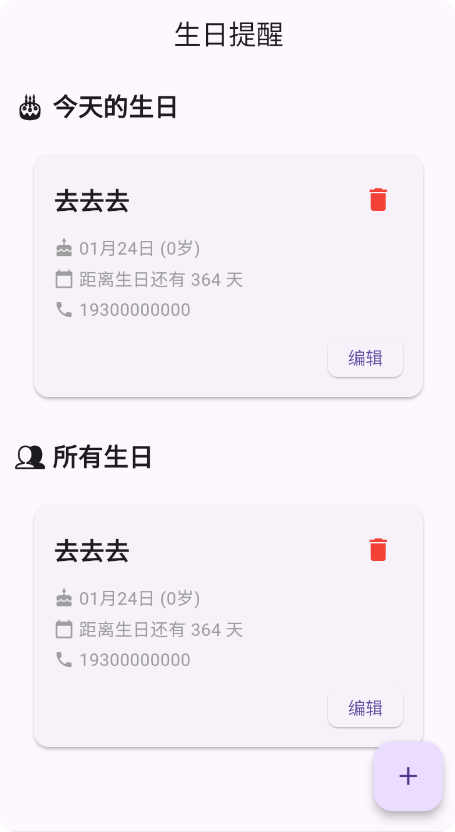
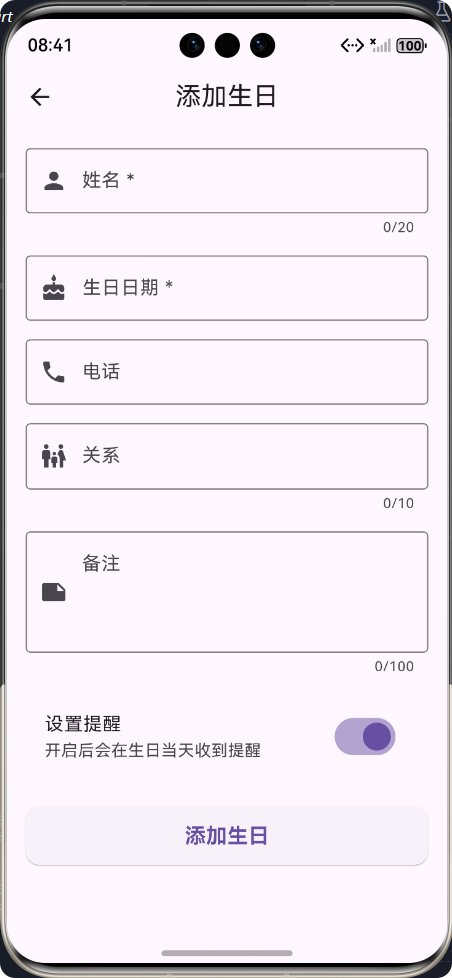
Flutter框架跨平台鸿蒙开发——定时生日提醒APP的开发流程
📝 前言
随着移动互联网的快速发展,跨平台开发框架已成为移动应用开发的主流趋势。Flutter作为Google推出的开源UI工具包,以其"一次编写,多端运行"的特性,受到了广大开发者的青睐。本文将详细介绍如何使用Flutter框架开发一款跨平台的定时生日提醒APP,并重点阐述其在鸿蒙系统上的适配与实现。
🎯 为什么选择Flutter?
- 跨平台一致性:同一套代码可运行在Android、iOS、Web、Windows、macOS和Linux等多个平台
- 高性能渲染:采用Skia图形引擎,性能接近原生应用
- 丰富的组件库:提供了大量精美的Material Design和Cupertino组件
- 热重载:提高开发效率,实时查看代码变更效果
- 强大的社区支持:拥有活跃的开发者社区和丰富的第三方包
🎂 APP介绍
功能特点
定时生日提醒APP是一款帮助用户管理亲友生日的实用工具,主要功能包括:
- ✅ 生日信息的添加、编辑和删除
- ✅ 今天生日、即将到来生日和所有生日的分类展示
- ✅ 距离生日天数的自动计算
- ✅ 年龄的自动计算
- ✅ 生日提醒开关设置
- ✅ 响应式布局设计,适配不同屏幕尺寸
技术栈
| 技术/框架 | 版本 | 用途 |
|---|---|---|
| Flutter | 3.6.2+ | 跨平台UI框架 |
| Dart | 3.6.2+ | 开发语言 |
| shared_preferences | ^2.5.3 | 本地数据存储 |
| uuid | ^4.5.0 | 生成唯一标识符 |
| intl | ^0.19.0 | 日期格式化 |
🔧 开发流程
整体架构设计
详细开发步骤
-
项目初始化
- 创建Flutter项目
- 配置项目依赖
- 设置应用图标和名称
-
数据模型设计
- 定义BirthdayReminder数据模型
- 实现序列化和反序列化方法
- 设计年龄和距离生日天数的计算逻辑
-
存储服务实现
- 基于shared_preferences实现本地存储
- 封装增删改查操作
- 实现数据排序和筛选功能
-
UI界面开发
- 生日列表页面设计
- 添加/编辑生日页面设计
- 响应式布局适配
-
功能测试
- 单元测试
- 集成测试
- 跨平台兼容性测试
-
鸿蒙适配
- 鸿蒙环境配置
- 权限适配
- 性能优化
🚀 核心功能实现
1. 数据模型设计
/// 生日提醒数据模型
/// 用于存储和管理生日提醒信息
class BirthdayReminder {
  /// 唯一标识符
  final String id;

  /// 姓名
  final String name;

  /// 生日日期
  final DateTime birthday;

  /// 电话号码(可选)
  final String? phone;

  /// 关系(可选)
  final String? relationship;

  /// 备注(可选)
  final String? note;

  /// 是否设置提醒
  final bool isRemind;

  /// 构造函数
  const BirthdayReminder({
    required this.id,
    required this.name,
    required this.birthday,
    this.phone,
    this.relationship,
    this.note,
    this.isRemind = true,
  });

  /// 从Map转换为BirthdayReminder对象
  factory BirthdayReminder.fromMap(Map<String, dynamic> map) {
    return BirthdayReminder(
      id: map['id'],
      name: map['name'],
      birthday: DateTime.parse(map['birthday']),
      phone: map['phone'],
      relationship: map['relationship'],
      note: map['note'],
      isRemind: map['isRemind'] ?? true,
    );
  }

  /// 从BirthdayReminder对象转换为Map
  Map<String, dynamic> toMap() {
    return {
      'id': id,
      'name': name,
      'birthday': birthday.toIso8601String(),
      'phone': phone,
      'relationship': relationship,
      'note': note,
      'isRemind': isRemind,
    };
  }

  /// 计算年龄
  int get age {
    final now = DateTime.now();
    int age = now.year - birthday.year;
    if (now.month < birthday.month ||
        (now.month == birthday.month && now.day < birthday.day)) {
      age--;
    }
    return age;
  }

  /// 计算距离下次生日的天数
  int get daysUntilBirthday {
    final now = DateTime.now();
    DateTime nextBirthday = DateTime(now.year, birthday.month, birthday.day);

    if (nextBirthday.isBefore(now) || nextBirthday.isAtSameMomentAs(now)) {
      nextBirthday = DateTime(now.year + 1, birthday.month, birthday.day);
    }

    return nextBirthday.difference(now).inDays;
  }

  /// 检查今天是否是生日
  bool get isTodayBirthday {
    final now = DateTime.now();
    return now.month == birthday.month && now.day == birthday.day;
  }
}
2. 存储服务实现
/// 生日提醒服务
/// 用于管理生日提醒的数据操作
class BirthdayService {
  /// 单例实例
  static final BirthdayService _instance = BirthdayService._internal();

  /// SharedPreferences实例
  SharedPreferences? _prefs;

  /// 构造函数
  factory BirthdayService() => _instance;

  /// 内部构造函数
  BirthdayService._internal();

  /// 初始化SharedPreferences
  Future<void> _initPrefs() async {
    if (_prefs == null) {
      _prefs = await SharedPreferences.getInstance();
    }
  }

  /// 保存生日提醒
  Future<void> saveBirthday(BirthdayReminder birthday) async {
    try {
      final birthdays = await getAllBirthdays();

      // 检查是否已存在相同id的生日提醒
      final index = birthdays.indexWhere((b) => b.id == birthday.id);

      if (index != -1) {
        // 更新现有记录
        birthdays[index] = birthday;
      } else {
        // 添加新记录
        birthdays.add(birthday);
      }

      // 保存到存储
      await _saveBirthdaysToStorage(birthdays);
    } catch (e) {
      debugPrint('保存生日提醒失败: $e');
      rethrow;
    }
  }

  /// 获取所有生日提醒
  Future<List<BirthdayReminder>> getAllBirthdays() async {
    try {
      await _initPrefs();
      if (_prefs == null) {
        return [];
      }

      final jsonList = _prefs!.getString('birthdays') ?? '[]';
      final List<dynamic> birthdaysJson = jsonDecode(jsonList);

      final birthdays = birthdaysJson
          .map((e) => BirthdayReminder.fromMap(e as Map<String, dynamic>))
          .toList();

      // 按姓名排序
      birthdays.sort((a, b) => a.name.compareTo(b.name));

      return birthdays;
    } catch (e) {
      debugPrint('获取所有生日提醒失败: $e');
      return [];
    }
  }

  /// 获取即将到来的生日提醒
  Future<List<BirthdayReminder>> getUpcomingBirthdays({int days = 30}) async {
    try {
      final allBirthdays = await getAllBirthdays();
      final now = DateTime.now();
      final futureDate = now.add(Duration(days: days));

      return allBirthdays
          .where((birthday) {
            final nextBirthday = DateTime(
              now.year,
              birthday.birthday.month,
              birthday.birthday.day,
            );

            DateTime adjustedNextBirthday;
            if (nextBirthday.isBefore(now) || nextBirthday.isAtSameMomentAs(now)) {
              adjustedNextBirthday = DateTime(
                now.year + 1,
                birthday.birthday.month,
                birthday.birthday.day,
              );
            } else {
              adjustedNextBirthday = nextBirthday;
            }

            return adjustedNextBirthday.isBefore(futureDate) ||
                   adjustedNextBirthday.isAtSameMomentAs(futureDate);
          })
          .toList()
          ..sort((a, b) => a.daysUntilBirthday.compareTo(b.daysUntilBirthday));
    } catch (e) {
      debugPrint('获取即将到来的生日提醒失败: $e');
      return [];
    }
  }

  /// 获取今天的生日提醒
  Future<List<BirthdayReminder>> getTodayBirthdays() async {
    try {
      final allBirthdays = await getAllBirthdays();
      return allBirthdays.where((b) => b.isTodayBirthday).toList();
    } catch (e) {
      debugPrint('获取今天的生日提醒失败: $e');
      return [];
    }
  }

  /// 删除生日提醒
  Future<void> deleteBirthday(String id) async {
    try {
      final birthdays = await getAllBirthdays();
      birthdays.removeWhere((b) => b.id == id);
      await _saveBirthdaysToStorage(birthdays);
    } catch (e) {
      debugPrint('删除生日提醒失败: $e');
      rethrow;
    }
  }

  /// 将生日提醒列表保存到存储
  Future<void> _saveBirthdaysToStorage(List<BirthdayReminder> birthdays) async {
    try {
      await _initPrefs();
      if (_prefs == null) {
        return;
      }

      final jsonList = jsonEncode(birthdays.map((b) => b.toMap()).toList());
      await _prefs!.setString('birthdays', jsonList);
    } catch (e) {
      debugPrint('保存生日提醒到存储失败: $e');
      rethrow;
    }
  }
}
3. 生日列表页面
/// 生日提醒列表页面
/// 显示所有生日提醒,支持添加、编辑、删除操作
class BirthdayListScreen extends StatefulWidget {
/// 构造函数
const BirthdayListScreen({super.key});
State<BirthdayListScreen> createState() => _BirthdayListScreenState();
}
class _BirthdayListScreenState extends State<BirthdayListScreen> {
/// 生日服务实例
final BirthdayService _birthdayService = BirthdayService();
/// 所有生日提醒列表
List<BirthdayReminder> _allBirthdays = [];
/// 今天的生日提醒列表
List<BirthdayReminder> _todayBirthdays = [];
/// 即将到来的生日提醒列表
List<BirthdayReminder> _upcomingBirthdays = [];
/// 是否正在加载
bool _isLoading = true;
void initState() {
super.initState();
_loadBirthdays();
}
/// 加载所有生日数据
Future<void> _loadBirthdays() async {
try {
// 获取所有生日
final allBirthdays = await _birthdayService.getAllBirthdays();
// 获取今天的生日
final todayBirthdays = await _birthdayService.getTodayBirthdays();
// 获取即将到来的生日(30天内)
final upcomingBirthdays = await _birthdayService.getUpcomingBirthdays(days: 30);
setState(() {
_allBirthdays = allBirthdays;
_todayBirthdays = todayBirthdays;
_upcomingBirthdays = upcomingBirthdays;
});
} catch (e) {
debugPrint('加载生日数据失败: $e');
} finally {
setState(() {
_isLoading = false;
});
}
}
// ... 其他方法实现
Widget build(BuildContext context) {
return Scaffold(
appBar: AppBar(
title: const Text('生日提醒'),
centerTitle: true,
),
body: _isLoading
? _buildLoadingState()
: _allBirthdays.isEmpty
? _buildEmptyState()
: SingleChildScrollView(
child: Padding(
padding: const EdgeInsets.all(16),
child: Column(
crossAxisAlignment: CrossAxisAlignment.start,
children: [
// 今天的生日
if (_todayBirthdays.isNotEmpty) ...[
const Text(
'🎂 今天的生日',
style: TextStyle(
fontSize: 20,
fontWeight: FontWeight.bold,
),
),
const SizedBox(height: 16),
..._todayBirthdays.map(_buildBirthdayCard),
const SizedBox(height: 24),
],
// 即将到来的生日
if (_upcomingBirthdays.isNotEmpty && _upcomingBirthdays.length != _allBirthdays.length) ...[
const Text(
'📅 即将到来的生日',
style: TextStyle(
fontSize: 20,
fontWeight: FontWeight.bold,
),
),
const SizedBox(height: 16),
..._upcomingBirthdays
.where((b) => !_todayBirthdays.contains(b))
.map(_buildBirthdayCard),
const SizedBox(height: 24),
],
// 所有生日
const Text(
'👥 所有生日',
style: TextStyle(
fontSize: 20,
fontWeight: FontWeight.bold,
),
),
const SizedBox(height: 16),
..._allBirthdays
.where((b) => !_todayBirthdays.contains(b) &&
!_upcomingBirthdays.contains(b))
.map(_buildBirthdayCard),
],
),
),
),
floatingActionButton: FloatingActionButton(
onPressed: () => _navigateToAddBirthday(),
tooltip: '添加生日',
child: const Icon(Icons.add),
),
);
}
}
4. 添加/编辑生日页面
/// 添加/编辑生日页面
/// 用于添加新的生日提醒或编辑现有生日提醒
class AddBirthdayScreen extends StatefulWidget {
/// 要编辑的生日提醒(可选)
final BirthdayReminder? birthday;
/// 构造函数
const AddBirthdayScreen({super.key, this.birthday});
State<AddBirthdayScreen> createState() => _AddBirthdayScreenState();
}
class _AddBirthdayScreenState extends State<AddBirthdayScreen> {
/// 生日服务实例
final BirthdayService _birthdayService = BirthdayService();
/// UUID生成器
final Uuid _uuid = const Uuid();
/// 表单键
final GlobalKey<FormState> _formKey = GlobalKey<FormState>();
/// 姓名控制器
final TextEditingController _nameController = TextEditingController();
/// 电话控制器
final TextEditingController _phoneController = TextEditingController();
/// 关系控制器
final TextEditingController _relationshipController = TextEditingController();
/// 备注控制器
final TextEditingController _noteController = TextEditingController();
/// 生日日期
DateTime? _selectedDate;
/// 是否设置提醒
bool _isRemind = true;
void initState() {
super.initState();
// 如果是编辑模式,初始化表单数据
if (widget.birthday != null) {
_nameController.text = widget.birthday!.name;
_selectedDate = widget.birthday!.birthday;
_phoneController.text = widget.birthday!.phone ?? '';
_relationshipController.text = widget.birthday!.relationship ?? '';
_noteController.text = widget.birthday!.note ?? '';
_isRemind = widget.birthday!.isRemind;
}
}
/// 选择日期
Future<void> _selectDate(BuildContext context) async {
final DateTime? picked = await showDatePicker(
context: context,
initialDate: _selectedDate ?? DateTime.now(),
firstDate: DateTime(1900),
lastDate: DateTime(2100),
builder: (BuildContext context, Widget? child) {
return Theme(
data: ThemeData.light().copyWith(
colorScheme: ColorScheme.light(
primary: Theme.of(context).primaryColor,
onPrimary: Colors.white,
onSurface: Colors.black,
),
),
child: child!, // child is not null
);
},
);
if (picked != null && picked != _selectedDate) {
setState(() {
_selectedDate = picked;
});
}
}
/// 保存生日提醒
Future<void> _saveBirthday() async {
if (!_formKey.currentState!.validate()) {
return;
}
if (_selectedDate == null) {
if (!mounted) return;
ScaffoldMessenger.of(context).showSnackBar(
const SnackBar(content: Text('请选择生日日期')),
);
return;
}
try {
// 创建或更新生日提醒对象
final birthday = BirthdayReminder(
id: widget.birthday?.id ?? _uuid.v4(),
name: _nameController.text.trim(),
birthday: _selectedDate!,
phone: _phoneController.text.trim().isEmpty ? null : _phoneController.text.trim(),
relationship: _relationshipController.text.trim().isEmpty ? null : _relationshipController.text.trim(),
note: _noteController.text.trim().isEmpty ? null : _noteController.text.trim(),
isRemind: _isRemind,
);
// 保存到存储
await _birthdayService.saveBirthday(birthday);
// 显示成功消息
if (!mounted) return;
ScaffoldMessenger.of(context).showSnackBar(
SnackBar(
content: Text(widget.birthday == null
? '生日提醒添加成功'
: '生日提醒更新成功'),
),
);
// 返回上一页
if (!mounted) return;
Navigator.pop(context);
} catch (e) {
debugPrint('保存生日提醒失败: $e');
if (!mounted) return;
ScaffoldMessenger.of(context).showSnackBar(
const SnackBar(content: Text('保存失败,请重试')),
);
}
}
Widget build(BuildContext context) {
return Scaffold(
appBar: AppBar(
title: Text(widget.birthday == null ? '添加生日' : '编辑生日'),
centerTitle: true,
),
body: SingleChildScrollView(
padding: const EdgeInsets.all(16),
child: Form(
key: _formKey,
child: Column(
crossAxisAlignment: CrossAxisAlignment.start,
children: [
// 姓名输入
TextFormField(
controller: _nameController,
decoration: const InputDecoration(
labelText: '姓名 *',
border: OutlineInputBorder(),
prefixIcon: Icon(Icons.person),
),
validator: (value) {
if (value == null || value.trim().isEmpty) {
return '请输入姓名';
}
return null;
},
maxLength: 20,
style: const TextStyle(fontSize: 16),
),
const SizedBox(height: 16),
// 生日日期选择
GestureDetector(
onTap: () => _selectDate(context),
child: AbsorbPointer(
child: TextFormField(
decoration: const InputDecoration(
labelText: '生日日期 *',
border: OutlineInputBorder(),
prefixIcon: Icon(Icons.cake),
),
readOnly: true,
controller: TextEditingController(
text: _selectedDate != null
? DateFormat('yyyy-MM-dd').format(_selectedDate!)
: '',
),
style: TextStyle(
fontSize: 16,
color: _selectedDate != null ? Colors.black : Colors.grey,
),
),
),
),
// 其他表单字段...
const SizedBox(height: 24),
// 保存按钮
SizedBox(
width: double.infinity,
height: 50,
child: ElevatedButton(
onPressed: _saveBirthday,
style: ElevatedButton.styleFrom(
shape: RoundedRectangleBorder(
borderRadius: BorderRadius.circular(12),
),
textStyle: const TextStyle(
fontSize: 18,
fontWeight: FontWeight.bold,
),
),
child: Text(
widget.birthday == null ? '添加生日' : '保存修改',
),
),
),
],
),
),
),
);
}
}
🔍 鸿蒙适配要点
1. 权限配置
在鸿蒙系统上,需要在module.json5文件中配置相关权限:
{
  "module": {
    "abilities": [
      {
        "permissions": [
          {
            "name": "ohos.permission.READ_USER_STORAGE"
          },
          {
            "name": "ohos.permission.WRITE_USER_STORAGE"
          }
        ]
      }
    ]
  }
}
2. 性能优化
- 减少布局层级:避免过多的嵌套布局,使用
ListView.builder等懒加载组件 - 优化图像资源:使用适当大小的图像,避免过大的资源占用
- 合理使用状态管理:避免不必要的重建和重绘
- 优化存储操作:减少频繁的读写操作,使用批量处理
3. 兼容性处理
- 日期时间格式化:使用
intl包确保日期时间在不同平台上的一致性 - 组件适配:针对鸿蒙系统的特殊组件进行适配和测试
- 字体适配:确保字体在鸿蒙系统上显示正常
📊 测试与调试
测试策略
| 测试类型 | 测试内容 | 工具/方法 |
|---|---|---|
| 单元测试 | 数据模型、业务逻辑 | Flutter Test |
| 集成测试 | 页面跳转、数据交互 | Flutter Integration Test |
| 兼容性测试 | 不同设备、系统版本 | 真机测试、模拟器测试 |
| 性能测试 | 启动时间、内存占用 | Flutter DevTools |
调试技巧
- 使用
print或debugPrint输出调试信息 - 利用Flutter DevTools进行性能分析和调试
- 使用热重载功能快速查看代码变更效果
- 在真机上进行测试,确保实际运行效果
🎉 总结
通过本文的详细介绍,我们了解了如何使用Flutter框架开发一款跨平台的定时生日提醒APP,并重点阐述了其在鸿蒙系统上的适配与实现。该APP具有以下特点:
- 跨平台兼容性:同一套代码可运行在Android、iOS、Web和鸿蒙等多个平台
- 丰富的功能:支持生日信息的添加、编辑、删除,分类展示,自动计算年龄和距离生日天数
- 友好的用户界面:采用Material Design设计风格,界面美观、易用
- 高性能:使用Flutter的高性能渲染引擎,运行流畅
- 良好的可扩展性:模块化设计,便于后续功能扩展
💡 开发感悟
Flutter框架为跨平台开发提供了强大的支持,尤其是在鸿蒙系统上的适配,使得开发者可以快速构建高质量的跨平台应用。通过本次开发,我们深刻体会到了Flutter的优势和潜力,同时也积累了丰富的跨平台开发经验。
在未来的移动应用开发中,跨平台开发将成为主流趋势,Flutter作为其中的佼佼者,必将在更多的场景中得到广泛应用。我们期待着Flutter在鸿蒙生态中发挥更大的作用,为开发者带来更多的便利和可能性。
欢迎加入开源鸿蒙跨平台社区:https://openharmonycrossplatform.csdn.net

作为“人工智能6S店”的官方数字引擎,为AI开发者与企业提供一个覆盖软硬件全栈、一站式门户。
更多推荐
 0
0 0
0- 0


 已为社区贡献15条内容

所有评论(0)