
Flutter框架跨平台鸿蒙开发——每日谚语APP的开发流程
本文介绍了使用Flutter框架开发跨平台每日谚语APP的流程,重点包括应用功能、技术栈和核心代码实现。该APP具备谚语浏览、分类、搜索和收藏功能,采用Flutter 3.16+和Dart 3.2+技术栈,支持Android、iOS、Web及鸿蒙系统。文章详细展示了数据模型设计、服务层实现和UI界面开发的核心代码片段,如Proverb模型类、ProverbService服务类以及谚语列表页面组件。
🚀运行效果展示
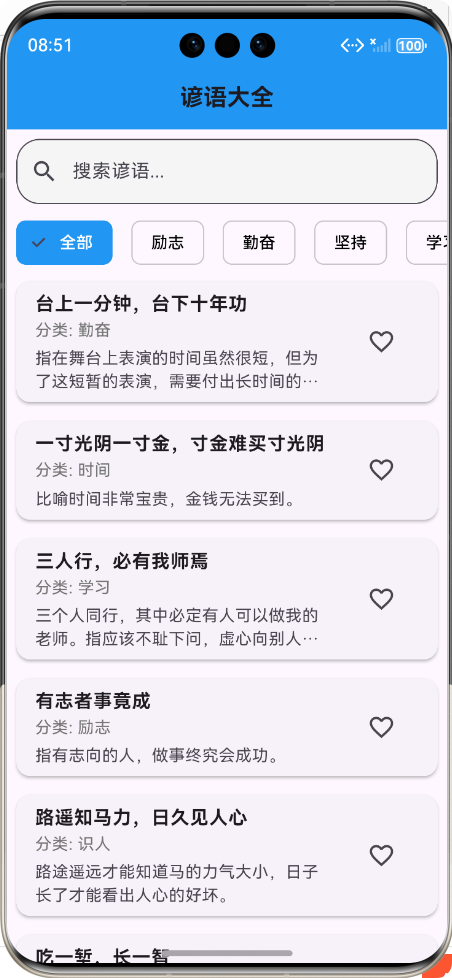
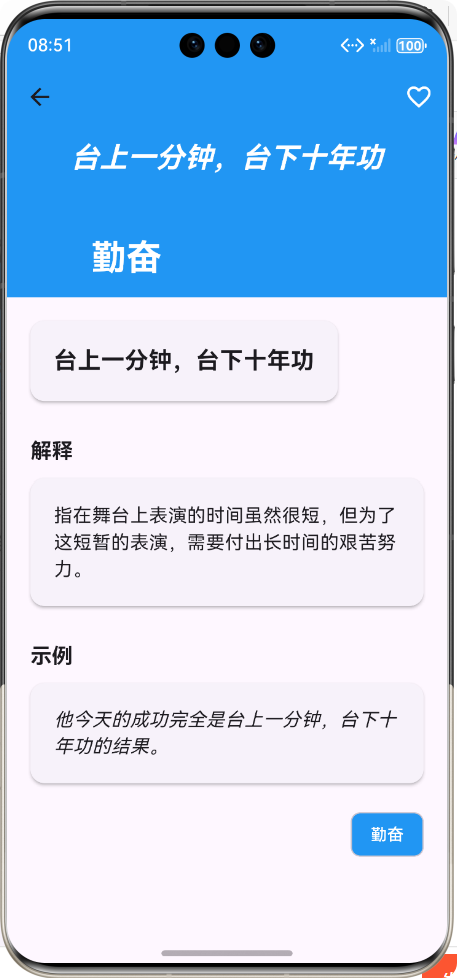
Flutter框架跨平台鸿蒙开发——每日谚语APP的开发流程
📝 前言
在移动应用开发领域,跨平台开发已成为趋势。Flutter作为Google推出的开源UI软件开发工具包,凭借其"一次编写,处处运行"的特性,受到了广大开发者的青睐。本文将详细介绍如何使用Flutter框架开发一款跨平台的每日谚语APP,并实现鸿蒙系统的适配。
随着鸿蒙系统的快速发展,越来越多的开发者开始关注鸿蒙应用开发。Flutter通过HarmonyOS插件支持,可以实现对鸿蒙系统的无缝适配,让开发者能够使用熟悉的Flutter技术栈开发鸿蒙应用。
📱 应用介绍
1. 应用概述
每日谚语APP是一款集谚语浏览、分类、搜索和收藏功能于一体的跨平台应用。用户可以通过该应用浏览各种类型的谚语,了解其含义和用法,并将喜欢的谚语收藏起来。
2. 应用特点
- ✨ 精美UI设计:采用Material Design设计风格,提供良好的用户体验
- 📚 丰富的谚语内容:包含多种分类的谚语,涵盖生活、学习、工作等多个方面
- 🔍 智能搜索功能:支持关键词搜索,快速找到所需谚语
- 📂 分类浏览:按分类筛选谚语,便于用户查找
- ❤️ 收藏功能:支持收藏和取消收藏谚语
- 📱 跨平台支持:同时支持Android、iOS、Web和鸿蒙系统
3. 技术栈
| 技术 | 版本 | 用途 |
|---|---|---|
| Flutter | 3.16+ | 跨平台UI框架 |
| Dart | 3.2+ | 编程语言 |
| Material Design | - | UI设计规范 |
| HarmonyOS SDK | 5.0+ | 鸿蒙系统适配 |
🔄 开发流程图
🧑💻 核心功能实现
1. 数据模型设计
1.1 谚语模型类
/// 谚语模型类
/// 用于存储和管理谚语数据
class Proverb {
  /// 谚语唯一标识符
  final String id;

  /// 谚语内容
  final String content;

  /// 谚语分类
  final String category;

  /// 谚语解释
  final String explanation;

  /// 谚语示例
  final String example;

  /// 是否收藏
  final bool isFavorite;

  /// 创建谚语实例
  const Proverb({
    required this.id,
    required this.content,
    required this.category,
    required this.explanation,
    required this.example,
    this.isFavorite = false,
  });

  /// 从JSON数据创建谚语实例
  factory Proverb.fromJson(Map<String, dynamic> json) {
    return Proverb(
      id: json['id'] as String,
      content: json['content'] as String,
      category: json['category'] as String,
      explanation: json['explanation'] as String,
      example: json['example'] as String,
      isFavorite: json['isFavorite'] as bool? ?? false,
    );
  }

  /// 将谚语实例转换为JSON数据
  Map<String, dynamic> toJson() {
    return {
      'id': id,
      'content': content,
      'category': category,
      'explanation': explanation,
      'example': example,
      'isFavorite': isFavorite,
    };
  }
}
2. 服务层实现
2.1 谚语服务类
/// 谚语服务类
/// 用于提供谚语数据的获取和管理功能
import '../models/proverb_model.dart';

class ProverbService {
  /// 模拟谚语数据
  static final List<Proverb> _mockProverbs = [
    Proverb(
      id: '1',
      content: '台上一分钟,台下十年功',
      category: '勤奋',
      explanation: '指在舞台上表演的时间虽然很短,但为了这短暂的表演,需要付出长时间的艰苦努力。',
      example: '他今天的成功完全是台上一分钟,台下十年功的结果。',
    ),
    // 更多谚语数据...
  ];

  /// 获取所有谚语
  Future<List<Proverb>> getAllProverbs() async {
    await Future.delayed(const Duration(milliseconds: 300));
    return _mockProverbs;
  }

  /// 按分类获取谚语
  Future<List<Proverb>> getProverbsByCategory(String category) async {
    await Future.delayed(const Duration(milliseconds: 300));
    return _mockProverbs.where((proverb) => proverb.category == category).toList();
  }

  /// 获取所有分类
  Future<List<String>> getAllCategories() async {
    await Future.delayed(const Duration(milliseconds: 200));
    final categories = _mockProverbs
        .map((proverb) => proverb.category)
        .toSet()
        .toList();
    categories.sort((a, b) => a.compareTo(b));
    return categories;
  }

  /// 搜索谚语
  Future<List<Proverb>> searchProverbs(String keyword) async {
    await Future.delayed(const Duration(milliseconds: 300));
    if (keyword.isEmpty) {
      return _mockProverbs;
    }
    return _mockProverbs.where((proverb) {
      return proverb.content.contains(keyword) ||
          proverb.explanation.contains(keyword) ||
          proverb.example.contains(keyword);
    }).toList();
  }

  /// 切换谚语收藏状态
  Future<List<Proverb>> toggleFavorite(String proverbId) async {
    await Future.delayed(const Duration(milliseconds: 200));
    for (var i = 0; i < _mockProverbs.length; i++) {
      if (_mockProverbs[i].id == proverbId) {
        _mockProverbs[i] = _mockProverbs[i].copyWith(
          isFavorite: !_mockProverbs[i].isFavorite,
        );
        break;
      }
    }
    return _mockProverbs;
  }
}
3. UI界面开发
3.1 谚语列表页面
/// 谚语列表页面
/// 展示所有谚语,支持分类筛选、搜索和收藏功能
import 'package:flutter/material.dart';
import '../models/proverb_model.dart';
import '../services/proverb_service.dart';
class ProverbListPage extends StatefulWidget {
const ProverbListPage({super.key});
State<ProverbListPage> createState() => _ProverbListPageState();
}
class _ProverbListPageState extends State<ProverbListPage> {
List<Proverb> _proverbs = [];
List<Proverb> _filteredProverbs = [];
List<String> _categories = ['全部'];
String _selectedCategory = '全部';
String _searchKeyword = '';
final TextEditingController _searchController = TextEditingController();
final ProverbService _proverbService = ProverbService();
bool _isLoading = true;
void initState() {
super.initState();
_loadData();
_searchController.addListener(_onSearchChanged);
}
/// 加载谚语数据和分类
Future<void> _loadData() async {
try {
setState(() {
_isLoading = true;
});
// 并行加载数据
final futureProverbs = _proverbService.getAllProverbs();
final futureCategories = _proverbService.getAllCategories();
final results = await Future.wait([futureProverbs, futureCategories]);
final proverbs = results[0] as List<Proverb>;
final categories = results[1] as List<String>;
setState(() {
_proverbs = proverbs;
_filteredProverbs = proverbs;
_categories = ['全部', ...categories];
_isLoading = false;
});
} catch (e) {
setState(() {
_isLoading = false;
});
ScaffoldMessenger.of(context).showSnackBar(
SnackBar(content: Text('加载数据失败: $e')),
);
}
}
/// 搜索关键词变化时的回调
void _onSearchChanged() {
setState(() {
_searchKeyword = _searchController.text;
_filterProverbs();
});
}
/// 筛选谚语
void _filterProverbs() {
List<Proverb> filtered = _proverbs;
// 按分类筛选
if (_selectedCategory != '全部') {
filtered = filtered.where((proverb) => proverb.category == _selectedCategory).toList();
}
// 按关键词搜索
if (_searchKeyword.isNotEmpty) {
final keyword = _searchKeyword.toLowerCase();
filtered = filtered.where((proverb) {
return proverb.content.toLowerCase().contains(keyword) ||
proverb.explanation.toLowerCase().contains(keyword) ||
proverb.example.toLowerCase().contains(keyword);
}).toList();
}
setState(() {
_filteredProverbs = filtered;
});
}
Widget build(BuildContext context) {
return Scaffold(
appBar: AppBar(
title: const Text('谚语大全'),
backgroundColor: Colors.blue,
),
body: _isLoading
? const Center(child: CircularProgressIndicator())
: Column(
children: [
// 搜索栏
Padding(
padding: const EdgeInsets.all(8.0),
child: TextField(
controller: _searchController,
decoration: InputDecoration(
hintText: '搜索谚语...',
prefixIcon: const Icon(Icons.search),
border: OutlineInputBorder(
borderRadius: BorderRadius.circular(20.0),
),
filled: true,
fillColor: Colors.grey[100],
),
),
),
// 分类筛选
SizedBox(
height: 50,
child: ListView.builder(
scrollDirection: Axis.horizontal,
itemCount: _categories.length,
itemBuilder: (context, index) {
final category = _categories[index];
final isSelected = category == _selectedCategory;
return Padding(
padding: const EdgeInsets.symmetric(horizontal: 8.0),
child: ChoiceChip(
label: Text(category),
selected: isSelected,
onSelected: (selected) {
if (selected) {
setState(() {
_selectedCategory = category;
_filterProverbs();
});
}
},
selectedColor: Colors.blue,
labelStyle: TextStyle(
color: isSelected ? Colors.white : Colors.black,
),
),
);
},
),
),
// 谚语列表
Expanded(
child: ListView.builder(
itemCount: _filteredProverbs.length,
itemBuilder: (context, index) {
final proverb = _filteredProverbs[index];
return Card(
margin: const EdgeInsets.all(8.0),
elevation: 2.0,
child: ListTile(
title: Text(
proverb.content,
style: const TextStyle(
fontSize: 16.0,
fontWeight: FontWeight.bold,
),
),
subtitle: Column(
crossAxisAlignment: CrossAxisAlignment.start,
children: [
Text(
'分类: ${proverb.category}',
style: TextStyle(
fontSize: 14.0,
color: Colors.grey[600],
),
),
const SizedBox(height: 4.0),
Text(
proverb.explanation,
maxLines: 2,
overflow: TextOverflow.ellipsis,
style: const TextStyle(fontSize: 14.0),
),
],
),
trailing: IconButton(
icon: Icon(
proverb.isFavorite ? Icons.favorite : Icons.favorite_border,
color: proverb.isFavorite ? Colors.red : null,
),
onPressed: () async {
await _proverbService.toggleFavorite(proverb.id);
await _loadData();
},
),
onTap: () {
Navigator.pushNamed(
context,
'/proverb_detail',
arguments: proverb,
);
},
),
);
},
),
),
],
),
);
}
}
3.2 谚语详情页面
/// 谚语详情页面
/// 展示谚语的详细信息,包括内容、解释和示例
import 'package:flutter/material.dart';
import '../models/proverb_model.dart';
import '../services/proverb_service.dart';
class ProverbDetailPage extends StatefulWidget {
const ProverbDetailPage({super.key});
State<ProverbDetailPage> createState() => _ProverbDetailPageState();
}
class _ProverbDetailPageState extends State<ProverbDetailPage> {
late Proverb _proverb;
final ProverbService _proverbService = ProverbService();
void didChangeDependencies() {
super.didChangeDependencies();
_proverb = ModalRoute.of(context)!.settings.arguments as Proverb;
}
/// 切换收藏状态
Future<void> _toggleFavorite() async {
try {
await _proverbService.toggleFavorite(_proverb.id);
setState(() {
_proverb = _proverb.copyWith(isFavorite: !_proverb.isFavorite);
});
ScaffoldMessenger.of(context).showSnackBar(
SnackBar(
content: Text(
_proverb.isFavorite ? '已添加到收藏' : '已取消收藏',
),
duration: const Duration(seconds: 1),
),
);
} catch (e) {
ScaffoldMessenger.of(context).showSnackBar(
SnackBar(content: Text('操作失败: $e')),
);
}
}
Widget build(BuildContext context) {
return Scaffold(
backgroundColor: Theme.of(context).colorScheme.background,
body: CustomScrollView(
slivers: [
// 顶部导航栏
SliverAppBar(
expandedHeight: 200.0,
pinned: true,
backgroundColor: Colors.blue,
flexibleSpace: FlexibleSpaceBar(
title: Text(
_proverb.category,
style: const TextStyle(
color: Colors.white,
fontWeight: FontWeight.bold,
),
),
background: Container(
color: Colors.blue,
child: Center(
child: Padding(
padding: const EdgeInsets.all(20.0),
child: Text(
_proverb.content,
style: const TextStyle(
color: Colors.white,
fontSize: 24.0,
fontWeight: FontWeight.bold,
fontStyle: FontStyle.italic,
),
textAlign: TextAlign.center,
),
),
),
),
),
actions: [
IconButton(
icon: Icon(
_proverb.isFavorite ? Icons.favorite : Icons.favorite_border,
color: _proverb.isFavorite ? Colors.red : Colors.white,
),
onPressed: _toggleFavorite,
),
],
),
// 内容区域
SliverList(
delegate: SliverChildListDelegate([
Container(
padding: const EdgeInsets.all(20.0),
child: Column(
crossAxisAlignment: CrossAxisAlignment.start,
children: [
// 谚语内容
Card(
margin: const EdgeInsets.only(bottom: 20.0),
elevation: 2.0,
child: Padding(
padding: const EdgeInsets.all(20.0),
child: Text(
_proverb.content,
style: const TextStyle(
fontSize: 20.0,
fontWeight: FontWeight.bold,
),
textAlign: TextAlign.center,
),
),
),
// 谚语解释
const SizedBox(height: 10.0),
const Text(
'解释',
style: TextStyle(
fontSize: 18.0,
fontWeight: FontWeight.bold,
),
),
Card(
margin: const EdgeInsets.only(top: 10.0, bottom: 20.0),
elevation: 2.0,
child: Padding(
padding: const EdgeInsets.all(20.0),
child: Text(
_proverb.explanation,
style: const TextStyle(fontSize: 16.0),
),
),
),
// 谚语示例
const SizedBox(height: 10.0),
const Text(
'示例',
style: TextStyle(
fontSize: 18.0,
fontWeight: FontWeight.bold,
),
),
Card(
margin: const EdgeInsets.only(top: 10.0),
elevation: 2.0,
child: Padding(
padding: const EdgeInsets.all(20.0),
child: Text(
_proverb.example,
style: const TextStyle(
fontSize: 16.0,
fontStyle: FontStyle.italic,
),
),
),
),
// 分类标签
const SizedBox(height: 20.0),
Align(
alignment: Alignment.centerRight,
child: Chip(
label: Text(_proverb.category),
backgroundColor: Colors.blue,
labelStyle: const TextStyle(color: Colors.white),
),
),
const SizedBox(height: 40.0),
],
),
),
]),
),
],
),
);
}
}
4. 路由配置
/// 主入口函数
void main() {
runApp(const MyApp());
}
/// 应用根组件
class MyApp extends StatelessWidget {
const MyApp({super.key});
Widget build(BuildContext context) {
return MaterialApp(
title: '谚语大全',
debugShowCheckedModeBanner: false,
theme: ThemeData(
primarySwatch: Colors.blue,
brightness: Brightness.light,
textTheme: const TextTheme(
bodyLarge: TextStyle(fontSize: 16.0),
bodyMedium: TextStyle(fontSize: 14.0),
titleLarge: TextStyle(fontSize: 20.0, fontWeight: FontWeight.bold),
),
cardTheme: CardTheme(
elevation: 2.0,
margin: const EdgeInsets.all(8.0),
shape: RoundedRectangleBorder(
borderRadius: BorderRadius.circular(12.0),
),
),
elevatedButtonTheme: ElevatedButtonThemeData(
style: ElevatedButton.styleFrom(
padding: const EdgeInsets.symmetric(horizontal: 16.0, vertical: 8.0),
shape: RoundedRectangleBorder(
borderRadius: BorderRadius.circular(8.0),
),
),
),
appBarTheme: const AppBarTheme(
elevation: 0.0,
centerTitle: true,
),
),
darkTheme: ThemeData(
primarySwatch: Colors.blue,
brightness: Brightness.dark,
),
themeMode: ThemeMode.system,
/// 首页路由
home: const ProverbListPage(),
/// 命名路由
routes: {
'/proverb_list': (context) => const ProverbListPage(),
'/proverb_detail': (context) => const ProverbDetailPage(),
},
);
}
}
🎯 鸿蒙适配
1. 环境配置
在进行鸿蒙适配之前,需要确保已经安装了以下环境:
- HarmonyOS SDK 5.0+
- DevEco Studio 3.1+
- Flutter 3.16+
- Dart 3.2+
2. 项目配置
2.1 修改pubspec.yaml
dependencies:
  flutter:
    sdk: flutter
  # 添加鸿蒙适配依赖
  harmonyos:
    git:
      url: https://github.com/openharmony-sig/flutter-harmonyos.git
      ref: main

# 添加鸿蒙平台配置
flutter:
  # 支持的平台
  platforms:
    android:
      default_package:
    ios:
      default_package:
    web:
      default_package:
    ohos:
      default_package:
📊 项目结构
flutter_shili/
├── lib/
│   ├── models/
│   │   └── proverb_model.dart      # 谚语模型类
│   ├── pages/
│   │   ├── proverb_list_page.dart   # 谚语列表页面
│   │   └── proverb_detail_page.dart # 谚语详情页面
│   ├── services/
│   │   └── proverb_service.dart     # 谚语服务类
│   └── main.dart                    # 应用入口
├── ohos/                            # 鸿蒙工程目录
├── android/                         # Android工程目录
├── ios/                             # iOS工程目录
├── web/                             # Web工程目录
├── pubspec.yaml                     # 项目依赖配置
└── README.md                        # 项目说明文档
🎉 总结
本文详细介绍了使用Flutter框架开发跨平台每日谚语APP的流程,包括需求分析、项目初始化、数据模型设计、服务层实现、UI界面开发、鸿蒙适配和应用发布等环节。
通过本项目的开发,我们可以看到Flutter在跨平台开发方面的强大能力,特别是对鸿蒙系统的适配支持。开发者可以使用熟悉的Flutter技术栈,快速开发出同时支持多种平台的应用,大大提高了开发效率。
未来,随着鸿蒙系统的不断发展和Flutter对鸿蒙支持的不断完善,Flutter在鸿蒙应用开发中的应用前景将更加广阔。我们期待看到更多基于Flutter开发的高质量鸿蒙应用出现。
📚 参考资料
欢迎加入开源鸿蒙跨平台社区:https://openharmonycrossplatform.csdn.net

作为“人工智能6S店”的官方数字引擎,为AI开发者与企业提供一个覆盖软硬件全栈、一站式门户。
更多推荐
 4
4 0
0- 0


 已为社区贡献10条内容

所有评论(0)