
Flutter框架跨平台鸿蒙开发——植物养殖APP的开发流程
本文介绍了使用Flutter框架开发跨平台植物养殖APP的过程,重点适配了鸿蒙OS系统。该APP提供植物分类浏览、详细养殖指南、搜索和收藏管理等功能。文章详细展示了项目架构设计、植物数据模型构建以及核心页面实现代码,包括植物列表页面的筛选搜索功能实现。技术栈采用Flutter 3.10.0+和Dart 3.0.0+,通过分层架构实现了UI、业务逻辑和数据服务的分离,为开发者提供了完整的跨平台应用开
🚀运行效果展示
Flutter框架跨平台鸿蒙开发——植物养殖APP的开发流程
🌱 前言
随着移动互联网的快速发展,跨平台开发框架逐渐成为开发者的首选。Flutter作为Google推出的开源UI工具包,凭借其"一次编写,多端运行"的特性,在移动开发领域获得了广泛的应用。而鸿蒙OS作为华为自主研发的分布式操作系统,也在不断扩大其生态系统。本文将详细介绍如何使用Flutter框架开发一款跨平台的植物养殖APP,并实现鸿蒙OS的适配。
📱 APP介绍
1. 项目概述
本项目是一款基于Flutter框架开发的跨平台植物养殖大全APP,旨在为用户提供全面的植物养殖知识和指导。用户可以通过APP浏览各种植物的详细信息,包括植物的基本介绍、光照需求、水分需求、适宜温度、土壤要求、施肥建议、繁殖方式以及常见病虫害等。
2. 技术栈
| 技术 | 版本 | 用途 |
|---|---|---|
| Flutter | 3.10.0+ | 跨平台UI框架 |
| Dart | 3.0.0+ | 开发语言 |
| HarmonyOS | 3.0+ | 目标平台 |
3. 功能模块
| 模块 | 功能描述 |
|---|---|
| 植物列表 | 展示所有植物,支持分类筛选和搜索 |
| 植物详情 | 展示植物的详细信息和养殖要点 |
| 搜索功能 | 支持根据关键词搜索植物 |
| 收藏管理 | 支持收藏和取消收藏植物 |
🔧 核心功能实现及代码展示
1. 项目架构设计
2. 植物数据模型设计
/// 植物数据模型
/// 用于存储植物的基本信息和养殖要点
class Plant {
  /// 植物ID
  final String id;

  /// 植物名称
  final String name;

  /// 植物别名
  final String alias;

  /// 植物类型 (例如:花卉、多肉、绿植、果树等)
  final String type;

  /// 植物简介
  final String description;

  /// 光照需求 (例如:充足、适中、散射光等)
  final String lightRequirement;

  /// 水分需求 (例如:湿润、耐旱、见干见湿等)
  final String waterRequirement;

  /// 适宜温度 (例如:15-25°C)
  final String temperature;

  /// 土壤要求 (例如:疏松肥沃、排水良好等)
  final String soil;

  /// 施肥建议 (例如:每月一次、生长期施肥等)
  final String fertilization;

  /// 繁殖方式 (例如:扦插、播种、分株等)
  final String propagation;

  /// 常见病虫害 (例如:蚜虫、叶斑病等)
  final String pests;

  /// 植物图片URL
  final String imageUrl;

  /// 是否收藏
  final bool isFavorite;

  /// 构造函数
  const Plant({
    required this.id,
    required this.name,
    required this.alias,
    required this.type,
    required this.description,
    required this.lightRequirement,
    required this.waterRequirement,
    required this.temperature,
    required this.soil,
    required this.fertilization,
    required this.propagation,
    required this.pests,
    required this.imageUrl,
    this.isFavorite = false,
  });

  // 其他方法...
}
3. 植物列表页面实现
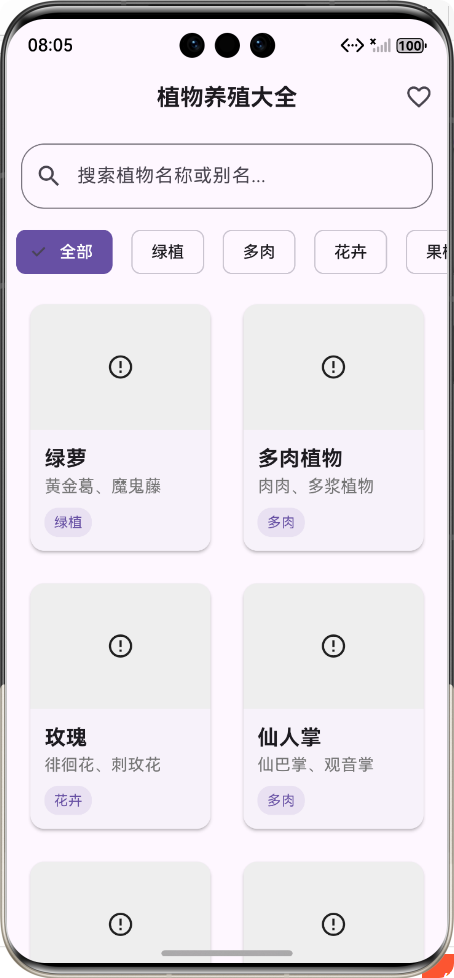
植物列表页面是APP的首页,用于展示所有植物,并支持分类筛选和搜索功能。
/// 植物列表页面
/// 展示所有植物的列表,支持分类筛选和搜索
class PlantListPage extends StatefulWidget {
/// 构造函数
const PlantListPage({super.key});
State<PlantListPage> createState() => _PlantListPageState();
}
class _PlantListPageState extends State<PlantListPage> {
/// 所有植物数据
List<Plant> _plants = [];
/// 筛选后的植物数据
List<Plant> _filteredPlants = [];
/// 植物类型列表
List<String> _plantTypes = ['全部', '绿植', '多肉', '花卉', '果树'];
/// 当前选中的植物类型
String _selectedType = '全部';
/// 搜索关键词
String _searchKeyword = '';
/// 搜索控制器
final TextEditingController _searchController = TextEditingController();
void initState() {
super.initState();
_loadPlants();
_searchController.addListener(_onSearchChanged);
}
/// 加载植物数据
void _loadPlants() {
setState(() {
_plants = PlantDataService.getAllPlants();
_filteredPlants = _plants;
});
}
/// 搜索功能
void _onSearchChanged() {
setState(() {
_searchKeyword = _searchController.text;
_filterPlants();
});
}
/// 筛选植物
void _filterPlants() {
List<Plant> result = _plants;
// 按类型筛选
if (_selectedType != '全部') {
result = result.where((plant) => plant.type == _selectedType).toList();
}
// 按关键词搜索
if (_searchKeyword.isNotEmpty) {
final lowercaseKeyword = _searchKeyword.toLowerCase();
result = result.where((plant) {
return plant.name.toLowerCase().contains(lowercaseKeyword) ||
plant.alias.toLowerCase().contains(lowercaseKeyword) ||
plant.description.toLowerCase().contains(lowercaseKeyword);
}).toList();
}
setState(() {
_filteredPlants = result;
});
}
Widget build(BuildContext context) {
return Scaffold(
appBar: AppBar(
title: const Text('植物养殖大全'),
actions: [
IconButton(
icon: const Icon(Icons.favorite_outline),
onPressed: _navigateToFavoritesPage,
tooltip: '我的收藏',
),
],
),
body: Column(
children: [
// 搜索栏
Padding(
padding: const EdgeInsets.all(12.0),
child: TextField(
controller: _searchController,
decoration: InputDecoration(
hintText: '搜索植物名称或别名...',
prefixIcon: const Icon(Icons.search),
suffixIcon: _searchKeyword.isNotEmpty
? IconButton(
icon: const Icon(Icons.clear),
onPressed: () {
_searchController.clear();
},
)
: null,
border: OutlineInputBorder(
borderRadius: BorderRadius.circular(20.0),
),
),
),
),
// 植物类型筛选
SizedBox(
height: 50.0,
child: ListView.builder(
scrollDirection: Axis.horizontal,
itemCount: _plantTypes.length,
itemBuilder: (context, index) {
final type = _plantTypes[index];
return Padding(
padding: const EdgeInsets.symmetric(horizontal: 8.0),
child: ChoiceChip(
label: Text(type),
selected: _selectedType == type,
onSelected: (selected) {
if (selected) {
_onTypeChanged(type);
}
},
),
);
},
),
),
// 植物列表
Expanded(
child: GridView.builder(
padding: const EdgeInsets.all(12.0),
gridDelegate: SliverGridDelegateWithFixedCrossAxisCount(
crossAxisCount: MediaQuery.of(context).size.width > 600 ? 3 : 2,
crossAxisSpacing: 12.0,
mainAxisSpacing: 12.0,
childAspectRatio: 0.75,
),
itemCount: _filteredPlants.length,
itemBuilder: (context, index) {
final plant = _filteredPlants[index];
return GestureDetector(
onTap: () => _navigateToPlantDetail(plant),
child: Card(
elevation: 2.0,
shape: RoundedRectangleBorder(
borderRadius: BorderRadius.circular(12.0),
),
child: Column(
crossAxisAlignment: CrossAxisAlignment.start,
children: [
// 植物图片
Expanded(
child: ClipRRect(
borderRadius: const BorderRadius.vertical(
top: Radius.circular(12.0),
),
child: Image.network(
plant.imageUrl,
width: double.infinity,
fit: BoxFit.cover,
),
),
),
// 植物信息
Padding(
padding: const EdgeInsets.all(12.0),
child: Column(
crossAxisAlignment: CrossAxisAlignment.start,
children: [
Text(
plant.name,
style: const TextStyle(
fontSize: 18.0,
fontWeight: FontWeight.bold,
),
),
Text(
plant.alias,
style: TextStyle(
fontSize: 14.0,
color: Colors.grey[600],
),
),
const SizedBox(height: 8.0),
Container(
padding: const EdgeInsets.symmetric(
horizontal: 8.0,
vertical: 4.0,
),
decoration: BoxDecoration(
color: Theme.of(context).colorScheme.primary.withOpacity(0.1),
borderRadius: BorderRadius.circular(12.0),
),
child: Text(
plant.type,
style: TextStyle(
fontSize: 12.0,
color: Theme.of(context).colorScheme.primary,
),
),
),
],
),
),
],
),
),
);
},
),
),
],
),
);
}
// 其他方法...
}
4. 植物详情页面实现
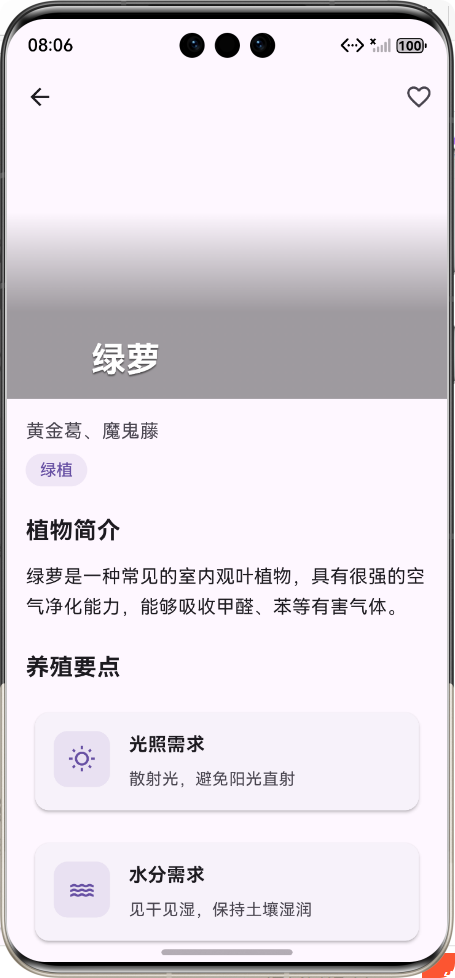
植物详情页面用于展示植物的详细信息和养殖要点,采用卡片式布局,信息清晰易读。
/// 植物详情页面
/// 展示植物的详细信息和养殖要点
class PlantDetailPage extends StatelessWidget {
/// 构造函数
const PlantDetailPage({super.key});
Widget build(BuildContext context) {
// 获取传递过来的植物数据
final Plant plant = ModalRoute.of(context)!.settings.arguments as Plant;
return Scaffold(
backgroundColor: Theme.of(context).colorScheme.background,
body: CustomScrollView(
slivers: [
// 顶部图片和导航栏
SliverAppBar(
expandedHeight: 300.0,
pinned: true,
flexibleSpace: FlexibleSpaceBar(
title: Text(plant.name),
background: Image.network(
plant.imageUrl,
fit: BoxFit.cover,
),
),
actions: [
IconButton(
icon: Icon(
plant.isFavorite ? Icons.favorite : Icons.favorite_outline,
color: plant.isFavorite ? Colors.red : null,
),
onPressed: () {
// 收藏功能逻辑
},
),
],
),
// 植物详细信息
SliverList(
delegate: SliverChildListDelegate([
Padding(
padding: const EdgeInsets.all(16.0),
child: Column(
crossAxisAlignment: CrossAxisAlignment.start,
children: [
// 植物别名
Text(
plant.alias,
style: TextStyle(
fontSize: 16.0,
color: Theme.of(context).colorScheme.onSurfaceVariant,
),
),
// 植物类型标签
Container(
padding: const EdgeInsets.symmetric(
horizontal: 12.0,
vertical: 4.0,
),
decoration: BoxDecoration(
color: Theme.of(context).colorScheme.primary.withOpacity(0.1),
borderRadius: BorderRadius.circular(16.0),
),
child: Text(plant.type),
),
// 植物简介
const SizedBox(height: 24.0),
const Text(
'植物简介',
style: TextStyle(
fontSize: 20.0,
fontWeight: FontWeight.bold,
),
),
const SizedBox(height: 12.0),
Text(
plant.description,
style: TextStyle(
fontSize: 16.0,
height: 1.6,
),
),
// 养殖要点
const SizedBox(height: 24.0),
const Text(
'养殖要点',
style: TextStyle(
fontSize: 20.0,
fontWeight: FontWeight.bold,
),
),
const SizedBox(height: 16.0),
// 养殖要点卡片列表
_buildCareTipCard(
context,
icon: Icons.wb_sunny_outlined,
title: '光照需求',
content: plant.lightRequirement,
),
const SizedBox(height: 12.0),
_buildCareTipCard(
context,
icon: Icons.water_outlined,
title: '水分需求',
content: plant.waterRequirement,
),
const SizedBox(height: 12.0),
_buildCareTipCard(
context,
icon: Icons.thermostat_outlined,
title: '适宜温度',
content: plant.temperature,
),
const SizedBox(height: 12.0),
_buildCareTipCard(
context,
icon: Icons.grass_outlined,
title: '土壤要求',
content: plant.soil,
),
const SizedBox(height: 12.0),
_buildCareTipCard(
context,
icon: Icons.local_florist_outlined,
title: '施肥建议',
content: plant.fertilization,
),
const SizedBox(height: 12.0),
_buildCareTipCard(
context,
icon: Icons.eco_outlined,
title: '繁殖方式',
content: plant.propagation,
),
const SizedBox(height: 12.0),
_buildCareTipCard(
context,
icon: Icons.pest_control_outlined,
title: '常见病虫害',
content: plant.pests,
),
],
),
),
]),
),
],
),
);
}
/// 构建养殖要点卡片
Widget _buildCareTipCard(
BuildContext context,
{required IconData icon, required String title, required String content}
) {
return Card(
elevation: 2.0,
shape: RoundedRectangleBorder(
borderRadius: BorderRadius.circular(12.0),
),
child: Padding(
padding: const EdgeInsets.all(16.0),
child: Row(
crossAxisAlignment: CrossAxisAlignment.start,
children: [
// 图标
Container(
width: 48.0,
height: 48.0,
decoration: BoxDecoration(
color: Theme.of(context).colorScheme.primary.withOpacity(0.1),
borderRadius: BorderRadius.circular(12.0),
),
child: Icon(
icon,
size: 24.0,
color: Theme.of(context).colorScheme.primary,
),
),
const SizedBox(width: 16.0),
// 标题和内容
Expanded(
child: Column(
crossAxisAlignment: CrossAxisAlignment.start,
children: [
Text(
title,
style: const TextStyle(
fontSize: 16.0,
fontWeight: FontWeight.bold,
),
),
const SizedBox(height: 8.0),
Text(
content,
style: TextStyle(
fontSize: 14.0,
color: Theme.of(context).colorScheme.onSurfaceVariant,
height: 1.5,
),
),
],
),
),
],
),
),
);
}
}
5. 搜索页面实现
搜索页面提供植物搜索功能,支持实时搜索和搜索结果展示。
/// 搜索页面
/// 提供植物搜索功能,展示搜索结果
class SearchPage extends StatefulWidget {
/// 构造函数
const SearchPage({super.key});
State<SearchPage> createState() => _SearchPageState();
}
class _SearchPageState extends State<SearchPage> {
/// 搜索结果列表
List<Plant> _searchResults = [];
/// 搜索关键词
String _searchKeyword = '';
/// 搜索控制器
final TextEditingController _searchController = TextEditingController();
/// 是否正在搜索
bool _isSearching = false;
void initState() {
super.initState();
_searchController.addListener(_onSearchChanged);
}
/// 搜索功能
void _onSearchChanged() {
setState(() {
_searchKeyword = _searchController.text;
_performSearch();
});
}
/// 执行搜索
void _performSearch() {
if (_searchKeyword.isEmpty) {
setState(() {
_searchResults = [];
_isSearching = false;
});
return;
}
setState(() {
_isSearching = true;
});
// 模拟搜索延迟
Future.delayed(const Duration(milliseconds: 300), () {
final results = PlantDataService.searchPlants(_searchKeyword);
setState(() {
_searchResults = results;
_isSearching = false;
});
});
}
Widget build(BuildContext context) {
return Scaffold(
appBar: AppBar(
title: TextField(
controller: _searchController,
autofocus: true,
decoration: InputDecoration(
hintText: '搜索植物名称或别名...',
border: InputBorder.none,
),
),
actions: [
IconButton(
icon: const Icon(Icons.clear),
onPressed: () {
_searchController.clear();
},
),
],
),
body: _buildSearchResults(),
);
}
// 其他方法...
}
6. 收藏页面实现
收藏页面用于展示用户收藏的植物列表,支持取消收藏和跳转到植物详情页面。
/// 我的收藏页面
/// 展示用户收藏的植物列表
class FavoritesPage extends StatefulWidget {
/// 构造函数
const FavoritesPage({super.key});
State<FavoritesPage> createState() => _FavoritesPageState();
}
class _FavoritesPageState extends State<FavoritesPage> {
/// 收藏的植物列表
List<Plant> _favoritePlants = [];
/// 是否正在加载
bool _isLoading = false;
void initState() {
super.initState();
_loadFavoritePlants();
}
/// 加载收藏的植物数据
void _loadFavoritePlants() {
setState(() {
_isLoading = true;
});
// 模拟加载延迟
Future.delayed(const Duration(milliseconds: 300), () {
final favorites = PlantDataService.getFavoritePlants();
setState(() {
_favoritePlants = favorites;
_isLoading = false;
});
});
}
Widget build(BuildContext context) {
return Scaffold(
appBar: AppBar(
title: const Text('我的收藏'),
),
body: _buildFavoritePlants(),
);
}
// 其他方法...
}
7. 路由配置
/// 主入口函数
void main() {
runApp(const MyApp());
}
/// 应用根组件
class MyApp extends StatelessWidget {
/// 构造函数
const MyApp({super.key});
Widget build(BuildContext context) {
return MaterialApp(
title: '植物养殖大全',
debugShowCheckedModeBanner: false,
theme: ThemeData(
/// 主色调 - 使用绿色系,更适合植物APP
primarySwatch: Colors.green,
brightness: Brightness.light,
),
darkTheme: ThemeData(
primarySwatch: Colors.green,
brightness: Brightness.dark,
),
themeMode: ThemeMode.system,
/// 首页路由
home: const PlantListPage(),
/// 命名路由
routes: {
'/plant_detail': (context) => const PlantDetailPage(),
'/search': (context) => const SearchPage(),
'/favorites': (context) => const FavoritesPage(),
},
);
}
}
🚀 鸿蒙OS适配
1. 适配流程
2. 关键配置
- 修改
pubspec.yaml文件,添加鸿蒙OS相关依赖 - 配置
build.gradle文件,设置鸿蒙OS构建参数 - 修改
AndroidManifest.xml文件,适配鸿蒙OS权限 - 构建鸿蒙OS安装包,使用
flutter build ohos命令
3. 测试和调试
- 使用鸿蒙OS模拟器进行测试
- 使用真实鸿蒙OS设备进行调试
- 确保所有功能在鸿蒙OS上正常运行
- 优化性能和用户体验
📊 项目总结
1. 项目成果
- 成功开发了一款基于Flutter框架的跨平台植物养殖APP
- 实现了植物列表展示、分类筛选、搜索功能、植物详情查看和收藏管理等核心功能
- 完成了鸿蒙OS的适配,支持在鸿蒙OS设备上运行
- 应用采用响应式设计,适配不同屏幕尺寸
- 代码结构清晰,模块化设计,便于维护和扩展
🌟 结语
通过本项目的开发,我们成功实现了一款基于Flutter框架的跨平台植物养殖APP,并完成了鸿蒙OS的适配。Flutter框架的跨平台特性让我们能够快速开发出高质量的移动应用,同时支持多个平台。鸿蒙OS作为新兴的操作系统,具有广阔的发展前景,适配鸿蒙OS可以让我们的应用触达更多用户。
欢迎加入开源鸿蒙跨平台社区:https://openharmonycrossplatform.csdn.net

作为“人工智能6S店”的官方数字引擎,为AI开发者与企业提供一个覆盖软硬件全栈、一站式门户。
更多推荐
 0
0 0
0- 0


 已为社区贡献15条内容

所有评论(0)