
Flutter 框架跨平台鸿蒙开发 - 大学生兼职助手应用开发教程
本教程详细介绍了Flutter大学生兼职助手应用的完整开发过程。
Flutter大学生兼职助手应用开发教程
项目概述
随着大学生就业压力的增加和实践经验需求的提升,兼职工作成为大学生获得工作经验和经济收入的重要途径。本教程将带你开发一个功能完整的大学生兼职助手应用,帮助大学生更好地寻找和管理兼职工作。
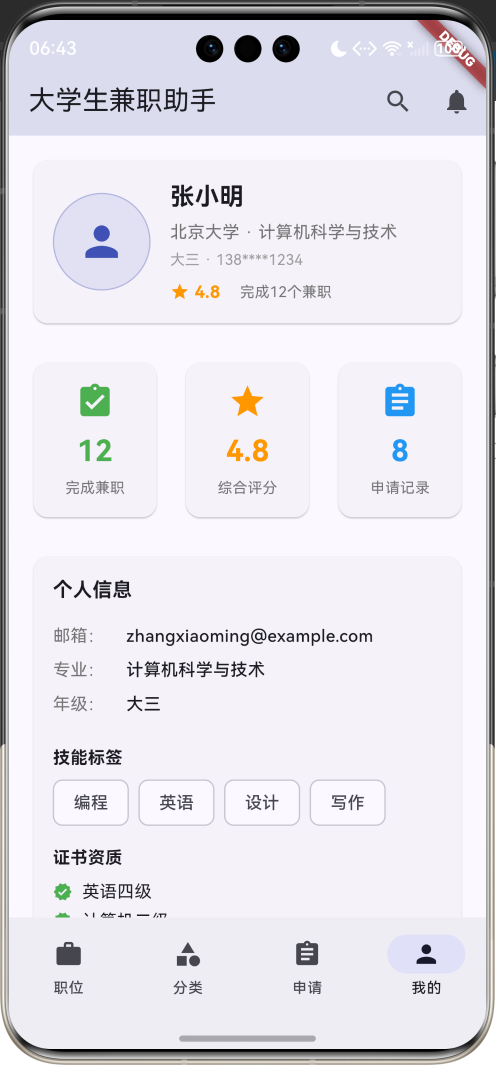
运行效果图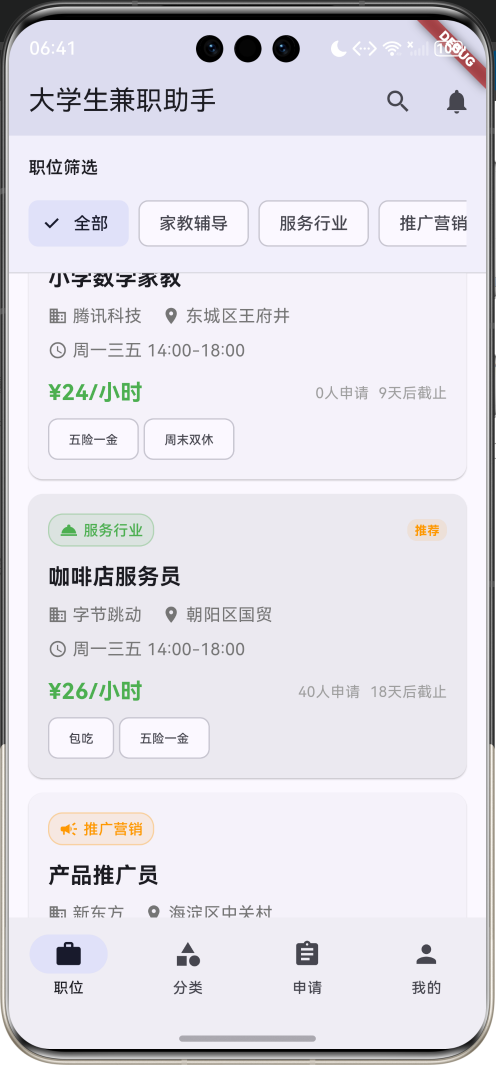
应用特色
- 丰富的职位分类:涵盖家教辅导、服务行业、推广营销、配送外卖、办公文员、创意设计等多个领域
- 智能职位筛选:支持按分类、关键词等多维度筛选职位
- 完整的申请流程:从职位浏览到申请提交的完整流程管理
- 个人档案管理:详细的学生个人信息和技能展示
- 申请状态跟踪:实时跟踪申请状态和反馈信息
- 直观的用户界面:采用Material Design 3设计,界面美观易用
- 数据统计分析:提供个人兼职数据的统计和分析
技术栈
- 框架:Flutter 3.x
- 开发语言:Dart
- UI设计:Material Design 3
- 状态管理:StatefulWidget
- 数据存储:内存存储(可扩展为本地数据库)
核心功能模块
1. 职位浏览与搜索
- 职位列表展示和详情查看
- 多维度筛选和关键词搜索
- 职位分类浏览
- 紧急招聘和推荐职位标识
2. 职位申请管理
- 在线申请表单提交
- 申请状态实时跟踪
- 申请历史记录查看
- 雇主反馈信息展示
3. 个人档案管理
- 学生基本信息管理
- 技能标签和证书展示
- 自我介绍和简历管理
- 兼职经历统计
4. 分类导航系统
- 职位分类网格展示
- 分类职位数量统计
- 快速分类切换
数据模型设计
PartTimeJob(兼职职位)模型
class PartTimeJob {
  final String id;              // 职位唯一标识
  final String title;           // 职位标题
  final String company;         // 公司名称
  final String categoryId;      // 分类ID
  final String location;        // 工作地点
  final double hourlyRate;      // 时薪
  final String workTime;        // 工作时间
  final List<String> requirements; // 职位要求
  final String description;     // 职位描述
  final DateTime publishDate;   // 发布日期
  final DateTime deadline;      // 截止日期
  final String contactPerson;   // 联系人
  final String contactPhone;    // 联系电话
  final String contactEmail;    // 联系邮箱
  final bool isUrgent;          // 是否紧急
  final bool isRecommended;     // 是否推荐
  final int applicantCount;     // 申请人数
  final List<String> tags;      // 福利标签
  final String workType;        // 工作类型
}
PartTimeJob模型包含了兼职职位的完整信息,通过categoryName、categoryColor、categoryIcon等计算属性提供分类相关的显示信息。daysUntilDeadline属性计算距离截止日期的天数,isExpired属性判断职位是否已过期。
JobApplication(职位申请)模型
class JobApplication {
  final String id;              // 申请唯一标识
  final String jobId;           // 关联职位ID
  final String studentName;     // 学生姓名
  final String studentPhone;    // 学生电话
  final String studentEmail;    // 学生邮箱
  final String university;      // 所在大学
  final String major;           // 专业
  final int grade;              // 年级
  final String selfIntroduction; // 自我介绍
  final List<String> skills;    // 技能标签
  final String experience;      // 相关经验
  final DateTime applicationDate; // 申请日期
  final String status;          // 申请状态
  final String? feedback;       // 反馈信息
}
JobApplication模型记录学生的申请信息,包含完整的个人资料和申请状态。通过statusColor和statusIcon属性为不同状态提供视觉标识。
StudentProfile(学生档案)模型
class StudentProfile {
  final String id;              // 学生唯一标识
  final String name;            // 姓名
  final String phone;           // 电话
  final String email;           // 邮箱
  final String university;      // 大学
  final String major;           // 专业
  final int grade;              // 年级
  final String avatar;          // 头像
  final List<String> skills;    // 技能列表
  final String selfIntroduction; // 自我介绍
  final double rating;          // 评分
  final int completedJobs;      // 完成兼职数
  final List<String> certificates; // 证书列表
  final String resume;          // 简历文件
}
StudentProfile模型存储学生的完整档案信息,包括基本信息、技能证书、兼职经历等。gradeText属性将数字年级转换为中文显示。
JobCategory(职位分类)模型
class JobCategory {
  final String id;              // 分类唯一标识
  final String name;            // 分类名称
  final IconData icon;          // 分类图标
  final Color color;            // 分类颜色
}
JobCategory模型定义职位分类的基本信息,为不同分类提供统一的视觉标识。
项目结构设计
lib/
├── main.dart                 # 应用入口文件
├── models/                   # 数据模型
│   ├── part_time_job.dart   # 兼职职位模型
│   ├── job_application.dart # 职位申请模型
│   ├── student_profile.dart # 学生档案模型
│   └── job_category.dart    # 职位分类模型
├── screens/                  # 页面文件
│   ├── home_screen.dart     # 主页面
│   ├── jobs_screen.dart     # 职位页面
│   ├── categories_screen.dart # 分类页面
│   ├── applications_screen.dart # 申请页面
│   └── profile_screen.dart  # 个人页面
├── widgets/                  # 自定义组件
│   ├── job_card.dart        # 职位卡片
│   ├── application_card.dart # 申请卡片
│   ├── category_card.dart   # 分类卡片
│   └── profile_card.dart    # 档案卡片
└── services/                 # 业务逻辑
    └── job_service.dart      # 职位数据服务
主界面设计与实现
底部导航栏设计
应用采用四个主要功能模块的底部导航设计:
- 职位:浏览和搜索兼职职位
- 分类:按分类浏览职位
- 申请:查看申请记录和状态
- 我的:个人档案和设置
bottomNavigationBar: NavigationBar(
  selectedIndex: _selectedIndex,
  onDestinationSelected: (index) {
    setState(() => _selectedIndex = index);
  },
  destinations: const [
    NavigationDestination(icon: Icon(Icons.work), label: '职位'),
    NavigationDestination(icon: Icon(Icons.category), label: '分类'),
    NavigationDestination(icon: Icon(Icons.assignment), label: '申请'),
    NavigationDestination(icon: Icon(Icons.person), label: '我的'),
  ],
),
应用栏设计
appBar: AppBar(
  title: const Text('大学生兼职助手'),
  backgroundColor: Colors.indigo.withValues(alpha: 0.1),
  actions: [
    IconButton(
      onPressed: () {
        _showSearchDialog();
      },
      icon: const Icon(Icons.search),
    ),
    IconButton(
      onPressed: () {
        ScaffoldMessenger.of(context).showSnackBar(
          const SnackBar(content: Text('消息功能开发中...')),
        );
      },
      icon: const Icon(Icons.notifications),
    ),
  ],
),
应用栏采用靛蓝色主题,符合专业求职应用的视觉特征。提供搜索和消息通知功能,增强用户体验。
职位浏览页面实现
职位筛选功能
职位页面顶部提供分类筛选功能:
Widget _buildJobFilters() {
  return Container(
    padding: const EdgeInsets.all(16),
    decoration: BoxDecoration(
      color: Colors.indigo.withValues(alpha: 0.05),
      border: Border(
          bottom: BorderSide(color: Colors.grey.withValues(alpha: 0.3))),
    ),
    child: Column(
      crossAxisAlignment: CrossAxisAlignment.start,
      children: [
        const Text('职位筛选', style: TextStyle(fontWeight: FontWeight.w600)),
        const SizedBox(height: 12),
        SingleChildScrollView(
          scrollDirection: Axis.horizontal,
          child: Row(
            children: [
              FilterChip(
                label: const Text('全部'),
                selected: _selectedCategoryId.isEmpty,
                onSelected: (selected) {
                  setState(() {
                    _selectedCategoryId = '';
                  });
                },
              ),
              const SizedBox(width: 8),
              ..._categories.map((category) {
                return Padding(
                  padding: const EdgeInsets.only(right: 8),
                  child: FilterChip(
                    label: Text(category.name),
                    selected: _selectedCategoryId == category.id,
                    onSelected: (selected) {
                      setState(() {
                        _selectedCategoryId = selected ? category.id : '';
                      });
                    },
                  ),
                );
              }),
            ],
          ),
        ),
      ],
    ),
  );
}
筛选功能支持以下分类:
- 全部:显示所有职位
- 家教辅导:教育培训相关职位
- 服务行业:餐饮、零售等服务职位
- 推广营销:市场推广、销售职位
- 配送外卖:物流配送相关职位
- 办公文员:行政、文秘类职位
- 创意设计:设计、创意类职位
职位卡片设计
每个兼职职位以卡片形式展示关键信息:
Widget _buildJobCard(PartTimeJob job) {
  return Card(
    margin: const EdgeInsets.only(bottom: 12),
    child: InkWell(
      onTap: () => _showJobDetail(job),
      borderRadius: BorderRadius.circular(12),
      child: Padding(
        padding: const EdgeInsets.all(16),
        child: Column(
          crossAxisAlignment: CrossAxisAlignment.start,
          children: [
            // 分类标签和紧急/推荐标识
            Row(
              children: [
                Container(
                  padding: const EdgeInsets.symmetric(horizontal: 8, vertical: 4),
                  decoration: BoxDecoration(
                    color: job.categoryColor.withValues(alpha: 0.1),
                    borderRadius: BorderRadius.circular(12),
                    border: Border.all(
                        color: job.categoryColor.withValues(alpha: 0.3)),
                  ),
                  child: Row(
                    mainAxisSize: MainAxisSize.min,
                    children: [
                      Icon(job.categoryIcon, size: 16, color: job.categoryColor),
                      const SizedBox(width: 4),
                      Text(
                        job.categoryName,
                        style: TextStyle(
                          fontSize: 12,
                          color: job.categoryColor,
                          fontWeight: FontWeight.w500,
                        ),
                      ),
                    ],
                  ),
                ),
                const Spacer(),
                // 紧急招聘和推荐标识
                if (job.isUrgent)
                  Container(
                    padding: const EdgeInsets.symmetric(horizontal: 6, vertical: 2),
                    decoration: BoxDecoration(
                      color: Colors.red.withValues(alpha: 0.1),
                      borderRadius: BorderRadius.circular(8),
                    ),
                    child: const Text(
                      '急招',
                      style: TextStyle(
                        fontSize: 10,
                        color: Colors.red,
                        fontWeight: FontWeight.bold,
                      ),
                    ),
                  ),
              ],
            ),
            const SizedBox(height: 12),
            // 职位标题
            Text(
              job.title,
              style: const TextStyle(
                fontSize: 18,
                fontWeight: FontWeight.bold,
              ),
            ),
            const SizedBox(height: 8),
            // 公司和地点信息
            Row(
              children: [
                Icon(Icons.business, size: 16, color: Colors.grey[600]),
                const SizedBox(width: 4),
                Text(job.company, style: TextStyle(fontSize: 14, color: Colors.grey[600])),
                const SizedBox(width: 16),
                Icon(Icons.location_on, size: 16, color: Colors.grey[600]),
                const SizedBox(width: 4),
                Expanded(
                  child: Text(job.location, style: TextStyle(fontSize: 14, color: Colors.grey[600])),
                ),
              ],
            ),
            const SizedBox(height: 8),
            // 工作时间
            Row(
              children: [
                Icon(Icons.access_time, size: 16, color: Colors.grey[600]),
                const SizedBox(width: 4),
                Text(job.workTime, style: TextStyle(fontSize: 14, color: Colors.grey[600])),
              ],
            ),
            const SizedBox(height: 12),
            // 薪资和申请信息
            Row(
              children: [
                Text(
                  '¥${job.hourlyRate.toStringAsFixed(0)}/小时',
                  style: const TextStyle(
                    fontSize: 18,
                    fontWeight: FontWeight.bold,
                    color: Colors.green,
                  ),
                ),
                const Spacer(),
                Text(
                  '${job.applicantCount}人申请',
                  style: TextStyle(fontSize: 12, color: Colors.grey[500]),
                ),
                const SizedBox(width: 8),
                Text(
                  '${job.daysUntilDeadline}天后截止',
                  style: TextStyle(
                    fontSize: 12,
                    color: job.daysUntilDeadline <= 3 ? Colors.red : Colors.grey[500],
                  ),
                ),
              ],
            ),
            // 福利标签
            if (job.tags.isNotEmpty) ...[
              const SizedBox(height: 8),
              Wrap(
                spacing: 4,
                children: job.tags.map((tag) {
                  return Chip(
                    label: Text(tag, style: const TextStyle(fontSize: 10)),
                    materialTapTargetSize: MaterialTapTargetSize.shrinkWrap,
                  );
                }).toList(),
              ),
            ],
          ],
        ),
      ),
    ),
  );
}
职位卡片设计特点:
- 分类标识:使用颜色和图标区分不同职位分类
- 状态标签:显示紧急招聘、推荐等特殊状态
- 关键信息:突出显示薪资、地点、时间等核心信息
- 申请统计:显示申请人数和截止时间
- 福利展示:以标签形式展示福利待遇
- 交互设计:点击卡片可查看详细信息
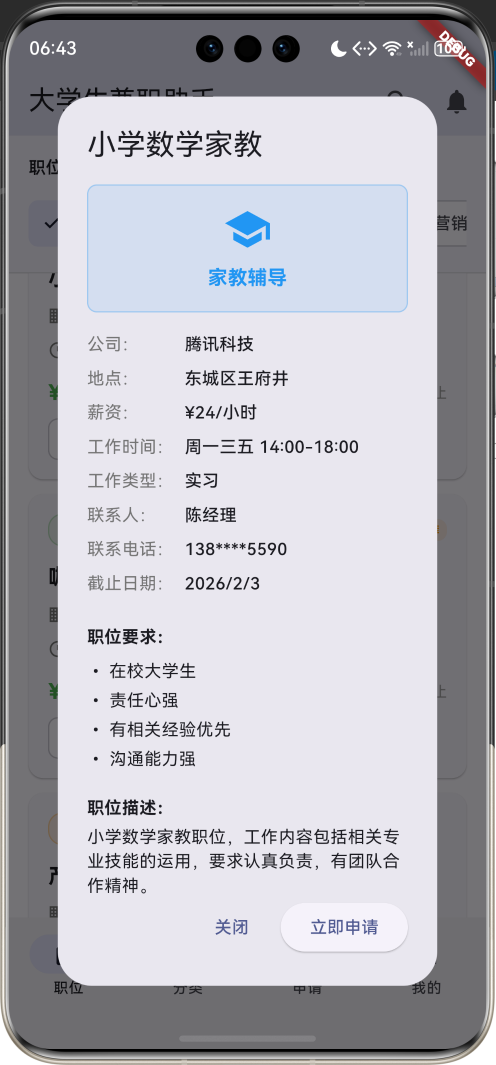
职位详情对话框
点击职位卡片可以查看完整的职位信息:
void _showJobDetail(PartTimeJob job) {
  showDialog(
    context: context,
    builder: (context) => AlertDialog(
      title: Text(job.title),
      content: SingleChildScrollView(
        child: Column(
          crossAxisAlignment: CrossAxisAlignment.start,
          mainAxisSize: MainAxisSize.min,
          children: [
            // 分类展示区域
            Container(
              width: double.infinity,
              padding: const EdgeInsets.all(16),
              decoration: BoxDecoration(
                color: job.categoryColor.withValues(alpha: 0.1),
                borderRadius: BorderRadius.circular(8),
                border: Border.all(
                    color: job.categoryColor.withValues(alpha: 0.3)),
              ),
              child: Column(
                children: [
                  Icon(job.categoryIcon, size: 40, color: job.categoryColor),
                  const SizedBox(height: 8),
                  Text(
                    job.categoryName,
                    style: TextStyle(
                      fontSize: 16,
                      fontWeight: FontWeight.bold,
                      color: job.categoryColor,
                    ),
                  ),
                ],
              ),
            ),
            const SizedBox(height: 16),
            // 详细信息展示
            _buildDetailRow('公司', job.company),
            _buildDetailRow('地点', job.location),
            _buildDetailRow('薪资', '¥${job.hourlyRate.toStringAsFixed(0)}/小时'),
            _buildDetailRow('工作时间', job.workTime),
            _buildDetailRow('工作类型', job.workType),
            _buildDetailRow('联系人', job.contactPerson),
            _buildDetailRow('联系电话', job.contactPhone),
            _buildDetailRow('截止日期', '${job.deadline.year}/${job.deadline.month}/${job.deadline.day}'),
            // 职位要求
            const SizedBox(height: 16),
            const Text('职位要求:', style: TextStyle(fontWeight: FontWeight.bold)),
            const SizedBox(height: 8),
            ...job.requirements.map((req) => Text('• $req')),
            // 职位描述
            const SizedBox(height: 16),
            const Text('职位描述:', style: TextStyle(fontWeight: FontWeight.bold)),
            const SizedBox(height: 4),
            Text(job.description),
            // 福利待遇
            if (job.tags.isNotEmpty) ...[
              const SizedBox(height: 16),
              const Text('福利待遇:', style: TextStyle(fontWeight: FontWeight.bold)),
              const SizedBox(height: 8),
              Wrap(
                spacing: 4,
                children: job.tags.map((tag) {
                  return Chip(
                    label: Text(tag, style: const TextStyle(fontSize: 12)),
                    materialTapTargetSize: MaterialTapTargetSize.shrinkWrap,
                  );
                }).toList(),
              ),
            ],
          ],
        ),
      ),
      actions: [
        TextButton(
          onPressed: () => Navigator.pop(context),
          child: const Text('关闭'),
        ),
        ElevatedButton(
          onPressed: () {
            Navigator.pop(context);
            _showApplicationForm(job);
          },
          child: const Text('立即申请'),
        ),
      ],
    ),
  );
}
职位分类页面
分类网格展示
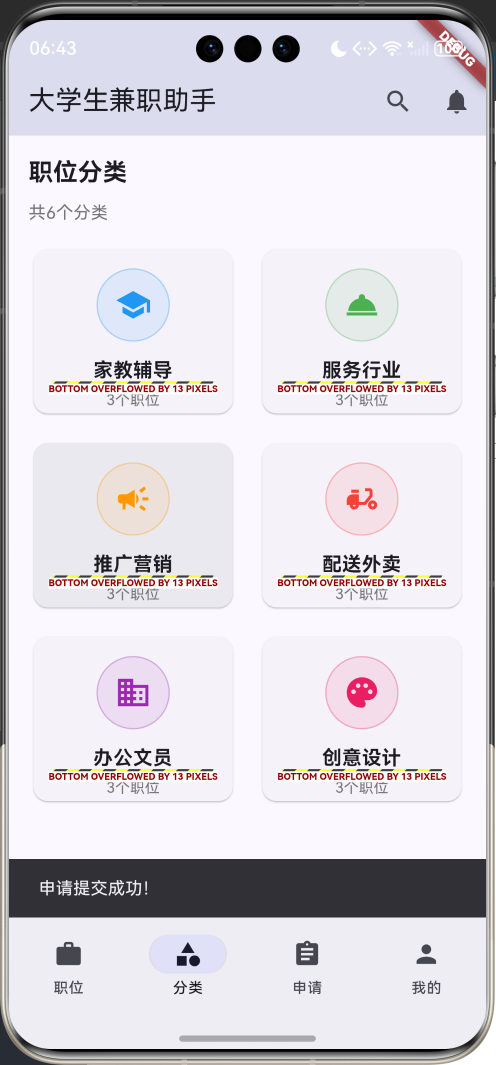
分类页面以网格形式展示所有职位分类:
Widget _buildCategoriesPage() {
  return Padding(
    padding: const EdgeInsets.all(16),
    child: Column(
      crossAxisAlignment: CrossAxisAlignment.start,
      children: [
        const Text(
          '职位分类',
          style: TextStyle(fontSize: 20, fontWeight: FontWeight.bold),
        ),
        const SizedBox(height: 8),
        Text(
          '共${_categories.length}个分类',
          style: TextStyle(fontSize: 14, color: Colors.grey[600]),
        ),
        const SizedBox(height: 16),
        Expanded(
          child: GridView.builder(
            gridDelegate: const SliverGridDelegateWithFixedCrossAxisCount(
              crossAxisCount: 2,
              childAspectRatio: 1.2,
              crossAxisSpacing: 16,
              mainAxisSpacing: 16,
            ),
            itemCount: _categories.length,
            itemBuilder: (context, index) {
              return _buildCategoryCard(_categories[index]);
            },
          ),
        ),
      ],
    ),
  );
}
分类卡片设计
每个分类以卡片形式展示:
Widget _buildCategoryCard(JobCategory category) {
  final jobCount = _jobs.where((job) => job.categoryId == category.id).length;

  return Card(
    child: InkWell(
      onTap: () {
        setState(() {
          _selectedCategoryId = category.id;
          _selectedIndex = 0;
        });
      },
      borderRadius: BorderRadius.circular(12),
      child: Padding(
        padding: const EdgeInsets.all(16),
        child: Column(
          mainAxisAlignment: MainAxisAlignment.center,
          children: [
            Container(
              width: 60,
              height: 60,
              decoration: BoxDecoration(
                color: category.color.withValues(alpha: 0.1),
                borderRadius: BorderRadius.circular(30),
                border: Border.all(
                    color: category.color.withValues(alpha: 0.3)),
              ),
              child: Icon(
                category.icon,
                color: category.color,
                size: 30,
              ),
            ),
            const SizedBox(height: 12),
            Text(
              category.name,
              style: const TextStyle(
                fontSize: 16,
                fontWeight: FontWeight.bold,
              ),
              textAlign: TextAlign.center,
            ),
            const SizedBox(height: 4),
            Text(
              '$jobCount个职位',
              style: TextStyle(
                fontSize: 12,
                color: Colors.grey[600],
              ),
            ),
          ],
        ),
      ),
    ),
  );
}
分类卡片特点:
- 视觉识别:每个分类使用独特的颜色和图标
- 职位统计:显示该分类下的职位数量
- 交互导航:点击分类卡片直接跳转到对应职位列表
- 响应式布局:网格布局适配不同屏幕尺寸
申请管理页面
申请列表展示
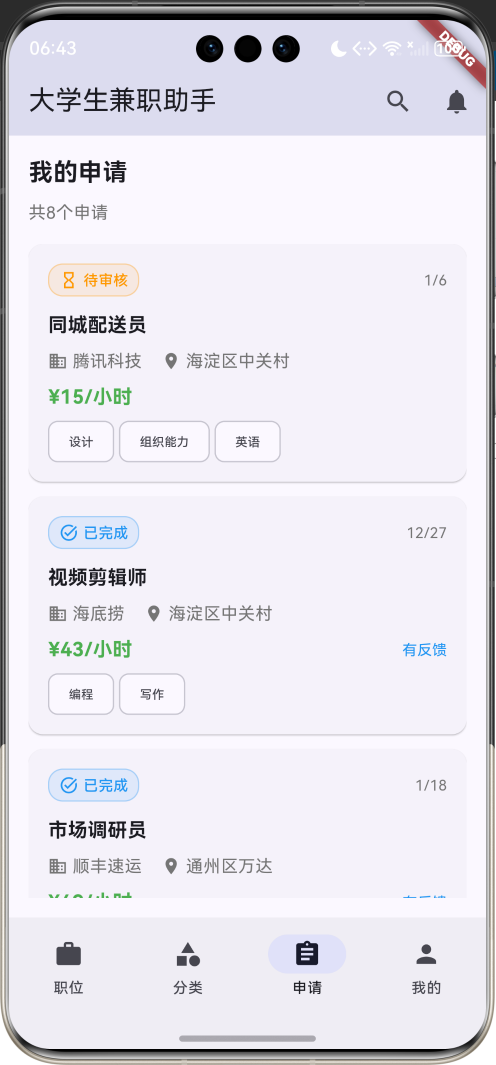
申请页面显示学生的所有申请记录:
Widget _buildApplicationsPage() {
  return Padding(
    padding: const EdgeInsets.all(16),
    child: Column(
      crossAxisAlignment: CrossAxisAlignment.start,
      children: [
        const Text(
          '我的申请',
          style: TextStyle(fontSize: 20, fontWeight: FontWeight.bold),
        ),
        const SizedBox(height: 8),
        Text(
          '共${_applications.length}个申请',
          style: TextStyle(fontSize: 14, color: Colors.grey[600]),
        ),
        const SizedBox(height: 16),
        Expanded(
          child: ListView.builder(
            itemCount: _applications.length,
            itemBuilder: (context, index) {
              return _buildApplicationCard(_applications[index]);
            },
          ),
        ),
      ],
    ),
  );
}
申请卡片设计
每个申请记录以卡片形式展示:
Widget _buildApplicationCard(JobApplication application) {
  final job = _jobs.firstWhere((j) => j.id == application.jobId);

  return Card(
    margin: const EdgeInsets.only(bottom: 12),
    child: InkWell(
      onTap: () => _showApplicationDetail(application, job),
      borderRadius: BorderRadius.circular(12),
      child: Padding(
        padding: const EdgeInsets.all(16),
        child: Column(
          crossAxisAlignment: CrossAxisAlignment.start,
          children: [
            // 申请状态和日期
            Row(
              children: [
                Container(
                  padding: const EdgeInsets.symmetric(horizontal: 8, vertical: 4),
                  decoration: BoxDecoration(
                    color: application.statusColor.withValues(alpha: 0.1),
                    borderRadius: BorderRadius.circular(12),
                    border: Border.all(
                        color: application.statusColor.withValues(alpha: 0.3)),
                  ),
                  child: Row(
                    mainAxisSize: MainAxisSize.min,
                    children: [
                      Icon(application.statusIcon, size: 16, color: application.statusColor),
                      const SizedBox(width: 4),
                      Text(
                        application.status,
                        style: TextStyle(
                          fontSize: 12,
                          color: application.statusColor,
                          fontWeight: FontWeight.w500,
                        ),
                      ),
                    ],
                  ),
                ),
                const Spacer(),
                Text(
                  '${application.applicationDate.month}/${application.applicationDate.day}',
                  style: TextStyle(fontSize: 12, color: Colors.grey[600]),
                ),
              ],
            ),
            const SizedBox(height: 12),
            // 职位信息
            Text(
              job.title,
              style: const TextStyle(fontSize: 16, fontWeight: FontWeight.bold),
            ),
            const SizedBox(height: 8),
            Row(
              children: [
                Icon(Icons.business, size: 16, color: Colors.grey[600]),
                const SizedBox(width: 4),
                Text(job.company, style: TextStyle(fontSize: 14, color: Colors.grey[600])),
                const SizedBox(width: 16),
                Icon(Icons.location_on, size: 16, color: Colors.grey[600]),
                const SizedBox(width: 4),
                Expanded(
                  child: Text(job.location, style: TextStyle(fontSize: 14, color: Colors.grey[600])),
                ),
              ],
            ),
            const SizedBox(height: 8),
            // 薪资和反馈信息
            Row(
              children: [
                Text(
                  '¥${job.hourlyRate.toStringAsFixed(0)}/小时',
                  style: const TextStyle(
                    fontSize: 16,
                    fontWeight: FontWeight.bold,
                    color: Colors.green,
                  ),
                ),
                const Spacer(),
                if (application.feedback != null)
                  const Text(
                    '有反馈',
                    style: TextStyle(fontSize: 12, color: Colors.blue),
                  ),
              ],
            ),
            // 技能标签
            if (application.skills.isNotEmpty) ...[
              const SizedBox(height: 8),
              Wrap(
                spacing: 4,
                children: application.skills.map((skill) {
                  return Chip(
                    label: Text(skill, style: const TextStyle(fontSize: 10)),
                    materialTapTargetSize: MaterialTapTargetSize.shrinkWrap,
                  );
                }).toList(),
              ),
            ],
          ],
        ),
      ),
    ),
  );
}
申请状态包括:
- 待审核:申请已提交,等待雇主审核
- 已通过:申请通过,可以联系雇主
- 已拒绝:申请被拒绝
- 已完成:兼职工作已完成
个人档案页面
档案头部设计
个人页面顶部展示学生的基本信息和统计数据:
Widget _buildProfileHeader() {
  return Card(
    child: Padding(
      padding: const EdgeInsets.all(16),
      child: Row(
        children: [
          Container(
            width: 80,
            height: 80,
            decoration: BoxDecoration(
              color: Colors.indigo.withValues(alpha: 0.1),
              borderRadius: BorderRadius.circular(40),
              border: Border.all(
                  color: Colors.indigo.withValues(alpha: 0.3)),
            ),
            child: const Icon(
              Icons.person,
              color: Colors.indigo,
              size: 40,
            ),
          ),
          const SizedBox(width: 16),
          Expanded(
            child: Column(
              crossAxisAlignment: CrossAxisAlignment.start,
              children: [
                Text(
                  _currentStudent.name,
                  style: const TextStyle(
                    fontSize: 20,
                    fontWeight: FontWeight.bold,
                  ),
                ),
                const SizedBox(height: 4),
                Text(
                  '${_currentStudent.university} · ${_currentStudent.major}',
                  style: TextStyle(fontSize: 14, color: Colors.grey[600]),
                ),
                const SizedBox(height: 4),
                Text(
                  '${_currentStudent.gradeText} · ${_currentStudent.phone}',
                  style: TextStyle(fontSize: 12, color: Colors.grey[500]),
                ),
                const SizedBox(height: 8),
                Row(
                  children: [
                    Icon(Icons.star, color: Colors.orange, size: 16),
                    const SizedBox(width: 4),
                    Text(
                      _currentStudent.rating.toString(),
                      style: const TextStyle(
                        fontSize: 14,
                        fontWeight: FontWeight.bold,
                        color: Colors.orange,
                      ),
                    ),
                    const SizedBox(width: 16),
                    Text(
                      '完成${_currentStudent.completedJobs}个兼职',
                      style: TextStyle(fontSize: 12, color: Colors.grey[600]),
                    ),
                  ],
                ),
              ],
            ),
          ),
        ],
      ),
    ),
  );
}
统计数据展示
个人统计数据以卡片网格形式展示:
Widget _buildProfileStats() {
  return Row(
    children: [
      Expanded(
        child: Card(
          child: Padding(
            padding: const EdgeInsets.all(16),
            child: Column(
              children: [
                Icon(Icons.assignment_turned_in, color: Colors.green, size: 32),
                const SizedBox(height: 8),
                Text(
                  '${_currentStudent.completedJobs}',
                  style: const TextStyle(
                    fontSize: 24,
                    fontWeight: FontWeight.bold,
                    color: Colors.green,
                  ),
                ),
                const SizedBox(height: 4),
                Text(
                  '完成兼职',
                  style: TextStyle(fontSize: 12, color: Colors.grey[600]),
                ),
              ],
            ),
          ),
        ),
      ),
      const SizedBox(width: 16),
      Expanded(
        child: Card(
          child: Padding(
            padding: const EdgeInsets.all(16),
            child: Column(
              children: [
                Icon(Icons.star, color: Colors.orange, size: 32),
                const SizedBox(height: 8),
                Text(
                  _currentStudent.rating.toString(),
                  style: const TextStyle(
                    fontSize: 24,
                    fontWeight: FontWeight.bold,
                    color: Colors.orange,
                  ),
                ),
                const SizedBox(height: 4),
                Text(
                  '综合评分',
                  style: TextStyle(fontSize: 12, color: Colors.grey[600]),
                ),
              ],
            ),
          ),
        ),
      ),
      const SizedBox(width: 16),
      Expanded(
        child: Card(
          child: Padding(
            padding: const EdgeInsets.all(16),
            child: Column(
              children: [
                Icon(Icons.assignment, color: Colors.blue, size: 32),
                const SizedBox(height: 8),
                Text(
                  '${_applications.length}',
                  style: const TextStyle(
                    fontSize: 24,
                    fontWeight: FontWeight.bold,
                    color: Colors.blue,
                  ),
                ),
                const SizedBox(height: 4),
                Text(
                  '申请记录',
                  style: TextStyle(fontSize: 12, color: Colors.grey[600]),
                ),
              ],
            ),
          ),
        ),
      ),
    ],
  );
}
详细信息展示
个人详细信息包括基本信息、技能标签、证书资质等:
Widget _buildProfileInfo() {
  return Card(
    child: Padding(
      padding: const EdgeInsets.all(16),
      child: Column(
        crossAxisAlignment: CrossAxisAlignment.start,
        children: [
          const Text(
            '个人信息',
            style: TextStyle(fontSize: 16, fontWeight: FontWeight.bold),
          ),
          const SizedBox(height: 16),
          _buildInfoRow('邮箱', _currentStudent.email),
          _buildInfoRow('专业', _currentStudent.major),
          _buildInfoRow('年级', _currentStudent.gradeText),
          const SizedBox(height: 16),
          const Text(
            '技能标签',
            style: TextStyle(fontSize: 14, fontWeight: FontWeight.bold),
          ),
          const SizedBox(height: 8),
          Wrap(
            spacing: 8,
            children: _currentStudent.skills.map((skill) {
              return Chip(
                label: Text(skill),
                materialTapTargetSize: MaterialTapTargetSize.shrinkWrap,
              );
            }).toList(),
          ),
          const SizedBox(height: 16),
          const Text(
            '证书资质',
            style: TextStyle(fontSize: 14, fontWeight: FontWeight.bold),
          ),
          const SizedBox(height: 8),
          ..._currentStudent.certificates.map((cert) => Padding(
                padding: const EdgeInsets.only(bottom: 4),
                child: Row(
                  children: [
                    Icon(Icons.verified, color: Colors.green, size: 16),
                    const SizedBox(width: 8),
                    Text(cert),
                  ],
                ),
              )),
          const SizedBox(height: 16),
          const Text(
            '自我介绍',
            style: TextStyle(fontSize: 14, fontWeight: FontWeight.bold),
          ),
          const SizedBox(height: 8),
          Text(
            _currentStudent.selfIntroduction,
            style: TextStyle(fontSize: 14, color: Colors.grey[600]),
          ),
        ],
      ),
    ),
  );
}
申请流程实现
申请表单设计
点击"立即申请"按钮后显示申请表单:
void _showApplicationForm(PartTimeJob job) {
  showDialog(
    context: context,
    builder: (context) => AlertDialog(
      title: Text('申请 ${job.title}'),
      content: SingleChildScrollView(
        child: Column(
          crossAxisAlignment: CrossAxisAlignment.start,
          mainAxisSize: MainAxisSize.min,
          children: [
            Text('职位:${job.title}'),
            Text('公司:${job.company}'),
            Text('薪资:¥${job.hourlyRate.toStringAsFixed(0)}/小时'),
            const SizedBox(height: 16),
            const Text('申请信息:', style: TextStyle(fontWeight: FontWeight.bold)),
            const SizedBox(height: 8),
            TextFormField(
              decoration: const InputDecoration(
                labelText: '姓名',
                border: OutlineInputBorder(),
              ),
              initialValue: _currentStudent.name,
            ),
            const SizedBox(height: 12),
            TextFormField(
              decoration: const InputDecoration(
                labelText: '电话',
                border: OutlineInputBorder(),
              ),
              initialValue: _currentStudent.phone,
            ),
            const SizedBox(height: 12),
            TextFormField(
              decoration: const InputDecoration(
                labelText: '邮箱',
                border: OutlineInputBorder(),
              ),
              initialValue: _currentStudent.email,
            ),
            const SizedBox(height: 12),
            TextFormField(
              decoration: const InputDecoration(
                labelText: '自我介绍',
                border: OutlineInputBorder(),
                hintText: '请简单介绍一下自己...',
              ),
              maxLines: 3,
              initialValue: _currentStudent.selfIntroduction,
            ),
          ],
        ),
      ),
      actions: [
        TextButton(
          onPressed: () => Navigator.pop(context),
          child: const Text('取消'),
        ),
        ElevatedButton(
          onPressed: () {
            Navigator.pop(context);
            ScaffoldMessenger.of(context).showSnackBar(
              const SnackBar(content: Text('申请提交成功!')),
            );
          },
          child: const Text('提交申请'),
        ),
      ],
    ),
  );
}
申请表单特点:
- 预填信息:自动填入学生的基本信息
- 职位确认:显示申请的职位信息
- 完整表单:包含姓名、电话、邮箱、自我介绍等必要信息
- 提交反馈:提交后给出明确的成功提示
搜索功能实现
应用提供关键词搜索功能:
void _showSearchDialog() {
  showDialog(
    context: context,
    builder: (context) => AlertDialog(
      title: const Text('搜索职位'),
      content: TextFormField(
        decoration: const InputDecoration(
          labelText: '输入关键词',
          border: OutlineInputBorder(),
          hintText: '职位名称、公司名称...',
        ),
        onChanged: (value) {
          setState(() {
            _searchKeyword = value;
          });
        },
      ),
      actions: [
        TextButton(
          onPressed: () => Navigator.pop(context),
          child: const Text('取消'),
        ),
        ElevatedButton(
          onPressed: () {
            Navigator.pop(context);
            setState(() => _selectedIndex = 0);
          },
          child: const Text('搜索'),
        ),
      ],
    ),
  );
}
搜索功能支持:
- 职位标题搜索:根据职位名称进行模糊匹配
- 公司名称搜索:根据公司名称进行模糊匹配
- 实时筛选:输入关键词后实时更新职位列表
- 组合筛选:可以与分类筛选组合使用
数据生成与管理
职位分类初始化
系统预定义六个主要职位分类:
void _initializeCategories() {
  _categories.addAll([
    JobCategory(
      id: 'tutoring',
      name: '家教辅导',
      icon: Icons.school,
      color: Colors.blue,
    ),
    JobCategory(
      id: 'service',
      name: '服务行业',
      icon: Icons.room_service,
      color: Colors.green,
    ),
    JobCategory(
      id: 'promotion',
      name: '推广营销',
      icon: Icons.campaign,
      color: Colors.orange,
    ),
    JobCategory(
      id: 'delivery',
      name: '配送外卖',
      icon: Icons.delivery_dining,
      color: Colors.red,
    ),
    JobCategory(
      id: 'office',
      name: '办公文员',
      icon: Icons.business,
      color: Colors.purple,
    ),
    JobCategory(
      id: 'creative',
      name: '创意设计',
      icon: Icons.palette,
      color: Colors.pink,
    ),
  ]);
}
兼职职位数据生成
系统自动生成18个不同类型的兼职职位:
void _generateJobs() {
  final jobTitles = [
    '小学数学家教', '咖啡店服务员', '产品推广员', '外卖配送员',
    '文档整理员', 'UI设计助理', '英语口语陪练', '餐厅服务员',
    '市场调研员', '快递分拣员', '数据录入员', '平面设计师',
    '高中物理辅导', '奶茶店店员', '活动策划助理', '同城配送员',
    '客服专员', '视频剪辑师',
  ];

  final companies = [
    '学而思教育', '星巴克', '阿里巴巴', '美团外卖',
    '腾讯科技', '字节跳动', '新东方', '海底捞',
    '百度', '顺丰速运', '华为', '小米科技',
  ];

  final random = Random();

  for (int i = 0; i < 18; i++) {
    final categoryId = _categories[i % _categories.length].id;

    // 随机生成福利标签
    final selectedTags = <String>[];
    final tags = ['包吃', '包住', '交通补贴', '弹性工作', '周末双休', '五险一金'];
    for (int j = 0; j < 2 + random.nextInt(3); j++) {
      final tag = tags[random.nextInt(tags.length)];
      if (!selectedTags.contains(tag)) {
        selectedTags.add(tag);
      }
    }

    _jobs.add(PartTimeJob(
      id: 'job_$i',
      title: jobTitles[i],
      company: companies[random.nextInt(companies.length)],
      categoryId: categoryId,
      location: locations[random.nextInt(locations.length)],
      hourlyRate: 15 + random.nextDouble() * 35,
      workTime: _generateWorkTime(random),
      requirements: ['在校大学生', '责任心强', '沟通能力强'],
      description: '${jobTitles[i]}职位,工作内容包括相关专业技能的运用,要求认真负责,有团队合作精神。',
      publishDate: DateTime.now().subtract(Duration(days: random.nextInt(7))),
      deadline: DateTime.now().add(Duration(days: 7 + random.nextInt(14))),
      contactPerson: '${['张', '李', '王', '刘', '陈'][random.nextInt(5)]}经理',
      contactPhone: '138****${1000 + random.nextInt(9000)}',
      contactEmail: 'hr${i + 1}@company.com',
      isUrgent: random.nextBool(),
      isRecommended: random.nextBool(),
      applicantCount: random.nextInt(50),
      tags: selectedTags,
      workType: ['兼职', '实习', '临时工', '长期'][random.nextInt(4)],
    ));
  }
}
申请记录数据生成
系统为当前学生生成多条申请记录:
void _generateApplications() {
  final statuses = ['待审核', '已通过', '已拒绝', '已完成'];
  final universities = ['北京大学', '清华大学', '人民大学', '北京理工大学', '北京航空航天大学'];
  final majors = ['计算机科学', '工商管理', '英语', '数学', '物理', '化学', '经济学'];
  final skills = ['编程', '英语', '设计', '写作', '演讲', '组织能力', '沟通能力'];

  final random = Random();

  for (int i = 0; i < 8; i++) {
    final selectedSkills = <String>[];
    for (int j = 0; j < 2 + random.nextInt(3); j++) {
      final skill = skills[random.nextInt(skills.length)];
      if (!selectedSkills.contains(skill)) {
        selectedSkills.add(skill);
      }
    }

    _applications.add(JobApplication(
      id: 'app_$i',
      jobId: _jobs[random.nextInt(_jobs.length)].id,
      studentName: _currentStudent.name,
      studentPhone: _currentStudent.phone,
      studentEmail: _currentStudent.email,
      university: universities[random.nextInt(universities.length)],
      major: majors[random.nextInt(majors.length)],
      grade: 1 + random.nextInt(4),
      selfIntroduction: '我是一名${['大一', '大二', '大三', '大四'][random.nextInt(4)]}学生,对这份工作很感兴趣,希望能够得到这个机会。',
      skills: selectedSkills,
      experience: random.nextBool() ? '有相关兼职经验' : '无相关经验,但学习能力强',
      applicationDate: DateTime.now().subtract(Duration(days: random.nextInt(30))),
      status: statuses[random.nextInt(statuses.length)],
      feedback: random.nextBool() ? '面试表现良好,符合岗位要求' : null,
    ));
  }
}
用户界面设计原则
Material Design 3 应用
应用全面采用Material Design 3设计规范:
- 颜色系统:使用靛蓝色作为主题色,符合专业求职应用的特征
- 组件设计:使用最新的Material 3组件,如NavigationBar、FilterChip等
- 视觉层次:通过不同的字体大小、颜色深浅建立清晰的信息层次
- 交互反馈:所有可点击元素都提供适当的视觉反馈
求职主题设计
针对大学生兼职应用的特殊需求:
-
状态色彩化:
- 绿色:已通过、完成状态
- 橙色:待审核、推荐标识
- 红色:已拒绝、紧急招聘
- 蓝色:信息展示、已完成
-
分类视觉化:
- 每个职位分类使用独特的颜色和图标
- 家教辅导:蓝色 + 学校图标
- 服务行业:绿色 + 服务图标
- 推广营销:橙色 + 宣传图标
- 配送外卖:红色 + 配送图标
- 办公文员:紫色 + 商务图标
- 创意设计:粉色 + 调色板图标
-
信息层次化:
- 职位标题使用大字体突出显示
- 薪资信息使用绿色强调
- 截止时间根据紧急程度使用不同颜色
响应式布局设计
// 网格布局自适应
GridView.builder(
  gridDelegate: const SliverGridDelegateWithFixedCrossAxisCount(
    crossAxisCount: 2,
    childAspectRatio: 1.2,
    crossAxisSpacing: 16,
    mainAxisSpacing: 16,
  ),
  itemCount: _categories.length,
  itemBuilder: (context, index) {
    return _buildCategoryCard(_categories[index]);
  },
)

// 弹性布局
Row(
  children: [
    Expanded(child: widget1),
    const SizedBox(width: 16),
    Expanded(child: widget2),
  ],
)
状态管理与数据流
StatefulWidget状态管理
应用使用StatefulWidget进行状态管理:
class _PartTimeJobHomePageState extends State<PartTimeJobHomePage> {
int _selectedIndex = 0;
final List<JobCategory> _categories = [];
final List<PartTimeJob> _jobs = [];
final List<JobApplication> _applications = [];
String _selectedCategoryId = '';
String _searchKeyword = '';
void initState() {
super.initState();
_initializeCategories();
_generateJobs();
_generateApplications();
}
// 状态更新方法
void _updateSelectedIndex(int index) {
setState(() {
_selectedIndex = index;
});
}
void _updateCategoryFilter(String categoryId) {
setState(() {
_selectedCategoryId = categoryId;
});
}
}
数据筛选逻辑
职位列表支持多维度筛选:
final filteredJobs = _jobs.where((job) {
  // 分类筛选
  if (_selectedCategoryId.isNotEmpty && job.categoryId != _selectedCategoryId) {
    return false;
  }
  // 关键词搜索
  if (_searchKeyword.isNotEmpty &&
      !job.title.toLowerCase().contains(_searchKeyword.toLowerCase()) &&
      !job.company.toLowerCase().contains(_searchKeyword.toLowerCase())) {
    return false;
  }
  return true;
}).toList();
数据关联管理
通过ID关联不同数据实体:
// 获取申请对应的职位信息
final job = _jobs.firstWhere((j) => j.id == application.jobId);

// 统计分类下的职位数量
final jobCount = _jobs.where((job) => job.categoryId == category.id).length;

// 获取学生的申请记录
final studentApplications = _applications
    .where((app) => app.studentName == _currentStudent.name)
    .toList();
性能优化策略
列表渲染优化
使用ListView.builder和GridView.builder进行高效渲染:
ListView.builder(
  itemCount: filteredJobs.length,
  itemBuilder: (context, index) {
    return _buildJobCard(filteredJobs[index]);
  },
)

GridView.builder(
  gridDelegate: const SliverGridDelegateWithFixedCrossAxisCount(
    crossAxisCount: 2,
    childAspectRatio: 1.2,
  ),
  itemCount: _categories.length,
  itemBuilder: (context, index) {
    return _buildCategoryCard(_categories[index]);
  },
)
条件渲染优化
避免不必要的组件渲染:
// 条件显示标签
if (job.isUrgent)
  Container(
    padding: const EdgeInsets.symmetric(horizontal: 6, vertical: 2),
    decoration: BoxDecoration(
      color: Colors.red.withValues(alpha: 0.1),
      borderRadius: BorderRadius.circular(8),
    ),
    child: const Text('急招'),
  ),

// 条件显示福利标签
if (job.tags.isNotEmpty) ...[
  const SizedBox(height: 8),
  Wrap(
    spacing: 4,
    children: job.tags.map((tag) => Chip(label: Text(tag))).toList(),
  ),
],
状态更新优化
精确控制状态更新范围:
setState(() {
  _selectedCategoryId = categoryId; // 只更新筛选条件
});

setState(() {
  _selectedIndex = index; // 只更新导航索引
});
扩展功能建议
数据持久化
可以集成以下数据存储方案:
-
SQLite数据库:
dependencies: sqflite: ^2.3.0 path: ^1.8.3 // 创建职位表 CREATE TABLE jobs ( id TEXT PRIMARY KEY, title TEXT NOT NULL, company TEXT, category_id TEXT, location TEXT, hourly_rate REAL, work_time TEXT, description TEXT, publish_date TEXT, deadline TEXT, is_urgent INTEGER, is_recommended INTEGER ); -
SharedPreferences:
dependencies:
  shared_preferences: ^2.2.2

// 存储用户偏好
final prefs = await SharedPreferences.getInstance();
await prefs.setString('selected_category', categoryId);
await prefs.setStringList('favorite_jobs', favoriteJobIds);
推送通知功能
dependencies:
  flutter_local_notifications: ^16.3.0

// 设置新职位通知
void _scheduleJobNotification(PartTimeJob job) {
  final notification = FlutterLocalNotificationsPlugin();
  notification.show(
    job.hashCode,
    '新职位推荐',
    '${job.title} - ${job.company},时薪¥${job.hourlyRate.toStringAsFixed(0)}',
    const NotificationDetails(
      android: AndroidNotificationDetails(
        'job_channel',
        '职位推荐',
        channelDescription: '新职位推荐通知',
      ),
    ),
  );
}
地图定位功能
dependencies:
  geolocator: ^10.1.0
  google_maps_flutter: ^2.5.0

// 获取用户位置
Future<Position> _getCurrentLocation() async {
  bool serviceEnabled = await Geolocator.isLocationServiceEnabled();
  if (!serviceEnabled) {
    throw Exception('位置服务未启用');
  }

  LocationPermission permission = await Geolocator.checkPermission();
  if (permission == LocationPermission.denied) {
    permission = await Geolocator.requestPermission();
  }

  return await Geolocator.getCurrentPosition();
}

// 计算距离
double _calculateDistance(Position userLocation, PartTimeJob job) {
  // 假设job有经纬度信息
  return Geolocator.distanceBetween(
    userLocation.latitude,
    userLocation.longitude,
    job.latitude,
    job.longitude,
  );
}
简历管理功能
dependencies:
  file_picker: ^6.1.1
  path_provider: ^2.1.2

// 上传简历文件
Future<void> _uploadResume() async {
  FilePickerResult? result = await FilePicker.platform.pickFiles(
    type: FileType.custom,
    allowedExtensions: ['pdf', 'doc', 'docx'],
  );

  if (result != null) {
    File file = File(result.files.single.path!);
    // 保存简历文件
    final directory = await getApplicationDocumentsDirectory();
    final resumePath = '${directory.path}/resume_${DateTime.now().millisecondsSinceEpoch}.pdf';
    await file.copy(resumePath);

    // 更新学生档案
    setState(() {
      _currentStudent.resume = resumePath;
    });
  }
}
收藏功能
class FavoriteJob {
  final String jobId;
  final DateTime favoriteDate;

  FavoriteJob({required this.jobId, required this.favoriteDate});
}

// 收藏职位
void _toggleFavorite(PartTimeJob job) {
  setState(() {
    if (_favoriteJobs.any((fav) => fav.jobId == job.id)) {
      _favoriteJobs.removeWhere((fav) => fav.jobId == job.id);
      ScaffoldMessenger.of(context).showSnackBar(
        const SnackBar(content: Text('已取消收藏')),
      );
    } else {
      _favoriteJobs.add(FavoriteJob(
        jobId: job.id,
        favoriteDate: DateTime.now(),
      ));
      ScaffoldMessenger.of(context).showSnackBar(
        const SnackBar(content: Text('已添加收藏')),
      );
    }
  });
}
测试策略
单元测试
// test/models/part_time_job_test.dart
import 'package:flutter_test/flutter_test.dart';
import 'package:your_app/models/part_time_job.dart';

void main() {
  group('PartTimeJob Tests', () {
    test('Days until deadline calculation', () {
      final job = PartTimeJob(
        id: 'test_1',
        title: '测试职位',
        company: '测试公司',
        categoryId: 'tutoring',
        location: '测试地点',
        hourlyRate: 20.0,
        workTime: '周末',
        requirements: ['测试要求'],
        description: '测试描述',
        publishDate: DateTime.now(),
        deadline: DateTime.now().add(const Duration(days: 7)),
        contactPerson: '测试联系人',
        contactPhone: '13800000000',
        contactEmail: 'test@example.com',
        isUrgent: false,
        isRecommended: false,
        applicantCount: 0,
        tags: [],
        workType: '兼职',
      );

      expect(job.daysUntilDeadline, 7);
      expect(job.isExpired, false);
    });

    test('Category properties', () {
      final job = PartTimeJob(
        // ... 其他属性
        categoryId: 'tutoring',
        // ... 其他属性
      );

      expect(job.categoryName, '家教辅导');
      expect(job.categoryColor, Colors.blue);
      expect(job.categoryIcon, Icons.school);
    });
  });
}
集成测试
// integration_test/app_test.dart
import 'package:flutter/material.dart';
import 'package:flutter_test/flutter_test.dart';
import 'package:integration_test/integration_test.dart';
import 'package:your_app/main.dart' as app;

void main() {
  IntegrationTestWidgetsFlutterBinding.ensureInitialized();

  group('Part-time Job App Integration Tests', () {
    testWidgets('Navigation and job browsing test', (tester) async {
      app.main();
      await tester.pumpAndSettle();

      // 测试底部导航
      await tester.tap(find.text('分类'));
      await tester.pumpAndSettle();
      expect(find.text('职位分类'), findsOneWidget);

      // 测试分类选择
      await tester.tap(find.text('家教辅导'));
      await tester.pumpAndSettle();
      expect(find.text('职位'), findsOneWidget);

      // 测试职位详情
      await tester.tap(find.byType(Card).first);
      await tester.pumpAndSettle();
      expect(find.text('立即申请'), findsOneWidget);
    });

    testWidgets('Application process test', (tester) async {
      app.main();
      await tester.pumpAndSettle();

      // 点击第一个职位
      await tester.tap(find.byType(Card).first);
      await tester.pumpAndSettle();

      // 点击立即申请
      await tester.tap(find.text('立即申请'));
      await tester.pumpAndSettle();

      // 验证申请表单
      expect(find.text('提交申请'), findsOneWidget);
      expect(find.byType(TextFormField), findsWidgets);
    });
  });
}
部署与发布
鸿蒙系统部署
-
环境配置:
flutter doctor flutter create --platforms ohos . -
应用配置:
// ohos/entry/src/main/module.json5 { "module": { "name": "entry", "type": "entry", "description": "大学生兼职助手", "mainElement": "EntryAbility", "deviceTypes": ["phone", "tablet"], "abilities": [ { "name": "EntryAbility", "label": "兼职助手", "icon": "$media:icon" } ] } } -
权限配置:
{
  "module": {
    "requestPermissions": [
      {
        "name": "ohos.permission.INTERNET",
        "reason": "网络访问权限"
      },
      {
        "name": "ohos.permission.LOCATION",
        "reason": "位置服务权限"
      }
    ]
  }
}
Android/iOS部署
-
Android配置:
# android/app/build.gradle android { compileSdkVersion 33 defaultConfig { applicationId "com.example.part_time_job_helper" minSdkVersion 21 targetSdkVersion 33 versionCode 1 versionName "1.0.0" } } -
iOS配置:
<!-- ios/Runner/Info.plist -->
<key>CFBundleDisplayName</key>
<string>兼职助手</string>
<key>NSLocationWhenInUseUsageDescription</key>
<string>需要位置权限来推荐附近的兼职工作</string>
总结
本教程详细介绍了Flutter大学生兼职助手应用的完整开发过程。该应用具有以下特点:
技术特色
- 跨平台支持:支持鸿蒙、Android、iOS三大平台
- 现代化UI:采用Material Design 3设计规范和求职主题
- 完整功能:涵盖职位浏览、分类筛选、申请管理、个人档案等核心功能
- 智能筛选:支持多维度职位筛选和关键词搜索
- 良好架构:清晰的数据模型和组件设计
应用价值
- 求职便利:为大学生提供便捷的兼职求职平台
- 信息集中:整合各类兼职信息,提高求职效率
- 流程规范:标准化的申请流程和状态跟踪
- 个人管理:完整的个人档案和申请记录管理
扩展潜力
- 数据同步:可以集成云存储实现多设备同步
- 智能推荐:可以基于用户偏好和位置推荐合适职位
- 社交功能:可以添加用户评价和经验分享功能
- 企业端:可以开发企业端应用实现双向匹配
通过本教程的学习,开发者可以掌握Flutter在求职招聘领域的应用开发技能,并能够开发出功能完整、用户体验良好的求职应用。
欢迎加入开源鸿蒙跨平台社区:https://openharmonycrossplatform.csdn.net

作为“人工智能6S店”的官方数字引擎,为AI开发者与企业提供一个覆盖软硬件全栈、一站式门户。
更多推荐
 0
0 0
0- 0


 已为社区贡献25条内容

所有评论(0)