
Flutter框架跨平台鸿蒙开发——Text样式详解
TextStyle是Text组件样式的核心,提供了丰富的样式配置选项。
·
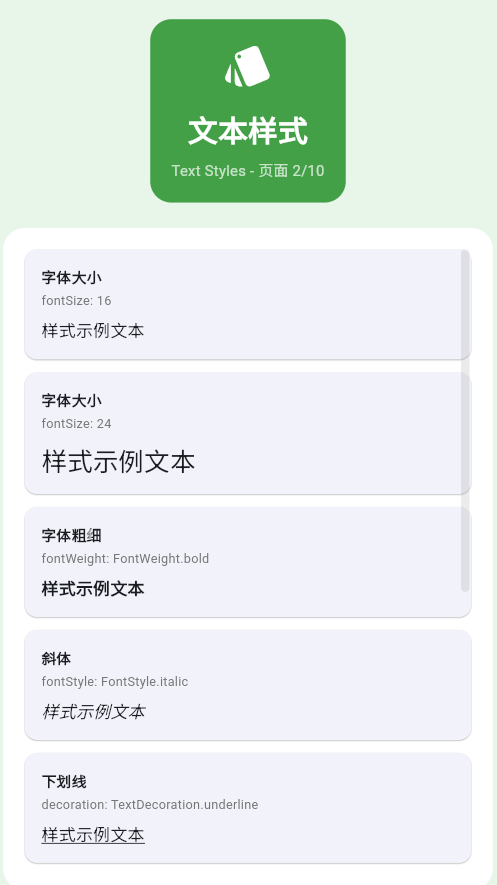
一、TextStyle完整属性
TextStyle是Text组件样式的核心,提供了丰富的样式配置选项。
TextStyle属性分类
二、字体属性详解
字体大小
Column(
  children: [
    Text('超大文本', style: TextStyle(fontSize: 48)),
    Text('大文本', style: TextStyle(fontSize: 32)),
    Text('中号文本', style: TextStyle(fontSize: 20)),
    Text('小号文本', style: TextStyle(fontSize: 14)),
    Text('超小文本', style: TextStyle(fontSize: 10)),
  ],
)
字体粗细
Column(
  children: [
    Text('Thin (100)', style: TextStyle(fontWeight: FontWeight.w100)),
    Text('Light (300)', style: TextStyle(fontWeight: FontWeight.w300)),
    Text('Regular (400)', style: TextStyle(fontWeight: FontWeight.w400)),
    Text('Medium (500)', style: TextStyle(fontWeight: FontWeight.w500)),
    Text('Bold (700)', style: TextStyle(fontWeight: FontWeight.w700)),
    Text('Black (900)', style: TextStyle(fontWeight: FontWeight.w900)),
  ],
)
字体样式
Column(
  children: [
    Text('正常字体', style: TextStyle(fontStyle: FontStyle.normal)),
    Text('斜体字体', style: TextStyle(fontStyle: FontStyle.italic)),
  ],
)
三、颜色属性
文本颜色
Column(
  children: [
    Text('红色文本', style: TextStyle(color: Colors.red)),
    Text('蓝色文本', style: TextStyle(color: Colors.blue)),
    Text('绿色文本', style: TextStyle(color: Colors.green)),
    Text('自定义颜色', style: TextStyle(color: Color(0xFF6C63FF))),
    Text('透明度颜色', style: TextStyle(color: Colors.blue.withOpacity(0.5))),
  ],
)
背景颜色
Column(
  children: [
    Container(
      padding: EdgeInsets.all(8),
      color: Colors.yellow.shade200,
      child: Text('带背景的文本'),
    ),
    Container(
      padding: EdgeInsets.all(8),
      color: Colors.blue.shade100,
      child: Text(
        '带背景的文本',
        style: TextStyle(
          backgroundColor: Colors.blue.shade50,
          color: Colors.blue.shade900,
        ),
      ),
    ),
  ],
)
四、装饰属性
装饰类型
Column(
  children: [
    Text('下划线',
        style: TextStyle(decoration: TextDecoration.underline)),
    Text('上划线',
        style: TextStyle(decoration: TextDecoration.overline)),
    Text('删除线',
        style: TextStyle(decoration: TextDecoration.lineThrough)),
    Text('组合装饰',
        style: TextStyle(decoration: TextDecoration.underline | TextDecoration.lineThrough)),
  ],
)
装饰样式
Column(
  children: [
    Text('实线下划线',
        style: TextStyle(
          decoration: TextDecoration.underline,
          decorationStyle: TextDecorationStyle.solid,
        )),
    Text('双线下划线',
        style: TextStyle(
          decoration: TextDecoration.underline,
          decorationStyle: TextDecorationStyle.double,
        )),
    Text('点线下划线',
        style: TextStyle(
          decoration: TextDecoration.underline,
          decorationStyle: TextDecorationStyle.dotted,
        )),
    Text('虚线下划线',
        style: TextStyle(
          decoration: TextDecoration.underline,
          decorationStyle: TextDecorationStyle.dashed,
        )),
    Text('波浪线下划线',
        style: TextStyle(
          decoration: TextDecoration.underline,
          decorationStyle: TextDecorationStyle.wavy,
        )),
  ],
)
五、间距属性
字符间距
Column(
  children: [
    Text('正常间距', style: TextStyle(letterSpacing: 0)),
    Text('紧凑间距', style: TextStyle(letterSpacing: -0.5)),
    Text('标准间距', style: TextStyle(letterSpacing: 1.0)),
    Text('宽松间距', style: TextStyle(letterSpacing: 2.0)),
    Text('极宽间距', style: TextStyle(letterSpacing: 4.0)),
  ],
)
单词间距
Column(
  children: [
    Text('正常单词间距', style: TextStyle(wordSpacing: 0)),
    Text('宽松单词间距', style: TextStyle(wordSpacing: 2.0)),
    Text('极宽单词间距', style: TextStyle(wordSpacing: 10.0)),
  ],
)
行高
Column(
  crossAxisAlignment: CrossAxisAlignment.start,
  children: [
    Text('行高1.0\n第二行\n第三行', style: TextStyle(height: 1.0)),
    SizedBox(height: 8),
    Text('行高1.5\n第二行\n第三行', style: TextStyle(height: 1.5)),
    SizedBox(height: 8),
    Text('行高2.0\n第二行\n第三行', style: TextStyle(height: 2.0)),
  ],
)
六、综合示例
class TextStylesExample extends StatelessWidget {
const TextStylesExample({super.key});
Widget build(BuildContext context) {
return Scaffold(
appBar: AppBar(title: Text('Text样式')),
body: SingleChildScrollView(
padding: EdgeInsets.all(16),
child: Column(
crossAxisAlignment: CrossAxisAlignment.start,
children: [
_buildSection('字体大小'),
_buildFontSizeExamples(),
SizedBox(height: 24),
_buildSection('字体粗细'),
_buildFontWeightExamples(),
SizedBox(height: 24),
_buildSection('颜色示例'),
_buildColorExamples(),
SizedBox(height: 24),
_buildSection('装饰效果'),
_buildDecorationExamples(),
],
),
),
);
}
Widget _buildSection(String title) {
return Text(
title,
style: TextStyle(fontSize: 20, fontWeight: FontWeight.bold),
);
}
Widget _buildFontSizeExamples() {
return Column(
crossAxisAlignment: CrossAxisAlignment.start,
children: [
Text('超大文本 (48px)', style: TextStyle(fontSize: 48)),
Text('大文本 (32px)', style: TextStyle(fontSize: 32)),
Text('中号文本 (20px)', style: TextStyle(fontSize: 20)),
Text('小号文本 (14px)', style: TextStyle(fontSize: 14)),
],
);
}
Widget _buildFontWeightExamples() {
return Column(
crossAxisAlignment: CrossAxisAlignment.start,
children: [
Text('Regular (400)', style: TextStyle(fontWeight: FontWeight.w400)),
Text('Medium (500)', style: TextStyle(fontWeight: FontWeight.w500)),
Text('Bold (700)', style: TextStyle(fontWeight: FontWeight.w700)),
],
);
}
Widget _buildColorExamples() {
return Column(
children: [
Text('红色文本', style: TextStyle(color: Colors.red)),
Text('蓝色文本', style: TextStyle(color: Colors.blue)),
Text('绿色文本', style: TextStyle(color: Colors.green)),
],
);
}
Widget _buildDecorationExamples() {
return Column(
children: [
Text('下划线',
style: TextStyle(decoration: TextDecoration.underline)),
Text('删除线',
style: TextStyle(decoration: TextDecoration.lineThrough)),
Text('波浪线',
style: TextStyle(
decoration: TextDecoration.underline,
decorationStyle: TextDecorationStyle.wavy,
)),
],
);
}
}
欢迎加入开源鸿蒙跨平台社区:https://openharmonycrossplatform.csdn.net

作为“人工智能6S店”的官方数字引擎,为AI开发者与企业提供一个覆盖软硬件全栈、一站式门户。
更多推荐
 14
14 0
0- 0


 已为社区贡献8条内容

所有评论(0)