
Flutter 框架跨平台鸿蒙开发——Async Await异步编程
Async/Await是Dart处理异步操作的语法糖,使异步代码像同步代码一样易读。fill:#333;important;important;fill:none;color:#333;color:#333;important;fill:none;fill:#333;height:1em;异步操作完成调用async函数返回Futureawait等待挂起执行恢复执行获得结果|| 特性 | 说明 ||
·
一、Async Await概述
Async/Await是Dart处理异步操作的语法糖,使异步代码像同步代码一样易读。
|| 特性 | 说明 |
|------|------|
| 语法简洁 | 代码线性化 |
| 错误处理 | try-catch机制 |
| 链式调用 | 避免回调地狱 |
| 性能优化 | 非阻塞执行 |
二、示例代码
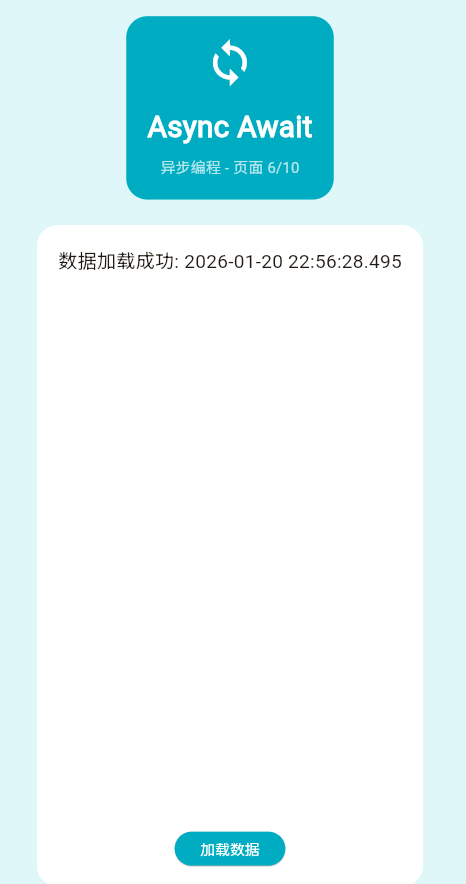
class _Page06AsyncDemo extends StatefulWidget {
const _Page06AsyncDemo();
State<_Page06AsyncDemo> createState() => _Page06AsyncDemoState();
}
class _Page06AsyncDemoState extends State<_Page06AsyncDemo> {
bool _isLoading = false;
String _result = '';
Future<String> _fetchData() async {
await Future.delayed(const Duration(seconds: 2));
return '数据加载成功: ${DateTime.now().toLocal()}';
}
Future<void> _loadData() async {
setState(() {
_isLoading = true;
_result = '';
});
try {
final data = await _fetchData();
if (mounted) {
setState(() {
_result = data;
_isLoading = false;
});
}
} catch (e) {
if (mounted) {
setState(() {
_result = '错误: $e';
_isLoading = false;
});
}
}
}
Widget build(BuildContext context) {
return Container(
color: Colors.cyan.shade50,
padding: const EdgeInsets.all(20),
child: Column(
children: [
Container(
padding: const EdgeInsets.all(20),
decoration: BoxDecoration(
color: Colors.cyan.shade600,
borderRadius: BorderRadius.circular(20),
),
child: const Column(
children: [
Icon(Icons.sync, size: 48, color: Colors.white),
SizedBox(height: 16),
Text(
'Async Await',
style: TextStyle(fontSize: 28, fontWeight: FontWeight.bold, color: Colors.white),
),
SizedBox(height: 8),
Text('异步编程 - 页面 6/10', style: TextStyle(color: Colors.white70)),
],
),
),
const SizedBox(height: 24),
Expanded(
child: Container(
padding: const EdgeInsets.all(20),
decoration: BoxDecoration(color: Colors.white, borderRadius: BorderRadius.circular(20)),
child: Column(
children: [
if (_isLoading)
const Center(child: CircularProgressIndicator())
else if (_result.isNotEmpty)
Text(_result, style: const TextStyle(fontSize: 18))
else
const Text('点击按钮加载数据', style: TextStyle(fontSize: 16, color: Colors.grey)),
const Spacer(),
ElevatedButton(
onPressed: _isLoading ? null : _loadData,
style: ElevatedButton.styleFrom(backgroundColor: Colors.cyan.shade600),
child: const Text('加载数据', style: TextStyle(color: Colors.white)),
),
],
),
),
),
],
),
);
}
}
三、异步流程
| 阶段 | 操作 | 时间 |
|---|---|---|
| 开始 | 调用async函数 | 0ms |
| 等待 | await挂起 | 2000ms |
| 完成 | 获得结果 | 2000ms+ |
四、最佳实践
- ✅ 始终检查mounted
- ✅ 使用try-catch处理错误
- ✅ 提供加载状态反馈
- ❌ 避免阻塞主线程
欢迎加入开源鸿蒙跨平台社区:https://openharmonycrossplatform.csdn.net

作为“人工智能6S店”的官方数字引擎,为AI开发者与企业提供一个覆盖软硬件全栈、一站式门户。
更多推荐
 7
7 0
0- 0



 已为社区贡献10条内容

所有评论(0)