
Flutter 框架跨平台鸿蒙开发——原生集成
原生集成允许Flutter应用调用HarmonyOS原生API和第三方SDK,扩展应用能力。fill:#333;important;important;fill:none;color:#333;color:#333;important;fill:none;fill:#333;height:1em;NAPIAPI调用SDK集成返回返回响应结果Flutter应用插件层第三方SDK|| 特性 | 说明
·
一、原生集成概述
原生集成允许Flutter应用调用HarmonyOS原生API和第三方SDK,扩展应用能力。
|| 特性 | 说明 |
|------|------|
| 完整访问 | 访问所有系统API |
| SDK集成 | 集成第三方库 |
| 性能优化 | 原生代码执行 |
| 代码复用 | 复用原生代码 |
二、集成流程
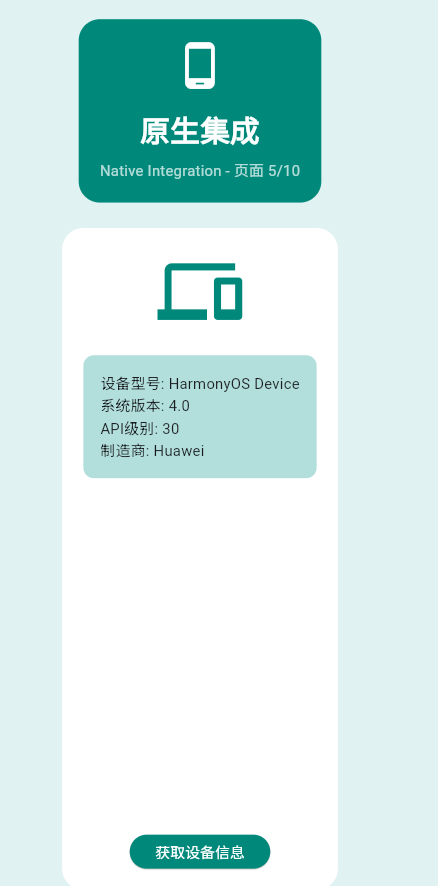
class _Page05NativeIntegration extends StatefulWidget {
const _Page05NativeIntegration();
State<_Page05NativeIntegration> createState() => _Page05NativeIntegrationState();
}
class _Page05NativeIntegrationState extends State<_Page05NativeIntegration> {
static const platform = MethodChannel('com.example.demo/native');
String _deviceInfo = '未获取';
bool _isLoading = false;
Future<void> _getDeviceInfo() async {
setState(() {
_isLoading = true;
_deviceInfo = '获取中...';
});
try {
// 模拟获取设备信息
await Future.delayed(const Duration(seconds: 1));
final info = {
'设备型号': 'HarmonyOS Device',
'系统版本': '4.0',
'API级别': '30',
'制造商': 'Huawei',
};
if (mounted) {
setState(() {
_deviceInfo = info.entries.map((e) => '${e.key}: ${e.value}').join('\n');
_isLoading = false;
});
}
} catch (e) {
if (mounted) {
setState(() {
_deviceInfo = '错误: $e';
_isLoading = false;
});
}
}
}
Widget build(BuildContext context) {
return Container(
color: Colors.teal.shade50,
padding: const EdgeInsets.all(20),
child: Column(
children: [
Container(
padding: const EdgeInsets.all(20),
decoration: BoxDecoration(
color: Colors.teal.shade600,
borderRadius: BorderRadius.circular(20),
),
child: const Column(
children: [
Icon(Icons.phone_android, size: 48, color: Colors.white),
SizedBox(height: 16),
Text(
'原生集成',
style: TextStyle(fontSize: 28, fontWeight: FontWeight.bold, color: Colors.white),
),
SizedBox(height: 8),
Text('Native Integration - 页面 5/10', style: TextStyle(color: Colors.white70)),
],
),
),
const SizedBox(height: 24),
Expanded(
child: Container(
padding: const EdgeInsets.all(20),
decoration: BoxDecoration(color: Colors.white, borderRadius: BorderRadius.circular(20)),
child: Column(
children: [
Icon(
Icons.devices,
size: 80,
color: Colors.teal.shade600,
),
const SizedBox(height: 20),
Container(
padding: const EdgeInsets.all(16),
decoration: BoxDecoration(
color: Colors.teal.shade100,
borderRadius: BorderRadius.circular(10),
),
child: Text(
_deviceInfo,
style: const TextStyle(fontSize: 14, fontFamily: 'monospace'),
),
),
const Spacer(),
ElevatedButton(
onPressed: _isLoading ? null : _getDeviceInfo,
style: ElevatedButton.styleFrom(backgroundColor: Colors.teal.shade600),
child: _isLoading
? const SizedBox(
width: 20,
height: 20,
child: CircularProgressIndicator(strokeWidth: 2, color: Colors.white),
)
: const Text('获取设备信息', style: TextStyle(color: Colors.white)),
),
],
),
),
),
],
),
);
}
}
三、集成步骤
| 步骤 | 操作 | 说明 |
|---|---|---|
| 1 | 创建插件 | 创建HarmonyOS插件项目 |
| 2 | 配置权限 | 在module.json5中声明权限 |
| 3 | 实现NAPI | 编写原生方法 |
| 4 | 注册Channel | 建立Flutter连接 |
| 5 | 测试验证 | 验证功能正常 |
四、权限配置
五、常见API
六、最佳实践
- ✅ 合理申请权限
- ✅ 处理权限拒绝
- ✅ 优化NAPI性能
- ✅ 提供错误回退方案
欢迎加入开源鸿蒙跨平台社区:https://openharmonycrossplatform.csdn.net

作为“人工智能6S店”的官方数字引擎,为AI开发者与企业提供一个覆盖软硬件全栈、一站式门户。
更多推荐
 6
6 0
0- 0



 已为社区贡献10条内容

所有评论(0)