
Flutter框架适配鸿蒙:多平台适配
Flutter的"一次编写,多处运行"理念并不意味着完全不需要平台适配。优秀的跨平台应用需要针对不同平台的特性、用户习惯和系统规范进行适配,提供原生级别的用户体验。本案例实现一个跨平台音乐播放器,针对iOS、Android和HarmonyOS三个平台进行深度适配,展示平台特定的UI设计、交互方式和系统集成。使用Platform类进行基本检测针对HarmonyOS等特殊平台进行额外判断提供统一的平台
·
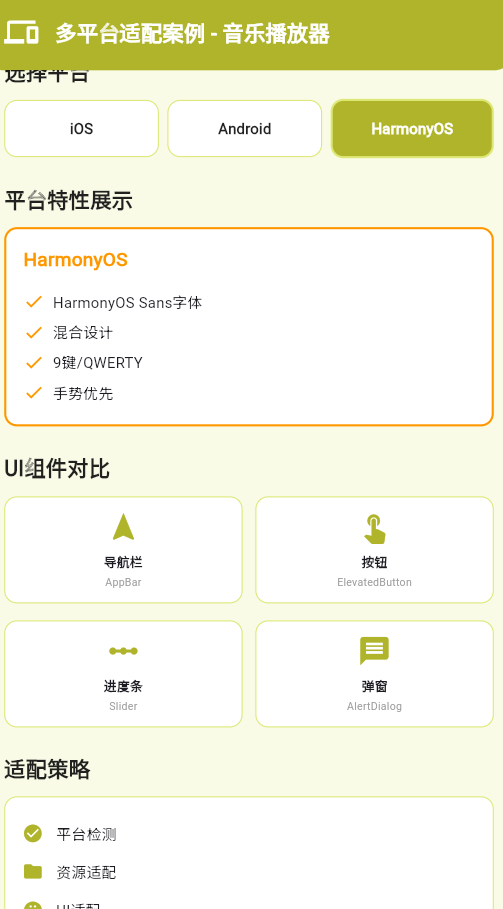
一、多平台适配概述
Flutter的"一次编写,多处运行"理念并不意味着完全不需要平台适配。优秀的跨平台应用需要针对不同平台的特性、用户习惯和系统规范进行适配,提供原生级别的用户体验。
平台差异
| 维度 | iOS | Android | HarmonyOS | Web |
|---|---|---|---|---|
| 导航风格 | 推送式 | 标签式 + 返回 | 混合式 | URL路由 |
| 交互模式 | 手势优先 | 菜单键优先 | 手势优先 | 点击优先 |
| 字体 | San Francisco | Roboto | HarmonyOS Sans | 系统字体 |
| 键盘 | 专有键盘 | 虚拟键盘 | 9键/QWERTY | 物理键盘 |
| 通知 | 通知中心 | 通知栏 | 控制中心 | 浏览器通知 |
| 权限 | 严格 | 灵活 | 中等 | 有限 |
适配策略
- 平台检测:识别当前运行平台
- 条件编译:为不同平台提供不同实现
- 资源适配:提供平台特定资源
- UI适配:遵循平台设计规范
- 行为适配:符合用户使用习惯
二、平台检测与条件编译
1. 平台检测API
import 'dart:io' show Platform;

void main() {
  if (Platform.isAndroid) {
    print('运行在Android平台');
  } else if (Platform.isIOS) {
    print('运行在iOS平台');
  } else if (Platform.isWindows) {
    print('运行在Windows平台');
  } else if (Platform.isMacOS) {
    print('运行在macOS平台');
  } else if (Platform.isLinux) {
    print('运行在Linux平台');
  } else if (Platform.isFuchsia) {
    print('运行在Fuchsia平台');
  }
}
2. 平台主题适配
class PlatformAdaptation {
  static ThemeData getTheme() {
    if (Platform.isIOS) {
      return ThemeData.cupertino(
        primaryColor: CupertinoColors.systemBlue,
        textTheme: CupertinoTextThemeData(),
      );
    } else {
      return ThemeData(
        primarySwatch: Colors.blue,
        useMaterial3: true,
      );
    }
  }
}
3. 平台组件选择
Widget buildPlatformSpecificButton() {
  if (Platform.isIOS) {
    return CupertinoButton(
      onPressed: () {},
      child: Text('按钮'),
    );
  } else {
    return ElevatedButton(
      onPressed: () {},
      child: Text('按钮'),
    );
  }
}
三、资源适配
1. 平台特定资源
assets/
├── images/
│   ├── logo.png              # 默认图片
│   ├── android/
│   │   └── logo.png        # Android专用
│   ├── ios/
│   │   └── logo.png        # iOS专用
│   └── harmonyos/
│       └── logo.png        # HarmonyOS专用
└── fonts/
    ├── custom_font.ttf      # 默认字体
    └── android/
        └── custom_font.ttf  # Android专用字体
2. 运行时加载平台资源
class AssetLoader {
  static String getPlatformSpecificPath(String basePath) {
    if (Platform.isAndroid) {
      return 'assets/android/$basePath';
    } else if (Platform.isIOS) {
      return 'assets/ios/$basePath';
    } else if (kIsWeb) {
      return 'assets/web/$basePath';
    }
    return basePath;
  }

  static Future<String> loadPlatformImage() async {
    final path = getPlatformSpecificPath('logo.png');
    return await rootBundle.loadString(path);
  }
}
3. 分辨率适配
assets/images/
├── icon.png               # 1.0x (基础)
├── 2.0x/icon.png        # 2.0x (2倍)
├── 3.0x/icon.png        # 3.0x (3倍)
└── 4.0x/icon.png        # 4.0x (4倍)
四、多平台适配案例:跨平台音乐播放器
案例介绍
本案例实现一个跨平台音乐播放器,针对iOS、Android和HarmonyOS三个平台进行深度适配,展示平台特定的UI设计、交互方式和系统集成。
实现步骤
1. 平台适配基础类
// lib/platform/platform_adapter.dart
import 'dart:io';
import 'package:flutter/cupertino.dart';
import 'package:flutter/material.dart';
import 'package:flutter/services.dart';

enum PlatformType { ios, android, harmonyos, web, other }

class PlatformAdapter {
  static PlatformType get currentPlatform {
    if (Platform.isIOS) return PlatformType.ios;
    if (Platform.isAndroid) {
      // 检测HarmonyOS
      if (_isHarmonyOS()) return PlatformType.harmonyos;
      return PlatformType.android;
    }
    if (kIsWeb) return PlatformType.web;
    return PlatformType.other;
  }

  static bool _isHarmonyOS() {
    try {
      final result = Platform.environment['OHOS_VERSION'] ?? '';
      return result.isNotEmpty;
    } catch (e) {
      return false;
    }
  }

  // 获取平台主题
  static ThemeData getTheme() {
    switch (currentPlatform) {
      case PlatformType.ios:
        return ThemeData.cupertino(
          primaryColor: CupertinoColors.systemBlue,
          brightness: Brightness.light,
          scaffoldBackgroundColor: CupertinoColors.systemBackground,
        );
      case PlatformType.android:
      case PlatformType.harmonyos:
        return ThemeData(
          primarySwatch: Colors.blue,
          useMaterial3: true,
          colorScheme: ColorScheme.fromSeed(
            seedColor: Colors.blue,
            brightness: Brightness.light,
          ),
        );
      default:
        return ThemeData(
          primarySwatch: Colors.blue,
          useMaterial3: true,
        );
    }
  }

  // 获取平台特定导航栏
  static PreferredSizeWidget buildAppBar({
    required String title,
    List<Widget>? actions,
    VoidCallback? onBackPressed,
  }) {
    switch (currentPlatform) {
      case PlatformType.ios:
        return CupertinoNavigationBar(
          middle: Text(title),
          trailing: Row(
            mainAxisSize: MainAxisSize.min,
            children: actions ?? [],
          ),
        );
      default:
        return AppBar(
          title: Text(title),
          actions: actions,
          leading: onBackPressed != null
              ? IconButton(
                  icon: const Icon(Icons.arrow_back),
                  onPressed: onBackPressed,
                )
              : null,
        );
    }
  }

  // 获取平台特定按钮
  static Widget buildPrimaryButton({
    required String label,
    required VoidCallback onPressed,
    bool isLoading = false,
  }) {
    switch (currentPlatform) {
      case PlatformType.ios:
        return CupertinoButton.filled(
          onPressed: isLoading ? null : onPressed,
          child: isLoading
              ? const CupertinoActivityIndicator()
              : Text(label),
        );
      default:
        return ElevatedButton(
          onPressed: isLoading ? null : onPressed,
          style: ElevatedButton.styleFrom(
            padding: const EdgeInsets.symmetric(
              horizontal: 32,
              vertical: 16,
            ),
          ),
          child: isLoading
              ? const SizedBox(
                  width: 20,
                  height: 20,
                  child: CircularProgressIndicator(
                    strokeWidth: 2,
                    color: Colors.white,
                  ),
                )
              : Text(label),
        );
    }
  }

  // 获取平台特定进度条
  static Widget buildProgressIndicator({
    double value = 0,
    Color? color,
  }) {
    switch (currentPlatform) {
      case PlatformType.ios:
        return CupertinoActivityIndicator(
          color: color,
        );
      default:
        return CircularProgressIndicator(
          value: value == 0 ? null : value,
          color: color,
        );
    }
  }

  // 获取平台特定弹窗
  static Future<T?> showPlatformDialog<T>({
    required BuildContext context,
    required String title,
    required Widget content,
    required List<Widget> actions,
  }) async {
    switch (currentPlatform) {
      case PlatformType.ios:
        return showCupertinoDialog<T>(
          context: context,
          builder: (context) => CupertinoAlertDialog(
            title: Text(title),
            content: content,
            actions: actions,
          ),
        );
      default:
        return showDialog<T>(
          context: context,
          builder: (context) => AlertDialog(
            title: Text(title),
            content: content,
            actions: actions,
          ),
        );
    }
  }

  // 获取系统状态栏样式
  static SystemUiOverlayStyle getStatusBarStyle() {
    switch (currentPlatform) {
      case PlatformType.ios:
        return SystemUiOverlayStyle.dark;
      case PlatformType.android:
      case PlatformType.harmonyos:
        return const SystemUiOverlayStyle(
          statusBarColor: Colors.transparent,
          statusBarIconBrightness: Brightness.dark,
        );
      default:
        return SystemUiOverlayStyle.dark;
    }
  }

  // 获取平台特定的滑块
  static Widget buildSlider({
    required double value,
    required ValueChanged<double> onChanged,
    double min = 0.0,
    double max = 1.0,
    int? divisions,
  }) {
    switch (currentPlatform) {
      case PlatformType.ios:
        return CupertinoSlider(
          value: value,
          onChanged: onChanged,
          min: min,
          max: max,
          divisions: divisions,
        );
      default:
        return Slider(
          value: value,
          onChanged: onChanged,
          min: min,
          max: max,
          divisions: divisions,
        );
    }
  }
}
2. 音乐播放器核心功能
// lib/music_player/music_player_service.dart
import 'dart:async';
import 'package:flutter/foundation.dart';
import 'package:flutter/services.dart';

enum PlayerState {
  stopped,
  playing,
  paused,
  buffering,
  error,
}

class Song {
  final String id;
  final String title;
  final String artist;
  final String album;
  final int duration; // 毫秒
  final String url;

  Song({
    required this.id,
    required this.title,
    required this.artist,
    required this.album,
    required this.duration,
    required this.url,
  });

  factory Song.fromJson(Map<String, dynamic> json) {
    return Song(
      id: json['id'],
      title: json['title'],
      artist: json['artist'],
      album: json['album'],
      duration: json['duration'],
      url: json['url'],
    );
  }
}

class MusicPlayerService {
  static const MethodChannel _channel =
      MethodChannel('com.example.music_player');

  final List<Song> _playlist = [];
  int _currentIndex = 0;
  PlayerState _state = PlayerState.stopped;
  int _position = 0;
  double _volume = 1.0;
  bool _isShuffle = false;
  bool _isRepeat = false;

  final StreamController<PlayerState> _stateController =
      StreamController.broadcast();
  final StreamController<int> _positionController =
      StreamController.broadcast();

  Stream<PlayerState> get stateStream => _stateController.stream;
  Stream<int> get positionStream => _positionController.stream;

  List<Song> get playlist => _playlist;
  Song? get currentSong =>
      _playlist.isEmpty ? null : _playlist[_currentIndex];
  PlayerState get state => _state;
  int get position => _position;
  double get volume => _volume;
  bool get isShuffle => _isShuffle;
  bool get isRepeat => _isRepeat;

  MusicPlayerService() {
    _setupEventChannel();
  }

  void _setupEventChannel() {
    _channel.setMethodCallHandler((call) async {
      switch (call.method) {
        case 'onStateChanged':
          _state = PlayerState.values.firstWhere(
            (e) => e.toString() == call.arguments,
            orElse: () => PlayerState.stopped,
          );
          _stateController.add(_state);
          break;
        case 'onPositionChanged':
          _position = call.arguments;
          _positionController.add(_position);
          break;
      }
    });
  }

  Future<void> loadPlaylist(List<Song> songs) async {
    _playlist.clear();
    _playlist.addAll(songs);
    _currentIndex = 0;
    await _loadCurrentSong();
  }

  Future<void> _loadCurrentSong() async {
    if (_playlist.isEmpty) return;

    final song = _playlist[_currentIndex];
    try {
      await _channel.invokeMethod('load', {
        'url': song.url,
        'volume': _volume,
      });
    } on PlatformException catch (e) {
      debugPrint('加载歌曲失败: ${e.message}');
    }
  }

  Future<void> play() async {
    if (_playlist.isEmpty) return;
    try {
      await _channel.invokeMethod('play');
    } on PlatformException catch (e) {
      debugPrint('播放失败: ${e.message}');
    }
  }

  Future<void> pause() async {
    try {
      await _channel.invokeMethod('pause');
    } on PlatformException catch (e) {
      debugPrint('暂停失败: ${e.message}');
    }
  }

  Future<void> seekTo(int position) async {
    try {
      await _channel.invokeMethod('seekTo', {'position': position});
      _position = position;
    } on PlatformException catch (e) {
      debugPrint('跳转失败: ${e.message}');
    }
  }

  Future<void> next() async {
    if (_playlist.isEmpty) return;

    if (_isShuffle) {
      _currentIndex = (DateTime.now().millisecondsSinceEpoch) % _playlist.length;
    } else {
      _currentIndex = (_currentIndex + 1) % _playlist.length;
    }

    await _loadCurrentSong();
    if (_state == PlayerState.playing) {
      await play();
    }
  }

  Future<void> previous() async {
    if (_playlist.isEmpty) return;

    if (_isShuffle) {
      _currentIndex = (DateTime.now().millisecondsSinceEpoch) % _playlist.length;
    } else {
      _currentIndex = (_currentIndex - 1 + _playlist.length) % _playlist.length;
    }

    await _loadCurrentSong();
    if (_state == PlayerState.playing) {
      await play();
    }
  }

  Future<void> setVolume(double volume) async {
    _volume = volume.clamp(0.0, 1.0);
    try {
      await _channel.invokeMethod('setVolume', {'volume': _volume});
    } on PlatformException catch (e) {
      debugPrint('设置音量失败: ${e.message}');
    }
  }

  Future<void> toggleShuffle() async {
    _isShuffle = !_isShuffle;
  }

  Future<void> toggleRepeat() async {
    _isRepeat = !_isRepeat;
  }

  void dispose() {
    _stateController.close();
    _positionController.close();
  }
}
3. 平台适配的UI界面
// lib/music_player/music_player_ui.dart
import 'package:flutter/material.dart';
import 'platform/platform_adapter.dart';
import 'music_player/music_player_service.dart';
class MusicPlayerUI extends StatefulWidget {
const MusicPlayerUI({Key? key}) : super(key: key);
_MusicPlayerUIState createState() => _MusicPlayerUIState();
}
class _MusicPlayerUIState extends State<MusicPlayerUI> {
final MusicPlayerService _player = MusicPlayerService();
StreamSubscription<PlayerState>? _stateSubscription;
StreamSubscription<int>? _positionSubscription;
void initState() {
super.initState();
_initPlayer();
}
Future<void> _initPlayer() async {
// 模拟加载播放列表
final playlist = [
Song(
id: '1',
title: '示例歌曲1',
artist: '艺术家A',
album: '专辑X',
duration: 240000, // 4分钟
url: 'https://example.com/song1.mp3',
),
Song(
id: '2',
title: '示例歌曲2',
artist: '艺术家B',
album: '专辑Y',
duration: 300000, // 5分钟
url: 'https://example.com/song2.mp3',
),
];
await _player.loadPlaylist(playlist);
_stateSubscription = _player.stateStream.listen((state) {
if (mounted) {
setState(() {});
}
});
_positionSubscription = _player.positionStream.listen((position) {
if (mounted) {
setState(() {});
}
});
}
void dispose() {
_stateSubscription?.cancel();
_positionSubscription?.cancel();
_player.dispose();
super.dispose();
}
Widget build(BuildContext context) {
return Scaffold(
appBar: PlatformAdapter.buildAppBar(
title: '音乐播放器',
actions: [
IconButton(
icon: Icon(_player.isShuffle ? Icons.shuffle : Icons.shuffle_outlined),
onPressed: _player.toggleShuffle,
),
IconButton(
icon: Icon(_player.isRepeat ? Icons.repeat : Icons.repeat_outlined),
onPressed: _player.toggleRepeat,
),
],
),
body: SafeArea(
child: Column(
children: [
// 专辑封面
Expanded(
flex: 3,
child: Padding(
padding: const EdgeInsets.all(32),
child: Container(
decoration: BoxDecoration(
borderRadius: BorderRadius.circular(20),
boxShadow: [
BoxShadow(
color: Colors.black.withOpacity(0.3),
blurRadius: 20,
offset: const Offset(0, 10),
),
],
),
child: ClipRRect(
borderRadius: BorderRadius.circular(20),
child: Container(
color: Colors.grey.shade300,
child: Icon(
Icons.music_note,
size: 120,
color: Colors.grey.shade600,
),
),
),
),
),
),
// 歌曲信息
Padding(
padding: const EdgeInsets.symmetric(horizontal: 32),
child: Column(
children: [
Text(
_player.currentSong?.title ?? '无歌曲',
style: const TextStyle(
fontSize: 24,
fontWeight: FontWeight.bold,
),
textAlign: TextAlign.center,
),
const SizedBox(height: 8),
Text(
_player.currentSong?.artist ?? '未知艺术家',
style: TextStyle(
fontSize: 16,
color: Colors.grey.shade600,
),
textAlign: TextAlign.center,
),
],
),
),
const SizedBox(height: 32),
// 进度条
Padding(
padding: const EdgeInsets.symmetric(horizontal: 32),
child: Column(
children: [
PlatformAdapter.buildSlider(
value: _player.currentSong != null
? _player.position /
_player.currentSong!.duration
: 0,
onChanged: (value) {
if (_player.currentSong != null) {
final position = (value *
_player.currentSong!.duration)
.toInt();
_player.seekTo(position);
}
},
),
const SizedBox(height: 8),
Row(
mainAxisAlignment: MainAxisAlignment.spaceBetween,
children: [
Text(_formatDuration(_player.position)),
Text(_formatDuration(
_player.currentSong?.duration ?? 0)),
],
),
],
),
),
const SizedBox(height: 32),
// 控制按钮
Row(
mainAxisAlignment: MainAxisAlignment.spaceEvenly,
children: [
IconButton(
icon: const Icon(Icons.skip_previous, size: 48),
onPressed: _player.previous,
),
_buildPlayButton(),
IconButton(
icon: const Icon(Icons.skip_next, size: 48),
onPressed: _player.next,
),
],
),
const SizedBox(height: 32),
// 音量控制
Padding(
padding: const EdgeInsets.symmetric(horizontal: 32),
child: Row(
children: [
const Icon(Icons.volume_down),
Expanded(
child: PlatformAdapter.buildSlider(
value: _player.volume,
onChanged: _player.setVolume,
),
),
const Icon(Icons.volume_up),
],
),
),
const SizedBox(height: 16),
],
),
),
);
}
Widget _buildPlayButton() {
final isPlaying = _player.state == PlayerState.playing;
return Container(
width: 80,
height: 80,
decoration: BoxDecoration(
color: Theme.of(context).primaryColor,
shape: BoxShape.circle,
boxShadow: [
BoxShadow(
color: Colors.black.withOpacity(0.2),
blurRadius: 10,
),
],
),
child: IconButton(
icon: Icon(
isPlaying ? Icons.pause : Icons.play_arrow,
size: 48,
color: Colors.white,
),
onPressed: () {
if (isPlaying) {
_player.pause();
} else {
_player.play();
}
},
),
);
}
String _formatDuration(int milliseconds) {
final minutes = milliseconds ~/ 60000;
final seconds = (milliseconds % 60000) ~/ 1000;
return '${minutes}:${seconds.toString().padLeft(2, '0')}';
}
}
五、HarmonyOS特殊适配
1. HarmonyOS检测
bool isHarmonyOS() {
  try {
    return Platform.environment.containsKey('OHOS_VERSION');
  } catch (e) {
    return false;
  }
}
2. HarmonyOS UI适配
Widget buildHarmonyOSSpecificUI() {
  if (!isHarmonyOS()) return const SizedBox.shrink();

  return Container(
    decoration: BoxDecoration(
      color: HarmonyOSColors.background,
      borderRadius: BorderRadius.circular(16),
    ),
    child: Column(
      children: [
        // HarmonyOS特有组件
        HarmonyOSButton(
          text: '鸿蒙特有功能',
          onPressed: () {},
        ),
      ],
    ),
  );
}
3. HarmonyOS权限处理
Future<void> requestHarmonyOSPermissions() async {
  if (!isHarmonyOS()) return;

  // HarmonyOS特定的权限请求
  await _channel.invokeMethod('requestHarmonyOSPermissions');
}
六、最佳实践总结
1. 平台检测
- 使用
Platform类进行基本检测 - 针对HarmonyOS等特殊平台进行额外判断
- 提供统一的平台适配接口
2. UI适配
- 遵循各平台的设计规范
- 提供平台特定的组件和行为
- 保持功能一致性的同时体现平台特色
3. 性能优化
- 条件编译减少不必要的代码
- 延迟加载平台特定资源
- 使用平台优化的API
4. 测试策略
- 在所有目标平台上测试
- 自动化测试覆盖平台差异
- 收集各平台的性能指标
总结
多平台适配是Flutter应用成功的关键。通过系统的平台检测、资源适配和UI适配策略,开发者可以构建出在各个平台上都具有原生级用户体验的应用。本案例的音乐播放器展示了完整的平台适配流程,包括基础适配、UI组件适配、系统集成适配以及HarmonyOS的特殊适配,为开发者提供了实用的参考。
欢迎加入开源鸿蒙跨平台社区:https://openharmonycrossplatform.csdn.net

作为“人工智能6S店”的官方数字引擎,为AI开发者与企业提供一个覆盖软硬件全栈、一站式门户。
更多推荐
 11
11 0
0- 0


 已为社区贡献4条内容

所有评论(0)